
How to Transfer

The number one question I get asked when installing a new phone system has to be “How do I transfer a call?”  Seems that most people who have been using phones most of their adult lives are mystified by the little button that allows them to send a call somewhere else.  Especially when I put the complexity of a Voice over IP (VoIP) phone system in their hands.

The majority of people that have been using Private Branch Exchange (PBX) phone systems for the past few decades should be familiar with basic unsupervised transfer.  You may also hear this referred to as a blind transfer or a cold transfer.  In this implementation, the party initiating the transfer presses the transfer button, dials the number that the call needs to go to, and is then disconnected from the call.  The original caller is sent to the new target and when the target answers, they get an earful of whatever the original caller wishes to tell them.  They call this blind (or cold) because the other party has no idea it’s coming.  Some people, especially executives, get kind of upset by all this messy blind stuff.

Most modern phone systems use a method of supervised transfers.  These are also called consult transfers or warm transfers.  These kinds of transfers start out the same.  A called party presses the transfer button and dials the number of the person that needs to get the phone call.  In this case, though, the called party stays on the phone until the target picks up.  All the while, the original caller is hearing the dulcet tones of Streaming Winds (or whatever your music on hold happens to be).  When the target picks up, you get to give them all the gory details of the phone conversation so far, out of earshot of the transferred party.  Only when the person on the other end agrees to take the call do you complete the transfer by pressing the Transfer button again.  It’s a warm transfer because the target gets to hear a friendly voice before the original caller gets to launch into whatever they want to talk about.  It’s still possible for you to pull off a blind transfer in this setup.  When the target’s phone starts ringing, you press the transfer button to complete the transfer.  Now, the original caller will hear the target’s phone ringing and they get to start talking as soon as the phone picks up.  In some cases, depending on how the transfer caller ID works, this can be worse than a blind transfer, because the target will see the caller ID of the original called party and think it’s someone internally wanting to talk, only to get an outside caller when they answer.  It’s caused some embarrassment before, I can assure you.

For whatever reason, some people have a problem with warm transfers.  Especially if they are used to blind transfers.  They hang up on the original caller, thinking the transfer went through with no issues.  The problem is that the call won’t complete until the transfer button is pressed twice, meaning that hanging up without pressing it twice will disconnect the caller.  Then they get to call back, angry they’ve been disconnected.  No amount of training in this world has been able to break people of this bad habit.

Cisco Unified Communications Manager (CUCM) doesn’t have an option for blind transfers.  It’s a consult transfer system only.  However, there is an option you can set that will act like a blind system and allow your users to act as they always have without disconnecting callers.

  1. Log into your CUCM publisher and go to the System menu.
  2. Choose the Service Parameter option.
  3. Choose the publisher server from the dropdown menu.
  4. Choose the Cisco CallManager Service.
  5. Scroll down until you find the Clusterwide Parameters (Device-Phone)
  6. Look for the Transfer On-Hook Enabled setting.  By default, it’s set to FALSE.
  7. Change this setting to TRUE to allow On-hook transfers.

Here’s a picture in case you get lost:
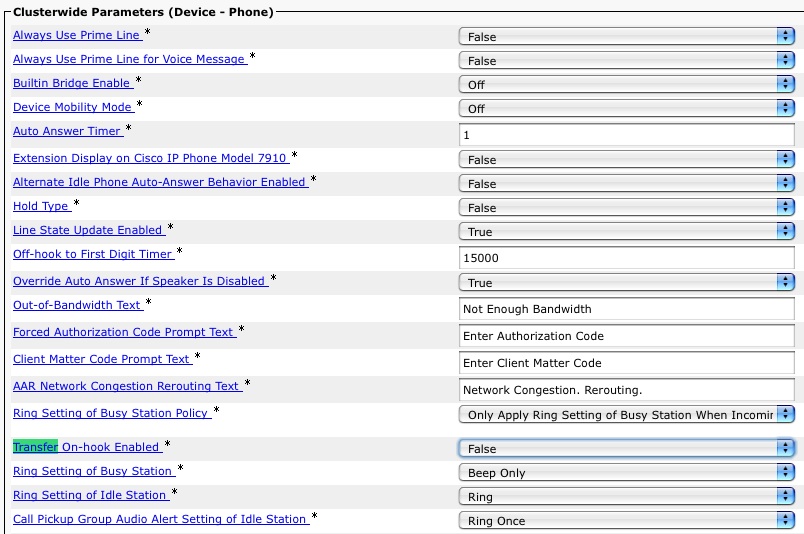
Easy as cake.  If your phones are all SCCP-based, the setting will take effect immediately.  If you phones are SIP, you’re going to have to reset them to change this, so be sure to do it when you can reboot them all without affecting communications.

There you have it.  Once you’ve enabled this little setting, you can still use a warm transfer, but those users that can’t or won’t transfer with the Transfer button can still pull off a transfer by hanging up without disconnecting the caller.  If you can find a way to drill the concept of a warm transfer into the heads of those that just don’t seem to get it for some reason, you can make some real money.  Sure, it may involve some heavy duty mind control, but in the end I think it will all be worth it.

CCIE…For A Few Dollars More

The price of becoming an Expert just went up a little.  Effective August 1, 2011, the price of the CCIE lab is being increased by $100US across the board to be $1500.  The email that candidates received this morning:

As of August 1, 2011, the price of the CCIE Lab will change from $1400
to $1500 USD*.  Your lab fee will be processed 90 days before your
scheduled lab date. Since payment for your lab will be processed after
this date, you will incur the new price.  While you can cancel your
lab date without cost, we hope you will continue on with your
certification exam to certify that you are one of the most expert
networking professionals in the world.

As an administrative change, the timing on this is just about right.  The Cisco fiscal year begins on August 1 every year, so we are now officially in FY12.  Revenue increases usually get recognized in a new accounting period for reasons that I’ve managed to forget since my last accounting class in college.  Suffice to say that tying the lab price increase to the beginning of the fiscal year isn’t all that unheard of.

Why increase the price at all?  What am I getting for an extra 7%?  All valid questions.  Allow me to speculate:

1.  A Weak Dollar.  It’s no secret that the US dollar isn’t doing so well against other foreign currencies, like the Euro.  I’m not a Harvard Economist, so I’m not going to delve into areas that I know nothing about.  However, the price difference between the two currencies could lead Cisco to believe that the customers paying for the lab in denominations other than the US Dollar aren’t getting a fair shake.  Or, it could mean that other candidates are looking at the US labs as a bargain compared to Brussels and Dubai.  That would mean they could start booking labs here as opposed to there and start overloading the seating available here for US students.  It’s happened before, so I wouldn’t be that surprised to see it again if the candidates believed the price difference was that great.  By raising the lab to $1500, Cisco is essentially resetting the level so that everyone is fair again.

2.  Layoffs.  Yes, I know that within the next two weeks, Cisco is looking at about 6,500 layoffs from all over the company.  This includes 2,100 people who opted for an “early retirement” package in lieu of a furlough.  Why would this have an impact on the CCIE lab?  Because I have it on good authority that once of those 2,100 retirees was a CCIE proctor.  Typically, most labs run two proctors.  One shows up early to get the lab up and running for the day and run the candidates through the morning instructions.  The other proctor ends the lab and collects materials.  Depending on the time differences, the first proctor may not even be around when the lab ends.  Only having one proctor available for a site means a lot of overtime for that poor soul.  More likely is the idea that a new proctor will need to be brought on board, so increasing the price of the lab makes sense from the perspective of training a new guy in how to be mean and paying a chunk of his/her salary in an environment where pennies are going to be pinched pretty soon.

3.  Technology Refreshes.  Before any candidates out there have a heart attack, notice I said “technology” and not “blueprint”.  There is a lot of interesting technology coming in the future for the CCIE lab.  Mark Snow hinted at some of it in his Cisco Live 2011 recap post.  The plan going forward is to port all the lab workbooks to the CCIE Lab Delivery System that the R&S lab uses now.  This costs money.  Also, Cisco wants to start introducing more troubleshooting tasks in the actual configuration section now that the Open-Ended Questions have been removed.  This isn’t cheap.  In addition, Cisco is working on varying the lab tasks slightly among different versions of the exam, for instance asking a task to be configured one way on a version and the same task to have a slightly different configuration in another version.  This kind of development takes time and (you guessed it) money.  So, by adding another $100 to the lab price, they can effectively pay for the development of these new technologies without having to increase revenue from another source.  By making sure the CCIE lab can generate enough revenue to fund its own development, you never have to worry about another business unit getting involved and deciding how things are going to be run.

Tom’s Take

The CCIE lab isn’t cheap.  Not by a long shot.  Between the lab costs and the flights and the hotels and the rental cars, even one trip is a fairly costly adventure.  Adding another $100 onto that may not seem like a lot up front.  But the psychological effect can’t be understated.  The lab is now a nice round $1500 amount.  For those footing the bill themselves, this is another wallet-sized portrait of Benjamin Franklin that they have to part with.  In the end, all the pain and suffering is worth it, even that of your poor bank account.  I think the price increase will fund some great new advances in the lab and hopefully do away with the 3-ring binders for the workbooks and usher in a new age that uses technology to full advantage.  If this increase is due to currency parity, then the additional revenue that is brought in after the currency markets stabilize will be useful as well.  Just don’t expect the price of the lab to go down anytime soon, if ever.  Because if there’s one thing you can count on, it’s the cost of the CCIE lab always being a fistful of dollars.