A Chrome-Plated Workout

I’ve had my CR-48 for about two weeks now, and I’ve put it through it’s paces.  I used it to take notes at Tech Field Day 5.  I set up an IRC channel for people to ask questions during the event.  I’ve written numerous blog posts on the little laptop.  I’ve used it to chat with people halfway around the world.  All in all, I’m impressed with the unit.  That’s not to say that everything about it has me thrilled.

The Good

I like the fact that the CR-48 is instantly on when I lift the lid.  The SSD and the lightweight OS team up to make it quite easy to just grab and fire up to start using for notes or web surfing.  It’s not quite as fast as an iPad, but much faster than hauling out my Lenovo w701 behemoth.  I like having the CR-48 handy for things I would rather do with a keyboard.

More than a few people have remarked to me that it looks “just like a MacBook”.  And I’ve come to see it much like a MacBook Air.  Obviously it’s not as sleek as Apple’s little wonder, but I like the form factor and the screen resolution much better than some of the other netbooks I’ve used.  It doesn’t feel cramped and toy-like.  In fact, it feels more Mac-like than any other laptop I’ve used.  I’m sure that is intentional on the part of Google.

Having the 3G Verizon radio is pretty handy in situations where there is no Wi-Fi available.  More than once I found myself unable to connect to a certificate-based wireless system (a known issue) or stuck in a place with terrible reception.  With the CR-48, I just switch over to the 3G radio and keep plugging away.  The 100MB allowed with the trial is a little anemic for heavy-duty use, but the bigger plans seem fairly priced should I find the need to upgrade to one.  When I tried activating the radio over the phone, the Verizon rep made sure to point out that they had plans available in all sizes for me to purchase, but somehow skipped over the part about me having 100MB for free each month.  Luckily I read the instructions.

The Bad

The CR-48 isn’t without it’s annoyances.  The touchpad is probably the most persistent issue I had.  The tap-to-click functionality found on most trackpads was bordering on annoying for me.  I’m a touch typist with hands the size of a gorilla.  I tend to rest my thumbs at the bottom of the keyboard as I type and on this laptop that means brushing the trackpad more often than not.  With the default settings, I often found myself sending e-mail or canceling tweets without realizing what happened, or my cursor shooting over to a random section of my blog post and my words spilling into other thoughts.  I finally gave up and disabled the tap-to-click setup, ironically making it more like a MacBook.

I also made the mistake of letting the battery run down all the way.  It was already low from use and I let it go to sleep without plugging it in.  Sure enough, it drained down and wouldn’t power back up.  Once I plugged it in I was able to use it, but it wouldn’t charge no matter how long I left it plugged in.  It took some searching on the Internet to find an acceptable solution (of which there appear to be many) before settling on a combination of things.  I pulled the battery for about 2 minutes, then reattached it and CAREFULLY plugged the adapter back in.  As soon as I saw the orange charging light come on, I finished pushing the charger all the way in and it worked for me after that.  There are rumors that the port and/or the charger are a little substandard, so this is something that is going to bear a little more inspection.  Speaking of the charger, the fact that it uses a three-pronged plug is a little annoying when I’m trying to find a place to plug in.  I’ve taken to carrying a little 2-prong grounding adapter in my bag just so I can plug in anywhere.  Not an expensive solution, but something I wish I didn’t have to do.

One final annoyance was a minor issue that turned into a humorous solution.  When I unboxed the unit and fired it up the first time, it seemed that playing two audio streams on top of each other would cause the speaker to short out and sound like I was choking a robot.  There was evidently a fix for it, but there seemed to be an issue with the netbook pulling the new update as it was only a point release and very minor.  Every time I checked the system updater, it told me the system was up to date.  The fix I found on the Internet suggested to click the Update button repeatedly until the system finally recognized the new update.  Literally, I clicked 50 times in order to get the update.  It did fix my audio issues, but you would think the update system would recognize a new release was out without me needing to be spastic with the update button.

Tom’s Take

Over all I’m thrilled with the CR-48 after a couple of weeks of exposure.  I keep it in my bag at all times, ready to go when necessary.  When I head back to Wireless Field Day in March, I’m planning on leaving the behemoth behind and only taking my CR-48 and my iPad for connectivity.  I figure cutting down on the extra 12 pounds of weight will be good for my posture and not having to haul an extra laptop out at the TSA Security and Prostate Screeing Checkpoint is always welcome to not only myself but the other passengers as well.  I’m also debating whether or not to flip over into developer mode to see if that has any additional tricks I can try out.  I don’t know if it’ll increase my productivity any more, but having a few extra knobs and switches to play with is never a bad thing.


Tech Field Day – HP

The final presenters for Tech Field Day 5 were from HP.  HP presented on two different architectures that at first seemed to be somewhat unrelated.  The first was their HP StoreOnce data deduplication appliances.  The second was an overview of the technologies that comprise the HP Networking converged networking solutions.  These two technologies are very intrinsic to the future of the datacenter solutions offered by HP.

After a short marketing overview about HP and their direction in the market, as well as reinforcement of their commitment to open standards (more on this later), we got our first tech presentation from Jeff DiCorpo.  He talked to us about the HP StoreOnce deduplication appliances.  These units are designed to sit inline with your storage and servers and deduplicate the data as it flies past.  The idea of inline dedupe is quite appealing to those customer that have many remote branch offices and would prefer to reduce the amount of data being sent across the wire to a central backup location.  By deduping the data in the branch before sending it along, the backup windows can be shorter and the costs associated with starving other applications with high data usage can be avoided.  I haven’t really been delving into the backup solutions focused on the datacenter, but as I heard about what HP is doing with their line of appliances, it started to make a little more sense to me.  The trend to me appears to be one where the data is being centralized again in one location, much like the old days of mainframe computing.  For those locations that don’t have the ability or the need to centralize data in a large SAN environment, the HP StoreOnce appliances can shorten backup times for that critical remote site data.  The appliances can even be used internal to your datacenter to dedupe the data before it is presented to the backup servers.  The limits of the things that can be done with deduplication seem to be endless.  My networking background tends to have me thinking about data in relatively small streams.  But as I start encountering more and more backup data that needs priority treatment, the more I think that some kind of deduplication software or hardware is needed to reduce those large data streams.  There was a lot of talk at Tech Field Data about dedupe, and the HP solution appears to be an interesting one for the datacenter.

Afterwards, Jay Mellman of HP Networking talked to us about the value proposition of HP Converged Networking.  While not a pure marketing overview, there were the typical case studies and even a “G” word printed in the bottom corner of one slide.  Once Jay was finished, I did ask a few questions about the position of HP Networking in regards to their number one competitor, Cisco.  Jay admitted that HP is doing its best to force Cisco to change the way they do business.  The Cisco quarterly results had been released while I was at TFD, and the fact that there was less revenue was not lost on HP.  I asked Jay about the historical position of HP Network (formerly Procurve) and his stance that the idea of an edge-centric design was a better model than Cisco’s core-focused guidelines.  Having worked with both sets of hardware and seen reference documentation for each vendor, I can say that there is most definitely disagreement.  Cisco tends to focus its designs around strong cores of Catalyst 6500 or Nexus 7000 switches.  The access layer tends to be simple port aggregation where few decisions are made.  This is due to the historical advantage Cisco has enjoyed with its core products.  HP has always maintained that keeping the intelligence of the network out in the edge, what Cisco would term the “access layer”, is what allows them to be very agile and keep the processing of network traffic closer to the intended target.  I think part of this edge-centric focus has been because the historic core switching offerings from HP have been somewhat spartan compared to the Cisco offering.  I think this situation was remedied with the acquisition of 3Com/H3C and their A-series chassis switches.  This gives HP a great platform to launch back into the core.  As such, I’ve seen a lot more designs from HP that are beginning to talk about core networking.  Who’s right in all this?  I can’t say.  This is one of those OSPF – IS-IS kind of arguments.  Each has their appeal and their deficiencies.

After Jay, we heard from Jeff about the tech specs of the A-series switches.  He talked about the support HP has for the open standards in the datacenter.  Casually mentioned was the support for standards such as TRILL and QCN, but not for Cisco FabricPath.  As expected, Jeff made sure to point out that FabricPath was Cisco proprietary and wasn’t supported by the A-series.  He did speak about Intelligent Resilient Framework (IRF), which is a technology used by HP to unify the control plane of a set of switches to make it appear as one unified fabric.  To me, this sounds a lot like the VSS solution that Cisco uses on their core switches.  HP is positioning this as an option to flatten the network by creating lots of trunked (Etherchanneled) connections between the devices in the datacenter.  I specifically asked if they were using this as a placeholder until TRILL is ratified as a standard.  The answer was ‘yes’.  As IRF is a technology acquired from the H3C purchase, it only runs on the A-series switches.  In addition, there are enhancements above and beyond those offered by TRILL that will ensure IRF will still be used even after TRILL is finalized and put into production.  So, with all that in mind, allow me to take my turn at Johnny Carson’s magnificent Karnac routine:

The answer is: Cisco FabricPath OR HP IRF

The question? What is a proprietary technology used by a vendor in lieu of an open standard that allows a customer to flatten their datacenter today while still retaining several key features that will allow it to be useful even after ratification of the standard?

The presentation continued to talk about the trends and technolgy in the datacenter for enabling multi-hop Fiber Channel over Ethernet (FCoE) and the ability of the HP Flexfabric modules to support many different types of connectivity in the C7000 blade chassis.  I think that this is where the Cisco/HP battle is going to be won or lost.  By racing towards a fast and cost-effective multi-hop FCoE solution, HP and Cisco are hoping to have a large install base ready for the standards to become totally finalized.  When that day comes, they will be able to work alongside the standard and enjoy the fruits of a hard-fought war.  Time will tell whether or not this approach will work or who will come out on top, if anyone.

I think HP has some interesting arguments for their datacenter products.  They’ve also been making servers for a long time and they have a very compelling solution set for customers that incorporates storage, which is something Cisco currently lacks without a partner like EMC.  What I would like to see HP focus more on in their solution presentation is telling me what they can do and what the are about.  Conversely, they should spend a little less time comparing themselves to Cisco and taking each opportunity to mention how Cisco doesn’t support standards and has no previous experience in the server market.  To be honest, I don’t hear that from Cisco or IBM when I talk to them about servers or storage or networking.  I hear what they have to offer.  HP, if you can give me all the information I need to make my decision and your product is the one that fits my needs the best, you shouldn’t have to worry about what my opinion of your competitors is.

Tech Field Day Disclosure

HP was a sponsor of Tech Field Day 5, and as such was responsible for a portion of my airfare and hotel accommodations.  In addition, HP provided their Executive Briefing Center in Cupertino, CA for the Friday presentations.  They also served a great hot breakfast and allowed us unlimited use of their self-serve Starbucks coffee, espresso and chai machine.  We returned the favor by running it out of steamed milk for use in the yummy Dirty Chai.  HP also provided the delegates with a notepad and pen.  At no time did HP ask for nor were they promised any kind of consideration in this article.  Any and all analysis and opinions are mine and mine alone.

Let Me Google (Chrome) That For You

Back in December, I applied for a Google Chrome OS notebook.  I figured that if I got one I could use it for testing and checking out Google’s ideas about a web-enabled OS.  I then promptly forgot about it.  Guess what showed up on Monday?

I am now the proud possessor of a Google CR-48 Chrome OS laptop.  It’s a pretty utilitarian thing, which suits me just fine.  The finish is matte all over.  No fancy aluminium or gloss plastic.  Likewise, the connection ports are equally spartan.  An SD card slot, headphone jack, single USB port, and a power connector adorn the right side.  The VGA out occupies the left side.  No Firewire, no Ethernet, no optical drive.  This thing is designed to use wireless to connect to the network and pretty much run on it’s own without many (if any) peripherals.

The hardware is very netbook-ish.  An Atom processor with 2GB of RAM, along with a 16 GB SSD.  The latter allows the machine to wake from sleep almost instantly, much like a certain Air-y demo from the Fruit Company Not-A-Netbook press conference last year.  There’s even an integrated Verizon 3G modem for connectivity outside of Wi-Fi areas.  All in all, the looks combined with the hardware specs would most likely not even get a second glance from a buyer.  It’s what’s under the hood that is so very different.

For those of you out there that are fans of the Google Chrome web browser like I am, you’ll find the interface to be identical on the CR-48.  Here’s the catch, though.  That web browser is the ENTIRE OS.  No start menu.  No dock.  The whole OS concept revolves around the browser, and by extension, the web itself.  The user account for the system is a Google account.  It pulls your information from GMail, Google Docs, and even your Chrome favorites if you’ve set them to sync.  All of my Google information was pulled down the first time I logged into the laptop.  The 16GB drive is enough to handle a few downloads, but most of your file manipulation will occur in the “cloud”.  Google Docs for an office suite, for instance.  Any other apps you might need can be downloaded from the Google Apps Web Store.  Twitter clients, note taking apps, remote access apps, and so on.  They can all be “installed” into the browser OS for access to the things you use the most.  The more I used the system, though, the more I found myself thinking in terms of web-based content and less in terms of document storage and programs like I think of on my work laptop.   For a child or a spouse the spend 85-95% of their time doing online-related content creation and consumption (like Facebook or webmail), this would be the perfect laptop.

That’s not to say that the CR-48 is a perfect laptop.  There are some issues, even taking into account this early beta type OS/Platform.  Bluetooth doesn’t work.  Neither does connecting to a Wi-Fi network that uses certificate authentication.  The trackpad is a little tough to get used to.  I’ve heard some people compare it to the type found on the latest Macbook.  It takes some getting used to, and the gesture support isn’t quite intuitive for me just yet.  The other bug I ran into was with the Verizon 3G modem.  There’s a quick link for activating the Verizon account that Google has graciously provided.  However, I hit a geographical snag.  It appears that the Verizon towers in my area code (405) used to belong to Alltel Communications before they were purchased by Verizon last year.  So, when the activation signal was sent, it wouldn’t register correctly.  I was only able to activate it correctly when I went out of state.  To Google’s credit, they Chrome Netbook Ninja (support person) I talked to diagnosed the problem inside of 5 minutes after the Verizon pre-paid tech fought with it for 30 minutes.  Kudos to Google for having competent support people.  And even more kudos for allowing them to call themselves ninjas.

I plan on using the Chrome netbook to take notes during Tech Field Day this week to give it a good run and see how well it performs.  I may even let my kids start using it to see how well it holds up to the gentle caresses of a 5 year old and a 2 year old.  Stay tuned for further reports.

Fast Tracks and Shiny Plaques

HP has announced a new certification program called ExpertONE (http://h10120.www1.hp.com/certification/expert_one-networking.html).  This appears to be the culmination of the acquisition of 3COM/Huawei and the rebranding of Procurve as “HP Networking”.  In this new program, they have consolidated their existing tracks and certifications to fall into the familiar 3-tiered system of associate (Advanced Integration Specialist or AIS), Professional (Advanced System Engineer or ASE) and Expert (Master Advanced Systems Engineer or Master ASE).  The current tracks include networking, wireless, security, and voice.

What is of particular interest is the “Fast Track” program.  This program allows an individual certified in a competitor’s certification system to use these certifications to achieve an equivalent HP certification level.  For instance, if you hold a valid CCNA, you can take the HP2-Z04 Building HP Procurve Campus LANs exam and achieve the HP AIS: Networking certification.  Taking the same test and submitting a valid CCIE: R&S gives you the Master ASE: Networking certification.  While I can say that I like the approach that HP has taken by allowing existing vendor certifications to count towards their certification track, I do have a couple of problems with it.

1.  It’s a major modification from the existing track. My reasoning for this?  In the previous track, you could take one test that covered the convergence aspect of Procurve switches (basically multicast routing and QoS) and you could achieve the ASE: Convergence certification.  In order to become a Master ASE: Convergence all you needed to do was submit a valid CCVP certificate. (http://h10147.www1.hp.com/training/certifications/technical/convergence.htm)  That’s what I did.  And for the next 11 days, I am still a Master ASE: Convergence.  I even have the shirt to prove it.  But as of November 1st, that track will expire and there is no current projected replacement for it.  In an effort to realign their business tracks, HP has expired all previous certifications in favor of the new ExpertONE program.  No option to recertify in a track.  In fact, it appears the ONLY way to become a Master ASE is to hold a CCIE (or perhaps JNCIE) and take this one online test.  No other major vendor has ever expired all of their certification tracks at once, to my knowledge.  When Novell moved from Netware 5 to Netware 6, if you were certified on Netware 5 you could still claim to be a CNE, but Novell would inform those that asked that you were not certified on the current OS.  I’m still a MCNE on Netware 6.  I’m an MCSE on Windows 2000.  All expired tracks, yet the certification is still valid.  But with HP?  Nope.  No ASE for you unless you have the current certification.  But that’s not the most concerning thing about this.

2.  HP seems to be trying to attract Cisco talent out of spite. It’s no real secret that HP and Cisco in the last year have gone from friendly rivals to outright war with each other.  From the Cisco “California” UCS product line to the acquisition of 3COM/Huawei, the pitched battles keep getting fought over and over.  In fact, the announcement of the ExpertONE certification track was released at the same time Cisco announced changes to the CCIE Service Provider, CCNP: Voice, and CCNP: Security tracks.  HP has done everything in its power to pick as many fights with Cisco as it can.  And this new certification track is no different in my mind.  By claiming that anyone with a valid Cisco certification can now hold an equivalent HP Networking certification, HP is telling networking professionals they value the learning that those professionals have accomplished, even if they don’t care much for the logo on the certificate.  One test could certify me in 3 or 4 different tracks for HP due to my Cisco certifications.

This appears to me to be an effort by HP to win over a large portion of the networking professional community by giving them a head start in the HP certification program.  I can say that the idea of being able to gain some nice HP certifications because of my standing with Cisco is a nice idea.  But at the same time, I wonder what is going to happen in the future.  The Fast Track program won’t last forever.  HP is already prepping new tests and tracks for the November – January timeframe.  In my mind, that says that if you want to take advantage of the Fast Track program, you’d best do it now.  It may not be long before HP decides to ‘expire’ the Fast Track option in favor of new, developed coursework.  I’m also curious how long the CCIE will be a prerequisite for the Master ASE.  While you could be very certain that you are getting the cream of the crop by requiring a CCIE as a prerequisite for any certification, given HP’s previous actions of excising any trace of Cisco they can find makes me wonder how long it will last.  Perhaps until HP can implement their own lab program similar to the CCIE or JNCIE.  But those programs take time to develop and properly implement.  Until that time, I think HP is viewing the CCIE as a necessary evil.  And, quite possibly, HP will use the numbers of CCIEs gaining Master ASEs as a marketing tool to justify how advanced their certification program is becoming.

In the end, I think that HP has got the right idea.  While the prospect of losing my Master ASE due to reorganization does chafe somewhat, I think the program realignment was necessary to make the certification program have some prestige and level the playing field.  However, I’m couching my opinion until I see exactly how long the Fast Track program lasts.  And I hope that this isn’t just another example of the networking professional community being dragged into a vendor war.

The Abomination!

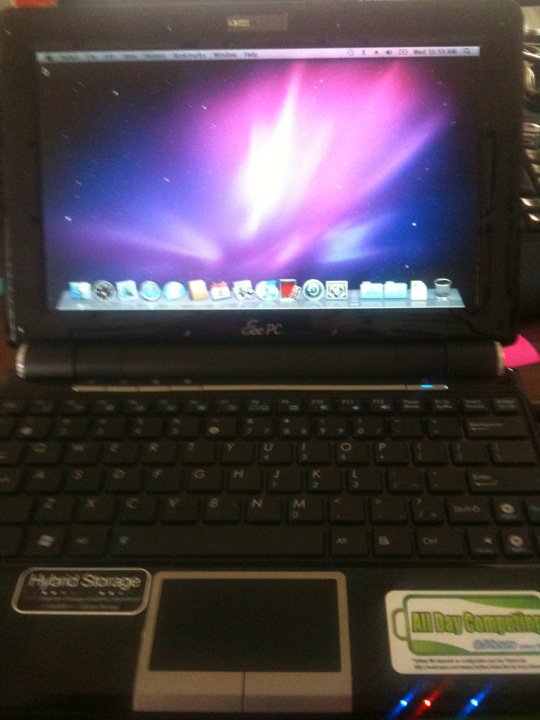
Sometimes I get bored.  Everybody does.  But when I get bored, strange things start happening.  I get restless.  I get devious.  And, this week, I got bored enough to get creative.  As such, I created The Abomination:

Yes, that is OS X Snow Leopard running on an ASUS EeePC 1000HE.  Who needs stinkin Macs, right???

Actually, this was a fascinating exploration into the way that operating systems are built.  I’ve been a closet Linux fan for years.  I can still remember working with Red Hat 6 when I interned at IBM.  And my backup machines around the house have always had some flavor of Linux on them.  I’ve emerged Gentoo and built Slackware.  I’ve dropped in Fedora and Ubuntu.  I’ve even used Debian.  Once.  So I’ve gotten a lot of practice installing OSes on systems.

Now, Mac has always fascinated me to a certain degree.  As much as Linux people are evangelistic, Mac people are downright zealous.  Up until my iPhone, I’d never really had the time or inclination to deal with Apple hardware or software.  But my opinion has always been that Mac software is significantly less buggy due to the fact that Apple has historically been a great hardware company.  Windows, for what it is, can install on lots of different hardware.  Net time you are in Best Buy, look at ALL the hardware you can buy for a PC.  And realize that all of it has to work with several different versions of Windows.  Now look at the Mac section (if there is one).  Probably a few white boxes.  Accessories.  No video cards.  No RAID controllers.  Everything you need comes in your Mac.  So, the OS only has to be written to encompass a small number of devices.  Most of the problems with Windows stem from misbehaving drives.  As such, if you only have to write drivers for a smaller subset of hardware, it’s a lot easier to stabilize your OS.  It’s also a lot easier to write to it’s fullest specifications, such as cute graphics like your icons bouncing on a toolbar.  So, it goes without saying that OS X is stable and flashy.  But it really only installs on Apple hardware.  Or so I thought…

Enter the guys over at Insanely Mac.  Those guys have installed OS X on everything that they could, including a toaster.  And so I started researching the forums, initially intending on installing OS X on my backup Lenovo/IBM Thinkpad T60.  Lo and behold, I find out that most of the hardware in the T60 will work, but my particular wireless card is a no-go.  But, the netbook that’s been lying on my desk collecting dust for the last six months is fully supported.  The camera, the wireless card, everything!  So off I set to complete my evil scheme.

I procured an OS X install disc.  Legally, of course.  The I read THIS THREAD. REPEATEDLY. I borrowed one of the Mac Guy’s systems.  I didn’t really tell him what I was doing.  I first tried to use an 8 GB USB drive to perform an install, but I could never get the OS to install correctly.  So I formulated Plan B and just pulled the drive out of the netbook and did a complete install.  I blew away the partitions and created a single OS X partition.  And an hour later, I have a complete OS X install on my netbook drive.  After reading the thread again, I downloaded the software to make the installation bootable.  I copied over the KEXT files (which are basically drivers for OS X).  And after all of that was completed, I disconnected the drive and reconnected it to my netbook.  And I rebooted.

This was possibly the most nerve wracking part.  I knew the installation was good, as the drive booted on an iMac.  But would it work on the netbook?  As the gray Apple boot screen spun and spun, I sat transfixed.  I waited for a crash or a kernel panic.  I was no stranger to kernel panics, so I knew if I could get a diagnostic message I’d be good.  But, that was not to be.  A frozen gray screen stayed up for about five minutes before I rebooted.  I checked my BIOS settings to make sure the settings listed in the forum guide were disabled.  This time on the reboot, things came up a little faster.  It turns out that OS X was building some system files in the background and I just needed to have a little more patience.  But finally, I was greeted with a desktop!

The camera worked.  Bluetooth worked (but I couldn’t turn it off).  But no connectivity.  Wired Ethernet was not there.  No WLAN card detected.  I figured that the networking would be the hardest part to configure, but I’m not The Networking Nerd for nothing!  As it turns out, the Ethernet driver was linked in the post.  After I copied it over to the netbook and did the convoluted driver install procedure for OS X, wired Ethernet worked after a reboot.  As the system came back up, I checked the BIOS once again for issues and found that the dreaded “Boot Booster” was still enabled.  According to the Interwebs, Boot Booster caches BIOS settings from the last boot and uses them to speed boot times by about a second or two.  It also seems to freak out the WLAN card in OS X.  After I disabled the Boot Booster, the wireless card miraculously started working!

I updated the installation to 10.6.1 using a combo update and reapplied settings as outlined in the last page of the above thread.  I stopped there as Apple removed support for the Atom processor as of 10.6.2, requiring some nifty kernel patching to put the support back in.  I decided that 10.6.1 was acceptable enough for me right now for testing.  And so I’ve been using my little MacNetBook on and off for the last few days.  Based on the recoils of horror from some of my Twitter followers, I’ve even made the hostname ‘abomination’.

How do I like it?  So far, to me it doesn’t really feel much different than Linux.  There’s a bit of a learning curve (better than my Windows-to-Linux curve), and the software installation routine is much, much better than RPMs.  But all in all, I think I’m going to need to use it a little more to get a good opinion.  And I’m probably going to need to install it on a full-sized machine to use it more often than I do now.

In the end though, it was nice to prove that I could do something not entirely supported by anyone other than the community.  It brought back my Gentoo days, and all my original Linux fun from the Red Hat 6 days.  And it proved that no OS is locked down too tight given enough bored people out there.