Ghost in the Wires – Review

Anyone who is old enough to remember the heady days of the formation of what we recognize as today’s Internet knows the name Kevin Mitnick.  Depending on who you ask, Mitnick is either a curious computer user that was wrongfully accused of horrendous crimes or he’s the most evil person to ever sit behind a keyboard and is capable of causing Armageddon with nothing more than a telephone.  Of course, the truth lies somewhere in the middle.

Mitnick has written books before that discuss social engineering.  The Art of Intrusion and The Art of Deception are both interesting books for security professionals that talk about the myriad of ways that hackers can exploit trust and other factors to compromise networks and systems.  However, both books lack something.  Deception is written as a series of “what if” methods of social engineering.  Intrusion uses real examples from a variety of sources, but not from Mitnick.  I’m sure there were lots of things that prevented him from talking about his past in these two books.  What people have really waited for though is the story of the World’s Most Wanted Hacker.  Well, wait no longer:
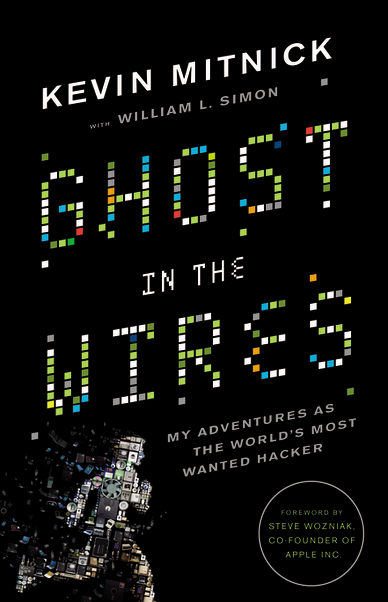
Ghost in the Wires is the autobiography of Kevin Mitnick.  Now that I’ve finished my CCIE studies, I have a couple of hours of free time to enjoy reading something that isn’t a whitepaper or a lab workbook.  I picked this up as soon as it was available on Amazon and cracked it open right away.  I took my time going through it, enjoying each chapter as it built up the story of Mitnick from his early years onward.  As the story progressed more into his social engineering stories and hacking exploits, I found myself spending more and more time reading about them.  I was drawn into the book not only because of the content, but the writing style as well.  Mitnick and his co-author William Simon decided to keep the content at a fairly non-technical level.  Other than a couple of expositions about gaining access via .rhosts files or spoofing IPs, the book as a whole doesn’t really go much deeper than programming a VCR.

What you do get from this book is a sense of what drives Mitnick.  It’s not wealth or fame or anarchy.  It’s the pursuit of knowledge.  Unlike the fame seeking kids today, Mitnick outlines that he only went after the targets he did because of the challenge of breaking into the them.  He didn’t do it to steal credit card numbers or to hold computers for ransom in some strange blackmail scheme.  Sure, he gained from his knowledge by virtue of his unfettered access to the phone company or his ability to clone his cell phone’s ESN whenever he wished.  However, rather than exploit this on a grand scale or sell his access privileges on the Internet, he held on to them and used them as capital only for bragging rights to other hackers.

Mitnick also takes some time to address the “Myth of Kevin Mitnick”, the legend that has grown up and been propagated about his crimes.  Stories of his flight from early prosecution to another country of his “ability” to whistle launch codes into pay phones elicit laughter but also show how the legal system in the early days of person computing was ill-equipped to deal with people like Mitnick that pushed systems to their boundaries and used them for their own purposes.  At times, it seems like the legal system in this book is run by a collection of scare mongers, ready at a moment’s notice to say whatever it takes to keep their suspects locked in solitary confinement and safely away from any form of communication, electronic or otherwise.  The second half of the book details his flight from the federal authorities and the ease with which Mitnick was able to create a new identity for himself.  Back in 1993 he was able to create a string of identities to elude his pursuers.  Today, however, I wonder if it would be as easy as before with all the linking of databases and sharing of information among all the different departments that Mitnick used to set himself up and someone else.  I’m sure it would be a very difficult challenge, which is just the kind Mitnick admits he loves.

Tom’s Take

I loved this book.  I’m a sucker for computer history, especially from someone as famous as Kevin Mitnick.  Yes, he violated laws and treated security procedures like recommendations instead of guidelines.  In truth, his crimes consisted of theft of things like source code or free telephone calls.  He did it because he liked the challenge of getting things he wasn’t supposed to have.  He was like a kid that would take his toys apart as a child to see how they worked.  I can identify with this kind of mentality, as I’m sure many of you can.  Mitnick chose to express this desire in ways that ended up bringing him into conflict with law and order.  In the end, he paid for his crimes.  However, he has paid us all back with the wealth of knowledge that he has shared about his methods of social engineering and computer hacking.  I recommend this book not only to those that are interested in the history of hacking but also to anyone that might ever take a telephone call or use a computer.  A little education about how easily Mitnick was able to gain the trust of unsuspecting people and get them to give him whatever info he wanted is worth the ounce of prevention that it will provide.  If nothing else, you’ll know what a nuclear launch code sounds like when it’s whistled in your general direction.

Sight Beyond Sight – 4 Months of LASIK

I had my last major checkup after my LASIK procedure (detailed here) this week.  For the past four months, I’ve been enjoying the benefits of having amazing vision without the need to wear contact lenses or glasses.  I now have 20/16 vision in my left and right eyes, and when I use both eyes I have 20/12 vision.  Since the majority of the healing process has now occurred, I’m fairly certain this this will be my stable vision for a good long while.

Continuing on from my previous post, I can honestly say that the experience was the best thing I’ve ever done.  My worries about night halos were pretty much over-hyped.  I’d heard from many people that bright lights at night had a kind of halo effect that caused driving to be difficult with all the headlights.  I found that while there was indeed a halo around things like street lights or car headlights, it wasn’t nearly as pronounced as I had been led to believe and was quite tolerable.  Now, four months later, even those small halos are practically non-existent.  This is pretty much what I expected, since the halos are usually just artifacts of the incisions made during the procedure and as the eyes heal the halos vanish.

The other side effect that I have is increased light sensitivity.  Imagine walking outside on a day where the sun is shining so brightly that it hurts your eyes to have them open more than just a small amount.  That’s what going outside on bright days feels like to me.  When a flashbulb or bright light gets shined in my eyes, the after effects seem to last a bit longer than they did before.  It’s not that it’s any different that what a normal person might feel in those situations, it’s just a little more pronounced.  I’ve managed to fix the sunlight issue by investing in a nice pair of polarized sunglasses.  Before, I wore sunglasses only to drive.  Now I feel like I need to wear them most of the time when I’m outside in the sunlight.  As for flashbulbs, I think that’s only going to be a real problem when I become a celebrity blogger and TMZ starts following me around with cameras.

Tom’s Take

The big question is: Would you do it again?  Yes, yes, a thousand times yes.  I recommend that anyone capable of getting the procedure done should investigate it.  My wife is going to get it done before the year is out.  My friends are all asking about it and I recommend it without reservation.  Unless you have a medical reason to avoid it, or you just like the look of “brainy specs”, the benefits of no longer needing glasses or contacts far outweighs anything that you could consider a downside.

I don’t rub my eyes nearly as much as I used to.  Before, when I felt my eyes start watering, I had to grab a napkin and blot them, lest my contact pop out or become dislodged.  Now, I just let my eyes water and I find that they aren’t nearly as irritated as they once were.  That might also be due to the notion that I no longer have a hunk of plastic sitting on top of them.  The highest praise that I can give to my LASIK procedure is that I sometimes forget that I had it done.  I just feels natural to me now to not have to worry about changing contacts or tracking down glasses.  If you are thinking about it, don’t hesitate to go out and get more information.  Ask your eye doctor about their opinion of your local options.  And don’t hesitate to get a second opinion.  Your sight will thank you.

SIP Trunking – Review

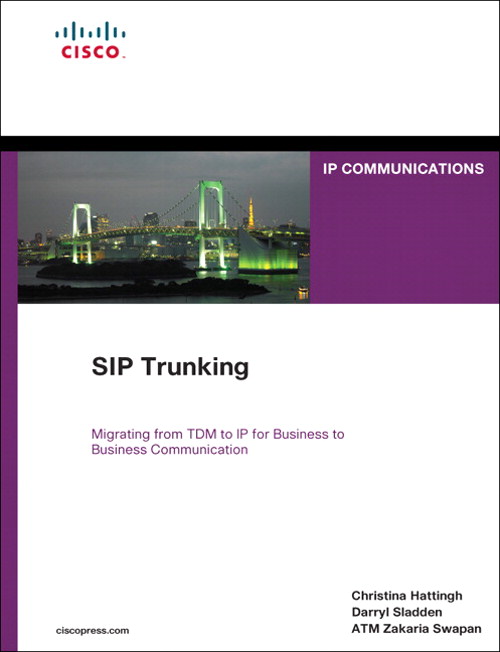
When I first got started working with Voice-over-IP (VoIP), I was excited about all the possibilities of making calls over the Internet and moving away from my old reliance on Ma Bell.  However, the reality of my continued dependence on the good old phone company is an ever-present reminder that sometimes technology needs to mature a little before I can make bigger leaps.  That’s why the idea behind SIP trunking has me excited.  It brings back a little bit of that hopeful magic from my early days of VoIP possibilities.  Thanks to Christina Hattingh, Darryl Sladden, and ATM Zakaria Swapan and the good folks over at Cisco Press, I got my feet wet with SIP Trunking:

This is the “pound cake” of Cisco Press books.  It’s only about 300 pages and a bit on the thin size, but it’s a very dense read.  Part 1 covers the differences between traditional Time-Division Multiplexing (TDM) trunking and SIP trunking.  There is discussion of the cost and benefit of moving to a hybrid model or even to a pure SIP environment.  This is a good part to focus on if you aren’t familiar with SIP trunking in general or you are trying to convince your decision makers to give it a try.

Part 2 is all about planning.  One hundred plus pages of modeling and design and checklists.  An engineer’s dream.  You are going to spend a lot of time in here dissecting the cutover strategies and the list of questions that you need to ask your provider before delving into the SIP-infested waters.  In fact, I would recommend this book for Chapter 9 alone, the checklist chapter.  It goes into great detail about all the questions you need to ask your provider, along with a description of each question and why the answer would be so important to you.

Part 3 is the deployment guide.  No Cisco Press book is complete without some code examples, and Chapter 10 has them in spades.  One thing I did like about their examples of AT&T and Verizon configuration is that they are appropriately annotated with notes to be sure you understand why a particular setting was configured.  I want to see more of this in the networking-focused Cisco Press books, not just the planning ones.  There are also case studies to help you make decisions and a chapter on the future of Unified Communications.  This one’s kind of dubious, though, as most of the time the predictions either end up looking hilariously obvious in hindsight or wide of the mark.  You can’t fault the authors for wanting to put a little bit of vision in at the end of this read, though.

Tom’s Take

If you want to learn a little more about SIP trunking or you are planning to put one in in the next 6-8 months, grab a copy of this book.  Have a cup of coffee before you jump into it, as the material could be a little dry if you aren’t focused on the task at hand.  Make sure to dog-ear the first page of Chapter 9, as you’ll find yourself coming back here more and more as you start implementing your SIP trunk.

Disclaimer

This book was provided to me as a perk at Cisco Live for being a NetVet.  I chose this book from a list of the available titles and it was provided to me at no charge above the cost of the conference.  Cisco Press did not ask for nor did I promise any kind of consideration in the above review.  The thoughts and opinions expressed above represent my true and honest opinion of the material.

Software I Use Every Day

People tend to find programs that work really well for them in their day-to-day jobs and then find themselves using those programs over and over again.  I’m no different.  In my job as a network engineer for a Value Added Reseller (VAR), I have quite a few programs installed on my laptop at any one time.  However, there are three that always find themselves getting installed first whenever I upgrade, or I find myself installing them when I’m remotely connected to a server and need to do some work.  The best thing about these three programs?  They’re totally free.

TeraTerm

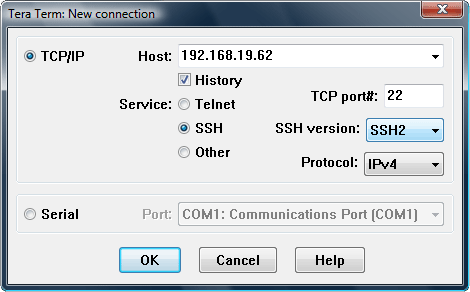
If you work with Cisco/HP/Juniper/Brocade/etc devices that have a console port, odds are good you have a console cable or three in your backpack.  You also have some sort of terminal program on your laptop.  A lot of engineers I know used Hyperterm in Windows XP.  I loathe Hyperterm.  A crippled version of a retail product that’s confusing and hard to use.  When I started at my current employer, my mentor introduced me to TeraTerm.  It’s a wonderful little program that can be used to telnet, SSH, or console to a device.  There are a ton of programs out there that can do the same, such as PuTTY or SecureCRT.  No matter how many times I use them I keep coming back to TeraTerm.  One reason is the Serial connection drop down box.  On my laptop, every time I plug in a USB-to-Serial converter, it is assigned a different COM port depending on which port I plugged it into.  With PuTTY, I have to remember when COM port is associated with a particular USB port.  With TeraTerm, I just choose from a drop down box.  Simple.  Another nice option is the ability to log all your console output to a text file.  If you’ve every had to type show tech-support on a router, you know the flood of info that comes rushing at you with no way to stop or pause and copy it to a file for TAC.  With TeraTerm, you just set the logging option, pick a file name, type your command, and sit back while it takes care of the copying for you.  It’s also great if you want to capture a configuration after you’re finished for archival just in case you need it again.

TeraTerm has had some development issues in the past, but since 2004 it has been maintained by it’s own development team for free at Sourceforge.  Get it HERE.  You may also be interested in PuTTY or SecureCRT, but please note that SecureCRT isn’t free.

TFTPD32

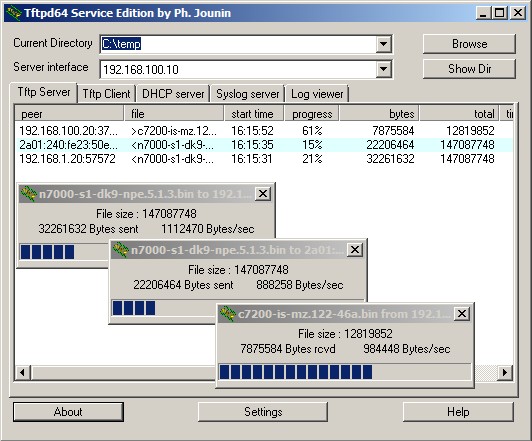
If you work with Cisco/HP/Juniper/Brocade/etc devices, you’ve found yourself in need of a TFTP server at some point in time.  TFTP is the most popular way to upload/download software and configurations to and from these devices.  It’s a quick protocol with little overhead, since it relies on UDP packets to deliver information.  Many vendors have a TFTP server, whether it be Solarwinds, 3COM’s old TFTP server, or even Klever’s PumpKIN TFTP server.  I find myself coming back to TFTPD32 because it’s more than just a server.  It’s also a TFTP client, which is handy if you want to try and pull down a file to make sure it’s being shared correctly.  It’s a tiny DHCP server if you are plugged directly into a device such as an access point and you need to give it a quick address to get to the web configuration.  It’s a Simple Network Time Protocol (SNTP) server if you have a device that needs to sync to an NTP server, such as CUCM during setup.  Lastly, it has a syslog server if you need to redirect syslog output during a debug or troubleshooting session.  TFTPD32 also supports the transfer of files over 32MB in size, which has left some of the older TFTP servers in the dust, as most modern firmware images are well above 32MB.  There’s even a 64-bit version for those who have made the switch to the new generation of operating systems.  If you just need something simple to transfer files to and from your routers, you can’t go wrong with TFTPD32.

TFTPD32 is free and available HERE.  You may also be interested in alternatives from Solarwinds or Klever’s PumpKIN.  Note that Solarwinds requires registration.  I don’t recommend using the old 3COM TFTP server any longer, as it isn’t capable of 32MB image transfers and is generally considered dead software.

freeFTPd

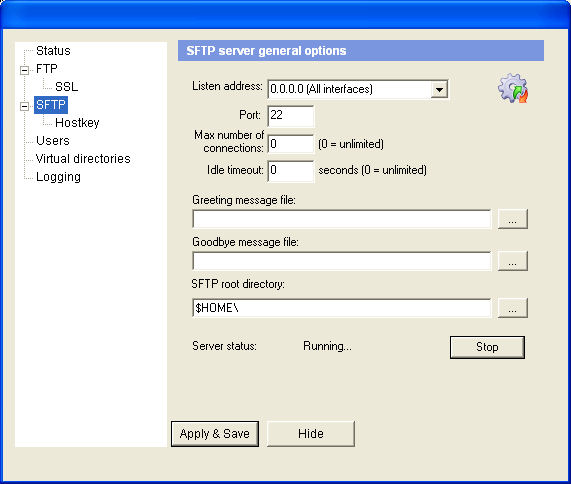
Working with CUCM lately as much as I have been, I’m finding myself growing more reliant on using FTP instead of TFTP.  CUCM seems to want to use FTP (or SFTP) for almost everything, whether it be configuration backups or upload of new COP files.  I’ve used Xlight FTP server (the free version) for a while, but when I needed an SFTP option, the licensing options for Xlight seemed somewhat steep.  After some searching, I came across freeFTPd.  It’s very simple to setup and configure both FTP and SFTP, along with users and virtual directories.  You can also set it to listen on all your laptop’s interfaces, so if you find yourself with a slow Ethernet connection you can always flip over to the wireless interface.  I highly recommend installing freeFTPd if you use CUCM today or you might find yourself working on it in the future.  You’ll thank me later.

You can also use Xlight’s FTP server or Filezilla.  Note that Xlight is a 30-day trial of the standard edition, but after those 30 days it becomes the limited personal edition.  You might also check the license terms in case you want to use it professionally.

Tom’s Take

Discussing favorite programs is a lot like arguing who the best Doctor is.  Everyone has their opinions and beliefs about why a particular program works the best, or they’ve been burned by a program in the past and have forsworn it for all eternity.  I find these programs easy to use, easy to install if they aren’t on the machine I’m using, and since they are mostly open source, free of any sticky licensing issues that might cause problems down the road.  Feel free to suggest any programs you find useful in the comments so that others might try them out too.  Note that because I’m a Windows user, all of these programs run on Windows, either XP or Windows 7.  If you’re interested in a Mac version of this list, please feel free to send me a MacBook Pro and I’ll whip one up for you.  I’m keeping the MacBook, though.

Switch SuperNAP – The Super Datacenter

One of the highlights of my trip to Cisco Live 2011 was an invitation from Aneel Lakhani and Brian Gracely of Cisco to take an impromptu tour of the SuperNAP facility in Las Vegas, Nevada.  Now, I must admit that I was a bit ignorant of what SuperNAP was when I accepted the invitation.  That changed quickly, though.

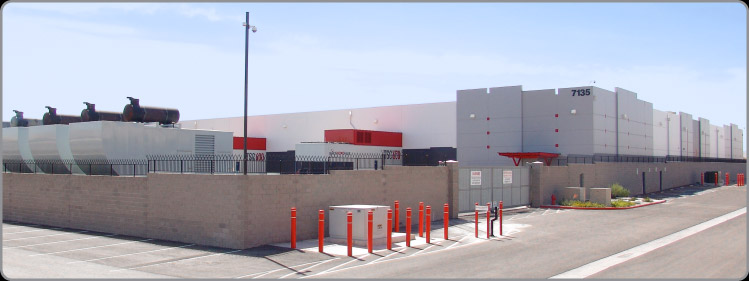
We left the Mandalay Bay hotel on the south end of The Strip and drove over to the facility.  The drive would have been less than fifteen minutes except for some road construction traffic.  Once we turned the corner into the facility, we were greeted with this visage:

This is the kind of facility that just screams “stay away”.  The only entrance is the door in the middle right of the picture.  You must have an appointment to enter the facility, and the voice on the loudspeaker isn’t a friendly one.  Once our tour group gained access, we parked in one of the three parking spots and were immediately greeted by a man in a tactical vest with an assortment of hardware, like a walkie-talkie, flashlight, and sidearm.  He informed us that we needed to have our identification ready and there were ABSOLUTELY no pictures to be taken inside the facility.  While he didn’t confiscate our cell phones, he did question one of our group about an insulin pump on his hip.

Once inside the entrance, I immediately noticed the hardware located behind the security office.  It was more impressive than what I had seen in the FBI buildings I’ve visited.  Behind several inches of bullet resistant glass were M4 assault rifles and what appeared to be shotguns as well.  Coupled with the the posture of the security guards, I was pretty sure this was going to be a rather interesting tour.  Once I surrendered by driver’s license for a visitor pass, we were escorted through the steel mantrap.  The security guard had to buzz each visitor in individually with his access badge and his thumbprint, a very nice combo of two-factor authorization for a security nerd like me.  We were escorted to a conference room filled with industrial-looking tables and comfortable chairs.  The guard asked if we needed to use the restroom, and after no one accepted his offer he asked that we stay in this room until our appointment arrived.  When I heard the door click behind him, I realized that was more of a statement rather than a request.

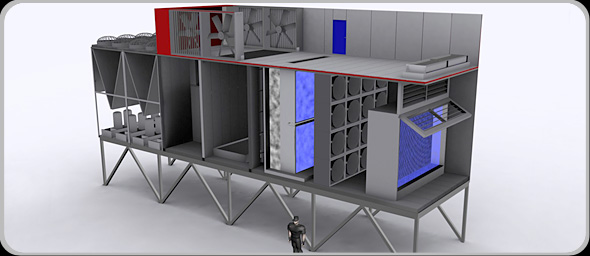
Once the rest of our group arrived, Missy Young came in to start our sightseeing show.  She started out giving us an overview of the facility itself, focusing on the layout and the air handling system.  In most datacenters, keeping the massive amount of equipment cool is one of the more difficult tasks.  When Switch first asked about cooling SuperNAP with the traditional air cooling units, the cooling vendor’s response to their request would have filled half the datacenter floor with A/C units.  So Switch built their own:

Each of those units contains four different types of cooling systems to ensure the most efficient method is used to keep the data center at the appropriate temperature.  There’s even a software program, Living Datacenter, running at all times to monitor the air temperature outside that keeps the air handlers running at peak efficiency and the data center from becoming a greenhouse.  Altogether, there are 44,000 tons of cooling available for the 407,000 square foot facility.  Inside, it was nice and chilly, just like the servers like it.  Thanks to all that cooling power, SuperNAP customers are not required to space their equipment out to allow proper airflow.  The building can deliver the right amount of cooling to every square inch of the floor, therefore allowing Switch to make the most efficient use of the space.

SuperNAP houses lots of equipment from various different companies like Sony and Ebay.  They also host a variety of servers from government agencies as well, many of which they aren’t allowed to talk about.  Because of this, the facility can never be down.  They promise 100% uptime to their customers, and they have the backup systems to deliver.  The facility has 100 MW of power delivered to it for running systems and has almost 150 MW of generator capacity.  Each of those generators is powered by 7,000 gallons of diesel fuel.  In the event of a power outage, SuperNAP has contracts with several fuel companies to start delivering diesel within two hours of the outage report and every eight hours thereafter until power is restored.  In the event that the fuel resupply fails, the security forces are authorized to begin commandeering fuel from the civilian population of Las Vegas.  However, I doubt it would come to that anytime soon.  SuperNAP taps the two national power mains that deliver electricity to Las Vegas upstream of the city.  Even if Sin City starts having brownouts, SuperNAP will stay online.  Due to their level of importance in keeping the lights on, the only facility in Nevada that would get power preference before them is the Hoover Dam.

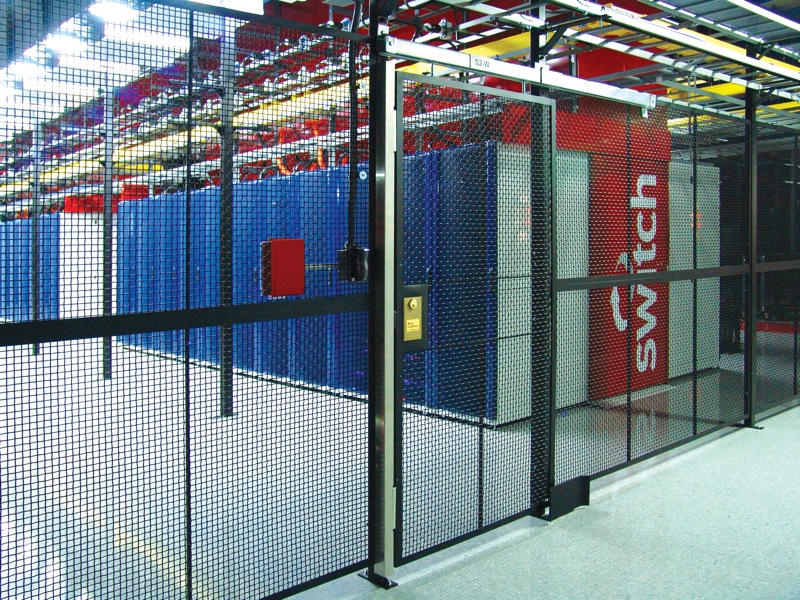
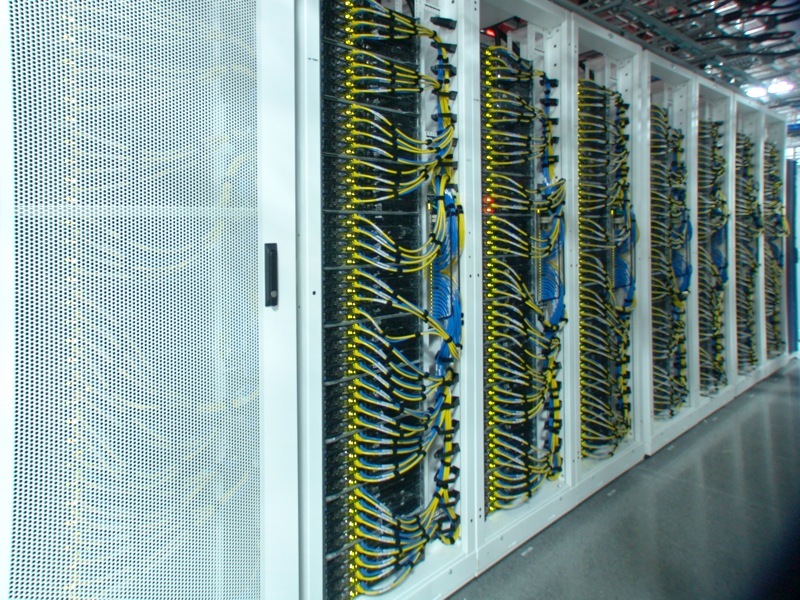
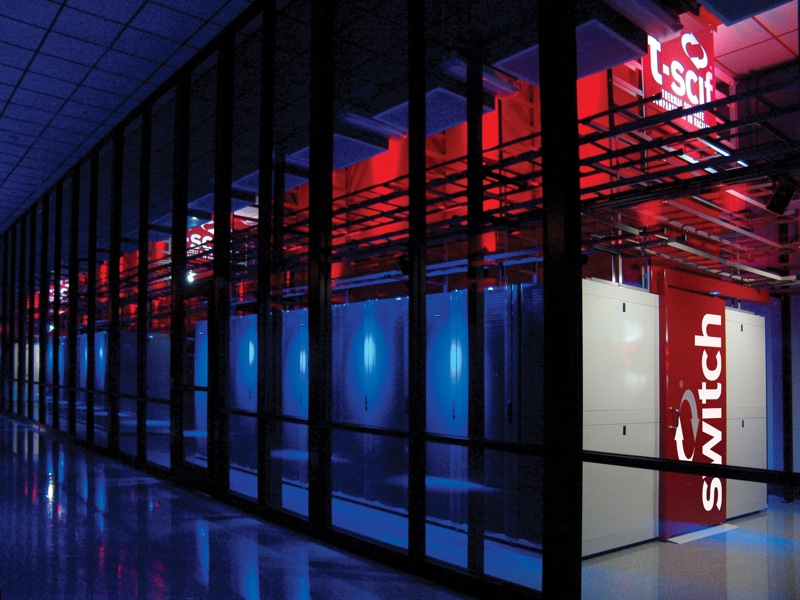
After the overview, we all signed our waivers and walked out a door to begin the tour of the facility.  Since we couldn’t take our own pictures, I’m going to post some of theirs.  Trust me, they’re real.

It’s really impressive in person.  Even though there were only nine of us on the tour, we were followed by an armed guard at all times.  He radioed in every time we walked into a different section of the facility.  It was a little eerie, but I can see how they might want to keep tabs on a shifty fellow like me.

We walked into one of the air handling units and got to see each of the sections bringing air into the facility.  There is a pressure differential inside each unit, so in order to show us the amount of air being pushed by the fans, they had to crack an outside door to equalize things inside.  Somehow, I got stuck on the end nearest the fan door, and when the rather large guard opened it up, I got blasted with hurricane-force cold air for a few seconds.  I felt like Jim Cantore for a bit.  That much air flowing into the facility is a large reason behind its success at keeping the whole thing cool and stable, and they’ve got 30 of these things around the perimeter.  Combined with Living Datacenter, the units are even smart enough to shut off the outside air supply in the event of a dust storm or other unwanted conditions and recirculate the hot exhaust coming back from the server areas.

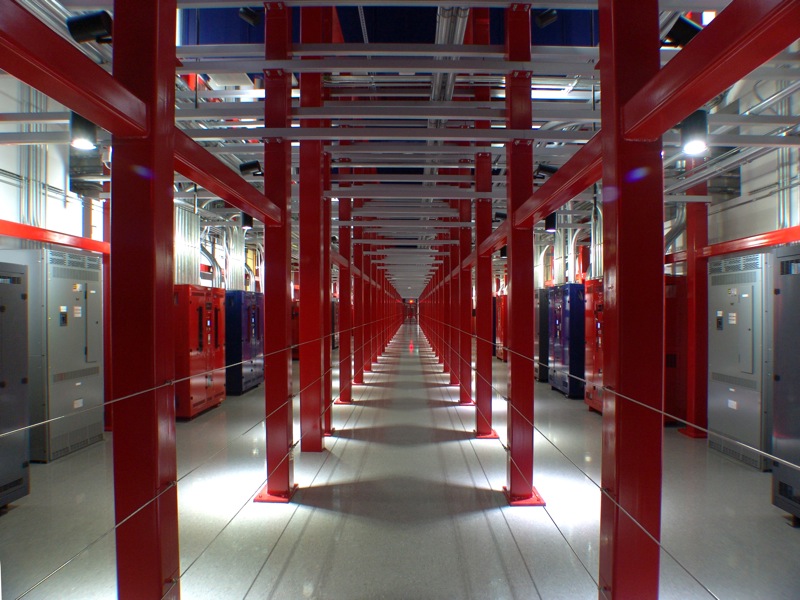
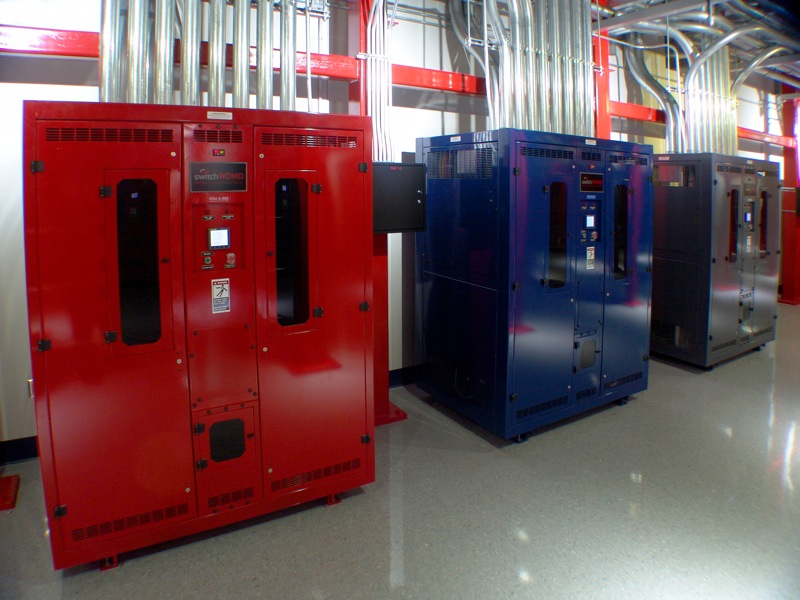
In between areas runs the Power Spine, the location of the large PDUs that distribute the go-go juice to all those hungry servers.  It looked like something out of a sci-fi movie:

Each rack can be provided 26 Kw of power from each of those color-coded units, and there are two running to each rack to provide redundancy, with a third available just in case.  There’s even enough floor space to double up and provide 200 Mw of power to the whole facility.  The floor itself uses 4,500 psi concrete to be able to support all that weight.  And since there isn’t any raised floor space in the whole facility (all the infrastructure is overhead), it allows customers to pack in some seriously heavy computing power.

One thing I will note here.  You notice that everything in these pictures looks very polished and theatrical.  That’s a bit on purpose.  From the armed guards to the LED lighting to the enamel paint everywhere, this whole facility screams theater from the inside.  Some disbelieve their ability to deliver what they promise.  Missy’s response was “just ask our customers.”  I agree that there is a bit of a show being put on at the facility.  I surmise that it’s most likely due to an extension of will from those that built the facility in the first place.  After all, it’s very impressive to visitors to see all this hardware powering rows and rows of computing power.  Why not take the extra time and effort to make it pretty?  Besides, if someone leaves a mess, you’ve always got the security guards around to shoot the offenders.

Tom’s Take

If there’s ever a zombie apocalypse, I’m getting in the car and heading for SuperNAP.  I’m going to call ahead and make sure that Missy knows I’m coming though, because that could get interesting when the guards don’t know whether or not I’m zombified.  The SuperNAP facility delivers a very impressive profile for a datacenter, both in size and operation.  It was like walking through Toys R Us as a kid, only the toys here are multi-million dollar server equipment and the sales clerks carry assault rifles.  SuperNAP delivers on their promises of 100% uptime and their customer list is rather impressive.  I think that everyone interested in the hows and whys of data center design should take a peek inside to see what it looks like when it’s done right.  Just call ahead first.

Thanks again to Aneel Lakhani and Brian Gracely of Cisco for the invite and thanks to the rest of the group for allowing me to tag along and not get us shot at.

Configuring Cisco Unified Communications Manager and Unity Connection – Review

Voice engineering is a world apart from the run-of-the-mill routing and switching work most network rock stars do regularly.  Lots of browser screens, few opportunities for CLI work, and an ever-evolving interface make for interesting work even in the best of times.  Technology changes so quickly that people who have been out of the loop for more than a couple of years may find themselves adrift in a sea of confusion.

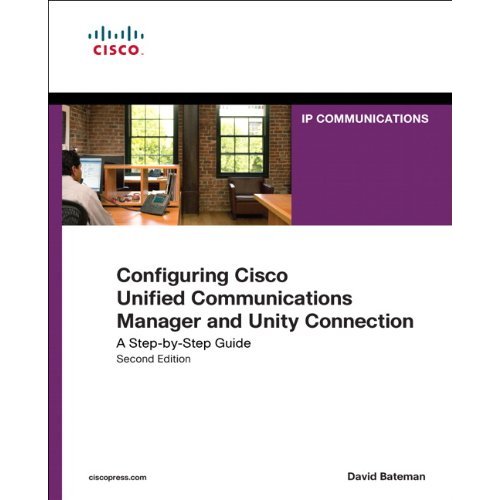
When the first edition of Configuring Cisco CallManager and Unity came out, it quickly became a go-to reference for voice engineers that wanted to learn all about Cisco’s preeminent call processing platform. Today, however, that volume is severely out of date, referencing CallManager 4.x and Unity 4.x, both long retired. With the changes that have been introduced since the move away from Windows-based platforms and Exchange, it was time to update the Cisco Press tome of voice knowledge. Not coincidentally, I give you Configuring Cisco Unified Communications Manager and Unity Connection, Volume Two.

Configuring Cisco Unified Communications Manager and Unity Connection

Title just rolls right off the tongue, doesn’t it?  Along with the change to CallManager, now abbreviated CUCM, we get updates to the platform in the book. This volume focuses on CUCM version 8.x and Unity Connection version 8.0. There is also some coverage of Unity 8.0 as well, since those of you with strange curses may find yourself running into it like a patch of poison ivy.

For those of you that are new to CUCM v8, or new to CUCM in general, this book is a wonderful resource that guides you step-by-step through the menu options and settings in CUCM.  There is very little discussion about voice theory or SIP proxy setup or Nyquist’s Theorem. Instead, the meat of the book tells you how to make CUCM sing, from esoteric Enterprise Service parameters to the confusing Calling Search Space (CSS) setup. It guides and teaches do that you can spend time setting things up the right way and less time scratching your head. The style is simple and easy to follow and unlike online documentation, doesn’t read like stereo instructions.

The second half of the book deals with Unity and Unity Connection. Setup, PBX Integration, and even digital networking get their share of coverage. The instructions and features are presented generically so that they may apply to both platforms as necessary. Only in places where a feature is only related to one platform is there specification, such as the need to sprinkle holy water on Unity to make it boot up. Call Handler configuration gets a chapter as well, and I found the information there very good reference material for a feature that can become complicated quite fast.

Tom’s Take

If you are a new voice rock star that has a CUCM server to set up and no experience with the knobs and switches on the platform, go buy this book now. It will guide you through your first deployment much more gently than searching for hours through acres of documentation. For the grizzled veterans of CallManager 4.x who are just getting back into the game after years of therapy deprogramming all those Windows admin skills, this is also a must read. It will get you up to speed on new features like SUBSCRIBE CSS and new interface features.

For the voice rock stars that have been configuring CUCM through version 5 & 6, the purchase of this book is a little less compelling. Many of these things are things we do every day or each time we setup CUCM, so it may feel like a bit of a rehashing. I found some of the more trivia-oriented content, like explanations of Service parameters and less-used feature configuration, to be of great value. I’m going to toss this book into my voice bag and keep it handy for those times when I need to configure a Unity Interview Handler and I don’t have Internet access on site. Think of it more as a Physician’s Desk Reference rather than Encyclopedia Britannica.

Disclaimer

Cisco Press provided an evaluation copy of this book.  At no time did they ask for, nor did they receive any consideration in this review. The analysis and opinions presented here represent my views and mine alone

IPv6 for Enterprise Networks – Review

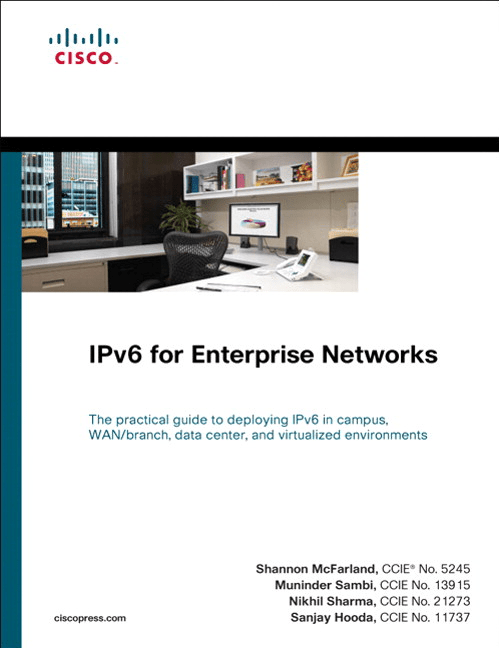
Unless you’ve been living in a cave with Tony Stark for the past several months, you are well aware that IPv6 is a reality that can’t be ignored by today’s networker.  Part of the issue affecting IPv6 adoption is the lack of good reading material.  Yes, there are mountains of RFCs out there that talk about IPv6 in nauseating detail.  However, these documents aren’t all that accessible for the average network rock star that is working 50 hours a week and doesn’t have time to pour over page after page of dry Internet-ese.  There have been some great posts about IPv6 for the common man from people like Jeremy Stretch and Chris Jones but there is a segment of the population that would rather read about the subject from a vendor source.  Enter Shannon McFarland and company:

IPv6 for Enterprise Networks Cover

Cisco Press graciously provided a copy of this book for my evaluation.  Clocking in at a svelte 361 pages, this tome has a great wealth of IPv6 information from a design perspective.  There are some code examples for your networking gear, but much of the discussion in this book revolves around IPv6 design and building your network right the first time.

Chapter 1 starts off the same way many network rock stars will start off pitching IPv6 to their company, with a discussion of the market drivers for IPv6 adoption.  Even though networking professionals know IPv6 is inevitable, the C-level executives will most likely need some additional convincing.  This chapter is great for them to hear about the reasons why IPv6 is necessary.  Chapter 2 is an overview of the Cisco hierarchical network design, now expanded to include IPv6 content.  If you’ve seen any network design documentation in the past decade, this should be a review for you.  Just note the IPv6 sections.

Chapter 3 starts the meat of the book.  This chapter discusses the coexistence mechanisms that you are likely to face when prepping your network, since we are going to need to run IPv4 alongside IPv6 no matter how much we might not want to.  Tunnels and NAT64 get some discussion, along with running IPv6 over MPLS.  Chapter 4 discusses the various network services that will need to be IPv6 aware to help run your network, such as OSPFv3 or BGP.  Great discussion is made about multicast, since multicast is such a crucial component in IPv6.  Chapter 5 is a short one, discussing the planning that one will need to go through for implementing an IPv6 infrastructure.  This is more of the paperwork and staging behind the scenes that might be boring, but in an enterprise is critical for painless IPv6 deployment.

Chapter 6 is the largest chapter and will most likely be where you spend most of your time.  This is a soup-to-nuts campus IPv6 deployment.  The authors analyze the deployment from three different perspectives, the dual stack (my favorite), the hybrid model that is useful for non-IPv6 applications, and the service block model, which allows you to bring IPv6 online in sections.  Every facet of your network is analyzed in this chapter, from VLANs to routing protocols to QoS and other network services.  If you are going to be deploying IPv6 in your network in the future, you’d do well to just dog ear Chapter 6 so you can turn back to it quickly.

Chapters 7 through 10 deal with specific cases of IPv6 deployment to support use-cases, such as virtualization, branch offices, datacenters, or remote access.  They exist so that you can quickly reference these scenarios as needed, since you may not need to worry about deployment of IPv6 in a datacenter in your environment for instance.  The authors do a wonderful job of explaining all the things you might need to take into account in your deployment of ancillary technologies, such as Microsoft protocols to be aware of or application requirements that may not necessarily be network dependent.

Chapter 11 is all about managing your shiny new IPv6 network through things like Netflow and SNMP.  Careful attention should be paid if you don’t want to find yourself chasing poltergeists in your network at 3 a.m. on a Sunday.  Chapter 12 gives you a great breakdown of parts and pieces that would be great to construct a lab to pilot your IPv6 implementation before unleashing it on your live network.  That way, IPv6 doesn’t call the Resume Generating Event (RGE) protcol.

Tom’s Take

I liked this book quite a bit.  There is a ton of good information to be found inside for all levels of network rock star, from those just learning about deploying IPv6 to the poor souls that find themselves mired in a remote access IPv6 deployment gone wrong.  With a big focus on proper network design, IPv6 for Enterprise Networks ensures that you don’t have to rebuild your IPv6-enabled network after a short time due to bad design decisions or compromises. Every scenario I’ve seen discussed concerning IPv6 deployment is laid out in clear language, with both pros and cons for deployment.  I highly recommend picking up this book as soon as you can so your journey down the IPv6 yellow brick road starts off smoothly and you can avoid the pitfalls before you encounter them.

As a bonus, if you are going to Cisco Live 2011 in Las Vegas, Shannon McFarland is giving a session based around this book, BRKRST-2301 Enterprise IPv6 deployment.  If you aren’t adverse to 8 a.m. sessions the morning after the Customer Appreciation Event you should sign up and check it out.  I plan on bringing my book so that Shannon can autograph it.  That way, I can claim I met him before he became a gigantic IPv6 rock star.

Laser Beam Eyes – My LASIK Experience

Just like any good nerd out there, I have vision issues.  While I’m capable of reading things close up, once you get past arm’s length it all gets blurry.  I wore glasses for a couple of years in middle school before switching to contact lenses for my primary form of vision correction.  Allow me to state for the record that I was the worst contact lens wearer imaginable.  30-day extended wear pairs would last me 8 months.  I left them in all the time, even when I slept.  The only time I wore glasses is when I couldn’t stand the contacts any longer, and that usually lasted about an hour because I couldn’t stand my glasses either.  I always wanted to be free of the plastic and glass I was forced to use to avoid bumping into large objects.

Enter laser vision correction, commonly referred to as LASIK.  I’d looked at getting it for several years, but I never looked too deeply.  I figured I’d get around to it sooner or later.  Last year, my eye doctor asked me if I’d ever considered getting LASIK.  It seems that having a stable prescription for a decade makes you a good candidate.  She did some preliminary tests in her office and found that my corneas were the proper thickness to perform the procedure.  And with that, I started investigating all the possibilities.  There are lots of different options out there for people that want to use the power of the almighty laser to fix vision issues.  Lucky enough for me, I fell into the category of “average”, meaning my prescription wasn’t too crazy to cause issues with the fixing my eyes.

For those not familiar with the process, the doctor essentially cuts a flap in your eye, peels back that flap, and uses the laser to correct your vision on the cornea itself.  In essence, the doctor is creating a permanent contact lens for your eye.  No need to take it out every night and wash it, or worry about losing it in the ocean.  Always there, always correcting your vision.  After chatting with a couple of different doctors, I settled on Dr. Gary Wilson at ClearSight Center.  His plan seemed to meet my needs and wasn’t over priced.  While I was willing to spend whatever it took to make sure I could see at the end of the procedure, I also didn’t want to break the bank on useless add-ons.

The pre-op appointments were pretty standard.  The measured my eyes and double-checked my prescription.  They told me that I would need to have my glasses on for at least two weeks, since the eyeball needs to settle back into a normal shape if you are a long-term contact wearer.  Seems contacts deform the eye slightly.  Once I had my contacts out for the requisite two weeks, there were a few last minute checks and I thought I was off and running.  Except…since Dr. Wilson is the only eye surgeon at the center, if he’s sick the whole operation shuts down.  And since Dr. Wilson caught a bit of a stomach bug, my surgery was off the table for its original date, April 15th.  A reschedule for the following Tuesday was also met with disappointment, as Dr. Wilson was still not quite up to surgery.  As I would rather have my eye doctor performing at full capacity, I rescheduled for April 26th.  As a side note to you network people out there, this goes to show that a one-person operation can be a disaster when that one person is unavailable for any reason.  Spread out your knowledge so that having a single person down doesn’t mean having your whole business down.

Surgery day started out a little nerve wracking.  I had to fill out a few forms, including writing out a paragraph of an agreement long hand.  It had been so long since I’ve written anything in cursive I almost forgot how to write.  After the forms were filled out, the waiting began.  It took about an hour before they were ready for me.  After stepping back into the operating area, I was given a sexy shower cap to wear on my head and cool shoe covers as well.  I asked for one of those peek-a-boo hospital gowns but was met with blank stares and shivers of revulsion.  Then, the eyedrops started.  Antibiotic drops, anesthetic drops, drops to clear my redness.  All in all, I think I had eight different eyedrops administered over the course of the next twenty minutes.  Not just a drop or two either.  It felt like Niagara Falls splashing against my face.  I also got to take a steroid to aid the healing process and two different anti-anxiety medications to keep me from being jittery.  Not that they helped totally, as the idea of having my eyes operated on coupled with the hosptial-like atmosphere (not my favorite of places) lead me to have a small panic attack right before I went back.  Thankfully, the nurse was right there with a 7-UP and package of delicious crackers.  Maybe the crackers had Valium hidden in them…

Once the doctor was ready, it was showtime.  I walked back into the room and laid down on what was essentially a massage table.  I fit my head back into the little headrest and the doctor and nurses explained the procedure to me.  All I really had to do was stare straight ahead and follow a little light.  Easy, right?  After taping my left eye shut to prevent me from getting hurt by errant laser blasts, the doctor placed a device over my right eye. This was basically the most uncomfortable portion of the procedure, as it felt someone was pressing down on my eye for about thirty seconds, during which time everything was black.  What was happening was the device was creating the flap on my eye, slicing off a section of my cornea.  I elected to go with a bladeless cornea cut, as the idea of having someone put a razor blade close to my eyeball wasn’t pleasant.  Once the flap was created, the device was removed and my vision returned.  I then had to stare at a green light over my head so the laser could get a reference point for my eyeball.  There was a tracking system positioned around my head so that if my eye twitched even slightly, the laser would shut off instantly to prevent damage. Not that it was entirely necessary, as the amount of medication I’d been subjected to made sure my eyes didn’t twitch.  The doctor warned me that my vision was about to get very blurry.  Boy, he wasn’t kidding.  Like, fifteen beers blurry.  The green light I was supposed to be staring at went from looking like a pinpoint to a whole constellation.  This was due to the doctor flipping my cornea flap up to laser my eye.  Once ready, a 9-second laser burst was all it took to correct 20 years of bad vision.  The chemical smell in the air from the laser light being produced smelled like burning hair, but I tried not to think about it as I stared at the green constellation of lights above me.  Nine seconds later, the doctor flipped my cornea flap back down and smoothed it out with a little plastic tool.  As my eyeball was numbed to the point of barely existing at that point, it was a little surreal to watch him touch my eye with something that I couldn’t feel.  He made me close my eye and taped it shut so he could move on to the left eye, since I had elected to have them both done at once.  The left eye required an eleven second laser burst, due to a slight amount of astigmatism.  Afterwards, my eyes were rinsed out with some saline solution, and I stood up for the first time in twenty years able to see without glasses or contacts.

The post-op was fairly uneventful.  I was informed I shouldn’t read or use a computer for about 24 hours.  I should only watch TV and try to take as many naps as I could so my eyes would start healing.  I was given a regimen of eye drops to take four times daily to help prevent infection.  I was told that any time I felt my eyes getting dry, I should use artificial tears to keep them wet and lubricated.  Other than that, it was pretty easy compared to other post-op instructions I’ve heard.

Tom’s Take

Overall, LASIK was a great success for me.  Twenty-four hours later my vision was 20/16, which is a step better than the average person.  I know that over the course of the next few months the healing process will cause my vision to fluctuate some.  As long as I end up with 20/20, I’ll be damn happy.  I haven’t tried to drive at night yet, so I’m not sure of the effects of night halos around light sources.  I can say that I’m a little more sensitive to sunshine.  It’s not painful, but I do notice the sun being a lot brighter than usual outside.  I hope that the next few months will prove to be as good as the last forty eight hours.

If you are a good candidate for LASIK, I highly recommend the procedure.  The ability to not worry about glasses or contacts when you wake up in the morning is more than worth it.  There was no pain at all, and the procedure was the epitome of fast and easy.  There is no reason why everyone shouldn’t enjoy the fruits of modern technology like this.

Xangati VDI Dashboard – Review

A few weeks back, I got a sneak peak at the new VDI Dashboard product from Xangati.  They had given us a very quick overview of it at Tech Field Day 5 but I got a special one-on-one opportunity to get a product demo.  What follows is information about what I saw.

With virtualization become such a hot topic in today’s IT environments, it’s only natural that people want to extend the benefits of centralized management and reduced hardware expenditure costs to the desktop level as well.  VMware is accomplishing this through the Virtual Desktop Infrastructure (VDI), which allows end user desktops to be virtualized and loaded on less powerful hardware.  The main processing is done on the back end by the vSphere for Desktops servers and presented to the users via PC over IP (PCoIP).  This allows the user to experience the same desktop they would normally have, but make it portable across a variety of devices.  This kind of reminds me of the ultimate extension of a roaming profile, only in this case the profile is your whole computer.

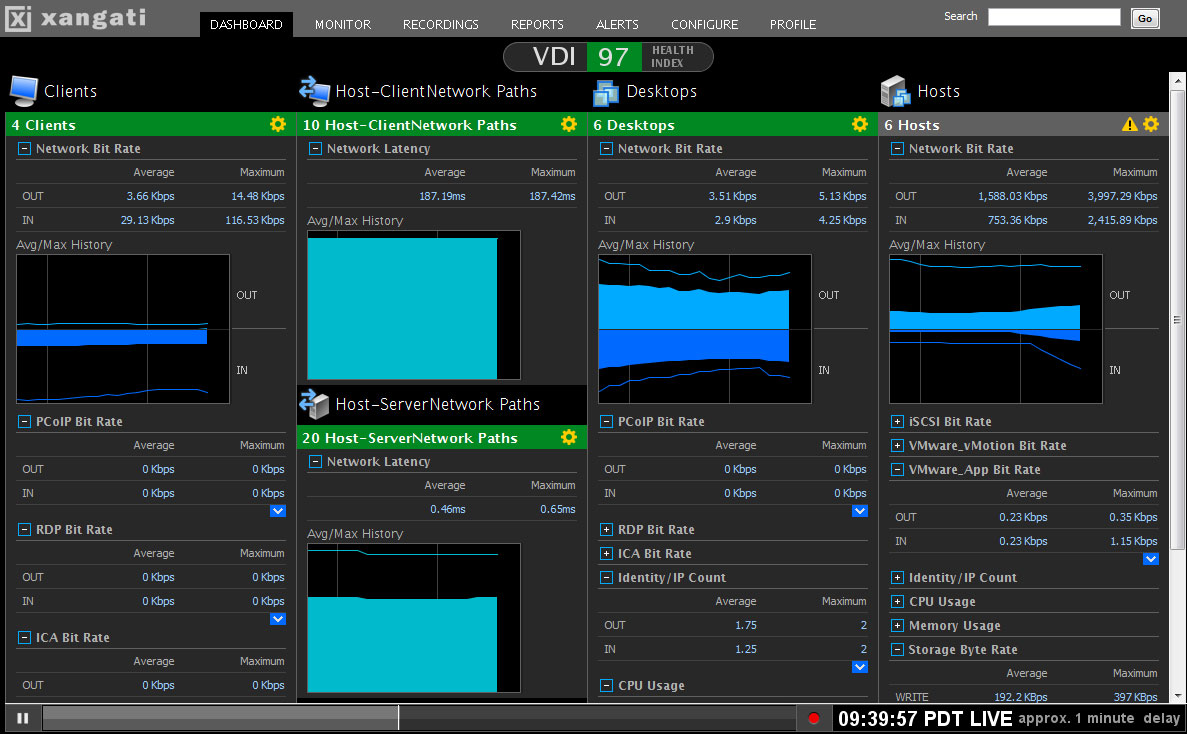
This process isn’t without issues, though.  Before, the network was merely a transport medium for data moving from PC to server or PC to the Internet.  However, when you abstract the operation of a PC to the point where it requires the network to operate, there can be an entirely new set of variables introduced into the troubleshooting process.  Even things that we might normally take for granted, like watching a video, become bigger issues when the network is introduced as a medium for transporting all the data to a user endpoint.  Factor in that the virtual team is usually not integrated with the network team, and you end up with a situation that often results in finger-pointing and harsh words.  What’s needed in the ability to gather information quickly and easily and display it in an easy-to-read format for the team that might be troubleshooting the issue.  Enter Xangati and their VDI Dashboard:

This product gathers information from various different points in your VDI as well as your network and displays it in easy to decipher graphs and tables.  For those in more of a hurry, the health index at the top allows at-a-glance digestion of the overall health of the VDI system.  When everything is working as it should, this number will be nice and green.  once problems occur and monitoring thresholds are triggered, the color will go from worrisome yellow all the way to problematic red.  This all occurs in real time, so you can keep up with what goes on as it happens.  This is useful if you have a group of people that all come to work at the same time and spool up 10 or 20 new VDI systems as they log on for the day.  You can view the impact this has on your VDI and network from the dashboard.  You can also see when a user may have an adverse impact on the system from doing something they consider innocuous, such as watching an HD video and consuming much more PCoIP bandwidth than their non-video neighbors.

In addition, the DVR-like functionality present in Xangati’s other products is extended here as well.  You can “rewind” the view to a point where the problems started occurring and begin troubleshooting from ground zero.  This is a decided advantage because as busy network rock stars, we aren’t always staring at our Single Pane of Glass (SPoG) when a problem happens.  The ability to backtrack and see all the events leading up to the problem gives us the ability to take decisive corrective action quickly and efficiently.

Tom’s Take

I don’t have a large VDI setup to manage, but if I did I would consider the VDI Dashboard closely.  It’s got a great view for all the things that could cause your deployment to go haywire.  Easy to read with tons of great information about all the individual components that comprise the total VDI, this tool makes it very simple to diagnose issues and take corrective steps quickly to limit impact on your users.  I haven’t played with it myself, but what I’ve seen makes me happy to know that when my users reach the point where I need to virtualize their Facebook Interface Terminals and LOLCat Creation Devices, I can count on Xangati and their VDI Dashboard to give me up-to-the-minute information.

If you’d like to learn more about Xangati, you can check out their website at http://xangati.com.  You can also follow them on Twitter as @XangatiPress.

Disclaimer

Xangati gave me a one-on-one presentation prior to the release of their product and provided me with a press kit containing the image above.  I was under no requirement to write an article describing my briefing.  The opinions and views expressed in this review are mine and mine alone.

PKI Uncovered – My Review

Security is a very important element in today’s network. The number of people trying to penetrate and disrupt you network is growing by the day, both internally and externally. The consolidation of servers into the data center is especially bothersome, as it tends to place your high-priority targets into one location.  It’s very important to find a way to keep that data secure from as many intruders as possible.

The trend recently has been to use virtual private networks (VPNs) to secure communications between users and critical data sources. Whether it be a remote access VPN for teleworkers or an internal VPN for HIPAA or PCI compliance, securing data with an encrypted tunnel is the fastest and easiest method of protection. However, in many cases the administrators use inherently insecure on non-scalable methods of VPN authentication, such as pre-shared keys (PSK). PSK works well with very small deployments or with very static equipment that requires few changes or little turnover/replacement. The main problem with using PSK is that it doesn’t scale very well, plus the method of distribution leaves a lot be desired.  You write the PSK down in a file for someone to configure and it’s just as insecure as writing it down on a sticky note. In order to really have a secure and scalable design, you must involve a public key infrastructure (PKI) at some point. I was somewhat familiar with PKI from my security training, but my depth of knowledge at implementing it on Cisco equipment was rather shallow.

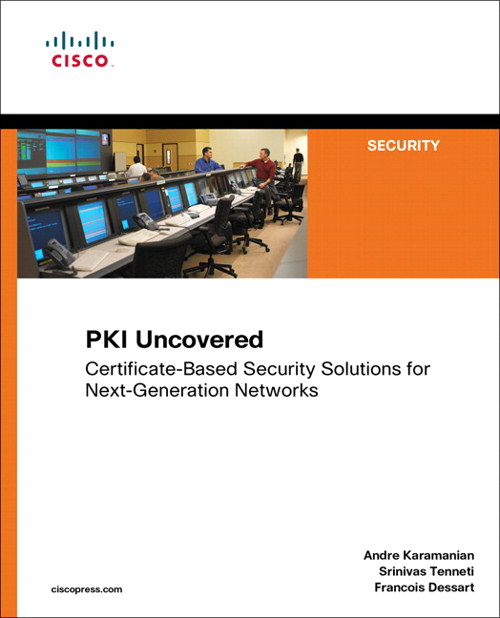
As luck would have it, Cisco Press asked for volunteers to review books and I jumped at the chance. Imagine my surprise when a shiny new book showed up on my desk. PKI Uncovered is a new book from Cisco Press that looks to give the average Cisco enginee….rock star a crash course in PKI and the many implementations it has in the networking space. What follows is my review of this book.

PKI Uncovered Cover - Image courtesy of Cisco Press

The first section is an overview of PKI basics for the non-security people. If you are a CISSP, CCSP, or any other conglomeration of security acronyms, these chapters will be review.  The importance of using PKI, along with the differentiations between it and symmetric key encryption are laid out. As well, the hierarchy of certification authorities (CA) are laid out with great detail. Once we get past the review, it’s time to delve into the nuts and bolts of implementation.

The second section of the book looks at specific deployment scenarios where PKI would be useful. Chapter 5 is the generic model that the other chapters build on, so the most basic ideas of deployment and chaining CAs are presented. In the following chapters, more specific needs are addressed, from large scale implementations of PKI used with GETVPN in site-to-site design to remote access with ASAs and IOS VPN. As well, more application focused examples on 802.1x NAC and CUCM phone security are presented. These chapters give great examples to follow along with as well as detailed output of the process at each step. The troubleshooting sections at the end of each chapter are also well written, and could be very useful if you find yourself staring down a real head scratcher.   The final two chapters are presented more as a case study where the previous examples are used to illustrate deployments with Cisco Virtual Office or Cisco Security Manager.  They help tie everything together and allow you to see the building blocks in action.

Tom’s Take

Overall, I found this book a very quick and easy read. It clocks in at less than 250 pages, which is practically a white paper.  It never assumes that you are a PKI expert and does a great job of letting you wade in before you get to the real meat of the example deployments.

The middle of the book will be the most used section, dog-eared and well-worn from hours of reference. I think this will be how I use it the most, as a quick reference guide for my future PKI deployments.  It’s a simple matter to work through the configuration examples and make sure your output matches the generous output examples. The case studies at the end are less compelling, as I doubt I’ll find myself in those kinds of deployment scenarios any time soon.

Overall, I’d recommend this as one to pick up if you have any desire to learn about PKI and its implementation on Cisco devices or feel that you’ll be implementing it any time in the immediate future.

If you’d like to pick up a copy, you can find it on http://www.ciscopress.com or at http://www.amazon.com.

Disclaimer

This book was provided to me by Cisco Press at no cost for evaluation. It came with no promise of consideration for a review. The ideas and opinions expressed in this review are mine and mine alone and provided freely for the use and consideration of my audience.