Cut Me Some SLAAC, Or Why You Need RA Guard

The Internet has been buzzing for the last couple of weeks about a new vulnerability discovered in IPv6 and the way it is interpreted by networking devices.  Firstly, head over to Sam Bowne’s excellent IPv6 site and read his assessment of the attack HERE.  What is being exploited is a “feature” in IPv6.

Since IPv6 doesn’t use Address Resolution Protocol (ARP), it relies on ICMP and Neighbor Discovery messages to determine neighbors on the network.  It also uses Router Advertisements (RA) to build a picture of how to get off the local network.  When the Stateless Address AutoConfiguration (SLAAC) flag is set in the RA, the local host will choose an address from the announced address space and begin using it.  This is a great addition to the protocol, since it allows a network admin to setup an automatic addressing protocol that isn’t reliant on a server like DHCPv6.  However, from a security standpoint, it introduces some possible problems.  If a host on the network were to start sending RA packets to the LAN, that man-in-the-middle could start influencing packet routing.  Worse still, if the attacker isn’t really interested in rerouting packets, they could just take the anarchist’s approach and burn the whole network down with a specially-crafted DoS attack.  By flooding a ton of RA messages onto the local network with different network address spaces, the attacker can cause the CPUs on Windows and FreeBSD boxes to spike to 100% and stay there indefinitely.  This is because the host system continually tries to process the RAs flooding in from the network and starts trying to pick address space in every network announcement that it hears.  This consumes all its resources with updating the routing table and addressing the adapters on the system.  This could cause problems for your end users should an attacker get into a position to launch RAs into your LAN.  Right now, there are a couple of ways to fix this:

1. Disable IPv6 – Okay, this doesn’t fix the problem it just makes it go away.

2.  Disable RAs on the local network – Again, not a fix, just hiding it.  Plus, this breaks SLAAC, which I see is a real advantage to IPv6.

3.  Install a firewall or ACL on your host-facing ports to block RAs or filter out the ICMPv6 packets carrying them.

What I find even more interesting about this whole affair is the response of the three biggest players in the game in regards to the issue.  Let me sum it all up using their words:

Microsoft – This is Working As Intended (WAI).  We don’t plan on fixing this.

Juniper – We need to work with the IETF and figure out a standard solution to address this problem, and until we do we aren’t patching against it.

Cisco – We fixed this last year, and by the way have you heard of RA Guard?

Cisco has implemented a solution very similar to what they do with DHCP snooping on IPv4 switches.  They call it RA Guard.  As defined in RFC 6105, RA Guard can be enabled on all host-facing switchports to filter RAs from non-trusted sources.  In this case, the trusted source would be a switchport you know to contain a valid router, so you wouldn’t enable RA guard on it.  The RFC defines a discovery method using Secure Neighbor Discovery (SeND) that made me chuckle because the four states of the discovery are the same as 802.1w Rapid Spanning Tree.  Seems we’re never going to get rid of it.  When you enable SeND-based RA Guard discovery, it can dynamically scan the network for devices broadcasting RAs and block or allow them as necessary.  That way, you don’t have to worry about misconfiguring a switchport and killing all the advertisements coming from it. By enabling RA guard on a Cisco switch with firmware 12.2(50)SY, you can effectively mitigate the possibility of an unauthorized attacker DoSing your entire network with what amounts to a script-kiddie style attack.

Tom’s Take

Take a vulnerability that has been known about for two years but swept under the rug, add in a dash of vendor disregard, and shake until the Internet security community is frothing at the mouth to tell you that you should turn off IPv6 on your entire network.  Sounds like a recipe for overreaction to me.  I’m not denying that it is a serious vulnerability.  In fact, given the fact that IPv6 is enabled by default on the current Windows version, it could cause issues.  That is, unless you are smart and take measures to fix the issue rather than sweeping it back under the rug.  Rather than just turning off IPv6 until someone other than Microsoft releases a patch, we need to work through the issue and fix the underlying security issue.  At the same time, this needs to be agreed upon by the major networking vendors sooner rather than later.  The longer this issue exists in its present form, the more security sensationalists can point to it and decry one of the advantages of IPv6 on your network when in fact they should be focusing on the lack of security in the software that allows anyone to masquerade as an IPv6 router.  Then, maybe we can cut IPv6 a little bit of slack.

My Thoughts on IOU-For-Learning

This week, Learning@Cisco announced a new program designed to help those people out there that want a virtualized router platform upon which to study for the CCNA and CCNP.  While the idea behind an emulated IOS platform is one that has been desired for a long time, what Cisco released today isn’t quite what we’ve been clamoring for.  The new programs use the now-famous IOS on Unix (IOU) setup that has been used internally at Cisco for a while now and was made famous by Jeremy Gaddis in this post.  This is also the same platform that is used in the troubleshooting section of the CCIE Routing & Switching Lab.

The new program is completely hosted by Cisco.  All of your access to the IOU environment is done via web and SSH.  You, as the end user, have no access to the files that comprise IOU.  Since the emulator is presented as a component of a learning package, there is no opportunity to modify the topologies presented.  They are canned and align with the courseware you purchase.  This is great for people that are just starting out in the networking world that have no access to the proper gear to learn how to enable telnet sessions and address an interface.  By limiting the access you have to a topology, you get rid of some of the confusion that surrounds tools such as GNS3, namely the dearth of options that tend to confuse the first-time users.

I have a couple of problems with what Cisco’s released so far:

1.  IOU isn’t a true layer 2 emulator.  The software that comprises IOU is great at simulating IOS running on a router.  That’s because it’s essentially an IOS image that has been modified to run on a different “hardware” platform.  So long as all you are worried about is working with routers, IOU is a great resource.  However, if you really want to dive into the second layer of the OSI model, you’re going to come up short rather quickly.  Basic layer 2 configuration is fine for a CCENT/CCNA type of student, but by the time you reach the CCNP level of switching, you’re going to find the interface of IOU wholly unsuitable.  Since IOU emulates a router, it has to emulate switching as it would be on a router with an ESM switch module.  That means that anything that relies on an ASIC to function, such as QoS, is right out the window.  Which means that some of the more esoteric and hard-to-learn parts of using IOS on a switch remain off-limits.  I’ve been able to use 16-port switching modules in GNS3 to emulate switches for some of my studies, but I quickly reached the limits of this configuration with things like advanced spanning tree configuration or specialized tasks like Storm Control.  I think that Cisco needs to put a little more effort into providing an emulated environment for switching.  Finding a way to emulate the ASICs of the QoS functions would make those learning VoIP QoS on 3560/3750 switches much happier.

2.  There’s still no proof-of-concept for engineers.  As luck would have it, I have a small lab at $employer to test some of the things customers ask me about.  It’s been cobbled together with bits and pieces of cast off equipment over the years.  Where I run into trouble are those cases where the customer has a setup that I can’t quite reconstruct with the equipment I have.  What would be nice is a kind of emulation environment that allows me to reconstruct this setup quickly.  This is the perfect scenario for something like IOU.  Being able to quickly reconstruct a customer’s environment or duplicate your own environment for things like change control and internal testing would be a dynamite idea.  By utilizing a Cisco UCS cluster with the right topology files, I could have my WAN configuration duplicated and run several sample configs for maintenance window changes quickly with the capability to roll them back if something horrible breaks.  That’s where the true power of having an emulator lies for the advanced engineer.

3.  Strict control of IOU cuts out the “gray market”.  It’s no big shock that Cisco has taken the stance with the 360 Program that you’re either with us or you’re the “gray market”.  Vendors like Internetwork Expert (INE) and IPExpert have their own courseware and rack space designed to aid their students.  These racks use real routers and switches to allow students the ability to do practical studying.  However, these kinds of study aids are prohibitively expensive for a training provider to get into.  Now, imagine if you could fire up and virtual rack of routers and switches for your students at the touch of a button.  The barrier to entry becomes much lower to those companies wishing to get involved in the training market.  The possibility then exists that you could have some bad apples in the bunch that might dilute the training offered to students and put a black mark against your name.  By holding all the cards in the IOU discussion, Cisco ensures that the technology never leaves their house, so any training partners wishing to leverage the power behind the emulated IOS platform must abide by Cisco’s rules if they want to keep playing.  Cisco can then force training partners to use 360 materials or the equivalent for CCNP/CCNA/CCENT training.  That forces the non-Cisco approved partners out of the space sooner rather than later.

Tom’s Take

Cisco’s getting to the educational platform party ahead of some of the other network vendors, like HP and Juniper, but they’re doing it with baby steps.  High level engineers have been hoping for a truly unlimited emulator for testing things for quite a while now.  I think they’re still going to be waiting for a while to come.  This new learning program is leveraging IOU to replace aging programs like the Boson Network Simulator or the NetSim products.  By tailoring it toward the entry-to-mid learner, it allows them to work out the kinks in the presentation while still keeping control over the platform for the time being.  I’ve heard that they will expand this idea to encompass security offerings and one day the CCIE as well.  I think that the IOU Learning Platform will be integrated into the 360 program and will only be offered as a part of the materials that you receive from your subscription to it.  I seriously doubt that even a CCIE-level student will have unfettered access to IOU in their own lab, since the possibility of a non-crippled version of IOU being readily available creates too many complications for Cisco support.  It’s already fairly easy to get a copy of IOU if you know where to look.  Imagine what would happen if a copy from a CCIE candidate got out into the wild without fixed configurations or limitations that you face in the hosted CCNA version?  I applaud Cisco for the steps they’ve taken in the right direction for allowing students access to emulated educational software.  Now it’s time to observe what happens and meet the needs of those of us on the other end of the scale.

If you think that Cisco needs to offer a full IOS platform for educational purposes, please head over to Greg Ferro’s site and put your digital signature on the educational IOS petition.  The more signatures that are gathered, the more pressure that can be brought to bear on Cisco to show them the will of the engineer.

These /8s Are Now Diamonds

The end times are upon us.  According to many reliable sources, the allocation of IPv4 addresses is quickly reaching it’s conclusion.  Of the final seven /8s available to be allocated by IANA, APNIC is about to exercise its option on two of them.  When that happens, the final 5 will be allocated as planned to each of the 5 Regional Internet Registrars (RIRs) and completely deplete the source pool of allocatable IPv4 addresses.  Now, before Chicken Little starts screaming about what this means, let’s take a step back and examine things.

I liken the total allocation addresses from IANA to the RIRs to a resource exhaustion.  For the sake of discussion, lets pretend the IPv4 addresses are diamonds.  The announcement of of total allocation would be like De Beers announcing that all of the diamonds in the earth’s crust have been mined and there are no more available.  That doesn’t necessarily mean that all the engagement rings and tennis bracelets for sale will disappear tomorrow.  What it means is the primary source for this resource is now depleted.  Just like we can’t manufacture any more IPv4 addresses, in this example we can’t mine any more diamonds.  So what happens next?

Usually, when a resource starts becoming scarce, the cost to acquire that resource will be driven up.  In this particular case, people like Greg Ferro have already suggested that there will be a “run” on addresses.  Again, this is a behavior that is typically seen when the announcement is made that a resource is becoming hard to come by.  I think that the RIRs will start putting policies in place to prevent ISPs and other parties from requesting more IPv4 addresses than they currently need.  That will prevent the pool that the RIRs currently possess from becoming depleted faster than necessary.  It will also hopefully stave off the resale of these addresses on the black market, which is a distant possibility but possible nonetheless.  Just like in our fictional diamond example, the price of the diamonds at the jewelry store will go up, and most stores will implement policies restricting the sale of large numbers of stones to single parties, so as to prevent hoarding and help keep prices high.  This will also stave off the onset of a diamond secondary market, where speculators will sell stockpiles of stones for exorbitant prices.

So, now that IANA has run out of addresses, what’s next?  Well, the next countdown becomes the date the first RIR runs out of it’s allocation.  Right now, that’s projected to be APNIC sometime in October 2011.  APNIC has been burning through its addressing at blinding speed, and so they find themselves at the head of the IPv4 exhaustion line.  Once APNIC runs out of addresses, the only thing they can offer their customers going forward is IPv6 address space.  For some customers, this will be rather unsavory.  These types of customers will feel that IPv6 hasn’t penetrated deep enough into the market.  They’ll pay any price for those precious v4 prefixes.  So, I imagine that APNIC and the other RIRs will hold a small portion of IPv4 address blocks in reserve for those customers that are willing to pay big bucks for them.  For the customers without the pocketbook or that don’t care about the address space they receive, they’ll get IPv6 and likely won’t think twice about it.  Just like in our diamond example, when the first jewelry supply runs out of stones purchased from De Beers the price will start going up.  Perhaps they’ll offer lab-created diamonds of similar quality.  But there will be customers that feel the lab-created stones are inferior and those same customers will pay a significant amount of money to get the “real” stones.  In these cases, the smart jewelry supplier will hold back some of the best gems in order to get a much better price for them.

Once the first RIR runs out of address, things will accelerate from there.  Depending on the level of IPv6 preparedness in the market, you may start seeing customers hosting equipment in locations where RIRs still have address space to assign.  I would sincerely hope that by the end of 2011 that most everyone has either begun their IPv6 prep in earnest or completed it with flying colors.  Otherwise, I predict there will be a migration of data centers to locations served by AfriNIC, which is the RIR with the largest block of unallocated /8s.  The final exhaustion of IPv4 addresses isn’t predicted to occur until July 2012.  That gives customers and plenty of time to decide how to implement IPv6 rather than moving data centers around to mop up what little IPv4 address space remains.  In our fictional example, as the jewelery suppliers start running out of diamonds to give to their customers, their customers will begin shopping around to find suppliers that still have stock, even if they have to start importing stock from supplies located overseas.

Once the last RIR runs out of addresses to give to its customers, then it will be a matter of time before the last of the IPv4 addresses are allocated to the final end users by the ISPs and other middle men.  Customers that deal directly with ARIN and RIPE and the other RIRs will be out of luck, instead needing to move to IPv6 to continue growing their Internet presence.  Hopefully by the time this occurs in late 2012, IPv6 will be firmly entrenched and the drive to allocate the final IPv4 address space will be greatly lessened.  With end users concentrating on their shiny new IPv6 address blocks, the last of the IPv4 addresses can be handed out to those truly in need.  After that, the Internet can go forward operating on a dual-stack of IPv4 and IPv6 until the last of the IPv4-only hosts go dark, leaving us totally on IPv6.  I doubt that day will ever truly come, but it’s a possibility that’s out there.  And in our fictional diamond example, people will still show off their fancy jewelry, but the world at large will start to turn to the next precious stone like rubies or sapphires.  While diamonds will never truly be gone, the demand for that which can no longer be obtained will be lessened greatly, only pursued by those with the resources to expend to obtain something so expensive.

The final and total allocation of IPv4 isn’t something that’s going to happen overnight.  It will be a death by degrees.  Just like boiling a frog one degree at a time, there was a time we might not have known what was going on until it was too late.  Thankfully, enough people have been getting the word out to cause everyone to start making their plans early and get ready for what is coming.  This was no more apparent to me as when I contacted a local technology group putting on a conference to request a presentation slot to speak about IPv4 exhaustion and IPv6 planning.  The person on the other end of the phone was a rather technical person, yet I had to spend some time explaining just what IPv6 was and why getting the word out was so important.  So, to those of you that have influence on communication and/or blogging and tweeting avenues, keep talking about what’s going on with IPv4 depletion as we approach the true end of the address space.  That way, we don’t find ourselves scrambling for diamonds at the last minute or wondering if we need to upgrade to Diamondv6.

ISR G2: ISR Harder

There have been a lot of questions recently about the new Integrated Services Router (ISR) G2 line of routers from Cisco.  These new routers are designated by a ‘9’ in the hundreds digit of the model number, e.g. 2901 or 3945.  They are the replacement models for the original line of ISRs, the x800 series.  A little history:

Old and Not-Quite-Busted

The original line of ISRs from Cisco was designed to start incorporating more and more of the integrated network services as defined by Cisco’s “Network as a Platform” idea.  They incorporated things like Packet Voice DSP Modules (PVDM) for voice transcoding and AIM slots for things like Unity Express voice mail modules.  Also, security related modules could be purchased and loaded, and VPN encryption was accelerated on the main board itself through the use of a specialized ASIC.  They also included more RAM and compact flash memory then the previous models to allow for all kinds of fun things like CallManager Express and larger and larger routing tables.  As well, newer services such as MPLS and GET VPN were designed around the idea of using these newer routers with all the additional horsepower to achieve better performance.  And since there introduction, they are quickly becoming some of the most popular routers out in production.  So imagine my surprise when Cisco not only releases a second generation model, but announces the end of sale of the previous generation.

New, um, Warmness

The new line of ISRs, the G2 as Cisco refers to them, are evolutionary upgrades to the product line.  From the specs listed on Cisco’s website, they appear to incorporate newer technology and refreshes of hardware, but nothing spectacularly groundbreaking.  For example:

  • The G2 comes standard with gigabit ethernet ports for the 2900 and 3900.  The 2911 and up includes at least 3 ports, with one being an SFP module for things like fiber, which are becoming increasing more common as a handoff.
  • The amount of RAM has increased to 512MB across the board as the default.  The G2 can also increase to a maximum of 2GB of RAM.
  • There are two compact flash slots on the G2.  One is preloaded with a 256MB flash module, and both can be upgraded to a max of 4GB of flash each.
  • The x900 series includes the new USB console connection, which allows for the use of a simple USB A-to-mini-B connector instead of the ubiquitous blue rollover cable.  Good news for those of us that are getting tired of hauling around USB-to-serial adaptors that don’t work half the time with OSX or Windows 7.
  • Also included are two USB 2.0 ports (an upgrade from the 1.1 ports on the x800s) for things like security token use and file transfers
  • Support for newer HWICs, VWICs, and PVDM3 modules that provide DSPs for voice and video.

As you can see, this is at best an evolutionary upgrade.  Much like refreshing the Dell Vostro or the Lenovo Thinkpad, Cisco has given us better hardware in the box.  It’s now more modern and better suited for increasing connectivity speeds.  But was all this really necessary for a new product line launch?  Or the sunsetting of the old?  Before you answer that question, let’s look at the OTHER piece of the puzzle.  The software.

IOS with a capital “I”

Despite what a Cisco router looks like on the outside, what’s always been important to us is what’s under the hood.  The real guts of the router for networking professionals is the operating system.  A router could look like a pile of circuit boards and plastic packing peanuts as long as it shovels packets and gives us a way to program it.  And so, Cisco’s IOS has moved up to version 15.  Yes, they went from 12.4 to 15.  I can see skipping 13 out of superstitious reasons, but while they vaulted past 14 is beyond me.  Maybe 15 was a nice round number.  At any rate, along with the launch of IOS 15 was a change in the licensing model.  That’s where the real meat of this upgrade lives.

Go to Cisco’s website and check out how many software images are available for download for the 12.4 code train on the 2811.  Go ahead, I’ll stay here and burn a Lady Gaga CD…

Back already?  What, you don’t have a service contract with a 2800?  You can’t see the images to download them?  Oh, alright.  I’ll check for you.

Twenty four.  Yes, that’s right.  While some of them are bundle upgrades, there are still a lot of images out there.  With names like IP Base, SP Services, Advanced IP Services, and Advance Enterprise Services.  What?  What do those mean?  Unless you use the IOS feature navigator, who on earth knows?  Each one of those images contains some functionality that you need.  Need a CME upgrade?  You need SP Services or better.  MPLS?  Your looking for Advanced IP services.  Each feature you need from a service set requires you to download a specific file.  And in some cases, you get more functionality than you know what to do with.  If you download Advanced Enterprise services, you get the whole kitchen sink to deal with.  And that is the crux of Cisco’s problem.

It is entirely possible to purchase a 2811 router with an IP Base IOS image and then upgrade it to an Advanced Enterprise Services image (DISCLAIMER: I do not advise that you do this.  It’s illegal.  And it’ll get you in tons of trouble with Cisco should they find out.  And, you have  your conscience to live with afterward.)  The only limiting factor on the platform is the amount of RAM and flash storage needed.  As well, when you download the proper image looking for CCME, you inadvertently get the MPLS code and a whole host of other things as well.  It gets in the way and doesn’t allow things to run smoothly.

Now, go check out how many images are available for the 2911.  Oh, yeah.  Service contract thing again…

One.  Exactly one IOS image available for the 2911.  No IP Base or SP Services.  It’s labeled a “universal” IOS image.  What exactly does that mean?

The Cisco Code

For those of you that play video games, you might remember one called Quake.  Made by id Software all the way back in good old 1996, it was a first-person shooter.  It was also the subject of an interesting sales tactic by the publisher, GT Interactive.  They used a method called “Test Drive”, which allowed you to purchase the shareware version of the game at a nice low price.  You could play the first few levels of the game and decide if you liked it.  If you did, you called up GT and told them you wanted to buy the whole game.  They e-mailed you a key and told you to type it in.  As soon as you did, you unlocked the whole game on the CD you purchased.  That way, there was no second trip to the store and no additional install time.  GT saved a ton on packaging by only selling one version of the game.  The “full” version you bought for the regular $50 price tag just included the unlock code in the box.

Now, it appears that Cisco is doing something very similar with IOS to prevent OS piracy and lock down feature sets.  When you order an ISR G2 router, you get the basic image with all the basic routing functions.  If you want to do CCME, you need to buy a Unified Communications license.  You want to do VPN?  You have to buy a security license.  MPLS? Advanced data license.  This way, Cisco can give you all the functionality on the router when you buy it, but you only have to unlock what you need.  No silly MPLS commands to get in the way of the clean, sleek dial peers and CUBE settings.

Of course, this does allow for other nefarious things as well.  VWICs now require you to have a Unified Communications license or they won’t work.  They bark and complain when you try to activate them if the license isn’t correct.  The commands don’t show up if the license isn’t right, just like the old days when you had the wrong IOS on the router.  The difference is the commands are still in IOS 15, they’re just hidden until you have the right license key.  Once you type in the right key (or upload the license file into flash), reboot and the thing magically starts working again!  This is also a way to make sure you keep up with your maintenance, as the ability to mark a key with an expiration date is now a distinct possibility.  Don’t pay your SmartNet?  No SSL VPN for you!  As well, if you purchase the router on E-Bay or through a 3rd party seller, it is very easy to disable the license for that router and force it to be repurchased.

My Thoughts

I’m all for upgrades.  New hardware makes me drool and faster software with fewer bugs is something everyone can enjoy.  But the licensing thing drives me bonkers.  I understand the reasons why you have to have it.  The pirates and dishonest people out there have seen to it that every slip up or advantage they can use to screw Cisco out of a few dollars are well worth it, no matter what price they might pay.  But it also makes the lives of an honest network engin…um, rock star miserable.  I’m all for finding a way to make the software easy to use and install without needing to spend half my install tracking down the one little slip of paper that came in the box with the right key.  Or worse, the key is in an envelope that got shipped to the Houston office when the router is is Columbus.  Things like that make enemies of your valuable resources.  And with everyone out there gunning for you now, the fewer enemies you have, the better.

I’m going to go one installing ISR G2s for my customers.  I don’t have a whole lot of choice in the matter.  Moreover, I actually like what they’ve done with the platform as far as USB console cables and such.  But when it comes down to uploading that silly license, I’m still going to grumble.  Not much I can do about that.

IPv4, My Old Comfy T-Shirt

I have a t-shirt in my closet that I’ve owned since my freshman year of college.  It’s a plain gray shirt, full of holes and practically threadbare.  It’s a size or two too small at this point, not quite having survived the assault waged by my increasing appetite and decreased physical activity.  It’s stained and faded.  It also happens to be the most comfortable shirt that I own despite all of the above statements.  No matter what, when I dig down to the bottom of the vendor t-shirt pile, it’s always there waiting for me.  And every time I see it, I can’t help but put it on and wear it around for the rest of the day.  Because it brings back good memories and it still feels good, small and worn-out though it may be.  And no matter how many times my wife tells me to throw it out or hides it in the back of the closet, I’ll still hold on to it for years to come.

And now you ask yourself, “What was the whole point of that tangent???”  Well, dear readers, IP version 4 is a lot like my old t-shirt.  It’s familiar.  It’s been around forever.  Yes, it’s full of holes and has some ugly dirtiness about it that we’d rather not have to deal with (**cough NAT cough**).  It’s too small, having been outgrown by the very Internet it helped to found.  Our appetites for devices and connectivity have outpaced our activity in keeping current with addresses to consume.  But, it’s still a comfortable old friend to look upon and experience nostalgia.  The first time you “got” subnetting.  The day you read RFC 1918.  The first time you accidentally configured a host with the broadcast address of a subnet.  The day you figured out what those Class E addresses were REALLY for (Shhh…it’s a secret to everybody.)  And it still works for the majority of the world at large.

IP version 6 isn’t just a pie-in-the-sky vision, it’s a cold hard reality of the world we live in.  We’re going to have to move, and we have to do it sooner rather than later.  Pretty soon, all my appliances are going to have IP addresses, and if my toaster can’t talk to the microwave, there’ll be hell to pay.  But in order to facilitate that kind of universal connectivity, we have to make some hard choices.  We have to go back and add on to the years of work we’ve done making our grand Internet.  And it scares the hell out of a lot of us.  Most network, um, rock stars can tell you their IP scheme off the top of their head.  They’ve spent time and effort and reams of paper documenting the management VLAN IPs and loopbacks.  And the thought of wrecking all that for the new, shiny protocol that still a little mysterious frightens and downright pisses them off.  Or, implementing IPv6 on top of all their hard work makes them upset they’re having to reinvent the wheel all over again.  And so, they dig down into the pile of t-shirts and find their old friend, IPv4.  They find ways of making it work for a few more months.  Carrier NAT, class A reallocation, class E allocation, call it what you want.  It’s like telling yourself that if you go to the gym that old t-shirt will fit again, only saying it while you’re eating Doritos.  We all know it’s time for IPv4 to go.  Yes, it will still be around for a long time to come so users can access the Internet.  Similar to good old DOS, it’ll be here in one form or another well past it’s useful life.  And much like my wife, everyone is saying that the old IPv4 has to go.  And much like I do when my wife tells me that, I nod my head in agreement and then promptly ignore her (Shhh…don’t tell her I said that).  Because as long as IPv4 is still around, we’ll still be able to remember the glory days.

So maybe in 2011, it’s time to really take a look at IPv6 and what it’s going to take to pull our networks into a new generation.  Finally enable dual-stack on our devices and stop consuming so many IP addresses.  Drive a stake through the heart of NAT and sweep it under the rug where it belongs.  But when I go through all of that, you can rest assured I’m going to be wearing my comfy old t-shirt.  That is, if my wife doesn’t find it first.

Tunnels, tunnels everywhere

In my attempts to drill IPv6 into my skull in time for my next CCIE lab attempt, I started playing around with some of the multicasting aspects of it on my GNS3 lab.  When I typed in “ipv6 multicast-routing”, imagine my surprise when I saw a tunnel interface pop up.  I tried to get rid of it, only to be told by IOS, “%Tunnel0 used by PIM for Registering, configuration no allowed.”

Now, thanks to Greg Ferro, I know that tunnels are an evil, evil thing used to duct tape the Internet together.  So I started researching why the router suddenly started spewing tunnels all over my finely constructed lab.  It took tons and tons of digging before I was finally able to come up with the answer, buried in a PDF.  I’m reprinting the explanation here so as to hopefully get it indexed by Google to aid whomever else may need to find it in a hurry.


Registering

The PIM-SM Draft suggests that source registering be accomplished using a virtual tunnel interface. This use of virtual tunnel interfaces permits consistent PIM state handling for the registration process. During the registration process, the tunnel interface appears like any other interface in the Outgoing Interface List for the multicast data source (S,G) state with all the rules valid for the state management. In Cisco IOS Software implementations, an automatic tunnel is created as soon as an RP is known; one virtual tunnel for each active RP in the network. While the PIM-SM Draft suggests that the tunnel should be deleted after each process of registering, Cisco IOS Software keeps each tunnel as long as the RP is known. The additional implementation-specific advantage of these tunnel interfaces is simplification of the register data encapsulation—it does not have to be handled specifically in the PIM part of the code. Instead, generic IP code can be used to perform the encapsulation such that the PIM Register packet is just forwarded into the tunnel for encapsulation. Use of generic tunnelling code in Cisco IOS Software enables the possible handling of PIM Register packets in fast (not process-switched) path if available.
These virtual tunnels are always unidirectional (transmit only) and automatic—the tunnel interface status immediately goes to up when it is created. However, the line protocol stays in down status until the there is a valid RPF interface to the RP (for example, unicast connectivity through unicast BGP in the default configuration is not enough, as BGP is not used for RPF check) and also a unicast route exists in the unicast RIB to the RP. Sources can successfully register only when the tunnel interface is fully up.
It is important to note that while all PIM Register messages from the registering routers (first-hop routers) are sent to the RP via these virtual tunnels, all PIM Register-Stop messages are sent directly from the RP to the registering router and do not use virtual tunnels.
The handling of dynamic changes of RP information is not fully resolved in the first IPv6 Multicast implementation—it is a generic Cisco IOS Software issue, which can not handle properly deleting of interfaces (the register tunnels in this case) and reusing of the same interface number by a newly created tunnel. This can cause problems when BSR and embedded RP are used to distribute RP information (when the RP information dynamically changes).

(Copied from THIS PDF)

So, it appears that these tunnels are here to stay.  They are used for PIM registrations and appear to be unidirectional and pointed toward whatever RP is setup.  So, if you find yourself configuring IPv6 multicast and you suddenly become inundated with a swarm of tunnels, just relax.  You don’t need to break out the duct tape just yet.

One Switch to Rule Them All, One ACL to Bind Them

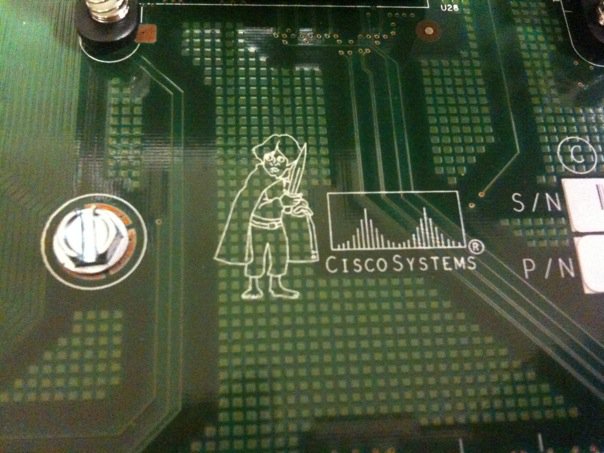
A couple of weeks ago, Dan Hughes (http://blog.olorin.co.uk/ and http://www.twitter.com/rovingengineer) opened a Catalyst 3750 switch and found something curious:

3570 Switch featuring Frodo

Soon, the questions and speculation started pouring in.  What could it be?  Was it a black market motherboard?  A prank gone wrong? Was Dan trying his hand at art college?

After some research, I found a good explanation.  Just like any major manufacturer out there, Cisco gives each project a code name while under internal development.  It makes it easier to refer to instead of typing a project number out each time, plus if any information about it leaks out before it’s ready, the competition is scratching their heads wondering why you might be working on a new Shire-friendly device.

In this particular case, the 3750 switch was the first in Cisco’s portfolio to use Stackwise technology.  According to the very detailed whitepaper found here:

(http://www.cisco.com/en/US/prod/collateral/switches/ps5718/ps5023/prod_white_paper09186a00801b096a.html)

the switch uses a combination of hardware and software to create a ring between all members of the stack in order to emulate the backplane of a chassis switch.  During internal testing, this new technology get tagged with the code name Lord of the Rings, which is why you’ll find our little Hobbit friend of the motherboard of your 3750 if you open it up.

And since I can’t get enough of trivia like that, I did some additional digging and came up with some interesting and not-so-interesting code names for other Cisco products:

Cisco GSR 12000 series -> Cisco BFR (Big F***ing Router, or Big Fast Router if you’re in marketing) Supposedly named after the Big F***ing Gun (BFG) from the video game Doom.  You can see a picture of the BFR logo on a 12000 linecard here: http://www.kumari.net/gallery2/main.php?g2_itemId=331

Cisco CRS-1 -> HFR (Huge Fast Router, or Huge F***ing Router depending on who you ask).  Named after the Cisco GSR 12000 from above.  And yet it needed to be changed to a less specific and more PC acronym.  HFR lives on if you look at the software loads for the CRS-1, though.  They all start with “hfr”.

Cisco UCS -> “California”.  This one is interesting.  All during development, the UCS project was code named California.  In fact, all of the Cisco entries in the product line are named after places in California:

Los Angeles – 2RU UCS C250

San Diego – C210 and C200

Palo – Cisco virtualized networking/storage adapter

Catalina – Memory controller chip inside the UCS servers that allow extra memory sockets to be connected to the memory bus

So the next time you find yourself staring at a fictional character on a motherboard, don’t automatically assume that it’s something sinister.  It might just be an homage that only gets seen by 10 or 15 people.  Who then post it on the Internet and ruin the surprise for everyone.

By the way, if anyone out there knows any other cool Cisco product code names (for released products), post a comment and let me know.  These kinds of things are the stuff I expect to win on Jeopardy! with at some point in my lifetime.

What a RIP-off!

A few days ago, there were a couple of tweets in my stream about RIP. Yes, the much-maligned, older-than-the-hills Routing Information Protocol. These particular tweets came from a couple of people that are in the study process for their CCIE lab exam. Having had a couple of shots at the lab myself, I found it prudent to mention that while RIP was indeed on the exam, don’t believe for one second that it’s going to be easy. While I can’t and won’t discuss specifics about what I’ve seen, I think I can speak with generality about why RIP is still very much a topic on the now version 4 of the venerable CCIE exam.

Every entry-level networking student learns about RIP. It was the very first routing protocol, and as such serves as a prototype for beginners to learn about topics like hop counts, routing tables, and other more esoteric subjects. RIP was designed to do one thing and do it well. Because of that, it doesn’t take long before he complexity of RIP is exhausted and students move on to bigger and better routing topics. In fact, the only purpose that RIP serves past the very early point is as a yardstick, a way of measuring how much better something is at its job than RIP.  Students quickly learn why EIGRP is much better as an advanced distance vector routing protocol.  Or why link-state is much better for larger networks.  Because of this, CCNAs and JNCIAs all over quickly develop the idea that “RIP sucks”.

I’m not a RIP apologist by any stretch of the imagination.  But I also have a healthy respect for the fact that while RIP may not be the most impressive routing protocol by today’s lofty standards, its place in history is secure by it’s longevity and due to the fact that we wouldn’t have EIGRP and OSPF today if RIP hadn’t paved the way for them.  So, why then would a 22-year old protocol that has been eclipsed in almost every conceivable way still show up in the blueprint for the granddaddy of all routing and switching exams? In short, to screw with your head.

Anyone with a driver’s license can probably cite traffic laws.  And any of them can’t most likely describe the procedure to parallel park.  Or park on a hill.  But the second half of the US drivers test doesn’t quiz you on your knowledge of how to parallel park.  They make you go out and do it.  And often, you don’t get to parallel park in perfect conditions like you practiced for weeks and months before your test.  No, if the driving instructor is particularly insidious, they might make you parallel park on a hill in a school zone.  In much the same way, RIP is on the test to mess with you.  You know RIP inside and out.  If you’ve read Jeff Doyle’s Routing TCP/IP volume 1 you can likely diagram a RIP update packet with some toothpicks and a pencil.  But, the devious-minded proctors and test writers aren’t going to ask you CCNA-level RIP questions.  No, much like the driving instructor, they are going to make you apply your RIP knowledge to situations you might not have encountered in practice.  Like establishing RIP neighbor relationships across 4 routers with no tunnels allowed.  Or, more likely, they will give you a very simple setup followed by the most infamous of all CCIE candidate 4-letter words: redistribution.  Most people know how RIP ticks, but when you start injecting RIP into a perfectly stable OSPF topology, that’s when the rubber hits the road and most things start falling apart.  Knowing how to pick up the pieces after RIP trashes your orderly link-state protocol is one of the things that shows you are a RIP genius and aren’t scared to get your hands dirty.

You might ask yourself, “Well, anyone can write evil RIP questions all day long.  Why is it still on the exam.  Who even still uses RIP?” Good question? Who still uses frame relay?  Or dial up modems?  Or bridges?  Being a CCIE means that you aren’t phased when you run into something old and (relatively) complicated.  It means you understand why RIP and frame relay and bridges paid their dues so that today we could have OSPF and MPLS and TrILL.  And as long as there is still a mainframe out there that only speaks routed or a network that has two routers that were made during the Carter administration, you are still going to encounter RIP.  And if you think outside the box on that stressful day in a dark lab somewhere, you don’t have to worry about being RIPed off by your grandfather’s routing protocol.

The Five Most Important Clients You’ll Meet

I ran across this little config snip while switching a router from one ISP to another.  I’ve changed the IPs in the access-list to protect the guilty, but I’ve left enough to get the general idea across.  Anyone want to take a wild guess as to what’s wrong with the config? I’ll give you a little hint: The first five callers get an unexpected bonus!


aaa authentication login vty local
!
ip access-list extended VTY
permit ip 172.17.0.0 0.0.255.255 any
permit ip 192.168.10.0 0.0.0.255 any
!
line vty 0 4
login authentication vty
transport input telnet ssh
!
line vty 5 15
access-class VTY in
login authentication vty