Tech Field Day – Cisco

The second company to present at Tech Field Day was Cisco.  This is the company that I’ve had the most experience with in my wireless career, so getting to hear from them in this setting held some wonderful appeal.  While I was fairly familiar with the product line, I hoped that Cisco would give me some insight into things.

Upon arrival at the Cisco campus on Tasman Drive, we started walking through the building to our meeting room.  The wireless people were taking pictures of all the antennas in the area and geeking out about all the equipment around the building.  After we reached our briefing room, we got seated and started listening to our first presenter, Jim Florwick, who was remote and presenting over Webex.  As he went over the basic outline of Cisco wireless strategy and philosophy, it started to dawn on me that I’d seen much of this material before.  I followed along as we talked about the congestion in the 2.4 GHz spectrum and the need to start moving clients into the 5GHz range for additional throughput gains.  We got a quick overview of Cisco’s CleanAir technology, which is the technology acquired from the Cognio purchase embedded into the 3502 access point (AP) line.  This overview felt a little more like marketing, which is not necessarily the thing to bring to a Field Day.

Around about the time the first presenter started wrapping up, there were murmurs amongst the wireless delegates.  I asked Jennifer Huber what all the fuss was about, and she told me, “Do you know where we are?  This is THE Building 14!” The importance of our location was quickly apparent when someone pulled up a screenshot of the Wireless Control Server from Cisco’s website and just as plain as day, there was the third floor of the building we were currently occupying.  Since building 14 is where the bulk of the wireless development and testing occurs, it makes total sense the the majority of the example screenshots on Cisco’s website would be of that building.  For the wireless nerds, I suppose it was really like returning home.

The next presentation was from David Stiff, who is the Senior Product Manager for the Wireless Networking Business Unit for Cisco.  He went over a lot of the same material that we had just discussed, only more in depth.  He talked about technologies such as Client Link and CleanAir.  The only problem with this type of presentation is that it loses the delegates attention.  Compared to the MetaGeek or Aerohive presentations, this one felt more like a lecture.  I don’t doubt the that the information was great and wonderful to know, but since it was a lot of the same as what I’ve seen before, it didn’t hold as much appeal as the MetaGeek demo or the Aerohive show-and-tell.  In some ways, it felt more like a presentation that would be given to people less familiar with the ins and outs of wireless networking.  As Jennifer remarked to me later, “Not only have I heard that presentation before several times, I’ve given it several times as well.”

After lunch, we got to hear about the in-building cellular technology that Cisco is partnering to bring to the market.  This presentation felt a little out of place for this crowd.  A couple of the delegates mentioned that they had looked at it before, but the need for it was spotty at best and the market was pretty thin.  To me, this is the explanation for why Cisco is partnering to bring it to the market rather than developing it in house or buying the developer outright.  The idea behind in-building cellular is using the existing category 5/6 cabling in the building to help amplify cellular signals in areas where there is severe signal degradation.  I’m betting that this technology is designed to be marketed to healthcare, where the wireless spectrum is congested and cell phones barely work as it is.  Another possible option is a rural areas where cell coverage is spotty at best, like the second floor of my house only on a larger scale.  All in all, I think in-building cellular is a little too much of a niche product to be useful to me in the near future.

Next up was David Stephenson talking about next generation hotspots.  David was one of the people responsible for the 802.11u amendment, and it was apparent that he knew his stuff.  802.11u deals with scenarios where the user isn’t necessarily authorized for access to a given wireless network.  Think about being at the airport and seeing that there are tons of wireless networks to join, but you don’t know any of the keys to join them.  This is where the free hotspot idea comes in.  But since free hotspots are not necessarily available everywhere, a different idea must be considered.  802.11u addresses this by creating what looks to me like a hotspot federation or roaming agreement.  Similar to the agreements that allow cellular coverage across different provider towers, 802.11u would allow users to log in using credentials for the networks they are authorized for, and in return gain the ability to access certain services on a given network.  For instance, a user authorized to use AT&T hotspots may be able to use some internet services on a Boingo network.  For those that wish to restrict things much more, you can limit access to very basic things like emergency services.  One of the use cases that David talked about was using this next generation hotspot to allow users to log into wireless networks in a retail environment and receive coupons on their smartphones based on their login credentials.  Exciting stuff to hear about, and lots to look forward in the future.

The last presenter was Jameson Blandford, a Cisco TME who is somewhat famous for a competitive analysis video on Youtube:

Jameson’s portion of the presentation was NDA’d due to a lot of restricted competitive analysis.  Based on what he said and things that I observed later during Tech Field Day, I’ve got a lot of thinking and analysis to do about the current state of the arms race amongst the various wireless vendors.

Tom’s Take

As a Cisco partner engineer, I get to hear from Cisco quite a bit.  Their presentation methodology is polished and crisp.  However, in the case of Tech Field Day I think they were just a bit off the mark.  As I’ve said before , Tech Field Day delegates aren’t your usual group of decision makers and slightly technical people.  We’re nerds and geeks.  We like seeing how things work and hearing about the gory details.  Cisco has always presented good opportunities in the past to get into the nuts and bolts of how things work.  Maybe a demo of CleanAir healing a network, similar to the video above.  Or perhaps an opportunity for us to see even a canned demo of a next generation hotspot.  Something to keep our attention rather than the endless parade of Powerpoint slides.  I never want presenters at Tech Field Day to have a bad outing, so I’m hoping that my words here will help encourage Cisco to step up next time and hit one out of the park.  Most of the info was great, but knowing how to reach your captive Tech Field Day audience is just as key.

If you’d like to learn more about Cisco and their wireless technology, head on over to http://www.cisco.com/go/wireless.  In addition, you can follow their wireless information on Twitter at @cisco_mobility

Disclaimer

Cisco was a sponsor of Tech Field Day, and as such was responsible for a portion of my travel expenses and hotel accommodations.  In addition, they provided lunch for the delegates on Thursday afternoon.  They were not promised, nor were they offered any consideration in the writing of this review.  All of the opinions and analysis offered here are mine and mine alone and are given freely and without reservation.


Tech Field Day – MetaGeek

The first Tech Field Day presenter that we heard from was MetaGeek.  I’ve been a fan of their free InSSIDer product for a while now.  At the time, my needs were fairly simple when it came to wireless spectrum scanning.  I simply looked for the SSID network names and used a little interpolation to help me find access points.  However, the 2.4 GHz spectrum where most client devices now operate has become congested with devices and sources of non-WiFi interference, so little tricks aren’t going to cut it any longer.  You need a serious tool to help you make sense of things.  MetaGeek offers a solution to help you find out a little more about the space around you.

The presentation started out with a quick recap about the founding of the company.  Once nice thing that I saw was that the head geek and founder, Ryan Woodings, saw a need and capitalized on it.  His original device was designed to scan wireless mice for interference.  He expanded it to include more and more sources of wireless transmission.  Much like any geek or nerd I know, he started peeling back the layers and diving deeper into the problem.  A couple of fun pictures about the first MetaGeek offices and their exposure on Engadget leading to their success today had me feeling a little nostalgic.  It’s always nice to see a company come from humble beginnings and enjoy great success.

Once the short and fun history lesson was out of the way, it was time for the real payoff – a demonstration of the flagship Wi-Spy DBx analyzer tool and the associated Chanalyzer Pro analysis software.  The Tech Field Day delegates also recieved a Wi-Spy and copy of Chanalyzer Pro so that we could follow along with the geeks as they laid out their program and it’s capabilities.

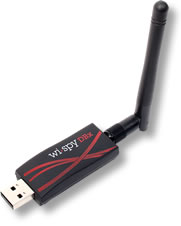
WiSpy DBx (Image courtesy of MetaGeek)

The Wi-Spy DBx is a very unassuming piece of hardware, a USB adapter with an RP-SMA connector on the end.  The small form factor allows it to be plugged in just about anywhere quickly and easily.  The DBx model allows you to scan both the 2.4 GHz spectrum where 802.11b and 802.11g networks operate and the 5 GHz spectrum where 802.11a networks are prevalent.  Note that the Wi-Spy can’t scan both network simultaneously, so if you want to do captures on both at the same time you’ll need two DBx units, or one DBx and one 2.4GHz-only unit like the Wi-Spy 2.4x.  There is also a patch antenna option that allows you to be a little more specific about the direction of the signal detection.

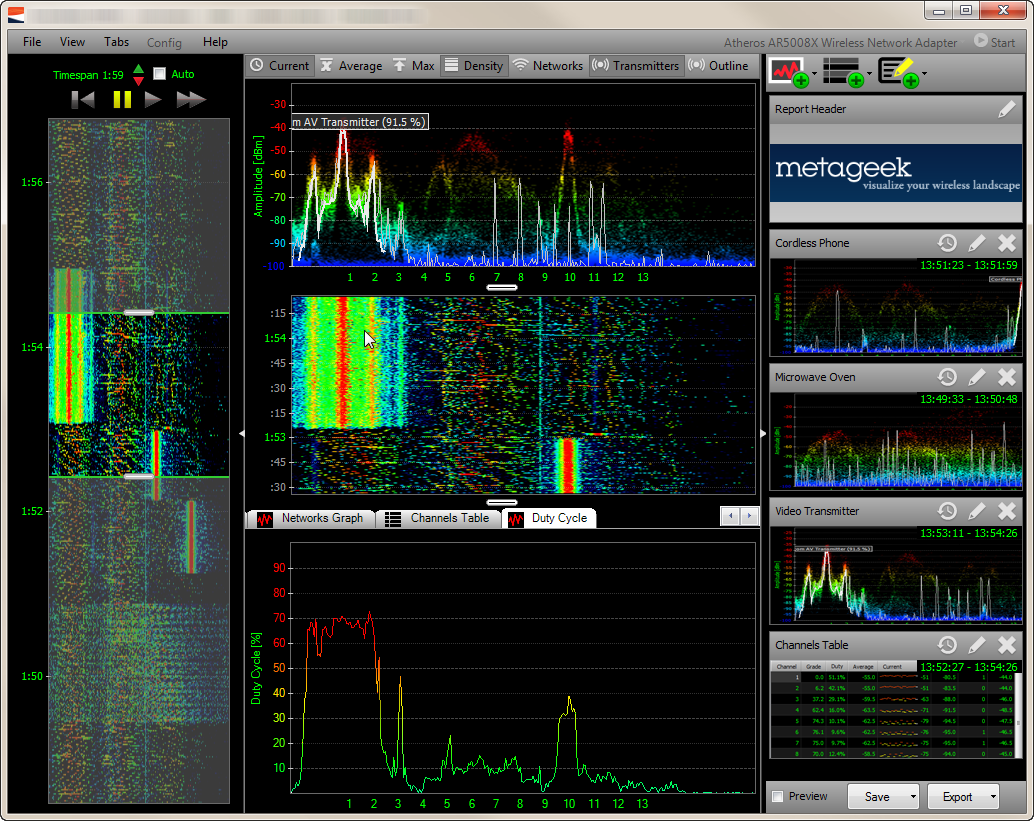
Chanalyzer Pro (Image courtesy of MetaGeek)

The Chanalyzer Pro application is where you are going to spend most of your time.  It gives you a great visual representation of the information the Wi-Spy will be passing along to you.  The application packs a lot of information into a small space.  The line graph at the top center shows you the utilization for the spectrum currently being scanned.  There are options to turn on/off the average and peak utilization, as well as the intensity of signals in color.  This is where you will notice the utilization of a given frequency or channel.  The middle pane show the ‘waterfall’ view, which is the representation of the top pane over time.  This gives you the opportunity to see any sources of interference as they appear and persist.  The bottom pane gives you more specific detail to drill into, such as SSID overlay or duty cycle information.  This is painted in both a specific graph on the bottom and in the case of the SSID, overlaid on the top graph to allow you to see that there are too many access points (APs) on the same channel in your vicinity.  The large graph on the left side of the window extends the waterfall view over time, but also allows you to move the graph to any point during the time of the packet capture.  This is a great feature for sources of interference that are transient.  You can rewind and fast forward much like a DVR.  This is great if you were preoccupied when the interference happened or you need to review it again to profile the specifics for later classification.

During our great demo, Ryan and Trent Cutler were showing us some of the more interesting interference sources they have seen and classified.  Much like any good investigator, they can recognize things like the difference between 802.11b and 802.11g APs on sight, as well as being able to tell you the difference between a microwave and a cordless phone.  For those of us not as gifted in the art of interference profiling, the Chanalyzer application includes preset waveforms that allow you to overlay them on the graph to tell you the difference between your cordless phone and a wireless video camera.  Very handy for nerds like me that need a little more time in the saddle before we can spot the trouble from the line graph itself.  You can also take captures of interference sources and send them to Trent and he’ll help identify them if it’s something that hasn’t been seen before.  He keeps a collection of the odd and interesting captures he’s gotten, like a fun version of a stamp collection.  I think my favorite was the ceiling fan mounted audio system.

Tom’s Take

The MetaGeeks really knocked it out of the park for the first batter up at the plate.  They looked a little nervous at first, but once into their element, they really shined at showing the delegates what their tool was capable of doing.  I was very impressed by the power of their software along with the ease of use.  So much so that after I returned from Tech Field Day, I spent a whole evening running around my house with my Wi-Spy turning on microwaves and cordless phones and being amazed at what I saw.  The other spectrum analyzers I’ve seen run in the thousands of dollars, which makes the Wi-Spy an incredible value for those wanting to jump into the spectrum analysis arena without needed to sacrifice a kidney in the process.  I plan on giving the Wi-Spy a real run for it’s money in the near future to see how well I can integrate it into what I do every day.  I even plan on getting some interesting spectrum captures to see if I can stump Ryan and Trent.

If you’d like to learn more about MetaGeek and their product lines, you can check them out at http://www.metageek.net.  You can also follow them on twitter as @metageek.

Disclaimer

MetaGeek was a sponsor of Tech Field Day, and as such they were responsible for paying a portion of my travel costs and hotel expenses.  In addition, they provided a package to the delegates containing a Wi-Spy DBx with Chanalyzer Pro as well as Chanalyzer Lab and a Device Finder patch antenna option.  There was also a WiFi Interference Detection Kit (a bag of microwave popcorn) included in the black lunchbox that housed the rest of the equipment.  This package was provided to the delegates for evaluation purposes and was in no way intended to curry favor.  They did not ask for, nor were they promised any consideration in any review.  Any and all opinions and conclusions in this review were provided freely and clearly and reflect my own thoughts on the product.

HP Wireless Updates

Today, HP has launched a couple of new additions to their wireless portfolio.  I was able to get a look at them and ask some questions about their performance and capabilities.  First, a little history lesson for those not up on HP wireless networking.

Back in the day, when HP Networking was the entity formerly known as Procurve, they had their own product line for wireless, centered around their Wireless Edge Services Module.  This little blade plugged into the 54xx and 82xx switches to provide a controller-based wireless solution.  The access points used by HP weren’t called “access points” but “radio ports”, more accurately describing their function as dumb antennas that relayed the signal back to a central controller, where the traffic was then switched to the appropriate port or routed for destinations known or unknown.  It worked fairly well for what it was, and I had a couple of opportunities to deploy it for some customers.  It was 802.11 a/b/g only, so when the newer 802.11n access points started coming along, this solution couldn’t keep up with the users’ faster data access desires.

To rectify this situation, HP announced the purchase of Colubris Networks back in August 2008.  Colubris was one of the first manufacturers of 802.11n APs and had some very interesting plans to start offering a controller that allowed wired and wireless users to be integrated into one appliance for traffic selection and processing.  Alas, this product never really came out, and so the whole development team was swept up into HP after the purchase.  The existing Colubris APs and controllers became the new MSM series access points from HP, and the old Procurve Wireless Edge and Radio Port solution was put out to pasture.

Fast forward about 2.3 years, and you have today’s announcement from HP of their first dual-band a/b/g/n radio sets.  These units are designed to compete with Cisco’s 1142 AP, based on the slide deck that I was shown.  There are two new APs with internal omnidirectional antennas, the E-MSM430 and the E-MSM460.  The 460 is a 3×3:3 AP, which means that it has 3 transmit and 3 receive antennas (3×3), as well as support for 3 data streams (:3).  The 430 is 2X3:2, meaning it has 2 transmit antennas and 2 data streams.  For a point of reference, the competing Cisco 1142 AP is 2×3:2 as well.  Having more spatial streams means that you can really crank up the bandwidth.  The 430 has a max bandwidth of 300 Mbps per radio, when the 460 can top out at 450 Mbps per radio.  There is also an E-MSM 466 that has 3×3:3 antenna support, but uses a selection of external antennas as opposed to the internal omnis of the other units.

The APs use a standards-based implementation of beamforming, as well as 802.3af PoE standards.  They also offer a capability of steering clients to less-used sections of the airspace.  Many devices today offer 802.11a as well as 802.11b/g client radios.  However, many devices will show a preference for one over the other, and in many consumer cases this preference is for the 2.4 Ghz 802.11b/g spectrum, which by now is full of lots of things, like microwaves, cordless phones, Mi-Fi mobile hotspots , and so on.  It’s getting pretty crowded to try and do anything.  The 802.11a spectrum, on the other hand, appears to be very open at this point.  There are very few devices competing up there, and the amount of non-overlapping channels lends itself well to things like channel bonding to increase throughput.  HP’s technology will allow the controller to steer the 802.11a-capable clients to that spectrum and allow the 2.4 space a little breathing room.  That could be a lifesaver for certain markets where connectivity in that band range is very critical, like healthcare for instance.

For those of you have cold sweats about the last wireless announcement, have no fears here.  The new APs are designed to work with the 7xx-series controllers, so you won’t need to rent any more forklifts.  The controllers have the capability to have traffic exit at both the controller end and the AP end, so people who want to access the network printer down the hall won’t have their traffic traversing all the way back to the network core to come back down to the printer.  That aspect has me very interested, as I’m beginning to see some throughput concerns with all AP traffic terminated at the controller.  There are only so many links you can shove into an Etherchannel/LACP setup.

There is also an update to the HP Mobility Manager software.  This Single Pane of Glass (SPoG) software allows you to manage multiple controllers and APs at the same time.  You can get a pretty accurate picture of your network quickly and decide how best to implement policy changes.  This software will also integrate with Procurve Manager Plus and the HP Intelligent Management Center (formerly of H3C).  These capabilities are nice so your NOC people don’t have to keep flipping back and forth between applications to ensure the network is up and running.

Tom’s Take

I’m glad to see HP joining the dual-radio world with this new set of access points.  As pointed out by almost all of the wireless blogs I follow, the 2.4 Ghz space is far too congested now, and with almost all devices being shipped now starting to include 5 Ghz radios as well, it’s very critical that a serious wireless company get involved in both spectrums simultaneously.  This new series of APs will allow them to complete directly with Cisco, and if the specs on the 460/466 hold up those two APs should provide higher throughput for connected clients.  Coupled with the capability to shunt clients to less-congested airspace, it should make some aspects of wireless troubleshooting much easier on us poor wireless rock stars.  The Mobility Manager updates should also prove helpful to those people using the software to control multiple controllers and AP setups.

This offering shows that HP is looking to step up their game and are going to compete with Cisco and most likely Juniper once the dust settles from the Trapeze acquisition.  I’m optimistic that these new offerings will compliment HP’s wireless infrastructure and drive innovation in both the hardware and software from the competition.  It should be a win-win for everyone that deals with wireless regularly.

If you would like to read the press release on these wireless updates, you can see it HERE. If you’d like to see the speeds and feeds on these new products, check out the HP Wireless Networking landing page HERE.