Unknown's avatar

About networkingnerd

Tom Hollingsworth, CCIE #29213, is a former network engineer and current organizer for Tech Field Day. Tom has been in the IT industry since 2002, and has been a nerd since he first drew breath.

Why I Dislike Keynotes

I’d like to take a moment to talk about keynote presentations.  Anyone that has been to a major event in the last hundred years has had the privilege of hearing a keynote address.  Keynote comes from literature, where it describes something that sets an underlying theme.  Keynotes set the tone for everything that follows and serve as a framing mechanism.  At a conference or other gathering, a keynote is usually delivered by an important figure, either a high executive from the conference sponsor or a celebrity of some kind.  The celebrity can be used as a way to generate excitement or publicity about the conference, as people not otherwise interested might sign up just to see the keynote speaker.  Except, there’s just one issue…

I don’t like keynote addresses.

Nope.  None of them.  I’m not singling anyone out here.  I don’t like the idea of a keynote, period.  At most of the conferences and Tech Field Day events that I attend, we have a small mix of people listening to presentations and giving honest and real-time feedback about what they are hearing.  It’s not all that dissimilar from an honors class in college.  Smaller groups that debate topics and ask deeper, probing questions that might not be as welcome in a larger class.  I can specifically remember in my microeconomics class back in college spending two weeks building a utility-based theory of demand.  Once we thought we had our theory nailed down, the professor asked a couple of deceptively simple questions that pulled the rug out from under us and forced us to examine all the hard work that we had been doing for the last two weeks.  He gave us the rest of the day off to think about why we were wrong and when we came to class the next week, we started forming a proper demand theory that addressed all the shortcomings that had been brought up.  It was a fascinating exercise and we all learned a lot from it because we were allowed to take our own path and ask our own questions.  My friend in the larger non-honors section of the same class with the same teacher was simply told how the theory needed to be constructed on the first day of class.  No investigation, no construction.  This is how things are and how you will see them.

Keynote addresses, to me, are much the same as the large class sections.  We have a speaker who holds some importance, whether they be a CEO, CIO, or other famous celebrity.  They get to stand up and spend 45-60 minutes talking.  Their presentation is carefully constructed to display a certain message.  It feels like being in a car wash.  Things are happening around you, but you are locked in for the ride, unable to interact with anything going on.  Questions aren’t invited during a keynote.  You aren’t supposed to provide feedback to this important CxO/celebrity.  Your job as the audience is to sit there and accept what is being spoonfed to you.  That’s what I dislike the most.  I’m a vocal guy, especially when I disagree with something that’s being said.  At smaller gatherings, I can express my dissatisfaction.  Many times, we can have an interesting discussion about things, and often times I can either change my mind or at least see where the speaker is coming from.  In a keynote, I don’t get that opportunity.  I can lean over to the person sitting next to me and say something.  I can take to social media outlets and express my opinion, even if it is limited in character space.  Yet none of that will likely ever reach the person giving the speech.  If I disagree with their assessment or opinion of things, it’s a good chance that others do as well.  If we aren’t allowed to make our feelings on the matter known, then the speaker will likely never understand the dissension to their ideas.

Think about the definition of keynote for a moment.  It is something that is supposed to frame the discussion.  It’s a leading talk at the beginning to direct people to a goal.  What is the purpose of a closing keynote then?  These are usually the celebrity talks.  They involve an interviewer asking leading questions of someone not usually associated with the field in a way to make their opinions and observations relate to a topic at hand.  Almost as if to say “See?  Musicians and movie stars know about information technology too!”  Ask yourself this question: When’s the last time your heard someone exclaim, “I can’t wait to hear <celebrity>’s closing keynote!  I’m interested in their take on data center fabrics.”  Usually, the closing keynote will just serve as a way to generate interest and keep the attendees all the way to the end of the conference.  People want to see the movie star or the famous director talk.  They could care less if that person read numbers out of a phone book for a hour.

Tom’s Take

I can’t really stop keynotes.  I’m going to have to live with them at every conference I attend, with some notable exceptions.  What I can do is tell people how much I’d rather have a frank and open discussion about things.  It’s very easy for a CxO to stand in front of a captive audience and dictate policy and vision.  It’s an entirely different atmosphere when said CxO instead spends that time fielding questions and having frank discussions with people.  Would you rather hear about sweeping changes and visionary statements?  Or would you rather ask questions and get the chance to hear honest feedback?  I know which I’d rather have.  So while you might see me sitting in a keynote address from time to time, know that I’ve got something else on my mind entirely.


Cisco Live 2012 – The Place To Be Social

With less than a month to go until Cisco Live 2012 in San Diego, we’re learning more and more about the festivities every day.  From the closing keynote speakers to the Customer Appreciation Event (CAE) band, it’s shaping up to be a very exciting event.  One area that I’m particularly excited to learn more about is the social side of things.  Last year was the best Cisco Live event I’ve ever attended, due in large part to all the people that I interacted with from Twitter and other social media sites.  We spent so much time hanging out together outside the registration desk that our group of tables was nicknamed “Tom’s Corner”.  I still blush a little bit when I think of that moniker.  It was wonderful having a place for everyone to come and sit down for a bit and just hang out or discuss sessions or speakers.  Even if we did have to fight for table space or chairs from time to time, I feel that having a place set aside for everyone to meet is a wonderful idea.  For Cisco Live 2012, the great folks at Cisco that are behind social media realize that too.  That leads to a couple of exciting new opportunities this year.

Social Media Lounge

The first thing that I’m excited about is a specific area set aside in the World of Solutions (WoS) for social media!  I always hear about “blogger lounges” and other such places at other vendor events or trade shows.  Cisco must have heard about them too, because we’re going to have our own spot at Cisco Live.  Much like the NetVet Lounge or the Cisco Certified Lounge, social media will finally have a hangout to call our own.  Based on some information that I’ve seen, it’s going to be a nice place to congregate and relax.  Couches galore, TVs all around, and even perhaps some entertainment options like an XBox or two.  This will also be the place where Cisco’s social media team will likely be hanging out as well, so if you want to interact with them then this is the place to be.  I’m already planning on moving myself in the second the WoS opens up.  I wonder if they’ll let me hang a banner…?

CAE Tweetup

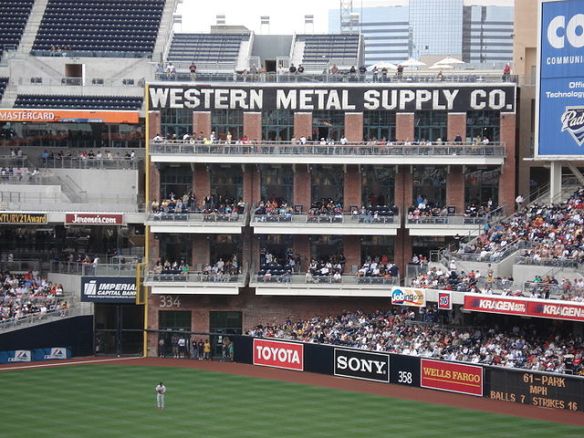
Since last year’s CAE Tweetup was such a rousing success, there’s going to be another one this year.  I’m excited for all the same reasons that I’m thrilled about the social media lounge.  The CAE Tweetup is going to be even better though.  I’ll give you a hint why:

That’s where we’re going to be!  Originally, the Western Metal Supply Company building was going to be torn down when Petco Park was being built in 2004.  Since it was such a historic piece of San Diego, the park designers found a way to incorporate it into the actual architecture of the park.  The Western Metal Building has now been converted into a section of luxury suites with balconies and even a viewing terrace on the roof.  During the CAE, one of those suites will house the Tweetup.  It’s going to be a great time for sure.  I’ll post more info about the CAE once my Cisco Live moles feed me more information.

Other Tweetups

Since the WoS (and social media lounge) will only be open from Monday evening to Thursday afternoon, there’s been discussion of what to do about meeting up with people around those hours.  It’s always great to get in and hang out with everyone on the first day, especially since many of us don’t get to see each other unless we run into one another at Cisco Live.  Since I’m arriving around lunchtime on Sunday, June 10, I was talking to the Cisco Live folks about having an impromptu tweetup that afternoon, say around 3 p.m. or so.  The event schedule for Sunday looks fairly light, so having a tweetup around that time would give us all a chance to stop by and say hello before wandering off to parts unknown.  There’s still not a firm place nailed down for the meeting, so once again I’ll be relying on my Bothan spies to get me the information as soon as possible.

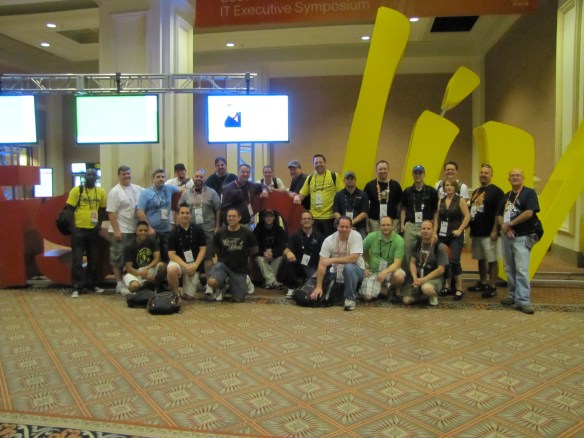
Another idea being kicked around is a farewell tweetup sometime on Thursday.  The closing keynote runs from 2:00 to 3:00, but afterwards there are going to be many people that either don’t have sessions or just want to hang out one last time.  What would be a good time to have this last Twitter party of Cisco Live?  Last year we all hung out at Tom’s Corner until they came and took our tables away before heading off to dinner.  This year, I was thinking we could use the final meetup to take an awesome picture next to the Cisco Live sign like this one from last year:

The Cisco Live 2011 Twitter Army

There were a few folks that couldn’t make it to the photo session last year for various reasons.  This year, I figured it we got it all planned ahead of time no one would be left out. If you have any good ideas for the Thursday tweetup, either time or location, leave me a comment.  I’ll be sure to forward it on to the Cisco Live folks and make your voice heard.

Tom’s Take

Social media is a wonderful and powerful thing.  As you can see, Cisco is putting a lot of extra effort into social media and its participants this year.  From having our own lounge in the WoS to having a luxury box at the CAE, there’s no denying that it’s going to be a great time.  If you haven’t already, make sure you’re on the Cisco Live 2012 Twitter List.  That way, we can all link up easier and put names and faces to Twitter handles.  You should also log into your Cisco Live account and be sure your Twitter handle is there so it can be printed on your badge.  Let’s face it, most of us are more familiar by our handles and avatars than we are by our given names.  Hopefully, that will change with all the amazing opportunities that Cisco has given us to hang out together at Cisco Live 2012.  I can’t wait!

So Long To The CCIP

The Cisco Certified Internetwork Professional (CCIP) certification has always been the goal of those network professionals that wanted to march to the beat of a different drummer.  People like me that concentrate on the enterprise/campus side of things revel in our use of OSPF and EIGRP.  We live and die by IOS and get cold sweats at night when someone mentions IS-IS.  The ideal CCIP candidate, on the other hand, loves all of this service provider oriented talk.  They want to spend all their time talking about ingress QoS policies.  They cackle with glee when the subject of MPLS-TE comes up.  They think users are just a myth that exist on the other side of the mythical CPE Wall.

The problem, though, is that the CCIP hasn’t really been focused on the service provider arena for a while now.  While the other professional level exams have received overhauls in the recent past, no one touched the CCIP.  When the CCVP and CCSP became the CCNP: Voice and CCNP: Security, no one wanted to make the CCNP: Internetwork.  The coursework for the CCIP has always relied heavily on other tracks to exist.  QoS is a big part of the SP world, so the QoS exam was borrowed from the voice track.  Routing is another huge part, so the old Building Cisco Scalable Internetworks (BSCI) test was repurposed as well.  The only pure CCIP exams were over BGP and MPLS.  You could even take a composite exam if you were feeling up to the challenge of getting your teeth kicked in for twice as long.  However, the routing exam has caused some consternation.  When I originally studied for my CCNP three years ago, the BSCI book was a handbook of enterprise and service provider routing.  It contained a lot of information about every routing protocol.  While it focused on OSPF and EIGRP, there was a touch of BGP and IS-IS as well.  It served as the foundation for the CCNP, CCDP, and the CCIP.  This made sense with Cisco’s foundation being the router.  However, when Cisco changed the tests and courseware for the CCNP with their latest refresh, the new ROUTE test was a shell of its former self.  Based on the blueprint (login required), it still tests on OSPF, EIGRP, and BGP somewhat.  It even throws in IPv6 routing as well, which is a sorely needed topic.  However, there’s no IS-IS.  None. Nada. Zilch.  How’s that supposed to help the SP engineer that might use IS-IS all the time and never see EIGRP?  Something needed to be done.  And every passing day that the CCIP relied upon tests that didn’t fulfill the criteria of the people being certified was a day that it passed closer to irrelevance.

Thankfully, Cisco decided in May 2012 to overhaul the entire CCIP track.  Now known as the CCNP: Service Provider, it finally focuses on the things that service provider network professionals will be doing.  The four new tests are specific to the SP track.  There are no overlapping tests.  The prerequisite for the CCNP: SP is the CCNA: SP, which is two SP-specific tests of it’s own.  Cisco has finally figured out that most SP engineers exist in a world all their own with very little in common with enterprise/campus folks.  A quick glance at Mirek Burnejko’s excellent IT Certfication Master page for the CCNP:SP shows that the SPROUTE test will focus on IS-IS, OSPFv2 and v3, and BGP.  No EIGRP to be found.  It also tests these topics on IOS-XR and IOS-XE, the new flavors of IOS that run on the equipment that would be found in an SP environment.  If you’d like to see more about the ins and outs of IOS-XR, check out Jeff Fry’s (@fryguy_pa) IOS-XR posts.  The SPADVROUTE test focuses on BGP and multicast, the two odd ducks of routing.  This means that you can spend your time reading Jeff Doyle’s Routing TCP/IP Volume 2 and take a test basically over that whole book.  The SPCORE covers QoS and MPLS functionality such as MPLS-TE.  That’s where I’d expect to see the TE stuff, since it’s usually configured in the network core and not on the edges.  The SPEDGE test covers MPLS VPNs, as well as VPN technologies in general.  I like that Cisco chose to split the core and edge pieces of the CCNP: SP, as there are people that may spend their entire careers working on P routers and never see a piece of CPE equipment.  Conversely, there are those that want to stay as far away from the core as possible and would prefer to make the PE router their device of choice.

The CCNP: SP is available today at any Prometric/VUE testing center.  You can find out more about the certification from Cisco’s website or by visiting Mirek’s site above.

Tom’s Take

Cisco has done a great job of breaking the CCIP up into bite-sized chunks that have clearly defined topic boundaries.  I can choose to focus on interior routing without worrying about multicast.  I can focus on MPLS VPN without thinking too much about MPLS-TE.  I can focus on the important parts one at a time.  The new CCNP: SP also addresses the shortcomings I’ve seen with the old CCIP test.  By giving the SP track a dedicated testing platform all by itself, Cisco no longer has to worry that test changes in one area will carry over to a separate track and cause confusion and delay.  As well, with the new branding and focus on the service provider arena, Cisco has shown that it has not forsaken those that want to spend their time working behind the scenes at ISPs.

Switchport Voice VLAN – What Does It Do?

One of the more tedious parts of any phone system deployment is configuring the access layer switches to support said phones.  The configuration in and of itself isn’t complicated, but every port that may receive a phone needs to be setup correctly.  In Cisco parlance, this is accomplished with the switchport voice vlan <ID> command.  I’ve typed that into the CLI a thousand times and never really knew what it did besides “make the phones work”.  After a little research, I finally found some answers.  I thought I’d share them with you.

In the old days, before the Catalyst 2950, configuring a switch port for use by a phone involved creating an explicit 802.1q trunk.  This made sense from the perspective that it allowed traffic from multiple VLANs to pass on a single link.  It also allowed the 802.1p priority bits for Quality of Service (QoS) tagging to be sent with the frames.  The downside is that it was very difficult for phone mobility.  You either needed to provision every phone-facing switchport in your organization to be an 802.1q trunk or you had to leave the phones were they were.  While the latter is usually the case in most of my deployments, the mobility provided by the ability to plug a phone in anywhere in the network and not worry about extra configuration is key to some clients.  Thankfully, Cisco fixed this starting in the 2950 with a little concept known as the Auxiliary VLAN.

The Auxiliary VLAN (AUX VLAN) is a specialized VLAN that sits beside a regular access VLAN configured on a switch (sometimes called a “normal” VLAN).  The purpose of the AUX VLAN is to allow IP phones to transmit their payloads along with the untagged data coming from a PC that might be plugged into a switchport on the back of the phone.  The AUX VLAN allows these two devices to transmit on the same port without the need to use an explicit trunk on the link.  In addition, since the port is not configured explicitly as an 802.1q trunk, extraneous VLANs will not be flooded over the port.  In essence, the port becomes a two VLAN trunk.  All the phone traffic is tagged with the ID of the AUX VLAN and the PC traffic is untagged.  Curiously, according to this document, the traffic in the AUX VLAN must also carry a Class of Service (CoS) of 5 along with the AUX VLAN ID.  Otherwise, the traffic is dropped.  So how does the phone get the ID of the AUX VLAN so it can start sending the traffic?  Ah, that’s where CDP comes in.

Cisco Discovery Protocol (CDP) is very crucial in the operation of a Cisco IP phone.  It not only provides the AUX (Voice) VLAN ID for the phone to being sending traffic on the AUX VLAN, it also allows the phone to automatically negotiate power settings.  This allows the phone to use less than the maximum 15.4 watts of power under the 802.3af PoE standard.  If you disable CDP on the port facing the phone/PC you will likely start pulling your hair out.  Even though the phone might have already assigned itself in the Voice VLAN, removing CDP from the switchport in question causes it to forget where to find the voice VLAN.  You’ll need to re-enable CDP and reboot the phone.  You could also statically configure an 802.1q trunk to fix the issue, but where’s the fun in that?

One other curious note is that I’ve always been told that the connection between the phone and the switch when switchport voice vlan is configured is a “special 802.1q trunk”.  Not that I’ve ever been able to see that configuration, as show interface trunk seems to think that the port isn’t trunking and show interface switchport says that it’s an access port.  The key is in Cisco’s documentation.  The correct term for a port with switchport voice vlan configured is a “multi-VLAN access port”.  The distinction between the two is that only the two vlans (voice and access) configured on the switchport will be accepted on the link.  If you were to do something silly like, oh I don’t know, plug another switch into the back of the phone and configure an access port on that switch to be in a different VLAN than the voice or PC access VLAN, traffic will not pass through the phone port to the switch.  Once again, that’s because this isn’t a real trunk.  The switch will only accept tagged frames from the Voice (AUX) VLAN.


Tom’s Take

I hope this was a little more insight into what the magical command switchport voice vlan does on a switch.  I’m often asked by people new to voice why this must be configured each time.  Before I blindly regurgitated lines like “special 802.1q trunk” and “do it or it won’t work.”  Now I have a very interesting story to tell and threaten people with if they don’t do it.

Cisco Unified Communications Manager 8: Expert Administration Cookbook – Review

When you spend as much time configuring Cisco Unified Communications Manager (CUCM) servers as I do, you do one of two things.  Either you spend a lot of time reading through documentation, or you write down the important steps as concisely as possible for later use.  Documentation has uses.  When you are first learning something or you need the explanation for exactly what a partition does, documentation is your best friend.  However, when you’ve configured a ton of servers already and know the basics cold, wading through page upon page of prose to find the missing parameter of your Automated Alternate Routing (AAR) configuration is time consuming and frustrating.  If only there was some book that you could keep with you that has the basic configurations spelled out in short snippets.  A book that would allow you to quickly look up a function or feature and get it up and running without a fifteen page lead-in.  Thankfully, such a book does exist:

Tanner Ezell (@tannerezell) does a great job of condensing the mountain of documentation that Cisco has produced to support CUCM into 285 pages of tips and tricks on configuring important features that you’ll run across every day.  Unlike the Cisco Press CUCM guide I reviewed previously, Tanner’s book doesn’t step through the details of configuring a partition or a calling search space (CSS) for the first time.  Instead, this book assumes that you are a professional that has done tasks like that many, many times before.  Instead, this book concentrates on some of the newer features in CUCM 8 that may or may not be something that the reader has configured before.  Things like E.164 normalized dialing using the “+” symbol or Cross-Cluster Extension Mobility.  In fact, after reading the first three recipes in the book, I configured plus-dialing on my production cluster with no fuss.  That’s not something I was comfortable doing after reading through the tome of configuration on Cisco’s website or in the Solution Reference Network Design (SRND) document.

Think of this book as a reference guide for the 20% of features that you may configure once or twice every six months.  Sure, I can create a North American Numbering Plan (NANP) route pattern list in my sleep.  However, when it comes time for me to configure AAR or setup the Real Time Monitoring Tool (RTMT) to email me when something breaks, I’m going to have to look up how to do that.  Now, all I need to do is flip open this book to the appropriate chapter and get right to work without using CTRL + F to sort through to what I need to know.

Tom’s Take

CUCM 8 Expert Administration Cookbook was a pretty quick read for me.  That’s because I’ve seen many of the things in here before.  The problem is that I don’t remember them since they aren’t things I do every day.  It’s nice to know that I have a good reference book that I can rely on to help me in those times of need when I have to have a feature up and running quickly and my mind has gone totally blank on it.  I commend Tanner Ezell for taking the time to boil the feature configuration down to the bare necessities needed to get everything operational and then put it into printed form for us to enjoy.  I’m sure that my copy of this book is going to be well worn for many deployments to come.

Review Disclaimer

The copy of CUCM 8: Expert Administration Cookboook that was reviewed was purchased by me from Amazon.  It was not provided by the publisher.  As such, neither the publisher nor the author were granted any consideration in the writing of this review.  The opinions and analysis contained herein are mine and mine alone.

More Technical Presentation Tips

As an engineer for a Value-Added Reseller (VAR) as well as a frequent Tech Field Day delegate and technical presenter, I spend a lot of my time listening to presentations.  I often find myself critiquing them for things like speaker delivery and content.  I feel that it’s my duty to share some of my thoughts on presenting and presentation structure, especially when you choose to talk to a group of technical people.  I’ve already talked about some presentation tips before, so what follows are a couple of new things that I’ve been thinking about for the last year or so.

Time Is Not On Your Side

One of the biggest concerns that I’ve seen with technical presentations as of late is the time issue.  People are typically given a one or two hour presentation slot depending on the event I am attending or presenting at.  The presenter then proceeds to fill the entire time with slide decks and lecture.  Every minute of the presentation is accounted for by a bullet point or a fancy animated slide.  Should someone disrupt the flow of the presenter’s zen with a question or a request for clarification, they are met either with a curt answer or a request to hold all questions until the end of the session.  After the end of the presentation, there is usually very little time for Q&A.

Nowhere was this more apparent to me than at the recent Network Field Day 3.  We managed to gather a great group of individuals once again to listen to industry experts talk to us about great new technologies.  However, for the first time that I can remember, we had a group that was willing to start peppering away with questions not even five minutes into the presentation.  Between Ivan Pepelnjak (@ioshints) and Marko Milivojevic (@icemarkom), there were some very good back-and-forth discussions going on.  I love these kinds of discussions.  They really show how people can take a point and launch from it into a rabbit hole of technical brilliance.  The problem with these discussions come when you have the aforementioned presenters that have filled every minute with a slide.  There’s no room to freestyle and talk about things.  Occasionally, you have companies like Metageek come along and do something totally off the wall.  They want to listen as much as they want to present.  At Wireless Field Day 2, Ryan and Trent spent quite a bit of time talking to the delegates and getting feedback.  I’d say the last twenty minutes of their presentation was spent posing questions rather than answering them.  I found this refreshing.  So refreshing, in fact, that my presentation over cloud computing not a month later got slashed from it’s allotted hour of time down to around 45-50 minutes.  Why?  I wanted to get good feedback from my audience.  I wanted to field questions as they came in and not worry about running out of time to get to my last slide.  I wanted to be sure that my presentation involved the audience as much as possible.  I think that’s a key the needs to be taken forward for presenters.  Don’t look at your time slot as a container to fill to the brim with your own ideas.  Instead, take a cue from the coffee bars of the world and pour your slot almost full.  Leave some room for questions and discussion, which are just like the sweetener and cream I pour in my coffee.  Aim for 75-80% of your time slot for presentation.  The rest should be for your audience.  Even if you don’t get a lot of questions about your presentation, at least the people will be happy that they got out fifteen minutes early and they don’t have to rush to their next session.  Either way, your audience will love you.

Live By The Demo, Die By The Demo

Oh, the demo.  How I love thee.  No boring slide deck.  No relentless bullet points.  All the joy of seeing something work in real life.  But, at the same time I hate the demo.  Too much chance for failure.  Too easy for things to go off the rails and result in a wandering audience.  How then do we reconcile the good things about a demo with all the possible downsides?

The key to giving a good demo is to make it flow.  Come up with a script for your tour that moves the viewers seamlessly from one area to the next.  It should feel connected and coherent.  You should leave some time for improvisation in case your audience finds an area where they would like to spend some more time focusing.  However, these rabbit holes are the first sign that the demo pitfalls are coming soon.  It’s all too easy to waste time talking about a specific feature and lose sight of the big picture.  When that happens, you get lots of sidebar conversations between your audience.  When the people you are talking to spend more time talking to each other, you’ve lost control.  You need to find a way to bring things back to you.  It’s also important to note that technical people hate watching progress bars and incrementing counters.  If your demo is going to require time to load a program or push out a firmware, consider kicking it off early in your presentation and then talking more about a specific feature or fielding questions while it goes on in the background.  Infineta did this at Network Field Day 3.  Rather than let us watch the couple of hundred gigabytes of traffic flooding across a boring screen, they instead kicked off the demo and let it run in the background while they melted our brains with algorithm math.  When we had been beaten into submission by formulae, we flipped back over to see the results of the live demo.  All the benefits of a real walkthrough without any wasted time.

Tom’s Take

There’s no such thing as a perfect presentation.  It’s goal that we all strive for but can never really accomplish.  That’s not to say we as presenters can’t give it our best shot.  I’m not saying these tips will apply to you.  In fact, a large portion of the presentations that I do either don’t involve a demo or don’t have a place for one.  They key is to recognize that a live (or simulcasted) audience isn’t a group of mindless drones that will absorb your every word without question.  You should do your best to involve and include them at every step of the way.  When the audience feels they have a choice in the content and direction, they’ll be more involved and happier in the end.

My Cisco Live 2012 Schedule

It’s that time of year again.  Cisco Live 2012 in San Diego is coming up in June.  I will once again be attending for my seventh event.  After last year’s event, I realized for the first time that networking with my peers is just as important as attending breakout sessions.  With that in mind, I chose carefully this year when I build my Cisco Live conference schedule:

Monday
10:00 AM
12:00 PM
CUG-1002 Unified Communications Product Direction – Large Enterprise
1:00 PM
3:00 PM
BRKARC-3452 Cisco Nexus 5000/5500 and 2000 Switch Architecture
Tuesday
10:00 AM
11:30 AM
Conference Event GENKEY-4346 Keynote and Welcome Address
4:00 PM
6:00 PM
BRKCRT-9344 IPv6 for Cert Nuts
Wednesday
10:00 AM
11:30 AM
Conference Event GENKEY-4347 Cisco Technology Keynote
12:30 PM
2:30 PM
CUG-1008 Cisco Collaboration User Group Open Forum
4:00 PM
6:00 PM
BRKSEC-2006 It is 2012, Why Do You Keep Getting Hacked?
Thursday
8:00 AM
9:30 AM
BRKCRT-8862 Cisco Certified Architect: How to complete the journey from CCIE to CCDE to CCAr
12:00 PM
1:30 PM
CUG-1010 Cisco Collaboration User Group Business Meeting
2:00 PM
3:00 PM
Conference Event GENKEY-4358 Closing Keynote: An Afternoon with Adam Savage and Jamie Hyneman

Most of my unified communications sessions this year are going to be taking part in the Collaboration Users Group.  I like the small focus and immediate response to feedback I get from being a part of this users group.  I’m also going to be checking out some IPv6 and data center sessions, as I feel that much of what I’m going to be doing in the next couple of years will focus on these technologies.  Of course, having a security session is almost a requirement, so I found an interesting one in the list.  I’m also going to check out the Cisco Certified Architect briefing.  I’m nowhere near qualified to sit for the exam, having neither my CCDE nor the requisite experience in architect projects.  However, I think it will be interesting to see what’s going on with this certification since I was around for the initial formation discussion groups.

The keynotes are usually fairly interesting affairs.  John Chambers will likely have something to say about the new, slimmer Cisco and how they are doing in the market.  Padma Warrior will also likely be talking about the data center and the advantages that UCS offers to Cisco in this space.  The closing keynote appears to be the one that most people are talking about.  Discovery’s Mythbusters will be delivering a talk to the assembled crowd.  The closing keynotes are always interesting affairs, as you can never be quite sure what the guests will have to say to Carlos Dominguez.  I’m really looking forward to it.

If you’re headed to Cisco Live, feel free to leave a comment.  The Twitter and blogger contingent is usually fairly large and always great to hang out with.  The more people we know about at Cisco Live, the better the party will be.  See you in San Diego!

Welcome To The vExpert Class of 2012

It appears that I’ve been placed in some rarified company. In keeping with my goals for this year, I wanted to start writing more about virtualization. I do a lot of work with it in my day job and figured I should devote some time to talking about it here. I decided at the last minute to sign up for the VMware vExpert program as a way to motivate myself to spend more time on the topic of virtualization. Given that I work for a VMware partner, I almost signed up through the partner track. However, it was more important to me to be an independent vExpert and be considered based on the content on my writing. I’d seen many others talking about their inclusion into the program already via pictures and welcome emails. So it was that I figured I’d just been passed over due to lack of VMware content on my blog.

On Sunday, April 15th, VMware announced the list of vExperts for 2012. I browsed through the list after I woke up, curious to see if friends like Stephen Foskett (@SFoskett) and Maish Saidel-Keesing (@MaishSK) were still there. Imagine my surprise when I found my name in the first page of the list (they alphabetize by first name, and I’d signed up under “Alfred”). I was shocked to say the least. This means that I can now count myself among a group of distinguished individuals in virtualization. I’m an evangelist now, even if just officially. I’ve been a huge advocate of using VMware solutions for servers for a while now. This designation just means that I’m going to be spending even more time working with VMware, as well as coming up with good topics to write about. It also makes sense to me that with my desire to chase after the VCAP-DCA and VCAP-DCD to further my virtualization education, the blogging opportunities for these topics are very possible.

A vExpert isn’t the final word in virtualization. I recognize that I’ve got quite a bit to learn when it comes to the ins-and-outs of large scale virtualization. What the vExpert designation means to me is that I’ve shown my desire to learn more about these technologies and share them with everyone. There are a lot of great bloggers out there doing this very thing already. I’m excited and humbled to be included in their ranks for the coming year. I just hope I can keep up with the expectations that come with being a vExpert and reward the faith that John Troyer (@jtroyer) and Alex Maier (@lxmaier) have show in me.

Spirent – Network Field Day 3

The final presentation for Network Field Day 3 came from Spirent Communications.  This was the one company at NFD3 that I was completely in the dark about.  Beyond knowing that they “test stuff”, I was unsure how that would translate into something that a networker would be interested in using.  After I walked out of their building, I now how a new-found respect for companies that build the devices that we take for granted when reading reports.

We almost didn’t get the chance to show Spirent to the viewing audience.  Spirent was unsure how some of their software would come across on a live stream.  I can attest to the fact that software demos are sometimes not the best thing to showcase to the home audience.  However, after watching the coverage of NFD3 from the previous day, Spirent was impressed by the amount of feedback and discussion going on between the delegates and the home audience.  When we arrived at the Spirent offices, we grabbed a quick lunch while the video crew set up for the session.  We got a quick introduction from Sailaja Tennati and Patrick Johnson about who Spirent is and what they do.  Turns out that Spirent makes many of the tools that other networking vendors use to test their equipment.  I liken it to the people that make the equipment that is used to test high performance cars. As impressive as the automobile might be, it’s equally (if not more) impressive to build a machine that can test that performance and even exceed it as needed.  A famous quote says “Fred Astaire was a great dancer.  But don’t forget Ginger Rogers did everything he did backwards in high heels.”  To me, Spirent is like Ginger Rogers.  They not only have to keep up with the equipment that Cisco puts out, they have to exceed it and provide that additional capacity to the vendor.

Ankur Chadda was the next presenter.  He started off by telling us about the difficulties in testing equipment.  Firstly, as soon as there is a problem, the first thing to blame is the testing equipment.  It seems that certain people are so sure their equipment is right, there is no way anything could be wrong.  Instead, it’s the tester that’s at fault.  Many times, this comes from the idea that the data used to test the equipment should be carefully considered.  Ask yourself how many times you’ve looked at “speed and feed” numbers on a data sheet or in a publication and said to yourself, “Yeah, but are those real numbers?”  Odds are good that’s because those numbers are somewhat synthetic and generated with carefully crafted packets.  Throughput is done with very small packet sizes.  VPN connections are done with clients that just connect and not transfer data.  And so on.  Spirent uses their PASS methodology to test equipment – Performance, Availability, Security, and Scalability.  This ensures that the numbers that are generated are grounded in reality and useful to the customers wanting to run this in a production environment.

Jurrie van den Breekel introduced us to the data center testing arm of Spirent.  I find it very interesting that many vendors like Alcatel, Avaya, and Huawei come to Spirent to provide objective interoperability testing.  That says a lot about their capability as well as the trust invested in a company to provide unbiased results.  This is something I‘ve said we’ve needed in networking for very long time.  Another key piece of testing methodology is ensure that you’re comparing similar capabilities.  The example Jurrie gave in the above video is comparing switching performance when the devices use cut-through forwarding versus store-and-forward.  Based on understanding of the way those methods work, cut-through should beat store-and-forward.  However, Jurrie mentioned that there have been testing scenarios when the converse it true.  The key is making sure that the tests match the specifications being tested.  Otherwise, you end up with wacky results like those above.  The other fun anecdote from Jurrie involved testing a Juniper QFabric implementation.  One thing that most people tend to overlook when testing or installing equipment is simple cabling.  While many might take it for granted, it becomes a non-trivial issue at a big enough scale.  In the case of the QFabric test, it took two full days to cable the 1500 ports.  That’s something to keep in mind the next time someone wants you to quote hours for an installation.

Our last presenter for the streamed portion of NFD3 was Ameya Barve.  He led his talk with a nice prediction – testing as we know it will shift from individual scenarios like application or network testing and instead become converged on infrastructure testing.  This is critical because most of these tests today occur completely independent of each other.  This means that the people doing the testing need to know what to test for.  That’s one of the things that Spirent is moving towards.  I think that this kind of holistic testing is going to be critical as well.  Too many times we find out after the fact that an application had some unforeseen interaction with a portion of the network in what is normally called a “corner case scenario”.  Corner cases are extremely hard to test for in siloed testing because the interaction never happens.  It’s only when you toss everything together and shake it all up that you start finding these interesting problems.

After we shut off the cameras, we got a chance to look at a tool that Spirent uses for more focused testing.  It’s an Integrated Development Environment (IDE) tool called iTest.  iTest allows you to use all kinds of interesting things to test all aspects of your network.  You can have iTest SSH to a router to observe what happens when you pump a lot of HTTP traffic through it.  You can also write regular expressions (regex) to pull in all kinds of information that is present in log files and console output.  There’s a ton of things that you can do with iTest, and I’m just scratching the surface with it.  I’m hoping to have a totally separate post up at some point covering some of the more interesting parts of iTest.

If you’d like to learn more about Spirent and their testing tools and methodology, you can head over to their website at http://www.spirent.com.  You can also follow them on Twitter as @Spirent.

Tom’s Take

It’s always a fun when I realize there is a whole world out there that I have no idea about.  My trip to Spirent showed me that the industry built around testing is a world unto itself.  I had no idea that so much went into the methodology and setup for generating the numbers we see in marketing slides.  I’m really interested to see what Spirent will be bringing to market to help converge the siloed testing that we see today.

Tech Field Day Disclaimer

Spirent was a sponsor of Network Field Day 3.  As such, they were responsible for covering a portion of my travel and lodging expenses while attending Network Field Day 3. In addition, they provided me with a gift bag containing a coffee mug, polo shirt, pen, scratchpad, USB drive containing marketing collateral, and a 1-foot long Toblerone chocolate bar. They did not ask for, nor where they promised any kind of consideration in the writing of this review/analysis.  The opinions and analysis provided within are my own and any errors or omissions are mine and mine alone.

Solarwinds – Network Field Day 3

The first presenter up for Network Field Day 3 was a familiar face to many Tech Field Day viewers.  Solarwinds presented at the first Network Field Day and has been a sponsor of more events than any other.  It’s always nice to see vendors coming back time and again to show the delegates what they’ve been cooking since their last appearance.

We started our day in the Doubletree San Jose boardroom.  We were joined by Joel Dolisy, the Chief Software Architect for Solarwinds and Mav Turner (@mavturner), the Senior Product Manager for the network software division.  After introductions, we jumped right into some of the great software that Solarwinds makes for network engineers.  First up was the Solarwinds IP SLA Monitor.  IP Service Level Agreement (SLA) is a very important tool used by engineers to track key network metrics like reachability and latency.  What makes IP SLA so great as opposed to a bigger monitoring tool is that the engineer can take the information from IP SLA and use it to create actionable items, such as bringing down an overloaded link or sending trap information to the third-party monitoring system to alert key personnel when something is amiss.  One of the sore spots about IP SLA from my perspective is the difficulty that I have in setting it up.  Thankfully, Solarwinds thought of that for me already.  No only can the IP SLA Monitor show me all the pertinent details about a given IP SLA configuration, I can even create a new one on the fly if needed.  IP SLA Monitor allows me to push the configurations down to a single router, or to multiple routers as quickly as I can select interfaces and metrics to track.  It’s a very interesting product, especially when you know that it grew out of a simple way to manage Voice over IP (VoIP) call metrics.  When Solarwinds realized the potential of the program, they immediately added more features and enabled it across a whole host of protocols.  If you’d like to try it out on a single router, you can download the free version here.

During the presentation, I asked Solarwinds about adding some additional wireless troubleshooting capabilities to the product lines, courtesy of a request from Blake Krone (@BlakeKrone).  One thing that Joel and Mav said was that Solarwinds adds the large majority of their new features based on customer response and request.  I do admire that a company that is so highly regarded by most engineers I know is willing to sit down and make sure that customer needs are addressed in such a manner.  That way, the features that get added into the program really do come from the desires of the userbase.  The only thing that might give me pause this arrangement is that Solarwinds may be missing an opportunity to drive some development around new features by waiting for people to ask for them.  Many times I’ve looked at a piece of software and seen a curious feature in a list only to realize that I never knew I needed it.  I hope that Solarwinds is keeping up with the rapid pace of software development and ensuring that the hottest new technologies are being supported as quickly as possible in their flagship Orion platform.

One thing that Solarwinds took some additional time to show off to us was their Virtualization Manager.  An acquisition from Hyper9 last year, Virtualization Manager allows Solarwinds to hook into the VMware vCenter APIs to find all kinds of interesting things like orphaned VMs or performance issues.  You can create custom alerts on these data points to let you know if a VM goes missing after a difficult vMotion or if your hypervisors have become CPU or memory bound.  You can also archive configs and perform capacity planning and a whole host of other useful features.  One of the nicest things, though, was the fact that the UI was completely devoid of Flash!  Everything was written with HTML5 so that there is no need to worry about whether you’re using the correct device to manage your VM infrastructure’s web portal.  This was a big win for the assembled delegates, as management systems that require proprietary scripting languages or horrendously laggy and memory hungry plugins tend to make us cranky at best.

We also had some good discussions toward the end around building Linux-based polling devices and how extensible the querying capabilities can be inside of Orion.  I think this kind of flexibility is huge in allowing me to craft the tool to my needs instead of the other way around.  When you think about it, there aren’t that many companies that are willing to provide you the framework to rebuild the tool to your environment.  That’s one thing that Solarwinds has in the their favor.

If you’d like to learn more about the various offerings that Solarwinds has available, you can check them out at http://www.solarwinds.com/.  You can also follow them on Twitter at their new handle, @solarwinds

Tom’s Take

Solarwinds has been making tools that make my life easier for quite some time.  They’ve also been offering them for free for a while as well.  This is a great way for people to figure out if the larger collection of tools in the Orion suite will be a good fit for what they want to do with their network.  I think the large number of tools can be daunting for an engineer just starting out or one that’s in over their head.  While the overview we received was a wonderful peek at things, Solarwinds needs to take the time to be sure the educate users to the tool capabilities, both free and paid.  I also feel that Solarwinds needs to take the time to develop some software functionality independently of user requests.  I know that the majority of the features they build into their tools are requested by users.  But as I said above, sometimes the feature I need is the one I didn’t know could be done until I read the release notes.

Tech Field Day Disclaimer

Solarwinds was a sponsor of Network Field Day 3.  As such, they were responsible for covering a portion of my travel and lodging expenses while attending Network Field Day 3. In addition, they provided me with a coffee cup.  They did not ask for, nor where they promised any kind of consideration in the writing of this review/analysis.  The opinions and analysis provided within are my own and any errors or omissions are mine and mine alone.