Network Field Day 4

I am once again humbled and honored to accept an invitation to my favorite industry event – Network Field Day (now in its fourth iteration).  Network Field Day 4 (NFD4) will be coming to you from San Jose October 10-12th.  The delegate lineup has a bunch of new faces that I’m excited to catch up with and/or meet for the first time:

https://i0.wp.com/techfieldday.com/wp-content/uploads/2012/09/clintonswedding-wpcf_60x49.jpeg Anthony Burke @Pandom_
https://i0.wp.com/techfieldday.com/wp-content/uploads/2012/08/Plankers-wpcf_60x60.jpg Bob Plankers @Plankers
https://i0.wp.com/techfieldday.com/wp-content/uploads/2012/08/Casemore-wpcf_60x39.jpg Brad Casemore @BradCasemore
https://i0.wp.com/techfieldday.com/wp-content/uploads/2012/08/brent-salisbury1-wpcf_60x60.jpeg Brent Salisbury @NetworkStatic
https://i0.wp.com/techfieldday.com/wp-content/uploads/2012/08/cmcnamara-headshot-2011-color-scaled-wpcf_42x60.jpg Colin McNamara @ColinMcNamara
https://i0.wp.com/techfieldday.com/wp-content/uploads/2012/08/Ferro-wpcf_60x39.jpg Greg Ferro @EtherealMind
https://i0.wp.com/techfieldday.com/wp-content/uploads/2012/08/mfMcNamara-60x60.jpeg Michael McNamara @mfMcNamara
https://i0.wp.com/techfieldday.com/wp-content/uploads/2012/08/Paul-Small.png Paul Stewart @PacketU

This is a great crew with a lot to say and I’m anxious to see them unleashed on our assembled sponsors:


https://i0.wp.com/techfieldday.com/wp-content/uploads/2012/08/Brocade.gif https://i0.wp.com/techfieldday.com/wp-content/uploads/2012/09/Cisco-Borderless1-wpcf_80x60.gif https://i0.wp.com/techfieldday.com/wp-content/uploads/2012/08/Juniper-wpcf_100x28.gif https://i0.wp.com/techfieldday.com/wp-content/uploads/2012/08/logo-black-sm-wpcf_100x22.png
https://i0.wp.com/techfieldday.com/wp-content/uploads/2012/08/spirentLogo-wpcf_100x40.gif https://i0.wp.com/techfieldday.com/wp-content/uploads/2012/09/LogoColSize3-wpcf_100x33.png

Brocade – I’m betting that VCS is going to be up on the block this time around.  We got a chance to play with it a while back and we had a blast.  With the annoucements that you’ve made around Brocade Tech Day, I’d like to hear more about the VCS strategy and how it will dovetail into your other product lines.  I’d also like to hear more about the ADX and how you plan on terminating VXLAN tunnels in hardware.  Please be sure that you can talk about these in decent depth.  Being told over and over again that something is NDA when it shouldn’t be a huge mystery is a bit disconcerting.  Also, if Jon Hudson isn’t presenting, at least have him show up for a few minutes to say hello.  We love that guy.During Wireless Field Day 3, Gregor Vučajnk (@GregorVucajnk) had a great blog post about attending that had something that I’m going to borrow for this NFD outing.  He called out each of the participating sponsors and gave them a short overview of what he wanted to see from each of them.  I loved the idea, as it gives a bit more direction to the people making the decisions about presentation content.

Cisco Borderless – Please, please, oh please tell me what Borderless really means.  Even if it’s just “everything but data center and collaboration”.  I really want to know how you’re pulling all these product lines together to create synergy.  Otherwise, it’s still just going to be the routing BU, switching BU, and so on.  We had a great time listening to the last presentation about ASA CX and Wireshark on the Cat 4500.  More of that good stuff, even if it means you have to shave your presentation down a bit to accommodate.  Remember, we ask lots of questions.

Juniper – Firstly, I want a bit of talk about Ivan’s post exploring all the gooey details around QFabric.  I understand that in this case it may be a bit like the magician telling how the trick is done, but this is the kind of thing that fascinates me.  I’m also sure there’s going to be discussion around SDN and the Juniper approach to it.  The presentation at NFD2 was so great I want to see you keeping up the good work.

OpenGear – Hello there.  I know nothing about you beyond the cursory Google search.  It looks like you’ve got some interesting technology that could be of great use to network professionals.  Case studies and anecdotes about using a 3G console failover to prevent global chaos would be awesome.  Also, allowing us the opportunity to poke around on a box for a few minutes would rock.  I want to think about how I can use your product to make my life less miserable when it comes to offline console access.

Spirent – Hello again to you.  I didn’t know anything about Spirent last time, but now I see them everywhere I look.  Spirent is like the Good Housekeeping seal for network gear.  Lets dive deeper into things.  I know you’re squeamish about showing off GUIs and things like that, but we nerd out on those things.  Also, I want to talk about how you plan on building testing rigs to handle all the coming 100GigE traffic.  Show me how Spirent is going to keep up the Ginger Rogers mystique that I’ve associated with it.

Statseeker – Network Performance Management and monitoring can be a bit of a dry subject, but doing it with an accent from the Land Down Under could be a bit of a treat.  After your recent Packet Pushers episode, I want to drill down more into how you go about keeping all the monitoring data.  I’ve seen what overwhelming an NMS with data can do, and while it was a pretty light show, I want to prevent it from happening again.  I don’t expect you to bring one of your famous Minis to give away to the delegates, but don’t underestimate the power of bribery via Tim Tam.

Tech Field Day – Audience Participation

For those of you that like to follow along with the Tech Field Day delegates from the comfort of your office chair or recliner, you are more than welcome.  I’ve even seen people talking about taking the day off from work or making sure they aren’t on a remote site.  We will be streaming each of the presentations live at http://techfieldday.com.  Note that this stream does use uStream, so we aren’t optimized for mobile devices just yet.  We’re working on it, though.  We will also be spending a lot of time on Twitter discussing the presentations and questions about them.  Just make sure to use the hashtag #NFD4 and you can be a part of the discussion.  I love seeing discussion and commentary from all the people watching online.  I always make sure to keep my Twitter client at the forefront so I can ask questions from the home audience when they arise.  That way, I’m truly a delegate representing people and giving them a say in what shapes the events.

If you’d like to learn a little more about Tech Field Day, you can head over to http://techfieldday.com and read up on things.  You can also apply to be a delegate at this link.  I look forward to seeing you online and hearing from you at this Tech Field Day event.

Standard Tech Field Day Sponsor Disclaimer

Tech Field Day is a massive undertaking that involves the coordination of many moving parts.  It’s not unlike trying to herd cats with a helicopter.  One of the most important pieces is the sponsors.  Each of the presenting companies is responsible for paying a portion of the travel and lodging costs for the delegates.  This means they have some skin in the game.  What this does NOT mean is that they get to have a say in what we do.  No Tech Field Day delegate is every forced to write about the event due to sponsor demands. If a delegate chooses to write about anything they see at Tech Field Day, there are no restrictions about what can be said.  Sometimes this does lead to negative discussion.  That is entirely up to the delegate.  Independence means no restrictions.  At times, some Tech Field Day sponsors have provided no-cost evaluation equipment to the delegates.  This is provided solely at the discretion of the sponsor and is never a requirement.  This evaluation equipment is also not a contingency of writing a review, be it positive or negative.

SDN and the IT Toolbox

There’s been a *lot* of talk about software-defined networking (SDN) being the next great thing to change networking. Article after article has been coming out recently talking about how things like the VMware acquistion of Nicira is going to put network engineers out of work. To anyone that’s been around networking for a while, this isn’t much different than the talk that’s been coming out about any one of a number of different technologies over the last decade.

I’m an IT nerd. I can work on a computer with my eyes closed. However, not everything in my house is a computer. Sometimes I have work on other things, like hanging mini-blinds or fixing a closet door. For those cases, I have to rely on my toobox. I’ve been building it up over the years to include all the things one might need to do odd jobs around the house. I have a hammer and a big set of screwdrivers. I have sockets and wrenches. I have drills and tape measures. The funny thing about these tools is the “new tool mentality”. Every time I get a new tool, I think of all the new things that I can do with it. When I first got my power drill, I was drilling holes in everything. I hung blinds with ease. I moved door knobs. I looked for anything and everything I could find to use my drill for. The problem with that mentality is that after a while, you find that your new tool can’t be used for every little job. I can’t drive a nail with a drill. I can’t measure a board with a drill. In fact, besides drilling holes and driving screws, drills aren’t good for a whole lot of work. With experience, you learn that a drill is a great tool for a range of uses.

This same type of “new tool mentality” is pervasive in IT as well. Once we develop a new tool for a purpose, we tend to use that tool to solve almost every problem. In my time in IT, I have seen protocols being used to solve every imaginable problem. Remember ATM? How about LANE? If we can make everything ATM, we can solve every problem. How about QoS? I was told at the beginning of my networking career that QoS is the answer to every problem. You just have to know how to ask the right question. Even MPLS has fallen into the category at one point in the past. MPLS-ing the entire world just makes it run better, right? Much like my drill analogy above, once the “newness” wore off of these protocols and solutions, we found out that they are really well suited for a much more narrow purpose. MPLS and QoS tend to be used for the things that they are very good at doing and maybe for a few corner cases outside of that focus. That’s why we still need to rely on many other protocols and technologies to have a complete toolbox.

SDN has had the “new tool mentality” for the past few months. There’s no denying at this point that it’s a disruptive technology and ripe to change the way that people like me looking at networking. However, to say that it will eventually become the de facto standard for everything out there and the only way to accomplish networking in the next three years may be stretching things just a bit. I’m pretty sure that SDN is going to have a big impact on my work as an integrator. I know that many of the higher education institutions that I talk to regularly are not only looking at it, but in the case of things like Internet2, they’re required to have support for SDN (the OpenFlow flavor) in order to continue forward with high speed connections. I’ve purposely avoided launching myself into the SDN fray for the time being because I want to be sure I know what I’m talking about. There’s quite a few people out there talking about SDN. Some know what they’re talking about. Others see it as a way to jump into the discussion with a loud voice just to be heard. The latter are usually the ones talking about SDN as a destuctive force that will cause us all to be flipping burgers in two years. Rather than giving credence to their outlook on things, I would say to wait a bit. The new shinyness of SDN will eventually give way to a more realistic way of looking at its application in the networking world.  Then, it will be the best tool for the jobs that it’s suited for.  Of course, by then we’ll have some other new tool to proclaim as the end-all, be-all of networking, but that’s just the way things are.

The Card Type Command – Don’t Flop

If you’ve ever found yourself staring at a VWIC2-1MFT-T1/E1 or a NM1-T3/E3 module, you know that you’ve got some configuration work ahead of you.  Whether it be for a PRI circuit to hook up that new VoIP system or a DS3 to get a faster network connection, the T1/T3 circuit still exists in many places today.  However, I’ve seen quite a few people that have been stymied in their efforts to get these humble interface cards connected to a router.  I have even returned a T1/E1 card myself when I thought that it was defective.  Imagine the egg on my face when I discovered that the error was mine.

It turns out that ordering the T1/E1 or T3/E3 module from Cisco requires a little more planning on the installation side of things.  These cards can have a dual identity because the delivery mechanism for these circuits is identical.  In the case of a T1/E1, the delivery mechanism is almost always over an unshielded twisted pair (UTP) cable.  Almost all of the T3/E3 circuits that I’ve installed have been delivered over fiber but terminated via coax cables with BNC connectors.  The magic, then, is in the location.  A T1 circuit is typically delivered in North America, while the E1 circuit is European version.  There are also differences in the specifics of each circuit.  A T1 is 24 channels of 64kbits each.  An E1 is 32 channels of the same size.  This means that a T1 has an effective data rate of 1.544 Mbits while an E1 is a bit faster a 2.048 Mbits.  There are also framing differences and a slightly different signaling structure.  The long and short of it is that T1 and E1 circuits are incompatible with each other.  So how does Cisco manage to ship a module that supports both circuit types?

The key is that you must choose which circuit you are going to support when you install the card.  The card can’t automatically flip back and forth based on circuit detection.  Where the majority of issues come from in my line of work is that the card doesn’t show up as a configurable interface until you force a circuit type.  This is accomplished by using the card type command:

RouterA(config)#card type ?
 e1 E1
 e3 E3
 t1 T1
 t3 T3

Choose your circuit type and away you go!  As soon as you enter the card type, the appropriate serial interface is created.  You will still need to enter the controller interface to set parameters like the framing and line code.  However, the controller interface only shows up when the card type has been set as well.  So unless you’ve done the first step, there isn’t going to be a place to enter any additional commands.


Tom’s Take

Sometimes there are things that seem so elementary that you forget to do them.  Checking a power plug, flipping a light switch, or even remembering to look for little blinking lights.  We don’t think about doing all the easy stuff because we’re concentrating on the hard problems.  After all our hard work, we know it has to be something really messed up otherwise it would be fixed by now.  In the case of T1/E1 cards, I made that mistake.  I forgot to check everything before declaring the card dead on arrival.  Now, I find myself spending a lot of time providing that voice of reason for others when they’re sure that it has to be something else.  The little voice of reason doesn’t always have to be loud, sometimes it just has to say something at the right time.

So Long To The CCIP

The Cisco Certified Internetwork Professional (CCIP) certification has always been the goal of those network professionals that wanted to march to the beat of a different drummer.  People like me that concentrate on the enterprise/campus side of things revel in our use of OSPF and EIGRP.  We live and die by IOS and get cold sweats at night when someone mentions IS-IS.  The ideal CCIP candidate, on the other hand, loves all of this service provider oriented talk.  They want to spend all their time talking about ingress QoS policies.  They cackle with glee when the subject of MPLS-TE comes up.  They think users are just a myth that exist on the other side of the mythical CPE Wall.

The problem, though, is that the CCIP hasn’t really been focused on the service provider arena for a while now.  While the other professional level exams have received overhauls in the recent past, no one touched the CCIP.  When the CCVP and CCSP became the CCNP: Voice and CCNP: Security, no one wanted to make the CCNP: Internetwork.  The coursework for the CCIP has always relied heavily on other tracks to exist.  QoS is a big part of the SP world, so the QoS exam was borrowed from the voice track.  Routing is another huge part, so the old Building Cisco Scalable Internetworks (BSCI) test was repurposed as well.  The only pure CCIP exams were over BGP and MPLS.  You could even take a composite exam if you were feeling up to the challenge of getting your teeth kicked in for twice as long.  However, the routing exam has caused some consternation.  When I originally studied for my CCNP three years ago, the BSCI book was a handbook of enterprise and service provider routing.  It contained a lot of information about every routing protocol.  While it focused on OSPF and EIGRP, there was a touch of BGP and IS-IS as well.  It served as the foundation for the CCNP, CCDP, and the CCIP.  This made sense with Cisco’s foundation being the router.  However, when Cisco changed the tests and courseware for the CCNP with their latest refresh, the new ROUTE test was a shell of its former self.  Based on the blueprint (login required), it still tests on OSPF, EIGRP, and BGP somewhat.  It even throws in IPv6 routing as well, which is a sorely needed topic.  However, there’s no IS-IS.  None. Nada. Zilch.  How’s that supposed to help the SP engineer that might use IS-IS all the time and never see EIGRP?  Something needed to be done.  And every passing day that the CCIP relied upon tests that didn’t fulfill the criteria of the people being certified was a day that it passed closer to irrelevance.

Thankfully, Cisco decided in May 2012 to overhaul the entire CCIP track.  Now known as the CCNP: Service Provider, it finally focuses on the things that service provider network professionals will be doing.  The four new tests are specific to the SP track.  There are no overlapping tests.  The prerequisite for the CCNP: SP is the CCNA: SP, which is two SP-specific tests of it’s own.  Cisco has finally figured out that most SP engineers exist in a world all their own with very little in common with enterprise/campus folks.  A quick glance at Mirek Burnejko’s excellent IT Certfication Master page for the CCNP:SP shows that the SPROUTE test will focus on IS-IS, OSPFv2 and v3, and BGP.  No EIGRP to be found.  It also tests these topics on IOS-XR and IOS-XE, the new flavors of IOS that run on the equipment that would be found in an SP environment.  If you’d like to see more about the ins and outs of IOS-XR, check out Jeff Fry’s (@fryguy_pa) IOS-XR posts.  The SPADVROUTE test focuses on BGP and multicast, the two odd ducks of routing.  This means that you can spend your time reading Jeff Doyle’s Routing TCP/IP Volume 2 and take a test basically over that whole book.  The SPCORE covers QoS and MPLS functionality such as MPLS-TE.  That’s where I’d expect to see the TE stuff, since it’s usually configured in the network core and not on the edges.  The SPEDGE test covers MPLS VPNs, as well as VPN technologies in general.  I like that Cisco chose to split the core and edge pieces of the CCNP: SP, as there are people that may spend their entire careers working on P routers and never see a piece of CPE equipment.  Conversely, there are those that want to stay as far away from the core as possible and would prefer to make the PE router their device of choice.

The CCNP: SP is available today at any Prometric/VUE testing center.  You can find out more about the certification from Cisco’s website or by visiting Mirek’s site above.

Tom’s Take

Cisco has done a great job of breaking the CCIP up into bite-sized chunks that have clearly defined topic boundaries.  I can choose to focus on interior routing without worrying about multicast.  I can focus on MPLS VPN without thinking too much about MPLS-TE.  I can focus on the important parts one at a time.  The new CCNP: SP also addresses the shortcomings I’ve seen with the old CCIP test.  By giving the SP track a dedicated testing platform all by itself, Cisco no longer has to worry that test changes in one area will carry over to a separate track and cause confusion and delay.  As well, with the new branding and focus on the service provider arena, Cisco has shown that it has not forsaken those that want to spend their time working behind the scenes at ISPs.

Double NAT – NAT$$$

Welcome to my first NAT post of 2012.  After spending some time during the holidays unwrapping new tech toys and trying to get them to work on my home network, I’m full of enough vitriol that I need to direct it somewhere.  Based on the number of searches for “double NAT” that end up on my blog, I thought it was only fitting that I direct some hate toward NAT444, also called carrier-grade NAT or large-scale NAT.

Carrier-grade NAT is the brainchild of the ISP world.  It turns out that we may be running out of IP addresses.  Shocking, right?  We’ve all known for at least a year that we were on the verge of running out of IPv4 addresses.  I even said as much last February.  The ISPs seem to have decided that IPv4 is still a very important business model for them and the need to continue using it over IPv6 is equally important.  My best guess is that many consumer-oriented ISPs looked at their traffic patterns and found that the majority of them were dominated by outbound connections.  This isn’t shocking when you consider that the majority of devices in the home aren’t focused around serving content.  In fact, many residential ISPs (like mine) tend to block connections on well-known server ports like 25 and 80.  This serves to discourage consumer users from firing up their own mail and web servers and forces them to use those of the ISP.  It also makes the traffic patterns outflow dominant.

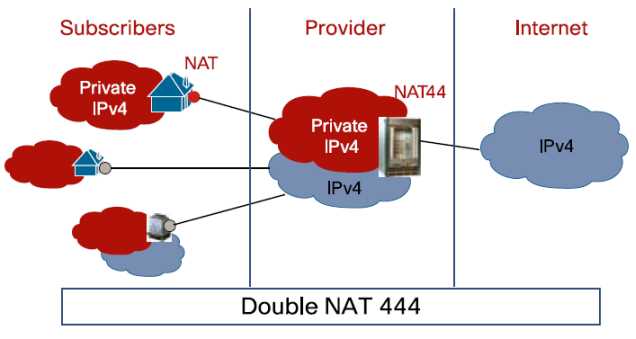
With the lack of availability of IPv4 addresses, the ISP need to find a way to condense their existing and new traffic onto an ever-dwindling pool of available resources.  Hence, NAT444.  Rather than handing the customer an global IPv4 address for use, the ISP NATs all traffic between their exit points and the customer premise equipment (CPE):

In this example, the subscribers may have an address space on their devices in the 192.168.x.x/24 space.  The ISP would then assign an address to the CPE device in the 172.16.x.x./16 space or the 10.x.x.x/8 space.  That traffic would then bent sent through some kind of NAT gateway device or cluster of devices.  Those devices would function in the same way that your home DSL/Cable router functions when translating addresses, only on a much larger scale.  The amount of addresses the ISP current has in their pool would not need to be significantly increased to compensate for a larger number of subscribers, just as if buying a new XBox doesn’t require you to get a new IP address from your ISP.

NAT444 has its appealing points.  It’s helpful in staving off the final depletion of the IPv4 address space from the provider side of things.  It will help keep IPv4 up and running until IPv6 can be implemented and reduce the pressure on the address space.  Yeah, that’s about it…

NAT444 has drawbacks.  Lots of them.  First, you are adding a whole new layer of complexity onto your ISP’s network.  Keeping track of all those state tables and translations for things like lawful intercept is going to be a pain.  Not to mention that the NAT gateway devices are going to need to be huge, or at the very least clustered well.  Think about how many translations are going through your CPE device at home.  Now multiply that by the number of people on your ISP’s network.  Each of those connections now has to have a corresponding translation in the NAT table.  That means RAM and CPU power.  Stupidly big boxes for that purpose.  What about applications?  We’ve already seen that things like VoIP don’t like NAT, especially when SIP hardcodes the IP address of the endpoint into all of its messages.  Lucky for me, a group already did some testing and published their results as a draft RFC.  Their findings?  Not so great if you like using SIP or seeding files with BitTorrent (hey, it has legitmate uses…).  They also tested things like XBox Live and Netflix.  Those appear to have been bad as late as last year, but may have gotten better as of the last test.  Although, I don’t think testing Netflix streaming for 15 minutes was a fair assessment.  You can also forget about hosting anything from your own network.  No web, no email, no peer-to-peer gaming sessions over a NAT444 setup.  I’m sure your ISP will be more than happy to provide you with a non-NAT444 setup provided you want to upgrade to “premium” service or move to a business account with all the associated fees.

I leave you with a this small reminder…


Tom’s Take

I had one of those funny epiphanies when writing this post.  I kept holding down the shift key when typing, so NAT444 kept turning into NAT$$$.  That’s when it hit me.  NAT444 isn’t about providing better service for the customers.  It’s about keeping the whole mess running just a little while longer with the same old equipment.  If the ISPs can put off upgrading to IPv6 for another year or two, that’s one more year they don’t have to spend their budgets on new stuff.  Who cares if it’s a little harder to troubleshoot things?

In the end, I think NAT444 will be dead on arrival, or at the most shortly thereafter.  Why?  Because too many things that end users depend on today will be horribly broken.  Sure, I can grouse about how NAT444 breaks the Internet and is horrible from a design perspective.  I am the I Hate NAT Guy, after all.  But try telling the average suburban household that they won’t be able to watch a streaming Netflix movie or play Call of Duty over XBox live anymore because we didn’t plan to keep the Internet running with a new set of addresses.  Those people won’t wax intellectual about their existential quandary on a blog.  They’ll vote with their dollars and go to an ISP that doesn’t use NAT444 so all their shiny new technology works the way they want it to.  In the end, NAT444 will end up costing the ISPs big $$$.

Aerohive Branch on Demand – Bring Your Own Office

Bring Your Own Device (BYOD) is enabling people to provide their own equipment for work.  But what happens when people aren’t just satisfied bringing their own Macbook to the party?  What happens if they want to bring their office to your office as well?  With the large surge in teleworkers and contractors being brought on inside companies and their ability to do the majority of their jobs without having to step foot into the corporate office, the need to provide connectivity and security for a home workspace is now becoming paramount if the Bring Your Own Office (BYOO) movement is going to take off.

The current solutions to this problem either involve using some off-the-shelf consumer product to address the issue or buying an enterprise grade solution to implement.  Both have their strengths and weaknesses.  Consumer-grade devices are dirt cheap and get the job done.  However, there is very little in the way of scalability and configuration management.  Unless your remote worker is good at configuring Linksys or D-Link, you could be in for a fight.  Also, consumer grade equipment doesn’t have the service and support necessary to run an enterprise on a regular basis.  On the flip side, enterprise equipment does have a great degree of manageability and support to provide robust service for your teleworkers.  Provided, that is, you are willing to invest the large amount of money that it takes to get it setup.  In fact, the investment is usually so high that reclaiming the equipment is top priority in the event that the teleworker leaves the company or completes the contract.  How then do we as network rock stars balance our need for cheap remote connectivity with our desire to have manageability and security?

Enter Aerohive.  I saw Aerohive at Wireless Field Day back in March of this year and was pretty impressed by their HiveManager product that they use to provide configuration and management for their controller-less access points.  They’ve also given me a briefing about the 4.0 release of their HiveOS firmware.  They were kind enough to give me a sneak peak at their Branch on Demand product that was announced November 15th.

Aerohive Branch on Demand utilizes Aerohive’s experience with creating cloud based management for devices and couples it with a new branch router device that can provide simple connectivity for your branch/remote offices or teleworkers.  All of the provisioning for these devices is done in HiveManager, so the only instructions your remote workers need is “plug the yellow cable into the yellow slot and plug the other end into the Internet”.  I think even my mom could do that.  Afterwards, the router checks in with HiveManager and pulls down the configuration so your teleworker can connect back to the home office.  Your user connects via SSL IPSec VPN to allow any device to access corporate resources, whether it be a desktop, laptop, tablet, or smartphone (EDIT – Stephen Phillip was kind enough to notice that I mixed up SSL and IPSec in my notes on this.  The BR series use IPSec to connect back to the central site due to the increased performance for special traffic like voice).   The same polices that you have in place in your corporate office are extended to the remote worker as well.  You can either choose to tunnel all traffic back to the home office to be scanner and permitted, or you can split tunnel the traffic so that non-corporate packets exit locally.  There is a bit of apprehension on the part of most network rock stars for a setup like this, as splitting the traffic does introduce the capability for nasty things to infect the remote machine and then be introduced back into the corporate network.  Aerohive thought of this too and uses a cloud proxy to redirect the split tunneled traffic to a filtering service such as Websense or Barracuda to ensure that all those packets are “cloud washed” before they are permitted back into the network.  That alleviates the stress of not knowing where your branch users are going as well as preventing large amounts of traffic from being needlessly tunneled back to the corporate sites just to go out to the Internet.

All of these features come with HiveOS 5.0, which means that current users of the AP 330 and AP 350 gain the ability for those devices to function as routers.  You can even connect a 3G/4G USB modem to the USB port on the device and turn it into a backup interface for connectivity in the event the primary WAN link goes down for some reason.  At launch, the branch routers will support a small list of USB modems such as the AT&T Shockwave or Momentum, but as the software matures and drivers become available a wider variety of these devices will be supported.  This would be a great idea for those that live in areas where solid Internet connectivity isn’t always a given or for a user that spends a lot of time on the road and needs corporate VPN capabilities where they aren’t always available, such as in the middle of an oilfield or a parking lot.  No need to setup a cumbersome VPN client or worry about usernames and passwords and tokens.  Just give them an Aerohive branch router and let them go.

There are two models of branch routers available.  The BR100 is a 10/100 5-port device that includes a 2.4GHz 802.11n radio and a USB port for 3G/4G backhaul.  It retails for $99, or if you’d like to use the Network-as-a-Service subscription, you can get the device for the same $99 price point, only it includes software updates as well as tech refreshes for two years, so when a new update to the BR100 comes out, you’ll get that device for nothing.  There is also a BR200 that will have 5 GigE ports and dual 2.4/5GHz 3×3:3 802.11n radios as well as two PoE ports and crypto acceleration.  The BR200 will be out sometime next year.


Tom’s Take

I think Aerohive has finally found a good use case for the cloud.  Having your hardware managed by a cloud-based application means that you can always find it no matter where it might be.  If you are already an Aerohive customer that finds yourself in need of a branch router solution, this is a no-brainer.  The same management platform now allows you to control your access points as well as your branch users.  The ability to push the same policies from desktop to Destin, FL is very powerful and cuts down on a lot of stress.  If you aren’t a current Aerohive customer but know that you are going to need to add some teleworking capacity in the future, you can’t go wrong looking at this solution.  For $99 a device (and $999 for the VPN termination software) the solution is very inexpensive and gives you a lot of flexibility to build out instead of needing to worry about scaling straight up.  After all, letting your users bring their own office should cost you yours.

If you’d like to learn more about Aerohive’s new solutions, head over to http://www.aerohive.com.  There’s also a nice short introduction to the product over at the Packet Pushers site.


Disclaimer

Aerohive provided me with an advanced briefing on the Branch on Demand product for the purposes of preparing this blog post.  The did not ask for nor were they promised any consideration in the creation of this article.  Any and all opinions expresses within are mine and mine alone.

Bogon Poetry

I was thinking the other day that I’ve used the term bogon in several Packet Pushers podcasts and never really bothered to define it for my readers.  Sure, you could go out and search on the Internet.  But you’ve got me for that!

Bogon is a term used in networking to describe a “bogus address”.  According to Wikipedia, Fount of All Knowledge, the term originated from a hacker reference to a single unit of bogosity, which is the property of being bogus.  I personally like to think of it as standing for BOGus Network (forgive my spelling).  Not that this refers to undesirable packets, which is not to be confused with vogon, which is a class of undesirable bureaucrats that run the galaxy or a bogan, which is an undesirable class of socioeconomics in Australia (if you’re American, think “redneck” or “white trash”).

Bogons are addresses that should never be seen as the source of packets that are entering your network.  The most stable class of bogon isn’t actually a bogon.  It’s a martian, so called because they look like they are coming from Mars, which is a place packets clearly cannot be sourced from…yet.  Martians include any address space that is listed as reserved by RFC1918 or RFC5735.  It’s a pretty comprehensive list, especially in RFC5735 so take few moments to familiarize yourself with it.  You’ll see the majority of private networks along with APIPA addressing and a few lesser-known examples of bogus networks as well.

The other component of a bogon is an address that shouldn’t exist on the public Internet.  Beyond the aforementioned Martians, the only other bogons should be IP blocks that haven’t yet been allocated by IANA to the RIRs.  However, that list should be almost empty right now, as IANA has exhausted all its available address space and given it over to the 5 RIRs.  The folks over at Team Cymru (that prononunced kum-ree for those not fortunate to be fluent in Welsh) have put together a list of what they call “fullbogons” which lists the prefixes assigned to RIRs but not yet handed out to ISPs for consumption by customers.  Traffic being sourced from this range should be treated as dubious until the range is allocated by the RIR.  The fullbogon list is updated very frequently as the hungry, hungry Internet gobbles up more and more prefixes, so if you are going to use it please stay on top of it.

How Do I Use Bogons?

My preferred method of using a bogon list is in an edge-router access list (ACL) designed to filter traffic before it ever lands on my network.  By putting the ACL on the very edge of the network, the traffic never gets the chance to hop to my firewall for evaluation.  I’d prefer to save every spare CPU cycle I could on that puppy.  My access list looks something like this (taken from Team Cymru’s bogon list today):

!
access-list 1 deny 0.0.0.0 0.255.255.255
access-list 1 deny 10.0.0.0 0.255.255.255
access-list 1 deny 127.0.0.0 0.255.255.255
access-list 1 deny 169.254.0.0 0.0.255.255
access-list 1 deny 172.16.0.0 0.15.255.255
access-list 1 deny 192.0.0.0 0.0.0.255
access-list 1 deny 192.0.2.0 0.0.0.255
access-list 1 deny 192.168.0.0 0.0.255.255
access-list 1 deny 198.18.0.0 0.1.255.255
access-list 1 deny 198.51.100.0 0.0.0.255
access-list 1 deny 203.0.113.0 0.0.0.255
access-list 1 deny 224.0.0.0 15.255.255.255
access-list 1 deny 240.0.0.0 15.255.255.255
access-list 1 permit any
!
!
interface FastEthernet 0/0
description Internet_Facing
ip access-group 1 in
!

That should wipe out all the evil bogons and martians try to invade your network.  If you want to use the fullbogon list, obviously your ACL would be considerably longer and need to be updated more frequently.  The above list is just the basic bogon/martian detection and should serve you well.

Tom’s Take

Blocking these spoofed networks before they can make it to you is a huge help in preventing attacks and spurious traffic from overwhelming you as a Network Rock Star.  Every little bit helps today with all of the reliance on the Internet, especially as we start moving toward…The Cloud.  If you sit down and block just the regular bogon list I’ve outlined above, you can block up to 60% (Warning: Powerpoint) of the obviously bad stuff trying to get to your network.  That should be a big relief to you and let you have a few minutes of free time to take up a new hobby, like poetry.

Thanks to Team Cymru for all the information and stats.  Head over to http://www.team-cymru.org to learn more about all those nasty bogons and how to stop them.

Network Field Day 2: Network Boogaloo

Guess who’s back?

I’m headed to yet another Tech Field Day event!  This time, I’ll be attending Network Field Day in San Jose, CA on October 27th and 28th.  I read about the first Network Field Day last year and learned a lot about the vendors and presentations from the delegates.  Now, it’s up to me to provide that same kind of response for Net Field Day 2.  The delegate list this time around is quite awe-inspiring for a guy like me:

Kurt Bales Network Janitor @NetworkJanitor
Ethan Banks PACKETattack @ECBanks
Tony Bourke The Data Center Overlords @tbourke
Brandon Carroll BrandonCarroll GlobalConfig @BrandonCarroll
Greg Ferro EtherealMind PacketPushers @EtherealMind
Jeremy L. Gaddis Evil Routers @JLGaddis
Ivan Pepelnjak Cisco IOS Hints and Tricks @IOSHints
Mrs. Y. Packet Pushers @MrsYisWhy

I am humbled to be included in such good company.  The two Packet Pushers, Mr. MPLS himself, the man that beat IOU, the Aussie JNCIE/CCIE candiate, the walking security dictionary Brandon Carroll, and the Network Security Princess herself.  I think my invitation must have gotten confused with someone else’s.

Odds are good that if you are involved in networking at all you already follow all of these people on Twitter and read their blogs daily.  If not, stop what you are doing and follow them RIGHT NOW.  You won’t be sorry.  In fact, this is the first time I haven’t had to start following a Tech Field Day delegate on the list of attendees since I’ve been following these folks for quite a while.

Getting Inolved with Tech Field Day

Tech Field Day is always looking for amazing people to attend events and share in the wealth of knowledge.  There are lots of ways you can add your voice to the gestalt:

1.  Read the TFD FAQ and the Becoming a Field Day Delegate pages first and foremost.  Indicate your desire to become a delegate.  You can’t go if you don’t tell someone you want to be there.  Filling out the delegate form submits a lot of pertinent information to Tech Field Day that helps in the selection process.

2.  Realize that the selection process is voted upon by past delegates and has selection criteria.  In order to be the best possible delegate for a Tech Field Day, you have to be an open-minded blogger willing to listen to the presentations and think about them critically.  There’s no sense in bringing in delegates that will refuse to listen to a presentation from Brocade because all they’ve ever used is Arista and they won’t accept Brocade having good technology.  If you want to learn more about all the products and vendors out in the IT ecosystem, TFD is the place for you.

3.  Write about what you’ve learned.  One of the hardest things for me after Tech Field Day was consolidating what I had learned into a series of blog posts.  TFD is a fire hose of information, and there is little time to process it as it happens.  Copious notes are a must.  As is having the video feeds to look at later to remember what your notes meant.  But it is important to get those notes down and put them up for everyone else to see.  Because while your audience may have been watching the same video stream you were watching live, they may not have the same opinion of things.  Tech Field Day isn’t just about fun and good times.  Occasionally, the delegates must look at things with a critical eye and make sure they let everyone know where they stand.


Be sure to follow Tech Field Day on Twitter (@TechFieldDay) for information and updates about Network Field Day 2 as the date approaches.  There will also be streaming video of the presentations at the Tech Field Day website.  The videos will also be posted in their entirety shortly afterwards.  If you want to follow along on Twitter, you can use the hastags #TechFieldDay or #NFD2 to make comments or ask questions during the presentations.  I usually have a TweetDeck window open and will relay your questions along if no one else beats me to it.  I try to tag all my posts with the #TechFieldDay and #NFD2 hashtags, so if I’m overwhelming you with commentary feel free to filter that hashtag from your feed to keep me quiet.  In the past, I’ve tried to have an IRC channel open during the presentations to allow for real-time communications and feedback for those of you out there that prefer an alternative to Twitter.  Once I have the room setup I will post the details.

Tech Field Day Sponsor Disclaimer

Tech Field Day is made possible by the sponsors.  Each of the sponsors of the event is responsible for a portion of the travel and lodging costs.  In addition, some sponsors are responsible for providing funding for the gatherings that occur after the events are finished for the day.  However, the sponsors understand that their financing of Tech Field Day in no way guarantees them any consideration during the analysis and writing of reviews.  That independence allows the delegates to give honest and direct opinions of the technology and the companies that present it.

You Don’t Need Gigabit, But We Do

Stacy Higginbotham wrote a thought-provoking article last week entitled “The Elephant in the Gigabit Network Room”.  Therein, she talks about how many providers are starting to bring gigabit connectivity to residential areas for prices in the $200-$300 range.  She also discusses that this is overkill for most customers, as many devices today can’t reach sustained transfer rates above 500 Mbps as well as the majority of the content being provided are low speed, bandwidth non-intensive services like Twitter.  She goes on to discuss that while there may be applications for using gigabit broadband, they are few and far between now and don’t equate to the cost when something like a 25 Mbps downstream cable modem would suffice just as well.

Allow me to disagree here.

I think one of the reasons why this article sounded flawed to me is because is sounds based on the idea that people still use one computer at a time.  The more I thought about it, the more I realized that the supposition that gigabit residential service for a single machine is overkill is indeed correct.  However, that’s where my opinion diverges.  I would argue that today’s residential networks are staring to resemble small enterprise networks with regard to bandwidth usage.

Think about all the things that you are doing with your home networks right now.  Sure, there’s a fair amount of low bandwidth web surfing going on.  We use Twitter to and Facebook to post status updates.  We check email.  We look up things on Wikipedia to win Internet arguments.  If that was it, I would say that even 100 Mbps or 25 Mbps service would be more than you’d ever need.  But go deeper.  We now use Netflix to stream movies to our televisions.  We use iTunes to download content to all manner of devices.  Hulu, Boxee, and Vudu are all clamoring for attention and bandwidth.  Even simple Bittorrent transfers can suck up an entire pipe.  Now imagine all this couple with the blah blah cloud services coming down the pipe.  We even use cloud-ish services today.  Gigabytes of pictures uploaded to Picasa and Flickr.  Video uploaded to Youtube and Vimeo.  Music streaming coming from Google, Amazon, Apple, and anyone else with a handheld device with a headphone jack.  We can even run our household phone system over the Internet.  Not to mention Facetime, Telepresence, and all manner of real-time video communications.  Sounds to me like that little cable modem is starting to get a bit crowded.

Another argument against gigabit networking is the inability of devices to use the full bandwidth.  Specifically, the lack of gigabit wireless networking is pointed out in the article.  Right now, she’s right.  However, with 802.11ac coming down the pipe and WiGig coming to the 60 Ghz spectrum sooner rather than later, I think it’s better if we have the broadband infrastructure in place sooner rather than later.  In the article, it is stated that a generic laptop only hit 420 Mbps downstream in a test.  Okay, so with a little optimization we could probably hit 600 Mbps easy.  Did they test several sites to be sure it wasn’t a transit network issue?  Did they pull from a close FTP server with a high-speed backbone?  Or were they clocking Windows Update?  Most machines will eat any amount of bandwidth you throw at them.  Even if you peaked at 500 Mbps out of the box, that’s still 5 times faster than a 100 Mbps network.  Think about what would happen in your enterprise if you granted users the ability to run gigabit all the way to the desktop.  Files could be transferred faster internally.  Content could be pushed with little effort.  Imagine again what might happen if you then brought those same users back down to 100 Mbps.  You’d have a mutiny on your hands.  When driving on the highway, 80 MPH only seems fast when you get going.  Once you’ve been cruising there for a while, 60 MPH seems like a standstill.  I think that even half a gigabit connection per machine is still amazingly fast, especially when that pipe starts getting crowded as I’ve outlined above.

The final argument is that there is no killer app that necessitates paying such high fees for gigabit service.  One service that is discussed by the author is online backup.  This, however, is dismissed as being too infrequent to be useful to a customer paying a monthly charge.  Let me ask this of you out there: how crazy did the idea of downloading music on the Internet seem when the fastest connection we could muster was 56k?  How about watching movies in our house solely over the internet when 128k ISDN was the fastest kid on the block (that was exorbitantly high priced for its time too)?  Why code an app if you know it can’t work to its fullest potential today?  What about continuous online backup?  If you’ve already got the pipe to handle it why not keep a running backup of your files out in the blah blah cloud?  HD streaming video to multiple devices simultaneously?  What about the burgeoning website designs that seem to be taking more and more bandwidth every day with Flash landing pages, Flash adds, Shockwave menus and more?  If we start running gigabit to our house, I can promise you that there will be apps written to take advantage of those big fat pipes.

Tom’s Take

Yes, running a gigabit pipe into my house would probably be overkill right now.  Despite my protestations to the contrary, my wife realizes that I don’t need to have the ability to instantly download anything and everything on the Internet.  But I also see that as we start placing more and more content and information outside of our computers and in the blah blah cloud, we’re going to get very impatient to get that content quickly.  HD video, 27 megapixel images, and enough MP3s to sink an aircraft carrier stored somewhere in an online vault and we have to have it NAO!  Just because 100 Mbps would do anyone just fine today doesn’t mean that there isn’t a market for gigabit residential service.  It’s like saying that just because we can only drive 65-75 MPH on the highway there’s no need for sports cars that can do 130.  Someone out there will find a use for it if it’s available.  If nothing else, the blah blah cloud providers should be championing us to get the fastest available connections and start storing everything we have with them.  That way, we don’t have to spend so much time worrying about where our stuff is being stored.  We just click it and go.

Rollover Beethoven – USB’s In Town

Every Cisco engine…rock star in the world should have a rollover cable or two stashed away in their bag/car/pocket just in case.  The rollover serial cable is the hallmark of access to a Cisco device.  The console port is the last resort for configuration when all else has gone wrong.  It is the first thing you should plug into when you boot up a router for the first time and the best way to get info you couldn’t otherwise find.  However, the days of the serial cable are quickly becoming numbered.

It wasn’t all that long ago that every PC manufactured included a 9-pin serial connection.  These ports were handy for all kinds of devices, including printers and modems.  However, with the introduction of Universal Serial Bus (USB) connections, the usefulness of the serial (and parallel) ports has been waning quickly.  By utilizing a higher speed connection that more tightly integrates into the system, the need to configure devices with DIP switches and play COM port roulette have long since passed.  As it is with any transition though, there have been some holdouts in the movement to retire serial ports.  While some of these are understandable due to outdated single-purpose technology, others have never made any sense to me, like the Cisco rollover console cable.  Surely there must be a better way to connect to the serial port of a device than with an outdated technology holdover from the 80s?  I myself am a victim of this kind of thinking, having used an IBM T30 Thinkpad well past its useful life simply because it had an integrated serial port and my replacement laptop wouldn’t.

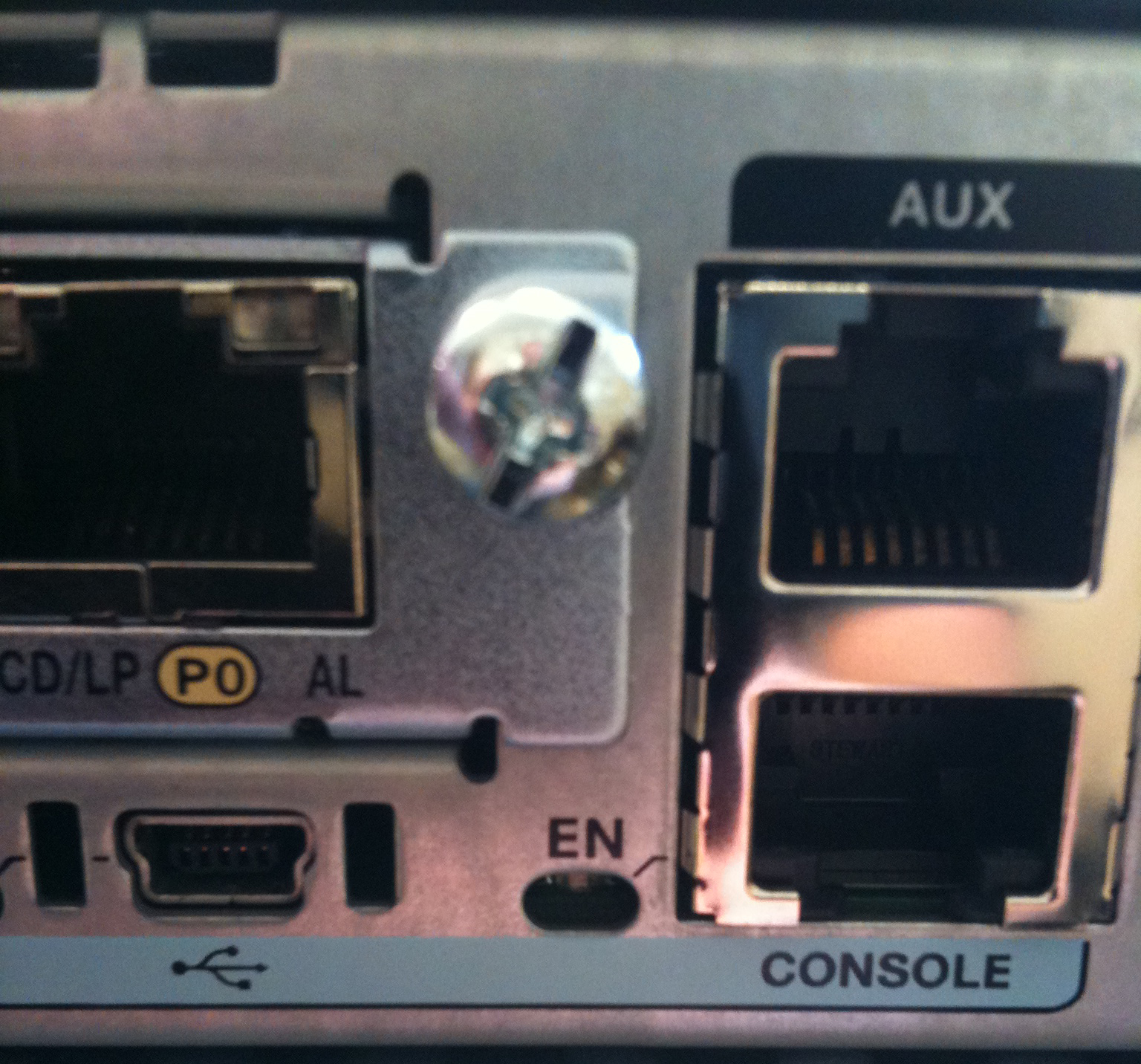
When Cisco developed the new ISR G2 line of routers, someone in the console access department finally decided to wake up and get with the 2000’s.  Thanks to their efforts, the Cisco routers and switches manufactured today have started including a new console access option:

In the picture above, you can see the familiar RJ-45 console port to the right and the newer USB console port to the left, indicated with the USB icon.  This new port allows those of us that have spent most of our lives using the flat blue rollover serial cables to add a new, exciting cable to our bag, the USB A-to-mini cable.

The new USB port allows the user to access the router’s console with a newer cable instead of relying on the standby rollover cable.  However, you need to take a few steps first.  You have to head out to the Cisco Connections Online (CCO) download page and pull the driver for your particular operating system if you’re running on Windows.  Make sure you specify 32-bit or 64-bit, since this driver will be masquerading as a COM port on your system.  You don’t want to waste time downloading a driver that won’t work.  Once you’ve installed the driver, you can plug in your USB connection to any USB port and then to the router.  It will look like an additional COM port on your system, probably with a high number like COM6 or COM7, so make sure you’ve got a terminal emulator that allows you to choose your COM port.  I tend to use TeraTerm for this very reason, but your terminal program of choice should do nicely.  For those of you in the audience with Macbooks, you don’t need to download any drivers at all.  Seems like OS X already has the right driver built in, so just plug and and get cranking.  As a quick aside, Cisco will attempt to sell you a $30 USB console cable when you order the router. JUST. SAY. NO.  This is a regular USB A-to-Mini cable that can be purchased at Walmart for about $10.  You can even use the USB cable that came with your digital camera or Blackberry or old Motorola RAZR.

Once you get attached to the USB console port, you’ll find that it works pretty much the same as the RJ-45 port that you’ve become attached to over the years.  You can also plug in a regular old serial cable into the RJ-45 port if you need a second connection.  The RJ-45 console port will mirror what’s going on with the USB console port.  However, since their both Console 0, only one of them will have preference on the input.  In this case, that’s the USB port.  So if you have a terminal access server plugged in for reverse telnet connections and someone comes in and attaches a USB connector, you can watch what’s going on but you can’t do anything about it.  You can specify a timeout value if you’d like so you can force a logout after inactivity.  You can do that with the following command:

Router(config)# line con 0
Router(config-line)#usb-inactivity-timeout <value in minutes>

Note that this command doesn’t work on the 2900 series ISR G2 routers for some strange reason.  Oh well, feature request down the road.  For those of you out there that don’t feel comfortable with the idea of having just anyone off the street walking up and consoling into your router via USB, you can always disable the USB console port in favor of the RJ-45 connection as follows:

Router(config)# line con 0
Router(config-line)# media-type rj45

Bingo.  USB port locked out.  Now only those people in possession of a serial-to-USB adapter or a Redpark iOS Console Cable will have access.

Tom’s Take

I have three rollover cables in my various laptop bags.  I keep two for emergencies and one in case someone doesn’t have theirs.  I passed out console cables to all my engineers and technicians once and told them the next time I asked them for their console cable, they’d better present this one to me.  A console cable is an indispensable tool for anyone that works on Cisco equipment.  Having the USB option is always welcome since I no longer have to fumble for my USB-to-serial adapter or worry that the dodgy drivers are going to bluescreen my Windows 7 64-bit laptop over and over again.  Still, there is a lot of Cisco equipment out there with the older RJ-45 cable setup as the only console option.   So you can’t just throw out the old rollover serial cables just yet.  Better to throw a USB cable in your bag for those glorious days where you get to access a newer device.  Then you can await the day when you can bury your rollover cable alongside Beethoven.