Brocade Tech Day – Data Centers Made Simple

When I was just a wee lad, my mom decided one year that she’d had enough of the mass produced Halloween costumes available at the local department store.  I wanted to be a ninja (surprise, I know) and she was determined to make me the best ninja costume around.  My mother knows how to sew, but she isn’t a seamstress by any stretch of the imagination.  What she did do was go to the fabric store and pick up a package of Simplicity patterns.  These are wonderful.  They enable those of us without the gift of textile assembly to create something from fabric that can be astounding.  Simplicity takes all the guesswork out of making a costume by giving you easy-to-follow directions.  You don’t have to think about the process beyond a few cuts and some stitches.  Instead, you can think about the applications of the final product, from ninja to Jedi to superhero.

You may be asking yourself…what does this have to do with Brocade and networking?  At Brocade Tech Day, myself and other analysts sat down to hear about the new story from Brocade in the data center.  At the heart of the message was the work “simplicity”.  Simplicity Through Innovation.  The need to radically simplify things in order to achieve the scale and efficiency we need to create huge data centers.  And at the center of it all is Brocade’s VCS Ethernet fabric.  I got a chance to kick the tires on VCS back at Network Field Day 2, but the announcements at Brocade Tech Day were a bit more ambitious.  That’s because the face of VCS is now the Brocade VDX 8770.  This switch is a monster.  It has the capability of learning up to 384,000 MAC addresses in those little CAM tables.  It has the capacity for 384 10GigE and 96 40GigE ports, as well as expandability to 100GigE.  Though I’m a bit unsure of how they arrived at the numbers, they claim it can support up to 320,000 virtual machines on those ports.  Ivan Pepelnjak did a great breakdown of the capabilities of the switch on launch day.  I’m especially keen on the idea that you can create a four-way virtual gateway that shares the same IP and MAC address.  This overcomes the limitations of HSRP/VRRP, as well as some of the quirkiness of GLBP.  That shows that Brocade is at least thinking beyond layer 2, unlike a lot of data center vendors that believe the world is flat (networking wise).  After speaking with Lisa Caywood (@TheRealLisaC), I found that this huge iron switch is being used by customers not at the core of the network but instead at the edge of the data center, where all those hungry hypervisors and servers live.  All the numbers that I’m seeing from the VDX 8770 point to it as a way to aggregate a huge amount of packets coming from a data center server farm and feed it through the rest of the network via VCS.  That makes total sense when coupled with some of Brocade’s prognostications, such as 80% of server traffic becoming east-west (server-to-server) in the next year or so.

Brocade also had some other interesting pieces on display.  One of them was a new capability for the ADX application delivery controller, or load balancer as 90% of the rest of the world calls it.  The ADX is slated to begin using Field Programmable Gate Arrays (FPGAs) to terminate VXLAN tunnels before they head into the VCS fabric.  I find it very interesting that they chose FPGAs to do this, having seen something similar from Arista just a few months ago.  I also get to chuckle a little bit to myself when one of the cornerstones of the software defined networking (SDN) world is terminated in a hardware construct.  I suppose it brings a bit of order back to my world.  Another interesting thing that came up during the presentations is that Brocade is making all their own silicon in the VDX 8770 and moving forward.  In a day and age where moving to merchant silicon seems to be the flavor of the month, I’m curious as to where Brocade is headed with this.  Obviously, the ability to create your own chips gives you an advantage over other competitors when it comes to designing the chip the way you want it to function, such as putting 38MB of TCAM on it or producing something with a ridiculously low port-to-port latency.  However, the agility afforded from merchant silicon gives other vendors the ability to innovate in the software arena.  That, I believe, is where the battleground is really going to be in the coming months.  On the one side, you’ll have vendors invested in custom silicon that will be doing amazing things with hardware.  On the other side, you’ll have the merchant silicon vendors that are all using very similar reference designs but are really concentrating on innovation in software.  It’s an exciting time to be in networking for sure.

Brocade Tech Day Disclaimer

I was invited to attend Brocade Tech Day by Brocade.  They paid for my airfare and lodging.  I also attended an executive dinner that evening that was provided by Brocade.  At no time during this process was any requirement made of me in regards to posting information about Brocade Tech Day.  Brocade did not ask for nor were they promised any consideration in this post.  The conclusions and analysis herein are mine and mine alone.

Arista – Network Field Day 3

The third stop for the Network Field Day 3 express took us to the offices of Arista Networks.  I’m marginally familiar with Arista from some ancillary conversations I’ve had with their customers.  I’m more familiar with one of their employees, Doug Gourlay (@dgourlay) the Vice President of Marketing.  Doug was a presenter at Network Field Day 1 and I’ve seen him at some other events as well.  He’s also written an article somewhat critical of OpenFlow for Network World, so I was very interested to see what he had to say at an event that has been so involved in OpenFlow recently.

After we got settled at Arista, Doug wasted no time getting down to business.  If nothing else can be said about Arista, they’re going to win points by having Doug out front.  He’s easily one of the most natural presenters I’ve seen at a Tech Field Day event.  He clearly understands his audience and plays to what we want to see from our presentations.  Doug offered to can his entire slide deck and have a two hour conversation about things with just a whiteboard for backup.  I think this kind of flexibility makes for a very interesting presentation.  This time, however, there were enough questions about some of the new things that Arista was doing that slides were warranted.

The presentation opened with a bit about Arista and what they do.  Doug was surprising frank in admitting that Arista focused on one thing – making 10 gigabit switches for the data center.  His candor in one area was a bit refreshing, “Every company that ever set out to compete against Cisco…and try to be everything to everybody has failed.  Utterly.”  I don’t think he said this out of deference for his old employer.  On the contrary, I think it comes from the idea that too many companies have tried to emulate the multiple product strategy that Cisco has done with their drive into market adjacencies and subsequently scaled back.  One might argue some are still actively competing in some areas.  However, I think Arista’s decision to focus on a specific product segment gives them a great competitive advantage.  This allows the Arista developers to focus on different things, like making switches easier to manage or giving you more information about your network to allow you to “play offense” when figuring out problems like the network being slow.  Doug said that the idea is to make the guys in the swivel chairs happy.  Having a swiveling chair in my office, I can identify with that.

After a bit more background on Arista, we dove head first into the new darling of their product line – the FX series.  The FX series is a departure from the existing Arista switch lines in that it uses Intel silicon instead of the Broadcom Trident chipset in the SX series.  It also sports some interesting features like a dual core processor, a 50GB SSD, and an onboard rubidium atomic clock.  That last bullet point plays well into one of Arista’s favorite verticals – financial markets.  If you can timestamp packets with a precision time stamp from RFC1588, you don’t have to worry about when they arrived or exited the switch.  The timestamp tells you when to replay them and how to process them.  Plus, 300 picoseconds of drift a year sure beats the hell out of relying on NTP.  The biggest feature of the FX series though is the Field Programmable Gate Array (FPGA) onboard.  Arista has included these little gems in the FX series to allow customers even more flexibility to program their switches after the fact.  For those customers that can program in VHDL or are willing to outsource the programming to one of Arista’s partners, you can make the hardware on this switch do some very interesting things like hardware accelerated video transcoding or inline risk analysis for financial markets.  You’re only limited by your imagination and ability to write code.  While programming FPGAs won’t be for everyone out there, it fits in rather well with the niche play that Arista is shooting for.

At this point, Arista “brought in a ringer” as Stephen Foskett (@SFoskett) put it.  Doug introduced us to Andy Bechtolsheim.  Andy is currently the Chief Development Officer at Arista.  However, he’s probably more well known for another company he founded – Sun Microsystems.  He was also the first person to write a check to invest in a little Internet company then known as “Google, Inc.”  Needless to say, Andy has seen a lot of Internet history.  We only got to talk to him for about half an hour but that time was very well spent.  It was interesting to see him analyze things going on in the current market (like OpenFlow) and kind of poke holes all over the place.  From any other person it might sound like clever marketing or sour grapes.  But from someone like Bechtolsheim it sounded more like the voice of someone that has seen much of this before.  I especially liked his critique of those in academics creating a “perfect network” and seeing it fail in implementation because people don’t really build networks like that in real life.  There’s a lot of wisdom in the above video and I highly recommend a viewing or two.

The remainder of our time at Arista was a demo of Arista’s EOS platform that runs the switches.  Doug and his engineer/developer Andre wanted to showcase some of the things that make EOS so special.  EOS is currently running a Fedora Core 2.6.32 Linux kernel as the heart of the operating system.  It also allows you to launch a bash shell to interact with the system.  One of the keys here is that you can use Linux programs to aid in troubleshooting.  Like, say, running tcpdump on a switchport to analyze traffic going in and out.  Beats trying to load up Wireshark, huh?  The other neat thing was the multi-switch CLI enabled via XMPP.  By connecting to a group of switches you can issue commands to each of them simultaneously to query things like connected ports or even issue upgrades to the switches.  This answered a lingering question I had from NFD1.  I thought to myself, “Sure, having your switches join and XMPP chat room is cool.  But besides novelty, what’s the point?”  This shows me the power of using standard protocols to drive innovation.  Why reinvent the wheel when you can simply leverage something like XMPP to do something that I haven’t seen from any other switch vendor.  You can even lock down the multi-switch CLI to prevent people from issuing a reload command to a switch group.  That prevents someone from being malicious and crashing your network at the height of business.  It also protects you from your own stupidity so that you don’t do the same thing inadvertently.  There’s even more fun things from EOS, such as being able to display the routes on a switch at a given point in time historically.  Thankfully for the NFD3 delegates, we’re going to get our chance to play around with all the cool things that EOS is capable of, as Arista provided us with a USB stick containing a VM of EOS.  I hope I get the chance to try it out and put it through some interesting paces.

If you’d like to learn more about Arista Networks, you can check out their website at http://www.aristanetworks.com.  You can also follow them on Twitter as @aristanetnews.


Tom’s Take

Odds are good that without Network Field Day, I would never have come into contact with Arista.  Their primary market segment isn’t one that I play into very much in my day job.  I am glad to have the opportunity to finally see what they have to offer.  The work that they are doing not only with software but with hardware like FPGAs and onboard atomic clocks shows attention to detail that is often missed by other vendors.  The ability to learn their OS in a VM on my machine is just icing on the cake.  I’m looking forward to seeing what EOS is capable of in my own time.  And while I’m not sure whether or not I’ll ever find an opportunity to use their equipment in the near future, chance does favor the prepared mind.

Tech Field Day Disclaimer

Arista was a sponsor of Network Field Day 3.  As such, they were responsible for covering a portion of my travel and lodging expenses while attending Network Field Day 3. In addition, they provided me a USB drive containing marketing collateral and copies of the presentation as well as a copy of EOS in a virtual machine.  The USB drive also functioned as a bottle opener.  They did not ask for, nor where they promised any kind of consideration in the writing of this review/analysis.  The opinions and analysis provided within are my own and any errors or omissions are mine and mine alone.

NEC – Network Field Day 3

OpenFlow was on the menu for our second presentation at Network Field Day 3.  We returned the the NEC offices to hear about all the new things that have come about since our first visit just six months ago.  Don Clark started us off with an overview of NEC as a company.  They have a pretty impressive balance sheet ($37.5 billion annually) for a company that gets very little press in the US.  They make a large variety of products across all electronics lines, from monitors to storage switches and even things like projectors and digital television transmitters.  But the key message to us at NFD3 revolved around the data center and OpenFlow.

According to NEC, the major problem today with data center design and operation is the silo effect.  As Ethan Banks discussed recently, the various members of the modern datacenter (networking, storage, and servers) don’t really talk to each other any longer.  We exist in our own little umwelts and the world outside doesn’t exist.  With the drive to converge data center operations for the sake of reduced costs, both capital expenditures and operational expenditures, we can no longer afford to exist in solitude.  NEC sees OpenFlow and programmable networking as a way to remove these silo walls and drive down costs by pushing networking intelligence into the application layer while also allowing for more centralized command and control of devices and packet flows.  That’s a very laudable goal indeed.

A few things stuck out to me during the presentation.  First, in the video above, Ivan asks what kind of merchant silicon is powering the NEC solution.  He specifically mentions the Broadcom Trident chipset that many vendors are beginning to use as their entry into merchant silicon.  As in, the Juniper QFX3500, Cisco Nexus 3000, HP5900AF, and Arista 7050.  Ivan says that the specs he’s seeing on the PF5820 are very similar.  Don’s response of “it’s merchant silicon” seems to lend credence to the use of a Trident chipset in this switch.  I think this means that we’re going to start seeing switches with very similar “speeds and feeds” coming from every vendor that decides to outsource their chipsets.  The real power is going to come from software and management layers that drive these switches to do things.  That’s what OpenFlow is really getting into.  If all the switches can have the same performance, it’s a relatively trivial matter to drive their performance with a centralized controller.  When you consider that most of them will end up running similar chipsets anyway, it’s not a big leap to suggest that the first generation of OpenFlow/SDN enabled switches are going to look identical to a controller at a hardware level.

The other takeaway from the first part of the session is the “recommended” limit of 25 switches per controller in Programmable Flow architecture.  This, in my mind, is the part that really cements this solution firmly in the data center and not in the campus as we know it.  Campus closets can be very interesting environments with multiple switches across disparate locations.  I’m not sure if the PF-series switches need to have direct connections to a controller or if they can be daisy chained.  But by setting a realistic limitation of 25 switches in this revision, you’re creating a scaling limitation of 25 racks of equipment, since NEC considers the PF5820 to be a Top-of-Rack (ToR) switch for data center users.  A 25-rack data center could be an acreage of servers for some or a drop in the bucket for others.  The key will be seeing if NEC is going to support a large install base per controller in future releases.

We got a great overview of using OpenFlow in network design from Samrat Ganguly.  He mentioned a lot of interesting scenarios where OpenFlow and Programmable Flow could be used to provide functionality similar to what we do today with things like MPLS.  We could force a traffic flow to transit from a firewall to an IDS and then onto its final destination all by policy rather than clever cabling tricks.  The idea for using OpenFlow as opposed to MPLS focuses mostly on the idea of using a (relatively) simple central controller versus the more traditional method of setting up VRFs and BGP to connect paths across your core.  This is another place where software defined networking (SDN) will help in the data center.  I don’t know what kind of inroads it will make against those organizations that are extensively using MPLS today, but it gives many starting out a good option for easy traffic steering.  We rounded out our time at NEC with a live demo of Programmable Flow:

If you’d like to learn more about NEC and ProgrammableFlow, check them out at http://www.necam.com/pflow/.  You can also follow them on Twitter as @NECAm1

Tom’s Take

It appears to me that NEC has doubled down on OpenFlow.  That’s not a bad thing in the least.  However, I do believe that OpenFlow has a very well defined set of characteristics today that make it a good fit for data center networking and not for the campus LAN.  The campus LAN is still the wild, wild west and won’t benefit in the near-term from the ability to push flows down into the access layer in a flash.  The data center, on the other hand, is much less tolerant of delay and network reconfiguration.  By allowing a ProgrammableFlow controller to direct traffic around your network, you can put the resources where they are needed much quicker than with some DC implementations on the market.  The key to take away from NEC this time around is that OpenFlow is still very much a 1.0 product release.  There are a lot of things planned for the future of OpenFlow, even in the 1.1 and 1.2 specs.  I think NEC has the right ideas with where they want to take things in OpenFlow 2.0.  The key is going to be whether or not the industry changes fast enough to keep up.

Tech Field Day Disclaimer

NEC was a sponsor of Network Field Day 3.  As such, they were responsible for covering a portion of my travel and lodging expenses while attending Network Field Day 3. In addition, they provided me a USB drive containing marketing collateral and copies of the presentation and a very interesting erasable pen.  They did not ask for, nor where they promised any kind of consideration in the writing of this review/analysis.  The opinions and analysis provided within are my own and any errors or omissions are mine and mine alone.

The Wild Wild Campus

The venerable Catalyst 6500 is a switching platform that has been around for several presidential administrations.  It’s a workhorse that has helped provide connectivity for what we now refer to as the campus as well as providing a solution for the data center.  However, like star athlete in it’s waning years, it’s getting old.  Ethan has decided that the 6500 is past its prime in the campus core.  Others beg to differ.  Who’s right?

I think the issue here isn’t one of the switch being past it’s prime compared to the new products on the horizon.  Sure, the next up-and-coming sheriff is going to eclipse the veteran sitting on his horse.  The question comes down to being properly suited for the role. I think what we need to consider is that the campus userland is a totally different area than the pristine beauty of a data center.

In a data center, I have total control over what happens in my space.  I know every server and and connection.  I have everything documented and categorized.  Nothing happens without my notice or approval.  It’s a very regimented structure that keeps the critical infrastructure running while minimizing surprises.  When I have complete control over my environment, I can contemplate ideas like turning off Spanning-Tree Protocol (STP) to increase performance or disabling Port Security to prevent MAC issues with multihomed servers.  Because I can say with reliability that I know where everything is connected, I can start looking at ways to make it all run as fast as possible.  This would be like a new lawman coming into town and instituting his brand of justice learned from the Army.  Very tight, very regimented.  But based totally on rules that are very unlike the real world.

In the campus LAN, however, things begin to look more like the wild west.  At the access layer closest to the users, it’s not uncommon to see a whole host of protection mechanisms designed to prevent catastrophic network disaster from propagating to the core of your campus and then on to the data center.  Turn off STP in the access layer?  That’s a resume-generating event.  Disable port security?  Okay, but you better be ready for the onslaught of garbage.  Campus LANs aren’t the structured beauty of your data center.  At best, they are the Shootout at the OK Corral.  We employ host protection and QoS mechanisms to be sure that those gunslinger users can’t affect more than their own little domain.  No bulky FTP transfers killing the phone system.  No renegade switches being placed under desks and affecting STP paths.

To me, the distinction comes from the fact that the Nexus line of switches that we put in the data center is focused on that structured environment.  Since NX-OS is a fork of Cisco’s SAN OS, it is focused on providing connectivity among servers and storage arrays in that carefully cultivated environment.  Put one of these out in the campus core and you might find that connectivity is blazingly fast…right up to the point where someone creates a broadcast storm.  I’m sure there are mechanisms in place to prevent these kinds of things.  I just don’t know if they are as tested as the ones in the granddaddy 6500.  The 6500 also comes with a variety of service module options to help alleviate issues, such as the Firewall Service Module (FWSM) and Network Analysis Module (NAM), not to mention the wireless connectivity options afforded by a WiSM.

Ethan (and others) point out that the 6500 is reaching the end of its ability to keep up with faster and faster connectivity options.  The new Sup-2T now has the ability to introduce more 10 Gigabit ports on a linecard to aggregate links.  The Nexus line has a laundry list of 10 Gigabit connectivity options, not to mention options for 40 Gigabit and 100 Gigabit Ethernet.  Rumor has it a 40 Gigabit option will be available for the 6500 at some point, but it will likely be limited for a while due to backplane considerations (as well as requiring a new Supervisor engine).  So where does that leave the 6500?

I think what will end up happening soon is that the 6500 will become less of a campus core switch and move down into the distribution layer, perhaps even all the way to the access layer.  The 6500 still has the tools that an old sheriff needs to keep the peace in Userland.  With 10Gig and 40Gig connectivity, it can provide a fast backhaul to the distribution layer if used as an access layer device.  If it lies in the distribution layer, the ability to aggregate 10Gig links coming from the access layer is very crucial to users as the majority of traffic begins to move into the data center for things like Virtual Desktop Integration (VDI) and other heavy traffic loads.  Add in the ability of the 6500 to make intelligent decisions via service modules and you have a great device to offload complicated decision making from a core switch and allow the core to switch/route packets at high speed wherever they need to go.  This could allow you to use the new Nexus 7009 or Nexus 5500 series in the campus core and extend FabricPath/TRILL connections into the campus LAN.  That will allow the 6500 to live on providing things the Nexus can’t right now, like PoE+ and Low Latency Queuing (LLQ) which are critical to voice guys like me.

Before you say that putting a 6500 at the access layer is a mighty expensive proposition, just think about what ripping out your existing access layer to provide 10Gig uplink connectivity and Gigabit-to-the-desktop will run.  Now, add in redundancy for power and uplinks.  Odds are good the numbers are starting to get up there.  Now, think about the investment of reusing a good platform like the 6500.  You’ve already invested in supervisors and power redundancy.  If you can pick up some 10/100/1000 PoE linecards to fill it up, you have a great way to aggregate wiring closets and begin to deploy important network services closer to the edge to prevent those outlaws from rustling your precious data center network.


Tom’s Take

Any time the idea of the 6500 is brought up, you’re going to see polarization.  Some will stand by their old sheriff, confident in the fact that he’s seen it all and done it all.  Sure, he isn’t the fastest gun in the West anymore.  He doesn’t need to be.  He’s still got the smarts to outfox any outlaw.  The other camp decries that fact that the 6500 has been around before the turn of the millennium.  What they want is to put the fancy city slicker Nexus everywhere and show everyone his fancy brand of the law.  I think in this case the Catalyst still has a lot of life left to provide connectivity and services to the end users while the back end of the campus transitions to the newer high-speed platforms.  I doubt 10Gig-to-the-desktop is coming any time soon, based on Cat 6E/7 cable costs and inability to run fiber on a laptop.  That will eliminate the major points in favor of a total campus Nexus deployment.  Despite what others may say, I think the 6500 is a perfect option here, especially with the Sup-2T and newer line cards.  Just because it’s a little long in the tooth doesn’t mean it doesn’t know how the Wild Wild Campus was won.

Network Field Day 2: Network Boogaloo

Guess who’s back?

I’m headed to yet another Tech Field Day event!  This time, I’ll be attending Network Field Day #2 in San Jose, CA on October 27th and 28th.  I read about the first Network Field Day last year and learned a lot about the vendors and presentations from the delegates.  Now, it’s up to me to provide that same kind of response for Net Field Day 2.  The delegate list this time around is quite awe-inspiring for a guy like me:

Kurt Bales Network Janitor @NetworkJanitor
Ethan Banks PACKETattack @ECBanks
Tony Bourke The Data Center Overlords @tbourke
Brandon Carroll BrandonCarroll GlobalConfig @BrandonCarroll
Greg Ferro EtherealMind PacketPushers @EtherealMind
Jeremy L. Gaddis Evil Routers @JLGaddis
Ivan Pepelnjak Cisco IOS Hints and Tricks @IOSHints
Mrs. Y. Packet Pushers @MrsYisWhy

I am humbled to be included in such good company.  The two Packet Pushers, Mr. MPLS himself, the man that beat IOU, the Aussie JNCIE/CCIE candiate, the walking security dictionary Brandon Carroll, and the Network Security Princess herself.  I think my invitation must have gotten confused with someone else’s.

Odds are good that if you are involved in networking at all you already follow all of these people on Twitter and read their blogs daily.  If not, stop what you are doing and follow them RIGHT NOW.  You won’t be sorry.  In fact, this is the first time I haven’t had to start following a Tech Field Day delegate on the list of attendees since I’ve been following these folks for quite a while.

Getting Inolved with Tech Field Day

Tech Field Day is always looking for amazing people to attend events and share in the wealth of knowledge.  There are lots of ways you can add your voice to the gestalt:

1.  Read the TFD FAQ and the Becoming a Field Day Delegate pages first and foremost.  Indicate your desire to become a delegate.  You can’t go if you don’t tell someone you want to be there.  Filling out the delegate form submits a lot of pertinent information to Tech Field Day that helps in the selection process.

2.  Realize that the selection process is voted upon by past delegates and has selection criteria.  In order to be the best possible delegate for a Tech Field Day, you have to be an open-minded blogger willing to listen to the presentations and think about them critically.  There’s no sense in bringing in delegates that will refuse to listen to a presentation from Brocade because all they’ve ever used is Arista and they won’t accept Brocade having good technology.  If you want to learn more about all the products and vendors out in the IT ecosystem, TFD is the place for you.

3.  Write about what you’ve learned.  One of the hardest things for me after Tech Field Day was consolidating what I had learned into a series of blog posts.  TFD is a fire hose of information, and there is little time to process it as it happens.  Copious notes are a must.  As is having the video feeds to look at later to remember what your notes meant.  But it is important to get those notes down and put them up for everyone else to see.  Because while your audience may have been watching the same video stream you were watching live, they may not have the same opinion of things.  Tech Field Day isn’t just about fun and good times.  Occasionally, the delegates must look at things with a critical eye and make sure they let everyone know where they stand.


Be sure to follow Tech Field Day on Twitter (@TechFieldDay) for information and updates about Network Field Day 2 as the date approaches.  There will also be streaming video of the presentations at the Tech Field Day website.  The videos will also be posted in their entirety shortly afterwards.  If you want to follow along on Twitter, you can use the hastags #TechFieldDay or #NFD2 to make comments or ask questions during the presentations.  I usually have a TweetDeck window open and will relay your questions along if no one else beats me to it.  I try to tag all my posts with the #TechFieldDay and #NFD2 hashtags, so if I’m overwhelming you with commentary feel free to filter that hashtag from your feed to keep me quiet.  In the past, I’ve tried to have an IRC channel open during the presentations to allow for real-time communications and feedback for those of you out there that prefer an alternative to Twitter.  Once I have the room setup I will post the details.

Tech Field Day Sponsor Disclaimer

Tech Field Day is made possible by the sponsors.  Each of the sponsors of the event is responsible for a portion of the travel and lodging costs.  In addition, some sponsors are responsible for providing funding for the gatherings that occur after the events are finished for the day.  However, the sponsors understand that their financing of Tech Field Day in no way guarantees them any consideration during the analysis and writing of reviews.  That independence allows the delegates to give honest and direct opinions of the technology and the companies that present it.

My Thoughts on Dell and Force 10

Big announcement today concerning Michael Dell’s little computer company and their drive to keep up with the Joneses in the data center.  Dell has been a player in the server market for many years, but in the data center they are quickly losing out to the likes of HP, Cisco, and even IBM.  Until they hired away HP’s chief blade architect a few years ago, they weren’t even interested in blade servers/enclosures.  Instead, they relied on the tried-and-true model of 1U rack-mounted servers everywhere.  That has all changed recently with the explosion of high-density server enclosures becoming the rage with customers.  Now, the push seems to be headed toward offering a soup-to-nuts portfolio that allows your customers to go to one vendor to get all their data center needs, whether it be storage, servers, or networking.  HP was the first company to really do this, having acquired 3Com last year and integrating their core switching products into the Flex family of data center offerings.  Cisco has always had a strong background in networking, and their UCS product line appears to be coming on strong as of late.  IBM has been a constant bellweather in the market, offering storage and servers, but being forced to outsource their networking offerings.  Dell found itself in the same boat as IBM, relying on Brocade and Juniper as OEM partners to offer their networking connectivity for anything beyond simple low-end ports, which are covered by the Dell PowerConnect line.  However, the days of OEM relationships are quickly drying up, as the bigger vendors are on an acquisition spree and the little fish in the market are becoming meals for hungry vendors.

Dell has enjoyed a very strong relationship with Brocade in the past, and the positioning of Brocade as a strong player in the data center made them a very logical target for Dell’s pocketbook.  In fact, it had been reported several weeks ago that a deal between Dell and Brocade was all but done.  So, imagine the surprise of everyone when Dell announced on July 20th that they were buying Force10 Networks, a smaller vendor that specializes in high-performance switching for markets such as stock market trading floors.  To say that my Twitter stream erupted was an understatement.  We all knew that Dell was going to buy someone, but most figured it would be Brocade.  I even ranked Arista ahead of Force10 as the likely target of Dell’s acquisition fever.  I just figured that Force10 was a little too small and specialized to garner much attention from the big boys.  Don’t get me wrong, I think that Force10 makes some great products.  Their presentation at Network Field Day was well received, and they several customers that will swear by their performance.

What I expected from Dell was a purchase that would serve them across their whole network portfolio.  Brocade would have given them a replacement for the PowerConnect line at the low end as well as data center and fibre channel connectivity options.  They were already OEM-ing Brocade’s product line, so why not buy them outright?  I think that comes down the fact that EVERYONE is OEM-ing from Brocade (or so it seems).  EMC, IBM, and even HP have products from Brocade in their offerings.  If Dell had purchased Brocade outright, it would have forced those vendors to look elsewhere for fibre channel connectivity.  This would either be due to a desire to not inflate a competitor’s bottom line, or perhaps later if and when Dell decided to change the rules of how other vendors OEM from them.  This move away from a Dell-owned Brocade would have really muddied the waters for those inside Dell that wanted Brocade for it’s revenue stream.  As it is, I’m pretty sure that Dell is going to scale back on the B-series PowerConnect stuff everywhere but the fibre channel line and use Force10 as the main data center core technology group, while at the same time maintaining the PowerConnect line at the lower end for campus connectivity.  This will allow them to keep their margins on the PowerConnect side while at the same time increasing them in the data center, since they’ll no longer have to pay OEM fees to Brocade.

Whither Juniper?

The next most popular topic of conversation after Force10 involved…Juniper.  Juniper was a long-shot target of acquisition for Dell (and others), and now that the only major server vendor without a solid networking background is IBM, people are staring to ask who, if not IBM, is going to buy Juniper?  And when?

Folks, Juniper isn’t an easy acquisition.  Add in the fact that the IBM you see today isn’t the IBM of your father (or my early networking days for that matter), and you’ll see that Juniper is best left to its own devices for the time being.  Juniper isn’t really what I would consider a “data center switching” company like Force10 or Arista.  They tend to fall more in the service provider/campus LAN market to me.  I think that if someone like IBM could pony up the billions to buy them, they’d quickly find themselves lost in what to do with Juniper’s other technologies.  Buying Juniper for their data center offerings would be like buying a Porsche because you like the stereo.  You’re missing the point.  I’d wager money that Juniper is more likely to buy twenty more companies before they get bought themselves.  Their networking business is growing by leaps and bounds right now, and saddling them with a large company as ‘oversight’ would probably cripple their innovation.

IBM already owns a high-speed, low-latency networking company that they bought about this time last year, Blade Networks.  Why should they go out and spend more money right now?  Especially if they are happy with their OEM partnerships with Brocade and Juniper (like Dell has been doing previously)?  IBM has shed so much of what it used to be that it no longer resembles the monster that it once was.  Gone are the PCs and Thinkpads and low-end servers.  Instead, they’ve moved to the blade and high end server market, with storage to complement.  They used to be number one, but have long since been passed by HP.  Now they find themselves fighting off their old foe Dell and this new upstart, Cisco.  Does it really make sense for them to mortgage the family farm to buy Juniper, only to let it die off?  I’d rather see them make a play for a smaller company, maybe even one as well-known as Arista.  It would fit the profile a bit better than buying Juniper.  That’s more HP’s style.

Tom’s Take

I fully expect the trumpets of Dell’s new-found data center switching expertise to start sounding as soon as the ink is dry on Force10.  In fact, don’t be surprised to see it come up during Tech Field Day 7 next month in Austin, TX.  I think Dell will get a lot of mileage out of their new stalking horse, as most of the complaints I’ve heard about Force10 come from their sales staff, and we all know how great Dell is at selling.

For now, Juniper needs to sit back and bide its time, perhaps stroking a white Persian cat.  They can go down the interoperability road, telling their customers that since they have strong OEM relationships with many vendors, they can tie all these new switches together will very little effort.  They shouldn’t worry themselves with the idea that anyone is going to buy them anytime soon.

Flexing Your Muscles – HP Networking Announcements

It’s Interop week, which means a lot of new product announcements coming out on all kinds of interesting hardware and software.  HP is no different and a couple of the products that they’ve got on tap appear to have some interesting designs on how we perceive the idea of a campus network for the coming months.

HP Flex Network Architecture

HP has announced a new network design methodology they refer to as the Flex Network Architecture.  It addresses many of the deficiencies that HP is seeing in network design related to thinking about networks in old ways.  There has been a lot of innovation in networking in recent months but it has been focused primarily on the datacenter.  This isn’t all that surprising, as most of the traction around building large networks has included buzzwords like “cloud” or “fabric” and tend to focus on centralizing the exchange of data.  HP wants to take a great number of these datacenter innovations and push them out to the campus and branch network, where most of us users live.

HP’s three primary areas of focus in the Flex Network are the Flex Fabric, which is the datacenter area that includes unified computing resources and storage, Flex Campus, which is the primary user-facing network area where users connect via technologies such as wireless, and the Flex Branch, where HP is focusing on creating a user experience very similar to that of the Campus users.  To do this, HP is virtually eliminating the lines between what have been historically referred to as “SMB” or “Enterprise” type networks.  I believe this distinction is fairly unnecessary in today’s market, as many branch networks could technically qualify as “Enterprise”, and a lot of campus networks could realistically be considered “SMB”.  By marrying the technology more toward the needs of the site and less to a label, HP can better meet the needs of the environment.

According to HP, there are five key components of the Flex Network:

1. Standards – In order to build a fully resilient architecture, standards are important.  By keeping the majority of your network interoperable with key standards, it allows you to innovate in pockets to improve things like wireless performance without causing major disruptions in other critical areas.

2. Scalability – HP wants to be sure that the solutions they offer are scalable to the height of their capability.  Mike Neilsen summed this up rather well by saying, “What we do, we do well.  What we don’t do well, we don’t do at all.”

3. Security – Security should be enabled all over your network.  It should not be an afterthought, it should be planned in at the very beginning and at every step of the project.  This should be the mantra of every security professional and company out there.

4. Agility – The problem with growing your network is that you lose the ability to be agile.  Network layers quickly overwhelm your ability to quickly make changes and decrease network latency.  HP wants to be sure that Flex allows you to collapse networks down to at most one or two layers to provide the ability to have them running in top condition.

5. Consistency – If you can’t repeat your success every time, you won’t have success.  By leveraging HP’s award winning managment tools like IMC, you can monitor and verify that your network experience is the same for all users.

The focus of the Flex Campus for this briefing is the new A10500-series switch.  This is a new A-series unit designed to go into the core of the campus network and provide high-speed switching for data bound for users.  This would most closely identify with a Cisco Catalyst 6500 switch.  The A10500 is the first switch in HP’s stable to provide IRF in up to 4 chassis.  For those not familiar, Intelligent Resilient Framework (IRF) is the HP method of providing Multiple Link Aggregation (MLAG) between core switches.  By linking multiple chassis together, one logical unit can be presented to the distribution layer to provide fault tolerance and load balancing.  HP’s current A-series switches currently support only 2 chassis in an IRF instance, but the 4IRF technology is planned to be ported to them in the near future.  One of the important areas where HP has done research on the campus core is the area of multimedia.  With the world becoming more video focused and consuming more and more bandwidth dedicated to things like HD Youtube videos and rich user-focused communications, bandwidth is being consumed like alcohol and a trade show.  HP has increased the performance of the A10500 above the Cat 6500 w/ Sup720 modules by reducing latency by 75%, while increasing switching capacity by almost 250%.  There is also a focus on aggregating as many connections as possible.  The launch LPUs (or line cards in Cisco parlance) are a 16-port 10GbE module and a 48-port 1GbE module, with plans to include a 4-port 40GbE and 48-port 10GbE module at some point next year, which should provide 270% more 10GbE density that the venerable Cat 6500. The A10500 comes in 3 flavors, a 4-slot chassis that uses a single crossbar fabric to provide better than 320 Gbps of throughput, and an 8-slot chassis that can mount the LPUs either vertically or horizontally and provide no less than 640 Gbps of throughput.  These throughput numbers are courtesy of the new MPU modules, what Cisco people might call Supervisor engines.  The n+1 fabric modules that tie all the parts and pieces together are called SFMs.  This switch isn’t really designed to go into a datacenter, so there is no current plan to provide FCoE LPUs, but there is strong consideration to support TRILL and SPB in the future to ease the ability to interoperate with datacenter devices.

Another new product that HP is launching is focused on security in the datacenter.  This comes courtesy of the new TippingPoint S6100N.  This is designed to function similarly to an IDS/IPS box, inspecting traffic flying in and out of your datacenter swtiches.  It has the ability to pump up to 16 Gbps of data through the box at once, but once you start inspecting more and more of that traffic, you’ll probably see something closer to 8-10Gbps of throughput.  The S6100N also gives you the ability to have full visibility for VM-to-VM conversations, something that is currently giving many networking and security professionals grief, as much of the traffic being generated in today’s datacenter is generated and destined for virtual machines.  I think there is going to be a real opportunity in the coming months for a device that can provide this kind of visibility without impeding traffic.  HP looks to have a great future with this kind of device.

The third new piece of  the Flex Network Architecture is the addition of Intelligent Management Center (IMC) 5.0 to the Flex Management portion of the Flex Architecture.  The flagship software program for HP’s network management strategy, IMC provide Single Pane of Glass (SPoG) functionality to manage both wired and wireless networks, as well as access control and identity management for both.  It integrates with HP Network Management Center to allow total visibility into your network infrastructure, whether it consist of HP, Procurve, Cisco, 3Com, or Juniper.  There are over 2600 supported devices in IMC that can be monitored and controlled.  In addition, you can use the integrated access controls to control the software being run on the end user workstations and monitor their bandwidth utilization to determine if you’ve got a disproportionately low number of users monopolizing your bandwidth.  IMC is available for installation on a dedicated hardware appliance or in a virtual machine for those that have an invested VMware infrastructure.  You can try it out all the features for 60 days at no charge to see if it fits into your environment and helps alleviate “swivel chair” management.

Tom’s Take

The new HP Flex Architecture gives HP a great hook to provide many new services under a consistent umbrella.  The new addition of the A10500 gives HP a direct competitor to the venerable Cat 6500 platform that can provide high speed connectivity to the campus core without muddying the waters with unnecessary connectivity options, ala the A12500 or Nexus 7000 with their high-priced FCoE capabilities.  The S6100N helps HP begin to focus on the new landscape of datacenter security, where firewalls are less important the visibility into traffic flows between physical and virtual servers.  The IMC update allows all of these pieces to be managed easily from one operations center with no additional effort.  It seems that HP is gearing up to spread out from their recent success in the datacenter and take the fight to the campus and branch office.  I liked what I heard from HP on this call, as it was more of what HP could do and less of what Cisco couldn’t.  So long as HP can continue to bring new and innovative products to the networking marketplace, I think their fortunes have nowhere to go but up.

Bluntly BPDU–The Redux

Firstly, you should read this blog entry.  Go ahead, I’ll be here when you get back.

All done?  Good.  Now, for the first part of my response.  Mea culpa. I fracked up.

Based on this document: http://www.cisco.com/en/US/docs/switches/lan/catalyst6500/ios/12.1E/native/configuration/guide/stp_enha.html#wp1033403 I assumed an incomplete and incorrect stance on the way BPDUFiltering works.  This guide says that when a BPDU is received on a Portfast port, the port loses its Portfast state, which disables the BPDUFiltering and it begins acting like a regular STP port again.    However, thanks to Santino Rizzo for gently pointing out that BPDUFilter when enabled on an interface completely strips the BPDUs from being received and transmitted.  When enabled globally, it performs as I originally assumed, with the ports being transitioned out of Portfast and into regular STP ports.  I think the differences in my understanding come from the fact that the linked guide above is only for CatOS, which only allows BPDUFilter to be enabled globally.  The reference documents for interface-level BPDUFilter (like this one: http://www.cisco.com/en/US/docs/switches/lan/catalyst4000/7.4/configuration/guide/stp_enha.pdf) state correctly that it strips BPDUs from being transmitted at the interface level.  Okay, with that out of the way, on to the meat of my post…

When I started my CCIE walkabout 3 years ago, I had the good fortune to attend one of Narbik Kocharian’s boot camps.  One thing he told me there sticks with me to this day.  When we got into a discussion about the behavior of a certain protocol or configuration, he would always fire up a live router or switch to test our theories.  He told us, “IOS never lies.”  And he’s right.  IOS always does what you tell it to.  And it does it pretty much every time.  The same configuration gives you the same output.  So when we need to test something, we can jump into IOS and get out answer.  Because it will always tell us the truth.  That was my failing last night.  While I had been thinking of the discussion on Saturday, I didn’t take the time to lab it up.  So, I took my afternoon to do just that.

Let me state the parameters of my lab experiment.  I used two 3560 switches, one 24-port and one 8-port.  Both were running 12.2(25)SEE IOS, the 24-port was running the enhanced image, and the 8-port was running the base image.  I wiped the configuration of the two switches before starting and only configured a hostname on the 24-port switch.  The 24-port switch served as my test bed, and was the root of the spanning tree for VLAN 1, the only VLAN configured on the switches.  The only configuration done on the 8-port switch was to shutdown the connecting port between tests, and then re-enable it when I wanted to observe the output.  Otherwise all testing was done on the 24-port switch.  And now, I give you the results:

1.  No Configuration

I started out with a control of no configuration under the port at all.  This would give me a good baseline to work from.  I plugged the switches in and enabled the ports.  I then used the show spanning-tree interface fa 0/1 detail command to see the BPDUs.  Here’s the output from that test:


 Port 3 (FastEthernet0/1) of VLAN0001 is forwarding
   Port path cost 19, Port priority 128, Port Identifier 128.3.
   Designated root has priority 32769, address 0019.2f4d.4580
   Designated bridge has priority 32769, address 0019.2f4d.4580
   Designated port id is 128.3, designated path cost 0
   Timers: message age 0, forward delay 0, hold 0
   Number of transitions to forwarding state: 1
   Link type is point-to-point by default
   Bpdu filter is enabled internally
   BPDU: sent 44, received 1

Okay, so that’s what we expected.  BPDUs are being sent from the root bridge.  The switch has received one BPDU from its partner.  This is pretty much what happens straight out of the box.  now, let’s turn on Portfast.

2.  Portfast

I enabled access mode on the port with switchport mode access so that I could enable Portfast on the interface with spanning-tree portfast.  Afterwards, I enabled the port on the other switch and checked the output:


 Port 3 (FastEthernet0/1) of VLAN0001 is forwarding
   Port path cost 19, Port priority 128, Port Identifier 128.3.
   Designated root has priority 32769, address 0019.2f4d.4580
   Designated bridge has priority 32769, address 0019.2f4d.4580
   Designated port id is 128.3, designated path cost 0
   Timers: message age 0, forward delay 0, hold 0
   Number of transitions to forwarding state: 1
   The port is in the portfast mode
   Link type is point-to-point by default
   Bpdu filter is enabled internally
   BPDU: sent 20, received 1

Again, as expected.  The port is still sending BPDUs and receiving them.  The difference here is that the switch is now bypassing the blocking, listening, and learning phases and begins forwarding traffic immediately.  Bad thing if there is a loop behind it.  Okay, so the behavior is as expected so far.  Now, let’s start turning on the BPDU protection stuff.

3. BPDUGuard enabled per interface

For this test, I wanted to see what BPDUGuard does when enabled on the interface:


00:18:48: %SPANTREE-2-BLOCK_BPDUGUARD: Received BPDU on port FastEthernet0/1 with BPDU Guard enabled. Disabling port.

00:18:48: %PM-4-ERR_DISABLE: bpduguard error detected on Fa0/1, putting Fa0/1 in err-disable state

TestSwitch#sh spann int fa 0/1 det

no spanning tree info available for FastEthernet0/1

TestSwitch#sh int fa 0/1

FastEthernet0/1 is down, line protocol is down (err-disabled)

As soon as the switch received the BPDU from its partner, it slammed the door shut and placed the interface in err-disable.  No STP info because the port is essentially shutdown.

4.  BPDUFilter enabled per interface

After clearing the err-disable state, I removed the BPDUGuard configuration and ensured the port was no longer err-disabled.  I then enabled BPDUFilter on the interface with spanning-tree bpdufilter enable.  Here’s what I saw when I ran the spanning tree interface command:


 Port 3 (FastEthernet0/1) of VLAN0001 is forwarding
   Port path cost 19, Port priority 128, Port Identifier 128.3.
   Designated root has priority 32769, address 0019.2f4d.4580
   Designated bridge has priority 32769, address 0019.2f4d.4580
   Designated port id is 128.3, designated path cost 0
   Timers: message age 0, forward delay 0, hold 0
   Number of transitions to forwarding state: 1
   The port is in the portfast mode
   Link type is point-to-point by default
   Bpdu filter is enabled internally
   BPDU: sent 0, received 0

We now have STP information about the port, but no BPDUs being received or transmitted.  This is consistent with Santino’s description of the way BPDUFilter performs on an interface.  If you plugged a switch in now, it would see itself as the root bridge for each of it’s VLANs, as it isn’t seeing any BPDUs coming from its ports.  This would be the strange behavior I had seen with BPDUFilter when I had configured it in production earlier.  Makes sense to me now.  Let’s see how bad we can screw things up when we start combining things.

5.  BPDUGuard enabled globally, BPDUFilter enabled per interface

Setting the interfaces back to default, I then enabled BPDUGuard globally with spanning-tree portfast bpduguard default. I then enabled BPDUFilter on the interface with the previous command.  Here’s what I saw:


 Port 3 (FastEthernet0/1) of VLAN0001 is forwarding
   Port path cost 19, Port priority 128, Port Identifier 128.3.
   Designated root has priority 32769, address 0019.2f4d.4580
   Designated bridge has priority 32769, address 0019.2f4d.4580
   Designated port id is 128.3, designated path cost 0
   Timers: message age 0, forward delay 0, hold 0
   Number of transitions to forwarding state: 1
   The port is in the portfast mode
   Link type is point-to-point by default
   Bpdu guard is enabled by default
   Bpdu filter is enabled internally
   BPDU: sent 0, received 0

In this case, the inteface specific configuration overrrode the global config.  And the interface never received a BPDU to trigger the BPDUGuard function, so it remains in the forwarding state, albeit with no STP information on that port.  Let’s reverse it.

6.  BPDUFilter enabled globally, BPDUGuard enabled per interface

Back to default interfaces and removal of all global BPDU protection.  Now, I enable BPDUFilter with spanning-tree portfast bpdufilter default and enable BPDUGuard on the interface.  What do you think will happen?


TestSwitch#
00:27:59: %SPANTREE-2-BLOCK_BPDUGUARD: Received BPDU on port FastEthernet0/1 wit
h BPDU Guard enabled. Disabling port.
00:27:59: %PM-4-ERR_DISABLE: bpduguard error detected on Fa0/1, putting Fa0/1 in err-disable state
TestSwitch#sh spann int fa 0/1 det
no spanning tree info available for FastEthernet0/1

TestSwitch#sh int fa 0/1
FastEthernet0/1 is down, line protocol is down (err-disabled)

Just like expected.  The BPDU was received and the port shutdown before BPDUFilter could remove it.  As Santino explained above, BPDUFilter enabled globally evaluates the BPDUs on the Portfast ports and if one is received, the port would be transitioned out of Portfast and into a regular STP port.  Except in this case, where BPDUGuard does its job and disables the port before that can happen.  So far, so good.  Now for the big one.

7.  BPDUGuard and BPDUFilter enabled per interface

Back to default one more time.  Now, I enable BPDUGuard and BPDUFilter on the interface.  Once the config is done, I re-enable the port.  Here’s the payoff:


 Port 3 (FastEthernet0/1) of VLAN0001 is forwarding
   Port path cost 19, Port priority 128, Port Identifier 128.3.
   Designated root has priority 32769, address 0019.2f4d.4580
   Designated bridge has priority 32769, address 0019.2f4d.4580
   Designated port id is 128.3, designated path cost 0
   Timers: message age 0, forward delay 0, hold 0
   Number of transitions to forwarding state: 1
   The port is in the portfast mode
   Link type is point-to-point by default
   Bpdu guard is enabled
   Bpdu filter is enabled internally
   BPDU: sent 0, received 0

TestSwitch#sh run | beg 0/1
interface FastEthernet0/1
 switchport mode access
 spanning-tree portfast
 spanning-tree bpdufilter enable
 spanning-tree bpduguard enable

Ah ha!  It looks like BPDUFilter is stopping BPDUs from being transmitted or received on the port, as my new understanding of BPDUFilter explains.  Since there are no BPDUs, there is nothing to trigger the BPDUGuard feature!  Success!  As I said in the last post, when both are enabled on the same interface, BPDUFilter wins.  Yes, I admit I got confused about the function of BPDUFilter on the interface, but the results are the same.  I just have a better understanding of it now.

In conclusion, I learned a lot in the last 24 hours.  Always trust IOS.  It may not be clear all the time, but it never lies.  Make sure you lab it up when you have a question about things.  Listen to the commenters on your blog, they know their stuff.  And don’t be afraid to be blunt.  If nothing else, it makes you sure of your position.

Calm Before the Storm: BPDUGuard & BPDUFilter

A couple of days ago, a discussion erupted on Twitter  regarding the explanation and use cases for two of Cisco’s layer 2 edge protection technologies: BPDUGuard and BPDUFilter.  There were some interesting explanations and scenarios offered up, and I thought I’d give my take on it here as it will take a few more than 140 characters to lay out.

For those of you not familiar with BPDUs and why we need to guard and filter them, here’s the dime store tour of bridging 101.  The bridge is the most basic layer 2 device you can imagine.  It is designed to connect one network to another network.  The original bridge was designed by Radia Perlman while working at Digital Equipment Corp.  It was originally put in place to connect one of their customer’s LANs to another.  The story of the first bridge is outlined here: http://youtu.be/N-25NoCOnP4 and is highly recommended viewing for those not familiar with the origins of switching technology.  Radia was tasked with designing a method for bridges to detect loops in the network and avoid them at all costs, as a bridging loop would be catastrophic for data transmission.  She succeeded by creating a protocol that essentially form the network into a tree of nodes that prune links leading back to the root node.  In order to form this tree, each bridge sends out a special data packet called a Bridge Protocol Data Unit (BPDU).  This packet contains the information necessary for each bridge to build a path back to the root node/bridge and form a loop free path through the network.  If you’re interested in the exhausting detail of how BPDUs and spanning tree protocol (STP) work at a fundamental layer, check out the Wikipedia link.  You might say, “That’s great, but what does that have to do with my switches?” Well, if a bridge connects two networks together and segments their collision domains, think of a switch as the ultimate extension of that paradigm.  A switch is a device that bridges networks on every port, segmenting each port into its own collision domain.  Only, in today’s networks we don’t use hubs behind the bridge to connect end user devices, we use the switch as the user/system connection device.

So, now we know why switches send out BPDUs.  And now we hopefully know that BPDUs are very critical to the proper operation of a network.  So why on earth would we want to block or filter them?  Well, firstly any time that a new BPDU is seen on the network from a switch, it must send BPDUs toward the current root with the Topology Change Notification (TCN) flag enabled.  When the root bridge receives these BPDUs, it sets the TCN flag on its own BPDUs and forces the remaining nodes in the spanning tree to age out their topology tables.  The switches must then recalculate the spanning tree topology to ensure that the new switch has a path to the current root bridge or that the new switch IS the new root bridge.  This calculation can cause traffic to stop on your network for the duration of the calculation, which is 50 seconds by default.  So, when might the new switch become the new root bridge and cause chaos and despair in your network?  By default, bridges use a value known as the Bridge Priority to determine which one is the root.  A bridge with a lower priority is elected as the root bridge for that particular spanning tree instance.  Out of the box, the Bridge Priority value for most switches running regular 802.1d spanning tree is 32768.  So, assuming that all the bridge priorities in the network are the same, how do we break the tie?  The tie breaker is the MAC address of the bridge.  In most cases, this means the the device with the lowest MAC address is elected the root bridge.  And, in almost every case, the device with the lowest MAC address is the oldest bridge in your network.  So, if you pull an old switch out of the storage closet and plug it into the network, you’re going to cause a spanning tree election, and if you haven’t modified the Bridge Priority on your switches that old switch just might be elected the root bridge.  Which would cause your network to stop forwarding traffic for 50 critical seconds.  Those 50 seconds feel like an eternity to your users.  A word to the wise: ALWAYS set the bridge priority on the switch you want to be the root bridge.  Trust me, it’ll save you hours of pain in the future.

Users dislike a non-responsive network.  Immensely.  And under the default circumstances, when a user plugs a device into the switch, the switch does its job to determine if this device is sending BPDUs.  Which means the port has to do through the 50-second spanning tree process.  In most cases, this is not only unnecessary but annoying for the end user.  They don’t really care why what the switch is doing is so critical.  They just want to check their email.  How do we resolve this without breaking spanning tree?  Cisco decided to fix this with Portfast.  Portfast is a spanning tree enhancement that allows a network admin to say “This port is only going to ever have a PC plugged into it.  Please ignore the normal spanning tree process.”  What happens is that the port is immediately placed into the forwarding state, bypassing the learning and listening phases.  Spanning tree is not disabled on the port, but we also don’t take the time to listen for BPDUs or learn the information they contain.  This works great for end user nodes.  They get to check e-mail right away and you don’t get calls about the “slow network”.  And this works 90% of the time.  The other 10% is the stuff nightmares are made of.

Gertrude has one network port in her office.  She has a computer.  She bought a network printer and a new laptop.  She wants all three of these devices plugged into the network at the same time.  She buys a switch from a big box store so she can plug all these things in at the same time, not wanting to bother the IT department since they’ll either say ‘no’ or take a month to run a new cable to her office.  In her haste to get everything plugged in, she accidentally plugs one end of the network cable into the switch, and the other end into another port on the switch.  Then, she plugs her switch into the port on the wall.  And, if this port is Portfast-enabled, you’ve got yourself a Category 5 broadcast storm.  If you’re lucky enough to have never lived through one of these, count yourself fortunate.  Watch a spanning tree loop propagate through a network is like watching a firestorm.  Switch CPU’s spike to 100% load trying to process all the BPDUs flooding the network.  Users find themselves unable to get to the network, or in VoIP networks find themselves unable to use their phones.  Servers start going haywire and seeing themselves fighting for static IP address with…themselves.  And the only way for the IT department to fix the problem in most cases is to start unplugging switches until the culprit is found.  And heaven help Gertrude when they find her switch…

How could something like this happen?  Because Portfast assumes that the designated port is never going to have a switch connected to it, so it never bothers to listen for the BPDUs that would be a tell-tale sign of a loop.  It would never block the port initially while waiting for more information.  The Portfast switch gleefully starts forwarding packets and counting toward meltdown.  Portfast assumes that nothing bad could come from that port.  Anyone that works in IT knows that assumption is the mother of all frack-ups.  So, Cisco gave us two protocols to combat frack-ups, BPDUGuard and BPDUFilter.

BPDUGuard is a Portfast enhancement that functions as a fail-closed gatekeeper for the port.  As soon as a BPDU is detected on the port, BPDUGuard slams it shut and places the port into ‘err-disable’ mode.  Unless a recovery mode is configure (it isn’t by default), that port stay shutdown until the admins recover it.  In the above example, Gertrude plugs her switch in, and the switch detects a BPDU on a BPDUGuard-enabled port.  It gets disabled, and Gertrude can’t get on the network.  She calls into the IT helpdesk with her problem. The IT staff notice the port is err-disabled and investigate.  The IT staff go out to her office and find the switch before they re-enable the port.  After a stern talking-to, the network is saved and Gertrude gets her additional cable sometime next month.  BPDUGuard is the most-configured protection mechanism for this kind of issue.  Most IT admins want the port to shut off before the damage is done.  The problem with BPDUGuard is that if you aren’t the network admin, or if you aren’t in a position to turn the port back on quickly the user will experience an outage until the port is recovered.  If you’re a network admin that uses portfast, you should turn on BPDUGuard.  Don’t ask, just turn it on and save yourself even more hours of pain in the future.

BPDUFilter is a Portfast enhancement that functions as the fail-open moderator for the port.  Firstly, it prevents a switch from transmitting BPUDs on a Portfast enabled port (the switch still transmits BPDUs on Portfast ports).  If a BPDU is detected on the Portfast-enabled port, the Portfast state is removed and the port is forced to transition through the normal states of blocking, listening, and learning before it can begin forwarding.  In the above example, when Gertrude plugs her switch in, the uplink switch will detect the BPDU and force the device to transition through the regular spanning tree process.  It should also detect the loop and disable the highest-numbered port on the switch to disable the loop.  Gertrude will have to wait an additional minute before her port is up completely, but it will start forwarding.  The IT admins may never know what happened unless they notice Gertrude’s port is no longer in Portfast mode, or that a new switch is transmitting BPDUs from her switch port.  So why in the world would you use BPDUFilter?  In my experience, it is used when you are not the network admin for a given network and have no easy way to re-enable those ports that would be disabled by BPDUGuard.  Or, if the network policy for the particular network states that ports should begin forwarding immediately but that users should be able to connect devices without the port becoming disabled.  For the record, if you ever find a network policy that looks like this send it to me.  I’d really like to know who came up with it.  BPDUFilter is rarely used in my experience as a Portfast protection mechanism.

So, as these things usually happen, the question was asked during our discussion “What happens if you enable both BPDUGuard and BPDUFilter at the same time?” Well, I found a great blog post on the subject here: http://bit.ly/cKpBTd Essentially, if you enable BPDUFilter globally and enable BPDUGuard on a particular interface, the interface specific configuration takes precedence and shuts the port down before BPDUFilter can transition the port back to normal.  However, if you enable BPDUFilter using the interface-specific command and BPDUGuard using the interface-specific command, BPDUFilter will catch the BPDU first and transition the port to normal spanning tree mode before BPDUGuard can shut it down.  So, they each will perform their function while locking out the other.  The question becomes where each is configured (globally vs. interface-specific).  For those of you who might be in the unfortunate position to still be running CatOS, the only way to enable BPDUFilter is globally.  In this specific case, BPDUGuard will always win and the ports will be disabled.  You would only use BPDUFilter in this case to prevent ports from transmitting BPDUs.

My Take

Since best practice guidelines tell us that switch-to-switch connections should be trunk links, you should enable Portfast on all your user-facing ports to cut down on delay and trouble tickets.  But, if you have Portfast enabled, you better make sure to have BPDUGuard enabled at a minimum.  It will save your bacon one day.  The case for BPDUFilter is less compelling to me.  If you are in one of the few scenarios where BPDUFilter makes more sense than BPDUGuard, by all means use it.  It’s better than a poke in the eye with a sharp stick.  Personally, I’ve used BPDUFilter once or twice with mixed results.  My network started behaving quite strangely and some poorly-configured switches hanging off unidentified ports stopped responding until I removed the BPDUFilter configuration.  So I mainly stick to BPDUGuard now.  Better to have to re-enable a port after a user plugged in something they weren’t supposed to than to have to frantically unplug connections in the core in a vain effort to stem the raging broadcast storm.

EDIT

Be sure to check out my additional testing and findings over here.

One Switch to Rule Them All, One ACL to Bind Them

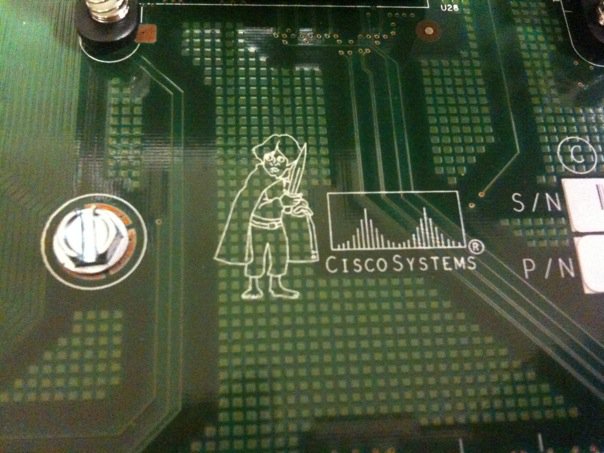
A couple of weeks ago, Dan Hughes (http://blog.olorin.co.uk/ and http://www.twitter.com/rovingengineer) opened a Catalyst 3750 switch and found something curious:

3570 Switch featuring Frodo

Soon, the questions and speculation started pouring in.  What could it be?  Was it a black market motherboard?  A prank gone wrong? Was Dan trying his hand at art college?

After some research, I found a good explanation.  Just like any major manufacturer out there, Cisco gives each project a code name while under internal development.  It makes it easier to refer to instead of typing a project number out each time, plus if any information about it leaks out before it’s ready, the competition is scratching their heads wondering why you might be working on a new Shire-friendly device.

In this particular case, the 3750 switch was the first in Cisco’s portfolio to use Stackwise technology.  According to the very detailed whitepaper found here:

(http://www.cisco.com/en/US/prod/collateral/switches/ps5718/ps5023/prod_white_paper09186a00801b096a.html)

the switch uses a combination of hardware and software to create a ring between all members of the stack in order to emulate the backplane of a chassis switch.  During internal testing, this new technology get tagged with the code name Lord of the Rings, which is why you’ll find our little Hobbit friend of the motherboard of your 3750 if you open it up.

And since I can’t get enough of trivia like that, I did some additional digging and came up with some interesting and not-so-interesting code names for other Cisco products:

Cisco GSR 12000 series -> Cisco BFR (Big F***ing Router, or Big Fast Router if you’re in marketing) Supposedly named after the Big F***ing Gun (BFG) from the video game Doom.  You can see a picture of the BFR logo on a 12000 linecard here: http://www.kumari.net/gallery2/main.php?g2_itemId=331

Cisco CRS-1 -> HFR (Huge Fast Router, or Huge F***ing Router depending on who you ask).  Named after the Cisco GSR 12000 from above.  And yet it needed to be changed to a less specific and more PC acronym.  HFR lives on if you look at the software loads for the CRS-1, though.  They all start with “hfr”.

Cisco UCS -> “California”.  This one is interesting.  All during development, the UCS project was code named California.  In fact, all of the Cisco entries in the product line are named after places in California:

Los Angeles – 2RU UCS C250

San Diego – C210 and C200

Palo – Cisco virtualized networking/storage adapter

Catalina – Memory controller chip inside the UCS servers that allow extra memory sockets to be connected to the memory bus

So the next time you find yourself staring at a fictional character on a motherboard, don’t automatically assume that it’s something sinister.  It might just be an homage that only gets seen by 10 or 15 people.  Who then post it on the Internet and ruin the surprise for everyone.

By the way, if anyone out there knows any other cool Cisco product code names (for released products), post a comment and let me know.  These kinds of things are the stuff I expect to win on Jeopardy! with at some point in my lifetime.