One More Thing…Now What?

Unless you’ve been living under a rock for the last 13 hours or so, you’ve probably heard that Steve Jobs has stepped down as CEO of Apple.  He has asked to move to the position of Chairman of the Board, and he’s requested that current Chief Operating Officer Tim Cook step into the CEO seat.  This isn’t much of a change, as Cook has been acting in the role since January of this year, when Jobs stepped aside due to medical reasons related to his battle with pancreatic cancer.  One can only assume that if he is resigning today and completely stepping back that this medical battle isn’t going as well as he might have hoped and that he will need to devote time and energy to his healing process that would otherwise be distracted running the largest company of all time.

This announcement happened when it did for a good reason.  Apple is rumored to be on the verge of announcing the iPhone 5.  In fact, I expect to see the confirmation of an event happening in mid-September sometime late next week, after news of Steve’s resignation calms down.  Had Jobs waited to announce his resignation between the pre-event release and the actual event, it would have overshadowed the launch of what will likely become the most successful phone in the history of the company.  People are salivating over the prospect of a new iPhone, and the fact that it wasn’t announced at WWDC this year is whipping the fanboys into a frenzy.  Stepping down now allows all the retrospectives and analysis to happen ahead of the new product launch, while not casting an iCloud on it (see what I did there?).

Tim Cook will be scrutinized at this event like no time in his past.  Sure, he’s launched products before in place of Captain Turtleneck, but this time he isn’t just a temp filling in for the man.  Now, he *IS* the man and the leader of the Cult of Steve.  If he comes across as confident and reassured, people will be happy and content.  If he feels nervous or ill-suited for his role at the head of Apple, both he and the stock price won’t last long.  Much has been written about what will happen to Apple after Steve’s departure, due to the effect his strong personality has on the direction of Apple’s business.  Much like Oracle and Larry Ellison, Steve Jobs drives his company through force of will.  His aesthetic ideas become design mantras.  If he thinks something needs to be jettisoned for the greater good, out it goes.  Cook may not be the man to do all that.  He may just be a steward that shepherds the last of Steve’s designs out the door before taking a bow himself.  I’ve always said that in football, you never want to be the coach that follows a legend.  Here, I’m thinking that Tim Cook may not want to be the CEO that follows an even bigger legend.

I think the Jobs Design Philosophy is still ingrained enough at Apple that the next generation or two of products will still be wild sellers.  The iPhone 5, iPad3, and rumored redesigns of 15″ MacBook Airs and the like will still bear enough of the imprint of the former CEO to keep the company riding high for some time to come.  Much like a football coach that takes over for a legend that has recruited the best players and goes on to win a championship with that talent, the hangover effect of Jobs will last for a while.  The worrisome thing is what happens after Generation+2.  Will the design wizards be able to continue the success?  Will the company have enough fortitude to make crazy decisions now to pay off later, like that whole silly notion of a tablet device.  Taking risks got Apple where it is today, but only because Steve Jobs was a risk-taker.  If that mentality hasn’t been cultivated among those left in the company, we could find ourselves quickly repeating history when it comes to Apple and their slice of the market.

Tom’s Take

I’m sorry to see Steve Jobs go.  Yes, I’ve poked fun at Macs before, but truthfully I’m starting to come around a little.  I think now the important thing is for Jobs to take all the time he needs to stay healthy and impart some wisdom from time to time at Apple.  I think that Tim Cook will do a wonderful job keeping things afloat for the time being, but he needs to be very careful in continuing the innovation and risk taking that has made Apple a serious contender in the personal computer market.  If Apple become complacent, there’s a long spiral to fall down before hitting bottom again.  Only this time, the man with the turtleneck isn’t going to be waiting to swoop in out of the cold and pick them back up again.  Who knows?  Maybe Woz is just biding his time to make a triumphant return…

Touch-and-Go Pad

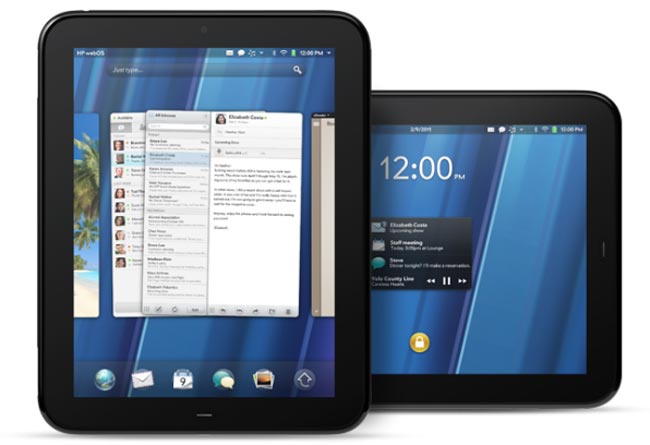
By now, you’ve probably heard that HP has decided to axe the TouchPad tablet and mull the future of WebOS as a licensed operating system.  You’ve probably also seen the fire sale that retailers have put on to rid themselves of their mountains of overstocked TouchPads.  I’ve been watching with great interest to see where this leads.

WebOS isn’t bad by any stretch of the imagination.  I’ve used a TouchPad briefly and I was fairly impressed.  The basics for a great OS are all there, and the metaphors for things like killing running applications made a little more sense to me than they did in iOS, which is by and large the predominant table OS today (and the most often copied for that matter).  I wasn’t all that thrilled about the hardware, though.  It felt a bit like one of my daughter’s Fisher Price toys.  Plastic, somewhat chunky, and a fingerprint magnet.  WebOS felt okay on the hardware, and from what I’ve heard it positively screams on some newer hardware comparable to that found in the iPad or the Galaxy Tab 10.1.

I think WebOS as an alternative to Android will be very helpful in the long run of recovering HP’s investment.  Google’s recent acquisition of Motorola is probably making companies like HTC and Samsung a little wary, despite what the press releases might say.  Samsung has done a lot with Android in the tablet space, presenting a viable alternative to Apple, or at least as viable as you can get going against that 800-pound gorilla.  They’ll be on the good side of Google for a while to come.  HTC sells a lot on handsets and has already shown that they’re willing to go with the horse that gives them the best chance in the race.  Whether that is Windows Mobile, Android, or someone else depends on which way the wind is blowing on that particular day.  If HP can position WebOS attractively to HTC and get them to start loading it on one or two phone models, it might help give HTC some leverage in their negotiations with other vendors.  Plus, HP can show that the TouchPad was a fluke from the sales perspective and get some nice numbers behind device adoption.  I’m sure that was part of the idea behind the announcement that HP would start preloading WebOS on its PCs and printers (which is probably not going to happen now that HP is shopping their PC business to potential buyers).  More numbers mean better terms for licensing contracts and better fluff to put into marketing releases.

As for the TouchPad itself, I think it’s going to have a life beyond HP.  Due to the large number of them that have been snapped up by savvy buyers, there is a whole ecosystem out there just waiting to be tapped.  There’s already a port of Ubuntu.  XDA has a bounty of $500 for the first Android port to run on it.  With so many devices floating around out there and little to no support from the original manufacturer, firmware hackers are going to have a field day creating new OS loads and shoehorning them into the TouchPad.  I don’t think it’s ever going to be enough to unseat the current table champ, but you have to admit that if the TouchPad was even close to being a competitor to the iPad, the fact that it now costs 1/5th of Fruit Company Tablet is a very enticing offer.  I doubt my mom or my grandmother is going to run out and snap one up, but someone like me that has no qualms about loading unsupported software might decide to take a chance on it.  If nothing else, it might just make a good picture frame.

Tom’s Take

Products have a lifecycle.  That’s why we aren’t still buying last year’s widgets.  Technology especially seems to have a much shorter lifecycle than anything else, with the possible exception of milk.  HP bet big on the TouchPad, but like most of today’s new television shows, when it wasn’t a hit out of the gate it got cancelled in favor of something else.  Maybe the combination of WebOS on this particular hardware wasn’t the optimal device.  We might see WebOS on printers and pop machines in the next 5 years, who knows?  The hardware from the TouchPad itself is going to live on in the hands of people that like building things from nothing keeping dead products breathing for just a little longer.  I’d love to see what a TouchPad running Backtrack 5 would be like.  With all those shiny new clearanced TouchPads floating around out there, I doubt I’m going to have to wait very long.

My Thoughts on Dell and Force 10

Big announcement today concerning Michael Dell’s little computer company and their drive to keep up with the Joneses in the data center.  Dell has been a player in the server market for many years, but in the data center they are quickly losing out to the likes of HP, Cisco, and even IBM.  Until they hired away HP’s chief blade architect a few years ago, they weren’t even interested in blade servers/enclosures.  Instead, they relied on the tried-and-true model of 1U rack-mounted servers everywhere.  That has all changed recently with the explosion of high-density server enclosures becoming the rage with customers.  Now, the push seems to be headed toward offering a soup-to-nuts portfolio that allows your customers to go to one vendor to get all their data center needs, whether it be storage, servers, or networking.  HP was the first company to really do this, having acquired 3Com last year and integrating their core switching products into the Flex family of data center offerings.  Cisco has always had a strong background in networking, and their UCS product line appears to be coming on strong as of late.  IBM has been a constant bellweather in the market, offering storage and servers, but being forced to outsource their networking offerings.  Dell found itself in the same boat as IBM, relying on Brocade and Juniper as OEM partners to offer their networking connectivity for anything beyond simple low-end ports, which are covered by the Dell PowerConnect line.  However, the days of OEM relationships are quickly drying up, as the bigger vendors are on an acquisition spree and the little fish in the market are becoming meals for hungry vendors.

Dell has enjoyed a very strong relationship with Brocade in the past, and the positioning of Brocade as a strong player in the data center made them a very logical target for Dell’s pocketbook.  In fact, it had been reported several weeks ago that a deal between Dell and Brocade was all but done.  So, imagine the surprise of everyone when Dell announced on July 20th that they were buying Force10 Networks, a smaller vendor that specializes in high-performance switching for markets such as stock market trading floors.  To say that my Twitter stream erupted was an understatement.  We all knew that Dell was going to buy someone, but most figured it would be Brocade.  I even ranked Arista ahead of Force10 as the likely target of Dell’s acquisition fever.  I just figured that Force10 was a little too small and specialized to garner much attention from the big boys.  Don’t get me wrong, I think that Force10 makes some great products.  Their presentation at Network Field Day was well received, and they several customers that will swear by their performance.

What I expected from Dell was a purchase that would serve them across their whole network portfolio.  Brocade would have given them a replacement for the PowerConnect line at the low end as well as data center and fibre channel connectivity options.  They were already OEM-ing Brocade’s product line, so why not buy them outright?  I think that comes down the fact that EVERYONE is OEM-ing from Brocade (or so it seems).  EMC, IBM, and even HP have products from Brocade in their offerings.  If Dell had purchased Brocade outright, it would have forced those vendors to look elsewhere for fibre channel connectivity.  This would either be due to a desire to not inflate a competitor’s bottom line, or perhaps later if and when Dell decided to change the rules of how other vendors OEM from them.  This move away from a Dell-owned Brocade would have really muddied the waters for those inside Dell that wanted Brocade for it’s revenue stream.  As it is, I’m pretty sure that Dell is going to scale back on the B-series PowerConnect stuff everywhere but the fibre channel line and use Force10 as the main data center core technology group, while at the same time maintaining the PowerConnect line at the lower end for campus connectivity.  This will allow them to keep their margins on the PowerConnect side while at the same time increasing them in the data center, since they’ll no longer have to pay OEM fees to Brocade.

Whither Juniper?

The next most popular topic of conversation after Force10 involved…Juniper.  Juniper was a long-shot target of acquisition for Dell (and others), and now that the only major server vendor without a solid networking background is IBM, people are staring to ask who, if not IBM, is going to buy Juniper?  And when?

Folks, Juniper isn’t an easy acquisition.  Add in the fact that the IBM you see today isn’t the IBM of your father (or my early networking days for that matter), and you’ll see that Juniper is best left to its own devices for the time being.  Juniper isn’t really what I would consider a “data center switching” company like Force10 or Arista.  They tend to fall more in the service provider/campus LAN market to me.  I think that if someone like IBM could pony up the billions to buy them, they’d quickly find themselves lost in what to do with Juniper’s other technologies.  Buying Juniper for their data center offerings would be like buying a Porsche because you like the stereo.  You’re missing the point.  I’d wager money that Juniper is more likely to buy twenty more companies before they get bought themselves.  Their networking business is growing by leaps and bounds right now, and saddling them with a large company as ‘oversight’ would probably cripple their innovation.

IBM already owns a high-speed, low-latency networking company that they bought about this time last year, Blade Networks.  Why should they go out and spend more money right now?  Especially if they are happy with their OEM partnerships with Brocade and Juniper (like Dell has been doing previously)?  IBM has shed so much of what it used to be that it no longer resembles the monster that it once was.  Gone are the PCs and Thinkpads and low-end servers.  Instead, they’ve moved to the blade and high end server market, with storage to complement.  They used to be number one, but have long since been passed by HP.  Now they find themselves fighting off their old foe Dell and this new upstart, Cisco.  Does it really make sense for them to mortgage the family farm to buy Juniper, only to let it die off?  I’d rather see them make a play for a smaller company, maybe even one as well-known as Arista.  It would fit the profile a bit better than buying Juniper.  That’s more HP’s style.

Tom’s Take

I fully expect the trumpets of Dell’s new-found data center switching expertise to start sounding as soon as the ink is dry on Force10.  In fact, don’t be surprised to see it come up during Tech Field Day 7 next month in Austin, TX.  I think Dell will get a lot of mileage out of their new stalking horse, as most of the complaints I’ve heard about Force10 come from their sales staff, and we all know how great Dell is at selling.

For now, Juniper needs to sit back and bide its time, perhaps stroking a white Persian cat.  They can go down the interoperability road, telling their customers that since they have strong OEM relationships with many vendors, they can tie all these new switches together will very little effort.  They shouldn’t worry themselves with the idea that anyone is going to buy them anytime soon.

Why I Went Back To iOS 4.3.3…For Now

I’ve been an unofficial beta tester of iOS 5 for about two weeks now. There are a lot of interesting features that I think have the capability to make my life easier. First and foremost is the revamped notification system. Not being pulled out of my current thoughts by a modal dialog box is a great thing. Being able to deal with alerts on my schedule is very liberating. Also of great import to me is the integration with Twitter.
Allowing me to tag contacts with Twitter handles helps me keep my nerd friends straight, and the ability to snap pictures and upload them directly to Twitter is very helpful for those that takes tons of snapshots, like Stephen Foskett. There are even more features that have promise, like iMessage.

So why, on the eve of my trip to Cisco Live 2011, did I put my phone into DFU mode and go back to 4.3.3? Well, for all the greatness that I found in the beta, there were a couple of things that gave me pause. Enough pause that when I knew I was going to be at a conference where I would be relying heavily on my phone to be my lifeline to the rest of the world for a week, I had to go back to something a little more polished. My biggest complaint about the beta release of iOS 5 was the abysmal battery life. I wasn’t on beta release 1, which by all accounts had a battery life best measured in minutes. I jumped in during beta 2, where things were much improved, or so the story went. However, I found my battery life to be noticeably worse. I hesitated to use my phone to check my email or Twitter feed for fear it wouldn’t last through the day. If I actually made a call on it, I had to recharge it on the way home from work to be sure it would hold out. My trip to the OSDE tweetup was marred by less than 10% battery power, which made status updates unrealistically optimistic. I know that battery life is always a fine balance to maintain. New features require even more power, and the antiquated battery in my 3GS is quickly approaching the end of its useful life. However, if the next beta doesn’t address the battery life issue with a little more tweaking, it will be a hard choice to make.

Another irritation was the overall lagginess of my phone. Apps would take an extra second or two to launch than normal. Pulling up information inside Facebook or Safari seemed to freeze every time. My new fancy camera app crashed so much it was unusable. The phone just seemed to stall, like a computer with an old, slow processor or inadequate amount of RAM. Again, I know that most of this is due to the code train not being
optimized yet for release and the apps not being optimized for iOS 5. Usually, these are the last things to get fixed before release, so I’m optimistic that things will clear up. However, these are the same complaints that iPhone 3G users had about iOS 4 when it was released. It seems that maybe Apple’s support of 2-year old hardware is spotty in some cases.

Tom’s Take

Beta testing is always a crapshoot. You are agreeing to test something that may not be ready for prime time. I’ve been beta testing things since I got into computers and networking, so I’m never shocked by what I get into. However, in recent years, companies have been using the beta tag a lot differently. They either keep something that’s ready for release in beta forever, like GMail, or they push unfinished code out the door and make
their customers unwilling beta testers, which can best be summed up by the old maxim, “Don’t install a new version of Windows until the first service pack is released.” While I like many of the new features of iOS 5, the lack of polish in the battery life and lag departments were enough to make me reconsider my decision this time. I especially find that part funny, since I’ve never been so attached to a device to care about what revision
of code is running on it. I might give beta 3 a shot (if there is one), but for now I’m going back to something that isn’t going to make me tote around a 500-foot extension cord and curse my phone twice as much as I do already.

An Outsider’s View of Junosphere

It’s no secret that learning a vendor’s equipment takes lots and lots of time at the command line interface (CLI).  You can spend all the time you want pouring over training manuals and reference documentation, but until you get some “stick time” with the phosphors of a console screen, it’s probably not going to stick.  When I was studying for my CCIE R&S, I spent a lot of time using GNS3, a popular GUI for configuring Dynamips, the Cisco IOS simulator developed by the community.  There was no way I would be about to afford the equipment to replicate the lab topologies, as my training budget wasn’t very forgiving outside the test costs and any equipment I did manage to scrounge up usually went into production soon after that.  GNS3 afforded me the opportunity to create my own lab environments to play with protocols and configurations.  I’d say 75-80% of my lab work for the CCIE was done on GNS3.  The only things I couldn’t test were hardware-specific configurations, like the QoS found on Catalyst switches, or things that caused massive processor usage, like configuring NTP on more than two routers.  I would have killed to have had access to something a little more stable.

Cisco recently released a virtual router offering based around IOS-on-Unix (IOU), a formerly-internal testing tool that was leaked and cracked for use by non-Cisco people.  The official IOU simulation from Cisco revolves around their training material, so using it to setup your own configurations is very difficult.  Juniper Networks, on the other hand, has decided to release their own emulated OS environment built around their own hardware operating system, Junos.  This product is called Junosphere.  I was recently lucky enough to take part in a Packet Pushers episode where we talked with some of the minds behind Junosphere.  What follows here are my thoughts about the product based on this podcast and some people in the industry that I’ve talked to.

Junosphere is a cloud-based emulation platform being offered by Juniper for the purpose of building a lab environment for testing or education purposes.  The actual hardware being emulated inside Junosphere is courtesy of VJX, a virtual Junos instance that allows you to see the routing and security features of the product.  According to this very thorough Q&A from Chris Jones, VJX is not simply a hacked version of Junos running in a VM.  Instead, it is a fully supported release track code that simply runs on virtual hardware instead of something with blinking lights.  This opens up all sorts of interesting possibilities down the road, very similarly to Arista Networks vEOS virtualized router.  VJX evolved out of code that Juniper developers originally used to test the OS itself, so it has strong roots in the ability to emulate the Junos environment.  Riding on top of VJX is a web interface that allows you to drag-and-drop network topologies to create testing environments, as well as the ability to load preset configurations, such as those that you might get from Juniper to coincide with their training materials.  To reference this to something people might be more familiar with, VJX is like Dyanmips, and the Junosphere lab configuration program is more like GNS3.

Junosphere can be purchased from a Juniper partner or directly from Juniper just like you would with any other Juniper product.  The reservation system is currently set up in such a way as to allot 24-hour blocks of time for Junosphere use.  Note that those aren’t rack tokens or split into 8-hour sessions.  You get 24 continuous hours of access per SKU purchase.  Right now, the target audience for Junosphere seems to be the university/academic environment.  However, I expect that Juniper will start looking at other markets once they’ve moved out of the early launch phase of their product.  I’m very much aware that this is all very early in the life cycle of Junosphere and emulated enviroments, so I’m making sure to temper my feelings with a bit of reservation.

As it exists right now, Junosphere would be a great option for the student wanting to learn Junos for the first time in a university or trade school type of setting.  By having continuous access to the router environments, these schools can add the cost of Junosphere rentals onto the student’s tuition costs and allow them 24-hour access to the router pods for flexible study times.  For self-study oriented people like me, this first iteration is less compelling.  I tend to study at odd hours of the night and whenever I have a free moment, so 24-hour access isn’t nearly as important to me as having blocks of 4 or 8 hours might be.  I understand the reasons behind Juniper’s decision to offer the time the way they have.  By offering 24-hour blocks, they can work out the kinks of VJX being offered to end users that might not be familiar with the quirks of emulated environments, unlike the developers that were the previous user base for the product.

Tom’s Take

I know that I probably need to learn Junos at some point in the near future.  It makes all the sense in the world to try and pick it up in case I find myself staring at an SRX in the future.  With emulated OS environments quickly becoming the norm, I think that Junosphere has a great start on providing a very important service.  As I said on Packet Pushers, to make it more valuable to me, it’s going to need to be something I can use on my local machine, ala GNS3 or IOU.  That way, I can fire it up as needed to test things or to make sure I remember the commands to configure IS-IS.  Giving me the power to use it without the necessity of being connected to the Internet or needing to reserve timeslots on a virtual rack is the entire reason behind emulating the software in the first place.  I know that Junosphere is still in its infancy when it comes to features and target audiences.  I’m holding my final judgement of the product until we get to the “run” phase of the traditional “crawl, run, walk” mentality of service introduction.  It helps to think about Junosphere as a 1.0 product.  Once we get the version numbers up a little higher, I hope that Juniper will have delivered a product that will enable me to learn more about their offerings.

For more information on Junosphere, check out the Junosphere information page at http://www.juniper.net/us/en/products-services/software/junos-platform/junosphere/.

Flexing Your Muscles – HP Networking Announcements

It’s Interop week, which means a lot of new product announcements coming out on all kinds of interesting hardware and software.  HP is no different and a couple of the products that they’ve got on tap appear to have some interesting designs on how we perceive the idea of a campus network for the coming months.

HP Flex Network Architecture

HP has announced a new network design methodology they refer to as the Flex Network Architecture.  It addresses many of the deficiencies that HP is seeing in network design related to thinking about networks in old ways.  There has been a lot of innovation in networking in recent months but it has been focused primarily on the datacenter.  This isn’t all that surprising, as most of the traction around building large networks has included buzzwords like “cloud” or “fabric” and tend to focus on centralizing the exchange of data.  HP wants to take a great number of these datacenter innovations and push them out to the campus and branch network, where most of us users live.

HP’s three primary areas of focus in the Flex Network are the Flex Fabric, which is the datacenter area that includes unified computing resources and storage, Flex Campus, which is the primary user-facing network area where users connect via technologies such as wireless, and the Flex Branch, where HP is focusing on creating a user experience very similar to that of the Campus users.  To do this, HP is virtually eliminating the lines between what have been historically referred to as “SMB” or “Enterprise” type networks.  I believe this distinction is fairly unnecessary in today’s market, as many branch networks could technically qualify as “Enterprise”, and a lot of campus networks could realistically be considered “SMB”.  By marrying the technology more toward the needs of the site and less to a label, HP can better meet the needs of the environment.

According to HP, there are five key components of the Flex Network:

1. Standards – In order to build a fully resilient architecture, standards are important.  By keeping the majority of your network interoperable with key standards, it allows you to innovate in pockets to improve things like wireless performance without causing major disruptions in other critical areas.

2. Scalability – HP wants to be sure that the solutions they offer are scalable to the height of their capability.  Mike Neilsen summed this up rather well by saying, “What we do, we do well.  What we don’t do well, we don’t do at all.”

3. Security – Security should be enabled all over your network.  It should not be an afterthought, it should be planned in at the very beginning and at every step of the project.  This should be the mantra of every security professional and company out there.

4. Agility – The problem with growing your network is that you lose the ability to be agile.  Network layers quickly overwhelm your ability to quickly make changes and decrease network latency.  HP wants to be sure that Flex allows you to collapse networks down to at most one or two layers to provide the ability to have them running in top condition.

5. Consistency – If you can’t repeat your success every time, you won’t have success.  By leveraging HP’s award winning managment tools like IMC, you can monitor and verify that your network experience is the same for all users.

The focus of the Flex Campus for this briefing is the new A10500-series switch.  This is a new A-series unit designed to go into the core of the campus network and provide high-speed switching for data bound for users.  This would most closely identify with a Cisco Catalyst 6500 switch.  The A10500 is the first switch in HP’s stable to provide IRF in up to 4 chassis.  For those not familiar, Intelligent Resilient Framework (IRF) is the HP method of providing Multiple Link Aggregation (MLAG) between core switches.  By linking multiple chassis together, one logical unit can be presented to the distribution layer to provide fault tolerance and load balancing.  HP’s current A-series switches currently support only 2 chassis in an IRF instance, but the 4IRF technology is planned to be ported to them in the near future.  One of the important areas where HP has done research on the campus core is the area of multimedia.  With the world becoming more video focused and consuming more and more bandwidth dedicated to things like HD Youtube videos and rich user-focused communications, bandwidth is being consumed like alcohol and a trade show.  HP has increased the performance of the A10500 above the Cat 6500 w/ Sup720 modules by reducing latency by 75%, while increasing switching capacity by almost 250%.  There is also a focus on aggregating as many connections as possible.  The launch LPUs (or line cards in Cisco parlance) are a 16-port 10GbE module and a 48-port 1GbE module, with plans to include a 4-port 40GbE and 48-port 10GbE module at some point next year, which should provide 270% more 10GbE density that the venerable Cat 6500. The A10500 comes in 3 flavors, a 4-slot chassis that uses a single crossbar fabric to provide better than 320 Gbps of throughput, and an 8-slot chassis that can mount the LPUs either vertically or horizontally and provide no less than 640 Gbps of throughput.  These throughput numbers are courtesy of the new MPU modules, what Cisco people might call Supervisor engines.  The n+1 fabric modules that tie all the parts and pieces together are called SFMs.  This switch isn’t really designed to go into a datacenter, so there is no current plan to provide FCoE LPUs, but there is strong consideration to support TRILL and SPB in the future to ease the ability to interoperate with datacenter devices.

Another new product that HP is launching is focused on security in the datacenter.  This comes courtesy of the new TippingPoint S6100N.  This is designed to function similarly to an IDS/IPS box, inspecting traffic flying in and out of your datacenter swtiches.  It has the ability to pump up to 16 Gbps of data through the box at once, but once you start inspecting more and more of that traffic, you’ll probably see something closer to 8-10Gbps of throughput.  The S6100N also gives you the ability to have full visibility for VM-to-VM conversations, something that is currently giving many networking and security professionals grief, as much of the traffic being generated in today’s datacenter is generated and destined for virtual machines.  I think there is going to be a real opportunity in the coming months for a device that can provide this kind of visibility without impeding traffic.  HP looks to have a great future with this kind of device.

The third new piece of  the Flex Network Architecture is the addition of Intelligent Management Center (IMC) 5.0 to the Flex Management portion of the Flex Architecture.  The flagship software program for HP’s network management strategy, IMC provide Single Pane of Glass (SPoG) functionality to manage both wired and wireless networks, as well as access control and identity management for both.  It integrates with HP Network Management Center to allow total visibility into your network infrastructure, whether it consist of HP, Procurve, Cisco, 3Com, or Juniper.  There are over 2600 supported devices in IMC that can be monitored and controlled.  In addition, you can use the integrated access controls to control the software being run on the end user workstations and monitor their bandwidth utilization to determine if you’ve got a disproportionately low number of users monopolizing your bandwidth.  IMC is available for installation on a dedicated hardware appliance or in a virtual machine for those that have an invested VMware infrastructure.  You can try it out all the features for 60 days at no charge to see if it fits into your environment and helps alleviate “swivel chair” management.

Tom’s Take

The new HP Flex Architecture gives HP a great hook to provide many new services under a consistent umbrella.  The new addition of the A10500 gives HP a direct competitor to the venerable Cat 6500 platform that can provide high speed connectivity to the campus core without muddying the waters with unnecessary connectivity options, ala the A12500 or Nexus 7000 with their high-priced FCoE capabilities.  The S6100N helps HP begin to focus on the new landscape of datacenter security, where firewalls are less important the visibility into traffic flows between physical and virtual servers.  The IMC update allows all of these pieces to be managed easily from one operations center with no additional effort.  It seems that HP is gearing up to spread out from their recent success in the datacenter and take the fight to the campus and branch office.  I liked what I heard from HP on this call, as it was more of what HP could do and less of what Cisco couldn’t.  So long as HP can continue to bring new and innovative products to the networking marketplace, I think their fortunes have nowhere to go but up.

Tech Field Day – HP Wireless

Day two of Wireless Tech Field Day started off with HP giving us a presentation at their Executive Briefing Center in Cupertino, CA.  As always, we arrived at the location and then immediately went to the Mighty Dirty Chai Machine to pay our respects.  There were even a few new converts to the the Dirty Chai goodness, and after we had all been properly caffeinated, we jumped into the HP briefing.

The first presenter was Rich Horsley, the Wireless Products and Solutions Manager for HP Networking.  He spoke a bit about HP and their move into the current generation of controller-based 802.11n wireless networks through the acquisition of Colubris Networks back in 2008.  They talked at length about some of the new technology they released that I talked about a couple of weeks ago over here.  Rather than have a large slide deck, they instead whiteboarded a good portion of their technology discussion, fielding a number of questions from the assembled delegates about the capabilities of their solutions.  Chris Rubyal, a Wireless Solutions Architect, helped fill in some of the more technical details.

HP has moved to a model where some of the functions previously handled exclusively by the controller have been moved back into the APs themselves.  While not as “big boned” as a solution from Aerohive, this does give the HP access points the ability to segment traffic, such as the case where you want local user traffic to hop off at the AP level to reach a local server, but you want the guest network traffic to flow back to the controller to be sent to a guest access VLAN.  HP has managed to do this by really increasing the processor power in the new APs.  They also have increased antenna coverage on both the send and receive side for much better reception.  However, HP was able to keep the power budget under 15.4 watts to allow for the use of 802.3af standard power over Ethernet (PoE).  I wonder if they might begin to enable features on the APs at a later date that might require the use of 802.3at PoE+ in order to fully utilize everything.  Another curious fact was that if you want to enable layer 3 roaming on the HP controller, you need to purchase an additional license.  Given the number of times I’ve been asked about the ability to roam across networks, I would think this would be an included feature across all models.  I suppose the thinking is that the customer will mention their desire to have the feature up front, so the license can be included in the initial costs, or the customer will bring it up later and the license can be purchased for a small additional cost after the fact.  Either way, this is an issue that probably needs some more visiting down the road as HP begins to get deeper into the wireless market.

After some more discussion about vertical markets and positioning, it was time for a demo from Andres Chavez, a Wireless Solutions Tester.  Andres spends most of his time in the lab, setting up APs and pushing traffic across them.  He did the same for us, using an HP E-MSM460 and iPerf.  The setup worked rather well at first, pushing 300Mbits of data across the AP while playing a trailer for the Star Wars movie on Blu-Ray at full screen in the background.  However, as he increased the stream to 450Mbits per second, Mr. Murphy reared his ugly head and the demo went less smooth at that point.  There were a few chuckles in the audience about this, but you can’t fault HP for showing us in real time what kinds of things their APs are capable of, especially when the demo person wasn’t used to being in front of a live video stream.  One thing that did make me pause was the fact that the 300Mbit video stream pushed the AP’s processor to 99% utilization.  That worried me from the aspect that we were only pushing traffic across one SSID and had no real policies turned on at the AP level.  I wonder what might happen if we enable QoS and some other software things when the AP is already taxed from a processor perspective, not to mention putting 4-clients on at the same time.  When I questioned them about this, they said that there were actually two processor cores in the AP, but one was disabled right now and would be enabled in future updates.  Why disable one processor core instead of letting it kick in and offload some of the traffic?  I guess that’s something that we’ll have to see in the future.

After a break, the guys from HP sat down with the delegates and had a round table discussion about challenges in wireless networking today and future directions.  It was nice to sit down for once and have a discussion with the vendors about these kinds of topics.  Normally, we would have a round table like this if a session ended early, but having it scheduled into our regular briefing time really gave us a chance to explore some topics in greater depth than we might have been able to with only a 5-10 minute window.  Andrew vonNagy brought up an interesting topic about needed better management of user end-node devices.  The idea that we could restrict what a user could access based on their client device is intriguing.  I’d love to be able to set a policy that restricted my iPhone and iPad users to specific applications such as the web or internal web apps.  I could also ensure that my laptop clients had full access even with the same credentials.

Tom’s Take

HP is getting much better with their Field Day presentations.  I felt this one was a lot better than the previous one, both from a content perspective and from the interaction level.  Live demos are always welcome, even if they don’t work 100%.  Add to that the ability to sit down and brainstorm about the future of wireless and you have a great morning.  I think HP’s direction in the wireless space is going to be interesting to watch in the coming months.  They seem to be attempting to push more and more of the functions of the APs back into the APs themselves.  This will allow for more decisions to be made at the edge of the network and keep traffic from needing to traverse all the way to the core.  I think that HP’s transition to the “fatter” AP at the edge will take some time, both from a technology deployment perspective and to ensure that they don’t alienate any of their current customers by reducing the effectiveness of their currently deployed equipment.  I’m going to be paying attention in the near future to see how these things proceed.

If you’d like to learn more about HP Wireless Networking, you can check them out at http://h17007.www1.hp.com/us/en/products/wireless/index.aspx.  You can also find them on Twitter as @HP_Networking.

Disclaimer

HP was a sponsor of Wireless Tech Field Day, and as such they were responsible for a portion of my travel expenses and hotel accommodations.  In addition, they provided lunch for the delegates, as well as a pen and notepad set and a travel cooler with integrated speakers.  At no time did they ask for nor where they promised any kind of consideration in the writing of this review.  The analysis and opinions presented here are given freely and represent my own thoughts.

Fruit Company Console: My Review of the Cisco Console Companion for iPad/iPhone

One of the major advantages to owning an iPad, or in some cases an iPhone, is that you have a mobile computer at your fingertips that is quite easy to carry around the datacenter or networking closet.  I have an iPad myself, and I find it very useful for documentation purposes.  Whether it be taking notes about the configuration of a specific device or looking up the PDF of a particular feature from Cisco’s website, the iPad has many uses.  However, if I find myself in need of connecting to a device such as a switch or a router, my iPad/iPhone options are limited.  I can use a telnet or SSH client to remote into the system, but if I don’t know the management IP or the username/password combination I can be sunk.  Or worse yet, if the switch has never been properly configured for remote access it becomes a moot point.  If I want to be able to use my trusty Cisco rollover console cable to get into the switch the old fashioned way, I have to lug out my behemoth Lenovo W701 laptop and get it ready, which can be quite an endeavor depending on the amount of room I have to work with or the amount of time that I’m going to spend consoled in, since my laptop has about 1.5 hours of battery life under the best of circumstances.  Add in the difficulties that I’ve faced with USB-to-serial adapters under Windows 7 64-bit and you can see why I’m reluctant to use the console.  However, there is hope for the best of these two worlds.

A company called Redpark has started selling a rollover cable with a 30-pin iDevice connector.  Engadget had a story about it HERE.  Naturally, I decided that I just had to have one of these.  You know…for work and stuff.  Anyway, I jumped right over to the Redpark website.  Hello sticker shock.  This baby is going to set you back a cool $69.  Add in more if you want shipping and handling (whatever that is), so expect to shell out about $80 to get it to your neck of the woods, more if you need to have one tomorrow.  That’s not all, folks!  Even if you do manage to get your hands on one of these little jewels, you still need an app to access the console.  Now those of you that looked at this excellent blog post by Ruhann about console access on a jailbroken iPad are all set.  The rest of us poor saps that haven’t jailbroken our iPads yet are in a bit of a lurch.  Fear not, because the company also has an official app on the App Store called Get Console (or Cisco Console Companion) that will give you console access.  For a measly $9.99.  After all, you’ve already spent $80 already, what’s a few dollars more?

Once my console cable arrived in the mail, I was a little underwhelmed by the packaging:

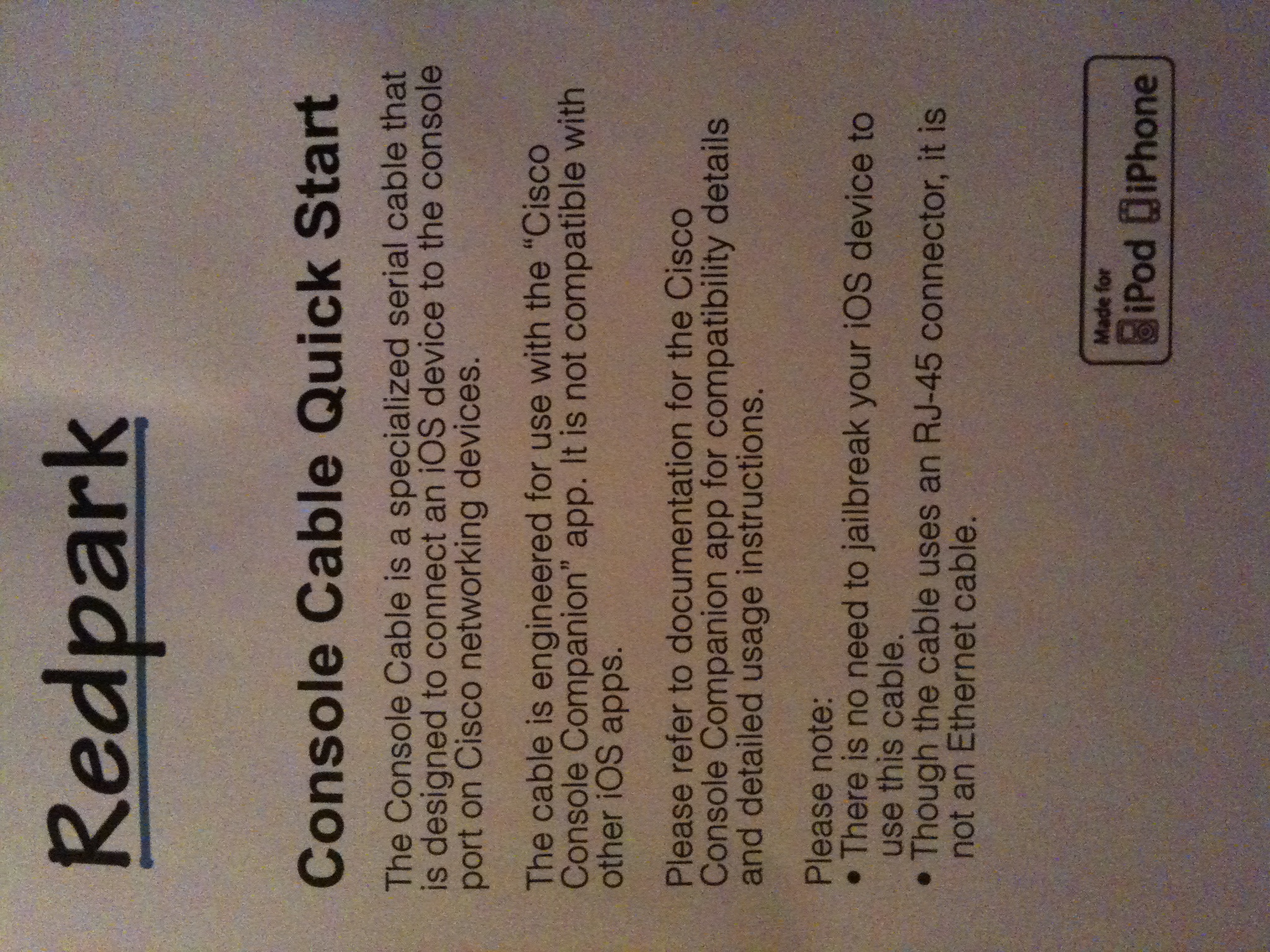
Not much to look at.  The contents of the box were even worse.  The console cable lovingly encased in bubble wrap, and this instruction sheet:

Bravo for making it straightforward and easy to read.  Off to the App Store to download my new app.  Except…”Cisco Console Companion” isn’t the official title of the app.  It’s “Get Console”, along with a big disclaimer that it is in no way associated with Cisco.  I’m guessing they had to use an alternate title in the app store because of some wonky trademark issues that Uncle John wasn’t too pleased about.  At any rate, it was a fast download and then I was off and running.

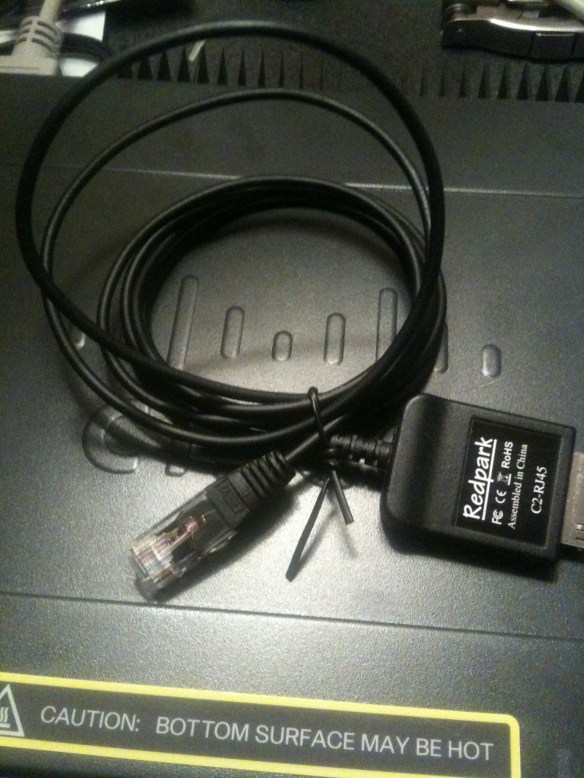
For the purposes of this test, I’m consoling into a Cisco Catalyst 3560 8-port switch.  Once I fired up the program, it popped up with a one-time reminder that it was only for Cisco devices and that it would check each device to ensure that it was a genuine Cisco product.  My best guess is this is there to prevent people from trying to use it as an Ethernet cable or something, because most reports I’ve seen says that it works just fine with any kind of device that uses a rollover cable, like Juniper, or HP, or what have you.  I didn’t test this out during my first run, but I will be testing it down the road of some of those devices.  Note that since it is an RJ-45 rollover cable, it can’t be used on RS-232 or null modem devices.  Oh well, time to upgrade those old switches anyway.  The cable itself feels rather thin, almost like a fiber patch cable rather than a flat rollover cable or even a UTP cable.  It’s about 6 feet long, so you don’t have to be right next to the device you’re trying to console into, but don’t expect to be programming from across the room.  Here’s a picture of the cable on top of my test switch:
My first encounter with the Get Console program led me to this screen:

Fairly utilitarian, but that’s fine by me.  I’m not really a “bells and whistles” kind of guy.  The bottom section of the screen is dominated by the on-screen keyboard, but that’s to be expected.  Just above that is a collapsible keyboard bar that lists some very useful control keys.  First is the all-important TAB key, which I’ve found sorely lacking on some of the telnet clients I’ve used.  TAB saves me a ton of time.  Next is the CTRL key, which when tapped toggles on and allows you to use CTRL+ shortcuts for moving around the command line or sending a CTRL+C or CTRL+Z to end.  Next is the BRK key, which sends an immediate break signal to the console.  Useful for those times when you need to enter ROMMON on bootup.  Next is everyone’s favorite question mark key.  Having it here is really helpful so that I don’t have to waste a keystroke getting to the number/symbol keyboard on the iPad.  This is followed by the up and down error keys, which are used to cycle through your command history forward and backward.  Lastly is a Return key, which I didn’t really use, since the iPad keyboard has one built in.

The upper right corner of the app replicates many of the same keys as the collapsible keyboard, along with a paper clip icon.  When you tap this, it pulls out a drawer that contains the contents of the clipboard.  You can paste those contents directly onto the command line.  So if you find yourself typing the same commands in over and over, this is a handy shortcut (there are others we’ll get to in a second).  As a quick note, while you can type in this clipboard, if you don’t copy the contents before pasting it will simply paste what was in the box before.  So be sure to copy before you paste.

The upper left includes the Settings button, the session button, the keyboard show/hide button, a button to show/hide the collapsible keyboard with the TAB and CTRL keys, and a file drawer for storing config files.  The settings button is very feature rich. You can choose to have the program automatically connect when it launches or wait for you to connect manually.  There are also settings to change the baud rate and stop bits, which really helps when you are connecting to some non-standard gear.  You can have the system log all of your console sessions, which can be stored in the filing cabinet for later examination.  You can change the number of columns and rows, as well as the amount of scrollback in the window.  Be aware that adding too many columns will mean you need to scroll the screen left or right to see the output, as it looks like the main window is about 80 columns wide.  You can change the bell that dings when you do something you aren’t supposed to, as well as changing the color scheme to something other than white-on-black text.  The font size slider doesn’t correspond to actual point sizes, so you might need to play around with it to find a comfortable setting.

The session button allows you to disconnect a console session manually as well as offering one of the added benefits of this program.  By signing up at http://www.get-console.com, you can add an option under settings to connect to a remote console server at that website.  You can then tap the session button and obtain a 7-digit access code that allows someone to access your console session from the Get Console webpage.  This is fairly handy if you have a junior administrator on site and need to walk them through a configuration.  Or if that same junior admin is in a network that is down, you can use a 3G iPad to connect to their console session and do some troubleshooting.  I had to play around with the settings in order to test this feature.  It looks like the app connects to the remote console server when you choose to share the session, and the access code allows the user on the website to connect in like a type of reverse telnet connection.  I couldn’t get the app to connect using the North America servers, but the Europe and Asia servers worked just fine.  However, the latency on these connections was pitiful.  Redraw on my screen could be measured in seconds.  I tried entering some commands on the webpage, but careful typing was enough to overrun the keyboard buffer for the app.  And if you’re going to try and look at live debugs, you might as well forget about it.  By the time you could send a break or “un all”, you’d be swamped in messages.  Better to use the web app as a mirroring device for training or for simple troubleshooting.  You can also choose to encrypt the sessions if you want, which is a pretty good idea if you don’t want everyone on the Internet up in your business.

The filing cabinet is another interesting piece.  By uploading configs to the Get Console website, you can store them in your filing cabinet to copy onto the device locally.  That way, if you have a template for your switches, you don’t need to worry about copying and pasting it out of an e-mail, where it may get buggered up by some strange formatting issues.  You can also have those pesky junior admins share an account and copy the configs to the filing cabinet for them, so all they have to do is walk out and plug in to setup the switch with enough config for you to be able to telnet to it.  There is local shortcut storage as well, so you can keep some of your more clever commands on your own iPad safe from those that could use them to do harm.  You can also store console logs for later upload or email.

Out of the box, the font size was downright tiny.  I had to bump the slider up to about 3/4ths of the way just to read it comfortably, and I was holding the iPad less than a foot from my face.  The keyboard was quite responsive, and the scrolling of the information was smooth and easy to follow.  The app is setup to beep at you when you try to use a key that isn’t supported, such as a down arrow at the prompt when there are no more commands to replay.  This feature is nice because it gives some feedback so you know when you’re beating your head against a brick wall.

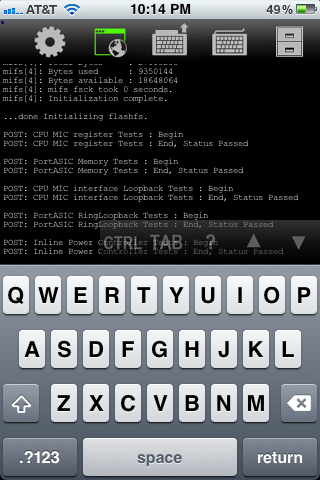
In case you’re curious, this app is universal for both iPad and iPhone/iPod Touch.  But other than just glancing at the console I’m not sure how useful it’s going to be.  There isn’t much screen real estate to start with, and all the extra pieces don’t give you much room to look at things.  Here’s a screen shot to give you and idea of what I’m talking about:
Tom’s Take

It all comes down to money.  Is there enough utility in this cable and app for you to justify spending $100 on it?  Do you often find yourself in a network room with only your iPad and a switch that won’t respond to any other method of input?  I wouldn’t dream of trying to do any kind of heavy duty debugging on this device.  I’d rather have my full laptop with multiple apps and notepad windows to drag around to interpret console spam.  As well, any kind of programming that would require lots of time at the keyboard would probably get uncomfortable after a while, unless you’re one of those people that happens to like typing on the iPad on-screen keyboard.  I suppose you could haul along a wireless keyboard, but at that point you’re dragging along an awful lot of devices for simple console access.

I could see this being a useful tool for training or for an emergency tool kit.  Throw an iPad and a cable in your kit and you have instant access to the console of a device from anywhere in the world.  You could send the less-skilled network admins out on site and a more senior person could stay in the office and do some simple troubleshooting or configuration in order to get to the equipment through SSH or telnet.  The web piece, in my mind, is just too unresponsive to spend a lot of time on.  Plus, if you are fast typist like I am, you’re going to get rather frustrated with the delay in command execution, if you don’t outright lock the system up with all the characters you’re throwing at it.

The app does what it says, there’s no denying that.  I find it very useful to have on my iPad and I’ll probably use it going forward for many of my walkthroughs and audits.  However, I think the $100 price tag is a little steep for something like this.  I hope that the price of the console cable will come down at some point, because $69 dollars for this is a bit of a stretch, even by Apple standards.  If there is enough demand, we may even see some other vendors get into the market and offer something like this.  If that happens, hopefully the Get Console people will support them as well.  I had hoped that maybe the software people could offer a gift card with the purchase of the cable, but I believe that they are two different companies so that’s probably out of the question.  Redpark could always throw in a $10 iTunes gift card if the want to soften the blow of needing the additional app to use the cable, but marketing isn’t my department.

All in all, I think I’m going to be able to find some use out of this app.  However, you really need to think twice about whether or not a C-note is worth giving up for this type of functionality.  If you want to learn more about these products, you can check out the console cable at http://redpark.myshopify.com/products/console-cable and you can check out the software program at http://www.get-console.com/

HP Wireless Updates

Today, HP has launched a couple of new additions to their wireless portfolio.  I was able to get a look at them and ask some questions about their performance and capabilities.  First, a little history lesson for those not up on HP wireless networking.

Back in the day, when HP Networking was the entity formerly known as Procurve, they had their own product line for wireless, centered around their Wireless Edge Services Module.  This little blade plugged into the 54xx and 82xx switches to provide a controller-based wireless solution.  The access points used by HP weren’t called “access points” but “radio ports”, more accurately describing their function as dumb antennas that relayed the signal back to a central controller, where the traffic was then switched to the appropriate port or routed for destinations known or unknown.  It worked fairly well for what it was, and I had a couple of opportunities to deploy it for some customers.  It was 802.11 a/b/g only, so when the newer 802.11n access points started coming along, this solution couldn’t keep up with the users’ faster data access desires.

To rectify this situation, HP announced the purchase of Colubris Networks back in August 2008.  Colubris was one of the first manufacturers of 802.11n APs and had some very interesting plans to start offering a controller that allowed wired and wireless users to be integrated into one appliance for traffic selection and processing.  Alas, this product never really came out, and so the whole development team was swept up into HP after the purchase.  The existing Colubris APs and controllers became the new MSM series access points from HP, and the old Procurve Wireless Edge and Radio Port solution was put out to pasture.

Fast forward about 2.3 years, and you have today’s announcement from HP of their first dual-band a/b/g/n radio sets.  These units are designed to compete with Cisco’s 1142 AP, based on the slide deck that I was shown.  There are two new APs with internal omnidirectional antennas, the E-MSM430 and the E-MSM460.  The 460 is a 3×3:3 AP, which means that it has 3 transmit and 3 receive antennas (3×3), as well as support for 3 data streams (:3).  The 430 is 2X3:2, meaning it has 2 transmit antennas and 2 data streams.  For a point of reference, the competing Cisco 1142 AP is 2×3:2 as well.  Having more spatial streams means that you can really crank up the bandwidth.  The 430 has a max bandwidth of 300 Mbps per radio, when the 460 can top out at 450 Mbps per radio.  There is also an E-MSM 466 that has 3×3:3 antenna support, but uses a selection of external antennas as opposed to the internal omnis of the other units.

The APs use a standards-based implementation of beamforming, as well as 802.3af PoE standards.  They also offer a capability of steering clients to less-used sections of the airspace.  Many devices today offer 802.11a as well as 802.11b/g client radios.  However, many devices will show a preference for one over the other, and in many consumer cases this preference is for the 2.4 Ghz 802.11b/g spectrum, which by now is full of lots of things, like microwaves, cordless phones, Mi-Fi mobile hotspots , and so on.  It’s getting pretty crowded to try and do anything.  The 802.11a spectrum, on the other hand, appears to be very open at this point.  There are very few devices competing up there, and the amount of non-overlapping channels lends itself well to things like channel bonding to increase throughput.  HP’s technology will allow the controller to steer the 802.11a-capable clients to that spectrum and allow the 2.4 space a little breathing room.  That could be a lifesaver for certain markets where connectivity in that band range is very critical, like healthcare for instance.

For those of you have cold sweats about the last wireless announcement, have no fears here.  The new APs are designed to work with the 7xx-series controllers, so you won’t need to rent any more forklifts.  The controllers have the capability to have traffic exit at both the controller end and the AP end, so people who want to access the network printer down the hall won’t have their traffic traversing all the way back to the network core to come back down to the printer.  That aspect has me very interested, as I’m beginning to see some throughput concerns with all AP traffic terminated at the controller.  There are only so many links you can shove into an Etherchannel/LACP setup.

There is also an update to the HP Mobility Manager software.  This Single Pane of Glass (SPoG) software allows you to manage multiple controllers and APs at the same time.  You can get a pretty accurate picture of your network quickly and decide how best to implement policy changes.  This software will also integrate with Procurve Manager Plus and the HP Intelligent Management Center (formerly of H3C).  These capabilities are nice so your NOC people don’t have to keep flipping back and forth between applications to ensure the network is up and running.

Tom’s Take

I’m glad to see HP joining the dual-radio world with this new set of access points.  As pointed out by almost all of the wireless blogs I follow, the 2.4 Ghz space is far too congested now, and with almost all devices being shipped now starting to include 5 Ghz radios as well, it’s very critical that a serious wireless company get involved in both spectrums simultaneously.  This new series of APs will allow them to complete directly with Cisco, and if the specs on the 460/466 hold up those two APs should provide higher throughput for connected clients.  Coupled with the capability to shunt clients to less-congested airspace, it should make some aspects of wireless troubleshooting much easier on us poor wireless rock stars.  The Mobility Manager updates should also prove helpful to those people using the software to control multiple controllers and AP setups.

This offering shows that HP is looking to step up their game and are going to compete with Cisco and most likely Juniper once the dust settles from the Trapeze acquisition.  I’m optimistic that these new offerings will compliment HP’s wireless infrastructure and drive innovation in both the hardware and software from the competition.  It should be a win-win for everyone that deals with wireless regularly.

If you would like to read the press release on these wireless updates, you can see it HERE. If you’d like to see the speeds and feeds on these new products, check out the HP Wireless Networking landing page HERE.

Blu-Ray Blues

I don’t know if it made the news or not, but apparently Apple refreshed the Macbook Pro line this week.  Not a groundbreaking update, mind you, but more along the lines of a processor refresh and move back to ATI/AMD discrete graphics over the existing NVIDIA chips.  There was also the unveiling of the new Thunderbolt port, based on Intel’s Light Peak technology.  This new port is designed to be a high-speed data access pathway for multiple devices.  For now, the Mac will use it for storage and DisplayPort.  Remember this, you’ll see it again later.

There was a long list of rumored hardware that might make it in to the new units, from SSD boot drives to liquid metal cases to reduce weight.  As with many far-out rumors, there was little fire behind the smoke and mirrors.  One thing that I didn’t see in the rumor mill which has been generating some discussion the past few days was the inclusion of a Blu-Ray drive in the Macbook.  People have asked for the high capacity drive to be an option on the Macbook for a couple of years now.  Some people want the option to pop in an HD movie and watch away on their laptop.  Others would love the opportunity to have a Blu-Ray burner and create their own content in Final Cut Pro to later burn to disc.  Still others want to use that burner to archive large amounts of data and keep their drives nice and clean.  The arguments say that it’s time for Apple to step into the now and include an HD optical option.  They cite the fact that Apple was key in the formation of the Blu-Ray spec.  While I can empathize with those looking for an internal Blu-Ray option for their shiny new Macbook, I seriously doubt that it’s ever going to happen.  Why?

1.  Blu-Ray competes with iTunes. For those of you that want to use your Macbook to watch movies in all their HD glory, your current option is to use iTunes to purchase or rent them.  And that’s just the way Apple likes it.  If Apple were to include a Blu-Ray option on the Macbook, it would cut into the sales of HD content on iTunes.  Given the option to pay for wireless access at the airport and spend my time downloading a movie through iTunes and hope it gets pulled down by the time my flight takes off, or simply throwing a couple of Blu-Ray discs in my bag before I leave on my trip, I’ll gladly take the second option.  It’s just easier for me keep my entertainment content on removable media that can easily be swapped and doesn’t need an external battery pack to operate.  Plus, I’m the kind of person that tends to keep lots of data on my drive, so the available space for downloading those large HD movie files might not be available.  However, Apple doesn’t make any money from my Blu-Ray purchases from Amazon.  I think for that reason they’ll stick to the lowly DVD drive for the foreseeable future.

2.  The future of the Macbook isn’t optical. When the Macbook Air was released in October, Tim Cook heralded it as “the Mac of the future”.  While many focused on the solid state drive (SSD) providing the on-board storage or the small form factor, others looked at the removal of the SuperDrive and remarked that Apple was making a bold statement.  Think about the last time you used a CD or DVD to load a program.  I have lots of old programs on CD/DVD, but most of the new software I load is installed from a downloaded program file.  Even the large ISO files I download are mounted as virtual CD drives and installed that way to expedite the setup process.  Now, with the Mac App Store, Apple is trying to introduce a sole-source repository for software like they have on the iPhone/iPad/iPod.  By providing an online software warehouse and then removing the SuperDrive on their “newest” laptop, Apple wants to see if people are really going to miss the drive.  Much like the gradual death of the floppy drive, the less people think about the hardware, the more likely they won’t miss it if a computer company “forgets” to include it on cutting edge models.  Then, it’s a simple matter to remove it across all their lines and move on to bigger and better things.  At this point, I think Apple sees optical drives as a legacy option on their laptop lines, so going to the length of adding a new technology like Blu-Ray would be taking a technological step back for them.  Better to put that R&D effort into newer things.

3.  Thunderbolt creates different options for storage.  Notice the first peripheral showcased alongside Thunderbolt was a storage array.  I don’t think this was coincidental when considering our current argument.  For those Blu-Ray fans that talk about using the drive to burn Final Cut-created movies or data backups, Apple seems to be steering you in the direction of using direct storage attached through their cool new port.  Having an expandable drive array attached to a high-speed port negates the need for a Blu-Ray unit for backups.  Add in the fact that the RAID array would be more reliable than a plastic disc and you can see the appeal of the new Thunderbolt technology.  For you aspiring directors, copying you new motion picture masterpiece to a LaCie Thunderbolt-enabled external drive would allow you to distribute it as simply as you could on a Blu-Ray disc without needing to worry about having a file size limitation of the optical media.  For what it’s worth, if you go out and price a Blu-Ray burner online you’ll find that you can get an external RAID array for almost the same price.  I’d recommend the fine products from Drobo (don’t forget to use the coupon code DRIHOLLING to save a little more off the top).

As you can see, I think Apple has some very compelling reasons for not including a Blu-Ray drive on their Macbooks.  Whether it be idea that optical discs are “old” technology or the desire to not include competition for their cash cow, Apple doesn’t seem compelled to change out their SuperDrive technology any time soon.  But if I were you, I wouldn’t worry about getting the Blu-Ray blues any time soon.  With the way things are going with app stores and Thunderbolt storage arrays, in a few years you’ll look back on the SuperDrive in your old Macbook with the same fondness you had for the 5 1/4″ drive on your old Apple II.