MetaGeek – Wireless Field Day 2

The second session of Wireless Field Day 2 saw us back at the Tech Field Day San Jose Headquarters of the Doubletree to see the Boys from Boise, MetaGeek.  Ryan Woodings (@ryanwoodings) and Trent Cutler (@firemywires) were  presenters at Wireless Field Day 1 and I’ve talked about my love for the story of MetaGeek building their innovations before as well.  I’ve never been disappointed talking to these guys, and I was sure that Wireless Field Day 2 wasn’t going to disappoint.

Compared to the nervousness from WFD1, Ryan and Trent were like old pals for us at WFD2.  We had some laughs at the beginning about things while the guys were getting set up and Sam Clements decided to play his own practical joke.  While Trent was showing us a live packet capture of the wireless frequencies in the room, Sam flipped on his pocket Wi-Fi jammer.  The soft blues and greens of the Wi-Spy interface jumped up to angry reds and filled the screen with a rainbow of bad conditions.  You know you’re in a room full of Wi-Fi nerds when they start gasping at a picture of a packet capture.  Sam’s joke gave us an excellent chance to see the Wi-Spy in action.  The tool is an outstanding way to visualize the airspace in the room and see sources of interference from all types of devices, not just Wi-Fi sources.  We delved into the now familiar interface as well as some recorded packet captures that Trent just loves to share.  As a side note here: Trent was running some advanced code on his machine, and as such it crashed once or twice trying to load packet captures.  He was a little flustered from the application crashes.  Trent (and others reading) – you’ve got nothing to worry about.  If you’re stuff is so cutting edge and cool that it has an occasional issue, I’m cool with that.  I’d rather see you pushing the envelope and having the odd issue.  It’s much more real to me if there’s a bug or two.  Besides, I know you’ll get it fixed.

Once we worked through the Wi-Spy and Channelyzer stuff, we got a chance to see what MetaGeek had been working on in the Boise Skunkworks.  The first was a portable scanner device they called “Sputnik”.  It’s a little server of some kind that has been retrofitted with a Wi-Spy and some antennas.  It’s a great way to get a device into the hands of people for on-site testing.  You can collect data about the airspace in a given area without the need to have a Wi-Spy or Channelyzer installed on a laptop.  They even showed us some packet captures they’d taken at Interop Vegas this year with Sputnik.  I had no idea the Interop show floor was such a hostile RF environment.  We also got to see the work they are doing with Channelyzer on tablets.  Right now, the iPad supports viewing packet captures.  But since there are Android Honeycomb tablets on the market that support full-sized USB ports, MetaGeek has a way to do packet captures from them as well!  Can you imagine handing your Wi-Spy-enabled tablet to an intern to go chase down some interference for you on another campus?  This is a great idea and I’m interested to see where it leads down the road.  Heck, it might have even given me a use case for a non-fruity table device.

We also got one of the first looks at the new packet visualization tool that MetaGeek has been working on, Eye P.A.:

MetaGeek has taken a Wireshark packet capture (.pcap file) and breathed life into it.  No longer must you sit and try to decode headers and decipher payloads.  Instead, you feed your packet capture into Eye P.A. and you let the magic happen.  It reads all the pertinent data and draws a very pretty stacked pie chart to help you visualize things like authentication headers and retransmit packets.  “Cool” doesn’t even begin to describe this tool.  I can now get a big picture view of PCAP files in seconds without needing to spend a lot of time decoding things.  Thanks to MetaGeek, we were all provided a beta copy of Eye P.A. to put through the paces and play with.  I’m actually excited to feed it some packet captures and see what kind of beautiful, nerdy art I can come up with.  Just start calling me Leonardo da Nerd.

One thing that MetaGeek did do toward the end of the presentation that I liked quite a bit was take a few minutes to ask us what we wanted to see from their product.  It’s very easy to sit in an ivory tower and assume that all the features you are cramming into a product are cool and necessary.  It’s something else entirely to solicit feedback from the users and get a feel for where you need to take things.  Especially if it’s going to involve a lot of extra work, like coding Channelyzer for the Mac or releasing inSSIDer for Linux.  I can’t wait to see where MetaGeek is going to take their products in the next year.  Of course, it wouldn’t be MetaGeek without an Oprah Moment as well.  I’m already a huge fan of the Wi-Spy I got last year.  Now, I have another!  MetaGeek gave me a new Wi-Spy DBx as well as the 900 MHz model, a Device Finder antenna, Channelyzer, Channelyzer Lab, and a beta copy of Eye P.A.  They even gave me a snazzy case to put in my laptop bag and carry with me wherever I might roam.  I can’t wait to try out these new toys and maybe even put them in the hands of my junior rock stars to get them interested in wireless interference scanning.

If you’d like to learn more, you can check out their website at http://www.metageek.net.  You can also follow them on Twitter as @MetaGeek.

Tom’s Take

MetaGeek is the best example of everything that is good about Tech Field Day.  A little company from Idaho that wasn’t well known outside of a copy of Engadget articles.  They come out to Wireless Field Day 1 and hit a home run on their first at-bat despite being in the room with some notoriously hard-to-please people.  Eleven months later they come back the seasoned WFD veterans and manage to top themselves.  I hope that WFD has generated a lot of buzz for MetaGeek because I want to see them keep coming back and sharing with us.  They’re a great group to talk to and they love to have fun.  If anyone deserves to thrive in the wireless industry, it’s the Boise Boys of MetaGeek.

As a special bonus, here’s the WFD 2 Day 1 wrap up video showcasing Trent Cutler’s outakes.  The most genuine video ever from Tech Field Day, and my new favorite.

Wireless Field Day 2 Disclaimer

MetaGeek was a sponsor of Wireless Field Day 2.  As such, they were responsible for covering a portion of my travel and lodging expenses while attending Wireless Field Day 2. In addition, they provided me a Wi-Spy DBx, a Wi-Spy 900 MHz model, a Device Finder antenna, Channelyzer, Channelyzer Lab, a beta copy of the Eye P.A packet capture visualization tool, and a carrying pouch containing all of the above equipment.  They did not ask for, nor where they promised any kind of consideration in the writing of this review/analysis.  The opinions and analysis provided within are my own and any errors or omissions are mine and mine alone.


Aerohive – Wireless Field Day 2

We kicked off Wireless Field Day 2 with a visit to the Aerohive offices.  Since my first interaction with these folks, I’ve been very impressed by their dedication to the wireless industry.  I had to laugh when I realized how many Aerohivers I follow on Twitter.  They’ve also done a great job of keeping in touch with me during the past year to let me know about new product launches, such as the BR100 branch router.

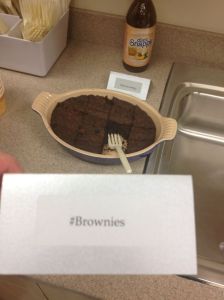
Aerohive was waiting for us with a smile and a handshake from the very start.  The never-shy Devin Akin (@DevinAkin) welcomed us all to the Aerohive offices while we descended on the breakfast we were going to need to fuel the Tech Field Day “Firehose of Information”™.  I must take a second here to highlight one of the best puns I’ve seen in a very long time:

#Brownies? Well played, Jeni. Well played.

Once settled with food, we were invited to take a shot of the Devinator’s favorite liquid substance, Diet Peach Tea Snapple, which I should probably start referring to as “Aerohive Kool-Aid”  Our first presenter was Matthew Gast (@MatthewSGast), one of the chief archtects at Aerohive as well as a member of the 802.11 committees that drive wireless standards.  His presentation was very technical, diving deep into concerns about 802.11n and issues that are already being seen with throughput on controllers today.  This segued into the future of Wi-Fi, 802.11ac Gigabit Wireless, and the impact that Aerohive’s design philosophies have on the increased capabilities that wireless devices will have in the near term once 802.11ac sees wider adoption.  Matthew really cranked up the Nerd Meter on this one, and I thank him for letting us get our hands dirty with all the talk about layer 1 discussion, which is probably one of the most neglected layers of the OSI model when it comes right down to it.

After Matthew finished melting my brain, we moved on to the newest Aerohive product, the BR100 branch router.  Aerohive had given me a briefing on this device before, so much of it was a review.  I like the form factor of the BR100, especially for remote offices or teleworkers that don’t need anything more fancy that simple connectivity.  My personal use case would be something along the lines of having it available for trips to allow secure wireless connectivity in my hotel room without the need to rely on the hotel’s often-unstable wireless solution.  We went through some more particulars of the device, mostly around the new options enabled by the additions to the Aerohive HiveManager interface that allow networking configuration on top of the wireless configuration options.

As the live demo was readied, we got hit with our Aerohive Oprah Moment – chocolate covered bacon!  I must say that this was a first for me as a bacon fan.  The hog parts were high quality, and the chocolate added a sweet compliment.  I doubt it’s something I’m going to eat every day though.  Thanks Aerohive for giving me the opportunity (and the extra cholesterol).  We also got an Aerohive backpack filled with goodies.  An Aerohive water bottle, notepad and pen set, and…a BR100!  Yes, I now have a little Aerohive branch router to try out.  I plan on putting this little guy through his paces.  The unexpected Oprah moments really help me get a chance to evaluate the equipment.

The 15 minute, 15 branch deployment demo from an iPad was pretty impressive.  The ability to have no restriction on the configuration device interface is a welcome change from the Java/Flash/client restrictions from other vendors, and it appears to be becoming a drive in the industry to provide that kind of flexibility.  A word of caution, however, to those thinking of doing live demos at presentations or other events:  Be sure to keep your audience engaged and riveted on the demo.  It’s very easy to lose your audience with demos.  Not that Aerohive did, but I noticed we were getting a little restless toward the end.

The restlessness seemed to trigger the Devinator’s Oprah Gland again, because he announced that we had reached the end of the presentation and that it was time to award the coveted Gregor Awards.  We didn’t know it, but Gregor Vučajnk (@GregorVucajnk) had been monitoring the #WFD2 hashtag during the Aerohive presentation and handed out the awards for the best tweeters.  Somehow, I managed to win!  I guess the extra snark I packed in my carry-on helped my out on this one.  I got an Aerohive AP 350 for causing so much trouble.  This impressive piece of hardware is going to get a great workout both at home and the office, as I now have my own “hive” of APs to test and play around with.

If you’d like to learn more, you can check out their website at http://www.aerohive.com.  You can also follow them on Twitter as @Aerohive.

Tom’s Take

Overall, Aerohive was a great start to Wireless Field Day 2.  I enjoyed the interaction with Matthew Gast and the ability to pick his brain about the nerd knobs of wireless.  While the information about the BR100 wasn’t necessarily new, I think this speaks volumes about Aerohive’s ability to keep bloggers and technical people in the loop about new developments and keep their products fresh in our minds.  While the Oprah Moments are never a required part of Tech Field Day, it’s nice to see that companies like Aerohive believe so strongly in their products that they are willing to put a few out there in the hands of people that will pick them apart and tell you the good and bad without reservation.  That’s a lot of confidence, folks.  Something that I’ve never sensed that Aerohive is short on.  Keep up the good work, Aerohive.  And keep drinking that Diet Peach Tea Snapple Aerohive Kool-Aid.

Wireless Field Day 2 Disclaimer

Aerohive was a sponsor of Wireless Field Day 2.  As such, they were responsible for covering a portion of my travel and lodging expenses while attending Wireless Field Day 2. In addition, they provided me with an Aerohive backpack, water bottle, pen and notepad set, an Aerohive BR100 evaluation unit, and an Aerohive AP 350 evaluation unit.  They did not ask for, nor where they promised any kind of consideration in the writing of this review/analysis.  The opinions and analysis provided within are my own and any errors or omissions are mine and mine alone.
Backdoors By Design

I was listening to the new No Strings Attached Wireless podcast on my way to work and Andrew von Nagy (@revolutionwifi) and his guests were talking about the new exploit in WiFi Protected Setup (WPS).  Essentially, a hacker can brute force the 8-digit setup PIN in WPS, which was invented in the first place because people needed help figuring out how to setup more secure WiFi at home.  Of course, that got me to thinking about other types of hacks that involve ease-of-use features being exploited.  Ask Sarah Palin about how the password reset functionality in Yahoo mail could be exploited for nefarious purposes.  Talk to Paris Hilton about why not having a PIN on your cell phone’s voice mail account when calling from a known number (i.e. your own phone) is a bad idea when there  are so many caller ID spoofing tools in the wild today.

Security isn’t fun or glamorous.  In the IT world, the security people are pariahs.  We’re the mean people that make you have strong passwords or limit access to certain resources.  Everyone thinks were a bunch of wet blankets.  Why is that exactly?  Why do the security people insist on following procedures or protecting everything with an extra step or two of safety?  Wouldn’t it just be easier if we didn’t have to?

The truth is that security people act the way we do because users have been trying for years to make it easy on themselves.  The issues with WPS highlight how a relatively secure protocol like WPA can be affected by something minor like WPS because we had to make things easy for the users.  We spend an inordinate amount of time taking a carefully constructed security measure and eviscerating it so that users can understand it.  We spend almost zero time educating users about why we should follow these procedures.  At the end of the day, users circumvent them because they don’t understand why they should be followed and complain that they are forced to do so in the first place.

Kevin Mitnick had a great example of this kind of exploitation in his book The Art of Intrusion.  All of the carefully planned security for accessing a facility through the front doors was invalidated because there was a side door into the building for smokers that had no guard or even a secure entrance mechanism.  They even left it propped open most of the time!  Given the chance, people will circumvent security in a heartbeat if it means their jobs are easier to do.  Can you imagine if the US military decided during the Cold War to move the missile launch key systems closer together so that one man could operate them in case the other guy was in the bathroom?  Or what if RSA allowed developers to access the seed code for their token system from a non-secured terminal?  I mean, what would happen if someone accessed the code from a terminal that had been infected with an APT trojan horse?  Oh, wait…

We have been living in the information age for more than a generation now.  We can’t use ignorance as an excuse any longer.  There is no reason why people shouldn’t be educated about proper security and why it’s so important to prevent not only exposure of our information but possible exposure of the information of others as well.  In the same manner, it’s definitely time that was stop coddling users by creating hacking points in technology deemed “too complicated” for them to understand.  The average user has a good grasp of technology.  Why not give them the courtesy of explaining how WPA works and how to set it up on their router?  If we claim that it’s “too hard” to setup or the user interface is too difficult to navigate to setup a WPA key, isn’t that more an indictment of the user interface design than the user’s technical capabilities?

Tom’s Take

I resolve to spend more time educating people and less time making their lives easy.  I resolve to tell people why I’ve forced them to use a regular user account instead of giving them admin privileges.  I promise to spend as much time as it takes with my mom explaining how wireless security works and why she shouldn’t use WPS no matter how easy it seems to be. I look at it just like exercise.  Exercise shouldn’t be easy.  You have to spend time applying yourself to get results.  The same goes for users.  You need to spend some time applying yourself to learn about things in order to have true security.  Creating backdoors and workarounds does nothing but keep those that need to learn ignorant and make those that care spend more time fixing problems than creating solutions.

If you’d like to learn more about the WPS hack, check out Dan Cybulsike’s blog or follow him on twitter (@simplywifi)

Wireless Field Day 2 – Nerds Without Wires

Wouldn’t you know it?  I’m headed back for round two of Wireless Field Day.  I was fortunate enough to be invited to the first assemblage of the preeminent wireless minds in the industry today.  Now it appears an encore is in order.  January 25th through the 27th I’ll be joining some August company for 3 days of immersion in the hottest technology driving business and personal computing today:

Not bad, eh? These people represent the brightest minds in wireless networking and having so many back from the first Wireless Field Day makes this event a very good opportunity for me to interact and learn from the best.  Of course, I’ll be sure to pass my learning on to each and every one of you with a multitude of blog posts and discussion at the event.

Getting Involved with Tech Field Day

With this being my fourth Tech Field Day event, I’ve had a lot of experience with the people around Tech Field Day.  They are always looking for thought leaders to join in the fun and impart knowledge while they absorb a large amount of knowledge from the best and brightest in the industry.  There are a couple of ways for you to get involved:

1.  Read the TFD FAQ and the Becoming a Field Day Delegate pages first and foremost.  Indicate your desire to become a delegate.  You can’t go if you don’t tell someone you want to be there.  Filling out the delegate form submits a lot of pertinent information to Tech Field Day that helps in the selection process.

2.  Realize that the selection process is voted upon by past delegates and has selection criteria.  In order to be the best possible delegate for a Tech Field Day, you have to be an open-minded blogger willing to listen to the presentations and think about them critically.  There’s no sense in bringing in delegates that will refuse to listen to a presentation from Meru because all they’ve ever used is Aruba and they won’t accept Meru having good technology.  If you want to learn more about all the products and vendors out in the IT ecosystem, TFD is the place for you.

3.  Write about what you’ve learned.  One of the hardest things for me after Tech Field Day was consolidating what I had learned into a series of blog posts.  TFD is a fire hose of information, and there is little time to process it as it happens.  Copious notes are a must.  As is having the video feeds to look at later to remember what your notes meant.  But it is important to get those notes down and put them up for everyone else to see.  Because while your audience may have been watching the same video stream you were watching live, they may not have the same opinion of things.  Tech Field Day isn’t just about fun and good times.  Occasionally, the delegates must look at things with a critical eye and make sure they let everyone know where they stand.


Be sure to follow the Tech Field Day account on Twitter (@TechFieldDay) for information and updates about Wireless Field Day 2 as the date gets closer.  There will also be live streaming video of each presentation on-site, and the videos will be uploaded shortly after the presentation.  If you want to participate in the fun, you can use the Twitter hashtags #TechFieldDay or #WFD2 to make comments or ask questions during the presentations.  I will have a Twitter client open during the presentations and will be happy to relay your questions or comments to the presenters and delegates (if no one else beats me to it, that is).  I’m going to tag all my event-related tweets with those hashtags, so if you are being overwhelmed with the volume coming from the event, feel free to filter those tags or unfollow me for the duration of the event.  There’s usually so much to talk about that I get carried away sometimes, so I won’t see it as an affront, I promise.

Tech Field Day Sponsor Disclaimer

Tech Field Day is made possible first and foremost by the sponsors.  Each of them is responsible for a portion of the travel and lodging costs.  In addition, the sponsors also chip in to pay for the after-event gatherings each day.  However, the sponsors also understand that their underwriting of Tech Field Day in no way guarantees them any consideration during the analysis and writing of any blog posts or reviews.  That independence allows the delegates to give honest and direct feedback and opinions of the technology and the companies that present it.

Aerohive HiveOS 4

Aerohive really stood out to me at Wireless Tech Field Day back in March.  They’re a great company with a lot of interesting ideas behind wireless technology today that run counter to what you are hearing from the mainstream vendors.  The most perpendicular of these is that having a controller-based wireless network is no longer the way to go now that the processing power of access points (APs) has caught up to the modern era.  You can still have a software program directing their configuration and provisioning, but needed to run all that traffic through a centralized box is just asking for trouble.  Accordingly, Aerohive is coming out with some updates to their software offerings.

Aerohive announced the newest release of their HiveOS, version 4.0.  To go along with it, they are also releasing a new version of their HiveManager software, 4.0 as well.  The folks at Aerohive let me take a sneak peak at the bells and whistles on their new products.  The idea behind HiveOS 4 and HiveManager 4 is the ability to simplify the configuration of the network for guest users and mobile devices.  The current trend in wireless technology today is moving away from providing your employees with corporate mobile devices, such as tablets and smartphones, and instead configuring your network to allow more of a Bring Your Own Mobile Device approach.  From the CxO’s new iPad to a Galaxy Tab 10.1, the landscape of wireless client devices is proliferating quickly.  One of the areas where Aerohive told me they are seeing this explosion of BYOMD is in the healthcare industry.  With so many doctors and specialists floating in and out of hospitals, the number of different devices hopping on the wireless network at any given time is staggering.  Add in the patients and their families and loved ones and you can see how crazy things can get at times.  As a network admin, you can’t just tell all those people that they are only allowed to get on your network if they use the right device.  Doctors, in particular, become very attached to their mobile device and would prefer taking it around to each site they visit rather than be issued an “approved” mobile device upon arrival.  It becomes more important then to configure your wireless in such as way to provide the best experience for your users while at the same time protecting them and protecting the network from harm.

One way that Aerohive is helping this guest device explosion is by offering the ability to have your users self enroll on a portal page for a Private Pre-Shared Key (PPSK).  I like the idea of a PPSK, since it essentially provides a throw-away password for each user and allows you to grant access without giving away the whole network.  This also does away with any kind of need to have an open guest network, which has been shown in recent months to be vulnerable to all kinds of snooping and sniffing software, such as the infamous Firesheep.  In HiveOS 4, you can also tag those PPSKs with an expiration time and date, so for instance the network admins at a concert performance or sporting event can mark all the self-generated PPSKs to expire two hours after the end of the show to help prevent people from leeching the network forever.  This can help you setup easy access for your clients to generate their own PPSKs via a web portal so the admins need not get involved in the process while at the same time making sure that you can restrict access should the need arise.  If you have a user that is misbehaving or needs to be disconnected, you merely disable their PPSK without needing to rekey the network.  This feature is also a great idea in places where employee turnover is rather high.

Another new feature in HiveOS 4 is the ability to snoop on mobile Internet devices, or MIDs as Aerohive refers to them.  Every mobile device you can buy today identifies itself in one form or another.  Most of the time this is done via browser user agents.  As a quick example, the user agent on your iPhone announces to the website that it is indeed a Fruit Company Mobile Phone, and the website displays a mobile-friendly site with larger text and fewer graphics.  In much the same way, HiveOS 4 allows the network to determine which devices are being used  and restrict them with policies.  For instance, you may want to give your CxO unfettered access to all corporate resources on his laptop.  If he uses his iPad, you may want to restrict him from accessing servers which don’t support his tablet.  If he jumps on with his iPhone, you may wish to further restrict him to Internet access only.  By snooping on the user agents, you can configure these policies quickly and easily without restricting access on his other devices.  Think of a restaurant, for example.  The host/hostess up front would love to use an iPad to take reservations quickly and easily, but the management is worried they might instead use it to surf the web or spend more time on Facebook than face-to-face with customers.  In HiveOS 4, you can restrict the host station iPads from the Internet and only allow them access to the reservation system.  A win for everyone that is interested in things other than status updates.  Note that this is all done without the need to enable 802.1x authentication on the network, a very time consuming and hairy process for even the most seasoned security and network people.

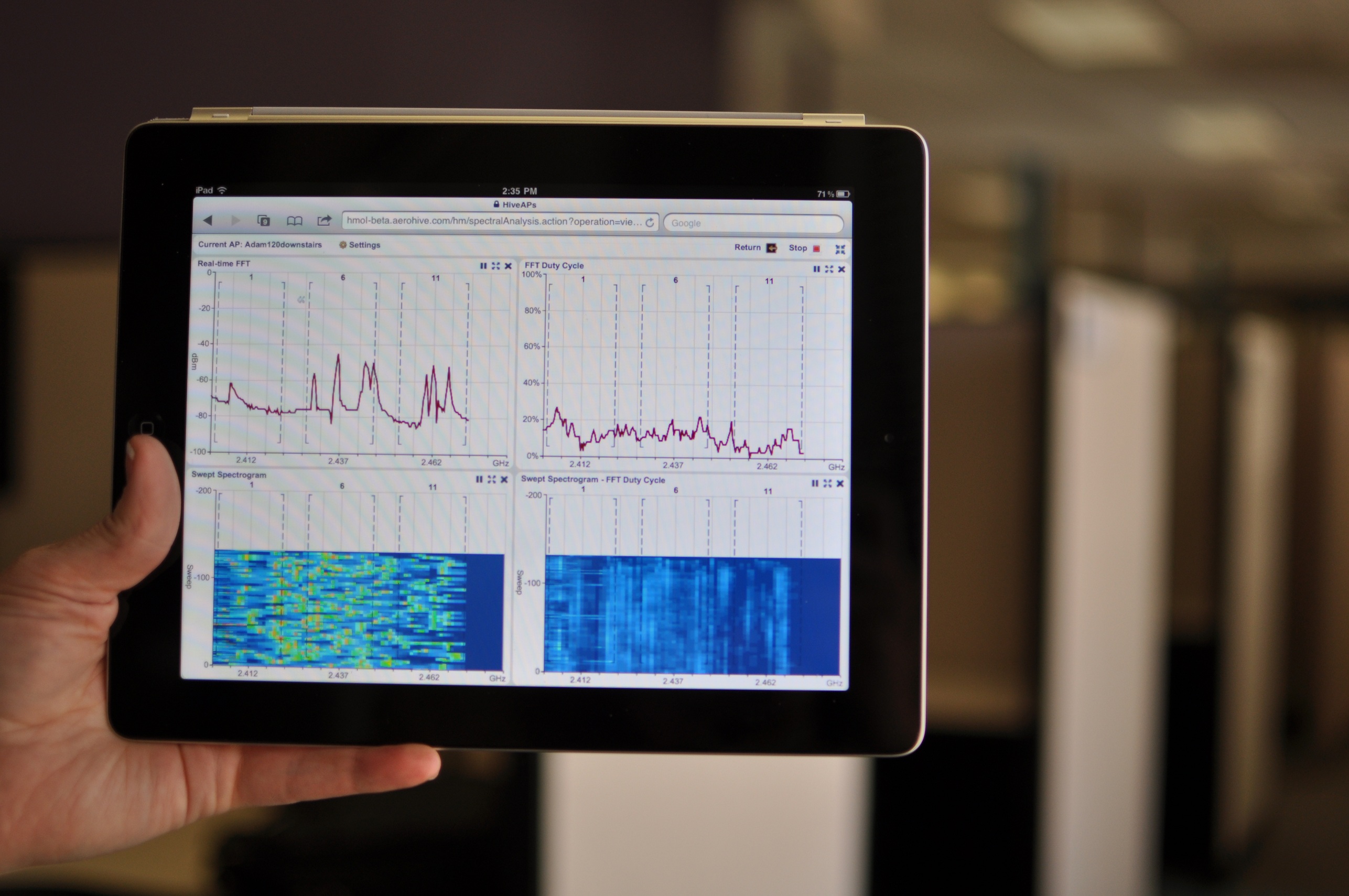
One unexpected addition in HiveOS 4 is spectrum analysis.  Cisco has really been pushing the advantages of the Cognio chip embedded in all of it’s 3500 series APs.  When we asked Aerohive about doing spectrum analysis in their APs at WFD, the answer was “wait and see”.  I’m pleased to announce that with HiveOS 4, you can now enable a spectrum analyzer in your Aerohive 802.11n APs.  The interface in HiveManager 4 is all based on HTML5, so it has no display issues on your favorite Fruit Company Mobile Device.  There is a large signature database included, so you can plot the air waves and then compare them to a list of known interference sources in case you aren’t sure whether it’s a Bluetooth headset or a cordless phone causing interference.  This is great if you want to enable the spectrum analyzer on a remote AP and then have someone back at the office check the interference source while you walk around trying to find out who’s hiding a microwave under their desk (Here’s a tip:  Look for the guy glowing in the dark…).  This feature is included in HiveOS 4 at no additional cost.  One caveat I noticed – HiveManager can only receive data from 10 spectrum analysis sources at once, so you can’t configure any more than that.  When I asked about this limitation, I was informed that in order to receive and process the data quickly and efficiently, they had to put a limit on it, so 10 is it.  For now, at least.

HiveOS 4 Spectrum Analysis running on your favorite Fruit Company Tablet

For those of you out there that may be Aerohive partners, there is also a new Partner Admin page that allows you to demo the product and set up customer evaluations.  You can also remote in and add devices to your customer’s network or even delegate certain tasks to administrators at the customer site.  This is a great addition for those providers looking to add Aerohive as a kind of managed services wireless solution.  For one low monthly fee, you can lease Aerohive gear to your customers and manage it from one location.  You can involve the customer admins as little or as much as you want.

There are a lot of other great features that are in HiveOS 4 and HiveManager 4, so you should head over to Aerohive’s site and check it out.  The upgrade is free for all existing Aerohive customers and will be available on June 20.

Tom’s Take

I like what Aerohive is doing with their approach to wireless.  By moving the intelligence of the network out into the access points, they alleviate some of the bottleneck issues with controllers.  They also have some great ideas that they bring to the table to increase the visibility of their software with certain verticals, such as education and health care.  However, if software is your game, you’re only as good as the features in your latest release.  I think Aerohive nailed it with HiveOS 4.  They’ve added a lot of new features to help admins address their pain points in the Bring Your Own Mobile Device era, as well as adding a much-needed feature that will allow them to compete with offerings from Cisco in the spectrum analysis arena.  By making this upgrade available for all existing customers, you can refresh your wireless network with the click of a button.  No forklifts needed.  So join me in raising a glass to the latest release of HiveOS:

I look forward to seeing more good stuff from Aerohive in the future.

Disclaimer

I received a sneak peak at the offering from Aerohive before the launch date.  No consideration was asked for in my attendance, and none was offered.  The opinions and analysis offered in this post are mine and mine alone.

NFC: Not For Consumers (Yet)

There’s been quite a bit of buzz recently regarding the capabilities surrounding Near Field Communications (NFC).  The idea behind this is that a user can be provided with a low-powered, short range (about 2 inches) wireless transmitter/receiver that can be used in a variety of applications, such as providing access control to restricted doors, airline or mass transit check-in/ticketing, and even payment methods.  Google especially has upped the ante in this last department with the announcement of Google Wallet, a movement to make your phone into your primary method of payment for goods and services.  While I’m behind the idea that you can start using mobile devices for electronic payment, I think that the NFC idea isn’t quite ready for prime time just yet.

1.  NFC-enabled devices are few and far between.  The list of devices that have built-in NFC transmitters is longer than expected…provided you live anywhere other than the United States.  Most of the phones that have NFC chips are Nokia devices primarily marketed in Europe.  The main devices found in the US are (naturally) the Google Nexus S and to my surprise the Blackberry Bold/9900.  While I’ve been told the boys in Mountain View make a mighty nice phone, the adoption rates aren’t nearly as high as other devices from Motorola and the Fruit Company Mobile Device Company.  In fact, rumors that the iPhone 5 *might* include a NFC chip had people foaming at the mouth.  Why’s that?  Well, despite what others might tell you, putting a new technology in the next iPhone is a good way to push it toward the mainstream.  This may not guarantee that it will be adopted, but based on the sales numbers that the iPhone usually produces, putting a NFC chip in it would get it to several million people in short order.  Once the technology is more pervasive than a few hundred thousand handsets, I think there’ll be more effort given to incorporating it into payment methods.  Otherwise, it will sit unused, taking up valuable space in your phone that could have been used for a bigger battery or a fancy gyroscope.

2.  NFC-enabled retailers are few and far between.  This is the same as number 1, except it’s the other side of the coin.  Not seeing any real need to provide NFC receivers for a non-existent demand, retailers haven’t really put any in.  Think back to the MasterCard PayPass or American Express ExpressPay.  How many people have you seen with those cards?  How many of those terminals have you seen?  I’ve seen a few of the newer ones here and there, but never at any big box retailers or department stores.  If Google or Apple are serious about driving adoption of this kind of technology, they may have to work with the credit card companies to underwrite the replacement of NFC-enabled POS devices.  Walmart won’t spend millions to replace their terminals on a whim with the possible hope of having NFC customers, but if Google agrees to pay 25% and MasterCard agrees to pay 25%, that might be the tipping point to spur adoption.  Starbucks has faced a similar issue with their mobile payment system.  Starbucks began testing the use of barcodes in their mobile app to see if adoption would take off.  Their testing areas, Seattle and Silicon Valley, showed that people were willing to use their iPhones or Nexi devices to pay with a virtual Starbucks card.  Once they rolled out their mobile terminals across the country, I wonder if they’ve seen the same kind of adoption in places other than coffee-crazy Seattle or tech-friendly Silicon Valley.  If the mobile manufacturers want to drive this technology, they may have to put their money where their chips are.

3.  Who has my money?  This is probably going to be the biggest problem standing in the way of mobile device NFC payment.  Right now, Google Wallet works with Citi MasterCard and Google pre-paid cards.  Not an impressive list of authorized cards, to say the least.  If Apple were to adopt this technology in the iPhone 5 or iPhone 5GSX+++, they obviously would want the funds used to purchase things stored in your iTunes account.  Whoever controls the money controls your spending habits.  Think about having a number of small bank accounts, each with small amounts of money.  You can’t use any one account for all your purchases due to the lack of significant funds in any one of them.  Extrapolate that further.  Would you really tie up, say, $500 worth of your income in an iTunes NFC payment account?  I don’t think the electric company accepts iTunes yet, and you can’t really use Google pre-paid cards at a Coke machine.  The credit card companies are going to be hesitant to partner with Google and Apple unless terms are favorable for them to keep getting their 2% margins (or better) and the device manufacturers are not going to want to use the technology unless they can get their cut, especially Apple and their 30% tax on anything they touch.  The fight among each of these parties is likely to keep the whole thing shelved for the foreseeable future, unless some kind of breakthrough can be reached.

Tom’s Take

I think NFC has the opportunity to be a real game-changer for Personal Area Network (PAN) applications.  An example, if you will.  Those that have played the Metal Gear Solid series of games no doubt remember the annoyance in Metal Gear Solid 1 where you were required to be holding a door key card when you wanted to enter.  In every game after that, the key cards utilized PAN technology to allow you to pass through them without the need to select them every time.  NFC-type communications at it’s best.  Now apply those lessons to the real world.  Your phone can replace your access badge.  Your phone can unlock the front door to your house.  You can use your phone for a boarding pass or a parking meter fob or any one of a number of cool futuristic things.  Yes, even a payment method.  However, there are enough challenges to make adoption difficult at best.  Everyone wants to lock you into their particular flavor of NFC banking to best help you find ways to spend your money.  Until we get some kind of universal access or centralized clearinghouse that all the interested parties can agree on, I don’t think NFC will be replacing my wallet any time soon.  Let’s hope time proves me wrong on this one.

Tech Field Day – Fluke Networks

The final Wirless Tech Field Day presenter was Fluke Networks.  Fluke recently purchased AirMagnet, so I was curious about what they had to offer that was different from the AirMagnet presentation.  I’ve used some tools from Fluke in the past and found them to be very handy, but since they shifted to a more hardware-oriented approach I hadn’t really kept up with things.

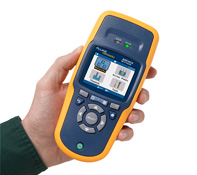
The presentation kicked off with Carolyn Carter, Product Manager for the Portable Network Tools division.  She gave us an overview of Fluke and some of the tools that they offer.  Owing to the fact that this was a wireless-focused event, she delved right into the AirCheck, a handheld wireless scanner.  This product is designed to be used by a first level technician that would be sent to a site to do some preliminary investigation in order to get enough information to see if a site visit would be warranted.  It’s a rugged little device, the trademark blue and gold coloring making it stand out anywhere you might accidentally leave it.  As we dove deeper into the AirCheck, Carolyn handed the presentation over to Paul Hittel, Principal Engineer.  Paul seemed a little nervous as he started into his presentation, probably owing to the fact that he is more of an engineer than a speaker.  He fumbled with his notes a bit in the beginning and told a product story that went a bit longer than it should before it found the point.  As an aside, I know exactly how Paul feels.  I’m sure some of my co-workers are still waiting for my stories to get to the point.

Paul described how Fluke came up with the idea of a handheld scanner.  Since wireless is such a tricky medium to work in and can be affected by any number of environmental factors, a site visit is often necessary to uncover additional details, such as a recently installed wireless video camera or a testy microwave that’s only on for 10 minutes a day.  The wireless engineering staff is usually equipped to handle these kinds of spectrum challenges, whether they be armed with a Wi-Spy DBx or an AirMagnet Spectrum XT.  However, these products are not usually deployed to the first level technical support staff, usually due to cost or unfamiliarity with their complexity.  And since sending your top engineer on site to diagnose what could be a simple issue is an inefficient use of their time, Fluke decided to wrap the spectrum analyzer in an easy-to-understand handheld package.

The unit powers on in about 2-3 seconds and starts scanning the airwaves right away.  It can detect access points (APs) and wireless networks.  It displays the network type with easy-to-decypher symbols, denoting a/b/g/n and even 40MHz n networks.  You can view which access points are broadcasting the networks, along with how many APs are detected for a given channel, which is very critical in the 2.4GHz space.  There is even a simple location application available that plays a tone from an integrated speaker that increases in pitch the closer you are to a specific AP.  It’s not exactly a bullseye, but it’ll help you find an AP that may be hidden under a desk or in a ceiling.

Rather than just telling us about how great this unit was, the Fluke team brought us each one to demo and play with.  We walked around the room playing with the different options.  Several of the delegates said they would be perfect for first tier support personnel in remote offices.  One even remarked that what he thought was a little tinker toy in fact was a great tool for the segment at which it was targeted.  This kind of hands-on demo is great for tools such as this because the “try it before you buy it” mentality is paramount to me in a hardware-based unit.  By giving us the opportunity to walk around and put it through it’s paces at our leisure, I think the delegates were endeared to the tool a bit more than if they had only watched screenshots on a slide.

Alas, all good things must come to an end, and Carolyn needed all of the units turned back in, since they were merely loaners.  However, she did say that she had one that she could give away.  We each filled out a card and dropped it into the hat, and when Paul drew the name, mine came up!  Yes folks, I am now the possessor of an AirCheck. I plan on letting my other engineers and technicians evaluate it to its fullest, and if nothing else I hope it gives me the opportunity to sit at my desk and write a few more blog posts rather than needing to drive out on site to find a fussy microwave.

Tom’s Take

Fluke makes great tools, there’s no denying that.  I have a full wiring kit and telephone lineman’s set in my bag.  I can now add an AirCheck to that same lineup.  The rugged nature of their products means I don’t have to worry about dropping it.  The AirCheck impressed me by not attempting to cram a wireless engineer into a plastic box.  Instead, it’s a focused tool designed to lay some groundwork and assist the tier 1 helpdesk in determining if they need to get someone else involved in an issue.  While Fluke can never be said to have the cheapest toys in the toy box, I think that the amount you invest in them can give you and excellent return in the time savings from unnecessary site visits for simple issues.

Disclaimer

Fluke Networks was a sponsor of Wireless Tech Field Day, and as such they were responsible for a portion of my travel expenses and hotel accommodations.  In addition, I personally won an AirCheck evaluation unit from them in a raffle.  At no time did they ask for nor were they assured any kind of consideration in the writing of this review.  The thoughts and analysis herein are mine and mine alone.  The thoughts are given freely and without reservation whatsoever.
Tech Field Day – AirMagnet

The second presenter at Wireless Tech Field Day day 2 was AirMagnet.  I’ve heard of them before in reference to their spectrum analysis products, and based on what I’d seen the day before from MetaGeek, I was interested to see how the Airmagnet product compared to them.  I knew that the list price for the AirMagnet products was higher than that of MetaGeek, but I was sure that the differences in the two justify the price difference.

The presentation was kicked off by Bruce Hubbert, the Principle Systems Engineer for AirMagnet.  He gave us a great overview of the AirMagnet product line.  I never realized that AirMagnet had such a plethora of products dedicated to wireless scanning and design.  These include AirMagnet Survey Pro, which is a very good tool used to design wireless networks quickly and easily.  The tool looked quite detailed, with the ability to lay out your particular building or site maps and define what types of material it was constructed from, then tell the program to automatically lay out the access points based on frequency and coverage patterns.  This would be a great tool for those that spend a great deal of time designing wireless networks for large sites.  While it can’t replace a good old fashioned site survey, it can give the wireless engineer a great starting point for placement patterns.

Another program that AirMagnet is known for is AirMagnet WiFi Analyzer Pro.  This tool allows an engineer to walk around with a PC Card adapter and perform in-depth site surveys.  The tool can generate packets and measure the data rates on APs.  The idea is that the engineer mounts the AP in a particular location or has it attached to a mobile cart and then generates packets and measures what kind of radiation pattern and data rates result.  This is probably one of the most important tools to have for a wireless engineer to have in their toolbox for performing a thorough site survey.

The tool that we got the most interaction with was AirMagnet Spectrum XT.  This is a full-featured spectrum analyzer designed to detect sources of wireless interference and and classify them to aid in troubleshooting wireless issues.  It is quite similar to the MetaGeek Wi-Spy and Chanalyzer that we looked at the previous day, and the Spectrum XT software appears to have a similar feature set.  What makes the difference in Spectrum XT is the integration that you get with the rest of the suite of AirMagnet tools above.  You can use the spectrum analysis from XT to feed into the survey and design tools and give you a good picture of how to design your network to avoid interference sources such as microwaves, cordless phones, and unshielded audio systems.  The delegates were provided with a copy of Spectrum XT along with a USB spectrum scanner to evaluate.  Once curiosity that I asked Bruce about was the fact that all the spectrum analyzers I had seen required Windows as the operating system.  Given that most of the delegates were packing MacBooks, I found it curious that more development wasn’t done for OSX.  Bruce explained that this was due to the need for deep interaction with the wireless network card drivers to perform packet captures and analysis.  He did say that many were working toward finding ways to integrate with OSX that didn’t involve the use of virtual machines inside Boot Camp/Parallels or VMware Fusion.

The final part of the AirMagnet presentation focused on their wireless intrusion prevention system (WIPS) products.  The AirMagnet solution is designed to integrate with an existing deployment of APs and deliver independent intrustion protection as well as spectrum analysis from a dedicated platform.  As the threats to wireless networks grow and their critical nature becomes more and more integrated into areas such as healthcare, the need to have a WIPS solution is very real.  By augmenting your existing infrastructure with the AirMagnet solution, you can increase the coverage of any existing setups as well as providing a different detection vector to avoid being blinded by targeted exploits designed to eliminate a specific vendor’s equipment.  The security mantra of “defense in depth” applies equally to both wired and wireless networks.  I didn’t get a chance to really test the AirMagnet solution in great detail, but I will be sure to keep it in mind in the future in the event that a dedicated WIPS solution is called for.

Tom’s Take

I think AirMagnet has earned their reputation by making some great tools that provide wireless engineers and architects with the ability to design and troubleshoot wireless networks at a very high level.  Some might argue that the pricing of their solutions is on the high side, but the counter to that is proved by the amount of detail that you get from their integration.  The suite of AirMagnet tools isn’t for everyone, and may indeed be overkill for smaller deployments, but if you are beginning to design and deploy enterprise-grade networks, you can’t go wrong by looking at their products.  The returns you gain with the expertise put in by years of research and development at AirMagnet will easily pay for the investment in short order.

If you’d like to learn more about AirMagnet, you can check them out at http://www.airmagnet.com/.  You can also follow them on Twitter as @AirMagnet_Inc.

Disclaimer

AirMagent was a sponsor for Wireless Tech Field Day, and as such they were responsible for paying a portion of my travel expenses and hotel accommodations.  In addition, they provided the delegates a package including an AirMagnet polo shirt and a copy of Spectrum XT with USB adapter for evaluation.  At no time did they ask for nor were they promised any kind of consideration in this review.  The analysis and opinions here are mine and mine alone.  They are given freely and without reservation.

Tech Field Day – HP Wireless

Day two of Wireless Tech Field Day started off with HP giving us a presentation at their Executive Briefing Center in Cupertino, CA.  As always, we arrived at the location and then immediately went to the Mighty Dirty Chai Machine to pay our respects.  There were even a few new converts to the the Dirty Chai goodness, and after we had all been properly caffeinated, we jumped into the HP briefing.

The first presenter was Rich Horsley, the Wireless Products and Solutions Manager for HP Networking.  He spoke a bit about HP and their move into the current generation of controller-based 802.11n wireless networks through the acquisition of Colubris Networks back in 2008.  They talked at length about some of the new technology they released that I talked about a couple of weeks ago over here.  Rather than have a large slide deck, they instead whiteboarded a good portion of their technology discussion, fielding a number of questions from the assembled delegates about the capabilities of their solutions.  Chris Rubyal, a Wireless Solutions Architect, helped fill in some of the more technical details.

HP has moved to a model where some of the functions previously handled exclusively by the controller have been moved back into the APs themselves.  While not as “big boned” as a solution from Aerohive, this does give the HP access points the ability to segment traffic, such as the case where you want local user traffic to hop off at the AP level to reach a local server, but you want the guest network traffic to flow back to the controller to be sent to a guest access VLAN.  HP has managed to do this by really increasing the processor power in the new APs.  They also have increased antenna coverage on both the send and receive side for much better reception.  However, HP was able to keep the power budget under 15.4 watts to allow for the use of 802.3af standard power over Ethernet (PoE).  I wonder if they might begin to enable features on the APs at a later date that might require the use of 802.3at PoE+ in order to fully utilize everything.  Another curious fact was that if you want to enable layer 3 roaming on the HP controller, you need to purchase an additional license.  Given the number of times I’ve been asked about the ability to roam across networks, I would think this would be an included feature across all models.  I suppose the thinking is that the customer will mention their desire to have the feature up front, so the license can be included in the initial costs, or the customer will bring it up later and the license can be purchased for a small additional cost after the fact.  Either way, this is an issue that probably needs some more visiting down the road as HP begins to get deeper into the wireless market.

After some more discussion about vertical markets and positioning, it was time for a demo from Andres Chavez, a Wireless Solutions Tester.  Andres spends most of his time in the lab, setting up APs and pushing traffic across them.  He did the same for us, using an HP E-MSM460 and iPerf.  The setup worked rather well at first, pushing 300Mbits of data across the AP while playing a trailer for the Star Wars movie on Blu-Ray at full screen in the background.  However, as he increased the stream to 450Mbits per second, Mr. Murphy reared his ugly head and the demo went less smooth at that point.  There were a few chuckles in the audience about this, but you can’t fault HP for showing us in real time what kinds of things their APs are capable of, especially when the demo person wasn’t used to being in front of a live video stream.  One thing that did make me pause was the fact that the 300Mbit video stream pushed the AP’s processor to 99% utilization.  That worried me from the aspect that we were only pushing traffic across one SSID and had no real policies turned on at the AP level.  I wonder what might happen if we enable QoS and some other software things when the AP is already taxed from a processor perspective, not to mention putting 4-clients on at the same time.  When I questioned them about this, they said that there were actually two processor cores in the AP, but one was disabled right now and would be enabled in future updates.  Why disable one processor core instead of letting it kick in and offload some of the traffic?  I guess that’s something that we’ll have to see in the future.

After a break, the guys from HP sat down with the delegates and had a round table discussion about challenges in wireless networking today and future directions.  It was nice to sit down for once and have a discussion with the vendors about these kinds of topics.  Normally, we would have a round table like this if a session ended early, but having it scheduled into our regular briefing time really gave us a chance to explore some topics in greater depth than we might have been able to with only a 5-10 minute window.  Andrew vonNagy brought up an interesting topic about needed better management of user end-node devices.  The idea that we could restrict what a user could access based on their client device is intriguing.  I’d love to be able to set a policy that restricted my iPhone and iPad users to specific applications such as the web or internal web apps.  I could also ensure that my laptop clients had full access even with the same credentials.

Tom’s Take

HP is getting much better with their Field Day presentations.  I felt this one was a lot better than the previous one, both from a content perspective and from the interaction level.  Live demos are always welcome, even if they don’t work 100%.  Add to that the ability to sit down and brainstorm about the future of wireless and you have a great morning.  I think HP’s direction in the wireless space is going to be interesting to watch in the coming months.  They seem to be attempting to push more and more of the functions of the APs back into the APs themselves.  This will allow for more decisions to be made at the edge of the network and keep traffic from needing to traverse all the way to the core.  I think that HP’s transition to the “fatter” AP at the edge will take some time, both from a technology deployment perspective and to ensure that they don’t alienate any of their current customers by reducing the effectiveness of their currently deployed equipment.  I’m going to be paying attention in the near future to see how these things proceed.

If you’d like to learn more about HP Wireless Networking, you can check them out at http://h17007.www1.hp.com/us/en/products/wireless/index.aspx.  You can also find them on Twitter as @HP_Networking.

Disclaimer

HP was a sponsor of Wireless Tech Field Day, and as such they were responsible for a portion of my travel expenses and hotel accommodations.  In addition, they provided lunch for the delegates, as well as a pen and notepad set and a travel cooler with integrated speakers.  At no time did they ask for nor where they promised any kind of consideration in the writing of this review.  The analysis and opinions presented here are given freely and represent my own thoughts.

Tech Field Day – Aerohive

Our third presentation at Wireless Tech Field Day was from Aerohive.  We arrived at their office in the afternoon to round out day one.  Once at the front door, we were greeted by Devin Akin.  He warmly greeted everyone and shook our hands as we walked in.  Once inside our meeting room, we were presented with a package containing an Aerohive polo shirt, notebook, chocolate bar, and a plastic shamrock necklace to wear in honor of St. Patrick’s Day.  As soon as we all were seated and settled, Devin jumped right into a special presentation before we got started properly.  In honor of Andrew von Nagy’s recent success on the CCIE Wireless lab exam, Devin and the Aerohive crew presented him with a sash in Aerohive gold bearing his CCIE number in glitter.  Andrew was a great sport and accepted his special gift proudly.

After the very special presentation, we dove headlong into Aerohive.  I’d like to mention a few words about Devin.  His energy during our visit was off the charts.  He seems to enjoy the world of wireless networking, and based on conversations I’ve had with the other delegates, his name carries quite a bit of weight in the wireless world.  I read some of his blog posts before I left for Tech Field Day, and he strikes me as a person who isn’t afraid to put his opinion out there for the world to see.  He also “gets” Tech Field Day.  When we walked into the room, he had the Twitter stream for the #TechFieldDay hashtag projected on the wall of the room for everyone to see.  That way, the presenters could glance over and get instant feedback about how things were going.  They could also get immediate feedback from the audience not directly in front of them.  These kinds of little touches go a long way toward making a successful presentation at Tech Field Day.

We got to hear from Bob O’Hara, who is a legend in the wireless area.  He is the founder of Airespace, which was snatched up by Cisco and he is generally credited with creating the whole movement behind controller-based access points (APs).  Bob talked for a few minutes about some of the history he helped create, as well as why he has worked with Aerohive to move away from the controller-based AP model and into something different.

After Bob, Mr. Energy Devin Akin jumped in and sped through the perfunctory intro/framing slides.  He talked about the market position of Aerohive and what differentiates them from the competition in the market.  While the other vendors in the market are using relatively “dumb” radios that send traffic back toward the controller for processing, Aerohive has taken a very different approach.  Using merchant silicon, they have made their APs much smarter while keeping their price reasonable.  This means that there is no need for a controller to direct the APs.  Instead, the management software can be loaded on a small appliance, a virtual machine (VM) or even…the cloud.  The APs themselves have a great feature set to allow things like mesh operation, fast layer 3 roaming across subnets, and even some layer 2 MAC routing.  The management software for the APs allows for some additional interesting features, such as private pre-shared keys (PPSK) which give you the ability to issue a PSK per user that has an expiration date and allows a certain number of devices per AP.  That way, your laptop, iPhone, and iPad can all join from a single key.  There is also support for a teacher based view that allows instructors to lock out all or a portion of access to network and Internet resources.  This is a great feature for the K-12 education environment, as it ensures the teacher determines exactly where the students can go, and due to the granularity of the controls, even allowing students a reward of some additional Internet surfing after their work is completed.

One of the more impressive features involved a full setup demo.  All of the APs were set back to defaults and removed from the manager.  Then, in front of the delegates, a new highly secure network was built in about 15 minutes.  It was very straight forward, and once the details of the network were provisioned the configurations were pushed out the members of the “hive”, which is the Aerohive term for the collection of APs in the network.

After the demos were over, it was time for a delegate demo.  Devin informed us that there was an AP somewhere in the building broadcasting an SSID of “Find Me” at 1 mW, which made it practically invisible.  Under that AP was an “Oprah Moment” for the delegates.  Devin suggested we use our newly-acquired MetaGeek Wi-Spy scanners to see if we could find the AP.  This again was a great touch.  Devin had been paying attention and knew what we were now capable of doing, so he decided to build on it and make us work for it.  Having only brought lightweight devices like my ChromeOS CR-48 and my iPad, I couldn’t participate in this little Easter egg hunt, but after a few minutes the delegates located the prize – an Aerohive HiveAP110 and 3 years of access to the cloud-based Hive Manager software to provision it.

Tom’s Take

I was quite impressed with Aerohive.  They have a great product and a wonderful staff developing it.  While it appears that their primary vertical right now is in the education space, I have no doubt that their feature set has appeal to medical and other verticals as well.  I think they with the industry focusing right now on the controller-based architecture, Aerohive can carve itself a very comfortable niche for the controller-less technology they have created.  Other information that I’ve encountered leads me to believe that some vendors are beginning to look at locating more intelligence in the AP/edge once again, which means that when they finally move back toward that strategy they will no doubt find Aerohive staring back at them as a leader in that particular space.  I’m going to spend some more time evaluating the HiveAP capabilities thanks to Devin and his team.  I hope to have more to write about it in the near future.

If you would like to learn more about Aerohive, you can check out their website at http://www.aerohive.com.  You can also follow them on Twitter as @Aerohive

Disclaimer

Aerohive was a sponsor of Wireless Tech Field Day, and as such they were responsible for paying a portion of my travel expenses and hotel accommodations.  In addition, they provided the delegates a package including an Aerohive polo shirt, note book, candy bar (which was consumed during the writing of this review and was delicious), and St. Patrick’s Day themed button and necklace.  The delegates were also provided with an Aerohive HiveAP 110 and 3 years access to the cloud-based Hive Manager software for evaluation.  At the conclusion of the session, Aerohive provided all attendees a selection of beers with Irish themes, such as Guinness, Harp, and Smithwick’s.  At no time did they ask for nor were they granted any kind of consideration in this review.  The analysis and conclusions outlined here are mine and mine alone.  They are offered freely and willingly.