There’s a lot of talk around now about the trend of people bringing in their own laptops and tablets and other devices to access data and do their jobs. While most of you (including me) call this Bring Your Own Device (BYoD), I’ve been hearing a lot of talk recently about a different aspect of controlling mobile devices. Many of my customers have been asking me about Mobile Device Management (MDM). MDM is getting mixed into a lot of conversations about controlling the BYoD explosion.
Mobile Device Management (MDM) refers to the process of controlling the capabilities of a device via a centralized control point, whether it be in the cloud or on premises. MDM can restrict functions of a device, such as the camera or the ability to install applications. It can also restrict which data can be downloaded and saved onto a device. MDM also allows device managers to remotely lock the device in the event that it is lost or even remotely wipe the device should recovery be impossible. Vendors are now pushing MDM is a big component of their mobility offerings. Every week, it seems like some new vendor is pushing their MDM offering, whether it be a managed service software company, a wireless access point vendor, or even a dedicated MDM provider. MDM is being pushed as the solution to all your mobility pain points. There’s one issue though.
MDM is a very intrusive solution for mobile devices. A good analogy might be the rules you have for your kids at home. There are many things they are and aren’t allowed to do. If they break the rules, there are consequences and possible punishments. Your kids have to follow your rules if they live under your roof. Such is the way for MDM as well. Most MDM vendors that I’ve spoken to in the last three months take varying degrees of intrusion to the devices. One Windows Mobile provider started their deployment process with a total device wipe before loading an approved image onto the mobile device. Others require you to trust specific certificates or enroll in special services. If you run Apple’s iOS and designate the device as a managed device in iOS 6 to get access to certain new features like the global proxy setting, you’ll end up having a wiped device before you can manage it. Services like MobileIron can even give administrators the ability to read any information on the device, regardless of whether it’s personal or not.
That level of integration into a device is just too much for many people bringing their personal devices into a work environment. They just want to be able to check their email from their phone. They don’t want a sneaky admin reading their text messages or even wiping their entire phone via a misconfigured policy setting or a mistaken device loss. Could you image losing all your pictures or your bank account info because Exchange had a hiccup? And what about pushing MDM polices down to disable your camera due to company policy or disable your ability to make in-app purchases from your app repository of choice? How about setting a global proxy server so you are restricted from browsing questionable material from the comfort of your own home? If you’re like me, any of those choices make me cringe a little.
That’s why BYoD polices are important. They function more like having your neighbor’s children over at your house. While you may have rules for your children, the neighbor’s kids are just vistors. You can’t really punish them like you’d punish your own kids. Instead, you make what rules you can to prevent them from doing things they aren’t supposed to do. In many cases, you can send the neighbor’s kids to a room with your own kids to limit the damage they can cause. This is very much in line with the way we treat devices with BYoD settings. We try to authenticate users to ensure they are supposed to be accessing data on our network. We place data behind access lists that try to determine location or device type. We use the network as the tool to limit access to data as opposed to intruding on the device.
Both BYoD and MDM are needed in a corporate environment to some degree. The key to figuring out which needs to be applied where can be boiled down to one easy question:
Who paid for your device?
If the user bought their device, you need to be exploring BYoD polices as your primary method of securing the network and enabling access. Unless you have a very clearly defined policy in place for device access, you can’t just assume you have the right to disable half a user’s device functions and then wipe it whenever you feel the need. Instead, you need to focus your efforts on setting up rules that they should follow and containing their access to your data with access lists and user authentication. On the other hand, if the company paid for your tablet then MDM is the likely solution in mind. Since the device belongs to the corporation, they are will within their rights to do what they would like with it. Use it just like you would a corporate laptop or an issued Blackberry instead of a personal iPhone. Don’t be shocked if it gets wiped or random features get turned off due to company policy.
Tom’s Take
When it’s time to decide how best to manage your devices, make sure to pull out all those old credit card receipts. If you want to enable MDM on all your corporate phones and tablets, be sure to check out http://enterpriseios.com/ for a list of all the features supported in a given MDM provider for both iOS and other OSes like Android or Blackberry. If you didn’t get the bill for that tablet, then you probably want to get in touch with your wireless or network vendor to start exploring the options available for things like 802.1X authentication or captive portal access. In particular, I like some of the solutions available from Aerohive and Aruba’s ClearPass. You’re going to want both MDM and BYoD policies in your environment to be sure your devices are as useful as possible while still being safe and protecting your network. Just remember to back it all up with a very clear, detailed written use policy to ensure there aren’t any legal ramifications down the road from a wiped device or a lost phone causing a network penetration. That’s one bill you can do without.
At some point or another, we’ve all sat down and heard a presentation from a relatively new company. Whether it be a startup, a stealth mode developer, or just someone trying to find their marketing legs not everyone can afford to have a PR budget like Microsoft. At some point, all of this started sounding the same to me. With the help of my friend Joshua Williams (@JSW_EdTech), we’ve managed to figure out why this all seems to sound like we’ve heard the same story over and over. It’s not quite like the presentation bingo game that you may be used to. Instead of trying to cover the card, you just need to wait for the five magic phrases or indicators.
B – Business Founders – Odds are good one of the first things a really hot startup will tell you about is how awesome the founders are. The most impressive companies you have never heard of seem to be run by really famous people that got really bored with what they were doing for their old job and ran out and started a new company. These folks likely used to work for Cisco or Juniper or Microsoft or even EMC. But now they’ve got something really awesome that they want to sell you or tell you. You will probably see this by the second slide in the Company Overview. And the odds are really good that if the founder is one of those Cult of Personality types, you’re going to hear their name brought up a few more times in the presentation. Usually by first name, because that shows the close-knit group dynamic that they’ve got going on.
I – I’m Unique Because… – Let’s face it. Do we really need another storage array or switch or single pane of glass management program? Probably not. However, that’s what’s been built to target a segment of the market that’s really untapped at this point. The key isn’t making the product totally awesome in every way possible. The real key is to tell you how it’s radically different than anything you’ve seen before. Maybe it automatically configures switch ports when load characteristics increase exponentially around holiday shopping traffic. Maybe it can do hitless snapshots while the array is online and rebuilding. Maybe the interface has unicorns all over the login page. The presenter is going to hit you over the head with the fact that they are different than everyone else. That’s why they’re going to be successful. Never mind that the login process takes five minutes and the documentation looks like it was written by a classroom full of first graders. When a big publication does a story on us, we have something different to draw everyone in.
N – Neato Tagline – Everyone has to have a tagline. It’s the stinger that you take away and put in the back of your mind until you’ve completely forgotten about the presentation. Then, one morning when you’re having breakfast, the tagline comes back to you out of nowhere and you suddenly realize that this is the thing you need to fix the thing that doesn’t work! Never mind that you can’t remember what they did or how much it costs. That tagline was awesome! It probably rhymes or is a pun on the state of the industry. Maybe the it’s something the founders are fond of saying at the end of every meeting to remind people what their goals are. Chances are it’s so cool that it will generate a few hundred thousand sales. Then the company will hire a professional marketing firm and they’ll do market research to find a tagline that resonantes with a key demographic and everything will change and there’ll be glossy marketing slicks to go with everything. And when that fails eventually, they’ll go back to using a modified version of the old tagline to remind everyone how they’re getting back to the core of what makes them great.
G – Gartner – You knew this one was coming. I’m picking on Gartner here because the name fits my theme, but you know that IDC and Forrester and Tolly and others are going to come up at some point. Despite the fact that you’ve likely never heard of them, you’re going to see that the analysts know all about this company and will have already pigeonholed them into some polygon or ranked them among the best in some esoteric category that doesn’t matter to 90% of the buying population. It’s like being in a bank. Everyone’s a vice president…of something. A friend of mine was VP of communications for a bank. His department had no employees besides himself. What’s the point of being number one if there’s no number two or three or four? I’m pretty sure you know how I feel about analyst firms in general by now. Just know that the presenters are all hot to tell you about how other people tell the world that they’re awesome. And be sure to take that information with the prescribed grain of salt.
O – Our Customers Include…(NASCAR Slide) – One of my personal favorites. Never mind that the presenter is telling you how awesome their company/widget/idea is. Take it from the list of companies that I’m about to show you on one (or many more) slides. But I’m going to be clever and just show you logos, since you obviously might get FedEx confused with FedEx Cleaners in Cleveland or something. These slides are usually a jumble of graphics that look like someone has vomited a stream of GIFs and JPEGs onto a slide. In many ways it resembles the side of a NASCAR vehicle or jumpsuit. In fact, all it really boils down to is an attempt to sway your opinion by saying, “Hey! These successful people use our stuff! You should too!” It’s as ridiculous as McDonalds putting the logo of every company in the world on their marketing material because the employees of the company eat there on occasion. Rather than filling your presentation with slide after slide of blather and graphic, include a testimonial from a specific company. Or better yet, have a representative of that company come tell me how awesome your stuff is.
After you get all five of these in your presentation, you can proudly jump up and shout “BINGO!!!” and then leave. You don’t need to know any more about the company from this point forward. Who cares what they make? Do you really want to know how they handle upgrades or licensing or costs? Probably not. You’ve already seen the important stuff. They have awesome founders that are doing something totally unique that no one else has thought of. They spent all their time coming up with a catchy phrase to stick in your brain and did just enough to get noticed by a few companies looking for something different to try this time around. That, in turn, got them noticed by professionals whose job it is to tell you who you should be using and reassuring you that the products you are using are pretty cool. After all that, you just need to write the check for whatever it is that the company is trying to sell you. I mean, with an amazing presentation like that you shouldn’t need any more details.
Last week, Cisco finally plugged a huge hole in their certification offerings. Cisco has historically required its partner community to study for specific certifications related to technologies before offering them as specialized tracks for all candidates. It was that was for voice, wireless, and even security. However, until last week there was no offering for data center networking. I think this is an area in which Cisco needs to concentrate, especially when you look at their results for the first quarter of their fiscal year that were just released. Cisco grew its data center networking business by 61% and their UCS success has vaulted them into third place in the server race easily, though some may argue they are a tight contender for second. What Cisco needs to solidify all that growth is a program that grows data center network engineers from the ground up.
Cisco’s previous path to creating a data center network engineer involved getting a basic CCNA with no specialization and then focusing on the Data Center Networking Infrastructure certifications. After the networking is taken care of, there is a path for UCS design and support as well. But that requires a prospective engineer to pick up NX-OS on the fly, not having started with it in the CCNA level. Thankfully, Cisco has now addressed that little flaw in the program.
CCNA Data Center
Cisco now has a CCNA Data Center certification that consists of non-overlapping material. 640-911Introduction to Data Center Networking DCICN is square one for new data center hopefuls. It tests over the basics of networking much like the CCNA, but the focus is on NX-OS devices like the Nexus 7k and Nexus 5k. It’s very much like the ICND1 exam in that is focuses on the basics and theory of general networking. 640-916 Introducing Cisco Data Center Technologies DCICT is the real meat of data center technology. This is where the various fabric and SAN technologies are tested along with Unified Computing as well as virtualization technology like the Nexus 1000V. Of these two tests, the DCICT is going to be the really hefty one for most candidates to chew on. In fact, I’m almost sure that most CCNA-level engineers can go out and pass DCICN without any study beyond their CCNA knowledge. The DCICT will likely require much more time with the study guides to get past. Once you’ve gotten through both, you can now proudly display your CCNA: Data Center title.
CCNP Data Center
Once you’ve attained your CCNA Data Center, it’s time to delve into the topics a bit deeper. Cisco introduced the CCNP Data Center certification track to compliment the entry level offering in the CCNA DC. Historically, this is where the various partner-focused Data Center specializations have focused. With the CCNP Data Center, you have to start with the Implementing Data Center Unified Computing DCUCI and Implementing Data Center Unified Fabric DCUFI exams. Right now, you can take either version 4 or version 5 of these exams, but the version 4 exams will start expiring next year. Once you’ve passed the implementation exams, you have a choice to make. You can go down the path of the data center designer with Designing Cisco Data Center Unified Computing DCUCD and Designing Cisco Unifed Data Center Fabric DCUFD. Those two exams also have a choice between version 4 and version 5, with similar expiration dates in 2013 for the version 4 exams. If you fancy yourself more of a hands-on troubleshooter, you can opt for the Troubleshooting Cisco Unified Data Center Computing DCUCT and Troubleshooting Cisco Unified Data Center Fabric DCUFT exams. Note that these exams don’t have a version 4 option. There seems to have been some confusion about which exams count for what. You must take the Implementation exams. After that you can either take the Design exams or the Troubleshooting exams.
Tom’s Take
I’ve spent a lot of time in the last year talking about the CCIE Data Center. One of the things that struck me about it was how focused it was in its present state on currently trained engineers. Unless you work with Nexus and UCS every day, you won’t do well on the CCIE DC exam because there isn’t really a training program for it. Now, with the additions of the CCNA DC and the CCNP DC, aspiring data center rock stars can get started on the road to the CCIE without needing to worry about learning IOS first. I’m sure that Cisco will eventually retire the data center partner specializations and make the requirement for the Data Center Architecture focused around the CCNA DC and CCNP DC. There’s no better time to jump out there and get started. Just remember your jacket.
During the November 14th vBrownBag, which is an excellent weekly webinar dedicated to many interesting virtualization topics, the question was raised on Twitter about mapping the VMware certification levels to their corresponding counterparts in Cisco certification. That caught me a bit off guard at first because certification programs among the various vendors tend to be very insular and don’t compare well to other programs. The Novell CNE isn’t the same animal as the JNCIE. It’s not even in the same zoo. Still, the watermark for difficult certifications is still the CCIE for most people, due to its longevity and reputation as a tough exam. Some were wondering how it compared to the VCDX, VMware’s premier architect exam. So I decided to take it upon myself to write up a little guide for those out there that may be Cisco certification junkies (like me) and are looking to see how their test taking skills might carry over into the nebulous world of vKernels and port groups. Note that I’m going to focus on the data center virtualization track of the VMware certification program, as that’s the one I’ve had the most experience with and the other tracks are relatively new at this time.
VCP
The VMware Certified Professional (VCP) is most like the CCNA from Cisco. It’s a foundational knowledge exam designed to test a candidate’s ability to understand and configure a VMware environment consisting of the ESXi hypervisor and vCenter management server. The questions on the VCP tend to fall into the area of “Which button do you click?” and “What is the maximum number of x?” types of questions. These are the things you will need to know when you find yourself staring at a vCenter window and you need to program a vKernel port or turn on LACP on a set of links. Note that according to the VCP blueprint, there aren’t any of those nasty simulation questions on the VCP, unlike the CCNA. That means you won’t have to worry about a busted Flash simulation that doesn’t support the question mark key or other crazy restrictions. However, the VCP does have a prerequisite that I’m none too pleased about. In order to obtain the VCP, you must attend a VMware-authorized training course. There’s no getting around it. Even if you take the exam and pass, you won’t get the credential until you’ve coughed up the $3000 US for the class. That creates a ridiculous barrier to entry for many that are starting out in the virtualization industry. It’s difficult in some cases for candidates to pony up the cost of the exam itself. Asking them to sell a kidney in order to go to class is crazy. For reference, that’s two CCIE lab fees. Just for a class. Yes, I know that existing VCPs can recertify on the new version without going to class. But it’s a bit heavy handed to require new candidates to go to class, especially when the material that’s taught in class is readily available from work experience and the VMware website.
VCAP-DCA
The next tier of VMware certifications is the VMware Certified Advanced Professional (VCAP). This is actually split into two different disciplines – Data Center Administration (DCA) and Data Center Design (DCD). The VCAP-DCA is very similar to the CCIE. Yes, I know that’s a pretty big leap from the CCNA-like VCP. However, the structure of the exam is unlike anything but the CCIE in Ciscoland. The VCAP-DCA is a 4-hour live practical exam. You are configuring a set of 30-40 tasks on real servers. You have access to the official documentation, although just like the CCIE you need to know your stuff and be able to do it quickly or you will run out of time. Also, just like the CCIE, you are given constraints on some things, such as “Configure this task using the CLI, not the GUI.” When you leave the secured testing facility, you won’t know your score for up to fifteen days until the exam is graded, likely by a combination of script and live person (just like the CCIE). David M. Davis of Trainsignal is both a CCIE and a VCAP and has an excellent blog post about his VCAP experience. He says that while the exam format of the VCAP is very similar to the CCIE, the exam contents themselves aren’t as tricky or complicated. That makes sense when you think about the mid-range target for this exam. This is for those people who are the best at administering VMware infrastructure. They know more than the VCP blueprint and want to show that they are capable of troubleshooting all the wacky things that can happen to a virtual cluster. Note that while there is a recommended training class available for the VCAP, it isn’t required to sit the test. Also note that the VCAP is a restricted exam, meaning you must request authorization in order to sit it. That makes sense when you consider that it’s a 4-hour test that can only be taken at a secured Pearson VUE testing center.
VCAP-DCD
The other VMware Certified Advanced Professional (VCAP) exam is the Data Center Design (DCD) exam. This is where the line starts to blur between people that spend their time plugging away and configurations and people that spend their time in Visio putting data centers together. Rather than focusing on purely practical tasks like the VCAP-DCA, the VCAP-DCD instead tests the candidate’s ability to design VMware-focused data centers based on a set of conditions. The exam consists of a grouping of multiple choice, fill-in-the-blank, and in-exam design sessions. The latter appears to have some Visio-like design components according to those that have taken the test. This would put the exam firmly in the territory of the CCDP or even the CCDE. The material on the DCD may be focused on design specifically, but the exam format seems to speak more to the kind of advanced questions you might see in the higher level Cisco design exams. Just like the DCA, there are recommended courses for the DCD (like the VMware Design Workshop), but these are not requirements. You will receive your score as soon as you leave, since there aren’t enough live configuration items on the exam to warrant a live person grading your exam.
VCDX
The current king of the mountain for VMware certifications is the VMware Certified Design Expert (VCDX). This the VMware’s premier architecture certification. It’s also one of the most rigorous. A lot of people compare this to the CCIE as the showcase cert for a given industry, but based on what I’ve seen the two certifications only mirror each other in number of attempts per candidate. The VCDX is actually more akin to the Cisco Certified Architect (CCAr) or Microsoft Certified Master certification. That’s because rather than have a lab of gear to configure, you have to create a total solution around a given problem and demonstrate your knowledge to a council of people live and in person. It’s not a inexpensive, either in terms of time or cost. You have to pay a $300 fee to even have your application submitted. This is pretty similar to the CCIE written exam. However, even if you submit the proposal, there’s no guarantee you’ll make it to the defense. Your application has to be scrutinized and there has to be a reasonable chance of you defending it. If you’re submission isn’t up to snuff, you get recycled to the back of the pile with a pat on the head and a “try again later” note. If you do make the cut, you have to fly out to a pre-determined location to defend. Unlike Cisco’s policy of having a lab in many different locations all over the world, the defense locations tend to move around. You may defend at VMWorld in San Francisco and have to try again in Brussels or even Tokyo. It all really depends on timing. Once you get in the room for your defense, you have to present your proposal to the council as well as field questions about it. You’ll probably have to end up whiteboarding at some point to prove you know what you’re talking about. And this council doesn’t accept simple answers. If they ask you why you did something, you’d better have a good answer. And “Because it’s best practice” doesn’t cut it either. You need to show an in-depth knowledge of all facets of not only the VMware pieces of the solution, but third party pieces as well. You need to think about all the things that you would put into a successful implementation, from environmental impacts to fault tolerance. Implementation plans and training schedules could also come up. The idea is that you are working your way through a complete solution that shows you are a true architect, not just a mouse-clicker in the trenches. That’s why I tend to look at the VCDX as above the CCIE. It’s more about strategic thinking instead of brilliant tactical maneuvers. Read up on my CCAr post from earlier this year to get an idea of what Cisco’s looking for in their architects. That’s what VMware is looking for too.
That’s VMware certification in a nutshell. It doesn’t map one-to-one to the existing Cisco certification lineup, but I would argue that’s due more to the VMware emphasis on practical experience versus book learning. Even the VCAP-DCD, which would appear to be a best practices exam, has a component of live drag-and-drop design in a simlet. I would argue that if Cisco had to do it all over again, their certification program would look a lot like the VMware version. I talked earlier this year about wanting to do the VCAP in some form this year. I don’t think I’m going to get there. But knowing what I know now about the program and where I need to focus my studies based on what I’m doing today, I think that the VCAP is a very realistic goal for 2013. The VCDX may be a bit out of my league for the time being, but who knows? I said the same thing about the CCIE many years ago.
If you’re in the tech industry, it never seems like there’s any downtime. That was the case today all thanks to my friend Greg Ferro (@etherealmind). I was having breakfast when this suddenly scrolled up on my Twitter feed:
After I finished spitting out my coffee, I started searching for confirmation or indication to the contrary. Stephen Foskett (@SFoskett) provided it a few minutes later by finding the following link:
EDIT: As noted in the comments below, Brandon Bennett (@brandonrbennett) found a copy of the page in Google’s Webcache. The company in the linked page says “Madras”, but the rest of the info is all about Meraki. I’m thinking Madras is just a placeholder.
For the moment, I’m going to assume that this is a legitimate link that is really going to point to something soon. I’m not going to assume Cisco has a habit of creating “Cisco announces intent to acquire X Company” pages out of habit, like this famous Dana Carvey SNL video. In that case, the biggest question now becomes…
Why Meraki?
I’ll admit, I was shaking my head for a bit on this one. Cisco doesn’t buy companies because of hardware technology. They’ve got R&D labs that can replicate pretty much anything under the sun given enough time. Cisco instead usually purchases for innovative software platforms. They originally bought Airespace for the controller architecture and managment software that originally became WCS. The silicon isn’t as important, since Cisco makes their own.
Meraki doesn’t really make anything innovative from a hardware front. Their APs use reference architecture. Their switch and firewall offerings are also pretty standard fare with basic 10/100/1000 connectivity and are likely based on Broadcom reference designs as well. What exactly draws in a large buyer like Cisco? What is unique among all those products?
Cisco’s Got Its Head In The Clouds
The single thing that is similar across the whole Meraki line is the software. I talked a bit about it in my Wireless Field Day 2 post on Meraki. Their single management platform allows them to manage switches, firewalls, and wireless in one single application. You can see all the critical information that your switches are pumping out and program them accordingly. The demo I saw at WFD2 was isolating a hungry user downloading too much data with a combination of user identification and pushing an ACL down to that user limiting their bandwidth for certain kinds of traffic without totally locking that person out of the network. That’s the kind of thing that Cisco is looking for.
With the announcement of onePK, Cisco really wants to show off what they can do when they start plugging APIs into their switches and routers. But simply opening an API doesn’t do anything. You’ve got to have some kind of software program to collect data from the API and then push instructions back down to it to accomplish a goal. And if you can decentralize that control to somewhere in the cloud, you’ve got a recipe for the marketing people to salivate over. For now, I thought that would be some kind of application borne out of the Cisco Prime family.
If the Meraki acquisition comes to fruition, Meraki’s platform will likely be rebranded as a member of the Cisco Prime family and used for this purpose. It will likely be positioned initially towards the SMB and medium enterprise customers. In fact, I’ve got three or four use cases for this management software on Cisco hardware today with my customers. This would do a great job of replacing some of the terrible management platforms I’ve seen in the past, like Cisco Configuration Assisstant (CCA) and the unmentioned product Cisco was pitching as a hands-off way to manage sub 50-node networks. By allowing the Meraki management software to capture data from Cisco devices, you can have a proven portal to manage your switches and APs. Add in the ability to manage other SMB devices, such as a UC 500 or a small 800-series router and you’ve got a smooth package you can sell to your customers for a yearly fee. Ah ha! Recurring, cloud based income! That’s just icing on the cake.
Ruckus just had their IPO. It was time for a shake up in the upstart wireless market. Meraki was the target that most people had in mind. I’d been asked by several traditional networking vendors recently who I thought was going to be the next wireless company to be acquired, and every time my money landed on Meraki. They have a good software platform that helps them manage inexpensive devices. All their engineering goes into the software. By moving away from pure wireless products, they’ve raised their profile with their competitors. I never seriously expected Meraki to dethrone Cisco or Brocade with their switch offerings. Instead, I saw the Meraki switches and firewalls as an add-on offering to compliment their wireless deployments. You could have a whole small office running Meraki wireless, wired, and security deployments. Getting the ability to manage all those devices easily from one web-based application must have appealed to someone at Cisco M&A. I remember from my last visit to the Meraki offices that their name is an untranslatable word from Greek that means “to do something with intense passion.” It also can mean “to have a place at the table.” It does appear that Meraki found a place at a very big table indeed.
If you’re a person that is using VMware or interested in starting, you should be a member of the VMware User Group (VMUG). This organization is focused on providing a local group that talks about all manner of virtualization-related topics. It can be a learning resource for you to pick up new techniques or technologies. It can also serve as a sounding board for those that want to discuss in-depth design challenges or project ideas. The various regional VMUGs have quite a following, with many quarterly meetings encompassing a full day of breakout sessions and keynote addresses.
I signed up for the Oklahoma City VMUG about six months ago shortly after confirmation that I had been selected as vExpert for 2012. I wanted to gauge interest in VMware locally and hopefully get some ideas about where people were taking it outside my own experiences. I work mostly with primary education institutions in my day job, and many of them are just now starting to realize the advantages of virtualizing their systems. In fact, my previous virtualization primer was directed at this group of individuals. However, I know there are many more organizations that are making effective use of this technology and I hoped that many of them would be involved in the VMUG.
What I found after I joined was a bit disjointed. There didn’t seem to be a lot of activity on the discussion boards. I couldn’t really find the leadership group that was in charge of meetings and such. As it turned out, there hadn’t even been a VMUG meeting for almost two years. There were a lot of people that wanted to be involved in some capacity, but no real direction. Thankfully, that changed at VMWorld this year thanks to Joey Ware. Joey is an admin at the University of Oklahoma Heath Sciences Center. He jumped in the driver’s seat and started planning a new meeting to allow everyone to circle back up and catch up with what had been going on recently.
When I arrived at the meeting on Nov. 12th, I wasn’t really sure what to expect. I know that organizations like the New England VMUG and the UK VMUG are rather large. I didn’t know if the OKC VMUG was going to attract a crowd or a basketball team. Imagine my surprise when there were upwards of 50 people in the room! There were university administrators, energy company architects, and corporate developers. There were VMware employees and even an EMC vSpecialist. After a welcome back introduction, we got a nice overview of the new things in vSphere 5.1. Much of this was review for me, having been tuned in during the launch at VMWorld this year and reading great blog articles released thereafter (check out the massive archive here courtesy of Eric Seibert). It was great to see so many people looking at moving to vSphere 5.1. Of course, I couldn’t let the whole briefing go without injecting a bit of commentary about one of my least-liked features, VMware Storage Appliance (VSA). VSA, to me at least, is a half-baked idea designed to give cost conscious customers access to advanced VMware features without buying a SAN or even take the time to roll their own NAS from a Linux distro. It really feels like something someone threw together right before a code freeze deadline and got it on the checklist of Cool Things You Can Do In vSphere. If you are at all seriously considering using VSA, save your time and money and just buy a SAN. Now, during the VMUG session, there were several people that mentioned that VSA does have a place, but purely as a last ditch option. I’d tend to agree with this assessment, but again save your resources and get something useful.
We got a good discussion about vCenter Operations Manager (vCOps) from Sean O’Dell (@CloudyChance). VMware is really pusing vCOps in 5.1 as a way to increase your productivity and reduce the chance for human error in your configuration. They are really trying to push it by making the Foundation edition free in vSphere 5.1. The Foundation edition helps you get started with some of the alert capabilities and health monitoring pieces that many admins would find useful. Once you find that you like what vCOps is telling you and you want to start using the more advanced features to start managing your environment, you’re ready to move up to the Standard edition, which does cost around $125/VM in packs of 25. If you’re managing that many VMs today without some kind of automation, you should really look at investing in vCOps. I promise that it’s going to end up saving you more than 25 hours worth of work over the course of a year, which will more than pay for itself in the long run.
Tom’s Take
My first VMUG was well worth it. I was really happy that there were that many people in my area that want to learn more about VMware and want to talk to people that work with it. Just when I think that I’m the only one trying to do awesome things with virtualization, my peers go out and show me that I don’t really live in a vacuum. I really hope that Joey can keep the OKC VMUG going far into the future and keep spreading the word about virtualization to anyone that will listen. Who knows? Maybe I’ll get brave enough to give a presentation sometime soon.
If you are interested in joining your local VMUG, head over to http://www.vmug.com/l/pw/rs and sign up. It’s totally free and open to anyone. For those reading my post that are in the Oklahoma City area, the link to the OKC VMUG workspace is here. We’re going to try to have quarterly meetings, so I look forward to seeing more new faces after the first of the year.
When I gave my cloud presentation earlier this year, I did indeed have about 10% of my audience walk out on my presentation by the end. I couldn’t really figure out why either. I thought that an overview of the cloud was a great topic to bring up among people that might not otherwise know much about it. Through repeated viewings of my presentation, I think I realize when I lost most everyone. I should have stopped after my cloud section and spent the rest of the time clarifying everything. Instead, I barrelled through the next section on virtualization with wild abandon, as if I was giving this presentation to a group of people that were already doing it. Instead, I should have split the two and focused on presenting virtualization in its own session.
When I got the chance to present again at the fall edition of this conference, I jumped at the chance. Here was my opportunity to erase my mistake and spend more time on the “how” of things. Coupled with my selection as a vExpert, I figured it was about time for me to evangelize all the great things about virtualization. If you are at all familiar with virtualization, this is going to be a pretty boring presentation to watch. Here’s a link to my slide deck (PDF Warning):
Here’s the video to go along with it:
Not my worst presentation. I felt it came off rather conversationally this time instead of a lecture. We did have some good discussion before the video started rolling that I wish I had captured. One of the things that really took me by surprise was the lack of questions. I don’t know if that’s because people are just being generally polite or if they’re worried about the quality of their question. I’m used to being in presentations at Tech Field Day where the delegates aren’t afraid to voice their opinions about things. I’m beginning to wonder if that is the exception to the rule. Even at other presentations that I’ve been to locally, the audience seems to be on the quiet side for the most part. I’ve even considered doing a TFD-style presentation of about two or three slides and the rest becomes a big discussion. I know I’d get a lot out of that, but I’m not sure my audience would appreciate it as much.
I’ve also noticed that I do need to start being careful when I’m in other presentations. In one that I attended two days after this video was made, I had to strongly resist the urge to correct a presenter on something. An audience member asked a question about BYOD security posture and classification and the answer that was received wasn’t what I would have wanted to get. I decided that discretion was the better part of valor and kept my mouth shut. What about you? If the presenter is saying something totally wrong or has missed the point entirely, would you say something?
Tom’s Take
In the end, most of it comes down to practice. When you assemble your slide deck and practice it a couple of times, you should feel good about the material. Don’t be one of those presenters that gets caught off guard by your own slide transitions. Don’t laugh, it happened in a different presentation. For me, the key going forward is going to be to reduce the slides and spend more time on the conversation. I’ve already decided that my content for 2013 is going to focus around IPv6. People have been coming to me asking about my original IPv6 presentation from 2011, and due to the final exhaustion of IPv4 from RIPE and ARIN, I think it’s time to revisit that one with a focus on real-world experience. That does mean that I’m going to have a lot of my plate in the next few months, but when I am done I’m going to have a lot of good anecdotes to tell.
The final Network Field Day 4 (NFD4) presentation was from Juniper. Juniper has been a big supporter of Tech Field Day so getting to see some of their newest technology and advances was just another step in the the wonderful partnership. We arrived Friday afternoon to a very delicious lunch before settling in for the four hour session.
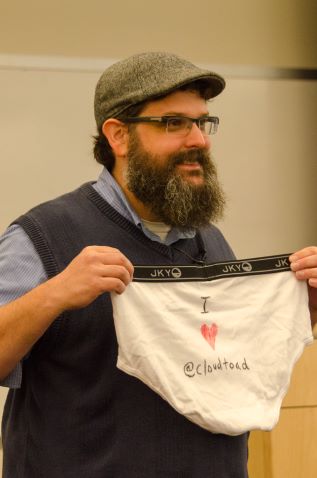
We were introduced to one of our own, Derick Winkworth (@cloudtoad). Derick was a delegate and NFD2 and has recently come to Juniper as the PM of Automation. It’s always nice to see someone from Tech Field Day in front of us for the vendor. Some have said that the vendors are stealing away members of the Field Day community, but I see it more as the vendors realizing the unique opportunity to bring someone on board the “gets it.” However, I couldn’t let Derick off the hook quite that easily. At Cisco Live, Derick proved his love for Dave Ward of Cisco by jumping up during Dave’s OnePK panel and throwing a pair of men’s briefs at him with “I ❤ Dave” written on the back. Lots of laughs were had by all, and Dave seemed appreciative of his gift. Once I learned the Derick was presenting first for NFD4, I hatched my own fan boy plot. When Derick walked up front to face the NFD delegates as “the enemy,” I too proved my love for the Cloud Toad by jumping up and tossing him a pair of underwear as well. These were adorned with “I ❤ @cloudtoad” to show Derick that he too has groupies out there.
Derick then proceeded to give us a small overview of the decision he made to join Juniper and the things that he wanted to improve to make everyone’s life a bit better. I can tell the Derick is genuinely pumped about his job and really wants to make a difference. If someone is that excited about going to work every day, it really doesn’t matter if it’s for a vendor or a VAR or even a garbageman. I only wish that half the people I work with had the same passion for their jobs as Derick.
Our first presentation was a bit of a surprise. We got a first hand look at storage from Simon Gordon. Yes, Juniper shook things up by making their first peek all about hard drives. Okay, so maybe it was more about showing how technologies like QFabric can help accelerate data transfers back and forth across your network. The two storage people in the room seemed fascinated by the peek into how Juniper handled these kinds of things. I was a bit lost with all the terminology and tried to keep up as best I could, but that’s what the recorded video archive is for, right? It’s no surprise that Juniper is pitching QFabric as a solution for the converged data center, just like their competitors are pitching their own fabric solutions. It just reminds me that I need to spend some more time studying these fabric systems. Also, you can see here where the demo gremlins bit the Juniper folks. It seemed to happen to everyone this time around. The discussion, especially from Colin McNamara (@colinmcnamara) did a great job of filling the time where the demo gremlins were having their fun.
The second presentation was over Virtual Chassis, Juniper’s method of stacking switches together to unify control planes and create managment simplicity. The idea is to take a group of switches and interconnect the backplanes to create high throughput while maintaining the ability to program them quickly. The technology is kind of interesting, especially when you extend it toward something like QFabric to create a miniature version of the large fabric deployment. However, here is where I get to the bad guy a bit… Juniper, while this technology is quite compelling, the presentation fell a bit flat. I know that Tech Field Day has a reputation for chewing up presenters. I know that some sponsors are afraid that if they don’t have someone technical in front of the group that bedlam and chaos will erupt. That being said, make sure that the presenter is engaging as well as technical. I have nothing but respect for the presenter and I’m sure he’s doing amazing things with the technology. I just don’t think he felt all the comfortable in front of our group talking about it. I know how nervous you can be during a presentation. Little things like demo failures can throw you off your game. But in the end, a bad presentation can be saved by a good presenter. A good presentation can take a hit from a less-than-ideal presenter. Virtual chassis is a huge talking point for me. Not only because it’s the way that the majority of my customers will interconnect their devices. Not because it’s a non-proprietary connector way to interconnect switches. It’s because Virtual Chassis is the foundation for some exciting things (that may or may not be public knowledge) around fabrics that I can’t wait to see.
Up next was Kyle Adams with Mykonos. They are a new acquistion by Juniper in the security arena. They have developed a software platform that provides a solution to the problem of web application security. Mykonos acts like a reverse proxy in front of your web servers. When it’s installed, it intercepts all of the traffic traveling to your Internet-facing servers and injects a bit of forbidden fruit to catch hackers. Things like fake debug codes, hidden text fields, and even phantom configuration files. Mykonos calls these “tar pits” and they are designed to fool the bad guys into a trail of red herrings. Becauase all of the tar pit data is generated on the fly and injected into the HTTP session, no modification of the existing servers is necessary. That is the piece that had eluded my understanding up until this point. I always thought Mykonos integrated into your infrastructure and sprayed fake data all over your web servers in the hope of catching people trying to footprint your network. Realizing now that it does this instead from the network level, it interesting to see the approaches that Mykonos can take. The tar pit data is practically invisible to the end user. Only those that are snooping for less-than-honorable intentions may even notice it. But once they take the bait and start digging a bit deeper, that’s when Mykonos has them. The software then creates a “super cookie” on the system as a method of identifying the attacker. These super coookes are suprisingly resilient, using combinations of Java and Flash and other stuff to stay persistent even if the original cookie is deleted. Services like Hulu and Netflix use them to better identify customers. Mykonos uses them to tie attacker sessions together and collect data. There are some privacy concerns naturally, but that is a discussion for a different day. Once Mykonos has tagged you, that’s when the countermeasures can start getting implemented.
I loved watching this in demo form. Mykonos randomly selects a response based on threat level and deploys it in an effort to prevent the attacker from compromising things. Using methods such as escalting network latency back to the attacker or creating fake .htacess files with convincingly encrypted usernames and passwords, Mykonos sets the hook to reel in the big fish. While the attacker is churning through data and trying to compromise what he thinks is a legitimate security hole, Mykonos is collecting data the whole time to later identify the user. That way, they can either be blocked from accessing your site or perhaps even prosecuted if desired. I loved the peek at Mykonos. I can see why Christofer Hoff (@beaker) was so excited to bring them on board. This refreshing approach to web application firewalls is just crazy enough to work well. As I said on the video, Mykonos is the ultimate way to troll attackers.
The final presentation at Juniper once again starred Derick Winkworth along with Dan Backman. Dan had presented over workflow automation at NFD2. Today, they wanted to talk about the same topic from a slightly different perspective. Derick took the helm this time and started off with a hilarious description of the land of milk and honey and unicorns, which according to him was representitive of what happens when you can have a comfortable level of workflow automation. It’s also where the title of this post came from. As you can tell from the video, this was the best part of having a former delegate presenting to us. He knew just how to keep us in stitches with all his whiteboarding and descriptions. After I was done almost spitting my refreshments all over my laptop, he moved on to his only “slide”, which was actually a Visio diagram. I suppose this means that Derick has entered the Hall Of Slideless TFD Presenters. His approach to workflow automation actually got me a bit excited. He talked less about scripting commands or automating configuration tasks and instead talked about all the disparate systems out there and how the lack of communication between them can cause the silo effect present in many organizations to amplify. I like Derick’s approach to using Junos to pull information in from various different sources to help expedite things like troubleshooting or process execution. Leveraging other utilities like curl helps standardize the whole shooing match without reinventing the wheel. If I can use the same utilities that I’ve always used, all my existing knowledge doesn’t become invalidated or replaced. That really speaks to me. Don’t make me unlearn everything. Give me the ability to take your product and use additional tools to do amazing things. That, to me, is the essence of SDN.
If you’d like to learn more about the various Juniper products listed above, be sure to visit their website at http://www.juniper.net. You can also follow their main Twitter account as @JuniperNetworks.
Tom’s Take
Juniper’s doing some neat things from what they showed us at NFD4. They appear to be focusing on fabric technology, both from the QFabric converged networking overview and even the Virtual Chassis discussion. Of course, protecting things is of the utmost importance, so Mykonos can prevent the bad guys from getting the goods in a very novel way. Uniting all of this is Junos, the single OS that has all kinds of capabilities around SDN and now OpenFlow 1.3. Sure, the demo gremlins hit them a couple of times, but they were able to keep the conversation going for the most part and present some really compelling use cases for their plans. The key for Juniper is to get the word out about all their technology and quit putting up walls that try and “hide” the inner workings of things. Geeks really like seeing all the parts and pieces work. Geeks feel a lot more comfortable knowing the ins and outs of a process. That will end up winning more converts in the long run than anything else.
Tech Field Day Disclaimer
Juniper was a sponsor of Network Field Day 4. As such, they were responsible for covering a portion of my travel and lodging expenses while attending Network Field Day 4. In addition, Juniper provided me with a hooded sweatshirt with the Juniper logo and some “I Wish This Ran Junos” stickers. They did not ask for, nor where they promised any kind of consideration in the writing of this review. The opinions and analysis provided within are my own and any errors or omissions are mine and mine alone.
The first presentation of the final day of Network Field Day 4 brought us to the mothership on Tasman Drive. The Cisco Borderless team had a lineup of eleven different presenters ready to show us everything they had. For those of you not familar with the term, Borderless Networks inside Cisco essentially means “everything that isn’t data center or voice.” Yeah, that means routing and switching and security and wireless and everything else. That also meant that we got a very diverse group of people presenting to us and a lot of short twenty minute videos of their products. In a way, it’s very much like speed dating. With little time to get the point across, you tend to shed the unnecessary pleasantries and get right to the important stuff.
First up was the UCS team with new E-series servers. These are blades that are designed to slide into a ISR G2 router and provide a full-featured x86 platform. It’s a great idea in search of an application. I can still remember the AxP modules and how they were going to change my life. That never really materialized. The payoff use case that you are looking for is the second video above. Cisco is starting to push for the idea that you can contain a whole branch office in a single router and run not only the phone system and networking routing and VPN, but now a light-duty server as well. I’m not sure how many people will be looking to do that with virtualized server resources residing in the data center, but there was some discussion of using this a temporary failover type of environment to push the branch server to the edge in the event of some kind of disaster or outage. That might work better to me that running the entire branch on the router. Of course, as you can tell, the demo gremlins found Cisco as well.
The next presentation was the new darling Cloud Services Router (CSR) 1000v. This little gem got some face time on stage with John Chambers at Cisco Live this year. It’s a totally virtualized router (hence the “v”) that can move workloads into the cloud when needed. I’m really curious as to why this is included with Borderless, as this is a very data center specific play right now. I know that Cisco is pushing this device currently as a VPN concentrator or MPLS endpoint for WAN aggregation. It makes more sense from some of their diagrams to have it running inside a cloud provider network carving up user space. I’m going to keep an eye on this one to see where the development goes.
Now, we get to something fun. Cisco FlexVPN is what happens when someone finally took a look at all the different methods for configuring VPNs on the various Cisco devices and said “WTF?!?” FlexVPN utilizes IKEv2 to help speed configuration. You can watch the short video and see all the stuff that we have to deal with to configure a VPN today. Cisco finally took our complaints to heart and made things a lot more simple. Of course there are drawbacks, and with FlexVPN that means it only works with IKEv2. There’s no backwards compatibility. Of course, if you’re going to have to be migrating everything anyway, you might as well make a clean break and rebuild it right. That’s going to make things like hub-and-spoke VPN configuration a whole lot less painful in the near future. Props to Cisco for fixing a pain point for us.
Okay, so maybe a I lied just a bit. Since Cisco Unified Border Element runs on a router (even though it’s technically voice), we got a presentation about it! I was in hog heaven here. If you are looking at deploying a SIP trunk, you had better be looking at a CUBE box to handle the handoff. Don’t think, just do it. Listen to the voice of Amy Arnold (@amyengineer) and Erik Peterson (@ucgod). You need this. You just don’t know how much until you start banging your head against a wall.
More Voice!!! By this point, I was practically crying tears of joy. Two voice presentations in one day. At a networking event no less! This presentation on enhanced SRST shows how big of kludge SRST really is. I’m not a huge fan of it, but I have to configure it to be sure that the phone systems work correctly in the event of a WAN outage. It’s all still CLI and very annoying to configure and keep in sync. Thankfully, with the ESRST manager highlighted in the video above, we can keep those configurations in sync and even have it automagically pull the necessary configurations out of CUCM. This software runs on a Service Engine right now in the router, but I can’t wait to see if Cisco ports it to a virtual setup to run under a CUCMBE 6000 server or even on a UCS-E blade down the road. Anything that I can do to make SRST less painful is a welcome change.
Okay, this had to be one of the more interesting presentations I’ve been involved in at an NFD event. We got our AppNav presentation over Webex from a remote resource. I know this a hot thing to do at Cisco offices to make sure we have the most talented people giving us the most up-to-date info about a particular subject. However, I expect this when I’m in the middle of nowhere Oklahoma, not at the mothership in San Jose. The Webex cut out now and then and there were times when we had to strain to hear what was being said in the room. Looking back at the video, I marvel that the room mikes picked up as much as they did. As for AppNav itself, it’s a virtual DC version of the Wide Area Application Services (WAAS). My grasp of WAN acceleration isn’t as good as it should be, even from Infineta back at NFD3. There’s some good info in here I’m sure. I’m just going to have to go back and digest it to see where it fits into my needs.
Now it’s time for some switching talk. We got a roadmap on the Catalyst line. There are some interesting tidbits in the slides, such as a monster 9000W power supply for the 4500 to support UPoE (more on that in a minute). The 4500 is also going to get VSS support and ISSU support. Those two things alone are going to make me start considering the use of the 4500 in the core of most of my smaller networks. The fixed configuration Catalyst switches also have some nice roadmaps, including UPoE support and lots of IPv6 enhancements. As I move forward in 2013, I’m planning on doing a lot with IPv6, so knowing that I’m going to have switching support behind me is a nice comfort. Of all the updates, the most talked about one was probably the Catalyst 6500. A switch that has been rumored to be on the chopping block for many years now, the venerable Cat6K is getting more updates, including FabricPath support and 100Gig module support. I think this switch may outlast my networking career at this rate. There are lots of rumors as to why Cisco is renovating this campus core stalwart once more, but it’s clear that they are attempting to squeeze as much life out of it as they can right now. To me, the idea of stretching FabricPath down into the campus presents some very tantalizing opportunities to finally get rid of spanning tree on all but the user-facing links. Let’s hope that the Cat6k sticks around long enough to get a gold watch and a nice pension for all the work it’s given us over the years.
Our next discussion was around security and using Cisco TrustSec to do things a little differently that we’re used to. By now, I think everyone has talked your ear off about BYOD. Even I’ve done it a couple of times. It’s a real issue for people in the dark security caves because our traditional methods of access lists and so forth don’t work the same way when you’ve got employees bringing their own laptops or asking you to give them access to data from tablets or phones. What this has morphed into is a need to do more role-based authorization. That’s what TrustSec means to me. Of course, a lot of previous attempts to do this, like NAC, haven’t really hit the mark or have been so convoluted that it was almost impossible to get them working correctly. Today, Cisco has rolled all the functionality of NAC and ACS into the Identity Services Engine (ISE). I’ve had a very brief encounter with ISE, so I know it has a lot of potential. I want to see how Cisco will incorporate it into the bigger TrustSec picture to make everything work across my various platforms.
Time to turn up the juice. Cisco brought out Universal Power over Ethernet (UPoE), which is their solution to pump up to 60 watts of power across a standard Ethernet cable to power…well, whatever it is that eats 60w of power. Cisco’s doing this by taking 802.3at PoE+, which can pump 30w down the cable, and pushing an additional 30w of power down the other unused pairs. Interestingly, Cisco talked to the people behind the ISO and EIA/TIA standards and found that when you have a bunch of unstructured cables running about around 50 watts (which is the 60w number above minus cable loss), you get a temperature in the cable bundle about 8-10 degrees above the ambient room temperature. In reality, this means that 60w is the max amount of power you’re likely to ever get out of a Cat5e cable unless you chill it or have some kind of new material that can reduce the heating effect. Cisco seems to be targeting UPoE to drive things like monitors, thin client desktops, and even those crazy command center touch pads that you see littered across the floor of a trading house or stock exchange. This last item really makes me believe that UPoE is going to be positioned in the same vein as the ultra-low latency Nexus 3548 – financial markets. Thin clients and command center touch panels are likely to be the kind of mission-critical devices these companies are willing to pay big buck to power. With the above-mentioned 9000w PS for the Catalyst 4500, you can see why we’re going to soon need to put a nuclear reactor in to drive these things.
Cisco Smart Operations dropped by to talk to us about Cisco Smart Install. This is the feature that I tend to turn off when I see it by the telltale sign of “Error opening tftp://255.255.255.255/network-config.” The Smart Operations team is doing its best to create an environment where an IT department that doesn’t have the headcount to send technicians to deploy remote site switches can leverage software tools to have those devices auto-provision themselves. You can also configure them to automatically configure things like Smartport roles, which has never really been one of my favorite switch features. Overall, I can appreciate where Cisco is wanting to go with this technology. But, as a CLI jockey, I’m still a bit jaded when it comes to having part of my job replaced by a TFTP script.
The final Cisco NFD4 presentation was about application visibility and control. This is a lot of the intelligence that is built into the Cisco Prime monitoring software that was demoed for us back at NFD3. If you can identify the particular fingerprints of a given application, such as Telepresence, you can better determine when those fingerprints are out of whack. I’m also excited because fingerprinting apps is going to be a huge part of security in the near future, as evidenced by Palo Alto’s app-based firewall and the others like Sonicwall and Watchguard that have followed along. Even the Cisco ASA-CX is starting to come around to the idea of stopping apps and not protocols.
There you have it. Lots of presenters. Hours of video. A couple of thousand words from me on all of it. It’s almost exhausting to see that much information in a short span of time. Some of the things that Cisco did with this presentation were great. There were technologies that only needed a bit of time. There were others that we could have spent an hour or more on. I think that the next NFD presenters that want to try something along these lines should setup the first three hours with rapid fire presentations and reserve the last hour for us to call back to earlier presenters and hit them with additional questions. That way, we don’t run out of time and we get to talk about the things that interest us the most. Bravo overall to the Cisco Borderless team for breaking out of the mold and trying something new to keep the NFD delegates hooked in.
Tech Field Day Disclaimer
Cisco was a sponsor of Network Field Day 4. As such, they were responsible for covering a portion of my travel and lodging expenses while attending Network Field Day 4. In addition, they provided me with an 8GB USB drive with marketing collateral and data sheets. They did not ask for, nor where they promised any kind of consideration in the writing of this review. The opinions and analysis provided within are my own and any errors or omissions are mine and mine alone.
Brocade kicked off our first double session at Network Field Day 4. We’d seen them previously at Network Field Day 2 and I’d just been to Brocade’s headquarters for their Tech Day a few weeks before. I was pretty sure that the discussion that was about to take place was going to revolve around OpenFlow and some of the hot new hardware the Brocade had been showing off recently. Thankfully, Lisa Caywood (@TheRealLisaC) still has some tricks up her sleeve.
I hereby dub Lisa “Queen of the Mercifully Short Introduction.” Lisa’s overview of Brocade hit all the high points about what Brocade’s business lines revolve around. I think by now that most people know that Brocade acquired Foundry for their ethernet switching line to add to their existing storage business that revolves around Fibre Channel. With all that out of the way, it was time to launch into the presentations.
Jessica Koh was up first to talk to me about a technology that I haven’t seen already – HyperEdge. This really speaks to me because the majority of my customer base isn’t ever going to touch a VDX or and ADX or an MLXe. HyperEdge technology is Brocade’s drive to keep the campus network infrastructure humming along to keep pace with the explosion of connectivity in the data center. Add in the fact that you’ve got all manner of things connecting into the campus network, and you can see how things like manageability can be at the forefront of people’s minds. To that end, Brocade is starting off the HyperEdge discussion early next year with the ability to stack dissimilar ICX switches together. This may sound like crazy talk to those of you that are used to stacking together Cisco 3750s or 2960s. On those platforms, every switch has to be identical. With the HyperEdge stacking, you can take an ICX 6610 and stack it with an ICX 6450 and it all works just fine. In addition, you can place a layer 3 capable switch into the stack in order to provide a device that will get your packets off the local subnet. That is a very nice feature that allows the customer base to buy layer 2 today if needed then add on in the future when they’ve outgrown the single wiring closet or single VLAN. Once you’ve added the layer 3 switch to the stack, all those features are populated across all the ports of the whole stack. That helps to get rid of some of the idiosyncrasies of some of the first stacking switch configurations, like not being able to locally switch packets. Add in the fact that the stacking interfaces on these switches are the integrated 10Gig Ethernet ports, and you can see why I’m kind of excited. No overpriced stacking kits. Standard SFP+ interfaces that can be reused in the event I need to break the stack apart.
I’m putting this demo video up to show how a demo during your presentation can be both a boon and a bane. Clear you cache after you’re done or log in as a different user to be sure you’re getting a clean experience. The demo can be a really painful part when it doesn’t run correctly.
Kelvin Franklin was up next with an overview of VCS, Brocade’s fabric solution. This is mostly review material from my Tech Day briefing, but there are some highlights here. Firstly, Brocade is using yet a third new definition for the word “trunk”. Unlike Cisco and HP, Brocade refers to the multipath connections into a VCS fabric as a trunk. Now, a trunk isn’t a trunk isn’t a trunk. You just have to remember the context of which vendor you’re talking about. This was also the genesis of packet spraying, which I’m sure was a very apt description for what Brocade’s VCS is doing to the packets as they send them out of the bundled links but it doesn’t sound all that appealing. Another thing to keep in mind when looking at VCS is that it is heavily based on TRILL for the layer 2 interconnects, but it does use FSPF from Brocade’s heavy fibre channel background to handle the routing of the links instead of IS-IS as the TRILL standard calls for. Check out Ivan’s post from last year as to why that’s both good and bad. Brocade also takes time to call out the fact that they’ve done their own ASIC in the new VCS switches as opposed to using merchant silicon like many other competitors. Only time will tell how effective the move to merchant silicon will be for those that choose to use it, but so long as Brocade can continue to drive higher performance from custom silicon it may be an advantage for them.
This last part of the VCS presentation covers some of the real world use cases for fabrics and how Brocade is taking an incremental approach to building fabrics. I’m curious to see how the VCS will begin to co-mingle with the HyperEdge strategy down the road. Cisco has committed to bringing their fabric protocol (FabricPath) to the campus in the Catalyst 6500 in the near future. With all the advantages of VCS that Brocade has discussed, I would like to see it extending down into the campus as well. That would be a huge advantage for some of my customers that need the capability to do a lot of east-west traffic flows without the money to invest in the larger VCS infrastructure until their data usage can provide adequate capital. There may not be a lot that comes out of it in the long run, but even having the option to integrate the two would be a feather in the marketing cap.
After lunch and a short OpenStack demo, we got an overview of Brocade’s involvement with the Open Networking Foundation (ONF) from Curt Beckmann. I’m not going to say a lot about this video, but you really do need to watch it if you are at all curious to see where Brocade is going with their involvement with OpenFlow going forward. As you’ve no doubt heard before, OpenFlow is really driving the future of networking and how we think about managing data flows. Seeing what Brocade is doing to implement ideas and driving direction of ONF development is nice because it’s almost like a crystal ball of networking’s future.
The last two videos really go together to illustrate how Brocade is taking OpenFlow and adopting it into their model for software defined networking (SDN). By now, I’ve heard almost every imaginable definition of SDN support. On one end of the spectrum, you’ve got Cisco and Juniper. A lot of their value is tied up in their software. IOS and Junos represent huge investments for them. Getting rid of this software so the hardware can be controlled by a server somewhere isn’t the best solution as they see it. Their response has been to open APIs into their software and allow programmability into their existing structures. You can use software to drive your networking, but you’re going to do it our way. At the other extreme end of the scale, you’ve got NEC. As I’ve said before, NEC is doubling down on OpenFlow mainly for one reason – survival. If they don’t adapt their hardware to be fully OpenFlow compliant, they run the risk of being swept off the table by the larger vendors. Their attachment to their switch OS isn’t as important as making their hardware play nice with everyone else. In the middle, you’ve got Brocade. They’ve made some significant investments into their switch software and protocols like VCS. However, they aren’t married to the idea of their OS being the be all, end all of the conversation. What they do want, however, is Brocade equipment in place that can take advantage of all the additional features offered from areas that aren’t necessarily OpenFlow specific. I think their idea around OpenFlow is to push the hybrid model, where you can use a relatively inexpensive Brocade switch to fulfill your OpenFlow needs while at the same time allowing for that switch to perform some additional functionality above and beyond that defined by the ONF when it comes to VCS or other proprietary software. They aren’t doing it for the reasons of survival like NEC, but it offers them the kind of flexibility they need to get within striking distance of the bigger players in the market.
If you’d like to learn more about Brocade, you can check out their website at http://www.brocade.com. You can also follow them on Twitter as @BRCDComm.
Tom’s Take
I’ve seen a lot of Brocade in the last couple of months. I’ve gotten a peek at their strategies and had some good conversations with some really smart people. I feel pretty comfortable understanding where Brocade is going with their Ethernet business. Yes, whenever you mention them you still get questions about fibre channel and storage connectivity, but Brocade really is doing what they can to get the word out about that other kind of networking that they do. From the big iron of the VDX to the ability to stack the ICX switches all the way to the planning in the ONF to run OpenFlow on everything they can, Brocade seems to have started looking at the long-term play in the data networking market. Yes, they may not be falling all over themselves to go to war with Cisco or even HP right now. However, a bit of visionary thinking can lead one to be standing on the platform when the train comes rumbling down the track. That train probably has a whistle that sounds an awful lot like “OpenFlow,” so only time can tell who’s going to be riding on it and who’s going to be underneath it.
Tech Field Day Disclaimer
Brocade was a sponsor of Network Field Day 4. As such, they were responsible for covering a portion of my travel and lodging expenses while attending Network Field Day 4. In addition, Brocade provided me with a gift bag containing a 2GB USB stick with marketing information and a portable cell phone charger. They did not ask for, nor where they promised any kind of consideration in the writing of this review. The opinions and analysis provided within are my own and any errors or omissions are mine and mine alone.