Dial Plan Considerations

A Candlestick Phone (image courtesy of WIkipedia)

Dial Plans are probably one of the hardest parts of learning about voice.  I consider it to be just like subnetting for network enginee…rock stars.  There are volumes upon volumes of how to stage and arrange your dial plans to speed call routing and minimize memory usage on voice over IP (VoIP) equipment.  However, there are a couple of things that I’ve found over the course of my career in voice that I want to pass along that I’ve never really found written down anywhere.  Consider these some of the “street smarts” of VoIP.

– Avoid Placing Extensions in the “9XXX” range.  This one seems to be the most popular issue.  No matter if you’re using 3-digit or 4-digit extensions, consider anything beginning with a “9” to be off limits.  There are actually a couple of reasons for this.  First and foremost, “9” is generally used at the PSTN access code (or escape code) for most PBX-style equipment in the world.  It’s also used as the escape code for Centrex phone service.  If any of the extensions on your Cisco phone system start with a “9”, the system will get a bit confused.  The external route patterns on your CUCM/CUCME system all start with “9” and have the “Provide Outside Dial Tone” box checked (at least they should).  If you have an extension that is 9640, for instance, CUCM will not play the pitch-changed PSTN dial tone until the number you are dialing explicitly matches a route pattern with the “Provide Outside Dial Tone” check box enabled.  In this example, if you are calling a long distance number, when you hit “9”, you won’t hear the higher-pitched tone.  You also won’t hear it if you follow with 1, 3, or 1.  Not until you dial the 5th digit of your long distance call that eliminates the above 9640 extension will the caller hear the PSTN dial tone.  While this doesn’t really affect the operation of the system, it really throws the users for a loop when they don’t hear that dial tone for accessing the PSTN.

The other crucial reason for avoiding extensions that start with “9” is to cut down on the number of misdialed emergency numbers (911 or 999).  I’ve talked about emergency numbers before and taking them into account here is just as critical.  I’ve even had to change the PSTN escape code to something other than “9” (like 8 or 7) in order to correct this emergency calling issue.  In those cases, I have to avoid putting extensions in the 9 range and the new code range to keep my PSTN dial tones and emergency calling behavior straight.

– The 1XXX range is your friend.  If you need a number range for your extensions or voice mail ports or other system directory numbers, anything starting with a “1” is a great idea.  Why?  Well, since the very beginning of phone systems two numbers have always been reserved and not used to start phone numbers.  One of these is “0”.  Zero has always been used as a signal to the phone company operator, so no number in the North American Numbering Plan (NANP) starts with a zero.  The other number is “1”.  One is a more curious case.  It turns out that the original “candlestick” phones had a bad habit of sending a fast pulse when they went off-hook.  In order to prevent a ton of misdialed calls, the system was configured to ignore any numbers that started with a “1”.  Again, no numbers in the NANP start with a “1”.  We now use One to signal a long distance telephone call, but that is really the only time it’s used.  If you use the 1XXX range for all your voice mail ports or park slots or even extensions, you never really have to worry about it colliding with other parts of your dialing plan.  If you’re setting up a home CUCME system, like I’m trying to do once I can convince my wife, you can put your extensions in the 1XX range and not need to worry about using a PSTN access code.  I’ll probably write a little more about this once my experiment is up and running.

– Create a local 10-digit dial peer.  I’ve mentioned this in passing once before, but if you still live in one of those areas that hasn’t switched to 10-digit dialing for all local calls, you should probably program an explicit local dial peer.  For example, in central Oklahoma calls are still dialed with 7 digits locally.  However, there are destinations that are not long distance (prefixed with a 1) that use 10-digits.  If you program a standard 10-digit dial peer (9.[2-9]XX[2-9]XXXXXX), when you dial 7-digit local calls the system must wait for the interdigit timeout to expire before dialing the call.  This is because those 7 digits can match two different dial peers (7-digit and 10-digit) and the system doesn’t know which one to use until you let the digit timeout expire, which could be up to 15 seconds.  That time is an eternity to your users.

Instead, until the time when your state figures out 10-digit dialing is what all the cool kids are doing, you should do this little work around.  Configure your regular 7-digit and long distance dialing codes.  Rather than creating a 10-digit route pattern though, just create a route pattern with your 10-digit local area code.  In the above example for central Oklahoma (area code 405), that explicit dial peer would be 9.405[2-9]XXXXXX.  This way, any 10-digit calls will route immediately.  Most of your 7-digit calls should route immediately as well when they match the 9.[2-9]XXXXXX route pattern.  The only issue you might have is if your local NANP prefix (the [2-9]XX part) is the same as your area code.  Chances are slim in that case, so your local calls won’t wait for the interdigit time to expire.  Just be sure to have the 10-digit dial peer for all local calls ready to go on the day you get switched over.  Otherwise you are going to have some confused and angry users.

Tom’s Take

If you are going to be a voice enginee…miracle worker, you are going to spend a lot of time learning about dial plans.  Before you know it, things will just be automatic and you’ll be able to churn them out without a second thought.  If you take my advice above into account as you’re learning about dial plans, you will have a much easier time when it comes to the strange corner cases you might run into like not hearing a PSTN dial tone or interdigit timeout issues for local calling.

Cisco Phone Cheat Codes

There are many things in this world that are hidden just beneath the surface that make our lives easier.  Whether it be the Secret Menu at In-n-Out Burger or the good old Konami Code, the good stuff that we need is often just out of reach unless you know the code.  This is also the case when dealing with Cisco phones.  There are three key combinations that will help you immensely when configuring these devices, provided you know what they are.

1.  Unlock Settings – *, *, #.  When you check the settings on a Cisco phone, you’ll notice that you can look at the values but you can’t change any of them.  Many of these values are set at the Cisco Unified Communications Manager (CUCM) level.  However, once common issue is the phone not being able to contact the CUCM server or the phone having the wrong address/TFTP server information from DHCP.  While there are a multitude of ways to correct these issues in the network, there is a quick method to unlock the phone to change the settings.

  • Go to the Settings page of the phone
  • While in the settings page, press *, *, # (star, star, pound) about 1/2 second apart
  • The phone will display “Settings Unlocked” and allow you to make changes

It’s that easy.  There won’t be a whole lot to do with the phone Telephony User Interface (TUI), but you can make quick changes to DHCP, IP address, or TFTP server address entries to verify the phone configuration is correct.  By the way, when putting in an IP address via TUI, the “*” key can be used to put a period in an IP address.  That should save you an extra keystroke or two.

2.  Hard Reset – *,*,#,*,*.  Sometimes, you just need to reboot.  There are a variety of things that can cause a phone to need to be reset.  Firmware updates, line changes, or even ring cadence necessitate reboots.  While you can trigger these from the CUCM GUI, there are also times that they may need to be done from the phone itself in the event of a communications issue.  Rebooting is also a handy method for beginning to troubleshoot issues.

But Tom?  Why not just pull the network cable from the back of the phone?  Won’t disconnecting the power reboot?

True, it will.  What if the phone is mounted to the wall?  Or if the phone is running from an external power supply?  Or positioned in such as way that only the keypad is visible?  Better to know a different way to reboot just in case.  Here’s where the reboot cheat code comes in handy.

  • Go to the settings page of the phone
  • Press *,*,#,*,* (star, star, pound, star, star) about 1/2 second apart
  • The phone will display “Resetting” and perform a hard reset

This sequence will cause the phone to reboot as if the power cable had been unplugged and force it to pull a new configuration from CUCM.  Once common issue I find when entering this code is the keypresses not registering with the phone.  Try it a couple of times until you develop a rhythm for entering it about 1/2 second apart.  Much more than that and the phone won’t think you’re entering the code.  Quicker than that and the keys might not all register.

3.  Factory Reset – “1,2,3,4,5,6,7,8,9,*,0,#”.  When all else fails, nuke the phone from orbit.  It’s the only way to be sure.  Some settings are so difficult to change that it’s not worth it.  Or you’ve got a buggy firmware that needs to be erased.  In those cases, there is a way to completely reset a phone back to the shipping configuration.  You’ll need access to unplug the power cable, as well as enough dexterity to press buttons on the front as you plug it back in.

  • Unplug the power from the phone.
  • As you plug it back it, press and hold the “#” key.  If performed correctly, the Headset, Mute, and Speaker buttons in the lower right corner will start to flash in sequence.
  • When those three buttons start flashing in sequence, enter the following code: 1,2,3,4,5,6,7,8,9,*,0,#.  You’ll notice that’s every button on the keypad in sequence from left to right, top to bottom.
  • Phone will display “Upgrading” and erase the configuration.

Don’t worry if you press a key twice on accident.  The phone will still accept the code.  However, you do need to be quick about things.  The phone will only accept the factory reset code for 60 seconds after the Headset, Mute, and Speaker buttons start flashing in sequence.

Tom’s Take

I find myself using these cheat codes all the time.  Whether I’m correcting a bad TFTP server entry or setting a static IP on a subnet, the ability to manipulate a phone without resorting to using CUCM all the time is very useful.  You can also use these codes to impress your friends with your intimate knowledge of the way Cisco phones work.  Just be careful with that reset code.  About every 1 out of 1,000 times it gives you 30 lives instead.

You Don’t Need Gigabit, But We Do

Stacy Higginbotham wrote a thought-provoking article last week entitled “The Elephant in the Gigabit Network Room”.  Therein, she talks about how many providers are starting to bring gigabit connectivity to residential areas for prices in the $200-$300 range.  She also discusses that this is overkill for most customers, as many devices today can’t reach sustained transfer rates above 500 Mbps as well as the majority of the content being provided are low speed, bandwidth non-intensive services like Twitter.  She goes on to discuss that while there may be applications for using gigabit broadband, they are few and far between now and don’t equate to the cost when something like a 25 Mbps downstream cable modem would suffice just as well.

Allow me to disagree here.

I think one of the reasons why this article sounded flawed to me is because is sounds based on the idea that people still use one computer at a time.  The more I thought about it, the more I realized that the supposition that gigabit residential service for a single machine is overkill is indeed correct.  However, that’s where my opinion diverges.  I would argue that today’s residential networks are staring to resemble small enterprise networks with regard to bandwidth usage.

Think about all the things that you are doing with your home networks right now.  Sure, there’s a fair amount of low bandwidth web surfing going on.  We use Twitter to and Facebook to post status updates.  We check email.  We look up things on Wikipedia to win Internet arguments.  If that was it, I would say that even 100 Mbps or 25 Mbps service would be more than you’d ever need.  But go deeper.  We now use Netflix to stream movies to our televisions.  We use iTunes to download content to all manner of devices.  Hulu, Boxee, and Vudu are all clamoring for attention and bandwidth.  Even simple Bittorrent transfers can suck up an entire pipe.  Now imagine all this couple with the blah blah cloud services coming down the pipe.  We even use cloud-ish services today.  Gigabytes of pictures uploaded to Picasa and Flickr.  Video uploaded to Youtube and Vimeo.  Music streaming coming from Google, Amazon, Apple, and anyone else with a handheld device with a headphone jack.  We can even run our household phone system over the Internet.  Not to mention Facetime, Telepresence, and all manner of real-time video communications.  Sounds to me like that little cable modem is starting to get a bit crowded.

Another argument against gigabit networking is the inability of devices to use the full bandwidth.  Specifically, the lack of gigabit wireless networking is pointed out in the article.  Right now, she’s right.  However, with 802.11ac coming down the pipe and WiGig coming to the 60 Ghz spectrum sooner rather than later, I think it’s better if we have the broadband infrastructure in place sooner rather than later.  In the article, it is stated that a generic laptop only hit 420 Mbps downstream in a test.  Okay, so with a little optimization we could probably hit 600 Mbps easy.  Did they test several sites to be sure it wasn’t a transit network issue?  Did they pull from a close FTP server with a high-speed backbone?  Or were they clocking Windows Update?  Most machines will eat any amount of bandwidth you throw at them.  Even if you peaked at 500 Mbps out of the box, that’s still 5 times faster than a 100 Mbps network.  Think about what would happen in your enterprise if you granted users the ability to run gigabit all the way to the desktop.  Files could be transferred faster internally.  Content could be pushed with little effort.  Imagine again what might happen if you then brought those same users back down to 100 Mbps.  You’d have a mutiny on your hands.  When driving on the highway, 80 MPH only seems fast when you get going.  Once you’ve been cruising there for a while, 60 MPH seems like a standstill.  I think that even half a gigabit connection per machine is still amazingly fast, especially when that pipe starts getting crowded as I’ve outlined above.

The final argument is that there is no killer app that necessitates paying such high fees for gigabit service.  One service that is discussed by the author is online backup.  This, however, is dismissed as being too infrequent to be useful to a customer paying a monthly charge.  Let me ask this of you out there: how crazy did the idea of downloading music on the Internet seem when the fastest connection we could muster was 56k?  How about watching movies in our house solely over the internet when 128k ISDN was the fastest kid on the block (that was exorbitantly high priced for its time too)?  Why code an app if you know it can’t work to its fullest potential today?  What about continuous online backup?  If you’ve already got the pipe to handle it why not keep a running backup of your files out in the blah blah cloud?  HD streaming video to multiple devices simultaneously?  What about the burgeoning website designs that seem to be taking more and more bandwidth every day with Flash landing pages, Flash adds, Shockwave menus and more?  If we start running gigabit to our house, I can promise you that there will be apps written to take advantage of those big fat pipes.

Tom’s Take

Yes, running a gigabit pipe into my house would probably be overkill right now.  Despite my protestations to the contrary, my wife realizes that I don’t need to have the ability to instantly download anything and everything on the Internet.  But I also see that as we start placing more and more content and information outside of our computers and in the blah blah cloud, we’re going to get very impatient to get that content quickly.  HD video, 27 megapixel images, and enough MP3s to sink an aircraft carrier stored somewhere in an online vault and we have to have it NAO!  Just because 100 Mbps would do anyone just fine today doesn’t mean that there isn’t a market for gigabit residential service.  It’s like saying that just because we can only drive 65-75 MPH on the highway there’s no need for sports cars that can do 130.  Someone out there will find a use for it if it’s available.  If nothing else, the blah blah cloud providers should be championing us to get the fastest available connections and start storing everything we have with them.  That way, we don’t have to spend so much time worrying about where our stuff is being stored.  We just click it and go.

The Sky’s The Limit for CCIEs

First of all, congratulations to Jonathan Topping, CCIE #30002.  He passed back on August 25th, which means that CCIE #30000 passed on the 24th or 25th.  That person is still unknown at this time, but the milestone that it represents is pretty impressive.

I chased my CCIE all the way through the 20000’s.  From reading Ethan Banks’ first blog at CCIE Candidate as he got his number (20655) all the way up until I got mine just shy of the 30k mark, I’ve been entrenched in the lore of things.  30,000 is a big mark.  Sure, CCIE #31025 will be the actual 30,000th person certified, but you can’t ignore the significance of how many people out there have chased their goal and achieved it.  Ethan passed his lab in April 2008, and with a little fudging on the math with the pass rates, it took about 3.5 years to get from 20,000 to 30,000.  Pretty impressive for what some have considered to be the hardest exam in the industry for a number of years.  The rate of passing seems to be accelerating.  It fluxuates from about 50 per week up to 150 per week depending on when the test is being taken and whether changes are rumored to be coming down the pipe soon.

There was a time I can remember people saying that anyone with a 5-digit CCIE number was just too green to be of any use in the industry.  Those same things were said just after Larry Edie passed to become #20000.  I’m sure someone will say that now that we’ve broken through 30,000 as well.  It doesn’t matter in the end though.  CCIE numbers are like grade point averages.  I was worried when I graduated college because my GPA wasn’t as outstanding as those kids that spent every waking minute studying for tests and turning in homework two weeks early.  However, on my first interview I wasn’t asked about my GPA.  They asked about my experience and what I was capable of.  The same is now true of my CCIE.  People are impressed with the certification itself, not the number.  The number only exists to prove you are who you say you are.  It doesn’t matter if you’re #1027 or #31027.  The fact is that you’ve all passed the same rigorous test to achieve your goals.  Sure, Greg Ferro may have had to study Token Ring and Ethan Banks may have had to study ATM, but we all passed a lab exam with requirements and tasks.  I’m sure that the IP tasks on my lab exam will look foreign in 3 years when we’re all running IPv6 and configuring OSPFv3.

Other vendors are starting to see the light, too.  Juniper has lab exams for its Juniper Networks Certified Internet Expert (JNCIE).  Microsoft added practical-type questions to the Server 2008 certification track a while back.  Novell took a shot at a practical exam with the first iteration of the Novell Certified Linux Engineer 1.0 exam.  I still have nightmares about that jewel.  I can see more people starting to look at practical exams at the expert level.  I know they are pain to administer and grade.  They are difficult to study for and the material has to be refreshed frequently.  However, they provide something no written multiple choice test can – experience.  I know that someone who has passed the CCIE or the JNCIE can actually sit down and do the things on the test.  There’s no multiple guessing or subject board to award a certification.  It’s down to merit, plain and simple.

Tom’s Take

CCIE #40000 will probably be certified in March 2013 if the current passing trends stay stable.  Sounds closer than one might think.  Milestones come and go, but the aptitude is always there for those that pass.  Don’t worry about getting vanity numbers like 31,024 or 31,337.  Whatever number you get will be the one 5-digit number you will never forget in your entire life.  Don’t fret over getting a number in the 30,000s.  You’re still a name after all.  The number just comes after it.

If you’d like to lookup some milestone CCIE numbers, I highly recommend Marc La Porte’s CCIE Hall of Fame.  He verifies every CCIE number, so the information there is better than anywhere else on the net.

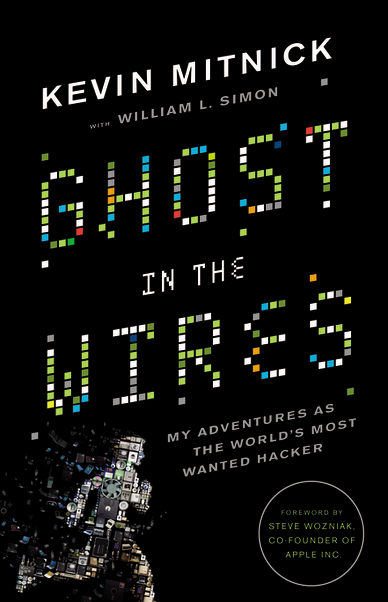
Ghost in the Wires – Review

Anyone who is old enough to remember the heady days of the formation of what we recognize as today’s Internet knows the name Kevin Mitnick.  Depending on who you ask, Mitnick is either a curious computer user that was wrongfully accused of horrendous crimes or he’s the most evil person to ever sit behind a keyboard and is capable of causing Armageddon with nothing more than a telephone.  Of course, the truth lies somewhere in the middle.

Mitnick has written books before that discuss social engineering.  The Art of Intrusion and The Art of Deception are both interesting books for security professionals that talk about the myriad of ways that hackers can exploit trust and other factors to compromise networks and systems.  However, both books lack something.  Deception is written as a series of “what if” methods of social engineering.  Intrusion uses real examples from a variety of sources, but not from Mitnick.  I’m sure there were lots of things that prevented him from talking about his past in these two books.  What people have really waited for though is the story of the World’s Most Wanted Hacker.  Well, wait no longer:

Ghost in the Wires is the autobiography of Kevin Mitnick.  Now that I’ve finished my CCIE studies, I have a couple of hours of free time to enjoy reading something that isn’t a whitepaper or a lab workbook.  I picked this up as soon as it was available on Amazon and cracked it open right away.  I took my time going through it, enjoying each chapter as it built up the story of Mitnick from his early years onward.  As the story progressed more into his social engineering stories and hacking exploits, I found myself spending more and more time reading about them.  I was drawn into the book not only because of the content, but the writing style as well.  Mitnick and his co-author William Simon decided to keep the content at a fairly non-technical level.  Other than a couple of expositions about gaining access via .rhosts files or spoofing IPs, the book as a whole doesn’t really go much deeper than programming a VCR.

What you do get from this book is a sense of what drives Mitnick.  It’s not wealth or fame or anarchy.  It’s the pursuit of knowledge.  Unlike the fame seeking kids today, Mitnick outlines that he only went after the targets he did because of the challenge of breaking into the them.  He didn’t do it to steal credit card numbers or to hold computers for ransom in some strange blackmail scheme.  Sure, he gained from his knowledge by virtue of his unfettered access to the phone company or his ability to clone his cell phone’s ESN whenever he wished.  However, rather than exploit this on a grand scale or sell his access privileges on the Internet, he held on to them and used them as capital only for bragging rights to other hackers.

Mitnick also takes some time to address the “Myth of Kevin Mitnick”, the legend that has grown up and been propagated about his crimes.  Stories of his flight from early prosecution to another country of his “ability” to whistle launch codes into pay phones elicit laughter but also show how the legal system in the early days of person computing was ill-equipped to deal with people like Mitnick that pushed systems to their boundaries and used them for their own purposes.  At times, it seems like the legal system in this book is run by a collection of scare mongers, ready at a moment’s notice to say whatever it takes to keep their suspects locked in solitary confinement and safely away from any form of communication, electronic or otherwise.  The second half of the book details his flight from the federal authorities and the ease with which Mitnick was able to create a new identity for himself.  Back in 1993 he was able to create a string of identities to elude his pursuers.  Today, however, I wonder if it would be as easy as before with all the linking of databases and sharing of information among all the different departments that Mitnick used to set himself up and someone else.  I’m sure it would be a very difficult challenge, which is just the kind Mitnick admits he loves.

Tom’s Take

I loved this book.  I’m a sucker for computer history, especially from someone as famous as Kevin Mitnick.  Yes, he violated laws and treated security procedures like recommendations instead of guidelines.  In truth, his crimes consisted of theft of things like source code or free telephone calls.  He did it because he liked the challenge of getting things he wasn’t supposed to have.  He was like a kid that would take his toys apart as a child to see how they worked.  I can identify with this kind of mentality, as I’m sure many of you can.  Mitnick chose to express this desire in ways that ended up bringing him into conflict with law and order.  In the end, he paid for his crimes.  However, he has paid us all back with the wealth of knowledge that he has shared about his methods of social engineering and computer hacking.  I recommend this book not only to those that are interested in the history of hacking but also to anyone that might ever take a telephone call or use a computer.  A little education about how easily Mitnick was able to gain the trust of unsuspecting people and get them to give him whatever info he wanted is worth the ounce of prevention that it will provide.  If nothing else, you’ll know what a nuclear launch code sounds like when it’s whistled in your general direction.

A Case of Mistaken Identity

It appears as though the carefully crafted hierarchy of trust that we’ve built in public key encryption is in danger of unraveling like a cheap suit.  Thanks to DigiNotar, the heretofor unknown registrar for the government of the Netherlands, we’ve got ourselves another fake certificate floating around out there.  This time, they generated a certificate for google.com (yes, the whole domain) back on July 19th.  According to DigiNotar, their certification authority (CA) infrastructure was breached and used to generate the false certificate.  Based on some defaced websites on DigiNotar’s site, there are strong rumors that a foreign government attempted to use the certificate as the catalyst in a man-in-the-middle (MITM) interception attack that would allow nefarious things like GMail to be snooped or search results to be cataloged.

Most security conscious users are already doing the smart thing.  They are removing DigiNotar from their trust lists even as Microsoft, Mozilla, and Google remove the rogue certificate.  I’m in the camp of completely removing DigiNotar from my list of trusted CAs.  I’ve also done the same with Comodo after their little issue with rogue certificate problems a few months ago.  To me, once a CA starts issuing false certificates, they have effectively erased any kind of trust they might have once built up.  Even worse, by admitting that it was a security breach and not an honest mistake on the part of a careless employee or an admin with a grudge they have moved from the realm of carelessness and into the ocean of stupidity.  If the CAs that sign our most trusted pieces of information that identify trustworthy organizations can be so easily compromised, how are we to trust the information we are presented?  Granted, this kind of MITM does require a chokepoint, such as a country with only one or two regulated Internet terminus points.  The risk of something similar happening in a country like the US or the UK is reduced due to our infrastructure, but it’s still something that could cause problems should a certificate like this be issued and then installed by a large ISP.

At Cisco Live, the 15,000 attendees hammered the Interop block providing Internet access to the point where the BGP peerings started freaking out.  Some of our traffic was getting rerouted to Japan.  A few noticed the strange google.co.jp pages popping up but thought nothing of them.  That same mentality causes people to click through certificates without much thought to where they were issued from or whether or not they should be trusted.  Now, compound that with a trusted provider not causing a certificate warning and you’ve got a recipe for disaster.

I think we need to take a hard look at all of these trusted CAs that are issuing certificates like I hand out candy at Halloween.  Someone needs to provide real oversight and not just allow anyone to start signing identities.  If you get caught issuing bad certificates, you should be shut down until you can prove you have implemented strict security measures somewhere other than on paper.  If not, you get shut down and all your certificates get invalidated permanently.  It would suck mightily, especially for a CA that signs government certificates.  However, faced with the alternative, I think a little bit of trouble in rooting out the bad CAs is worth not having to face what could happen.

Tom’s Take

If you haven’t already, rip DigiNotar out of your trusted certificate list.  Just search for your particular OS and there are lots of instructions.  Update your browser, as all the major players have already removed the rogue certificate.  Show DigiNotar that the price of being compromised is high.  Maybe a few people protesting like this is equal to a bucket of water missing from the Pacific Ocean, but the more people that remove that trusted certificate, the bigger the message that can be sent to all these “trusted” companies that they had better keep the keys to their kingdom safe and sound.  The alternative is a situation that doesn’t sit well with me at all.

Sight Beyond Sight – 4 Months of LASIK

I had my last major checkup after my LASIK procedure (detailed here) this week.  For the past four months, I’ve been enjoying the benefits of having amazing vision without the need to wear contact lenses or glasses.  I now have 20/16 vision in my left and right eyes, and when I use both eyes I have 20/12 vision.  Since the majority of the healing process has now occurred, I’m fairly certain this this will be my stable vision for a good long while.

Continuing on from my previous post, I can honestly say that the experience was the best thing I’ve ever done.  My worries about night halos were pretty much over-hyped.  I’d heard from many people that bright lights at night had a kind of halo effect that caused driving to be difficult with all the headlights.  I found that while there was indeed a halo around things like street lights or car headlights, it wasn’t nearly as pronounced as I had been led to believe and was quite tolerable.  Now, four months later, even those small halos are practically non-existent.  This is pretty much what I expected, since the halos are usually just artifacts of the incisions made during the procedure and as the eyes heal the halos vanish.

The other side effect that I have is increased light sensitivity.  Imagine walking outside on a day where the sun is shining so brightly that it hurts your eyes to have them open more than just a small amount.  That’s what going outside on bright days feels like to me.  When a flashbulb or bright light gets shined in my eyes, the after effects seem to last a bit longer than they did before.  It’s not that it’s any different that what a normal person might feel in those situations, it’s just a little more pronounced.  I’ve managed to fix the sunlight issue by investing in a nice pair of polarized sunglasses.  Before, I wore sunglasses only to drive.  Now I feel like I need to wear them most of the time when I’m outside in the sunlight.  As for flashbulbs, I think that’s only going to be a real problem when I become a celebrity blogger and TMZ starts following me around with cameras.

Tom’s Take

The big question is: Would you do it again?  Yes, yes, a thousand times yes.  I recommend that anyone capable of getting the procedure done should investigate it.  My wife is going to get it done before the year is out.  My friends are all asking about it and I recommend it without reservation.  Unless you have a medical reason to avoid it, or you just like the look of “brainy specs”, the benefits of no longer needing glasses or contacts far outweighs anything that you could consider a downside.

I don’t rub my eyes nearly as much as I used to.  Before, when I felt my eyes start watering, I had to grab a napkin and blot them, lest my contact pop out or become dislodged.  Now, I just let my eyes water and I find that they aren’t nearly as irritated as they once were.  That might also be due to the notion that I no longer have a hunk of plastic sitting on top of them.  The highest praise that I can give to my LASIK procedure is that I sometimes forget that I had it done.  I just feels natural to me now to not have to worry about changing contacts or tracking down glasses.  If you are thinking about it, don’t hesitate to go out and get more information.  Ask your eye doctor about their opinion of your local options.  And don’t hesitate to get a second opinion.  Your sight will thank you.

One More Thing…Now What?

Unless you’ve been living under a rock for the last 13 hours or so, you’ve probably heard that Steve Jobs has stepped down as CEO of Apple.  He has asked to move to the position of Chairman of the Board, and he’s requested that current Chief Operating Officer Tim Cook step into the CEO seat.  This isn’t much of a change, as Cook has been acting in the role since January of this year, when Jobs stepped aside due to medical reasons related to his battle with pancreatic cancer.  One can only assume that if he is resigning today and completely stepping back that this medical battle isn’t going as well as he might have hoped and that he will need to devote time and energy to his healing process that would otherwise be distracted running the largest company of all time.

This announcement happened when it did for a good reason.  Apple is rumored to be on the verge of announcing the iPhone 5.  In fact, I expect to see the confirmation of an event happening in mid-September sometime late next week, after news of Steve’s resignation calms down.  Had Jobs waited to announce his resignation between the pre-event release and the actual event, it would have overshadowed the launch of what will likely become the most successful phone in the history of the company.  People are salivating over the prospect of a new iPhone, and the fact that it wasn’t announced at WWDC this year is whipping the fanboys into a frenzy.  Stepping down now allows all the retrospectives and analysis to happen ahead of the new product launch, while not casting an iCloud on it (see what I did there?).

Tim Cook will be scrutinized at this event like no time in his past.  Sure, he’s launched products before in place of Captain Turtleneck, but this time he isn’t just a temp filling in for the man.  Now, he *IS* the man and the leader of the Cult of Steve.  If he comes across as confident and reassured, people will be happy and content.  If he feels nervous or ill-suited for his role at the head of Apple, both he and the stock price won’t last long.  Much has been written about what will happen to Apple after Steve’s departure, due to the effect his strong personality has on the direction of Apple’s business.  Much like Oracle and Larry Ellison, Steve Jobs drives his company through force of will.  His aesthetic ideas become design mantras.  If he thinks something needs to be jettisoned for the greater good, out it goes.  Cook may not be the man to do all that.  He may just be a steward that shepherds the last of Steve’s designs out the door before taking a bow himself.  I’ve always said that in football, you never want to be the coach that follows a legend.  Here, I’m thinking that Tim Cook may not want to be the CEO that follows an even bigger legend.

I think the Jobs Design Philosophy is still ingrained enough at Apple that the next generation or two of products will still be wild sellers.  The iPhone 5, iPad3, and rumored redesigns of 15″ MacBook Airs and the like will still bear enough of the imprint of the former CEO to keep the company riding high for some time to come.  Much like a football coach that takes over for a legend that has recruited the best players and goes on to win a championship with that talent, the hangover effect of Jobs will last for a while.  The worrisome thing is what happens after Generation+2.  Will the design wizards be able to continue the success?  Will the company have enough fortitude to make crazy decisions now to pay off later, like that whole silly notion of a tablet device.  Taking risks got Apple where it is today, but only because Steve Jobs was a risk-taker.  If that mentality hasn’t been cultivated among those left in the company, we could find ourselves quickly repeating history when it comes to Apple and their slice of the market.

Tom’s Take

I’m sorry to see Steve Jobs go.  Yes, I’ve poked fun at Macs before, but truthfully I’m starting to come around a little.  I think now the important thing is for Jobs to take all the time he needs to stay healthy and impart some wisdom from time to time at Apple.  I think that Tim Cook will do a wonderful job keeping things afloat for the time being, but he needs to be very careful in continuing the innovation and risk taking that has made Apple a serious contender in the personal computer market.  If Apple become complacent, there’s a long spiral to fall down before hitting bottom again.  Only this time, the man with the turtleneck isn’t going to be waiting to swoop in out of the cold and pick them back up again.  Who knows?  Maybe Woz is just biding his time to make a triumphant return…

Touch-and-Go Pad

By now, you’ve probably heard that HP has decided to axe the TouchPad tablet and mull the future of WebOS as a licensed operating system.  You’ve probably also seen the fire sale that retailers have put on to rid themselves of their mountains of overstocked TouchPads.  I’ve been watching with great interest to see where this leads.

WebOS isn’t bad by any stretch of the imagination.  I’ve used a TouchPad briefly and I was fairly impressed.  The basics for a great OS are all there, and the metaphors for things like killing running applications made a little more sense to me than they did in iOS, which is by and large the predominant table OS today (and the most often copied for that matter).  I wasn’t all that thrilled about the hardware, though.  It felt a bit like one of my daughter’s Fisher Price toys.  Plastic, somewhat chunky, and a fingerprint magnet.  WebOS felt okay on the hardware, and from what I’ve heard it positively screams on some newer hardware comparable to that found in the iPad or the Galaxy Tab 10.1.

I think WebOS as an alternative to Android will be very helpful in the long run of recovering HP’s investment.  Google’s recent acquisition of Motorola is probably making companies like HTC and Samsung a little wary, despite what the press releases might say.  Samsung has done a lot with Android in the tablet space, presenting a viable alternative to Apple, or at least as viable as you can get going against that 800-pound gorilla.  They’ll be on the good side of Google for a while to come.  HTC sells a lot on handsets and has already shown that they’re willing to go with the horse that gives them the best chance in the race.  Whether that is Windows Mobile, Android, or someone else depends on which way the wind is blowing on that particular day.  If HP can position WebOS attractively to HTC and get them to start loading it on one or two phone models, it might help give HTC some leverage in their negotiations with other vendors.  Plus, HP can show that the TouchPad was a fluke from the sales perspective and get some nice numbers behind device adoption.  I’m sure that was part of the idea behind the announcement that HP would start preloading WebOS on its PCs and printers (which is probably not going to happen now that HP is shopping their PC business to potential buyers).  More numbers mean better terms for licensing contracts and better fluff to put into marketing releases.

As for the TouchPad itself, I think it’s going to have a life beyond HP.  Due to the large number of them that have been snapped up by savvy buyers, there is a whole ecosystem out there just waiting to be tapped.  There’s already a port of Ubuntu.  XDA has a bounty of $500 for the first Android port to run on it.  With so many devices floating around out there and little to no support from the original manufacturer, firmware hackers are going to have a field day creating new OS loads and shoehorning them into the TouchPad.  I don’t think it’s ever going to be enough to unseat the current table champ, but you have to admit that if the TouchPad was even close to being a competitor to the iPad, the fact that it now costs 1/5th of Fruit Company Tablet is a very enticing offer.  I doubt my mom or my grandmother is going to run out and snap one up, but someone like me that has no qualms about loading unsupported software might decide to take a chance on it.  If nothing else, it might just make a good picture frame.

Tom’s Take

Products have a lifecycle.  That’s why we aren’t still buying last year’s widgets.  Technology especially seems to have a much shorter lifecycle than anything else, with the possible exception of milk.  HP bet big on the TouchPad, but like most of today’s new television shows, when it wasn’t a hit out of the gate it got cancelled in favor of something else.  Maybe the combination of WebOS on this particular hardware wasn’t the optimal device.  We might see WebOS on printers and pop machines in the next 5 years, who knows?  The hardware from the TouchPad itself is going to live on in the hands of people that like building things from nothing keeping dead products breathing for just a little longer.  I’d love to see what a TouchPad running Backtrack 5 would be like.  With all those shiny new clearanced TouchPads floating around out there, I doubt I’m going to have to wait very long.

Missing CUCM Configuration Files

Oy.  There’s always one trouble ticket that gives you difficulty and makes you want to throw things around the room.  When you solve it, you yell and dance down the hallway proclaiming how smart you are to have gotten it fixed.  Folks, let me introduce you to that issue.

A Cisco Unified Communications Manager Business Edition (CUCMBE) server started exhibiting strange behavior.  No phones registered and no web GUI.  Not the first time that this has happened, so I’ll just log in via SSH and reboot the server.  When it came back up, nothing.  Same thing.  When I poke around in the CLI, I find out the SSH services are started, but that’s about it.  When I try to start the Tomcat service, which is required for the web GUI, I get an error about the Service Manager not being started.  No problem, I’ll just start that one:

admin:utils service start Service Manager
Aborting servM startup due to invalid configuration files

Oh crap.

Uh, restore from backup?  Hah!  No backup here.  Boot off the recovery CD and check the disk with FSCK (which looks a lot like a curse word I was uttering at this point)?  Fixed a couple of file issues, but still no dice on the services.  No backup partition, as this server had never been upgraded.

Just great.  What now?

Well, if you’re impatient like me when you’re waiting on support engineers to get back with you and you know you’re probably going to have to reload anyway, you can try some crazy things on the off chance they might work.  I mean, what’s the worst that can happen, right?

WARNING!!!!!

The things I’m about to discuss are totally unsupported by Cisco.  I also am not going to support them.  It worked for me this time, but it could have very easily screwed things up.  Don’t come to me and tell me you did this and now you need to reformat and you want me to help you.

Okay, that being said, there are a multitude of ways to gain root access to your CUCM server.  Again, none of them are supported, so don’t do them if you are the least bit squeemish.  The first thing you should read is the great guide at blindhog.net about gaining root access on CUCM 5.x/6.x.  It’s a very handy way to show you that the underlying system in CUCM is actually RedHat Enterprise Linux.  Since I didn’t have a Linux boot disk handy, I instead stumbled across this post which talks about jailbreaking CUCM.  I didn’t have to go all the way through it, but it is a fascinating read nonetheless.

1.  Download PuTTY, PuTTYgen, and PSFTP from HERE.  The instructions at the above link use these files and you should too.

2.  Log into CUCM CLI via SSH as the administrator user.

3.  Type in “file dump sftpdetails ../.ssh/id_dsa” at the CLI.  You’re going to get a dump of the SSH private key for the sftpuser account.  Copy this information to a text file and save it somewhere on your system.

4.  You need to convert this SSH private key from OpenSSH to PuTTY’s SSH format using PuTTYgen.  Import the Private Key file and save it somewhere like c:\temp.  Be sure to save it with the .ppk extension.

5.  Launch PSFTP with this command string:

psftp -2 -i c:\TEMP\id.ppk sftpuser@cucm.example.com

The file location should be where you saved the private key and the user@server should reflect your server’s IP or hostname.  Be sure to type in sftpuser@<your server address here>.

6.  If you’ve logged into the server before and saved the RSA fingerprint, you may get a warning here about the key your using.  Just say “yes” and keep going.

7.  Voila!  You’ve logged into the system as the sftpuser account and you can now download files from the Linux file system or copy files to it.  In the above link, this is where you would jailbreak the system.  For my particular example, we won’t have to go quite that far.

8.  In my troubleshooting case, I changed directories to “/usr/local/platform/conf/” which is where the configuration files live.  I noticed that “server.conf” was missing, but there was a “server.conf.bak” in the same directory.  I typed in “mv server.conf.bak server.conf” since I couldn’t copy the file.  Then I tried to start the Service Manager service again from a SSH CLI session.

SUCCESS!!!

Tom’s Take

I do stupid things all the time.  Like voiding warranties, which is what my little procedure above will do to your CUCM system if you try it.  I was desperate and impatient and it paid off for me this time.  I also have experience on the Linux CLI so I’m not afraid to do things there, even knowing that the outcome for a little slipup could crater my system.  Don’t do what I do unless you know what you’re doing or you aren’t afraid to reload.

That being said, a little Internet searching followed by some practical application can save your bacon in a time of emergency.  Just remember that the Disaster Recovery Tool (DiRT) is there for a reason. Use it wisely and use it often and you shouldn’t find yourself needing to jailbreak your CUCM server anytime soon.