Crunch Time

Everyone in IT has been there before.  The core switches are melting down.  The servers are formatting themselves.  Packets are being shuffled off to their doom.  Human sacrifce, dogs and cats living together, mass hysteria.  You know, the usual.  What happens next?

Strangely enough, how IT people react to stressful situations such as these has become a rather interesting study habit of mine.  I know how I react when these kinds of things start happening.  I go into my own “panic mode”.  It’s interesting to think about what changes happen when the stress levels get turned up and problems start mounting.  I start becoming short with people.  Not yelling or screaming, per se.  I start using short declarative sentences at an elevated tone of voice to get my point across.  I being looking for solutions to problems, however inelegant they may be.  Quick fixes rule over complicated designs.  I’ve trained myself to eliminate the source of stress or the cause of the problem.  I tend to tune out any other distractions until the issues at hand are sorted out.  Should I find myself in a situation where I can effect a solution to the problem, or if I’m waiting on someone or something to happen outside my directly control, that is the time when the stress starts mounting.  To those that share my “can do” attitude, this makes me look efficient and helpful in times of crisis.  To others, I look like a complete jerk.

I’ve also found that there are others in IT (and elsewhere) that have an entirely different method of dealing with stress: they shut down.  My observations have shown that these people become overwhelmed with the pressure of the situation almost immediately and begin finding ways to cope through indirect action.  Some begin blaming the problem on someone or something else.  Rather than search out the source of the trouble, they try to pin it on someone other than them, maybe in the hopes they won’t have to deal with it.  These people begin to withdraw into their own world.  They sit down and stare off into space.  They become quiet.  Some of them even break down and start to cry (yes, I’ve seen that happen before).  Until the initial shock of the situation has passed, they find themselves incapable of rendering any kind of assistance.

How do we as IT professionals deal with these two disparate types of panic modes?  You need to work out how to do that now so that you don’t have to come up with things on the fly when the core switches are dropping packets and the CxOs are screaming for heads, which is funny that the second category of blamers and inaction people always seem to be in management.

For people like me, the “doers”, we need to be doing something that can impact the problem.  No busy work, no research.  We need to be attacking things head-on.  Any second we aren’t in attack mode compounds the stress we’re under.  Even if we try a hundred things and ninety nine of them fail, we have to try to keep from going crazy.  Think of these “doers” like a wind-up toy: get us working on something and let us go.  You might not want to be around us while we’re working, lest you want some curt answers followed by looks of distaste when we have to stop and explain what we’re doing.  We’ll share…when we’re done.

For the other type of people, those that have a stress-induced Blue Screen of Death (BSoD), I’ve found that you have to do something to get them out of their initial funk.  Sometimes, this involves busy work.  Have them research the problem.  Have them go get coffee.  In most cases, have them do something other than be around you while you’re troubleshooting.  Once you can get them past the blame/sulk/cry state, they can become a useful resource for whatever needs to happen to get the problem solved.  Usually, they come back to me later and thank me for letting them help.  Of course, they also usually tell me I was a bit of an ass and should really be nicer when I’m in panic mode.  Oh well…

Tom’s Take

I don’t count on anyone in a stressful situation that isn’t me.  Most often, I don’t have the luxury of time to figure out how a person is going to react.  If you can help me I’ll get you doing something useful.  If not, I’m going to ignore or marginalize you until the problem is fixed.  Over the last couple of years, though, I’ve found that I really need to start working with every different group to ensure that communications are kept alive during stressful situations and no one’s feelings get hurt (even though I don’t normally care).  By consciously realizing that people generally fall into the “doer” or “BSoD” category, I can better plan for ways to utilize them when the time comes and make sure that the only thing going CRUNCH at crunch time is the problem.  And not someone’s head.

Forest for the Trees

If you work in data center networking today, you are probably being bombarded from all sides by vendors pitching their new fabric solutions.  Every major vendor from Cisco to Juniper to Brocade has some sort of new solution that allows you to flatten your data center network and push a collapsed control plane all the way to the edges of your network.  However, the more I look at it, the more it appears to me that we’re looking at a new spin on an old issue.

Chassis switches are a common sight for high-density network deployments.  They contain multiple interfaces bundled into line cards that are all interconnected via a hardware backplane (or fabric).  There is usually one or more intelligent pieces running a control plane and making higher level decisions (usually called a director or a supervisor).  This is the basic idea behind the switch architecture that has been driving networking for a long time now.  A while back, Denton Gentry wrote a very interesting post about the reasoning behind vendors supporting chassis-based networking the way they do.  By having a point of presence in your networking racks that provides an interface that can only be populated by hardware purchased from a vendor that you bought the enclosure from, they can continue to count on you as a customer until you grow tired enough to rip the whole thing out and start all over again with Vendor B.  Innovation does come and it allows you to upgrade your existing infrastructure over and over again with new line cards and director hardware.  However, you can’t just hop over to Vendor C’s website and buy and new module and just plug it into your Vendor A chassis.  That’s what we call “lock-in”.  Not surprisingly, this idea soon found its way into the halls of IBM, HP, and Sun to live on as the blade server enclosure.  Same principle, only revolving around the hardware that plugs into your network rather than being the network itself.  Chassis-based networking and server hardware makes a fortune for vendors every year due to repeat business.  Hold that thought, we’ll be back to it in just a minute.

Now, every vendor is telling you that data center networking is growing bigger and faster every day.  Your old fashioned equipment is dragging you down and if you want to support new protocols like TrILL and 40Gig/100Gig Ethernet, you’re going to have to upgrade.  Rest assured though, because we will interoperate with the other vendors out there to keep you from spending tons of money to rip out your old network and replace it with ours.  We aren’t proprietary.  Once you get our solution up and running, everything will be wine and roses.  Promise.  I may be over selling the rosy side here, but the general message is that interoperability is king in the new fabric solutions.  No matter what you’ve got in your network right now, we’ll work with it.

Now, if you’re a customer looking at this, I’ve got a couple questions for you to ask.  First, which port do I plug my Catalyst 4507 into on the QFabric Interconnect?  What is the command to bring up an IRF instance on my QFX3500?  Where should I put my HP12500 in my FabricPath deployment?  Odds are good, you’re going to be met with looks of shock and incredulence.  Turns out, interoperability in a fabric deployment doesn’t work quite like that.

I’m going to single out Juniper here and their QFabric solution not because I dislike them.  I’m going to do it because their solution most resembles something we already are familiar with – the chassis switch.  The QFX3500 QFabric end node switch is most like a line card where your devices plug in.  These are connected to QFX3008 QFabric Interconnect Switches that provide a backplane (or fabric) to ensure packets are forwarded at high speeds to their destinations.  There is also a supervisor on the deployment providing control plane and higher-level functions, in this case referred to as the QF/Director.  Sound familiar?  It should.  QFabric (and FabricPath and others) look just like exploded chassis switches.  Rather than being constrained to a single enclosure, the wizards at these vendors have pulled all the pieces out and spread them over the data center into multiple racks.

Juniper must get asked about QFabric and whether or not it’s proprietary a lot, because Abner Germanow wrote an article entitled “Is QFabric Proprietary?” where he says this:

Fact: A QFabric switch is no more or less proprietary than any Ethernet chassis switch on the market today.

He’s right, of course.  QFabric looks just like a really big chassis switch and behaves like one.  And, just like Denton’s blog post above, it’s going to be sold like one.

Now, instead of having a chassis welded to one rack in your data center, I can conceivably have one welded to every rack in your data center.  By putting a QFX3500/Nexus 5000 switch in the top of every rack and connecting it to QFabric/FabricPath, I provide high speed connectivity over a stretched out backplane that can run to every rack you have.  Think of it like an interstate highway system in the US, high speed roads that allow you to traverse between major destinations quickly.  So long as you are going somewhere that is connected via interstate, it’s a quick and easy trip.

What about interoperability?  It’s still there.  You just have to make a concession or two.  QFabric end nodes connect to the QF/Interconnects via 40Gbps connections.  They aren’t Ethernet, but they push packets all the same.  Since they aren’t standard Ethernet, you can only plug in devices that speak QFabric (right now, the QFX3500).  If you want to interconnect to a Nexus FabricPath deployment or a Brocade VCS cluster, you’re going to have to step down and use slower standardized connectivity, such as 10Gbps Ethernet.  Even if you bundle them into port channels, you’re going to take a performance hit for switching traffic off of your fabric.  That’s like exiting the interstate system and taking a two-lane highway.  You’re still going to get to your destination, it’s just going to take a little longer.  And if there’s a lot of traffic on that two-lane road, be prepared to wait.

Interoperability only exists insofar as to provide a bridge to your existing equipment.  In effect, you are creating islands of vendor solutions in the Ocean of Interoperability.  Once you install VCS/FabricPath/QFabric and see how effectively you can move traffic between two points, you’re going to start wanting to put more of it in.  When you go to turn up that new rack or deployment, you’ll buy the fabric solution before looking at other alternatives since you already have all the pieces in place.  Pretty soon, you’re going to start removing the old vendor’s equipment and putting in the new fabric hotness.  Working well with others only comes up when you mention that you’ve already got something in place.  If this was a greenfield data center deployment, vendors would be falling all over you to put their solution in place tomorrow.


Tom’s Take

Again, I’m not specifically picking on Juniper in this post.  Every vendor is guilty of the “interoperability” game (yes, the quotes are important).  Abner’s post just got my wheels spinning about the whole thing.  He’s right though.  QFabric is no more proprietary than a Catalyst 6500 or other chassis switches.  It all greatly depends on your point of view.  Being proprietary isn’t a bad thing.  Using your own technology allows you to make things work the way you want without worrying about other extraneous pieces or parts.  The key is making sure everyone knows which pieces only work with your stuff and which pieces work with other people’s stuff.

Until a technology like OpenFlow comes fully into its own and provides a standardized method for creating these large fabrics that can interconnect everything from a single rack to a whole building, we’re going to be using this generation of QFabric/FabricPath/VCS.  The key is making sure to do the research and keep and eye out for the trees so you know when you’ve wandered into the forest.

I’d like to thank Denton Gentry and Abner Germanow for giving me the ideas for this post, as well as Ivan Pepelnjak for his great QFabric dissection that helped me sort out some technical details.

Mobile TFTP – Review

If you work with networking devices, you know a little something about Trivial File Transfer Protocol (TFTP).  TFTP allows network rock stars to transfer files back and forth from switches and routers to central locations, such as a laptop or configuration archive.  TFTP servers are a necessary thing to have for any serious network professional.  I’ve talked about a couple that I use before in this post but I’ve started finding myself using my iDevices more and more for simple configuration tasks.  Needless to say, having my favorite server on my iPad didn’t look like a realistic possibility.

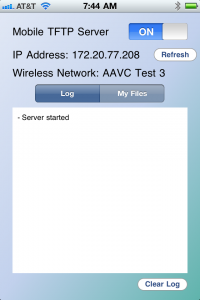
Enter Mobile TFTP.  This is the only app I could find in the App Store for TFTP file transfers.  It’s a fairly simple affair:

You toggle the server on and join your iDevice to a local wireless network.  I didn’t test whether the app would launch on 3G connection, but suffice it to say that wouldn’t be a workable solution for most people.  The IP address of your device is shown so you can start copying files over to it.  The most popular suggested use for this app is to archive configurations to your iDevice.  This is a good idea for those that spend time walking from rack to rack with a console cable trying to capture device configs.  It’s also a great way to have control over your configuration archives, since Mobile TFTP allows you to turn the service on and off as needed rather than keeping a TFTP server running on your network at all times.  As a consultant, this app is wonderful when I need to capture a config without booting my laptop.  Combined with tools like GetConsole or another SSH client, you can access a device and send the config to your mobile TFTP server without the need to boot up your laptop.

I did attempt to copy some larger files up to the device, but those results weren’t as spectacular.  Mobile TFTP Server will support files up to 32MB, so larger IOS files and WLAN controller files are out. The transfer rates from an iPhone or iPad aren’t as spectacular as a hardwired connection, but I think this is more of the platform and less of the software.  The only real complaint that I have is that the files you copy to the device are stuck inside the app.  Sure, you can hook your iDevice up to your laptop at the end of the day and copy the files out of the app inside iTunes (which is also a great way to preload skeleton configs up front), but in today’s world integration is the name of the game.  Giving me the option of linking to a storage service like Dropbox would be amazing.  I tend to keep a lot of things in Dropbox, and being able to throw a troublesome router config in there so it would automagically appear on my laptop would be too sweet.  Still, you can’t argue with the efficiency of this little app.  It does exactly what it says and does it well enough that I don’t find myself cursing at it.

Mobile TFTP Server is $3.99 in the App Store, but as it’s the only dedicated TFTP app I could find, I think it’s worth that to someone who spends a lot of time copying files back and forth and loves the portability of their iDevice.

Disclosure

The creator of Mobile TFTP Server provided me with a promo code for the purposes of reviewing this app.  He did not ask for any consideration in the writing of this review, and none was promised.  The opinions and conclusions reached here are mine and mine alone.

Trust But Verify

By the time you are ready to sit in the torture chambers that house the CCIE lab, you are practiced with live configuration to the point of it being subconscious.  Configuring VLANs and routing processes happen without a second thought.  The candidate can do simple tasks quickly and spend more time focusing on difficult areas and weak points.  After walking out of the lab and waiting for the score report, tough areas are replayed over and over again trying to dissect any bright spots.  Whether or not you are confident about your results, when the unsuccessful score report arrives there is usually a shock.  Areas that the candidate believed they passed with authority show missed points and lost opportunity.  The most often heard phrase after this situation is, “I know I did better than that!”

I uttered these very words more than once.  I thought to myself, “How could I get that wrong?  I typed everything in right.  It looked like it was working.”  The fault here wasn’t only in my configuration skill.  Instead, the additional fault was in my failure to verify what I had configured.  Typing commands into a terminal for a lab configuration task is easy, relatively speaking.  It is equally important to prove that you’ve done what you think you’ve done.  Without verification, there is no way to make sure that your configuration tasks are behaving like they should.

Every time I have sat down in the lab, I take one of the two pieces of paper that you are given and I write down a number for every task in the troubleshooting and configuration sections of the lab.  When I configure something, I make a check mark next to that task.  If I can’t get it working right away, I leave it blank.  Once I have a list full of single check marks, I know it’s time to verify.  I sit down with the configuration tasks and I forget everything I’ve done up to that point.  I do this because in the past I’ve been known to say to myself, “I did that right.  No need to check it.”  That attitude couldn’t be more wrong.  If you assume that you’ve done something correctly and don’t bother to check it, you might as well have gotten the question wrong.

When I begin verifying, I read the question again and make sure there were no omitted words or phrases that could affect the configuration.  I then use a variety of “show” commands to prove that I typed everything in the right way the first time.  Nothing is taken for granted.  Neighbor statements are checked.  VLAN descriptions are checked.  Routing tables are poured over.  On lab attempts 6 & 7 (where I passed the configuration section), I found simple mistakes both times that would have cost me a large number of points.  The kind of simple mistakes that a lot of people assume that they couldn’t possibly screw up because they were so easy.  The grading script doesn’t assume you meant “neighbor 1.1.1.1 remote-as 254” instead of what you typed “neighbor 1.1.1.1 remote-as 245“.  Don’t give the script the chance to punch you out for lapses in typing skill.

Once I’ve verified a task the second time, I put a second check mark next to that task.  Once I have a page full of double checks I can relax just a little knowing that I’ve looked at every question twice.  If there’s enough time remaining before I head out, I look over the particularly hairy tasks and add perhaps a third check mark if necessary to really be sure I got them working correctly.  These are usually single tasks that stand alone in the configuration and shouldn’t have an impact on core reachability.  Screwing up your core with less than an hour to go is a great way to get high blood pressure quickly.

Tom’s Take

There’s a reason why they call it “double checking”.  I feel that having a running total of the tasks in your lab keep you focused on the macro task instead of getting bogged down in the micro sections.  It helped in my passing attempt by forcing my to keep moving in the troubleshooting section.  It always helped me in the configuration section so that I didn’t miss the forest for the trees.  Hopefully those of you out there going after your lab will find this useful.  After all, since you can’t use the paper to dispose of your gum you might as well put it to good use.

Double NAT

I’m sure that you’ve probably seen the now-famous Double Rainbow video somewhere on the Internet or television.  It has spawned thousands of time-wasting videos.  Allow me to make that 1,001.

Gerren Murphy (@Smurficus) threw down the gauntlet on Sept. 27th with this tweet.  I thought it might be fun to try, so I fired up the Flip and promptly got writers block.  How to show what double NAT really looked like?  That’s when I stumbled across the Wikipedia page for carrier-grade NAT.  The picture there served my purpose just fine, so I pulled it up in full screen and let my best method acting take over:

I would like to thank the Academy for any awards I might win in the future.  Although I apologize to my readers for not being as…augmented as the original video director.

If you’d like to learn more about carrier-grade NAT (also called NAT444), please head to Ivan Pepelnjak’s blog and check out his NAT444 post.

Motivating for Enterprise IPv6 Adoption

Firstly, head over to Packet Pushers and read Ethan’s excellent blog post about The Reason Enterprises Aren’t Deploying IPv6.  This post made me start thinking about IPv6 adoption, especially in light of the things I talked about almost 8 months ago in front of a group of education IT professionals.  In his post, Ethan discusses the problem with IPv6 in the enterprise from the perspective of it being more trouble than it’s worth right now.  I agree with him that there are a lot of issues to overcome today for very little immediate gain.  Today’s IPv6 implementations are still relegated to a lab or to the IT department network where they can be contained and properly tested.  I’d wager that Hurricane Electric tunnels is the most common method of IPv6 support right now.  It’s still very much a “hobby kit” type of implementation where the nerd spends several hours pouring over documentation and expends energy typing furiously at a dimly lit console only to finish up and say, “Cool.  It works.”  No fanfare, no raise.  Just the satisfaction of a hard job well done.  So how do we change that?

In college, I studied Management Information Systems, which is a fancy way of spelling Database Administrator.  I promptly forgot all my DBA training, but the Introduction to Database class was a goldmine of information thanks to my wonderful professor, Dr. Traci Carte.  She once told me that there are basically two ways to motivate people in business: fear and greed.  The more time I spend in the business world, the more I see that she had a good point.  Those two emotions tend to be pretty strong and are great motivators for people that wouldn’t ordinarily be compelled to take action.

When it comes to IPv6, we’ve already tried to motivate through fear.  If you remember any of the headlines from earlier this year you’ll agree that the Chicken Little mentality of the IPv4 sky falling down on us was reaching a fever pitch quickly.  It even made the local nightly news, which of course made my mom call and wonder when her computer was going to blow up.  Unfortunately, fear didn’t work here.  Why not?  Because there wasn’t a consequence.  It’s like announcing that an asteroid is going to hit the earth tomorrow.  If we make to the end of the day and no big rock comes down in our front yard, we just go back to life as it was.  When ICANN depleted their IPv4 prefixes and the Internet just kept working the next day, the rank-and-file users went right back to watching cat videos on Youtube without a care in the world.  After all, how bad can this problem be if there are still cat videos?

I think it’s time we move to motivator #2 – greed.  Greed, for lack of a better word, is good.   And greed can work for you.  IPv6 isn’t a compelling case when you tell your boss that most everyone can still use the Internet with no issues.  The key is that “most everyone” statement.  As APNIC and ARIN begin to deplete their reserves of IPv4 prefixes, the cost to acquire them will start skyrocketing.  For those not willing to pay a king’s ransom for a /28, there has to be an alternative.  Based on my distaste for things like carrier-grade NAT or NAT64, I would hope that pure IPv6 prefixes would start to be handed out.  Assuming that NAT64 does end up getting used as a necessary evil for those newly-minted prefixes, are we to assume that it’s going to work all the time?  What happens when there are hiccups or outages?  Only pure IPv6 sites will be available.  Right now, that’s Facebook or Google.  Greed comes into play when you can convince your decision makers to implement IPv6 to reach those customers.  If your widget is the only one those IPv6-only users can find when they search http://ipv6.google.com then you are going to have a competitive advantage over everyone else.  This might be a wash up front when you think about the costs needed to plan and implement IPv6 versus the additional revenue from those IPv6 only users.  However, we aren’t going to slow down our ravenous consumption of IPv4 addresses any time soon.  As more and more customers come online with native IPv6 support, they’re going to be surfing an Internet where you don’t have a presence.  First-to-market has a whole new meaning here.

Another avenue of greed to appeal to is the ego of a company and its decision makers when it comes to IPv6 implementation.  The same kind of mentality that drives executives to drive fancy cars and wear expensive accessories can be manipulated to drive adoption of new protocols.  Comments like, “Wouldn’t you like to be known as the first CxO to make their website ready for IPv6 in this market?” or “I hear that <competitor> is working on an IPv6 implementation and I’d like to beat them to it.” work on the ego of people that love attention and want to be known as leaders in their industry.  Giving them another headline or accolade plays right into their desire for recognition and gets you the time and resources needed to plan your implementation of IPv6.

Tom’s Take

This may seem a little like gamesmanship to some.  You may disagree with me boiling things down to simplistic terms.  You may even think I’m a bit crazy for thinking that someone can be manipulated into implementing new technology solely by appealing to their desire for money and recognition.  However, until a real business case materializes for IPv6, it won’t really get implemented.  And until it is more pervasive, real business cases won’t materialize.  A classic Catch-22 scenario.  Something has to give.  It’s time to draw a line in the sand.  Maybe I have to spend a little more time stroking egos or building a compelling business case instead of typing away on a keyboard or working in Visio.  If I can drive IPv6 implementation along by playing a few head games now and then, I think I can sleep well at night knowing I made the world a slightly better place one /48 at a time.

The Last Cable Tool You’ll Ever Need

We all have our own tools that we carry around in our toolkits when we need to get down and dirty with our hands.  Screwdrivers, wire cutters, wire strippers, crimping tools, knives, duct tape, and even velcro are common sights.  You can see what Tony Matke has in his bag and contrast it with the contents of Jeff Fry’s bag.  However, a co-worker of mine recently purchased a tool that I think might trump all of them:

The Gerber Cable Dawg

Say hello to the Gerber Cable Dawg.  This little jewel represents the high-end for cable crimpers/strippers/destroyers.  It was designed by Gerber to be used by U.S. military personnel in Forward Operating Bases (FOBs) for cabling projects.  It is constructed from high-grade steel while the handles are made from glass-filled nylon.  This means that while the length of the tool is 7.5 inches, the weight is a svelt 14 ounces.  As you might expect, it is a hardy little device with a veritable toolbox attached to it.

The Cable Dawg includes anything you might find yourself needing to work with cabling.  There is a wire cutter and Category 5 (CAT 5) cable stripper in the spring-loaded nose.  An RJ-45 crimper rests behind the pivot point along with a stripping block that can handle a lot of different gauges of wire.  The handles also contain a great number of additions.  One hand includes a set of driver bits for slotted and Phillips screws as well as a punch-down bit for terminating wires.  There is also a lanyard attachment if you don’t want to carry the tool in the included tactical pouch.

The other handle is the greatest part of the tool, in my opinion.  It contains the driver attachment for the above driver bits as well as a knife blade with a partially serrated edge and “jacket cutter” which is the little hook on the end that is capable of slicing a CAT 5 wire jacket or skinning the intern that may dare try to do their job incorrectly.  While driver handles and knife blades are fairly standard fare on a multitool, the genius in the Cable Dawg is that the knife/driver handle detaches from the tool itself to feel more like a screwdriver or pocket knife in your hand.  No longer do you have to fumble around with an overly-large multitool when all you need to do is drive a screw or slice a tomato.  Pop off the handle and go to town!

The Cable Dawg is available from Gerber’s Military Tool website here.  You can also scout around and find it on a variety of different military gear websites.  That might be a good idea, since this thing appears to be out of stock frequently.  That’s all the more impressive when you consider the retail price for the Cable Dawg clocks in at $300.  It does come with a lifetime warranty for the price, but if you can come close to wearing this puppy out you are a more vicious cabler than I can imagine.

Tom’s Take

I’m a Gerber fan.  I own three of their multitools and equally as many folding knives.  They are very high quality and have never let me down.  When my friend told me that he ordered a cable tool from Gerber, I couldn’t wait to see what they had done with it.  The Cable Dawg is a little on the pricy side for most IT personnel, but if you find yourself in need of a rugged tool that will take loads of punishment and keep crimping and stripping no matter what, this is worth the price, especially if you are in the military.  Besides, it’s better than a $600 hammer, right?

I’d like to say thanks to Scott Baird for loaning me his Cable Dawg for the purposes of writing this review and for a little testing.  I promise to return it to you…soon.

Network Field Day 2: Network Boogaloo

Guess who’s back?

I’m headed to yet another Tech Field Day event!  This time, I’ll be attending Network Field Day #2 in San Jose, CA on October 27th and 28th.  I read about the first Network Field Day last year and learned a lot about the vendors and presentations from the delegates.  Now, it’s up to me to provide that same kind of response for Net Field Day 2.  The delegate list this time around is quite awe-inspiring for a guy like me:

Kurt Bales Network Janitor @NetworkJanitor
Ethan Banks PACKETattack @ECBanks
Tony Bourke The Data Center Overlords @tbourke
Brandon Carroll BrandonCarroll GlobalConfig @BrandonCarroll
Greg Ferro EtherealMind PacketPushers @EtherealMind
Jeremy L. Gaddis Evil Routers @JLGaddis
Ivan Pepelnjak Cisco IOS Hints and Tricks @IOSHints
Mrs. Y. Packet Pushers @MrsYisWhy

I am humbled to be included in such good company.  The two Packet Pushers, Mr. MPLS himself, the man that beat IOU, the Aussie JNCIE/CCIE candiate, the walking security dictionary Brandon Carroll, and the Network Security Princess herself.  I think my invitation must have gotten confused with someone else’s.

Odds are good that if you are involved in networking at all you already follow all of these people on Twitter and read their blogs daily.  If not, stop what you are doing and follow them RIGHT NOW.  You won’t be sorry.  In fact, this is the first time I haven’t had to start following a Tech Field Day delegate on the list of attendees since I’ve been following these folks for quite a while.

Getting Inolved with Tech Field Day

Tech Field Day is always looking for amazing people to attend events and share in the wealth of knowledge.  There are lots of ways you can add your voice to the gestalt:

1.  Read the TFD FAQ and the Becoming a Field Day Delegate pages first and foremost.  Indicate your desire to become a delegate.  You can’t go if you don’t tell someone you want to be there.  Filling out the delegate form submits a lot of pertinent information to Tech Field Day that helps in the selection process.

2.  Realize that the selection process is voted upon by past delegates and has selection criteria.  In order to be the best possible delegate for a Tech Field Day, you have to be an open-minded blogger willing to listen to the presentations and think about them critically.  There’s no sense in bringing in delegates that will refuse to listen to a presentation from Brocade because all they’ve ever used is Arista and they won’t accept Brocade having good technology.  If you want to learn more about all the products and vendors out in the IT ecosystem, TFD is the place for you.

3.  Write about what you’ve learned.  One of the hardest things for me after Tech Field Day was consolidating what I had learned into a series of blog posts.  TFD is a fire hose of information, and there is little time to process it as it happens.  Copious notes are a must.  As is having the video feeds to look at later to remember what your notes meant.  But it is important to get those notes down and put them up for everyone else to see.  Because while your audience may have been watching the same video stream you were watching live, they may not have the same opinion of things.  Tech Field Day isn’t just about fun and good times.  Occasionally, the delegates must look at things with a critical eye and make sure they let everyone know where they stand.


Be sure to follow Tech Field Day on Twitter (@TechFieldDay) for information and updates about Network Field Day 2 as the date approaches.  There will also be streaming video of the presentations at the Tech Field Day website.  The videos will also be posted in their entirety shortly afterwards.  If you want to follow along on Twitter, you can use the hastags #TechFieldDay or #NFD2 to make comments or ask questions during the presentations.  I usually have a TweetDeck window open and will relay your questions along if no one else beats me to it.  I try to tag all my posts with the #TechFieldDay and #NFD2 hashtags, so if I’m overwhelming you with commentary feel free to filter that hashtag from your feed to keep me quiet.  In the past, I’ve tried to have an IRC channel open during the presentations to allow for real-time communications and feedback for those of you out there that prefer an alternative to Twitter.  Once I have the room setup I will post the details.

Tech Field Day Sponsor Disclaimer

Tech Field Day is made possible by the sponsors.  Each of the sponsors of the event is responsible for a portion of the travel and lodging costs.  In addition, some sponsors are responsible for providing funding for the gatherings that occur after the events are finished for the day.  However, the sponsors understand that their financing of Tech Field Day in no way guarantees them any consideration during the analysis and writing of reviews.  That independence allows the delegates to give honest and direct opinions of the technology and the companies that present it.

Blogging with the Packet Pushers

I’ve always believed that everyone has at least one good story in them.  People have anecdotes about funny times in college or goofy stories about their kids.  Tech-oriented people have even more stories that usually revolve around technology gone bad or interaction with non-technical people.  From the amount of studying and learning that tech-oriented people do, it is inevitable that knowledge is accumulated and waiting to be passed on.  The trick with all these stories and knowledge is finding someone to share it with.

Blogging is my preferred method of getting the thoughts out of my head.  Most of my friends an colleagues do the same.  Some of us have established blogs that have been going for a while now.  Others are just starting out.  However, there are even more of you out there with stories to tell and things to share without a blog.  Maybe you have no desire to keep up with the day-to-day drudgery of maintaining a blog.  Perhaps you don’t think you have enough in you to keep writing day after day.  You have even avoided creating a blog because you couldn’t think of a catchy title.  Let me tell you that I’ve got a deal for you that will eliminate all those issues for you.

As many of you know, I’ve been a regular contributor to the Packet Pushers Podcast.  Recently, Ethan and Greg have redesigned the site and started blogging more and more there.  They’ve also decided to open up the doors and invite some guest bloggers to write content for the site.  This is wonderful for those of you that are worried about blogging.  You don’t have to concern yourself with writing once a week.  Or month.  Or even year.  Just write whenever you feel the need to put something out there.  The Packet Pushers will make sure that everything is spelled correctly and put it up on the site.  You can be sure that your post will be seen by lots of visitors, as the Packet Pushers site gets hundreds every day and several thousand a month.  And you’ll get lots of feedback and comments for sure.

How do you get involved?  Send an email to packetpushers@gmail.com with the subject line “I Want To Blog With The Packet Pushers!”  You’ll get an account on the website for creating your post and the rest will take care of itself.  I look forward to see some of you writing on Packet Pushers and sharing all you’ve learned.  Remember, Too Much Blogging Would Never Be Enough.

365 Days of Blogging

My last real milestone to hit just came up.  This blog has now been around for one whole year.  I’m shocked to say the least.  I never believed that having a scratchpad for jotting down my ideas about troubleshooting would blossom into this.  Those of you that have followed me for a while know that I tend to flit around technologies from wireless to security to switching and back to posts about Apple computers from time to time (even though I don’t own one).  To see that I’ve been able to keep this going for as long as I have is either a testament to my stubbornness or the large amount of cruft floating around in my head.

My initial ideas about troubleshooting hit a writer’s block wall pretty quickly.  I started posting some things about my CCIE studies and the occasional voice-related article.  It took a couple of months before I started writing pieces based more on opinion than fact.  I was afraid at first.  I’m normally the kind of person that keeps my opinions to myself.  However, it was interesting to put my thoughts and ideas down on “paper” and see what people thought of them.  Opinion pieces don’t require paragraphs worth of console output or exhaustive testing.  Of course, they can also be wrong or inaccurate and subject to debate or correction.  Other bloggers have told me that opinion pieces aren’t for them due to the possibility of angering their audience or fear of rejection.  My advice is to give it a shot on something simple first.  Put your thoughts out there and see what the reaction looks like.  Remember the old adage, “If people agree with everything you’ve said, you aren’t doing your job.”

I find myself spending more time commenting on current events in long form now.  I do get a chance to discuss things on Packet Pushers from time to time, but when something really juicy comes up, I can’t resist adding my voice to the din.  Some of these articles are interesting, others not so much.  I tried my hand at adding some link aggregation pages every week or so but found that I didn’t really keep up with new things like I thought I would.  I really spend a lot more time out in the field doing rather than learning.  I’m not one for going over simple things that are well-documented elsewhere.  I tend to talk about the more esoteric configurations or things that you just can’t find anywhere else.  Those posts are as much for my benefit as anyone else’s.  If I know that I’ve run into a particular situation and I write about it, I know I can always find it here as opposed to sifting through Google for hours on end.  I just hope my readers can get some use out of it too.

I still blog about the CCIE a fair amount.  It feels a little different commenting on it from the other side of the line, but people seem to like reading about all things lab related.  There are a ton of great blogs out there that detail the process that lab candidates are going through and the little gems of knowledge that they unearth from time to time, whether it be revelations about Dynamic Trunking Protocol (DTP) or alias lists or even TCL scripts.  I should probably create a CCIE candidate blog list just so those of you out there that hunger for my CCIE-related material can get your fix from them as well.  My CCIE posts tend to be more on the commentary side and focused on the details in the process rather than the content.  I think it’s more of a way to talk about the things that I see are important to keep in mind besides the ability to remember OSPF LSA types on demand.  A “forest for the trees” approach, if you will.

Once again, I’d like to thank all my visitors and readers for your time.  I appreciate your feedback and comments about everything.  You help me be a better blogger with every post.  It helps me to know that the things I post can be useful.  Tanner Ezell and I discussed the idea that people should provide help and support because they can, not because they’re doing it for fame or recognition.  I like helping people solve problems.  It just so happens that the most efficient way for me to do it is by writing a blog.  The more you wonderful people read it, the more popular and well-known it becomes.  While I appreciate that, know that I’ll still be here plugging away and talking about things even if I’m on page 30 of a Google search.