A Lot Of People Take The Lab Seven Times…

A couple people have asked about some highlights in my lab experiences while going for my CCIE. Here are a few of the more humorous points.

My first lab attempt was in December of 2008. This was back before Open-Ended Questions (OEQs) or the Troubleshooting section. I got my teeth kicked in by this first lab. By lunchtime, I was pretty much shell shocked. I didn’t talk to anyone and spent a lot of time staring at my lab binder. At 2:00 p.m., I was wrestling with a BGP problem that I refused to let go of until I solved it, even if it cost me the rest of my lab. I got up and decided to get a drink from the break room. In RTP, the breakroom and bathroom are down the hall from the lab. As I worked out the possible solutions to my issues in my head, I woke up from my mental fog and found myself in the bathroom wondering where the Coke machine was. That’s when I knew my goose was cooked on that attempt.

Number two was the first with the OEQs.  I switched lab locations from RTP to San Jose.  Firstly, because the lab started an hour later and I love my sleep.  Secondly because I had the time change going from Central to Pacific working for me instead of going from Central to Eastern and always being behind.  I nailed the trivia section at the beginning but got hammered on the configuration section.  I realized that I was good at the theory, but I needed to concentrate on the application.  Number three was my last shot at the version 3 lab. I got enough points to pass the configuration section, but I missed too many trivia questions. I was livid. It’s like meeting someone for the first date and calling them by the wrong name 5 minutes after you meet. The rest of the night is a wash no matter what, so why bother putting yourself through it?

Number four was my first version 4 lab attempt. I refused to take the new lab so long as the OEQs were still there. Two things kicked me out of my self-imposed funk. First was the announcement of the elimination of the OEQs. Secondly was some words of encouragement from my friend Narbik Kocharians. At Cisco Live 2010, he told me that I just needed to keep it up until I got my number. So I took him up on his advice. Attempt four hurt a lot. The TS section wasnt kidding around, and I got stomped by the lab. I felt almost the same as I did after attempt number one. The sole bright spot was my ever-increasing subscore. While I didn’t get enough points to pass either section, I was getting close to the top.  I just needed to find the drive to put myself over the summit.

Attempts five and six were my “near misses”. On five, I passed the TS but failed the configuration.  I was upset after that one.  I thought I had done a damn good job, only to get my score report back less than an hour after I left the lab building.  I retraced all my steps in my mind to find where I could have screwed up.  All the anger in the world wouldn’t get me past my failing mark, though.  IPExpert instructor Marko Milivojevic put it a little differently to me.  He told me there was no sense complaining about it. Get ready for the next one and get it done. On six, I failed TS and passed config. So, if you averaged those two, I passed. 😉 Attempt six really bolstered my confidence. I knew I had failed the TS section after the first two hours. But rather than leave and enjoy the California sunshine, I stuck around and finished. In return, I was able to pass the config section for the first time.  It was a bright spot that led me to have a little hope that passing this thing was possible.

I didn’t say much about attempt number seven because I was anxious. I felt a little embarrassed that I was up that high.  I was worried that I’d disappoint everyone that had been keeping up with my battle with the dreaded lab. I decided to take the Navy SEAL approach. Get in, do the job, then talk about it after success. I was relaxed as I strolled into the lab Thursday morning.  There were a couple of first timers there, and I could tell they were nervous.  It reminded me of my first attempt.  I’m pretty sure Tom Eggers and Tong Ma recognized me from my last attempt.  I could have given the pre-lab briefing for the proctors.  For every previous attempt, I’d been seated at the same workstation. This time, I was beside my usual spot. Maybe a change of location would be a good thing.

I started the TS section and told myself not to get caught up on any questions. If I couldn’t get it in 10 minutes, move on to the next one. I started to panic a little by the third question, but after I made a change that fixed a bunch of things all at once, I was elated and plowed right through, finishing about 20 minutes early. Once I was sure all the conditions were satisfied and my configs were correct and saved, I jumped into the lab. Normally, I get up after reading over the lab and go to the bathroom and get a drink. This time, however, I was in the zone and I didn’t stop to think. I just kept going. Before I realized it, Tong was handing out the lunch vouchers.

After a nice lunch, I came back and dove right back in. A couple of silly mistakes right off the bat made me refocus on doing things right.  I cursed myself for such simple errors, knowing that the difference between typing the right command and the wrong one was razor thin inside Building C.  I shut out distractions and kept going. In fact, I didn’t even notice the guy beside me on his first attempt get up and leave just after lunch. Guess my old pod got him too. By the time I finished my first run through, it was 2:00. I looked up and thought to myself that this was very doable from this point on. I had 3 hours to make sure I was right this time. After rearming with a Mountain Dew, my first that day, I went back over my configs with a fine tooth comb. Not a cursory inspection, but a real Navy SEAL dressing down. I forced myself to reverify every command, no stone left unturned. It’s a good thing I did, too. I found mistakes that would have cost me 7 points had I not corrected them. Those little lapses of attention very likely would have had me coming back for attempt number eight.

Once I double checked everything, literally in this case as each task had two check marks next to it on my paper, I reverified a few things I wasn’t sure about. After I satisfied myself with the answers, I turned in my scratch paper. It was 3:30, an hour and a half before the end of time. When I walked out of Building C, I knew I had done my absolute best. I was confident that this would finally be the one. After catching up on Twitter and email, I celebrated with my usual trip to In-N-Out Burger. Back at the hotel, the minutes started ticking away. After reading about the last few passing attempts from my friends online, I knew the longer it took for your score report to come back, the better it would be for my chances. No report after an hour was good. After 3 hours, I was giddy. I’m sure the hotel bar had nothing at all to do with that. By 11:00, I was equally concerned and hopeful. Had the grading script messed up? Were the proctors going over my configs to shake out any flaws? I had given up the idea that I’d get my results before bed. After hopping in the shower, I walked over to shut off my computer before bed. It was then that Outlook delivered the dreaded email.

CCIE Score Report

I clicked on the link and logged into the site. I scanned to the bottom of the list and saw FAIL. My heart sank. How could I have failed?!? Then I realized I was reading the results of my first attempt in RTP. The newest score was at the top of the list. My eyes flitted over the four most wonderful numbers I’d ever seen. P-A-S-S, quickly followed by a glance at the five most amazing numbers ever, 2-9-2-1-3. The whoop I let out surely had to wake the whole hotel. I called my lovely wife at 2:00 her local time and told her the good news. She informed me she was very happy. And also going back to bed. I, however, was wired. It was like the feeling of winning the big game a thousand times over. No more doubt, no more anticipation. No more second guessing myself and wondering if it would all ever be worth it. I emailed my boss and my Cisco account team. I chatted on Twitter with the poor souls awake at that hour. I made lists of who I needed to talk to. I tried to calm down. I finally fell asleep an hour later, but I didn’t really rest. The elation at my accomplishment kept me on high for a while. But at least I wasn’t dreaming about Indiana Jones and the Lost Prefix (that has happened before).  The next morning was filled with phone calls before my flight.  My boss answered on his speaker phone but quickly switched to his handset when I told him I was going to give him my lab results.  After informing him I passed, he laughed and said, “I could have left you on speaker for that good news.”  I boarded the plane home with a spring in my step for the first time in a long while.  Nothing could chisel the smile from my face.

Tom’s Take

What is best in life?  To crush the lab, see it driven before you, and hear the lamentations of the proctors.  Okay, maybe a little cheesy, but it kind of sums things up.  My father asked me how many questions I got wrong and still passed.  I told him “Since they don’t give you a breakdown, I’ll always think I got them all right.”  I can’t give the best advice about lab strategy.  As you can see, there were lots of dumb mistakes and missed chances.  I underestimated some sections and they paid me back in full.  But if nothing else, know that perseverance is the key to the lab.  Not giving up, not backing down, not letting yourself think for an instant that it isn’t possible.  Doubt is one of the biggest enemies of the CCIE hopeful.  Don’t let it cost you your chance at a number.

I’m Not A Name, I’m A Number!

You have no idea how long I’ve waited to see this little snippet in my email:

Three years.  Seven lab attempts.  Several close calls.  Lots of studying.  Lots of second guessing.  Lots of anger.  But in the end, the elation of those four letters makes it all worthwhile.

There are a lot of people to thank.  I’m going to call out three people in particular who are head and shoulders above the rest though.

First, my family and my beautiful wife Kristin especially.  Thank you for putting up with my odd schedule and my even odder behavior for the last three years.  Thank you for not letting give up and making me keep my nose to the grindstone for this achievement.  I promise from this point forward that Daddy won’t have his nose buried in a configuration guide.  At least not too often.

Secondly, to my amazing boss, Mr. Mike Hibbs.  The man that never gave up on me.  Every time I flew back home with my head hung low with shame burning on my forehead, he told me to pick myself up off the ground and try again.  He footed the bill for me even when I didn’t think I could do it any more.  I owe you more than I can ever hope to repay in a lifetime.

And lastly (but certainly not least), to my mentor and friend Wes Williams.  Four years ago, Wes and I were having lunch and I told him that I was going to take the CCIE exam.  He paused and told me in his slow drawl, “Well, if you keep your head on straight and study hard, I think you’ll do it with no problem.”  Wes, you left us far too soon.  You saw the potential in me from the very start and never let me settle for second best.  I always said that if I passed the lab that I would owe my success to you.  I just wish you could have been here to see it.  This one’s for you, Wes.  I hope I made you proud.

There’s a lot more story for me to tell than I can hope to stuff into this blog post right now.  I plan on laying out some more of it after I’ve had time to come down off this emotional high.  I want to thank everyone for their encouragement and support for the last three years.  I knew that the only time I would have truly failed the CCIE is the day I decided the quite trying.  And now I never have to worry about that day.

From now on, CCIE #29213 belongs to me.

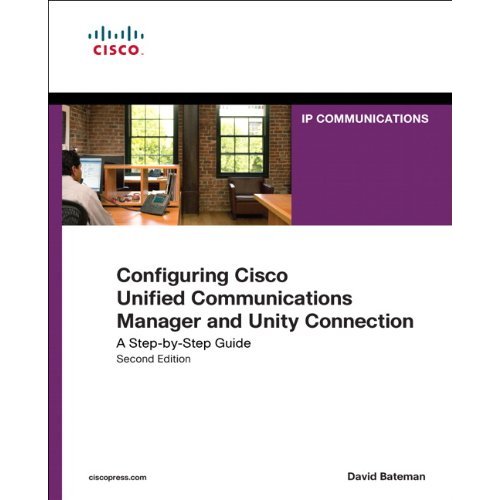
Configuring Cisco Unified Communications Manager and Unity Connection – Review

Voice engineering is a world apart from the run-of-the-mill routing and switching work most network rock stars do regularly.  Lots of browser screens, few opportunities for CLI work, and an ever-evolving interface make for interesting work even in the best of times.  Technology changes so quickly that people who have been out of the loop for more than a couple of years may find themselves adrift in a sea of confusion.

When the first edition of Configuring Cisco CallManager and Unity came out, it quickly became a go-to reference for voice engineers that wanted to learn all about Cisco’s preeminent call processing platform. Today, however, that volume is severely out of date, referencing CallManager 4.x and Unity 4.x, both long retired. With the changes that have been introduced since the move away from Windows-based platforms and Exchange, it was time to update the Cisco Press tome of voice knowledge. Not coincidentally, I give you Configuring Cisco Unified Communications Manager and Unity Connection, Volume Two.

Configuring Cisco Unified Communications Manager and Unity Connection

Title just rolls right off the tongue, doesn’t it?  Along with the change to CallManager, now abbreviated CUCM, we get updates to the platform in the book. This volume focuses on CUCM version 8.x and Unity Connection version 8.0. There is also some coverage of Unity 8.0 as well, since those of you with strange curses may find yourself running into it like a patch of poison ivy.

For those of you that are new to CUCM v8, or new to CUCM in general, this book is a wonderful resource that guides you step-by-step through the menu options and settings in CUCM.  There is very little discussion about voice theory or SIP proxy setup or Nyquist’s Theorem. Instead, the meat of the book tells you how to make CUCM sing, from esoteric Enterprise Service parameters to the confusing Calling Search Space (CSS) setup. It guides and teaches do that you can spend time setting things up the right way and less time scratching your head. The style is simple and easy to follow and unlike online documentation, doesn’t read like stereo instructions.

The second half of the book deals with Unity and Unity Connection. Setup, PBX Integration, and even digital networking get their share of coverage. The instructions and features are presented generically so that they may apply to both platforms as necessary. Only in places where a feature is only related to one platform is there specification, such as the need to sprinkle holy water on Unity to make it boot up. Call Handler configuration gets a chapter as well, and I found the information there very good reference material for a feature that can become complicated quite fast.

Tom’s Take

If you are a new voice rock star that has a CUCM server to set up and no experience with the knobs and switches on the platform, go buy this book now. It will guide you through your first deployment much more gently than searching for hours through acres of documentation. For the grizzled veterans of CallManager 4.x who are just getting back into the game after years of therapy deprogramming all those Windows admin skills, this is also a must read. It will get you up to speed on new features like SUBSCRIBE CSS and new interface features.

For the voice rock stars that have been configuring CUCM through version 5 & 6, the purchase of this book is a little less compelling. Many of these things are things we do every day or each time we setup CUCM, so it may feel like a bit of a rehashing. I found some of the more trivia-oriented content, like explanations of Service parameters and less-used feature configuration, to be of great value. I’m going to toss this book into my voice bag and keep it handy for those times when I need to configure a Unity Interview Handler and I don’t have Internet access on site. Think of it more as a Physician’s Desk Reference rather than Encyclopedia Britannica.

Disclaimer

Cisco Press provided an evaluation copy of this book.  At no time did they ask for, nor did they receive any consideration in this review. The analysis and opinions presented here represent my views and mine alone

The Seedless Garden

After weeks of speculation on the matter, it appears that RSA has finally decided to admit the obvious that the SecurID Token system has become compromised.  Honestly, I’m not shocked.  In fact, I said as much almost 2 months ago when debating the subject with the other Packet Pushers.  I remember hearing the original disclosure and thinking to myself “How could these hackers NOT have the keys to the kingdom?”  RSA categorized this hack as an Advanced Persistent Threat (APT), which is a great new umbrella term to describe hacks that persist for weeks or months without detection.  Of course, I don’t think clicking on an Excel spreadsheet pulled out of your junk mail folder qualifies as a particularly advanced penetration method, but as we’ve seen in the past few months (if not years), social engineering is a much more reliable infection vector.  That’s because you can always count on people to do things they aren’t supposed to.

RSA covered up the worst of the attack.  They put up a good smoke screen about needing to figure out what was stolen in breach.  They even went so far as to talk about having the budget to implement new security that they wouldn’t have been able to before, which to me smacks of fixing the gate after the horses have gotten out.  RSA didn’t admit up front that the seed of the SecurID tokens could have been compromised, although they admitted that some information relating to the SecurID system might have been involved.  They really didn’t admit much more than that.  In return, we got months of second guessing, supposition, and ultimately delays that caused Lockheed Martin, Northrup Grumman, and L-3 Communications to suffer from penetration attempts.  RSA never publicly told their customers to ditch their tokens, even though security professionals said that the worst case scenario of the seed exposure was probably the case.  In fact, Steve Gibson eerily said as much back on March 19th.

RSA should have come clean the day after the attack.  Even if it didn’t admit that it (likely) stored the token serial number in a database along with the seed used to generate the token’s algorithm, they should have at least advised their customers begin the process to replace the older tokens with newer ones to ensure that the old tokens couldn’t be used as an attack vector.  Why?  Well, if you have access to the customer database, it doesn’t take much guesswork to figure out user IDs (first initial, last name).  Once you have the serial number, you can figure out which algorithm was used on the token, since it appears RSA stored this data somewhere or made it easily accessible.  Given that information, brute force becomes the tool used to try and penetrate a vulnerable network.  There has been some speculation that there is some foreign governmental interference in this whole mess due to the fact that the three targets were all defense contractors.  While I won’t discount this possibility, it’s more likely that these targets were chosen due to their heightened aura of security, almost guaranteeing they would use RSA tokens in their remote access strategy.  Since US defense contractors probably buy these things by the truckload, their information was probably all over the hacked database.  This lit them up like a Christmas tree in the eyes of potential hackers.

If you’re using an RSA token right now, put it down.  Drop it in a thirty-three foot hole in the ground.  Bury it completely (rocks and boulders should be fine).  Then demand the RSA replace it with a new one.  Yes, you aren’t going to be able to destroy your whole remote access strategy and rip out all the RSA equipment.  That would cost you a small fortune.  Better to make RSA replace the tokens for you (at their cost) and investigate alternatives down the road.  While I believe that RSA may be able to recover from this with enough time and some management changes, the fact that they let it happen in the first place will sting them for a long time to come.

Tom’s Take

Security breaches are always a wonderful game of ‘worst case scenario’.  It tends to make most security professionals a little cynical, but it also keeps us from shooting ourselves in the foot.  If you are a respected company like RSA (was), there should be no excuse for this cover up.  You should always assume the worst case scenario in a situation like this.  The new replacement tokens should have started shipping to your most important customers weeks ago.  They newly-keyed devices should have been in the hands of your critical customers before they had the chance to ask why their keychain ornaments needed to be replaced.  Even if the algorithm wasn’t compromised (which we now know that it was), a little proactive goodwill may cost money up front, but it won’t come anywhere near the cost that a black eye like this will end up totaling in the long run.  Sony may have a big black eye from its security fiasco, but RSA is actually a security company.  People like Sony trust them to security data.  Finding out that they were hacked and their code stolen to leverage attacks on their customer is like shooting a cop with his own gun.  RSA should have known better and done the right thing up front.  No grandiose PR moves backed with vague statements that “something happened, we think”.  Come clean, fix the issue, and be ready the meet the fallout head on rather than being blindsided in the press after the fact when your customers are getting the Sony Treatment.  Better to have a garden of crops that will eventually grow back than the barren salted earth you’ve got now.

A Moment of Silence for Sony

It goes without saying that Sony currently has a target the size of Iowa painted on its back.  Between the breaches in the Playstation Network, Sony Online Entertainment, and now Sony Pictures, you would be hard pressed to find a company that has been more thoroughly embarrassed when it comes to user data security.  Every day brings word of another incursion.  I’m thinking that something is going to have to give sooner or later.

Sony started out this whole mess by going after George Hotz, a famous hacker that goes by the online name Geohot.  Geohot has done all manner of things, including a simple jailbreak for the iPhone known as Limera1n.   Geohot also had his eyes on rooting the Playstation 3, Sony’s premier gaming console.  While Sony had given you the option to install a Linux-based OS onto the console from the start, Geohot wanted to take it a step further and unlock the ability to run other kinds of code, as well as gaining access to the memory contents and hypervisor level of the console.  This would allow users to do things like emulate Playstation 2 games, which was an original feature of the console that was later dropped due to complexity and memory contraints.  Geohot also started work on creating a custom firmware for the console that would allow users to do as they wished, while still keeping certain features of the OS intact.  In April of 2010, Geohot announced that he was not pursuing the development any further, but in January 2011, he posted the root signing keys of the PS3 online.  This is probably the straw that broke Sony.  The root key would give anyone the ability to sign code and execute it on the console without raising any suspicion.  Sony sued Geohot, and after some legal maneuvering and lots of publicity, eventually settled the lawsuit in April 2011.  This was the catalyst for the difficulties that Sony has faced over the past two months.

In late April, Sony shut down large portions of the Playstation Network (PSN) for an extended period of time due to what was later termed an “external intrusion”.  After rushing to bring the network that controlled the majority of Playstation online multiplayer capabilities, Sony Online Entertainment was intruded upon as well as PSN in early May.  Rather than rushing things back online this time, more care was taken to excise any possible problems and no ETA was set to bring the services back to the public.  In the interim, Sony profusely apologized for the problems and even testified before the US Congress about the breaches.  Sony recently enabled PSN once more, only to fall victim to another hacking group exposing portions of the Sony Pictures online customer database.  In all, close to 40 million Sony customers have had their personal information exposed in one form or another in the past two months.  Email addresses, birthdates, and credit card numbers with Card Verification Value (CVV) verification codes have all been stolen.

What started out as a showdown in the desert between Sony and a group of hackers angered by the treatment of Geohot has now taken on the appearance of a rotting carcass slowly being picked over by anyone that wants to come along and poke it.  The question now isn’t whether Sony will be hacked again, but what might get stolen this time, and where it will be stolen from.  As a former customer of Sony Online Entertainment, I can be certain that some of my information is probably out in the wild.  I’ve since changed passwords and credit card numbers to avert any possible wrongdoing, but other customers haven’t been so lucky.  I’ve lost all confidence in Sony and their ability to keep my information secure.  While many point to the infamous rootkit incident as the point where Sony started to sour in the eyes of their customer base, I think the PSN outage points to a bigger issue.  If Sony wants to install software on my computer to monitor whether or not I’m ripping CDs that’s their business.  I can dislike them for doing something they shouldn’t and be done with it.  The only harm done was their ham-handed attempt to sneak something onto my PC.  But with this series of hacks, Sony has taken their corporate image and dragged it through the filthiest mud imaginable.  I now no longer dislike Sony because they do things they shouldn’t, but instead I’ve lost confidence in their ability to keep me safe.  Just like a bank failure, when a company can no longer assure me they can do business the way that it should be conducted it’s time to move my business elsewhere.

Sony faces some pretty rough territory in the coming future.  First, they really need to find out what raised the ire of their intruders and apologize for it.  Profusely.  It may be a little late now, but if they show a little remorse for whatever wrong they may have done it might call off the dogs for a bit.  Sony needs time to recover and reassess their security posture.  Secondly, Sony needs to can their security team and bring a set of fresh eyes into the picture.  It’s quite apparent that the current time wouldn’t know security if it bit them in the ass.  Passwords stored in clear text, arbitrary account recovery mechanisms, and general incompetence seem to abound.  It’s time to get a new CISO and make some drastic and public changes.  Announce what you are going to do and make sure your now-burned customers are aware of your new commitment to security.  You aren’t going to win anyone back by implementing new security features and burying them on page 20 of a 21 page press release.  Face it Sony, your reputation is shot either way.  Why not make the most of it and try to win back some fans by admitting your screwed up and then fixing it?

Tom’s Take

There’s no doubt Sony makes good technology.  Even when it fails.  However, a series of organizational policies that have left their customer base more violated than the speed limit is their worst failure to date.  There isn’t going to be a cool new feature to save them from this disaster.  No hope for a new version of software to work out these bugs.  It’s time to rewrite the security posture from the ground up.  Find an executive or two to fall on their swords for this whole mess and move on.  Make sure to keep your former customers in the loop about how you’re going to ensure that this never happens again.  I, for one, am done with Sony until I see some major changes in their handling of customer data.  No more TVs, cameras, Walkmen, or games until they prove to me that filling out an online profile isn’t going to expose me to all manner of dastardly things on the Internet and beyond.  Sony’s had their moment of silence in all this by refusing to come clean about the hack in the first place.  Again and again, they’ve kept their mouths shut about timetables and countermeasures.  And until I hear something from them about all this, they won’t hear anything from me at all.

Aerohive HiveOS 4

Aerohive really stood out to me at Wireless Tech Field Day back in March.  They’re a great company with a lot of interesting ideas behind wireless technology today that run counter to what you are hearing from the mainstream vendors.  The most perpendicular of these is that having a controller-based wireless network is no longer the way to go now that the processing power of access points (APs) has caught up to the modern era.  You can still have a software program directing their configuration and provisioning, but needed to run all that traffic through a centralized box is just asking for trouble.  Accordingly, Aerohive is coming out with some updates to their software offerings.

Aerohive announced the newest release of their HiveOS, version 4.0.  To go along with it, they are also releasing a new version of their HiveManager software, 4.0 as well.  The folks at Aerohive let me take a sneak peak at the bells and whistles on their new products.  The idea behind HiveOS 4 and HiveManager 4 is the ability to simplify the configuration of the network for guest users and mobile devices.  The current trend in wireless technology today is moving away from providing your employees with corporate mobile devices, such as tablets and smartphones, and instead configuring your network to allow more of a Bring Your Own Mobile Device approach.  From the CxO’s new iPad to a Galaxy Tab 10.1, the landscape of wireless client devices is proliferating quickly.  One of the areas where Aerohive told me they are seeing this explosion of BYOMD is in the healthcare industry.  With so many doctors and specialists floating in and out of hospitals, the number of different devices hopping on the wireless network at any given time is staggering.  Add in the patients and their families and loved ones and you can see how crazy things can get at times.  As a network admin, you can’t just tell all those people that they are only allowed to get on your network if they use the right device.  Doctors, in particular, become very attached to their mobile device and would prefer taking it around to each site they visit rather than be issued an “approved” mobile device upon arrival.  It becomes more important then to configure your wireless in such as way to provide the best experience for your users while at the same time protecting them and protecting the network from harm.

One way that Aerohive is helping this guest device explosion is by offering the ability to have your users self enroll on a portal page for a Private Pre-Shared Key (PPSK).  I like the idea of a PPSK, since it essentially provides a throw-away password for each user and allows you to grant access without giving away the whole network.  This also does away with any kind of need to have an open guest network, which has been shown in recent months to be vulnerable to all kinds of snooping and sniffing software, such as the infamous Firesheep.  In HiveOS 4, you can also tag those PPSKs with an expiration time and date, so for instance the network admins at a concert performance or sporting event can mark all the self-generated PPSKs to expire two hours after the end of the show to help prevent people from leeching the network forever.  This can help you setup easy access for your clients to generate their own PPSKs via a web portal so the admins need not get involved in the process while at the same time making sure that you can restrict access should the need arise.  If you have a user that is misbehaving or needs to be disconnected, you merely disable their PPSK without needing to rekey the network.  This feature is also a great idea in places where employee turnover is rather high.

Another new feature in HiveOS 4 is the ability to snoop on mobile Internet devices, or MIDs as Aerohive refers to them.  Every mobile device you can buy today identifies itself in one form or another.  Most of the time this is done via browser user agents.  As a quick example, the user agent on your iPhone announces to the website that it is indeed a Fruit Company Mobile Phone, and the website displays a mobile-friendly site with larger text and fewer graphics.  In much the same way, HiveOS 4 allows the network to determine which devices are being used  and restrict them with policies.  For instance, you may want to give your CxO unfettered access to all corporate resources on his laptop.  If he uses his iPad, you may want to restrict him from accessing servers which don’t support his tablet.  If he jumps on with his iPhone, you may wish to further restrict him to Internet access only.  By snooping on the user agents, you can configure these policies quickly and easily without restricting access on his other devices.  Think of a restaurant, for example.  The host/hostess up front would love to use an iPad to take reservations quickly and easily, but the management is worried they might instead use it to surf the web or spend more time on Facebook than face-to-face with customers.  In HiveOS 4, you can restrict the host station iPads from the Internet and only allow them access to the reservation system.  A win for everyone that is interested in things other than status updates.  Note that this is all done without the need to enable 802.1x authentication on the network, a very time consuming and hairy process for even the most seasoned security and network people.

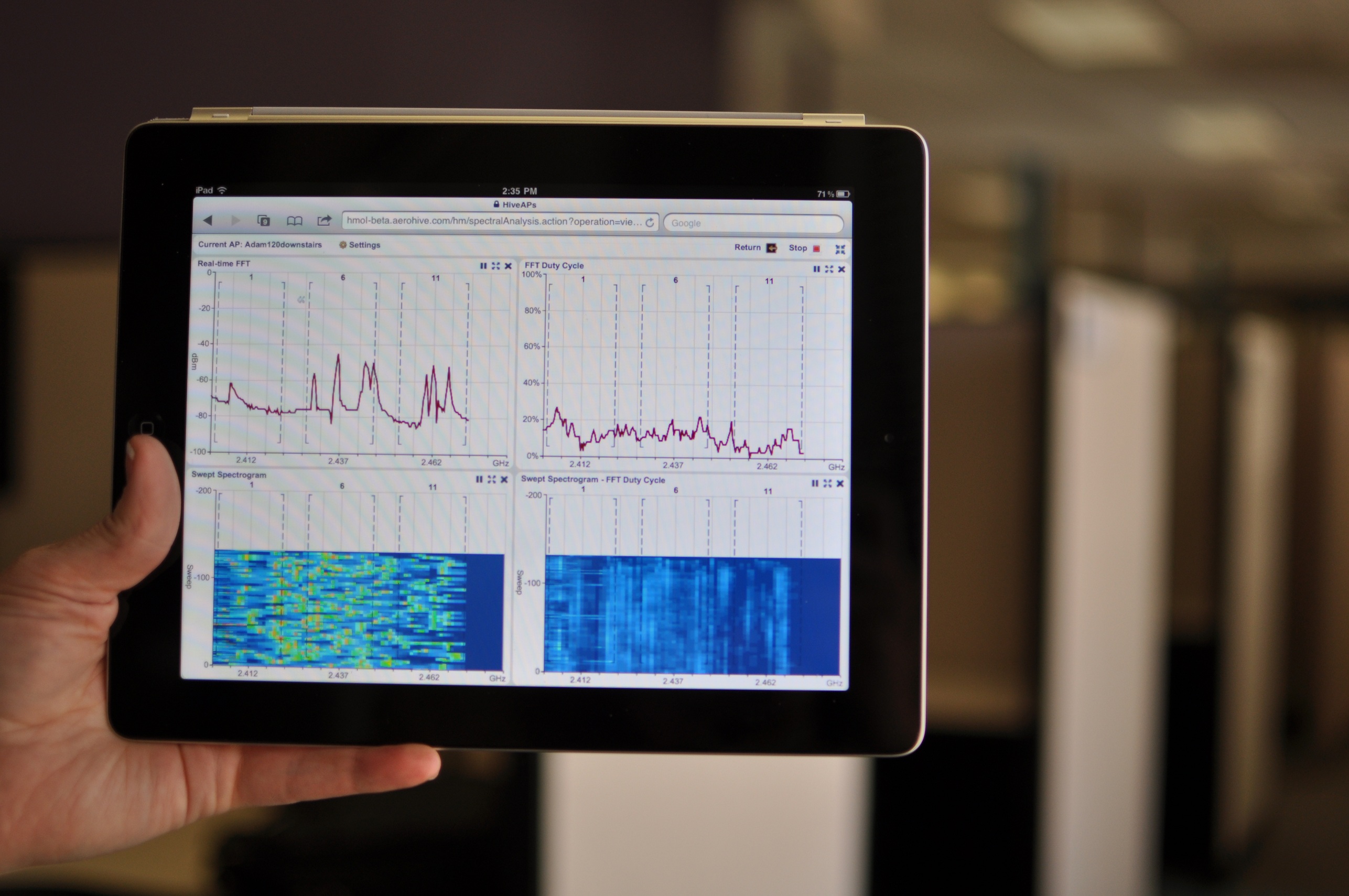
One unexpected addition in HiveOS 4 is spectrum analysis.  Cisco has really been pushing the advantages of the Cognio chip embedded in all of it’s 3500 series APs.  When we asked Aerohive about doing spectrum analysis in their APs at WFD, the answer was “wait and see”.  I’m pleased to announce that with HiveOS 4, you can now enable a spectrum analyzer in your Aerohive 802.11n APs.  The interface in HiveManager 4 is all based on HTML5, so it has no display issues on your favorite Fruit Company Mobile Device.  There is a large signature database included, so you can plot the air waves and then compare them to a list of known interference sources in case you aren’t sure whether it’s a Bluetooth headset or a cordless phone causing interference.  This is great if you want to enable the spectrum analyzer on a remote AP and then have someone back at the office check the interference source while you walk around trying to find out who’s hiding a microwave under their desk (Here’s a tip:  Look for the guy glowing in the dark…).  This feature is included in HiveOS 4 at no additional cost.  One caveat I noticed – HiveManager can only receive data from 10 spectrum analysis sources at once, so you can’t configure any more than that.  When I asked about this limitation, I was informed that in order to receive and process the data quickly and efficiently, they had to put a limit on it, so 10 is it.  For now, at least.

HiveOS 4 Spectrum Analysis running on your favorite Fruit Company Tablet

For those of you out there that may be Aerohive partners, there is also a new Partner Admin page that allows you to demo the product and set up customer evaluations.  You can also remote in and add devices to your customer’s network or even delegate certain tasks to administrators at the customer site.  This is a great addition for those providers looking to add Aerohive as a kind of managed services wireless solution.  For one low monthly fee, you can lease Aerohive gear to your customers and manage it from one location.  You can involve the customer admins as little or as much as you want.

There are a lot of other great features that are in HiveOS 4 and HiveManager 4, so you should head over to Aerohive’s site and check it out.  The upgrade is free for all existing Aerohive customers and will be available on June 20.

Tom’s Take

I like what Aerohive is doing with their approach to wireless.  By moving the intelligence of the network out into the access points, they alleviate some of the bottleneck issues with controllers.  They also have some great ideas that they bring to the table to increase the visibility of their software with certain verticals, such as education and health care.  However, if software is your game, you’re only as good as the features in your latest release.  I think Aerohive nailed it with HiveOS 4.  They’ve added a lot of new features to help admins address their pain points in the Bring Your Own Mobile Device era, as well as adding a much-needed feature that will allow them to compete with offerings from Cisco in the spectrum analysis arena.  By making this upgrade available for all existing customers, you can refresh your wireless network with the click of a button.  No forklifts needed.  So join me in raising a glass to the latest release of HiveOS:

I look forward to seeing more good stuff from Aerohive in the future.

Disclaimer

I received a sneak peak at the offering from Aerohive before the launch date.  No consideration was asked for in my attendance, and none was offered.  The opinions and analysis offered in this post are mine and mine alone.

NFC: Not For Consumers (Yet)

There’s been quite a bit of buzz recently regarding the capabilities surrounding Near Field Communications (NFC).  The idea behind this is that a user can be provided with a low-powered, short range (about 2 inches) wireless transmitter/receiver that can be used in a variety of applications, such as providing access control to restricted doors, airline or mass transit check-in/ticketing, and even payment methods.  Google especially has upped the ante in this last department with the announcement of Google Wallet, a movement to make your phone into your primary method of payment for goods and services.  While I’m behind the idea that you can start using mobile devices for electronic payment, I think that the NFC idea isn’t quite ready for prime time just yet.

1.  NFC-enabled devices are few and far between.  The list of devices that have built-in NFC transmitters is longer than expected…provided you live anywhere other than the United States.  Most of the phones that have NFC chips are Nokia devices primarily marketed in Europe.  The main devices found in the US are (naturally) the Google Nexus S and to my surprise the Blackberry Bold/9900.  While I’ve been told the boys in Mountain View make a mighty nice phone, the adoption rates aren’t nearly as high as other devices from Motorola and the Fruit Company Mobile Device Company.  In fact, rumors that the iPhone 5 *might* include a NFC chip had people foaming at the mouth.  Why’s that?  Well, despite what others might tell you, putting a new technology in the next iPhone is a good way to push it toward the mainstream.  This may not guarantee that it will be adopted, but based on the sales numbers that the iPhone usually produces, putting a NFC chip in it would get it to several million people in short order.  Once the technology is more pervasive than a few hundred thousand handsets, I think there’ll be more effort given to incorporating it into payment methods.  Otherwise, it will sit unused, taking up valuable space in your phone that could have been used for a bigger battery or a fancy gyroscope.

2.  NFC-enabled retailers are few and far between.  This is the same as number 1, except it’s the other side of the coin.  Not seeing any real need to provide NFC receivers for a non-existent demand, retailers haven’t really put any in.  Think back to the MasterCard PayPass or American Express ExpressPay.  How many people have you seen with those cards?  How many of those terminals have you seen?  I’ve seen a few of the newer ones here and there, but never at any big box retailers or department stores.  If Google or Apple are serious about driving adoption of this kind of technology, they may have to work with the credit card companies to underwrite the replacement of NFC-enabled POS devices.  Walmart won’t spend millions to replace their terminals on a whim with the possible hope of having NFC customers, but if Google agrees to pay 25% and MasterCard agrees to pay 25%, that might be the tipping point to spur adoption.  Starbucks has faced a similar issue with their mobile payment system.  Starbucks began testing the use of barcodes in their mobile app to see if adoption would take off.  Their testing areas, Seattle and Silicon Valley, showed that people were willing to use their iPhones or Nexi devices to pay with a virtual Starbucks card.  Once they rolled out their mobile terminals across the country, I wonder if they’ve seen the same kind of adoption in places other than coffee-crazy Seattle or tech-friendly Silicon Valley.  If the mobile manufacturers want to drive this technology, they may have to put their money where their chips are.

3.  Who has my money?  This is probably going to be the biggest problem standing in the way of mobile device NFC payment.  Right now, Google Wallet works with Citi MasterCard and Google pre-paid cards.  Not an impressive list of authorized cards, to say the least.  If Apple were to adopt this technology in the iPhone 5 or iPhone 5GSX+++, they obviously would want the funds used to purchase things stored in your iTunes account.  Whoever controls the money controls your spending habits.  Think about having a number of small bank accounts, each with small amounts of money.  You can’t use any one account for all your purchases due to the lack of significant funds in any one of them.  Extrapolate that further.  Would you really tie up, say, $500 worth of your income in an iTunes NFC payment account?  I don’t think the electric company accepts iTunes yet, and you can’t really use Google pre-paid cards at a Coke machine.  The credit card companies are going to be hesitant to partner with Google and Apple unless terms are favorable for them to keep getting their 2% margins (or better) and the device manufacturers are not going to want to use the technology unless they can get their cut, especially Apple and their 30% tax on anything they touch.  The fight among each of these parties is likely to keep the whole thing shelved for the foreseeable future, unless some kind of breakthrough can be reached.

Tom’s Take

I think NFC has the opportunity to be a real game-changer for Personal Area Network (PAN) applications.  An example, if you will.  Those that have played the Metal Gear Solid series of games no doubt remember the annoyance in Metal Gear Solid 1 where you were required to be holding a door key card when you wanted to enter.  In every game after that, the key cards utilized PAN technology to allow you to pass through them without the need to select them every time.  NFC-type communications at it’s best.  Now apply those lessons to the real world.  Your phone can replace your access badge.  Your phone can unlock the front door to your house.  You can use your phone for a boarding pass or a parking meter fob or any one of a number of cool futuristic things.  Yes, even a payment method.  However, there are enough challenges to make adoption difficult at best.  Everyone wants to lock you into their particular flavor of NFC banking to best help you find ways to spend your money.  Until we get some kind of universal access or centralized clearinghouse that all the interested parties can agree on, I don’t think NFC will be replacing my wallet any time soon.  Let’s hope time proves me wrong on this one.

Friday Fun Links – 5/27

This week’s link collection tends to fall on the side of security.  Whether you have a Mac or you work for Lockheed Martin, it’s been a rough few days.

Krebs on Security: ChronoPay Fueling Mac Scareware Scams

Perhaps Apple will have better luck than others who have tried
convincing ChronoPay to quit the rogue anti-virus business, but I’m
not holding my breath. As I noted in a story earlier this year,
ChronoPay has been an unabashed “leader” in the scareware industry
for quite some time.

I don’t need to tell you that the majority of spyware/malware/crapware out there is motivated today by money.  It is a little surprising to find out that one company seems to be masterminding things.  And with the surge in Mac sales raising their profile among hackers, expect a flood of junk for the Mac.

Reuters: Hackers Breach US Defense Contractors

Unknown hackers have broken into the security networks of
Lockheed Martin Corp and several other U.S. military contractors,
 a source with direct knowledge of the attacks told Reuters.  
They breached security systems designed to keep out intruders
by creating duplicates to "SecurID" electronic keys from
EMC Corp's RSA security division, said the person who was not 
authorized to publicly discuss the matter.

I am Jack’s complete lack of surprise.  As we discussed on Packet Pushers almost 2 months ago, there was more to the RSA breach than was being let on.  Looks like the tokens are compromised and making copies is easier than RSA would like.  If you’re using SecurID tokens, it’s best to discontinue their use if possible and get in touch with RSA to get them replaced.  You might also think about mentioning you don’t want them pulled from stock.  You know, just in case…

RFC 6127 – IPv4 Run-Out and IPv4-IPv6 Co-Existence Scenarios

Check out our latest discussion of All Things NAT, as well as fun things like Carrier-Grade NAT (NAT 444), Teredo, and my personal favorite…jabbing bamboo shoots under your fingernails.

9.@ Must Die!

Frequent visitors to my site should know that I am a voice rock star on top of my other regular networking/wireless/server/virtualization/etc roles.  One of the things I have tried to do since the very beginning of my time in voice is avoid using unnecessary shortcuts and make things work right the first time.  This is no different when it comes to the likes of route patterns in Cisco Unified Communications Manager (CUCM).  I speak of course of the infamous “@” route pattern.

When configuring a route pattern in CUCM, I have seen some documentation suggest that you configure your route pattern using the “@” wildcard and be done.  In CUCM, the “@” is a wildcard macro that contains most of the numbering plan for North America, also known as NANP.  In North America, we use 10-digit telephone numbers that are composed of a 3-digit area code followed by a 7-digit local number.  The first digit of the area code cannot be a zero or a one, and the first digit of the local number cannot be a zero or a one either.  The NANP format is usually represented as NXX-NXX-XXXX, where N is a number between two and nine, and X is any number.  The “@” wildcard takes this information and builds several route patterns in CUCM than can match numbers that you might want to dial.  However, “@” has some additional issues that have to be addressed.  Often, you must configure your local area code with a route filter to allow the system to recognize when a local call is dialed.  You also will need to configure things like country code and possibly even end-of-dial strings to help calls be terminated quickly.  If these items are not configured properly, CUCM will have to wait for the interdigit timeout to expire before deciding to send the dialed digits to the PSTN gateway.  By default, this interdigit timeout is 15 seconds, which can be an eternity to a user.

In my career, I have never used the “@” wildcard.  I have always configured my own route patterns.  To me, it looks much cleaner and is easier to troubleshoot rather than having to unwind a shortcut macro.  For the following examples, “9” is used as a pre-dot PSTN access code and is assumed to be stripped at some point before arriving at the PSTN.

911 and 9.911 – Emergency services route patterns.  You need to have these or your people can’t dial emergency services.  If you’d like to read more about my reasons for configuring both route patterns, check it out over here.

9.[2-8]XX – Service codes. These are defined by NANP to provide 3-digit access to special services.  There is no 111 access code.  I don’t include 911 in this configuration due to the explicit urgent priority pattern configured explicitly for emergency services.

9.1[2-9]XX[2-9]XXXXXX – Long Distance.  Most long distance providers in the country use “1” to signal that a long distance call outside of your area code is being made.  This route pattern looks for an 10-digit number prefixed with “91”  The “1” is sent with the number to signal a long distance call.  This is pretty straight forward and will likely be required on all route plans.

9.011! – International calls.  I still configure international call route patterns even if my customers don’t care for them.  I limit their use via Calling Search Spaces (CSS).  It’s better to have the route pattern configured and available to turn on at a moment’s notice in case the CxO starts asking why he can’t call London or Tokyo.  I use a “!” at the end of the route pattern to signal that there could be any number of digits after “011”, which is the international access code for the United States.  The caveat is that you must wait for the interdigit timeout to expire before the call is dialed.  You can add an octothorpe (#) after the “!” to signal that you are done dialing digits, but if that is your only route pattern, you must dial the # or the call will not go through.

The remaining two route patterns that get configured are a little trickier and often cause issues on the system depending on how they are configured.  Local calling is different depending on where you live.  Some metropolitan areas are still on the small side, so you are allowed to dial only seven digits to complete a call.  This is true where I live in Oklahoma City, which is totally contained in the 405 area code.  In other areas, such as Dallas/Ft. Worth or New York City, there are so many telephone numbers that you must use a full 10 digit number to make a call.  As more and more phones are sold and activated, especially cellular phones, the move to 10-digit dialing for most everyone is inevitable.  Until the day when 10 digits are universal, there are somethings to keep in mind for route patterns.

9.[2-9]XXXXXX is used for 7-digit dialing for local calls.  9.[2-9]XX[2-9]XXXXXX is used for 10-digit local calling.  If both of these route patterns are configured on the system at the same time, there can be issues.  In the best case, users must wait for the interdigit timeout to expire on local calls, since when only 7 digits are dialed CUCM is still waiting to see which route pattern to match for the call to complete.  In the future, there will be no use for the 7-digit pattern, and only the 10-digit pattern will be present.  Until that time, here’s a trick you can use to help avoid the interdigit timeout for local calls.

Configure the 7-digit pattern for your local calls.  If you live in an area like I do where some calls inside your area code can be dialed at 10-digit and not be long distance, i.e. not prefixed with a “1”, then configure a 10-digit route pattern with the explicit area code set, such as 9.405[2-9]XXXXXX.  You don’t need to configure a 10-digit route pattern in this case, since any non-local call outside your area code will require a “1” to dial.  This will help you avoid the interdigit timeout on local calls, which should keep your users from rioting.  When your city or county or area code finally implements an overlay area code and starts requiring the use of 10-digit dialing, simply remove the explict area code route pattern (9.405[2-9]XXXXXX in the above example) and the 7-digit route pattern and configure the 10-digit route pattern, 9.[2-9]XX[2-9]XXXXXX.

This should be enough to help you configure all of your NANP dialing needs without the horror that is 9.@.  Much like the <none> partition, 9.@ is a dirty crutch that usually ends up doing more harm than good, especially when it comes time to troubleshoot odd behavior of route patterns and why one is being overridden by something you can’t even see.  By having your route patterns explicitly configured, you not only gain more control over your dialing domain, but you also have the ability to block specific route patterns such as 900 numbers or those nasty Carribean international calls without fear that a crusty old shortcut is still in your system causing you grief and and costing you money.

Fun Links for Friday

I’ve been meaning to start a link round-up post each week to highlight some things that I read that I find interesting or that might slip through the cracks sometimes.

PaulDotCom: Virtualizing Junos

Many times when working with a client network or working on our own we have the need to test, document and validate certain networks configurations in a test environment. Sadly not many have the money to have one so as to test different scenarios so as to gage the impact that this changes might have on the production network. For a majority of configuration when it comes to system settings and routing a virtualized environment can be of great help, sadly anything ASIC or HW Specific configurations. On this blog post I will cover how to virtualize JunOS operating system to aide with testing and validating.

This does indeed work.  Remember though, that you need to be a Juniper customer to download the Junos images.

TED Talk: Beware of Online Filter Bubbles

As web companies strive to tailor their services (including news and search results) to our personal tastes, there’s a dangerous unintended consequence: We get trapped in a “filter bubble”and don’t get exposed to information that could challenge or broaden our worldview.

Something that never occurs to a person because they don’t realize what’s going on.  It seems that the Internet is walling off the outside world from us a piece at at time.

Stephen Foskett, Pack Rat: FCoE vs. iSCSI – Making the Choice”

“FCoE vs. iSCSI” isn’t a battle or cage match. Your choice depends on many factors, and is more a reflection of convergence than a religious conviction

I get to have this conversation with my customers on a regular basis.  Stephen says it a lot better than I do, and he even has a slide deck.