Unknown's avatar

About networkingnerd

Tom Hollingsworth, CCIE #29213, is a former network engineer and current organizer for Tech Field Day. Tom has been in the IT industry since 2002, and has been a nerd since he first drew breath.

IP Addresses in Entertainment

Fake IP

Every time I sit down to watch a TV show or movie and they mention computers or hacking, I get amused.  I know that I’m probably going to see some attempt to make computer hacking look cool or downright scary.  Whether it be highly stylized like Hackers or fairly accurate like the power plant hack in The Matrix Reloaded, there are always little details that get glossed over.  In many cases, one of these is the IP addressing of the systems themselves.  If the producers and writers of the film even choose to show an IP address on the screen, it’s usually so wrong that I laugh at a totally inappropriate moment of drama.

The practice of using fictitious numbering schemes for things in entertainment goes back several decades.  The first known instance of a movie using a fake number for something was in Panic in Year Zero back in 1962.  For the first time, the writers used a fictitious phone number starting with 555 instead of a real telephone number.  Even though 555 prefixes were used for things like directory assistance, they weren’t widely deployed.  As such, the 555 prefix became synonymous with a “fake” phone number.  555-0100 through 555-0199 are the only official numbers in that range set aside for fictitious use, however many people still associate that prefix with a phone number that won’t work in the real world.

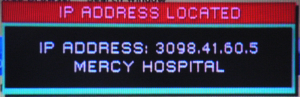
Hollywood has been trying for some time to come up with IP addresses that look real enough to pass the sniff test but are totally false.  Sometimes that works.  Other times, you end up with Law and Order.  In particular, the SVU flavor of that show has been known to produce IP address ranges that don’t even come close to looking real.  This page documents a couple of the winners from that show when the police start tracing an offender by their IP address.  Some of them look almost real.  Others seem to have an octet that jumps above 255.  Still others have 4-digit octets or other oddities that don’t quite measure up.  Sure, it heightens the suspense when people can see what the detectives are doing, but for those of us that know enough to be dangerous, it pulls you out of the moment.  It would be like watching ER and hearing the doctors start talking about brain surgery, only to start cutting open a patient’s arm to get to it.

TCP/IP has a large number of address ranges that can be used in a fictitious manner. For instance, Class E experimental addresses (240.0.0.0/4) were set aside and hard coded into most OSes as unavailable.  The address range for example use and documentation purposes 192.0.2.0/24 can also serve as a safe fictitious range.  Then there’s RFC 1918.  These addresses are used for private network ranges and must be NATed to work correctly on the public internet due to their non-routability.  These would be perfect for use in movies, as they represent networks that most people use daily.  They would look believable to those of us that know what to look for.  However, I think the producers and writers avoid doing that because of the inherent curiosity of people.

The greatest example of this comes courtesy of Tommy Tutone.  The band hit radio gold with their song “867-5309/Jenny” back in 1982.  Unlike 555, 867 is a widely used prefix code in the North American Numbering Plan (NANP).  There are numerous stories of people that have received that phone number and been cursed with popularity.  One story from Brown university tells of unsuspecting freshmen that move into the dorm room with that telephone number.  The phone calls never stop until a request is made to shut down the line.  Even back in 1982, the regional Bell companies were seeing huge spikes in telephone calls to that one number.  In many cases, they had to disconnect it in order to keep the traffic to a reasonable level.  If you’re curious, you can hear some of the messages left for the unfortunate possessors of that cursed number over at http://www.jennynetwork.com

People are compelled to try things they see in movies.  This article in the Chicago Tribune talks about the writer memorizing a realistic looking number from a movie and going home to call it several times before giving up.  The movie Magnolia included the real number 877-TAME-HER which the movie studio used to record Tom Cruise giving an in-character speech about his system for the purposes of marketing.  That’s all well and good in the real world when someone gets a few occasional prank calls or other harmless issues.  What happens in a computer network when someone sees a 10.0.0.0/8 address on TV and then decides to try and hack it?  What if they call the police and say that the computer address of a murder or a predator is on their network?  This can cause huge issues for network admins.  The nightmare of trying to explain to people that just because the Gibson in Hackers 3 is at 192.168.1.2 doesn’t mean they get to assault the mail server every day would get old really fast.  And when it comes to IPv6, the opportunity for even more trouble arises.

I was a long-time player of the MMORPG City of Heroes.  One of the reasons that I liked playing it so much was the lore and back story to the world.  I was one of the players that read all of the fluff text to get a better sense of what the writers were trying to do.  Imagine my surprise when I was playing a new mission a several months ago and ran across a little Easter egg.  One of the writers decided that the imaginary world of Paragon City had long ago ran out of IPv4 addresses and decided to upgrade to IPv6.  One of the consoles in the game had a reference to an IPv6 address – 3015:db6:97c4:9e1:2420:9b3f:073:8347.  I was excited.  Finally, someone in the entertainment industry realized we were running out of IPv4!  Then I started thinking.  Right now, the allocations to the RIRs all start with 2001.  Eventually, once we get the intergalactic Internet up and running, we might end up getting into the 3000 range.  It might be a hundred years before the address above is allocated to someone.  By then, most everyone will have forgotten City of Heroes ever existed.  Putting real IPv6 addresses in movies and on TV does run the risk of having people “hacking the Gibson” when you least expect it.  I think you’ll see that even in those far-flung ranges, the odds of a fake address on TV coinciding with a real IPv6 server or workstation address, even on a global scale, is pretty slim.  Despite the fact that all our systems will be globally reachable, the IPv6 address space is so large that no two systems are likely to even overlap.  Add in neighbor discovery, duplicate address detection, and the uniqueness of a MAC address (which forms the basis of EUI-64 addressing and SLAAC) and you can see how difficult it would be.


Tom’s Take

In case the name of my blog didn’t warn you…I’m a nerd.  When I see something inaccurate in a movie, I tend to point it out.  That’s why I don’t watch Armageddon any more.  I understand that writers and directors are trying to entertain people.  When you’re trying to do that, sometimes the details get sacrificed for the sake of telling a good story.  However, when it comes to something that can represented easily for the most realistic look possible, the creative team involved should do that.  Whether it be the night sky in Titanic or the address of the mainframe in a techno thriller, I want the people that care about the production values of a movie to show me how much they care.  With the advent of IPv6, I think creating fake addresses to put in movies and other entertainment will be easier.  Given the vast range of available space it doesn’t take too much effort to pull out something “techy sounding” to put in a movie script.  Trust me, the nerds out there will thank you for it.

Mountain Lion PL-2303 Driver Crash Fix

Now that I’ve switched to using my Mac full time for everything, I’ve been pretty happy with the results.  I even managed to find time to upgrade to Mountain Lion in the summer.  Everything went smoothly with that except for one little hitch with a piece of hardware that I use almost daily.

If you are a CLI jockey like me, you have a USB-to-Serial adapter in your kit.  Even though the newer Cisco devices are starting to use USB-to-mini USB cables for console connections, I find these to be fiddly and problematic at times.  Add in the amount of old, non-USB Cisco gear that I work on regularly and you can seem my need for a good old fashioned RJ-45-to-serial rollover cable.  My first laptop was the last that IBM made with a built-in serial port.  Since then, I’ve found myself dependent on a USB adapter.  The one that I have is some no-name brand, but like most of those cables it has the Prolific PL-2303 chipset.  This little bugger seems to be the basis for almost all serial-to-USB connectivity except for Keyspan adapters.  While the PL-2303 is effective and cheap, it’s given me no end of problems over the past couple of years.  When I upgraded my Lenovo to Windows 7 64-bit, the drivers available at the time caused random BSOD crashes when consoled into a switch.  I could never nail down the exact cause, but a driver point release fixed it for the time being.  When I got my Macbook Air, it came preinstalled with Lion.  There were lots of warnings that I needed to make sure to upgrade the PL-2303 drivers to the latest available on the Prolific support site in order to avoid problems with the Lion kernel.  I dutifully followed the directions and had no troubles with my USB adapter.  Until I upgraded to Mountain Lion.

After I upgraded to 10.8, I started seeing some random behaviors I couldn’t quite explain.  Normally, after I’m done consoling into a switch or a router, I just close my laptop and throw it back in my bag.  I usually remember after I closed it and put it to sleep that I need to pull out the USB adapter.  After Mountain Lion, I was finding that I would open my laptop back up and see that it had rebooted at some point.  All my apps were still open and had the data preserved, but I found it odd that things would spontaneously reboot for no reason.  I found the culprit one day when I yanked the USB adapter out while my terminal program (ZTerm) was still open.  Almost instantly, I got a kernel panic followed by a reboot.  I had finally narrowed down my problem.  I tried closing ZTerm before unplugging the cable and everything behaved as it should.  It appeared the the issue stemmed from having the terminal program actively accessing the port then unplugging it.  I searched around and found that there were a few people reporting the same issue.  I even complained about it a bit on Twitter.

Santino Rizzo (@santinorizzo) heard my pleas for sanity and told me about a couple of projects that created open source versions of the PL-2303 driver.  Thankfully, someone else had noticed that Prolific was taking their sweet time updating things and took matters into their own hands.  The best set of directions to go along with the KEXT that I can find are here:

http://www.xbsd.nl/2011/07/pl2303-serial-usb-on-osx-lion.html

For those not familiar with OS X, a KEXT is basically a driver or DLL file.  Copying it to System/Library/Extensions places in in the folder where OS X looks for device drivers.  Make sure you get rid of the old Prolific driver if you have it installed before you install the OS PL-2303 driver.  Once you’ve run the commands list on the site above, you should be able to plug in your adapter and then unplug it without any nasty crashes.  One other note – the port used to connect in ZTerm changed when I used the new drivers.  Instead of it being /dev/USBSerial or something of that nature, it’s now PL2303-<random digits>.  It also changed the <random digits> when I moved it from one USB port to another.  Thankfully for me, ZTerm remembers the USB ports and will try them all when I launch it until it find the right adapter.  There is some discussion in the comments of the post above about creating a symlink for a more consistent pointer.


Tom’s Take

Writing drivers is hard.  I’ve seen stats that say up to 90% of all Windows crashes are caused by buggy drivers.  Even when drivers appear to work just fine, things can be a little funny.  Thankfully, in the world of *NIX, people that get fed up with the way things work can just pull out their handy IDE and write their own driver.  Not exactly the easiest thing in the world to do but the results speak for themselves.  When the time comes that vendors either can’t or won’t support their hardware in a timely fashion, I take comfort in knowing that the open source community is ready to pick up the torch and make things work for us.

2012 Depleted, Time to Adopt ::2013

It’s been 366 days since my last post about goals for 2012.  How’d I do on my list for the past year?

1. Juniper – Dropped the ball on this one.  I spent more time seeing Juniper gear being installed all over the place and didn’t get my opportunity to fire up the JNCIA-Junos liked I wanted.  I’m planning to change all that sooner rather than later.  Doug Hanks even gave me a good head start on immersion learning of the MX Series.

2. Data Center – I did get a little more time on some Nexus gear, but not nearly enough to call it good for this goal.  Every time I sat down to start looking at UCS, I kept getting pulled away on some other project.  If the rumblings I’m hearing in the DC arena are close to accurate, I’m going to wish I’d spent more time on this.

3. Advanced Virtualization – While I didn’t get around to taking either of the VCAP tests in 2012, I did spend some more time on virtualization.  I was named a vExpert for 2012, gave a virtualization primer presentation, and even attended my first VMUG meeting.  I also started listening to the vBrownBag podcast put on by ProfessionalVMware.  They have a ton of material that I’m going to start reviewing so I can go out and at least take the DCD test soon.

4. Moving to the Cloud – Ah ha! At last something that I nailed.  I moved a lot of my documents and data into cloud-based storage.  I leveraged Dropbox, Skydrive, and Google Docs to keep my documentation consistent across multiple platforms.  As I continue forward, I’m going to keep storing my stuff in the big scary cloud so I can find it whenever I need it.

Looks like I’ve got two fails, one tie, and one win.  Still not the 50% that I had hoped for, but it’s funny how real life tends to pull you in a different direction that you anticipate.  Beyond attending a few more Tech Field Day events and Cisco Live, I also attended a Cisco Unified Communications Partner Beta Training launch event and the Texas IPv6 Task Force Winter Summit.  It was this last event that really got me thinking about what I wanted to do in the coming year.

I think that 2013 is going to be a huge year for IPv6 adoption on the Internet.  We’ve been living in the final depletion phase of IPv4 for a whole year now.  We can no longer ignore the fact that IPv6 is the future.  I think the major issue with IPv6 adoption is getting the word out to people.  Some of the best and brightest are doing their part to talk to people about enabling IPv6.  The Texas IPv6 Task Force meeting showed me that a lot of great people are putting in the time and effort to try and drive people into the future.  However, a lot of this discussion is happening outside of people’s view.  Mailing lists aren’t exactly browsing-friendly.  Not everyone can drop what they’re doing for a day or two to go to a task force meeting.  However, people do have the spare time to read a blog post on occasion.  That’s where I come in.

In 2013, I’m going to do my part to get the word out about IPv6.  I’m going to spend more time writing about it.  I’m going to write posts about enabling it on all manner of things.  Hypervisors, appliances, firewalls, routers, and even desktops are on the plate.  I want to take the things I’m learning about IPv6 and apply them to the world that I work in.  I don’t know how service providers are going to to enable IPv6.  However, I can talk about enabling CallManager to use IPv6 and register IP phones without IPv4 addresses.  I can work out the hard parts and the gotchas so that you won’t have to.  I’ve already decided that any presentation that I give in 2013 will be focused on IPv6.  I’ve already signed up for one slot later in the year with a possibility of having a second.  I applied for a presentation slot at the Rocky Mountain IPv6 Task Force meeting in April.  I want to hone my skills talking to people about IPv6.  I’m also going to try and make a lot more blog posts about IPv6 in the coming year.  I want to take away all the scary uncertainty behind the protocol and make it more agreeable to people that want to learn about it without getting scared off by the litany of RFCs surrounding it.  To that end, I’m going to start referring to this year as ::2013.  The more we get familiar with seeing IPv6 notation in our world, the better off we’ll be in the long run.  Plus, it gives me a tag that I can use to show how important IPv6 is to me.

A shorter set of goals this year doesn’t mean a more modest one.  Focus is a good thing in the long run for me.  Being an agent of change when it comes to IPv6 is something that I’m passionate about.  Sure, I’m still going to make the occasional NAT post.  I may even have some unnice things to say about vendors and IPv6 support.  The overall idea is that we keep the discussion focused on moving forward and making IPv6 more widely adopted.  It’s the least I can do to try and leave my mark on the Internet in some other way besides posting cat pictures or snarky memes.  It’s also a goal that is going to keep progressing and never really be finished until the lights are turned out on the last IPv4 webserver out there.  Until that fateful day, here’s hoping that ::2013 is a good year for all.

Marketing By Subtraction

After my posts on presentation tips, I had a couple of people ask me what I would like to see in a presentation.  While I’m kind of difficult to nail down when it comes to the things I’d like to see companies showing me when they get up to pitch something, there is one thing I absolutely would love to see go away in 2013.  I’m getting very tired of seeing marketing based solely on differential marketing.  In other words, your entire marketing message is “We’re Not Those Guys.”

I’ve seen a lot of material recently that follows this methodology.  There might be a cursory mention of features or discussion of capabilities, but even that usually gets framed as in the manner of pointing out what the other products don’t do.  Presentations, marketing guides, and even commercials do this quite a bit.  The biggest example that I’ve seen recently is this commercial by Samsung:

Note that while I use an iPhone, I really don’t take sides in the smartphone marketing battle.  People use what works for them.  However, Samsung has decided to make a marketing campaign that is short on features and long on “gotchas.”  This whole ad is focused on pointing out the difference in features between the two devices.  However, it does by way of concentrating on how the iPhone is bad or lacking rather than spending time talking about what their device has instead.  When the ad is over, I wonder if people are ready to buy Samsung’s product because it has awesome features or because it’s not an iPhone (or in this case, not something used by “those people”).

Could you imagine how this would play out if other mundane items were marketed in a similar manner?  Think about going into a grocery store and seeing ads for apples that say things like “Better taste than oranges!” or “No need to peel like other fruits!”  How about a pet store using marketing such as, “Buy a cat! Less mess than dogs!” or “Take home the superior four legged friend!  Dogs are 10 times friendlier than cats!”

We don’t market other items quite the same way we do in tech.  Even car manufacturers have finally moved away from solely marketing based of differentiation with competitors.  You don’t see as many commercials focused on brand-vs-brand arguments.  Instead, you see a list of features presented in tabular format or something similar.  Even though the feature sets are usually cherry-picked to support the producer of the marketing, there is at least the illusion of balance.

I think it’s time that companies start spending their budgets on telling us what their product does and spend much less time on telling me how they are different than their competitors.  Yes, I know that we will never really be able to eliminate competitive marketing.  There are just some things you can’t get away from.  However, buyers are much more interested in the features of what you’re selling.  If you spend your entire presentation telling me how your widget is better or faster or cheaper than the other company, the potential customer will walk away and be thinking about the other product.  Some might even be tempted to go try out the other product to see if your assertions are true.  In either case, you’ve shifted the discussion from something you control to something you can’t.  If your customers are spending the majority of their time talking about something that isn’t your product, you aren’t doing it right.  It takes a tremendous amount of faith to put your product’s capabilities out there and let the stand on their own.  If you’ve built it right or designed it as well as possible you shouldn’t be worried.  Instead, take that leap of faith and let me decide what works best for me.  After all, you don’t want me to be left with the impression that the only thing unique about your product is that your aren’t your competitors.

Learn Why Things Work

As a nerd, I can safely say that Star Trek II: The Wrath of Khan is the best of all the Star Trek films.  It has great character development, and engaging story, and even some fun dialog.  One throwaway line in particular caught my attention recently and made me think about certifications and studying.

In the first big dramatic scene, the bad guy (Khan) has the good guy (Kirk) outgunned and at his mercy.  While scrambling to find a solution to this unwinnable situation, he settles on the gambit of hacking the bad guy’s ship.  When the green lieutenant asks the good guy why he needs the secret code (prefix code) for the bad guy’s ship, the good guy admonishes the lieutenant with the following line:

You have to learn why things work on a starship.

In a movie filled with other great quotes and scenes, this one throwaway line goes unnoticed.  I even had to find a copy of the script to be sure I got it right.  But when it comes to certification, that line holds a lot of power.  You might even say that it sums up the totality of the certification process, as well as the reason why some people that pass still have trouble in the real world.

Everything in networking, or IT for that matter, follows a set of rules.  Programs execute based on a set of instructions.  Electrical signals follow the laws of physics.  Unlike the Matrix, these rules are very seldom flexible.  The same inputs almost always produce the same outputs.  There is no magic or mystical explanation for these behaviors.  Everything does what it does because of these rules.

When you take the time to learn why a protocol behaves in a specific way or why a device  exhibits a certain erratic behavior during troubleshooting, you have a more complete understanding of all the factors that go into that behavior.  Just like in the above example, the good guy is the old veteren of many starship voyages.  He knows why ships behave they way they do.  Because he knows why the ships have a prefix code, he knows how to exploit that behavior against someone that doesn’t know in order to escape the situation.  Someone without knowledge of why things are the way they are would miss that as a possibility simply because it doesn’t exist to them.

Far too often, people seeking certification don’t want to know why something behaves in the way that it does.  They simply want to know the answer to the question or they want to learn the trivia facts in order to satisfy the multiple choice part of the exam.  When it comes time to apply that knowledge those students that don’t understand things beyond fact memorization can’t cope.  For example, look at a simple layer 2 bridging loop.  Most people that have experienced this will tell you simply that it takes the entire network down. Easy enough to explain why it’s bad.  But why does it do this?  You have to dig a little deeper to find the answer.  You have to understand that bridges forward unknown unicast frames out of every port except the ingress port.  Then you have to know there isn’t a method for layer 2 Time To Live (TTL) so those unicast frames can eventually age out of the network.  Finally, you have to know that the impact of all those unicast frames being constantly forwarded out of the bridge eventually overwhelms the CPU and causes the bridge to stop forwarding traffic of all kinds because it can’t keep up.  There’s a lot of why in that explanation.  Learning all of it means you know a myriad of ways to prevent the problem from happening in the first place.  Knowing why means when you develop a new protocol down the road you can address those things and fix them (hello L2 TTL!)

If you skip the why, you miss out on a huge part of troubleshooting and configuration.  Every command has a reason for existing.  Every setting has a valid excuse for being included.  Taking the extra time to learn about those things is what separates the good network rock stars from the rest of the pack.  The dedication and time invested in learning something that completely really shows to potential employers and people conducting technical interviews.  But don’t take my word for it.  Instead, listen to CCIE Instructor Marko Milivojevic:

I couldn’t have said it better myself.

Lightening The Linksys Load

If you’re in the mood to pick up an interesting present for someone this holiday season, you may be in luck. Rumor has it that Cisco is looking to offload Linksys. Again. According to the rumors, Cisco is shopping Linksys to manufacturers of TVs for a lot less than the $500 million they paid for it a decade ago. This isn’t the first time that there have been rumors about the demise of Linksys. A year and a half ago, I even had something to say about it. My opinion of the situation hasn’t really changed from that previous blog post. What has changed is the way that Linksys has been marketed.

Cisco has known for a while that it’s fighting a losing battle in the consumer market. Cheaper vendors have been attacking them on price. Premium vendors have been offering significantly more advanced devices. It also doesn’t help that the Linksys brand itself has been murky for the past several months. Cisco has attached the Linksys name not only to the shrink wrapped boxes you find in your favorite dying big box retailer but also to many of their small business products as well. You can now buy a Linksys phone system, switches, wireless APs, and routers. Many of these products used to carry a Cisco SMB brand but were rebranded in order to give Linksys a bit more robust feel. This was probably a bad decision on Cisco’s part. No matter which piece of equipment you choose to carry the Linksys logo, most of your SMB customer base is going to have visions of trying to buy a wireless router at Best Buy. I had a very similar conversation a few years ago with D-Link. One of their reps came in to try and sell me on their enterprise line of switches. At this point I said to myself, “D-Link makes enterprise gear?!?” I was informed they were a large vendor of this type of gear. They were rather popular in Europe, according to the rep. My response? “So is David Hasselhoff.” No matter what you build with that brand, you’re still going to conjure images of your consumer brand. Linksys shares that same fate.

Cisco has made no secret that they want to start moving toward software as the core of their network offerings. When John Chambers finally retires in a couple of years, he wants to be sure that he hit his last market transition. In order to make the voyage to the Land of Software he’s going to have to shed some weight. I think Linksys is the biggest piece of that weight. After the Flip and ümi closures last year, Chambers needed some breathing room before turning the lights out in other areas. Linksys still holds enough value to fetch a fair price on the open market. Seeing as it’s being shopped to TV manufacturers this would be an excellent opportunity for a mid-market player to catch up to Samsung or Vizio in terms of network offerings. All these devices are going to need to be networked. Most of them come with wireless cards today. With 802.11ad still too far off to be of useful impact today for short-range high speed networking, manufacturers are going to need a stop-gap solution today. Likewise, Cisco has to make the decision whether or not to invest the R&D in the brand to get to those new protocols and devices. Most consumers today own an 802.11n wireless router of some kind. Those people are unlikely to buy a new device until there’s a protocol change or some kind of massive increase in throughput. And even when it does come time to make that upgrade, users are unlikely to spend the kind of money that it would take to recover the cost of development. If Cisco really wants to concentrate on software in the future, doubling down on unprofitable hardware today makes little sense.


Tom’s Take

My Cisco Valet Plus, which is really just a rebranded Linksys WRT310N, now sits on my bookshelf unused. I finally decided to move on to something that fits my usage profile better. I settled on an Apple Airport Extreme. I now have dual band radios, guest access, and a USB port for my Time Machine backups. I might have been able to get a lot of this in a Linksys device, but I grew tired of trying to figure out which one I needed. There was also a lot of feature similarity between the hardware that only seemed to be limited by firmware instead of hardware. For better or worse, I didn’t buy Linksys. Cisco is hoping that someone will buy it from them now. That buyer is going to get an entrenched consumer networking product that has some life left in it. As for Cisco, they get to rid themselves of a peculiar albatross that has weighed heavily on them as of late. Lets hope the Linksys Diet pays off.

Juniper MX Series – Review

A year ago I told myself I needed to start learning Junos.  While I did sign up for the Fast Track program and have spent a lot of time trying to get the basics of the JNCIA down, I still haven’t gotten around to taking the test.  In the meantime, I’ve had a lot more interaction with Juniper users and Juniper employees.  One of those was Doug Hanks.  I met him at Network Field Day 4 this year.  He told me about a book that he had recently authored that I might want to check out if I wanted to learn more about Junos and specifically the MX router platform.  Doug was kind enough to send me an autographed copy:

MX Series Cover

The covers on O’Reilly books are always the best.  It’s like a zoo with awesome content inside.

This is not a book for the beginner.  Frankly, most O’Reilly press books are written for people that have a good idea about what they’re doing.  If you want to get your feet wet with Junos, you probably need to look at the Day One guides that Juniper provides free of charge.  When you’ve gone through those and want to step up to a more in-depth volume you should pick up this book.  It’s the most extensive, exhaustive guide to a platform that I’ve ever seen in a very long time.  This isn’t just an overview of the MX or a simple configuration guide.  This book should be shipped with every MX router that leaves Sunnyvale.  This is a manual for the TRIO chipset and all the tricks you can do on it.

The MX Series book does a great job of not only explaining what makes the MX and TRIO chipset different, but also how to make it perform at the top of its game.  The chapter on Class of Service (CoS) alone is worth its weight in gold.  That topic has worried me in the past because of other vendor’s simplified command line interfaces for Quality of Service (QoS).  This book spells everything out in a nice orderly fashion and makes it all make more sense than I’ve seen before.  I’m pretty sure those pages are going to get reused a lot as I start my journey down the path of Junos.  But just because the book make things easy to understand doesn’t mean that it’s shallow on technical knowledge or depth.  The config snippet for DDoS mitigation is fifteen pages long!  That’s a lot of info that you aren’t going to find in a day one guide.  And all of those chapters are backed up with case studies.  It’s not enough that you know how to configure some obscure command.  Instead, you need to see where to use it and what context makes the most sense.  That’s where these things hit home for me.  I was always a fan of word problems in math.  Simple formulas didn’t really hit home for me.  I needed an example to reinforce the topic.  This book does an outstanding job of giving me those case studies.


Tom’s Take

The Juniper MX Series book is now my reference point for what an deep dive tome on a platform should look like.  It covers the technology to a very exhaustive depth without ever really getting bogged down in the details.  If you sit down and read this cover to cover, you will come away with a better understanding of the MX platform that anyone else on the planet except perhaps the developers.  That being said, don’t sit down and read it all at once.  Take the time to go into the case studies and implement them on your test lab to see how the various features interact together.  Use this book as an encyclopedia, not as a piece of fireside reading material.  You’ll thank yourself much later when you’re not having dreams of CoS policies and tri-color policers.

Disclaimer

This copy of Juniper MX Series was provided to me at no charge by Doug Hanks for the purpose of review.  I agreed with Doug to provide an unbiased review of his book based on my reading of it.  There was no consideration given to him on the basis of providing the book and he never asked for any when providing it.  The opinions and analysis provided in this review reflect my views and mine alone.

Unlearning IPv4

"You must unlearn what you have learned." -Yoda

“You must unlearn what you have learned.” -Yoda

As network rock stars, we’ve all spent the majority of our careers learning how to do things.  We learn how to address interfaces and configure routing protocols.  For many of those out there, technology has changed often enough that we often find ourselves need to retrain.  Whether it be a new version of an old protocol or an entirely new way of thinking about things, there will always come a time when it’s necessary to pick up new knowledge.  However, in the case of updated knowledge it’s often difficult to process.  That’s because the old way of doing things interposes itself in our brains while we’re learning to do it the new way.  How many times have you been practicing something only to hear a little voice in the back of your head saying, “That’s not right.  You should be doing it this way.”  In many ways, it’s like trying to reprogram the pathway in your brain that leads to the correct solution to your problem.

This is very apparent to me when it comes to learning how to configure and setup IPv6 on a network.  Those just starting out in the big wide world of IPv6 need to have some kind of reference point to start configuring things, so they tend to lean back on their IPv4 training in order to get started.  This can work for some applications.  For others, though, it can be quite detrimental to getting IPv6 running the way it should.  Instead of carrying forward the old way of doing things because “that’s just the way they should be done,” you need to start unlearning IPv4.  The little green guy in Empire Strikes Back hit the nail on the head.  The whiney farm boy had spent so much of his life convinced that something was impossible that he couldn’t conceive that someone could lift his starship out of a swamp with the Force.  He had to unlearn that lifting things with his mind was impossible.  Once you take that little step, nothing can stop you from accomplishing anything.

With that in mind, here are a few things that need to be unlearned from our days working with IPv4.  Note that this won’t be easy.  But nothing worth doing is ever easy.

Address Conservation – This one is the biggest stumbling block today.  Look at all the discussion we’ve got around point-to-point links and whether to address them with a /64 or a /127 bit mask.  People claim that addressing this link with a /64 wastes addresses.  To  quote the old guy in the desert from Star Wars, “It’s true, depending on your point of view.”  In a given /64, there are approximately 18 quadrillion addresses available (I’m rounding to make the math easy).  If you address a point-to-point link with a /64, you’re only going to be using 0.0000000000000000001% of those addresses (thats 1 * 10^-19).  To many, that’s a pretty big waste.  But with numbers that big, your frame of reference gets screwed up.  By example, take a subnet with 4,094 hosts, which today would need /20 in IPv4.  That’s about the biggest single subnet I can imagine creating.  If you address that 4,094 host subnet with a /64 in IPv6, you’d end up using 0.0000000000000002% (2 * 10^-16) of the address space.  Waste is all a matter of perspective.  On the other hand, by addressing a link with a bit mask beyond a /64, we break neighbor discovery and secure neighbor discovery and PIM sparse mode with embedded RP among other things.  We need to unlearn the address conservation mentality and instead concentrate on making our networks easier to configure and manage.

Memorizing IP addresses – I’m guilty of this.  I spend a lot of time working at the command line with IPv4, whether it be via telnet or SSH or even just plugging numbers into a GUI.  My CUCM systems are setup to use IP only.  I memorize the addresses of my servers, or in many cases try to make this as similar mnemonically to other systems to jog my memory about where to find them in IP space.  In IPv6, memorizing addresses is going to be impossible.  It’s hard enough for me to remember non-RFC1918 address space as it is with 4 octets of decimal numbers.  Now quadruple that and add in hex addressing.  And when it comes to workstations with SLAAC or DHCPv6 assigned addresses?  Forget about it.  Rather than memorizing address space, we’re going to need to start using DNS for communications between endpoints.  Yes, that means setting up DNS for all your routers and CUCM servers too.  It’s going to be a lot of extra work up front.  It’ll pay off in the long run, though.  I’m sure you’d much rather refer to CUCM1.local rather than trying to remember fe80::ba8d:12ff:fe0b:8aff every time you want to get to the phone server.

Subnet Masks – Never again will you need to see 255 in an IPv6 address unless it’s part of the address.  Subnet masking is dead and buried.  Instead, bit masks and slash notation rule the day.  This is going to be one of the most welcome changes in IPv6, but I think it’s going to take a long time to unlearn.  Not really as much for network engineers, but mainly for the people that have ancillary involvement with networking, such as the server people.  Think about the number of server admins that you’ve talked to that have memorized that the subnet mask of their network card is 255.255.255.0.  Now, ask them what that means. Odds are good they can’t tell you.  Worse, some of them might say that it’s a Class C subnet mask.  It’s a little piece of anecdotal information that they heard once when the network folks were talking that they just picked up.  Granted, most of the time the servers are going to be addresses with a /64 bit mask on the IPv6 address.  That’s still going to take a while to explain to the non-networking people.  No, you don’t need any more 255s in your address.  Yes, the /64 is the same as that, sort of.  No, there’s math involved.  Yes, I’ll take care of all the math.

Ships in the Night – As I said on my recent appearance on the Class C block podcast, I think it’s high time that networking vendors stop treating IPv4 and IPv6 like they are separate entities.  I know that I’ve spent the better part of this blog post talking about how IPv4 and IPv6 require a difference in application and not carrying across old habits and conventions.  The two protocols are more alike that they are different.  That means that we need to stop thinking of IPv6 as an afterthought.  Take a look at the CCIE.  There’s still a separate section for IPv6.  It feels like it was just a piece that was added on to the end of the exam instead of being integrated into the core lab.  Look at Kurt Bales’ review of the JNCIE lab that he took.  Specifically, the last bullet point.  You could be asked to configure something on either IPv4 or IPv6, or even both!  Juniper understands that the people taking the JNCIE today aren’t going to have the luxury of concentrating on just IPv4.  The world is going to require us to use IPv6, so I think it’s only fair that our certification programs start doing the same.  IPv6 should be integrated into every level of certification from CCNA/JNCIA all the way up to CCIE/JNCIE.


Tom’s Take

Working with IPv6 is a big change from the way we’ve done things in the past.  With SLAAC and integrated IPSec, the designers have done a great job of making our lives easier with things that we’ve needed for a long time.  However, we’re doing our best to preclude our transition to IPv6 by carrying over a lot of baggage from IPv4.  I know that our brains look for patterns and like to settle on familiarity as a way to help train for new challenges.  If we aren’t careful, we’re going to carry over too much of the old familiar networking and make IPv6 difficult to work with.  Unlearning what we think we know about networking is a good first step.  A person may learn something quickly with familiarity, but they can learn even faster when they approach it with a blank slate and a keen interest to learn.  With that approach, even the impossible won’t keep you from succeeding.

The Five Stages of IPv6 and NAT

I think it’s time to put up a new post on IPv6 and NAT.  Mainly because I’m still getting comments on my old NAT66 post from last year.  I figured it would be nice to create a new place for people to start telling me how necessary NAT is for the Internet of the future.

In the interim, though, I finally had a chance to attend the Texas IPv6 Task Force Winter 2012 meeting.  I got to hear wonderful presentations from luminaries such as John Curran of ARIN, Owen DeLong of Hurricane Electric, and even Jeff Doyle of Routing TCP/IP book fame.  There was a lot of great discussion about IPv6 and the direction that we need to be steering adoption of the new address paradigm.  I also got some very interesting background about the formation of IPv6.  When RFC 1550 was written to start soliciting ideas about a new version of IP, the Internet was a much different place.  Tim Berners-Lee was just beginning to experiment with HTTP.  The majority of computers connected to the Internet used FTP and Telnet.  Protocols that we take for granted today didn’t exist.  I knew IPSec was a creation of the IPv6 working group.  But I didn’t know that DHCP wasn’t created yet (RFC 2131).  Guess what?  NAT wasn’t created yet either (RFC 1631).  Granted, the IPng (IPv6) informational RFC 1669 was published after NAT was created, but NAT as we know and use it today wasn’t really formalized until RFC 2663.  That’s right, folks.

The reason NAT66 doesn’t exist is because IPv6 was built at a time when NAT didn’t exist.

It’s like someone turned on a lightbulb.  That’s why NAT66 has always felt so wrong to me. Because the people that created IPv6 had no need for something that didn’t exist.  IPv6 was about creating a new protocol with advanced features like automatic address configuration and automatic network detection and assignment.  I mean, take a look at the two IPv6 numbering methods.  Stateless Automatic Autoconfiguration (SLAAC) can assign all manner of network information to a host.  I can provide prefixes and gateways and even default routes.  However, the one thing that I can’t provide in basic SLAAC is a DNS server entry.  In fact, I can’t provide any of the commonly assigned DHCP options, such as NTP server or other vendor-specific fields.  SLAAC is focused solely on helping hosts assign addresses to themselves and get basic IP connectivity to the global Internet.  Now, take DHCPv6.  This stateful protocol can keep track of options like DNS server or NTP server.  It can also provide a database of assignments so I know which machine has which IP.  But you know what critical piece of information it can’t provide?  A default router.  That’s right, DHCPv6 has no method of assigning a default router or gateway to an end node.  I’m sure that’s due to the designers of DHCPv6 knowing that SLAAC and router advertisements (RA) handle the network portion of things.  The two protocols need to work together to get hosts onto the internet.  In 1995, that was some pretty advanced stuff.  Today, we think auto addressing and network prefix assignment is pretty passé.

Instead of concentrating on solving the dilemma of increasing the adoption rate of IPv6 past the 1% mark where it currently resides, we’ve instead turned to the Anger and Bargaining phases of the Küber-Ross model, otherwise known as the Five Stages of Grief. The need for IPv6 can no longer be denied.  The reality of running out of IPv4 addresses is upon us.  Instead, we lash out against that which we don’t understand or threatens us.  IPv6 isn’t ready for real networking.  There are security risks.  End-to-end communications aren’t important.  IPv6 is too expensive to maintain.  People aren’t smart enough to implement it.  Any of those sound familiar?  Maybe not those exact words, but I’ve heard arguments very similar to that leveled at IPv6 in just the two short years that I’ve been writing.  Think about how John Curran of ARIN must feel twenty years after he started working on the protocol.

Anger is something I can handle.  Getting yelled at or called expletives is all part of networking.  It’s the Bargaining phase that scares me.  Now, armed with a quiver of use cases that perhaps 5% of the population will ever take advantage of, we now must delay adoption or move to something entirely different to support those use cases.  It’s the equivalent of being afraid to jump off a diving board because there is a possibility that the water will drain out of the pool on the way down.  The most diabolical is Carrier Grade NAT.  Let’s NAT our NATed networks to keep IPv4 around just a little longer.  It won’t cause that many problems, really.  After all, we’ve only got 65,536 ports that we can assign for any given PAT setup.  So if we take that limit and extend it yet another level, we have 65,536 PATed PAT translations that we can assign per CGN gateway.  That has real potential to break applications, and not just from an end-to-end connectivity point of view. To prove my point, fire up any connection manager and go to http://maps.google.com.  See how many separate connection requests are spawned when those map tiles start loading.  Now, imagine what would happen if you could only load ten or fifteen of them.  There’s going to be a lot of blank spots on the that map.

Now, for the fun part.  I’ve been accused of hating NAT.  Yes, it’s true.  I dislike any protocol that breaks basic connectivity and causes headaches for troubleshooting and end-to-end communications.  I have to live with it in IPv4.  I’d rather not see it carried forward.  That’s the feeling of many IPv6 evangelists.  If you think I dislike NAT, ask Owen DeLong his feelings on the subject.  However, to say that I dislike NAT for no good reason is silly.  People are angry at me for saying the emperor has no clothes.  Every time I discuss the lack of need for NAT66, the same argument gets thrown in my face.  Ivan Pepelnjak wrote an article about about using network prefix translation (NPT) in a very specific case.  If you are multihoming your network to two different providers and not using BGP then a case for NPT can be made.  It’s not the best solution, but it’s the easiest.  Much like Godwin’s Law, as the length of any NAT66 argument increases, the probability of someone bringing up Ivan’s article approaches approaches one.

So, I’ve found a solution to the problem.  I’m going to fix this one scenario.  I’m going to dedicate my time to solving the multihoming without BGP issue.  When I do that, I expect choirs of angels to sing and a chariot pulled by unicorns to arrive at my home to escort me to my new position of Savior of IPv6 Adoption.  More realistically, I expect someone else to find a corner case rationale for why IPv6 isn’t the answer.  Of course, that’s just another attempt at bargaining.  By that point, I’ll have enough free time to solve the next issue.  Until then, I suggest the following course of action:

BYOD vs MDM – Who Pays The Bill?

Generic Mobile Devices

There’s a lot of talk around now about the trend of people bringing in their own laptops and tablets and other devices to access data and do their jobs.  While most of you (including me) call this Bring Your Own Device (BYoD), I’ve been hearing a lot of talk recently about a different aspect of controlling mobile devices.  Many of my customers have been asking me about Mobile Device Management (MDM).  MDM is getting mixed into a lot of conversations about controlling the BYoD explosion.

Mobile Device Management (MDM) refers to the process of controlling the capabilities of a device via a centralized control point, whether it be in the cloud or on premises.  MDM can restrict functions of a device, such as the camera or the ability to install applications.  It can also restrict which data can be downloaded and saved onto a device.  MDM also allows device managers to remotely lock the device in the event that it is lost or even remotely wipe the device should recovery be impossible.  Vendors are now pushing MDM is a big component of their mobility offerings.  Every week, it seems like some new vendor is pushing their MDM offering, whether it be a managed service software company, a wireless access point vendor, or even a dedicated MDM provider.  MDM is being pushed as the solution to all your mobility pain points.  There’s one issue though.

MDM is a very intrusive solution for mobile devices.  A good analogy might be the rules you have for your kids at home.  There are many things they are and aren’t allowed to do.  If they break the rules, there are consequences and possible punishments.  Your kids have to follow your rules if they live under your roof.  Such is the way for MDM as well.  Most MDM vendors that I’ve spoken to in the last three months take varying degrees of intrusion to the devices.  One Windows Mobile provider started their deployment process with a total device wipe before loading an approved image onto the mobile device.  Others require you to trust specific certificates or enroll in special services.  If you run Apple’s iOS and designate the device as a managed device in iOS 6 to get access to certain new features like the global proxy setting, you’ll end up having a wiped device before you can manage it.  Services like MobileIron can even give administrators the ability to read any information on the device, regardless of whether it’s personal or not.

That level of integration into a device is just too much for many people bringing their personal devices into a work environment.  They just want to be able to check their email from their phone.  They don’t want a sneaky admin reading their text messages or even wiping their entire phone via a misconfigured policy setting or a mistaken device loss.  Could you image losing all your pictures or your bank account info because Exchange had a hiccup?  And what about pushing MDM polices down to disable your camera due to company policy or disable your ability to make in-app purchases from your app repository of choice?  How about setting a global proxy server so you are restricted from browsing questionable material from the comfort of your own home?  If you’re like me, any of those choices make me cringe a little.

That’s why BYoD polices are important.  They function more like having your neighbor’s children over at your house.  While you may have rules for your children, the neighbor’s kids are just vistors.  You can’t really punish them like you’d punish your own kids.  Instead, you make what rules you can to prevent them from doing things they aren’t supposed to do.  In many cases, you can send the neighbor’s kids to a room with your own kids to limit the damage they can cause.  This is very much in line with the way we treat devices with BYoD settings.  We try to authenticate users to ensure they are supposed to be accessing data on our network.  We place data behind access lists that try to determine location or device type.  We use the network as the tool to limit access to data as opposed to intruding on the device.

Both BYoD and MDM are needed in a corporate environment to some degree. The key to figuring out which needs to be applied where can be boiled down to one easy question:

Who paid for your device?

If the user bought their device, you need to be exploring BYoD polices as your primary method of securing the network and enabling access.  Unless you have a very clearly defined policy in place for device access, you can’t just assume you have the right to disable half a user’s device functions and then wipe it whenever you feel the need.  Instead, you need to focus your efforts on setting up rules that they should follow and containing their access to your data with access lists and user authentication.  On the other hand, if the company paid for your tablet then MDM is the likely solution in mind.  Since the device belongs to the corporation, they are will within their rights to do what they would like with it.  Use it just like you would a corporate laptop or an issued Blackberry instead of a personal iPhone.  Don’t be shocked if it gets wiped or random features get turned off due to company policy.

Tom’s Take

When it’s time to decide how best to manage your devices, make sure to pull out all those old credit card receipts.  If you want to enable MDM on all your corporate phones and tablets, be sure to check out http://enterpriseios.com/ for a list of all the features supported in a given MDM provider for both iOS and other OSes like Android or Blackberry.  If you didn’t get the bill for that tablet, then you probably want to get in touch with your wireless or network vendor to start exploring the options available for things like 802.1X authentication or captive portal access.  In particular, I like some of the solutions available from Aerohive and Aruba’s ClearPass.  You’re going to want both MDM and BYoD policies in your environment to be sure your devices are as useful as possible while still being safe and protecting your network.  Just remember to back it all up with a very clear, detailed written use policy to ensure there aren’t any legal ramifications down the road from a wiped device or a lost phone causing a network penetration.  That’s one bill you can do without.