Unknown's avatar

About networkingnerd

Tom Hollingsworth, CCIE #29213, is a former network engineer and current organizer for Tech Field Day. Tom has been in the IT industry since 2002, and has been a nerd since he first drew breath.

Cisco Borderless – Network Field Day 3

The second half our our visit to Cisco during day 2 of Network Field Day 3 was filled with members of the Cisco Borderless Networks team.  Borderless Networks is really an umbrella term for the devices in the campus LAN such as wireless, campus switching, and the ASA firewall.  It was a nice break from much of the data center focus that we had been experiencing for the past couple of presentations.

Brian Conklin kicked things off with an overview of the ASA CX next generation firewall.  This was a very good overview of the product and reinforced many of the things I wrote about in my previous ASA CX blog post.  Some high points from the talk with Brian include Active Directory and LDAP integration and the inner workings of how packets are switched up to the CX module from the ASA itself.  As I had suspected, the CX is really a plugin module along the lines of IDS module or the CSC module.  We also learned that much of the rule base for application identification came from Ironport.  This isn’t really all that surprising when you think about the work that Ironport has put into fingerprinting applications.  I just hope that all of the non-web based traffic will eventually be able to be identified without the need to have the AnyConnect client installed on every client machine.  I think Brian did a very good job of showing off all the new bells and whistles of the new box while enduring questions from myself, Mrs. Y, and Brandon Carroll.  I know that the CX is still a very new product, so I’m going to hold any formal judgement until I see the technology moved away from the niche of the 5585-X platform and down into the newer 55×5-X boxes.

Next up on our tour of the borderless network was Mark Emmerson and Tomer Hagay Nevel with Cisco Prime.  Prime is a new network management and monitoring solution that Cisco is rallying behind to unify all their disparate products.  Many of you out there might remember CiscoWorks.  And if any of you actually used it regularly, you probably just shuddered when I mentioned that name.  To say that CiscoWorks has a bit of a sullied reputation might be putting it mildly.  In fact, the first time I was ever introduced to the product the person I was talking too referred to it as Cisco(Sometimes)Works.  Now, with Cisco Prime, Cisco is getting back to a solution that is useful and easy to configure.  Cisco Prime LAN Management Solution is focused on the Borderless Networks platforms specifically, with the ability to do things like archive configurations of devices and push out firmware updates when bugs are fixed or new features need to be implemented.  As well, Cisco is standardizing on the Prime user interface for all of the GUIs in their products, so you can expect a consistent experience whether you’re using Prime LMS or the Identity Services Engine (which will be folded into Prime at a later date).  The only downside to the UI right now is that there is still a reliance on Adobe Flash.  While this is still a great leap forward from Java and other nasty things like ActiveX controls, I think we need to start leveraging all the capabilities in HTML5 to create scalable UIs for customers.  Sure, much of the development of HTML5 UIs is driven by people that want to use them on devices that don’t or won’t support Flash (like the iPad).  But don’t you think it’s a bit easier to share your UI between all the devices when it’s not dependent on a third party scripting language?  After all, Aruba’s managed to do it.  We wrapped up the Prime demo with a peak at the new Collaboration Manager product.  I’ve never been one to use a product like this to manage my communications infrastructure.  However, with some of the very cool features like hop-by-hop Telepresence call monitoring and troubleshooting, I may have to take another look at it in the future.

Our last presentation at Cisco came courtesy of Nikhil Sharma, a Technical Marketing Engineer (TME) working on the Catalyst 4500 switch as well as some other fixed configuration devices.  Nikhil showed us something very interesting that’s capable now on the Supervisor 7E running IOS XE.  Namely…Wireshark.  As someone that spends a large amount of time running Wireshark on networks as well as someone that installs it on every device I own, having a copy of Wireshark available on the switch I’m troubleshooting is icing on the cake.  The 4500 Wireshark can capture packets in either the control plane or the data plane to extend your troubleshooting options when faced with a particularly vexing issue.  Once you’ve assembled your packet captures in the now-familiar PCAP format, you can TFTP or SFTP the file to another server to break it down in your viewer of choice. Another nice feature of the 4500 Wireshark is that the packet captures are automatically rate limited to protect the switch CPU from melting into a pile of slag if you end up overwhelming it with a packet tsunami.  If only we could get a protection like that from a nastier command like debug ip packet detail.

The ability to run Wireshark on the switch is due in large part to IOS XE.  This is a reimplementation of IOS running on top of a Linux kernel with a hardware abstraction layer.  It also allows the IOS software running in the form of a system daemon to utilize one core of the dual core CPU in the Sup7E.  The other core can be dedicated to running other third party software like Wireshark.  I think I’m going to have to do some more investigation of IOS XE to find out what kind of capabilities and limitations are in this new system.  I know it’s not Junos.  It’s also not Arista’s EOS.  But it’s a step forward for Cisco.

If you’d like to learn more about Cisco’s Borderless networks offerings, you can check out the Borderless Networks website at http://www.cisco.com/en/US/netsol/ns1015/index.html.  You can also follow their Twitter account as @CiscoGeeks.


Tom’s Take

Borderless is a little closer to my comfort level than most of the Data Center stuff.  While I do enjoy learning about FabricPath and NX-OS and VXLAN, I realize that when my journey to the fantasy land that is Tech Field Day is over, I’m going to go right back to spending my days configuring ASAs and Catalyst 4500s.  With Cisco spotlighting some of the newer technologies in the portfolio for us at NFD3, I got an opportunity to really dig in deeper with the TMEs supporting the product.  It also helps me avoid peppering my local Cisco account team with endless questions about the ASA CX or asking them for a demo 4500 with a Sup7E so I can Wireshark to my heart’s content.  That huge sigh of relief you just heard was from a very happy group of people.  Now, if I can just figure out what “Borderless” really means…

Tech Field Day Disclaimer

Cisco Data Center was a sponsor of Network Field Day 3.  As such, they were responsible for covering a portion of my travel and lodging expenses while attending Network Field Day 3. In addition, they provided me a USB drive containing marketing collateral and copies of the presentation as well as a pirate eyepatch and fake pirate pistol (long story).  They did not ask for, nor where they promised any kind of consideration in the writing of this review/analysis.  The opinions and analysis provided within are my own and any errors or omissions are mine and mine alone.

Cisco Data Center – Network Field Day 3

Day two of Network Field Day 3 brought us to Tasman Drive in San Jose – the home of a little networking company named Cisco.  I don’t know if you’ve heard of them or not, but they make a couple of things I use regularly.  We had a double session of four hours at the Cisco Cloud Innovation Center (CCIC) covering a lot of different topics.  For the sake of clarity I’m going to split the two posts along product lines.  The first will deal with the Cisco Data Center team and their work on emerging standards.

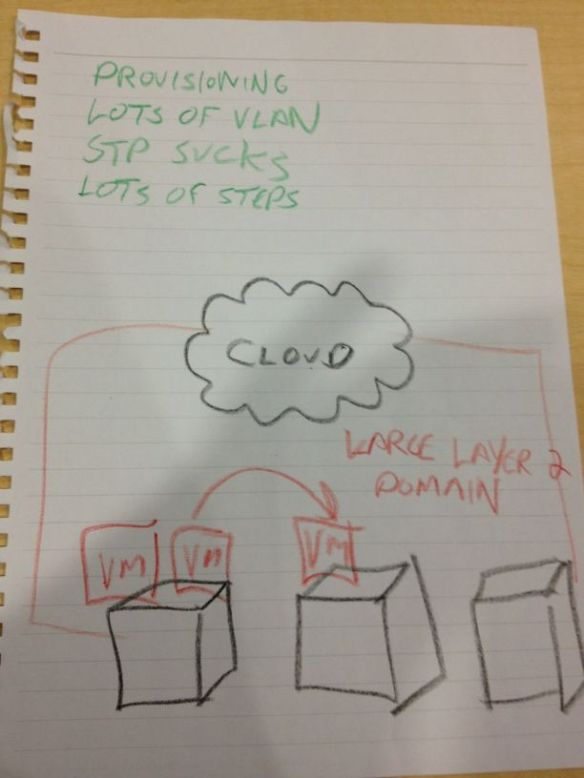
Han Yang, Nexus 1000v Product Manager, started us off with a discussion centered around VXLAN.  VXLAN is an emerging solution to “the problem” (drawing by Tony Bourke):

The Problem

The Problem - courtesy of Tony Bourke

The specific issue we’re addressing with VXLAN is “lots of VLANS”.  As it turns out, when you try to create multitenant clouds for large customers, you tend to run out of VLANs pretty quickly.  Seems 4096 VLANs ranks right up there with 640k of conventional memory on the “Seemed Like A Good Idea At The Time” scale of computer miscalculations.  VXLAN seeks to remedy this issue by wrapping the original frame in a VXLAN header that contains an additional 24-bit VXLAN header along with an additional 802.1q tag:

VXLAN allows the packet to be encapsulated by the vSwitch (in this case a Nexus 1000v) and be tunneled over the network before arriving in the proper destination where the VXLAN header is stripped off, leaving the tag underneath.  The hypervisor isn’t aware of VXLAN at all.  It merely serves as an overlay.  VXLAN does require multicast to be enabled in your network, but for your PIM troubles you get an additional 16 million sub divisions to your network structure.  That means you shouldn’t run out of VLANs any time soon.

Han gave us a great overview of VXLAN and how it’s going to be used a bit more extensively in the data center in the coming months as we begin to attempt to scale out and break through our limitation of VLANs in large clouds.  Here’s hoping that VXLAN really begins to take off and becomes the de facto standard of NVGRE.  Because I still haven’t forgiven Microsoft for Teredo.  I’m not about to give them a chance to screw up the cloud too.

Up next was Victor Moreno, a technical lead in the Data Center Business Unit.  Victor has been a guest on Packet Pushers before on show 54 talking about the Locator/ID Separation Protocol (LISP).  Victor talked to us about LISP as well as the difficulties in creating large-scale data centers.  One key point of Victor’s talk was about moving servers (or workloads as he put them).  Victor pointed out that moving all of the LAN extensions like STP and VTP across the site was totally unnecessary.  The most important part of the move is preservation of IP reachability.  In the video above, this elicited some applause from the delegates because it’s nice to see that people are starting to realize that extending the layer 2 domain everywhere might not be the best way to do things.

Another key point that I took from Victor was about VXLAN headers and LISP headers and even Overlay Transport Virtualization (OTV) headers.  It seems they all have the same 24-bit ID field in the wrapper.  Considering that Cisco is championing OTV and LISP and was an author on the VXLAN draft, this isn’t all that astonishing.  What really caught me was the idea that Victor proposed wherein LISP was used to implement many of the features in VXLAN so that the two protocols could be very interoperable.  This also eliminates the need to continually reinvent the wheel every time a new protocol is needed for VM mobility or long-distance workload migration.  Pay close attention to a slide about 22:50 into the video above.  Victor’s Inter-DC and Intra-DC slide detailing which protocol works best in a given scenario at a specific layer is something that needs to be committed to memory for anyone that wants to be involved in data center networking any time in the next few years.

If you’d like to learn more about Cisco’s data center offerings, you can head over to the data center page on Cisco’s website at http://www.cisco.com/en/US/netsol/ns340/ns394/ns224/index.html.  You can also get data center specific information on Twitter by following the Cisco Data Center account, @CiscoDC.

Tom’s Take

I’m happy that Cisco was able to present on a lot of the software and protocols that are going into building the new generation of data center networking.  I keep hearing things like VXLAN, OTV, and LISP being thrown around when discussing how we’re going to address many of the challenges presented to us by the hypervisor crowd.  Cisco seems to be making strides in not only solving these issues but putting the technology at the forefront so that everyone can benefit from it.  That’s not to say that their solutions are going to end up being the de facto standard.  Instead, we can use the collective wisdom behind things like VXLAN to help us drive toward acceptable methods of powering data center networks for tomorrow.  I may not have spent a lot of my time in the data center during my formal networking days, but I have a funny feeling I’m going to be there a lot more in the coming months.

Tech Field Day Disclaimer

Cisco Data Center was a sponsor of Network Field Day 3.  As such, they were responsible for covering a portion of my travel and lodging expenses while attending Network Field Day 3. In addition, they provided me a USB drive containing marketing collateral and copies of the presentation as well as a pirate eyepatch and fake pirate pistol (long story).  They did not ask for, nor where they promised any kind of consideration in the writing of this review/analysis.  The opinions and analysis provided within are my own and any errors or omissions are mine and mine alone.

Infineta – Network Field Day 3

The first day of Network Field Day 3 wrapped up at the offices of Infineta Systems.  Frequent listeners of the Packet Pushers podcast will remember them from Show 60 and Show 62.  I was somewhat familiar with their data center optimization technology before the event, but I was interested to see how they did their magic.  That desire to see behind the curtains would come back to haunt me.

Infineta was primed to talk to us.  They even had a special NFD3 page setup for the streaming video and more information about their solutions.  We arrived on site and were ushered into a conference room where we got setup for the ensuing fun.

Haseeb Budhani (@haseebbudhani), Vice President of Products, kicked off the show with a quick overview of Infineta’s WAN optimization product line.  Unlike companies like Riverbed or Cisco WAAS, Infineta doesn’t really care about optimizing branch office traffic.  Infineta focuses completely on the data center at 10Gbps speeds.  Those aren’t office documents, kids.  That’s heavy duty data for things like SAN replication, backup and archive jobs, and even scaling out application traffic.  Say you’re a customer wanting to do VMDK snapshots across a gigabit WAN link between sites on two different coasts.  Infineta allows you to reduce the amount of time that transferring the data takes while at the same time allowing you to better utilize the links.  If you’re only seeing 25-30% link utilization in a scenario like this, Infineta can increase that to something on the order of 90%.  However, the proof for something like this doesn’t come in a case study on Powerpoint.  That means demo time!  Here is one place where I think Infineta hit a home run.  Their demo was going to take several minutes to compress and transfer data.  Rather than waiting for the demo to complete at the end of the presentation and boring the delegates with ever-increasing scrollbars, Infineta kicked off the demo and let it run in the background.  That’s great thinking to keep our attention focused on the goods of the solution even while the proof of things is working in the background.  While the demo was chugging along in the background, Infineta brought in someone that did something I never thought possible.  They found someone that out-nerded Victor Shtrom.

That fine gentleman is Dr. K. V. S. Ramarao (@kvsramarao) or “Ram” as he is affectionately known.  He was a professor of Computer Science at Pitt.  And he’s ridiculously smart.  I jokingly said that I was going to need to go back to college to write this blog post because of all the math that he pulled out in discussion of how Infineta does their WAN optimization.  Even watching the video again didn’t help me much.  There’s a LOT of algorithmic math going on in this explanation.  The good Dr. Ramarao definitely earned his Ph.D if he worked on this.  If you are at all interested in the theoretical math behind large-scale data deduplication, you should watch the above video at least three times.  Then do me a favor and explain it to me like I was a kindergartner.

The wrap up for Infineta was a bit of reinforcement of the key points that differentiate them from the rest of the market.  All in all, a very good presentation and a great way to keep the nerd meter way off the charts.

If you’d like to learn more about Infineta Systems, you can find them at http://www.infineta.com/.  You can also follow them on Twitter as @Infineta


Tom’s Take

Data centers in the modern world are increasing the amount of traffic they can produce exponentially.  They are no longer bound to a single set of hard disks or a physical memory limit.  We also ask a lot more of our servers when we task them with sub-second failover across three or more timezones.  Since WAN links are keeping up nearly as fast with the explosion of moving data and the reduction in time that it has to arrive in the proper place, we need to look at how to reduce the data being put on the wire.  I think Infineta has done a very good job of fitting into this niche of the market.  By basing their product on some pretty solid math, they’ve shown how to scale their solution to provide much better utilization of WAN links while still allowing for magical things like vMotion to happen.  I’m going to be keeping a closer eye on Infineta, especially when I find myself in need to migrating a server from Los Angeles to New York in no time flat.

Tech Field Day Disclaimer

Infineta was a sponsor of Network Field Day 3.  As such, they were responsible for covering a portion of my travel and lodging expenses while attending Network Field Day 3. In addition, they provided me a t-shirt, coffee mug, pen, and USB drive containing product information and marketing collateral.  They did not ask for, nor where they promised any kind of consideration in the writing of this review/analysis.  The opinions and analysis provided within are my own and any errors or omissions are mine and mine alone.

Arista – Network Field Day 3

The third stop for the Network Field Day 3 express took us to the offices of Arista Networks.  I’m marginally familiar with Arista from some ancillary conversations I’ve had with their customers.  I’m more familiar with one of their employees, Doug Gourlay (@dgourlay) the Vice President of Marketing.  Doug was a presenter at Network Field Day 1 and I’ve seen him at some other events as well.  He’s also written an article somewhat critical of OpenFlow for Network World, so I was very interested to see what he had to say at an event that has been so involved in OpenFlow recently.

After we got settled at Arista, Doug wasted no time getting down to business.  If nothing else can be said about Arista, they’re going to win points by having Doug out front.  He’s easily one of the most natural presenters I’ve seen at a Tech Field Day event.  He clearly understands his audience and plays to what we want to see from our presentations.  Doug offered to can his entire slide deck and have a two hour conversation about things with just a whiteboard for backup.  I think this kind of flexibility makes for a very interesting presentation.  This time, however, there were enough questions about some of the new things that Arista was doing that slides were warranted.

The presentation opened with a bit about Arista and what they do.  Doug was surprising frank in admitting that Arista focused on one thing – making 10 gigabit switches for the data center.  His candor in one area was a bit refreshing, “Every company that ever set out to compete against Cisco…and try to be everything to everybody has failed.  Utterly.”  I don’t think he said this out of deference for his old employer.  On the contrary, I think it comes from the idea that too many companies have tried to emulate the multiple product strategy that Cisco has done with their drive into market adjacencies and subsequently scaled back.  One might argue some are still actively competing in some areas.  However, I think Arista’s decision to focus on a specific product segment gives them a great competitive advantage.  This allows the Arista developers to focus on different things, like making switches easier to manage or giving you more information about your network to allow you to “play offense” when figuring out problems like the network being slow.  Doug said that the idea is to make the guys in the swivel chairs happy.  Having a swiveling chair in my office, I can identify with that.

After a bit more background on Arista, we dove head first into the new darling of their product line – the FX series.  The FX series is a departure from the existing Arista switch lines in that it uses Intel silicon instead of the Broadcom Trident chipset in the SX series.  It also sports some interesting features like a dual core processor, a 50GB SSD, and an onboard rubidium atomic clock.  That last bullet point plays well into one of Arista’s favorite verticals – financial markets.  If you can timestamp packets with a precision time stamp from RFC1588, you don’t have to worry about when they arrived or exited the switch.  The timestamp tells you when to replay them and how to process them.  Plus, 300 picoseconds of drift a year sure beats the hell out of relying on NTP.  The biggest feature of the FX series though is the Field Programmable Gate Array (FPGA) onboard.  Arista has included these little gems in the FX series to allow customers even more flexibility to program their switches after the fact.  For those customers that can program in VHDL or are willing to outsource the programming to one of Arista’s partners, you can make the hardware on this switch do some very interesting things like hardware accelerated video transcoding or inline risk analysis for financial markets.  You’re only limited by your imagination and ability to write code.  While programming FPGAs won’t be for everyone out there, it fits in rather well with the niche play that Arista is shooting for.

At this point, Arista “brought in a ringer” as Stephen Foskett (@SFoskett) put it.  Doug introduced us to Andy Bechtolsheim.  Andy is currently the Chief Development Officer at Arista.  However, he’s probably more well known for another company he founded – Sun Microsystems.  He was also the first person to write a check to invest in a little Internet company then known as “Google, Inc.”  Needless to say, Andy has seen a lot of Internet history.  We only got to talk to him for about half an hour but that time was very well spent.  It was interesting to see him analyze things going on in the current market (like OpenFlow) and kind of poke holes all over the place.  From any other person it might sound like clever marketing or sour grapes.  But from someone like Bechtolsheim it sounded more like the voice of someone that has seen much of this before.  I especially liked his critique of those in academics creating a “perfect network” and seeing it fail in implementation because people don’t really build networks like that in real life.  There’s a lot of wisdom in the above video and I highly recommend a viewing or two.

The remainder of our time at Arista was a demo of Arista’s EOS platform that runs the switches.  Doug and his engineer/developer Andre wanted to showcase some of the things that make EOS so special.  EOS is currently running a Fedora Core 2.6.32 Linux kernel as the heart of the operating system.  It also allows you to launch a bash shell to interact with the system.  One of the keys here is that you can use Linux programs to aid in troubleshooting.  Like, say, running tcpdump on a switchport to analyze traffic going in and out.  Beats trying to load up Wireshark, huh?  The other neat thing was the multi-switch CLI enabled via XMPP.  By connecting to a group of switches you can issue commands to each of them simultaneously to query things like connected ports or even issue upgrades to the switches.  This answered a lingering question I had from NFD1.  I thought to myself, “Sure, having your switches join and XMPP chat room is cool.  But besides novelty, what’s the point?”  This shows me the power of using standard protocols to drive innovation.  Why reinvent the wheel when you can simply leverage something like XMPP to do something that I haven’t seen from any other switch vendor.  You can even lock down the multi-switch CLI to prevent people from issuing a reload command to a switch group.  That prevents someone from being malicious and crashing your network at the height of business.  It also protects you from your own stupidity so that you don’t do the same thing inadvertently.  There’s even more fun things from EOS, such as being able to display the routes on a switch at a given point in time historically.  Thankfully for the NFD3 delegates, we’re going to get our chance to play around with all the cool things that EOS is capable of, as Arista provided us with a USB stick containing a VM of EOS.  I hope I get the chance to try it out and put it through some interesting paces.

If you’d like to learn more about Arista Networks, you can check out their website at http://www.aristanetworks.com.  You can also follow them on Twitter as @aristanetnews.


Tom’s Take

Odds are good that without Network Field Day, I would never have come into contact with Arista.  Their primary market segment isn’t one that I play into very much in my day job.  I am glad to have the opportunity to finally see what they have to offer.  The work that they are doing not only with software but with hardware like FPGAs and onboard atomic clocks shows attention to detail that is often missed by other vendors.  The ability to learn their OS in a VM on my machine is just icing on the cake.  I’m looking forward to seeing what EOS is capable of in my own time.  And while I’m not sure whether or not I’ll ever find an opportunity to use their equipment in the near future, chance does favor the prepared mind.

Tech Field Day Disclaimer

Arista was a sponsor of Network Field Day 3.  As such, they were responsible for covering a portion of my travel and lodging expenses while attending Network Field Day 3. In addition, they provided me a USB drive containing marketing collateral and copies of the presentation as well as a copy of EOS in a virtual machine.  The USB drive also functioned as a bottle opener.  They did not ask for, nor where they promised any kind of consideration in the writing of this review/analysis.  The opinions and analysis provided within are my own and any errors or omissions are mine and mine alone.

NEC – Network Field Day 3

OpenFlow was on the menu for our second presentation at Network Field Day 3.  We returned the the NEC offices to hear about all the new things that have come about since our first visit just six months ago.  Don Clark started us off with an overview of NEC as a company.  They have a pretty impressive balance sheet ($37.5 billion annually) for a company that gets very little press in the US.  They make a large variety of products across all electronics lines, from monitors to storage switches and even things like projectors and digital television transmitters.  But the key message to us at NFD3 revolved around the data center and OpenFlow.

According to NEC, the major problem today with data center design and operation is the silo effect.  As Ethan Banks discussed recently, the various members of the modern datacenter (networking, storage, and servers) don’t really talk to each other any longer.  We exist in our own little umwelts and the world outside doesn’t exist.  With the drive to converge data center operations for the sake of reduced costs, both capital expenditures and operational expenditures, we can no longer afford to exist in solitude.  NEC sees OpenFlow and programmable networking as a way to remove these silo walls and drive down costs by pushing networking intelligence into the application layer while also allowing for more centralized command and control of devices and packet flows.  That’s a very laudable goal indeed.

A few things stuck out to me during the presentation.  First, in the video above, Ivan asks what kind of merchant silicon is powering the NEC solution.  He specifically mentions the Broadcom Trident chipset that many vendors are beginning to use as their entry into merchant silicon.  As in, the Juniper QFX3500, Cisco Nexus 3000, HP5900AF, and Arista 7050.  Ivan says that the specs he’s seeing on the PF5820 are very similar.  Don’s response of “it’s merchant silicon” seems to lend credence to the use of a Trident chipset in this switch.  I think this means that we’re going to start seeing switches with very similar “speeds and feeds” coming from every vendor that decides to outsource their chipsets.  The real power is going to come from software and management layers that drive these switches to do things.  That’s what OpenFlow is really getting into.  If all the switches can have the same performance, it’s a relatively trivial matter to drive their performance with a centralized controller.  When you consider that most of them will end up running similar chipsets anyway, it’s not a big leap to suggest that the first generation of OpenFlow/SDN enabled switches are going to look identical to a controller at a hardware level.

The other takeaway from the first part of the session is the “recommended” limit of 25 switches per controller in Programmable Flow architecture.  This, in my mind, is the part that really cements this solution firmly in the data center and not in the campus as we know it.  Campus closets can be very interesting environments with multiple switches across disparate locations.  I’m not sure if the PF-series switches need to have direct connections to a controller or if they can be daisy chained.  But by setting a realistic limitation of 25 switches in this revision, you’re creating a scaling limitation of 25 racks of equipment, since NEC considers the PF5820 to be a Top-of-Rack (ToR) switch for data center users.  A 25-rack data center could be an acreage of servers for some or a drop in the bucket for others.  The key will be seeing if NEC is going to support a large install base per controller in future releases.

We got a great overview of using OpenFlow in network design from Samrat Ganguly.  He mentioned a lot of interesting scenarios where OpenFlow and Programmable Flow could be used to provide functionality similar to what we do today with things like MPLS.  We could force a traffic flow to transit from a firewall to an IDS and then onto its final destination all by policy rather than clever cabling tricks.  The idea for using OpenFlow as opposed to MPLS focuses mostly on the idea of using a (relatively) simple central controller versus the more traditional method of setting up VRFs and BGP to connect paths across your core.  This is another place where software defined networking (SDN) will help in the data center.  I don’t know what kind of inroads it will make against those organizations that are extensively using MPLS today, but it gives many starting out a good option for easy traffic steering.  We rounded out our time at NEC with a live demo of Programmable Flow:

If you’d like to learn more about NEC and ProgrammableFlow, check them out at http://www.necam.com/pflow/.  You can also follow them on Twitter as @NECAm1

Tom’s Take

It appears to me that NEC has doubled down on OpenFlow.  That’s not a bad thing in the least.  However, I do believe that OpenFlow has a very well defined set of characteristics today that make it a good fit for data center networking and not for the campus LAN.  The campus LAN is still the wild, wild west and won’t benefit in the near-term from the ability to push flows down into the access layer in a flash.  The data center, on the other hand, is much less tolerant of delay and network reconfiguration.  By allowing a ProgrammableFlow controller to direct traffic around your network, you can put the resources where they are needed much quicker than with some DC implementations on the market.  The key to take away from NEC this time around is that OpenFlow is still very much a 1.0 product release.  There are a lot of things planned for the future of OpenFlow, even in the 1.1 and 1.2 specs.  I think NEC has the right ideas with where they want to take things in OpenFlow 2.0.  The key is going to be whether or not the industry changes fast enough to keep up.

Tech Field Day Disclaimer

NEC was a sponsor of Network Field Day 3.  As such, they were responsible for covering a portion of my travel and lodging expenses while attending Network Field Day 3. In addition, they provided me a USB drive containing marketing collateral and copies of the presentation and a very interesting erasable pen.  They did not ask for, nor where they promised any kind of consideration in the writing of this review/analysis.  The opinions and analysis provided within are my own and any errors or omissions are mine and mine alone.

Start Menus and NAT – An Experiment

Fresh off my recent fame from my NAT66 articles (older and newer), I decided first thing Monday morning that a little experiment was in order.  I wanted to express my displeasure for sullying something like IPv6 with something I consider to be at best a bad idea.  The only thing I could come up with was this:

The response was interesting to say the least.  Questions were raised.  Some asked if I was playing a late April Fools joke.  Others rounded up the pitchforks and torches and threatened to burn down my house if I didn’t recant on the spot.  Mostly though, people made sure to express their displeasure by educating me to the fact that I should use something else to do what I wanted rather than rely on the tried-and-true metaphor of a Start Menu.

Now do you see what I’m talking about with NAT66?  Some people think that NAT is needed not because it’s a technological necessity.  Not because it’s solving fifteen problems that IPv6 has right now.  They want NAT because they really don’t understand how things work in IPv6.  It’s the same as bolting a Start Menu on to OS X.  When I started using my new MacBook a few months ago, I took the time to figure out how to use things like Spotlight and Alfred.  They weren’t my Start Menu, but they worked almost the same way (in many cases better).  I didn’t protest the lack of a metaphor I clearly didn’t need.  I adapted and overcame.  And in the end I found myself happier because I found something that worked better than I had hoped.

In much the same way, people that crave NAT on IPv6 are just looking for familiar metaphors for addressing.  I’m going to cast aside the multihoming argument right now because we’ve done that one to death.  Yes, it exists.  Yes, it needs to be addressed.  Yes, NPT is the best solution we’ve got right now.  However, when I started going through all the comments on my NAT66 blog post after the link from the Register article, I noticed that some of the commenters weren’t entirely sure how IPv6 worked.  They did understand that the addresses being assigned to the adapters were globally routable.  But some seemed to believe that a globally routable address meant that every device was going to need a firewall along with DDoS protection and ruleset monitoring.  Besides the fact that every OS has had a firewall since 2002, let me ask one question.  Are you tearing out your WAN firewall when you move to IPv6?  Because as far as I know, you still one have one (maybe two) WAN connections that are terminated on some device.  That could be a router or a firewall.  In the IPv4 world, that device is doing NAT in addition to controlling which devices on the outside can talk to the inside.  Configuring a service to traverse the firewall is generally a two-stage process today.  You must configure a static NAT entry for the device in question and then allow one or more ports to pass through the firewall.  It’s not too difficult, but it is time consuming.  In IPv6, with the same firewall and no NAT, there isn’t a need to create a static NAT entry.  You just permit the ports to access the devices on the inside.  No NAT required.  If you don’t want anyone to talk to the devices on the inside, you don’t configure any inbound rules.  Simple as that.  When you need to poke holes in the firewall for things like web servers, email servers, and so on, all you need to do is poke the hole and be done.

Perhaps what we really need to end this NAT issue is wildcard masking for IPv6 addresses in firewalls.  I have no doubt that eventually any simple home network device that support DHCPv4 today will eventually support DHCPv6 or SLAAC in the near future.  As fast as new chipsets are created to increase the processing power we install into small office/home office devices, it’s inevitable that support will come.  But to support the “easy” argument, what we likely need to do is create a field in the firewall that says “Network Address”.  That would be the higher ordered 48 bits of the IPv6 address.  Once it’s plugged in, the hosts will use DHCPv6 or SLAAC to address themselves.  Then, we select the devices from a list based on DNS name and click a couple of checkboxes to allow ports to open for inbound and outbound traffic.  If a customer is forced to change their address allocation, all they need to do is change the “Network Address” field.  Then, software on the backend would script changes to DHCPv6/SLAAC and all the firewall rules.  DNS would update automatically and all would work again.  Perhaps this idea is too far fetched right now and the scripting necessary would be difficult to write at the present time.  But if it answers the “easy” outcry about IPv6 addressing without the need to add NAT to the protocol, I’m all for it.  Who knows?  Maybe Apple will come up with something just this easy.


Tom’s Take

For the record, I really don’t think there needs to be a Start Menu in OS X.  I think Spotlight is a perfectly fine way to launch programs not located on the dock and find files on your computer.  Even alternatives like Alfred and Quicksilver are fine for me.  The point of my tweet and subsequent replies wasn’t meant to advocate for screwing up the UI of OS X.  It was meant to show that while some people think that my distaste for NAT is silly, all it takes is the right combination of silliness to get people up in arms.  To all of you that were quick to jump and offer alternatives and education for my apparent lack of vision, I say that we need to focus effort like that into educating people about how IPv6 works or spend our time figuring out how to remove the roadblocks standing in the way of adoption.  If that means time writing scripting for low-end devices or figuring out easy UI options, so be it.  After all, someone else has already figured out how to create a Start Menu on a Mac:

IPv6, NAT, and the SME – A Response

I think my distaste for NAT is pretty well known by now. I’ve talked time and again about how I believe that NAT is a bad idea, especially where IPv6 is concerned. I’d said my peace and had time for good conversations with my friends Ivan Pepelnjak (@ioshints) and Ed Horley (@ehorley) about the subject. I was content to just wear my “I HATE NAT” t-shirts to conferences and let bygones be bygones. Then, suddenly…

IPv6 Sucks for SMEs – The Register

Some of you have seen my responses before. Maybe you’ve even been amused by them. Coupled with the fact that I tend to lean toward the snarky side of things, I can see where I might come off as a bit of a smart ass. But “belitted?” “chastened?” Wow. Maybe I’ve let my passion blind me to the plight of the Small-to-Medium Enterprise/Business (SME/B) network/server folks. Maybe we really should stop trying to undo years of duct tape patches to networking and embrace the fact that NAT is a great thing because it allows the little guys to spend less time changing ISPs and deciding to renumber their internal networks on a whim. In fact, I’m even considering calling all my buddies at the IETF and rescinding the whole idea of IPv6. I mean, after all what good is renumbering the Internet if it breaks such a fundamentally important protocol like NAT?

Oh, sorry. I just couldn’t keep a straight face anymore…

In all seriousness, Trevor Pott (@cakeis_not_alie) brings up some very interesting points in his discourse on the impact of IPv6 for the Small-to-Medium Enterprise/Business (SME/B). I’m even willing to admit that we might have glazed over some of the lower-end aspects of what a change like this will mean to people on the razor’s edge of IT. But in the article, the painting of networking professionals as uncaring dictators of fiat laws is almost as silly as characterizing me as a belittling jackass. Yes, I write some pretty pointed posts about NAT and IPv6. Sure, I have a lot of fun playing the heel. But I would hope that my points are made from somewhat sound networking reasoning and not simply blind hatred of NAT and those that use it.  Yes, especially those on the edge of networking.

When I was an intern at IBM Global Services in 2001, I had my first real exposure to the way networking operates. I spent a lot of time configuring static IP addresses on devices and using DHCP on others. I got a real eye opening experience. It even colored my perception of networking for a few years to come, although I didn’t know it at the time. You see, as one of the “old guard” networking companies, IBM has their own registered /8 (Class A) network prefix. Everything inside IBM runs on 9.0.0.0/8. Apple similarly has 17.0.0.0/8. These folks have the luxury of a globally routable IP space large enough that they never (realistically) have to worry about running out. For many years afterwards, I couldn’t understand why I was unable to reach my 192.168.1.0/24 network at home from my university network. It wasn’t until I really started learning more about networking that I realized that RFC1918 existed and NAT was in place to allow ever-growing LANs to have Internet access in absence of registered IP space like I had enjoyed at IBM. As time moved on and I started becoming involved with more and more network services that are affected by NAT, I began to see what IBM’s /8 could offer an enterprise. The flexibility of being static. By having their own IP space, IBM didn’t have to change their address structure to suit the needs of users. They never had to worry about changing ISPs and renumbering their network. Everything just stayed the same and we went on with our lives. But, as Trevor Pott pointed out in the article, IBM and Cisco and Juniper and Apple are enterprises. They aren’t…small.

On the polar opposite end of the scale, we have the little guys. The folks that keep law offices running on a SOHO router/firewall/DHCP server. The accounting offices that can only get a /28 or a /29 IPv4 block from their ISP. Folks that look at duct tape as a solution and not a patch. The “cost conscious” customer as one might say. I can identify with many of these customers because their are my customers in my day job. I’ve had to renumber a publicly addressed network on the fly on a Saturday morning. I’ve had to reconfigure firewalls because the ISP decided to reclaim IP space from a customer. It’s a giant pain in the exhaust port. It’s not glamorous or fun. It’s a necessary evil. But is it a reason to rail against IPv6?

In my previous posts, I talked about the issues with IPv6 on the small end of the scale. Sure, we’ve got a lot of addresses to hand out. We’ve also got a lot of configuration to do. We have to reexamine our stand on firewalls and routes and DNS and a lot of other things. Yes, I will freely admit that this isn’t going to be cheap. I’ve already started building the costs of these analyses into the contracts I sign with my customers for the coming year because I know it will need to be done and I don’t want them to be surprised when they get the message from their provider that the time has come to renumber. But I’ve also got another solution in mind for some of my most “cost conscious” customers and readers. I don’t really want to spill the secret sauce, but here goes:

If it’s going to bother you that much, don’t use IPv6.

Plain and simple in black and white (and red). Unless your ISP is going to start charging you an inordinately high monthly fee to keep an IP block you’ve had for years, don’t change. Stay on IPv4. There’s a whole world out there that is never going to move from IPv4 and be perfectly happy. People who run equipment that will never have enough memory or CPU power to process a naked IPv6 packet (let alone a NATed or NPTed packet). People who are mandated to use translated addresses because of some kind of regulatory oversight like the Payment Card Industry (PCI). I really don’t mean to sound like I’m snorting derisively with this advice. If the additional cost of maintaining an IPv6 network with things like link local addresses and proper DNS resolution and multiple firewall translations isn’t worth it to you and your customer base, then stay where you are. No one will come to your office and put a gun to your head to make you move. The issues we have with address space exhaustion inside enterprises are a wholly different animal than keeping the small office going. Honestly, you folks will stay in business for years to come serving a subset of the Internet populace. There may come a time when there is an  opportunity cost of being able to reach new customers that are IPv6-only, but that cost will either be balanced by the need to trade out your “low cost” equipment for something that will run newer IPv6 features or it will be balanced out by your need to get any business to offset falling revenues due to IPv6-only customers no longer being able to reach your site on IPv4.

If you’re an SME/B network admin that’s still reading this, I’d highly recommend that you take a moment to think about something though. Is IPv6’s insistence on one-to-one communications and move away from NAT really disrupting the way the Internet works? Or is it moving back to the way things were before? Setting right what once went wrong? One of the funny things about information technology that I’ve noticed can best be summed up by a quote from the new Battlestar Galactica, “All of this has happened before. All of this will happen again.” Think about mainframes. We used to do all of our work from a dumb terminal that gave us a window to a large processing system that housed everything. Then we decided we didn’t like that and wanted all the processing power to live locally in minicomputers and client/server architecture. Now, with the advent of things like virtualization and virtual desktop infrastructure (VDI), we’ve once again come back to using dumb terminals to access resources on large central computers. All of this has happened before. And when we get constrained on our big hypervsior/VDI servers, we’ll go right back to decentralized processing in a minicomputer or client/server model once more. All of this will happen again.

In networking, we moved from globally routable address space on all of our nodes to running them all behind a translated boundary. At first we did it to prevent exhaustion of the address pool before a suitable replacement was ready. But as often is the case in networking (and information technology for that matter), we patched something and forgot to really fix the problem. NAT became a convenient crutch that allowed network admins to not have to worry about address renumbering and creating complex (even if appropriate) firewall rules. I’m just as guilty of this as anyone. It was only when I realized that many of the things that I want to do with networking, such as video conferencing, require more effort to work with NAT than they would otherwise. We spent so much time trying to patch things to work with the patch that we forgot what things looked like before the patch. I’d argue that getting back to end-to-end communications to “fix” protocols like SIP and FTP is just as important as anything. Relying on Skype to do VoIP/video communications just because it doesn’t care about NAT and firewalls isn’t good design. It’s just an inexpensive way to avoid the problem for a little longer. The funny thing about IPv6 is that while there is a huge amount of configuration up front and a lot of design work, when things are configured correctly, stuff just works. Absent of a firewall in the middle, I can easily configure an end-to-end connection directly to a system. Before you say that something like that is only important to an enterprise, think about something like remotely supporting a small office. I no longer have to poke holes in firewalls and create one-to-one NAT translations to remotely connect to servers. I can just fire up my RDP client (or your screen sharing tool of choice) and connect easily. No fuss, no muss, and no NAT needed.

I’ve also said before that I now see that there is a use case for Network Prefix Translation (NPT). Ivan has talked about it before and showed me the light from the networking side. Ed Horley has also given me a perspective from the Microsoft side of things that has changed my mind. But exhorting NPT as a solution to all of our NAT problems in IPv6 is like using a butter knife as a screwdriver. NPT was designed to solve one really huge issue – IPv6 multihoming. Announcing address space to two different upstream providers, which is easier to do with NAT in IPv4 than it currently is in IPv6 absent of the solution provided in RFC6296. NPT for multihoming is a good idea in my mind because of the inherent issues with advertising multiple address spaces to different providers and configuring those addresses on all the internal links in an organization. I also believe that NPT is a transition mechanism and will allow us to start “doing it right” down the road when we’ve overcome some of the thinking that we’ve used with IPv4 for so long. One-to-one NAT makes no sense to me in IPv6. Why are you hiding your address? The idea is that the device is reachable, whether it be a web server or a video conferencing unit. Why force a translation at the edge for no apparent reason? Is it because you don’t want to have to re-address your internal network devices?

Absent the aforementioned multihoming issues, let’s talk about renumbering for a second. How often to you really renumber your internal network? At the company that I work for, we’ve done it once in ten years. That’s not because we were forced to. It was because we ran out of space and needed to move from a /24 to a /23 (and now maybe to a /22). We didn’t even renumber half the devices in the network. We just changed a couple of subnet masks and started adding things in new subnets that were created. Now, granted, that was with an RFC1918 private address space internally. However, with SLAAC/DHCPv6 and IPv6, renumbering isn’t that big of a pain. You just change the network ID that is being handed to your end nodes. Thanks to EUI-64 addressing, the host portion of the address won’t change one bit. And Trevor Pott points out in the article that enterprises assume that DNS resolution will take care of the changeover just before he snorts derisively about how no one has managed to make it work yet. I’d argue that he’s more right than he knows. I have the IP addresses of hundreds of customers memorized. Most of them are RFC1918. Some are not. All of them are dotted decimal octets. I know that when I move these customers to IPv6, I will be relying on DNS resolution to reach these end nodes. My days of memorizing IP addresses are most definitely coming to a middle. And for those that might scoff at the ability of a DHCP server to register and maintain a database of DNS-to-host address mappings, you might take a look at what Active Directory has been doing for the last twelve years. I say that because in my experience, many SME/B networks run some form of Microsoft operating systems, even if it is just for directory services.

I’d like to take a moment to talk about “small” enterprises versus “large” enterprises. For most people, the breaking point is usually measure in costs or in devices. As an example, if you have more than 1000 devices, you’re large. If you have less than 50, you’re small. Otherwise, you’re in the middle (medium). Me? I don’t like those definitions. 10,000 devices in a flat Layer 2 network is (relatively) simple. A 10-person shop doing BGP multihoming and DMVPN is more of an enterprise than the previous example. For those networking admins that are running tens or even hundreds of servers, ask yourself what you really consider yourself to be. Are you a small enterprise because you have a Linksys/D-Link/Netgear Swiss Army Box at your edge? Or are you really a medium-to-large enterprise because of what you’re doing with all that horsepower? Now ask yourself if you want your network to be easy to configure because that’s the way networks should be, or is it really because you’re understaffed and running far more infrastructure that you should be? I’m not going to sit here and say that you just throw more people at the problem. That’s never the right answer. In fact, it’s usually the one that gets you laughed at (or worse). Instead, you should examine what you’re doing to see why wholesale renumbering or network changes are even necessary in the first place. One of the main points of the article is that IPv6 will allow network admins to finally be able to create hundreds of VMs on a single physical server and make them reachable from the global Internet. I would counter with the idea that if the only thing truly holding you back from doing that has been address space, the SME/B that you work for has really been a large enterprise wolf in small enterprise sheep’s clothing all along.

Now, if you’re still with me this far you should congratulate yourself. I’ve expounded a lot of thoughts about the technical reasons behind the way IPv6 behaves and why there are difficulties in applying it to the SME/B. I also wrote all that in isolation on an airplane. As soon as I stepped off and got my Internet lifeline back, I checked up on the original article and noticed that Trevor Pott had clarified his original intent at the bottom of the post with a long comment. Being no stranger to this myself, I read on with measured intent. What I came away with galvanized my original thoughts even further. Allow me to restate my original point a little more pointedly:

If “cheap” and “simple” are your two primary design goals, IPv6 probably isn’t for you.

We’ve gone through this whole problem before in the infancy on the Internet. Last year, Vint Cerf gave a talk at Interop about the problem of protocol adoption.  One of the stories I love from this talk involved Mr. Cerf’s attempt to spur the adoption of TCP/IP over the then-dominant NCP protocol. He needed to drive people away from NCP, which wouldn’t scale into the future, and force them to adopt TCP/IP. But adoption rates plateaued quite often as network operators just became comfortable that NCP would always be there to do all the work. Mr. Cerf eventually solved his adoption issues. How did he do it? He turned off NCP for a couple of hours. Then for a day. Then for a week. He drove adoption of a better protocol through sheer force of will and an on/off switch. Now, we all know that we can’t do that today. The Internet is too vital to our global economy to just start shutting things off willy-nilly. Despite that, “cheap” and “simple” aren’t design goals for the Internet core or even the ISP distribution layer. We have to have a protocol that will scale out to support the explosion of connected devices both now and in the coming years. Enterprise providers like Cisco and Juniper and Brocade are leading the charge to provide equipment and services to support this in-state transition. There will be no shutdown of IPv4. This is a steady-state parallel migration to IPv6. These kinds of things don’t come without a cost of some kind. It may not be in the form of a purchase order for a new network core. It may not even be in the form of a service contract to a consultant to help engineer a renumbering and migration plan. The cost may be extra hours reconfiguring servers. It may be taking more time to read RFCs and understand the challenges inherent in reconfiguring the largest single creation in the history of mankind at a fundamental level.

Economies of scale are a good thing. They bring us amazing products every day. They also enable us to spend less time configuring or working and spend more time on creating solutions. The first time you tried to ride a bicycle was probably difficult. As you practiced and progressed it became easier. Soon, you could ride a bike without thinking about it. You might even be able to ride a bike with holding the handlebars or ride it standing on the seat (I never could). That kind of practice and refinement is what is needed in IPv6. We have to make it work on a large scale first to get the kinks worked out. Every network vendor does this. Yes, even the ones that only sell their wares at the local big box retailer. Once you can make something work on a big scale, you can start winnowing down the pieces that are necessary to make it work on the small scale. That’s where “cheap” and “simple” come from. No magic wand. No easy button. Just hard work and investment of time and money.


Tom’s Take

Spurring us “priestly” networking people to change the way things work is a very valid goal and should be lauded. Doing it by accusing us of being obstinate and condescending is the wrong way to do things. I don’t consider myself to be a member of the Cabal of IETF High Priests. I’m not even a member of the IETF. Or the IEEE. I’m a solutions guy. I take what the academics come up with and I make it work in real life. Yes, much like Trevor Potts, I’m a blogger. I like to take positions on things and write interesting articles. Yes, I lampoon those that would seek to hobble a protocol I have high hopes for with thinking from fifteen years ago for the sake of making things “simple”. I’d rather be spending my time working on ways to reduce the time and effort needed to roll out IPv6 everywhere. I’d rather focus on ways to make it easier to renumber the “hundreds” of VMs I typically see at my local small business. In the end, I want what everyone else wants. I want an Internet that works. I know that it may take the rest of my career to get there. But at the end of the day, if I’m forced to choose between making the best Internet I can for the sake of everyone or making it “cheap” or “simple”, then I’ll sacrifice and pay a little more in time and costs. It’s the least I can do.

Automating vSphere with VMware vCenter Orchestrator – Review

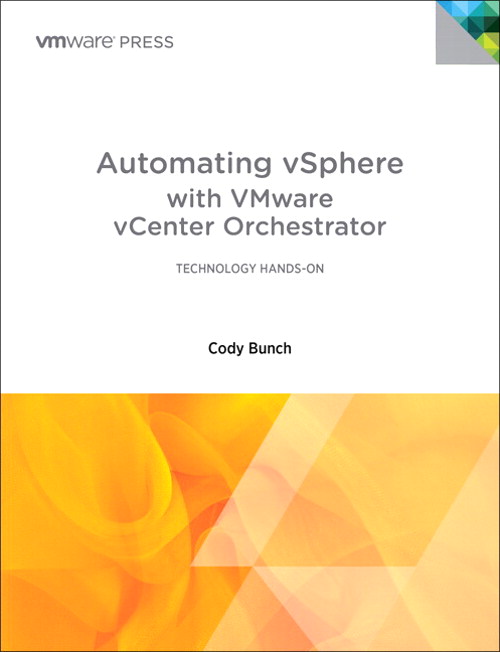
I’ll be honest.  Orchestration, to me, is something a conductor does with the Philharmonic.  I keep hearing the word thrown around in virtualization and cloud discussions but I’m never quite sure what it means.  I know it has something to do with automating processes and such but beyond that I can’t give a detailed description of what is involved from a technical perspective.  Luckily, thanks to VMware Press and Cody Bunch (@cody_bunch) I don’t have to be uneducated any longer:

One of the first books from VMware Press, Automating vSphere with VMware vCenter Orchestrator (I’m going to abbreviate to Automating vSphere) is a fine example of the type of reference material that is needed to help sort through some of the more esoteric concepts surrounding virtualization and cloud computing today.  As I started reading through the introduction, I knew immediately that I was going to enjoy this book immensely due to the humor and light tone.  It’s very easy to write a virtualization encyclopedia.  It’s another thing to make it readable.  Thankfully, Cody Bunch has turned what could have otherwise been a very dry read into a great reference book filled with Star Trek references and Monty Python humor.

Coming in at just over 200 pages with some additional appendices, this book once again qualifies as “pound cake reading”, in that you need to take your time and understand that length isn’t the important part, as the content is very filling.  The author starts off by assuming I know nothing about orchestration and filling me in on the basics behind why vCenter Orchestrator (vCO) is so useful to overworked server/virtualization admins.  The opening chapter makes a very good case for the use of orchestration even in smaller environments due to the consistency of application and scalability potential should the virtualization needs of a company begin to increase rapidly.  I’ve seen this myself many times in smaller customers.  Once the restriction of one server to one operating system is removed, virtualized servers soon begin to multiply very quickly.  With vCO, managing and automating the creation and curation of these servers is effortless.  Provided you aren’t afraid to get your hands dirty.  The rest of Part I of the book covers the installation and configuration of vCO, including scenarios where you want to split the components apart to increase performance and scalability.

Part II delves into the nuts and bolts of how vCO works.  Lots of discussions about workflows that have containers that perform operations.  When presented like this, vCO doesn’t look quite as daunting to an orchestration rookie.  It’s important to help the new people understand that there really isn’t a lot of magic in the individual parts of vCO.  The key, just like a real orchestra, is bringing them together to create something greater than the sum of its parts.  The real jewel of the book to me was Part III, as case study with a fictional retail company.  Case studies are always a good way to ground readers in the reality and application of nebulous concepts.  Thankfully, the Amazing Smoothie company is doing many of the things I would find myself doing for my customers on a regular basis. I enjoyed watching the workflows and Javascript come together to automate menial tasks like consolidating snapshots or retiring virtual machines.  I’m pretty sure that I’m going to find myself dog-earing many of the pages in this section in the future as I learn to apply all the nuggets contained within to real life scenarios for my own environment as well as that of my customers.

If you’d like to grab this book, you can pick it up at the VMware Press site or on Amazon.


Tom’s Take

I’m very impressed with the caliber of writing I’m seeing out of VMware Press in this initial offering.  I’m not one for reading dry documentation or recitation of facts and figures.  By engaging writers like Cody Bunch, VMware Press has made it enjoyable to learn about new concepts while at the same time giving me insight into products I never new I needed.  If you are a virtualization admin that manages more than two or three servers, I highly recommend you take a peak at this book.  The software it discusses doesn’t cost you anything to try, but the sheer complexity of trying to configure it yourself could cause you to give up on vCO without a real appraisal of its capabilities.  Thanks to VMware Press and Cody Bunch, the amount of time and effort you save from buying this book will easily be offset by gains in productivity down the road.

Book Review Disclaimer

A review copy of Automating vSphere with VMware vCenter Orchestrator was provided to me by VMware Press.  VMware Press did not ask me to review this book as a condition of providing the copy.  VMware Press did not ask for nor were they promised any consideration in the writing of this review.  The thoughts and opinions expressed herein are mine and mine alone.

Cisco ASA CX – Next Generation Firewall? Or Star Trek: Enterprise Firewall?

There’s been a lot of talk recently about the coming of the “next generation” firewall.  A simple firewall is nothing more than a high-speed packet filter.  You match on criteria such as access list or protocol type and then decide what to do with the packet from there.  It’s so simple in fact that you can setup a firewall on a Cisco router like Jeremy Stretch has done.  However, the days of the packet filtering firewall are quickly coming to an end.  Newer firewalls must have the intelligence to identify traffic not by IP address or port number.  In today’s network world, almost all applications tunnel themselves over HTTP, either due to their nature as web-based apps or the fact that they take advantage of port 80 being open through almost every firewall.  The key to being able to identify malicious or non-desired traffic attempting to use HTTP as a “common carrier” is to inspect the packet at a deeper level than just port number.  Of course, many of the firewalls that I’ve looked at in the past that claim to do deep packet inspection either did a very bad job of it or did such a great job inspecting that the aggregate throughput of the firewall dropped to the point of being useless.  How do we balance the need to look more closely at the packet with the desire to not have it slow our network to the point of tears?

Cisco has spent a lot of time and money on the ASA line of firewalls.  I’ve installed quite a few of them myself and they are pretty decent when it comes to high speed packet filtering.  However, my customers are now asking for the deeper packet inspection that Cisco hasn’t yet been able to provide.  Next-Gen vendors like Palo Alto and Sonicwall (now a part of Dell) have been playing up their additional capabilities to beat the ASA head-on in competitions where blocking outbound NetBIOS-over-TCP is less important than keeping people off of Farmville.  To answer the challenge, Cisco recently announced the CX addition to the ASA family.  While I haven’t yet had a chance to fire one of these things up, I thought I’d take a moment to talk about it and aggregate some questions and answers about the specs and capabilities.

The ASA CX is a Security Services Processor (SSP) module that today runs on the ASA 5585-X model.  It’s a beastly server-type device that has 12GB or 24GB or RAM, 600GB of RAID-1 disk space and 8GB of flash storage.  The lower-end model can take up to 2Gbps throughput and the bigger brother can handle 5Gbps.  It scans over 1000 applications and more than 75,000 “micro” applications to determine whether the user is listening to iTunes in the cloud or watching HD video on Youtube.  The ASA CX also utilizes other products in the Cisco Secure-X portfolio to feed it information.  The Cisco AnyConnect Secure VPN client allows the CX to identify traffic that isn’t HTTP-based, as right now the CX can only identify traffic via HTTP User Agent in the absence of AnyConnect.  In addition, the Cisco Security Intelligence Operation (SIO) Manager can aggregate information from different points on the network to give the admins a much bigger picture of what is going on to prevent things such as zero-day attack outbreaks and malware infections.

One of the nice new features of the ASA CX that’s been pointed out by Greg Ferro is the user interface for the CX module.  Rather than relying on the Java-based ADSM client or forcing users to learn yet another CLI convention, Cisco decided to include a copy of the Cisco Prime Security Manager on-box to manage the CX module.  This is arguably the best way for Cisco to have created an easy way for customers to easily utilize the features of the new CX module.  I’ve recently had a chance to play around with the Identity Services Engine (ISE) and while the UI is very slick and useful, I cried a little when I started using the ADE-OS interface on the CLI.  It’s not the same as the IOS or CUCM CLI that I’m used to, so I spent much of my time figuring out how to do things I’ve already learned to do twice before.  Instead, with the CX Prime Security Manager interface, Cisco has allowed me to take a UI that I’m already comfortable with and apply it to the new features in the firewall module.  In addition, I can forego the use of the on-box Prime instance and instead register the CX to an existing Prime installation for a single point of management for all my security needs.  I’m sure that the firewall itself still needs to use ASDM for configuration and that the Prime instance is only for the CX module but this is still a step in the right direction.

There are some downsides to the CX right now.  That’s to be expected in any 1.0-type launch.  Firstly, you need an ASA 5585-X to run the thing.  That’s a pretty hefty firewall.  It’s an expensive one too.  It makes sense that Cisco will want to ensure that the product works well on the best box it has before trying to pare down the module to run effectively on the lower ASA-X series firewall.  Still, I highly doubt Cisco will ever port this module to run on the plain ASA series.  So if you want to do Next-Gen firewalling, you’re going to need to break out the forklift no matter what.  In the 1.0 CX release, there’s also no support for IPS, non-web based application identification without AnyConnect, or SSH decryption (although it can do SSL/TLS decryption on the fly).  It also doesn’t currently integrate with ISE for posture assessment and identity enforcement.  That’s going to be critical in the future to allow full integration with the rest of Secure-X.

If you’d like to learn more at the new ASA CX, check out the pages on Cisco’s website.  There’s also an excellent Youtube walkthrough:


Tom’s Take

Cisco has needed a Next-Gen firewall for quite a while.  When the flagship of your fleet looks like the Stargazer instead of the Enterprise-D, it’s time for a serious upgrade.  I know that there have been some challenges in Cisco’s security division as of late, but I hope that they’ve been sorted out and the can start moving down the road.  At the same time, I’ve got horrible memories of the last time Cisco tried to extend the Unified Threat Management (UTM) profile of the ASA with the Content Security and Control (CSC) module.  That outsourced piece of lovely was a source of constant headache for the one or two customers that had it.  On top of it all, everything inside was licensed from Trend Micro.  That meant that you had to pay them a fee every year on top of the maintenance you were paying to Cisco!  Hopefully by building the CX module with Cisco technologies such as Network-Based Application Recognition (NBAR) version 2, Cisco can avoid having the new shiny part of it’s family being panned by the real firewall people out there and languish year-to-year before finally being put out of it’s misery, much like the CSC module or Star Trek: Enterprise.  I’m sure that’s why they decided to call the new module the CX and not the NX.  No sense cursing it out of the gate.

Minimizing MacGyver

I’m sure at this point everyone is familiar with (Angus) MacGyver.  David Lee Zlotoff created a character expertly played by Richard Dean Anderson that has become beloved by geeks and nerds the world over.  This mulletted genius was able to solve any problem with a simple application of science and whatever materials he had on hand.  Mac used his brains before his brawn and always before resorting to violence of any kind.  He’s a hero to anyone that has ever had to fix an impossible problem with nothing.  My cell phone ringtone is the Season One theme song to the TV show.  It’s been that way ever since I fixed a fiber-to-Ethernet media converter with a paper clip.  So it is with great reluctance that I must insist that it’s time network rock stars move on from my dear friend MacGyver.

Don’t get me wrong.  There’s something satisfying about fixing a routing loop with a deceptively simple access list.  The elegance of connecting two switches back-to-back with a fiber patch cable that has been rigged between three different SC-to-ST connectors is equally impressive.  However, these are simply parlor tricks.  Last ditch efforts of our stubborn engineer-ish brains to refuse to accept failure at any cost.  I can honestly admit that I’ve been known to say out loud, “I will not allow this project to fail because of a missing patch cable!”.  My reflexes kick in, and before I know it I’m working on a switch connected to the rest of the network by a strange combination of bailing wire and dental floss.  But what has this gained me in the end?

Anyone that has worked in IT knows the pain of doing a project with inadequate resources or insufficient time.  It seems to be a trademark of our profession.  We seem like miracle workers because we can do the impossible from less than nothing.  Honestly though, how many times have we put ourselves into these positions because of hubris or short-sightedness?  How many times have we equivocated to ourselves that a layer 2 switch will work in this design?  Or that a firewall will be more than capable of handling the load we place on it even if we find out later that the traffic is more than triple the original design?  Why do we subject ourselves to these kinds of tribulations knowing that we’ll be unhappy unless we can use chewing gum and duct tape to save the day?

Many times, all it takes is a little planning up front to save the day.  Even MacGyver does it. I always wondered why he carried a roll of duct tape wherever he went.  The MacGyver Super Bowl Commercial from 2009 even lampooned his need for proper preparation.  I can’t tell you the number of times I’ve added an extra SFP module or fiber patch cable knowing that I would need it when I arrived on site.  These extra steps have saved me headaches and embarrassment.  And it is this prior proper planning that network engine…rock stars must rely on in order to do our jobs to the fullest possible extent.  We must move away from the bailing wire and embrace the bill of materials.  No longer should we carry extra patch cables.  Instead we should remember to place them in the packages before they ship.  Taking things for granted will end in heartache and despair.  And force us to rely less on our brains and more on our reflexes.

Being a Network MacGyver makes me gleam with pride because I’ve done the impossible.  Never putting myself in the position to be MacGyver makes me even more pleased because I don’t have to break out the duct tape.  It means that I’ve done all my thinking up front.  I’m content because my project should just fall into place without hiccups.  The best projects don’t need MacGyver.  They just need a good plan.  I hope that all of you out there will join me in leaving dear Angus behind and instead following a good plan from the start.  We only make ourselves look like miracle workers when we’ve put ourselves in the position to need a miracle.  Instead, we should dedicate ourselves to doing the job right before we even get started.