Unknown's avatar

About networkingnerd

Tom Hollingsworth, CCIE #29213, is a former network engineer and current organizer for Tech Field Day. Tom has been in the IT industry since 2002, and has been a nerd since he first drew breath.

Janetter – The Twitter Client That Tweetdeck Needs To Be

Once I became a regular Twitter user, I abandoned the web interface and instead started using a client.  For a long while, the de facto client for Windows was Tweetdeck.  The ability to manage lists and segregate users into classifications was very useful for those that follow a very eclectic group of Twitterers.  Also very useful to me was the multiple column layout, which allowed me to keep track of my timeline, mentions, and hashtag searches.  This last feature was the most attractive to me when attending Tech Field Day events, as I tend to monitor the event hashtag closely for questions and comments.  So it was that I became a regular user of Tweetdeck.  It was the only reason I installed Adobe Air on my desktop and laptop.  It was the first application I launched in the morning and the last I closed at night.

That was before the dark times.  Before…Twitter.

Last May, Twitter purchased Tweetdeck for about $40 million.  I was quite excited at first.  The last time this happened, Twitter turned the Tweetie client for iPhone and Mac into the official client for those platforms.  I liked the interface in the iPhone and hoped that Twitter would pour some development into Tweetdeck and turn it into the official cross-platform client for power users.  Twitter took their time consolidating the development team and updating Tweetdeck as they saw fit.  About six months later, Twitter released Tweetdeck 1.0, and increase from Tweetdeck’s last version of 0.38.2.  Gone was the dependency on Adobe Air, instead using HTML5.  That was probably the only good thing about it.  The interface was rearranged.  Pieces of critical information, like date and time of tweets was gone.  The interface defaulted to using “real” names instead of Twitter handles.  The multiple column layout was broken.  All in all, it took me about a day to delete the 1.0 app from my computer and go back to the version 0.38 Air app.  I’d rather have an old client that works than a newer broken client.

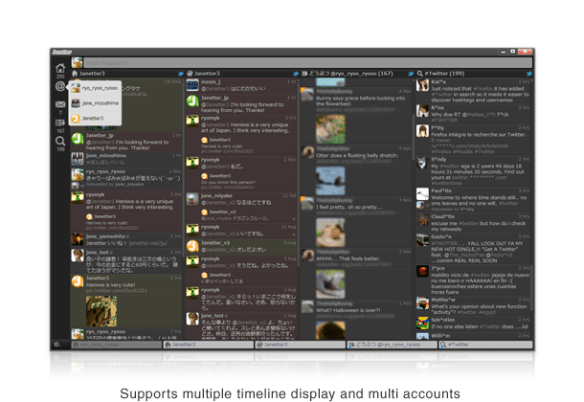
As the weeks passed, I realized that Tweetdeck Air was having a few issues.  People would randomly be unfollowed.  Tweets would have issues being posted.  Plus, I knew that I would eventually be forced to upgrade if Twitter released a killer new feature.  I wanted a new client but I wanted it to be like the old Tweetdeck.  I was about to give up hope when Matthew Norwood (@MatthewNorwood) mentioned that he’d been using a new client.  Behold – Janetter:

It even looks like the old Tweetdeck!  It uses the Chromium rendering engine (Webkit on Mac) to display tweets.  This also means that the interface is fully skinnable with HTML5 and CSS.  Support for multiple accounts, multiple columns, lists, and filtering/muting make it just as useful as the old Tweetdeck.  Throw in in-line image previews and the ability to translate highlighted phrases and you see that there’s a lot here to utilize.  I started using it as my Windows client full time and I use the Mac version when I need to monitor hashtags.  I find it very easy to navigate and use.

That’s not to say there aren’t a couple of caveats.  Keeping up with a large volume of tweets can be cumbersome if you step away from the keyboard.  The auto scrolling is a bit buggy sometimes.  As well, sometimes I get random tweets that were read being marked as unread.  The default user interface is a bit of a trainwreck (I recommend the Deep Sea theme).  Despite these little issues, I find Janetter to be a great replacement overall for the Client Formerly Known As Tweetdeck for those of you that miss the old version but can’t bring yourself to install what Twitter released a very “1.0 product”.  Perhaps with a little time and some proper feedback, Twitter will remake their version of Tweetdeck into what it used to be with some polish and new features.

Head over to http://janetter.net to see more features or download a copy for your particular flavor of operating system.  You can also download Janetter through the Mac App Store.

Is Dell The New HP? Or The Old IBM?

Dell announced it’s intention today to acquire Sonicwall, a well-respected firewall vendor.  This is just a latest in a long line of fairly recent buys for Dell, including AppAssure, Force10, and Compellent.  There’s been a lot of speculation about the reasons behind the recent flurry of purchases coming out of Austin, TX.  I agree with the majority of what I’m hearing, but I thought I’d point out a few things that I think make a lot of sense and might give us a glimpse into where Dell might be headed next.

Dell is a wonderful supply chain company.  I’ve heard them compared to Walmart and the US military in the same breath when discussing efficiency of logistic management.  Dell has the capability of putting a box of something on your doorstep within days of ordering.  It just so happens that they make computer stuff.  For years, Dell seemed to be content to partner with companies to utilize their supply chain to deliver other people’s stuff.  After a while, Dell decided to start making that stuff for themselves and cut out the middle man.  This is why you see things like Dell printers and switches.  It didn’t take long for Dell to change it’s mind, though.  It made little sense to devote so much R&D to copying other products.  Why not just spend the money on buying those companies outright?  I mean, that’s how HP does it, right?  And so we start the acquisition phase for Dell.  Since acquiring Equallogic in 2008, they’ve bought 5 other companies that make everything from enterprise storage to desktop management. They only thing they’ve missed on was acquiring 3PAR, which happened because HP threw a pile of cash at 3PAR to not go to Dell.  I’m sure that was more about denying Dell an enterprise storage vendor than it was using 3PAR to its fullest capabilities.

Dell still has a lot of OEM relationships, though.  Their wireless solution is OEMed from Aruba.  They resell Juniper and Brocade equipment as their J-series and B-series respectively.  However, Dell is trying to move into the data center to fight with HP, Cisco, and IBM.  HP already owns a data center solution top to bottom.  Cisco is currently OEMing their solution with EMC (vBlock).  I think Dell realizes that it’s not only more profitable to own the entire solution in the DC, it’s also safer in the long term.  You either support all your own equipment, or you have to support everyone’s equipment.  And if you try to support someone else’s stuff, you have to be very careful you don’t upset the apple cart.  Case in point: last year many assumed Cisco was on the outs with EMC because they started supporting NetApp and Hyper-V.  If you can’t keep your OEM DC solution partners happy, you don’t have a solution.  From Dell’s perspective, it’s much easier to appease everyone if they’re getting their paychecks from the same HR department.  Dell’s acquisitions of Force10 and, now, Sonicwall seem to support the idea that they want the “one throat to choke” model of solution delivery.  Very strategic.

They only problem that I have with this kind of Innovation by Acquisition strategy is that it only works when upper management is competent and focused.  So long as Michael Dell is running the show in Austin, I’m confident that Dell will make solid choices and bring on companies that complement their strategies.  Where the “buy it” model breaks down is when you bring in someone that runs counter to your core beliefs.  Yes, I’m looking at HP now.  Ask them how they feel about Mark Hurd basically shutting down R&D and spending their war chest on Palm/WebOS.  Ask them if they’re still okay with Leo Apotheker reversing that decision only months later and putting PSG on a chopping block because he needed some cash to buy a software company (Autonomy) because software is all he knows.  If the ship has a good captain, you get where you’re going.  If the cook’s assistant is in charge, you’re just going to steam in circles until you run out of gas.  HP is having real issues right now trying to figure out who they want to be.  A year of second guessing and trajectory reversals (and re-reversals) have left many shell shocked and gun shy, afraid to make any more bold moves until the dust settles.  The same can be said of many other vendors.  In this industry, you’re only as successful as your last failed acquisition.

On the other hand, you also have to keep moving ahead and innovating.  Otherwise the mighty giants get left behind.  Ask IBM how it feels to now be considered an also-ran in the industry.  I can remember not too long ago when IBM was a three-letter combination that commanded power and respect.  After all, as the old saying goes “No one every got fired for buying IBM.”  Today, the same can’t be said.  IBM has divested all of its old power to Lenovo, spinning off the personal systems and small server business to concentrate more on the data center and services division.  It’s made them a much leaner, meaner competitor.  However, it’s also reaved away much of what made them so unstoppable in the past.  People now look to companies like Dell and HP to provide top-to-bottom support for every part of their infrastructure.  I can speak from experience here.  I work for a company founded by an ex-IBMer.  For years we wouldn’t sell anything that didn’t have a Big Blue logo on it.  Today, I can’t tell you the last time I sold something from IBM.  It feels like the industry that IBM built passed them by because they sold off much of who they were trying to be what they wanted.  Now that they are where they want to be, no one recognizes who they were.  They will need to start fighting again to regain their relevance.  Dell would do good to avoid acquiring too much too fast to avoid a similar fate.  Once you grow too large, you have to start shedding things to stay agile.  That’s when you start losing your identity.


Tom’s Take

So far, reaction to the Sonicwall purchase has been overwhelmingly positive.  It sets the stage for Dell to begin to compete with the Big Boys of Networking across their product lines.  It also more or less completes Dell’s product line by bringing everything they need in-house.  They only major piece they are still missing is wireless.  They OEM from Aruba today, but if they want to seriously compete they’ll need to acquire a wireless company sooner rather than later.  Aruba is the logical target, but are they too big to swallow so soon after Sonicwall?  And what of their new switching line?  No sense trampling on PowerConnect or Force10.  That leaves other smaller vendors like Aerohive or Meraki.  Either one might be a good fit for Dell.  But that’s a blog post for another day.  For right now, Dell needs to spend time making the transition with Sonicwall as smooth as possible.  That way, they can just be Dell.  Not the New HP.  And not the Old IBM.

DST Configuration – Just In the Nick of Time

Today is the dreaded day in the US (and other places) when we must sacrifice an hour of our precious time to the sun deity so that he might rise again in the morning.  While this is great for being outdoors and enjoying the sunshine all the way into the late evening hours, it does wreak havoc on our networking equipment that relies on precise timing to let us know when a core dump happened or when that last PRI call came in when running debug isdn q931.  However, getting the right time running on our devices can be a challenge.  In this post, I will cover configuring Daylight Savings Time on Cisco, HP, and Juniper network equipment for the most pervasive OS deployments.  Note that some configurations are more complicated than others.  Also, I will be using Central Time (CST/CDT) for my examples, which is GMT -6 (-5 in DST).  Adjust as necessary for your neck of the woods.  I’m also going to assume that you’ve configured NTP/SNTP on your devices.  If not, read my blog post about it and go do that first.  Don’t worry, I’ll still be here when you get back.  I have free time.

Cisco

I’ve covered the basics of setting DST config on Cisco IOS before, but I’ll put it here for the sake of completeness.  In IOS (and IOS XR), you must first set the time zone for your device:

R1(config)# clock timezone <name> <GMT offset>
R1(config)# clock timezone CST -6

Easy, right?  Now for the fun part.  Cisco has always required manual configuration of DST on their IOS devices.  This is likely due to them being shipped all around the world and various countries observing DST (or not) and even different regions observing it differently.  At any rate, you must the clock summer-time command to configure your IOS clock to jump when needed.  Note that in the US, DST begins at 2:00 a.m. local time on the second Sunday in March and ends a 2:00 a.m. local time on the first Sunday in November.  That will help you decode this code string:

R1(config)# clock summer-time <name> recurring <week number start> <day> <month> <time to start> <week number end> <day> <month> <time to end>
R1(config)# clock summer-time CDT recurring 2 Sun Mar 2:00 1 Sun Nov 2:00

Now your clock will jump when necessary on the correct day.  Note that this was a really handy configuration requirement to have in 2007, when the US government decided to change DST from the previous requirement of the first Sunday in April at the start and the last Sunday in October to end.  With Cisco, manual reconfiguration was required, but no OS updates were needed.

HP (Procurve/E-Series and H3C/A-Series)

As near as I can tell, all HP Networking devices derive their DST settings from the OS.  That’s great…unless you’re working on an old device or one that hasn’t been updated since the last presidential administration.  It turns out that many old HP Procurve network devices still have the pre-2007 US DST rules hard-coded in the OS.  In order to fix them, you’re going to need to plug in a config change:

ProCurve(config)# time daylight-time-rule user-defined begin-date 3/8 end-date 11/1

I know what you’re thinking.  Isn’t that going to be a pain to change every year if the dates are hard-coded?  Turns out the HP guys were ahead of us on that one too.  The system is smart enough to know that DST always happens on a Sunday.  By configuring the rule to occur on March 8th (the earliest possible second Sunday in March) and November 1st (the earliest possible first Sunday in November), the system will wait until the Sunday that matches or follows that date to enact the DST for the device.  Hooray for logic!  Note that if you upgrade the OS of your device to a release that supports the correct post-2007 DST configuration, you won’t need to remove the above configuration.  It will work correctly.

Juniper

Juniper configures DST based on the information found in the IANA Timezone Database, often just called tz.  First, you want to get your device configured for NTP.  I’m going to refer you to Rich Lowton’s excellent blog post about that.  After you’ve configured your timezone in Junos, the system will automatically correct your local clock to reflect DST when appropriate.  Very handy, and it makes sense when you consider that Junos is based heavily on BSD for basic OS operation.  One thing that did give me pause about this has nothing to do with Junos itself, but with the fact that there have been issues with the tz database, even as late as last October.  Thankfully, that little petty lawsuit was sidestepped thanks to the IANA taking control of the tz database.  Should you find yourself in need of making major changes to the Junos tz database without the need to do a complete system update, check out these handy instructions for setting a custom timezone over at Juniper’s website.  Just don’t be afraid to get your hands dirty with some BSD commands.


Tom’s Take

Daylight Savings Time is one of my least favorite things.  I can’t see the advantage of having that extra hour of daylight to push the sunlight well past bedtime for my kids.  Likewise, I think waking up to sunrise is overrated.  As a networking professional, DST changes give me heartburn even when everything runs correctly.  And I’m not even going to bring up the issues with phone systems like CallManager 4.x and the “never going to be patched” DST issues with Windows 2000.  Or the Java issues with 79xx phones that still creep up to this day and make DST and confusing couple of weeks for those that won’t upgrade technology. Or even the bugs in the iPhone with DST that cause clocks to spring the wrong way or alarms to fail to fire at the proper time.  In the end though, network enginee…rock stars are required to pull out our magical bags and make everything “just work”.  Thanks to some foresight by major networking vendors, it’s fairly easy to figure out DST changes and have them applied automagically.  It’s also easy to change things when someone decides they want their kids to have an extra hour of daylight to go trick-or-treating at Halloween (I really wish I was kidding).  If you make sure you’ve taken care of everything ahead of time, you won’t have to worry about losing more than just one hour of sleep on the second Sunday in March.

Cisco CoLaboratory – Any Questions? Any Answers?

Cisco has recently announced the details of their CoLaboratory program for the CCNP certification.  This program is focused on those out there certified as CCNPs with a couple of years of job experience that want to help shape the future of the CCNP certification.  You get to spend eight weeks helping develop a subset of exam questions that may find their way into the question pool for the various CCNP or CCDx tests.  And you’re rewarded for all your hard work with a one-year extension to your current CCNP/CCDx certification.

I got a chance to participate in the CCNA CoLab program a couple of years ago.  I thought it would be pretty easy, right?  I mean, I’ve taken the test.  I know the content forwards and backwards.  How hard could it be to write questions for the test?  Really Hard.  Turns out that there are a lot of things that go into writing a good test question.  Things I never even thought of.  Like ensuring that the candidate doesn’t have a good chance of guessing the answer.  Or getting rid of “all of the above” as an answer choice.  Turns out that most of the time “all of the above” is the choice, it’s the most often picked answer.  Same for “none of the above”.  I spent my eight weeks not only writing good, challenging questions for aspiring network rock stars, but I got a crash course in why the Cisco tests look and read the way they do.  I found a new respect for those people that spend all their time trying to capture the essence of very dry reading material in just a few words and maybe a diagram.

I also found that I’ve become more critical of shoddy test writing.  Not just all/none of the above type stuff either.  How about questions that ask for 3 correct answers and there are only four choices?  There’s a good chance I’ll get that one right even just guessing.  Or one of my favorite questions to make fun of: “Each answer represents a part of the solution.  Choose all correct steps that apply.”  Those questions are not only easy to boil down to quick binary choices, but I hate that often there is one answer that sticks out so plainly that you know it must be the right answer.  Then there’s the old multiple choice standby: when all else fails, pick the longest answer.  I can’t tell you how much time I spent on my question submissions writing “good” bad answers.  There’s a whole methodology that I never knew anything about.  And making sure the longest answer isn’t the right one every time is a lot harder than you might think.

Tom’s Take

In the end, I loved my participation in the Cisco CoLaboratory program.  It gave me a chance to see tests from the other side of the curtain and learn how to better word questions and answers to extract the maximum amount of knowledge from candidates.  If you are at all interested in certifications, or if you’ve ever sat in a certification test and said to yourself, “This question is stupid!  I could write a better question than this.”, you should head over to the Cisco CoLaboratory page and sign up to participate.  That way you get to come up with good questions.  And hopefully better answers.

CCIE Data Center – The Waiting Is The Hardest Part

By now, you’ve probably read the posts from Jeff Fry and Tony Bourke letting the cat out of the CCIE bag for the oft-rumored CCIE Data Center (DC) certification.  As was the case last year, a PDF posted to the Cisco Live Virtual website spoiled all the speculation.  Contained within the slide deck for BRKCRT-1612 Evolution of Data Centre Certification and Training is a wealth of confirmation starting around slide 18.  It spells out in bold letters the CCIE DC 1.0 program.  It seems to be focused around three major technology pillars: Unified Computing, Unified Fabric, and Unified Network Services.  As people who have read my blog since last year have probably surmised, this wasn’t really a surprise to me after Cisco Live 2011.

As I surmised eight months ago, it encompasses the Nexus product line top to bottom, with the 7009, 5548, 2232, and 1000v switches all being represented.  Also included just for you storage folks is a 9222i MDS SAN switch.  There’s even a Catalyst 3750 thrown in for good measure.  Maybe they’re using it to fill an air gap in the rack or something.  From the UCS server side of the house, you’ll likely get to see a UCS 6248 fabric interconnect and a 5148 blade chassis.  And because no CCIE lab would exist without a head scratcher on the blueprint there is also an ACE 4710 module.  I’m sure that this has to do with the requirement that almost every data center needs some kind of load balancer or application delivery controller.  As I mentioned before and Tony mentioned in his blog post, don’t be surprised to see an ACE GSS module in there as well.  Might be worth a two point question.

Is the CCIE SAN Dead?

If you’re currently studying for your SAN CCIE, don’t give up just yet.  While there hasn’t been any official announcement just yet, that also doesn’t mean the SAN program is being retired any time soon.  There will be more than enough time for you SAN jockeys to finish up this CCIE just in time to start studying for a new one.  If you figure that the announcement will be made by Cisco Live Melbourne near the end of March, it will likely be three months for the written beta.  That puts the wide release of the written exam at Cisco Live San Diego in June.  The lab will be in beta from that point forward, so it will be the tail end of the year before the first non-guinea pigs are sitting the CCIE DC lab.  Since you SAN folks are buried in your own track right now, keep heading down that path.  I’m sure that all the SAN-OS configs and FCoE experience will serve you well on the new exam, as UCS relies heavily on storage networking.  In fact, I wouldn’t be surprised to see some sort of bridge program run concurrently with the CCIE SAN / CCIE DC candidates for the first 6-8 months where SAN CCIEs can sit the DC lab as an opportunity and incentive to upgrade.  After all, the first DC CCIEs are likely to be SAN folks anyway.  Why not try to certify all you can?

Expect the formal announcement of the program to happen sometime between March 6th and March 20th.  It will likely come with a few new additions to the UCS line and be promoted as a way to prove to the world that Cisco is very serious about servers now.  Shortly after that, expect an announcement for signups for the beta written exam.  I’d bank on 150-200 questions of all kinds, from FCoE to UCS Manager.  It’ll take some time to get all those graded, so while you’re waiting to see if you’ve hit the cut score, head over to the Data Center Supplemental Learning page and start refreshing things.  Maybe you’ll have a chance to head to San Jose and sit in my favorite building on Tasman Drive to try and break a brand new lab.  Then, you’ll just be waiting for your score report.  That’s the hardest part.

Partly Cloudy – A Hallmark Presentation

One of the joys of working for an education-focused VAR is that I get to give technical presentations.  More often than not, I try to get a presentation slot at the Oklahoma Technology Association annual conference.  I did one last year over IPv6 to a packed house…of six people.  This year, I jumped at the chance to grab a slot and talk about something new and different.

The Cloud.

Yes, I figured it was about time to teach the people in education about some of the basics behind cloud.  When the call for presentations came out, I registered almost immediately.  This year, I had 12 months worth of analysis and experience at Tech Field Day to drive me in my presentation preparations.  The first think I knew I needed to do was come up with a catchy title.  People get numbed to the descriptive, SEO-friendly titles that get put on conference agendas.  As you can tell from the titles of my blog posts, I want something that’s going to pop.  I decided to sort of theme my presentation after a weather report.   Therefore, calling it “Partly Cloudy” seemed like a no-brainer.  I added “Forecast For Your Technology Future” as a subtitle to ensure that people didn’t think I was talking strictly about meteorology.  I spent a bit of time laying out slides and putting some thoughts down.  I hate when people read their bullet points from a slide deck, so I use mine more as discussion points.  They serve as a way to keep me on track and help focus me on what I want to say to my audience.  I also decided to do something fun for the audience.  I shamelessly stole this idea from Cisco Press author Tim Szigeti.  Tim wrote a very good guide to QoS and when he gives a presentation at Cisco Live, he gives away a copy of said book to the first person to ask a question during his presentation.  I loved the idea and wanted to do something similar.  However, I’m not an author.  I wracked my brain trying to come up with a good idea.  That was where I came up with the idea of using an umbrella as a prop.  You’ll see why in just a minute.

When I got to the room to do my presentation, I was astonished.  There were almost 90 people in the audience!  I got a little jittery from realizing how many people were there, especially the ones I didn’t know.  I got everything setup and started my video camera so I could go back after the fact and not only post about it on my blog, but have a reference for what I did right and what I could have done better.  Here’s me:

If you’d like to follow along with my slide deck, you can download the PDF HERE.

Compared to last year, I desperately wanted to avoid using the word “so” as much as I did.  I practiced a lot to try and leave it out as a pause word or a joining word.  If you’ve ever talked to me in real life, you can understand how hard that is for me.  Unfortunately, I think I jumped on the word “hallmark” and used it a little more than I should.  Not sure why I did that to be honest.  But as far as things go, it could have been much worse.  One thing that did unnerve me a little was the fact that people started walking out of my presentation about about ten minutes.  Having left a few presentations early in my lifetime, I started thinking in the back of my mind what could be causing people to leave.  Was I boring?  Was the subject matter too elementary?  Did people just hate the sound of my voice?  All in all, about twenty people left before the end, although to be honest if my company hadn’t been giving away a gift card, it might have been higher than that.  I caught up with several of the early departures during the conference and asked them why they decided to bail.  Their response was almost universal and caught me a little off guard – “You were just talking way over our heads.”  I had never even considered that approach.  I’d spent so much time making sure my content touched on many areas of the cloud that I forgot most of my audience doesn’t talk to Christofer Hoff (@Beaker) about cloud regularly.  My audience consisted of people that found out about cloud technology from a Microsoft commercial or on their new iPhone.  These people don’t care about instantiation of vCloud Director instances or vApp deployments.  They’re still amazed they can put a contact on their iPhone and have it show up on their iPad.  That was my failing.  I never want to be the guy that talks down to an audience.  In this case, however, I think I needed to take a step back and ensure my audience was on the same ground I was on when it came to talking about the cloud.  Lesson learned.

There were a number of other little things that bugged me.  I didn’t like standing behind a lectern since I’m usually an animated presenter.  However, the room design forced me to have a microphone.  I was forced to insert a couple of things into my slides.  I’ll let you guess where those were.  Overall though, I was complimented by several audience members and I had lots of people come up to me afterwards and ask me questions about cloud-based software and virtualization.  I think I’m going to do another one of these at the Fall OTA conference focused on something like virtual desktop infrastructure.  This time I’ll have demos.  And fewer weather-related jokes.

Feedback from my readers is always welcome.  I value each opinion about my presentation and I always strive to get better at them.  I doubt I’ll ever be the most effective public speaker out there, but I want to avoid boring most people to death.

Network Field Day the Third

“This is the third time; I hope good luck lies in odd numbers…. There is divinity in odd numbers, either in nativity, chance, or death.” – William Shakespeare

Good ole Bill Shakespeare says that good things happen in threes (more or less).  And in the case of Network Field Day, he’s right on the money.  March 29th and 30th, 2012, the best and brightest networking minds will gather in the Tech Field Day San Jose Headquarters at the Airport Doubletree to spend time debating Open Flow, OSPF, and how everything in networking has happened before and will likely happen again.  A sampling of the people that will be arguing about these topics (and many more) are:

Ethan Banks Packet Pushers @ECBanks
Tony Bourke The Data Center Overlords @TBourke
Brandon Carroll Brandon Carroll
TechRepublic
@BrandonCarroll
Greg Ferro EtherealMind
Packet Pushers
@EtherealMind
Jeremy L. Gaddis Evil Routers @JLGaddis
Tom Hollingsworth The Networking Nerd @NetworkingNerd
Ivan Pepelnjak ipSpace.net @IOSHints
Derick Winkworth Cloud Toad @CloudToad
Mrs. Y. Packet Pushers @MrsYisWhy

There’s a great group of Tech Field Day veterans here, as well as newcomers Derick Winkworth and our mysterious Network Security Princess, Mrs. Y.  I’m excited to be invited back for yet another event with the TFD crew and happy to be considered in such austere company.

What is Tech Field Day?

Simply put, Tech Field Day is the Dragon’s Den of technical presentations.  There is no fluff.  No pretense.  No tolerance for drivel.  Instead, there are nerd knobs and technical content that would make anyone’s head spin.  No one is safe.  Analyst reports are booed.  Water bottles are thrown.  Why do this?  What’s in it for the companies?  Exposure.  The chance to reach a group of independent bloggers and put your best foot forward to show the world what you’re made of.  A chance to answer tough questions.  At Network Field Day 2 (NFD2), NEC presented about their new approach to Open Flow and where they were taking the emerging market.  They must have really liked what we had to say, because they are coming back once again.  I’m sure they’re going to bring a great presentation and lots of details and demonstrations for us to take in and discuss.

What Do I Get From Tech Field Day?

I love the concept of Tech Field Day.  Being able to talk to vendors in a small group with really bright minds helps me understand emerging technologies like Open Flow or Data Center Fabrics.  In my line of work, I might not encounter these things for many years (if ever), but with the help of Tech Field Day I can interact with the people driving these things today.  I also enjoy the fact that I can condense what I’ve learned and give it back to the community in the form of blog posts and discussion.  It’s been suggested that perhaps I’ve been to one too many Tech Field Day events in recent months.  To that I say: I don’t campaign actively to go to every event.  I realize that they are topics that I’m not well suited for.  I am always honored and humbled to accept invitations whenever they are presented to me.  I look at a chance to attend Tech Field Day as an obligation to my readers and followers to provide top notch technical analysis.  My wife has told me in the past the it’s a “nerdy vacation”.  She wasn’t as sure when I showed her the harrowing schedule or the amount of writing that I had to do for each company when I got back home.  The point is that I enjoy the real space networking opportunities and chance to discuss things with my peers that I might never get to otherwise.  Being able to sit down at a table and look someone in the eyes when you’re talking to them has a wonderful way of generating great discussion.

Tech Field Day – The Home Game

For those of you that like to follow along with the Tech Field Day delegates from the comfort of your office chair or recliner, you are more than welcome.  We will be streaming each of the presentations live at http://techfieldday.com.  We will also be spending a lot of time on Twitter discussing the presentations and questions about them.  Just make sure to use the hashtag #NFD3 and you can be a part of the discussion.  I always make sure to keep my Twitter client at the forefront so I can ask questions from the home audience when they arise.  That way, I’m truly a delegate representing people and giving them a say in what shapes the events.

If you’d like to learn a little more about Tech Field Day, you can head over to http://techfieldday.com and read up on things.  You can also apply to be a delegate at this link.  I look forward to seeing you online and hearing from you at this Tech Field Day event.

Standard Tech Field Day Sponsor Disclaimer

Tech Field Day is a massive undertaking that involves the coordination of many moving parts.  It’s not unlike trying to herd cats with a helicopter.  One of the most important pieces is the sponsors.  Each of the presenting companies is responsible for paying a portion of the travel and lodging costs for the delegates.  This means they have some skin in the game.  What this does NOT mean is that they get to have a say in what we do.  No Tech Field Day delegate is every forced to write about the event due to sponsor demands. If a delegate chooses to write about anything they see at Tech Field Day, there are no restrictions about what can be said.  Sometimes this does lead to negative discussion.  That is entirely up to the delegate.  Independence means no restrictions.  At times, some Tech Field Day sponsors have provided no-cost evaluation equipment to the delegates.  This is provided solely at the discretion of the sponsor and is never a requirement.  This evaluation equipment is also not a contingency of writing a review, be it positive or negative.

IPv6 Wireless Support – The Broadcast Problem

When I was at Wireless Field Day 2, my standard question to all the vendors concerned IPv6 support.  Since I’m a huge proponent of IPv6 and the Internet will be arriving at IPv6 rather soon, I wanted to know what kind of plans the various wireless companies had for their particular flavor of access devices.  Most of the answers were the same: it’s coming…soon.  The generic response of “soon” usually means that there isn’t much demand for it.  It could also mean that there are some tricky technical challenges.  My first thought was about the operating system kernels being run on these access points.  Since most APs run some flavor of BSD/Linux, kernel space can be a premium.  Based on my own experiments trying to load DD-WRT on Linksys wireless routers, I know that the meager amount of memory on these little things can really restrict the feature sets available to network rock stars.  So it was that I went on thinking about this until I had a chance conversation with Matthew Gast (@MatthewSGast) from Aerohive.  Matthew is the chair for the IEEE 802.11 committee.  Yes, that means he’s in charge of running the ship for all the little subletters that drive wireless standards.  I’d say he’s somewhat familiar with wireless.  I spent some time at a party one night talking to him about the challenges of shoehorning IPv6 support into a wireless AP.  His answers were rather enlightening and may have caused one of my brain cells to explode.

Matthew started things off by telling me about wireless keys.  If you pick up Matthew’s book 802.11 Wireless Networks: The Definitive Guideyou can flip over to page 465 to read about the use of keys in wireless.  Keys are used to ensure that all the traffic flying around in the air between clients stays separated.  That’s a rather important thing when you consider how much data gets pushed around via wireless.  However, the frames that carry those keys are limited in the amount of space they have to carry key information.  So some time ago, the architects of 802.11 took a shortcut.  Rather than duplicating key information over and over again for every possible scenario, they decided to make the broadcast key for each wireless client identical.  This saved space in the packet headers and allowed the AP to send broadcasts to all clients connected to the AP.  They relied on the higher layer mechanisms inherent in ARP and layer 3 broadcast control to prune away unnecessary traffic.  Typically, clients will not respond to a broadcast for a different subnet than the one they are attached to.  The major side effect is that clients may hear broadcasts for VLANs for which they are not a member of.  For the most part, this hasn’t been a very big deal.  That is, until IPv6 came about.

Recall, if you will, that IPv6 uses multicast mechanisms to propagate advertisements about neighbor discovery and router advertisement (RA).  In particular, these RAs tell the IPv6-enabled clients about available routers that can be used to exit the local network.  Mulitcast is a purely layer 3 construct.  At layer 2 (and below), multicasts turn into broadcasts.  This is the mechanism that ensures that non-layer 3 aware devices can receive the traffic.  Now, think about the issue above.  Broadcast keys are all the same for clients no matter which VLAN they may be attached to.  Multicast RAs get converted to broadcasts at layer 2.  Starting to see a problem yet?

Let’s say that we have 3 VLANs in a site, VLAN 21, VLAN 42, and VLAN 63.  We are a member of VLAN 63, but we use the same SSID for all 3 VLANs.  If we turn on IPv6 for each of these three VLANs, we now have 3 different devices sending out RAs and SLAAC packets for addressing hosts.  If these multicast packets are converted into broadcast packets for the SSID, all three VLANs are going to see the same broadcast.  The VLAN information is inconsequential to the broadcast key on the AP.  We’re going to see the RAs for the routers in VLAN 21 and VLAN 42 on top of the one in VLAN 63.  All of these are going to get installed as valid exit points off the local network.  As well, the end system may even assign a SLAAC address to itself with a router from a different VLAN.  According to the end system, it heard about all of these networks, so they must all be valid, right?  The system doesn’t know that it won’t have a layer 2 path to them.  Worse yet, if one of those RAs has the best metric for getting off the local LAN, it’s going to be the preferred exit point.  The end system will be unable to communicate with the exit point.  Bummer.

How do we fix this problem?  Well, the current thinking revolves around suppressing the broadcasts at layer 2.  Cisco does this by default in their wireless controllers.  The WLAN controller acts as a DHCP relay and provides proxy ARP while ignoring all other broadcast traffic.  That’s great to prevent the problem from happening right now.  What happens when the problem grows in the future and we can no longer simply ignore these multicast/broadcast packets.  Thankfully, Matthew had the answer for that as well.  In 802.11ac, the new specification for gigabit speed wireless, they’ve overhauled all the old key mechanisms.  No longer will the broadcast key be shared among all clients on the same AP.  Here’s hoping that we can get some 802.11ac clients and APs out there and supported when the time comes to flip the big switch to IPv6.


I’d like to thank Matthew Gast for his help in creating this blog post and pointing out the problems inherent in broadcast key caching.  I’d also like to thank Andrew von Nagy (@revolutionwifi) for translating Matthew’s discussion into terms a non-wireless guy like me can understand.

Software Release Names

Keith Parsons (@KeithRParsons) is to blame for this one with the following tweet:

I’m not a developer, but I’ve been on the receiving end of some of these software naming conventions before.  I figured I’d share my thoughts on them and maybe get a chuckle or two out of it.

Alpha – You should be happy the program even launches!  Alpha code is basically every module our programmers have been working on thrown together for the purposes of meeting a milestone.  It probably doesn’t work half the time.  It has horrible memory leaks. In fact, 50% of the features that are here won’t be in the final release.  Either because we don’t know how to code them properly or we only put the names in there to generate buzz and get more funding.  Your job as an alpha tester is to ensure that this program doesn’t format your hard drive or cause your GPU to melt through your motherboard.  If you do a really good job helping us fix all the glaring and obvious mistakes, we might give you and invite to the closed beta.  Maybe.  Tech support is great at this point.  Provided the developer isn’t on the phone with his mom or ordering a pizza for a late night coding session.

Beta – Okay, we got the GUI all figured out, and it won’t melt your machine anymore.  We’ve still got memory leaks, and we pulled some of the features that we listed just so we sounded as good as the other programs just like this but didn’t really plan on putting in here anyway.  However, we’re thinking of adding a few more features or changing a whole bunch of stuff right before release so that we don’t have time to test or change anything.  After all, we’ve got a deadline to meet, right?  Your job as a beta tester is to fill out form after form of feedback and bug reports so we know what we screwed up from the alpha code.  In fact, most of it is still screwed up.  We just spent our time going to beta putting in feedback forms and making sure they were all spelled correctly so we didn’t get bug reports that said, “You misspelled feedback.”  If you want to call support, feel free.  We could use a good laugh after looking at our last paycheck.

Beta (Google) – This is actually the release code.  We’ve been running it internally for about six months and it’s bulletproof.  We want to release it to about ten people and then make the rest of you beg for invites while we polish the extra pieces.  We also don’t want to support it in any way, so we’re just going to leave the beta tag on this until the development team that created it gets tired of working here and leaves to go to Microsoft.  Then we’ll just kill the product.  Have fun testing!

Developer Preview – Thank you for paying perfectly good money to be official guinea pigs.  Whether you flew to our conference or signed up for a yearly fee, we really appreciate you giving us extra money for a sneak peak at how horrible our programmers are.  You’re likely going to find out about the developer preview about a hour before we tell the gadget websites.  We’ll give you an older copy on a DVD and tell you to load it up and play with it.  Of course, it’s not really ready to go just yet and not much better than the last beta we put out there.  This really only exists for those app writers out there that want to figure out we’ve screwed up their whole programming structure.  We’re going to force them to massively rewrite their code in a rush to have an “approved” app out in time for the release in 6-9 months.  Of course, we’ll probably just take all their hard work and create our own feature that mimics theirs and cut them out of the profits.  Tech support for developer previews is conducted solely from our online support forums by those people who live and breathe our products.  We don’t actually pay them to like our stuff so much and we surely won’t pay them to keep fixing everyone else’s problems.

Release Candidate (RC) – This is what we used to call “beta”.  But since Google screwed up the term beta for the whole world, we had to come up with a new beta.  Sorry!  In this case, RC releases are the final code.  You can submit bug feedback, but we’re going to ignore it until the product goes live.  No time for delays!  Wall Street expects this out yesterday!  Your job is to find all the bugs and submit them so we can put them into the first service pack.  We’re also going to have to put a time limitation in this so people don’t download the software thinking it’s the final release and then use it forever and call for support on what is essentially a beta release.  Microsoft tried that with Windows ME and, well, you see what happened there.

Open Beta (mostly online games) – This is what you’re going to pay $60 plus $15/month for next month.  It’s the final game code release for the first twenty levels.  We don’t have time to work on the last thirty, so we’re placating you people to finish them.  You’re supposed to be stress testing the servers and verifying the first act of the game is feature complete.  In reality, we know all you nerds are downloading the game and using it as a “try before you buy” sneak preview.  There’s a good chance that we’re leaving some surprise stuff out, but you’re going to look at the program files and figure it out anyway.  Please feel free to post on message boards and fan sites and tell us how much our game sucks and how much it resembles other games that are more popular (we did copy them after all).  We won’t read anything in the feedback queue until we hit the first major patch.  Unless you figured out a way to hit the max level in eight hours.  Then we’ll fix that little bit and have you banned and burn down your house.  No hard feelings.

Gold Release – Hurry up and download this!  It’s the real live version!  It’s even got the right release number so your automatic updater doesn’t freak out later.  We’re trying to get this code to the manufacturing plant or the content delivery network as fast as possible.  In the meantime, someone probably posted this to a popular nerd or gadget website, so our single code server is getting hammered right now.  We’re just going to sit back and laugh at the 1 kbit/sec download speeds.  You fools should really have more patience.  In the meantime, we’re going to be sitting here playing Halo.  Don’t bother calling the support line if you break something.  They won’t be trained on the new version until next Wednesday.

General Availability – Okay, you can now download our software from anywhere.  It hasn’t changed much since the first release candidate.  We just kept correcting spelling mistakes and incrementing the version numbers.  The lead developer took his milestone bonus and went to Fiji for a month, so we couldn’t do any really complicated code fixes.  He’s back now with a sunburn and can’t go outside for two months, so he’s coding away.  We’re not fixing anything until the first service pack comes out, though.  We only release hotfixes if the CEO finds out that this program conflicts with his PalmPilot software.  We should also point out that support is going to be a little hard to come by.  The two people that didn’t schedule their vacations to coincide with the release date for the software were sick last Wednesday during training.  You might try turning it off and on again.  That helps. Really.

First Service Pack – Now you can install the software without fear that it will wipe out all those family pictures you keep forgetting to back up.  We fixed all the bugs you reported in the RC stage.  We’re still working on the ones that you came up with when we really released it.  We also added five new features that will probably break ten other things you really counted on.  We’re also adding in support for the second version of some new software so that we can claim to support it when it comes out sometime next year.  But in reality we’re just going to have to recode everything anyway.  If you work in a mission-critical environment, feel free to install this program now.  We’re 80% sure it won’t explode.  Okay, maybe 65%.

Extended Release/Extended Support – Guess what?  We finally fixed all the bugs!  Granted, you’ve probably been using this software for the last five years and complaining every day.  We fixed everything though!  Now, there have been quantum leaps in hardware and coding technology.  So we’re going to mark this one as “old” and move on to porting the whole thing to Java.  Or HTML5.  Or whatever wacky programming language Microsoft is trying to peddle this week.  The new version will have 68% of the feature set of the previous version.  It will also run 200% slower, due to code bloat.  That’s because the lead developer for the project took his release bonus and moved to Fiji permanently.  We had to hire six new interns to replicate what he was doing.  Then we had to send the code to him to fix the things the interns broke.  Don’t bother calling support unless you are a very important publication or the government.  Then we might help.  But we’re going to charge $500/hr for support.  We also take checks.

I hope this little guide helps you out the next time you’re trying to decipher what the various different software release acronyms/terms mean.  Don’t get me started on major number/minor number versioning, though.  That’s a whole other mess.

Why Not OS X Cougar?

Apple announced today that the new version of OS X (10.8) will be called Mountain Lion.  This makes sense considering the last version was called Lion and this is more of an evolutionary upgrade than a total redesign.  But I wondered why the didn’t pick something more catchy.  Like Cougar.  I realize the connotations that the word “cougar” carries in the world today.  You can read some of them on Urban Dictionary, but be warned it’s a very Not-Safe-For-Work page.  The more I thought about it, the more it made sense that it should be called Cougar.  After all, OS X 10.8…:

– is very mature at this point

– is trying to stay attractive and good looking despite its advancing age

– is trying hard to attract a younger crowd

– unsure of what it wants to be (OS X or iOS)

– has expensive tastes (10.8 will only work well on newer Intel i-series processors)

For the record, OS X 10.1 Puma and 10.3 Panther are the same animal as 10.8 Mountain Lion.  Maybe they’ll save Cougar until 10.9.