HP has had a pretty good track record with SDN. Even if it’s not very well-known. HP has embraced OpenFlow on a good number of its Procurve switches. Given the age of these devices, there’s a good chance you can find them laying around in labs or in retired network closets to test with. But where is that going to lead in the long run?
HP Networking was kind enough to come to Interop New York and participate in a Tech Field Day roundtable. It had been a while since I talked to their team. I wanted to see how they were handling the battle being waged between OpenFlow proponents like NEC and Brocade, Cisco and their hardware focus, and VMware with NSX. Jacob Rapp and Chris Young (@NetManChris) stepped up to the plate to talk about SDN and the vision on HP.
They cover a lot of ground in here. Probably the most important piece to me is the SDN app store.
The press picked up on this quickly. HP has an interesting idea here. I should know. I mentioned it in passing in an article I wrote a month ago. The more I think about the app store model, the more I realize that many vendors are going to go down the road. Just not in the way HP is thinking.
HP wants to curate content for enterprises. They want to ensure that software works with their controller to be sure that there aren’t any hiccups in implementation. Given their apparent distaste for open source efforts, it’s safe to say that their efforts will only benefit HP customers. That’s not to say that those same programs won’t work on other controllers. So long as they operate according to the guidelines laid down by the Open Networking Foundation, all should be good.
Show Me The Money
Where’s the value then? That’s in positioning the apps in the store. Yes, you’re going to have some developers come to HP and want to simple apps to put in the store. Odds are better that you’re going to see more recognizable vendors coming to the HP SDN store. People are more likely to buy software from a name they recognize, like TippingPoint or F5. That means that those companies are going to want to have a prime spot in the store. HP is going to make something from hosting those folks.
The real revenue doesn’t come from an SMB buying a load balancer once. It comes from a company offering it as a service with a recurring fee. The vendor gets a revenue stream. HP would be wise to work out a recurring fee as well. It won’t be the juicy 30% cut that Apple enjoys from their walled garden, but anything would be great for the bottom line. Vendors win from additional sales. Customers win from having curated apps that work every time that are easy to purchase, install, and configure. HP wins because everyone comes to them.
Fragmentation As A Service
Now that HP has jumped on the idea of an enterprise-focused SDN app store, I wonder which company will be the next to offer one? I also worry that having multiple app stores won’t end up being cumbersome in the long run. Small developers won’t like submitting their app to four or five different vendor-affiliated stores. More likely they’ll resort to releasing code on their own rather than jump through hoops. That will eventually lead to support fragmentation. Fragmentation helps no one.
Tom’s Take
HP Networking did a great job showcasing what they’ve been doing in SDN. It was also nice to hear about their announcements the day before they broke wide to the press. I think HP is going to do well with OpenFlow on their devices. Integrating OpenFlow visibility into their management tools is also going to do wonders for people worried about keeping up with all the confusing things that SDN can do to a traditional network. The app store is a very intriguing concept that bears watching. We can only hope that it ends up being a well-respect entry in a long line of easing customers into the greater SDN world.
Tech Field Day Disclaimer
HP was a presenter at the Tech Field Day Interop Roundtable. In addition, they also provided the delegates a 1TB USB3 hard disk drive. They did not ask for any consideration in the writing of this review nor were they promised any. The conclusions and analysis contained in this post are mine and mine alone.
While at the Software Defined Data Center Symposium, I had the good fortune to moderate a panel focused on application focused networking in the data center. There were some really smart engineers on that panel. One of the most impressive people was Najam Ahmad from Facebook. He is their Director of Technical Operations. He told me some things about Facebook that made me look at what they are doing a in a new light.
Najam said when I asked him about stakeholder perceptions that he felt a little out of sorts on stage because Ivan Pepelnjak (@IOSHints) and David Cheperdak (@DavidCheperdak) had spent the last fifteen minutes talking about virtual networking. Najam said that he didn’t really know what a hypervisor or a vSwitch were because they don’t run them at Facebook. All of their operating systems and servers run directly on bare metal. That shocked me a bit. Najam said that inserting anything in between the server and what its function was added unnecessary overhead. That’s a pretty unique take on things when you look at how many data centers are driving toward full virtualization.
Old Tools, New Uses
Facebook also runs BGP to the top-of-rack (ToR) switches in their environment. That means that they are doing layer 3 all the way to their access layer. What’s funny is that while BGP in the ToR switches provides for scalability and resiliency, they don’t use BGP as their primary protocol when exchanging routes with providers. For Facebook, BGP at the edge of doesn’t provide enough control over network egress. They take the information that BGP is providing and they crunch it a bit further before adding that all into a controller-based solution that applies business logic and policies to determine the best solution for a given network scenario.
Najam also said that they had used NetFlow for a while to collect data from their servers in order to build a picture of what was going on inside the network. What they found is that the collectors were becoming overwhelmed by the amount of data that they were being hammered with. So instead of installing bigger, faster collectors the Facebook engineers broke the problem apart by putting a small shim program on every server to collect the data and then forward to a system designed to collect data inputs, not just NetFlow inputs. Najam lovingly called their system “FBFlow”.
I thought about this for a while before having a conversation with Colin McNamara (@ColinMcNamara). He told me that this design was a lot more common than I previously thought and that he had implemented it a few times already. At service providers. That’s when things really hit home for me.
Providing Services
Facebook is doing the same things that you do in your data center today. They’re just doing it at a scale that’s one or two orders of magnitude bigger. The basics are all still there: Facebook pushes packets around a network to feed servers and provide applications for consumption by users. What is so different is that the scale at which Facebook does this begins to look less and less like a traditional data center and more and more like a service provider. After all, they *are* providing a service to their users.
I’ve talked before about how Facebook’s Open Compute Project (OCP) switch wasn’t going to be the death knell for traditional networking. Now you see some of that validated in my opinion. Facebook is building hardware to meet their needs because they are a strange hybrid of data center and service provider. Things that we would do successfully in a 500 VM system don’t scale at all for them. Crazy ideas like running exterior gateway routing protocols on ToR switches work just fine for them because of the scale at which they are operating.
Which brings me to the title of the post. People are always holding Facebook and Google in such high regard for what they are doing in their massive data centers. Those same people want to try to emulate that in their own data centers and often find that it just plain doesn’t work. It’s the same set of protocols. Why won’t this work for me?
Facebook is solving problems just like a service provider would. They are building not for continuous uptime, but instead for detectable failures that are quickly recoverable. If I told you that your data center was going to be down for ten minutes next month you’d probably be worried. If I told you that those outages were all going to be one minute long and occur ten times, you’d probably be much less worried. Service providers try to move around failure instead of pouring money into preventing it in the first place. That’s the whole reasoning behind Facebook’s “Fail Harder” mentality.
Failing Harder means making big mistakes and catching them before they become real problems. Little issues tend to get glossed over and forgotten about. Thing about something like Weighted Random Early Detection (WRED). WRED works because you can drop a few packets from a TCP session and it will keep chugging and request the missing bits. If you kill the entire connection or blow up a default gateway then you’ve got a real issue. WRED fixes a problem, global TCP synchronization, by failing quietly once in a while. And it works.
Tom’s Take
Instead of comparing your data center to Facebook or Google you should be taking a hard look at what you are actually trying to do. If you are doing Hadoop your data center is going to look radically different than a web services company. There are lessons you can learn from what the big boys are doing. Failing harder and using old tools in novel new ways are a good start your own data center analysis and planning. Just remember that those big data centers aren’t alien environments. They just have different needs to meet.
Here’s the entire SDDC Symposium Panel with Najam if you’d like to watch it. He’s got a lot of interesting insights into things besides what I wrote about above.
Scott Adams wrote a blog post once about career advice and whether is was better to be excellent at one thing or good at several things. Basically, being the best at something is fairly hard. There’s always going to be someone smarter or faster than you doing it just a bit better. Many times it’s just as good to be very good at what you do. The magic comes when you take two or three things that are very good and combine them in a way that no one has seen before to make something amazing. The kind of thing that makes people gaze in wonder then immediately start figuring out how to use your thing to be great.
During Networking Field Day 6, ThousandEyes showed the delegates something very similar to what Scott Adams was talking about. ThousandEyes uses tools like Traceroute, Ping, and BGP data aggregation to collect data. These tools aren’t overly special in and of themselves. Ping and Traceroute are built into almost every networking stack. BGP looking glass servers and data analysis have been available publicly for a while and can be leveraged in a tool like BGPMon. All very good tools. What ThousandEyes did was combine them in a way to make them better.
ThousandEyes can show data all along the path of a packet. I can see response times and hop-by-hop trajectory. I can see my data leave one autonomous system (AS) and land in another. Want to know what upstream providers your ISP is using? ThousandEyes can tell you that. All that data can be collected in a cloud dashboard. You can keep tabs on it to know if you service level agreements (SLAs) are being met. Or, you could think outside the box and do something that I found very impressive.
Let’s say you are a popular website that angered someone. Maybe you published an unflattering article. Maybe you cut off a user doing something they should have. Maybe someone out there just has a grudge. With the nuclear options available to most “hackers” today, the distributed denial of service (DDoS) attack seems to be a popular choice. So popular that DDoS mitigation services have sprung up to shoulder the load. The basic idea is that when you determine that you’re being slammed with gigabits of traffic, you just swing the DNS for your website to a service that starts scrubbing away attack traffic and steering legitimate traffic to your site. In theory it should prevent the attackers from taking you offline. But how can you prove it’s working?
ThousandEyes can do just that. In the above video, they show what happened when Bank of America (BoA) was recently knocked offline by a huge DDoS attack. The information showed two of the three DDoS mitigation services were engaged. The third changeover didn’t happen. All that traffic was still being dumped on BoA’s servers. Those BoA boxes couldn’t keep up with what they were seeing, so even the legitimate traffic that was being forwarded on by the mitigation scrubbers got lost in the noise. Now, if ThousandEyes can tell you which mitigation provider failed to engage then that’s a powerful tool to have on your side when you go back to them and tell them to get their act together. And that’s just one example.
I hate calling ISPs to fix circuits because it never seems to be their fault. No matter what I do or who I talk to it never seems to be anything inside the provider network. Instead, it’s up to me to fiddle with knobs and buttons to find the right combination of settings to make my problem go away, especially if it’s packet loss. Now, imagine if you had something like ThousandEyes on your side. Not only could you see the path that your packets are taking through your ISP, you can check latency and see routing loops and suboptimal paths. And, you can take a screenshot of it to forward to the escalation tech during those uncomfortable phone arguments about where the problem lies. No fuss, no muss. Just the information you need to make your case and get the problem fixed.
If you’d like to learn more about ThousandEyes and their monitoring solutions, check out their website at http://www.thousandeyes.com. You can also follow them on Twitter as @ThousandEyes.
Tom’s Take
Vision is a funny thing. Some have it. Some don’t. Having vision can mean many things. It can be someone who assembles tools in a novel way to solve a problem. It can be the ability to collect data and “see” what’s going on in a network path. It can also mean being able to take that approach and use it in a non-obvious way to provide a critical service to application providers that they’ve never had before. Or, as we later found out at Networking Field Day 6 during a presentation with Solarwinds, it can mean having the sense to realize when someone is doing something right, as Joel Dolisy said when asked about ThousandEyes, “Oh, we’ve got our eye on them.” That’s a lot of vision. A ThousandEyes worth.
While I was not an official delegate at Networking Field Day 6, I did participate in the presentations and discussions. ThousandEyes was a sponsor of Networking Field Day 6. In addition to hosting a presentation in their offices, they provided snacks and drink for the delegates. They also provided a gift bag with a vacuum water bottle, luggage tag, T-shirt, and stickers (which I somehow managed to misplace). At no time did they ask for any consideration in the writing of this review, nor were they offered any. Independence means no restrictions. The analysis and conclusions contained in this post are mine and mine alone.
This is the one of the most exciting times to be working in networking. New technologies and fresh takes on existing problems are keeping everyone on their toes when it comes to learning new protocols and integration systems. VMworld 2013 served both as an annoucement of VMware’s formal entry into the larger networking world as well as putting existing network vendors on notice. What follows is my take on some of these announcements. I’m sure that some aren’t going to like what I say. I’m even more sure a few will debate my points vehemently. All I ask is that you consider my position as we go forward.
Captain Over, Captain Under
VMware, through their Nicira acquisition and development, is now *the* vendor to go to when you want to build an overlay network. Their technology augments existing deployments to provide software features such as load balancing and policy deployment. In order to do this and ensure that these features are utilized, VMware uses VxLAN tunnels between the devices. VMware calls these constructs “virtual wires”. I’m going to call them vWires, since they’ll likely be called that soon anyway. vWires are deployed between hosts to provide a pathway for communications. Think of it like a GRE tunnel or a VPN tunnel between the hosts. This means the traffic rides on the existing physical network but that network has no real visibility into the payload of the transit packets.
Nicira’s brainchild, NSX, has the ability to function as a layer 2 switch and a layer 3 router as well as a load balancer and a firewall. VMware is integrating many existing technologies with NSX to provide consistency when provisioning and deploying a new sofware-based network. For those devices that can’t be virtualized, VMware is working with HP, Brocade, and Arista to provide NSX agents that can decapsulate the traffic and send it to an physical endpoint that can’t participate in NSX (yet). As of the launch during the keynote, most major networking vendors are participating with NSX. There’s one major exception, but I’ll get to that in a minute.
NSX is a good product. VMware wouldn’t have released it otherwise. It is the vSwitch we’ve needed for a very long time. It also extends the ability of the virtualization/server admin to provision resources quickly. That’s where I’m having my issue with the messaging around NSX. During the second day keynote, the CTOs on stage said that the biggest impediment to application deployment is waiting on the network to be configured. Note that is my paraphrasing of what I took their intent to be. In order to work around the lag in network provisioning, VMware has decided to build a VxLAN/GRE/STT tunnel between the endpoints and eliminate the network admin as a source of delay. NSX turns your network in a fabric for the endpoints connected to it.
Under the Bridge
I also have some issues with NSX and the way it’s supposed to work on existing networks. Network engineers have spent countless hours optimizing paths and reducing delay and jitter to provide applications and servers with the best possible network. Now, that all doesn’t matter. vAdmins just have to click a couple of times and build their vWire to the other server and all that work on the network is for naught. The underlay network exists to provide VxLAN transport. NSX assumes that everything working beneath is running optimally. No loops, no blocked links. NSX doesn’t even participate in spanning tree. Why should it? After all, that vWire ensures that all the traffic ends up in the right location, right? People would never bridge the networking cards on a host server. Like building a VPN server, for instance. All of the things that network admins and engineers think about in regards to keeping the network from blowing up due to excess traffic are handwaved away in the presentations I’ve seen.
The reference architecture for NSX looks pretty. Prettier than any real network I’ve ever seen. I’m afraid that suboptimal networks are going to impact application and server performance now more than ever. And instead of the network using mechanisms like QoS to battle issues, those packets are now invisible bulk traffic. When network folks have no visibility into the content of the network, they can’t help when performance suffers. Who do you think is going to get blamed when that goes on? Right now, it’s the network’s fault when things don’t run right. Do you think that moving the onus for server network provisioning to NSX and vCenter is going to forgive the network people when things go south? Or are the underlay engineers going to be take the brunt of the yelling because they are the only ones that still understand the black magic outside the GUI drag-and-drop to create vWires?
NSX is for service enablement. It allows people to build network components without knowing the CLI. It also means that network admins are going to have to work twice as hard to build resilient networks that work at high speed. I’m hoping that means that TRILL-based fabrics are going to take off. Why use spanning tree now? Your application and service network sure isn’t. No sense adding any more bells and whistles to your switches. It’s better to just tie them into spine-and-leaf CLOS fabrics and be done with it. It now becomes much more important to concentrate on the user experience. Or maybe the wirless network. As long as at least one link exists between your ESX box and the edge switch let the new software networking guys worry about it.
The Recumbent Incumbent?
Cisco is the only major networking manufacturer not publicly on board with NSX right now. Their CTO Padma Warrior has released a response to NSX that talks about lock-in and vertical integration. Still others have released responses to that response. There’s a lot of talk right now about the war brewing between Cisco and VMware and what that means for VCE. One thing is for sure – the landscape has changed. I’m not sure how this is going to fall out on both sides. Cisco isn’t likely to stop selling switches any time soon. NSX still works just fine with Cisco as an underlay. VCE is still going to make a whole bunch of money selling vBlocks in the next few months. Where this becomes a friction point is in the future.
Cisco has been building APIs into their software for the last year. They want to be able to use those APIs to directly program the network through devices like the forthcoming OpenDaylight controller. Will they allow NSX to program them as well? I’m sure they would – if VMware wrote those instructions into NSX. Will VMware demand that Cisco use the NSX-approved APIs and agents to expose network functionality to their software network? They could. Will Cisco scrap OnePK to implement NSX? I doubt that very much. We’re left with a standoff. Cisco wants VMware to use their tools to program Cisco networks. VMware wants Cisco to use the same tools as everyone else and make the network a commodity compared to the way it is now.
Let’s think about that last part for a moment. Aside from some speed differences, networks are largely going to be identical to NSX. It won’t care if you’re running HP, Brocade, or Cisco. Transport is transport. Someone down the road may build some proprietary features into their hardware to make NSX run better but that day is far off. What if a manufacturer builds a switch that is twice as fast as the nearest competition? Three times? Ten times? At what point does the underlay become so important that the overlay starts preferring it exclusively?
Tom’s Take
I said a lot during the Tuesday keynote at VMworld. Some of it was rather snarky. I asked about full BGP tables and vMotioning the machines onto the new NSX network. I asked because I tend to obsess over details. Forgotten details have broken more of my networks than grand design disasters. We tend to fuss over the big things. We make more out of someone that can drive a golf ball hundreds of yards than we do about the one that can consistently sink a ten foot putt. I know that a lot of folks were pre-briefed on NSX. I wasn’t, so I’m playing catch up right now. I need to see it work in production to understand what value it brings to me. One thing is for sure – VMware needs to change the messaging around NSX to be less antagonistic towards network folks. Bring us into your solution. Let us use our years of experience to help rather than making us seem like pariahs responsible for all your application woes. Let us help you help everyone.
Unless you’ve been living under a rock for the past few years, you’ve no doubt heard all about the problem that we have with big data. When you start crunching the numbers on data sets in the terabyte range the amount of compute power and storage space that you have to dedicate to the endeavor is staggering. Even at Dell Enterprise Forum some of the talk in the keynote addresses focused on the need to split the processing of big data down into more manageable parallel sets via use of new products such as the VRTX. That’s all well and good. That is, it’s good if you actually believe the problem is with the data in the first place.
Data Vs. Information
Data is just description. It’s a raw material. It’s no more useful to the average person than cotton plants or iron ore. Data is just a singular point on a graph with no axes. Nothing can be inferred from that data point unless you process it somehow. That’s where we start talking about information.
Information is the processed form of data. It’s digestible and coherent. It’s a collection of data points that tell a story or support a hypothesis. Information is actionable data. When I have information on something, I can make a decision or present my findings to someone to make a decision. They key is that it is a second-order product. Information can’t exist without data upon which to perform some kind of analysis. And therein lies the problem in our growing “big data” conundrum.
Big Analysis
Data is very sedentary. It doesn’t really do much after it’s collected. It may sit around in a database for a few days until someone needs to generate information from it. That’s where analysis comes into play. A table is just a table. It has a height and a width. It has a composition. That’s data. But when we analyze that table, we start generating all kinds of additional information about it. Is it comfortable to sit at the table? What color lamp goes best with it? Is it hard to move across the floor? Would it break if I stood on it? All of that analysis is generated from the data at hand. The data didn’t go anywhere or do anything. I created all that additional information solely from the data.
Look at the above Wikipedia entry for big data. The image on the screen is one of the better examples of information spiraling out of control from analysis of a data set. The picture is a visual example of Wikipedia edits. Note that it doesn’t have anything to do with the data contained in a particular entry. They’re just tracking what people did to describe that data or how they analyzed it. We’ve generated terabytes of information just doing change tracking on a data set. All that data needs to be stored somewhere. That’s what has people in IT sales salivating.
Guilt By Association
If you want to send a DBA screaming into the night, just mention the words associative entity (or junction table). In another lifetime, I was in college to become a DBA. I went through Intro to Databases and learned about all the constructs that we use to contain data sets. I might have even learned a little SQL by accident. What I remember most was about entities. Standard entities are regular data. They have a primary key that describes a row of data, such as a person or a vehicle. That data is pretty static and doesn’t change often. Case in point – how accurate is the height and weight entry on your driver’s license?
Associative entities, on the other hand, represent borderline chaos. These are analysis nodes. They contain more than one primary key as a reference to at least two tables in a database. They are created when you are trying to perform some kind of analysis on those tables. They can be ephemeral and usually are generated on demand by things like SQL queries. This is the heart of my big data / big analysis issue. We don’t really care about the standard data entities. We only want the analysis and information that we get from the associative entities. The more information and analysis we desire, the more of these associative entities we create. Containing these descriptive sets is causing the explosion in storage and compute costs. The data hasn’t really grown. It’s our take on the data that has.
Crunch Time
What can we do? Sadly, not much. Our brains are hard-wired to try and make patterns out of seeming unconnected things. It is a natural reaction that we try to bring order to chaos. Given all of the data in the world the first thing we are going to want to do with it is try and make sense of it. Sure, we’ve found some very interesting underlying patterns through analysis such as the well-worn story from last year of Target determining a girl was pregnant before her family knew. The purpose of all that analysis was pretty simple – Target wanted to know how to better pitch products to a specific focus groups of people. They spent years of processing time and terabytes of storage all for the lofty goal of trying to figure out what 18-24 year old males are more likely to buy during the hours of 6 p.m. to 10 p.m. on weekday evening. It’s a key to the business models of the future. Rather than guessing what people want, we have magical reports that tell us exactly what they want. Why do you think Facebook is so attached to the idea of “liking” things? That’s an advertisers dream. Getting your hands on a second-order analysis of Facebook’s Like database would be the equivalent of the advertising Holy Grail.
Tom’s Take
We are never going to stop creating analysis of data. Sure, we may run out of things to invent or see or do, but we will never run out of ways to ask questions about them. As long as pivot tables exist in Excel or inner joins happen in an Oracle database people are going to be generating analysis of data for the sake of information. We may reach a day where all that information finally buries us under a mountain of ones and zeroes. We brought it on ourselves because we couldn’t stop asking questions about buying patterns or traffic behaviors. Maybe that’s the secret to Zen philosophy after all. Instead of concentrating on the analysis of everything, just let the data be. Sometimes just existing is enough.
I was invited by Dell to be a part of their first ever Enterprise Forum. You may remember this event from the past when it was known as Dell Storage Forum, but now that Dell has a bevy of enterprise-focused products in their portfolio a name change was in order. The Enterprise Forum still had a fair amount of storage announcements. There was also discussion about networking and even virtualization. One thing seemed to be on the tip of everyone’s tongue from the moment it was unveiled on Tuesday morning.
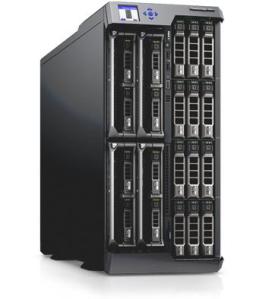
Say hello to Dell’s newest server platform – VRTX (pronounced “vertex”). The VRTX is a shift away from the centralized server clusters that you may be used to seeing from companies like Cisco, HP, or IBM. Dell has taken their popular m1000 blade units and pulled them into an enclosure that bears more than a passing resemblance to the servers I deployed five or six years ago. The VRTX is capable of holding up to 4 blade servers in the chassis alongside either 12 3.5″ hard drives or 25 2.5″ drives, for a grand total of up to 48 TB of storage space. What sets VRTX apart from other similar designs, like the IBM S-class BladeCenter of yore, is the ability for expansion.
Rather than just sliding a quad-port NIC into the mezzanine slot and calling it a day, Dell developed VRTX to expand to meet future needs of customers. That’s why you’ll find 8 PCIe slots in VRTX (3 full height, 5 half height). That’s the real magic in this system. For example, the VRTX ships today with 8 1GbE ports for network connectivity. While 10GbE is slated for a future release you could slide in a 10GbE PCIe card and attach it to a blade if needed to gain connectivity. You could also put in a Serial Attached SCSI (SAS) Host Bus Adapter (HBA) and gain more expansion for your on-board storage. In the future, you could even push that to 40GbE or maybe one of those super fast PCIe SSD cards from a company like Fusion-IO. The key is that the PCIe slots give you a ton of expandability in such a small form factor instead of limiting you to whatever mezzanine card or expansion adapter has been blessed by the skunkworks labs for your supplying server vendor.
VRTX doesn’t come without a bit of controversy. Dell has positioned this system as a remote office/branch office (ROBO) solution that combines everything you would need to turn up a new site into one shippable unit. That follows along with comments made at a keynote talk on the third day about Dell believing that compute power has reached a point where it will no longer grow at the same rate. Dell’s solution to the issue is to push more compute power to the edge instead of centralizing it in the data center. What you lose in manageability you gain in power.
The funny thing for me was looking at VRTX and seeing the solution to a small scale data center problem I had for many years. The schools I used to serve didn’t need an 8 or 10-slot blade chassis. They didn’t need two Compellent SANs with data tiering and failover. They needed a solution to virtualize their aging workloads onto a small box built for their existing power and cooling infrastructure. VRTX fits the bill just fine. It uses 110v power. The maximum of four blades fits just perfectly with VMware‘s Essentials bundle for cheap virtualization with the capability to expand if needed later on. Everything is the same as the enterprise-grade hardware that’s being used in other solutions, just in a more SMB-friendly box. Plus, the entry level price target of $10,000 in a half-loaded configuration fits the budget conscious needs of a school or small office.
If there is one weakness in the first iteration of VRTX it comes from the software side of things. VRTX doesn’t have any software beyond what you load on it. It will run VMware, Citrix, Hyper-V, or any manner of server software you want to install. There’s no software to manage the platform, though. Without that, VRTX is a standalone system. If you truly wanted to use it as a “pay as you grow” data center solution, you need to find a way to expand the capabilities of the system linearly as you expand the node count. As a counterpoint to this, take a look at Nutanix. Many storage people at Enterprise Forum were calling the VRTX the “Dell Nutanix” solution. You can watch an overview of what Nutanix is doing from a session at Storage Field Day 2 last November:
The key difference is that Nutanix has a software management program that allows their nodes to scale out when a new node is added. That is what Dell needs to work on developing to harness the power that VRTX represents. Dell developed this as a ROBO solution yet no one I talked to saw it that way. They saw this as a building block for a company starting their data center build out. What’s needed is the glue to stitch two or more VRTX systems together. Harnessing the power of multiple discrete compute units is a very important part of breaking through all the barriers discussed at the end of Enterprise Forum.
Tom’s Take
Bigger is better. Except when it’s not. Sometimes good things really do come in small packages. Considering that Dell’s VRTX was a science project for the last four years being built as a proof-of-concept I’d say that Dell has finally achieved one thing they’ve been wanting to do for a while. It’s hard to compete against HP and IBM due to their longevity and entrenchment in the blade server market. Now, Dell has a smaller blade server that customers are clamoring to buy to fill needs that aren’t satisfied by bigger boxes. The missing ingredient right now is a way to tie them all together. If Dell can mulitplex their resources together they stand an excellent chance of unseating the long-standing titans of blade compute. And that’s a change worth fighting for.
Disclaimer
I was invited to attend Dell Enterprise Forum at the behest of Dell. They paid for my travel and lodging expenses while on site in San Jose. They also provided a Social Media Influencer pass to the event. At no time did they place any requirements on my attendance or participation in this event. They did not request that any posts be made about the event. They did not ask for nor where they granted any kind of consideration in the writing of this or any other Dell Enterprise Forum post.
It’s hard to believe that the last Tech Field Day event was held almost two years ago. Since the, the Field Day series has branched out to cover topics like Networking, Storage, and Wireless. The industry never stands still for long, however. The stars aligned and the sponsors asked to bring back the granddaddy of them all. That’s why I’m happy to announce that I’ll be attending Tech Field Day 9 from June 19-21 in Austin, TX.
There’s an all-star lineup of previous Field Day attendees with a couple of new folks sprinkled in to keep things lively:
The delegates are some of the best and brightest across the networking, server, and storage industries. Which is quite fitting when you consider the sponsors that are coming your way and how the represent the new trend in converged data centers:
In particular, Infinio is an exciting edition to the Tech Field Day series. They will be launching during their presentation slot, so I’m sure they’re going to have a very interesting take on their topic.
Tech Field Day 9 is also a transition point for me personally. For the first time, I’ll be attending the event as both a delegate AND a staff member. Now that I’m a full-time employee of Foskett Services and Gestalt IT I’m going to split my time between listening to the presenters and making sure that everything is running smoothly in the background. It’s going to be a challenge to try and keep up with everything, but I feel that I’m more than capable of making every aspect of this event outstanding.
What’s Field Day Like?
Tech Field Day is not a vacation. This event will involve starting a day early first thing Wednesday morning and running full steam for two and a half days. We get up early and retire late. Wall-to-wall meetings and transportation to and from vendors fill the days. When you consider that most of the time we’re discussing vendors and presentations on the car ride to the next building, there’s very little downtime. We’ve been known to have late night discussions about converged storage networking and automation until well after midnight. If that’s your idea of a “vacation” then Tech Field Day is a paradise. I usually crawl onto a plane late Friday night mentally and physically exhausted with a head full of blog posts and ideas. It’s not unlike the same kind of feeling you get after running a marathon. You don’t know if you could do it again tomorrow, but you can’t wait until the next one.
Tech Field Day – Join In Now!
Everyone at home is as much a participant in Tech Field Day as the delegates on site. At the last event we premiered the ability to watch the streaming video from the presentations on mobile devices. This means that you can tune in from just about anywhere now. There’s no need to stay glued to your computer screen. If you want to tune in to our last presentations of the day from the comfort of your couch with your favorite tablet device then feel free by all means. We’ll also have the videos from the session posted quickly afterwards on Youtube and Vimeo. If you have to run to the store for ice cream or catch that playoff game you can always catch up with what’s going on when you get back. Don’t forget that you can also use Twitter to ask questions and make comments about what you’re seeing and hearing. Some of the best questions I’ve seen came from the home audience. Use the hashtag #TFD9 during the event. Note that I’ll be tagging the majority of my tweets that week with #TFD9, so if the chatter is getting overwhelming you can always mute or filter that tag.
Standard Tech Field Day Sponsor Disclaimer
Tech Field Day is a massive undertaking that involves the coordination of many moving parts. It’s not unlike trying to herd cats with an aircraft carrier. One of the most important pieces is the sponsors. Each of the presenting companies is responsible for paying a portion of the travel and lodging costs for the delegates. This means they have some skin in the game. What this does NOT mean is that they get to have a say in what we do. No Tech Field Day delegate is every forced to write about the event due to sponsor demands. If a delegate chooses to write about anything they see at Tech Field Day, there are no restrictions about what can be said. Sometimes this does lead to negative discussion. That is entirely up to the delegate. Independence means no restrictions. At times, some Tech Field Day sponsors have provided no-cost evaluation equipment to the delegates. This is provided solely at the discretion of the sponsor and is never a requirement. This evaluation equipment is also not a contingency of writing a review, be it positive or negative. The delegates are in this for the truth, the whole truth, and nothing but the truth.
If you’d like to learn more about what makes Tech Field Day so special, please check out the website at http://techfieldday.com. If you want to be a part of Tech Field Day, don’t hesitate to fill out the nomination form to become a delegate. We’re always on the lookout for great people to become a part of the event and we’d love to have you along for the ride.
I have a hard time keeping all the cloud terms straight. Everything seems to be available As A Service (aaS). Try as I might to explain them, it just didn’t click for some people. Since cloud terms are so nebulous some times, I decided I need to put everything in a context that people understand. Therefore, I present…Coffee as a Service (CaaS):
Software as a Service (SaaS): Anytime you want coffee, it just appears in front of you. You don’t have to make it or anything. Sometimes it shows up immediately. Other times it shows up an hour or so after you wanted it. You pay a monthly fee, but if you want to have cream or sugar you have to pay a bit more. Some SaaS coffee vendors don’t have those options, so you’re stuck with whatever you get up front.
Platform as a Service (PaaS): You’ve decided that you want to have coffee, but you want a bit more control over it. You sign up for a new service that gives you coffee packages. Dark roast, light roast, and Turkish coffee are all options. You are still at the mercy of the provider for other options like latte or cappuccino. It is still mysteriously delivered to you. Cream and sugar are options in each of the packages for a small fee. Coffee can still show up late, but you have an agreement with the provider that late coffee gets you a small amount off the monthly bill.
Infrastructure as a service (Iaas): You’ve now decided that you want complete control over your coffee delivery. You’ve contacted a new provider that is willing to rent you a coffee machine with all the extra hardware needed to make any kind of coffee you want. You’re going to have to buy your own coffee and creamer and sugar. Once you have it at the coffee machine, they’ll make the coffee to your exact specifications and send it to you. Might still show up late depending on how popular the service is or if some technician accidentally restarts the machine on a Friday night. You get charged either by the cup or by how often the machine is used. Coffee still tastes okay but you have to worry about renting more machines as it becomes more popular. Machine rental rates fluctuate if you use the Spot Machine market.
Private Cloud: Okay, forget about the whole renting thing. Time to go to the coffee warehouse and buy everything yourself. You max out your credit card, but you come home with a coffee machine and a milk steamer. You still provide everything yourself. You find a place to hook everything up with electricity and water supply. You grind the beans yourself. You make your own coffee or you hire a barista to do it for you. The coffee is excellent and on time. Your credit card bill scares the daylights out of you. In three years, you have to upgrade your coffee machine again to support hyper foaming milk.
Hybrid Cloud: You can make the basics with your machine. You still can’t figure out how to make a good cappuccino. All the easy stuff gets made locally by you or your barista. For the really odd stuff, like double shot mocha light frappuccinos you send people to the Starbucks down the road.
Cloudbursting: Your fancy coffee machine is really popular around the office. About once a month, there’s a line that’s 50 people long. Rather than making them wait for their coffee, you pass out Starbucks gift cards for anyone over the 35th person. You send them off to get their coffee. You can justify the gift card cost because you’re only busy that one time a month.
I’m always open for suggestions in the comments below.
Most of the readers of my blog would agree that there is a lot of discussion in the networking world today about software defined networking (SDN) and the various parts and pieces that make up that umbrella term. There’s argument over what SDN really is, from programmability to orchestration to network function virtualization (NFV). Vendors are doing their part to take advantage of some, all, or in some cases none of the above to push a particular buzzword strategy to customers. I like to make sure that everything is as clear as possible before I start discussing the pros and cons. That’s why I jumped at the chance to get a briefing from Brocade around their new software and hardware releases that were announced on April 30th.
I spoke with Kelly Harrell, Brocade’s new vice president and general manager of the Software Business Unit. If that name sounds somewhat familiar, it might be because Mr. Harrell was formerly at Vyatta, the software router company that was acquired by Brocade last year. We walked through a presentation and discussion of the direction that Brocade is taking their software defined networking portfolio. According to Brocade, the key is to be pragmatic about the new network. New technologies and methodologies need to be introduced while at the same time keeping in mind that those ideas must be implemented somehow. I think that a large amount of the frustration with SDN today comes from a lot of vaporware presentations and pie-in-the-sky ideas that aren’t slated to come to fruition for months. Instead, Brocade talked to me about real products and use cases that should be shipping very soon, if not already.
The key to Brocade is to balance SDN against network function virtualization, something I referred to a bit in my Network Field Day 5 post about Brocade. Back then, I called NFV “Networking Done (by) Software,” which was my sad attempt to point out how NFV is just the opposite of what I see SDN becoming. During our discussion, Harrell pointed out that NFV and SDN aren’t totally dissimilar after all. Both are designed to increase the agility with which a company can execute on strategy and create value for shareholders. SDN is primarily focused on programmability and orchestration. NFV is tied more toward lowering costs by implementing existing technology in a flexible way.
NFV seeks to take existing appliances that have been doing tasks, such as load balancers or routers, and free their workloads from being tied to a specific piece of hardware. In fact, there has been an explosion of these types of migrations from a variety of vendors. People are virtualizing entire business lines in an effort to remove the reliance on specialized hardware or reduce the ongoing support costs. Brocade is seeking to do this with two platforms right now. The first is the Vyatta vRouter, which is the extension what came over in the Vyatta acquisition. It’s a router and a firewall and even a virtual private networking (VPN) device that can run on just about anything. It is hypervisor agnostic and cloud platform agnostic as well. The idea is that Brocade can include a copy of the vRouter with application packages that can be downloaded from an enterprise cloud app store. Once downloaded and installed, the vRouter can be fired up and pull a predefined configuration from the scripts included in the box. By making it agnostic to the underlying platform, there’s no worry about support down the road.
The second NFV platform Brocade told me about is the virtual ADX application delivery switch. It’s basically a software load balancer. That’s not really the key point of the whole idea of applying the NFV template to an existing hardware platform. Instead, the idea is that we’re taking something that’s been historically huge and hard to manage and moving it closer to the edge where it can be of better use. Rather that sticking a huge load balancer at the entry point to the data center to ensure that flows are separated, the vADX allows the load balancer to be deployed very close to the server or servers that need to have the information flow metered. Now, the agility of SDN/NFV allows these software devices to be moved and reconfigured quickly without needing to worry about how much reprogramming is going to be necessary to pull the primary load balancer out or change a ton of rules to take reroute traffic to a vMotioned cluster. In fact, I’m sure that we’re going to see a new definition of the “network edge” being to emerge as more software-based NFV devices begin to be deployed closer and closer to the devices that need them.
On the OpenFlow front, Brocade told me about their new push toward something they are calling “Hybrid Port OpenFlow.” OpenFlow is a great disruptive SDN technology that is gaining traction today, largely in part because of companies like Brocade and NEC that have embraced it and started pushing it out to their customer base well ahead of other manufacturers. Right now, OpenFlow support really consists to two modes – ON and OFF. OFF is pretty easy to imagine. ON is a bit more complicated. While a switch can be OpenFlow enabled and still forward normal traffic, the practice has always been to either dedicate the switch to OpenFlow forwarding, in effect turning it into a lab switch, or to enable OpenFlow selectively for a group of ports out of the whole switch, kind of like creating a lab VLAN for testing on a production box. Brocade’s Hybrid Port OpenFlow model allows you to enable OpenFlow on a port and still allow it to do regular traffic forwarding sans OpenFlow. That may be the best model for adopters going forward due to one overriding factor – cost. When you take a switch or a group of ports on a switch and dedicate them for OpenFlow, you are cost the enterprise something. Every port on the switch costs a certain amount of money. Every minute an engineer spends working on a crazy lab project incurs a cost. By enabling the network engineers to turn on OpenFlow at will without disrupting the existing traffic flow, Brocade can reduce the opportunity cost of enabling OpenFlow to almost zero. If OpenFlow just becomes something that works as soon as you enable it, like IPv6 in Windows 7, you don’t have to spend as much time planning for your end node configuration. You just build the core and let the end nodes figure out they have new capabilities. I figure that large Brocade networks will see their OpenFlow adoption numbers skyrocket simply because Hybrid Port mode turns the configuration into Easy Mode.
The last interesting software piece that Brocade showed me is a prime example of the kinds of things that I expect SDN to deliver to us in the future. Brocade has created an application called the Application Resource Broker (ARB). It sits above the fray of the lower network layers and monitors indicators of a particular application’s health, such as latency and load. When one of those indicators hits a specific threshold, ARB kicks in to request more resources from vCenter to balance things out. If the demand on the application continues to rise beyond the available resources, ARB can dynamically move the application to a public cloud instance with a much deeper pool of resources, a process known as cloudbursting. All of this can happen automatically without the intervention of IT. This is one of the things that shows me what SDN can really do. Software can take care of itself and dynamically move things around when abnormal demand happens. Intelligent choices about the network environment can be made on solid data. No guess what about what “might” be happening. ARB removes doubt and lag in response time to allow for seamless network repair. Try doing that with a telnet session.
There’s a lot more to the Brocade announcement than just software. You can check it out at http://www.brocade.com. You can also follow them on Twitter as @BRCDComm.
Tom’s Take
The future looks interesting at first. Flying cars, moving sidewalks, and 3D user interfaces are all staples of futuristic science fiction. The problem for many arises when we need to start taking steps to build those fanciful things. A healthy dose of pragmatism helps to figure out what we need to do today to make tomorrow happen. If we root our views of what we want to do with what we can do, then the future becomes that much more achievable. Even the amazing gadgets we take for granted today have a basis in the real technology of the time they were first created. By making those incremental steps, we can arrive where we want to be a whole lot sooner with a better understanding of how amazing things really are.
Our final presentation of Network Field Day 5 came from Juniper. A long-time contributor to Network Field Day, Juniper has been making noise as of late in the software defined networking (SDN) space with some of their ideas. We arrived on site for a nice hardy breakfast before settling in to hear what Juniper is bringing to the greater software networking space and how I later learned that it might be best to start phasing out the human element in the network.
First up was Jeremy Schulman (@nwkautomaniac) talking to us about Puppet integration into Junos. Jeremy opened with a talk about his involvement in automating things. Customers have been using infrastructure automation tools like Puppet and Chef for a while to provision servers. This allows you to spin up a new piece of hardware and have it quickly setup with basic configuration as soon as it boots up. Jeremy told us that reinventing the wheel when it comes to automation was unnecessary when you could just put a Puppet agent in Junos. So that’s what he did. As a side note here, Jeremy brings up a very good point about the future of networking. If you don’t know how to program in a real programming language, I suggest you start now. Most of the interfaces that I’ve seen in the last 6-9 months have a high degree of familiarity based on the old CLI interface conventions. But these interfaces only really exist to make us old school networking guys feel safe. Very soon, all the interfaces to these devices will be only be accessible via API – which means programming. If you don’t know how to write something in Python or Perl or even Java, you need to begin picking it up. For something like Python, you might consider Codecademy. It’s free and easy to pick up and follow whenever you want. Just a thought.
Demo time! There’s also a great overview of Puppet on Junos over on Packet Pushers written by none other than Anthony Burke (@pandom_). The basic idea is that you write the pertinent configuration snippets into a task that can be transformed into a workflow rather than being a CLI jockey that just spends time typing the command blindly into a Telnet or SSH session. Because you can also parse these tasks before they are sent out via the Puppet master, you can be sure your configs are sanitized and being sent to the appropriate device(s). That means that there are no humans in the middle of the process to type in the wrong address or type the right commands on the wrong device. Puppet is doing its part to remove the possibility of mistakes from your base configurations. Sure, it seems like a lot of work today to get Puppet up and running for the advantage of deploying a few switches. But when you look at the reduction of work down the road for the ability to boot up a bare metal box and have it be configured in a matter of minutes I think the investment is worth it. I spend a lot of time preconfiguring devices that get shipped to remote places. If I could have that box shipped the the remote location first and then just use Puppet to bring it online, I’d have a lot more time to devote to fine tuning the process. Which leads to greater efficiency. Which leads to more time (and so on and so on).
Next up, we got a sneak peek at Juniper’s next generation programmable core switch. While I didn’t catch the name at the time, it turns out that it was the new EX9200 that has been making some waves as of late. This switch is based on custom silicon, the Juniper One ASIC, rather than the merchant silicon in QFabric. Other than the standard speeds and feeds that you see from a core switch of this type, you can see that Juniper is going to support the kitchen sink of SDN with the EX9200. In addition to supporting OpenFlow and Puppet automation, it will also support VXLAN and NVGRE overlays as well as other interesting things like OpenStack and VMWare plugins in the future. Make no mistake – this platform is Juniper’s stalking horse for the future. There’s been a lot written about the longevity of the previous platforms compared to the new MX-based EX9200. I think that Juniper is really standing behind the idea that the future of networking lies in SDN and that a platform with support for the majority of the popular methods used to reach high levels of programmability and interoperability is critical going forward. Where that leaves other switching platforms is the realm of speculation. Just ask yourself this question: Are you planning on buying a non-SDN capable switch in the next refresh? Is regular packet forward fine for you for the next 3-5 years? That is the critical question being asked in strategy meetings and purchasing departments all over the place right now.
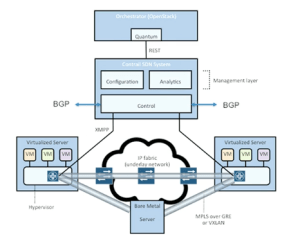
Parantap Lahiri stepped up next to present on the Contrail acquisition. Those of you interested in the greater SDN picture would do well to watch the whole video. Especially if you are curious about things like VMware’s new NSX strategy, as the Contrail idea is very similar, if not a bit more advanced. The three use cases outlined in the video are great for those not familiar with what SDN is trying to accomplish right now. In fact, commit this diagram to memory. You are going to see it again (I promise):
Note that further in the video, Parantap goes over one of the features of Contrail that is going to get many people excited. Via use of GRE tunnels, this solution can create a hybrid cloud solution to burst your traffic from the private data center into a public provider like AWS or Rackspace as needed. That, if nothing else, is the message that you need to consider with the “traditional” vendors that are supporting SDN. Cisco and Juniper and even VMware don’t want you to start buying whitebox servers and turning them into switches. They don’t want a “roll your own” strategy. What Juniper wants if for you to buy a whole bunch of EX9200s and then build a Contrail overlay system to manage it all. Then, when the workloads get to be too great for your own little slice of private cloud you can use Contrail to tunnel into the public cloud and move those workloads until the traffic spike subsides. Maybe you even want to keep some of those migrated workloads in the cloud permanently in order to take advantage of cheap compute and ease overall usage in your private data center. The key is flexibility, and that’s what Contrail gives you. That’s where the development is going to be for the time being.
The last presentation came from the Juniper Webapp Secure team. You may recognize this product by its former moniker – Mykonos. In fact, you may recognize this presentation from its former delivery at NFD4. In fact, I said as much during the demo:
As I said last time, Juniper Webapp Secure (nee Mykonos) is the greatest trolling security program I’ve seen. #NFD5
There’s a market for a security tool like this for lots of websites. It gets the bad guys without really affecting the good guys. I’m sure that Juniper is going to sell the living daylights out of it. They’re trying their best right now based on the number of people that I’ve seen talking about it on Twitter. The demo is engaging because it highlights the capabilities as well as injecting a bit of humor and trollishness. However, based on what I’ve seen at NFD4 and NFD5 and what people have told me they saw when they were presented, I think the Webapp Secure demo is very scripted and fairly canned. The above video is almost identical to the one from NFD4. Compare:
Guys, you need to create a new Generic company and give us some more goodies in the demo. Having a self-aware web firewall that doesn’t need human intervention to stop the attackers is a big deal. Don’t use Stock Demo Footage to tell us about it every time.
Tom’s Take
What does the Juniper strategy look like? The hint is in the title of this post. Juniper is developing automation to reduce the amount of people in the network making critical decisions without good information or tools to execute. As those people begin to be replaced by automated systems, the overall intelligence in the network increases while at the same time reducing the amount of time that it takes to take action to bring new nodes online and reconfigure on the fly to support things we thought might have been impossible even three years ago. Through device deployment orchestration, flexible platforms supporting new protocols with programmability built in and even to new technology like overlay networking and automated security response for critical systems, Juniper is doing their best to carve out a section of the SDN landscape just for themselves. It’s a strategy that should pay off in the long run provided there is significant investment that stays the course.
Tech Field Day Disclaimer
Juniper was a sponsor of Network Field Day 5. As such, they were responsible for covering a portion of my travel and lodging expenses while attending Network Field Day 5. In addition, they also provided breakfast for the delegates. Juniper also gave the delegates a copy of Juniper Warrior, a mobile phone charger, emergency battery pack, and a battery-powered pocket speaker. At no time did they ask for, nor where they promised any kind of consideration in the writing of this review. The opinions and analysis provided within are my own and any errors or omissions are mine and mine alone.











 I have a hard time keeping all the cloud terms straight. Everything seems to be available As A Service (aaS). Try as I might to explain them, it just didn’t click for some people. Since cloud terms are so nebulous some times, I decided I need to put everything in a context that people understand. Therefore, I present…Coffee as a Service (CaaS):
 Most of the readers of my blog would agree that there is a lot of discussion in the networking world today about software defined networking (


 The Networking Nerd