NEC – Network Field Day 2

The second presenter on day one of Network Field Day 2 was NEC.  I didn’t know a whole lot about their networking initiatives going into the presentation, even though I knew they were a manufacturer of VoIP systems among a variety of other things.  What I saw really impressed me.

After a quick company overview by John Wise, we dove right into what NEC is bringing to market in the OpenFlow arena.  I’ve posted some links to OpenFlow overviews already, so it was nice to see how NEC had built the technology into their ProgrammableFlow product line.  NEC has a shipping ProgrammableFlow Controller (PFC) as well as ProgrammableFlow switches.  This was a very interesting change of pace, as most vendors I’ve heard from recently have announced support for OpenFlow, but no plans for shipping any equipment that runs it right now.

The PFC is a Linux-based system that supports OpenFlow v1.0.  It allows you to deploy multi-tenant networks on the same physical infrastructure as well as providing location independence.  The PFC can be located anywhere and isn’t restricted to being deployed next to the switches that it supports.  The PFC allows you to do topology discovery via LLDP to find devices as well as more advanced features like fault detection and even self repair.  This is a great boon to network rock stars that can use the controller to fix problems as they occur without the need to leave their chair and start recabling their data center on the fly.  The PFC also supports graphic network creation, with the interface being as simple as creating a Visio drawing.  Except this Visio is a real network.

The ProgrammableFlow switch is a 48-port gigabit switch with 4 SFP+ uplinks capable of 10GBE.  It functions as a hybrid switch, allowing OpenFlow networks to be connected to a traditional L2/L3 environment.  This a wonderful for those that want to try out OpenFlow without wrecking their existing infrastructure.  A great idea going forward, as OpenFlow is designed to be overlaid without disturbing your current setup.  By providing a real shipping product to customers, NEC can begin to leverage the power of the coming OpenFlow storm to capitalize on a growing market.

Next we got a quick overview of the OpenNetworking Foundation and NEC’s participation in it.  What is of note here is that the board members are all consumers of technology, not the producers.  The producers are members, but not the steering committee.  In my mind, this ensures that OpenFlow will always reflect what the users want from it and not what the vendors want it to become.  NEC has provided us with a physical switch and controller to leverage OpenFlow and has even committed to providing support for a virtualized Hyper-V vSwitch in Windows 8.  This means that NEC will hit the ground running when Microsoft starts using the tools built into Windows 8 to virtualize large numbers of servers.  Whether or not this will be enough to unseat the VMware monster is anyone’s guess, but it never hurts to get in on the ground level.

I missed out on most of the demo of the ProgrammableFlow system in the second half of the presentation due to reality intruding on my serene Network Field Day world, but the video was interesting.  I’m going to spend a little time in the coming weeks doing some more investigation into what ProgrammableFlow has to offer.

<<EDIT>>

I want video! Part 1: NEC Introduction

Part 2: ProgrammableFlow Architecture and Use Cases

Part 3: ProgrammableFlow Demonstration


Tom’s Take

Okay, show of hands: who knew NEC made switches?  They rarely get mentioned in the same breath with Cisco, Juniper, or HP.  When it seems that the market has left you behind the best way to catch up is to move markets.  NEC has really embraced the concept of OpenFlow and I think it’s going to pay off handsomely for them.  By having one of the first shipping devices for OpenFlow integration and making it widely known to the networking consumer, NEC can reap the benefits of interesting in OpenFlow while other vendors ramp up to enter the market.  There’s something to be said for getting there first, and NEC has surely done that.  Now the trick will be taking that advantage and reaping what they have sown.


Tech Field Day Disclaimer

NEC was a sponsor of Network Field Day 2, as as such was responsible for paying a portion of my travel and lodging fees.  They also provided us with a USB drive containing marketing information and the presentation we were given.  We also received an NEC coffee mug and a set of children’s building blocks with NEC logos and slogans screenprinted on them.  At no time did NEC ask for, nor where they promised any kind of consideration in the drafting of this review. The analysis and opinions herein are mine and mine alone.

Cisco Data Center – Network Field Day 2

Our first presenters up on the block for day 1 of Network Field Day 2 were from the Cisco Data Center team. We arrived at Building Seven at the mothership and walked into the Cisco Cloud Innovation Center (CCIC). We were greeted by Omar Sultan and found our seats in the briefing center. Omar gave us a brief introduction, followed by Ron Fuller, Cisco’s TME for Nexus switching. In fact, he may have written a book about it.  Ron gave us an overview of the Nexus line, as well as some recent additions in the form of line cards and OS updates. His slides seemed somewhat familiar by now, but having Ron explain them was great for us as we could ask questions about reference designs and capabilities. There were even hints about things like PONG, a layer 2 traceroute across the fabric. I am very interested to hear a little more about this particular little enhancement.

Next up were representatives from two of Cisco’s recent acquisitions related to cloud-based services, Linesider and NewScale (Cisco Cloud Portal). They started out their presentations similarly, reminding us of “The Problem”:

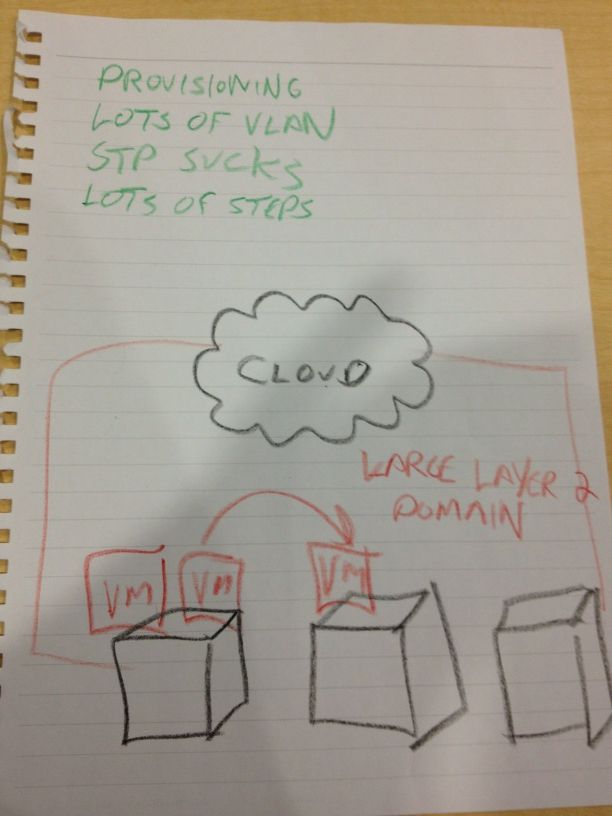
The Probelm

The Problem - courtesy of Tony Bourke

You might want to bookmark this picture, I’m going to be referring to it a lot. The cloud guys were the first example of a familiar theme from day 1 – Defining the Problem. It seems that all cloud service providers feel the need to spend the beginning of the presentation telling us what’s wrong. As I tweeted the next day, I’m pretty sick of seeing that same old drawing over and over again. By now, I think we have managed to identify the problem down to the DNA level. There is very little we don’t know about the desire to automate provisioning of services in the cloud so customers in a multi-tenancy environment can seamlessly click their way into building application infrastructure. That being said, with the brain trust represented by the Network Field Day 2 delegates, it should be assumed that we already know the problem. What needs to happen is that the presenters need to show us how they plan to address it. In fact, over the course of Network Field Day, we found that the vendors have identified the problem to death, but their methods of approaching the solution are all quite different. I don’t mean to pick on Cisco here, but they were first up and did get “The Problem” ball rolling, so I wanted to set the stage for later discussion. Once we got to the Cisco IT Elastic Infrastructure Services (CITEIS) demo, however, the ability to quickly create a backend application infrastructure was rather impressive. I’m sure for providers in a multitenancy environment that will be a huge help going forward to reduce the need to have staff sitting around just to spin up new resource pools. If this whole process can truly be automated as outlined by Cisco, the factor by which we can scale infrastructure will greatly increase.

After the cloud discussion, Cisco brought Prashant Ghandi from the Nexus 1000V virtual switching line to talk to us. Ivan Pepelnjak and Greg Ferro perked up and started asking some really good questions during the discussion of the capabilities of the 1000V and what kinds of things were going to be considered in the future. We ended up running a bit long on the presentation which set the whole day back a bit, but the ability to ask questions of key people involved in virtual switching infrastructure is a rare treat that shoud be taken advantage of whenever possible.

<<EDIT>>

Now with video goodness! Part 1: Nexus

Part 2: Cloud Orchestration and Automation

Part 3: Nexus 1000V


Tom’s Take

I must say that Cisco didn’t really bring us much more than what we’ve already seen. Maybe that’s a big credit to Cisco for putting so much information out there for everyone to digest when it comes to data center networking. Much like their presentation at Wireless Field Day, Cisco spends the beginning and end of the presentation reviewing things with us that we’re familiar with allowing for Q&A time with the key engineers. The middle is reserved for new technology discussion that may not be immediately relevant but represents product direction for what Cisco sees as important in the coming months. It’s a good formula, but when it comes to Tech Field Day, I would rather Cisco take a chance to let us poke around on new gear or let us ask the really good questions about what kind of things Cisco sees coming down the road.


Tech Field Day Disclaimer

Cisco was a sponsor of Network Field Day 2, as as such was responsible for paying a portion of my travel and lodging fees. At no time did Cisco ask for, nor where they promised any kind of consideration in the drafting of this review. The analysis and opinions herein are mine and mine alone.
Info about Open Flow

I will be attending the Packet Pushers OpenFlow Symposium at Network Field Day 2 next week in San Jose, CA.  OpenFlow is a disruptive technology that looks to change the way the many of us think about network traffic and how flows are distributed.  It’s still very early in the development phase, but thanks to Ethan Banks and Greg Ferro I’m going to get the change to listen to companies like Google and Yahoo talk about how they are using OpenFlow as well as hearing from network Vendors current supporting OpenFlow initiatives, like NEC, Juniper, and Big Switch Networks.

If you would like to brush up on some OpenFlow topics ahead of the symposium on Wednesday, October 26th, here are some great links to information about the ins and outs of OpenFlow:

Packet Pushers Show 68: Practical Introduction and Application of Ope Flow Networking – Watch this one first.  Greg really breaks down what OpenFlow is what it’s capable of.

Big Switch Network, OpenFlow, and Virtual NetworkingDerick Winkworth has done a great job at the Packet Pushers blog site going into depth about OpenFlow.  He’s an evangelist and has a lot of hope for what OpenFlow can do.  All of his articles are great, but this one in particular shows how one vendor is using OpenFlow.

IOS Hints Open Flow Posts – I’m just going to go ahead and link to the entire list of Ivan Pepelnjak’s OpenFlow posts.  He plays more of the realist and does a great job of digging deep into the current state of OpenFlow.  He’s also quick to keep us grounding in the fact that OpenFlow is still very young and has lots of potential if it ever takes off.  Worth a read after you’ve caught up on what OpenFlow is from the above sources.

If you have any questions about OpenFlow that you would like asked at the symposium, feel free to leave them in the comments and I’ll try to bring them up to the panel.  I look forward to attending this great event and learning more about the future of networking.

Network Field Day 2: Network Boogaloo

Guess who’s back?

I’m headed to yet another Tech Field Day event!  This time, I’ll be attending Network Field Day #2 in San Jose, CA on October 27th and 28th.  I read about the first Network Field Day last year and learned a lot about the vendors and presentations from the delegates.  Now, it’s up to me to provide that same kind of response for Net Field Day 2.  The delegate list this time around is quite awe-inspiring for a guy like me:

Kurt Bales Network Janitor @NetworkJanitor
Ethan Banks PACKETattack @ECBanks
Tony Bourke The Data Center Overlords @tbourke
Brandon Carroll BrandonCarroll GlobalConfig @BrandonCarroll
Greg Ferro EtherealMind PacketPushers @EtherealMind
Jeremy L. Gaddis Evil Routers @JLGaddis
Ivan Pepelnjak Cisco IOS Hints and Tricks @IOSHints
Mrs. Y. Packet Pushers @MrsYisWhy

I am humbled to be included in such good company.  The two Packet Pushers, Mr. MPLS himself, the man that beat IOU, the Aussie JNCIE/CCIE candiate, the walking security dictionary Brandon Carroll, and the Network Security Princess herself.  I think my invitation must have gotten confused with someone else’s.

Odds are good that if you are involved in networking at all you already follow all of these people on Twitter and read their blogs daily.  If not, stop what you are doing and follow them RIGHT NOW.  You won’t be sorry.  In fact, this is the first time I haven’t had to start following a Tech Field Day delegate on the list of attendees since I’ve been following these folks for quite a while.

Getting Inolved with Tech Field Day

Tech Field Day is always looking for amazing people to attend events and share in the wealth of knowledge.  There are lots of ways you can add your voice to the gestalt:

1.  Read the TFD FAQ and the Becoming a Field Day Delegate pages first and foremost.  Indicate your desire to become a delegate.  You can’t go if you don’t tell someone you want to be there.  Filling out the delegate form submits a lot of pertinent information to Tech Field Day that helps in the selection process.

2.  Realize that the selection process is voted upon by past delegates and has selection criteria.  In order to be the best possible delegate for a Tech Field Day, you have to be an open-minded blogger willing to listen to the presentations and think about them critically.  There’s no sense in bringing in delegates that will refuse to listen to a presentation from Brocade because all they’ve ever used is Arista and they won’t accept Brocade having good technology.  If you want to learn more about all the products and vendors out in the IT ecosystem, TFD is the place for you.

3.  Write about what you’ve learned.  One of the hardest things for me after Tech Field Day was consolidating what I had learned into a series of blog posts.  TFD is a fire hose of information, and there is little time to process it as it happens.  Copious notes are a must.  As is having the video feeds to look at later to remember what your notes meant.  But it is important to get those notes down and put them up for everyone else to see.  Because while your audience may have been watching the same video stream you were watching live, they may not have the same opinion of things.  Tech Field Day isn’t just about fun and good times.  Occasionally, the delegates must look at things with a critical eye and make sure they let everyone know where they stand.


Be sure to follow Tech Field Day on Twitter (@TechFieldDay) for information and updates about Network Field Day 2 as the date approaches.  There will also be streaming video of the presentations at the Tech Field Day website.  The videos will also be posted in their entirety shortly afterwards.  If you want to follow along on Twitter, you can use the hastags #TechFieldDay or #NFD2 to make comments or ask questions during the presentations.  I usually have a TweetDeck window open and will relay your questions along if no one else beats me to it.  I try to tag all my posts with the #TechFieldDay and #NFD2 hashtags, so if I’m overwhelming you with commentary feel free to filter that hashtag from your feed to keep me quiet.  In the past, I’ve tried to have an IRC channel open during the presentations to allow for real-time communications and feedback for those of you out there that prefer an alternative to Twitter.  Once I have the room setup I will post the details.

Tech Field Day Sponsor Disclaimer

Tech Field Day is made possible by the sponsors.  Each of the sponsors of the event is responsible for a portion of the travel and lodging costs.  In addition, some sponsors are responsible for providing funding for the gatherings that occur after the events are finished for the day.  However, the sponsors understand that their financing of Tech Field Day in no way guarantees them any consideration during the analysis and writing of reviews.  That independence allows the delegates to give honest and direct opinions of the technology and the companies that present it.

Tech Field Day – Fluke Networks

The final Wirless Tech Field Day presenter was Fluke Networks.  Fluke recently purchased AirMagnet, so I was curious about what they had to offer that was different from the AirMagnet presentation.  I’ve used some tools from Fluke in the past and found them to be very handy, but since they shifted to a more hardware-oriented approach I hadn’t really kept up with things.

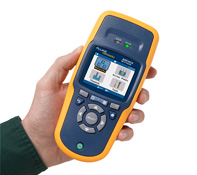
The presentation kicked off with Carolyn Carter, Product Manager for the Portable Network Tools division.  She gave us an overview of Fluke and some of the tools that they offer.  Owing to the fact that this was a wireless-focused event, she delved right into the AirCheck, a handheld wireless scanner.  This product is designed to be used by a first level technician that would be sent to a site to do some preliminary investigation in order to get enough information to see if a site visit would be warranted.  It’s a rugged little device, the trademark blue and gold coloring making it stand out anywhere you might accidentally leave it.  As we dove deeper into the AirCheck, Carolyn handed the presentation over to Paul Hittel, Principal Engineer.  Paul seemed a little nervous as he started into his presentation, probably owing to the fact that he is more of an engineer than a speaker.  He fumbled with his notes a bit in the beginning and told a product story that went a bit longer than it should before it found the point.  As an aside, I know exactly how Paul feels.  I’m sure some of my co-workers are still waiting for my stories to get to the point.

Paul described how Fluke came up with the idea of a handheld scanner.  Since wireless is such a tricky medium to work in and can be affected by any number of environmental factors, a site visit is often necessary to uncover additional details, such as a recently installed wireless video camera or a testy microwave that’s only on for 10 minutes a day.  The wireless engineering staff is usually equipped to handle these kinds of spectrum challenges, whether they be armed with a Wi-Spy DBx or an AirMagnet Spectrum XT.  However, these products are not usually deployed to the first level technical support staff, usually due to cost or unfamiliarity with their complexity.  And since sending your top engineer on site to diagnose what could be a simple issue is an inefficient use of their time, Fluke decided to wrap the spectrum analyzer in an easy-to-understand handheld package.

The unit powers on in about 2-3 seconds and starts scanning the airwaves right away.  It can detect access points (APs) and wireless networks.  It displays the network type with easy-to-decypher symbols, denoting a/b/g/n and even 40MHz n networks.  You can view which access points are broadcasting the networks, along with how many APs are detected for a given channel, which is very critical in the 2.4GHz space.  There is even a simple location application available that plays a tone from an integrated speaker that increases in pitch the closer you are to a specific AP.  It’s not exactly a bullseye, but it’ll help you find an AP that may be hidden under a desk or in a ceiling.

Rather than just telling us about how great this unit was, the Fluke team brought us each one to demo and play with.  We walked around the room playing with the different options.  Several of the delegates said they would be perfect for first tier support personnel in remote offices.  One even remarked that what he thought was a little tinker toy in fact was a great tool for the segment at which it was targeted.  This kind of hands-on demo is great for tools such as this because the “try it before you buy it” mentality is paramount to me in a hardware-based unit.  By giving us the opportunity to walk around and put it through it’s paces at our leisure, I think the delegates were endeared to the tool a bit more than if they had only watched screenshots on a slide.

Alas, all good things must come to an end, and Carolyn needed all of the units turned back in, since they were merely loaners.  However, she did say that she had one that she could give away.  We each filled out a card and dropped it into the hat, and when Paul drew the name, mine came up!  Yes folks, I am now the possessor of an AirCheck. I plan on letting my other engineers and technicians evaluate it to its fullest, and if nothing else I hope it gives me the opportunity to sit at my desk and write a few more blog posts rather than needing to drive out on site to find a fussy microwave.

Tom’s Take

Fluke makes great tools, there’s no denying that.  I have a full wiring kit and telephone lineman’s set in my bag.  I can now add an AirCheck to that same lineup.  The rugged nature of their products means I don’t have to worry about dropping it.  The AirCheck impressed me by not attempting to cram a wireless engineer into a plastic box.  Instead, it’s a focused tool designed to lay some groundwork and assist the tier 1 helpdesk in determining if they need to get someone else involved in an issue.  While Fluke can never be said to have the cheapest toys in the toy box, I think that the amount you invest in them can give you and excellent return in the time savings from unnecessary site visits for simple issues.

Disclaimer

Fluke Networks was a sponsor of Wireless Tech Field Day, and as such they were responsible for a portion of my travel expenses and hotel accommodations.  In addition, I personally won an AirCheck evaluation unit from them in a raffle.  At no time did they ask for nor were they assured any kind of consideration in the writing of this review.  The thoughts and analysis herein are mine and mine alone.  The thoughts are given freely and without reservation whatsoever.

Tech Field Day – AirMagnet

The second presenter at Wireless Tech Field Day day 2 was AirMagnet.  I’ve heard of them before in reference to their spectrum analysis products, and based on what I’d seen the day before from MetaGeek, I was interested to see how the Airmagnet product compared to them.  I knew that the list price for the AirMagnet products was higher than that of MetaGeek, but I was sure that the differences in the two justify the price difference.

The presentation was kicked off by Bruce Hubbert, the Principle Systems Engineer for AirMagnet.  He gave us a great overview of the AirMagnet product line.  I never realized that AirMagnet had such a plethora of products dedicated to wireless scanning and design.  These include AirMagnet Survey Pro, which is a very good tool used to design wireless networks quickly and easily.  The tool looked quite detailed, with the ability to lay out your particular building or site maps and define what types of material it was constructed from, then tell the program to automatically lay out the access points based on frequency and coverage patterns.  This would be a great tool for those that spend a great deal of time designing wireless networks for large sites.  While it can’t replace a good old fashioned site survey, it can give the wireless engineer a great starting point for placement patterns.

Another program that AirMagnet is known for is AirMagnet WiFi Analyzer Pro.  This tool allows an engineer to walk around with a PC Card adapter and perform in-depth site surveys.  The tool can generate packets and measure the data rates on APs.  The idea is that the engineer mounts the AP in a particular location or has it attached to a mobile cart and then generates packets and measures what kind of radiation pattern and data rates result.  This is probably one of the most important tools to have for a wireless engineer to have in their toolbox for performing a thorough site survey.

The tool that we got the most interaction with was AirMagnet Spectrum XT.  This is a full-featured spectrum analyzer designed to detect sources of wireless interference and and classify them to aid in troubleshooting wireless issues.  It is quite similar to the MetaGeek Wi-Spy and Chanalyzer that we looked at the previous day, and the Spectrum XT software appears to have a similar feature set.  What makes the difference in Spectrum XT is the integration that you get with the rest of the suite of AirMagnet tools above.  You can use the spectrum analysis from XT to feed into the survey and design tools and give you a good picture of how to design your network to avoid interference sources such as microwaves, cordless phones, and unshielded audio systems.  The delegates were provided with a copy of Spectrum XT along with a USB spectrum scanner to evaluate.  Once curiosity that I asked Bruce about was the fact that all the spectrum analyzers I had seen required Windows as the operating system.  Given that most of the delegates were packing MacBooks, I found it curious that more development wasn’t done for OSX.  Bruce explained that this was due to the need for deep interaction with the wireless network card drivers to perform packet captures and analysis.  He did say that many were working toward finding ways to integrate with OSX that didn’t involve the use of virtual machines inside Boot Camp/Parallels or VMware Fusion.

The final part of the AirMagnet presentation focused on their wireless intrusion prevention system (WIPS) products.  The AirMagnet solution is designed to integrate with an existing deployment of APs and deliver independent intrustion protection as well as spectrum analysis from a dedicated platform.  As the threats to wireless networks grow and their critical nature becomes more and more integrated into areas such as healthcare, the need to have a WIPS solution is very real.  By augmenting your existing infrastructure with the AirMagnet solution, you can increase the coverage of any existing setups as well as providing a different detection vector to avoid being blinded by targeted exploits designed to eliminate a specific vendor’s equipment.  The security mantra of “defense in depth” applies equally to both wired and wireless networks.  I didn’t get a chance to really test the AirMagnet solution in great detail, but I will be sure to keep it in mind in the future in the event that a dedicated WIPS solution is called for.

Tom’s Take

I think AirMagnet has earned their reputation by making some great tools that provide wireless engineers and architects with the ability to design and troubleshoot wireless networks at a very high level.  Some might argue that the pricing of their solutions is on the high side, but the counter to that is proved by the amount of detail that you get from their integration.  The suite of AirMagnet tools isn’t for everyone, and may indeed be overkill for smaller deployments, but if you are beginning to design and deploy enterprise-grade networks, you can’t go wrong by looking at their products.  The returns you gain with the expertise put in by years of research and development at AirMagnet will easily pay for the investment in short order.

If you’d like to learn more about AirMagnet, you can check them out at http://www.airmagnet.com/.  You can also follow them on Twitter as @AirMagnet_Inc.

Disclaimer

AirMagent was a sponsor for Wireless Tech Field Day, and as such they were responsible for paying a portion of my travel expenses and hotel accommodations.  In addition, they provided the delegates a package including an AirMagnet polo shirt and a copy of Spectrum XT with USB adapter for evaluation.  At no time did they ask for nor were they promised any kind of consideration in this review.  The analysis and opinions here are mine and mine alone.  They are given freely and without reservation.

Tech Field Day – HP Wireless

Day two of Wireless Tech Field Day started off with HP giving us a presentation at their Executive Briefing Center in Cupertino, CA.  As always, we arrived at the location and then immediately went to the Mighty Dirty Chai Machine to pay our respects.  There were even a few new converts to the the Dirty Chai goodness, and after we had all been properly caffeinated, we jumped into the HP briefing.

The first presenter was Rich Horsley, the Wireless Products and Solutions Manager for HP Networking.  He spoke a bit about HP and their move into the current generation of controller-based 802.11n wireless networks through the acquisition of Colubris Networks back in 2008.  They talked at length about some of the new technology they released that I talked about a couple of weeks ago over here.  Rather than have a large slide deck, they instead whiteboarded a good portion of their technology discussion, fielding a number of questions from the assembled delegates about the capabilities of their solutions.  Chris Rubyal, a Wireless Solutions Architect, helped fill in some of the more technical details.

HP has moved to a model where some of the functions previously handled exclusively by the controller have been moved back into the APs themselves.  While not as “big boned” as a solution from Aerohive, this does give the HP access points the ability to segment traffic, such as the case where you want local user traffic to hop off at the AP level to reach a local server, but you want the guest network traffic to flow back to the controller to be sent to a guest access VLAN.  HP has managed to do this by really increasing the processor power in the new APs.  They also have increased antenna coverage on both the send and receive side for much better reception.  However, HP was able to keep the power budget under 15.4 watts to allow for the use of 802.3af standard power over Ethernet (PoE).  I wonder if they might begin to enable features on the APs at a later date that might require the use of 802.3at PoE+ in order to fully utilize everything.  Another curious fact was that if you want to enable layer 3 roaming on the HP controller, you need to purchase an additional license.  Given the number of times I’ve been asked about the ability to roam across networks, I would think this would be an included feature across all models.  I suppose the thinking is that the customer will mention their desire to have the feature up front, so the license can be included in the initial costs, or the customer will bring it up later and the license can be purchased for a small additional cost after the fact.  Either way, this is an issue that probably needs some more visiting down the road as HP begins to get deeper into the wireless market.

After some more discussion about vertical markets and positioning, it was time for a demo from Andres Chavez, a Wireless Solutions Tester.  Andres spends most of his time in the lab, setting up APs and pushing traffic across them.  He did the same for us, using an HP E-MSM460 and iPerf.  The setup worked rather well at first, pushing 300Mbits of data across the AP while playing a trailer for the Star Wars movie on Blu-Ray at full screen in the background.  However, as he increased the stream to 450Mbits per second, Mr. Murphy reared his ugly head and the demo went less smooth at that point.  There were a few chuckles in the audience about this, but you can’t fault HP for showing us in real time what kinds of things their APs are capable of, especially when the demo person wasn’t used to being in front of a live video stream.  One thing that did make me pause was the fact that the 300Mbit video stream pushed the AP’s processor to 99% utilization.  That worried me from the aspect that we were only pushing traffic across one SSID and had no real policies turned on at the AP level.  I wonder what might happen if we enable QoS and some other software things when the AP is already taxed from a processor perspective, not to mention putting 4-clients on at the same time.  When I questioned them about this, they said that there were actually two processor cores in the AP, but one was disabled right now and would be enabled in future updates.  Why disable one processor core instead of letting it kick in and offload some of the traffic?  I guess that’s something that we’ll have to see in the future.

After a break, the guys from HP sat down with the delegates and had a round table discussion about challenges in wireless networking today and future directions.  It was nice to sit down for once and have a discussion with the vendors about these kinds of topics.  Normally, we would have a round table like this if a session ended early, but having it scheduled into our regular briefing time really gave us a chance to explore some topics in greater depth than we might have been able to with only a 5-10 minute window.  Andrew vonNagy brought up an interesting topic about needed better management of user end-node devices.  The idea that we could restrict what a user could access based on their client device is intriguing.  I’d love to be able to set a policy that restricted my iPhone and iPad users to specific applications such as the web or internal web apps.  I could also ensure that my laptop clients had full access even with the same credentials.

Tom’s Take

HP is getting much better with their Field Day presentations.  I felt this one was a lot better than the previous one, both from a content perspective and from the interaction level.  Live demos are always welcome, even if they don’t work 100%.  Add to that the ability to sit down and brainstorm about the future of wireless and you have a great morning.  I think HP’s direction in the wireless space is going to be interesting to watch in the coming months.  They seem to be attempting to push more and more of the functions of the APs back into the APs themselves.  This will allow for more decisions to be made at the edge of the network and keep traffic from needing to traverse all the way to the core.  I think that HP’s transition to the “fatter” AP at the edge will take some time, both from a technology deployment perspective and to ensure that they don’t alienate any of their current customers by reducing the effectiveness of their currently deployed equipment.  I’m going to be paying attention in the near future to see how these things proceed.

If you’d like to learn more about HP Wireless Networking, you can check them out at http://h17007.www1.hp.com/us/en/products/wireless/index.aspx.  You can also find them on Twitter as @HP_Networking.

Disclaimer

HP was a sponsor of Wireless Tech Field Day, and as such they were responsible for a portion of my travel expenses and hotel accommodations.  In addition, they provided lunch for the delegates, as well as a pen and notepad set and a travel cooler with integrated speakers.  At no time did they ask for nor where they promised any kind of consideration in the writing of this review.  The analysis and opinions presented here are given freely and represent my own thoughts.

Tech Field Day – Aerohive

Our third presentation at Wireless Tech Field Day was from Aerohive.  We arrived at their office in the afternoon to round out day one.  Once at the front door, we were greeted by Devin Akin.  He warmly greeted everyone and shook our hands as we walked in.  Once inside our meeting room, we were presented with a package containing an Aerohive polo shirt, notebook, chocolate bar, and a plastic shamrock necklace to wear in honor of St. Patrick’s Day.  As soon as we all were seated and settled, Devin jumped right into a special presentation before we got started properly.  In honor of Andrew von Nagy’s recent success on the CCIE Wireless lab exam, Devin and the Aerohive crew presented him with a sash in Aerohive gold bearing his CCIE number in glitter.  Andrew was a great sport and accepted his special gift proudly.

After the very special presentation, we dove headlong into Aerohive.  I’d like to mention a few words about Devin.  His energy during our visit was off the charts.  He seems to enjoy the world of wireless networking, and based on conversations I’ve had with the other delegates, his name carries quite a bit of weight in the wireless world.  I read some of his blog posts before I left for Tech Field Day, and he strikes me as a person who isn’t afraid to put his opinion out there for the world to see.  He also “gets” Tech Field Day.  When we walked into the room, he had the Twitter stream for the #TechFieldDay hashtag projected on the wall of the room for everyone to see.  That way, the presenters could glance over and get instant feedback about how things were going.  They could also get immediate feedback from the audience not directly in front of them.  These kinds of little touches go a long way toward making a successful presentation at Tech Field Day.

We got to hear from Bob O’Hara, who is a legend in the wireless area.  He is the founder of Airespace, which was snatched up by Cisco and he is generally credited with creating the whole movement behind controller-based access points (APs).  Bob talked for a few minutes about some of the history he helped create, as well as why he has worked with Aerohive to move away from the controller-based AP model and into something different.

After Bob, Mr. Energy Devin Akin jumped in and sped through the perfunctory intro/framing slides.  He talked about the market position of Aerohive and what differentiates them from the competition in the market.  While the other vendors in the market are using relatively “dumb” radios that send traffic back toward the controller for processing, Aerohive has taken a very different approach.  Using merchant silicon, they have made their APs much smarter while keeping their price reasonable.  This means that there is no need for a controller to direct the APs.  Instead, the management software can be loaded on a small appliance, a virtual machine (VM) or even…the cloud.  The APs themselves have a great feature set to allow things like mesh operation, fast layer 3 roaming across subnets, and even some layer 2 MAC routing.  The management software for the APs allows for some additional interesting features, such as private pre-shared keys (PPSK) which give you the ability to issue a PSK per user that has an expiration date and allows a certain number of devices per AP.  That way, your laptop, iPhone, and iPad can all join from a single key.  There is also support for a teacher based view that allows instructors to lock out all or a portion of access to network and Internet resources.  This is a great feature for the K-12 education environment, as it ensures the teacher determines exactly where the students can go, and due to the granularity of the controls, even allowing students a reward of some additional Internet surfing after their work is completed.

One of the more impressive features involved a full setup demo.  All of the APs were set back to defaults and removed from the manager.  Then, in front of the delegates, a new highly secure network was built in about 15 minutes.  It was very straight forward, and once the details of the network were provisioned the configurations were pushed out the members of the “hive”, which is the Aerohive term for the collection of APs in the network.

After the demos were over, it was time for a delegate demo.  Devin informed us that there was an AP somewhere in the building broadcasting an SSID of “Find Me” at 1 mW, which made it practically invisible.  Under that AP was an “Oprah Moment” for the delegates.  Devin suggested we use our newly-acquired MetaGeek Wi-Spy scanners to see if we could find the AP.  This again was a great touch.  Devin had been paying attention and knew what we were now capable of doing, so he decided to build on it and make us work for it.  Having only brought lightweight devices like my ChromeOS CR-48 and my iPad, I couldn’t participate in this little Easter egg hunt, but after a few minutes the delegates located the prize – an Aerohive HiveAP110 and 3 years of access to the cloud-based Hive Manager software to provision it.

Tom’s Take

I was quite impressed with Aerohive.  They have a great product and a wonderful staff developing it.  While it appears that their primary vertical right now is in the education space, I have no doubt that their feature set has appeal to medical and other verticals as well.  I think they with the industry focusing right now on the controller-based architecture, Aerohive can carve itself a very comfortable niche for the controller-less technology they have created.  Other information that I’ve encountered leads me to believe that some vendors are beginning to look at locating more intelligence in the AP/edge once again, which means that when they finally move back toward that strategy they will no doubt find Aerohive staring back at them as a leader in that particular space.  I’m going to spend some more time evaluating the HiveAP capabilities thanks to Devin and his team.  I hope to have more to write about it in the near future.

If you would like to learn more about Aerohive, you can check out their website at http://www.aerohive.com.  You can also follow them on Twitter as @Aerohive

Disclaimer

Aerohive was a sponsor of Wireless Tech Field Day, and as such they were responsible for paying a portion of my travel expenses and hotel accommodations.  In addition, they provided the delegates a package including an Aerohive polo shirt, note book, candy bar (which was consumed during the writing of this review and was delicious), and St. Patrick’s Day themed button and necklace.  The delegates were also provided with an Aerohive HiveAP 110 and 3 years access to the cloud-based Hive Manager software for evaluation.  At the conclusion of the session, Aerohive provided all attendees a selection of beers with Irish themes, such as Guinness, Harp, and Smithwick’s.  At no time did they ask for nor were they granted any kind of consideration in this review.  The analysis and conclusions outlined here are mine and mine alone.  They are offered freely and willingly.

Tech Field Day – Cisco

The second company to present at Tech Field Day was Cisco.  This is the company that I’ve had the most experience with in my wireless career, so getting to hear from them in this setting held some wonderful appeal.  While I was fairly familiar with the product line, I hoped that Cisco would give me some insight into things.

Upon arrival at the Cisco campus on Tasman Drive, we started walking through the building to our meeting room.  The wireless people were taking pictures of all the antennas in the area and geeking out about all the equipment around the building.  After we reached our briefing room, we got seated and started listening to our first presenter, Jim Florwick, who was remote and presenting over Webex.  As he went over the basic outline of Cisco wireless strategy and philosophy, it started to dawn on me that I’d seen much of this material before.  I followed along as we talked about the congestion in the 2.4 GHz spectrum and the need to start moving clients into the 5GHz range for additional throughput gains.  We got a quick overview of Cisco’s CleanAir technology, which is the technology acquired from the Cognio purchase embedded into the 3502 access point (AP) line.  This overview felt a little more like marketing, which is not necessarily the thing to bring to a Field Day.

Around about the time the first presenter started wrapping up, there were murmurs amongst the wireless delegates.  I asked Jennifer Huber what all the fuss was about, and she told me, “Do you know where we are?  This is THE Building 14!” The importance of our location was quickly apparent when someone pulled up a screenshot of the Wireless Control Server from Cisco’s website and just as plain as day, there was the third floor of the building we were currently occupying.  Since building 14 is where the bulk of the wireless development and testing occurs, it makes total sense the the majority of the example screenshots on Cisco’s website would be of that building.  For the wireless nerds, I suppose it was really like returning home.

The next presentation was from David Stiff, who is the Senior Product Manager for the Wireless Networking Business Unit for Cisco.  He went over a lot of the same material that we had just discussed, only more in depth.  He talked about technologies such as Client Link and CleanAir.  The only problem with this type of presentation is that it loses the delegates attention.  Compared to the MetaGeek or Aerohive presentations, this one felt more like a lecture.  I don’t doubt the that the information was great and wonderful to know, but since it was a lot of the same as what I’ve seen before, it didn’t hold as much appeal as the MetaGeek demo or the Aerohive show-and-tell.  In some ways, it felt more like a presentation that would be given to people less familiar with the ins and outs of wireless networking.  As Jennifer remarked to me later, “Not only have I heard that presentation before several times, I’ve given it several times as well.”

After lunch, we got to hear about the in-building cellular technology that Cisco is partnering to bring to the market.  This presentation felt a little out of place for this crowd.  A couple of the delegates mentioned that they had looked at it before, but the need for it was spotty at best and the market was pretty thin.  To me, this is the explanation for why Cisco is partnering to bring it to the market rather than developing it in house or buying the developer outright.  The idea behind in-building cellular is using the existing category 5/6 cabling in the building to help amplify cellular signals in areas where there is severe signal degradation.  I’m betting that this technology is designed to be marketed to healthcare, where the wireless spectrum is congested and cell phones barely work as it is.  Another possible option is a rural areas where cell coverage is spotty at best, like the second floor of my house only on a larger scale.  All in all, I think in-building cellular is a little too much of a niche product to be useful to me in the near future.

Next up was David Stephenson talking about next generation hotspots.  David was one of the people responsible for the 802.11u amendment, and it was apparent that he knew his stuff.  802.11u deals with scenarios where the user isn’t necessarily authorized for access to a given wireless network.  Think about being at the airport and seeing that there are tons of wireless networks to join, but you don’t know any of the keys to join them.  This is where the free hotspot idea comes in.  But since free hotspots are not necessarily available everywhere, a different idea must be considered.  802.11u addresses this by creating what looks to me like a hotspot federation or roaming agreement.  Similar to the agreements that allow cellular coverage across different provider towers, 802.11u would allow users to log in using credentials for the networks they are authorized for, and in return gain the ability to access certain services on a given network.  For instance, a user authorized to use AT&T hotspots may be able to use some internet services on a Boingo network.  For those that wish to restrict things much more, you can limit access to very basic things like emergency services.  One of the use cases that David talked about was using this next generation hotspot to allow users to log into wireless networks in a retail environment and receive coupons on their smartphones based on their login credentials.  Exciting stuff to hear about, and lots to look forward in the future.

The last presenter was Jameson Blandford, a Cisco TME who is somewhat famous for a competitive analysis video on Youtube:

Jameson’s portion of the presentation was NDA’d due to a lot of restricted competitive analysis.  Based on what he said and things that I observed later during Tech Field Day, I’ve got a lot of thinking and analysis to do about the current state of the arms race amongst the various wireless vendors.

Tom’s Take

As a Cisco partner engineer, I get to hear from Cisco quite a bit.  Their presentation methodology is polished and crisp.  However, in the case of Tech Field Day I think they were just a bit off the mark.  As I’ve said before , Tech Field Day delegates aren’t your usual group of decision makers and slightly technical people.  We’re nerds and geeks.  We like seeing how things work and hearing about the gory details.  Cisco has always presented good opportunities in the past to get into the nuts and bolts of how things work.  Maybe a demo of CleanAir healing a network, similar to the video above.  Or perhaps an opportunity for us to see even a canned demo of a next generation hotspot.  Something to keep our attention rather than the endless parade of Powerpoint slides.  I never want presenters at Tech Field Day to have a bad outing, so I’m hoping that my words here will help encourage Cisco to step up next time and hit one out of the park.  Most of the info was great, but knowing how to reach your captive Tech Field Day audience is just as key.

If you’d like to learn more about Cisco and their wireless technology, head on over to http://www.cisco.com/go/wireless.  In addition, you can follow their wireless information on Twitter at @cisco_mobility

Disclaimer

Cisco was a sponsor of Tech Field Day, and as such was responsible for a portion of my travel expenses and hotel accommodations.  In addition, they provided lunch for the delegates on Thursday afternoon.  They were not promised, nor were they offered any consideration in the writing of this review.  All of the opinions and analysis offered here are mine and mine alone and are given freely and without reservation.

Tech Field Day – MetaGeek

The first Tech Field Day presenter that we heard from was MetaGeek.  I’ve been a fan of their free InSSIDer product for a while now.  At the time, my needs were fairly simple when it came to wireless spectrum scanning.  I simply looked for the SSID network names and used a little interpolation to help me find access points.  However, the 2.4 GHz spectrum where most client devices now operate has become congested with devices and sources of non-WiFi interference, so little tricks aren’t going to cut it any longer.  You need a serious tool to help you make sense of things.  MetaGeek offers a solution to help you find out a little more about the space around you.

The presentation started out with a quick recap about the founding of the company.  Once nice thing that I saw was that the head geek and founder, Ryan Woodings, saw a need and capitalized on it.  His original device was designed to scan wireless mice for interference.  He expanded it to include more and more sources of wireless transmission.  Much like any geek or nerd I know, he started peeling back the layers and diving deeper into the problem.  A couple of fun pictures about the first MetaGeek offices and their exposure on Engadget leading to their success today had me feeling a little nostalgic.  It’s always nice to see a company come from humble beginnings and enjoy great success.

Once the short and fun history lesson was out of the way, it was time for the real payoff – a demonstration of the flagship Wi-Spy DBx analyzer tool and the associated Chanalyzer Pro analysis software.  The Tech Field Day delegates also recieved a Wi-Spy and copy of Chanalyzer Pro so that we could follow along with the geeks as they laid out their program and it’s capabilities.

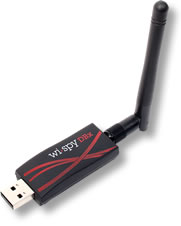
WiSpy DBx (Image courtesy of MetaGeek)

The Wi-Spy DBx is a very unassuming piece of hardware, a USB adapter with an RP-SMA connector on the end.  The small form factor allows it to be plugged in just about anywhere quickly and easily.  The DBx model allows you to scan both the 2.4 GHz spectrum where 802.11b and 802.11g networks operate and the 5 GHz spectrum where 802.11a networks are prevalent.  Note that the Wi-Spy can’t scan both network simultaneously, so if you want to do captures on both at the same time you’ll need two DBx units, or one DBx and one 2.4GHz-only unit like the Wi-Spy 2.4x.  There is also a patch antenna option that allows you to be a little more specific about the direction of the signal detection.

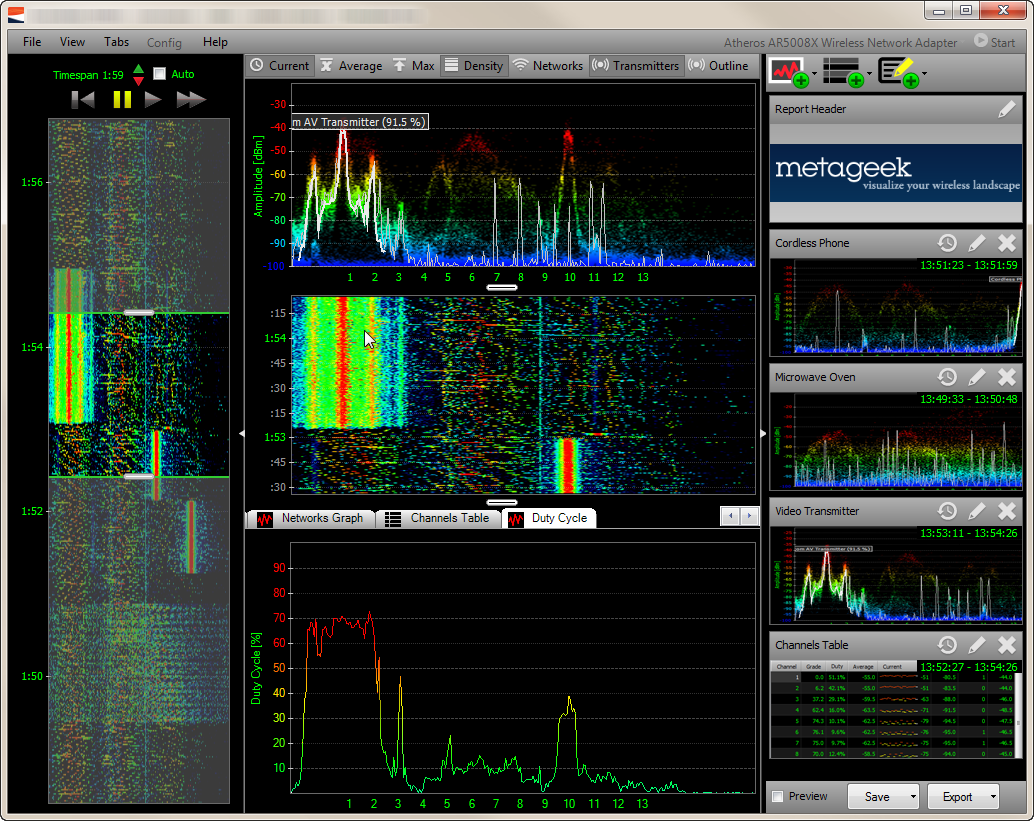
Chanalyzer Pro (Image courtesy of MetaGeek)

The Chanalyzer Pro application is where you are going to spend most of your time.  It gives you a great visual representation of the information the Wi-Spy will be passing along to you.  The application packs a lot of information into a small space.  The line graph at the top center shows you the utilization for the spectrum currently being scanned.  There are options to turn on/off the average and peak utilization, as well as the intensity of signals in color.  This is where you will notice the utilization of a given frequency or channel.  The middle pane show the ‘waterfall’ view, which is the representation of the top pane over time.  This gives you the opportunity to see any sources of interference as they appear and persist.  The bottom pane gives you more specific detail to drill into, such as SSID overlay or duty cycle information.  This is painted in both a specific graph on the bottom and in the case of the SSID, overlaid on the top graph to allow you to see that there are too many access points (APs) on the same channel in your vicinity.  The large graph on the left side of the window extends the waterfall view over time, but also allows you to move the graph to any point during the time of the packet capture.  This is a great feature for sources of interference that are transient.  You can rewind and fast forward much like a DVR.  This is great if you were preoccupied when the interference happened or you need to review it again to profile the specifics for later classification.

During our great demo, Ryan and Trent Cutler were showing us some of the more interesting interference sources they have seen and classified.  Much like any good investigator, they can recognize things like the difference between 802.11b and 802.11g APs on sight, as well as being able to tell you the difference between a microwave and a cordless phone.  For those of us not as gifted in the art of interference profiling, the Chanalyzer application includes preset waveforms that allow you to overlay them on the graph to tell you the difference between your cordless phone and a wireless video camera.  Very handy for nerds like me that need a little more time in the saddle before we can spot the trouble from the line graph itself.  You can also take captures of interference sources and send them to Trent and he’ll help identify them if it’s something that hasn’t been seen before.  He keeps a collection of the odd and interesting captures he’s gotten, like a fun version of a stamp collection.  I think my favorite was the ceiling fan mounted audio system.

Tom’s Take

The MetaGeeks really knocked it out of the park for the first batter up at the plate.  They looked a little nervous at first, but once into their element, they really shined at showing the delegates what their tool was capable of doing.  I was very impressed by the power of their software along with the ease of use.  So much so that after I returned from Tech Field Day, I spent a whole evening running around my house with my Wi-Spy turning on microwaves and cordless phones and being amazed at what I saw.  The other spectrum analyzers I’ve seen run in the thousands of dollars, which makes the Wi-Spy an incredible value for those wanting to jump into the spectrum analysis arena without needed to sacrifice a kidney in the process.  I plan on giving the Wi-Spy a real run for it’s money in the near future to see how well I can integrate it into what I do every day.  I even plan on getting some interesting spectrum captures to see if I can stump Ryan and Trent.

If you’d like to learn more about MetaGeek and their product lines, you can check them out at http://www.metageek.net.  You can also follow them on twitter as @metageek.

Disclaimer

MetaGeek was a sponsor of Tech Field Day, and as such they were responsible for paying a portion of my travel costs and hotel expenses.  In addition, they provided a package to the delegates containing a Wi-Spy DBx with Chanalyzer Pro as well as Chanalyzer Lab and a Device Finder patch antenna option.  There was also a WiFi Interference Detection Kit (a bag of microwave popcorn) included in the black lunchbox that housed the rest of the equipment.  This package was provided to the delegates for evaluation purposes and was in no way intended to curry favor.  They did not ask for, nor were they promised any consideration in any review.  Any and all opinions and conclusions in this review were provided freely and clearly and reflect my own thoughts on the product.