One More Thing…Now What?

Unless you’ve been living under a rock for the last 13 hours or so, you’ve probably heard that Steve Jobs has stepped down as CEO of Apple.  He has asked to move to the position of Chairman of the Board, and he’s requested that current Chief Operating Officer Tim Cook step into the CEO seat.  This isn’t much of a change, as Cook has been acting in the role since January of this year, when Jobs stepped aside due to medical reasons related to his battle with pancreatic cancer.  One can only assume that if he is resigning today and completely stepping back that this medical battle isn’t going as well as he might have hoped and that he will need to devote time and energy to his healing process that would otherwise be distracted running the largest company of all time.

This announcement happened when it did for a good reason.  Apple is rumored to be on the verge of announcing the iPhone 5.  In fact, I expect to see the confirmation of an event happening in mid-September sometime late next week, after news of Steve’s resignation calms down.  Had Jobs waited to announce his resignation between the pre-event release and the actual event, it would have overshadowed the launch of what will likely become the most successful phone in the history of the company.  People are salivating over the prospect of a new iPhone, and the fact that it wasn’t announced at WWDC this year is whipping the fanboys into a frenzy.  Stepping down now allows all the retrospectives and analysis to happen ahead of the new product launch, while not casting an iCloud on it (see what I did there?).

Tim Cook will be scrutinized at this event like no time in his past.  Sure, he’s launched products before in place of Captain Turtleneck, but this time he isn’t just a temp filling in for the man.  Now, he *IS* the man and the leader of the Cult of Steve.  If he comes across as confident and reassured, people will be happy and content.  If he feels nervous or ill-suited for his role at the head of Apple, both he and the stock price won’t last long.  Much has been written about what will happen to Apple after Steve’s departure, due to the effect his strong personality has on the direction of Apple’s business.  Much like Oracle and Larry Ellison, Steve Jobs drives his company through force of will.  His aesthetic ideas become design mantras.  If he thinks something needs to be jettisoned for the greater good, out it goes.  Cook may not be the man to do all that.  He may just be a steward that shepherds the last of Steve’s designs out the door before taking a bow himself.  I’ve always said that in football, you never want to be the coach that follows a legend.  Here, I’m thinking that Tim Cook may not want to be the CEO that follows an even bigger legend.

I think the Jobs Design Philosophy is still ingrained enough at Apple that the next generation or two of products will still be wild sellers.  The iPhone 5, iPad3, and rumored redesigns of 15″ MacBook Airs and the like will still bear enough of the imprint of the former CEO to keep the company riding high for some time to come.  Much like a football coach that takes over for a legend that has recruited the best players and goes on to win a championship with that talent, the hangover effect of Jobs will last for a while.  The worrisome thing is what happens after Generation+2.  Will the design wizards be able to continue the success?  Will the company have enough fortitude to make crazy decisions now to pay off later, like that whole silly notion of a tablet device.  Taking risks got Apple where it is today, but only because Steve Jobs was a risk-taker.  If that mentality hasn’t been cultivated among those left in the company, we could find ourselves quickly repeating history when it comes to Apple and their slice of the market.

Tom’s Take

I’m sorry to see Steve Jobs go.  Yes, I’ve poked fun at Macs before, but truthfully I’m starting to come around a little.  I think now the important thing is for Jobs to take all the time he needs to stay healthy and impart some wisdom from time to time at Apple.  I think that Tim Cook will do a wonderful job keeping things afloat for the time being, but he needs to be very careful in continuing the innovation and risk taking that has made Apple a serious contender in the personal computer market.  If Apple become complacent, there’s a long spiral to fall down before hitting bottom again.  Only this time, the man with the turtleneck isn’t going to be waiting to swoop in out of the cold and pick them back up again.  Who knows?  Maybe Woz is just biding his time to make a triumphant return…

Touch-and-Go Pad

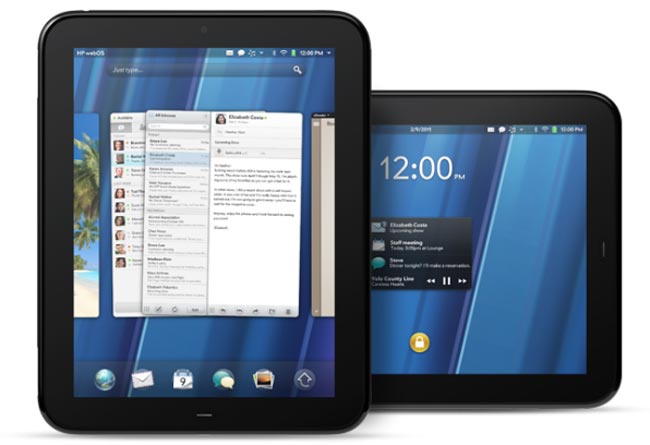
By now, you’ve probably heard that HP has decided to axe the TouchPad tablet and mull the future of WebOS as a licensed operating system.  You’ve probably also seen the fire sale that retailers have put on to rid themselves of their mountains of overstocked TouchPads.  I’ve been watching with great interest to see where this leads.

WebOS isn’t bad by any stretch of the imagination.  I’ve used a TouchPad briefly and I was fairly impressed.  The basics for a great OS are all there, and the metaphors for things like killing running applications made a little more sense to me than they did in iOS, which is by and large the predominant table OS today (and the most often copied for that matter).  I wasn’t all that thrilled about the hardware, though.  It felt a bit like one of my daughter’s Fisher Price toys.  Plastic, somewhat chunky, and a fingerprint magnet.  WebOS felt okay on the hardware, and from what I’ve heard it positively screams on some newer hardware comparable to that found in the iPad or the Galaxy Tab 10.1.

I think WebOS as an alternative to Android will be very helpful in the long run of recovering HP’s investment.  Google’s recent acquisition of Motorola is probably making companies like HTC and Samsung a little wary, despite what the press releases might say.  Samsung has done a lot with Android in the tablet space, presenting a viable alternative to Apple, or at least as viable as you can get going against that 800-pound gorilla.  They’ll be on the good side of Google for a while to come.  HTC sells a lot on handsets and has already shown that they’re willing to go with the horse that gives them the best chance in the race.  Whether that is Windows Mobile, Android, or someone else depends on which way the wind is blowing on that particular day.  If HP can position WebOS attractively to HTC and get them to start loading it on one or two phone models, it might help give HTC some leverage in their negotiations with other vendors.  Plus, HP can show that the TouchPad was a fluke from the sales perspective and get some nice numbers behind device adoption.  I’m sure that was part of the idea behind the announcement that HP would start preloading WebOS on its PCs and printers (which is probably not going to happen now that HP is shopping their PC business to potential buyers).  More numbers mean better terms for licensing contracts and better fluff to put into marketing releases.

As for the TouchPad itself, I think it’s going to have a life beyond HP.  Due to the large number of them that have been snapped up by savvy buyers, there is a whole ecosystem out there just waiting to be tapped.  There’s already a port of Ubuntu.  XDA has a bounty of $500 for the first Android port to run on it.  With so many devices floating around out there and little to no support from the original manufacturer, firmware hackers are going to have a field day creating new OS loads and shoehorning them into the TouchPad.  I don’t think it’s ever going to be enough to unseat the current table champ, but you have to admit that if the TouchPad was even close to being a competitor to the iPad, the fact that it now costs 1/5th of Fruit Company Tablet is a very enticing offer.  I doubt my mom or my grandmother is going to run out and snap one up, but someone like me that has no qualms about loading unsupported software might decide to take a chance on it.  If nothing else, it might just make a good picture frame.

Tom’s Take

Products have a lifecycle.  That’s why we aren’t still buying last year’s widgets.  Technology especially seems to have a much shorter lifecycle than anything else, with the possible exception of milk.  HP bet big on the TouchPad, but like most of today’s new television shows, when it wasn’t a hit out of the gate it got cancelled in favor of something else.  Maybe the combination of WebOS on this particular hardware wasn’t the optimal device.  We might see WebOS on printers and pop machines in the next 5 years, who knows?  The hardware from the TouchPad itself is going to live on in the hands of people that like building things from nothing keeping dead products breathing for just a little longer.  I’d love to see what a TouchPad running Backtrack 5 would be like.  With all those shiny new clearanced TouchPads floating around out there, I doubt I’m going to have to wait very long.

Missing CUCM Configuration Files

Oy.  There’s always one trouble ticket that gives you difficulty and makes you want to throw things around the room.  When you solve it, you yell and dance down the hallway proclaiming how smart you are to have gotten it fixed.  Folks, let me introduce you to that issue.

A Cisco Unified Communications Manager Business Edition (CUCMBE) server started exhibiting strange behavior.  No phones registered and no web GUI.  Not the first time that this has happened, so I’ll just log in via SSH and reboot the server.  When it came back up, nothing.  Same thing.  When I poke around in the CLI, I find out the SSH services are started, but that’s about it.  When I try to start the Tomcat service, which is required for the web GUI, I get an error about the Service Manager not being started.  No problem, I’ll just start that one:

admin:utils service start Service Manager
Aborting servM startup due to invalid configuration files

Oh crap.

Uh, restore from backup?  Hah!  No backup here.  Boot off the recovery CD and check the disk with FSCK (which looks a lot like a curse word I was uttering at this point)?  Fixed a couple of file issues, but still no dice on the services.  No backup partition, as this server had never been upgraded.

Just great.  What now?

Well, if you’re impatient like me when you’re waiting on support engineers to get back with you and you know you’re probably going to have to reload anyway, you can try some crazy things on the off chance they might work.  I mean, what’s the worst that can happen, right?

WARNING!!!!!

The things I’m about to discuss are totally unsupported by Cisco.  I also am not going to support them.  It worked for me this time, but it could have very easily screwed things up.  Don’t come to me and tell me you did this and now you need to reformat and you want me to help you.

Okay, that being said, there are a multitude of ways to gain root access to your CUCM server.  Again, none of them are supported, so don’t do them if you are the least bit squeemish.  The first thing you should read is the great guide at blindhog.net about gaining root access on CUCM 5.x/6.x.  It’s a very handy way to show you that the underlying system in CUCM is actually RedHat Enterprise Linux.  Since I didn’t have a Linux boot disk handy, I instead stumbled across this post which talks about jailbreaking CUCM.  I didn’t have to go all the way through it, but it is a fascinating read nonetheless.

1.  Download PuTTY, PuTTYgen, and PSFTP from HERE.  The instructions at the above link use these files and you should too.

2.  Log into CUCM CLI via SSH as the administrator user.

3.  Type in “file dump sftpdetails ../.ssh/id_dsa” at the CLI.  You’re going to get a dump of the SSH private key for the sftpuser account.  Copy this information to a text file and save it somewhere on your system.

4.  You need to convert this SSH private key from OpenSSH to PuTTY’s SSH format using PuTTYgen.  Import the Private Key file and save it somewhere like c:\temp.  Be sure to save it with the .ppk extension.

5.  Launch PSFTP with this command string:

psftp -2 -i c:\TEMP\id.ppk sftpuser@cucm.example.com

The file location should be where you saved the private key and the user@server should reflect your server’s IP or hostname.  Be sure to type in sftpuser@<your server address here>.

6.  If you’ve logged into the server before and saved the RSA fingerprint, you may get a warning here about the key your using.  Just say “yes” and keep going.

7.  Voila!  You’ve logged into the system as the sftpuser account and you can now download files from the Linux file system or copy files to it.  In the above link, this is where you would jailbreak the system.  For my particular example, we won’t have to go quite that far.

8.  In my troubleshooting case, I changed directories to “/usr/local/platform/conf/” which is where the configuration files live.  I noticed that “server.conf” was missing, but there was a “server.conf.bak” in the same directory.  I typed in “mv server.conf.bak server.conf” since I couldn’t copy the file.  Then I tried to start the Service Manager service again from a SSH CLI session.

SUCCESS!!!

Tom’s Take

I do stupid things all the time.  Like voiding warranties, which is what my little procedure above will do to your CUCM system if you try it.  I was desperate and impatient and it paid off for me this time.  I also have experience on the Linux CLI so I’m not afraid to do things there, even knowing that the outcome for a little slipup could crater my system.  Don’t do what I do unless you know what you’re doing or you aren’t afraid to reload.

That being said, a little Internet searching followed by some practical application can save your bacon in a time of emergency.  Just remember that the Disaster Recovery Tool (DiRT) is there for a reason. Use it wisely and use it often and you shouldn’t find yourself needing to jailbreak your CUCM server anytime soon.

The Ultimate Cisco Live Attendee

The results are in, and the Ultimate Cisco Live Attendee…isn’t me.  Bummer.  Congrats to Carole Warner Reece from Chesapeake NetCraftsmen for taking home the gold!

In all honesty, I never really figured I was going to win anyway.  There are people that have been going to Cisco Live since it began.  People that are way more involved in tons of aspects that I’ve never even seen.  And yet, I was named a semi-finalist along with my good friend Jeff Fry.  Jeff was a no-brainer because he did some great PR work with Cisco Live leading up to the event.  He was even a recommended read for all the first-time attendees this year.  You can’t knock the guy for being that popular.

I probably wouldn’t have entered the contest if it hadn’t been for the awesome time I had hanging out with all my friends.  Yes, crazy things happened.  Yes, I brought some of them on myself.  However, it all added up to make a great event and give me lots of interesting fodder for my submission video.  All of those things happened to me this year.  Except for my wife threatening to leave due to my overwhelming desire to collect t-shirts (that happens every year).

Here’s my submission video in all its glory direct from Cisco’s Youtube account.  For the record, I did record it on my Cius.

SIP Trunking – Review

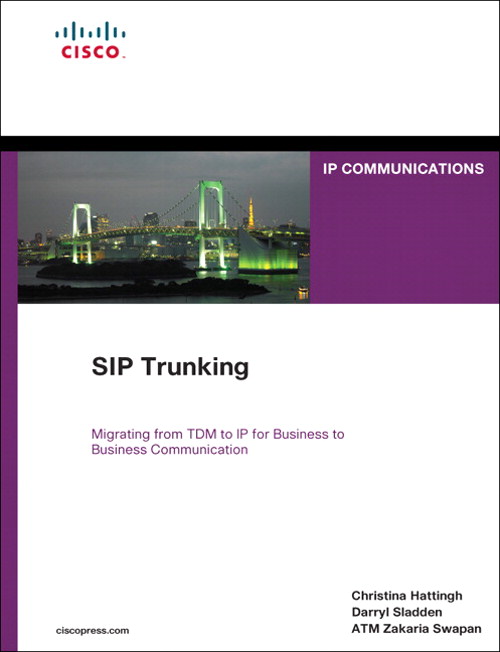
When I first got started working with Voice-over-IP (VoIP), I was excited about all the possibilities of making calls over the Internet and moving away from my old reliance on Ma Bell.  However, the reality of my continued dependence on the good old phone company is an ever-present reminder that sometimes technology needs to mature a little before I can make bigger leaps.  That’s why the idea behind SIP trunking has me excited.  It brings back a little bit of that hopeful magic from my early days of VoIP possibilities.  Thanks to Christina Hattingh, Darryl Sladden, and ATM Zakaria Swapan and the good folks over at Cisco Press, I got my feet wet with SIP Trunking:

This is the “pound cake” of Cisco Press books.  It’s only about 300 pages and a bit on the thin size, but it’s a very dense read.  Part 1 covers the differences between traditional Time-Division Multiplexing (TDM) trunking and SIP trunking.  There is discussion of the cost and benefit of moving to a hybrid model or even to a pure SIP environment.  This is a good part to focus on if you aren’t familiar with SIP trunking in general or you are trying to convince your decision makers to give it a try.

Part 2 is all about planning.  One hundred plus pages of modeling and design and checklists.  An engineer’s dream.  You are going to spend a lot of time in here dissecting the cutover strategies and the list of questions that you need to ask your provider before delving into the SIP-infested waters.  In fact, I would recommend this book for Chapter 9 alone, the checklist chapter.  It goes into great detail about all the questions you need to ask your provider, along with a description of each question and why the answer would be so important to you.

Part 3 is the deployment guide.  No Cisco Press book is complete without some code examples, and Chapter 10 has them in spades.  One thing I did like about their examples of AT&T and Verizon configuration is that they are appropriately annotated with notes to be sure you understand why a particular setting was configured.  I want to see more of this in the networking-focused Cisco Press books, not just the planning ones.  There are also case studies to help you make decisions and a chapter on the future of Unified Communications.  This one’s kind of dubious, though, as most of the time the predictions either end up looking hilariously obvious in hindsight or wide of the mark.  You can’t fault the authors for wanting to put a little bit of vision in at the end of this read, though.

Tom’s Take

If you want to learn a little more about SIP trunking or you are planning to put one in in the next 6-8 months, grab a copy of this book.  Have a cup of coffee before you jump into it, as the material could be a little dry if you aren’t focused on the task at hand.  Make sure to dog-ear the first page of Chapter 9, as you’ll find yourself coming back here more and more as you start implementing your SIP trunk.

Disclaimer

This book was provided to me as a perk at Cisco Live for being a NetVet.  I chose this book from a list of the available titles and it was provided to me at no charge above the cost of the conference.  Cisco Press did not ask for nor did I promise any kind of consideration in the above review.  The thoughts and opinions expressed above represent my true and honest opinion of the material.

Dirty Chai – The Engineer’s Little Helper

From time to time, I still see tweets about asking about the dirty chai.  The hallmark of any rough morning or caffeine-deficient situation, the dirty chai combines many things that are both delicious and useful into a small, portable package.  A little background…

What most people refer to as “chai” is actually a specific kind of spiced tea with milk known as Masala Chai.  I’ve been drinking these things for years.  The smooth taste is much more agreeable to me than strong coffee.  On a cold day, it really hits the spot with its combination of spices and richness.  However, one of the downsides of the delicious chai is the low amount of caffeine.  Due to the tea used and the brewing process, very little caffeine makes it into the drink.  Great if you are looking for something to drink right before bed or to calm you down.  Not so great if you find yourself in need of an energy infusion, or in my case, a jumpstart at the beginning of the day.  After all, hot drinks without caffeine are like beer without alcohol.  What’s the point?

Jennifer Huber introduced me to the concept of a “dirty” chai.  After ordering your typical hot chai drink, have the barista pour in an additional shot of espresso.  I wasn’t for sure the first time I ordered this drink, even going so far as to order it by recipe instead of using the sobriquet “dirty”.  When the barista confirmed that this was indeed “dirty”, I knew I’d found something good.  By adding the additional shot of espresso, the caffeine content is kicked through the roof.  The bitter flavor I typically associate with espresso shots is mellowed by the rich flavor of the chai.  A win/win situation.  If you find yourself in need of an additional pick-me-up, you can double the amount of espresso for a “double dirty” chai.  I hesitate to recommend the triple shot version before you’ve built up a tolerance, as mainlining that much espresso with chai could lead to molecular vibrations that will cause you to pass through solid objects or travel back in time.  Caveat drinkor.

In case you need a better example of the universal appeal of the dirty chai, check out this little example from Tech Field Day 5 in San Jose from February:

Less Than Dial Peer Zero

There was a good question posed by Karla Reyes a few days ago about the use of a voice dial peer that included the string incoming-called-number.  I did my best to figure out why one would use such a dial peer in production, and that led me to a search and discovery of all sorts of interesting things about dial peers and what happens when you are forced into defaults.

On a Cisco phone system, whether it be CallManager or CallManager Express, dial peers on your voice gateways route calls to the correct destinations, both inbound and outbound.  The outbound dial peers I’m familiar with, having configured them on numerous CUCME systems.  The inbound dial peers, not so much.  I configure most of my systems to use connection plar opx <extension> to ring analog circuits and send the calls to an operator or an auto attendant (AA).  Absent that configuration, you can still configure dial peers to evaluate incoming calls and route them to the proper locations.

Cisco voice gateways will evaluate the dial peers and choose the one the has the longest set of matching digits when deciding where to send a call.  So if one dial peer is 8… and the other is 85.., then if you call “8511”, the second dial peer will be used since it has the most matching digits of the two.  If you dial “8721”, the first dial peer is matched.  This is a simple, straight forward process.  When incoming calls are headed into the system, the same process is used.  So what happens if there isn’t a perfect match?

This is where Dial Peer 0 comes into play.  Dial Peer 0 exists on every voice gateway.  It’s a sneaky little default setting that no one pays much attention to until they stumble across it.  Part of the reason is that it’s invisible.  No reference to Dial Peer 0 pops up in the configuration.  Since it’s the default and it’s hard-coded, it’s always there.  It’s kind of like the implicit deny statement at the end of every access list.  And much like that deny statement, it often produces strange and undesirable results when it gets triggered.  That’s because Dial Peer 0 is designed to work with just about anything, so it has some of the silliest settings imaginable:

  • It supports any codec you throw at it.  The designers figured that rather than waste precious time negotiating whether or not your should use G.711 or G.729, Dial Peer 0 should just accept whatever it’s sent and move on.  Not so great when you are trying to keep bandwidth conserved on a slow link and someone sends you big fat voice packets.
  • DTMF packets are sent in-band, so if you decide to use G.729 as your signaling protocol, the tones can get mangled by the compression process.
  • All the voice signaling and data packets have their IP precedence settings remarked to 0.  All that pain and effort you went through getting your perfect Quality of Service (QoS) setup working gets chucked right out the window.
  • Resource Reservation Protocol (RSVP) is disabled.  That means if you spent even more time and pain setting up an Integrated Services QoS setup, it’s going to fail when the call hits Dial Peer 0.
  • IVR applications are disabled.  This means that any scripts that would be used for things like auto attendants are going to break.
  • Last but not least, Direct Inward Dial (DID) isn’t present.  This means your callers will get confused because they’ll hear a secondary dial tone when the call leg completes.  This is where they would enter your extension number to speak to you.  Instead, they’ll figure the call didn’t work then hang up and try again.  Enterprising hackers will hear the dial tone and realize what that means then try and transfer to another number, such as long distance or international calling.  That’ll run up your phone bill fast.

Sounds like a whole bunch of bad reasons to never use Dial Peer 0, right?  Except you can’t get rid of it.  It’s always there, lurking and waiting to screw up your day.  The only way to avoid using it is to configure a new default dial peer to match instead of letting the call fall all the way down to Dial Peer 0.  In order to understand that, you have to know the order in which Cisco matches incoming dial peers:

  1. Match the dialed number with incoming-called-address configured in the dial peer.
  2. Match the calling number with answer-address configured in the dial peer.
  3. Match the calling number with destination-pattern configured in the dial peer.
  4. Match an POTS dial peer with a port command configured in the dial peer.
  5. Take your chances with Dial Peer 0.

The easiest (and by far most popular) method of overriding Dial Peer 0 is to use #1 above like this:

dial-peer voice 1 pots
  incoming-called-number .
  direct-inward-dial

This ensures Dial Peer 1 is always matched ahead of Dial Peer 0, but not matched if a longer match exists.  It also uses DID to disable two-stage dialing, so those nefarious hackers won’t get a chance to call Cuba on your dime.

Tom’s Take

Defaults exist so that we don’t have to think about things sometimes.  Anyone who’s ever told someone how to install Microsoft Office by saying “Click Next, Next, I Agree, Next, Next” will know what defaults come in very handy.  However, if the default settings are baked in and unable to be changed, it makes life difficult if you can’t account for them and find a way to work around them.  At the very worst, it just means you get to spend a little more time on the phone with your favorite TAC engineers.

I’d like to thank Karla Reyes, Amy Arnold, and Aaron Conaway for their help on this post.

Software I Use Every Day

People tend to find programs that work really well for them in their day-to-day jobs and then find themselves using those programs over and over again.  I’m no different.  In my job as a network engineer for a Value Added Reseller (VAR), I have quite a few programs installed on my laptop at any one time.  However, there are three that always find themselves getting installed first whenever I upgrade, or I find myself installing them when I’m remotely connected to a server and need to do some work.  The best thing about these three programs?  They’re totally free.

TeraTerm

If you work with Cisco/HP/Juniper/Brocade/etc devices that have a console port, odds are good you have a console cable or three in your backpack.  You also have some sort of terminal program on your laptop.  A lot of engineers I know used Hyperterm in Windows XP.  I loathe Hyperterm.  A crippled version of a retail product that’s confusing and hard to use.  When I started at my current employer, my mentor introduced me to TeraTerm.  It’s a wonderful little program that can be used to telnet, SSH, or console to a device.  There are a ton of programs out there that can do the same, such as PuTTY or SecureCRT.  No matter how many times I use them I keep coming back to TeraTerm.  One reason is the Serial connection drop down box.  On my laptop, every time I plug in a USB-to-Serial converter, it is assigned a different COM port depending on which port I plugged it into.  With PuTTY, I have to remember when COM port is associated with a particular USB port.  With TeraTerm, I just choose from a drop down box.  Simple.  Another nice option is the ability to log all your console output to a text file.  If you’ve every had to type show tech-support on a router, you know the flood of info that comes rushing at you with no way to stop or pause and copy it to a file for TAC.  With TeraTerm, you just set the logging option, pick a file name, type your command, and sit back while it takes care of the copying for you.  It’s also great if you want to capture a configuration after you’re finished for archival just in case you need it again.

TeraTerm has had some development issues in the past, but since 2004 it has been maintained by it’s own development team for free at Sourceforge.  Get it HERE.  You may also be interested in PuTTY or SecureCRT, but please note that SecureCRT isn’t free.

TFTPD32

If you work with Cisco/HP/Juniper/Brocade/etc devices, you’ve found yourself in need of a TFTP server at some point in time.  TFTP is the most popular way to upload/download software and configurations to and from these devices.  It’s a quick protocol with little overhead, since it relies on UDP packets to deliver information.  Many vendors have a TFTP server, whether it be Solarwinds, 3COM’s old TFTP server, or even Klever’s PumpKIN TFTP server.  I find myself coming back to TFTPD32 because it’s more than just a server.  It’s also a TFTP client, which is handy if you want to try and pull down a file to make sure it’s being shared correctly.  It’s a tiny DHCP server if you are plugged directly into a device such as an access point and you need to give it a quick address to get to the web configuration.  It’s a Simple Network Time Protocol (SNTP) server if you have a device that needs to sync to an NTP server, such as CUCM during setup.  Lastly, it has a syslog server if you need to redirect syslog output during a debug or troubleshooting session.  TFTPD32 also supports the transfer of files over 32MB in size, which has left some of the older TFTP servers in the dust, as most modern firmware images are well above 32MB.  There’s even a 64-bit version for those who have made the switch to the new generation of operating systems.  If you just need something simple to transfer files to and from your routers, you can’t go wrong with TFTPD32.

TFTPD32 is free and available HERE.  You may also be interested in alternatives from Solarwinds or Klever’s PumpKIN.  Note that Solarwinds requires registration.  I don’t recommend using the old 3COM TFTP server any longer, as it isn’t capable of 32MB image transfers and is generally considered dead software.

freeFTPd

Working with CUCM lately as much as I have been, I’m finding myself growing more reliant on using FTP instead of TFTP.  CUCM seems to want to use FTP (or SFTP) for almost everything, whether it be configuration backups or upload of new COP files.  I’ve used Xlight FTP server (the free version) for a while, but when I needed an SFTP option, the licensing options for Xlight seemed somewhat steep.  After some searching, I came across freeFTPd.  It’s very simple to setup and configure both FTP and SFTP, along with users and virtual directories.  You can also set it to listen on all your laptop’s interfaces, so if you find yourself with a slow Ethernet connection you can always flip over to the wireless interface.  I highly recommend installing freeFTPd if you use CUCM today or you might find yourself working on it in the future.  You’ll thank me later.

You can also use Xlight’s FTP server or Filezilla.  Note that Xlight is a 30-day trial of the standard edition, but after those 30 days it becomes the limited personal edition.  You might also check the license terms in case you want to use it professionally.

Tom’s Take

Discussing favorite programs is a lot like arguing who the best Doctor is.  Everyone has their opinions and beliefs about why a particular program works the best, or they’ve been burned by a program in the past and have forsworn it for all eternity.  I find these programs easy to use, easy to install if they aren’t on the machine I’m using, and since they are mostly open source, free of any sticky licensing issues that might cause problems down the road.  Feel free to suggest any programs you find useful in the comments so that others might try them out too.  Note that because I’m a Windows user, all of these programs run on Windows, either XP or Windows 7.  If you’re interested in a Mac version of this list, please feel free to send me a MacBook Pro and I’ll whip one up for you.  I’m keeping the MacBook, though.

How to Transfer

The number one question I get asked when installing a new phone system has to be “How do I transfer a call?”  Seems that most people who have been using phones most of their adult lives are mystified by the little button that allows them to send a call somewhere else.  Especially when I put the complexity of a Voice over IP (VoIP) phone system in their hands.

The majority of people that have been using Private Branch Exchange (PBX) phone systems for the past few decades should be familiar with basic unsupervised transfer.  You may also hear this referred to as a blind transfer or a cold transfer.  In this implementation, the party initiating the transfer presses the transfer button, dials the number that the call needs to go to, and is then disconnected from the call.  The original caller is sent to the new target and when the target answers, they get an earful of whatever the original caller wishes to tell them.  They call this blind (or cold) because the other party has no idea it’s coming.  Some people, especially executives, get kind of upset by all this messy blind stuff.

Most modern phone systems use a method of supervised transfers.  These are also called consult transfers or warm transfers.  These kinds of transfers start out the same.  A called party presses the transfer button and dials the number of the person that needs to get the phone call.  In this case, though, the called party stays on the phone until the target picks up.  All the while, the original caller is hearing the dulcet tones of Streaming Winds (or whatever your music on hold happens to be).  When the target picks up, you get to give them all the gory details of the phone conversation so far, out of earshot of the transferred party.  Only when the person on the other end agrees to take the call do you complete the transfer by pressing the Transfer button again.  It’s a warm transfer because the target gets to hear a friendly voice before the original caller gets to launch into whatever they want to talk about.  It’s still possible for you to pull off a blind transfer in this setup.  When the target’s phone starts ringing, you press the transfer button to complete the transfer.  Now, the original caller will hear the target’s phone ringing and they get to start talking as soon as the phone picks up.  In some cases, depending on how the transfer caller ID works, this can be worse than a blind transfer, because the target will see the caller ID of the original called party and think it’s someone internally wanting to talk, only to get an outside caller when they answer.  It’s caused some embarrassment before, I can assure you.

For whatever reason, some people have a problem with warm transfers.  Especially if they are used to blind transfers.  They hang up on the original caller, thinking the transfer went through with no issues.  The problem is that the call won’t complete until the transfer button is pressed twice, meaning that hanging up without pressing it twice will disconnect the caller.  Then they get to call back, angry they’ve been disconnected.  No amount of training in this world has been able to break people of this bad habit.

Cisco Unified Communications Manager (CUCM) doesn’t have an option for blind transfers.  It’s a consult transfer system only.  However, there is an option you can set that will act like a blind system and allow your users to act as they always have without disconnecting callers.

  1. Log into your CUCM publisher and go to the System menu.
  2. Choose the Service Parameter option.
  3. Choose the publisher server from the dropdown menu.
  4. Choose the Cisco CallManager Service.
  5. Scroll down until you find the Clusterwide Parameters (Device-Phone)
  6. Look for the Transfer On-Hook Enabled setting.  By default, it’s set to FALSE.
  7. Change this setting to TRUE to allow On-hook transfers.

Here’s a picture in case you get lost:

Easy as cake.  If your phones are all SCCP-based, the setting will take effect immediately.  If you phones are SIP, you’re going to have to reset them to change this, so be sure to do it when you can reboot them all without affecting communications.

There you have it.  Once you’ve enabled this little setting, you can still use a warm transfer, but those users that can’t or won’t transfer with the Transfer button can still pull off a transfer by hanging up without disconnecting the caller.  If you can find a way to drill the concept of a warm transfer into the heads of those that just don’t seem to get it for some reason, you can make some real money.  Sure, it may involve some heavy duty mind control, but in the end I think it will all be worth it.

CCIE…For A Few Dollars More

The price of becoming an Expert just went up a little.  Effective August 1, 2011, the price of the CCIE lab is being increased by $100US across the board to be $1500.  The email that candidates received this morning:

As of August 1, 2011, the price of the CCIE Lab will change from $1400
to $1500 USD*.  Your lab fee will be processed 90 days before your
scheduled lab date. Since payment for your lab will be processed after
this date, you will incur the new price.  While you can cancel your
lab date without cost, we hope you will continue on with your
certification exam to certify that you are one of the most expert
networking professionals in the world.

As an administrative change, the timing on this is just about right.  The Cisco fiscal year begins on August 1 every year, so we are now officially in FY12.  Revenue increases usually get recognized in a new accounting period for reasons that I’ve managed to forget since my last accounting class in college.  Suffice to say that tying the lab price increase to the beginning of the fiscal year isn’t all that unheard of.

Why increase the price at all?  What am I getting for an extra 7%?  All valid questions.  Allow me to speculate:

1.  A Weak Dollar.  It’s no secret that the US dollar isn’t doing so well against other foreign currencies, like the Euro.  I’m not a Harvard Economist, so I’m not going to delve into areas that I know nothing about.  However, the price difference between the two currencies could lead Cisco to believe that the customers paying for the lab in denominations other than the US Dollar aren’t getting a fair shake.  Or, it could mean that other candidates are looking at the US labs as a bargain compared to Brussels and Dubai.  That would mean they could start booking labs here as opposed to there and start overloading the seating available here for US students.  It’s happened before, so I wouldn’t be that surprised to see it again if the candidates believed the price difference was that great.  By raising the lab to $1500, Cisco is essentially resetting the level so that everyone is fair again.

2.  Layoffs.  Yes, I know that within the next two weeks, Cisco is looking at about 6,500 layoffs from all over the company.  This includes 2,100 people who opted for an “early retirement” package in lieu of a furlough.  Why would this have an impact on the CCIE lab?  Because I have it on good authority that once of those 2,100 retirees was a CCIE proctor.  Typically, most labs run two proctors.  One shows up early to get the lab up and running for the day and run the candidates through the morning instructions.  The other proctor ends the lab and collects materials.  Depending on the time differences, the first proctor may not even be around when the lab ends.  Only having one proctor available for a site means a lot of overtime for that poor soul.  More likely is the idea that a new proctor will need to be brought on board, so increasing the price of the lab makes sense from the perspective of training a new guy in how to be mean and paying a chunk of his/her salary in an environment where pennies are going to be pinched pretty soon.

3.  Technology Refreshes.  Before any candidates out there have a heart attack, notice I said “technology” and not “blueprint”.  There is a lot of interesting technology coming in the future for the CCIE lab.  Mark Snow hinted at some of it in his Cisco Live 2011 recap post.  The plan going forward is to port all the lab workbooks to the CCIE Lab Delivery System that the R&S lab uses now.  This costs money.  Also, Cisco wants to start introducing more troubleshooting tasks in the actual configuration section now that the Open-Ended Questions have been removed.  This isn’t cheap.  In addition, Cisco is working on varying the lab tasks slightly among different versions of the exam, for instance asking a task to be configured one way on a version and the same task to have a slightly different configuration in another version.  This kind of development takes time and (you guessed it) money.  So, by adding another $100 to the lab price, they can effectively pay for the development of these new technologies without having to increase revenue from another source.  By making sure the CCIE lab can generate enough revenue to fund its own development, you never have to worry about another business unit getting involved and deciding how things are going to be run.

Tom’s Take

The CCIE lab isn’t cheap.  Not by a long shot.  Between the lab costs and the flights and the hotels and the rental cars, even one trip is a fairly costly adventure.  Adding another $100 onto that may not seem like a lot up front.  But the psychological effect can’t be understated.  The lab is now a nice round $1500 amount.  For those footing the bill themselves, this is another wallet-sized portrait of Benjamin Franklin that they have to part with.  In the end, all the pain and suffering is worth it, even that of your poor bank account.  I think the price increase will fund some great new advances in the lab and hopefully do away with the 3-ring binders for the workbooks and usher in a new age that uses technology to full advantage.  If this increase is due to currency parity, then the additional revenue that is brought in after the currency markets stabilize will be useful as well.  Just don’t expect the price of the lab to go down anytime soon, if ever.  Because if there’s one thing you can count on, it’s the cost of the CCIE lab always being a fistful of dollars.