A Gift Guide for Sanity In Your Home IT Life

If you’re reading my blog you’re probably the designated IT person for your family or immediate friend group. Just like doctors that get called for every little scrape or plumbers that get the nod when something isn’t draining over the holidays, you are the one that gets an email or a text message when something pops up that isn’t “right” or has a weird error message. These kinds of engagements are hard because you can’t just walk away from them and you’re likely not getting paid. So how can you be the Designated Computer Friend and still keep your sanity this holiday season?

The answer, dear reader, is gifts. If you’re struggling to find something to give your friends that says “I like you but I also want to reduce the number of times that you call me about your computer problems” then you should definitely read on for more info! Note that I’m not going to fill this post will affiliate links or plug products that have sponsored anything. Instead, I’m going to just share the classes or types of devices that I think are the best way to get control of things.

Step 1: Infrastructure Upgrades

When you go visit your parents for Thanksgiving or some other holiday check in, are they still running the same wireless network they got when they got their high-speed Internet? Is their Wi-Fi SSID still the default with the password printed on the side of the router/modem combo? Then you’re going to want to upgrade their experience to keep your sanity for the next few holidays.

The first thing you need to do it get control of their wireless setup. You need to get some form of wireless access point that wasn’t manufactured in the early part of the century. Most of the models on the market have Wi-Fi 6 support now. You don’t need to go crazy with a Wi-Fi 6E model for your loved ones right now because none of their devices will support it. You just need something more modern with a user interface that wasn’t written to look like Windows 3.1.

You also need to see about an access point that is controlled via a cloud console. If you’re the IT person in the group you probably already use some form control for your home equipment. You don’t need a full Meraki or Juniper Mist setup to lighten your load. That is, unless you already have one of those dashboards set up and you have spare capacity. Otherwise you could look at something like Ubiquiti as a middle ground.

Why a cloud controller AP? Because then you can log in and fix things or diagnose issues without needing to spend time talking to less technical users. You can find out if they have an unstable Internet connection or change SSID passwords at the drop of a hat. You can even set up notifications for those remote devices to let you know when a problem happens so you can be ready and waiting for the call. And you can keep tabs on necessary upgrades and such so you aren’t fielding calls when the next major exploit comes out and your parents call you asking if they’re going to get infected by this virus. You can just tell them they’re up-to-date and good to go. The other advantage of this method is that when you upgrade your own equipment at home you can just waterfall the old functional gear down to them and give them a “new to you” upgrade that they’ll appreciate.

Step 2: Device Upgrades

My dad was notorious for using everything long past the point of needing to be retired. It’s the way he was raised. If there’s a hole you patch it. If it breaks you fix it. If that fix doesn’t work you wrap it in duct tape and use it until it crumbles to dust. While that works for the majority of things out there it does cause issues with technology far too often.

He had a iPad that he loved. He didn’t use it all day, every day but he did use it frequently enough to say that it was his primary computing device. It was a fourth-generation device, so it fell out of fashion a few years ago. When he would call me and ask me questions about why it was behaving a certain way or why he couldn’t download some new app from the App Store I would always remind him that he had an older device that wasn’t fast enough or new enough to run the latest programs or even operating software. This would usually elicit a grumble or two and then we would move on.

If you’re the Designated IT Person and you spend half your time trying to figure out what versions of OS and software are running on a device, do yourself a favor and invest in a new device for your users just to ease the headaches. If they use a tablet as their primary computing device, which many people today do, then just buy a new one and help them migrate all the data across to the new one while you’re eating turkey or opening presents.

Being on later hardware ensures that the operating system is the latest version with all the patches for security that are needed to keep your users safe. It also means you’re not trying to figure out what the last supported version of the software was that works with the rest of the things. I’ve played this game trying to get an Apple Watch to connect to an older phone with mismatched software as well as trying to get support for newer wireless security on older laptops with very little capability to do much more than WPA1. The amount of hours I burned trying to make the old junk work with the new stuff would have been better served just buying a new version of the same old thing and getting all their software moved over. Problems seem to just disappear when you are running on something that was manufactured within the last five years.

Step 3: Help Them Remember

This is probably my biggest request: Forgotten passwords. Either it’s the forgotten Apple ID or maybe the wireless network password. My parents and in-laws forget the passwords they need to log into things all the time. I finally broke down and taught them how to use a password management tool a few years ago and it made all the difference in the world. Now, instead of them having to remember what their password was for a shopping site they can just set it to automatically fill everything in. And since they only need to remember the master password for their app they don’t have to change it.

Better yet, most of these apps have a secure section for notes. So all those other important non-password things that seem to come up all the time are great to put in here. Social Security Numbers, bank account numbers, and so much more can be put in one central location and made easy to access. The best part? If you make it a shared vault you can request access to help them out when they forget how to get in. Or you can be designated as a trusted party that can access the account in the event of a tragedy. Getting your loved ones used to using password vaults now makes it much easier to have them storing important info there in case something happens down the road that requires you to jump in without their interaction. Trust me on this.


Tom’s Take

Your loved ones don’t need knick knacks and useless junk. If you want to show them you love them, give them the gift of not having to call you every couple of days because they can’t remember the wireless password or because they keep getting this error that says their app isn’t support on this device. Invest in your sanity and their happiness by giving them something that works and that has the ability for you to help manage it from the background. If you can make it stable and useful and magically work before they call you with a problem you’re going to find yourself a happier person in the years to come.


IP Class is Now in Session

You may have seen something making the rounds on Twitter this week about a couple of proposed drafts designed to alleviate the problems with IPv4 exhaustion by repurposing some old IP spaces that aren’t available for use right now. Specifically:

Ultimately, this is probably going to fail for a variety of reasons and looks like it’s more of a suggestion than anything else but I wanted to take a moment to talk about why this isn’t an effective way of fixing address issues.

Error Bearers

The first reason that the Schoen drafts are going to fail is because most of the operating systems in the world won’t allow you to use reserved spaces for a system address. Because we knew years ago that certain spaces were marked as non-usable the logic was configured into the system to disallow the use of those spaces. And even if the system isn’t configured to disallow that space there’s no guarantee the traffic is going to be transmitted.

Let’s take 127/8 as a good example. Was it a smart idea to mark 16 million addresses as loopback host-only space? Nope. But that ship has sailed and we aren’t going to be able to easily fix it. Too many systems will see any address starting with 127 in first octet and assume it’s a loopback address. In much the same way as people have been known to assume the entire 192/8 address space is RFC1918 reserved instead of 192.168.0.0/16. Logic rules and people making decisions aren’t going to trust any space being used in that manner. Even if you did something creative like using NAT and only using it internally you’re not going to be able to patch every version of every operating system in your organization.

We modify rules all the time and then have to spend years updating those modifications. Take area codes in North America for example. The old rules used to say that an area code had to have a zero or a one for the middle digit – ([2-9][0-1][2-9]) to use the Cisco UCM parlance. If your middle digit was something other than a zero or a one it wasn’t a valid NANP area code. As we began to expand the phone system in 1995 we changed those rules and now have area codes with all manner of middle numbers.

What about prefixes? Those follow rules too. NANP prefixes must not start with a zero or a one – (area code) [2-9]XX-XXXX is the way they are coded. Prefixes that start with a zero or a one are invalid and can’t be used. If we suddenly decided that we needed to open up the numbers in existing area codes and include prefixes that start with those forbidden numbers we would need to reset all the dialing rules in systems all over the country. I know that I specifically programmed my CUCM servers to send an immediate error if you dialed a prefix with a zero or a one. And all of them would have to be manually reconfigured for such a change.

In much the same way, the address spaces that are reserved today as invalid would need to be patched out of systems from home computers to phones to networking equipment. And even if you think you got it all you’re going to miss one and wonder why it isn’t working. Worse yet, it might even silently fail because you may be able to transmit data to 95% of the systems out there but some intermediate system may discard your packets as invalid and never tell you what happened. You’ll spend hours or days chasing a problem you may not even be able to fix.

Avoiding the Solutions

The easiest way to look at these proposals is by understanding that people are really, really, really in love with IPv4. Despite the fact that using the effort of the changes necessary to implement these reserved spaces would be better spent on IPv6 adoption we still get these things being submitted. There is a solution but people don’t want to use it. The modern Internet relies so much on the cloud that it would be simple to enable IPv6 in your provider space and use your engineering talent to help provide better adoption for that instead. We’re already seeing that all over places with address space has been depleted for a while now.

It may feel easier to spend more effort to revitalize the IPv4 space we all know and love. It may even feel triumphant when we’re able to reclaim address space that was wasted and use it for something productive instead of just teaching that you can’t configure devices with those spaces. And millions of devices will have IP address space to use, or more accurately there will be millions of addresses available to sell to people that will waste them anyway. Then what?

The short term gain from opening up IPv4 space at the expense of not developing IPv6 adoption is a fallacy that will end in pain. We can keep putting policy duct tape on the IPv4 exhaustion problem but we are eventually going to hit a wall we can’t overcome. The math doesn’t work when your address space is only 32 bits in total. That’s why IPv6 expanded the amount of information in the address space.

Sure, there have been mistakes in the way that IPv6 address space has been allocated and provisioned. Those mistakes would need to eventually be corrected and other configurations would need to be done in order to efficiently utilize the space. Again, the effort should be made to fix problems with a future-proof solution instead of trying our hardest to keep the lights on with the old system that’s falling apart for a few more years.


Tom’s Take

The race to find every last possible way to utilize the IPv4 space is exactly what I expected when we’re in the death throes of using it instead of IPv6. The easy solutions are done. The market and hunger for IPv4 space is only getting stronger. Instead of weaning the consumers off their existing setups and moving them to something future proof we’re feeding their needs for short term gains. If the purpose of this whole exercise was to get more address space to be rationed out for key systems to keep them online longer I might begrudgingly accept it. However, knowing that it would likely be opened up and fed to providers to be auctioned off in blocks to be ultimately wasted means all the extra effort is for no gain. These IETF drafts have a lot of issues and we’re better off letting them expire in May 2022. Because if we take up this cause and try to make them a reality we’re going to have to relearn a lot of lessons of the past we’ve forgotten.

The Process Will Save You

I had the opportunity to chat with my friend Chris Marget (@ChrisMarget) this week for the first time in a long while. It was good to catch up with all the things that have been going on and reminisce about the good old days. One of the topics that came up during our conversation was around working inside big organizations and the way that change processes are built.

I worked at IBM as an intern 20 years ago and the process to change things even back then was arduous. My experience with it was the deployment procedures to set up a new laptop. When I arrived the task took an hour and required something like five reboots. By the time I left we had changed that process and gotten it down to half an hour and only two reboots. However, before we could get the new directions approved as the procedure I had to test it and make sure that it was faster and produced the same result. I was frustrated but ultimately learned a lot about the glacial pace of improvements in big organizations.

Slow and Steady Finishes the Race

Change processes work to slow down the chaos that comes from having so many things conspiring to cause disaster. Probably the most famous change management framework is the Information Technology Infrastructure Library (ITIL). That little four-letter word has caused a massive amount of headaches in the IT space. Stage 3 of ITIL is the one that deals with changes in the infrastructure. There’s more to ITIL overall, including asset management and continual improvement, but usually anyone that takes ITIL’s name in vain is talking about the framework for change management.

This isn’t going to be a post about ITIL specifically but about process in general. What is your current change management process? If you’re in a medium to large sized shop you probably have a system that requires you to submit changes, get the evaluated and approved, and then implemented on a schedule during a downtime window. If you’re in a small shop you probably just make changes on the fly and hope for the best. If you work in DevOps you probably call them “deployments” and they happen whenever someone pushes code. Whatever the actual name for the process is you have one whether you realize it or not.

The true purpose of change management is to make sure what you’re doing to the infrastructure isn’t going to break anything. As frustrating as it is to have to go through the process every time the process is the reason why. You justify your changes and evaluate them for impact before scheduling them. As opposed to something that can be termed as “Change and find out” kind of methodologies.

Process is ugly and painful and keeps you from making simple mistakes. If every part of a change form needs to be filled out you’re going to complete it to make sure you have all the information that is needed. If the change requires you to validate things in a lab before implementation then it’s forcing you to confirm that it’s not going to break anything along the way. There’s even a process exception for emergency changes and such that are more focused on getting the system running as opposed to other concerns. But whatever the process is it is designed to save you.

ITIL isn’t a pain in the ass on accident. It’s purposely built to force your justify and document at every step of the process. It’s built to keep you from creating disaster by helping you create the paper trail that will save you when everything goes wrong.

Saving Your Time But Not Your Sanity

I used to work with a great engineer name John Pross. John wrote up all the documentation for our migrations between versions of software, including Novell NetWare and Novell Groupwise. When it came time to upgrade our office Groupwise server there was some hesitation on the part of the executive suite because they were worried we were going to run into an error and lock them out of their email. The COO asked John if he had a process he followed for the migration. John’s response was perfect in my mind:

“Yes, and I treat every migration like the first one.”

What John meant is that he wasn’t going to skip steps or take shortcuts to make things go faster. Every part of the procedure was going to be followed to the letter. And if something came up that didn’t match what he thought the output should have been it was going to stop until he solved that issue. John was methodical like that.

People like to take shortcuts. It’s in our nature to save time and energy however we can. But shortcuts are where the change process starts falling apart. If you do something different this time compared to the last ten times you’ve done it because you’re in a hurry or you think this might be more efficient without testing it you’re opening yourself up for a world of trouble. Maybe not this time but certainly down the road when you try to build on your shortcut even more. Because that’s the nature of what we do.

As soon as you start cutting corners and ignoring process you’re going to increase the risk of creating massive issues rapidly. Think about something as simple as the Windows Server 2003 shutdown dialog box. People used to reboot a server on a whim. In Windows 2003, the server had a process that required you to type in a reason why you were manually shutting the server down from the console. Most people that rebooted the server fell into two camps: Those that followed their process and typed in the reason for the reboot and those that just typed “;Lea;lksjfa;ldkjfadfk” as the reason and then were confused six months from now when doing the post-mortem on an issue and cursing their snarky attitude toward reboot documentation.

Saving the Day

Change process saves you in two ways. The first is really apparent: it keeps you from making mistakes. By forcing you to figure out what needs to happen along the way and document the whole process from start to finish you have all the info you need to make things successful. If there’s an opportunity to catch mistakes along the way you’re going to have every opportunity to do that.

The second way change process saves you is when it fails. Yes, no process is perfect and there are more than a few times when the best intentions coupled with a flaw in the process created a beautiful disaster that gave everyone lots of opportunity to learn. The question always comes back to what was learned in that process.

Bad change failures usually lead to a sewer pipe of blame being pointed in your direction. People use process failures as a change to deflect blame and avoid repercussions for doing something they shouldn’t have or trying to increase their stock in the company. The truly honest failure analysis doesn’t blame anyone but the failed process and tries to find a way to fix it.

Chris told me in our conversation that he loved ITIL at one of his former jobs because every time it failed it led to a meaningful change in the process to avoid failure in the future. These are the reasons why blameless post-mortem discussions are so important. If the people followed the process and the process the people aren’t at fault. The process is incorrect or flawed and needs to be adjusted.

It’s like a recipe. If the instructions tell you to cook something for a specific amount of time and it’s not right, who is to blame? Is it you because you did what you were told? Is the recipe? Is it the instructions? If you start with the idea that you did the process right and start trying to figure out where the process is wrong you can fix the process for next time. Maybe you used a different kind of ingredient that needs more time. Or you made it thinner than normal and that meant cooking it too long this time. Whatever the result, you end up documenting the process and changing things for the future to prevent that mistake from happening again.

Of course, just like all good frameworks, change processes shouldn’t be changed without analysis. Because changing something just to save time or take a shortcut defeats the whole purpose! You need to justify why changes are necessary and prove they provide the same benefit with no additional exposure or potential loss. Otherwise you’re back to making changes and hoping you don’t get burned this time.


Tom’s Take

ITIL didn’t really become a popular thing until after I left IBM but I’m sure if I were still there I’d be up to my eyeballs in it right now. Because ITIL was designed to keep keyboard cowboys like me from doing things we really shouldn’t be doing. Change management process are designed to save us at every step of the way and make us catch our errors before they become outages. The process doesn’t exist to make our lives problematic. That’s like saying a seat belt in a car only exists to get in my way. It may be a pain when you’re dealing with it regularly but when you need it you’re going to wish you’d been using it the whole time. Trust in the process and you will be saved.

Is the M1 MacBook Pro Wi-Fi Really Slower?

I ordered a new M1 MacBook Pro to upgrade my existing model from 2016. I’m still waiting on it to arrive by managed to catch a sensationalist headline in the process:

“New MacBook Wi-Fi Slower than Intel Model!”

The article referenced this spec sheet from Apple referencing the various cards and capabilities of the MacBook Pro line. I looked it over and found that, according to the tables, the wireless card in the M1 MacBook Pro is capable of a maximum data rate of 1200 Mbps. The wireless card in the older model Intel MacBook Pro all the way back to 2017 is capable of 1300 Mbps. Case closed! The older one is indeed faster. Except that’s not the case anywhere but on paper.

PHYs, Damned Lies, and Statistics

You’d be forgiven for jumping right to the numbers in the table and using your first grade inequality math to figure out that 1300 is bigger than 1200. I’m sure it’s what the authors of the article did. Me? I decided to dig in a little deeper to find some answers.

It only took me about 10 seconds to find the first answer as to one of the differences in the numbers. The older MacBook Pro used a Wi-Fi card that was capable of three spacial streams (3SS). Non-wireless nerds reading this post may wonder what a spatial stream is. The short answer is that it is a separate unique stream of data along a different path. Multiple spacial streams can be leveraged through Multiple In, Multiple Out (MIMO) to increase the amount of data being sent to a wireless client.

The older MacBook Pro has support for 3SS. The new M1 MacBook Pro has a card that supports up to 2SS. Problem solved, right? Well, not exactly. You’re also talking about a client radio that supports different wireless protocols as well. The older model supported 802.11n (Wi-Fi 4) and 802.11ac (Wi-Fi 5) only. The newer model supports 802.11ax (Wi-Fi 6) as well. The quoted data rates on the Apple support page state that the maximum data rates for the cards are quoted in 11ac for the Intel MBP and 11ax for the M1 MBP.

Okay, so there are different Wi-Fi standards at play here. Can’t be too hard to figure out, right? Except that the move from Wi-Fi 5 to Wi-Fi 6 is more than just incrementing the number. There are a huge number of advances that have been included to increase efficiency of transmission and ensure that devices can get on and off the air quickly to help maximize throughput. It’s not unlike the difference between the M1 chip in the MacBook and its older Intel counterpart. They may both do processing but the way they do it is radically different.

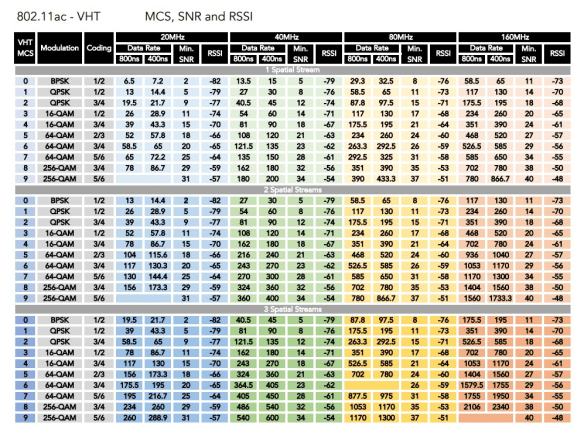
You also have to understand something called Modulation Coding Set (MCS). MCS defines the data rates possible for a given definition of signal-to-noise ratio (SNR), RSSI, and Quadrature Amplitude Modulation (QAM). Trying to define QAM could take all day, so I’ll just leave it to GT Hill to do it for me:

The MCS table for a given protocol will tell you what the maximum data rate for the client radio is. Let’s look at the older MacBook Pro first. Here’s a resource from NetBeez that has the 802.11ac MCS rates. If you look up the details from the Apple support doc for a 3SS radio using VHT 9 and an 80MHz channel bandwidth you’ll find the rate is exactly 1300 Mbps.

Here’s the MCS table for 802.11ax courtesy of Francois Verges.. WAY bigger, right? You’re likely going to want to click on the link to the Google Sheet in his post to be able to read it without a microscope. If you look at the table and find the row that equates to an 11ax client using 2SS, MCS HE 11, and 80MHz channel bandwidth you’ll see that the number is 1201. I’ll forgive Apple for rounding it down to keep the comparison consistent.

Again, this all checks out. The Wi-Fi equivalent of actuarial tables says that the older one is faster. And it is under absolutely perfect conditions. Because the quoted numbers for the Apple document are the maximums for those MCSes. When’s the last time you got the maximum amount of throughput on a wired link? Now remember that in this case you’re going to need to have perfect airtime conditions to get there. Which usually means you’ve got to be right up against the AP or within a very short distance of it. And that 80MHz channel bandwidth? As my friend Sam Clements says, that’s like drag racing a school bus.

The World Isn’t Made Out Of Paper

If you are just taking the numbers off of a table and reproducing them and claiming one is better than the other then you’re probably the kind of person that makes buying decisions for your car based on what the highest number on the speedometer says. Why take into account other factors like cargo capacity, passenger size, or even convertible capability? The numbers on this one go higher!

In fact, when you unpack the numbers here as I did, you’ll see that the apparent 100 Mbps difference between the two radios isn’t likely to come into play at all in the real world. As soon as you move more than 15 feet away from the AP or put a wall between the client device and your AP you will see a reduction in the data rate. The top end of these two protocols are running in the 5GHz spectrum, which isn’t as forgiving with walls as 2.4GHz is. Moreover, if there are other interfering sources in your environment you’re not going to get nearly the amount of throughput you’d like.

What about that difference in spatial streams? I wondered about that for the longest time. Why would you purposely put fewer spatial streams in a client device when you know that you could max it out? The answer is that even with that many spatial streams reality is a very different beast. Devin Akin wrote a post about why throughput numbers aren’t always the same as the tables. In that post he mentioned that a typical client mix in a network is 2018 is about 66% devices with 1SS, 33% devices with 2SS, and less than 1% of devices have 3SS. While those numbers have probably changed in 2021 thanks to the iPhone and iPad now having 2SS radios, I don’t think the 3SS numbers have moved much. The only devices that have 3SS are laptops and other bigger units. It’s harder for a unit to keep the data rates from a 3SS radio so most devices only include support for two of them.

The other thing to notice here is that the value of what a spatial stream brings you is different between the two protocols. In 802.11ac, the max data rate for a single spatial stream is about 433 Mbps. For 802.11ax it’s 600 Mbps. So a 2SS 11ac radio maxes out at 866 Mbps while a 3SS 11ax radio setup would get you around 1800 Mbps. It’s far more likely that you’ll be using the 2SS 11ax radio more efficiently more often than you’ll see the maximum throughput of a 3SS 11ac radio.


Tom’s Take

This whole tale is a cautionary example of why you need to do your own research, even if you aren’t a Wi-Fi pro. The headline was both technically correct and wildly inaccurate. Yes, the numbers were different. Yes, the numbers favored the older model. No one is going to see the maximum throughput under most normal conditions. Yes, having support for Wi-Fi 6 in the new MacBook Pro is a better choice overall. You’re not going to miss that 100 Mbps of throughput in your daily life. Instead you’re going to enjoy a better protocol with more responsiveness in the bands you use on a regular basis. You’re still faster than the gigabit Ethernet adapters so enjoy the future of Wi-Fi. And don’t believe the numbers on paper.