Unknown's avatar

About networkingnerd

Tom Hollingsworth, CCIE #29213, is a former network engineer and current organizer for Tech Field Day. Tom has been in the IT industry since 2002, and has been a nerd since he first drew breath.

Cisco ASA CX 9.1 Update

Cisco LogoEvery day I seem to get three or four searches looking for my ASA CX post even though it was written over a year ago.  I think that’s due in part to the large amount of interest in next-generation firewalls and also in the lack of information that Cisco has put out there about the ASA CX in general.  Sure, there’s a lot of marketing.  When you try to dig down into the tech side of things though, you find yourself quickly running out of release notes and whitepapers to read.  I wanted to write a bit about the things that have changed in the last year that might shed some light on the positioning of the ASA CX now that it has had time in the market.

First and foremost, the classic ASA as you know it is gone.  Cisco made the End of Sale announcement back in March.  After September 16, 2013 you won’t be able to buy one any longer.  Considering the age of the platform this isn’t necessarily a bad thing.  Firstly, the software that’s been released since version 8.3 has required more RAM than the platform initially shipped with.  That makes keeping up with the latest patches difficult.  Also, there was a change in the way that NAT is handled around the 8.3/8.4 timeframe.  That lead to some heartache from people that were just getting used to the way that it worked prior to that code release.  Even though it behaves more like IOS now (i.e. the right way), it’s still confusing to a lot of people.  When you’ve got an underpowered platform that requires expensive upgrades to function at a baseline level, it’s time to start looking at replacing it.  Cisco has already had the replacement available for a while in the ASA-X line, but there hasn’t been a compelling reason to cause customers to upgrade there existing boxes.  The End of Sale/End of Life notice is the first step in migrating the existing user base to the ASA-X line.

The second reason the ASA-X line is looking more attractive to people today is the inclusion of ASA CX functionality in the entire ASA-X line.  If you recall from my previous post, the only ASA capable of running the CX module was the 5585.  It had the spare processing power needed to work the kinks out of the system during the initial trial runs.  Now that the ASA CX software is up to version 9.1, you can install it on any ASA-X appliance.  As always, there is a bit of a catch.  While the release notes tell you that the ASA CX for the mid-range (non 5585) platforms is software based, please note that you need to have a secondary solid state disk (SSD) drive installed in the chassis in order to even download the software.  If you are running ASA OS 9.1 and try to pull down the ASA CX software, you’re going to get an error about a missing storage device.  Even if you purchased the software licensing for the ASA CX, you won’t get very far without some hardware.  The part you’re looking for is ASA5500X-SSD120=, which is a spare 120GB SSD that you can install in the ASA chassis.  If you don’t already have an ASA-X and want the ASA CX functionality, you’re much better off ordering one of the bundle part numbers.  That’s because it includes the SSD in the chassis preloaded with a copy of the ASA CX software.  Save yourself some effort and just order the bundle.

Another thing that I found curious about the 9.1 release of the ASA CX software was in the release notes.  As previously mentioned, the UI for the ASA CX is a copy of Cisco Prime Security Manager (PRSM), also pronounced “prism.”  At first, I just thought this meant that Cisco had borrowed concepts from PRSM to make the ASA CX UI a bit more familiar to people.  Then I read the 9.1 release notes.  Those notes are combined for the ASA CX and PRSM 9.1.  You’d almost never know it though, outside of a couple of mentions for the ASA CX.  Almost the entire document references PRSM, which makes sense when you think about it.  That really did clear up a lot of the questions I had about the ASA CX functionality.  I wondered what kind of strange parallel development track Cisco had used to come up with their answer in the next generation firewall space.  I was also worried that they had either borrowed or licensed software from a third part and that their effort would end up as doomed as the ASA UTM module that died a painful death thanks to Trend Micro‘s strange licensing.

ASA CX isn’t really a special kit.  It’s an on-box copy of PRSM.  The ASA is configured with a rule to punt packets to PRSM for inspection before being shunted back for forwarding.  No magic.  No special sauce.  Just placing one product inside another.  When you think about how IDS/IPS has worked in the ASA for the past several years I suppose it shouldn’t come as too big of a shock.  While vendors like Palo Alto and Sonicwall have rewritten their core OS to take advantage of fast next generation processing, Cisco is still going back to their tried-and-true method of passing all that traffic to a module.  In this case, I’m not even sure what that “module” is in the midrange devices, as it just appears to be an SSD for storing the software and not actually doing any of the processing.  That means that the ASA CX is likely a separate context on the ASA-X.  All the processing for both packet forwarding and next generation inspection is done by the firewall processor.  I know that that the ASA-X has much more in the processing department than its predecessor, but I wonder how much traffic those boxes are going to be able to take before they give out?


Tom’s Take

Cisco is playing catch up in the next generation market.  Yes, I understand that the term didn’t even really exist until Palo Alto started using it to differentiate their offering.  Still, when you look at vendors like Sonicwall, Fortinet, and even Watchguard, you see that they are embracing the idea of expanding unifed threat management (UTM) into a specific focus designed to let IT people root out traffic that’s doing something it’s not supposed to be.  Cisco needs to take a long hard look at the ASA-X platform.  If it is selling well enough against units like the Juniper SRX and the various Checkpoint boxes then the next generation piece needs to be spun out into a different offering.  If the ASA-X is losing ground, what harm could there be in pushing the reset button and turning the whole box into something a bit more grand that a high speed packet filter?  The ASA CX is a great first step.  But given the lack of publicity and difficulty in finding information about it, I think Cisco is in danger of stumbling before the race is even going.


Brocade’s Pragmatically Defined Network

logo-brocadeMost of the readers of my blog would agree that there is a lot of discussion in the networking world today about software defined networking (SDN) and the various parts and pieces that make up that umbrella term.  There’s argument over what SDN really is, from programmability to orchestration to network function virtualization (NFV).  Vendors are doing their part to take advantage of some, all, or in some cases none of the above to push a particular buzzword strategy to customers.  I like to make sure that everything is as clear as possible before I start discussing the pros and cons.  That’s why I jumped at the chance to get a briefing from Brocade around their new software and hardware releases that were announced on April 30th.

I spoke with Kelly Harrell, Brocade’s new vice president and general manager of the Software Business Unit.  If that name sounds somewhat familiar, it might be because Mr. Harrell was formerly at Vyatta, the software router company that was acquired by Brocade last year.  We walked through a presentation and discussion of the direction that Brocade is taking their software defined networking portfolio.  According to Brocade, the key is to be pragmatic about the new network.  New technologies and methodologies need to be introduced while at the same time keeping in mind that those ideas must be implemented somehow.  I think that a large amount of the frustration with SDN today comes from a lot of vaporware presentations and pie-in-the-sky ideas that aren’t slated to come to fruition for months.  Instead, Brocade talked to me about real products and use cases that should be shipping very soon, if not already.

The key to Brocade is to balance SDN against network function virtualization, something I referred to a bit in my Network Field Day 5 post about Brocade.  Back then, I called NFV “Networking Done (by) Software,” which was my sad attempt to point out how NFV is just the opposite of what I see SDN becoming.  During our discussion, Harrell pointed out that NFV and SDN aren’t totally dissimilar after all.  Both are designed to increase the agility with which a company can execute on strategy and create value for shareholders.  SDN is primarily focused on programmability and orchestration.  NFV is tied more toward lowering costs by implementing existing technology in a flexible way.

NFV seeks to take existing appliances that have been doing tasks, such as load balancers or routers, and free their workloads from being tied to a specific piece of hardware.  In fact, there has been an explosion of these types of migrations from a variety of vendors.  People are virtualizing entire business lines in an effort to remove the reliance on specialized hardware or reduce the ongoing support costs.  Brocade is seeking to do this with two platforms right now.  The first is the Vyatta vRouter, which is the extension what came over in the Vyatta acquisition.  It’s a router and a firewall and even a virtual private networking (VPN) device that can run on just about anything.  It is hypervisor agnostic and cloud platform agnostic as well.  The idea is that Brocade can include a copy of the vRouter with application packages that can be downloaded from an enterprise cloud app store.  Once downloaded and installed, the vRouter can be fired up and pull a predefined configuration from the scripts included in the box.  By making it agnostic to the underlying platform, there’s no worry about support down the road.

The second NFV platform Brocade told me about is the virtual ADX application delivery switch.  It’s basically a software load balancer.  That’s not really the key point of the whole idea of applying the NFV template to an existing hardware platform.  Instead, the idea is that we’re taking something that’s been historically huge and hard to manage and moving it closer to the edge where it can be of better use.  Rather that sticking a huge load balancer at the entry point to the data center to ensure that flows are separated, the vADX allows the load balancer to be deployed very close to the server or servers that need to have the information flow metered.  Now, the agility of SDN/NFV allows these software devices to be moved and reconfigured quickly without needing to worry about how much reprogramming is going to be necessary to pull the primary load balancer out or change a ton of rules to take reroute traffic to a vMotioned cluster.  In fact, I’m sure that we’re going to see a new definition of the “network edge” being to emerge as more software-based NFV devices begin to be deployed closer and closer to the devices that need them.

On the OpenFlow front, Brocade told me about their new push toward something they are calling “Hybrid Port OpenFlow.”  OpenFlow is a great disruptive SDN technology that is gaining traction today, largely in part because of companies like Brocade and NEC that have embraced it and started pushing it out to their customer base well ahead of other manufacturers.  Right now, OpenFlow support really consists to two modes – ON and OFF.  OFF is pretty easy to imagine.  ON is a bit more complicated.  While a switch can be OpenFlow enabled and still forward normal traffic, the practice has always been to either dedicate the switch to OpenFlow forwarding, in effect turning it into a lab switch, or to enable OpenFlow selectively for a group of ports out of the whole switch, kind of like creating a lab VLAN for testing on a production box.  Brocade’s Hybrid Port OpenFlow model allows you to enable OpenFlow on a port and still allow it to do regular traffic forwarding sans OpenFlow.  That may be the best model for adopters going forward due to one overriding factor – cost.  When you take a switch or a group of ports on a switch and dedicate them for OpenFlow, you are cost the enterprise something.  Every port on the switch costs a certain amount of money.  Every minute an engineer spends working on a crazy lab project incurs a cost.  By enabling the network engineers to turn on OpenFlow at will without disrupting the existing traffic flow, Brocade can reduce the opportunity cost of enabling OpenFlow to almost zero.  If OpenFlow just becomes something that works as soon as you enable it, like IPv6 in Windows 7, you don’t have to spend as much time planning for your end node configuration.  You just build the core and let the end nodes figure out they have new capabilities.  I figure that large Brocade networks will see their OpenFlow adoption numbers skyrocket simply because Hybrid Port mode turns the configuration into Easy Mode.

The last interesting software piece that Brocade showed me is a prime example of the kinds of things that I expect SDN to deliver to us in the future.  Brocade has created an application called the Application Resource Broker (ARB).  It sits above the fray of the lower network layers and monitors indicators of a particular application’s health, such as latency and load.  When one of those indicators hits a specific threshold, ARB kicks in to request more resources from vCenter to balance things out.  If the demand on the application continues to rise beyond the available resources, ARB can dynamically move the application to a public cloud instance with a much deeper pool of resources, a process known as cloudbursting.  All of this can happen automatically without the intervention of IT.  This is one of the things that shows me what SDN can really do.  Software can take care of itself and dynamically move things around when abnormal demand happens.  Intelligent choices about the network environment can be made on solid data.  No guess what about what “might” be happening.  ARB removes doubt and lag in response time to allow for seamless network repair.  Try doing that with a telnet session.

There’s a lot more to the Brocade announcement than just software.  You can check it out at http://www.brocade.com.  You can also follow them on Twitter as @BRCDComm.


Tom’s Take

The future looks interesting at first.  Flying cars, moving sidewalks, and 3D user interfaces are all staples of futuristic science fiction.  The problem for many arises when we need to start taking steps to build those fanciful things.  A healthy dose of pragmatism helps to figure out what we need to do today to make tomorrow happen.  If we root our views of what we want to do with what we can do, then the future becomes that much more achievable.  Even the amazing gadgets we take for granted today have a basis in the real technology of the time they were first created.  By making those incremental steps, we can arrive where we want to be a whole lot sooner with a better understanding of how amazing things really are.

Blog Posts and CISSP CPE Credit

CISSPLogoAmong my more varied certifications, I’m a Certified Information Systems Security Professional (CISSP).  I got it a few years ago since it was one of the few non-vendor specific certifications available at the time.  I studied my tail off and managed to pass the multiple choice scantron-based exam.  One of the things about the CISSP that appealed to me was the idea that I didn’t need to keep taking that monster exam every three years to stay current.  Instead, I could submit evidence that I had kept up with the current state of affairs in the security world in the form of Continuing Professional Education (CPE) credits.

CPEs are nothing new to some professions.  My lawyer friends have told me in the past that they need to attend a certain number of conferences and talks each year to earn enough CPEs to keep their license to practice law.  For a CISSP, there are many things that can be done to earn CPEs.  You can listen to webcasts and podcasts, attend major security conferences like RSA Conference or the ISC2 Security Congress, or even give a security presentation to a group of people.  CPEs can be earned from a variety of research tasks like reading books or magazines.  You can even earn a mountain of CPEs from publishing a security book or article.

That last point is the one I take a bit of umbrage with.  You can earn 5 CPEs for having a security article published in a print magazine or other established publishing house.  You can write all you want but you still have to wait on an old fashioned editor to decide that your material was worth of publication before it can be counted.  Notice that “blog post” is nowhere on the list of activities that can earn credit.  I find that rather interesting considering that the majority of security related content that I read today comes in the form of a blog post.

Blog posts are topical.  With the speed that things move in the security world, the ability to react quickly to news as it happens means you’ll be able to generate much more discussion.  For instance, I wrote a piece for Aruba titled Is It Time For a Hacking Geneva Convention?  It was based on the idea that the new frontier of hacking as a warfare measure is going to need the same kinds of protections that conventional non-combat targets are offered today.  I wrote it in response to a NY Times article about the Chinese calling for Global Hacking Rules.  A week later, NATO released a set of rules for cyberwarfare that echoed my ideas that dams and nuclear plants should be off limits due to potential civilian casualties.  Those ideas developed in the span of less than two weeks. How long would it have taken to get that published in a conventional print magazine?

I spend time researching and gathering information for my blog posts.  Even those that are primarily opinion still have facts that must be verified.  I spend just as much time writing my posts as I do writing my presentations.  I have a much wider audience for my blog posts than I do for my in-person talks.  Yet those in-person talks count for CPEs while my blog posts count for nothing.  Blogs are the kind of rapid response journalism that gets people talking and debating much faster than an article in a security magazine that may be published once a quarter.

I suppose there is something to be said for the relative ease with which someone can start a blog and write posts that may be inaccurate or untrue.  As a counter to that, blog posts exist and can be referenced and verified.  If submitted as a CPE, they should need to stay up for a period of time.  They can be vetted by a committee or by volunteers.  I’d even volunteer to read over blog post CPE submissions.  There’s a lot of smart people out there writing really thought provoking stuff.  If those people happen to be CISSPs, why can’t they get credit for it?

To that end, it’s time for (ISC)^2 to start allowing blog posts to count for CPE credit.  There are things that would need to change on the backend to ensure that the content that is claimed is of high quality.  The desire to have only written material allowed for CPEs is more than likely due to the idea that an editor is reading over it and ensuring that it’s top notch.  There’s nothing to prevent the same thing from occurring for blog authors as well.  After all, I can claim CPE credits for reading a lot of posts.  Why can I get credit for writing them?

The company that oversees the CISSP, (ISC)^2, has taken their time in updating their tests to the modern age.  I’ve not only taken the pencil-and-paper version, I’ve proctored it as well.  It took until 2012 before the CISSP was finally released as a computer-based exam that could be taken in a testing center as opposed to being herded into a room with Scantrons and #2 pencils.  I don’t know whether or not they’re going to be progressive enough to embrace new media at this time.  They seem to be getting around to modernizing things on their own schedule, even with recent additions of more activist board members like Dave Lewis (@gattaca).

Perhaps the board doesn’t feel comfortable allowing people to post whatever they want without oversight or editing.  Maybe reactionary journalism from new media doesn’t meet the strict guidelines needed for people to learn something.  It’s tough to say if blogs are more popular than the print magazines that they forced into email distribution models and quarterly publication as opposed to monthly.  What I will be willing to guarantee is that the quality of security-related blog posts will continue to be high and can only get higher as those that want to start claiming those posts for CPE credit really dig in and begin to write riveting and useful articles.  The fact that they don’t have to be wasted on dead trees and overpriced ink just makes the victory that much sweeter.

Tweebot For Mac – The Only Client You Need

TweetbotBirdI live my day on Twitter.  Whether it be learning new information, sharing information, or having great conversations I love the interactions that I get.  Part of getting the most out of Twitter comes from using a client that works to present you with the best experience.  Let me just get this out of the way: the Twitter web interface sucks.  It’s clunky and expends way too much real estate to provide a very minimal amount of useful information.  I’m constantly assaulted with who I should be following, what’s trending, and who is paying for their trends to float to the top of the list.  I prefer to digest my info a little bit differently.
You may recall that when I used Windows I was a big fan of the Janetter app.  When I transitioned to using a Mac full time, I started using Janetter at first to replicate my workflow.  I still kept my eyes open for a more streamlined client that I could keep on my desktop in the background.  While I loved the way the Mac client from Twitter (nee Tweetie) displayed things, I knew that development on that client had all but ended when Loren Britcher left Twitter.  Thankfully, Mark Jardine and Paul Haddad had been busy in the mad science lab to save me.

I downloaded Tweetbot for iOS back when I used an iPhone 3GS.  I loved the interface, but the program was a bit laggy on my venerable old phone.  When I moved to an iPhone 4S, I started using Tweetbot all the time.  This was around the time that Twitter decided to start screwing around with their mobile interface through things like the Dickbar.  Tweetbot on my phone was streamlined.  It allowed me to use gestures to see conversations.  I could see pictures inline and quickly tap links to pull up websites.  I could even send those links to mobile Safari or Instapaper as needed.  It fit my workflow needs perfectly.  It met them so well that I spent most of my time checking Twitter on my phone instead of my desktop.

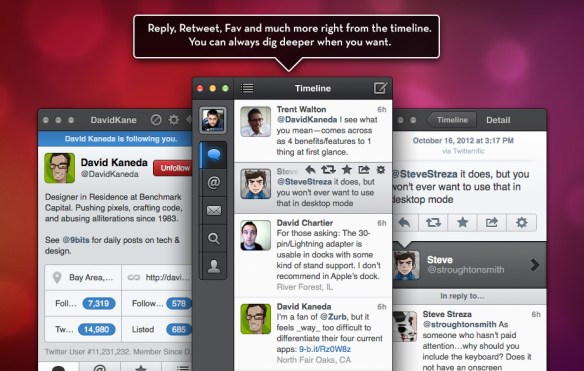
The wiz kids at Tapbots figure out that a client for Mac was one of their most requested features.  So the got cooking on it.  They released an alpha for us to break and test the living daylights out of.  I loved the alpha so much I immediately deleted all other clients from my Mac and started using it no matter how many undocumented features I had to live through.  I used the alpha/beta clients all the way up to the release.  The same features I loved from the mobile client were there on my desktop.  It didn’t take up tons of room on a separate desktop.  I could use gestures to see conversations.  They even managed to add new features like multi-column support to mimic one of Tweetdeck’s most popular features.  When I found that just before NFD4, I absolutely fell in love.

TweetbotMacShot

Tweetbot is beautiful.  It is optimized for retina displays on the new MacBooks, so when you scale it up to HiDPI (4x resolution) it doesn’t look like pixelated garbage.  Tweets can be streamed to the client so you don’t constantly have to pull down to refresh your timeline.  I can pin the timeline to keep up with my tweeps at my leisure instead of the client’s discretion.  I even have support within iCloud to keep my mobile Tweetbot client synced to the position of my desktop client and vice versa.  If I read tweets on my phone, my timeline position is updated when I get back to my desk.  I think that almost every feature that I need from Twitter is represented here without the fluff of promoted tweets or ads that don’t apply to me.

That’s not to say that all this awesomeness doesn’t come without a bit of bad news.  If you hop on over to the App Store, you’re going to find out that Tweetbot for Mac costs $20 US. How can a simple Twitter client cost that much?!?  The key lies in the changes to Twitter’s API in version 1.1.  Twitter has decided that third party clients are the enemy.  All users should be using the website or official clients to view things.  Not coincidentally, the website and official clients also have promoted tweets and trends injected into your timeline.  Twitter wants to monitize their user base in the worst way.  I’m sure it’s because they see Mark Zuckerberg sitting on a pile of cash at Facebook and want the same thing for themselves.  They key to that is controlling the user experience.  If they can guarantee that users will see ads they can charge a hefty fee to advertisers.  The only way to ensure that users see those ads is via official channels.  That means that third party clients like Tweetbot can’t be allowed to exist.

In order to lock the clients out without looking like they are playing favorites, a couple of changes were put in place.  First, non-official clients are limited to a maximum of 100,000 user tokens.  Once you hit your limit, you have to go back to Twitter and ask for more.  However, if Twitter determines that your client “replicates official features and offers no unique features,” you get the door slammed in your face and no more user tokens.  It’s already happened to one client.  If you don’t want to hit your limit too quickly, the only option is to make the price in the store much higher than the “casual” user is willing to pay.  As Greg Ferro (@etherealmind) likes to say, Tweetbot is “reassuringly expensive.”


Tom’s Take

I have a ton of apps on my phone and my MacBook that I’ve used once or twice. I paid the $.99 or $1.99 to test them out and found that they don’t meet my needs.  When Tweetbot was finally released, I didn’t hesitate to buy it even though it was $20.  As much as I use Twitter, I can easily justify the cost to myself.  I need a client that doesn’t get in my way. I want flexibility.  I don’t want the extra crap that Twitter is trying to force down my throat.  I want to use Twitter.  I don’t want Twitter to use me.  That’s what I get from Tweetbot.  I don’t need the metrics from Hootsuite.  I just want to read and respond to conversations and save articles for later.  Thanks to Twitter’s meddling, a lot of people have been looking for a replacement for the old Tweetdeck Air client that is getting sunsetted on May 7.  I can honestly say without reservation that Tweetbot for Mac is the replacement you’re looking for.

Review Disclaimer

I am a paying user of Tweetbot for iPhone, iPad, and Mac.  These programs were purchased by me.  This review was written without any prior contact with Tapbots.  They did not solicit any of the content or ask for any consideration in the writing of this article.  The conclusions and analysis herein are mine and mine alone.

Generation Lost

I’m not trying to cause a big sensation (talking about my generation) – The Who

GenTiltedNaming products is an art form.  When you let the technical engineering staff figure out what to call something, you end up with a model number like X440 or 8086.  When the marketing people get involved at first, you tend to get more order in the naming of things, usually in a series like the 6500 series or the MX series.  The idea that you can easily identify a product’s specs based on its name or a model number is nice for those that try to figure out which widget to use.  However, that’s all changing.

It started with mobile telephones.  Cellular technology has been around in identifiable form since the late 1970s.  The original analog signals worked on specific frequencies and didn’t have great coverage.  It wasn’t until the second generation of this technology moved entirely to digital transmission with superior encoding that the technology really started to take off.  In order to differentiate this new technology from the older analog version, many people made sure to market it as “second generation”, often shortening this to “2G” to save syllables.  When it came time to introduce a successor to the second generation personal carrier service (PCS) systems, many carriers started marketing their offerings withe moniker of “3G”, skipping straight past the idea of third generation offering in favor of the catchier marketing term.  AT&T especially loved touting the call quality and data transmission rate of 3G in advertising.  The 3G campaigns were so successful that when the successor to 3G was being decided, many companies started trying to market their incremental improvements as “4G” to get consumers to adopt them quickly.

Famously, the incremental improvement to high speed packet access (HSPA) that was being deployed en masse before the adoption of Long Term Evolution (LTE) as the official standard was known as high speed packet downlink access (HSPDA).  AT&T petitioned Apple to allow their carrier badge on the iPhone to say “4G” when HSPDA was active.  Even though speeds weren’t nearly as fast as the true 4G LTE standard, AT&T wanted a bit of marketing clout with customers over their Verizon rivals.  When the third generation iPad was released with a true LTE radio later on, Apple made sure to use the “LTE” carrier badge for it.  When the iOS 5 software release came out, Apple finally acquiesced to AT&T’s demands and rebranded the HSPDA network to be “4G” with a carrier update.  In fact, to this day my iPhone 4S still tells me I’m on 4G no matter where I am.  Only when I drop down to 2G does it say anything different.

The fact that we have started referring to carrier standards a “xG” something means the marketing is working.  And when marketing works, you naturally have to copy it in other fields.  The two most recent entries in the Generation Marketing contest come from Broadcom and Brocade.  Broadcom has started marketing their 802.11ac chipsets as “5G wireless.”  It’s somewhat accurate when you consider the original 802.11 standard through 802.11b, 802.11g, 802.11n, and now 802.11ac.  However, most wireless professionals see this more as an attempt to cash in on the current market trend of “G” naming rather than showing true differentiation.  In Brocade’s case, they recently changed the name of their 16G fibre channel solution to “Gen 5” in an attempt to shift the marketing message away from a pure speed measurement (16 gigabit) especially when starting to put it up against the coming 40 gigabit fibre channel over Ethernet (FCoE) offerings coming from their competitor at Cisco.

In both of these cases, the shift has moved away from strict protocol references or speed ratings.  That’s not necessarily a bad thing.  However, the shift to naming it “something G” reeks quite frankly.  Are we as consumers and purchases so jaded by the idea of 3G/4G/5G that we don’t get any other marketing campaigns?  What if they’d call it Revision Five or Fifth Iteration instead?  Doesn’t that convey the same point?  Perhaps it does, but I doubt more than an handful of CxO type people know what iteration means without help from a pocket dictionary.  Those same CxOs know what 4G/5G mean because they can look down at their phone and see it.  More Gs are better, right?

Generational naming should only be used in the broadest sense of the idea.  It should only be taken seriously when more than one company uses it.  Is Aruba going to jump on the 5G wireless bandwagon?  Will EMC release a 6G FC array?  If you’re shaking your head in answer to these questions, you probably aren’t the only one.  Also of note in this discussion – What determines a generation?  IT people have trouble keeping track of what constitutes the difference between a major version change and a point release update.  Why did 3 features cause this to be software version 8.0 but the 97 new features in the last version only made it go from 7.0 to 7.5?  Also, what’s to say that a company doesn’t just skip over a generation?  Why was HSPDA not good enough to be 4G?  Because the ITU said it was just an iteration of 3G and not truly a new generation.  How many companies would have looked at the advantage of jumping straight to 5G by “counting” HSPDA as the fourth generation absent oversight from the ITU?


Tom’s Take

My mom always told me to “call a spade a spade.”  I don’t like the idea of randomly changing the name of something just to give it a competitive edge.  Fibre channel has made it this far as 2 gig, 4 gig, and 8 gig.  Why the sudden shift away from 16 gig?  Especially if you’re going to have to say it runs at 16 gig so people will know what you’re talking about?  Is it a smoke-and-mirrors play?  Why does Broadcom insist on naming their wireless 5G?  802.11a/b/g/n has worked just fine up to now.  Is this just an attempt to confuse the consumer?  We may never know.  What we need to do in the meantime is consider holding feet to the fire and ensuring that consumers and purchasers ensure that this current naming “generation” gets lost.

IOS X-Treme!

IOSXtreme

As a nerd, I’m a huge fan of science fiction. One of my favorite shows was Stargate SG-1. Inside the show, there was a joke involving an in-universe TV program called “Wormhole X-Treme” that a writer unintentionally created based on knowledge of the fictional Stargate program. Essentially, it’s a story that’s almost the same as the one we’re watching, with just enough differences to be a totally unique experience. In many ways, that’s how I feel about the new versions of Cisco’s Internetwork Operating System (IOS) that have been coming out in recent months. They may look very similar to IOS. They may behave similarly to IOS. But to mistake them for IOS isn’t right. In this post, I’m going to talk about the three most popular IOS-like variants – IOS XE, IOS XR, and NX-OS.

IOS XE

IOS XE is the most IOS-like of all the new IOS builds that have been released. That’s because the entire point of the IOS XE project was to rebuild IOS to future proof the technology. Right now, the IOS that runs on routers (which will henceforth be called IOS Classic) is a monolithic kernel that runs all of the necessary modules in the same memory space. This means that if something happens to the routing engine or the LED indicator, it can cause the whole IOS kernel to crash if it runs out of memory. That may have been okay years ago but today’s mission critical networks can’t afford to have a rogue process bringing down an entire chassis switch. Cisco’s software engineers set out on a mission to rebuild the IOS CLI on a more robust platform.

IOS XE runs as a system daemon on a “modern Linux platform.” Which one is anyone’s guess. Cisco also abstracted the system functions out of the main kernel and into separate processes. That means that if one of them goes belly up it won’t take the core kernel with it. One of the other benefits of running the kernel as a system daemon is that you can now balance the workload of the processes across multiple processor cores. This was one of the more exciting things to me when I saw IOS XE for the first time. Thanks to the many folks that pointed out to me that the ASR 1000 was the first device to run IOS XE. The Catalyst 4500 (the first switch to get IOS XE) is using a multi core processor to do very interesting things, like the ability to run inline Wireshark on a processor core while still letting IOS have all the processor power it needs. Here’s a video describing that:

Because you can abstract the whole operation of the IOS feature set, you can begin to do things like offer a true virtual router like the CSR 1000. As many people have recently discovered, the CSR 1000 is built on IOS XE and can be booted and operated in a virtualized environment (like VMware Fusion or ESXi). The RAM requirements are fairly high for a desktop virtualization platform (CSR requires 4GB of RAM to run), but the promise is there for those that don’t want to keep using GNS3/Dynamips or Cisco’s IOU to emulate IOS-like features. IOS XE is the future of IOS development. It won’t be long until the next generation of supervisor engines and devices will be using it exclusively instead of relying on IOS Classic.

IOS XR

In keeping with the sci-fi theme of this post, IOS XR is what the Mirror Universe version of IOS would look like. Much like IOS XE, IOS XR does away with the monolithic kernel and shared memory space of IOS Classic. XR uses an OS from QNX to serve as the base for the IOS functions. XR also segments the ancillary process in IOS into separate memory spaces to prevent system crashes from an errant bug. XR is aimed at the larger service provider platforms like the ASR 9000 and CRS series of routers. You can see that in the way that XR can allow multiple routing protocol processes to be executed at the same time in different memory spaces. That’s a big key to the service provider.

What makes IOS XR so different from IOS Classic? That lies in the configuration method. While the CLI may resemble the IOS that you’re used to, the change methodology is totally foreign to Cisco people. Instead of making live config changes on a live system, the running configuration is forked into a separate memory space. Once you have created all the changes that you need to make, you have to perform a sanity check on the config before it can be moved into live production. That keeps you from screwing something up accidentally. Once you have performed a sanity check, you have to explicitly apply the configuration via a commit command. In the event that the config you applied to the router does indeed contain errors that weren’t caught by the sanity checker (like the wrong IP), you can issue a command to revert to a previous working config in a process known as rollback. All of the previous configuration sets are retained in NVRAM and remain available for reversion.

If you’re keeping track at home, this sounds an awful lot like Junos. Hence my Mirror Universe analogy. IOS XR is aimed at service providers, which is a market dominated by Juniper. SPs have gotten very used to the sanity checking and rollback capabilities provided by Junos. Cisco decided to offer those features in an SP-specific IOS package. There are many that want to see IOS XR ported from the ASR/CSR lines down into more common SP platforms. Only time will tell if that will happen. Jeff Fry has an excellent series of posts on IOS XR that I highly recommend if you want to learn more about the specifics of configuration on that platform.

NX-OS

NX-OS is the odd man out from the IOS family. It originally started life as Cisco’s SAN-OS, which was responsible for running the MDS line of fibre channel switches. Once Cisco started developing the Nexus switching platform, they decided to use SAN-OS as the basis for the operating system, as it already contained much of the code that would be needed to allow networking and storage protocols to interoperate on the device, a necessity for a converged data center switch. Eventually, the new OS became known as NX-OS.

NX-OS looks similar to the IOS Classic interface that most engineers have become accustomed to. However, the underlying OS is very different from what you’re used to. First off, not every feature of classic IOS is available on demand. Yes, a lot of the more esoteric feature sets (like the DHCP server) are just plain unavailable. But even the feature sets that are listed as available in the OS may not be in the actual running code. You need to active each of these via use of the feature keyword when you want to enable them. This “opt in” methodology ensures that the running code only contains essential modules as well as the features you want. That should make the security people happy from an exploit perspective, as it lowers the available attack surface of your OS.

Another unique feature of NX-OS is the interface naming convention. In IOS Classic, each interface is named via the speed. You can have Ethernet, FastEthernet, GigabitEthernet, TenGigabit, and even FortyGigabit interfaces. In NX-OS, you have one – Ethernet. NX-OS treats all interfaces as Ethernet regardless of the underlying speed. That’s great for a modular switch because it allows you to keep the same configuration no matter which line cards are running in the device. It also allows you to easily port the configuration to a newer device, say from Nexus 5500 to Nexus 6000, without needed to do a find/replace operation on the config and risk changing a line you weren’t supposed to. Besides, most of the time the engineer doesn’t care about whether an interface is gigabit or ten gigabit. They just want to program the second port on the third line card.


Tom’s Take

No software program can survive without updates. Especially if it is an operating system. The hardware designed to run version 1.0 is never the same as the hardware that version 5.0 or even 10.0 utilizes. Everything evolves to become more efficient and useful. Think of it like seasons of sci-fi shows. Every season tells a story. There may be some similarities, but people overall want the consistency of the characters they’ve come to love coupled with new stories and opportunities to increase character development. Network operating systems like IOS are no different. Engineers want the IOS-like interface but they also want separated control planes, robust sanity checking, and modularized feature insertion. Much like the writers of sci-fi, Cisco will continue to provide new features and functionality while still retaining the things to which we’ve grown accustomed. However, if Cisco ever comes up with a hare-brained idea like the Ori, I can promise there’s no way I’ll ever run IOS-Origin.

Death of Conversation and the Nuclear Option

If you’ve spent any time online since the founding of the Internet, you know how quickly things can escalate when it comes to arguments.

"Borrowed" from Tony Bourke (@tbourke)

“Borrowed” from Tony Bourke (@tbourke)

This is no more apparent to me than the recent discourse surrounding “Donglegate.”  The short, short version:

Male Pycon attendees make inappropriate comments.  Female attendee gets upset and publicly tweets about it.  Stuff happens.  People get fired.

I’m not going to go into anything about the situation, as that’s not my place or my area of expertise to comment.  What I did find upsetting was that after the first attendee that made the inappropriate comments was fired from his job, there was a massive Distributed Denial of Service (DDoS) attack launched at the employer of Adria Richards (the female attendee).  Their website was knocked offline for a couple of days.  The news that Ms. Richards had been let go from her job had to be posted on Facebook initially, as there was no other official communication method available.  It wasn’t until the news broke of her removal that the DDoS finally died down to the point where normal operations could continue.

This is a disturbing trend that I’m starting to see in many online disagreements.  As an increasingly online society, we have started to forego polite discourse and jump straight to the “nuclear strike” option of retaliation.  Don’t like a blogger’s post?  Nuke his site with a DoS tool like LOIC.  Think a vendor employee did something wrong?  Shame them in public and release their private information (also known as “doxing”).  Even noted security researcher Brian Krebs had the local SWAT team called to his house after he wrote about a service used to knock websites offline.

How did we end up at the point where we’ve skipped past “I disagree with what you say and would like to debate this topic!” all the way to “You suck and I’m going to burn down your house and the hospital you were born in!!!“?  Rather than have a meaningful and rational discussion, it appears to be in vogue to nuke anything and everything associated with the person that has made you upset.

Look at what’s happened to Spamhaus recently.  Yes, the articles posting about a massive 300Gbps “Internet breaking” DDoS were a bit overblown.  Yet someone has decided that the best way to make Spamhaus “pay” for their crimes is to launch an attack that relies on using DNS exploits to amplify the traffic to the point where even DDoS frontends like CloudFlare are having a hard time keeping up.  Spamhaus does have a reputation for taking things to the extreme as well when it comes to blacklisting IP ranges suspected of providing havens for spammers.  What you end up with is a standoff where neither side is willing to budge from their viewpoint.  Only they fight their war with packet generators and black hole ACLs that cause problems for users and make ISP technicians pull their hair out.

I’m no stranger to the “nuclear option” myself.  I’ve made some comments on my blog that are a bit…pointed, to put it mildly.  While I do get a bit of satisfaction sometimes from verbally sparring with someone that has called me names or done other such unsavory things, that’s where it ends for me.  I have no desire to do any further harm besides jousting with clever phrases.  I’ve never considered erasing their phone or clogging their Internet connection or releasing their Social Security number online.  Ruining someone for the sake of making a point is the height of pettiness.

Here’s a thought: At the height of the arguments leading up to the American Civil War, where American representatives were calling for state secession opening in Congress, decorum never faltered.  Even when referring to a senator that was despised for their politics, the opponent always called them “the distinguished gentleman from <state>.”  Hard to believe that a conflict that saw families torn apart and Americans shooting at each other by the thousands could still have some polite discussion in a government on the verge of being ripped asunder.  Those rules served to keep a bit of decorum in a place where it was required for conversation and useful argument to take place.

Maybe the problem is anonymity.  It’s far to easy to fire off anonymous comments or be a small cog in a larger DDoS and have a huge impact while staying mostly safe behind a curtain of obscurity.  People who might never utter an ill word to another human being suddenly turn into biased uncompromising trolls.  Rather than discuss rational points, they turn to the most extreme option available to either silence their critics or prove a point in a “scorched earth” victory at any costs.  Consider this XKCD comic:

I laughed when I first read this.  Slowly, I realized that the author is right.  Sometimes reading back the comment to people proves the point better than anything.  I frequently use a commenter’s words in my replies to point out what was said and how it was construed (at least by me).


Tom’s Take

In the end, to me it comes down to a matter of manners.  I’ve always made it a rule here to never say anything about a topic or person that I wouldn’t say to them in person.  I also do my best to look at both sides of an argument with a critical eye.  I don’t call people names or threaten them.  Even when people call me biased, narcissistic, or even just plain stupid I just try and debate the facts of the discussion.  Sure, I may rant and rave and shout out loud to myself sometimes.  However, name-calling never accomplishes anything.  Moving beyond that to the nuclear option is equally appalling to me as well.  I have no desire to knock out anyone’s blog or line of business for the sake of proving a point.  If my arguments don’t suffice to change someone’s mind or get a policy I care for overturned, then that’s my fault and not the fault of others.  I just agree to disagree and move on.  Maybe therein lies the spark that will reignite polite conversation and discussion instead of leaping straight to the last resort.  After all, an attentive ear can win more battles than the sharpest spear.

Juniper and the Removal of the Human Element

logo-top-m

Our final presentation of Network Field Day 5 came from Juniper.  A long-time contributor to Network Field Day, Juniper has been making noise as of late in the software defined networking (SDN) space with some of their ideas.  We arrived on site for a nice hardy breakfast before settling in to hear what Juniper is bringing to the greater software networking space and how I later learned that it might be best to start phasing out the human element in the network.

First up was Jeremy Schulman (@nwkautomaniac) talking to us about Puppet integration into Junos.  Jeremy opened with a talk about his involvement in automating things.  Customers have been using infrastructure automation tools like Puppet and Chef for a while to provision servers.  This allows you to spin up a new piece of hardware and have it quickly setup with basic configuration as soon as it boots up.  Jeremy told us that reinventing the wheel when it comes to automation was unnecessary when you could just put a Puppet agent in Junos.  So that’s what he did.  As a side note here, Jeremy brings up a very good point about the future of networking.  If you don’t know how to program in a real programming language, I suggest you start now.  Most of the interfaces that I’ve seen in the last 6-9 months have a high degree of familiarity based on the old CLI interface conventions.  But these interfaces only really exist to make us old school networking guys feel safe.  Very soon, all the interfaces to these devices will be only be accessible via API – which means programming.  If you don’t know how to write something in Python or Perl or even Java, you need to begin picking it up.  For something like Python, you might consider Codecademy.  It’s free and easy to pick up and follow whenever you want.  Just a thought.

Demo time!  There’s also a great overview of Puppet on Junos over on Packet Pushers written by none other than Anthony Burke (@pandom_).  The basic idea is that you write the pertinent configuration snippets into a task that can be transformed into a workflow rather than being a CLI jockey that just spends time typing the command blindly into a Telnet or SSH session.  Because you can also parse these tasks before they are sent out via the Puppet master, you can be sure your configs are sanitized and being sent to the appropriate device(s).  That means that there are no humans in the middle of the process to type in the wrong address or type the right commands on the wrong device.  Puppet is doing its part to remove the possibility of mistakes from your base configurations.  Sure, it seems like a lot of work today to get Puppet up and running for the advantage of deploying a few switches.  But when you look at the reduction of work down the road for the ability to boot up a bare metal box and have it be configured in a matter of minutes I think the investment is worth it.  I spend a lot of time preconfiguring devices that get shipped to remote places.  If I could have that box shipped the the remote location first and then just use Puppet to bring it online, I’d have a lot more time to devote to fine tuning the process.  Which leads to greater efficiency.  Which leads to more time (and so on and so on).

Next up, we got a sneak peek at Juniper’s next generation programmable core switch.  While I didn’t catch the name at the time, it turns out that it was the new EX9200 that has been making some waves as of late.  This switch is based on custom silicon, the Juniper One ASIC, rather than the merchant silicon in QFabric.  Other than the standard speeds and feeds that you see from a core switch of this type, you can see that Juniper is going to support the kitchen sink of SDN with the EX9200.  In addition to supporting OpenFlow and Puppet automation, it will also support VXLAN and NVGRE overlays as well as other interesting things like OpenStack and VMWare plugins in the future.  Make no mistake – this platform is Juniper’s stalking horse for the future.  There’s been a lot written about the longevity of the previous platforms compared to the new MX-based EX9200.  I think that Juniper is really standing behind the idea that the future of networking lies in SDN and that a platform with support for the majority of the popular methods used to reach high levels of programmability and interoperability is critical going forward.  Where that leaves other switching platforms is the realm of speculation.  Just ask yourself this question: Are you planning on buying a non-SDN capable switch in the next refresh?  Is regular packet forward fine for you for the next 3-5 years?  That is the critical question being asked in strategy meetings and purchasing departments all over the place right now.

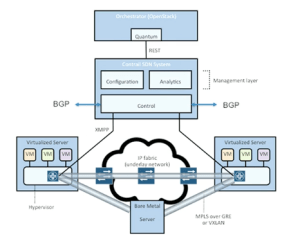
Parantap Lahiri stepped up next to present on the Contrail acquisition.  Those of you interested in the greater SDN picture would do well to watch the whole video.  Especially if you are curious about things like VMware’s new NSX strategy, as the Contrail idea is very similar, if not a bit more advanced.  The three use cases outlined in the video are great for those not familiar with what SDN is trying to accomplish right now.  In fact, commit this diagram to memory.  You are going to see it again (I promise):

ContrailDiagram

Note that further in the video, Parantap goes over one of the features of Contrail that is going to get many people excited.  Via use of GRE tunnels, this solution can create a hybrid cloud solution to burst your traffic from the private data center into a public provider like AWS or Rackspace as needed.  That, if nothing else, is the message that you need to consider with the “traditional” vendors that are supporting SDN.  Cisco and Juniper and even VMware don’t want you to start buying whitebox servers and turning them into switches.  They don’t want a “roll your own” strategy.  What Juniper wants if for you to buy a whole bunch of EX9200s and then build a Contrail overlay system to manage it all.  Then, when the workloads get to be too great for your own little slice of private cloud you can use Contrail to tunnel into the public cloud and move those workloads until the traffic spike subsides.  Maybe you even want to keep some of those migrated workloads in the cloud permanently in order to take advantage of cheap compute and ease overall usage in your private data center.  The key is flexibility, and that’s what Contrail gives you.  That’s where the development is going to be for the time being.

The last presentation came from the Juniper Webapp Secure team.  You may recognize this product by its former moniker – Mykonos.  In fact, you may recognize this presentation from its former delivery at NFD4.  In fact, I said as much during the demo:

There’s a market for a security tool like this for lots of websites.  It gets the bad guys without really affecting the good guys.  I’m sure that Juniper is going to sell the living daylights out of it.  They’re trying their best right now based on the number of people that I’ve seen talking about it on Twitter.  The demo is engaging because it highlights the capabilities as well as injecting a bit of humor and trollishness.  However, based on what I’ve seen at NFD4 and NFD5 and what people have told me they saw when they were presented, I think the Webapp Secure demo is very scripted and fairly canned.  The above video is almost identical to the one from NFD4.  Compare:

Guys, you need to create a new Generic company and give us some more goodies in the demo.  Having a self-aware web firewall that doesn’t need human intervention to stop the attackers is a big deal.  Don’t use Stock Demo Footage to tell us about it every time.


Tom’s Take

What does the Juniper strategy look like?  The hint is in the title of this post.  Juniper is developing automation to reduce the amount of people in the network making critical decisions without good information or tools to execute.  As those people begin to be replaced by automated systems, the overall intelligence in the network increases while at the same time reducing the amount of time that it takes to take action to bring new nodes online and reconfigure on the fly to support things we thought might have been impossible even three years ago.  Through device deployment orchestration, flexible platforms supporting new protocols with programmability built in and even to new technology like overlay networking and automated security response for critical systems, Juniper is doing their best to carve out a section of the SDN landscape just for themselves.  It’s a strategy that should pay off in the long run provided there is significant investment that stays the course.

Tech Field Day Disclaimer

Juniper was a sponsor of Network Field Day 5.  As such, they were responsible for covering a portion of my travel and lodging expenses while attending Network Field Day 5.  In addition, they also provided breakfast for the delegates.  Juniper also gave the delegates a copy of Juniper Warrior, a mobile phone charger, emergency battery pack, and a battery-powered pocket speaker.  At no time did they ask for, nor where they promised any kind of consideration in the writing of this review.  The opinions and analysis provided within are my own and any errors or omissions are mine and mine alone.

Plexxi and the Case for Affinity

Plexxi Logo

Our last presentation from Day 2 of Network Field Day 5 came from a relatively new company – Plexxi.  I hadn’t really heard much from them before they signed up to present at NFD5.  All I really knew was that they had been attracting some very high profile talent from the Juniper ranks.  First Dan Backman (@jonahsfo) shortly after NFD4 then Mike Bushong (@mbushong) earlier this year.  One might speculate that when the talent is headed in a certain direction, it might be best to see what’s going on over there.  If only I had known the whole story up front.

Mat Mathews kicked off the presentation with a discussion about Plexxi and what they are doing to differentiate themselves in the SDN space.  It didn’t take long before their first surprise was revealed.  Our old buddy Derick Winkworth (@cloudtoad) emerged from his pond to tell us the story of why he moved from Juniper to Plexxi just the week before.  He’d kept the news of his destination pretty quiet.  I should have guessed he would end up at a cutting edge SDN-focused company like Plexxi.  It’s good to see smart people landing in places that not only make them excited but give them the opportunity to affect lots of change in the emerging market of programmable networking.

Marten Terpstra jumped in next to talk about the gory details of what Plexxi is doing.  In a nutshell, this all boils down to affinity.  Based on a study done by Microsoft in 2009, Plexxi noticed that there are a lot of relationships between applications running in a data center.  Once you’ve identified these relationships, you can start doing things with them.  You can create policies that provide for consistent communications between applications.  You can isolate applications from one another.  You can even ensure which applications get preferential treatment during a network argument.  Now do you see the SDN applications?  Plexxi took the approach that there is more data to be gathered by the applications in the network.  When they looked for it, sure enough it was there.  Now, armed with more information, they could start crafting a response.  What they came up with was the Plexxi Switch.  This is a pretty standard 32-port 10GigE switch with 4 QSFP ports..  Their differentiator is the 40GigE uplinks to the other Plexxi Switches.  Those are used to create a physical ring topology that allows the whole conglomeration to work together to create what looked to me like a virtual mesh network.  Once connected in such a manner, the affinities between the applications running at the edges of the network can now begin to be built.

Plexxi has a controller that sits above the bits and bytes and starts constructing the policy-based affinities to allow traffic to go where it needs to go.  It can also set things up so that things don’t go where they’re not supposed to be, as in the example Simon McCormack gives in the above video.  Even if the machine is moved to a different host in the network via vMotion or Live Migration, the Plexxi controller and network are smart enough to figure out that those hosts went somewhere different and that the policy providing for an isolated forwarding path needs to be reimplemented.  That’s one of the nice things about programmatic networking.  The higher-order networking controllers and functions figure out what needs to change in the network and implements the changes either automatically or with a minimum of human effort.  This ensures that the servers don’t come in and muck up the works with things like Dynamic Resource Scheduler (DRS) moves or other unforeseen disasters.  Think about the number of times you’ve seen a VM with an anti-affinity rule that keeps it from being evacuated from a host because there is some sort of dedicated link for compliance or security reasons.  With Plexxi, that can all be done automagically.  Derick even showed off some interesting possibilities around using Python to extend the capabilities of the CLI at the end of the video.

If you’d like to learn more about Plexxi, you can check them out at http://www.plexxi.com.  You can also follow them on Twitter as @PlexxiInc


Tom’s Take

Plexxi has a much different feel than many of the SDN products I’ve seen so far.  That’s probably because they aren’t trying to extend an existing infrastructure with programmability.  Instead, they’ve taken a singular focus around affinity and managed to tun it into something that looks to have some very fascinating applications in today’s data centers.  If you’re going to succeed in the SDN-centric world of today, you either need to be front of the race as it is being run today, like Cisco and Juniper, or you need to have a novel approach to the problem.  Plexxi really is looking at this whole thing from the top down.  As I mentioned to a few people afterwards, this feels like someone reimplemented QFabric with a significant amount of flow-based intelligence.  That has some implications for higher order handling that can’t be addressed by a simple fabric forwarding engine.  I will stay tuned to Plexxi down the road.  If nothing else, just for the crazy sock pictures.

Tech Field Day Disclaimer

Plexxi was a sponsor of Network Field Day 5.  As such, they were responsible for covering a portion of my travel and lodging expenses while attending Network Field Day 5.  In addition, they also gave the delegates a Nerf dart gun and provided us with after hours refreshments.  At no time did they ask for, nor where they promised any kind of consideration in the writing of this review.  The opinions and analysis provided within are my own and any errors or omissions are mine and mine alone.

Additional Coverage of Plexxi and Network Field Day 5

Smart Optical Switching – Your Plexxible Friend – John Herbert

Plexxi Control – Anthony Burke

Brocade Defined Networking

logo-brocade

Brocade stepped up to the plate once again to present to the assembled delegates at Network Field Day 5.  I’ve been constantly impressed with what they bring each time they come to the party.  Sometimes it’s a fun demo.  Other times its a great discussion around OpenFlow.  With two hours to spend, I wanted to see how Brocade would steer this conversation.  I could guarantee that it would involve elements of software defined networking (SDN), as Brocade has quietly been assembling a platoon on SDN-focused luminaries.  What I came away with surprised even me.

Mike Schiff takes up the reigns from Lisa Caywood for the title of Mercifully Short Introductions.  I’m glad that Brocade assumes that we just need a short overview for both ourselves and the people watching online.  At this point, if you are unsure of who Brocade is you won’t get a feel for it in eight short minutes.

Curt Beckman started off with fifteen minutes of discussion about where the Open Networking Foundation (ONF) is concentrating on development.  Because Curt is the chairman of the ONF, we kind of unloaded on him a bit about how the ONF should really be called the “Open-to-those-with-$30,000-to-spare Networking Foundation”.  That barrier to entry really makes it difficult for non-vendors to have any say in the matters of OpenFlow.  Indeed, the entry fee was put in place specifically to deter those not materially interested in creating OpenFlow based products from discussing the protocol.  Instead, you have the same incumbent vendors that make non-OpenFlow devices today steering the future of the standard.  Unlike the IETF,  you can’t just sign up for the mailing list or show up to the meetings and say your peace.  You have to have buy in, both literally and figuratively.  I proposed the hare-brained idea of creating a Kickstarter project to raise the necessary $30,000 for the purpose of putting a representative of “the people” in the ONF.  In discussions that I’ve had before with IETF folks they all told me you tend to see the same thing over and over again.  Real people don’t sit on committees.  The IETF is full of academics that argue of the purity of an OAM design and have never actually implemented something like that in reality.  Conversely, the ONF is now filled with deep pocketed people that are more concerned with how they can use OpenFlow to sell a few more switches rather than now best to implement the protocol in reality.  If you’d like to donate to an ONF Kickstarter project, just let me know and I’ll fire it up.  Be warned – I’m planning on putting Greg Ferro (@etherealmind) and Brent Salisbury (@networkstatic) on the board.  I figure that should solve all my OpenFlow problems.

The long presentation of this hour was all about OpenFlow and hybrid switching.  I’ve seen some of the aspects of this in my day job.  One of the ISPs in my area is trying to bring a 100G circuit into the state for Internet2 SDN-enabled links.  The demo that I saw in their office was pretty spiffy.  You could slice off any section of the network and automatically build a path between two nodes with a few simple clicks.  Brocade expanded my horizons of where these super fast circuits were being deployed with discussions of QUILT and GENI as well as talking about projects across the ocean in Australia and Japan.  I also loved the discussions around “phasing” SDN into your existing network.  Brocade realizes that no one is going to drop everything they currently have and put up an full SDN network all at once.  Instead, most people are going to put in a few SDN-enabled devices and move some flows to them at first both as a test and as a way to begin new architecture.  Just like remodeling a house, you have to start somewhere and shore up a few areas before you can really being to change the way everything is laid out.  That is where the network will eventually lead to being fully software defined down the road.  Just realize that it will take time to get there.

Next up was a short update from Vyatta.  They couldn’t really go into a lot of detail about what they were doing, as they were still busy getting digested by Brocade after being acquired.  I don’t have a lot to say about them specifically, but there is one thing I thought about as I mulled over their presentation.  I’m not sure how much Vyatta plays into the greater SDN story when you think about things like full API programmability, orchestration, and even OpenFlow.  Rather than being SDN, I think products like Vyatta and even Cisco’s Nexus 1000v should instead be called NDS – Networking Done (by) Software.  If you’re doing Network Function Virtualization (NFV), how much of that is really software definition versus doing your old stuff in a new way?  I’ve got some more, deeper thoughts on this subject down the road.  I just wanted to put something out there about making sure that what you’re doing really is SDN instead of NDS, which is a really difficult moving target to hit because the definition of what SDN really does changes from day to day.

Up next is David Meyer talking about Macro Trends in Networking.  Ho-ly crap.  This is by far my favorite video from NFD5.  I can say that with comfort because I’ve watched it five times already.  David Meyer is a lot like Victor Shtrom from Ruckus at WFD2.  He broke my brain after this presentation.  He’s just a guy with some ideas that he wants to talk about.  Except those ideas are radical and cut right to the core of things going on in the industry today.  Let me try to form some thoughts out of the video above, which I highly recommend you watch in its entirety with no distractions.  Also, have a pen and paper handy – it helps.

David is talking about networks from a systems analysis perspective.  As we add controls and rules and interaction to a fragile system, we increase the robustness of that system.  Past a certain point, though, all those extra features end up harming the system.  While we can cut down on rules and oversight, ultimately we can’t create a truly robust system until we can remove a large portion of the human element.  That’s what SDN is trying to do.  By allowing humans to interact with the rules and not the network itself you can increase the survivability of the system.  When we talk about complex systems, we really talk about increasing their robustness while at the same time adding features and flexibility.  That’s where things like SDN come into the discussion in the networking system.  SDN allows us to constrain the fragility of a system by creating a rigid framework to reduce the complexity.  That’s the “bow tie” diagram about halfway in.  We have lots of rules and very little interaction from agents that can cause fragility.  When the outputs come out of SDN, the are flexible and unconstrained again but very unlikely to contribute to fragility in the system.  That’s just one of the things I took away from this presentation.  There are several more that I’d love to discuss down the road once I’ve finished cooking them in my brain.  For now, just know that I plan on watching this presentation several more times in the coming weeks.  There’s so much good stuff in such a short time frame.  I wish I could have two hours with David Meyer to just chat about all this crazy goodness.

If you’d like to learn more about Brocade, you can check out their website at http://www.brocade.com.  You can also follow them on Twitter as @BRCDcomm


Tom’s Take

Brocade gets it.  They’ve consistently been running in the front of the pack in the whole SDN race.  They understand things like OpenFlow.  They see where the applications are and how to implement them in their products.  They engage with the builders of what will eventually become the new SDN world.  The discussions that we have with Curt Beckman and David Meyer show that there are some deep thinkers that are genuinely invested in the future of SDN and not just looking to productize it.  Mark my words – Brocade is poised to leverage their prowess in SDN to move up the ladder when it comes to market share in the networking world.  I’m not saying this lightly either.  There’s an adage attributed to Wayne Gretskey – “Don’t skate where the puck is.  Skate where the puck is going.”  I think Brocade is one of the few networking companies that’s figured out where the puck is going.

Tech Field Day Disclaimer

Brocade was a sponsor of Network Field Day 5.  As such, they were responsible for covering a portion of my travel and lodging expenses while attending Network Field Day 5.  In addition, Brocade provided a USB drive of marketing material and two notepads styled after RFC 2460.  At no time did they ask for, nor where they promised any kind of consideration in the writing of this review.  The opinions and analysis provided within are my own and any errors or omissions are mine and mine alone.