Unknown's avatar

About networkingnerd

Tom Hollingsworth, CCIE #29213, is a former network engineer and current organizer for Tech Field Day. Tom has been in the IT industry since 2002, and has been a nerd since he first drew breath.

Death to 2.4GHz!

This week was the annual announcement of the Apple iPhone refresh.  There were a lot of interesting technologies discussed around the newest entry in the Cupertino Fruit and Mobile Company but one of the most exciting came in the form of the wireless chip.  The original iPhone and the iPhone 3G were 802.11b/g devices only.  Starting with the iPhone 3GS, Apple upgraded that chip to 802.11b/g/n.  With the announcement of the new iPhone 5, Apple has finally provided an 802.11a/n radio as well, matching the 5GHz capability as the iPad.  This means that all Apple devices can now support 5GHz wireless access points.  Along with the latest Android devices that offer similar support, I think the time has come to make a radical, yet needed, design decision in our wireless networks.

It’s time to abandon 2.4GHz and concentrate on 5GHz.

Matthew Gast from Aerohive had a great blog post along these same lines.  As Matthew explains, the 2.4GHz spectrum is awash with interference sources from every angle.  Microwave ovens, cordless telephones, and wireless video cameras are only part of the problem.  There are only three non-overlapping channels in 2.4GHz.  That means you’ve got a 33% chance of interfering with surrounding devices.  If you’ve got one of those fancy consumer devices that can do channel aggregation at 2.4GHz, the available channels decrease even further.  Add in the fact that most people are carrying devices now that are capable of acting as access point, such as MiFi hotspots or the built-in hotspot features in tablets and smartphones and you can see how the 2.4GHz spectrum is a crowded place indeed.  On the other hand, 5GHz has twenty three non-overlapping channels available.  That’s more than enough to satisfy the more dense AP deployments required to provide similar coverage patterns while at the same time providing for high speed throughput with channel aggregation.

There are a number of devices that are 2.4GHz only and will continue to be that way.  Low-power devices are one of the biggest categories, as Matthew pointed out.  2.4GHz radios just draw less power.  Older legacy devices are also not going to be upgraded anytime soon.  That means that we can’t just go around shutting off our 2.4GHz SSIDs and leaving all those devices out in the cold.  What it does mean is that we need to start focusing on the future of wireless.  I’m going to treat my 2.4GHz SSIDs just like a guest access VLAN.  It’s there, but it’s not going to get much support.  I’m going to enable band steering to push the 5GHz-capable clients to the better access method.  For everyone else that can only get on at 2.4GHz, you get what you get.  With more room to grow, I can enable wide channels and let my clients pull all the data they can stand from 5GHz.  When the rest of the world gets ready to deploy 802.11ac devices and APs, I’ll already have experience designing for that band.  My 2.4GHz network will live on much the same way my 802.11b clients lived on and my Novell clients persisted.  They’ll keep churning until they are forced to move, either by failure or total obsolescence.


Tom’s Take

Yes, it’s a hard choice to make right this moment to say that I’m leaving 2.4GHz to the wolves and moving to 5GHz.  It’s a lot like making the decision between ripping the band-aid off or pulling it slowly.  Either way, there will be pain.  The question becomes whether you want the pain all up front or spread out over time.  By making a conscious decision to start focusing your efforts of 5GHz, you get the pain out of the way.  Fighting for spectrum and positioning around kitchens and water pipes all fall away.  Coverage takes care of itself.  Neat new technology like 40MHz channels is simple, relatively speaking.  Let the 2.4GHz clients have their network.  I’m going to concentrate my efforts on where we’re headed, not where we’ve been.

Do They Give Out Numbers For The CCIE Written?

I’ve seen a bit of lively discussion recently about a topic that has vexed many an engineer for years.  It revolves around a select few that put “CCIE Written” as their title on their resume or their LinkedIn account.  While they have gone to great lengths to study and take the 100-question multiple choice written qualification exam for the CCIE lab, there is some notion that this test in and of itself grants a title of some sort.  While I have yet to interview someone that has this title, others that I talk to said they have.  I have been in a situation where some of my co-workers wanted to use that particular designation for me during the period of time when I passed the written but hadn’t yet made it through the lab.  I flat out told them “no.”

I understand the the CCIE is a huge undertaking.  Even the written qualification exam is a huge commitment of time and energy.  The test exists because the CCIE has no formal prerequisite.  Back before the CCNA or the CCNP, anyone could go out and attempt the CCIE.  However, since lab spots are a finite resource, some method of pre qualification had to be in place to ensure that people wouldn’t just book spot after spot in the hope of passing the lab.  The written serves as a barrier to entry that prevents just anyone from grabbing the nearest credit card and booking a lab slot they may have no hope of passing.  The written exam is just that, though – a qualification exam.  It doesn’t confer a number or a title of any kind.  It’s not the end of the journey.  It’s the beginning.  I think the rise of the number of people trying to use the CCIE written as a certification level comes from the fact that the exam can now be used to recertify any of a number of lower level certifications, including CCxA, CCxP, and almost all the Cisco Qualified Specialist designations.  That’s the reason I passed my first CCIE written.  At first, I had no real desire to try and get my brains hammered in by the infamous lab.  I merely wanted to keep my professional level certifications and my specialist tags without needing to go out and take all those exams over again.  However, once I passed the written and saw that I indeed knew more about routing and switching than I anticipated, I started analyzing the possibility of passing the lab.  I passed the written twice more before I got my number, both to keep my eligibility for the lab and to keep my other certifications from expiring.  Yet, every time someone asked me what my new title was after passing that test I reminded them that it meant nothing more beyond giving me the chance at a lab date.

I’m not mad at people that put “CCIE Written” as their title on a resume.  It’s not anger that makes me question their decision.  It’s disappointment.  I almost feel sorry that people see this as just another milestone that should provide some reward.  The reward of the CCIE Written is proving you know enough to go to San Jose or Brussels and not get your teeth kicked in.  It doesn’t confer a number or a title or anything other than a date taken and a score that you’ll need to log into the CCIE site every time you want to access your data (yes, even after you pass you still need it).  Rather than resting your laurels after you get through it, look at it as a license to accelerate your studies.  When someone asks you what your new title is, tell them your lab date.  It shows commitment and foresight.  Simply telling someone that you’re a CCIE written is most likely going to draw a stare of disdain followed by a very pointed discussion about the difference between a multiple choice exam and a practical lab.  Worst case scenario?  The person interviewing you has a CCIE and just dismisses you on the spot.  Don’t take that chance.  The only time the letters “CCIE” should be on your resume is if they are followed by a number.

A Talk in the Park – Using Call Park and Directed Call Park

Anyone that has ever used a phone is familiar with being placed on hold.  Most of the time, you get to hear nice, soothing music while the person on the other end of the line tries to figure out something without either shouting into the phone or having a long period of uncomfortable silence.  The hold button is usually the most worn-out button on the key systems that I replace.  However, on the newer PBXs that I install, the hold button is quickly losing its usefulness.  Hold work well when every line on your phone system is on every phone, like it is in a key system.  Placing Line 1 on hold at the reception desk phone allows Line 1 to be picked up by the CEO at their phone.  However, what happens in a PBX environment when the incoming lines don’t appear on every phone?  The hold button will still place the caller on hold, but only on the phone where the call was initially held.  In order to move that caller to another phone, you’ll need to transfer the caller or have the CEO come up to the reception desk.  These may not be the most effective solutions for most people.  What if there was another way?

My first experience with a “modern” PBX was with the call park feature.  Rather than relying on the hold button and tying up the lines coming into the building, the park button takes a different approach.  When a caller wants to speak to someone other than the person that they called, the receiver of the call can “park” the caller.  Parking a call is like placing the call on hold, but on a phantom extension that can be accessed system-wide.  Now, rather than having the CEO go to the reception desk to retrieve the call, the CEO can dial an extension and retrieve the parked call whenever it’s convenient.  Call park is a great solution for places where not everyone has a phone or usually isn’t near their extension.  Think of a warehouse or a retail sales floor.  These users may not have ready access to a phone to take a call.  It’s better for them to find an extension and take the call when possible.  That’s where the genius of call park comes into play.  Without a doubt, call park is the number one feature on my office phone system.  If it stopped working for some reason, there might just be a riot.  For users that don’t use it already, telling them about the feature when I’m doing the installation is like a ray of sunshine for them.

Configuring Call Park

I’m going to show you how to configure Call Park on Cisco equipment, seeing as that’s the one that I work on most of the time.  Your mileage may vary on your flavor of system.  If you’re using Cisco Unified Call Manager:

1.  After logging into the system, head to Call Routing -> Call Park.

2.  You’ll see a screen that looks like this:

The Call Park Number/Range field can accept either a single park number or a range (using the same X wildcard as a route pattern).  I’d recommend a range to give yourself some flexibility.  Be aware, though, that the limit for a single range of park slots is 100.  If you need more than that, you’ll need to create a different pattern.  I usually set aside 10 or so.  The description field is pretty self-evident.  The partition should be one that’s dialable from the phones that you want to access the park feature.  I usually just put it in my cluster resources or internal DNs partition.  The CUCM field gives you a bit of control over which cluster you assign the park slots.

3.  Once you’ve created the park slots, be sure to check the Phone Button Template that the phones are using to ensure there is a Park softkey available for use by the users.  I tend to move the key to the first row of softkeys to ensure that it gets used instead of the hold button.  Just be aware that changing the softkey template will require you to restart the phones to make the settings take effect.  When your users press the Park softkey, the system will pick the first open park slot ascending in the park pattern created and leave the call there.  The screen will display the park slot that is holding the call for about ten seconds.  You can tweak this timer under System -> Service Parameters -> Cisco CallManager

If you find yourself on a CUCME system, configuring a park slot is as easy as this:

ephone-dn  40 
 number 601 secondary 600 
 park-slot timeout 60 limit 10 
 no huntstop 
! 
! 
ephone-dn  41 
 number 602 secondary 600 
 park-slot timeout 60 limit 10 
 no huntstop 
! 
! 
ephone-dn  42 
 number 603 secondary 600 
 park-slot timeout 60 limit 10 
 no huntstop 
! 
! 
ephone-dn  43 
 number 604 secondary 600 
 park-slot timeout 60 limit 10 
 no huntstop

This will setup four park slots with their own number and a shortcut.  One other quick note here.  If you accidentally configure an ephone-dn as a park slot and later need to use it for a phone DN, you’re going to need to remove the whole DN and add it back in with the right configuration.  For whatever reason, marking a DN as a park slot is one-way job until it’s been deleted.

Directed Call Park

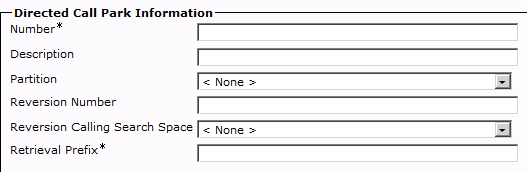
As much as I love call park, it does have one downside.  Once a call has been parked in a call park slot, there’s no real way to monitor it.  The call park slot is basically a phantom extension with no way to watch what’s going on.  While that may be fine for a small office with five or six slots, what happens when an enterprise with thirty slots needs a little more control?  What if you want to ensure that you always park an executive’s calls on the same slot?  You can’t do that with a regular call park slot.  That’s where directed call park comes into play.  Directed Call Park allows you to designate a range of park extensions that can be monitored via Busy Lamp Field (BLF) buttons.  You can also use those same BLF buttons as a speed dial to rapidly park calls in the same slots every time.  This makes a lot more sense for a large enterprise switchboard.  The configuration is very similar, with only a couple of extra fields:

Most of it looks the same.  The new fields include the reversion number and CSS.  This is where the call will be sent if no one picks it up in a certain period of time.  Normal call park sends the call back to the extension that parked it.  With directed call park, you will usually want the call to go to a central switchboard or receptionist.  If you leave these optional fields blank, it will behave just like the normal call park slot.  You’ll also notice that the Retrieval Prefix is a required field.  Directed Call Park requires you to prefix the park slot with a code for access.  If you don’t include the prefix, the system does nothing, as it thinks you’re trying to park a non-existant call in an occupied park slot.  If your call is parked on 601 and the retrieval prefix is 55, you will need to dial 55601 to pick up the call.  When you want to park a call in a directed call park slot, you need to do a consultative transfer to that slot.  In the above case, transfer the call to 601, then hit transfer again to send the caller to the park slot.  The Park softkey doesn’t do anything here for directed call park and in fact will send the caller to a regular park slot if they are configured.

Tom’s Take

Call park is a make-or-break feature for me.  I always talk about it in the phone system training that I give to people when first setting up their systems.  I caution them against using hold any longer.  The only time I use hold on my own phone is when I’m looking something up or I need to step away from the phone for a few seconds.  I treat the hold button like a mute button with music.  Call park is the new hold.  Call park gives you everything that the hold button ever could and more.  You can move calls where you need them to be without worrying about which phone has the call.  When you add in directed call park to give your switchboard the flexibility to monitor calls and control where calls are parked people will being to wonder how they ever lived without it.  You may even find that you can remove the Hold softkey from your phone button templates.  And then your job really will be a walk in the park.

SDN and the IT Toolbox

There’s been a *lot* of talk about software-defined networking (SDN) being the next great thing to change networking. Article after article has been coming out recently talking about how things like the VMware acquistion of Nicira is going to put network engineers out of work. To anyone that’s been around networking for a while, this isn’t much different than the talk that’s been coming out about any one of a number of different technologies over the last decade.

I’m an IT nerd. I can work on a computer with my eyes closed. However, not everything in my house is a computer. Sometimes I have work on other things, like hanging mini-blinds or fixing a closet door. For those cases, I have to rely on my toobox. I’ve been building it up over the years to include all the things one might need to do odd jobs around the house. I have a hammer and a big set of screwdrivers. I have sockets and wrenches. I have drills and tape measures. The funny thing about these tools is the “new tool mentality”. Every time I get a new tool, I think of all the new things that I can do with it. When I first got my power drill, I was drilling holes in everything. I hung blinds with ease. I moved door knobs. I looked for anything and everything I could find to use my drill for. The problem with that mentality is that after a while, you find that your new tool can’t be used for every little job. I can’t drive a nail with a drill. I can’t measure a board with a drill. In fact, besides drilling holes and driving screws, drills aren’t good for a whole lot of work. With experience, you learn that a drill is a great tool for a range of uses.

This same type of “new tool mentality” is pervasive in IT as well. Once we develop a new tool for a purpose, we tend to use that tool to solve almost every problem. In my time in IT, I have seen protocols being used to solve every imaginable problem. Remember ATM? How about LANE? If we can make everything ATM, we can solve every problem. How about QoS? I was told at the beginning of my networking career that QoS is the answer to every problem. You just have to know how to ask the right question. Even MPLS has fallen into the category at one point in the past. MPLS-ing the entire world just makes it run better, right? Much like my drill analogy above, once the “newness” wore off of these protocols and solutions, we found out that they are really well suited for a much more narrow purpose. MPLS and QoS tend to be used for the things that they are very good at doing and maybe for a few corner cases outside of that focus. That’s why we still need to rely on many other protocols and technologies to have a complete toolbox.

SDN has had the “new tool mentality” for the past few months. There’s no denying at this point that it’s a disruptive technology and ripe to change the way that people like me looking at networking. However, to say that it will eventually become the de facto standard for everything out there and the only way to accomplish networking in the next three years may be stretching things just a bit. I’m pretty sure that SDN is going to have a big impact on my work as an integrator. I know that many of the higher education institutions that I talk to regularly are not only looking at it, but in the case of things like Internet2, they’re required to have support for SDN (the OpenFlow flavor) in order to continue forward with high speed connections. I’ve purposely avoided launching myself into the SDN fray for the time being because I want to be sure I know what I’m talking about. There’s quite a few people out there talking about SDN. Some know what they’re talking about. Others see it as a way to jump into the discussion with a loud voice just to be heard. The latter are usually the ones talking about SDN as a destuctive force that will cause us all to be flipping burgers in two years. Rather than giving credence to their outlook on things, I would say to wait a bit. The new shinyness of SDN will eventually give way to a more realistic way of looking at its application in the networking world.  Then, it will be the best tool for the jobs that it’s suited for.  Of course, by then we’ll have some other new tool to proclaim as the end-all, be-all of networking, but that’s just the way things are.

No Bridge Too Far – A Quick Wireless Bridge Configuration

I constantly find myself configuring wireless bridges between sites.  It’s a cheaper alternative to using a fiber or copper connection, even if it is a bit problematic at times.  However, I never seem to have the right configuration, either because it was barely working in the first place or I delete it from my email before saving it.  Now, thanks to the magic of my blog, I’m putting this here as much for my edification as everyone else’s.  Feel free to use it if you’d like.

dot11 ssid BRIDGE-NATIVE
 vlan1
 authentication open
 authentication key-management wpa
 wpa-psk ascii 0 security
!
dot11 ssid BRIDGE44
 vlan 44
 authentication open
 authentication key-management wpa
 wpa-psk ascii 0 security
 !
 interface Dot11Radio0
 encryption vlan 1 mode ciphers tkip
 encryption vlan 44 mode ciphers tkip
 ssid BRIDGE-NATIVE
 !
 interface Dot11Radio0.1
 encapsulation dot1Q 1 native
 no ip route-cache
 bridge-group 1
 bridge-group 1 spanning-disabled
 !
 interface Dot11Radio0.44
 encapsulation dot1Q 44
 no ip route-cache
 bridge-group 44
 bridge-group 44 spanning-disabled
 !
 interface FastEthernet0.1
 encapsulation dot1Q 1 native
 no ip route-cache
 bridge-group 1
 bridge-group 1 spanning-disabled
 !
 interface FastEthernet0.44
 encapsulation dot1Q 44
 no ip route-cache
 bridge-group 44
 bridge-group 44 spanning-disabled

This allows you to pass traffic on multiple VLANs in case you want to put a phone or other device on the other side of the link.  Just make sure to turn the switch port connected to the bridge into a trunk so all the information will pass correctly.  As always, if you see an issue with my configuration or you have a cleaner, better way of doing things, don’t hesitate to leave a comment.  I’m always open to a better way of getting things done.

The Knights Who Say “Um…”

The other day, Ethan Banks (@ecbanks) tweeted a rather amusing thought while editing an episode of the Packet Pushers:

https://twitter.com/ecbanks/status/229235835449516032

It’s rather easy to sympathize with Ethan on this.  I find myself very conscious of saying “um” when I’m speaking.  We’re all guilty of it.  “Um” is a buffering word, a form of speech disfluency.  People use it as a filler while buying time to think of a more complete thought.  Most modern languages have some form of it, whether it be “err” or “ehhh”.  Most public speakers have gone to great lengths to analyze their speaking methods to eliminate these pause words.  The results, however, seem to point to substitution instead of reconfiguration.

Listen to any presentation involving technical content and you are likely to hear the word “so” more frequently than you’d like.  I’m as bad as anyone.  Since that presentation, I’ve gone to great lengths to eliminate “so” from my speaking vocabulary as a pause word.  Sometimes, I do a pretty good job.  Other times, I don’t do as great of a job.  There are a few people that work in my office that are constantly looking for my uses of “so” and pointing them out when they happen.  It seems that no matter how hard I try, rather than eliminating pause words, I just replace them.  Even in my second presentation, I used “hallmark” a lot more than I should.  Even with a lot of rehearsal, going off the cuff on some things tends to introduce the moments of indecision and thought processes that end in “um”s and “err”s.

I would much prefer that non-verbal cues be given instead of these pause words.  Rather than filling the conversation with unnecessary words, you should use silence as a time to reflect and collect your thoughts.  Provided you aren’t speaking over the phone or via a VoIP conversation, silence shouldn’t be regarded as a negative thing.  By taking a little extra time to analyze your thoughts before you start speaking, you negate the need to fill dead speaking space with unneeded syllables.  An old saying goes, “A pipe gives the wise man time to reflect and the unwise man something to put in his mouth.”  You should treat silence just like the pipe.  Rather than spending time filling the conversation, really think about what you want to say before you say it.  There’s no shame in taking an extra second or two before saying something really insightful or interesting.

I like to record my presentations because it gives me a chance to analyze them at length afterward to see what I was doing wrong.  I don’t listen for content the second or third or fourth time.  Instead, I try to pick out all the verbal garbage and make mental notes to myself to remove it for the next time.  After my IPv6 presentation, I did my best to eliminate “so” from my presenting vocabulary.  Now that I’m conscious of saying it, I can concentrate more on avoiding it.  The same goes for other pause words and comfort sayings, like “basically” or “interestingly”.  Only by repeated viewings of my prior work can I see what needs to be improved.  I would encourage those out there reading this to do the same.  Have a friend record your presentation or do it yourself with a simple tripod setup.  When you’re finished, take the time to analyze yourself.  Be honest.  Don’t give yourself any quarter when it comes to your speaking strategy.  It may be hard to watch yourself on film the first few time you do it, but after a while you begin to realize all the good that it can do for you.  You also learn to start tuning out the sound of your own voice, but that’s a different matter entirely.


Tom’s Take

There’s nothing wrong with speech disfluency.  In moderation, that is.  Words like “um” and “err” should be treated like salt – some is good, but too much ruins the dish.  Instead, focus on being conscious of the pause words and eliminating them from your speaking habits.  Instead, use silence as the best way to fill the void.  You’ll look smarter spending your time thinking about questions and not worrying about what words to fill into the conversation.

vRAM – Reversal of (costing us a) Fortune

A bombshell news item came across my feed in the last couple of days.  According to a source that gave information to CRN, VMware will being doing away with the vRAM entitlement licensing structure.  To say that the outcry of support for this rumored licensing change was uproarious would be the understatement of the year.  Ever since the changes in vSphere 5.0 last year, virtualization admins the world over have chafed at the prospect of having the amount of RAM installed in their systems artificially limited via a licensing structure.

On the surface, this made lots of sense.  VMware has always been licensed on a per-socket processor license.  Back in the old days, this made a lot of sense.  If you needed a larger, more powerful system you naturally bought more processors.  With a lot more processors, VMware made a lot more money.  Then, Intel went and started cramming more and more cores onto a processor die.  This was a great boon for the end user.  Now you could have two, four, or even eight processors in one socket.  Who cares if I have more than two sockets?  Once the floodgates opened on the multi-core race, it became a huge competition to increase core density to keep up with Moore’s Law.  For companies like VMware, the multi-core arms race was a disaster.  If the most you are ever going to make from a server is two processor licenses no matter how many virtual machines get crammed into it then you are royally screwed.  I’m sure the scurrying around VMware to find a new revenue source kicked into high gear once companies like Cisco started producing servers with lots of processor cores and more than enough horsepower to run a whole VM cluster.  That’s when VMware hit on a winner.  If processor cores are the big engine that drives the virtualization monster truck, then RAM is the gas in the gas tank.  Cisco and others loaded down those monster two-socket boxes with enough RAM to sink an aircraft carrier.  They had to in order to keep those processors humming along.  VMware stepped in and said, “We missed the boat on processor cores.  Let’s limit the amount of RAM to specific licenses.”  Their first attempt at vRAM was a huge headache.  The RAM entitlements were half of what they are now.  Only after much name calling and pleading on the part of the customer base did VMware double it all to the levels that we see today.

According to VMware, the vRAM entitlements didn’t affect the majority of their customers.  The ones that needed the additional RAM were already running the Enterprise or Enterprise Plus licenses.  However, what it did limit is growth.  Now, if customer has been running an Enterprise Plus license for their two-socket machine and the time for an upgrade comes along, they won’t get to order all that extra RAM like Cisco or HP would want them to do.  Why bother ordering more than 192GB of RAM if I have to buy extra licenses just to use it?  The idea that I can just have those processor licenses floating around for use with other machines is just as silly in my mind.  If I bought one server with 256GB of RAM and needed 3 licenses to use it all, I’m likely going to buy the same server again.  Then I have 6 license for 4 processors.  Sure, I could buy another server if I wanted, but I’d have to load it with something like 80GB of RAM, unless I wanted to buy yet another license.  I’m left with lots of leftover licenses that I’m not going to utilize.  That makes the accounting department unhappy.  Telling the bean counters that you bought something but you can’t utilize it all because of an aritificial limitation makes them angry.  Overall, you have a decision that makes engineering and management unhappy.

If the rumor from CRN is true, this is a great thing for us all.  It means we can concentrate more on solutions and less on ensuring we have counted the number of processors, real or imagined.  In addition, the idea that VMware might being bundling other software, such as vCloud Director is equally appealing.  Trying to convince my bean counters that I want to try this extra cool thing that doesn’t have any immediate impact but might save money down the road is a bit of a stretch.  Telling them it’s a part of the bundle we have to buy is easy.  Cisco has done this to great effect with Unified Workspace Licensing and Jabber for Everyone.  If it’s already a part of the bundle, I can use it and not have to worry about justifying it.  If VMware does the same thing for vCloud Director and other software, it should open doors to a lot more penetration of interesting software.  Given that VMware hasn’t outright said that this isn’t true, I’m willing to be that the announcement will be met with even more fanfare from the regular trade press.  Besides, after the uproar of support for this decision, it’s going to be hard for VMware to back out now.  These kinds of things aren’t really “leaked” anymore.  I’d wager that this was done with the express permission of the VMware PR department as a way to get a reaction before VMworld.  If the community wasn’t so hot about it, the announcement would have been buried at the end of the show.  As it is, they could announce only this change at the keynote and the audience would give a standing ovation.


Tom’s Take

I hate vRAM.  I think it’s a very backwards idea designed to try and put the genie back in the bottle after VMware missed the boat on licensing processor cores instead of sockets.  After spending more than a year listening to the constant complaining about this licensing structure, VMware is doing the right thing by reversing course and giving us back our RAM.  Solution bundles are the way to go with a platform like the one that VMware is building.  By giving us access to software we won’t otherwise get to run, we can now build bigger and better virtualized clusters.  When we’re dependent on all this technology working in concert, that’s when VMware wins.  When we have support contracts and recurring revenue pouring into their coffers because we can’t live without vCloud Director of vFabric Manager.  Making us pay a tax on hardware is a screwball idea.  But giving us a bit of advanced software for nothing with a bundle we’re going to buy anyway so we are forced to start relying on it?  That’s a pretty brilliant move.

Cloud and the Death of E-Rate

Seems today you can’t throw a rock with hitting someone talking about the cloud.  There’s cloud in everything from the data center to my phone to my TV.  With all this cloud talk, you’d be pretty safe to say that cloud has its detractors.  There’s worry about data storage and password security.  There are fears that cloud will cause massive layoffs in IT.  However, I’m here to take a slightly different road with cloud.  I want to talk about how cloud is poised to harm your children’s education and bankrupt one the most important technology advantage programs ever.

Go find your most recent phone bill.  It doesn’t matter whether it’s a landline phone or a cell phone bill.  Now, flip to the last page.  You should see a minor line item labeled “Federal Universal Service Fee”.  Just like all other miscellaneous fees, this one goes mostly unnoticed, especially since it’s required on all phone numbers.  All that money that you pay into the Universal Service Fund is administered by the Universal Service Administrative Company (USAC), a division of the FCC.  USF has four divisions, one of which is the Schools and Libraries Division (SLD).  This portion of the program has a more commonly used name – E-Rate.  E-Rate helps schools and libraries all over the country obtain telecommunications and Internet access.  It accomplishes this by providing a fund that qualifying schools can draw from to help pay for a portion of their services.  Schools can be classified in a range of discount percentages, ranging from as low as 20% all the way up to 90% discount rates.  Those schools only have to pay $.10 on the dollar for their telecommunications services.  Those schools also happen to be the ones most in need of assistance, usually because of things such as rural location or other funding challenges.

E-Rate is divided into two separate pieces – Priority One and Priority Two.  Priority One is for telecommunications service and Internet access.  Priority One pays for phone service for the school and the pipeline to get them on the Internet.  The general rule for Priority One is that it is service-based only.  There usually isn’t any equipment provided by Priority One – at least not equipment owned by the customer.  Back in 1997, the first year of E-Rate, a T1 was considered a very fast Internet Circuit.  Today, most schools are moving past 10Mbit Ethernet circuits and looking to 100Mbit and beyond to satisfy voracious Internet users.  All Priority One requests must be fulfilled before Priority Two requests will begin to be funded.  One USAC starts funding Priority Two, they start at the 90% discount percentage and begin funding requests until the $2.25 billion allocated each year to the program is exhausted.  Priority Two covers Internal Connections and basic maintenance on those connections.  This is where the equipment comes in.  You can request routers, switches, wireless APs, Ethernet cabling, and even servers (provided they meet the requirements of providing some form of Internet access, like e-mail or web servers).  You can’t request PCs or phone handsets.  You can only ask for approved infrastructure pieces.  The idea is that Priority Two facilitates connectivity to Priority One services.  Priority Two allocations vary every year.  Some years they never fund past the 90% mark.  Two years ago, they funded all applicants.  It all depends on how much money is left over after all Priority One requests are satisfied.  There are rules in place to prevent schools from asking for new equipment every year to keep things fair.  Schools can only ask for internal connections two out of any five given years (the 2-of-5 rule).  In the other three years, they must ask for maintenance of that equipment.

There has always been a tug-of-war between what things should be covered under Priority One and Priority Two.  As I said, the general rule is that Priority One is for services only – no equipment.  One of the first things that was discussed was web hosting.  Web servers are covered under Priority Two.  A few years ago, some web hosting providers were able to get their services listed under Priority One.  That meant that schools didn’t have to apply to have their web servers installed under Priority Two.  They could just pay someone to host their website under Priority One and be done with it.  No extra money needed.  This was a real boon for those schools with lower discount percentages.  They didn’t have to hope that USAC would fund down into the 70s or the 60s.  Instead, they could have their website hosted under Priority One with no questions asked.  Remember, Priority One is always funded before Priority Two is even considered.  This fact has lead to many people attempting to get qualifying services setup under Priority One.  E-mail hosting and voice over IP (VoIP) are two that immediately spring to mind.  E-mail hosting goes without saying.  Priority One VoIP is new to the current E-Rate year (Year 15) as an eligible service.  The general idea is that a school can use a VoIP system hosted at a central location from a provider and have it covered as a Priority One service.  This still doesn’t cover handsets for the users, as those are never eligible.  It also doesn’t cover a local voice gateway, something that is very crucial for schools that want to maintain a backup just in case their VoIP connectivity goes down.  However, it does allow the school to have a VoIP phone system funded every year as opposed to hoping that E-Rate will fund low enough to cover it this year.

While I agree that access to more services is a good thing overall, I think we’re starting to see a slippery slope that will lead to trouble very soon.  ISPs and providers are scrambling to get anything and everything they can listed as a Priority One service.  Why stop at phones?  Why not have eligible servers hosted on a cloud platform?  Outsource all the applications you can to a data center far, far away.  If you can get your web, e-mail, and phone systems hosted in the cloud, what’s left to place on site in your school? Basic connectivity to those services, perhaps.  We still need switches and routers and access points to enable our connectivity to those far away services.  Except…the money.  Since Priority One always gets funded, everything that gets shoveled into Priority One takes money that could be used in Priority Two for infrastructure.  Schools that may never get funded at 25% will have their e-mail hosting paid for, while a 90% school that could really use APs to connect a mobile lab may get left out even though they have a critical need.  Making things Priority One just for the sake of getting them funded doesn’t really help when the budget for the program is capped from the beginning.  It’s already happening this year.  E-Rate Year 15 will only fund down to 90% for Priority Two.  That’s only because there was a carry over from last year.  Otherwise, USAC was seriously considering not funding Priority Two at all this year.  No internal connections.  No basic maintenance.  Find your own way schools.  Priority One is eating up the fund with all the new cloud services being considered, let alone with the huge increase in faster Internet circuits needed to access all these cloud services.  Network World recently had a report saying that schools need 100Mbps circuits.  Guess where the money to pay for those upgrades is going to come from?  Yep, E-Rate Priority One.  At least, until the money runs out because server hosting is a qualifying service this year.

Most of the schools that get E-Rate funding for Priority Two wouldn’t be able to pay for infrastructure services otherwise.  Unlike large school districts, these in-need schools may be forced to choose between adding a switch to connect a lab and adding another AP to cover a classroom.  Every penny counts, even when you consider they may only be paying 10-12% of the price in the first place.  If Priority One services eat up all the funding before we get to Priority Two, it may not matter a whole lot to those 90% schools.  They may not have the infrastructure in place to access the cloud.  Instead, they’ll limp along with a T1 or a 10Mbps circuit, hoping that one day Priority Two might get funded again.

How do we fix this before cloud becomes the death mask for E-Rate?  We have to ensure that USAC knows that hosting services need to be considered separately from Priority One.  I’m not quite sure how that needs to happen, whether it needs to be a section under Priority Two or if it needs to be something more like Priority One And A Half.  But lumping hosted VoIP in with Internet access simply because there is no on-site equipment isn’t the right solution.  Since a large majority of the schools that qualify for E-Rate are lower elementary schools, it makes sense that they have the best access to the Internet possible, along with good intra-site connectivity.  A gigabit Internet circuit doesn’t amount to much if you are still running on 10Mbps hubs (don’t laugh, it’s happened).  If USAC can’t be convinced that hosted services need to be separated from other Priority One access, maybe it’s time to look at raising the E-Rate cap.  Every year, the amount of requests for E-Rate is more than triple the funding commitment.  That’s a lot of paperwork.  The $2.25 billion allocation set forth in 1997 may have been a lot back then, but looking at the number of schools applying today, it’s just a drop in the bucket.  E-Rate isn’t the only component of USF, and any kind of increase in funding will likely come from an increase in the USF fees that everyone pays.  That’s akin to raising taxes, which is always a hot button issue.  The program itself has even come under fire both in the past and in recent years due to mismanagement and fraud.  I don’t have any concrete answers on how to fix this problem, but I sincerely hope that bringing it to light helps shed some light on the way that schools get their technology needs addressed.  I also hope that it makes people take a hard look at the cloud services being proposed for inclusion in E-Rate and think twice about taking an extra bucket of water from the well.  After all, the well will run dry sooner or later.  Then everyone goes thirsty.

Disclaimer

I am employed by a VAR that focuses on providing Priority Two E-Rate services for schools.  The analysis and opinions expressed in this article do not represent the position of my employer and are my thoughts and conclusions alone.

Mental Case – In a Flash(card)

You’ve probably noticed that I spend a lot of my time studying for things.  Seems like I’ve always been reading things or memorizing arcane formulae for one reason or another.  In the past, I have relied upon a large number of methods for this purpose.  However, I keep coming back to the tried-and-true flash card.  To me, it’s the most basic form of learning.  A question on the front and an answer on the back is all you need to drill a fact into your head.  As I started studying for my CCIE lab exam, this was the route that I chose to go down when I wanted to learn some of the more difficult features, like BGP supress maps or NTP peer configurations.  It was a pain to hand write all that info out on my cards.  Sometimes it didn’t all fit.  Other times, I couldn’t read my own writing.  I wondered if there was a better solution.

Cue my friend Greg Ferro and his post about a program called Mental Case.  Mental Case, from Mental Faculty, is a program designed to let you create your own flashcards.  The main program runs on a Mac computer and allows you to create libraries of flash cards.  There are a lot of good example sets when you first launch the app for things like languages.  But, as you go through some of the other examples, you can see the power that Mental Case can give you above and beyond a simple 3″x5″ flash card.  For one thing, you can use pictures in your flash cards.  This is handy if you are trying to learn about art or landmarks, for instance.  You could also use it as a quick quiz about Cisco Visio shapes or wireless antenna types.  This is a great way to study things more advanced than just simple text.

Once you dig into Mental Case, though, you can see some of the things that separate it from traditional pen-and-paper.  While it might be handy to have a few flash cards in your pocket to take out and study when you’re in line at the DMV, more often than not you tend to forget about them.  Mental Case can setup a schedule for you to study.  It will pop up and tell you that it’s time to do some work.  That’s great as a constant reminder of what you need to learn.  Another nice feature is the learning feature.  If you have ever used flash cards, you probably know that after a while, you tend to know about 80% of them cold with little effort.  However, there are about 20% that kind of float in the middle of the pack and just get skipped past without much reinforcement.  They kind of get lost in the shuffle, so to speak.  With Mental Case, those questions which you get wrong more often get shuffled to the front, where your attention span is more focused.  Mental Case learns the best ways to make you learn best.  You can also set Mental Case to shuffle or even reverse the card deck to keep you on your toes.

When you couple all of these features with the fact that there is a Mental Case IOS client as well as a desktop version, your study efficiency goes through the roof.  Now, rather than only being able to study your flash cards when you are at your desk, you can take them with you everywhere.  When you consider that most people today spend an awful lot of time staring at their iPhones and iPads, it’s nice to know that you can pull up a set of flash cards from your mobile device and go to town at a moment’s notice, like in the line at the DMV.  In fact, that’s how I got started with Mental Case.  I downloaded the IOS app and started firing out the flash cards for things like changing RIP timers and configuring SSM.  However, the main Mental Case app only runs on Mac.  At the time, I didn’t have a Mac?  How did I do it?  Well, Mental Case seems to have thought of everything.  While the IOS app works best in concert with the Mac app, you can also create flash cards on other sites, like FlashcardExchange and Quizzlet.  You can create decks and make them publicly available for everyone, or just share them among your friends.  You do have to make the deck public long enough to download to Mental Case IOS, but it can be protected again afterwards if you are studying information that shouldn’t be shared with the rest of the world.  Note, though, that the IOS version of the software is a little more basic than the one on the Mac.  It doesn’t support wacky text formatting or the ability to do multiple choice quizzes.  Also, cards that are created with more than two “sides” (Mental Case calls them facets) will only display properly in slideshow mode.  But, if you think of the IOS client as a replacement for the stack of 10,000 flash cards you might already be carrying in your backpack or pocket the limitations aren’t that severe after all.

The latest version of Mental Case now has the option to share content between Macs via iCloud.  This will allow you to keep your deck synced between your different computers.  You still have to sync the cards between your Mac and your IOS device via Wi-Fi.  You can share at shorter ranges over Bluetooth.  You can also create collection of cards known as a Study Archive and place them in a central location, like Dropbox for instance. This wasn’t a feature when I was using Mental Case full time, but I like the idea of being able to keep my cards in one place all the time.

Mental Case is running a special on their software for the next few days.  Normally, the Mac version costs $29.99.  That’s worth every penny if you spend time studying.  However, for the next few days, it’s only $9.99.  This is a steal for such a powerful study program.  The IOS app is also on sale.  Normally $4.99, it’s just $2.99.  Alone the IOS app is a great resource.  Paired with its bigger brother, this is a no-brainer.  Run out and grab these two programs and spend more time studying your facts and figures efficiently and less time creating them.  If you’d like to learn more about Mental Case from Mental Faculty, you can check out their webiste at http://www.mentalcaseapp.com.

Disclaimer

I am a Mental Case IOS user.  I have used the demo version of the Mental Case Mac app.  Mental Case has not contacted me about this review, and no promotional consideration was given.  I’m just a really big fan of the app and wanted to tell people about it.

Networking Is Not Trivia(l)

Fun fact: my friends and family have banned me from playing Trivial Pursuit.  I played the Genus 4 edition in college so much that I practically memorized the card deck.  I can’t play the Star Wars version or any other licensed set.  I chalk a lot of this up to the fact that my mind seems to be wired for trivia.  For whatever reason, pointless facts stick in my head like glue.  I knew what an aglet was before Phinneas & Ferb.  My head is filled with random statistics and anecdotes about subjects no one cares about.  I’ve been accused in the past of reading encyclopedias in my spare time.  Amusingly enough, I do tend to consume articles on Wikipedia quite often.  All of this lead me to picking a career in computers.

Information Technology is filled with all kinds of interesting trivia.  Whether it’s knowing that Admiral Grace Hopper coined the term “bug” or remembering that the default OSPF reference bandwidth is 100 Mb, there are thousands of informational nuggets laying around, waiting to be discovered and cataloged away for a rainy day.  With my love of learning mindless minutia, it comes as no surprise that I tend to devour all kinds of information related to computing.  After a while I started to realize that simply amassing all of this information doesn’t do any good for anyone.  Simply remembering that EIGRP bandwidth values are multiplied by 256 doesn’t do any good without a bigger picture of realizing it’s for backwards compatibility with IGRP.  The individual facts themselves are useless without context and application.

I tried to learn how to play the guitar many years ago.  I went out and got a starter acoustic guitar and a book of chords and spent many diligent hours practicing the proper fingering to make something other than noise.  I was getting fairly good at producing chords without a second thought.  It kind of started falling apart when I tried to play my first song, though.  While I was good at making the individual notes, when it came time to string them together into something that sounded like a song I wasn’t quite up to snuff.  In much the same way, being an effective IT professional is more than just knowing a whole bunch of stuff.  It’s finding a way to take all that knowledge and apply it somehow.  You need to find a way to take all those little random bits of trivia and learn to apply them to problems to fix things efficiently.  People that depend on IT don’t really care what the multicast address for RIPv2 updates is.  What they want is a stable routing table when they have some sort of access list blocking traffic.  It’s up to us to make a song out of all the network chords we’ve learned.

It’s important to know all of those bits of trivia in the long run.  They come in handy for things like tests or cocktail party anecdotes.  However, you need to be sure to treat them like building blocks.  Take what you need to form a bigger picture.  You won’t become bogged down in the details of deciding what parts to implement based on sheer knowledge alone.  Instead, you can build a successful strategy.  Think of the idea of the gestalt – things are often greater than the sum of their parts.  That’s how you should look at IT-related facts.


Tom’s Take

I’m never going to stop learning trivia.  It’s as ingrained into my personality as snark and sarcasm.  However, if I’m going to find a way to make money off of all that trivia, I need to be sure to remember that factoids are useless without application.  I must always keep in mind that solutions are key to decision makers.  After all, the snark and sarcasm aren’t likely to amount to much of career.  At least not in networking.