Why I Hate The Term “Cloud”

Now that it has been determined that I Am The Cloud, I find it somewhat ironic that I don’t care much for that word. Sadly, while there really isn’t a better term out there to describe the mix of services being offered to abstract data storage and automation, it sill irritates me.

I draw a lot of network diagrams. I drag and drop switches and routers hither and yon. However, when I come to something that is outside my zone of control, whether it be a representation of the Internet, the Public Switched Telephone Network (PSTN) or private ISP connection circuit, how do I represent that in my drawing? That’s right, with a puffy little cloud. I use clouds when I have to show something that I don’t control. When there are a large number of devices beyond my control I wrap them in the wispy borders of the cloud.

So when I’m talking about creating a cloud inside my network, I feel uneasy calling it that.  Why? Because these things aren’t unknown to me. I created the server farms and the switch clusters to connect my users to their data. I build the pathways between storage arrays and campus LAN. There is nothing unknown to me. I’m proud of what I’ve built. Why would I hide it in the clouds? I’d rather show you what the infrastructure looks like.

To the users though, it really is a cloud. It’s a mystical thing sitting out there that takes my data and gives me back output. Users don’t care about TRILL connections or Fibre Channel over Ethernet (FCoE). If I told them their email got ferried around on the backs of unicorns, they’d probably belive me. They don’t really want to know what’s inside the cloud, so long as they can still get to what they want. In fact, when users want to create something cloud-like today without automation and provisioning servers in place, they’re likely to come ask me to do it. Hence the reason why I’m The Cloud.

Info about Open Flow

I will be attending the Packet Pushers OpenFlow Symposium at Network Field Day 2 next week in San Jose, CA.  OpenFlow is a disruptive technology that looks to change the way the many of us think about network traffic and how flows are distributed.  It’s still very early in the development phase, but thanks to Ethan Banks and Greg Ferro I’m going to get the change to listen to companies like Google and Yahoo talk about how they are using OpenFlow as well as hearing from network Vendors current supporting OpenFlow initiatives, like NEC, Juniper, and Big Switch Networks.

If you would like to brush up on some OpenFlow topics ahead of the symposium on Wednesday, October 26th, here are some great links to information about the ins and outs of OpenFlow:

Packet Pushers Show 68: Practical Introduction and Application of Ope Flow Networking – Watch this one first.  Greg really breaks down what OpenFlow is what it’s capable of.

Big Switch Network, OpenFlow, and Virtual NetworkingDerick Winkworth has done a great job at the Packet Pushers blog site going into depth about OpenFlow.  He’s an evangelist and has a lot of hope for what OpenFlow can do.  All of his articles are great, but this one in particular shows how one vendor is using OpenFlow.

IOS Hints Open Flow Posts – I’m just going to go ahead and link to the entire list of Ivan Pepelnjak’s OpenFlow posts.  He plays more of the realist and does a great job of digging deep into the current state of OpenFlow.  He’s also quick to keep us grounding in the fact that OpenFlow is still very young and has lots of potential if it ever takes off.  Worth a read after you’ve caught up on what OpenFlow is from the above sources.

If you have any questions about OpenFlow that you would like asked at the symposium, feel free to leave them in the comments and I’ll try to bring them up to the panel.  I look forward to attending this great event and learning more about the future of networking.

The Wild Wild Campus

The venerable Catalyst 6500 is a switching platform that has been around for several presidential administrations.  It’s a workhorse that has helped provide connectivity for what we now refer to as the campus as well as providing a solution for the data center.  However, like star athlete in it’s waning years, it’s getting old.  Ethan has decided that the 6500 is past its prime in the campus core.  Others beg to differ.  Who’s right?

I think the issue here isn’t one of the switch being past it’s prime compared to the new products on the horizon.  Sure, the next up-and-coming sheriff is going to eclipse the veteran sitting on his horse.  The question comes down to being properly suited for the role. I think what we need to consider is that the campus userland is a totally different area than the pristine beauty of a data center.

In a data center, I have total control over what happens in my space.  I know every server and and connection.  I have everything documented and categorized.  Nothing happens without my notice or approval.  It’s a very regimented structure that keeps the critical infrastructure running while minimizing surprises.  When I have complete control over my environment, I can contemplate ideas like turning off Spanning-Tree Protocol (STP) to increase performance or disabling Port Security to prevent MAC issues with multihomed servers.  Because I can say with reliability that I know where everything is connected, I can start looking at ways to make it all run as fast as possible.  This would be like a new lawman coming into town and instituting his brand of justice learned from the Army.  Very tight, very regimented.  But based totally on rules that are very unlike the real world.

In the campus LAN, however, things begin to look more like the wild west.  At the access layer closest to the users, it’s not uncommon to see a whole host of protection mechanisms designed to prevent catastrophic network disaster from propagating to the core of your campus and then on to the data center.  Turn off STP in the access layer?  That’s a resume-generating event.  Disable port security?  Okay, but you better be ready for the onslaught of garbage.  Campus LANs aren’t the structured beauty of your data center.  At best, they are the Shootout at the OK Corral.  We employ host protection and QoS mechanisms to be sure that those gunslinger users can’t affect more than their own little domain.  No bulky FTP transfers killing the phone system.  No renegade switches being placed under desks and affecting STP paths.

To me, the distinction comes from the fact that the Nexus line of switches that we put in the data center is focused on that structured environment.  Since NX-OS is a fork of Cisco’s SAN OS, it is focused on providing connectivity among servers and storage arrays in that carefully cultivated environment.  Put one of these out in the campus core and you might find that connectivity is blazingly fast…right up to the point where someone creates a broadcast storm.  I’m sure there are mechanisms in place to prevent these kinds of things.  I just don’t know if they are as tested as the ones in the granddaddy 6500.  The 6500 also comes with a variety of service module options to help alleviate issues, such as the Firewall Service Module (FWSM) and Network Analysis Module (NAM), not to mention the wireless connectivity options afforded by a WiSM.

Ethan (and others) point out that the 6500 is reaching the end of its ability to keep up with faster and faster connectivity options.  The new Sup-2T now has the ability to introduce more 10 Gigabit ports on a linecard to aggregate links.  The Nexus line has a laundry list of 10 Gigabit connectivity options, not to mention options for 40 Gigabit and 100 Gigabit Ethernet.  Rumor has it a 40 Gigabit option will be available for the 6500 at some point, but it will likely be limited for a while due to backplane considerations (as well as requiring a new Supervisor engine).  So where does that leave the 6500?

I think what will end up happening soon is that the 6500 will become less of a campus core switch and move down into the distribution layer, perhaps even all the way to the access layer.  The 6500 still has the tools that an old sheriff needs to keep the peace in Userland.  With 10Gig and 40Gig connectivity, it can provide a fast backhaul to the distribution layer if used as an access layer device.  If it lies in the distribution layer, the ability to aggregate 10Gig links coming from the access layer is very crucial to users as the majority of traffic begins to move into the data center for things like Virtual Desktop Integration (VDI) and other heavy traffic loads.  Add in the ability of the 6500 to make intelligent decisions via service modules and you have a great device to offload complicated decision making from a core switch and allow the core to switch/route packets at high speed wherever they need to go.  This could allow you to use the new Nexus 7009 or Nexus 5500 series in the campus core and extend FabricPath/TRILL connections into the campus LAN.  That will allow the 6500 to live on providing things the Nexus can’t right now, like PoE+ and Low Latency Queuing (LLQ) which are critical to voice guys like me.

Before you say that putting a 6500 at the access layer is a mighty expensive proposition, just think about what ripping out your existing access layer to provide 10Gig uplink connectivity and Gigabit-to-the-desktop will run.  Now, add in redundancy for power and uplinks.  Odds are good the numbers are starting to get up there.  Now, think about the investment of reusing a good platform like the 6500.  You’ve already invested in supervisors and power redundancy.  If you can pick up some 10/100/1000 PoE linecards to fill it up, you have a great way to aggregate wiring closets and begin to deploy important network services closer to the edge to prevent those outlaws from rustling your precious data center network.


Tom’s Take

Any time the idea of the 6500 is brought up, you’re going to see polarization.  Some will stand by their old sheriff, confident in the fact that he’s seen it all and done it all.  Sure, he isn’t the fastest gun in the West anymore.  He doesn’t need to be.  He’s still got the smarts to outfox any outlaw.  The other camp decries that fact that the 6500 has been around before the turn of the millennium.  What they want is to put the fancy city slicker Nexus everywhere and show everyone his fancy brand of the law.  I think in this case the Catalyst still has a lot of life left to provide connectivity and services to the end users while the back end of the campus transitions to the newer high-speed platforms.  I doubt 10Gig-to-the-desktop is coming any time soon, based on Cat 6E/7 cable costs and inability to run fiber on a laptop.  That will eliminate the major points in favor of a total campus Nexus deployment.  Despite what others may say, I think the 6500 is a perfect option here, especially with the Sup-2T and newer line cards.  Just because it’s a little long in the tooth doesn’t mean it doesn’t know how the Wild Wild Campus was won.

My Way or the Highway

If Twitter is good for nothing else, it can generate a lot of great entertainment.  Last Friday, when everyone was unwrapping a new Fruit Company Mobile Telephony Device, a back-and-forth erupted on Twitter between Christofer Hoff (@Beaker) and Brad Hedlund (@BradHedlund).  The nature of the discussion started as to whether VXLAN and NVGRE were “standards” or just experimental drafts.  Tony Bourke (@TBourke) also chimed in toward the end in regards to proprietary implementations in new data center switching fabrics.  As I’ve written a little about the fabric conundrum before, I spent some time thinking about proprietary-ness in general where it applies in the data center.  Besides, I had to wait to setup my mobile telephony device, so I had the free time.

To directly answer Tony’s question here, I’m going to have to side with Beaker on this one.  Proprietary is very cut and dried.  You are either entirely open and run the same implementation with everyone, like OSPF or IS-IS, or you are closed and only play well with your own kind, like EIGRP or IRF.  I’ve always been of the mind that proprietary implementations of things aren’t necessarily a bad thing.  When you are starting out creating something from scratch or attacking a difficult problem you don’t often have time to think about whether or not the solution will be open and documented for future generations.  This is typified by the idea, “Just make it work.  I’ll figure out the details later.”  All well and good for someone that is creating parts for a hand-made bookcase or designing a specialized tool.  Not so great for those that come after you and have to make your new proprietary widget behave with the rest of society.

Standardization is what you get when someone comes in behind you and tries to figure out what you’ve done.  Reverse engineering or disassembly help people figure out what you were thinking.  Then we take what we’ve learned and try to make that repeatable.  We write rules and guidelines that govern the behavior of the standard.  This many inches, this voltage input, and so on.  The rules help make sure everyone plays nice with each other.

Standards are important for the sake of predictability.  Electrical sockets, shoe sizes, and vehicle tire sizes are a great example of why standardization is important.  Proprietary tire sizes at best mean that you don’t have much choice in where you buy your product.  At worst, you end up with the problems faced in the American Civil War, where the Confederacy was littered with railroad tracks of varying gauge size, which led to an inability to effectively move troops and supplies around the war zone.  Not that a routing protocol has anything to do with a bloody civil war, but it does illustrate the point.

An Example

In today’s data center, vendors are starting to produce solutions that are more and more proprietary over a larger area.  Tony was right in that scale matters.  Only it wasn’t in regards to how proprietary a solution is.  Instead, think of it in terms of the effect it has on your network.  Today, proprietary interfaces between line cards and backplanes mean you can’t put a Brocade card in an HP switch.  Previously, our largest scale example was running a routing protocol like EIGRP in the network.  If you wanted to put a non-Cisco router somewhere, you were forced to interoperate by adding static routes pointing to your device at the edge of EIGRP or by running a routing protocol like OSPF and doing redistribution.  I think the routing protocol example is a great way to illustrate the growing data center fabric trend toward vendor happiness.  I’m going to pick on EIGRP here since it is the most obvious example of a proprietary protocol.

If you’ve only ever bought Cisco equipment in your network and need to run a routing protocol, EIGRP is an easy choice.  It’s simple to configure and runs with little intervention.  Kind of “set it and forget it” operation.  That doesn’t change so long as everything is Cisco.  The first Brocade switch you buy, however, is going to cause some issues.  If you want to simply send traffic to that network, you can plug in static routes.  Not an elegant or scalable solution, but it does work.  If you want to address scalability, you can look at reconfiguring your network to use the standard OSPF routing protocol.  That could take days or weeks to accomplish.   You would also have to learn a new protocol.  The investment of time to be standardized would probably be insurmountable.  The last option is to interoperate via redistribution.  By running OSPF on your Brocade switch and redistributing it into EIGRP you can achieve a stable network topology.  You lose EIGRP-specific benefits when you move into the OSPF area (and vice versa) but everything works.  Depending on your level of unease with this solution, you might even be tempted to avoid buying the Brocade switch and just stick with Cisco.  That way, all you have to do is turn up EIGRP and keep on running.

In the same way in a data center, once a large fabric is implemented, you have specific benefits that a particular vendor’s solution provides.  When you want to make your fabric talk to another fabric, you have to strip out the extra “goodies” and send that packet over to the other side.  Much like creating an ASBR in OSPF, this isn’t necessarily a fun job.  You’re going to lose functionality when that transition is made.  Maybe the packets are switched a fraction of a second slower.  Maybe the routing lookups take half a second more.  The idea is that you will look at the complexity of interoperating and decide it’s not worth the hassle.  Instead, you’ll just keep buying the vendor’s fabric solutions no matter how proprietary they may be.  Because you want things to just work.  There’s nothing malicious or vindictive on the vendor’s part.  They are selling the best product they can.  They are offering you the option of interoperating.

Remember that interoperating isn’t like running a standard protocol across your network like OSPF.  It’s consciously deciding to create a point of demarcation for the purposes of making nice with someone else’s proprietary ideas.  It’s messy to setup and a pain to manage.  But it’s not vendor lock-in, right?  So we learn to live with large-scale proprietary-ness with small connections of interoperability for the sake of simplicity.


Tom’s Take

Having something be proprietary isn’t bad.  Think of a finely tailored suit.  Totally custom made and well worth it.  The key is to understand what being proprietary means to you and your network.  You must realize that you are going to commit extra resources one way or another.  You commit them in the form of capital by being beholden to a specific vendor for their equipment that works best with it’s own kind.  The other method is to save capital resources and instead expend time and effort making all the solutions work together for the good of the data center.  Either way, there is an opportunity cost associated.  Some Network Rock Stars are perfectly happy buying everything from Vendor X.  Others chafe at the idea of being indentured to any one vendor and would rather spend their time tweaking knobs and switches to make everything run as efficiently as possible despite being heterogeneous.  One isn’t necessarily better than the other.  They key is to recognize which is better for you and your network and act accordingly.

Forest for the Trees

If you work in data center networking today, you are probably being bombarded from all sides by vendors pitching their new fabric solutions.  Every major vendor from Cisco to Juniper to Brocade has some sort of new solution that allows you to flatten your data center network and push a collapsed control plane all the way to the edges of your network.  However, the more I look at it, the more it appears to me that we’re looking at a new spin on an old issue.

Chassis switches are a common sight for high-density network deployments.  They contain multiple interfaces bundled into line cards that are all interconnected via a hardware backplane (or fabric).  There is usually one or more intelligent pieces running a control plane and making higher level decisions (usually called a director or a supervisor).  This is the basic idea behind the switch architecture that has been driving networking for a long time now.  A while back, Denton Gentry wrote a very interesting post about the reasoning behind vendors supporting chassis-based networking the way they do.  By having a point of presence in your networking racks that provides an interface that can only be populated by hardware purchased from a vendor that you bought the enclosure from, they can continue to count on you as a customer until you grow tired enough to rip the whole thing out and start all over again with Vendor B.  Innovation does come and it allows you to upgrade your existing infrastructure over and over again with new line cards and director hardware.  However, you can’t just hop over to Vendor C’s website and buy and new module and just plug it into your Vendor A chassis.  That’s what we call “lock-in”.  Not surprisingly, this idea soon found its way into the halls of IBM, HP, and Sun to live on as the blade server enclosure.  Same principle, only revolving around the hardware that plugs into your network rather than being the network itself.  Chassis-based networking and server hardware makes a fortune for vendors every year due to repeat business.  Hold that thought, we’ll be back to it in just a minute.

Now, every vendor is telling you that data center networking is growing bigger and faster every day.  Your old fashioned equipment is dragging you down and if you want to support new protocols like TrILL and 40Gig/100Gig Ethernet, you’re going to have to upgrade.  Rest assured though, because we will interoperate with the other vendors out there to keep you from spending tons of money to rip out your old network and replace it with ours.  We aren’t proprietary.  Once you get our solution up and running, everything will be wine and roses.  Promise.  I may be over selling the rosy side here, but the general message is that interoperability is king in the new fabric solutions.  No matter what you’ve got in your network right now, we’ll work with it.

Now, if you’re a customer looking at this, I’ve got a couple questions for you to ask.  First, which port do I plug my Catalyst 4507 into on the QFabric Interconnect?  What is the command to bring up an IRF instance on my QFX3500?  Where should I put my HP12500 in my FabricPath deployment?  Odds are good, you’re going to be met with looks of shock and incredulence.  Turns out, interoperability in a fabric deployment doesn’t work quite like that.

I’m going to single out Juniper here and their QFabric solution not because I dislike them.  I’m going to do it because their solution most resembles something we already are familiar with – the chassis switch.  The QFX3500 QFabric end node switch is most like a line card where your devices plug in.  These are connected to QFX3008 QFabric Interconnect Switches that provide a backplane (or fabric) to ensure packets are forwarded at high speeds to their destinations.  There is also a supervisor on the deployment providing control plane and higher-level functions, in this case referred to as the QF/Director.  Sound familiar?  It should.  QFabric (and FabricPath and others) look just like exploded chassis switches.  Rather than being constrained to a single enclosure, the wizards at these vendors have pulled all the pieces out and spread them over the data center into multiple racks.

Juniper must get asked about QFabric and whether or not it’s proprietary a lot, because Abner Germanow wrote an article entitled “Is QFabric Proprietary?” where he says this:

Fact: A QFabric switch is no more or less proprietary than any Ethernet chassis switch on the market today.

He’s right, of course.  QFabric looks just like a really big chassis switch and behaves like one.  And, just like Denton’s blog post above, it’s going to be sold like one.

Now, instead of having a chassis welded to one rack in your data center, I can conceivably have one welded to every rack in your data center.  By putting a QFX3500/Nexus 5000 switch in the top of every rack and connecting it to QFabric/FabricPath, I provide high speed connectivity over a stretched out backplane that can run to every rack you have.  Think of it like an interstate highway system in the US, high speed roads that allow you to traverse between major destinations quickly.  So long as you are going somewhere that is connected via interstate, it’s a quick and easy trip.

What about interoperability?  It’s still there.  You just have to make a concession or two.  QFabric end nodes connect to the QF/Interconnects via 40Gbps connections.  They aren’t Ethernet, but they push packets all the same.  Since they aren’t standard Ethernet, you can only plug in devices that speak QFabric (right now, the QFX3500).  If you want to interconnect to a Nexus FabricPath deployment or a Brocade VCS cluster, you’re going to have to step down and use slower standardized connectivity, such as 10Gbps Ethernet.  Even if you bundle them into port channels, you’re going to take a performance hit for switching traffic off of your fabric.  That’s like exiting the interstate system and taking a two-lane highway.  You’re still going to get to your destination, it’s just going to take a little longer.  And if there’s a lot of traffic on that two-lane road, be prepared to wait.

Interoperability only exists insofar as to provide a bridge to your existing equipment.  In effect, you are creating islands of vendor solutions in the Ocean of Interoperability.  Once you install VCS/FabricPath/QFabric and see how effectively you can move traffic between two points, you’re going to start wanting to put more of it in.  When you go to turn up that new rack or deployment, you’ll buy the fabric solution before looking at other alternatives since you already have all the pieces in place.  Pretty soon, you’re going to start removing the old vendor’s equipment and putting in the new fabric hotness.  Working well with others only comes up when you mention that you’ve already got something in place.  If this was a greenfield data center deployment, vendors would be falling all over you to put their solution in place tomorrow.


Tom’s Take

Again, I’m not specifically picking on Juniper in this post.  Every vendor is guilty of the “interoperability” game (yes, the quotes are important).  Abner’s post just got my wheels spinning about the whole thing.  He’s right though.  QFabric is no more proprietary than a Catalyst 6500 or other chassis switches.  It all greatly depends on your point of view.  Being proprietary isn’t a bad thing.  Using your own technology allows you to make things work the way you want without worrying about other extraneous pieces or parts.  The key is making sure everyone knows which pieces only work with your stuff and which pieces work with other people’s stuff.

Until a technology like OpenFlow comes fully into its own and provides a standardized method for creating these large fabrics that can interconnect everything from a single rack to a whole building, we’re going to be using this generation of QFabric/FabricPath/VCS.  The key is making sure to do the research and keep and eye out for the trees so you know when you’ve wandered into the forest.

I’d like to thank Denton Gentry and Abner Germanow for giving me the ideas for this post, as well as Ivan Pepelnjak for his great QFabric dissection that helped me sort out some technical details.

My Thoughts on Dell and Force 10

Big announcement today concerning Michael Dell’s little computer company and their drive to keep up with the Joneses in the data center.  Dell has been a player in the server market for many years, but in the data center they are quickly losing out to the likes of HP, Cisco, and even IBM.  Until they hired away HP’s chief blade architect a few years ago, they weren’t even interested in blade servers/enclosures.  Instead, they relied on the tried-and-true model of 1U rack-mounted servers everywhere.  That has all changed recently with the explosion of high-density server enclosures becoming the rage with customers.  Now, the push seems to be headed toward offering a soup-to-nuts portfolio that allows your customers to go to one vendor to get all their data center needs, whether it be storage, servers, or networking.  HP was the first company to really do this, having acquired 3Com last year and integrating their core switching products into the Flex family of data center offerings.  Cisco has always had a strong background in networking, and their UCS product line appears to be coming on strong as of late.  IBM has been a constant bellweather in the market, offering storage and servers, but being forced to outsource their networking offerings.  Dell found itself in the same boat as IBM, relying on Brocade and Juniper as OEM partners to offer their networking connectivity for anything beyond simple low-end ports, which are covered by the Dell PowerConnect line.  However, the days of OEM relationships are quickly drying up, as the bigger vendors are on an acquisition spree and the little fish in the market are becoming meals for hungry vendors.

Dell has enjoyed a very strong relationship with Brocade in the past, and the positioning of Brocade as a strong player in the data center made them a very logical target for Dell’s pocketbook.  In fact, it had been reported several weeks ago that a deal between Dell and Brocade was all but done.  So, imagine the surprise of everyone when Dell announced on July 20th that they were buying Force10 Networks, a smaller vendor that specializes in high-performance switching for markets such as stock market trading floors.  To say that my Twitter stream erupted was an understatement.  We all knew that Dell was going to buy someone, but most figured it would be Brocade.  I even ranked Arista ahead of Force10 as the likely target of Dell’s acquisition fever.  I just figured that Force10 was a little too small and specialized to garner much attention from the big boys.  Don’t get me wrong, I think that Force10 makes some great products.  Their presentation at Network Field Day was well received, and they several customers that will swear by their performance.

What I expected from Dell was a purchase that would serve them across their whole network portfolio.  Brocade would have given them a replacement for the PowerConnect line at the low end as well as data center and fibre channel connectivity options.  They were already OEM-ing Brocade’s product line, so why not buy them outright?  I think that comes down the fact that EVERYONE is OEM-ing from Brocade (or so it seems).  EMC, IBM, and even HP have products from Brocade in their offerings.  If Dell had purchased Brocade outright, it would have forced those vendors to look elsewhere for fibre channel connectivity.  This would either be due to a desire to not inflate a competitor’s bottom line, or perhaps later if and when Dell decided to change the rules of how other vendors OEM from them.  This move away from a Dell-owned Brocade would have really muddied the waters for those inside Dell that wanted Brocade for it’s revenue stream.  As it is, I’m pretty sure that Dell is going to scale back on the B-series PowerConnect stuff everywhere but the fibre channel line and use Force10 as the main data center core technology group, while at the same time maintaining the PowerConnect line at the lower end for campus connectivity.  This will allow them to keep their margins on the PowerConnect side while at the same time increasing them in the data center, since they’ll no longer have to pay OEM fees to Brocade.

Whither Juniper?

The next most popular topic of conversation after Force10 involved…Juniper.  Juniper was a long-shot target of acquisition for Dell (and others), and now that the only major server vendor without a solid networking background is IBM, people are staring to ask who, if not IBM, is going to buy Juniper?  And when?

Folks, Juniper isn’t an easy acquisition.  Add in the fact that the IBM you see today isn’t the IBM of your father (or my early networking days for that matter), and you’ll see that Juniper is best left to its own devices for the time being.  Juniper isn’t really what I would consider a “data center switching” company like Force10 or Arista.  They tend to fall more in the service provider/campus LAN market to me.  I think that if someone like IBM could pony up the billions to buy them, they’d quickly find themselves lost in what to do with Juniper’s other technologies.  Buying Juniper for their data center offerings would be like buying a Porsche because you like the stereo.  You’re missing the point.  I’d wager money that Juniper is more likely to buy twenty more companies before they get bought themselves.  Their networking business is growing by leaps and bounds right now, and saddling them with a large company as ‘oversight’ would probably cripple their innovation.

IBM already owns a high-speed, low-latency networking company that they bought about this time last year, Blade Networks.  Why should they go out and spend more money right now?  Especially if they are happy with their OEM partnerships with Brocade and Juniper (like Dell has been doing previously)?  IBM has shed so much of what it used to be that it no longer resembles the monster that it once was.  Gone are the PCs and Thinkpads and low-end servers.  Instead, they’ve moved to the blade and high end server market, with storage to complement.  They used to be number one, but have long since been passed by HP.  Now they find themselves fighting off their old foe Dell and this new upstart, Cisco.  Does it really make sense for them to mortgage the family farm to buy Juniper, only to let it die off?  I’d rather see them make a play for a smaller company, maybe even one as well-known as Arista.  It would fit the profile a bit better than buying Juniper.  That’s more HP’s style.

Tom’s Take

I fully expect the trumpets of Dell’s new-found data center switching expertise to start sounding as soon as the ink is dry on Force10.  In fact, don’t be surprised to see it come up during Tech Field Day 7 next month in Austin, TX.  I think Dell will get a lot of mileage out of their new stalking horse, as most of the complaints I’ve heard about Force10 come from their sales staff, and we all know how great Dell is at selling.

For now, Juniper needs to sit back and bide its time, perhaps stroking a white Persian cat.  They can go down the interoperability road, telling their customers that since they have strong OEM relationships with many vendors, they can tie all these new switches together will very little effort.  They shouldn’t worry themselves with the idea that anyone is going to buy them anytime soon.

Switch SuperNAP – The Super Datacenter

One of the highlights of my trip to Cisco Live 2011 was an invitation from Aneel Lakhani and Brian Gracely of Cisco to take an impromptu tour of the SuperNAP facility in Las Vegas, Nevada.  Now, I must admit that I was a bit ignorant of what SuperNAP was when I accepted the invitation.  That changed quickly, though.

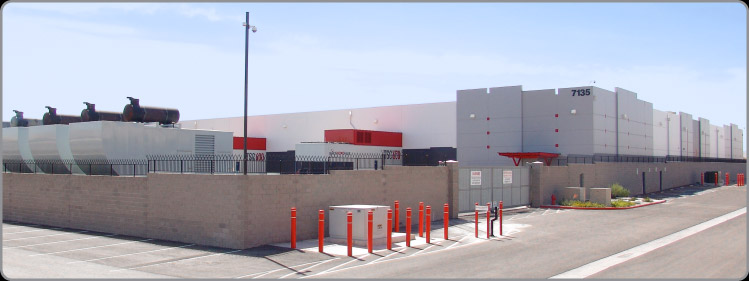
We left the Mandalay Bay hotel on the south end of The Strip and drove over to the facility.  The drive would have been less than fifteen minutes except for some road construction traffic.  Once we turned the corner into the facility, we were greeted with this visage:
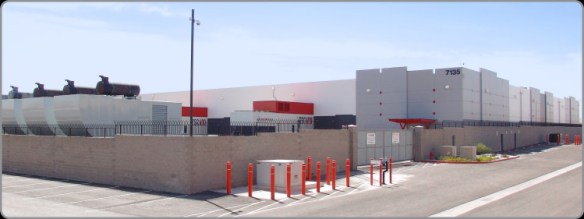
This is the kind of facility that just screams “stay away”.  The only entrance is the door in the middle right of the picture.  You must have an appointment to enter the facility, and the voice on the loudspeaker isn’t a friendly one.  Once our tour group gained access, we parked in one of the three parking spots and were immediately greeted by a man in a tactical vest with an assortment of hardware, like a walkie-talkie, flashlight, and sidearm.  He informed us that we needed to have our identification ready and there were ABSOLUTELY no pictures to be taken inside the facility.  While he didn’t confiscate our cell phones, he did question one of our group about an insulin pump on his hip.

Once inside the entrance, I immediately noticed the hardware located behind the security office.  It was more impressive than what I had seen in the FBI buildings I’ve visited.  Behind several inches of bullet resistant glass were M4 assault rifles and what appeared to be shotguns as well.  Coupled with the the posture of the security guards, I was pretty sure this was going to be a rather interesting tour.  Once I surrendered by driver’s license for a visitor pass, we were escorted through the steel mantrap.  The security guard had to buzz each visitor in individually with his access badge and his thumbprint, a very nice combo of two-factor authorization for a security nerd like me.  We were escorted to a conference room filled with industrial-looking tables and comfortable chairs.  The guard asked if we needed to use the restroom, and after no one accepted his offer he asked that we stay in this room until our appointment arrived.  When I heard the door click behind him, I realized that was more of a statement rather than a request.

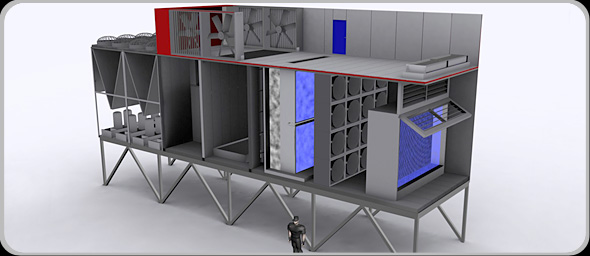
Once the rest of our group arrived, Missy Young came in to start our sightseeing show.  She started out giving us an overview of the facility itself, focusing on the layout and the air handling system.  In most datacenters, keeping the massive amount of equipment cool is one of the more difficult tasks.  When Switch first asked about cooling SuperNAP with the traditional air cooling units, the cooling vendor’s response to their request would have filled half the datacenter floor with A/C units.  So Switch built their own:
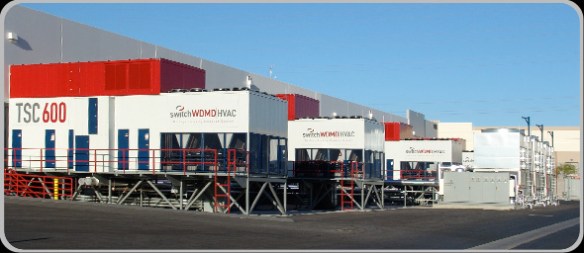
Each of those units contains four different types of cooling systems to ensure the most efficient method is used to keep the data center at the appropriate temperature.  There’s even a software program, Living Datacenter, running at all times to monitor the air temperature outside that keeps the air handlers running at peak efficiency and the data center from becoming a greenhouse.  Altogether, there are 44,000 tons of cooling available for the 407,000 square foot facility.  Inside, it was nice and chilly, just like the servers like it.  Thanks to all that cooling power, SuperNAP customers are not required to space their equipment out to allow proper airflow.  The building can deliver the right amount of cooling to every square inch of the floor, therefore allowing Switch to make the most efficient use of the space.

SuperNAP houses lots of equipment from various different companies like Sony and Ebay.  They also host a variety of servers from government agencies as well, many of which they aren’t allowed to talk about.  Because of this, the facility can never be down.  They promise 100% uptime to their customers, and they have the backup systems to deliver.  The facility has 100 MW of power delivered to it for running systems and has almost 150 MW of generator capacity.  Each of those generators is powered by 7,000 gallons of diesel fuel.  In the event of a power outage, SuperNAP has contracts with several fuel companies to start delivering diesel within two hours of the outage report and every eight hours thereafter until power is restored.  In the event that the fuel resupply fails, the security forces are authorized to begin commandeering fuel from the civilian population of Las Vegas.  However, I doubt it would come to that anytime soon.  SuperNAP taps the two national power mains that deliver electricity to Las Vegas upstream of the city.  Even if Sin City starts having brownouts, SuperNAP will stay online.  Due to their level of importance in keeping the lights on, the only facility in Nevada that would get power preference before them is the Hoover Dam.

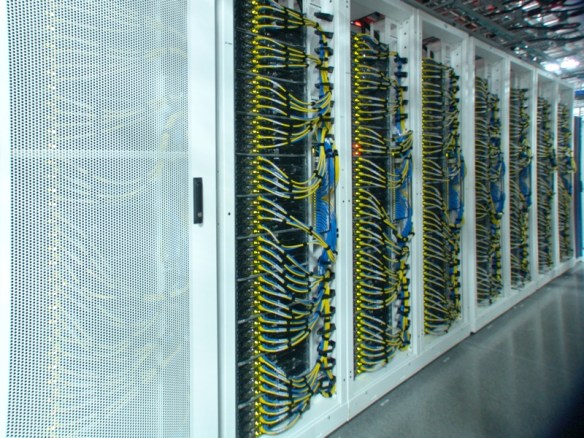
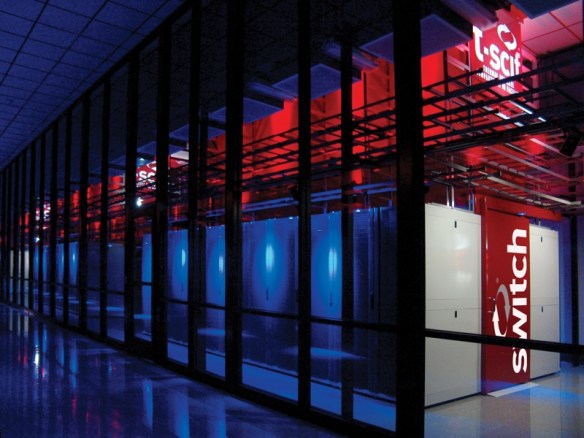
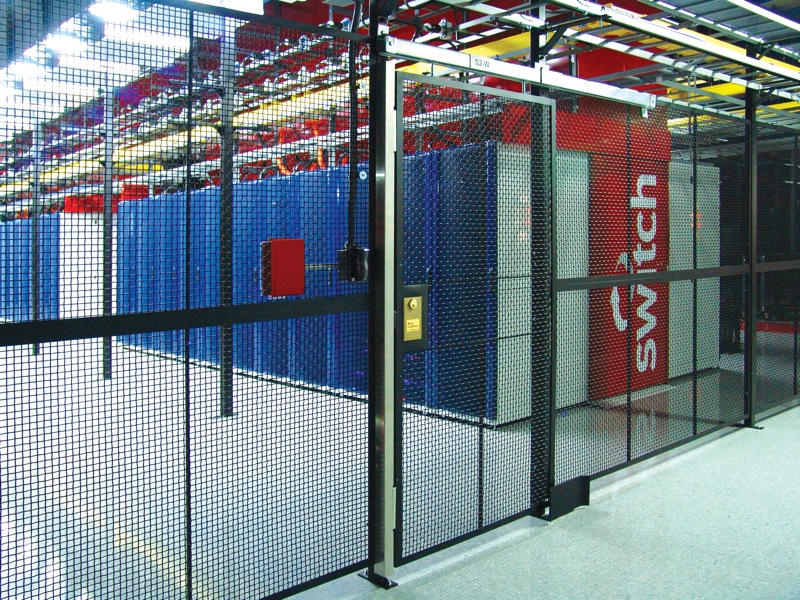
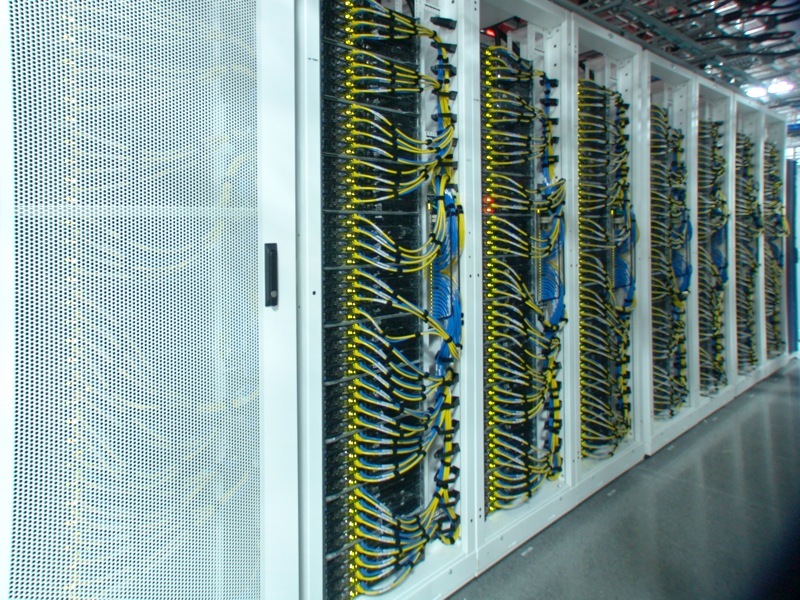
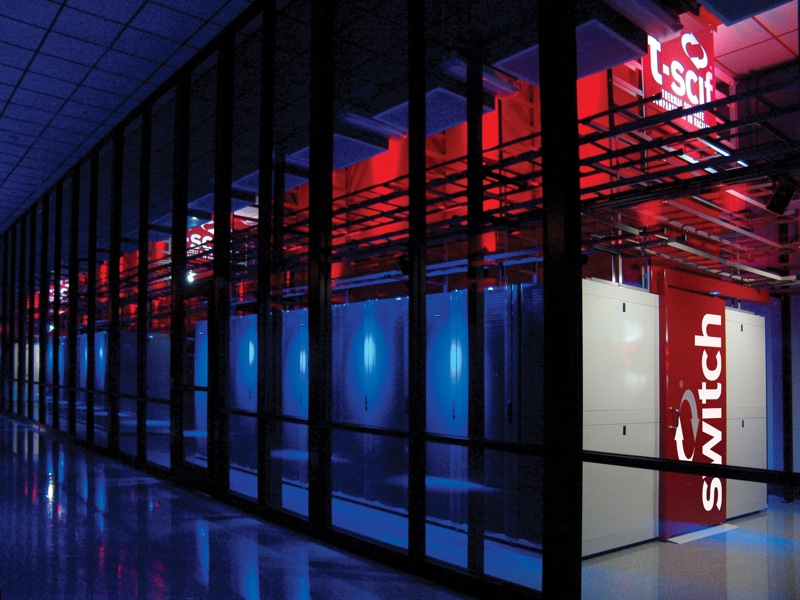
After the overview, we all signed our waivers and walked out a door to begin the tour of the facility.  Since we couldn’t take our own pictures, I’m going to post some of theirs.  Trust me, they’re real.
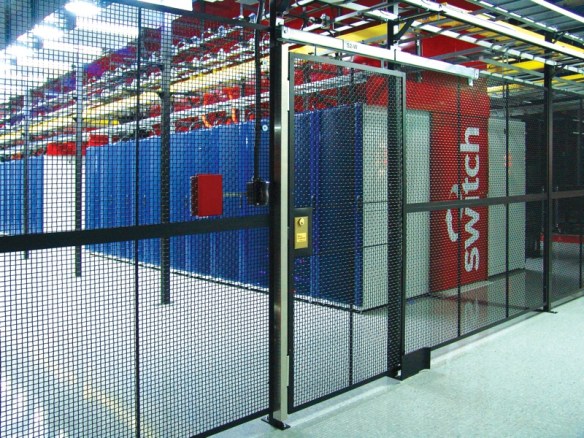
It’s really impressive in person.  Even though there were only nine of us on the tour, we were followed by an armed guard at all times.  He radioed in every time we walked into a different section of the facility.  It was a little eerie, but I can see how they might want to keep tabs on a shifty fellow like me.
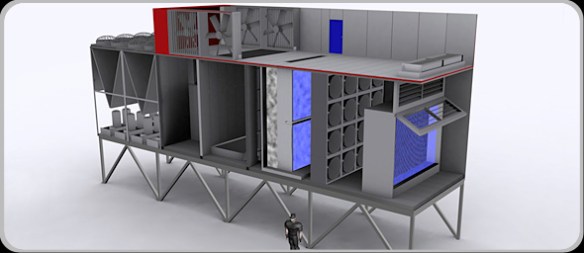
We walked into one of the air handling units and got to see each of the sections bringing air into the facility.  There is a pressure differential inside each unit, so in order to show us the amount of air being pushed by the fans, they had to crack an outside door to equalize things inside.  Somehow, I got stuck on the end nearest the fan door, and when the rather large guard opened it up, I got blasted with hurricane-force cold air for a few seconds.  I felt like Jim Cantore for a bit.  That much air flowing into the facility is a large reason behind its success at keeping the whole thing cool and stable, and they’ve got 30 of these things around the perimeter.  Combined with Living Datacenter, the units are even smart enough to shut off the outside air supply in the event of a dust storm or other unwanted conditions and recirculate the hot exhaust coming back from the server areas.

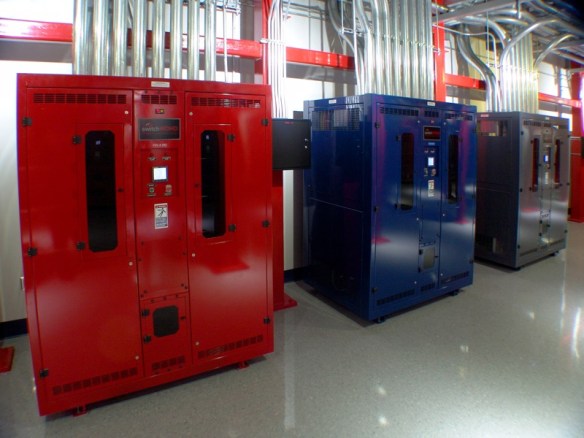
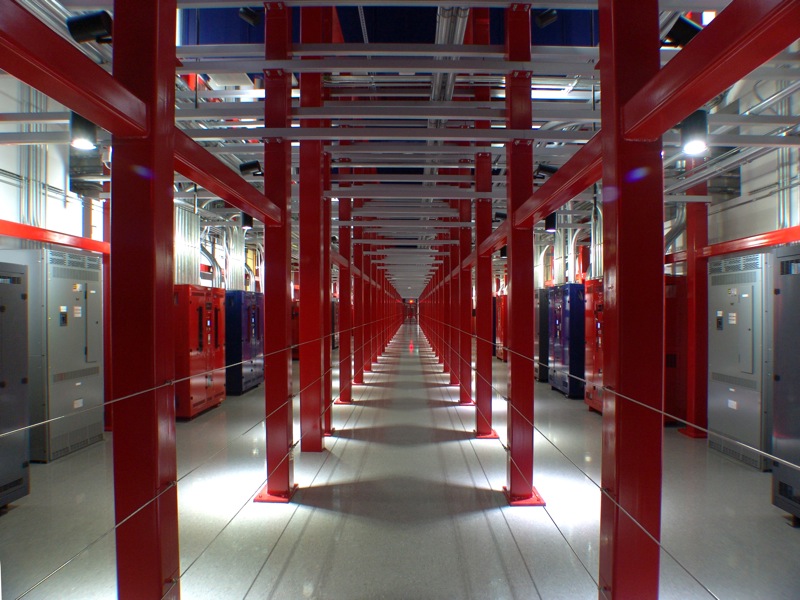
In between areas runs the Power Spine, the location of the large PDUs that distribute the go-go juice to all those hungry servers.  It looked like something out of a sci-fi movie:
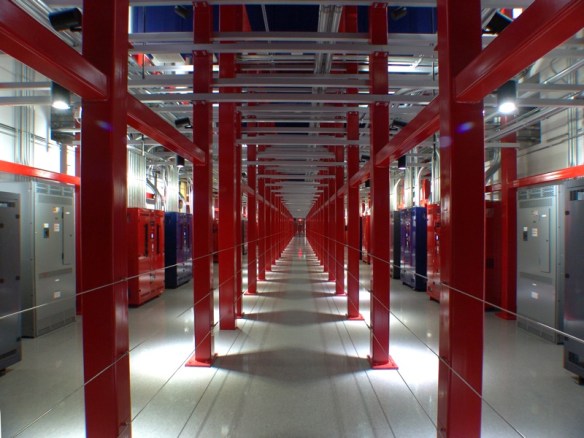
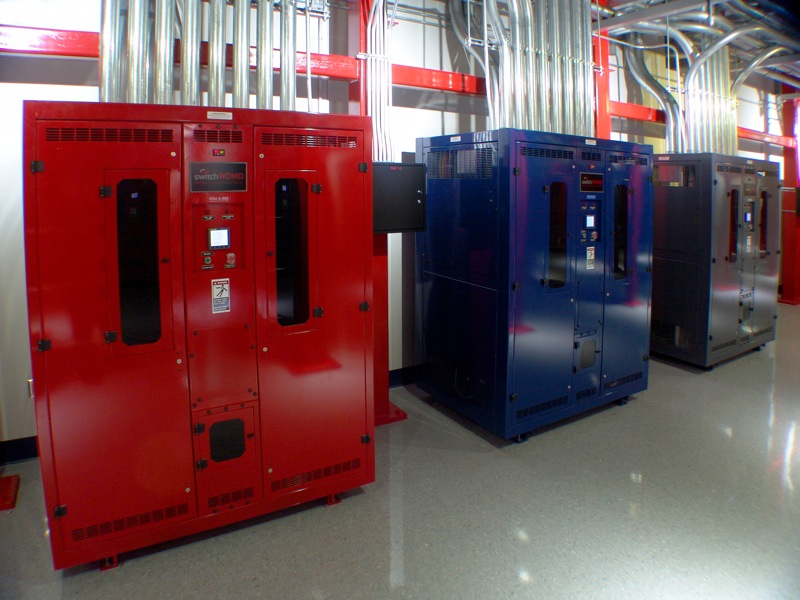
Each rack can be provided 26 Kw of power from each of those color-coded units, and there are two running to each rack to provide redundancy, with a third available just in case.  There’s even enough floor space to double up and provide 200 Mw of power to the whole facility.  The floor itself uses 4,500 psi concrete to be able to support all that weight.  And since there isn’t any raised floor space in the whole facility (all the infrastructure is overhead), it allows customers to pack in some seriously heavy computing power.

One thing I will note here.  You notice that everything in these pictures looks very polished and theatrical.  That’s a bit on purpose.  From the armed guards to the LED lighting to the enamel paint everywhere, this whole facility screams theater from the inside.  Some disbelieve their ability to deliver what they promise.  Missy’s response was “just ask our customers.”  I agree that there is a bit of a show being put on at the facility.  I surmise that it’s most likely due to an extension of will from those that built the facility in the first place.  After all, it’s very impressive to visitors to see all this hardware powering rows and rows of computing power.  Why not take the extra time and effort to make it pretty?  Besides, if someone leaves a mess, you’ve always got the security guards around to shoot the offenders.

Tom’s Take

If there’s ever a zombie apocalypse, I’m getting in the car and heading for SuperNAP.  I’m going to call ahead and make sure that Missy knows I’m coming though, because that could get interesting when the guards don’t know whether or not I’m zombified.  The SuperNAP facility delivers a very impressive profile for a datacenter, both in size and operation.  It was like walking through Toys R Us as a kid, only the toys here are multi-million dollar server equipment and the sales clerks carry assault rifles.  SuperNAP delivers on their promises of 100% uptime and their customer list is rather impressive.  I think that everyone interested in the hows and whys of data center design should take a peek inside to see what it looks like when it’s done right.  Just call ahead first.

Thanks again to Aneel Lakhani and Brian Gracely of Cisco for the invite and thanks to the rest of the group for allowing me to tag along and not get us shot at.

An Outsider’s View of Junosphere

It’s no secret that learning a vendor’s equipment takes lots and lots of time at the command line interface (CLI).  You can spend all the time you want pouring over training manuals and reference documentation, but until you get some “stick time” with the phosphors of a console screen, it’s probably not going to stick.  When I was studying for my CCIE R&S, I spent a lot of time using GNS3, a popular GUI for configuring Dynamips, the Cisco IOS simulator developed by the community.  There was no way I would be about to afford the equipment to replicate the lab topologies, as my training budget wasn’t very forgiving outside the test costs and any equipment I did manage to scrounge up usually went into production soon after that.  GNS3 afforded me the opportunity to create my own lab environments to play with protocols and configurations.  I’d say 75-80% of my lab work for the CCIE was done on GNS3.  The only things I couldn’t test were hardware-specific configurations, like the QoS found on Catalyst switches, or things that caused massive processor usage, like configuring NTP on more than two routers.  I would have killed to have had access to something a little more stable.

Cisco recently released a virtual router offering based around IOS-on-Unix (IOU), a formerly-internal testing tool that was leaked and cracked for use by non-Cisco people.  The official IOU simulation from Cisco revolves around their training material, so using it to setup your own configurations is very difficult.  Juniper Networks, on the other hand, has decided to release their own emulated OS environment built around their own hardware operating system, Junos.  This product is called Junosphere.  I was recently lucky enough to take part in a Packet Pushers episode where we talked with some of the minds behind Junosphere.  What follows here are my thoughts about the product based on this podcast and some people in the industry that I’ve talked to.

Junosphere is a cloud-based emulation platform being offered by Juniper for the purpose of building a lab environment for testing or education purposes.  The actual hardware being emulated inside Junosphere is courtesy of VJX, a virtual Junos instance that allows you to see the routing and security features of the product.  According to this very thorough Q&A from Chris Jones, VJX is not simply a hacked version of Junos running in a VM.  Instead, it is a fully supported release track code that simply runs on virtual hardware instead of something with blinking lights.  This opens up all sorts of interesting possibilities down the road, very similarly to Arista Networks vEOS virtualized router.  VJX evolved out of code that Juniper developers originally used to test the OS itself, so it has strong roots in the ability to emulate the Junos environment.  Riding on top of VJX is a web interface that allows you to drag-and-drop network topologies to create testing environments, as well as the ability to load preset configurations, such as those that you might get from Juniper to coincide with their training materials.  To reference this to something people might be more familiar with, VJX is like Dyanmips, and the Junosphere lab configuration program is more like GNS3.

Junosphere can be purchased from a Juniper partner or directly from Juniper just like you would with any other Juniper product.  The reservation system is currently set up in such a way as to allot 24-hour blocks of time for Junosphere use.  Note that those aren’t rack tokens or split into 8-hour sessions.  You get 24 continuous hours of access per SKU purchase.  Right now, the target audience for Junosphere seems to be the university/academic environment.  However, I expect that Juniper will start looking at other markets once they’ve moved out of the early launch phase of their product.  I’m very much aware that this is all very early in the life cycle of Junosphere and emulated enviroments, so I’m making sure to temper my feelings with a bit of reservation.

As it exists right now, Junosphere would be a great option for the student wanting to learn Junos for the first time in a university or trade school type of setting.  By having continuous access to the router environments, these schools can add the cost of Junosphere rentals onto the student’s tuition costs and allow them 24-hour access to the router pods for flexible study times.  For self-study oriented people like me, this first iteration is less compelling.  I tend to study at odd hours of the night and whenever I have a free moment, so 24-hour access isn’t nearly as important to me as having blocks of 4 or 8 hours might be.  I understand the reasons behind Juniper’s decision to offer the time the way they have.  By offering 24-hour blocks, they can work out the kinks of VJX being offered to end users that might not be familiar with the quirks of emulated environments, unlike the developers that were the previous user base for the product.

Tom’s Take

I know that I probably need to learn Junos at some point in the near future.  It makes all the sense in the world to try and pick it up in case I find myself staring at an SRX in the future.  With emulated OS environments quickly becoming the norm, I think that Junosphere has a great start on providing a very important service.  As I said on Packet Pushers, to make it more valuable to me, it’s going to need to be something I can use on my local machine, ala GNS3 or IOU.  That way, I can fire it up as needed to test things or to make sure I remember the commands to configure IS-IS.  Giving me the power to use it without the necessity of being connected to the Internet or needing to reserve timeslots on a virtual rack is the entire reason behind emulating the software in the first place.  I know that Junosphere is still in its infancy when it comes to features and target audiences.  I’m holding my final judgement of the product until we get to the “run” phase of the traditional “crawl, run, walk” mentality of service introduction.  It helps to think about Junosphere as a 1.0 product.  Once we get the version numbers up a little higher, I hope that Juniper will have delivered a product that will enable me to learn more about their offerings.

For more information on Junosphere, check out the Junosphere information page at http://www.juniper.net/us/en/products-services/software/junos-platform/junosphere/.