Juniper and the Removal of the Human Element

logo-top-m

Our final presentation of Network Field Day 5 came from Juniper.  A long-time contributor to Network Field Day, Juniper has been making noise as of late in the software defined networking (SDN) space with some of their ideas.  We arrived on site for a nice hardy breakfast before settling in to hear what Juniper is bringing to the greater software networking space and how I later learned that it might be best to start phasing out the human element in the network.

First up was Jeremy Schulman (@nwkautomaniac) talking to us about Puppet integration into Junos.  Jeremy opened with a talk about his involvement in automating things.  Customers have been using infrastructure automation tools like Puppet and Chef for a while to provision servers.  This allows you to spin up a new piece of hardware and have it quickly setup with basic configuration as soon as it boots up.  Jeremy told us that reinventing the wheel when it comes to automation was unnecessary when you could just put a Puppet agent in Junos.  So that’s what he did.  As a side note here, Jeremy brings up a very good point about the future of networking.  If you don’t know how to program in a real programming language, I suggest you start now.  Most of the interfaces that I’ve seen in the last 6-9 months have a high degree of familiarity based on the old CLI interface conventions.  But these interfaces only really exist to make us old school networking guys feel safe.  Very soon, all the interfaces to these devices will be only be accessible via API – which means programming.  If you don’t know how to write something in Python or Perl or even Java, you need to begin picking it up.  For something like Python, you might consider Codecademy.  It’s free and easy to pick up and follow whenever you want.  Just a thought.

Demo time!  There’s also a great overview of Puppet on Junos over on Packet Pushers written by none other than Anthony Burke (@pandom_).  The basic idea is that you write the pertinent configuration snippets into a task that can be transformed into a workflow rather than being a CLI jockey that just spends time typing the command blindly into a Telnet or SSH session.  Because you can also parse these tasks before they are sent out via the Puppet master, you can be sure your configs are sanitized and being sent to the appropriate device(s).  That means that there are no humans in the middle of the process to type in the wrong address or type the right commands on the wrong device.  Puppet is doing its part to remove the possibility of mistakes from your base configurations.  Sure, it seems like a lot of work today to get Puppet up and running for the advantage of deploying a few switches.  But when you look at the reduction of work down the road for the ability to boot up a bare metal box and have it be configured in a matter of minutes I think the investment is worth it.  I spend a lot of time preconfiguring devices that get shipped to remote places.  If I could have that box shipped the the remote location first and then just use Puppet to bring it online, I’d have a lot more time to devote to fine tuning the process.  Which leads to greater efficiency.  Which leads to more time (and so on and so on).

Next up, we got a sneak peek at Juniper’s next generation programmable core switch.  While I didn’t catch the name at the time, it turns out that it was the new EX9200 that has been making some waves as of late.  This switch is based on custom silicon, the Juniper One ASIC, rather than the merchant silicon in QFabric.  Other than the standard speeds and feeds that you see from a core switch of this type, you can see that Juniper is going to support the kitchen sink of SDN with the EX9200.  In addition to supporting OpenFlow and Puppet automation, it will also support VXLAN and NVGRE overlays as well as other interesting things like OpenStack and VMWare plugins in the future.  Make no mistake – this platform is Juniper’s stalking horse for the future.  There’s been a lot written about the longevity of the previous platforms compared to the new MX-based EX9200.  I think that Juniper is really standing behind the idea that the future of networking lies in SDN and that a platform with support for the majority of the popular methods used to reach high levels of programmability and interoperability is critical going forward.  Where that leaves other switching platforms is the realm of speculation.  Just ask yourself this question: Are you planning on buying a non-SDN capable switch in the next refresh?  Is regular packet forward fine for you for the next 3-5 years?  That is the critical question being asked in strategy meetings and purchasing departments all over the place right now.

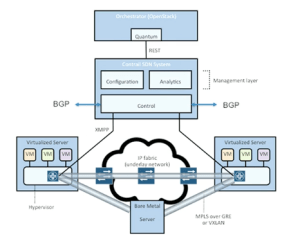
Parantap Lahiri stepped up next to present on the Contrail acquisition.  Those of you interested in the greater SDN picture would do well to watch the whole video.  Especially if you are curious about things like VMware’s new NSX strategy, as the Contrail idea is very similar, if not a bit more advanced.  The three use cases outlined in the video are great for those not familiar with what SDN is trying to accomplish right now.  In fact, commit this diagram to memory.  You are going to see it again (I promise):

ContrailDiagram

Note that further in the video, Parantap goes over one of the features of Contrail that is going to get many people excited.  Via use of GRE tunnels, this solution can create a hybrid cloud solution to burst your traffic from the private data center into a public provider like AWS or Rackspace as needed.  That, if nothing else, is the message that you need to consider with the “traditional” vendors that are supporting SDN.  Cisco and Juniper and even VMware don’t want you to start buying whitebox servers and turning them into switches.  They don’t want a “roll your own” strategy.  What Juniper wants if for you to buy a whole bunch of EX9200s and then build a Contrail overlay system to manage it all.  Then, when the workloads get to be too great for your own little slice of private cloud you can use Contrail to tunnel into the public cloud and move those workloads until the traffic spike subsides.  Maybe you even want to keep some of those migrated workloads in the cloud permanently in order to take advantage of cheap compute and ease overall usage in your private data center.  The key is flexibility, and that’s what Contrail gives you.  That’s where the development is going to be for the time being.

The last presentation came from the Juniper Webapp Secure team.  You may recognize this product by its former moniker – Mykonos.  In fact, you may recognize this presentation from its former delivery at NFD4.  In fact, I said as much during the demo:

There’s a market for a security tool like this for lots of websites.  It gets the bad guys without really affecting the good guys.  I’m sure that Juniper is going to sell the living daylights out of it.  They’re trying their best right now based on the number of people that I’ve seen talking about it on Twitter.  The demo is engaging because it highlights the capabilities as well as injecting a bit of humor and trollishness.  However, based on what I’ve seen at NFD4 and NFD5 and what people have told me they saw when they were presented, I think the Webapp Secure demo is very scripted and fairly canned.  The above video is almost identical to the one from NFD4.  Compare:

Guys, you need to create a new Generic company and give us some more goodies in the demo.  Having a self-aware web firewall that doesn’t need human intervention to stop the attackers is a big deal.  Don’t use Stock Demo Footage to tell us about it every time.


Tom’s Take

What does the Juniper strategy look like?  The hint is in the title of this post.  Juniper is developing automation to reduce the amount of people in the network making critical decisions without good information or tools to execute.  As those people begin to be replaced by automated systems, the overall intelligence in the network increases while at the same time reducing the amount of time that it takes to take action to bring new nodes online and reconfigure on the fly to support things we thought might have been impossible even three years ago.  Through device deployment orchestration, flexible platforms supporting new protocols with programmability built in and even to new technology like overlay networking and automated security response for critical systems, Juniper is doing their best to carve out a section of the SDN landscape just for themselves.  It’s a strategy that should pay off in the long run provided there is significant investment that stays the course.

Tech Field Day Disclaimer

Juniper was a sponsor of Network Field Day 5.  As such, they were responsible for covering a portion of my travel and lodging expenses while attending Network Field Day 5.  In addition, they also provided breakfast for the delegates.  Juniper also gave the delegates a copy of Juniper Warrior, a mobile phone charger, emergency battery pack, and a battery-powered pocket speaker.  At no time did they ask for, nor where they promised any kind of consideration in the writing of this review.  The opinions and analysis provided within are my own and any errors or omissions are mine and mine alone.

Plexxi and the Case for Affinity

Plexxi Logo

Our last presentation from Day 2 of Network Field Day 5 came from a relatively new company – Plexxi.  I hadn’t really heard much from them before they signed up to present at NFD5.  All I really knew was that they had been attracting some very high profile talent from the Juniper ranks.  First Dan Backman (@jonahsfo) shortly after NFD4 then Mike Bushong (@mbushong) earlier this year.  One might speculate that when the talent is headed in a certain direction, it might be best to see what’s going on over there.  If only I had known the whole story up front.

Mat Mathews kicked off the presentation with a discussion about Plexxi and what they are doing to differentiate themselves in the SDN space.  It didn’t take long before their first surprise was revealed.  Our old buddy Derick Winkworth (@cloudtoad) emerged from his pond to tell us the story of why he moved from Juniper to Plexxi just the week before.  He’d kept the news of his destination pretty quiet.  I should have guessed he would end up at a cutting edge SDN-focused company like Plexxi.  It’s good to see smart people landing in places that not only make them excited but give them the opportunity to affect lots of change in the emerging market of programmable networking.

Marten Terpstra jumped in next to talk about the gory details of what Plexxi is doing.  In a nutshell, this all boils down to affinity.  Based on a study done by Microsoft in 2009, Plexxi noticed that there are a lot of relationships between applications running in a data center.  Once you’ve identified these relationships, you can start doing things with them.  You can create policies that provide for consistent communications between applications.  You can isolate applications from one another.  You can even ensure which applications get preferential treatment during a network argument.  Now do you see the SDN applications?  Plexxi took the approach that there is more data to be gathered by the applications in the network.  When they looked for it, sure enough it was there.  Now, armed with more information, they could start crafting a response.  What they came up with was the Plexxi Switch.  This is a pretty standard 32-port 10GigE switch with 4 QSFP ports..  Their differentiator is the 40GigE uplinks to the other Plexxi Switches.  Those are used to create a physical ring topology that allows the whole conglomeration to work together to create what looked to me like a virtual mesh network.  Once connected in such a manner, the affinities between the applications running at the edges of the network can now begin to be built.

Plexxi has a controller that sits above the bits and bytes and starts constructing the policy-based affinities to allow traffic to go where it needs to go.  It can also set things up so that things don’t go where they’re not supposed to be, as in the example Simon McCormack gives in the above video.  Even if the machine is moved to a different host in the network via vMotion or Live Migration, the Plexxi controller and network are smart enough to figure out that those hosts went somewhere different and that the policy providing for an isolated forwarding path needs to be reimplemented.  That’s one of the nice things about programmatic networking.  The higher-order networking controllers and functions figure out what needs to change in the network and implements the changes either automatically or with a minimum of human effort.  This ensures that the servers don’t come in and muck up the works with things like Dynamic Resource Scheduler (DRS) moves or other unforeseen disasters.  Think about the number of times you’ve seen a VM with an anti-affinity rule that keeps it from being evacuated from a host because there is some sort of dedicated link for compliance or security reasons.  With Plexxi, that can all be done automagically.  Derick even showed off some interesting possibilities around using Python to extend the capabilities of the CLI at the end of the video.

If you’d like to learn more about Plexxi, you can check them out at http://www.plexxi.com.  You can also follow them on Twitter as @PlexxiInc


Tom’s Take

Plexxi has a much different feel than many of the SDN products I’ve seen so far.  That’s probably because they aren’t trying to extend an existing infrastructure with programmability.  Instead, they’ve taken a singular focus around affinity and managed to tun it into something that looks to have some very fascinating applications in today’s data centers.  If you’re going to succeed in the SDN-centric world of today, you either need to be front of the race as it is being run today, like Cisco and Juniper, or you need to have a novel approach to the problem.  Plexxi really is looking at this whole thing from the top down.  As I mentioned to a few people afterwards, this feels like someone reimplemented QFabric with a significant amount of flow-based intelligence.  That has some implications for higher order handling that can’t be addressed by a simple fabric forwarding engine.  I will stay tuned to Plexxi down the road.  If nothing else, just for the crazy sock pictures.

Tech Field Day Disclaimer

Plexxi was a sponsor of Network Field Day 5.  As such, they were responsible for covering a portion of my travel and lodging expenses while attending Network Field Day 5.  In addition, they also gave the delegates a Nerf dart gun and provided us with after hours refreshments.  At no time did they ask for, nor where they promised any kind of consideration in the writing of this review.  The opinions and analysis provided within are my own and any errors or omissions are mine and mine alone.

Additional Coverage of Plexxi and Network Field Day 5

Smart Optical Switching – Your Plexxible Friend – John Herbert

Plexxi Control – Anthony Burke

Brocade Defined Networking

logo-brocade

Brocade stepped up to the plate once again to present to the assembled delegates at Network Field Day 5.  I’ve been constantly impressed with what they bring each time they come to the party.  Sometimes it’s a fun demo.  Other times its a great discussion around OpenFlow.  With two hours to spend, I wanted to see how Brocade would steer this conversation.  I could guarantee that it would involve elements of software defined networking (SDN), as Brocade has quietly been assembling a platoon on SDN-focused luminaries.  What I came away with surprised even me.

Mike Schiff takes up the reigns from Lisa Caywood for the title of Mercifully Short Introductions.  I’m glad that Brocade assumes that we just need a short overview for both ourselves and the people watching online.  At this point, if you are unsure of who Brocade is you won’t get a feel for it in eight short minutes.

Curt Beckman started off with fifteen minutes of discussion about where the Open Networking Foundation (ONF) is concentrating on development.  Because Curt is the chairman of the ONF, we kind of unloaded on him a bit about how the ONF should really be called the “Open-to-those-with-$30,000-to-spare Networking Foundation”.  That barrier to entry really makes it difficult for non-vendors to have any say in the matters of OpenFlow.  Indeed, the entry fee was put in place specifically to deter those not materially interested in creating OpenFlow based products from discussing the protocol.  Instead, you have the same incumbent vendors that make non-OpenFlow devices today steering the future of the standard.  Unlike the IETF,  you can’t just sign up for the mailing list or show up to the meetings and say your peace.  You have to have buy in, both literally and figuratively.  I proposed the hare-brained idea of creating a Kickstarter project to raise the necessary $30,000 for the purpose of putting a representative of “the people” in the ONF.  In discussions that I’ve had before with IETF folks they all told me you tend to see the same thing over and over again.  Real people don’t sit on committees.  The IETF is full of academics that argue of the purity of an OAM design and have never actually implemented something like that in reality.  Conversely, the ONF is now filled with deep pocketed people that are more concerned with how they can use OpenFlow to sell a few more switches rather than now best to implement the protocol in reality.  If you’d like to donate to an ONF Kickstarter project, just let me know and I’ll fire it up.  Be warned – I’m planning on putting Greg Ferro (@etherealmind) and Brent Salisbury (@networkstatic) on the board.  I figure that should solve all my OpenFlow problems.

The long presentation of this hour was all about OpenFlow and hybrid switching.  I’ve seen some of the aspects of this in my day job.  One of the ISPs in my area is trying to bring a 100G circuit into the state for Internet2 SDN-enabled links.  The demo that I saw in their office was pretty spiffy.  You could slice off any section of the network and automatically build a path between two nodes with a few simple clicks.  Brocade expanded my horizons of where these super fast circuits were being deployed with discussions of QUILT and GENI as well as talking about projects across the ocean in Australia and Japan.  I also loved the discussions around “phasing” SDN into your existing network.  Brocade realizes that no one is going to drop everything they currently have and put up an full SDN network all at once.  Instead, most people are going to put in a few SDN-enabled devices and move some flows to them at first both as a test and as a way to begin new architecture.  Just like remodeling a house, you have to start somewhere and shore up a few areas before you can really being to change the way everything is laid out.  That is where the network will eventually lead to being fully software defined down the road.  Just realize that it will take time to get there.

Next up was a short update from Vyatta.  They couldn’t really go into a lot of detail about what they were doing, as they were still busy getting digested by Brocade after being acquired.  I don’t have a lot to say about them specifically, but there is one thing I thought about as I mulled over their presentation.  I’m not sure how much Vyatta plays into the greater SDN story when you think about things like full API programmability, orchestration, and even OpenFlow.  Rather than being SDN, I think products like Vyatta and even Cisco’s Nexus 1000v should instead be called NDS – Networking Done (by) Software.  If you’re doing Network Function Virtualization (NFV), how much of that is really software definition versus doing your old stuff in a new way?  I’ve got some more, deeper thoughts on this subject down the road.  I just wanted to put something out there about making sure that what you’re doing really is SDN instead of NDS, which is a really difficult moving target to hit because the definition of what SDN really does changes from day to day.

Up next is David Meyer talking about Macro Trends in Networking.  Ho-ly crap.  This is by far my favorite video from NFD5.  I can say that with comfort because I’ve watched it five times already.  David Meyer is a lot like Victor Shtrom from Ruckus at WFD2.  He broke my brain after this presentation.  He’s just a guy with some ideas that he wants to talk about.  Except those ideas are radical and cut right to the core of things going on in the industry today.  Let me try to form some thoughts out of the video above, which I highly recommend you watch in its entirety with no distractions.  Also, have a pen and paper handy – it helps.

David is talking about networks from a systems analysis perspective.  As we add controls and rules and interaction to a fragile system, we increase the robustness of that system.  Past a certain point, though, all those extra features end up harming the system.  While we can cut down on rules and oversight, ultimately we can’t create a truly robust system until we can remove a large portion of the human element.  That’s what SDN is trying to do.  By allowing humans to interact with the rules and not the network itself you can increase the survivability of the system.  When we talk about complex systems, we really talk about increasing their robustness while at the same time adding features and flexibility.  That’s where things like SDN come into the discussion in the networking system.  SDN allows us to constrain the fragility of a system by creating a rigid framework to reduce the complexity.  That’s the “bow tie” diagram about halfway in.  We have lots of rules and very little interaction from agents that can cause fragility.  When the outputs come out of SDN, the are flexible and unconstrained again but very unlikely to contribute to fragility in the system.  That’s just one of the things I took away from this presentation.  There are several more that I’d love to discuss down the road once I’ve finished cooking them in my brain.  For now, just know that I plan on watching this presentation several more times in the coming weeks.  There’s so much good stuff in such a short time frame.  I wish I could have two hours with David Meyer to just chat about all this crazy goodness.

If you’d like to learn more about Brocade, you can check out their website at http://www.brocade.com.  You can also follow them on Twitter as @BRCDcomm


Tom’s Take

Brocade gets it.  They’ve consistently been running in the front of the pack in the whole SDN race.  They understand things like OpenFlow.  They see where the applications are and how to implement them in their products.  They engage with the builders of what will eventually become the new SDN world.  The discussions that we have with Curt Beckman and David Meyer show that there are some deep thinkers that are genuinely invested in the future of SDN and not just looking to productize it.  Mark my words – Brocade is poised to leverage their prowess in SDN to move up the ladder when it comes to market share in the networking world.  I’m not saying this lightly either.  There’s an adage attributed to Wayne Gretskey – “Don’t skate where the puck is.  Skate where the puck is going.”  I think Brocade is one of the few networking companies that’s figured out where the puck is going.

Tech Field Day Disclaimer

Brocade was a sponsor of Network Field Day 5.  As such, they were responsible for covering a portion of my travel and lodging expenses while attending Network Field Day 5.  In addition, Brocade provided a USB drive of marketing material and two notepads styled after RFC 2460.  At no time did they ask for, nor where they promised any kind of consideration in the writing of this review.  The opinions and analysis provided within are my own and any errors or omissions are mine and mine alone.

Causing A Network Ruckus

ruckuslogo

The second presentation of day 2 of Network Field Day was from Ruckus wireless. Yes, a wireless company at a non-wireless Field Day event. I had known for a while that Ruckus wanted to present at Network Field Day and I was excited to see what they would bring. My previous experience with Ruckus was very enlightening. I wanted to see how they would do outside the comfort zone of a wireless event. Add in the fact that most networks are now becoming converged from the perspective of offering both wired and wireless access and you can see the appeal of being the only wireless company on the slate.

We started off with a talk from GT Hill (@GTHill). GT is one of those guys that started out very technical before jumping into the dark side of marketing. I think his presentation should be required viewing for those that think they may want to talk to any Tech Field Day group. GT had a lot of energy that he poured into his talk.  I especially loved how he took a few minutes at the beginning to ask the delegates about their familiarity with wireless.  That’s not something you typically see from a vertical-focused field day like NFD, but it does get back to the cross discipline aspect that makes the greater Tech Field Day events so great.  Once GT had an idea of what we all knew he kept each and every one of the delegates engaged as he discussed why wireless was so hard to do compared to the “simplicity” of wired networking. Being a fan of explaining technical subjects with easy-to-understand examples, I loved GT using archery as a way to explain the relative difficulty of 802.11 broadcasts in 802.11n and 802.11ac.

The second part of the discussion from Sandip Patel about 802.11ac was great. I didn’t get a chance to hear the presentations from the other wireless vendors at Wireless Field Day 3 & 4. Picking up all the new information regarding things like channel bandwidth and multi-user spatial streams was very nice for me.  There’s a lot of new technology being poured into 802.11ac right now.  There’s also a lot that’s being prepped for the future as well.  While I knew that 160 MHz channels were going to be necessary to get the full bandwidth rates out of 802.11ac, I was unaware that you could have two 80 MHz channels simultaneously working together to provide that.  You learn something awesome at every Field Day event.  I think 802.11ac is going to push a lot of lesser vendors out of the market before all is said and done.  The huge leap forward for throughput comes with a great cost insofar as making sure that your wireless radios work correctly while at the same time accommodating noise and interference.  Companies like Cisco and Aruba are going to come out okay just by virtue of being so large.  Aerohive should come out fine as well.  I think Ruckus has taken a unique approach with their antenna technology.  That shows in these presentations, as Ruckus will be the first to tell you that their superior transmitting technology means that the signal will be cleaner between client and AP.  I want to see a real 802.11ac from every wireless company put together in a room with various noise producers to see what happens.  Maybe something for Wireless Field Day 5?

After we shut off the cameras, we got to take tour of the Ruckus testing facilities.  Since Ruckus had moved buildings since Wireless Field Day 2 it was a brand new room.  There was a lot more room than the previous testing area that we’d seen before.  They still had a lot of the same strange containers and rooms designed to subject access point radios to the strangest RF environments imaginable.  In the new building, there was just a lot more elbow room to walk around along with more tables to spread out and get down to the nuts and bolts of testing.

If you’d like to learn more about Ruckus Wireless and their solutions, you can check them out at http://www.ruckuswireless.com.  You can also follow them on Twitter as @ruckuswireless.


Tom’s Take

While the Ruckus presentation was geared more toward people who weren’t that familiar with the wireless space, I loved it nonetheless.  GT Hill related to a group of non-wireless people in the best way I could imagine.  Sandip brought a lot of info about 802.11ac to the table now that the vendors are starting to ramp up towards putting out enterprise APs.  Ruckus wanted to show everyone that wireless is an important part of the conversation when it comes to the larger networking story.  While we spend a lot of time at NFD talking about SDN or data centers or other lofty things, it’s important to remember that our tweets and discussion and even our video coverage is coming over a wireless network of some kind.  Going to a vendor without some form of wireless access is a demerit in their case.  I’ve always made a point of paying attention once I see that something is everywhere I go.  Thankfully, Ruckus made the right kind of noise to make the delegates sit up and pay attention.

Tech Field Day Disclaimer

Ruckus was a sponsor of Network Field Day 5.  As such, they were responsible for covering a portion of my travel and lodging expenses while attending Network Field Day 5.  In addition, Ruckus provided me with lunch at their offices.  They also provided a custom nameplate and a gift package containing a wireless access point and controller.  At no time did they ask for, nor where they promised any kind of consideration in the writing of this review.  The opinions and analysis provided within are my own and any errors or omissions are mine and mine alone.

Additional Network Field Day 5 Coverage

Terry Slattery – Network Field Day 5: Ruckus Wireless

Pete Welcher – Network Field Day 5: Ruckus Wireless Comments

Pete Welcher – Testing WLAN and Network Management Products

Solarwinds – The Right Tool For A New Job

solarwinds_logo_tag2012

The first presentation of Networking Field Day 5 day 2 was from our old friends at Solarwinds.  We heard from them before at NFD3, but the nice thing about Solarwinds is that they’ve always got new tools coming out.  I’ve also served as a Thwack Ambassador on their forums and been featured as an IT Spotlight Blogger.  I wanted to see what Solarwinds would bring to the table at NFD5.

The geeks from Solarwinds started out with a quick overview of the tool portfolio.  One thing to take note of: most of the tools that you use a standalone products are actually integrated into the larger Orion platform.  Solarwinds makes some of them available as free downloads for trials or point solutions.  You can get all of them together in one big toolbox, provided you have the horsepower to run it all.  It tend to lean more toward the “right tool, right job” mentality rather than getting the whole box.  For every IP SLA monitor crescent wrench I use regularly, there are a multitude of metric socket sets and emergency break tools that I may never even touch.  That’s why it’s great when Solarwinds makes their software available to all for only the investment of a registration.

You’ll also notice in the video around 20 minutes in, I mention something about Solarwinds and SDN.  Colin McNamara (@colinmacnamara) chided me a bit about “SDN washing” of their technology.  Colin does have a point about overuse of SDN to describe everything under the sun.  Sanjay Castelino even made a post to the effect that what Solarwinds is doing isn’t SDN.  In a sense, he’s right.  These tools aren’t network programmability or overlay networking or even automation.  To me though, a part of what Solarwinds is doing falls under the SDN spectrum in that they can program different devices from a single interface.  Sure, it’s not the sexy sports car idea of network slicing and service instantiation that others are looking at.  Even the ability to quickly configure devices and pull pertinent info from them is better than some of what we’ve got going on right now.  This software allows you to define parameters and configuration in your network.  That’s SDN of some flavor to me.  Maybe not mocha SDN with sprinkles but something a bit different.

This led to a bit of a derailment of the conversation.  The delegates seized on the Solarwinds development model of “giving the customers what they want.”  I’d heard this many times before, so it wasn’t necessarily new to me.  What’s key to me in that message is that you’re going to have a lot of content customers.  Not necessarily happy, but content.  The key difference to me comes from the model.  If you give the customers what they want, they will be pacified.  All their desires are met and the can do their jobs.  However, if you can break outside of the demand-based model and show them something they never knew they needed, you have a real chance to make them deliriously happy.  Think about something like the iPad.  Did we know we needed it before it was released?  Not likely.  Now think about how many people have jumped at the chance to own a tablet device.  If those companies had simply been giving their customers what they asked for think about the market that would have been missed.  I’m not saying that Solarwinds is doing a bad job by any means.  I just think they need to get a geek in the house working on crazy stuff that will make people say “holy cow!!!”

Solarwinds talked to us about their newest network monitoring pieces.  They’ve got some very interesting tools, including Network Performance Monitor.  There was also some discussion around their IP Address Managment (IPAM) tool, which is what I wrote about during my Thwack Ambassadorship.  Thankfully, we had Terry Slattery in the room.  Terry loves the network monitoring discussions, having founded Netcordia and release NetMRI for that purpose before it was purchased by Infoblox.  Terry has seen a lot, and he’s not afraid to tell you what he thinks.  When we discussed the features of User Device Tracker (UDT), he asked if it can do a time-based report on unused switch ports.  When the answer wasn’t clear, he told the geeks, “If you can’t do that, you need to write that down.” We all had a couple of good jokes at their expense, but that fact is that when Terry tells you something is important, especially when it comes to network monitoring the chances are it’s really important.

Solarwinds is also getting into the API game with SWIS – Solarwinds Information Service.  This SOAP interface (soon to be REST) gives you the ability to write programs to pull data from the network and insert/update the same in many devices.  See what I’m talking about with SDN and the ability to pull info from the network and push it back again?  I think Solarwinds really needs to focus their efforts in this area and drive some more programmability from their tools rather than the old methods of just hiding CLI command pushes and things of that nature.  By allowing users to code to an API, you’ve just abstracted all of the icky parts of the backend away and focused the conversation where it needs to be – on getting problems solved.

If you’d like to learn more about Solarwinds, be sure to check them out at http://www.solarwinds.com.  You can also follow them on Twitter as @solarwinds.  Be sure to check out their dicussion forums at http://thwack.solarwinds.com.


Tom’s Take

Solarwinds has awesome tools.  They’re going to have awesome tools in the future.  But they’ve hit on some pieces of the puzzle that are going to do much more than that.  Beyond giving us a toolbox with fancy handles and shiny stickers, they’ve started to do what a lot of other people have done and give us designs for what we should build with the tools they’ve given us.  By expanding into that area of allowing us to program to APIs and put the pieces into a bigger context, they have the ability to transcend being a point product vendor releasing neat toys.  When you can be a meaningful discussion point in any monitoring and management meeting without being dismissed as just a niche player, that’s handy indeed.

Tech Field Day Disclaimer

Solarwinds was a sponsor of Network Field Day 5.  As such, they were responsible for covering a portion of my travel and lodging expenses while attending Network Field Day 5.  In addition, Solarwinds provided me with breakfast at the hotel.  They also gave the delegates a t-shirt and a messenger bag, along with all the stickers and buttons we could fit into our carry ons.  At no time did they ask for, nor where they promised any kind of consideration in the writing of this review.  The opinions and analysis provided within are my own and any errors or omissions are mine and mine alone.

Cisco Borderless Idol

Cisco Logo

Day one of Network Field Day 5 (NFD5) included presentations from the Cisco Borderless team. You probably remember their “speed dating” approach at NFD4 which gave us a wealth of information in 15 minute snippets. The only drawback to that lineup is when you find a product or a technology that interests you there really isn’t any time to quiz the presenter before they are ushered off stage. Someone must have listened when I said that before, because this time they brought us 20 minute segments – 10 minutes of presentation, 10 minutes of demo. With the switching team, we even got to vote on our favorite to bring the back for the next round (hence the title of the post). More on that in a bit.

6500 Quad Supervisor Redundancy

First up on the block was the Catalyst 6500 team. I swear this switch is the Clint Howard of networking, because I see it everywhere. The team wanted to tell us about a new feature available in the ((verify code release)) code on the Supervisor 2T (Sup2T). Previously, the supervisor was capable of performing a couple of very unique functions. The first of these was Stateful Switch Over (SSO). During SSO, the redundant supervisor in the chassis can pick up where the primary left off in the event of a failure. All of the traffic sessions can keep on trucking even if the active sup module is rebooting. This gives the switch a tremendous uptime, as well as allowing for things like hitless upgrades in production. The other existing feature of the Sup2T is Virtual Switching System (VSS). VSS allows two Sup2Ts to appear as one giant switch. This is helpful for applications where you don’t want to trust your traffic to just one chassis. VSS allows for two different chassis to terminate Multi-Chassis EtherChannel (MLAG) connections so that distribution layer switches don’t have a single point of failure. Traffic looks like it’s flowing to one switch when in actuality it may be flowing to one or the other. In the event that a Supervisor goes down, the other one can keep forwarding traffic.

Enter the Quad Sup SSO ability. Now, instead of having an RPR-only failover on the members of a VSS cluster, you can setup the redundant Sup2T modules to be ready and waiting in the event of a failure. This is great because you can lose up to three Sup2Ts at once and still keep forwarding while they reboot or get replaced. Granted, anything that can take out 3 Sup2Ts at once is probably going to take down the fourth (like power failure or power surge), but it’s still nice to know that you have a fair amount of redundancy now. This only works on the Sup2T, so you can’t get this if you are still running the older Sup720. You also need to make sure that your linecards support the newer Distributed Forwarding Card 3 (DFC3), which means you aren’t going to want to do this with anything less than a 6700-series line card. In fact, you really want to be using the 6800 series or better just to be on the safe side. As Josh O’brien (@joshobrien77) commented, this is a great feature to have. But it should have been there already. I know that there are a lot of technical reasons why this wasn’t available earlier, and I’m sure the increase fabric speeds in the Sup2T, not to mention the increased capability of the DFC3, are the necessary component for the solution. Still, I think this is something that probably should have shipped in the Sup2T on the first day. I suppose that given the long road the Sup2T took to get to us that “better late than never” is applicable here.

UCS-E

Next up was the Cisco UCS-E series server for the ISR G2 platform. This was something that we saw at NFD4 as well. The demo was a bit different this time, but for the most part this is similar info to what we saw previously.


Catalyst 3850 Unified Access Switch

The Catalyst 3800 is Cisco’s new entry into the fixed-configuration switch arena. They are touting this a “Unified Access” solution for clients. That’s because the 3850 is capable of terminating up to 50 access points (APs) per stack of four. This think can basically function as a wiring closet wireless controller. That’s because it’s using the new IOS wireless controller functionality that’s also featured in the new 5760 controller. This gets away from the old Airespace-like CLI that was so prominent on the 2100, 2500, 4400, and 5500 series controllers. The 3850, which is based on the 3750X, also sports a new 480Gbps Stackwise connector, appropriately called Stackwise480. This means that a stack of 3850s can move some serious bits. All that power does come at a cost – Stackwise480 isn’t backwards compatible with the older Stackwise v1 and v2 from the 3750 line. This is only an issue if you are trying to deploy 3850s into existing 3750X stacks, because Cisco has announced the End of Sale (EOS) and End of Life (EOL) information for those older 3750s. I’m sure the idea is that when you go to rip them out, you’ll be more than happy to replace them with 3850s.

The 3850 wireless setup is a bit different from the old 3750 Access Controller that had a 4400 controller bolted on to it. The 3850 uses Cisco’s IOS-XE model of virtualizing IOS into a sort of VM state that can run on one core of a dual-core processor, leaving the second core available to do other things. Previously at NFD4, we’d seen the Catalyst 4500 team using that other processor core for doing inline Wireshark captures. Here, the 3850 team is using it to run the wireless controller. That’s a pretty awesome idea when you think about it. Since I no longer have to worry about IOS taking up all my processor and I know that I have another one to use, I can start thinking about some interesting ideas.

The 3850 does have a couple of drawbacks. Aside from the above Stackwise limitations, you have to terminate the APs on the 3850 stack itself. Unlike the CAPWAP connections that tunnel all the way back to the Airespace-style controllers, the 3850 needs to have the APs directly connected in order to decapsulate the tunnel. That does provide for some interesting QoS implications and applications, but it doesn’t provide much flexibility from a wiring standpoint. I think the primary use case is to have one 3850 switch (or stack) per wiring closet, which would be supported by the current 50 AP limitation. the othe drawback is that the 3850 is currently limited to a stack of four switches, as opposed to the increased six switch limit on the 3750X. Aside from that, it’s a switch that you probably want to take a look at in your wiring closets now. You can buy it with an IP Base license today and then add on the AP licenses down the road as you want to bring them online. You can even use the 3850s to terminate CAPWAP connections and manage the APs from a central controller without adding the AP license.

Here is the deep dive video that covers a lot of what Cisco is trying to do from a unified wired and wireless access policy standpoint. Also, keep an eye out for the cute Unifed Access video in the middle.

Private Data Center Mobility

I found it interesting this this demo was in the Borderless section and not the Data Center presentation. This presentation dives into the world of Overlay Transport Virtualization (OTV). Think of OTV like an extra layer of 802.1 q-in-q tunneling with some IS-IS routing mixed in. OTV is Cisco’s answer to extending the layer 2 boundary between data centers to allow VMs to be moved to other sites without breaking their networking. Layer 2 everywhere isn’t the most optimal solution, but it’s the best thing we’ve got to work with the current state of VM networking (until Nicira figures out what they’re going to do).

We loved this session so much that we asked Mostafa to come back and talk about it more in depth.

The most exciting part of this deep dive to me was the introduction of LISP. To be honest, I haven’t really been able to wrap my head around LISP the first couple of times that I saw it. Now, thanks to the Borderless team and Omar Sultan (@omarsultan), I’m going to dig into a lot more in the coming months. I think there are some very interesting issues that LISP can solve, including my IPv6 Gordian Knot.


Tom’s Take

I have to say that I liked Cisco’s approach to the presentations this time.  Giving us discussion time along with a demo allowed us to understand things before we saw them in action.  The extra five minutes did help quite a bit, as it felt like the presenters weren’t as rushed this time.  The “Borderless Idol” style of voting for a presentation to get more info out of was brilliant.  We got to hear about something we wanted to go into depth about, and I even learned something that I plan on blogging about later down the line.  Sure, there was a bit of repetition in a couple of areas, most notably UCS-E, but I can understand how those product managers have invested time and effort into their wares and want to give them as much exposure as possible.  Borderless hits all over the spectrum, so keeping the discussion focused in a specific area can be difficult.  Overall, I would say that Cisco did a good job, even without Ryan Secrest hosting.

Tech Field Day Disclaimer

Cisco was a sponsor of Network Field Day 5.  As such, they were responsible for covering a portion of my travel and lodging expenses while attending Network Field Day 5.  In addition, Cisco provided me with a breakfast and lunch at their offices.  They also provided a Moleskine notebook, a t-shirt, and a flashlight toy.  At no time did they ask for, nor where they promised any kind of consideration in the writing of this review.  The opinions and analysis provided within are my own and any errors or omissions are mine and mine alone.

Cisco Data Center Duel

Cisco Logo

Network Field Day 5 started off with a full day at Cisco. The Data Center group opened and closed the day, with the Borderless team sandwiched in between. Omar Sultan (@omarsultan) greeted us as we settled in for a continental breakfast before getting started.

The opening was a discussion of onePK, a popular topic as of late from Cisco. While the topic du jour in the networking world is software-defined networking (SDN), Cisco steers the conversation toward onePK. This, at its core, is API access to all the flavors of the Internetwork Operating System (IOS). While other vendors discuss how to implement protocols like OpenFlow or how to expose pieces of their underlying systems to developers, Cisco has built a platform to allow access into pieces and parts of the OS. You can write applications in Java or Python to pull data from the system or push configurations to it. The process is slowly being rolled out to the major Cisco platforms. The support for the majority of the Nexus switching line should give the reader a good idea of where Cisco thinks this technology will be of best use.

One of the specific applications that Cisco showed off to us using onePK is the use of Puppet to provision switches from bare metal to functioning with a minimum of human effor. Puppet integration was a big underlying topic at both Cisco and Juniper (more on that in the Juniper NFD5 post). Puppet is gaining steam in the netowrking industry as a way to get hardware up and running quickly with the least amount of fuss. Server admins have enjoyed the flexibility of Puppet for a some time. It’s good to see well-tested and approved software like this being repurposed for similar functionality in the world of routing and switching.

Next up was a discussion about the Cisco ONE network controller. Controllers are a very hot topic in the network world today. OpenFlow allows a central management and policy server to push information and flow data into switches. This allows network admins to get a “big picture” of the network and how the packets are flowing across it. Having the ability to view the network in its entirity also allows admins to start partitioning it in a process called “slicing.” This was one of the first applications that the Stanford wiz kids used OpenFlow to accomplish. It makes sense when you think about how universities wanted to partition off their test networks to prevent this radical OpenFlow idea from crashing the production hardware. Now, we’re looking at using slicing for things like multi-tenancy and security. The building blocks are there to make some pretty interesting leaps. The real key is that the central controller have the ability to keep up with the flows being pushed through the network. Cisco’s ONE controller not only speaks OpenFlow, but onePK as well. This means that while the ONE controller can talk to disparate networking devices running OpenFlow, it will be able to speak much more clearly to any Cisco devices you have lying around. That’s a pretty calculated play from Cisco, given that the initial target for their controller will be networks populated primarily by Cisco equipment. The use case that was given to us for the Cisco ONE controller was replacing large network taps with SDN options. Fans of NFD may remember our trip to Gigamon. Cisco hadn’t forgotten, as the network tap they used as an example in their slide looked just like the orange Gigamon switch we saw at a previous NFD.

After the presentations from the Borderless team, we ended the day with an open discussion around a few topics. This is where the real fun started. Here’s the video:

The first hour or so is a discussion around hybrid switching. I had some points in here about the standoff between hardware and software people not really wanting to get along right now. I termed it a Mexican Standoff because no one really wants to flinch and go down the wrong path. The software people just want to write overlays and things like and make it run on everything. The entrenched hardware vendors, like Cisco, want to make sure their hardware is providing better performance than anyone else (because that’s where their edge is). Until someone decides to take a chance and push things in different directions, we’re not going to see much movement. Also, around 1:09:00 is where we talked a bit about Cisco jumping into the game with a pure OpenFlow switch without much more on top of it. This concept seemed a bit foreign to some of the Cisco folks, as they can’t understand why people wouldn’t want IOS and onePK. That’s where I chimed in with my “If I want a pickup truck, I don’t take a chainsaw to a school bus.” You shouldn’t have to shed all the extra stuff to get the performance you want. Start with a smaller platform and work your way up instead of starting with the kitchen sink and stripping things away.

Shortly after this is where the fireworks started. One of Cisco’s people started arguing that OpenFlow isn’t the answer. He said that the customer he was talking to didn’t want OpenFlow. He even went so far as to say that “OpenFlow is a fantasy because it promises everything and there’s nothing in production.” (about 1:17:00) Folks, this was one of the most amazing conversations I’ve ever seen at a Network Field Day event. The tension in the room was palpable. Brent and Greg were on this guy the entire time about how OpenFlow was solving real problems for customers today, and in Brent’s case he’s running it in production. I really wonder how the results of this are going to play out. If Cisco hears that their customers don’t care that much about OpenFlow and just want their gear to do SDN like in onePK then that’s what they are going to deliver. The question then becomes whether or not network engineers that believe that OpenFlow has a big place in the networks of tomorrow can convince Cisco to change their ways.

If you’d like to learn more about Cisco, you can find them at http://www.cisco.com/go/dc.  You can follow their data center team on Twitter as @CiscoDC.


Tom’s Take

Cisco’s Data Center group has a lot of interesting things to say about programmability in the network. From discussions about APIs to controllers to knock down, drag out aruguments about what role OpenFlow is going to play, Cisco has the gamut covered. I think that their position at the top of the network heap gives them a lot of insight into what’s going on. I’m just worried that they are going to use that to push a specific agenda and not embrace useful technologies down the road that solve customer problems. You’re going to hear a lot more from Cisco on software defined networking in the near future as they begin to roll out more and more features to their hardware in the coming months.

Tech Field Day Disclaimer

Cisco was a sponsor of Network Field Day 5.  As such, they were responsible for covering a portion of my travel and lodging expenses while attending Network Field Day 5.  In addition, Cisco provided me with a breakfast and lunch at their offices.  They also provided a Moleskine notebook, a t-shirt, and a flashlight toy.  At no time did they ask for, nor where they promised any kind of consideration in the writing of this review.  The opinions and analysis provided within are my own and any errors or omissions are mine and mine alone.

Additional NFD5 Blog Posts

NFD5: Cisco onePK – Terry Slattery

NFD5: SDN and Unicorn Blood – Omar Sultan

Gamification Gone Wild

CloudCredBadge

VMware launched a new site recently called Cloud Credibility.  The idea is that you log in and start earning points that you can cash in on rewards for things such as pens, books, and even a chance to win a trip to VMWorld.  Some of the tasks are simple, like following VMware personalities on Twitter.  Others include leading VMUG sessions or hosting a podcast.  There’s been a lot of backlash in recent days about the verification of these tasks or how downright silly some of them are.  One post from Michael Ducy (@mfdii) went so far as to compare it to Klout.

This isn’t the first site to do something like this.  While Klout may be the most well known, you have to include sites like FourSquare as well.  Tech sites are not immune from this.  Cisco’s support forums have a point-earning component that plays into earning VIP status and they have announced social rewards as well.  Sites like Codecademy award badges for completing certain modules as you learn a programming language.  Even education is starting to get on the bandwagon, as this review from MIT discusses.

The term for this type of thing is gamification.  It specifically refers to the addition of game playing elements in a non-game setting.  Most often, this is expressed via points or achievement badges of some kind.  That’s how Cloud Cred works.  You do a task and you earn 10 points.  You do a bigger task and earn 100 points.  When you get to 500 or 1000, you can cash in those points for a meaningless prize or keep accruing them in hopes of winning something big.  While the currency is all virtual, the effect is quite real.

The only purpose that gamification serves to me is to hook people into staying on the site and pushing toward a lofty goal.  When you see whitepaper, you may not be inclined to read it unless it’s something interesting to you.  If you see the same whitepaper with a quiz at the end that earns you points toward a USB drive you might be more compelled to read it more closely, if only to learn enough to pass the quiz.  Now, if you make the USB drive cost twice the number of points that the quiz offers, you can make the reader find other things on the site to do to earn those points.  You keep them on your site digging through things if only to keep their point-earning streak going.  Then, you make the plateaus for prizes rewarding in their own right but also give the earners a look at a bigger prize.  Cash in the points you’ve earned on a notebook or a USB drive, but if you earn 10,000 more you can enter in a drawing to win a laptop!

Cloud Cred seems to serve dual purposes right now.  The first is to gain more social discussion of VMware and the technologies around their announced cloud computing initiatives.  The more people talking about what’s going on with VMware and cloud the better.  The second purpose looks to be peer review of whitepapers.  By having people reading over these and taking quizzes or pointing out errata, you raise the collective intelligence of your solutions and technical offerings.  Plus, rather than having to beat people over the head to get them to review the research, you just offer them some meaningless points that they will probably never cash in on tchotchkes that cost the marketing department about $.38 each.


Tom’s Take

I dislike the trend of gamification in technology and education.  Remember, this is coming from a gamer.  When I sit down after a day of working, I fire up my favorite game and play to gain levels and fake money and whatever else the developers have decided I should earn.  When I’m stitting at a desk from eight to five, I don’t want to be subjected to the same kind of rewards.  These things are designed to suck you in and keep you interacting long past the date you would have otherwise.  I wasted half an hour earning Cloud Cred just while writing this article.  Every time I would go back to check something, I found myself earning a few more points to try and hit the next tier.  If we’re going to reduce all of our support and technical offerings to the electronic equivalent of rats in a maze hitting the green button for another food pellet then maybe it’s time for us to rethink our strategies.  After all, the reward for work well done is the opportunity to do more.  It shouldn’t be a pen and a flashy star next to your forum name.

VMware Partner Exchange 2013

VMwarePEXTitle

Having been named a vExpert for 2012, I’ve been trying to find ways to get myself invovled with the virtualization community. Besides joining my local VMware Users Group (VMUG), there wasn’t much success. That is, until the end of February. John Mark Troyer (@jtroyer), the godfather of the vExperts, put out a call for people interested in attending the VMware Partner Exchange in Las Vegas. This would be an all-expenses paid trip from a vendor. Besides going to a presentation and having a one-on-one engagement with them, there were no other restrictions about what could or couldn’t be said. I figured I might as well take the chance to join in the festivites. I threw my name into the hat and was lucky enough to get selected!

Most vendors have two distinctly different conferences througout the year. One is focused on end-users and customers and usually carries much more technical content. For Cisco, this is Cisco Live. For VMware, this is VMWorld. The other conference revolves around existing partners and resellers. Instead of going over the gory details of vMotions or EIGRP, it instead focuses on market strategies and feature sets. That is what VMware Partner Exchange (VMwarePEX) was all about for me. Rather than seeing CLI and step-by-step config guides to advanced features, I was treated to a lot of talk about differentiation and product placement. This fit right in with my new-ish role at my VAR that is focused toward architecture and less on post-sales technical work.

The sponsoring vendor for my trip was tried-and-true Hewlett Packard. Now, I know I’ve said some things about HP in the past that might not have been taken as glowing endoresements. Still, I wanted to look at what HP had to offer with an open mind. The Converged Application Systems (CAS) team specifically wanted to engage me, along with Damian Karlson (@sixfootdad), Brian Knudtson (@bknudtson), and Chris Wahl (@chriswahl) to observe and comment on what they had to offer. I had never heard of this group inside of HP, which we’ll get into a bit more here in a second.

My first real day at VMwarePEX was a day-long bootcamp from HP that served as an introduction to their product lines and how the place themselves in the market alongside Cisco, Dell, and IBM. I must admit that this was much more focused on sales and marketing than my usual presentation lineup. I found it tough to concentrate on certain pieces as we went along. I’m not knocking the presenters, as they did a great job of keeping the people in the room as focused as possible. The material was…a bit dry. I don’t think there was much that could have helped it. We covered servers, networking, storage, applications, and even management in the six hours we were in the session. I learned a lot about what HP had to offer. Based on my previous experiences, this was a very good thing. Once you feel like someone has missed on your expectations you tend to regard them with a wary eye. HP did a lot to fix my perception problem by showing they were a lot more than some wireless or switching product issues.

Definition: Software

I attended the VMwarePEX keynote on Tuesday to hear all about the “software defined datacenter.” To be honest, I’m really beginning to take umberage with all this “software defined <something>” terminology being bandied about by every vendor under the sun. I think of it as the Web 2.0 hype of the 2010s. Since VMware doesn’t manufacture a single piece of hardware to my knowledge, of course their view is that software is the real differentiator in the data center. Their message no longer has anything to do with convincing people that cramming twenty servers into one box is a good idea. Instead, they now find themsevles in a dog fight with Amazon, Citrix, and Microsoft on all fronts. They may have pioneered the idea of x86 virtualization, but the rest of the contenders are catching up fast (and surpassing them in some cases).

VMware has to spend a lot of their time now showing the vision for where they want to take their software suites. Note that I said “suite,” because VMware’s message at PEX was loud and clear – don’t just sell the hypervisor any more. VMware wants you to go out and sell the operations managment and the vCloud suite instead. Gone are the days when someone could just buy a single license for ESX or download ESXi and put in on a lab system to begin a hypervisor build-out. Instead, we now see VMware pushing the whole package from soup to nuts. They want their user base to get comfortable using the ops management tools and various add-ons to the base hypervisor. While the trend may be to stay hypervisor agnostic for the most part, VMware and their competitors realize that if you feel cozy using one set of tools to run your environment, you’ll be more likely to keep going back to them as you expand.

Another piece that VMware is really driving home is the idea of the hybrid cloud. This makes sense when you consider that the biggest public cloud provider out there isn’t exactly VMware-friendly. Amazon has a huge marketshare among public cloud providers. They offer the ability to convert your VMware workloads to their format. But, there’s no easy way back. According to VMware’s top execs, “When a customer moves a workload to Amazon, they lose. And we lose them forever.” The first part of that statement may be a bit of a stretch, but the second is not. Once a customer moves their data and operations to Amazon, they have no real incentive to bring it back. That’s what VMware is trying to change. They have put out a model that allows a customer to build a private cloud inside their own datacenter and have all the features and functionality that they would have in Reston, VA or any other large data center. However, through the use of magic software, they can “cloudburst” their data to a VMware provider/partner in a public cloud data center to take advantage of processing surplus when needed, such as at tax time or when the NCAA tournement is taxing your servers. That message is also clear to me: Spend your money on in-house clouds first, and burst only if you must. Then, bring it all back until you need to burst again. It’s difficult to say whether or not VMware is going to have a lot of success with this model as the drive toward moving workloads into the public cloud gains momentum.

I also got the chance to sit down with the HP CAS group for about an hour with the other bloggers and talk about some of the things they are doing. The CAS group seems to be focused on taking all the pieces of the puzzle and putting them together for customers. That’s similar to what I do in the VAR space, but HP is trying to do that for their own solutions instead of forcing the customer to pay an integrator to do it. While part of me does worry that other companies doing something similar will eventually lead to the demise of the VAR I think HP is taking the right tactic in their specific case. HP knows better than anyone else how their systems should play together. By creating a group that can give customers and integrators good reference designs and help us get past the sticky points in installation and configuration, they add a significant amount of value to the equation. I plan to dig into the CAS group a bit more to find out what kind of goodies they have that might make be a better engineer overall.


Tom’s Take

Overall, I think that VMwarePEX is well suited for the market that it’s trying to address. This is an excellent place for solution focused people to get information and roadmaps for all kinds of products. That being said, I don’t think it’s the place for me. I’m still an old CLI jockey. I don’t feel comfortable in a presentation that has almost no code, no live demos, or even a glory shot of a GUI tool. It’s a bit like watching a rugby game. Sure, the action is somewhat familiar and I understand the majority of what’s going on. It still feels like something’s just a bit out of place, though. I think the next VMware event that I attend will be VMWorld. With the focus on technical solutions and “nuts and bolts” detail, I think I’ll end up getting more out of it in the long run. I appreciate HP and VMware for taking the time to let me experience Partner Exchange.

Disclaimer

My attendance at VMware Parter Exchange was a result of a all expenses paid sponsored trip provided by Hewlett Packard and VMware. My conference attendance, hotel room, meals and incidentals were paid in full. At no time did HP or VMware propose or restrict content to be written on this blog. All opinions and analysis provided herein and on any VMwarePEX-related posts is mine and mine alone.

Every Voice Adds To The Chorus

BlankStaff

A long time ago, I was in high school.  I wasn’t a basketball player or an artist.  My school didn’t have a computer club or a chess club.  Instead, I found myself in the choir.  Despite what my futile attempts at karaoke might otherwise indicate, I had a nice bass voice at one point in my life.  However, my school was pretty small.  Our entire choir consisted of about 12 kids.  Because we didn’t have a lot of guys in the group, we didn’t have the opportunity to split the male section into tenors (higher notes) and bass singers (lower notes).  We combined the guys into baritones, which can sing in the middle of the range but don’t usually stray to either extreme.  While this allowed us to sing in competition, we couldn’t really sing complex material written for four-part harmony.  Instead, we were forced to sing three-part harmony at a less difficult level.  It wasn’t until my senior year that we got enough people in the choir to split into four-part harmony and increase both the quality and the difficulty of our songs.  Those extra voices really did make the choir better.

When I was at VMware Partner Exchange in February, I talked to a lot of people about my activity online around social media and blogging.  A lot of people expressed both interest and discouragement at the thought of blogging.  Most of it went something like this:

“I want to blog.  I’ve got some ideas.  But I don’t want to feel obligated to do it.”

If you want to blog or write or even make witty comments, the most important thing to do is to say something.  The biggest bump in the road isn’t finding content to publish.  It’s finding the nerve to publish it in the first place.

Most people want to light the world on fire with a blog.  They want to write that single post that is going to be linked on Slashdot and Reddit and make everyone impressed.  In reality, that’s likely to never happen.  When you write for yourself and not for a “name” like the professional blogging sites, the odds of your posts getting linked to major news aggregators are slim.  In two and a half years of blogging that’s only happened to me twice.  Once was my Meraki story.  The other was when Matt Simmons linked to my post about learning why things work on the sysadmin subreddit.  I’ve never written posts for the purposes of getting linked.  I just write because I have something to say and want to share it.  Other people reading it is just an added bonus.

Bob McCouch wanted to start a blog after becoming CCIE #38296.  He spent lots of time trying to come up with the perfect name.  I like Herding Packets, which is what he decided on.  At first, I think Bob may have been worried about what he was going to say on his post-CCIE blog.  Some want to use it to further their studies around a specific technology.  Others use it to plan for another big certification.  The point isn’t to write about something specific.  The real point is to get the writing juices flowing.  Here’s hoping that Bob keeps all the good stuff coming.

You don’t have to write about technical stuff all the time.  Staying that focused will eventually lead you to get burned out if you aren’t careful.  I try to keep things light with goofy posts from time to time, like my software release names post.  Stephen Foskett (@SFoskett) writes about random things like hot water heaters and toilets. Jeff Fry (@fryguy_pa) is a huge Disney fan.  They find ways to work their own interests into their writing to show their many facets.  Even within their own blog ecosystems, the very diverse voices they add to their own choral composition make things unique and interesting indeed.  If you ever find yourself in need of a quick post, never overlook the mundane things you do that might be exciting to someone else.

All of the above are excellent examples of how adding new and interesting voices to the overall choir serves to make the music much more enjoyable.  When more voices join into the conversation more time can be spent on analyzing up and coming topics.  The more words dedicated to discussing things like BYOD, SDN, and a thousand other topics, the better they can be understood by everyone.  The music becomes deeper and more meaningful with more voices involved in singing.  We aren’t just limited to the same four or five arrangements (or discussions) and instead can tackle the really tough pieces because of the varied voices.


Tom’s Take

I often say that everyone has at least one good blog post in them.  Once you’ve gotten that out, one often leads to two or three.  Unlike writing book chapters, blog posts are very free form and varied.  Some are like Michael Jackson, fast and lofty.  Others are like Barry White, robust and slow.  They all make music that people enjoy in their own way, and each of their songs adds to the overall variety and beauty of music.  In much the same way, blogging can only get better when people write down their thoughts and publish them for all to see.  Maybe you only want to post once a month.  Maybe you want to try and post every day.  It doesn’t matter if you want to publish short and sweet like a commercial jingle or more long-form like a symphony.  What’s important is making your voice heard.