IT Archetypes and Tech Field Day Delegates

Thanks to Ivan Pepelnjak’s weekly link post, I found myself reading a very interesting piece this weekend entitled The Rosetta Stone of IT Industry Analysts.  Brian Sommer took a humorous look at the types of people that he sees all the time in the analyst field.  From the grouchy old Curmudgeon to the prissy-pants Egoist, I had a very good laugh since I could identify with many of those caricatures.  Then I spent a little more time thinking about what that means to me and to those affiliated with Tech Field Day.

Obviously, many of these are oversimplifications and written for the sake of laughs.  However, I also found myself going through each of them and realizing that I’ve been that person many times in the past.  Whether it be the Fish Out of Water when people start talking about advanced fibre channel configurations or or the Snark when I have a chance to make a joke about something, I find myself floating in and out of these roles.  On the other hand, I do see that there are a couple that are great for those that are interested in Tech Field Day, as well as a couple that need to be avoided.

In the article, Brian specifically calls out the Rifleman as his preferred archetype for an analyst.  The Rifleman holds vendors to their word and cuts through the hype with a straight razor.  Their words are usually carefully chosen to ensure that the balloon of overpromises is deflated with a quick poke, usually followed by others jumping in to assist in the takedown.  For the Tech Field Day hopefuls (and delegates as well), this is the way to approach interactions with vendors.  If you can quickly understand where they are coming from and eliminate hype, you can gain the advantage and ensure that the audience, whether it be viewers on video or readers of you blog, can understand what makes a technology so great and grasp concepts with ease.

The Rifleman does run the risk of becoming the Curmudgeon or the Assassin without careful consideration.  It’s very easy to lose sight of the goals of being a skeptic when it comes to vendor presentations and begin thrashing presenters simply because it’s fun to be the bad guy.  In the IT analyst world, this is very simliar to the Dark/Light sides of the Force in Star Wars.  The slippery slope of beating people up gives way to becoming the grump that never likes anything and is more than likely just going to verbally abuse you whether you’re selling data center switches or air fresheners.  The key to avoid slipping down the dark path is to constantly ask yourself why you are being so sharp toward the vendors: Is it for your audience?  Or for your own glory?  I’ve been hard on some vendors before during Tech Field Day because I think they can do a better job of delivering their message or because they can make a better product.  I want to make sure the vendors understand where the audience is coming from.  I always try to put myself in the shoes of the people that will read my posts to be sure my motives are pure when I take someone to task.

I also do my best to avoid falling into the roles of the Ryan Secrest vendor cheerleader or the stoic Unmovable Object.  If I only spend my time giving useless platitudes to presenters and vendors my opinion isn’t worth much.  At the same time, never changing my mind or critically thinking about information being given to me is just as bad.  Without opening my mind to new ideas I become a liability in a setting like Tech Field Day where keeping up to date with people bring fresh ideas and products to market is a requirement.


Tom’s Take

The key to being a good Tech Field Day delegate is to be somewhat outgoing.  I’ve done my best to ensure I don’t spend my time at the back of the room sitting quietly and learning very little.  At the same time, I also understand that I need to be sure that my questions and commentary are carefully chosen to enhance the event and the participants rather than merely cutting them down for the sake of making a few look good.  With this list of IT analyst archetypes, I can do a much better job of identifying when I’m slipping too close to the undesirable attitudes that no one likes.  Instead, I can refocus myself on being more effective and ensuring that everyone involved, both participant and audience, gets the most they can out of the event.


Cisco Cius – My Long Overdue Review


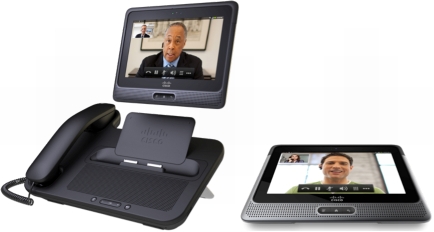
Cisco has introduced a new unified communications endpoint into its portfolio of devices that it hopes will bring a new user experience to customers wanting to unify video and voice in the palms of their hands.  The Cisco Cius represents a large investment into the intersection of mobility, voice, and video.

I won a Cisco Cius at Cisco Live this year.  I was excited to get it into my hands and start playing with it.  I wanted to put it on my desktop and utilize every function I could.  It’s been four months since I won the device, and I’ve spent time on and off putting it through it’s paces.  Some of the things I found were good.  Others, no so much.

The Cius is an Android-based (Froyo 2.2.2) tablet.  It has a 7″ screen (1024×600) with an Atom Z615 processor and 1GB of RAM.  It has an 802.11 a/b/g/n radio and a 4G LTE radio in an upcoming model as well as front and rear cameras, the latter capable of capturing 720p video.  It is also capable of being docked with a port replicator and handset that allows for speakerphone as well as USB ports to drive a keyboard and mouse.  Why?  Because the Cius also includes a Virtual Infrastructure Experience (VXI) client for running a virtual desktop as a replacement for your desktop PC.


When I got the unit, I first had to cool my jets for a bit.  The unit had pre-production software that wasn’t quite up to specs yet.  One of the things that didn’t work was application installation.  The Cius provides its own app store, AppHQ, which can be controlled via corporate policy to restrict downloads to this store.  You can also sideload apps from the regular Android market, but if your admin overlords decree that you shant be able to do that, you’ll be locked into AppHQ.  I took my time poking around the interface and noting how different it was from my iPad.  This was my first attempt at using a Google tablet, so it did take a bit of getting used to, layout wise. As well, the construction was a little different and the unit felt more ‘solid’.  Not to say that Apple’s iPad feels cheap, but the Cius is a little more dense than the aluminum used on my gen 1 iPad.  However, due to the software difficulties I was unable to do much with the Cius.  I did use it to record my Ultimate Cisco Live Attendee video right before I packed it away for the trip home.  Here you can get a feel for the video quality from the front VGA camera:

After I got it home, I had many stops and starts trying to get the right firmware to update it to a point where I could install things.  Thanks to some help from my friend Jon Nelson, I was at least able to get the right software to register it with my CallManager server, which I finally had to upgrade to 8.5 to get everything working correctly.  When I got the new firmware load installed, I was able to browse to the Android Market and start installing apps.  The process was pretty straightforward, and every app was available for installation.  The 7″ screen did seem a little cramped from my 10″ iPad, but it was very usable for simple browsing tasks.  I also noticed that the media dock didn’t secure the unit when docked.  Normally, I expect to hear a click or a snap as the locks engage on something like that, but there was nothing here.  In fact, if you don’t pay attention when docking the unit, it will slip and slide right off into the floor.

After playing with the Cius for a few days, I hit my first show stopping bug.  In the current firmware load there is a problem with dialing calls that require Forced Authorization Codes (FACs).  The dialpad for the unit disappears when the dial string is completed and won’t show up again until the call is connected.  The problem for me is that all my long distance calls (which represent the majority of my office calls) require me to enter an access code when I dial.  Without a dialpad, I can’t enter the code to complete the call.  For this reason, the 9971 I normally use has stayed on my desk and the Cius has been relegated to the side desk where it gets tested on occasion.  I’m sure that Cisco has seen the oversight in not allowing me to have a dialpad during ring out and will be releasing a firmware to fix that in no time.  Oh, wait…

In order to expedite my firmware update desires, I signed up for the Cius developer program and gained access to the firmware update service for testing.  Never one to shy away from putting beta code on my devices, I followed the developer directions and waited patiently for my Cius to update.  It took a couple of hours to pull the new code and reboot.  Where it promptly locked up.  Every time I tried to install new code, it rebooted and hung on the restart, the Cisco logo taunting me for hours on end until I performed a hard reset.  Which of course reset the firmware back to the old version.  And erased anything I might have installed.  Oh, bother.

Figuring that beta firmware may be just a little too advanced, I decided to head over to Cisco’s website and pull down a new production firmware for CUCM so that I can update it like that.  Which is where I finally encountered the “You do not have a valid contract” error that has bitten so many people as of late, especially Ethan Banks.  Of course, I don’t have a SmartNet contract for this device since I didn’t buy it in the first place.  I figure I need to order one if I want to figure out why it keeps locking up or why I can’t get the dialpad to show up to make long distance calls.  I know the firmware I managed to load did fix some other transient issues, like the unit losing connection to CUCM every night and requiring a reboot to establish a connection again.  However, I’m going to need a lot of support to bring this device up to the point were I consider it a replacement for my 9971 deskphone.


Tom’s Take

If I had to use one word to describe the Cius, it would be potential.  Cisco has obviously invested a lot of money into this unit and sees it as a big step going forward to unify all of their cutting edge technology into a single portable unit.  It makes for a really nice demo and you can argue that it makes a statement sitting on the desk.  The hardware seems to be acceptable for use as a business communications endpoint.  However, software quirks show it to be an early 1.0 product release.  Difficulties in getting my unit into a usable condition hampered me from replacing my current desk phone.  Inability to get software to load without causing reboot loops has forced me to reformat more times than I care to count.  And short-sightedness at allowing me to download production firmware updates means that it will likely sit on the side of my desk until such time as someone decides that, as a Cisco partner, I am not a stinking filthy pirate and only want to get my Cius running so that I can show it off to coworkers and customers in the hopes that they buy a truckload of them.  However, until that day comes, my Cius will be relegated to little more than a curious desk ornament, right next to the Buckyballs and my stressball collection.  Let’s hope I can fix that sooner rather than later.


Disclaimer

The Cisco Cius I have was won in a contest at Cisco Live 2011.  I recieved a Cius and a media dock, as well as a Cisco-branded Jawbone Icon headset.  At no time did Cisco ask me to write a review of the device, nor did they place any restrictions on the content of any reviews written by me.  They did not ask for any consideration nor were they promised any by me in the crafting of this post.  The opinions and conclusions reached are mine and mine alone.

What’s The Point of NAT66?

Frequent visitors to this site know of my crusade against all things Network Address Translation (NAT).  Despite its few useful properties and our current reliance on it with IPv4, I consider it to be a kludge at best.  However, some people see NAT as a necessity of modern networks and have begun working hard to ensure that NAT will live on with our shift to IPv6.

I realize that NAT is a necessary evil today.  The IPv4 Internet would have imploded long ago without translating the meager number of prefixes available into the large number of “private” devices sitting behind NAT gateways.  IPv4 is the duct tape that has held things together for the last ten years while we prep a long term solution like IPv6.  Alas, some people in the community think that since NAT has done such a good job fixing things for so long that it should be the all-in-one tool in their toolbox for every network problem.  Some people think it’s a great way to provide security for a network.  These people often confuse NAT with what a firewall does in conjunction with NAT.  NAT in and of itself provides no additional security beyond masking addresses.  NAT also adds in additional complexity when troubleshooting.  NAT boundaries break things like VoIP.  Packets hit the gateway device and get lost headed back to the source.  NAT does this for almost every form of end-to-end communication in the Internet.  If you add in Port Address Translation (PAT), where you translate a whole block of private addresses to one public IP address, you push the processor on your firewall to the breaking point.  I don’t have the hard numbers to prove my supposition, but I’d venture a guess that 50% of a firewall’s processor time is spent translating NAT/PAT rather than shuffling packets to their proper destinations.

IPv6 doesn’t currently have a concept of direct address translation.  Nor does it need one. There isn’t a dwindling pool of global addresses than need to be extended.  With the large amount of addresses available, the odds that two companies are going to have overlapping address spaces that will need to be translated in a merger are slim.  Right now, the only viable use case I can see for NAT used in relation to IPv6 is for translating the IPv6 addresses on a network to something that can access the IPv4 Internet without a dual-stacked router (NAT64).  Even this use case is rather dubious in my mind, but Ivan has managed to convince me that it’s useful in the short term.  So why do I still hear about RFC 6296? Why does Jeff Fry point out stories like this to me?  What is this world coming to?  Let me make this clear:

NAT on IPv6 is pointless and a bad idea.

There is no reason to implement native IPv6-to-IPv6 NAT (NAT66) in reality.  The address space is way too big to require translation in the foreseeable future of my lifetime or even that of my kids.  If you are really concerned about hiding your addresses or disguising your MAC address, you can look into the idea of Temporary Addressing.  In the middle of writing this post, Paul Regan asked me about using NAT to translate when you move from one provider to another.  That might be a good use case, and it happens to be the one that RFC 6296 is lined up to address, but if keeping your IPv6 space is so important when you move, why not sign up for a provider-independent block from your local Regional Internet Registrar (RIR) and run BGP to advertise it yourself?  If you switch ISPs often enough to keep switching IP schemes every few months, maybe you need to worry more about stability and less about chasing the lowest ISP price.  If your ISP keeps forcing you to switch addressing space that often, it might be time to shop around.

I truly believe that the people out there chasing the NAT66 sasquach are looking for a new security blanket.  They’ve dealt with NAT for so long in IPv4 that the idea of using IPv6 sans NAT makes them lie awake at night in a cold sweat.  Why else would you take something so unnecessary and bolt it on after the fact?  There’s no need to have NAT unless you take the position “it’s how we’ve always done it”.  The NAT66 proponents must think that NAT is needed simply because they’re unsure how to configure a firewall otherwise.  Obviously, without NAT the Internet breaks.  So we must have it in IPv6 or things won’t work right.  However, I think that having NAT66 will cause people to keep configuring their networks incorrectly and lead to confusion and problems down the road.  If IPv6 is going to require a shift in thinking like so many people keep telling me, why not truly shift our thinking away from things like NAT?  We’ve already done it once before with the concept of reserved local addresses.  RFC 1884 tried to define a site local address similar to what we think of with RFC 1918 addressing.  This was such a horrible idea that RFC 3879 came out and deprecated the whole idea (Yes, I know about RFC 4193.  I’m not talking about it.)

If there are people out there that think we still need to cling fervently to old ideas to help ease our transition to the Internet of the Future™, then I’m going to make my own proposal.  I think it’s time that we put the IP checksum field back into the IPv6 header.  Yes, I know that TCP has its own checksum and that the underlying packet must be good if the TCP checksum comes out okay.  Yes, I know that having a checksum in the IPv6 header is silly if there aren’t going to be any naked IP packets floating around anywhere.  However, I think that since it’s always been there in IPv4 it’s comforting to have it available in case I want to double check each of the packets moving into and out of my network.  Who cares if it introduces a small amount of latency to calculate?  I feel better knowing it’s still there.  Now, doesn’t that kind of thinking sound silly?  Yes, I purposely picked something totally trivial to make my point, but that’s how I feel about NAT.  If we want to move forward out of the IPv4 Dark Ages and into the realm of the IPv6 Renaissance, we need to leave behind childish things like the need to NAT IPv6 packets on IPv6 networks.  Let’s spend more time making the Internet work the right way and less time trying to make it work the way we think it should.

MacBook Air – My First Week

As many of you know, I am now a convert to the Cult of Mac.  I finally broke down and bought a MacBook Air this past week.  I’ve spent some time using it and I think I’m about ready to give my first impressions based on what I’ve learned so far.

My primary reason for getting a MacBook was to spend some time learning the OS.  I’ve taken the OS X Snow Leopard Administration exam already thanks to my Hackintosh and the time I’ve spent troubleshooting some of my friends’ MacBooks.  If I’m going to seriously start to work on deploying them and working on them, I figured it was time to eat a bit of my own dogfood.  Thanks to Best Buy running a nice sale on the entry-level MacBook Air, I leaped at the chance while I could.  I knew I wanted something portable rather than having a 21″ iMac on my desk.  I did spend a lot of time going back and forth about whether I wanted a MacBook Pro or MacBook Air.  The Pro does have a lot more expandability and horsepower under the hood.  I would feel a lot more comfortable running virtual machines with the Pro.  However, the Air is an ultraportable that would come in very handy for me on my many recent travels with things like Tech Field Day.  The SSD option in the basic Air was also a lure, as my SSD in my Thinkpad was the best investment I have made.  Add in the $1000 (US) price difference, and the Air won this round.

I’ve used OS X quite a bit in the last 6 months, but most of my experience has been on Snow Leopard.  Lion wasn’t much different on the surface, but it did take some time for me to relearn things at first.  I spent the majority of my time the first couple of days finding things to replicate the tasks that I spend most of my time doing each day.  I installed VMware Fusion as my OS virtualization program thanks to my status as a VMware partner, and I installed MS Office thanks to my Microsoft Gold Partner status.  Afterwards, I looked back over the lists I had compiled for Mac software, such as those found in the comments of my Software I Use Every Day post.  I settled on OmniGraffle for my drawing program and TextWrangler for my basic text editor.  After installing the drivers for my USB-to-serial adapter, I figured I was ready to strike out on my adventure of using a Mac day-to-day.

I’ve already encountered some interesting issues.  I knew Outlook at my office would be broken for me thanks to some strange interactions between Outlook 2011, Exchange 2007, and Exchange Web Services (EWS).  Outlook 2011 might as well be called Outlook 1.0 right now due to the large amount of issues that have cropped up since the switch from Entourage.  Most people I know have either switched back to using Entourage or have started using the native Mail.app.  I have decided Mail.app is the way to go for me until Outlook 201x comes out and actually works.  I also have to remember to use the Command (⌘) key for my CTRL-based shortcuts when I’m in OS X proper.  The CTRL-key commands still work in my terminal sessions and Windows RDP sessions, so the shift in thinking goes back and forth a lot.  I’m also still trying to get used to missing my familiar old Trackpoint.  I like the feel of the MacBook trackpad, and the gesture support is quickly becoming second nature.  However, the ability to navigate without taking my hands off the keyboard is missed some times.  I also miss my Page Up and Page Down keys when navigating long PDFs.  I know that the scrolling is very smooth with the trackpad, but putting a PDF into page mode and tapping a key is a quick way to go back and forth quickly.  The other fun thing that cropped up was a ground hum from the power supply when recording Packet Pushers show 78.  Thankfully, Ivan Pepelnjak was able to help me out quickly since he recently got his own MacBook.  If you’d like to read his thoughts on his new MacBook, you can go here.  I can definitely identify with his pains.


Tom’s Take

When I announced that I had finally fallen to the Dark Side and bought a Mac, the majority of the responses boiled down to “about time, dude”.  I can’t help but chuckle at that.  Yes, years ago I actively resisted the idea of using a Mac.  I’ve started to come around in the past few months due to the fact that most of the software that I use has an equivalent on the Mac.  Given the fact that I’ve already had to start running some of my software on a Windows XP VM instead of natively on Windows 7 64-bit, the idea of switching wasn’t that abhorrent after all.  I don’t know if the Air is ever going to replace my every day Windows computing needs.  I know that carrying it around on trips is going to be a lot easier than lugging the 8-pound Lenovo behemoth through the TSA gauntlet.  Maybe after I spend a little more time with OS X Lion I’ll finally get my processes and procedures to the point where I can say goodbye to the Redmond Home Improvement Corporation and settle down with the Cupertino Fruit Company.

VMware vSphere: What’s New [5.0] – Review

As I spend a lot of my time in training and learning about new technologies, I thought it might be a good idea to start reviewing the classes that I attend to help my readers figure out how to get the best out of their training dollars.  Recently, I had the opportunity to attend the 2-day VMware vSphere: What’s New [5.0] class.

If you are thinking about becoming a VMware Certified Professional (VCP), you’re going to need to go to class.  It’s a requirement for certification.  I don’t necessarily agree with this though.  No other certification I hold requires me to go to class.  The CISSP requires a certain level of experience, and when I looked at the Certified Ethical Hacker (CEH) requirements, they said that their required class could be waived with demonstrable experience.  So the fact that VMware is making me go to class is kind of irritating.  That’s even taking into account that my employer sees the usefulness of staying certified and lets me attend a large number of classes.  I really feel for the independent contractors that need to be VCPs to get into the field but can’t afford to either pay for the class or take the time off for 2-4 days to attend one.  There should be some kind of waiver for people that can demonstrate experience with VMware.  Yes, I know that if you are a 1-step removed VCP (VCP4 in this case) you don’t have to go to class.  Yes, I know that there are very good reasons to make people attend class, such as keeping current with new technology and ensuring your certified user base is up on all the new features.  Yes, I know that the costs of the class are necessary for things like facilities rental and materials.  Just because I understand why it’s required and why it’s so expensive doesn’t mean I have to like it.  But, I digress…

I chose to take the 2-day What’s New class because it was a quicker way to go through the requirements as well as being valid for upgrading my VCP3 to a VCP5 until February.  The 2-day What’s New class is a condensed version of the 4-day Install, Configure, and Manage (ICM) class that introduces VMware to those that are new to virtualization.  Being condensed, the prerequisites for the course state you must be familiar with VMware.  While you don’t need to be intimately familiar with every aspect of the hypervisor and it’s settings, you had better at least be comfortable logging into vCenter and doing some basic tasks.  There won’t be much time for hand-holding in the What’s New class.

The materials for the 2-day class are a 270-page student manual with the slide deck from the class printed in note-taking format and an 80-page lab guide.  The student guide has ample annotations of the slide deck as well as space for taking notes in class.  The lab guide has places to record the information for your student lab pods so you aren’t constantly flipping back and forth to remember what your vCenter or ESXi servers are named.  The lab guide went into good detail about each task, making sure that you knew where to go to enable features or perform tasks.  The lab guide is great for those that want to do a little more practice after leaving the class in a personal lab environment.

The material covered in the class focused on the new features in vSphere 5 and how it’s different from vSphere 4.  Special attention is paid to the new storage features and the new deployment options for ESXi servers, like stateless Auto Deploy.  Thanks to the ample amount of lab time, you have a great opportunity to reinforce the topics with actual examples rather than just staring at static screens on slides.  If you get a really good instructor (like we had), you can even see live configurations of these topics on their lab machines.  Rick, our instructor, made sure to show us live examples every chance he had rather than just relying on stuffy slides.  He also did a great job going into depth on topics that deserved it, like VMware HA changes and elections.  By the way, for anyone that has ever complained about HSRP elections or STP root bridge selection, you should really check out http://www.yellow-bricks.com and get Ducan Epping’s vSphere Clustering Deep Dive book.  Therein, you will learn in vSphere 5, 99 is greater than 100 when performing HA elections.  I’ll give you hint: lexical numbers don’t follow normal rules…


Tom’s Take

Overall, I found the condensed version of class to be a much better value than the 4-day ICM course.  On the other hand, I’ve also been working with VMware for the last 3 years, so I had a good grasp on the basics.  For someone that isn’t familiar with the way virtualization works, the 4-day ICM class will give you a much more measured understanding and more time to play with the basics.  For those that have already gotten their feet wet with VMware and are just looking for a tune up or need to go take the VCP5 exam, you can’t go wrong with the 2-day short, short version of the class.  It’s going to save you a good deal of time and money that you can use to buy more licenses for vRAM.

If you’d like to see more details on the VMware education offerings or sign up for a VMware class, head over to the VMware Education Website at http://mylearn.vmware.com/portals/www/

Wireless Field Day 2 – Nerds Without Wires

Wouldn’t you know it?  I’m headed back for round two of Wireless Field Day.  I was fortunate enough to be invited to the first assemblage of the preeminent wireless minds in the industry today.  Now it appears an encore is in order.  January 25th through the 27th I’ll be joining some August company for 3 days of immersion in the hottest technology driving business and personal computing today:

Not bad, eh? These people represent the brightest minds in wireless networking and having so many back from the first Wireless Field Day makes this event a very good opportunity for me to interact and learn from the best.  Of course, I’ll be sure to pass my learning on to each and every one of you with a multitude of blog posts and discussion at the event.

Getting Involved with Tech Field Day

With this being my fourth Tech Field Day event, I’ve had a lot of experience with the people around Tech Field Day.  They are always looking for thought leaders to join in the fun and impart knowledge while they absorb a large amount of knowledge from the best and brightest in the industry.  There are a couple of ways for you to get involved:

1.  Read the TFD FAQ and the Becoming a Field Day Delegate pages first and foremost.  Indicate your desire to become a delegate.  You can’t go if you don’t tell someone you want to be there.  Filling out the delegate form submits a lot of pertinent information to Tech Field Day that helps in the selection process.

2.  Realize that the selection process is voted upon by past delegates and has selection criteria.  In order to be the best possible delegate for a Tech Field Day, you have to be an open-minded blogger willing to listen to the presentations and think about them critically.  There’s no sense in bringing in delegates that will refuse to listen to a presentation from Meru because all they’ve ever used is Aruba and they won’t accept Meru having good technology.  If you want to learn more about all the products and vendors out in the IT ecosystem, TFD is the place for you.

3.  Write about what you’ve learned.  One of the hardest things for me after Tech Field Day was consolidating what I had learned into a series of blog posts.  TFD is a fire hose of information, and there is little time to process it as it happens.  Copious notes are a must.  As is having the video feeds to look at later to remember what your notes meant.  But it is important to get those notes down and put them up for everyone else to see.  Because while your audience may have been watching the same video stream you were watching live, they may not have the same opinion of things.  Tech Field Day isn’t just about fun and good times.  Occasionally, the delegates must look at things with a critical eye and make sure they let everyone know where they stand.


Be sure to follow the Tech Field Day account on Twitter (@TechFieldDay) for information and updates about Wireless Field Day 2 as the date gets closer.  There will also be live streaming video of each presentation on-site, and the videos will be uploaded shortly after the presentation.  If you want to participate in the fun, you can use the Twitter hashtags #TechFieldDay or #WFD2 to make comments or ask questions during the presentations.  I will have a Twitter client open during the presentations and will be happy to relay your questions or comments to the presenters and delegates (if no one else beats me to it, that is).  I’m going to tag all my event-related tweets with those hashtags, so if you are being overwhelmed with the volume coming from the event, feel free to filter those tags or unfollow me for the duration of the event.  There’s usually so much to talk about that I get carried away sometimes, so I won’t see it as an affront, I promise.

Tech Field Day Sponsor Disclaimer

Tech Field Day is made possible first and foremost by the sponsors.  Each of them is responsible for a portion of the travel and lodging costs.  In addition, the sponsors also chip in to pay for the after-event gatherings each day.  However, the sponsors also understand that their underwriting of Tech Field Day in no way guarantees them any consideration during the analysis and writing of any blog posts or reviews.  That independence allows the delegates to give honest and direct feedback and opinions of the technology and the companies that present it.

Network Consumer Reports

I’m a huge fan of Consumer Reports magazine.  They do a great job of reviewing all manner of products from household appliances to SUVs.  They provide unbiased reviews for all products because they do not accept any outside advertising from companies nor do they accept any free samples from manufactures, instead choosing to purchase all of the items they review outright.  This gives them a substantial amount of credibility in the industry and their opinion has been known to influence the direction of many manufacturers, especially in the automotive arena.

Why is it that reviews in the networking space don’t have the same reputation?  Networking manufacturers are quick to refer to Gartner numbers or Tolly reports that back their equipment as being superior to their competitors.  For the most part, mention of either of these two names around network rock stars brings groans and cat calls.  The general consensus that I get from people I’ve talked to is that many of these reports are simply bought and paid for.  Joe Onisick has a great blog post about talking with the founder of Tolly about this very subject.  Many reports that are sponsored by a company are (suprisingly) critical of the sponsor’s competitors and give favorable reviews to said sponsors.  Not all that shocking when you think about it.  Even discounting the idea that the report could be massaged in favor of the sponsoring company, the odds are good that an unfavorable review would just be buried and never see the light of day.

This pattern of sponsored reports tends to leave the average network rock star jaded and distrustful of any testing that they haven’t done themselves.  Alas, when moving into a new field or testing equipment outside of the comfort zone it becomes quite easy to get lost and being making mistakes or missing key features or options.  Why can’t we do something about that?  Maybe we can…

I’d like to see a Consumer Reports type of service for networking.  It would have to adhere to the same rules that the Consumer’s Union uses for Consumer Reports.  No advertising, which also means that the reports can’t be used by the vendors for the purposes of selling their product.  That means no touting of the latest scores of the newest switches from Network Consumer Reports (NCR).  Also, all the equipment would need to be purchased outright from the vendors or through distributors or value added resellers (VARs).  This would also introduce some difficulties, as many vendors require complex designs before equipment will be sold or require the interaction of a VAR in order ensure the equipment will be installed correctly.  In order to ensure they fairness and impartiality of the tests, these people must be excluded from the configuration process and only be around for purchasing and delivery.  Only members of NCR would be allowed to install and configure the equipment.  Naturally, it’s going to take some skilled people to do that.

When the equipment for a given test or scenario arrives, it will be configured based on best practice guidelines for the vendor/manufacturer.  These practices should be found on the vendor’s website and be easily available.  No shortcuts or undocumented configurations would be allowed at first.  This is to ensure fairness as well as making the vendors responsible for the documentation that is provided to customers.  For a given test, traffic generators would be used to simulate all kinds of traffic patterns in a real world environment.  That would be similar to things that the real Consumer Reports does, like measuring fuel economy themselves rather than relying on the manufacturer’s EPA fuel economy numbers.  I’d rather see numbers I can believe with strict definitions of traffic rather than seeing tests that provide advantages, such as using different packet sizes for throughput versus latency.  Numbers you can trust are very important.

Once the tests are run and the reports have been generated, each vendor will be contacted with the reports and offered a small window of time to “tweak” things.  You have to offer this chance because invariably vendors begin grousing about not having a chance to fix the broken things.  Let’s say they are given 24 hours to modify the base configurations to increase throughput or reduce latency with the same traffic types used in the first test.  After the 24 hours, the tests will be readministered and the results recorded. However, any changes from the best practices will be documented.  If the new, “tweaked” configuration provides additional advantages, the report should then ask why those tweaks are not included in the best practices.  Each vendor will only be able to work on their own equipment and will not be informed of the results of any other vendor’s test.  In fact, they won’t even be informed which other vendors are being tested.  This is to ensure that no one has the opportunity to spread fear, uncertainty, or doubt (FUD) about a different competing solution.  Facts only here, folks.

After all of this, the reports will be published for all to see.  Perhaps there would be some kind of subscription service to reduce the astronomical cost associated with the acquisition and setup of the equipment.  This would only be necessary to avoid the need to rely on angel investors or the independently wealthy to capitalize such a large project.  Once the reports are published, the subscribers can trust in the content and use it however they see fit to begin to plan new projects or purchase equipment.


Tom’s Take

Why is it so hard to find a voice to trust when it comes to network reviews?  Why do I have to constantly ask myself “Who is behind this report?” I never worry about that when I read Consumer Reports.  I can trust the information they provide because I know it isn’t bought and paid for.  It would be wonderful to have something like that in the networking/storage/server space.  I’m sure the people out there right now do decent jobs of reviewing equipment, but none of them are the go-to type of publication like Consumer Reports.  Of course, bringing that kind of reporting to the IT world has a lot of huge challenges. Between getting capitalized and trying to find a way to buy large amounts of gear without raising any fuss from vendors, it would be a large undertaking.  However, if you can provide credibility with your reports and aid people in making good decisions for their businesses, I think you could make a go of it.  Let’s hope that this isn’t a pipe dream sometime down the road.

*Note: Consumer Reports is a trademark of Consumer’s Union and my use of their publications for examples in this post should not infer any kind of endorsement.

Aerohive Branch on Demand – Bring Your Own Office

Bring Your Own Device (BYOD) is enabling people to provide their own equipment for work.  But what happens when people aren’t just satisfied bringing their own Macbook to the party?  What happens if they want to bring their office to your office as well?  With the large surge in teleworkers and contractors being brought on inside companies and their ability to do the majority of their jobs without having to step foot into the corporate office, the need to provide connectivity and security for a home workspace is now becoming paramount if the Bring Your Own Office (BYOO) movement is going to take off.

The current solutions to this problem either involve using some off-the-shelf consumer product to address the issue or buying an enterprise grade solution to implement.  Both have their strengths and weaknesses.  Consumer-grade devices are dirt cheap and get the job done.  However, there is very little in the way of scalability and configuration management.  Unless your remote worker is good at configuring Linksys or D-Link, you could be in for a fight.  Also, consumer grade equipment doesn’t have the service and support necessary to run an enterprise on a regular basis.  On the flip side, enterprise equipment does have a great degree of manageability and support to provide robust service for your teleworkers.  Provided, that is, you are willing to invest the large amount of money that it takes to get it setup.  In fact, the investment is usually so high that reclaiming the equipment is top priority in the event that the teleworker leaves the company or completes the contract.  How then do we as network rock stars balance our need for cheap remote connectivity with our desire to have manageability and security?

Enter Aerohive.  I saw Aerohive at Wireless Field Day back in March of this year and was pretty impressed by their HiveManager product that they use to provide configuration and management for their controller-less access points.  They’ve also given me a briefing about the 4.0 release of their HiveOS firmware.  They were kind enough to give me a sneak peak at their Branch on Demand product that was announced November 15th.

Aerohive Branch on Demand utilizes Aerohive’s experience with creating cloud based management for devices and couples it with a new branch router device that can provide simple connectivity for your branch/remote offices or teleworkers.  All of the provisioning for these devices is done in HiveManager, so the only instructions your remote workers need is “plug the yellow cable into the yellow slot and plug the other end into the Internet”.  I think even my mom could do that.  Afterwards, the router checks in with HiveManager and pulls down the configuration so your teleworker can connect back to the home office.  Your user connects via SSL IPSec VPN to allow any device to access corporate resources, whether it be a desktop, laptop, tablet, or smartphone (EDIT – Stephen Phillip was kind enough to notice that I mixed up SSL and IPSec in my notes on this.  The BR series use IPSec to connect back to the central site due to the increased performance for special traffic like voice).   The same polices that you have in place in your corporate office are extended to the remote worker as well.  You can either choose to tunnel all traffic back to the home office to be scanner and permitted, or you can split tunnel the traffic so that non-corporate packets exit locally.  There is a bit of apprehension on the part of most network rock stars for a setup like this, as splitting the traffic does introduce the capability for nasty things to infect the remote machine and then be introduced back into the corporate network.  Aerohive thought of this too and uses a cloud proxy to redirect the split tunneled traffic to a filtering service such as Websense or Barracuda to ensure that all those packets are “cloud washed” before they are permitted back into the network.  That alleviates the stress of not knowing where your branch users are going as well as preventing large amounts of traffic from being needlessly tunneled back to the corporate sites just to go out to the Internet.

All of these features come with HiveOS 5.0, which means that current users of the AP 330 and AP 350 gain the ability for those devices to function as routers.  You can even connect a 3G/4G USB modem to the USB port on the device and turn it into a backup interface for connectivity in the event the primary WAN link goes down for some reason.  At launch, the branch routers will support a small list of USB modems such as the AT&T Shockwave or Momentum, but as the software matures and drivers become available a wider variety of these devices will be supported.  This would be a great idea for those that live in areas where solid Internet connectivity isn’t always a given or for a user that spends a lot of time on the road and needs corporate VPN capabilities where they aren’t always available, such as in the middle of an oilfield or a parking lot.  No need to setup a cumbersome VPN client or worry about usernames and passwords and tokens.  Just give them an Aerohive branch router and let them go.

There are two models of branch routers available.  The BR100 is a 10/100 5-port device that includes a 2.4GHz 802.11n radio and a USB port for 3G/4G backhaul.  It retails for $99, or if you’d like to use the Network-as-a-Service subscription, you can get the device for the same $99 price point, only it includes software updates as well as tech refreshes for two years, so when a new update to the BR100 comes out, you’ll get that device for nothing.  There is also a BR200 that will have 5 GigE ports and dual 2.4/5GHz 3×3:3 802.11n radios as well as two PoE ports and crypto acceleration.  The BR200 will be out sometime next year.


Tom’s Take

I think Aerohive has finally found a good use case for the cloud.  Having your hardware managed by a cloud-based application means that you can always find it no matter where it might be.  If you are already an Aerohive customer that finds yourself in need of a branch router solution, this is a no-brainer.  The same management platform now allows you to control your access points as well as your branch users.  The ability to push the same policies from desktop to Destin, FL is very powerful and cuts down on a lot of stress.  If you aren’t a current Aerohive customer but know that you are going to need to add some teleworking capacity in the future, you can’t go wrong looking at this solution.  For $99 a device (and $999 for the VPN termination software) the solution is very inexpensive and gives you a lot of flexibility to build out instead of needing to worry about scaling straight up.  After all, letting your users bring their own office should cost you yours.

If you’d like to learn more about Aerohive’s new solutions, head over to http://www.aerohive.com.  There’s also a nice short introduction to the product over at the Packet Pushers site.


Disclaimer

Aerohive provided me with an advanced briefing on the Branch on Demand product for the purposes of preparing this blog post.  The did not ask for nor were they promised any consideration in the creation of this article.  Any and all opinions expresses within are mine and mine alone.

Unable To Access User-Defined Storage Service

In my VMware vSphere: What’s New [5.0] class this week, I learned why having a lab environment to test things is very important.  I also learned that some bugs are fun to try and fix.

vSphere 5 introduced a lot of new features focused on storage.  One of these is Profile Driven Storage.  This allows users to create tiers for datastores and ensure that those profiles can be attached to VMs at a later date.  This would be very useful for someone that has ultra-fast SSD arrays like those from PureStorage alongside SAS or SATA arrays.  You can define the gold tier as the SSD array for VMs that need fast storage access, silver tier for slightly slower SAS drives and bronze tier for the large-but-slow SATA datastore.  I like this idea of allowing users to define their storage capabilities into easy to assign tiers.  However, we hit a bug when we tried to implement it in the lab.

After we created the tiers in VIClient, we went to assign them to the datastores from the Home -> Datastores and Datastore Clusters section.  When we right clicked on the datastore and chose “Assign User-Defined Storage Capability” we got hit with this error:

Unable To Access User-Defined Storage Service

Huh?  You let me configure the silly thing?  It’s got to be there somewhere!  Let me assign it to something.

Odds are good that if you are seeing this error, you’ve also installed the vSphere Web Client.  Another great option for users that don’t want to install the VMware Infrastructure Client, the Web Client allows you to access VMs from Firefox or Internet Explorer and manage them just like you would from the VIClient.  This would be useful for those out there that are running OS X and currently don’t have a way to manage VMs unless they launch the VIClient from a virtual machine or other emulated environment.  The Web Client software needs to be installed on a Windows (or Linux) machine in order to respond to requests from web browsers.  For many users that run OS X, the logical choice would be to install the Web Client service on the Windows-based vCenter Server and then use Firefox to remotely access the web client afterwards.  That’s what we did in the lab.

The problem lies in that the Web Client service conflicts with the Profile Driven Storage service.  I’m not sure if they use the same port numbers or if they just collide in memory space or something.  As long as the Web Client service is running, the Profile Driven Storage options cannot be configured on a Data Store.  The fix is somewhat simple:

1.  Open the Service console on your vCenter server.

2.  Find the VMware Web Client service.

3.  Stop or disable it.

4.  Restart VIClient.

Simple, huh?  You can now assign the User-Defined Storage profiles to all the datastores you’d like.  When you finish, close out VIClient and restart the Web Client Service so your Mac folks can administer VMs.  Just remember that every time you want to use Profile Driven Storage, you’re going to have to bounce the Web Client service.

One can only hope that this particular bug gets fixed in an upcoming point release of vSphere 5.  Not a show stopper, but I can see how it could cause issues for those that don’t know from the less-than-helpful error message where to look for help.  I’m just glad I found it in a learning lab and not in production.

BYO(a)D

I’ve talked about the whole Bring Your Own Device (BYOD) movement before and how it reminded me a lot of social circles in high school.  Now, a few months later, it appears that this movement has gained a lot of steam and is now in the phase of “If you aren’t dealing with it, you need to be” phase for enterprise and corporate IT departments.  I also know that it must be gaining more acceptance when my mom started asking me about that whole “Bring Your Own Computer to Work Day” stuff.  To give you an idea of where my mom falls on the tech adoption curve:

Yeah, it’s going to be popular if my mom has heard of it.  It also hit home last week when the new guy came into the office for his first day of work toting a MacBook and wondering what information he needed to setup in Mail to connect to Exchange.  Being a rather small company, the presence of a MacBook sent hushed whispers through the office along with anguished cries of fear at such a shiny thing.  We shackled him with a ThinkPad and took care of the immediate issue, but it did get my brain pondering something about BYOD and what represents it.

When I talk to people about BYOD and how I must now start supporting new devices and rewriting applications to support various platforms, the response I get is overwhelming in its unity: Will this work on my Mac/iPad/iPhone?  I hardly ever get asked about Ubuntu or Fedora or Froyo or Blackberry.  No one ever worries about using Ice Cream Sandwich to access the corporate Citrix farm, and not just because it isn’t out yet.  I find that far and away the largest number of people driving the idea of platform-agnostic service and application access tend to be fans of the Cupertino Fruit Company.  In fact, I am almost to the point where I’m going to start referring to it as BYOAD (Bring Your Own Apple Device).  Why is the representation so skewed?

At first I thought it might be a technical thing.  Linux users, after all, tend to be a little more technical than Mac users.  Linux folks aren’t afraid to get their hands dirty with file permissions or kernel recompiles.  They also seem to understand that while it would be nice to have certain things, other ideas are so difficult or impossible that it’s not worth trying.  Such as Exchange access in Evolution Mail.  Access to an Exchange server would make a Linux mail client an instant killer app.  The need to incorporate non-free code, however, is very much at odds with the “free as in freedom” mantra of many Linux stalwarts.  So we accept that we can’t access Exchange from anything other than a virtualized or emulated Outlook client and we move on.  Fix what you can, accept and work around what you can’t.  In a way, I tend to believe that kind of tinkering mentality filters down to many of the Android users out there.  Cyanogenmod is a perfect example of this, as is the ability with which users can root their devices to install things like VPN clients.  Android and Linux users like to see all the gory details of their systems.

I was lucky enough to attend a panel at the Oklahoma City Innotech conference that dealt with the new realities behind BYOD.  The panel fielded a lot of questions about software to ease transitions and security matters.  I did ask a question about Apple vs. Android/BlackBerry/Linux BYOD adoption and the panel said more or less that OS X/iOS access comprised up to 85% of their requests in many cases.  However, Eric Hileman was on the panel and said something that gave me pause in my thinking.  He told me that in his view, it wasn’t so much the device that was driving the BYOD movement as it was the culture behind each device.  As soon as he said it, I realized that I had been going down that road already and just hadn’t made it to the turn yet.

I had unconsciously put the Linux/Android users into a culture of tinkerers.  Curious engineers and kernel hackers that want to know how something works.  Nothing is magical for them.  They know every module loaded in their system and can modprobe for drivers like second nature.  Apple fans, on the other hand, are more artistic from what I’ve seen.  They don’t necessarily like to get under the hood of their aluminium marvels any more than they have to (if they even can).  To them, magic is important.  Applications should install with effort and just work.  Systems should never crash and kernels are pieces of popcorn, not parts of the operating system.  Their mantra is “It just works”.

Note that I didn’t say anything about intelligence levels.  Many of the smartest people I know use Macs daily.  I’ve also known some pretty inept Linux users that ran the OS simply because it couldn’t get as screwed up as Windows.  Intelligence is a non issue.  It comes down to cultures.  Mac people want the same access they’d have if they were running a PC.  After all, the hardware is all the same now with Intel chips instead of PowerPC.  Why should I get access to all my apps?  Apple is free to create interfaces into non-free software like Microsoft Office since they don’t have the “free as in freedom” battle cry to stand next to as much as the Debian fans out there.  For the Mac users, it doesn’t matter how something gets done.  It just needs to happen.  Software that doesn’t work isn’t looked at as a curiosity to be dissected and fixed.  Instead, it is discarded and other options are explored.


Tom’s Take

Thanks to Steve’s Cupertino Fruit Company, we have a revolution on our hands that is enabling people to concentrate more on creating content and less on having all the right tools on the right OS to get started.  Many of my peers have settled on using MacBooks so they can have a machine that never breaks and “just works”.  It’s kind of funny to think even just 3 or 4 years ago how impossible the idea of having OS-agnostic applications was.  Now I can go out and buy pretty much whatever I want and be assured that 85% of my applications will run on it.  As long as I’ve dabbled with Linux I’ve never felt that was a possibility.  To me, it seems that the artists and designers with an eye to form needed to cry out over the engineers and tinkerers that hold function in higher esteem.  We may yet one day get to the point where OS is an afterthought, but it’s going to take a lot more people bringing their own fruit to work.