Unknown's avatar

About networkingnerd

Tom Hollingsworth, CCIE #29213, is a former network engineer and current organizer for Tech Field Day. Tom has been in the IT industry since 2002, and has been a nerd since he first drew breath.

Will Dell Buy Aerohive?

DELL-Aerohive-Logo

One rumor I keep hearing about in the industry involves a certain buzzing wireless vendor and the world’s largest startup.  Acquisitions happen all the time.  Rumors of them are even more frequent.  But the more I thought about it, the more I realized this may be good for everyone.

Dell wants to own the stack from top to bottom.  In the past, they have had to partner with printer companies (Lexmark) and networking companies (Brocade and Juniper) to deliver parts of the infrastructure they couldn’t provide themselves.  In the case of printers, Dell found a way to build them on their own.  That reduced their reliance on Lexmark.  In the networking world, Dell shocked everyone by going outside their OEM relationship and buying Force10.  I’ve talked before about why the Force10 pickup was a better deal in the long run than Brocade.

Dell’s Desires

Dell needs specific pieces of the puzzle.  They don’t want to be encumbered with ancillary products that will need to be jettisoned later.  Buying Brocade would have required unwinding a huge fibre channel business.  In much the same way, I don’t think Dell will end up buying their current wireless OEM, Aruba Networks.  Aruba has decided to branch out past the doing simple wireless and moved into wired network switches and security and identity management programs like ClearPass.  Dell doesn’t want any of that.  They already have an issue integrating the Force10 networking expertise into the PowerConnect line.  I’ve been told in the past the FTOS will eventually come to PowerConnect, but that has yet to happen.  Integrating purchased companies isn’t easier.  That becomes exponentially harder the more product lines you have to integrate.

Aruba is too expensive for Dell to buy outright.  Michael Dell spent a huge chunk of his cash to get his company back from the shareholders.  He’s going to put it on a diet pretty soon.  I would expect to see a few product lines slimmed down or outright dropped.  That makes it tough to justify buying so much from another company.  Dell needs a scalpel, not a sledgehammer.

Aerohive’s Aspirations

Aerohive is the best target for Dell.  They are clearly fighting for third place in the wireless market behind Cisco and Aruba.  Aerohive has never been shy about punching above their weight.  They have the mentality of a scrappy terrier that won’t go down without a fight.  But, they are getting pressure to expand quickly across their product lines.  They took their time releasing an 802.11ac access point.  Their switching offering hasn’t caught on in the same way that of Aruba or Meraki (now a division of Cisco).

Aerohive is on the verge of going public.  I’m sure the infusion of cash would allow them to pay off some early investors as well as fund more development for 802.11ac Phase 2 gear and maybe a firewall offering.  The risk comes when you look at what happened to Ruckus Wireless shortly after their IPO.  While they did recover, it didn’t look very good for a company that supposedly did have a unique claim, their antenna design.  Aerohive is a cloud management platform like many others in the market.  You have to wonder how investors would view them.  Scrappy doesn’t sell stock.

Aerohive is now fighting in the new Gartner “Wired and Wireless Access” magic quadrant, which is an absolute disaster for everyone.  An analyst firm thinks that wireless is just like wired, so naturally it makes sense for AP vendors to start making switches, right?  Except the people who are really brilliant when it comes to wireless, like Matthew Gast and Victor Shtrom couldn’t care less about bits on copper.  They’ve spent the better part of their careers solving the RF problems in the world.  And now someone tells them that interference problems aren’t that much different than spanning tree?  I would have long since planted my head permanently onto my desk if I’d been told that in their position.

Aerohive gains a huge backer in the fight if Dell acquires them.  They get the name to go up against Cisco/Meraki.  The gain R&D from Dell with expertise around cloud management.  They can start developing integration with HiveManager and Dell’s SMB extensive product line.  Switch supply becomes a thing of the past.  Their entire software offering fits well with what Dell is trying to accomplish from a device independence perspective with regards to customers.

Tom’s Take

I don’t put much stock in random rumors.  But I’ve heard this one come up enough to make me ask some tough questions.  There are people in both camps that think it will happen sometime in 2014.  Dell has to get the books sorted out and figure out who’s in charge of buying things.  Aerohive has to see if there’s enough juice left in the market to IPO and not look foolish.  Maybe Dell needs to run the numbers and find out what it would take to cash out Aerohive’s investors and add the company to the growing Empire of Round Rock.  A little buzz for the World’s Largest Startup couldn’t hurt.

Don’t Just Curate, Cultivate

Sprout

Content curation is all the rage.  The rank and file folks online tend to get overwhelmed by the amount of information spewing from the firehose.  For the most part, they don’t want to know every little detail about everything.  They want salient points about a topic or how an article fits into the bigger picture.  This is the calling card of a content curator.  They organize the chaos and attempt to attach meaning and context to things.  It does work well for some applications.

Hall of Books

One of the biggest issues that I have with curation is that it lends itself to collection only.  I picture curated content like a giant library or study full of old books.  All that information has been amassed and cataloged somehow.  The curator has probably read each of those books once or perhaps twice before.  They can recall the important points when prompted.  But why does all that information need to be stored in a building the size of a warehouse?  Why do we feel the need to collect all that data and then leave it at rest, whether it be in a library or in a list of blogs or sources?

Content curation feels lazy.  I can create a list of bloggers that I want you to follow.  I want you to know that I read these blogs and think the writers make excellent points.  But how often should you go back and look at those lists again?  One of the greatest tragedies of blogging is the number of dead, dying, or abandoned blogs out there.  Part of my job is to evaluate potential delegates for Tech Field Day based on a number of factors.  One of my yardsticks is blogging.

Seeing a blog that has very infrequent posts makes me a bit sad.  That person obviously had something to say at some point.  As time wore on, the amount of things to say drifted away.  Maybe real life got in the way.  Perhaps a new shiny object caught their attention.  The worst is a blog that has only had two posts in the last year that both start with, “I know I haven’t blogged here in a while, but that’s going to change…”

Reaping What You Sow

I think the key to keeping that from happening is to avoid static collection of content.  We need to cultivate that content just like a farmer would cultivate a field.  Care and feeding of writers and bloggers is very important.  Writers can be encouraged by leaving comments or by sharing articles that they have written.  Engaging them in discussion to feed new ideas is also a great way to keep the fire of inspiration burning.

One of the other important ways to keep content creators from getting stale is to look at your blogrolls and lists of followed blogs and move things around from time to time.  I know for a fact that many people don’t scroll very far down the list to find blogs to read.  The further up the list you are, the more likely people are to take the time to read what you have to say.  The key for those wanting to share great writers is to put them up higher on the list.  Too often a blog will be buried toward the bottom of a list and not get the kind of attention the writer needs to keep going.  More likely is a blog at the top of a list that hasn’t posted in weeks or months.

Everyone should do their part to cultivate content creators.  Don’t just settle for putting them on a list and calling it a day.  Revisit those lists frequently to be sure that the people on them are still producing.  For some it will be easy.  There are people like Ivan Pepelnjak and Greg Ferro that are born writers.  Others might need some encouragement.  If you see a good writer than has fallen off in the posting department lately, all it might take is a new comment on a recent post or a mention on Twitter/Facebook/Google+ asking how the writing is coming along.  Just putting the thought in their mind is often enough to get the creative juices flowing again.


Tom’s Take

I’m going to do my part as well.  I’m going to try to keep up with my blogroll a bit more often.  I’m going to make sure people are writing and showing everyone just how great they are.  Perhaps it’s a bit selfish on my part.  The more writers and creators there are the more choices I have to pick from when it’s time to pick new Field Day delegates.  Deep down inside, I just want more writers.  I want to spend as much time as possible every morning reading great articles and adding to the greater body of knowledge.  If that means  I need to spend more time looking after those same writers, then I guess it’s time for me to be a writer farmer.

Betting the Farm on IPv6

41366342

IPv6 seems to have taken a back seat to discussions about more marketing-friendly topics like software defined networking and the Internet of Things.  People have said that IPv6 is an integral part of these initiatives and any discussion of them implies IPv6 use.  Yet, as I look around at discussions about SDN host routes or NATed devices running home automation for washing machines and refrigerators, I wonder if people really understand the fundamental shift in thinking.

One area that I recently learned has been investing heavily in IPv6 is agriculture.  When people think of a farm, they tend to imagine someone in a field with a plow being pulled by a horse.  Or, in a more modern environment you might imagine a tractor pulling a huge disc plow across hundreds of acres of fallow land.  The reality of faming today is as far removed from the second example as the second example is from the first.

Farming In The East

Modern farmers embrace all kinds of technology to assist in providing maximum yields, both in the western world as well as the east.  The biggest strides in information technology assistance for farmers has been in East Asia.  Especially in China, a country that has to produce massive amounts of food to feed 1.3 billion people.

Chinese farmers have embraced technologies that allow them to increase productivity.  Think about how many tractors are necessary to cultivate the huge amount of land needed to grow food.  Each of those tractors now comes equipped with a GPS transmitter capable of relaying exact positioning.  This ensures the right land is being worked and the area is ideal for planting certain types of crops.  All that telemetry data needs to be accumulated somewhere in order to analyze and give recommendations.

Think also about livestock.  In the old days, people hired workers to ensure that livestock didn’t escape or wander away from the herd.  It was a process that was both time and labor intensive.  With modern technology, those same cattle can be tagged with a small GPS transmitter.  A system can poll each animal in a given interval to determine herd count and location.  Geofences can be erected to ensure that no animal moves outside of a safe area.  When that occurs, alarms can be sent to monitoring stations where a smaller number of farm hands can drive out and rescue the errant animal.

Those two examples alone show the power of integrating traditional agriculture with information technology.  However, an unstated problem does exist: Where are we going to get those addresses?  We joke about giving addresses to game consoles and television sets and how that’s depleting the global IPv4 pool.  What happens when I do the same to dairy farmer’s herd?  Even my uncle and his modest dairy years ago had around one hundred cattle in his herd.  What happens when your herd is bigger than a /24?

IPv6 Rides To The Rescue

China has already solved this problem.  They don’t have any more IPv4 prefixes available.  They have to connect their devices.  The only answer is IPv6.  Tractors can exist as IPv6 endpoints in the monitoring station.  They can be tracked globally via monitoring stations.  Farm workers and supervisors can determine where the unit is at any given time.  Maintenance information can be relayed back to the manufacturer to alert when a part is on the verge of failure.  Heavy equipment can stay in working condition longer and be used more efficiently with this type of tracking.

Livestock herds can be monitored for position to ensure they are not trespassing on another farmers land.  The same telemetry can be used to monitor vital statistics to discover when animals have become ill.  That allows the farm workers to isolate those animals to prevent the herd from contracting illness that will slow production or impact yields.  Keeping better track of these animals ensures they will be as productive as possible, whether that be in a dairy case or a butcher shop.


Tom’s Take

I grew up on a farm.  I have gathered eggs, bottle fed calves, and milked cows.  Two of my uncles owned dairies.  The biggest complaint that I’ve heard from them was the lack of information they had on their products.  Whether it be a wheat crop or a herd of dairy cattle, they always wanted to know more about their resources.  With IPv6, we can start connecting more and more things to the Internet to provide access to the data that’s been locked away for so long, inaccessible to the systems that can provide insight.  Advancing technology to the point where a tractor or a bull can have a 2001::/16 address is probably the safest bet a farmer will make in his entire career.

Panes of Stained Glass

00964

If there is an overused term when it comes to management software, it has to be Single Pane of Glass (SPoG). The first thing that marketing and sales organizations want to tell you is how unified their management tools are. I’ve found that the tools in question are usually not as paneless (pun intended) as might be indicated otherwise.

Glassmakers

The idea of the Single Pane of Glass term comes originally from the disparate tools that have been used since time immemorial to configure and manage IT systems. At first, configuration was a separate program. Monitoring was a separate program. Even between applications on the same system the tools were often separated. When the number of browser windows kept climbing it started to resemble a window pane on the desktop, with four or more open at any one time just to manage and monitor a single application.

This usually became worse over time as companies would acquire new software or tools and attempt to integrate them into the process. If the company had some kind of flagship product that was the go-to for monitoring and maintenance the acquisition was usually ported quickly to provide a one-stop shop for users. When the integration was completed, the company could proudly announce that everything could be done from one browser window, or the Single Pane of Glass.

More often than not, the process to integrate the pieces together was rushed and incomplete. Sometimes the integration would launch a new browser window. Other times an HTML-based monitoring system would fire up a Java VM because the new firewall integration could only be managed via Java. Still other integration attempts would have a browser window with a CLI shell embedded within, since the appliance could only be managed through the console. These haphazard attempts at integration look like something else entirely.

Stained Glass

I can’t take full credit for this idea. It actually belongs to J. Michael Metz (@DrJMetz) of Cisco. He mentioned it in a tweet when talking about a competitor’s management system. I took the idea and ran with it a bit.

Stained Glass Management Systems happen because people are so focused on the overall picture that they lose sight of the fact that each individual unit is useless in the overall context. While a stained glass window may be a beautiful work of art, looking at one close up betray the fact that the whole is indeed made up of lots of dissimilar parts.

You’ve probably experienced this at least once. Think about a software program that has a web interface. For reference, I’m going to pick on Cisco Unified Communications Manager Business Edition (CUCMBE). This is essentially a CUCM server and a Cisco Unity Connection server crammed together to create a VoIP appliance.

CUCMBE doesn’t have a unified management portal. It is in fact managed via two (or more) separate GUIs. Except for a few minor changes to each GUI in a couple of fields, you wouldn’t even know that you were working on software programs co-resident on the same box. Each platform keeps a separate copy of a GUI that doesn’t really have any consistency with the others. CUCM looks different than Unity Connection. On the newer CUCMBE platforms, those GUIs look even more different from products like Unified Presence or Cisco Video Communications Server (VCS).

Cisco never marketed the CUCMBE GUI as being SPoG to my knowledge. But I know of some companies that would claim that a GUI reachable from one IP address that can manage multiple systems is technically SPoG. That’s wrong. A true SPoG needs to have a unified management style. No jarring transitions between management paradigms. If I realize I’m working on a totally different software platform, your SPoG failed.

The solution shouldn’t be to cram as much functionality into a web browser window. The real goal should be to analyze what you are trying to accomplish with the SPoG tools and rewrite your interface to keep overlap and discontinuity to a minimum. If I’m putting the same information in three different places because four different programs each read from a different place, you need to go back to the drawing board.

The interface needs to be consistent in and of itself. If you can a something a widget in the management section, don’t have a wudget in a different section with a legend stating “Wudgets are widgets in this program.” Sometimes that means you have to blow up the data structures of you old programs. So be it. If I can see the individual parts of the window, it detracts from the overall picture.


Tom’s Take

Some companies get it. HP and IBM have created decent SPoG tools after a few years of trial and error. Some companies don’t get it. I won’t mention CiscoWorks. I’m still not sold on Cisco Prime. The key is to look at the end goal. Are you trying to create a picture by collecting individual pieces and working toward the whole? Or are you trying to create the equivalent of macaroni art? That would be where everything is thrown together and resembles a picture in name only. Stained Glass should be avoided at all costs. Integrate your system to the point where I can’t see the pieces and longer and you’ll have a picture pretty enough to sell.

Should Microsoft Buy Big Switch?

MSBSN

Network virtualization is getting more press than ever.  The current trend seems to be pitting the traditional networking companies, like Cisco and Juniper, against the upstarts in the server virtualization companies, like VMware and OpenStack.  To hear the press and analysts talk about it makes one think that these companies represent all there is in the industry.

Whither Microsoft?

One company that seems to have been left out of the conversation is Microsoft.  The stalwarts of Redmond have been turning heads with their rapid pace of innovation to reach parity with VMware’s offerings.  However, when the conversation turns to networking Microsoft is usually left out in the cold.  That’s because their efforts at networking in the past have been…problematic.  They are very service oriented and care little for the world outside their comfortable servers.  That won’t last forever.  VMware will be able to easily shift the conversation away from feature parity with Hyper-V and concentrate on all the networking expertise that it has now that is missing in the competitor.

Microsoft can fix that problem with a small investment.  If you can innovate by building it, you need to buy it.  Microsoft has the cash to buy several startups, even after sinking a load of it into Nokia.  But which SDN-focused company makes the most sense for Microsoft?  I spent a lot of time thinking about this very question and the answer became clear for me:  Microsoft needs to buy Big Switch Networks.

A Window On The Future

Microsoft needs SDN expertise.  They have no current networking experience outside of creating DHCP and DNS services on their platforms.  I mean, did anyone ever use their Network Access Protocol solution as a NAC option?  Microsoft has traditionally created bare bones network constructs to please their server customers.  They think networking is a resource outside their domain, which coincidentally is just how their competitors used to look at it as well.  At least until Martin Casado changed their minds.

Big Switch is a perfect fit for Microsoft.  They have the chops to talk OpenFlow.  Their recent shift away from overlays to software on bare metal would play well as a marketing point against VMware and their “overlays are the best way” message.  They could also help Microsoft do more development on NV-GRE, the also ran to VxLAN.  Ivan Pepelnjak (@IOSHints) was pretty impressed with NV-GRE last December, but it’s dropped of the radar in the wake of VMware embracing VxLAN in NSX.  I think having a bit more development work from the minds at Big Switch would put it back into the minds of some smaller network virtualization companies looking to support something other than the de facto standard.  I know that Big Switch has moved away from the overlay model, but if NV-GRE can easily be adapted to the work Big Switch was doing a few months ago, it would be a great additional offering to the idea of running everything in an SDN-enabled switch OS.

Microsoft will also benefit from the pile of SDN applications that Big Switch has rumored to be sitting around and festering for lack of attention.  Applications like network taps sell Big Switch products now.  With NSX introducing the ideas of integrated load balancers and firewalls into the base product, Big Switch is going to be hard pressed to charge extra for them.  Instead, they’re going to have to go out on a limb and finish developing them past the alpha stage and hope that they are enough to sell more product and recoup the development costs.  With the deep pockets in Redmond, finishing those applications would be a drop in the bucket if it means that the new product can compete directly on an even field with VMware.

Building A Bigger Switch

Big Switch gains in this partnership also.  They get to take some pressure of their overworked development team.  It can’t be easy switching horses in mid-stream, especially when it involves changing your entire outlook on how SDN should be done.  Adding a few dozen more people to the project will allow you to branch out and investigate how integrating software into your ideas could be done.  Big Switch has already done a great job developing Project Floodlight.  Why not let some big brains chew on other ideas in the same vein for a while.

Big Switch could also use the stability of working for an established company.  They have a pretty big target on their backs now that everyone is developing an SDN strategy.  Writing an OS for bare metal switches is going to bring them into contention with Cumulus Networks.  Why not let an OS vendor do some of the heavy lifting?  It would also allow Microsoft’s well established partner program to offer incentives to partners that want to sell white label switches with software from Big Switch to get into networking much more cheaply than before.  Think about federal or educational discounts that Microsoft already gives to customers.  Do you think they’d be excited to see the same kind of consideration when it comes to networking hardware?

Tom’s Take

Little fish either get eaten by bigger ones or they have to be agile enough to avoid being snapped up.  The smartest little fish in the ocean may be the remora.  It survives by attaching itself to a bigger fish and providing a benefit for them both.  The remora gets the protection of not being eaten while also not taking too much from the host.  Microsoft would do well to setup some kind of similar arrangement with Big Switch.  They could fund future development into NV-GRE compatible options, or they just by the company outright.  Both parties get something out of the deal: Microsoft gets the SDN component they need.  Big Switch gets a backer with so much industry clout that they can no longer be dismissed.

No Total Recall – Outlook Message Recall

OutlookRecall

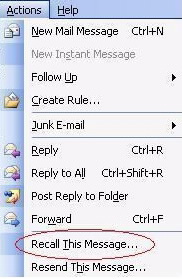
We’ve all had that moment when we hit send on something only to realize that we shouldn’t have.  Either there’s a glaring typo or a forgotten attachment or you attached a file you shouldn’t have.  Quickly you rush up to the Actions menu to take back that errant email via Outlook Message Recall.  And, much like every else on the planet, you click Recall This Message only to find out that it never works.

What is Outlook Message Recall?  And why does it fail almost every time?  Message recall is an Exchange feature that allows the server to reach into a connected Exchange user’s mailbox and pull out the bad message.  There are a lot of rules that govern whether or not a message can be recalled.  In most cases it comes down to whether or not the user is connected to your Exchange server and whether or not the message has been read.

The first condition is easy.  You can’t recall a message you sent to a Gmail address.  You can’t recall messages from a POP or IMAP mail store.  You can’t recall a message if the user you sent it to isn’t a user on your Exchange server.  The server only has authority to delete the original message if both users are on the same mail system.  There’s no point in recalling a message sent outside your organization.  In fact, attempting to do so usually results in the recall request calling attention to the original message.

The other condition seems to be whether or not the message was read.  If the user has read the message it will not be recalled.  Instead, the user will be notified that you want to recall the message and keep the original in their mailbox.  If you’re using a caching mailbox like I tend to do on my laptop, the original recalled message can’t be pulled out due to the nature of the mailbox.

I think the viewing status of the email is a pretty dumb conditional.  I habitually read all the email that comes into my inbox, even if I don’t intend to do something with it right away.  I need to glance at things to see how critical they are.  That means message recall would never work for messages in my inbox.  In fact, I’m pretty sure that message recall has never worked based on an informal poll I conducted with people.

I’ve gotten used to doing other things to ensure that my messages don’t escape before they’re ready.  I don’t put the recipients in until the text has been edited.  I don’t put a subject line in until the penultimate step so that I’ll be prompted to add it in.  I essentially write my emails backwards on purpose.

The best way to avoid using a broken, non-functional feature is to not need it in the first place.  Attention to detail will save you much more often than the recall button.  Taking a few moments to cool off before you ship out that burning missive will also protect you a whole lot better than a ham-handed attempt to pull back something that shouldn’t have been sent in the first place.

Vendorpendent

handshake

May you live in interesting times. – Purported Ancient Chinese Curse

Life is never boring for the independent blogger.  Especially when the vendors come calling.  In recent months, Sean Rynearson (@SRynearson) and Rocky Gregory (@BionicRocky) have taken up residence at Aruba Networks.  Gurusimran Khalsa (@gurusimran) has headed over to VMware.  Most recently, Ryan Adzima (@RAdzima) has joined the ranks of the wireless elite at AirTight Networks.  There’s still more to come if my guesses are right.  In many of those cases, I’ve been asked what I think about so many independent influencers heading for vendors.  My response is always the same: It’s a great thing.

A Cog In The Machine

So many independent people being hired by vendors shows the value of their thinking and analysis.  It’s much easier to interview for a job when your entire resume is online in the form of a blog full of deep thoughts and impressive research.  If the employer can Google your name and find not only your commentary but the commentary of people that have discussed things with you then the actual interview process is a formality.  I personally like it that way because I’m horrible at telling people about myself.  I’d much rather let my words do the talking for me.

Vendors know that having an independent thinker on staff is a huge asset.  If the independent is detached for the existing process, they can point out weaknesses or quickly adjust strengths to make things better for the vendor.  A dispassionate third party view is useful when determining if marketing efforts are working correctly or if a product line needs to be refreshed or removed entirely.  Sometimes you can’t get the objectivity needed from someone that’s been entrenched at a vendor for too long.

Independents worry about working for vendors.  They are afraid they will lose their objectivity.  They want to be sure that their opinions are their own and don’t reflect the views of their employers.  I’ve been asked on more than one occasion by those folks if it’s even possible.  My response: Yes, but it’s hard.

It’s Not Easy Being Free

You have to be vigilant when you want to make sure you are independent.  Your thoughts and ideas should never be suppressed because someone doesn’t like them or because they don’t fit a marketing campaign.  The value in having an independent on your payroll is the objectivity that person brings to the table.  Hiding that objectivity for the sake of a few dollars on the bottom line is the road to ruin.

Likewise, you as the independent need to be sure you don’t cross the line when it comes to reducing your own independence.  I’ve seen more than one person go to work for vendor and slowly transform themselves from an independent thinker to a corporate mouthpiece.  When you put the leash on yourself and impinge you own credibility you’ve done a disservice to your employer as well as yourself.  Attacking a competitor via blog posts or social media serves no real purpose.  Debating salient issues is a better use of time for everyone.  Don’t let yourself be dragged into the fray.  Rise above and keep the discussions focused on technology and not on the logo on the device.

Tom’s Take

I’ve stayed independent because of my own stubbornness.  I feel that my views are better voiced outside the vendor community.  That doesn’t mean that vendors are evil and should be avoided.  On the contrary, vendors are a great fit for a great number of bloggers.  Any time someone comes to me and tells me they’ve taken a position with a vendor I applaud their choice.  It ultimately comes down to the person making the choice.  If you feel you can stay independent inside the greater organization then a vendor is a great fit.  Just remember to be vigilant and stay true to who you are.  Not the logo on your shirt.

Building A Lego Data Center Juniper Style

JDC-BirdsEye

I think I’ve been intrigued by building with Lego sets as far back as I could remember.  I had a plastic case full of them that I would use to build spaceships and castles day in and day out.  I think much of that building experience paid off when I walked into the real world and I started building data centers.  Racks and rails are network engineering versions of the venerable Lego brick.  Little did I know what would happen later.

Ashton Bothman (@ABothman) is a social media rock star for Juniper Networks.  She emailed me and asked me if I would like to participate in a contest to build a data center from Lego bricks.  You could imagine my response:

YES!!!!!!!!!!!!!

I like the fact that Ashton sent me a bunch of good old fashioned Lego bricks.  One of the things that has bugged me a bit since the new licensed sets came out has been the reliance on specialized pieces.  Real Lego means using the same bricks for everything, not custom-molded pieces.  Ashton did it right by me.

Here’s a few of my favorite shots of my Juniper Lego data center:

My rack setup.  I even labeled some of the devices!

My rack setup. I even labeled some of the devices!

Ladder racks for my Lego cables.  I like things clean.

Ladder racks for my Lego cables. I like things clean.

Can't have a data center with a generator.  Complete with flashing lights.

Can’t have a data center with a generator. Complete with flashing lights.

The Big Red Button.  EPO is a siren call for troublemakers.

The Big Red Button. EPO is a siren call for troublemakers.

The Token Unix Guy.  Complete with beard and old workstation.

The Token Unix Guy. Complete with beard and old workstation.

Storage lockers and a fire extinguisher.  I didn't have enough bricks for a halon system.

Storage lockers and a fire extinguisher. I didn’t have enough bricks for a halon system.

The Obligatory Logo Shot.  Just for Ashton.

The Obligatory Logo Shot. Just for Ashton.


Tom’s Take

This was fun.  It’s also for a great cause in the end.  My son has already been eyeing this set and he helped a bit in the placement of the pirate DC admin and the lights on the server racks.  He wanted to put some ninjas in the data center when I asked him what else was needed.  Maybe he’s got a future in IT after all.

JDC-Overview

Here are some more Lego data centers from other contest participants:

Ivan Pepelnjak’s Lego Data Center

Stephen Foskett’s Datacenter History: Through The Ages in Lego

Amy Arnold’s You Built a Data Center?  Out Of A DeLorean?

FaceTime Audio: The Beginning or The End?

BlackApple

The world of mobile devices is a curious one. Handset manufacturers are always raising the bar for features in both hardware and software in order to convince customers to use their device. Yet, no matter how much innovation goes into the handset the vendors are still very reliant upon the whims of the carriers. Apple knows this perhaps better than anyone

In Your FaceTime

FaceTime was the first protocol to feel the wrath of the carriers. Apple developed it as a way to facilitate video communication between parties. The idea was that face-to-face video communications could be simplified to create a seamless experience. And it did, for the most part. Except that AT&T decided that using FaceTime over 3G would put too much strain on their network. At first, they forced Apple to limit FaceTime to only work with wireless connections. That severely inhibited the utility of the protocol. If the only place that a you can video call someone is at home or in a coffee shop (or on crappy hotel wireless) that makes the video call much less useful.

Apple finally allowed FaceTime to operate over cellular networks in iOS 6, yet AT&T (and other carriers) restricted the use of the protocol to those customers on the most current data plans. This eliminated those on older, unlimited data plans from utilizing the service. The carriers eventually gave in to customer pressure and started rolling out the capability to all subscribers. By then, it was too late. Apple had decided to take a different track – replace the need for a carrier.

Message For You

The first shot in this replacement battle came with iMessage. Apple created a messaging protocol like the iChat system for Mac, only it ran on iPhones and iPads (and later Macs). It was enabled by default, which was genius. The first time you sent an Short Message Service (SMS) text to a friend, the system detected you were messaging another iPhone user on a compatible version of software. The system then flipped the messaging over to use iMessage instead of SMS and the chat bubbles turned blue instead of green. Now, you could send pictures of any size as well as texts on any length with no restrictions. 160-character limits were no longer a concern. Neither was paying your carrier for an SMS plan. So long as the people you spoke with were all iDevice users the service was completely free.

iMessage was Apple’s first attempt to sideline the carriers. It removed a huge portion of their profitability. According to an article published at the launch of iMessage, carriers were making $.20 per message outside of an SMS plan for data that would cost about $.0125 on a data plan. Worse yet, that message traversed a control channel that was always present for the user. There was no additional cost to the carrier beyond flipping a switch to enable message delivery to the phone. It was a pure-profit enterprise. Apple seized on the opportunity to erode that profitability.

Today, you can barely find a cellular plan that *doesn’t* include unlimited text messaging. The carriers can no longer reap the rewards of a high profit, low cost service like SMS because of Apple and iMessage. Carriers are instead including it as a quality of life feature that they make nothing from. Cupertino has eliminated one of the sources of carrier entanglement. And they’re poised to do it again in iOS 7.

You Can Hear Me Now

FaceTime Audio was one of the features of iOS 7 that got swept under the rug in favor of talking about flat design or parallax wallpaper. FaceTime Audio uses the same audio codec from FaceTime, AAC-ELD, to initiate a phone call between two iDevice users. Only it doesn’t use the 3G/LTE radio to make the call. It’s all done via the data connection.

I tested FaceTime Audio for the first time after my wife upgraded her phone to iOS 7. The results were beyond astonishing. The audio quality of the call was as crisp and clear as any I’d every heard. In fact, I would compare it to the use of Cisco’s Wideband G.722 codec on an enterprise voice system. My wife, a non-technical person even noticed the difference by remarking, “It’s like you’re right next to me in the same room!” I specifically tried it over 3G/LTE to make sure it wasn’t blocked like FaceTime video. Amazingly, it wasn’t.

The Mean Opinion Score (MOS) rating that telephony network use to rate call clarity runs from 1 to 5. A 1 means you can’t hear them at all. A 5 means there is no difference between talking on the phone and talking in the same room. Most of the “best” calls get a MOS rating in the 4.1-4.3 range. I would rate FaceTime audio at a 4.5 or higher. Not only could I hear my wife clearly on the calls we made, but I also heard background noise clearly when she turned her head to speak to someone. The clarity was so amazing that I even tweeted about it.

FaceTime Audio calling could be poised to do the same thing to voice minutes that iMessage did to SMS. I’ve already changed the favorite for my wife’s number to dial her via FaceTime Audio instead of her mobile phone number. The clarity makes that much of a difference. It also helps that I’m not using any of my plan minutes to call her. Yes, I realize that many carriers make mobile-to-mobile calls free already. However, I was also able to call my wife via FaceTime Audio from my iPad as a test that worked perfectly. Now, I not only don’t use voice minutes but have the flexibility to call from a device that previously had no capability to do so.

Who Needs A Phone?

Think about the iPod Touch. It is a device that is very similar to the iPhone. In fact, with the exception of the cellular radio one might say they’re identical. With iMessage, I can get texts on an iPod touch using my Apple ID. So long as I’m around a wireless connection (or have a 3G MiFi device) I’m connected to the world. With FaceTime audio, the same Apple ID now allows me to take phone calls. The only thing the carriers now have to provide is a data connection. You still can’t text or call non-Apple devices with iMessage and FaceTime. However, you can reduce the amount of money you are paying for their services due to a reduction in the amount of minutes and/or texts you are sending. That should have the mobile carriers running scared.


Tom’s Take

I once said I would never own a cellular phone because sometimes I didn’t want to be found. Today, I get nervous if mine isn’t with me at all times. I also didn’t get SMS messaging at first. Now I spend more time doing that than anything else. Mobile technology has changed our lives. We’ve spent far too much time chained to the carriers, however. They have dictated what when can do with our phones. They have enforced how much data we use and how much we can talk. With protocols like FaceTime Audio, the handset manufacturers are going to start deciding how best to use their own devices. No carrier will be able to institute limits on minutes or texts. I think that if FaceTime Audio takes off in the same way as iMessage, you’ll see mobile carriers offering unlimited talk plans alongside the unlimited text plans within the next two years. If 50% of your userbase is making calls on their data plans, they need for all those “rollover” minutes becomes spurious. People will start reducing their plans down to the minimum necessary to get good data coverage. And if a carrier decides to start gouging for data service? Just take your device to another carrier. Or drop you contact in favor of a MiFi or similar data-only connection. FaceTime Audio is the beginning of easy Voice over IP (VoIP) calling. It’s the end of the road for carrier dominance.

SpectraLogic: Who Wants To Save Forever?

spectra-logic-logo

Data retention is a huge deal for many companies.  When you say “tape backup”, the first thing that leaps to people’s minds is backup operations.  Servers with Digital Audio Tape (DAT) drives or newer Linear-Tape Open (LTO) units.  Judiciously saving those bits for the future when you might just need to dig up one or two in order to recover emails or databases.  After visiting with SpectraLogic at their 2013 Spectra Summit, I’m starting to see that tape isn’t just for saving the day.  It’s for saving everything.

Let’s Go To The Tape

Tape is cheap.  As outlined in this Computer World article, for small applications of less than 6 tape drives, tape is 1/6th the cost of disk backup.  It also lasts virtually forever.  I’ve still got VHS tapes from the 80s that I can watch if I so desire.  And that’s consumer grade magnetic media.  Imagine how well enterprise grade stuff would work?  It’s also portable.  You can eject a tape and take it home on the weekends as a form of disaster recovery.  If you have at least one tape offsite in the grandfather-father-son rotation, you can be assured of getting at least some of your data back in the event of a disaster.

Tape has drawbacks.  It’s slow.  Really slow.  The sequential access of tape drives makes them inefficient as a storage medium.  You can batch writes to a cluster of drives, but good luck if you ever want to get that data back in a reasonable time frame.  I once heard someone refer to tape as “Write Once, Read Never”.  It also has trouble scaling very large.  In the end, you need to cluster several tape units together in order to achieve the kind of scale that you need to capture data from the the virtual firehose today.

Go Deeper

T-Finity.  Photo by Stephen Foskett

T-Finity. Photo by Stephen Foskett

SpectraLogic launched a product called DeepStorage.  That is in no way affiliated with Howard Marks (@DeepStorageNet).  DeepStorage is the idea that you can save files forever.  It uses a product called BlackPearl to eliminate one of the biggest issues with tape: speed.  BlackPearl comes with SSD drives to use as a write cache for data being sent to the tape archive.  BlackPearl uses a SpectraLogic protocol called DS3, which stands for DeepS3, to hold the data until it can be written to the tape archive in the most efficient manner.  DS3 looks a lot like Amazon S3.  That’s on purpose.  With the industry as a whole moving toward RESTful APIs and more web interfaces, making a RESTful API for tape storage seems like a great fit for SpectraLogic.

It’s goes a little deeper than that, though (pardon the pun).  One other thing that made me pause was LTFS – the Linear Tape File System.  LTFS allows for a more open environment to write data.  In the past, any data that you backed up to tape left you at the mercy of the software you used to write that data.  CommVault couldn’t read Veritas volumes.  ARCServe didn’t play nicely with Symantec.  With LTFS, you can not only read data from multiple different backup vendors, but you can also stop treating tape drives like Write Once, Read Never devices.  LTFS allows a cluster of tape units to look and act just like a storage array.  A slow array to be sure, but still an array.

SpectraLogic took the ideas behind LTFS and coupled them with DeepStorage to create an idea – “buckets”.  Buckets function just like the buckets you find in Amazon S3.  These are user-defined constructs that hold data.  The BlackPearl caches these buckets and optimizes the writes to your tape array.  Where the bucket metaphor works well is the portability of the bucket.  Let’s say you wanted to transfer long-term data like phone records or legal documents between law firms that are both using DeepStorage.  All you need to do is identify the bucket in question, eject the tape (or tapes) needed to recreate that bucket, and then send the tapes to the destination.  Once there, the storage admin just needs to import the bucket from the tapes in question and all the data in that bucket can be read.  No software version mismatches.  No late night panicked calls because nothing will mount.  Data exchange without hassles.

The Tape Library of Congress

The ideas here boggle the mind.  While at the Spectra Summit, we heard from companies like NASCAR and Yahoo.  They are using BlackPearl and DS3 as a way to store large media files virtually forever.  There’s no reason you can’t do something similar.  I had to babysit a legal server migration one night because it had 480,000 WordPerfect documents that represented their entire case log for the last twenty years.  Why couldn’t that be moved to long-term storage?  For law offices that still have paper records of everything and don’t want to scan it all in for fear of an OCR mistake, why not just make an image of every file and store it on an LTFS volume fronted by DS3?

The flexibility of a RESTful API means that you can created a customized interface virtually on the fly.  Afraid the auditors aren’t going to be able to find data from five years ago?  Make a simple searching interface that is customized to their needs.  Want to do batch processing across multiple units with parallel writes for fault tolerance?  You can program that as well.  With REST calls, anything is possible.

DS3 is going to enable you to keep data forever.  No more worrying about throwing things out.  No need to rent storage lockers for cardboard boxes full of files.  No need to worry about the weather or insects.  Just keeping the data center online is enough to keep your data in a readable format from now until forever.

For more information on SpectraLogic and their solutions, you can find them at http://www.spectralogic.com.  You can also follow them on Twitter as @SpectraLogic.


Disclaimer

I was a guest of SpectraLogic for their 2013 Spectra Summit.  They paid for my flight and lodging during the event.  They also provided a t-shirt, a jacket, and a 2 GB USB drive containing marketing collateral.  They did not ask for any consideration in the writing of this review, nor were they promised any.  The conclusions reach herein are mine and mine alone.  In addition, any errors or omissions are mine as well.