Could IPv6 Drown My Wireless Network?

IPv6WiFi

By now, the transition to adopt IPv6 networks is in full swing. Registrars are running out of prefixes and new users overseas are getting v6-only allocations for new circuits. Mobile providers are going v6-only and transition mechanisms are in place to ease the migration. You can hear about some of these topics in this recent roundtable recorded at Interop last week:

One of the converstaions that I had with Ed Horley (@EHorley) during Interop opened my eyes to another problem that we will soon be facing with IPv6 and legacy technology. Only this time, it’s not because of a numbering scheme. It’s because of old hardware.

Rate Limited

Technology always marches on. Things that seemed magical to us just five years ago are now antiquated and slow. That’s the problem with the original 802.11 specification. It supported wireless data rates at a paltry 1 Mbps and 2 Mbps. When 802.11b was released, it raised the rates to 5.5 Mbps and 11 Mbps. Those faster data rates, combined with a larger coverage area, helped 802.11b become commercially successful.

Now, we have 802.11n with data rates in the hundreds of Mbps. We also have 802.11ac right around the corner with rates approaching 1 Gbps. It’s a very fast wireless world. But thanks to the need to be backwards compatible with existing technology, even those fast new 802.11n access points still support the old 1 & 2 Mbps data rates of 802.11. This is great if you happen to have a wireless device from the turn of the millenium. It’s not so great if you are a wireless engineer supporting such an installation.

Wireless LAN professionals have been talking for the past couple of years about how important it is to disable the 1, 2, and 5.5 Mbps data rates in your wireless networks. Modern equipment will only utilize those data rates when far away from the access point and modern design methodology ensures you won’t be far from an access point. Removing support for those devices forces the hardware to connect at a higher data rate and preserve the overall air quality. Even one 802.11b device connecting to your wireless network can cause the whole network to be dragged down to slow data rates. How important is it to disable these settings? Meraki’s dashboard allows you to do it with one click:

MerakiDataRates

Flood Detected

How does this all apply to IPv6? Well, it turns out that that multicast has an interesting behavior on wireless networks. It seeks out the lowest data rate to send traffic. This ensures that all recievers get the packet. I asked Matthew Gast (@MatthewSGast) of Aerohive about this recently. He said that it’s up to the controller manufacturer to decide how multicast is handled. When I gave him an inquisitive look, he admitted that many vendors leave it up to the lowest common denominator, which is usually the 1 Mbps or 2 Mbps data rate.

This isn’t generally a problem. IPv4 multicast tends to be sporadic and short-lived at best. Most controllers have mechanisms in place for dealing with this, either by converting those multicasts to unicasts or by turning off mulitcast completely. A bit of extra traffic on the low data rates isn’t noticeable.

IPv6 has a much higher usage of multicast, however. Router Advertisements (RAs) and Multicast Listener Discovery (MLD) are crictical to the operation of IPv6. So critical, in fact, that turning off Global Multicast on a Cisco wireless controller doesn’t disable RAs and MLD from happening. You must have multicast running for IPv6.

What happens when all that multicast traffic from IPv6 hits a controller with the lower data rates enable? Gridlock. Without vendor intervention the MLD and RA packets will hop down to the lowest data rate and start flooding the network. Listeners will respond on the same low data rate and drag the network down to an almost-unusable speed. You can’t turn off the multicast to fix it either.

The solution is to prevent this all in the first place. You need to turn off the 802.11b low data rates on your controller. 1 Mbps, 2 Mbps, and 5.5 Mbps should all be disabled, both as a way to prevent older, slower clients from connecting to your wireless network and to keep newer clients running IPv6 from swamping it with multicast traffic.

There may still be some older clients out there that absolutely require 802.11b data rates, like medical equipment, but the best way to deal with these problematic devices is isolation. These devices likely won’t be running IPv6 any time in the future. Isolating them onto a separate SSID running the 802.11b data rates is the best way to ensure they don’t impact your other traffic. Make sure you read up on how to safely disable data rates and do it during a testing window to ensure you don’t break everything in the world. But you’ll find your network much more healthy when you do.


Tom’s Take

Legacy technology support is critical for continued operation. We can’t just drop something because we don’t want to deal with it any more. Anyone who has ever called a technical support line feels that pain. However, when the new technology doesn’t feasably support working with older tech, it’s time to pull the plug. Whether it be 802.11b data rates or something software related, like dropping PowerPC app support in OS X, we have to keep marching forward to make new devices run at peak performance.

IPv6 has already exposed limitations of older technologies like DHCP and NAT. Wireless thankfully has a much easier way to support transitions. If you’re still running 802.11b data rates, turn them off. You’ll find your IPv6 transition will be much less painful if you do. And you can spend more time working with tech and less time trying to tread water.


The Walls Are On Fire

There’s no denying the fact that firewalls are a necessary part of modern perimeter security. NAT isn’t a security construct. Attackers have the equivalent of megaton nuclear arsenals with access to so many DDoS networks. Security admins have to do everything they can to prevent these problems from happening. But one look at firewall market tells you something is terribly wrong.

Who’s Protecting First?

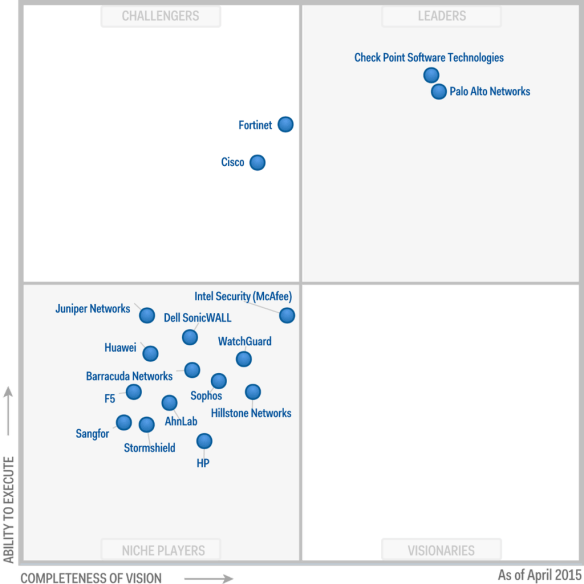
Take a look at this recent magic polygon from everyone’s favorite analyst firm:

FW Magic Polygon.  Thanks to @EtherealMind.

FW Magic Polygon. Thanks to @EtherealMind.

I won’t deny that Checkpoint is on top. That’s mostly due to the fact that they have the biggest install base in enterprises. But I disagree with the rest of this mystical tesseract. How is Palo Alto a leader in the firewall market? I thought their devices were mostly designed around mitigating internal threats? And how is everyone not named Cisco, Palo Alto, or Fortinet regulated to the Niche Players corral?

The issue comes down to purpose. Most firewalls today aren’t packet filters. They aren’t designed to keep the bad guys out of your networks. They are unified threat management systems. That’s a fancy way of saying they have a whole bunch of software built on top of the packet filter to monitor outbound connections as well.

Insider threats are a huge security issue. People on the inside of your network have access. They sometimes have motive. And their power goes largely unchecked. They do need to be monitored by something, whether it be an IDS/IPS system or a data loss prevention (DLP) system that keeps sensitive data from leaking out. But how did all of those devices get lumped together?

Deploying security monitoring tools is as much art as it is science. IPS sensors can be placed in strategic points of your network to monitor traffic flows and take action on them. If you build it correctly you can secure a huge enterprise with relatively few systems.

But more is better, right? If three IPS units make you secure, six would make you twice as secure, right? No. What you end up with is twice as many notifications. Those start getting ignored quickly. That means the real problems slip through the cracks because no one pays attention any more. So rather than deploying multiple smaller units throughout the network, the new mantra is to put an IPS in the firewall in the front of the whole network.

The firewall is the best place for those sensors, right? All the traffic in the network goes through there after all. Well, except for the user-to-server traffic. Or traffic that is internally routed without traversing the Internet firewall. Crafty insiders can wreak havoc without ever touching an edge IPS sensor.

And that doesn’t even begin to describe the processing burden placed on the edge device by loading it down with more and more CPU-intensive software. Consider the following conversation:

Me: What is the throughput on your firewall?


Them: It’s 1 Gbps!


Me: What’s the throughput with all the features turned on?


Them: Much less than 1 Gbps…

When a selling point of your UTM firewall is that the numbers are “real”, you’ve got a real problem.

What’s Protecting Second?

There’s an answer out there to fix this issue: disaggregation. We now have the capability to break out the various parts of a UTM device and run them all in virtual software constructs thanks to Network Function Virtualization (NFV). And they will run faster and more efficiently. Add in the ability to use SDN service chaining to ensure packet delivery and you have a perfect solution. For almost everyone.

Who’s not going to like it? The big UTM vendors. The people that love selling oversize boxes to customers to meet throughput goals. Vendors that emphasize that their solution is the best because there’s one dashboard to see every alert and issue, even if those alerts don’t have anything to do with each other.

UTM firewalls that can reliably scan traffic at 1 Gbps are rare. Firewalls that can scan 10 Gbps traffic streams are practically non-existant. And what is out there costs a not-so-small fortune. And if you want to protect your data center you’re going to need a few of them. That’s a mighty big check to write.


Tom’s Take

There’s a reason why we call it Network Function Virtualization. The need for the days when you try and cram all the possible features you could think of onto a single piece of hardware are over. We don’t need complicated all-in-one boxes that have insanely large CPUs. We have software constructs that can take care of all of that now.

While the engineers will like this brave new world, there are those that won’t. Vendors of the single box solutions will still tell you that their solution runs better. Analyst firms with a significant interest in the status quo will tell you NFV solutions are too far out or don’t address all the necessary features. It’s up to you to sort out the smoke from the flame.

Betting On The Right Horse

HobbyHorse

The annoucement of the merger of Alcatel-Lucent and Nokia was a pretty big discussion last week. One of the quotes that kept being brought up in several articles was from John Chambers of Cisco. Chambers has said the IT industry is in for a big round of “brutal consolidation” spurred by “missed market transitions”, which is a favorite term for Chambers. While I agree that consolidation is coming in the industry, I don’t think market transitions are the driver. Instead, it helps to think of it more like a day at the races.

Tricky Ponies

Startups in the networking industry have to find a hook to get traction with investors and customers. Since you can’t boil the ocean, you have to stand out. You need to find an application that gives you the capability to sell into a market. That is much easier to do with SDN than hardware-based innovation. The time-to-market for software is much lower than the barriers to ramp up production of actual devices.

Being a one-trick pony isn’t a bad thing when it comes to SDN startups. If you pour all your talent into one project, you get the best you can build. If that happens to be what your company is known for, you can hit a home run with your potential customers. You could be the overlay company. Or the policy company. Or the Docker networking layer company.

That rapid development time and relative ease of creation makes startups a tantalizing target for acquistion as well. Bigger companies looking to develop expertise often buy that expertise. Either acquiring the product or the team that built it gives the acquiring company a new horse in their stable.

If you can assemble an entire stable of ponies, you can build a networking company that addresses a lot of the needs of your customers. In fact, that’s how Cisco has managed to thrive to the point where they can gamble on those “market transitions”. The entity we call Cisco is really Crescendo, Insieme, Nuova, Andiamo, and hundreds of other single focus networking companies. There’s nothing wrong with that strategy if you have patience and good leadership.

Buy Your Own Stable

If you don’t have patience but have deep pockets, you will probably end up going down a different road. Rather than buying a startup here and there to add to a core strategy, you’ll be buying the whole strategy. That’s what Dell did when they bought Force10. If the rumors are true, that’s what EMC is looking to do soon.

Buying a company to provide your strategy has benefits. You can immediately compete. You don’t have to figure out synergies. Just sell those products and keep moving forward. You may not be the most agile company on the market but you will get the job done.

The issue with buying the strategy is most often “brain drain”. We see brain drain with a small startup going to a mid-sized company. Startup founders aren’t usually geared to stay in a corporate structure for long. They vest their interest and cash out. Losing a founder or key engineer on a product line is tough, but can be overcome with a good team.

What happens when the whole team walks out the door? If the larger acquiring company mistreats the acquired assets or influences creativity in a negative way, you can quickly find your best and brightest teams heading for green pastures. You have to make sure those people are taken care of and have their needs met. Otherwise your new product strategy will crumble before you know it.


Tom’s Take

The Nokia/Alcatel deal isn’t the last time we’ll hear about mergers of networking companies. But I don’t think it’s because of missed market transitions or shifting strategies. It comes down to companies with one or two products wanting protection from external factors. There is strength in numbers. And those numbers will also allow development of new synergies, just like horses in a stable learning from the other horses. If you’re a rich company with an interest in racing, you aren’t going to assemble a stable piece by piece. You’ll buy your way into an established stable. In the end, all the horses end up in a stable owned by someone. Just make sure your horse is the right one to bet on.

Going Out With Style

720367_54066174

Watching the HP public cloud discussion has been an interesting lesson in technology and how it is supported and marketed. HP isn’t the first company to publish a bold statement ending support for a specific technology or product line only to go back and rescind it a few days later. Some think that a problem like that shows that a company has some inner turmoil with regards to product strategy. More often than not, the real issue doesn’t lie with the company. It’s the customers fault.

No Lemonade From Lemons

It’s no secret that products have a lifespan. No matter how popular something might be with customers there is always a date when it must come to an end. This could be for a number of reasons. Technology marches on each and every day. Software may not run on newer hardware. Drivers may not be able to be written for new devices. CPUs grow more powerful and require new functions to unlock their potential.

Customers hate the idea of obsolescence. If you tell them the thing they just bought will be out-of-date in six years they will sneer at you. No matter how fresh the technology might be, the idea of it going away in the future unnerves customers. Sometimes it’s because the customers have been burned on technology purchases in the past. For every VHS and Blu-Ray player sold, someone was just as happy to buy a Betamax or HD-DVD unit that is now collecting dust.

That hatred of obsolescence sometimes keeps things running well past their expiration date. The most obivous example in recent history is Microsoft being forced to support Windows XP. Prior to Windows XP, Microsoft supported consumer releases of Windows for about five years. WIndows 95 was released in 1995 and support ended in 2001. Windows 98 reached EOL around the same time. Windows 2000 enjoyed ten years of support thanks to a shared codebase with popular server operating systems. Windows XP should have reached end-of-life shortly after the release of Windows Vista. Instead, the low adoption rate of Vista pushed system OEMs to keep installing Windows XP on their offerings. Even Windows 7 failed to move the needle significantly for some consumers to get off of XP. It finally took Microsoft dropping the hammer and setting a final end of extended support date in 2014 to get customers to migrate away from Windows XP. Even then, some customers were asking for an extension to the thirteen-year support date.

Microsoft kept supporting an OS three generations old because customers didn’t want to feel like XP had finally given up the ghost. Even though drivers couldn’t be written and security holes couldn’t be patched, consumers still wanted to believe that they could run XP forever. Even if you bought one of the last available copies of Windows XP when you purchased your system, you still got as much support for your OS as Microsoft gave Windows 95/98. Never mind that the programmers had moved on to other projects or had squeezed every last ounce of capability from the software. Consumers just didn’t want to feel like they’d been stuck with a lemon more than a decade after it had been created.

The Lesson of the Lifecycle

How does this apply to situations today? Companies have to make customers understand why things are being replaced. A simple annoucement (or worse, a hint of an unofficial annoucement from a third party source) isn’t enough any more. Customers may not like hearing their their favorite firewall or cloud platform is going away, but if you tell them the reasons behind the decision they will be more accepting.

Telling your customers that you are moving away from a public cloud platform to embrace hybrid clouds or to partner with another company doing a better job or offering more options is the way to go. Burying the annoucement in a conversation with a journalist and then backtracking later isn’t the right method. Customers want to know why. Vendors should have faith that customers are smart enough to understand strategy. Sure, there’s always the chance that customers will push back like they did with Windows XP. But there’s just as much chance they’ll embrace the new direction.


Tom’s Take

I’m one of those consumers that hates obsolescence. Considering that I’ve got a Cius and a Flip it should be apparent that I don’t bet on the right horse every time. But I also understand the reasons why those devices are no longer supported. I choose to use Windows 7 on my desktop for my own reasons. I know why it has been put out to pasture. I’m not going to demand Microsoft devote time and energy to a tired platform when Windows 10 needs to be finished.

In the enterprise technology arena, I want companies to be honest and direct when the time comes to retire products. Don’t hem and haw about shifting landscapes and concise technology roadmaps. Tell the world that things didn’t work out like you wanted and give us the way you’re going to fix it next time.

That’s Using Your Embrane

BrainInABox

Cisco announced their intent to acquire Embrane last week. Since they did it on April 1st, there was an initial thought that it might be a prank. But given that Cisco doesn’t really do April Fools jokes, it was quickly determined to be the real deal. More importantly, the Embrane acquistion plugs a very important hole in ACI that I have been worried about for a while.

Everybody Play Nice

Application Centric Infrastructure (ACI) is a great idea that works on the principle that Cisco can get multiple disparate systems to work together to “program” the underlying network to rapidly deploy applications and create policies that allow systems to be provisioned and reconfigured with a minimum of effort.

That’s a great idea in theory. And if you’re only working with Cisco gear it’s any easy thing to pull off. Provided you can easily integrate the ASA operating system with IOS and NX-OS. That’s not an easy chore and all those business units work for the same company. Can you imagine how hard it would be to integrate with an external third party? Even one that is friendly to Cisco? What about a company that only implements the bare minimum functionality to make ACI operational?

ACI is predicated on the idea that all the systems in the network are going to work together to accomplish the goal of policy programming. That starts falling apart when systems are difficult to integrate or refuse to be a part of ACI. Sure, you could program around them. It wouldn’t take much to do an end run around an unruly switch or router. But what about a firewall or load balancer?

Those devices are more important to security and scalability of an application. You can’t just cut them out. You may even have regulations that require you to include them inline with the application. That means headaches if you are forced to work with something that won’t completely integrate.

Bring Your Own Toys

Enter Embrane. Embrane’s helios platform gives Cisco a stable of software firewalls and load balancers that can be spun up and deployed as needed on-demand. That means that unruly hardware can be bypassed when necessary. If your firewall doesn’t like ACI or won’t implement the shims needed to make them play nice, all you need to do is spin up an Embrane firewall. Since Embrane was integrating with ACI even before the acquistion, you know that everything is going to work just fine.

You can also use the Embrane Elastic Services Manager (ESM) to help manage those devices and reclaim them as needed. That sounds like a no-brainer, but if you ever find yourself booting a virtual system on a cluster that has charge-back enabled, or worse booting it on a public cloud provider and forgetting about it, you’ll find that using a lifecycle manager to avoid hundreds or thousands of dollars in charges is a great idea. ESM can also help you figure out how utilized your devices are and gives your a roadmap to add capacity when it’s needed. That way you never have to answer a phone call complaining the new application is running “slow”.


Tom’s Take

Embrane’s acquisition makes all the sense in the world. Cisco had put up a stake in the company in their last funding round. That could be seen as an initial investment to keep Embrane working down the ACI path instead of moving off onto other ideas. Now, Cisco makes good on that investment by bringing the Embrane team back in house, for a while at least. Cisco gets a braintrust that knows how to make on-demand SDN work.

It’s no shock that Embrane is going to be rolled into the INSBU that houses Insieme. These two teams are going to be working together very closely in the coming months to push the Embrane technology into the core of ACI and provide it as an offering to get potential customers off the fence and into the solution. More options for configuring policy based networks is always a great carrot for customers. Overcoming objections about incompatible hardware makes selling the software of ACI a no brainer.

Budgeting For Wireless With E-Rate

Wireless

After having a nice conversation with Josh Williams (@JSW_EdTech) and helping Eddie Forero (@HeyEddie) with some E-Rate issues, I’ve decided that I’m glad I don’t have to deal with it any longer. But my conversation with Josh revealed something that I wasn’t aware of with regards to the new mandate from the president that E-Rate needs to address wireless in schools.

Building On A Budget

The first exciting thing in the new rules for E-Rate modernization is that there has been an additional $1 billion injected into the Category 2 (Priority 2) items. The idea is that this additional funding can be used for purchasing wireless equipment as outlined in the above initiative. I’ve said before that E-Rate needed an overhaul to fix some of the issues with reduced funding in competition for the available funding pool. That this additional funding came through things like sunsetting VoIP funding is a bit irritating, but sometimes these things can’t be helped.

The second item that caught my attention is the new budgeting rules for Category 2 in E-Rate going forward. Now, schools are allocated $150 per student for a rolling five year period. That means the old “2 of 5” rule for internal connections is gone. It also means you are going to have to be very careful with your planning from now on. But when it comes to wireless, that’s what has been advised by the professionals for quite a while. The maxim of “one AP per classroom” won’t fit with these new funding rules.

Let’s take an example. If your school has 1,000 students you are allocated $150,000 for Category 2 for a five year period. If you want to use this entire amount for wireless, you could use it as follows:

  1. Spend $150,000 this year on new wireless gear. You will have no extra money available in the next four years.
  2. Spend $100,000 on new wireless gear this year. You can then use the remaining $50,000 for more gear or maintenance on the existing gear in the next four years. Adding a warranty or maintenace contract to the initial cost will give you coverage on the gear over the five-year period.
  3. Spend $30,000 each year on new APs or on a managed service. This means you have less each year to spend, but you can continually add pieces.

If you student numbers increase in the five years, you gain access to additional funding. However, that’s not a guarantee. And thankfully, if you lose students you don’t have to pay back the difference.

The “D” Word“”

With the amount of money allocated to Priority 2 limited over a time period, design becomes more and more important, especially if you are building a wireless design. You can’t just throw an access point in every classroom or at every hallway intersection and call it a day. You’re going to need to invest real time and effort into making your design work.

Sometimes, that will mean paying for the work up front. Without funding. Those words strike fear into the hearts of school technology workers. I’ve seen cases where schools refused to pay for anything that wasn’t covered under E-Rate. In the case of a wireless design, that may be even harder to swallow, since the deliverable is a document that sits on a shelf, not a device that accomplishes something. If tech professionals are having a hard time buying it, you can better believe the superintendant and school boards will be even more averse.

A proper wireless design will save you money in the long term. By having someone use math and design principles to place APs instead of “best guesses”, you can reduce the number of APs in many cases while improving coverage where it’s needed instead of providing coverage for a strip of grass outside a classroom instead of the library. Better coverage means less complaints. Less hardware means less acquistion cost for your E-Rate discount percentage. Less cost means more money left in your budget for other E-Rate technology needs. Everyone wins.


Tom’s Take

I couldn’t figure out how the FCC was going to pay for all of this new wireless gear. Money doesn’t appear from nowhere. They found some of it by taking their budgeted amounts and reducing the unneeded items to make room for the things that were required. That learning process made them finally do something they should have done years ago: give the schools a real budget instead of crazy rules like “2 of 5”.

Yes, the per student budget is going to hurt smaller schools. Schools without higher headcounts are going to get much less in the coming years. But many of those smaller schools have disproportionately benefitted from E-Rate in the past 15 years. Tying the funding amounts to the actual number of users in the environment will mean the schools that need the funding will get it to improve their technology situation. And that’s something we can all agree is welcome and needed.


Does EMC Need A Network?

EMCnetwork

Network acquisitions are in the news once again. This time, the buyer is EMC. In a blog article from last week, EMC is reportedly mulling the purchase of either Brocade or Arista to add a networking component to its offerings. While Arista would be a good pickup for EMC to add a complete data center networking practice, one must ask themselves “Does EMC Really Need A Network?”

Hardware? For What?

The “smart money” says that EMC needs a network offering to help complete their vBlock offering now that the EMC/Cisco divorce is in the final stages. EMC has accelerated those plans from the server side by offering EVO:RAIL as an option for VSPEX now. Yes, VSPEX isn’t a vBlock. But it’s a flexible architecture that will eventually supplant vBlock when the latter is finally put out to pasture once the relationship between Cisco and EMC is done.

EMC being the majority partner in VCE has incentive to continue offering the package to customers to make truckloads of cash. But long term, it makes more sense for EMC to start offering alternatives to a Cisco-only network. There have been many, many assurances that vBlock will not be going away any time soon (almost to the level of “the lady doth protest too much, methinks“). But to me, that just means that the successor to vBlock will be called something different, like nBlock or eBlock.

Regardless of what the next solution is called, it will still need networking components installed in order to facilitate communication between the components in the system. EMC has been looking at networking companies in the past, especially Juniper (again with much protesting to the contrary). It’s obvious they want to have a hardware solution to offer alongside Cisco for future converged systems. But do they really need to?

How About A BriteBlock?

EMC needs a network component. NSX is a great control system that EMC already owns (and is already considering for vBlocks), but as Joe Onisick (@JOnisick) is fond of pointing out, NSX doesn’t actually forward packets. So we still need something to fling bits back and forth. But why does it have to be something EMC owns?

Whitebox switching is making huge strides toward being a data center solution. Cumulus, Pluribus, and Big Switch have created stable platforms that offer several advantages over more traditional offerings, not the least of which is cost. The ability to customize the OS to a degree is also attractive to people that want to integrate with other systems.

Could you imagine running a Cumulus switch in a vBlock and having the network forwarding totally integrated with the management platform? Or how about running Big Switch’s Big Fabric as the backplane for vBlock? These solutions would work with minimal effort on the part of EMC and very little tuning required by the end user. Add in the lowered acquistion cost of the network hardware and you end up with a slightly healthier profit margin for EMC.

Is The Answer A FaceBlock?

The other solution is to use OpenCompute Project switches in a vBlock offering. OCP is gaining momentum, with Cumulus and Big Switch both making big contributions recently at the 2015 OCP Summit. Add in the buzz around the Wedge switch and new Six Pack chassis and you have the potential to have significant network performance for a relative pittance.

Wedge and Six Pack are not without their challenges. Even running Cumulus Linux or Open Network Linux from Big Switch, it’s going to take some time to integrate the network OS with the vBlock architecture. NSX can alleviate some of these challenges, but it’s more a matter of time than technology. EMC is actually very good at taking nascent technology from startups and integrating with their product lines. Doing the same with OCP networking would not be much different from their current R&D style.

Another advantage of using OCP networking comes from the effect that EMC would have to the project. By having a major vendor embrace OCP as the spine of their architecture, Facebook gains the advantages of reduced component costs and increased development. Even if EMC doesn’t release their developments back into the community, they will attract more developers to the project and magnify the work being done. This benefits EMC as well, as every OCP addition flows back into their offerings as well.


Tom’s Take

We’re running out of big companies to buy other companies. Through consolidation and positioning, the mid-tier has grown to the point where they can’t easily be bought by anyone other than Cisco. Thanks to Aruba, HP is going to be busy with that integration until well after the company split. EMC is the last company out there that has the resources to buy someone as big as Arista or Brocade.

The question that the people at EMC need to ask themselves is: Do we really need hardware? Or can we make everything work without pulling out the checkbook? Cisco will always been an option for vBlock, just not necessarily the cheapest solution. EMC can find solutions to increase their margins, but it’s going to take some elbow grease and a few thinking caps to integrate whitebox or OCP-style offerings.

EMC does need a network. It just may not need to be one they own.


Insecurity Guards

file000491308347

Pick a random headline related to security today and you’ll see lots of exclamation points and dire warnings about the insecurity of a something we thought was inviolate, such as Apple Pay or TLS. It’s enough to make you jump out of your skin and crawl into a dark hole somewhere never to use electricity again. Until you read the article, that is. After going through a couple of paragraphs, you realize that a click-bait headline about a new technology actually underscores an age-old problem: people are the weakest link.

Engineered To Be Social

We can engineer security for protocols and systems until the cows come home. We can use ciphers so complicated that even Deep Thought couldn’t figure them out. We can create a system so secure that it could never be hacked. But in the end that system needs to be used by people. And people are where everything breaks down.

Take the most recent Apple Pay “exploit” in the news that’s been making all the headlines. The problem has nothing to do with Apple Pay itself, or the way the device interacts with the point-of-sale terminal. It has everything to do with enterprising crooks calling in to banks an impersonating users to get a live, breathing person on the other end of the phone to override security safeguards and break the system down. An hourly employee of the bank can put all the defense-in-depth research to naught in a matter of keystrokes.

It is the way it is because people are dumb, panicky, and dangerous. When confronted with situations that are outside their norm they tend to freeze up and do the wrong thing. Take this scene from Sneakers (which is an excellent movie you should go watch right now):

When I originally started writing this post, that scene stuck out in my mind as a brilliant way to illustrate how less-than-savory people get around high technology with simple solutions, like kicking in a door protected by a keypad. But then I watched the scene again and found an even better example of my point. Look how Robert Redford and River Phoenix work together to distract and eventually overwhelm the security guard. The guard knows that no one should be able to get through the gate without the right keycard. With a bit of distraction, some added stress, and an apparently helpless but irritated user, Redford is able to social engineer his way into the building with little effort. The movie is full of these kinds of scenes.

The point is not that Robert Redford can talk his way into a building. The point that should be illustrated is that people override security decisions every day. Writing down passwords. Ignoring security warnings. Clicking on believable but fake exploits. It’s done because it’s quicker or easier or it’s done to remove a screaming customer on the other end of the phone. Polices are ignored and shortcuts are taken to make things easy. So how do we fix it?

Teach It, Don’t Tech It

The absolute last thing you should do when trying to fix these issues is to create another layer of technology to insulate the issue. That leads to two problems. The first is that people will being to see the new solution as yet another problem and try to create shortcuts to work around it. The second, which is a more sinister issue, is that you’ve essentially told those people that they can’t understand why this is a problem and you’ve decided to marginalize them instead of teaching them. They may not realize it, but you’ve silently placed them lower on the intelligence ladder than a few bytes of code.

People need to know why things are the way they are. If the policy says not to write down a password, tell people why that is. If the rules say you don’t override a lockout for a PIN or add a card to a person’s account without certain information then you need to tell people why you don’t do that. A policy or security feature without an explanation is merely an annoyance. One that will be circumvented. Making your users aware of the reason for a policy makes it something that’s hard to ignore. You’re more likely to get traction by treating your users like people, not automatons.


Tom’s Take

Kevin Mitnick (@KevinMitnick) wrote an entire book about social engineering and how easy it is to accomplish. As security systems become more complicated and much less simple to fool, the majority of miscreants aren’t going to spend hours upon hours trying to hack a handshake protocol or create hash collisions. Instead, they will attack the weakest link in the chain. That will almost undoubtedly be the users of the system. We have to make our users smart enough to know when people are trying to take advantage of them and close that loop. Or at least make that loop as difficult to breach as the rest of the system. That’s the only way to be sure that the security measures we put in place can be used to their fullest potential. Just make sure that everyone knows the Eddie Vedder doesn’t work in accounting.


Are We The Problem With Wearables?

applewatchface
Something, Something, Apple Watch.

Oh, yeah. There needs to be substance in a wearable blog post. Not just product names.

Wearables are the next big product category that is driving innovation. The advances being made in screen clarity, battery life, and component miniaturization are being felt across the rest of the device market. I doubt Apple would have been able to make the new Macbook logic board as small as it is without a few things learned from trying to cram transistors into a watch case. But, are we the people sending the wrong messages about wearable technology?

The Little Computer That Could

If you look at the biggest driving factor behind technology today, it comes down to size. Technology companies are making things smaller and lighter with every iteration. If the words thinnest and lightest don’t appear in your presentation at least twice then you aren’t on the cutting edge. But is this drive because tech companies want to make things tiny? Or is it more that consumers are driving them that way?

Yes, people the world over are now complaining that technology should have other attributes besides size and weight. A large contingent says that battery life is now more important than anything else. But would you be okay with lugging around an extra pound of weight that equates to four more hours of typing time? Would you give up your 13-inch laptop in favor of a 17-inch model if the battery life were doubled?

People send mixed signals about the size and shape of technology all the time. We want it fast, small, light, powerful, and with the ability to run forever. Tech companies give us as much as they can, but tradeoffs must be made. Light and powerful usually means horrible battery life. Great battery life and low weight often means terrible performance. No consumer has ever said, “This product is exactly what I wanted with regards to battery, power, weight, and price.”

Where Wearables Dare

As Jonny Ive said this week, “The keyboard dictated the size of the new Macbook.” He’s absolutely right. Laptops and Desktops have a minimum size that is dictated by the screen and keyboard. Has anyone tried typing on a keyboard cover for and iPad? How about an iPad Mini cover? It’s a miserable experience, even if you don’t have sausage fingers like me. When the size of the device dictates the keyboard, you are forced to make compromises that impact user experience.

With wearables, the bar shifts away from input to usability. No wearable watch has a keyboard, virtual or otherwise. Instead, voice control is the input method. Spoken words drive communication beyond navigation. For some applications, like phone calls and text messages, this is preferred. But I can’t imagine typing a whole blog post or coding on a watch. Nor should I. The wearable category is not designed for hard-core computing use.

That’s where we’re getting it wrong. Google Glass was never designed to replace a laptop. Apple Watch isn’t going to replace an iPhone, let alone an iMac. Wearable devices augment our technology workflows instead of displacing them. Those fancy monocles you see in sci-fi movies aren’t the entire computer. They are just an interface to a larger processor on the back end. Trying to shrink a laptop to the size of a silver dollar is impossible. If it were, we’d have that by now.

Wearables are designed to give you information at a glance. Google Glass allows you to see notifications easily and access information. Smart watches are designed to give notifications and quick, digestible snippets of need-to-know information. Yes, you do have a phone for that kind of thing. But my friend Colin McNamara said it best:

I can glance at my watch and get a notification without getting sucked into my phone


Tom’s Take

That’s what makes the wearable market so important. It’s not having the processing power of a Cray supercomputer on your arm or attached to your head. It’s having that power available when you need it, yet having the control to get information you need without other distractions. Wearables free you up to do other things. Like building or creating or simply just paying attention to something. Wearables make technology unobtrusive, whether it’s a quick text message or tracking the number of steps you’ve taken today. Sci-Fi is filled with pictures of amazing technology all designed to do one thing – let us be human beings. We drive the direction of product development. Instead of crying for lighter, faster, and longer all the time, we should instead focus on building the right interface for what we need and tell the manufacturers to build around that.


Are Your Tweets Really Your Own?

new-twitter-logo350105_lg

We’ve all seen it recently. Twitter bios and blog profile pages with some combination of the following:

My tweets are my own.

Retweets are not endorsements.

My views do not represent my employer.

It has come to the point where the people in the industry are more visible and valuable than the brands they work for. Personal branding has jumped to the forefront of marketing strategies. But with that rise in personal branding comes a huge risk for companies. What happens when one of our visible stars says something we disagree with? What happens when we have to pull back?

Where Is My Mind?

Social media works best when it’s genuine. People sharing thoughts and ideas with each other without filters or constraint. Where it breaks down is when an external force starts interfering with that information exchange. Think about corporate social media policies that restrict what you can say. Or even policies that say your Twitter handle has to include the company you work for (yes, that exists). Why should my profile have to include miles of disclaimers telling people that I’m not a robot?

Is it because we have become so jaded as to believe that people can’t divorce their professional life from their personal life? Or is it because the interference from people telling you the “right way” to do social media has forced people to become robotic in their approach to avoid being disciplined?

Personal accounts that do nothing but reinforce the party line are usually unimportant to the majority of social media users. The real draw with speaking to someone from a company is the interaction behind the message. If a person really believes in the message then it shows through in their discussions without the need to hit all the right keywords or link to the “right” pages on a site.

Voices Carry

If you want more genuine, organic interaction with your people in the social world, you need to take off the leash. Don’t force them to put disclaimers in their profiles. Don’t make them take up valuable real estate telling the world what most of them already know. People speak for themselves. Their ideas and thoughts belong to them. Yes, you can tell the difference between when someone is parroting the party line and giving a real, honest introspective look at a discussion. People are not robots. Social media policies shouldn’t treat them as such.


Tom’s Take

I find myself in the situation that I’ve described above. I have to be careful with the things I say sometimes. I’m always ready to hit the Delete button on a tweet before it goes out. But what I don’t do is disclaim all over the place that “my tweets are my own”. Because everyone that I work with knows my mind. They know when I’m speaking for me and when I’m not. There is trust that I will speak my mind and stand by it. That’s the key to being honest in social media. Trust that your audience will understand you. Have faith in them. Which is something that a profile disclaimer can’t do.