Cross Training for Career Completeness

Are you good at your job? Have you spent thousands of hours training to be the best at a particular discipline? Can you configure things with your eyes closed and are finally on top of the world? What happens next? Where do you go if things change?

It sounds like an age-old career question. You’ve mastered a role. You’ve learned all there is to learn. What more can you do? It’s not something specific to technology either. One of my favorite stories about this struggle comes from the iconic martial artist Bruce Lee. He spent his formative years becoming an expert at Wing Chun and no one would argue he wasn’t one of the best. As the story goes, in 1967 he engaged in a sparring match with a practitioner of a different art and, although he won, he was exhausted and thought things had gone on far too long. This is what encouraged him to develop Jeet Kun Do as a way to incorporate new styles together for more efficiency and eventually led to the development of mixed martial arts (MMA).

What does Bruce Lee have to do with tech? The value of cross training with different tech disciplines is critical for your ability to continue to exist as a technology practitioner.

Time Marches On

A great example of this came up during Mobility Field Day back in May. During the Fortinet presentation there was a discussion about wireless and SASE. I’m sure a couple of the delegates were shrugging their shoulders in puzzlement about this inclusion. After all, what does SASE have to do with SNR or Wi-Fi 6E? Why should they care about software running on an AP when the real action is in the spectrum?

To me, as someone who sees the bigger picture, the value of talking about SASE is crucial. Access points are no longer radio bridges. They are edge computing devices that run a variety of software programs. In the old days it took everything the CPU had to process the connection requests and forward the frames to the right location. Today there is a whole suite of security being done at the edge to keep users safe and reduce the amount of traffic being forwarded into the network.

Does that mean that every wireless engineer needs to become a security expert? No. Far from it. There is specialized knowledge in both areas that people will spend years perfecting. Does that mean that wireless people need to ignore the bigger security picture? That’s also a negative. APs are going to be running more and more software in the modern IT world because it makes sense to put it there and not in the middle of the enterprise or the cloud. Why process traffic if you don’t have to?

It also means that people need to look outside of their specific skillset to understand the value of cross training. There are some areas that have easy crossover potential. Networking and wireless have a lot of commonality. So do storage and cloud, as well as virtualization and storage and cloud. We constantly talk about the importance of including security in the discussion everywhere, from implementation to development. Yet when we talk about the need to understand these technologies at a basic level we often face resistance from operations teams that just want to focus on their area and not the bigger picture.

New Approaches

Jeet Kune Do is a great example of why cross training has valuable lessons for us to learn about disruption. In a traditional martial arts fight, you attack your opponent. The philosophy of Jeet Kun Do is to attack your opponent’s attacks. You spend time defending by keeping them from attacking you. That’s a pretty different approach.

Likewise, in IT we need to examine how to we secure users and operate networks. Fortinet believes security needs to happen at the edge. Their philosophy is informed by their expertise in developing edge hardware to do this role. Other companies would say this is best performed in the cloud using their software, which is often their strength. Which approach is better? There is no right answer. I will say that I am personally a proponent of doing the security stuff as close the edge as possible to reduce the need for more complexity in the core. It might be a remnant of my old “three tier” network training but I feel the edge is the best place to do the hard work, especially given the power of the modern edge compute node CPU.

That doesn’t mean it’s always going to be the best way to do things. That’s why you have to continuously learn and train on new ways of doing things. SASE itself came from SD-WAN which came from SDN. Ten years ago most of this was theoretical or in the very early deployment stage. Today we have practical applications and real-world examples. Where will it go in five years? You only know if you learn how it works now.


Tom’s Take

I’ve always been a voracious learner and training myself on different aspects of technology has given me the visibility to understand the importance of how it all works together. Like Bruce Lee I always look for what’s important and incorporate it into my knowledge base and discard the rest. I know that learning about multiple kinds of technology is the key to having a long career in the industry. You just have to want to see the bigger picture for cross training to be effective.

Disclaimer: This post mentions Fortinet, a presenter at Mobility Field Day 9. The opinions expressed in this post reflect my own perspective and were not influenced by consideration from any companies mentioned.


Friday Mobility Field Day Thoughts

I’m finishing up Mobility Field Day 7 this week and there’s been some exciting discussion here around a lot of technology. I think my favorite, and something I’m going to talk about more, is the continuing battle between 5G and Wi-Fi. However, there’s a lot going on that I figured I’d bring up to whet your appetite for the videos.

  • What is mission critical? When you think about all the devices that are in your organization that absolutely must work every time what does that look like? And what are you prepared to do to make them work every time? If it’s a safety switch or some other kind of thing that prevents loss of life are you prepared to spend huge amounts of money to make it never fail?
  • Operations teams don’t need easier systems. They need systems that remove complexity. The difference in those two things is subtle but important. Easier means that things are simplified to the point of almost being unusable. Think Apple Airport or even some Meraki devices. Whereas reduced complexity means that you’ve made the up front configuration easy but enabled the ability to configure other features in different places. Maybe that’s by giving your engineers the ability to log in to an Advanced dashboard or something like that.
  • When you’re trying to figure out where your audience is on a subject, always aim slightly above their technical level. If all goes well you will pull them up to where you want them and they’ll appreciate the opportunity to stretch their thinking to meet you there. If not you’ll provide them lots of great material to learn about when they get there later.

Tom’s Take

Technology changes quickly but the way we teach it doesn’t need to if we do it right the first time. By taking the time to aim high and educate instead of retelling something we’ve already said a few times we create content that endures.

It’s Probably Not The Wi-Fi

After finishing up Mobility Field Day last week, I got a chance to reflect on a lot of the information that was shared with the delegates. Much of the work in wireless now is focused on analytics. Companies like Cape Networks and Nyansa are trying to provide a holistic look at every part of the network infrastructure to help professionals figure out why their might be issues occurring for users. And over and over again, the resound cry that I heard was “It’s Not The Wi-Fi”

Building A Better Access Layer

Most of wireless is focused on the design of the physical layer. If you talk to any professional and ask them to show your their tool kit, they will likely pull out a whole array of mobile testing devices, USB network adapters, and diagramming software that would make AutoCAD jealous. All of these tools focus on the most important part of the equation for wireless professionals – the air. When the physical radio spectrum isn’t working users will complain about it. Wireless pros leap into action with their tools to figure out where the fault is. Either that, or they are very focused on providing the right design from the beginning with the tools validating that access point placement is correct and coverage overlap provides redundancy without interference.

These aren’t easy problems to solve. That’s why wireless folks get paid the big bucks to build it right or fix it after it was built wrong. Wired networkers don’t need to worry about microwave ovens or water pipes. Aside from the errant fluorescent light or overly aggressive pair of cable pliers, wired networks are generally free from the kinds of problems that can plague a wire-free access layer.

However, the better question that should be asked is how the users know it’s the wireless network that’s behind the faults? To the users, the system is in one of three states: perfect, horribly broken, or slow. I think we can all agree that the first state of perfection almost never actually exists in reality. It might exist shortly after installation when user load is low and actual application use is negligible. However, users are usually living in one of the latter states. Either the wireless is “slow” or it’s horribly broken. Why?

No-Service Station

As it turns out, thanks to some of the reporting from companies like Cape and Nyansa, it turns out that a large majority of the so-called wireless issues are in fact not wireless related at all. Those designs that wireless pros spend so much time fretting over are removed from the equation. Instead, the issues are with services.

Yes, those pesky network services. The ones like DNS or DHCP that seem invisible until they break. Or those services that we pay hefty sums to every month like Amazon or Microsoft Azure. The same issues that plague wired networking exist in the wireless world as well and seem to escape blame.

DNS is invisible to the majority of users. I’ve tried to explain it many times with middling to poor results. The idea that computers on the internet don’t understand words and must rely on services to translate them to numbers never seems to click. And when you add in the reliance on this system and how it can be knocked out with DDoS attacks or hijacking, it always comes back to being about the wireless.

It’s not hard to imagine why. The wireless is the first thing users see when they start having issues. It’s the new firewall. Or the new virus. Or the new popup. It’s a thing they can point to as the single source of problems. And if there is an issue at any point along the way, it must be the fault of the wireless. It can’t possibly be DNS or routing issues or a DDoS on AWS. Instead, the wireless is down.

And so wireless pros find themselves defending their designs and configurations without knowing that there is an issue somewhere else down the line. That’s why the analytics platforms of the future are so important. By giving wireless pros visibility into systems beyond the spectrum, they can reliably state that the wireless isn’t at fault. They can also engage other teams to find out why the DNS servers are down or why the default gateway for the branch office has been changed or is offline. That’s the kind of info that can turn a user away from blaming the wireless for all the problems and finding out what’s actually wrong.


Tom’s Take

If I had a nickel for every problem that was blamed on the wireless network or the firewall or some errant virus when that actually wasn’t the case, I could retire and buy my own evil overlord island next to Larry Ellison. Alas, these are issues that are never going to go away. Instead, the only real hope that we have is speeding the time to diagnose and resolve them by involving professionals that manage the systems that are actually down. And perhaps having some pictures of the monitoring systems goes a long way to tell users that they should make sure that the issue is indeed the wireless before proclaiming that it is. Because, to be honest, it probably isn’t the Wi-Fi.

The History of The Wireless Field Day AirCheck

Mobility Field Day 2 just wrapped up in San Jose. It’s always a little bittersweet to see the end of a successful event. However, one thing that does bring a bit of joy to the end of the week is the knowledge that one of the best and longest running traditions at the event continues. That tradition? The Wireless/Mobility Field Day AirCheck.

The Gift That Keeps Giving

The Wireless Field Day AirCheck story starts where all stories start. The beginning. At Wireless Field Day 1 in March of 2011, I was a delegate and fresh off my first Tech Field Day event just a month before. I knew some wireless stuff and was ready to learn a lot more about site surveys and other great things. Little did I know that I was about to get something completely awesome and unexpected.

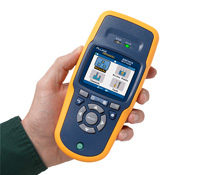
As outlined in this post, Fluke Networks held a drawing at the end of their presentation for a first-generation AirCheck handheld wireless troubleshooting tool. I was thrilled to be the winner of this tool. I took it home and immediately put it to work around my office. I found it easy to use and it provided great information about wireless networks that I could use to make my life easier. I even loaned it out to some of my co-workers during troubleshooting calls and they immediately told me the wanted one of my own.

As the rest of 2011 rolled forward, I found uses for my AirCheck but I didn’t do as much wireless as a lot of the other people out there. I knew that someone else could probably get more out of having it than I did. So, I hatched a plan. I told Stephen Foskett that if I had the chance to come back to Wireless Field Day 2, I would gladly give my AirCheck away to another worthy delegate. I wanted to keep the tool in use with the best and brightest people in the community and help them see how awesome it was.

Sure enough, I was invited to Wireless Field Day 2 in January 2012. I arrived with my AirCheck and waited until the proper moment. During the welcome dinner, Matt Simmons and I found a way to randomly draw a number and award the special prize to Matthew Norwood. He was just as thrilled to get the AirCheck as I was. I sent my prize from Wireless Field Day 1 on its way to a new home, content that I would help someone get more wireless knowledge.

But the giving didn’t stop there. Even though I wasn’t a delegate for Wireless Field Day 3 or Wireless Field Day 4, the AirCheck kept coming back. Matthew gave it to Dan Cybulskie. Dan gave it to Scott Stapleton. The AirCheck headed down under for half of 2013. When Wireless Field Day 5 rolled around, I was now a staff member for Tech Field Day and working behind the scenes. I had forgotten about the AirCheck until a box arrived from Australia with Scott’s postmark on it. He mailed it back to the US to continue the tradition!

And so, the AirCheck passed along to a new set of hands every event. Blake Krone got it at Wireless Field Day 5. Then Jake Snyder, followed by Richard McIntosh and Scott McDermott. Even when we changed the name of the event to Mobility Field Day in 2016, the AirCheck passed along to Rowell Dionicio.

Changing Of The Guard

In the interim, the AirCheck product moved over to Netscout. They developed a new version, the G2, that was released after Mobility Field Day 1 in 2016. The word also got around to the Netscout folks that there was a magical G1 AirCheck that was passed along to successive Wireless/Mobility Field Day delegates as a way of keeping the learning active in the community.

Netscout was a presenter during Mobility Field Day 2 in 2017. Chris Hinz contacted me before the event and asked if we still gave away the AirCheck during the event. I assured him that we did. He said that a tradition like that should continue, even if the G1 AirCheck was getting a bit long in the tooth. He told me that he might be able to help us all out.

After the Netscout presentation at Mobility Field Day 2, Chris presented me with his special surprise: a brand new G2 AirCheck! Since we hadn’t given the old unit to its new recipient just yet, we decided that it was time to “retire” the old G1 and pass along the G2 to the next lucky contestant. Shaun Neal was the lucky delegate this time and took the new and improved G2 home with him Wednesday night. I was happy to see it go to him knowing that he’ll get to put it through its paces and learn from it. And then he will get to bring it back to the next Mobility Field Day for it to pass along to a new delegate and continue the chain of sharing.


Tom’s Take

When I gave away my G1 AirCheck all those years ago, I never expected it would turn into something so incredible. The sharing and exchange of tools and knowledge at both Wireless Field Day and Mobility Field Day help remind me of why I do this job with Stephen. The community is an awesome and amazing place sometimes. The new G2 AirCheck will have a long life helping delegates troubleshoot wireless issues.

The old G1 AirCheck, my AirCheck, is in my suitcase. It’s ready to start its retirement in my office, having earned thousands of frequent flyer miles as well as becoming a very important part of Tech Field Day lore. I couldn’t be happier to get it back at the end of its life knowing how much happiness it brought to people along the way.