Outing Your Outages

How are you supposed to handle outages? What happens when everything around you goes upside down in an instant? How much communication is “too much”? Or “not enough”? And is all of this written down now instead of being figured out when the world is on fire?

Team Players

You might have noticed this week that Webex Teams spent most of the week down. Hard. Well, you might have noticed if you used Microsoft Teams, Slack, or any other messaging service that wasn’t offline. Webex Teams went offline about 8:00pm EDT Monday night. At first, most people just thought it was a momentary outage and things would be back up. However, as the hours wore on and Cisco started updating the incident page with more info it soon became apparent that Teams was not coming back soon. In fact, it took until Thursday for most of the functions to be restored from whatever knocked them offline.

What happened? Well, most companies don’t like to admit what exactly went wrong. For every CloudFlare or provider that has full disclosures on their site of outages, there are many more companies that will eventually release a statement with the least amount of technical detail possible to avoid any embarrassment. Cisco is currently in the latter category, with most guesses landing on some sort of errant patch that mucked things up big time behind the scenes.

It’s easy to see when big services go offline. If Netflix or Facebook are down hard then it can impact the way we go about our lives. On the occasions when our work tools like Slack or Google Docs are inoperable it impacts our productivity more than our personal pieces. But each and every outage does have some lessons that we can take away and learn for our own IT infrastructure or software operations. Don’t think that companies that are that big and redundant everywhere can’t be affected by outages regularly.

Stepping Through The Minefield

How do you handle your own outage? Well, sometimes it does involve eating some humble pie.

  1. Communicate – This one is both easy and hard. You need to tell people what’s up. You need to let everyone know things are working right and you’re working to make them right. Sometimes that means telling people exactly what’s affected. Maybe you can log into Facebook but not Chat or Messages. Tell people what they’re going to see. If you don’t communicate, you’re going to have people guessing. That’s not good.
  2. Triage – Figure out what’s wrong. Make educated guesses if nothing stands out. Usually, the culprits are big changes that were just made or perhaps there is something external that is affecting your performance. The key is to isolate and get things back as soon as possible. That’s why big upgrades always have a backout plan. In the event that things go sideways, you need to get back to functional as soon as you can. New features that are offline aren’t as good as tried-and-true stuff that’s reachable.
  3. Honest Post-Mortem – This is the hardest part. Once you have things back in place, you have to figure out why the broke. This is usually where people start running for the hills and getting evasive. Did someone apply a patch at the wrong time? Did a microcode update get loaded to the wrong system? How can this be prevented in the future? The answers to these questions are often hard to get because the people that were affected and innocent often want to find the guilty parties and blame someone so they don’t look suspect. The guilty parties want to avoid blame and hide in public with the rest of the team. You won’t be able to get to the bottom of things unless you find out what went wrong and correct it. If it’s a process, fix it. If it’s a person, help them. If it’s a strange confluence of unrelated events that created the perfect storm, make sure that can never happen again.
  4. Communicate (Again) – This is usually where things fall over for most companies. Even the best ones get really good at figuring out how to prevent problems. However, most of them rarely tell anyone else what happened. They hide it all and hope that no one ever asks about anything. Yet, transparency is key in today’s world. Services that bounce up and down for no reason are seen as unstable. Communicating as to their volatility is the only way you can make sure that people have faith that they’re going to stay available. Once you’ve figure out what went wrong and who did it, you need to tell someone what happened. Because the alternative is going to be second guessing and theories that don’t help anyone.

Tom’s Take

I don’t envy the people at Cisco that spent their entire week working to get Webex Teams back up and running. I do appreciate their work. But I want to figure out where they went wrong. I want to learn. I want to say to myself, “Never do that thing that they did.” Or maybe it’s a strange situation that can be avoided down the road. The key is communication. We have to know what happened and how to avoid it. That’s the real learning experience when failure comes around. Not the fix, but the future of never letting it happen again.


Writing Is Hard

Writing isn’t the easiest thing in the world to do. There are a lot of times that people sit down to pour out their thoughts onto virtual paper and nothing happens. Or they spend hours and hours researching a topic only to put something together that falls apart because of assumptions about a key point that aren’t true.

The world is becoming more and more enamored with other forms of media. We like listening to podcasts instead of reading. We prefer short videos instead of long articles. Visual aids beat a wall of text any day. Even though each of these content types has a script it still feels better having a conversation. Informal chat beats formal prose every day.

Written Wringers

I got into blogging because my typing fingers are way more eloquent than the thoughts running through my brain. I had tons of ideas that I needed to put down on paper and the best way to do that was to build a simple blog and get to it. It’s been eight years of posting and I still feel like I have a ton to say. But it’s not easy to make the words flow all the time.

I find that my blogging issues boil down into two categories. The first is when there is nothing to write about. That’s how most people feel. They see the same problems over and over and there’s nothing to really discuss. The second issue is when a topic has been absolutely beaten to a pulp. SD-WAN is a great example. I’ve written a lot about SD-WAN in a bunch of places. And as exciting as the technology is for people implementing it for the first time, I feel like I’ve said everything there is to say about SD-WAN. I know that because it feels like the articles are all starting to sound the same.

There are some exciting new technologies on the horizon. 802.11ax is one of them. So too is the new crop of super fast Ethernet. We even have crazy stuff like silicon photonics and machine learning and AI invading everything we do. There’s a lot of great stuff just a little ways out there. But it’s all going to take research and time. And learning. And investment. And that takes time to suss everything out. Which means a lot of fodder for blog posts as people go through the learning process.

Paper Trail

The reason why blogging is still so exciting for me is because of all the searches that I get that land in my neighborhood. Thinks like fixing missing SFPs or sending calls directly to voicemail. These are real problems that people have that need to be solved.

As great as podcasts and video series are, they aren’t searchable. Sure, the show notes can be posted that discuss some of the topics in general. But those show notes are basically a blog post without prose. They’re a bullet point list of reference material and discussion points. That’s where blogs are still very important. They are the sum total of knowledge that we have in a form that people can see.

If you look at Egyptian hieroglyphs or even Ancient Greek writings you can see what their society is like. You get a feel for who they were. And you can read it because it was preserved over time. The daily conversations didn’t stand the test of time unless they were committed to memory somehow. Sure, podcasts and videos are a version of this as well, but they’re also very difficult to maintain.

Think back to all the video that you have that was recorded before YouTube existed. Think about all the recordings that exist on VHS, Super8, or even reel-to-reel tape. One of the biggest achievements of humanity was the manned landing on the moon in 1969. Now, just 50 years later we don’t have access to the video records of that landing. A few grainy copies of the records exist, but not the original media. However, the newspaper articles are still preserved in both printed and archive form. And those archives are searchable for all manner of information.


Tom’s Take

Written words are important. Because they will outlast us. As much as we’d like to believe that our videos are going to be our breakthrough and those funny podcasts are going to live forever, the truth is that people are going to forget our voices and faces long after we’re gone. Our words will live forever though. Because of archiving and searchability future generations will be able to read our thoughts just like we read those of philosophers and thinkers from years past. But in order to do that, we have to write.

A Matter of Perspective

Have you ever taken the opportunity to think about something from a completely different perspective? Or seen someone experience something you have seen through new eyes? It’s not easy for sure. But it is a very enlightening experience that can help you understand why people sometimes see things entirely differently even when presented with the same information.

Overcast Networking

The first time I saw this in action was with Aviatrix Systems. I first got to see them at Cisco Live 2018. They did a 1-hour presentation about their solution and gave everyone an overview of what it could do. For the networking people in the room it was pretty straightforward. Aviatrix did a lot of the things that networking should do. It was just in the cloud instead of in a data center. It’s not that Aviatrix wasn’t impressive. It’s the networking people have a very clear idea of what a networking platform should do.

Fast forward two months to Cloud Field Day 4. Aviatrix presents again, only this time to a group of cloud professionals. The message was a little more refined from their first presentation. They included some different topics to appeal more to a cloud audience, such as AWS encryption or egress security. The reception from the delegates was the differencue between night and day. Rather than just be satisfied with the message that Aviatrix put forward, the Cloud Field Day delegates were completely blown away! They loved everything that Aviatrix had to say. They loved the way that Aviatrix approached a problem they had seen and couldn’t quite understand. How to extend networking into the cloud and take control of it.

Did Aviatrix do something different? Why was the reaction between the two groups so stark? How did it happen this way? I think it is in part because networking people talk to a networking company and see networking. They find the things they expect to find and don’t look any deeper. But when the same company presents to an audience that doesn’t have networking on the brain for the entirety of their career it’s something entirely different. While a networking audience may understand the technology a cloud audience may understand how to make it work better for their needs because they can see the advantages. Perspective matters in this case because people exposed to new ideas find ways to make them work in ways that can only be seen with fresh eyes.

Letting Go of Wires

The second time I saw an example of perspective at play was at Mobility Field Day 3 with Arista Networks. Arista is a powerhouse in the data center networking space. They have gone up against Cisco and taken them head-to-head in a lot of deals. They have been gaining marketshare from Cisco in a narrow range of products focused on the data center. But they’re also now moving into campus switching as well as wireless with the acquisition of Mojo Networks.

When Arista stepped up to present at Mobility Field Day 3, the audience wasn’t a group of networking people that wanted to hear about CloudVision or 400GbE or even EOS. The audience of wireless and mobility professionals wanted to hear how Arista is going to integrate the Mojo product line into their existing infrastructure. The audience was waiting for a message that everything would work together and the way forward would be clear. I don’t know that they heard that message, but it wasn’t because of anything that Arista did on purpose.

Arista is very much trying to understand how they’re going to integrate Mojo Networks into what they do. They’re also very focused on the management and control plane of the access points. These are solved problems in the wireless world right now. When you talk to a wireless professional about centralized management of the device or a survivable control plane that can keep running if the management system is offline they’ll probably laugh. They’ve been able to experience this for the past several years so far. They know what SDN should look like because it’s the way that CAPWAP controllers have always operated. Wireless pros can tell you the flaws behind backhauling all your traffic through a controller and why there are much better options to keep from overwhelming the device.

Wireless pros have a different perspective from networking people right now. Things that networking pros are just now learning about are the past to wireless people. Wireless pros are focused more on the radio side of the equation than the routing and switching side. That perspective gives the wireless crowd a very narrow focus on solving some very hard problems but it does make them miss the point that their expertise can be invaluable to helping both networking pros and networking companies see how to take the best elements of wireless networking control mechanisms and implement them in such a way as to benefit everyone.


Tom’s Take

For me, the difficulty in seeing things differently doesn’t come from having an open mind. Instead, it comes from the fact that most people don’t have a conception of anything outside their frame of reference. We can’t really comprehend things we can’t conceive of. What you need to do to really understand what it feels like to be in someone else’s shoes is have someone show you what it looks like to be in them. Observe people learning something for the first time. Or see how they react to a topic you know well. Odds are good you might just find that you will know it better because they helped you understand it better.

A Review of Ubiquiti Wireless

About six months ago, I got fed up with my Meraki MR34 APs. They ran just fine, but they needed attention. They needed licenses. They needed me to pay for a dashboard I used rarely but yet had to keep up yearly. And that dashboard had most of the “advanced” features hidden away under lock and key. I was beyond frustrated. I happen to be at the Wireless LAN Professionals Conference (WLPC) and ran into Darrell DeRosia (@Darrell_DeRosia) about my plight. His response was pretty simple:

“Dude, you should check out Ubiquiti.”

Now, my understanding of Ubiquiti up to that point was practically nothing. I knew they sold into the SMB side of the market. They weren’t “enterprise grade” like Cisco or Aruba or even Meraki. I didn’t even know the specs on their APs. After a conversation with Darrell and some of the fine folks at Ubiquiti, I replaced my MR34s with a UniFI AP-AC-HD and an AP-AC-InWall-Pro. I also installed one of their UniFi Security Gateways to upgrade my existing Linksys connection device.

You may recall my issue with redundancy and my cable modem battery when I tried to install the UniFi Security Gateway for the first time. After I figured out how to really clear the ARP entries in my cable modem I got to work. I was able to install the gateway and get everything back up and running on the new Ubiquiti APs. How easy was it? Well, after renaming the SSID on the new APs to the same as the old one, I was able to connect all my devices without anyone in the house having to reconnect any of their devices. As far as they knew, nothing changed. Except for the slightly brighter blue light in my office.

I installed the controller software on a spare machine I had running. No more cloud controllers for me. I knew that I could replicate those features with a Ubiquiti Cloud Key, but my need to edit wireless settings away from home was pretty rare.

Edit: As pointed out by my fact checked Marko Milivojevic, you don’t need a Cloud Key for remote access. The Cloud Key functions more as a secure standalone controller instance that has remote access capabilities. You can still run the UniFi controller on lots of different servers, including dedicated rack-mount gear or a Mac Mini (like I have).

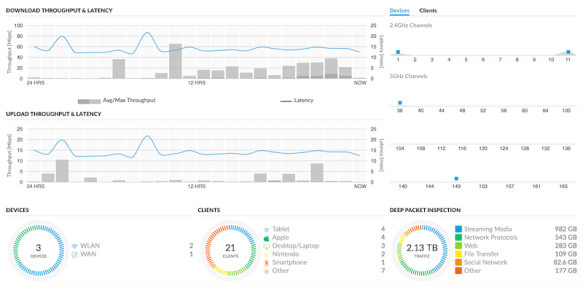
I logged into my new wireless dashboard for the first time:

It’s lovely! It gives me all the info I could want for my settings and my statistics. At a glance, I can see clients, devices, throughput, and even a quick speed test of my WAN connection. You’re probably saying to yourself right now “So what? This kind of info is tablestakes, right?” And you wouldn’t be wrong. But, the great thing about Ubiquiti is that its going to keep working after 366 days of installation without buying any additional licenses. It’s not going to start emailing me telling me it’s time to sink a few hundred dollars into keeping the lights on. That’s a big deal for me at home. Enterprises may be able to amortize license costs over the long haul but small businesses aren’t so lucky.

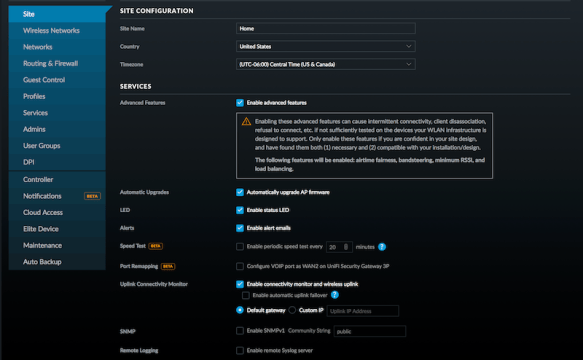
The Ubiquiti UniFi dashboard also has some other great things. Like a settings page:

Why is that such a huge deal? Well, Ubiquiti doesn’t remove functionality from the dashboard. They put it where you can find it. They make it easy to tweak settings without wishing on a star. They want you to use the wireless network the way you need to use it. If that means enabling or disabling features here and there to get things working, so be it. Those features aren’t locked away behind a support firewall that needs an act of Congress to access.

But the most ringing endorsement of Ubiquiti for me? Zero complaints in my house. Not once has anyone said anything about the wireless. It just “works”. With all the streaming and Youtube watching and online video game playing that goes on around here it’s pretty easy to saturate a network. But the Ubiquiti APs have kept up with all the things that have been thrown at them and more.

I also keep forgetting that I even have them installed. That’s a good thing. Because I don’t spend all my time tinkering with them they tend to fade away into the background of the house. Even the upstairs in-wall AP is chugging right along and serving clients with no issues. Small enough to fit into a wall box, powerful enough to feed Netflix for a whole family.


Tom’s Take

I must say that I’m very impressed by Ubiquiti. My impressions about their suitability for SMB/SME was all wrong. Thanks to Darrell I now know that Ubiquiti is capable of handling a lot of things that I considered “enterprise only” features. Even Lee Hutchinson at Are Technica is a fan of Ubiquiti at home. I also noticed that the school my kids attend installed Ubiquiti APs over the summer. It looks like Ubiquiti is making in-roads into SMB/SME and education. And it’s a very workable solution for what you need from a wireless system. Add in the fact that the software doesn’t require yearly upkeep and it makes all the sense in the world for someone that’s not ready to commit to the treadmill of constant licensing.