Unknown's avatar

About networkingnerd

Tom Hollingsworth, CCIE #29213, is a former network engineer and current organizer for Tech Field Day. Tom has been in the IT industry since 2002, and has been a nerd since he first drew breath.

Home on the Palo Alto Networks Cyber Range

You’ve probably heard many horror stories by now about the crazy interviews that companies in Silicon Valley put you though. Sure, some of the questions are downright silly. How would I know how to weigh the moon? But the most insidious are the ones designed to look like skills tests. You may have to spend an hour optimizing a bubble sort or writing some crazy code that honestly won’t have much impact on the outcome of what you’ll be doing for the company.

Practical skills tests have always been the joy and the bane of people the world over. Many disciplines require you to have a practical examination before you can be certified. Doctors are one. The Cisco CCIE is probably the most well-known in IT. But what is the test really quizzing you on? Most people will admit that the CCIE is an imperfect representation of a network at best. It’s a test designed to get people to think about networks in different ways. But what about other disciplines? What about the ones where time is even more of the essence than it was in CCIE lab?

Red Team Go!

I was at Palo Alto Networks Ignite19 this past week and I got a chance to sit down with Pamela Warren. She’s the Director of Government and Industry Initiatives at Palo Alto Networks. She and her team have built a very interesting concept that I loved to see in action. They call it the Cyber Range.

The idea is simple enough on the surface. You take a classroom setting with some workstations and some security devices racked up in the back. You have your students log into a dashboard to a sandbox environment. Then you have your instructors at the front start throwing everything they can at the students. And you see how they respond.

The idea for the Cyber Range came out of military exercises that NATO used to run for their members. They wanted to teach their cyberwarfare people how to stop sophisticated attacks and see what their skill levels were with regards to stopping the people that could do potential harm to nation state infrastructure or worse to critical military assets during a war. Palo Alto Networks get involved in helping years ago and Pamela grew the idea into something that could be offered as a class.

Cyber Range has a couple of different levels of interaction. Level 1 is basic stuff. It’s designed to teach people how to respond to incidents and stop common exploits from happening. The students play the role of a security operations team member from a fictitious company that’s having a very bad week. You learn how to see the log files, collect forensics data, and ultimately how to identify and stop attackers across a wide range of exploits.

If Level 1 is the undergrad work, Cyber Range Level 2 is postgrad in spades. You dig into some very specific and complicated exploits, some of which have only recently been discovered. During my visit the instructors were teaching everyone about the exploits used by OilRig, a persistent group of criminals that love to steal data through things like DNS exfiltration tunnels. Level 2 of the Cyber Range takes you deep down the rabbit hole to see inside specific attacks and learn how to combat them. It’s a great way to keep up with current trends in malware and exploitive behavior.

Putting Your Money Where Your Firewall Is

To me, the most impressive part of this whole endeavor is how Palo Alto Networks realizes that security isn’t just about sitting back and watching an alert screen. It’s about knowing how to recognize the signs that something isn’t right. And it’s about putting an action plan into place as soon as that happens.

We talk a lot about automation of alerts and automated incident response. But at the end of the day we still need a human being to take a look at the information and make a decision. We can winnow that decision down to a simple Yes or No with all the software in the world but we need a brain doing the hard work after the automation and data analytics pieces give you all the information they can find.

More importantly, this kind of pressure cooker testing is a great way to learn how to spot the important things without failing in reality. Sure, we’ve heard all the horror stories about CCIE candidates that typed in debug IP packet detail on core switch in production and watched it melt down. But what about watching an attacker recon your entire enterprise and start exfiltrating data. And you being unable to stop them because you either don’t recognize the attack vector or you don’t know where to find the right info to lock everything down? That’s the value of training like the Cyber Range.

The best part for me? Palo Alto Networks will bring a Cyber Range to your facility to do the experience for your group! There are details on the page above about how to set this up, but I got a great pic of everything that’s involved here (sans tables to sit at):
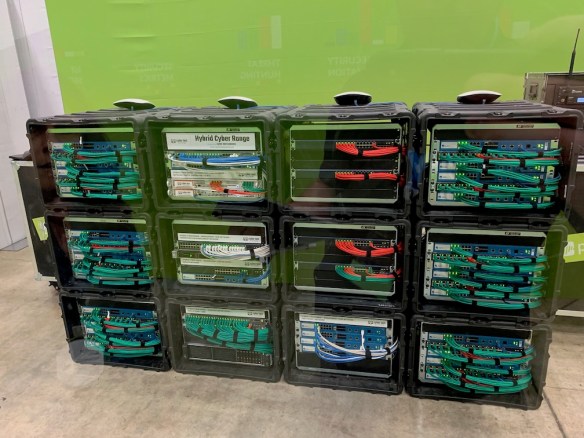
How can you turn down something like this? I would have loved to put something like this on for some of my education customers back in the day!


Tom’s Take

I really wish I would have had something like the Cyber Range for myself back when I was fighting virus outbreaks and trying to tame Conficker infections. Because having a sandbox to test myself against scripted scenarios with variations run by live people beats watching a video about how to “easily” fix a problem you may never see in that form. I applaud Palo Alto Networks for their approach to teaching security to folks and I can’t wait to see how Pamela grows the Cyber Range program!

For more information about Palo Alto Networks and Cyber Range, make sure to visit http://Paloaltonetworks.com/CyberRange/


The Good, The Bad, and The Questionable: Acquisition Activities

Sometimes I read the headlines when a company gets acquired and think to myself, “Wow, that was a great move!” Other times I can’t really speak after reading because I’m shaking my head too much about what I see to really make any kind of judgement. With that being said, I think it’s time to look at three recent acquisitions through the lens of everyone’s favorite spaghetti western.

The Good – Palo Networks Alto Buys Twistlock: This one was kind of a no-brainer to me. If you want to stay relevant in the infrastructure security space you’re going to need to have some kind of visibility into containers. If you want to stay solvent after The Cloud destroys all infrastructure spending forevermore, you’re going to need to learn how to look into containers. And when you’re ready and waiting for the collapse of the cloud, containers are probably still going to be relevant.

Joking aside, this is a great move for Palo Alto Networks. They’re getting a lot of container talent and can start looking at all kinds of ways to integrate that into their solution sets. It lets people in the organization justify the spend they have for security solutions by allowing them to work alongside the new constructs that the DevOps visionaries are using this week.

By the way, you can check out more about Palo Alto Networks June 19th at Security Field Day 2

The Bad – HPE Buys Cray?: Hands up if you were waiting for Cray to get purchased. Um, okay. Hands up if you thought Cray was actually still in business? Wow. No hands. Hmmm…

HPE has a love affair with HPC. And not just because they share a lot of letters in their acronyms. HPE has wanted to prove it has the biggest, baddest CPUs on the block. From all their press about The Machine to all the work they’ve done to build huge compute platforms, it is very clear that HPE thinks the future of HPC involves building big things. And who has the best reputation for having amazingly awesome supercomputers?

Here’s my issue with this purchase: Why does HPE think that the future of compute lies outside the cloud? Are they secretly hoping to build a supercomputer cluster and offer it for rent via a cloud service? Or are they realizing they have no hope of catching up in the cloud race and they’re just conceding that they need to position themselves in a niche market to drive revenue from the kinds of customers that can’t use the cloud for whatever reason? There isn’t a lot of room for buggy whip manufacturers any more, but I guess if you make the best one of the lot you win by default.

Given the HPE track record of questionable acquisitions (Aruba aside), I’m really taking a wait-and-see approach to this. I’d rather it be an Aruba success and not an Autonomy debacle.

The Questionable – NXP Buys Marvell Wi-Fi: This one was the head scratcher of the bunch for me. Why is this making headlines now? Well, in part because NXP is scrambling to fill out their portfolio. As mentioned in the linked article, NXP had been resting on their laurels a bit in hopes that the pending Qualcomm acquisition from last year would give them access to the pieces they needed to move into new markets like industrial and communications infrastructure.

Alas, the Qualcomm deal fell apart for political reasons. Which means people are picking up the pieces. And NXP is getting one of the pieces their desperately needed for just shy of $2 billion. But what’s the roadmap? Sure, Marvell has a lot of customers already that use their wireless and Bluetooth chipsets in a wide range of devices. But you don’t make a acquisition like that just for an existing customer base. You need synergy. You need expansion. You need to boost revenues across both companies to justify paying a huge price. So where’s the additional market going to come from? Are they going to double down on industrial and automotive connectivity? Or are they thinking about different expansion plans?


Tom’s Take

Acquisitions in the tech sector are no different from blockbuster trades in the sports world. Sometimes you cheer about a big pickup for a team and other times you boo at the crazy decisions that otherwise sane people made. But if you follow things closely enough you can usually work out which people are crazy like a fox as opposed to just plain crazy.

Will Spectrum Hunger Kill Weather Forecasting?

If you are a fan of the work we do each week with our Gestalt IT Rundown on Facebook, you probably saw a story in this week’s episode about the race for 5G spectrum causing some potential problems with weather forecasting. I didn’t have the time to dig into the details behind the story on that episode, so I wanted to take a few minutes and explain why it’s such a big deal.

First, you have to know that 5G (and many other) speeds are entirely dependent upon the amount of spectrum they can use to communicate. The more spectrum available to them, the more channels they have available to communicate. Which increases the speed they can exchange information and reduces the amount of interference between devices. Sounds simple right?

Except mobile devices aren’t the only things that are using the spectrum. We have all kinds of other devices out there that use radio waves to communicate. We’ve known for several years that there are a lot of devices in the 5 GHz spectrum used by 802.11 that interfere with wireless devices. Things like ISM radios for industrial and medical applications or government radar systems. The government has instituted many regulations in those frequency ranges to ensure that critical infrastructure isn’t interfered with.

When Nature Calls

However, sometimes you can’t regulate away interference. According to this Wired article the FCC, back in March, opened up auctions for the 24 GHz frequency band. This was over strenuous objections from NASA, NOAA, and the American Meteorological Society (AMS). Why is 24 GHz so important? Well, as it turns out, there’s a natural phenomenon that exists at that range.

Recall your kitchen microwave. How does it work? Basically, it uses microwave radiation to heat the water in the food you’re cooking. How does it do that? Turns out the natural frequency of water is 2.38 GHz. Now, thanks to the magic of math, 23.8 GHz is a multiple of that frequency. Which means that anything that broadcasts at 23.8 GHz will have issues with water, such as water in tree leaves or in water pipes.

So, why is NOAA and the AMS freaking out about auctioning off spectrum in the 23.8 GHz range? Because anything broadcasting in that range is not only going to have issues with water interference but it’s also going to look like water to sensitive equipment. That means that orbiting weather satellites that use microwaves to detect water vapor in the air that reacts to 23.8 GHz are going to encounter co-channel interference from 5G radio sources.

You might say to yourself, “So what? It’s just a little buzz, right?” Well, except that that little buzz creates interference in the data being fed into forecast prediction models. Those models are the basis for the weather forecasts we have today. And if you haven’t noticed the reliability of our long range forecasts has been steadily improving for the past 30 years or so. Today’s 7-day forecasts are almost 80% accurate, which is pretty good compared to how bad things were in the 80s, where you could only guarantee 80% accuracy from a 3-day forecast.

Guess what? NOAA says that if the 24 GHz spectrum gets auctioned off for 5G use, we could see the accuracy of our forecasting regress almost 30%, which would push our models back to where they were in the 80s. Now, for those of you that live in places that are fortunate enough to only get sun and the occasional rain shower that doesn’t sound too bad, right? Just make sure to pack an umbrella. But for those that live in places where there is a significant chance for severe weather, it’s a bit more problematic.

I live in Oklahoma. We’re right in the middle of Tornado Alley. In the spring between April 1 and June 1 my state becomes a fun place full of nasty weather that can destroy homes and cause widespread devastation. It’s never boring for sure. But in the last 30 years we’ve managed to go from being able to give people a few minutes warning about an impending tornado to being able to issue Potential Dangerous Situation (PDS) Tornado Watches up to 48 hours in advance. While a PDS Tornado Watch doesn’t mean that we’re going to get one in a specific area, it does mean that you need to be on the lookout for something that day. It gives enough warning to make sure you’re not going to get caught flat footed when things get nasty.

Yes Man

The easiest way to avoid this problem is probably the least likely to happen. The FCC needs to restrict the auction of that spectrum range identified by NOAA and NASA until it can be proven that there won’t be any interference or that the forecast accuracy isn’t going to be impacted. 5G rollouts are still far enough in the future that leaving a part of the spectrum out of the equation isn’t going to cause huge issues for the next few years. But if we have to start creating rules for how we have to change power settings for device manufacturers or create updates for fixed-position sensors and old satellites we’re going to have a lot more issues down the road than just slightly slow mobile devices.

The reason why this is hard is because an FCC focused on opening things up for corporations doesn’t care about the forecast accuracy of a farmer in Iowa. They care about money. They care about progress. And ultimately they care about looking good over saving lives. There’s no guarantee that reducing forecast accuracy will impact life saving, but the odds are that better forecasts will help people make better decisions. And ultimately, when you boil it down to the actual choices, the appearance is that the FCC is picking money over lives. And that’s a pretty easy choice for most people to make.


Tom’s Take

If I’m a bit passionate about weather tech, it’s because I live in one of the most weather-active places on the planet. The National Severe Storms Laboratory and the National Weather Center are both about 5-6 miles from my house. I see the use of this tech every day. And I know that it saves lives. It’s saved lives for years for people that need to know

You Don’t Want To Be A Rock Star

When I say “rock star”, you probably have all kinds of images that pop up in your head. Private planes, penthouse suites, grand stages, and wheelbarrows full of money are probably on that list somewhere. Maybe you’re a purist and you think of someone dedicated to the craft of entertaining the masses and trying to claw their way to fame one note at a time. But I’m also sure in both of those cases you also think about the negative aspects of being a rock star. Like ego. And lack of humility. I want to touch on some of that as it pertains to our jobs and our involvement in the community.

Great Like Elvis. Without The Tassels.

The rock star mentality at work is easy to come by. Perhaps you’re very good at what you do. You may even be the best at your company or even at the collection of companies that are your competitors. You’re the best senior architect there is. You know the products and the protocols and you can implement a complex project with your eyes closed. That’s how people start looking at you. Larger than life. The best. One of a kind.

And that should be the end of it, right? That person is the best and that’s that. Unless you start believing their words more than you should. Unless you think that you really are the best and that there is no one better than you. It’s a mentality I see all the time, especially in sports or in places with small sample sizes. A kid that knows how to pitch a baseball well in the 8th grade thinks he’s the king of the baseball diamond. Until he sees someone that pitches way better than he does or he gets to high school and realizes he’s just the average of everyone else around him.

IT creates rock stars because we have knowledge that no one else does. We also fix issues for users, which creates visibility. No one talks about how accountants or HR reps are rock stars. Even though they have knowledge or solve problems for their users. It’s because IT is so practical. Anyone can do math, right? Or fill out a form? IT is hard. You have to know computer stuff. You have to learn acronyms. It’s like being a doctor or a lawyer. And both of those groups produce their own rock stars. So too does IT. And it causes the exact same issues that it does in the medical or legal fields.

Rock stars know it all. They don’t want to listen because they’ve got this. They can figure this out and they don’t need you telling them what to do. Why call support? I’ll just look up the problem. Go do something else and stop bothering them because they’re not going to fail here. This is what they do. Any of that sound familiar? If you’re on the team with a rock star it probably does.

Trade This Life For Fortune And Fame

The rock star mentality extends into the wider community too. People get vaulted into high esteem for their contributions. They get recognized for what they do and held up as an example for others. For most that are thrust into that rarified air of community fame that’s the end of it. But some take it as an invitation to take more.

You’ve seen them. The prima donnas. The people that take the inch of fame they’ve been given and stretch it into a mile. The people who try to manipulate and cajole the rest of their fellows into outlandish things for no other reason than they can do it. Again, if you’ve ever been around people like this in a community you know how toxic and terrible it can be.

So how do you combat that? How can you keep rock stars from getting an ego the size of Alaska? How do you prevent someone from getting an attitude and poisoning a community? How do you keep things together and on-track?

Sadly, the answer doesn’t lie much in preventing the rock star behavior in the first place. Because it’s going to happen no matter what you do. People that do good things are going to be held above others. It’s the nature of recognition to want to reward people’s outstanding behavior and showcase the attributes and traits that they want to see in others. And that can often cause people to take those traits and run with them or assume that you want to showcase all of their traits, even the bad ones.

Cut My Hair and Change My Name

The key that I’ve found most successful in my time working with communities is to highlight those traits and refer them back to the collective to remind the person they are part of a greater whole. If you praise someone for organizing an event, tell them, “Thank you for giving the community a place to meet and talk.” You’re still holding them up for doing a good job, but you’re referencing the community. For the workplace rock stars, try something like “Thanks for working all night to ensure that the entire office had email service this morning.” It reinforces that Herculean tasks like that have a real payoff but that the work is still referenced to a greater whole and not just the ego of someone working to prove a point.

You have to positively identify the traits you like and tie them to greater success in order to select them out and prevent someone from highlighting negative traits that could be detrimental. It’s easy for some that’s good at organization to take it too far and start running everything for a community without being asked. It’s also likely that someone that has a wealth of knowledge at their fingertips could start interjecting into conversations without permission because they think they know the answer. But if you reinforce the value of those traits to the community you’ll make the members think more carefully about their contributions as they exercise them.


Tom’s Take

I’m no expert on community building. Or rock stars for that matter. I’m just a person that does what I can to help others succeed. And I think that’s the mark of a real servant leader and perfect community mentor. The rock star mentality is the polar opposite of this. Rock stars want personal fame at the expense of the group. Servant leaders want group success even if it means not being recognized. Some of the best people in the community I know prefer to hide in the background and avoid the “fame” of being recognized. We would do well to follow their examples when the time comes for us to step on stage.

IT And The Exception Mentality

If you work in IT, you probably have a lot in common with other IT people. You work long hours. You have the attitude that every problem can be fixed. You understand technology well enough to know how processes and systems work. It’s fairly common in our line of work because the best IT people tend to think logically and want to solve issues. But there’s something else that I see a lot in IT people. We tend to focus on the exceptions to the rules.

Odd Thing Out

A perfectly good example of this is automation. We’ve slowly been building toward a future when software and scripting does the menial work of network administration and engineering. We’ve invested dollars and hours into making interfaces into systems that allow us to repeat tasks over and over again without intervention. We see it in other areas, like paperwork processing and auto manufacturing. There are those in IT, especially in networking, that resist that change.

If you pin them down on it, sometimes the answers are cut and dried. Loss of job, immaturity of software, and even unfamiliarity with programming are common replies. However, I’ve also heard a more common response growing from people: What happens when the automation screws up? What happens when a system accidentally upgrades things when it shouldn’t? Or a system disappears because it was left out of the scripts?

The exception position is a very interesting one to me. In part, it stems from the fact that IT people are problem solvers. This is especially true if you’ve ever worked in support or troubleshooting. You only see things that don’t work correctly. Whether it’s software misconfiguration, hardware failure, or cosmic rays, there is always something that is acting screwy and it’s your job to fix it. So the systems that you see on a regular basis aren’t working right. They aren’t following the perfect order that they should be. Those issues are the exceptions.

And when you take someone that sees the exceptions all day long and tries to fix them, you start looking for the exceptions everywhere in everything. Instead of wondering how a queue moves properly at the grocery store you instead start looking at why people aren’t putting things on the conveyor belt properly. You start asking whey someone brought 17 items into the 15-items-or-less line. You see all the problems. And you start trying to solve the issues instead of letting the process work.

Let’s step back to our automation example. What happens when you put the wrong upgrade image on a device? Was there a control in place to prevent you from doing that? Did you go around it because you didn’t think it was the right way to do something? I’ve heard stories of the upgrade process not validating images because they couldn’t handle the errors if the image didn’t match the platform. So the process relies on a person to validate the image is correct in the first place. And that much human interaction in a system will still cause issues. Because people make mistakes.

Outlook on Failure

But whether or not a script is going to make an error doesn’t affect the way we look at them and worry. For IT people that are too focused on the details, the errors are the important part. They tend to forget the process. They don’t see the 99% of devices that were properly upgraded by the program. Instead, they only focus on the 1% that weren’t. They’re only interested in being proved right by their suspicions. Because they only see failed systems they need the validation that something didn’t go right.

This isn’t to say that focusing on the details is a bad thing. It’s almost necessary for a troubleshooter. You can’t figure out where a process breaks if you don’t understand every piece of it. But IT people need to understand the big picture too. We’re not automating a process because we want to create exceptions. We’re doing it because we want to reduce stress and prevent common errors. That doesn’t mean that all errors are going to go away overnight. But it does mean that we can prevent common ones from occurring.

That also means that the need for expert IT people to handle the exceptions is even more important. Because if we can handle the easy problems, like VLAN typos or putting in the wrong subnet range, you can better believe that the real problems are going to take a really smart person to figure out! That means the real value of an expert troubleshooter is using the details to figure out this exception. So instead of worrying about why something might go wrong, you can instead turn your attention to figuring out this new puzzle.


Tom’s Take

I know how hard it is to avoid focusing on exceptions because I’m one of the people that is constantly looking for them. What happens if this redistribution crashes everything? What happens if this switch isn’t ready for the upgrade? What happens if this one iPad can’t connect to the wireless. But I realize that the Brave New World of IT automation needs people that can focus on the exceptions. However, we need to focus on them after they happen instead of worrying about them before they occur.

Cisco’s Catalyst for Change

You’ve probably heard by now of the big launch of Cisco’s new 802.11ax (neé Wi-Fi 6) portfolio of devices. Cisco did a special roundtable with a group of influencers from the community called Just The Tech. Here’s a video from that event covering the APs that were released, the 9120:

Fred always does a great job of explaining the technical bits behind the APs. But one thing that caught my eye here is the name of the AP – Catalyst. Cisco has been using Aironet for their AP line since they purchased Aironet Wireless Communications back in 1999. The name was practically synonymous with wireless technologies for many people in the industry that worked exclusively with Cisco technologies.

So, is the name change something we should be concerned about?

A Rose Is a Rose Is An AP

Cisco moving toward a unified naming convention for their edge solutions makes a lot of sense. Ten years ago, wireless was still primarily 802.11g-based with 802.11n still a few months away from being proposed and ratified. Connectivity hadn’t quite yet reached the ubiquitous levels of wireless that we see today. The iPhone was only about to be on its third revision.

Cisco Catalyst devices were still the primary method of getting users connected to the network. Even laptop users hunted for Ethernet ports everywhere instead of just connecting to wireless. Ethernet was more reliable and faster than 54Mbps (at best) and fighting contention with all the other devices around. Catalyst stood for reliability.

In the time since, wireless has become the new edge device connectivity. No longer do we hunt for Ethernet ports unless we have a specific need for one. Laptops don’t come with dedicated wired networking options any longer. In 2019, wireless is king. And Aironet is the wireless name that Cisco has built. So why the change?

In short, because edge connectivity isn’t wired versus wireless any longer. Instead, it’s unified. Whether it was because of the idiotic decisions made by Gartner to required wired switching for their wireless Magic Quadrant (TM) or because people stopped thinking about Ethernet except to power wireless access points, the fact is that the edge no longer has wires. For Cisco, this means that Catalyst switches aren’t the edge any longer. So the name doesn’t have the same power as it once did.

However, the Aironet name has also lost its luster. Why? Because Aironet is a remnant of Cisco’s pre-controller AP past. The line of APs that most people are likely using in their office right now aren’t from the Aironet heritage. Instead, they are based on technology acquired by Cisco from Airespace that Cisco bought in 2005 to add controller-based technology to their portfolio. And, aside from references to Airespace in the code of the Wireless LAN Controllers (WLC), the line never really had a brand like Catalyst or Aironet.

Today, Cisco has started the move away from using Airespace technology in their controllers. As this video from 2018 shows, Cisco has begun to migrate their controller OS to a more modern platform instead of relying on modifying the old Airespace code again and again. This means that development going forward should be more rapid and less resultant on the whims of keeping everything running properly on a codebase over a decade old.

Branding New

So, that explains the reasons why Cisco might want to refresh everything. But why the naming of the APs? Why not just rely on Aironet and keep that branding going forward?

Well, because they want to make end users believe that the network is the same no matter if it’s wired or wireless. They want buyers to believe that Catalyst stands for edge connectivity, no matter where that edge might be. And, unless they really screw up and start making us think these new APs are switches they’ll be able to pull off this branding exercise fairly well.

That’s because users have stopped caring about the wired versus wireless debate. Instead, they only care about speed and reliability. 802.11ax will help on both fronts, and Cisco wants to capitalize on that by making these new APs feel different. And the best way to do that is by rebranding them.

Wireless professionals don’t care about the name. Most of the time they just refer to the model number anyway. And while Cisco’s model numbering strategies seem to be getting a bit crowded in the 9000-level of things, this makes a lot of sense to distance themselves from their past. The old 802.11ac APs are still very viable and will likely be useful all they way until the end of their life. But when the time comes to pull them out, you’ll be retiring Aironet and Airespace along with them. Even if you didn’t realize those were the branding names of those APs.


Tom’s Take

Branding matters. Or it doesn’t. Either you love the name of the thing you’ve been using or you couldn’t care less. Whether it’s an iPhone or a car or an access point, everything has a name and a number attached to it. Cisco has decided, for better or worse, to unify the edge under the Catalyst name. Maybe it will stick and reduce confusion with customers. Maybe it will be hated enough that they’ll bring back the Aironet name in a couple of cycles to “get back to basics” as it were. But for now, the catalyst for change at Cisco leads to a unified edge solution.

Increasing Entropy with Crypto4A

Have you ever thought about the increasing disorder in your life? Sure, it may seem like things are constantly getting crazier every time you turn around, but did you know that entropy is always increasing in the universe? It’s a Law of Thermodynamics!

The idea that organized systems want to fall into disorder isn’t too strange when you think about it. Maintaining order takes a lot of effort and disorder is pretty easy to accomplish by just giving up. Anyone with a teenager knows that the amount of disorder that can be accomplished in a bedroom is pretty impressive.

One place where we don’t actually see a lot of disorder is in the computing realm. Computers are based on the idea that there is order and rationality in everything that we do. This is so prevalent that finding a way to be random is actually pretty hard. Computer programmers have tried a number of ways to come up with random number generators that take a variety of inputs into the formula and come up with something that looks sufficiently random. For most people just wanting the system to guess a number between 1 and 100 it’s not too bad. But when it comes to really, really large numbers like the ones used in cryptography, those pseudorandom numbers aren’t good enough.

This All Looks So Familiar…

One of the reasons for this comes down to good old fashioned efficiency. In the old days computers programmers could rely on people to generate pseudorandom input. By sampling mouse clicks or delay between computer keyboard keystrokes you could easily come up with a number that looks nice and random. However, we’ve taken people out of the loop now. Thanks to the cloud and automation and any one of a number of new ways to reduce human input we’ve managed to remove mouse clicks and keystrokes.

That’s fine for running scripts and programs. It’s even good for building things at a huge scale. But it’s really bad when you need something that looks relatively random. And it’s really, really bad when your program relies on that randomness to keep you secure. Kind of like key generation in Public Key Cryptography (PKI).

A group of security researchers working for the National Institute of Standards and Technology (NIST) found out a few years ago that public keys were starting to collide at greater rates than random chance. The study, conducted in 2012, found that 5% of HTTPS and 10% of SSH public keys were duplicates. A collision in a hashing algorithm is when two inputs produce the same output, which renders that hashing function broken. In PKI, having a two different inputs output the same public key is really bad, because it could lead to key collisions that impact a variety of service.

What caused it? As it turns out, lack of orderly disorder. Because automation and non-human interaction have led to other pseudorandom inputs being used in key generation it appeared to the researchers that the same inputs were being used all over the place. That meant that a lot of the public keys that were being generated were being done in such as way as to make collisions more likely. When you look at how many things are relying on automated sources to generate keys it can be quite scary. Think about a smart lightbulb or other IoT device that’s trying to generate pseudorandom input from a CPU that’s just big enough to turn things on. Now imagine that CPU multiplied by the number of smart lightbulbs out there. Not a pleasant thought, is it?

Disorder In The Court

This fascinating discussion came from an interview I had with Bruno Couillard, the President and CTO of Crypto4A. Crypto4A is a company that provides Entropy-as-a-Service. What exactly does that mean?

Crypto4A has an appliance they call QAOS. QAOS is designed to give you the best possible disorder that you can get. It does this the old fashioned way. Instead of trying to use software as a Random Number Generator (RNG) QAOS instead uses hardware sources to generate entropy for their RNG. This includes a quantum RNG, which produces high quality disorder that’s difficult to fake any other way.

QAOS is designed to feed software with entropy to generate randomness sufficient to prevent PKI public key collisions. The software developers can follow the NIST guidelines on EaaS to have the program call an entropy source. QAOS, acting as that entropy source, will seed the RNG on the target system with good randomness and allow it to generate good keys. This could also be configured in the kernel of the OS to call a system like QAOS on boot and start the seed value with a good amount of random entropy in the case of old programs that can’t be modified to call anything other than a system-based RNG source like /dev/random/.


Tom’s Take

The NIST guidelines around EaaS are constantly evolving, but the idea that companies are already racing to fill the void that has been created by insufficient randomness in cryptography is telling. When you think about nth the number of devices that are going to be using PKI for secure communications, the need for something like Crypto4A QAOS is pretty clear. If we are going to rely on automated systems to run our daily lives, we need to have the resources in place to ensure they have a solid foundation of randomness to build on.

The Confluence of SD-WAN and Microsegmentation

If you had to pick two really hot topics in the networking space right now, you’d be hard-pressed to find two more discussed than SD-WAN and microsegmentation. SD-WAN is the former “king of the hill” in the network engineering. I can remember having more conversations about SD-WAN in the last couple of years than anything else. But as the SD-WAN market has started to consolidate and iterate, a new challenger has arrived. Microsegmentation is the word of the day.

However, I think that SD-WAN and microsegmentation are quickly heading toward a merger of ideas and solutions. There are a lot of commonalities between the two technologies that make a lot of sense running together.

SD-WAN isn’t just about packet switching and routing any longer. That’s because networking people have quickly learned that packet-by-packet processing of traffic is inefficient. All of our older network analysis devices could only see things one IP packet at a time. But the new wave of devices think in terms of flows. They can analyze a stream of packets to figure out what’s going on. And what generates those flows?

Applications.

The key to the new wave of SD-WAN technology isn’t some kind of magic method of nailing up VPNs between branch offices. It’s not about adding new connectivity types. Instead, it’s about application identification. App identification is how SD-WAN does QoS now. The move to using app markers means a more holistic method of treating application traffic properly.

SD-WAN has significant value in application handling. I recently chatted with Kumar Ramachandran of CloudGenix and he echoed that part of the reason why they’ve been seeing growth and recently received a Series C funding round was because of what they’re doing with applications. The battle of MPLS versus broadband has already been fought. The value isn’t going to come from edge boxes unless there is software that can help differentiate the solutions.

Segmenting Your Traffic

So, what does this have to do with microsegmentation? If you’ve been following that market, you already know that the answer is the application. Microsegmentation doesn’t work on a packet-by-packet basis either. It needs to see all the traffic flows from an application to figure out what is needed and what isn’t. Platforms that do this kind of work are big on figuring out which protocols should be talking to which hosts and shutting everything else down to secure that communication.

Microsegmentation is growing in the cloud world for sure. I’ve seen and talked to people from companies like Guardicore, Illumio, ShieldX, and Edgewise in recent months. Each of them has a slightly different approach to doing microsegmentation. But they all look at the same basic approach form the start. The application is the basic building block of their technology.

With the growth of microsegmentation in the cloud market to help ensure traffic flows between hosts and sites is secured, it’s a no-brainer that the next big SD-WAN platform needs to add this functionality to their solution. I say this because it’s not that big of a leap to take the existing SD-WAN application analytics software that optimizes traffic flows over links and change it to restrict traffic flow with policy support.

For SD-WAN vendors, it’s another hedge against the inexorable march of traffic into the cloud. There are only so many Direct Connect analogs that you can build before Amazon decides to put you out of business. But, if you can integrate the security aspect of application analytics into your platform you can make your solution very sticky. Because that functionality is critical to meeting audit goals and ensuring compliance. And you’re going to wish you had it when the auditors come calling.


Tom’s Take

I don’t think the current generation of SD-WAN providers are quite ready to implement microsegmentation in their platforms. But I really wouldn’t be surprised to see it in the next revision of solutions. I also wonder if that means that some of the companies that have already purchased SD-WAN companies are going to look at that functionality. Perhaps it will be VMware building NSX microsegmentaiton on top of VeloCloud. Or maybe Cisco will include some of their microsegmentation from ACI in Viptela. They’re going to need to look at that strongly because once companies that are still on their own figure it out they’re going to be the go-to solution for companies looking to provide a good, secure migration path to the cloud. And all those roads lead to an SD-WAN device with microsegmentation capabilities.

802.11ax Is NOT A Wireless Switch

802.11ax is fast approaching. Though not 100% ratified by the IEEE, the spec is at the point where most manufacturers and vendors are going to support what’s current as the “final” version for now. While the spec for what marketing people like to call Wi-Fi 6 is not likely to change, that doesn’t mean that the ramp up to get people to buy it is showing any signs of starting off slow. One of the biggest problems I see right now is the decision by some major AP manufacturers to call 802.11ax a “wireless switch”.

Complex Duplex

In case you had any doubts, 802.11ax is NOT a switch.1 But the answer to why that is takes some explanation. It all starts with the network. More specifically, with Ethernet.

Ethernet is a broadcast medium. Packets are launched into the network and it is hoped that the packet finds the destination. All nodes on the network listen and, if the packet isn’t destined for them they discard it. This is the nature of the broadcast. If multiple stations try to talk at once, the packets collide and no one hears anything. That’s why Ethernet developed a collision detection  system called CSMA/CD.

Switches solved this problem by segmenting the collision domain to a single port. Now, the only communications between the stations would be in the event that the switch couldn’t find the proper port to forward a packet. In every other case, the switch finds where the packet is meant to be sent and forwards it to that location. It prevents collisions by ensuring that no two stations can transmit at any one time except to the switch in the middle. This also allows communications to be full-duplex, meaning the stations can send and receive at the same time.

Wireless is a different medium. The AP still speaks Ethernet, and there is a bridge between the Ethernet interface and the radios on the other side. But the radio interfaces work differently than Ethernet. Firstly, they are half-duplex only. That means that they have to send traffic or listen to receive traffic but they can’t do both at the same time. Wireless also uses a different version of collision detection called CSMA/CA, where the last A stands for “avoidance”. Because of the half-duplex nature of wireless, clients have a complex process to make sure the frequency is clear before transmitting. They have to check whether or not other wireless clients are talking and if the ambient RF is within the proper thresholds. After all those checks are confirmed, then the client transmits.

Because of the half-duplex wireless connection and the need for stations to have permission to send, some people have said that wireless is a lot like an Ethernet hub, which is pretty accurate. All stations and APs exist in the contention (collision) domain. Aside from the contention algorithm, there’s nothing to stop the stations from talking all at once. And for the entire life of 802.11 so far, it’s worked. 802.11ac started to introduce more features designed to let APs send frames to multiple stations at the same time. That’s what’s called Multi-user Multi-In, Multi-out (MU-MIMO).In theory, it could allow for full-duplex transmissions by allowing a client to send on one antenna and receive on another, but utilizing client radios in this way has impacts on other things.

Switching It Up

Enter 802.11ax. The Wi-Fi 6 feature that has most people excited is Orthogonal Frequency-Division Multiple Access (OFDMA). Simply put, OFDMA allows the clients and APs to not use the entire transmission channel for sending data. It can be sliced up into sub-channels that can be used for low-bandwidth applications to reserve time to talk to the AP. Combined with enhanced MU-MIMO support in 802.11ax, the idea is that clients can talk directly to the AP and allocate a specific sub-channel resource unit all to themselves.

To the marketing people in the room, this sounds just like a switch. Reserved channels, single station access, right? Except it is still not a switch. The AP is still a bridge between two media types for one thing, but more importantly the transmission medium still hasn’t magically become full-duplex. Stations may get around this with some kind of trickery, but they still need to wait for the all-clear to send data. Remember that all stations and APs still hear all the transmissions. It’s still a broadcast medium at the most basic. No amount of software configuration is going to fix that. And for the networking people in the room that might be saying “so what?”, remember when Cisco tried to sell us on the idea that StackWise was capable of 40Gbps of throughput because it could send in both directions on the StackWise ring at once? Remember when you started screaming “THAT’S NOT HOW BANDWIDTH WORKS!!!” That’s what this is, basically. Smoke and mirrors and ignoring the underlying physical layer constraints.

In fact, if you read the above resources, you’re going to find a lot of caveats at the end about support for protocols coming up and not being in the first version of the spec. That’s exactly what happened with 802.11ac. The promise of “gigabit Wi-Fi” took a couple of years and the MU-MIMO enhancements everyone was trumpeting never fully materialized. Just like all technology, the really good stuff was deferred to the next release.

To make sure that both sides are heard, it is rightly pointed out by wireless professionals like Sam Clements (@Samuel_Clements) that 802.11ax is the most “switch-like” so far, with multiple dynamic collision domains. However, in the immortal words of Tyler Durden, “Sticking feathers up your butt doesn’t make you a chicken.” The switch moniker is still a marketing construct and doesn’t hold any water in reality aside from a comparison to a somewhat similar technology. The operation of wireless APs may be hub-like or switch-like, but these devices are not either of those types of devices.

CPU Bound and Determined

The other issue that I see that prevents this from becoming a switch is the CPU on the AP becoming a point of contention. In a traditional Ethernet switch, the forwarding hardware is a specialized ASIC that is optimized to forward packets super fast. It does this with some trickery, including cut through for packets and trusting the incoming CRC. When packets bounce up to the CPU to be process-switched, it bogs the entire system down terribly. That’s why most networking texts will tell you to avoid process switching at all costs.

Now apply those lessons to wireless. All this protocol enhancement is now causing the CPU to have to do extra duty to work on time-slicing and sub-channel optimization. And remember that those CPUs are operating on 18-28 watts of power right now. Maybe the newer APs will get over 30 watts with new PoE options, but that means those CPUs are still going to be eating a lot of power to process all this extra software work. Even adding dedicated processing power to the AP isn’t going to fix things in the long run. That might be one of the reasons why Cisco has been pushing enhanced PoE in the run-up to their big 802.11ax launch at the end of April.


Tom’s Take

Let me say it again for the cheap seats: 802.11ax is NOT a wireless switch! The physical layer technology that 802.11 is built on won’t be switchable any time soon. 802.11ax has given us a lot of enhancements in the protocol and there is a lot to be excited about, like OFDMA, BSS coloring, and TWT. But, like the decision to over-simplify the marketing name, the idea of calling it a wireless switch just to give people a frame of reference so they buy more of them is just silly. It’s disingenuous and sounds more like a snake oil salesman than honest technology marketing. Rather than trying to trick the users with cute sounding terms, how about we keep the discussion honest and discuss the pros and cons of the technology?

Special thanks to my friends in the wireless space for proofreading this post and correcting my errors in technology:


  1. The title was kind of a spoiler ↩︎

OpenConfig and Wi-Fi – The Winning Combo

Wireless isn’t easy by any stretch of the imagination. Most people fixate on the spectrum analysis part of the equation when they think about how hard wireless is. But there are many other moving parts in the whole architecture that make it difficult to manage and maintain. Not the least of which is how the devices talk to each other.

This week at Aruba Atmosphere 2019, I had the opportunity to moderate a panel of wireless and security experts for Mobility Field Day Exclusive. It was a fun discussion, as you can see from the above video. As the moderator, I didn’t really get a change to explain my thoughts on OpenConfig, but I figured now would be a great time to jump in with some color on my side of the conversation.

Yin and YANG

One of the most exciting ideas behind OpenConfig for wireless people should be the common YANG data models. This means that you can use NETCONF to have a common programming language against specific YANG models. That means no more fumbling around to remember esoteric commands. You just tell the system what you want it to do and the rest is easy.

As outlined in the video, this has a huge impact on trying to keep configurations standard across different types of APs. Imagine the nightmare of trying to configure power settings or radio thresholds with 3 or more AP manufacturers in your building. Now, imagine being able to do it across your building or dozens of others with a few simple commands and some programming know-how? Doesn’t seem quite as daunting now, does it? It’s easy because you’re speaking the same language across all those APs.

So, what if you don’t care, like Richard McIntosh (@802TopHat) points out? What if your vendor doesn’t support OpenConfig? Well, that’s fine. Not everyone has to support it today. But if you work on building a model system and setting up the automation and API interfaces, are you just going to throw it out the window during your refresh cycle because the new APs that you’re buying don’t support OpenConfig? Or is the need for OpenConfig going to be a huge driver for you and part of the selection process.

Companies are motived by their customers. If you tell them that they need to develop OpenConfig for their devices, they will do it because they run the risk of losing sales. And if the industry moves toward adopting a standard northbound API, what happens to those that get left out in the cold after a few missed refresh cycles? I bet they’ll quickly realize the lost opportunities more than cover the development costs of supporting OpenConfig.

Telemetry Short-Cuts

The other big piece of OpenConfig and wireless is telemetry. SNMP-based monitoring doesn’t work well in today’s wired networks and it’s downright broken in wireless. There are too many variables out there in the average deployment to be able to account for them with anything other than telemetry. Many vendors are starting to adopt the idea of streaming the data directly to collectors via a subscription model. OpenConfig makes this easy with the ability to subscribe to the data you want using OpenConfig models.

From a manufacturer perspective, this is a huge chance to get into telemetry and offer it as a differentiator. If you’re not tied to using an archaic platform with proprietary data models you can embrace OpenConfig and deliver a modern telemetry infrastructure that users will want to adopt. And if the radio performance is the same between all of the offerings, telemetry could be a the piece that tips the scales in your favor.

Single-Vendor Isn’t So Single

I remember doing a deployment for a wireless system once that was “state of the art” when we put it in. I had my challenges and made everything work well and the customer was happy. Until a month later when the supporting vendor announced they were buying a competing company and using that company as their offering going forward. My customer was upset, naturally, but so was I. I spent a lot of time working out how to build and deploy that system and now it was on the scrap heap.

It’s even worse when you keep buying from single vendors and suddenly find that the new products don’t quite conform to the same syntax or capabilities. Maybe the new model of router or AP has a new board that is 95% compatible with the old one, except of that one command you use all the time.

OpenConfig can change that. Because the capabilities of the device have to be outlined you can easily figure out if there are any missing parts and pieces. You can also be sure that your provisioning scripts and programs aren’t going to break or cause problems because a critical command was deprecated. And since you can keep the models around for old hardware as well as new you aren’t going to be duplicating efforts everywhere trying to keep things moving between the platforms.


Tom’s Take

OpenConfig is a great idea for any system that has distributed components. Even if it never takes off in Wi-Fi, it will force the manufacturers to do a bit better job of documenting their capabilities and making them easy to consume via API. And anything that exposes more functionality to be consumed by automation and programmability is a good thing indeed.