
Unknown's avatar

About networkingnerd

Tom Hollingsworth, CCIE #29213, is a former network engineer and current organizer for Tech Field Day. Tom has been in the IT industry since 2002, and has been a nerd since he first drew breath.

Is LISP The Answer to Multihoming?

LISPMultihoming

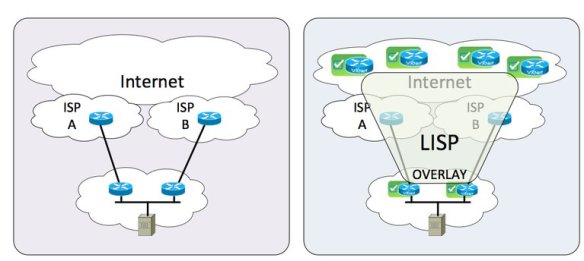
One of the biggest use cases for Locator/Identifier Separation Protocol (LISP) that will benefit small and medium enterprises is the ability to multihome to different service providers without needing to run Border Gateway Protocol (BGP). It’s the answer to a difficult and costly problem. But is it really the best solution?

Current SMB users may find themselves in a situation where they can’t run BGP. Perhaps their upstream ISP blocks the ability to establish a connection. In many cases, business class service is required with additional fees necessary to multihome. In order to take full advantage of independent links to different ISPs, two (or more) NAT configurations are required to send and receive packets correctly across the balanced connections. While technically feasible, it’s a mess to troubleshoot. It also doesn’t scale when multiple egress connections are configured. And more often that not, the configuration to make everything work correctly exists on a single router in the network, eliminating the advantages of multihoming.

LISP seeks to solve this by using a mapping database to send packets to the correct Ingress Tunnel Router (ITR) without the need for BGP. The diagram of a LISP packet looks a lot like an overlay. That’s because it is in many ways. The LISP packets are tunneled from an Egress Tunnel Router (ETR) to a LISP speaking decapsulation point. Depending on the deployment policies of LISP for a given ISP, it could be the next hop router on a connection. It could also be a router several hops upstream. LISP is capable of operating over non-LISP speaking connections, but it does eventually need decapsulation.

Where’s the Achille’s Heel in this design? LISP may solve the issue without BGP, but it does introduce the need for the LISP session to terminate on a single device (or perhaps a group of devices). This creates issues in the event the link goes down and the backup link needs to be brought online. That tunnel state won’t be preserved across the failover. It’s also a gamble to assume your ISP will support LISP. Many large ISPs should give you options to terminate LISP connections. But what about the smaller ISP that services many SMB companies? Does the local telephone company have the technical ability to configure a LISP connection? Let along making it redundant and highly available?

Right Tool For The Job

I think back to a lesson my father taught me about tools. He told me, “Son, you can use a screwdriver as a chisel if you try hard enough. But you’re better off spending the money to buy a chisel.” The argument against using BGP to multihome ISP connections has always come down to cost. I’ve gotten into heated discussions with people that always come back to the expense of upgrading to a business-class connection to run BGP or ensure availability. NAT may allow you to multihome across two residential cable modems, but why do you need 99.999% uptime across those two if you’re not willing to pay for it?

LISP solves one issue only to introduce more. I see LISP being misused the same way NAT has been. LISP was proposed by David Meyer to solve the exploding IPv4 routing table and the specter of an out-of-control IPv6 routing table.  While multihoming is certainly another function that it can serve, I don’t think that was Meyer’s original idea.  BGP might not be perfect, but it’s what we’ve got.  We’ve been using it for a while and it seems to get the job done.  LISP isn’t going to replace BGP by a long shot.  All you have to do it look at LISP ALternate Topology (LISP-ALT), which was the first iteration of the mapping database before the current LISP-TREE.  Guess what LISP-ALT used for mapping?  That’s right, BGP.


Tom’s Take

LISP multihoming for IPv4 or IPv6 in SMEs isn’t going to fix the problem we have today with trying to create redundancy from consumer-grade connections.  It is another overlay that will create some complexity and eventually not be adopted because there are still enough people out there that are willing to forgo an interesting idea simply because it came from Cisco.  IPv6 multihoming can be fixed at the protocol level.  Tuning router advertisements or configuring routes at the edge with BGP will get the job done, even if it isn’t as elegant as LISP.  Using the right tool for the right job is the way to make multihoming happen.

Are Exit Strategies Hurting Innovation?

MSP-exit-strategy-300x225

During the Think Tank that I participated in at Dell World, the topic of conversation turned to startups.  Specifically, how do startups drive innovation?  As I listened to the folks around the table like Justin Warren (@JPWarren) and Bob Plankers (@Plankers) talk about the advantages that startups enjoy when it comes to agility, I started to wonder if some startups today are hurting the process more than they are helping it.

Exit Strategy

The entire point of creating a business is to make money.  You do that by creating a product that you can sell to someone.  It doesn’t have to be a runaway success.  So long as you structure the business correctly you can make money for a good long while.  The key is that you must structure the business to pay off in the long run.

Startups seem to have this idea that the most important part of the equation is to build something quickly and get it onto the market.  The business comes second.  That only works if you are playing a very short game.  The bad decisions you make in the foundation of your business will come back to bite you down the road.

Startups that don’t have a business plan only have one other option – an exit strategy.  In far too many cases, the business plan for a startup is to build something so awesome that another larger company is going to want to buy them.  As I’ve said before talking about innovation, buying your way into a new product line does work to a point.  For the large vendor, it is dependent on the available cash on hand.  For the startup, the idea is that you need to have enough capital on hand to survive long enough to be bought.

Looking For A Buyer For The End Of The World

There’s nothing more awkward than a company that’s obviously seeking a buyout from a large vendor that hasn’t received it yet.  I look at the example of Violin Memory.  Violin makes flash storage cards for servers to accelerate caching for workloads.  They were a strategic parter of HP for a long time.  Eventually, HP decided to build those cards themselves rather than rely on Violin as a supplier.  This put Violin in a very difficult position.  In hindsight, I’m sure that Violin wanted to be bought by HP and become a division inside the server organization.  Instead, they were forced to look elsewhere for funds.  They chose to file an initial public offering (IPO) that hit the initial target.  After that, the parts of the business that weren’t so great started dragging the stock price down, angering the investors to the point where executives are starting to leave and lawsuits look likely.

Where did Violin go wrong?  If they had built a solid business in the first place they might have been able to keep selling along even though HP had decided not to buy them.  They might have been able to stay afloat long enough to find another buyer or file an IPO when they have a more stable situation with earnings or expenses.  They might have been able to make money instead of losing it hand over fist.

The Standoff

The idea that startups are just looking for a payday from a larger company is hurting innovation.  Startups just want to get the idea formed enough to get some interest from buyers.  Who cares if we can make it work in reality?  We just have to get someone to bite on the prototype.  That means that development is key.  Things like payroll and operating expenses come second.

In return, companies are becoming skittish of buying a startup.  Why take a chance on a company that may not be around next week?  I’d rather spend my time on internal innovation.  Or, better yet buy that failed startup for pennies on the dollar when they liquidate due to inability to manage a business.  Larger companies are going to shy away from startups that want millions (or billions) for ideas.  That lengthens the time that it takes to innovate, either because companies must invest time internally or spend countless hours negotiating purchases of intellectual property.


Tom’s Take

Obviously, not all startups have these issues.  Look at companies like Nimble Storage.  They are a business first.  They make money.  They don’t have out-of-control expenses.  They filed for an IPO because it was the right time, not because they needed more money to keep the lights on.  That’s the key to proper innovation.  Build a company that just happens to make something.  Don’t build a product that just happens to have a business around it.  That means you can continue to improve and innovate on your product as time goes on.  It means you don’t have to look for an exit strategy as soon as the funding starts running dry.  Then your strategy looks more like a plan.

Get a CCIE, Don’t Be A CCIE

Getting a CCIE is considered to be the pinnacle of a person’s networking career.  It is the culmination of hundreds (if not thousands) of hours of study.  People pass the lab and celebrate with the relief that can only come from completing a milestone in life.  But it’s important for newly-minted CCIEs to realize that getting your number doesn’t mean you obtained hubris with it.

A great article that talks about something similar comes from Hunter Walk.  It’s Fine To Get an MBA, But Don’t Be An MBA shows many of the things I’m talking about.  With the MBA, it’s a bit different.  The MBA is a pure book learning environment with very little practical experience.  The CCIE is a totally practical exam that requires demonstration of knowledge.  However, both of these things share something in common.  People get very hung up on the knowledge from the certification and forget to keep an open mind about other ideas.  In essence, someone that is “Being a CCIE” is using their certification incorrectly.

Here are some points:

Get A CCIE to further your knowledge about networking and learn how system work. Don’t Be A CCIE and think that you’ve learned everything there is to know about networking.

Get A CCIE and work with your coworkers and peers to solve problems.  Don’t Be A CCIE and ignore everyone because you think you’re smarter than they are.

Get A CCIE and contribute to the community with knowledge and experience.  Don’t Be A CCIE and refuse to share because you can’t be bothered.

Get A CCIE and help your company to take on bigger and better networking projects.  Don’t Be A CCIE and assume you are indispensable.

Get A CCIE because you want to.  Don’t Be A CCIE and assume you’ve always been one.

A CCIE doesn’t change who you are.  It just serves to show people how dedicated you can be.  Don’t let five little numbers turn you into a bully or a know-it-all.  Realize you still have much to learn.  Understand that your position is now at the forefront of where networking is going, not where it has been.  When you know that being a CCIE is more than just a piece of paper, then you will have truly gotten your CCIE.

CCIE Version 5: Out With The Old

Cisco announced this week that they are upgrading the venerable CCIE certification to version five.  It’s been about three years since Cisco last refreshed the exam and several thousand people have gotten their digits.  However, technology marches on.  Cisco talked to several subject matter experts (SMEs) and decided that some changes were in order.  Here are a few of the ones that I found the most interesting.

CCIEv5 Lab Schedule

Time Is On My Side

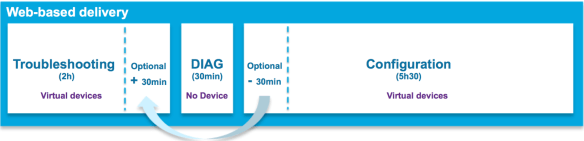
The v5 lab exam has two pacing changes that reflect reality a bit better.  The first is the ability to take some extra time on the troubleshooting section.  One of my biggest peeves about the TS section was the hard 2-hour time limit.  One of my failing attempts had me right on the verge of solving an issue when the time limit slammed shut on me.  If I only had five more minutes, I could have solved that problem.  Now, I can take those five minutes.

The TS section has an available 30 minute overflow window that can be used to extend your time.  Be aware that time has to come from somewhere, since the overall exam is still eight hours.  You’re borrowing time from the configuration section.  Be sure you aren’t doing yourself a disservice at the beginning.  In many cases, the candidates know the lab config cold.  It’s the troubleshooting the need a little more time with.  This is a welcome change in my eyes.

Diagnostics

The biggest addition is the new 30-minute Diagnostic section.  Rather than focusing on problem solving, this section is more about problem determination.  There’s no CLI.  Only a set of artifacts from a system with a problem: emails, log files, etc.  The idea is that the CCIE candidate should be an expert at figuring out what is wrong, not just how to fix it.  This is more in line with the troubleshooting sections in the Voice and Security labs.  Parsing log files for errors is a much larger part of my time than implementing routing.  Teaching candidates what to look for will prevent problems in the future with newly minted CCIEs that can diagnose issues in front of customers.

Some are wondering if the Diagnostic section is going to be the new “weed out” addition, like the Open Ended Questions (OEQs) from v3 and early v4.  I see the Diagnostic section as an attempt to temper the CCIE with more real world needs.  While the exam has never been a test of ideal design, knowing how to fix a non-ideal design when problems occur is important.  Knowing how to find out what’s screwed up is the first step.  It’s high time people learned how to do that.

Be Careful What You Wish For

The CCIE v5 is seeing a lot of technology changes.  The written exam is getting a new section, Network Principles.  This serves to refocus candidates away from Cisco specific solutions and more toward making sure they are experts in networking.  There’s a lot of opportunity to reinforce networking here and not idle trivia about config minimums and maximums.  Let’s hope this pays off.

The content of the written is also being updated.  Cisco is going to make sure candidates know the difference between IOS and IOS XE.  Cisco Express Forwarding is going to get a focus, as is ISIS (again).  Given that ISIS is important in TRILL this could be an indication of where FabricPath development is headed.  The written is also getting more IPv6 topics.  I’ll cover IPv6 in just a bit.

The biggest change in content is the complete removal of frame relay.  It’s been banished to the same pile as ATM and ISDN.  No written, no lab.  In it’s place, we get Dynamic Multipoint VPN (DMVPN).  I’ve talked about why Frame Relay is on the lab before.  People still complained about it.  Now, you get your wish.  DMVPN with OSPF serves the same purpose as Frame Relay with OSPF.  It’s all about Stupid Router Tricks.  Using OSPF with DMVPN requires use of mGRE, which is a Non-Broadcast Multi-Access (NBMA) network.  Just like Frame Relay.  The fact that almost every guide today recommends you use EIGRP with DMVPN should tell you how hard it is to do.  And now you’re forced to use OSPF to simulate NBMA instead of Frame Relay.  Hope all you candidates are happy now.

vCCIE

The lab is also 100% virtual now.  No physical equipment in either the TS or lab config sections.  This is a big change.  Cisco wants to reduce the amount of equipment that needs to be physically present to build a lab.  They also want to be able to offer the lab in more places than San Jose and RTP.  Now, with everything being software, they could offer the lab at any secured PearsonVUE testing center.  They’ve tried in the past, but the access requirements caused some disaster.  Now, it’s all delivered in a browser window.  This will make remote labs possible.  I can see a huge expansion of the testing sites around the time of the launch.

This also means that hardware-specific questions are out.  Like layer 2 QoS on switches.  The last reason to have a physical switch (WRR and SRR queueing) is gone.  Now, all you are going to get quizzed on is software functionality.  Which probably means the loss of a few easy points.  With the removal of Frame Relay and L2 QoS, I bet that services section of the lab is going to be really fun now.

IPv6 Is Real

Now, for my favorite part.  The JNCIE has had a robust IPv6 section for years.  All routing protocols need to be configured for IPv4 and IPv6.  The CCIE has always had a separate IPv6 section.  Not any more.  Going forward in version 5, all routing tasks will be configured for v4 and v6.  Given that RIPng has been retired to the written exam only (finally), it’s a safe bet that you’re going to love working with OSPFv3 and EIGRP for IPv6.

I think it’s great that Cisco has finally caught up to the reality of the world.  If CCIEs are well versed in IPv6, we should start seeing adoption numbers rise significantly.  Ensuring that engineers know to configure v4 and v6 simultaneously means dual stack is going to be the preferred transition method.  The only IPv6-related thing that worries me is the inclusion of an item on the written exam: IPv6 Network Address Translation.  You all know I’m a huge fan of NAT.  Especially NAT66, which is what I’ve been told will be the tested knowledge.

Um, why?!? 

You’ve removed RIPng to the trivia section.  You collapsed multicast into the main routing portions.  You’re moving forward with IPv6 and making it a critical topic on the test.  And now you’re dredging up NAT?!? We don’t NAT IPv6.  Especially to another IPv6 address.  Unique Local Addresses (ULA) is about the only thing I could see using NAT66.  Ed Horley (@EHorley) thinks it’s a bad idea.  Ivan Pepelnjak (@IOSHints) doesn’t think fondly of it either, but admits it may have a use in SMBs.  And you want CCIEs and enterprise network engineers to understand it?  Why not use LISP instead?  Or maybe a better network design for enterprises that doesn’t need NAT66?  Next time you need an IPv6 SME to tell you how bad this idea is, call me.  I’ve got a list of people.


Tom’s Take

I’m glad to see the CCIE update.  Getting rid of Frame Relay and adding more IPv6 is a great thing.  I’m curious to see how the Diagnostic section will play out.  The flexible time for the TS section is way overdue.  The CCIE v5 looks to be pretty solid on paper.  People are going to start complaining about DMVPN.  Or the lack of SDN-related content.  Or the fact that EIGRP is still tested.  But overall, this update should carry the CCIE far enough into the future that we’ll see CCIE 60,000 before it’s refreshed again.

More CCIE v5 Coverage:

Bob McCouch (@BobMcCouch) – Some Thoughts on CCIE R&S v5

Anthony Burke (@Pandom_) – Cisco CCIE v5

Daniel Dib (@DanielDibSWE) – RS v5 – My Thoughts

INE – CCIE R&S Version 5 Updates Now Official

IPExpert – The CCIE Routing and Switching (R&S) 5.0 Lab Is FINALLY Here!

SDN and Appeal of Abstraction

MeadowSunrise

During the recent Storage Field Day 4, I was listening to Howard Marks (@DeepStorageNet) talking about storage Quality of Service (QoS).  He was describing something he wanted his storage array to do that sounded suspiciously similar to strict priority queuing (or Low Latency Queuing if you speak Cisco).

As I explained how we solved the problem of allowing a specific amount of priority for a given packet stream, it finally dawned on me how software defined networking had the ability to increase productivity in organizations.  It’s not via automation, although that is a very alluring feature.  It’s because SDN can act as a language interpreter for those that don’t speak the right syntax.

It’s said that a picture is worth a thousand words.  As true as that is I would also argue that a few words can paint a thousand pictures.  It’s all in the interpretation.  If I told you I wanted a picture of a “meadow at sunrise”, you’ve probably come up with an idea in your head of what that would look like.  And the odds are good that it’s totally different from my picture.  These simple words are open to interpretation on a wide scale.  Now, let’s constrain the pictures a bit based on the recipient.  Someone that lives in France would have a totally different idea of a meadow than someone that lives in San Francisco.  Each view is totally valid, but the construction of the picture will be dictated by the thought process of the person.  They each know what the meadow looks like, they’re just a bit different.

Painting with SDN

Extend this metaphor to software.  Specifically to networking and storage.  I have a concept that I need to implement.  User A needs guaranteed access to a specific resource for a period of time that should not exceed a given threshold.  A phone may need priority queue access to a slow WAN link.  A backup client may need guaranteed access to a target server without overrunning the link bandwidth.  Two totally different use cases that can be described in the same general language.  Today, I would need two people to implement those instructions on different systems.  Programming a storage array is much different that programming a router or a switch.

But the abstraction of SDN allows my to input a given command and have it executed on dissimilar hardware via automation and integration.  The SDN management system doesn’t care that I want LLQ on a router or strict priority QoS on a backup client.  It knows that there should be an implementation of the given commands on a set of attached systems.  It’s up to the API integration with the systems to determine the syntax needed to execute the commands.  As a network engineer, I don’t need to know the commands to create the QoS construct on the storage array.  I just need to know what I want to accomplish.  The software takes care of the rest.

SDN could usher in a new age for natural language programming.  I often hear my friends in the CCIE community complaining that people only learn the commands to make something happen.  They ignore the basic concepts behind why something works the way it does.  If I can’t explain the concept to my 8-year old son, I don’t know it very well.  I can’t abstract it to the point where a simpler mind can understand.  What if that simple mind had the capability to translate those instructions into actionable programming?  What if I just had to state what I wanted to do?  “Ensure that all traffic on Link A is given priority treatment, except if it is for the backup server.”  The system can create API calls to program the access control lists and storage arrays to take care of all that without needing to fire up a CLI session or a browser.

This is going to require a lot of programming on the front end.  The management system needs to be able to interpret keywords in the instruction set to pick out the right execution items.  Then the system needs to know where to dispatch the commands to make them land on the right APIs.  In the case of the above example, the system would need to know to send two different sets of commands – one to the storage array to provide metered access during backup windows and another set to the networking gear to ensure the right QoS policies were enforced during the given time window.  Oh, and you’re going to want to have the system go back and clean up those ACLs when it’s time for production hours to start again.


Tom’s Take

This isn’t going to be easy by any means.  But adding all the value into the front end management system means that any other system attached on the backend via API is going to benefit.  I’d rather be doing the work in the right places as opposed to spending all our time on the backend and neglecting the interface to the whole system.  Engineers are notorious for writing terrible GUIs.  Let’s take the time to abstract the bad things away and instead make something that’s really going to change the way we program systems.

Troubleshooting and Triage

When troubleshooting any major issue, people tend to feel a bit lost at first.  There is the crowd that wants to fix the immediate problem.  Then there is the group that wants to look at everything going on and address the root problem no matter how long it takes.  The key to troubleshooting is to realize how each of these approaches has their place and how they are both right and wrong at the same time.

The first approach is triage.  Think of it like a medical emergency room.  Their purpose is to fix the immediate symptoms and stabilize the patient.  Especially critical is the stabilization part.  You can’t fix a network that has bouncing routes or intermittent bridging loops.  Often the true root cause of the problem is buried beneath a pile of other symptoms.  Only when the immediate issues are resolved does the real problem surface.  Learning how to triage problems is a very important troubleshooting skill.  It gives a quick response while allowing the worst of the issue to be dealt with.

It’s important to remember that triage is just a quick fix.  Emergency rooms would never triage a patient without following up with a more in-depth consult or return visit.  Triage fails when engineers leave the patch in place and consider it the final solution.  Most times that I’ve seen this approach have been due to time constraints.  Rather than spending the time to research and test to find the true problem people are content to make the majority of the symptoms go away no matter how briefly.  It happens all the time.

“Just make it work for now.  We’ll fix it later.”

“If we configure it like this, will it stay up until the end of the quarter?”

“We don’t have time to debate this.  The CEO wants things up NOW!”

True in-depth troubleshooting is what happens when we have time and a clear way to solve the deeper root issues.  Deep troubleshooting figures out that the cause of a route flap is actually a bad Ethernet cable.  That’s not something you can easily determine from a quick analysis.  It takes time and effort to figure out.  When I worked on an inbound desktop help desk, we tested for CD-ROM failures by flipping the IDE cables back and forth on the IDE ports on the motherboard.  In part, this was to test to ensure the drive failure followed the switch of cables and ports.  In addition, it also tested the cable and port to make sure the dead drive wasn’t masking a bigger failure.  It took more time to do it properly but we never ran into an issue where a good CD-ROM drive was returned and the problem persisted.

In-depth troubleshooting can fail when there are so many problems masking the real issue that you start trying to fix the wrong problem.  Tunnel vision is easy to get when working on a problem.  If you tunnel in on an ancillary symptom and fail to fix the root cause you aren’t really doing much better than simple triage.  Just like a doctor, you need to ensure that you are treating the real problem under all the symptoms.  Remember not to be sidetracked by each small issue you uncover.  Fix them and keep digging for the real issue underneath it all.


Tom’s Take

I’ve had a lot of people comment that I was able to figure out problems quickly.  They also liked how I was able to “fix” things quickly.  That’s because I was very good at triage.  In my job as a VAR engineer, I didn’t really have time to dig deeper into the issue to uncover root cause.  Thankfully, a couple of the guys that I worked with were the exact opposite of me.  They loved digging into problems and pulling everything apart until they found the real issue.  They were labeled “slow” or “methodical” by some.  I loved working with them because the complemented my style perfectly.  I fix the big issues and make people happy.  They fix the underlying cause and keep them that way.  Just like ER doctors and specialists.  We both have our place.  It’s important to realize which is more important at a given time.

The OpenFlow Longbow

carck_longbow

The label of disruption seems to be thrown around quite a bit.  I’ve heard tablets being called the disruptive technology when it comes to PCs.  I’ve also heard people talking about software defined networking (SDN) as the disruptive technology to the way that we’ve been doing networking for the last decade.  Nowhere is that more true than with OpenFlow.  But what does this disruption mean?  Aren’t we still essentially forwarding packets the same way we have in the past?  To get a frame of reference, let’s look at one of my favorite disruptive technologies – the longbow.

Who Are Yew?

The Welsh yew longbow had been a staple of the English military as far back as 600AD.  The recurve shape of the bow provided for a faster, longer arrow flight than the shorter bows used by foot soldiers and mounted calvary.  The wood was especially important, as the yew tree was only really found in abundance in Wales.  Longbows existed in one form or another in many armies in Europe, but the Welsh bow was the only one that was feared.

The advantage was never more apparent than during the Hundred Years War between England and France.  The longbow was deployed as a mid-range artillery to harass advancing troops.  There are questions about whether or not the arrows were able to pierce the plate armor used by knights at the time, but the results of archery corps can’t be denied.  Especially in the Battle of Agincourt.  The English used longbows to slow the advance of French forces in armor, tiring them out as they crossed the field and holding them at bay until the heavier foot soldiers of the English army could be repositioned to take the advancing enemy apart.  Agincourt was a win for the English and fives years later, the war was over.

The longbow proved itself to be a very disruptive technology.  Not because it killed soldiers better or faster than a mace or broadsword.  It was disruptive because it changed the way generals composed their armies.  Instead of relying on heavy assault troops in armor to punch a hole in the enemy lines, the longbow forced a soldier to become more mobile with less armor to be able to cross the range of the bow much more quickly and close to a range where the technology advantage was negated.  Bowmen were at a distinct advantage at point-blank range.  Armies grew more mobile all the way up to the point where a new technology disrupted the reign of the longbow: gunpowder.  Once musketeers became more prevalent, they replaced the role traditionally held by the longbow archer.

Disrupting the Flow

How does this history lesson apply to OpenFlow?  OpenFlow is poised to disrupt networking in the same way as the longbow forced people to take a new look at their armies.  OpenFlow takes something we know about and turns it on its head.  It gives us much more control over how a switch forwards packets.  It also makes us ask questions about how we build our networks.

Questions about big core switches, spine-and-leaf topologies, and the intelligence of edge devices all become very pertinent in an OpenFlow design.  Should I put a larger switch at the edge since it’s going to be doing a lot of heavy lifting?  Should I use a fabric in place of a three-tier design?  Will my controller allow me to use different interconnects to ensure high-speed traffic flows east and west in the data center?

OpenFlow is taking over some vendors offerings.  NEC and HP have already committed to OpenFlow designs.  Even companies that haven’t really embraced OpenFlow have decided to offer it rather than dismiss it.  Arista and Cisco are offering new switches that have support for OpenFlow, even if that support may not extend to more proprietary enhancements right now.  Just like the longbow, OpenFlow is forcing the opposition to reconfigure the way they fight the battle.  They may not like it.  They may even say in private that they’re just doing it to mollify a part of the customer base looking for specific points in an proposal.  But they are still dedicating time and effort to OpenFlow all the same.


Tom’s Take

Disruption happens all the time.  We don’t use cell phones in bags hardwired into our vehicles any more.  Our computers are the size of a broom closet and run off of punch cards.  Just like weapons in the ancient world, whoever comes up with a more effective way of winning battles enjoys a distinct advantage for a time.  Eventually, something comes along that disrupts the disruption.  OpenFlow is currently the king of the SDN battlefield.  It holds that title by virtue of how many people are racing to interoperate with it.  Eventually, it will be dethroned just as the longbow was.  They key will be recognizing the next new thing first and using it to your advantage.  And arming your archers with it.

50 Shades of IT

IMG_1008

Lots of things in IT sound much naughtier than they really are.  We’re constantly inserting and removing things.  We have to get down on our hands and knees from time to time.  We even give orders that must be followed.  Needless to say, there’s a fair amount of giggling that goes on sometimes.

Enter mainstream literature.  Specifically, the 50 Shades series by E. L. James.  It’s been a bit of hit from what I understand.  The subject matter is a bit more…mature than the usual paranormal romance or magical coming of age story.  It’s about control and domination and other such heady things.  I’ve never actually read it myself.  But based on the number of people I see on airplanes secreting one of the three volumes under a scarf or blanket, I dare say that many have read it.

These two worlds collide from time to time when someone says something rather saucy in regards to enterprise IT.  On Twitter, I’ve seen hashtags for #50ShadesOfNetworking and #50ShadesOfStorage.  They always elicit a good laugh or two.  In keeping with that idea (and to avoid polluting Twitter streams), I present my list for 50 Shades of IT: The Series.

Note: None of these are inherently bad.  That being said, I’m not going to be responsible for where you mind ends up taking it.

Networking

“He bound her ports together in a lovely Etherchannel.”

“She was confident enough to display all her assets in public cloud.”

“The hosting contract defined our relationship.”

“He was pleased everyone’s router recognized him as VRRP Master.”

“He watched as she flapped the tunnel over and over again.”

Security

“His packet inspection was the deepest she’d ever seen.”

“He had to do what he was told.  After all, she was root.”

“He injected a packet flow into her secure tunnel.”

“She wondered if the hackers would be able to penetrate her unsecured backdoor.”

Storage

“Quiesce my snapshot.”

“She gasped as he hot swapped the drive into her array.”

“She mounted his disk quickly.”

“I need you to format my partition.”

“I like big LUNs.”


Tom’s Take

If you need me, I’ll be in my bunk.

Will Dell Buy Aerohive?

DELL-Aerohive-Logo

One rumor I keep hearing about in the industry involves a certain buzzing wireless vendor and the world’s largest startup.  Acquisitions happen all the time.  Rumors of them are even more frequent.  But the more I thought about it, the more I realized this may be good for everyone.

Dell wants to own the stack from top to bottom.  In the past, they have had to partner with printer companies (Lexmark) and networking companies (Brocade and Juniper) to deliver parts of the infrastructure they couldn’t provide themselves.  In the case of printers, Dell found a way to build them on their own.  That reduced their reliance on Lexmark.  In the networking world, Dell shocked everyone by going outside their OEM relationship and buying Force10.  I’ve talked before about why the Force10 pickup was a better deal in the long run than Brocade.

Dell’s Desires

Dell needs specific pieces of the puzzle.  They don’t want to be encumbered with ancillary products that will need to be jettisoned later.  Buying Brocade would have required unwinding a huge fibre channel business.  In much the same way, I don’t think Dell will end up buying their current wireless OEM, Aruba Networks.  Aruba has decided to branch out past the doing simple wireless and moved into wired network switches and security and identity management programs like ClearPass.  Dell doesn’t want any of that.  They already have an issue integrating the Force10 networking expertise into the PowerConnect line.  I’ve been told in the past the FTOS will eventually come to PowerConnect, but that has yet to happen.  Integrating purchased companies isn’t easier.  That becomes exponentially harder the more product lines you have to integrate.

Aruba is too expensive for Dell to buy outright.  Michael Dell spent a huge chunk of his cash to get his company back from the shareholders.  He’s going to put it on a diet pretty soon.  I would expect to see a few product lines slimmed down or outright dropped.  That makes it tough to justify buying so much from another company.  Dell needs a scalpel, not a sledgehammer.

Aerohive’s Aspirations

Aerohive is the best target for Dell.  They are clearly fighting for third place in the wireless market behind Cisco and Aruba.  Aerohive has never been shy about punching above their weight.  They have the mentality of a scrappy terrier that won’t go down without a fight.  But, they are getting pressure to expand quickly across their product lines.  They took their time releasing an 802.11ac access point.  Their switching offering hasn’t caught on in the same way that of Aruba or Meraki (now a division of Cisco).

Aerohive is on the verge of going public.  I’m sure the infusion of cash would allow them to pay off some early investors as well as fund more development for 802.11ac Phase 2 gear and maybe a firewall offering.  The risk comes when you look at what happened to Ruckus Wireless shortly after their IPO.  While they did recover, it didn’t look very good for a company that supposedly did have a unique claim, their antenna design.  Aerohive is a cloud management platform like many others in the market.  You have to wonder how investors would view them.  Scrappy doesn’t sell stock.

Aerohive is now fighting in the new Gartner “Wired and Wireless Access” magic quadrant, which is an absolute disaster for everyone.  An analyst firm thinks that wireless is just like wired, so naturally it makes sense for AP vendors to start making switches, right?  Except the people who are really brilliant when it comes to wireless, like Matthew Gast and Victor Shtrom couldn’t care less about bits on copper.  They’ve spent the better part of their careers solving the RF problems in the world.  And now someone tells them that interference problems aren’t that much different than spanning tree?  I would have long since planted my head permanently onto my desk if I’d been told that in their position.

Aerohive gains a huge backer in the fight if Dell acquires them.  They get the name to go up against Cisco/Meraki.  The gain R&D from Dell with expertise around cloud management.  They can start developing integration with HiveManager and Dell’s SMB extensive product line.  Switch supply becomes a thing of the past.  Their entire software offering fits well with what Dell is trying to accomplish from a device independence perspective with regards to customers.

Tom’s Take

I don’t put much stock in random rumors.  But I’ve heard this one come up enough to make me ask some tough questions.  There are people in both camps that think it will happen sometime in 2014.  Dell has to get the books sorted out and figure out who’s in charge of buying things.  Aerohive has to see if there’s enough juice left in the market to IPO and not look foolish.  Maybe Dell needs to run the numbers and find out what it would take to cash out Aerohive’s investors and add the company to the growing Empire of Round Rock.  A little buzz for the World’s Largest Startup couldn’t hurt.

Don’t Just Curate, Cultivate

Sprout

Content curation is all the rage.  The rank and file folks online tend to get overwhelmed by the amount of information spewing from the firehose.  For the most part, they don’t want to know every little detail about everything.  They want salient points about a topic or how an article fits into the bigger picture.  This is the calling card of a content curator.  They organize the chaos and attempt to attach meaning and context to things.  It does work well for some applications.

Hall of Books

One of the biggest issues that I have with curation is that it lends itself to collection only.  I picture curated content like a giant library or study full of old books.  All that information has been amassed and cataloged somehow.  The curator has probably read each of those books once or perhaps twice before.  They can recall the important points when prompted.  But why does all that information need to be stored in a building the size of a warehouse?  Why do we feel the need to collect all that data and then leave it at rest, whether it be in a library or in a list of blogs or sources?

Content curation feels lazy.  I can create a list of bloggers that I want you to follow.  I want you to know that I read these blogs and think the writers make excellent points.  But how often should you go back and look at those lists again?  One of the greatest tragedies of blogging is the number of dead, dying, or abandoned blogs out there.  Part of my job is to evaluate potential delegates for Tech Field Day based on a number of factors.  One of my yardsticks is blogging.

Seeing a blog that has very infrequent posts makes me a bit sad.  That person obviously had something to say at some point.  As time wore on, the amount of things to say drifted away.  Maybe real life got in the way.  Perhaps a new shiny object caught their attention.  The worst is a blog that has only had two posts in the last year that both start with, “I know I haven’t blogged here in a while, but that’s going to change…”

Reaping What You Sow

I think the key to keeping that from happening is to avoid static collection of content.  We need to cultivate that content just like a farmer would cultivate a field.  Care and feeding of writers and bloggers is very important.  Writers can be encouraged by leaving comments or by sharing articles that they have written.  Engaging them in discussion to feed new ideas is also a great way to keep the fire of inspiration burning.

One of the other important ways to keep content creators from getting stale is to look at your blogrolls and lists of followed blogs and move things around from time to time.  I know for a fact that many people don’t scroll very far down the list to find blogs to read.  The further up the list you are, the more likely people are to take the time to read what you have to say.  The key for those wanting to share great writers is to put them up higher on the list.  Too often a blog will be buried toward the bottom of a list and not get the kind of attention the writer needs to keep going.  More likely is a blog at the top of a list that hasn’t posted in weeks or months.

Everyone should do their part to cultivate content creators.  Don’t just settle for putting them on a list and calling it a day.  Revisit those lists frequently to be sure that the people on them are still producing.  For some it will be easy.  There are people like Ivan Pepelnjak and Greg Ferro that are born writers.  Others might need some encouragement.  If you see a good writer than has fallen off in the posting department lately, all it might take is a new comment on a recent post or a mention on Twitter/Facebook/Google+ asking how the writing is coming along.  Just putting the thought in their mind is often enough to get the creative juices flowing again.


Tom’s Take

I’m going to do my part as well.  I’m going to try to keep up with my blogroll a bit more often.  I’m going to make sure people are writing and showing everyone just how great they are.  Perhaps it’s a bit selfish on my part.  The more writers and creators there are the more choices I have to pick from when it’s time to pick new Field Day delegates.  Deep down inside, I just want more writers.  I want to spend as much time as possible every morning reading great articles and adding to the greater body of knowledge.  If that means  I need to spend more time looking after those same writers, then I guess it’s time for me to be a writer farmer.