Unknown's avatar

About networkingnerd

Tom Hollingsworth, CCIE #29213, is a former network engineer and current organizer for Tech Field Day. Tom has been in the IT industry since 2002, and has been a nerd since he first drew breath.

Aerohive – Wireless Field Day 2

We kicked off Wireless Field Day 2 with a visit to the Aerohive offices.  Since my first interaction with these folks, I’ve been very impressed by their dedication to the wireless industry.  I had to laugh when I realized how many Aerohivers I follow on Twitter.  They’ve also done a great job of keeping in touch with me during the past year to let me know about new product launches, such as the BR100 branch router.

Aerohive was waiting for us with a smile and a handshake from the very start.  The never-shy Devin Akin (@DevinAkin) welcomed us all to the Aerohive offices while we descended on the breakfast we were going to need to fuel the Tech Field Day “Firehose of Information”™.  I must take a second here to highlight one of the best puns I’ve seen in a very long time:

#Brownies? Well played, Jeni. Well played.

Once settled with food, we were invited to take a shot of the Devinator’s favorite liquid substance, Diet Peach Tea Snapple, which I should probably start referring to as “Aerohive Kool-Aid”  Our first presenter was Matthew Gast (@MatthewSGast), one of the chief archtects at Aerohive as well as a member of the 802.11 committees that drive wireless standards.  His presentation was very technical, diving deep into concerns about 802.11n and issues that are already being seen with throughput on controllers today.  This segued into the future of Wi-Fi, 802.11ac Gigabit Wireless, and the impact that Aerohive’s design philosophies have on the increased capabilities that wireless devices will have in the near term once 802.11ac sees wider adoption.  Matthew really cranked up the Nerd Meter on this one, and I thank him for letting us get our hands dirty with all the talk about layer 1 discussion, which is probably one of the most neglected layers of the OSI model when it comes right down to it.

After Matthew finished melting my brain, we moved on to the newest Aerohive product, the BR100 branch router.  Aerohive had given me a briefing on this device before, so much of it was a review.  I like the form factor of the BR100, especially for remote offices or teleworkers that don’t need anything more fancy that simple connectivity.  My personal use case would be something along the lines of having it available for trips to allow secure wireless connectivity in my hotel room without the need to rely on the hotel’s often-unstable wireless solution.  We went through some more particulars of the device, mostly around the new options enabled by the additions to the Aerohive HiveManager interface that allow networking configuration on top of the wireless configuration options.

As the live demo was readied, we got hit with our Aerohive Oprah Moment – chocolate covered bacon!  I must say that this was a first for me as a bacon fan.  The hog parts were high quality, and the chocolate added a sweet compliment.  I doubt it’s something I’m going to eat every day though.  Thanks Aerohive for giving me the opportunity (and the extra cholesterol).  We also got an Aerohive backpack filled with goodies.  An Aerohive water bottle, notepad and pen set, and…a BR100!  Yes, I now have a little Aerohive branch router to try out.  I plan on putting this little guy through his paces.  The unexpected Oprah moments really help me get a chance to evaluate the equipment.

The 15 minute, 15 branch deployment demo from an iPad was pretty impressive.  The ability to have no restriction on the configuration device interface is a welcome change from the Java/Flash/client restrictions from other vendors, and it appears to be becoming a drive in the industry to provide that kind of flexibility.  A word of caution, however, to those thinking of doing live demos at presentations or other events:  Be sure to keep your audience engaged and riveted on the demo.  It’s very easy to lose your audience with demos.  Not that Aerohive did, but I noticed we were getting a little restless toward the end.

The restlessness seemed to trigger the Devinator’s Oprah Gland again, because he announced that we had reached the end of the presentation and that it was time to award the coveted Gregor Awards.  We didn’t know it, but Gregor Vučajnk (@GregorVucajnk) had been monitoring the #WFD2 hashtag during the Aerohive presentation and handed out the awards for the best tweeters.  Somehow, I managed to win!  I guess the extra snark I packed in my carry-on helped my out on this one.  I got an Aerohive AP 350 for causing so much trouble.  This impressive piece of hardware is going to get a great workout both at home and the office, as I now have my own “hive” of APs to test and play around with.

If you’d like to learn more, you can check out their website at http://www.aerohive.com.  You can also follow them on Twitter as @Aerohive.

Tom’s Take

Overall, Aerohive was a great start to Wireless Field Day 2.  I enjoyed the interaction with Matthew Gast and the ability to pick his brain about the nerd knobs of wireless.  While the information about the BR100 wasn’t necessarily new, I think this speaks volumes about Aerohive’s ability to keep bloggers and technical people in the loop about new developments and keep their products fresh in our minds.  While the Oprah Moments are never a required part of Tech Field Day, it’s nice to see that companies like Aerohive believe so strongly in their products that they are willing to put a few out there in the hands of people that will pick them apart and tell you the good and bad without reservation.  That’s a lot of confidence, folks.  Something that I’ve never sensed that Aerohive is short on.  Keep up the good work, Aerohive.  And keep drinking that Diet Peach Tea Snapple Aerohive Kool-Aid.

Wireless Field Day 2 Disclaimer

Aerohive was a sponsor of Wireless Field Day 2.  As such, they were responsible for covering a portion of my travel and lodging expenses while attending Wireless Field Day 2. In addition, they provided me with an Aerohive backpack, water bottle, pen and notepad set, an Aerohive BR100 evaluation unit, and an Aerohive AP 350 evaluation unit.  They did not ask for, nor where they promised any kind of consideration in the writing of this review/analysis.  The opinions and analysis provided within are my own and any errors or omissions are mine and mine alone.

CCIE Numbers Skyrocket – Red Alert?

Congratulations to Chris Martin, CCIE# 34310, according to IPExpert’s Successful Candidates page.  Thanks to Windows Calculator and my non-binary math skills, that means we’ve had 5,000 new numbers since my pass back in June.  That’s not counting the repeat passes that keep the same number.  The new numbers have been skyrocketing in the last 3 months, shooting up over 2,000 since Blake Krone passed his lab at the end of October.

I’ve heard a lot of interesting theories in the past couple of weeks about why the numbers are shooting up so quickly.  Some attribute it to the official Cisco 360 training program churning out candidates left and right.  There are also those that believe there is something hinkey is going on with the numbering scheme.  Is Cisco pre-allocating numbers to each lab seat every day and then discarding them if the lab isn’t passed?  Are they counting by even numbers now?  Is the numbering now logarithmic?  Add in the recent troubles that Marc La Porte has had with Cisco and his unofficial CCIE Hall of Fame Webpage and the conspiracy theories started spreading like wildfire.  Why is Cisco trying to take down the page?  Are they trying to hide something?

After listening to all the theories and rumors and some of the more outlandish theories that I didn’t even bother to put down, I keep thinking back to a conversation that I had with Terry Slattery back at Cisco Live 2011.  Being the fanboy that I am, I had a chance to ask Terry what he thought about the CCIE numbers climbing ever so higher.  Some of the thoughts he shared with me were rather intriguing and got me to thinking about things in a light that I hadn’t really considered before.  With the acceleration of the new numbers being spit out, I think now more than ever that Terry might have been on to something.

Let’s say for the sake of argument that there isn’t anything funny going on with the numbers.  Let’s also assume that there isn’t rampant cheating going on, as some have suggested to me.  That means that we have a large number of people taking and passing the lab.  But we aren’t hearing about them.  They don’t have blogs or spend time on Groupstudy or post success stories on LinkedIn.  There isn’t any information about them out there.  Almost as if they didn’t really have a big presence on the Internet.  As if they weren’t really looking to market their skills to others and instead were either already at jobs that required the CCIE or had one lined up and ready to go.  Where would such a thing be possible?

China.

Stop and think about it for a minute.  According to Cisco, China is seeing explosive growth in networking, everything ranging from power systems to survellience.  They’re ramping up and infrastructure that’s going to need to support over a billion people all looking to get connected somehow.  China is leading the way in deploying IPv6 internally as a way to alleviate the exhaustion of IPv4 addresses.  Ask yourself then: Where are they getting all these engineers?  How many of your friends and colleagues are flying to China to work on these massive projects?  I’m guessing hardly any.  Why’s that?  Where is the supply coming from to meet this massive demand?

I believe that there are sponsored learning facilities inside China that are essentially functioning like advanced technology vocational technology centers in an effort to train a workforce to go out and assume the roles needed to build and maintain advanced networking and computing infrastructures.  That way, they don’t need to sort out all the details of arranging for a large number of visas to allow foreign engineers to come and work for months at a time.  They also don’t have to worry about bad press from said foreign engineers coming back home and discussing things like the Internet filtering policies.  Instead, they can focus on creating a highly-skilled group of workers to go out and tackle these huge projects.  Because these facilities are likely sponsored or run by the government, profit is of less concern than results.  And if you have a populace that is willing to clamor toward a job that doesn’t involve manual labor or other undesirable work, you would have a motivated pool of talent to pick from.  Taking into account the mind-bending numbers of people available for these jobs, passing even 1,000 extra CCIEs into the global pool is a blip on the radar for China.

One other thing that I’ve mentioned before lends credence to the Chinese CCIE theory in my mind.  Remember those dastardly Open Ended Questions that I hated so much?  Guess which testing facility instituted the in-person interview process that led to the OEQs before the new troubleshooting section?  That’s right, Beijing.  I’m not accusing anyone of wrongdoing.  But the fact that the OEQ program originated there means they must have had a very high pass rate they were suspect of in the first place.  What if the pass rate is still legitimately high even with the new safeguards against impropriety?  Since Cisco doesn’t release numbers on pass rate per lab, I guess we’ll never know.

Tom’s Take

At this rate, we’re looking at seeing CCIE 40,000 before the end of the year.  That’s really going to hit home for people if it took almost 3 years to go from 20,000 to 30,000 and then only takes a year to climb up to 40,000.  I don’t like to think about the idea that lab cheating is so rampant that Cisco has given up trying to protect the value of the CCIE.  Quite the contrary, I’ve heard rumors that the difficulty of the lab is as strong as ever and people are working as hard as they can to get their digits.  To me, that says there is a large contingent of people passing the lab and not talking about it, either by their own choice or the choice of someone above them.  And since we in the U.S. aren’t seeing the workforce flooded with new CCIEs daily, that must mean those passing are someone other than the U.S. (or Europe).  Add in the fact that there aren’t many network rock stars studying Mandarin or watching Ni How Kai-Lan and I am guessing that means that many of our new unknown CCIE brethren are from the Orient.  No crazy conspiracies or funny math.  Just a group of dedicated people doing their best to make it in the world.

Clarification On Comment Policy

Before I get into the Wireless Field Day 2 posts coming up next week, I wanted to take a second and clarify the commenting policy I have on my blog.  That way there isn’t any confusion about comment approvals and such.

I have a pretty open policy when it comes to commenting.  If you take the time to post a comment, I will usually approve it.  I respect the opinions of those that read my blog and welcome any and all feedback.  If a particular post inspires you enough for you to take the time to put keyboard to phosphors and create a response, it is my duty as a blogger to make sure that your voice is heard.  It doesn’t matter if your opinion is different that mine or  if you are correcting misinformation.  I will publish all comments in my queue.  There are two exceptions, however:

1.  Spam – I detest spam comments with the fury of a thousand fiery suns.  I don’t need magic pills, Free*** devices (where *** is a ton of crap restrictions and offer signups) or SEO tips, thank you very much.  I have managed my blog so far without your help kind marketing people of the underbelly of the Internet.  I think I’ll make it a few more posts without you as well.  Comments that are definitely spam are approved to /dev/null and forgotten.  I will usually err on the side of caution when it comes to non-obvious comments.  I also go through the spam folder regularly and rescue non-spam comments.  I do see every one of them at some point, so the bad stuff is really bad stuff in my mind, not just a sorting algorithm.

2.  Hateful Comments – I don’t mind a good discussion, even a heated one.  Hell, I’ve even made a couple of pointed comments myself.  But, there has to be a point to the pointedness.  If you disagree with a particular position and can elucidate that point, even with some harsh or off-color language, I’ll likely approve your point of view.  If your comment is nothing more than “F*** off and die you stupid a**h***!!!!!111!!!”, I will delete it.  That comment adds nothing to the discussion and only seeks to inflame people into being dragged down to a low level of name calling.  When in doubt, remember that even during the height of the American Civil War, when states were shooting at each other, the members of Congress still referred to each other as “The Distinguished Gentlemen from […]” even as they were yelling obscenities.  A little decorum goes a long way to ensuring your voice is heard, even if it is a bit antagonistic.

With that said, there are times when things slip through or are taken out of context.  While I approve every comment without (much) reservation, I also feel it is my duty to leave comments up and not delete them out of spite.  I will, however, agree to delete a comment should the commentor contact me with the request to remove a specific comment.  I want to be sure that the opinions and positions expressed are accurate for all represented parties.  In the event that a comment reply chain spirals out of control, I reserve the right to remove comments of both parties back to the point where the flaming started.  I’ll leave the original comments unless otherwise asked to remove them.

I’m not a journalist.  I’m not a celebrity blogger.  I’m just some random nerdy guy with a keyboard and some thoughts that I want to share.  Many of you readers out there want to share your thoughts on my thoughts as well.  This post just ensures that we’re all on the same page when it comes to what gets approved and what doesn’t.

Mythbusters – Tech Field Day Edition

Minimalist Mythbusters - Image by Joey Vestal

On today’s episode of Mythbusters, we look at Tech Field Day.  The brainchild of Gestalt IT and Stephen Foskett, Tech Field Day gathers technical bloggers from all over the world and puts them in front of vendors for 2-4 hours at a time.  Far from a normal presentation, the delegate bloggers get to ask tough questions and hear real answers about capabilities and concerns.  In this episode, we will look at three myths commonly heard about Tech Field Day to see if they hold water.  Remember, we don’t just tell the myths.  We put them to the test.

Myth 1 – Tech Field Day Delegates Are Paid Vendor Shills

The number one most-repeated myth about Tech Field Day (TFD) by far.  There are many that believe that the TFD delegates are simply brought to a vendor’s office and told what to write.  The delegates are merely supposed to regurgitate the party line and “kiss up” to those providing funding for the trip.  Supposedly, delegate’s posts must be approved by company PR before going up and being advertised to death to reinforce vendor PR.

Let’s look at this one.  Firstly, the delegates aren’t paid.  Yes, we have our travel and lodging costs taken care of by the vendors by way of Gestalt IT.  But we don’t get a dime to come.  In fact, some delegates must use vacation or personal days to attend.  We get a good meal or a nice hotel bed, not a paycheck from Vendor X.  It’s not all that uncommon for vendors to do this kind of thing for PR people and other types of bloggers.  Would it make a difference if the delegates all paid their own way?  Probably not.  That’s because we aren’t shilling for the vendors.  Delegates attending TFD are under no obligation to write only good things about the presenting sponsor companies.  In fact, we’re under no obligation to write about anyone at all.  I never wrote a post about Embrane, the embargoed presenter from Network Field Day 2.  Why?  Because I didn’t understand the technology well enough to do it justice.  Just because they provided a portion of our meals and hotel room didn’t make me an indentured servant required to regurgitate platitudes about them.  They do have a great product that has generated a lot of buzz in the industry.  But I doubt I’ll get around to writing that post any time soon.  You don’t even need to be a blogger to attend.  There are delegates that have attended without any blog to their name. It just happens that the majority are known in the industry by their blogs.  I’ve talked about my independence feelings before.  You know that I have no compunction about telling things like I see them.  My Infoblox review from TFD 5 was all that glowing.  My Cisco review from Wireless Field Day 1 was critical.  Coming from a CCIE, you figure that if I was going to shill for anyone, it’d be Cisco.  But I don’t.  And neither does anyone else as far as I know.  There are plenty of firms out there that will write whatever they are told for far less than it costs to fly people to San Jose (or wherever).  TFD delegates tell the truth about what they see and feel.  That’s no myth.

Myth 1 – BUSTED

Myth 2 – TFD Delegates Only Come To Get Free Stuff

TFD delegates supposedly show up with hat in hand to get vendor handouts and other free stuff.  They expect to get free items from every vendor and only write good things about those they give them the best stuff.

Um, what?  Really?  I started hearing this after Wireless Field Day 1.  Why?  Because a couple of the wireless vendors went out of their way and gave us evaluation units to test with.  I was especially called out because I won an AirCheck unit from Fluke Networks.  By the way, I gave that very same AirCheck away at the delegate dinner during Wireless Field Day 2.  I hope Matthew Norwood (@matthewnorwood) gets more use from it that I did, and I trust that he won’t write nice things about me simply because I gave him something.  Yes, it’s a fact that vendors at both Wireless Field Day events have given away products to the delegates.  Yes, some vendors in the past have given away discounts codes or products.  Guess what?  That’s not the reason I go to Tech Field Day every chance I get.  Sure, it’s nice to get your hands on equipment and put it through its paces.  What about all the other companies that never give us anything other than a pen and notepad?  Did they deserve a bad review for being cheapskates?  Nothing could be further from the truth.  Wireless companies are a bit of a deviation from the norm, since their equipment is all small and easily transported in a carry-on bag.  It’s also fairly inexpensive (overall) for them to give away a $100 access point in order to let us review them and generate good blog posts about the equipment.  How exactly would I transport a Nexus 7k switch?  Would I have to check a Palo Alto firewall or could I put it in the over head bin?  Some companies don’t lend themselves to having easy-to-provide evaluation equipment.  But even if they did, giveaways are not a requirement of Tech Field Day.  In fact, most of the time they happen without the knowledge of the event coordinators.  But in the end, you should ask yourself a question about the delegates receiving evaluation equipment.  Would you rather we not get anything to test out and put through its paces and then write about it?  Or would you rather see us trying out best to break something and really give it a good evaluation before talking about it?

Myth 2 – BUSTED

Myth #3 – The Same People Go To Tech Field Day Each Time

You have to be one of the “cool kids” to get to go to Tech Field Day.  The list isn’t really chosen democratically but instead the delegates are all just friends that get invited over and over again.  The organizers are afraid to hear new voices and inherently distrust those that offer opinions different than the party line.

I’m going to use strong language this one time – this is a bunch of bullshit.  There is no magical list of people that are “friends” and get to go every time.  And remember, that statement is coming from someone that has been to four out of the last six Tech Field Day events.  Every delegate is evaluated on their own merits and voted upon by the Tech Field Day community.  Why?  Because we evaluate technical ability as well as interaction capacity.  There are people in this world that are insanely smart and afraid to ask questions.  There are wonderfully social people that don’t have a lick of technical sense (these people tend to end up in management).  Tech Field Day is about bringing in people that can comprehend Matthew Gast from Aerohive or Victor Shtrom from Ruckus when they start talking about a deep wireless rabbit hole.  Those same people also need to be able to take what they’ve learned and put it down for everyone to see.  That’s why we called the Tech Field Day attendees “delegates”.  We stand as representatives for those in the technical community.  We take questions from interested parties and forward them on to those that can answer them.  We don’t shy away from being tough.  Ask yourself a question: How many blogs do you read?  Then ask yourself how often you read blogs from new bloggers.  Once a week?  Once every six months?  Never?  Blogging isn’t for everyone.  Blogs get abandoned every day.  People get busy and don’t post.  They lose their passion for the subject.  They just give up because they have no readers.  So the people that do the most blogging and stick around tend to get the majority of the attention. People like Ivan Pepelnjak or Greg Ferro or Brad Casemore.  You don’t have to agree with everything they say but you do have to admit that these folks have staying power.  So, when it comes time for the vendors to start talking to people, naturally they want to talk to the people that the industry reads.  That’s why it seems the same people get asked to come back to Tech Field Day each time.  We try to add new blood all the time.  People like Blake Krone and Derick Winkworth.  But, the vendors also get a say in things.  They feel uncomfortable when they see a delegate that no one has heard of before.  Would take a chance on being judged by someone that you don’t know?  It’s one thing to go into a TFD event knowing that I’m snarky.  It’s something else entirely to find out that one of the delegates has a pathological hatred of your product and will never be convinced otherwise.  Vendors don’t like taking those kinds of chances.  The regular delegates at TFD events represent a kind of “known quantity” for vendors.  They can predict how we think and what our reaction will be to things.  It’s a reflection of our influence.

Myth 3 – BUSTED

Tom’s Take

For my own part in this, I can kind of explain my attendance at so many events.  I’m a rock star at a very small VAR.  I have to spend a lot of my time learning every technology.  So while I don’t know MPLS as well as Ivan or wireless as well as Andrew von Nagy, I can hold my own in discussions about routing, switching, wireless, security, storage, voice, virtualization, video, or even comic books.  As such, I can fill in pretty much anywhere.  I fill many roles.  I’ll never be the Michael Jordan of any one discipline, but I can be the (somewhat) quiet guy that plays a couple of roles and gets the job done.  At Tech Field Day, I can play the network outside among wireless folks or I can be the firewall guy at a security event.  This speaks to the heart of what Tech Field Day is all about.  When you get different disciplines together to discuss things, you wind up with fun things like Fibre Channel over Ethernet (FCoE).  I was even having discussions at WFD2 about routing protocols.  I went from being the utility player to being the expert in short order.  I never want to displace someone from going to Tech Field Day who might be more qualified than me, but I also welcome the chance to see how deep the rabbit hole of these technologies can go and I love the interaction with a great group of people.  I won’t get to go to every Tech Field Day.  The logistics don’t work out and there are great people that will go in front of me to events like Virtualization Field Day and Storage Field Day.  But whenever the folks at Tech Field Day ask me to come, I can’t very well say no.  I owe it to the people that read my blog to learn all I can and dispel as many myths as I can.

Disclaimer

This post has absolutely nothing to do with the Mythbusters televison program.  I watch it and respect the talents and knowledge of the hosts.  And those that get to meet them in person in the VIP section (I hate you Rocky Gregory).

2012, Year of the CCIE Data Center?

About six months ago, I wrote out my predictions about the rumored CCIE Data Center certification.  I figured it would be a while before we saw anything about it.  In the interim, there are a lot of people out there that are talking about the desire to have a CCIE focused on things like Cisco UCS and Nexus.  People like Tony Bourke are excited and ready to dive head first into the mountain of material that is likely needed to learn all about being an internetworking expert for DC equipment.  Sadly though, I think Tony’s going to have to wait just a bit longer.

I don’t think we’ll see the CCIE Data Center before December of 2012.

DISCLAIMER: These suppositions are all based on my own research and information.  They do not reflect the opinion of any Cisco employee, or the employees of training partners.  This work is mine and mine alone.

Why do I think that?  Several reasons actually.  The first is that there are new tests due for the professional level specialization for Cisco Data Center learning.  The DC Networking Infrastructure Support and Design Specialist certifications are getting new tests in February.  This is probably a refresh of the existing learning core around Nexus switches, as the new tests reference Unified Fabric in the title.  With these new tests imminent, I think Cisco is going to want a little more stability in their mid-tier coursework before they introduce their expert level certification.  By having a stable platform to reference and teach from, it becomes infinitely easier to build a lab.  The CCIE Voice lab has done this for a while now, only supporting versions 4.2 and 7.x, skipping over 5.x and 6.x.  It makes sense that Cisco isn’t going to want to change the lab every time a new Nexus line card comes out, so having a stable reference platform is critical.  And that can only come if you have a stable learning path from beginning to end.  It will take at least 6 months to work out the kinks in the new material.

Speaking of 6 months, that’s a bit of the magic number when it comes to CCIE programs.  All current programs require a 6 month window for notification of major changes, such as blueprints or technology refreshes.  Since we haven’t heard any rumblings of an imminent blueprint change for the CCIE SAN, I doubt we’ll see the CCIE DC any sooner than the end of the year.  From what I’ve been able to gather, the CCIE DC will be an add-on augmentation to the existing CCIE SAN program rather than being a brand new track.  The amount of overlap between DC and SAN would be very large, and the DC core network would likely include SAN switching in the form of MDS, so keeping both tracks alive doesn’t make a lot of sense.  If you start seeing rumors about a blueprint change coming for the CCIE SAN, that’s when you can bet that you are 6-9 months out from the CCIE DC.

One other reason for the delay is that the CCIE Security lab changes still have not gone live yet (as of this writing).  There are a lot of people in limbo right now waiting to see what is changing in the security internetworking expert realm, many more than those currently taking the CCIE SAN track.  CCIE Security is easily the third most popular track behind R&S and SP.  Keeping all those candidates focused and on task is critical to the overall health of the CCIE program.  Cisco tends to focus on one major track at a time when it comes to CCIE revamps, so with all their efforts focused on the security track presently, I doubt they will begin to look at the DC track until the security lab changes are live and working as intended.  Once the final changes to the security lab are implemented, expect a 6-9 month window before the DC lab goes live.

The final reason that I think the DC will wait until the last part of the year is timing.  If you figure that Cisco is aiming for the latter part of the calendar year to implement something, it won’t happen until after August.  Cisco’s fiscal year begins on August 1, so they tend to freeze things for the month of August while they work out things like reassigning personnel and forecasting projections.  September is the first realistic timeframe to look at changes being implemented, but that’s still a bit of a rush given all the other factors that go into creating a new CCIE track.  Especially one with all the moving parts that would be involved in a full data center network implementation.

Tom’s Take

Creating a program that is as sought after as the CCIE Data Center involves a lot of planning.  Implementing this plan is an involved process that will require lots of trial and error to ensure that it lives up to the standards of the CCIE program.  This isn’t something that should be taken lightly.  I expect that we will hear about the changes to the program around the time frame of Cisco Live 2012.  I think that will be the announcement of the beta program and the recruitment of people to try the written test beta.  With a short window between the release of the cut scores and beta testing the lab, I think that it will be a stretch to get the CCIE DC finalized by the end of the year.  Also, given that the labs tend to shut down around Christmas and not open back up until the new year, I doubt that 2012 will be the year of the CCIE DC.  I’ve been known to be wrong before, though.  So long as we don’t suffer from the Mayan Y2K bug, we might be able to get out butts kicked by a DC lab sometime in 2013.  Here’s hoping.

Backdoors By Design

I was listening to the new No Strings Attached Wireless podcast on my way to work and Andrew von Nagy (@revolutionwifi) and his guests were talking about the new exploit in WiFi Protected Setup (WPS).  Essentially, a hacker can brute force the 8-digit setup PIN in WPS, which was invented in the first place because people needed help figuring out how to setup more secure WiFi at home.  Of course, that got me to thinking about other types of hacks that involve ease-of-use features being exploited.  Ask Sarah Palin about how the password reset functionality in Yahoo mail could be exploited for nefarious purposes.  Talk to Paris Hilton about why not having a PIN on your cell phone’s voice mail account when calling from a known number (i.e. your own phone) is a bad idea when there  are so many caller ID spoofing tools in the wild today.

Security isn’t fun or glamorous.  In the IT world, the security people are pariahs.  We’re the mean people that make you have strong passwords or limit access to certain resources.  Everyone thinks were a bunch of wet blankets.  Why is that exactly?  Why do the security people insist on following procedures or protecting everything with an extra step or two of safety?  Wouldn’t it just be easier if we didn’t have to?

The truth is that security people act the way we do because users have been trying for years to make it easy on themselves.  The issues with WPS highlight how a relatively secure protocol like WPA can be affected by something minor like WPS because we had to make things easy for the users.  We spend an inordinate amount of time taking a carefully constructed security measure and eviscerating it so that users can understand it.  We spend almost zero time educating users about why we should follow these procedures.  At the end of the day, users circumvent them because they don’t understand why they should be followed and complain that they are forced to do so in the first place.

Kevin Mitnick had a great example of this kind of exploitation in his book The Art of Intrusion.  All of the carefully planned security for accessing a facility through the front doors was invalidated because there was a side door into the building for smokers that had no guard or even a secure entrance mechanism.  They even left it propped open most of the time!  Given the chance, people will circumvent security in a heartbeat if it means their jobs are easier to do.  Can you imagine if the US military decided during the Cold War to move the missile launch key systems closer together so that one man could operate them in case the other guy was in the bathroom?  Or what if RSA allowed developers to access the seed code for their token system from a non-secured terminal?  I mean, what would happen if someone accessed the code from a terminal that had been infected with an APT trojan horse?  Oh, wait…

We have been living in the information age for more than a generation now.  We can’t use ignorance as an excuse any longer.  There is no reason why people shouldn’t be educated about proper security and why it’s so important to prevent not only exposure of our information but possible exposure of the information of others as well.  In the same manner, it’s definitely time that was stop coddling users by creating hacking points in technology deemed “too complicated” for them to understand.  The average user has a good grasp of technology.  Why not give them the courtesy of explaining how WPA works and how to set it up on their router?  If we claim that it’s “too hard” to setup or the user interface is too difficult to navigate to setup a WPA key, isn’t that more an indictment of the user interface design than the user’s technical capabilities?

Tom’s Take

I resolve to spend more time educating people and less time making their lives easy.  I resolve to tell people why I’ve forced them to use a regular user account instead of giving them admin privileges.  I promise to spend as much time as it takes with my mom explaining how wireless security works and why she shouldn’t use WPS no matter how easy it seems to be. I look at it just like exercise.  Exercise shouldn’t be easy.  You have to spend time applying yourself to get results.  The same goes for users.  You need to spend some time applying yourself to learn about things in order to have true security.  Creating backdoors and workarounds does nothing but keep those that need to learn ignorant and make those that care spend more time fixing problems than creating solutions.

If you’d like to learn more about the WPS hack, check out Dan Cybulsike’s blog or follow him on twitter (@simplywifi)

Certification Merit Badges

I had an interesting exchange with a couple of Twitter folks the other day.  Jason Biniewski (@Jason_Biniewski) started it off with this interesting tweet:

http://twitter.com/#!/Jason_Biniewski/statuses/154445884027965440

Jason, Fernando Montenegro (@fsmontenegro) and I engaged in a little back-and-forth about the relative value of certification.  This is something that I do hear from many people, though.  Many employers don’t see the value of certification.  Some supervisors (like Jason’s) don’t think certifications are worth the paper they are printed on.  I have a totally different stance, and not just because of the giant Wall of Shame behind my desk.

Next time you run into someone that doesn’t think certifications hold much value, ask them to show your their diploma.  If this person is a supervisor or management type, they are sure to happily point out their degree from a prestigious organization.  In some cases, more than one.  Guess what?  In my mind, those college degrees are the same as certifications.  I have a bachelor’s degree.  I have a CCIE.  To me, those are very similar.  They both involve a large amount of studying.  Both study programs are fairly regimented to ensure the student gains the proper amount of knowledge to successfully execute upon that knowledge base.  Both are expensive to chase after.  Both are far from easy.  It just so happens that one of those taught me how to be a business leader and database admin and the other taught me how to work on routers and switches.  In the end, for both of them I ended up with a piece of paper that had my name printed on it that I could hang on my wall as a banner to tell everyone what I had accomplished.

One of the smartest men I ever worked with had no college degree and very few certifications.  No A+, no CCIE.  However, he had an instinctive understanding of the way computers worked and was quick to fix most every problem he encountered.  People constantly underestimated him because they didn’t see his diploma hanging on his wall or noticed his Novell/Microsoft/Cisco certifications.  I only made that mistake once.  That was the moment when I started realizing that certifications aren’t a measure of knowledge in and of themselves.  They’re more like merit badges.

I was a Boy Scout back in the day.  I loved pouring over the scouting handbook and picking out all the merit badges I wanted to earn.  You might even say it was an early precursor to what I’m like today.  I found it interesting that I merely needed to demonstrate my knowledge about a subject and the scouting organization would give me a little badge or pin that told everyone I knew how to make a campfire or pitch a tent.  Whenever I encountered another person with that same merit badge, I knew instinctively that person knew as much about the subject as I did.  I didn’t have to wonder if they knew the ins and outs of something they had a badge for.  That’s what certifications do for you.  They give you a little badge you can put on your resume so you can announce to people that you know a certain amount of basic information.  If you are an MCSE, I know you are familiar with Active Directory.  If you are a CCNA, I know you know what a router is.

If these certifications are so great, why would an employer be hesitant to want you to get one?  I did some thinking and asked a few people and I could really only come up with a couple of reasons.  The first involves companies that aren’t focused on things like value-added reselling.  These companies might be manufacturers or law firms or schools.  They don’t resell their IT services to others but instead consume them in-house.  To these organizations, what you know is more important that telling someone what you know.  So long as you are familiar with setting up Exchange or configuring a floating static route, who cares if you took a test to prove it?  These types of companies typically gain little for paying to have someone certified.  They also don’t see the value in the learning process toward certification.  So long as you can do your job effectively, learning more than is needed isn’t necessary.  I would recommend finding ways to prove that certification can reduce costs or provide extra value for the company as an incentive to get funding or time off for study.  Also, don’t underestimate the potential increase in prestige for employing a higher-caliber technical person.  Some companies treat prestige like a currency.

The other major issue with employers when it comes to certification is fear.  This is usually manifested by the idea that the employer doesn’t want you to pass any tests because they are afraid that you’ll jump ship once you’ve become a CCNA/CCNP/CCIE and leave them holding the bill.  Especially in the VAR space, employers become squeamish if they spend a lot time training someone only to have a competitor swoop in and offer a premium to hire that person away.  The competitor gains a highly trained resource for a pittance compared to the time and effort of training them.  If these types of employers do decide to fund your studies, they will typically do things like have you sign a contract for a length of time or agreement to pay back a portion of the training and certification costs if you decide to leave.  These types of things can be hard to combat.  If you aren’t willing to go the route of certification totally on your own, you may have to sign the agreement or otherwise convince your employer of the benefits of certification.  Just ensure that if you do have to sign an agreement that the clock doesn’t reset for every certification passed.  I’ve heard of people that kept re-upping for a new term with every test passed.  The bill to get out of that contract wasn’t pretty.


Tom’s Take

When I first started working for my present employer, the owner interviewed me and said, “Boy, I’m going to put a quarter of a million dollars into training you to be the best.” Almost eight years later when I passed my CCIE, I asked him if he’d hit his quarter of a million yet. He laughed and replied, “Long ago, son.  And it has been worth every penny.”  I’m fortunate that I get to work with people that understand the value of certifications.  It also helps that I work for a VAR that wants to show them off and use them for competitive advantage in the market.

The next time someone tells you that certifications are a waste of time, ask them where they graduated from, especially if it’s a college.  Explain to them that a certification isn’t any different than a college degree and confers a similar level of knowledge, albeit a little more focused on one area than a general education degree.  Then remind them that the diploma hanging on their wall is worth the same amount at the paper your certification is printed on.  Just don’t ask them how much they payed for their paper.  I’m sure you got a better deal on yours.

Double NAT – NAT$$$

Welcome to my first NAT post of 2012.  After spending some time during the holidays unwrapping new tech toys and trying to get them to work on my home network, I’m full of enough vitriol that I need to direct it somewhere.  Based on the number of searches for “double NAT” that end up on my blog, I thought it was only fitting that I direct some hate toward NAT444, also called carrier-grade NAT or large-scale NAT.

Carrier-grade NAT is the brainchild of the ISP world.  It turns out that we may be running out of IP addresses.  Shocking, right?  We’ve all known for at least a year that we were on the verge of running out of IPv4 addresses.  I even said as much last February.  The ISPs seem to have decided that IPv4 is still a very important business model for them and the need to continue using it over IPv6 is equally important.  My best guess is that many consumer-oriented ISPs looked at their traffic patterns and found that the majority of them were dominated by outbound connections.  This isn’t shocking when you consider that the majority of devices in the home aren’t focused around serving content.  In fact, many residential ISPs (like mine) tend to block connections on well-known server ports like 25 and 80.  This serves to discourage consumer users from firing up their own mail and web servers and forces them to use those of the ISP.  It also makes the traffic patterns outflow dominant.

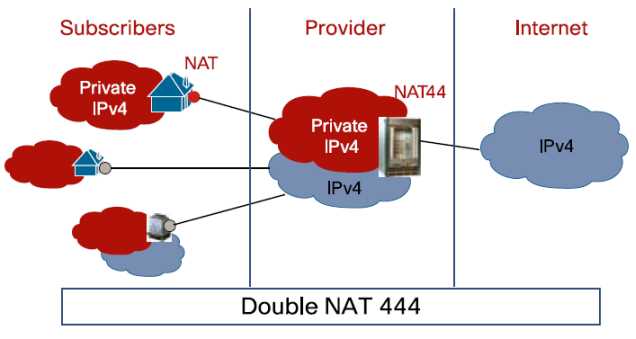
With the lack of availability of IPv4 addresses, the ISP need to find a way to condense their existing and new traffic onto an ever-dwindling pool of available resources.  Hence, NAT444.  Rather than handing the customer an global IPv4 address for use, the ISP NATs all traffic between their exit points and the customer premise equipment (CPE):

In this example, the subscribers may have an address space on their devices in the 192.168.x.x/24 space.  The ISP would then assign an address to the CPE device in the 172.16.x.x./16 space or the 10.x.x.x/8 space.  That traffic would then bent sent through some kind of NAT gateway device or cluster of devices.  Those devices would function in the same way that your home DSL/Cable router functions when translating addresses, only on a much larger scale.  The amount of addresses the ISP current has in their pool would not need to be significantly increased to compensate for a larger number of subscribers, just as if buying a new XBox doesn’t require you to get a new IP address from your ISP.

NAT444 has its appealing points.  It’s helpful in staving off the final depletion of the IPv4 address space from the provider side of things.  It will help keep IPv4 up and running until IPv6 can be implemented and reduce the pressure on the address space.  Yeah, that’s about it…

NAT444 has drawbacks.  Lots of them.  First, you are adding a whole new layer of complexity onto your ISP’s network.  Keeping track of all those state tables and translations for things like lawful intercept is going to be a pain.  Not to mention that the NAT gateway devices are going to need to be huge, or at the very least clustered well.  Think about how many translations are going through your CPE device at home.  Now multiply that by the number of people on your ISP’s network.  Each of those connections now has to have a corresponding translation in the NAT table.  That means RAM and CPU power.  Stupidly big boxes for that purpose.  What about applications?  We’ve already seen that things like VoIP don’t like NAT, especially when SIP hardcodes the IP address of the endpoint into all of its messages.  Lucky for me, a group already did some testing and published their results as a draft RFC.  Their findings?  Not so great if you like using SIP or seeding files with BitTorrent (hey, it has legitmate uses…).  They also tested things like XBox Live and Netflix.  Those appear to have been bad as late as last year, but may have gotten better as of the last test.  Although, I don’t think testing Netflix streaming for 15 minutes was a fair assessment.  You can also forget about hosting anything from your own network.  No web, no email, no peer-to-peer gaming sessions over a NAT444 setup.  I’m sure your ISP will be more than happy to provide you with a non-NAT444 setup provided you want to upgrade to “premium” service or move to a business account with all the associated fees.

I leave you with a this small reminder…


Tom’s Take

I had one of those funny epiphanies when writing this post.  I kept holding down the shift key when typing, so NAT444 kept turning into NAT$$$.  That’s when it hit me.  NAT444 isn’t about providing better service for the customers.  It’s about keeping the whole mess running just a little while longer with the same old equipment.  If the ISPs can put off upgrading to IPv6 for another year or two, that’s one more year they don’t have to spend their budgets on new stuff.  Who cares if it’s a little harder to troubleshoot things?

In the end, I think NAT444 will be dead on arrival, or at the most shortly thereafter.  Why?  Because too many things that end users depend on today will be horribly broken.  Sure, I can grouse about how NAT444 breaks the Internet and is horrible from a design perspective.  I am the I Hate NAT Guy, after all.  But try telling the average suburban household that they won’t be able to watch a streaming Netflix movie or play Call of Duty over XBox live anymore because we didn’t plan to keep the Internet running with a new set of addresses.  Those people won’t wax intellectual about their existential quandary on a blog.  They’ll vote with their dollars and go to an ISP that doesn’t use NAT444 so all their shiny new technology works the way they want it to.  In the end, NAT444 will end up costing the ISPs big $$$.

2011 in Review, 2012 in Preview

2011 was a busy year for me.  I set myself some rather modest goals exactly one year ago as a way to keep my priorities focused for the coming 365 days.  How’d I do?

1. CCIE R&S: Been There. Done That. Got the Polo Shirt.

2. Upgrade to VCP4: Funny thing.  VMware went and released VMware 5 before I could get my VCP upgraded.  So I skipped straight over 4 and went right to 5.  I even got to go to class..

3. Go for CCIE: Voice: Ha! Yeah, I was starting to have my doubts when I put that one down on the list.  Thankfully, I cleared my R&S lab.  However, the thought of a second track is starting to sound compelling…

4. Wikify my documentation: Missed the mark on this one.  Spent way to much time doing things and not enough time writing them all down.  I’ll carry this one over for 2012.

5. Spend More Time Teaching: Never got around to this one.  Seems my time was otherwise occupied for the majority of the year.

Forty percent isn’t bad, right?  Instead, I found myself spending time becoming a regular guest on the Packet Pushers podcast and attending three Tech Field Day Events: Tech Field Day 5, Wireless Field Day 1, and Network Field Day 2.  I’ve gotten to meet a lot of great people from social media and made a lot of new friends.  I even managed to keep making blog posts the whole year.  That, in and of itself, is an accomplishment.

What now?  I try to put a couple of things out there as a way to hold myself to the fire and be accountable for my aspirations.  That way, I can look back in 2013 and hopefully hit at least 50% next time.  Looking forward to the next 366 days (356 if the Mayans were right):

1. Juniper – I think it’s time to broaden my horizons.  I’ve talked to the Juniper folks quite a bit in 2011.  They’ve given me a great overview of how their technology works and there is some great potential in it.  Juniper isn’t something I run into every day, but I think it would be in my best interest to start learning how to get around in the curly CLI.  After all, if they can convert Ivan, they must really have some good stuff.

2. Data Center – Another growth area that I feel I have a lot of catching up to do is in the data center.  I feel comfortable working on NX-OS somewhat, but the lack of time I get to configure it every day makes the rust a little thick some times.  If it wasn’t for guys like Tony Mattke and Jeff Fry, I’d have a lot more catching up to do.  When you look at how UCS is being positioned by Cisco and where Juniper wants to take QFabric, I think I need to spend some time picking up more data center technology.  Just in case I find myself stranded in there for an extended period of time.  Can’t have this turning into the Lord of the CLIs.

3. Advanced Virtualization – Since I finally upgraded my VCP to version 5, I can start looking at some of the more advanced certifications that didn’t exist back when I was a VCP3.  Namely the VCAP.  I’m a design junkie, so the DCD track would be a great way for me to add some of the above data center skills while picking up some best practices.  The DCA troubleshooting training would be ideal for my current role, since anything beyond a simple check of vCenter is all I can muster in the troubleshooting arena.  I’d rather spend some time learning how the ESXi CLI works than fighting with a mouse to admin my virtual infrastructure.

4. Head to The Cloud – No, not quite what you’re thinking.  I suffered an SSD failure this year and if it hadn’t been for me having two hard drives in my laptop, I’d probably have lost a good portion of my files as well.  I keep a lot of notes on my laptop and not all of them are saved elsewhere.  Last year I tried to wikify everything and failed miserably.   This year I think I’m going to take some baby steps and get my important documents and notes saved elsewhere and off my local drives.  I’m looking to replace my OneNote archive with Evernote and keep my important documents in Google Docs as opposed to local Microsoft Word.  By keeping my important documents in the cloud, I don’t have to sweat the next drive death quite as much.

The free time that I seem to have acquired now that I’ve conquered the lab seems to have been filled with a whole lot of nothing.  In this industry, you can’t sit still for very long or you’ll find yourself getting passed by almost everyone and everything.  I need to sharpen my focus back to these things to keep moving forward and spend less time sitting on my laurels.  I hope to spend even more time debating technology with the Packet Pushers and engaging with vendors at Tech Field Day.  Given how amazing and humbling 2011 was, I can’t wait to see what 2012 has in store for me.

Say Backpack! – Cisco Live Conference Bags

One of the highlights of Cisco Live attendance is the conference backpack.  Geeks are always proud to carry around things with logos on them, especially if they are useful.  The backpacks at Cisco Live allow networking rock stars to carry all manner of dark magic with them and impress the unwashed masses with the skills of a real engineer.  Sometimes the bag is an instant hit and generates lots of good press.  Other times it’s a lightning rod for controversy and catcalls.  Given that many have only been to one or two Cisco Live events or may not be familiar with the backpacks of yore, I thought I might dig into my stash of carrying cases and have a nostalgic trip down memory lane.  Note that with one exception I’ll only be talking about bags that I have gotten from Cisco Live personally.  I know that there have been some cool ones before 2006, but since I don’t have them I can’t really do them justice.  Here you go:

2005

The 2005 Cisco Live bag was amazing, simply put.  So amazing that I didn’t even go to the conference and I still had to have one.  The reference design for this bag is the APC TravelPower Backpack.  This venerable design was APC’s foray into the market and was an attempt to provide not only a quality case for carrying your things but a way to charge them as well.  The backpack could be used with the APC TravelPower system, which placed a battery unit in one of the many pockets along with cables that could be routed throughout to provide power to laptops, cell phones, PDAs, and much more.  Then, a single power cable could be snaked out of the bottom and the whole backpack plugged into the wall.  Cisco must have just purchased a bunch of them from APC and had them branded with Cisco Live 2005, because they conference bag is identical (without the expensive TravelPower electrical stuff).  This bag is the mark of a seasoned Cisco Live Veteran.  I bought the APC backpack version right before APC stopped making them and I still carry it to this day.  I love all the extra pockets and places to hide my cables/adapters/junk.  My only real gripe is that it won’t hold a 17″ laptop (other than a MacBook), so I’m force to use a different pack for my behemoth Lenovo w701.  I love this backpack and will carry it until it frays away to nothing.  A note: if you want to make a backpack that will sell like hotcakes, you might consider copying this design and putting it back out on the market.

2006

The 2006 Cisco Live bag was my first.  I had been carrying a messenger bag for many years before and was considering changing over to something more comfortable.  This bag tipped the scales for me.  It’s a rugged design that it still sold today, notably on Newegg by MobileEdge.  It’s a big pack that has enough room to store a huge laptop as well as power supplies, cables, and assorted gadgets.  It also has a folding flap on the front that can be used as a shield or a place to carry a folded jacket.  I use this backpack today to carry my large laptop and it’s held up quite well for all the use it gets.  I am noticing that after 5 years the zipper pulls are starting to break off but I think that can be expected through normal wear and tear.  There aren’t quite as many pockets as I would like to carry all my gear, but that may be more a commentary on the amount of junk I carry around.

2007

Oh boy.  2007 was, quite simply, the mistake.  I heard about this bag on the bus headed to the registration desk.  People were complaining about it all week.  I have never heard so much vitrol about something so simple.  I think the idea that Cisco had was that there were so many backpacks already, maybe a change of pace was in order.  Instead, they got a revolt.  The bag itself isn’t necessarily bad.  It is well padded and has pockets for whatever you can think to carry.  The flap secures tightly and it’s comfortable to carry.  The real problem is that it was a major step down from the backpacks of the past years.  Many people commented that Cisco must have gotten them at a great price.  The addition of a bright red color scheme seemed to scare some because network rock stars seem to be allergic to colors other than black.  Overall a notable disappointment.  I use mine at home to store computer parts and will probably end up giving it to my son sooner or later.  At least until he’s big enough to carry a bigger backpack.

2008

Cisco live 2008 backpack - photo from Jim Fenton

Cisco got the message in 2008.  They gave us our backpacks again.  This one was grey and devoid of any electric colors and it suited the attendees just fine.  The standout feature to me was the reinforced cable handle.  This thing could be yanked around and you never had to worry about the handle coming loose or breaking off.  The carrying straps could also be rearranged in case you wanted to use it as a large messenger bag.  I never really warmed up to this bag, but I think that’s because I didn’t get the chance to.  As soon as I got back from Cisco Live, an officemate told me that he wanted to give the bag to his teenage son.  I figured it would probably get more use from him than it would from me, so I let him have it.  It’s another popular backpack to spot at Cisco Live, as many people still carry it due to the rugged construction.

2009

Cisco Live 2009 Backpack - many thanks to John Herbert (@MrTugs)

San Francisco was cold!  I never expected that I might freeze in the middle of the summer, but San Fran proved me wrong.  The 2009 backpack was a solid choice.  It didn’t have the reinforced carrying handle from 2008, but the padding on the straps and the back was very comfortable.  I have never really understood the need for the CD/media player pouch with headphone port on a “work” backpack, but that might be an alluring option for some.  The cords on the zipper pulls are also a very welcome change from the molded plastic of other years.  I used this bag for a bit up to the point where I started carrying my w701 which wouldn’t fit inside the laptop pocket.  I ended up giving this one to another coworker that work it with pride for quite a while.  I still see many people carrying this pack at Cisco Live events, most remarking on the comfort.

2010

Every convention comes back to Vegas sooner or later.  So it is with Cisco Live.  2010 was my first time back in Vegas since 2006, and I was greeted by this bag.  It seems to be based around the Wenger Pegasus backpack.  It’s a very solid pack and would probably be great for a large number of users.  I saw quite a few of them at Cisco Live 2011 which is always a good indicator of the longevity and popularity of a backpack.  However, nothing about this particular bag stood out to me as far as usability in my range of carrying cases. It has lots of neat extras like adjustable straps, music player pouches, and even a tab to hold your sunglasses.  Nice additions for sure, but not high on my list of “must haves” for a network rock star backpack.  This one is a good candidate for loaners or backup laptops in my opinion.

2011

Las Vegas still had more to give Cisco Live, and so we found ourselves back again in 2011.  This conference bag was the first in a while to have the bright colors again, this time orange to match all the orange draped in the Mandalay Bay Convention Center.  This bag is based off a reference design from Ogio, which coincidentally was the most popular backpack at Cisco Live 2007 (they flew off the shelves after the red messenger bag fiasco).  This bag has lots of space for all manner of books and laptops as well as a few catch pockets.  The big feature for this one, though, is that it meets the new TSA guidelines for travel bags.  The butterfly-style fold out allows you to send your bag through the x-ray with a minimum of shuffling.  The quality of this bag isn’t bad, but the Ogio bag it’s based on seems to have a bit better build.  I’ve heard that some people were having issues with straps and handles coming off after a few months of use.  Mine is still in almost pristine condition, but I haven’t really been using it because it won’t fit the behemoth.  If I had to start using something other than my APC or Live 2006 bag, it would probably be this one.

2012

This year for Cisco Live, we get to choose our bag!  We have the options of a backpack, a nice messenger bag, or even a gym bag.  I really do appreciate allowing the attendees to choose our favorite.  Some want a messenger bag because of the ease of carrying or the more professional look.  Others want the backpack to upgrade from whatever they might be carrying.  Still others want something a little different and think the gym bag would be a welcome change from the norm (as well as a great way to haul back the Cisco Live swag).  You can head over to the Cisco Live conference site and vote for your favorite.  Be sure your voice is heard.


Tom’s Take

Putting this post together was a trip down memory lane.  I can remember picking up each of these bags from the registration desk and trying my best to cram the contents of my current backpack inside.  Each of them is a reminder of fun times and lots of learning opportunities.  I hope that others can look back and see what kinds of backpacks we’ve gotten before and use them as a comparison to the future conference bags.  Those that forget the backpacks of the past are doomed to repeat them.  Although, for many of the backpacks on this list, a repeat wouldn’t be a bad thing…

Thanks to John Herbert (@MrTugs) and Jeff Fry (@FryGuy_PA) for their help in compiling this post.