
Mythbusters – Tech Field Day Edition

Minimalist Mythbusters - Image by Joey Vestal

On today’s episode of Mythbusters, we look at Tech Field Day.  The brainchild of Gestalt IT and Stephen Foskett, Tech Field Day gathers technical bloggers from all over the world and puts them in front of vendors for 2-4 hours at a time.  Far from a normal presentation, the delegate bloggers get to ask tough questions and hear real answers about capabilities and concerns.  In this episode, we will look at three myths commonly heard about Tech Field Day to see if they hold water.  Remember, we don’t just tell the myths.  We put them to the test.

Myth 1 – Tech Field Day Delegates Are Paid Vendor Shills

The number one most-repeated myth about Tech Field Day (TFD) by far.  There are many that believe that the TFD delegates are simply brought to a vendor’s office and told what to write.  The delegates are merely supposed to regurgitate the party line and “kiss up” to those providing funding for the trip.  Supposedly, delegate’s posts must be approved by company PR before going up and being advertised to death to reinforce vendor PR.

Let’s look at this one.  Firstly, the delegates aren’t paid.  Yes, we have our travel and lodging costs taken care of by the vendors by way of Gestalt IT.  But we don’t get a dime to come.  In fact, some delegates must use vacation or personal days to attend.  We get a good meal or a nice hotel bed, not a paycheck from Vendor X.  It’s not all that uncommon for vendors to do this kind of thing for PR people and other types of bloggers.  Would it make a difference if the delegates all paid their own way?  Probably not.  That’s because we aren’t shilling for the vendors.  Delegates attending TFD are under no obligation to write only good things about the presenting sponsor companies.  In fact, we’re under no obligation to write about anyone at all.  I never wrote a post about Embrane, the embargoed presenter from Network Field Day 2.  Why?  Because I didn’t understand the technology well enough to do it justice.  Just because they provided a portion of our meals and hotel room didn’t make me an indentured servant required to regurgitate platitudes about them.  They do have a great product that has generated a lot of buzz in the industry.  But I doubt I’ll get around to writing that post any time soon.  You don’t even need to be a blogger to attend.  There are delegates that have attended without any blog to their name. It just happens that the majority are known in the industry by their blogs.  I’ve talked about my independence feelings before.  You know that I have no compunction about telling things like I see them.  My Infoblox review from TFD 5 was all that glowing.  My Cisco review from Wireless Field Day 1 was critical.  Coming from a CCIE, you figure that if I was going to shill for anyone, it’d be Cisco.  But I don’t.  And neither does anyone else as far as I know.  There are plenty of firms out there that will write whatever they are told for far less than it costs to fly people to San Jose (or wherever).  TFD delegates tell the truth about what they see and feel.  That’s no myth.

Myth 1 – BUSTED

Myth 2 – TFD Delegates Only Come To Get Free Stuff

TFD delegates supposedly show up with hat in hand to get vendor handouts and other free stuff.  They expect to get free items from every vendor and only write good things about those they give them the best stuff.

Um, what?  Really?  I started hearing this after Wireless Field Day 1.  Why?  Because a couple of the wireless vendors went out of their way and gave us evaluation units to test with.  I was especially called out because I won an AirCheck unit from Fluke Networks.  By the way, I gave that very same AirCheck away at the delegate dinner during Wireless Field Day 2.  I hope Matthew Norwood (@matthewnorwood) gets more use from it that I did, and I trust that he won’t write nice things about me simply because I gave him something.  Yes, it’s a fact that vendors at both Wireless Field Day events have given away products to the delegates.  Yes, some vendors in the past have given away discounts codes or products.  Guess what?  That’s not the reason I go to Tech Field Day every chance I get.  Sure, it’s nice to get your hands on equipment and put it through its paces.  What about all the other companies that never give us anything other than a pen and notepad?  Did they deserve a bad review for being cheapskates?  Nothing could be further from the truth.  Wireless companies are a bit of a deviation from the norm, since their equipment is all small and easily transported in a carry-on bag.  It’s also fairly inexpensive (overall) for them to give away a $100 access point in order to let us review them and generate good blog posts about the equipment.  How exactly would I transport a Nexus 7k switch?  Would I have to check a Palo Alto firewall or could I put it in the over head bin?  Some companies don’t lend themselves to having easy-to-provide evaluation equipment.  But even if they did, giveaways are not a requirement of Tech Field Day.  In fact, most of the time they happen without the knowledge of the event coordinators.  But in the end, you should ask yourself a question about the delegates receiving evaluation equipment.  Would you rather we not get anything to test out and put through its paces and then write about it?  Or would you rather see us trying out best to break something and really give it a good evaluation before talking about it?

Myth 2 – BUSTED

Myth #3 – The Same People Go To Tech Field Day Each Time

You have to be one of the “cool kids” to get to go to Tech Field Day.  The list isn’t really chosen democratically but instead the delegates are all just friends that get invited over and over again.  The organizers are afraid to hear new voices and inherently distrust those that offer opinions different than the party line.

I’m going to use strong language this one time – this is a bunch of bullshit.  There is no magical list of people that are “friends” and get to go every time.  And remember, that statement is coming from someone that has been to four out of the last six Tech Field Day events.  Every delegate is evaluated on their own merits and voted upon by the Tech Field Day community.  Why?  Because we evaluate technical ability as well as interaction capacity.  There are people in this world that are insanely smart and afraid to ask questions.  There are wonderfully social people that don’t have a lick of technical sense (these people tend to end up in management).  Tech Field Day is about bringing in people that can comprehend Matthew Gast from Aerohive or Victor Shtrom from Ruckus when they start talking about a deep wireless rabbit hole.  Those same people also need to be able to take what they’ve learned and put it down for everyone to see.  That’s why we called the Tech Field Day attendees “delegates”.  We stand as representatives for those in the technical community.  We take questions from interested parties and forward them on to those that can answer them.  We don’t shy away from being tough.  Ask yourself a question: How many blogs do you read?  Then ask yourself how often you read blogs from new bloggers.  Once a week?  Once every six months?  Never?  Blogging isn’t for everyone.  Blogs get abandoned every day.  People get busy and don’t post.  They lose their passion for the subject.  They just give up because they have no readers.  So the people that do the most blogging and stick around tend to get the majority of the attention. People like Ivan Pepelnjak or Greg Ferro or Brad Casemore.  You don’t have to agree with everything they say but you do have to admit that these folks have staying power.  So, when it comes time for the vendors to start talking to people, naturally they want to talk to the people that the industry reads.  That’s why it seems the same people get asked to come back to Tech Field Day each time.  We try to add new blood all the time.  People like Blake Krone and Derick Winkworth.  But, the vendors also get a say in things.  They feel uncomfortable when they see a delegate that no one has heard of before.  Would take a chance on being judged by someone that you don’t know?  It’s one thing to go into a TFD event knowing that I’m snarky.  It’s something else entirely to find out that one of the delegates has a pathological hatred of your product and will never be convinced otherwise.  Vendors don’t like taking those kinds of chances.  The regular delegates at TFD events represent a kind of “known quantity” for vendors.  They can predict how we think and what our reaction will be to things.  It’s a reflection of our influence.

Myth 3 – BUSTED

Tom’s Take

For my own part in this, I can kind of explain my attendance at so many events.  I’m a rock star at a very small VAR.  I have to spend a lot of my time learning every technology.  So while I don’t know MPLS as well as Ivan or wireless as well as Andrew von Nagy, I can hold my own in discussions about routing, switching, wireless, security, storage, voice, virtualization, video, or even comic books.  As such, I can fill in pretty much anywhere.  I fill many roles.  I’ll never be the Michael Jordan of any one discipline, but I can be the (somewhat) quiet guy that plays a couple of roles and gets the job done.  At Tech Field Day, I can play the network outside among wireless folks or I can be the firewall guy at a security event.  This speaks to the heart of what Tech Field Day is all about.  When you get different disciplines together to discuss things, you wind up with fun things like Fibre Channel over Ethernet (FCoE).  I was even having discussions at WFD2 about routing protocols.  I went from being the utility player to being the expert in short order.  I never want to displace someone from going to Tech Field Day who might be more qualified than me, but I also welcome the chance to see how deep the rabbit hole of these technologies can go and I love the interaction with a great group of people.  I won’t get to go to every Tech Field Day.  The logistics don’t work out and there are great people that will go in front of me to events like Virtualization Field Day and Storage Field Day.  But whenever the folks at Tech Field Day ask me to come, I can’t very well say no.  I owe it to the people that read my blog to learn all I can and dispel as many myths as I can.

Disclaimer

This post has absolutely nothing to do with the Mythbusters televison program.  I watch it and respect the talents and knowledge of the hosts.  And those that get to meet them in person in the VIP section (I hate you Rocky Gregory).

2012, Year of the CCIE Data Center?

About six months ago, I wrote out my predictions about the rumored CCIE Data Center certification.  I figured it would be a while before we saw anything about it.  In the interim, there are a lot of people out there that are talking about the desire to have a CCIE focused on things like Cisco UCS and Nexus.  People like Tony Bourke are excited and ready to dive head first into the mountain of material that is likely needed to learn all about being an internetworking expert for DC equipment.  Sadly though, I think Tony’s going to have to wait just a bit longer.

I don’t think we’ll see the CCIE Data Center before December of 2012.

DISCLAIMER: These suppositions are all based on my own research and information.  They do not reflect the opinion of any Cisco employee, or the employees of training partners.  This work is mine and mine alone.

Why do I think that?  Several reasons actually.  The first is that there are new tests due for the professional level specialization for Cisco Data Center learning.  The DC Networking Infrastructure Support and Design Specialist certifications are getting new tests in February.  This is probably a refresh of the existing learning core around Nexus switches, as the new tests reference Unified Fabric in the title.  With these new tests imminent, I think Cisco is going to want a little more stability in their mid-tier coursework before they introduce their expert level certification.  By having a stable platform to reference and teach from, it becomes infinitely easier to build a lab.  The CCIE Voice lab has done this for a while now, only supporting versions 4.2 and 7.x, skipping over 5.x and 6.x.  It makes sense that Cisco isn’t going to want to change the lab every time a new Nexus line card comes out, so having a stable reference platform is critical.  And that can only come if you have a stable learning path from beginning to end.  It will take at least 6 months to work out the kinks in the new material.

Speaking of 6 months, that’s a bit of the magic number when it comes to CCIE programs.  All current programs require a 6 month window for notification of major changes, such as blueprints or technology refreshes.  Since we haven’t heard any rumblings of an imminent blueprint change for the CCIE SAN, I doubt we’ll see the CCIE DC any sooner than the end of the year.  From what I’ve been able to gather, the CCIE DC will be an add-on augmentation to the existing CCIE SAN program rather than being a brand new track.  The amount of overlap between DC and SAN would be very large, and the DC core network would likely include SAN switching in the form of MDS, so keeping both tracks alive doesn’t make a lot of sense.  If you start seeing rumors about a blueprint change coming for the CCIE SAN, that’s when you can bet that you are 6-9 months out from the CCIE DC.

One other reason for the delay is that the CCIE Security lab changes still have not gone live yet (as of this writing).  There are a lot of people in limbo right now waiting to see what is changing in the security internetworking expert realm, many more than those currently taking the CCIE SAN track.  CCIE Security is easily the third most popular track behind R&S and SP.  Keeping all those candidates focused and on task is critical to the overall health of the CCIE program.  Cisco tends to focus on one major track at a time when it comes to CCIE revamps, so with all their efforts focused on the security track presently, I doubt they will begin to look at the DC track until the security lab changes are live and working as intended.  Once the final changes to the security lab are implemented, expect a 6-9 month window before the DC lab goes live.

The final reason that I think the DC will wait until the last part of the year is timing.  If you figure that Cisco is aiming for the latter part of the calendar year to implement something, it won’t happen until after August.  Cisco’s fiscal year begins on August 1, so they tend to freeze things for the month of August while they work out things like reassigning personnel and forecasting projections.  September is the first realistic timeframe to look at changes being implemented, but that’s still a bit of a rush given all the other factors that go into creating a new CCIE track.  Especially one with all the moving parts that would be involved in a full data center network implementation.

Tom’s Take

Creating a program that is as sought after as the CCIE Data Center involves a lot of planning.  Implementing this plan is an involved process that will require lots of trial and error to ensure that it lives up to the standards of the CCIE program.  This isn’t something that should be taken lightly.  I expect that we will hear about the changes to the program around the time frame of Cisco Live 2012.  I think that will be the announcement of the beta program and the recruitment of people to try the written test beta.  With a short window between the release of the cut scores and beta testing the lab, I think that it will be a stretch to get the CCIE DC finalized by the end of the year.  Also, given that the labs tend to shut down around Christmas and not open back up until the new year, I doubt that 2012 will be the year of the CCIE DC.  I’ve been known to be wrong before, though.  So long as we don’t suffer from the Mayan Y2K bug, we might be able to get out butts kicked by a DC lab sometime in 2013.  Here’s hoping.

Backdoors By Design

I was listening to the new No Strings Attached Wireless podcast on my way to work and Andrew von Nagy (@revolutionwifi) and his guests were talking about the new exploit in WiFi Protected Setup (WPS).  Essentially, a hacker can brute force the 8-digit setup PIN in WPS, which was invented in the first place because people needed help figuring out how to setup more secure WiFi at home.  Of course, that got me to thinking about other types of hacks that involve ease-of-use features being exploited.  Ask Sarah Palin about how the password reset functionality in Yahoo mail could be exploited for nefarious purposes.  Talk to Paris Hilton about why not having a PIN on your cell phone’s voice mail account when calling from a known number (i.e. your own phone) is a bad idea when there  are so many caller ID spoofing tools in the wild today.

Security isn’t fun or glamorous.  In the IT world, the security people are pariahs.  We’re the mean people that make you have strong passwords or limit access to certain resources.  Everyone thinks were a bunch of wet blankets.  Why is that exactly?  Why do the security people insist on following procedures or protecting everything with an extra step or two of safety?  Wouldn’t it just be easier if we didn’t have to?

The truth is that security people act the way we do because users have been trying for years to make it easy on themselves.  The issues with WPS highlight how a relatively secure protocol like WPA can be affected by something minor like WPS because we had to make things easy for the users.  We spend an inordinate amount of time taking a carefully constructed security measure and eviscerating it so that users can understand it.  We spend almost zero time educating users about why we should follow these procedures.  At the end of the day, users circumvent them because they don’t understand why they should be followed and complain that they are forced to do so in the first place.

Kevin Mitnick had a great example of this kind of exploitation in his book The Art of Intrusion.  All of the carefully planned security for accessing a facility through the front doors was invalidated because there was a side door into the building for smokers that had no guard or even a secure entrance mechanism.  They even left it propped open most of the time!  Given the chance, people will circumvent security in a heartbeat if it means their jobs are easier to do.  Can you imagine if the US military decided during the Cold War to move the missile launch key systems closer together so that one man could operate them in case the other guy was in the bathroom?  Or what if RSA allowed developers to access the seed code for their token system from a non-secured terminal?  I mean, what would happen if someone accessed the code from a terminal that had been infected with an APT trojan horse?  Oh, wait…

We have been living in the information age for more than a generation now.  We can’t use ignorance as an excuse any longer.  There is no reason why people shouldn’t be educated about proper security and why it’s so important to prevent not only exposure of our information but possible exposure of the information of others as well.  In the same manner, it’s definitely time that was stop coddling users by creating hacking points in technology deemed “too complicated” for them to understand.  The average user has a good grasp of technology.  Why not give them the courtesy of explaining how WPA works and how to set it up on their router?  If we claim that it’s “too hard” to setup or the user interface is too difficult to navigate to setup a WPA key, isn’t that more an indictment of the user interface design than the user’s technical capabilities?

Tom’s Take

I resolve to spend more time educating people and less time making their lives easy.  I resolve to tell people why I’ve forced them to use a regular user account instead of giving them admin privileges.  I promise to spend as much time as it takes with my mom explaining how wireless security works and why she shouldn’t use WPS no matter how easy it seems to be. I look at it just like exercise.  Exercise shouldn’t be easy.  You have to spend time applying yourself to get results.  The same goes for users.  You need to spend some time applying yourself to learn about things in order to have true security.  Creating backdoors and workarounds does nothing but keep those that need to learn ignorant and make those that care spend more time fixing problems than creating solutions.

If you’d like to learn more about the WPS hack, check out Dan Cybulsike’s blog or follow him on twitter (@simplywifi)

Certification Merit Badges

I had an interesting exchange with a couple of Twitter folks the other day.  Jason Biniewski (@Jason_Biniewski) started it off with this interesting tweet:

http://twitter.com/#!/Jason_Biniewski/statuses/154445884027965440

Jason, Fernando Montenegro (@fsmontenegro) and I engaged in a little back-and-forth about the relative value of certification.  This is something that I do hear from many people, though.  Many employers don’t see the value of certification.  Some supervisors (like Jason’s) don’t think certifications are worth the paper they are printed on.  I have a totally different stance, and not just because of the giant Wall of Shame behind my desk.

Next time you run into someone that doesn’t think certifications hold much value, ask them to show your their diploma.  If this person is a supervisor or management type, they are sure to happily point out their degree from a prestigious organization.  In some cases, more than one.  Guess what?  In my mind, those college degrees are the same as certifications.  I have a bachelor’s degree.  I have a CCIE.  To me, those are very similar.  They both involve a large amount of studying.  Both study programs are fairly regimented to ensure the student gains the proper amount of knowledge to successfully execute upon that knowledge base.  Both are expensive to chase after.  Both are far from easy.  It just so happens that one of those taught me how to be a business leader and database admin and the other taught me how to work on routers and switches.  In the end, for both of them I ended up with a piece of paper that had my name printed on it that I could hang on my wall as a banner to tell everyone what I had accomplished.

One of the smartest men I ever worked with had no college degree and very few certifications.  No A+, no CCIE.  However, he had an instinctive understanding of the way computers worked and was quick to fix most every problem he encountered.  People constantly underestimated him because they didn’t see his diploma hanging on his wall or noticed his Novell/Microsoft/Cisco certifications.  I only made that mistake once.  That was the moment when I started realizing that certifications aren’t a measure of knowledge in and of themselves.  They’re more like merit badges.

I was a Boy Scout back in the day.  I loved pouring over the scouting handbook and picking out all the merit badges I wanted to earn.  You might even say it was an early precursor to what I’m like today.  I found it interesting that I merely needed to demonstrate my knowledge about a subject and the scouting organization would give me a little badge or pin that told everyone I knew how to make a campfire or pitch a tent.  Whenever I encountered another person with that same merit badge, I knew instinctively that person knew as much about the subject as I did.  I didn’t have to wonder if they knew the ins and outs of something they had a badge for.  That’s what certifications do for you.  They give you a little badge you can put on your resume so you can announce to people that you know a certain amount of basic information.  If you are an MCSE, I know you are familiar with Active Directory.  If you are a CCNA, I know you know what a router is.

If these certifications are so great, why would an employer be hesitant to want you to get one?  I did some thinking and asked a few people and I could really only come up with a couple of reasons.  The first involves companies that aren’t focused on things like value-added reselling.  These companies might be manufacturers or law firms or schools.  They don’t resell their IT services to others but instead consume them in-house.  To these organizations, what you know is more important that telling someone what you know.  So long as you are familiar with setting up Exchange or configuring a floating static route, who cares if you took a test to prove it?  These types of companies typically gain little for paying to have someone certified.  They also don’t see the value in the learning process toward certification.  So long as you can do your job effectively, learning more than is needed isn’t necessary.  I would recommend finding ways to prove that certification can reduce costs or provide extra value for the company as an incentive to get funding or time off for study.  Also, don’t underestimate the potential increase in prestige for employing a higher-caliber technical person.  Some companies treat prestige like a currency.

The other major issue with employers when it comes to certification is fear.  This is usually manifested by the idea that the employer doesn’t want you to pass any tests because they are afraid that you’ll jump ship once you’ve become a CCNA/CCNP/CCIE and leave them holding the bill.  Especially in the VAR space, employers become squeamish if they spend a lot time training someone only to have a competitor swoop in and offer a premium to hire that person away.  The competitor gains a highly trained resource for a pittance compared to the time and effort of training them.  If these types of employers do decide to fund your studies, they will typically do things like have you sign a contract for a length of time or agreement to pay back a portion of the training and certification costs if you decide to leave.  These types of things can be hard to combat.  If you aren’t willing to go the route of certification totally on your own, you may have to sign the agreement or otherwise convince your employer of the benefits of certification.  Just ensure that if you do have to sign an agreement that the clock doesn’t reset for every certification passed.  I’ve heard of people that kept re-upping for a new term with every test passed.  The bill to get out of that contract wasn’t pretty.


Tom’s Take

When I first started working for my present employer, the owner interviewed me and said, “Boy, I’m going to put a quarter of a million dollars into training you to be the best.” Almost eight years later when I passed my CCIE, I asked him if he’d hit his quarter of a million yet. He laughed and replied, “Long ago, son.  And it has been worth every penny.”  I’m fortunate that I get to work with people that understand the value of certifications.  It also helps that I work for a VAR that wants to show them off and use them for competitive advantage in the market.

The next time someone tells you that certifications are a waste of time, ask them where they graduated from, especially if it’s a college.  Explain to them that a certification isn’t any different than a college degree and confers a similar level of knowledge, albeit a little more focused on one area than a general education degree.  Then remind them that the diploma hanging on their wall is worth the same amount at the paper your certification is printed on.  Just don’t ask them how much they payed for their paper.  I’m sure you got a better deal on yours.

Double NAT – NAT$$$

Welcome to my first NAT post of 2012.  After spending some time during the holidays unwrapping new tech toys and trying to get them to work on my home network, I’m full of enough vitriol that I need to direct it somewhere.  Based on the number of searches for “double NAT” that end up on my blog, I thought it was only fitting that I direct some hate toward NAT444, also called carrier-grade NAT or large-scale NAT.

Carrier-grade NAT is the brainchild of the ISP world.  It turns out that we may be running out of IP addresses.  Shocking, right?  We’ve all known for at least a year that we were on the verge of running out of IPv4 addresses.  I even said as much last February.  The ISPs seem to have decided that IPv4 is still a very important business model for them and the need to continue using it over IPv6 is equally important.  My best guess is that many consumer-oriented ISPs looked at their traffic patterns and found that the majority of them were dominated by outbound connections.  This isn’t shocking when you consider that the majority of devices in the home aren’t focused around serving content.  In fact, many residential ISPs (like mine) tend to block connections on well-known server ports like 25 and 80.  This serves to discourage consumer users from firing up their own mail and web servers and forces them to use those of the ISP.  It also makes the traffic patterns outflow dominant.

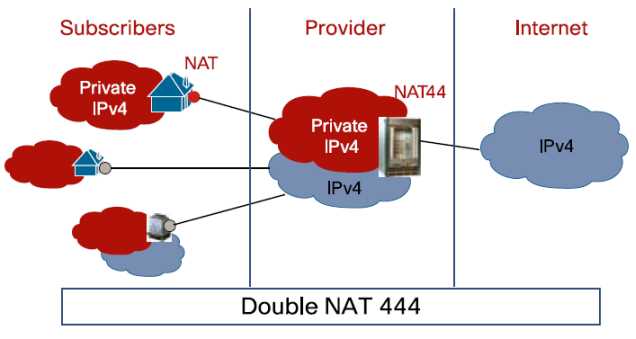
With the lack of availability of IPv4 addresses, the ISP need to find a way to condense their existing and new traffic onto an ever-dwindling pool of available resources.  Hence, NAT444.  Rather than handing the customer an global IPv4 address for use, the ISP NATs all traffic between their exit points and the customer premise equipment (CPE):

In this example, the subscribers may have an address space on their devices in the 192.168.x.x/24 space.  The ISP would then assign an address to the CPE device in the 172.16.x.x./16 space or the 10.x.x.x/8 space.  That traffic would then bent sent through some kind of NAT gateway device or cluster of devices.  Those devices would function in the same way that your home DSL/Cable router functions when translating addresses, only on a much larger scale.  The amount of addresses the ISP current has in their pool would not need to be significantly increased to compensate for a larger number of subscribers, just as if buying a new XBox doesn’t require you to get a new IP address from your ISP.

NAT444 has its appealing points.  It’s helpful in staving off the final depletion of the IPv4 address space from the provider side of things.  It will help keep IPv4 up and running until IPv6 can be implemented and reduce the pressure on the address space.  Yeah, that’s about it…

NAT444 has drawbacks.  Lots of them.  First, you are adding a whole new layer of complexity onto your ISP’s network.  Keeping track of all those state tables and translations for things like lawful intercept is going to be a pain.  Not to mention that the NAT gateway devices are going to need to be huge, or at the very least clustered well.  Think about how many translations are going through your CPE device at home.  Now multiply that by the number of people on your ISP’s network.  Each of those connections now has to have a corresponding translation in the NAT table.  That means RAM and CPU power.  Stupidly big boxes for that purpose.  What about applications?  We’ve already seen that things like VoIP don’t like NAT, especially when SIP hardcodes the IP address of the endpoint into all of its messages.  Lucky for me, a group already did some testing and published their results as a draft RFC.  Their findings?  Not so great if you like using SIP or seeding files with BitTorrent (hey, it has legitmate uses…).  They also tested things like XBox Live and Netflix.  Those appear to have been bad as late as last year, but may have gotten better as of the last test.  Although, I don’t think testing Netflix streaming for 15 minutes was a fair assessment.  You can also forget about hosting anything from your own network.  No web, no email, no peer-to-peer gaming sessions over a NAT444 setup.  I’m sure your ISP will be more than happy to provide you with a non-NAT444 setup provided you want to upgrade to “premium” service or move to a business account with all the associated fees.

I leave you with a this small reminder…


Tom’s Take

I had one of those funny epiphanies when writing this post.  I kept holding down the shift key when typing, so NAT444 kept turning into NAT$$$.  That’s when it hit me.  NAT444 isn’t about providing better service for the customers.  It’s about keeping the whole mess running just a little while longer with the same old equipment.  If the ISPs can put off upgrading to IPv6 for another year or two, that’s one more year they don’t have to spend their budgets on new stuff.  Who cares if it’s a little harder to troubleshoot things?

In the end, I think NAT444 will be dead on arrival, or at the most shortly thereafter.  Why?  Because too many things that end users depend on today will be horribly broken.  Sure, I can grouse about how NAT444 breaks the Internet and is horrible from a design perspective.  I am the I Hate NAT Guy, after all.  But try telling the average suburban household that they won’t be able to watch a streaming Netflix movie or play Call of Duty over XBox live anymore because we didn’t plan to keep the Internet running with a new set of addresses.  Those people won’t wax intellectual about their existential quandary on a blog.  They’ll vote with their dollars and go to an ISP that doesn’t use NAT444 so all their shiny new technology works the way they want it to.  In the end, NAT444 will end up costing the ISPs big $$$.

2011 in Review, 2012 in Preview

2011 was a busy year for me.  I set myself some rather modest goals exactly one year ago as a way to keep my priorities focused for the coming 365 days.  How’d I do?

1. CCIE R&S: Been There. Done That. Got the Polo Shirt.

2. Upgrade to VCP4: Funny thing.  VMware went and released VMware 5 before I could get my VCP upgraded.  So I skipped straight over 4 and went right to 5.  I even got to go to class..

3. Go for CCIE: Voice: Ha! Yeah, I was starting to have my doubts when I put that one down on the list.  Thankfully, I cleared my R&S lab.  However, the thought of a second track is starting to sound compelling…

4. Wikify my documentation: Missed the mark on this one.  Spent way to much time doing things and not enough time writing them all down.  I’ll carry this one over for 2012.

5. Spend More Time Teaching: Never got around to this one.  Seems my time was otherwise occupied for the majority of the year.

Forty percent isn’t bad, right?  Instead, I found myself spending time becoming a regular guest on the Packet Pushers podcast and attending three Tech Field Day Events: Tech Field Day 5, Wireless Field Day 1, and Network Field Day 2.  I’ve gotten to meet a lot of great people from social media and made a lot of new friends.  I even managed to keep making blog posts the whole year.  That, in and of itself, is an accomplishment.

What now?  I try to put a couple of things out there as a way to hold myself to the fire and be accountable for my aspirations.  That way, I can look back in 2013 and hopefully hit at least 50% next time.  Looking forward to the next 366 days (356 if the Mayans were right):

1. Juniper – I think it’s time to broaden my horizons.  I’ve talked to the Juniper folks quite a bit in 2011.  They’ve given me a great overview of how their technology works and there is some great potential in it.  Juniper isn’t something I run into every day, but I think it would be in my best interest to start learning how to get around in the curly CLI.  After all, if they can convert Ivan, they must really have some good stuff.

2. Data Center – Another growth area that I feel I have a lot of catching up to do is in the data center.  I feel comfortable working on NX-OS somewhat, but the lack of time I get to configure it every day makes the rust a little thick some times.  If it wasn’t for guys like Tony Mattke and Jeff Fry, I’d have a lot more catching up to do.  When you look at how UCS is being positioned by Cisco and where Juniper wants to take QFabric, I think I need to spend some time picking up more data center technology.  Just in case I find myself stranded in there for an extended period of time.  Can’t have this turning into the Lord of the CLIs.

3. Advanced Virtualization – Since I finally upgraded my VCP to version 5, I can start looking at some of the more advanced certifications that didn’t exist back when I was a VCP3.  Namely the VCAP.  I’m a design junkie, so the DCD track would be a great way for me to add some of the above data center skills while picking up some best practices.  The DCA troubleshooting training would be ideal for my current role, since anything beyond a simple check of vCenter is all I can muster in the troubleshooting arena.  I’d rather spend some time learning how the ESXi CLI works than fighting with a mouse to admin my virtual infrastructure.

4. Head to The Cloud – No, not quite what you’re thinking.  I suffered an SSD failure this year and if it hadn’t been for me having two hard drives in my laptop, I’d probably have lost a good portion of my files as well.  I keep a lot of notes on my laptop and not all of them are saved elsewhere.  Last year I tried to wikify everything and failed miserably.   This year I think I’m going to take some baby steps and get my important documents and notes saved elsewhere and off my local drives.  I’m looking to replace my OneNote archive with Evernote and keep my important documents in Google Docs as opposed to local Microsoft Word.  By keeping my important documents in the cloud, I don’t have to sweat the next drive death quite as much.

The free time that I seem to have acquired now that I’ve conquered the lab seems to have been filled with a whole lot of nothing.  In this industry, you can’t sit still for very long or you’ll find yourself getting passed by almost everyone and everything.  I need to sharpen my focus back to these things to keep moving forward and spend less time sitting on my laurels.  I hope to spend even more time debating technology with the Packet Pushers and engaging with vendors at Tech Field Day.  Given how amazing and humbling 2011 was, I can’t wait to see what 2012 has in store for me.

Say Backpack! – Cisco Live Conference Bags

One of the highlights of Cisco Live attendance is the conference backpack.  Geeks are always proud to carry around things with logos on them, especially if they are useful.  The backpacks at Cisco Live allow networking rock stars to carry all manner of dark magic with them and impress the unwashed masses with the skills of a real engineer.  Sometimes the bag is an instant hit and generates lots of good press.  Other times it’s a lightning rod for controversy and catcalls.  Given that many have only been to one or two Cisco Live events or may not be familiar with the backpacks of yore, I thought I might dig into my stash of carrying cases and have a nostalgic trip down memory lane.  Note that with one exception I’ll only be talking about bags that I have gotten from Cisco Live personally.  I know that there have been some cool ones before 2006, but since I don’t have them I can’t really do them justice.  Here you go:

2005

The 2005 Cisco Live bag was amazing, simply put.  So amazing that I didn’t even go to the conference and I still had to have one.  The reference design for this bag is the APC TravelPower Backpack.  This venerable design was APC’s foray into the market and was an attempt to provide not only a quality case for carrying your things but a way to charge them as well.  The backpack could be used with the APC TravelPower system, which placed a battery unit in one of the many pockets along with cables that could be routed throughout to provide power to laptops, cell phones, PDAs, and much more.  Then, a single power cable could be snaked out of the bottom and the whole backpack plugged into the wall.  Cisco must have just purchased a bunch of them from APC and had them branded with Cisco Live 2005, because they conference bag is identical (without the expensive TravelPower electrical stuff).  This bag is the mark of a seasoned Cisco Live Veteran.  I bought the APC backpack version right before APC stopped making them and I still carry it to this day.  I love all the extra pockets and places to hide my cables/adapters/junk.  My only real gripe is that it won’t hold a 17″ laptop (other than a MacBook), so I’m force to use a different pack for my behemoth Lenovo w701.  I love this backpack and will carry it until it frays away to nothing.  A note: if you want to make a backpack that will sell like hotcakes, you might consider copying this design and putting it back out on the market.

2006

The 2006 Cisco Live bag was my first.  I had been carrying a messenger bag for many years before and was considering changing over to something more comfortable.  This bag tipped the scales for me.  It’s a rugged design that it still sold today, notably on Newegg by MobileEdge.  It’s a big pack that has enough room to store a huge laptop as well as power supplies, cables, and assorted gadgets.  It also has a folding flap on the front that can be used as a shield or a place to carry a folded jacket.  I use this backpack today to carry my large laptop and it’s held up quite well for all the use it gets.  I am noticing that after 5 years the zipper pulls are starting to break off but I think that can be expected through normal wear and tear.  There aren’t quite as many pockets as I would like to carry all my gear, but that may be more a commentary on the amount of junk I carry around.

2007

Oh boy.  2007 was, quite simply, the mistake.  I heard about this bag on the bus headed to the registration desk.  People were complaining about it all week.  I have never heard so much vitrol about something so simple.  I think the idea that Cisco had was that there were so many backpacks already, maybe a change of pace was in order.  Instead, they got a revolt.  The bag itself isn’t necessarily bad.  It is well padded and has pockets for whatever you can think to carry.  The flap secures tightly and it’s comfortable to carry.  The real problem is that it was a major step down from the backpacks of the past years.  Many people commented that Cisco must have gotten them at a great price.  The addition of a bright red color scheme seemed to scare some because network rock stars seem to be allergic to colors other than black.  Overall a notable disappointment.  I use mine at home to store computer parts and will probably end up giving it to my son sooner or later.  At least until he’s big enough to carry a bigger backpack.

2008

Cisco live 2008 backpack - photo from Jim Fenton

Cisco got the message in 2008.  They gave us our backpacks again.  This one was grey and devoid of any electric colors and it suited the attendees just fine.  The standout feature to me was the reinforced cable handle.  This thing could be yanked around and you never had to worry about the handle coming loose or breaking off.  The carrying straps could also be rearranged in case you wanted to use it as a large messenger bag.  I never really warmed up to this bag, but I think that’s because I didn’t get the chance to.  As soon as I got back from Cisco Live, an officemate told me that he wanted to give the bag to his teenage son.  I figured it would probably get more use from him than it would from me, so I let him have it.  It’s another popular backpack to spot at Cisco Live, as many people still carry it due to the rugged construction.

2009

Cisco Live 2009 Backpack - many thanks to John Herbert (@MrTugs)

San Francisco was cold!  I never expected that I might freeze in the middle of the summer, but San Fran proved me wrong.  The 2009 backpack was a solid choice.  It didn’t have the reinforced carrying handle from 2008, but the padding on the straps and the back was very comfortable.  I have never really understood the need for the CD/media player pouch with headphone port on a “work” backpack, but that might be an alluring option for some.  The cords on the zipper pulls are also a very welcome change from the molded plastic of other years.  I used this bag for a bit up to the point where I started carrying my w701 which wouldn’t fit inside the laptop pocket.  I ended up giving this one to another coworker that work it with pride for quite a while.  I still see many people carrying this pack at Cisco Live events, most remarking on the comfort.

2010

Every convention comes back to Vegas sooner or later.  So it is with Cisco Live.  2010 was my first time back in Vegas since 2006, and I was greeted by this bag.  It seems to be based around the Wenger Pegasus backpack.  It’s a very solid pack and would probably be great for a large number of users.  I saw quite a few of them at Cisco Live 2011 which is always a good indicator of the longevity and popularity of a backpack.  However, nothing about this particular bag stood out to me as far as usability in my range of carrying cases. It has lots of neat extras like adjustable straps, music player pouches, and even a tab to hold your sunglasses.  Nice additions for sure, but not high on my list of “must haves” for a network rock star backpack.  This one is a good candidate for loaners or backup laptops in my opinion.

2011

Las Vegas still had more to give Cisco Live, and so we found ourselves back again in 2011.  This conference bag was the first in a while to have the bright colors again, this time orange to match all the orange draped in the Mandalay Bay Convention Center.  This bag is based off a reference design from Ogio, which coincidentally was the most popular backpack at Cisco Live 2007 (they flew off the shelves after the red messenger bag fiasco).  This bag has lots of space for all manner of books and laptops as well as a few catch pockets.  The big feature for this one, though, is that it meets the new TSA guidelines for travel bags.  The butterfly-style fold out allows you to send your bag through the x-ray with a minimum of shuffling.  The quality of this bag isn’t bad, but the Ogio bag it’s based on seems to have a bit better build.  I’ve heard that some people were having issues with straps and handles coming off after a few months of use.  Mine is still in almost pristine condition, but I haven’t really been using it because it won’t fit the behemoth.  If I had to start using something other than my APC or Live 2006 bag, it would probably be this one.

2012

This year for Cisco Live, we get to choose our bag!  We have the options of a backpack, a nice messenger bag, or even a gym bag.  I really do appreciate allowing the attendees to choose our favorite.  Some want a messenger bag because of the ease of carrying or the more professional look.  Others want the backpack to upgrade from whatever they might be carrying.  Still others want something a little different and think the gym bag would be a welcome change from the norm (as well as a great way to haul back the Cisco Live swag).  You can head over to the Cisco Live conference site and vote for your favorite.  Be sure your voice is heard.


Tom’s Take

Putting this post together was a trip down memory lane.  I can remember picking up each of these bags from the registration desk and trying my best to cram the contents of my current backpack inside.  Each of them is a reminder of fun times and lots of learning opportunities.  I hope that others can look back and see what kinds of backpacks we’ve gotten before and use them as a comparison to the future conference bags.  Those that forget the backpacks of the past are doomed to repeat them.  Although, for many of the backpacks on this list, a repeat wouldn’t be a bad thing…

Thanks to John Herbert (@MrTugs) and Jeff Fry (@FryGuy_PA) for their help in compiling this post.

I Have The Power! – Common Electrical Connectors

I’m no electrician.  In fact, the last time I tried to do some electrical work ended up with a minor electrocution and me not being able to taste for an hour.  However, in the IT world electricity is a key to our jobs.  The mightiest Nexus 7k or QFabric deployment can be brought to its knees by inadequate power.  The need to understand power and the the connectors that go along with it are vital.

Fabulous secrets were revealed to me the day I pulled up the Internet and started looking up the various codes for connectors that are used in electrical work.  I figured out pretty quickly that electricians had a language all their own and that I needed to learn how to speak some of it in order to get things accomplished.  After all, describing a connector as “one goes like this, the other goes like that” isn’t really helpful, especially over the phone.  I wanted to pass on a bit of what I learned to all of you.  A note for my international readers: this is going to be focused primarily on US connectors.  However, if you’d like to fly me to your country for a few days, I’ll be more than happy to bring a travel kit and research your electrical code from my hotel room.  Just a thought…

Some of these connectors standardized by the National Electrical Manufacturers Association (NEMA).  They also hold the trademark on the term “twist lock”, so when I use it, know that it belongs to them.  The others are standardized by the International Electrotechnical Commission (IEC) under IEC 60320.

NEMA 5


The NEMA 5-series plug and receptacles are the most common found in the US today.  They are three-wire circuits (hot, neutral, and ground) and are rated to carry a maximum of 125 volts, although they usually carry about 110 volts and are referred to as “110 circuits”. All of these connectors will start with a “5” and a dash, followed by the amperage of the circuit, from 15 amps to 30 amps.

5-15

By far the most common connector you’ll run into in the US.  A simple 110-125v circuit rated at 15 amps.  Whatever you do, don’t rip the ground plug out if you need to fit this into a NEMA 1-15 two prong outlet.  I’ve seen what happens there and it isn’t pretty.

5-20

The NEMA 5-20 connector is more common as you being to start using equipment with high wattage power supplies, like Catalyst 4500 switches.  I’ve always heard the 5-20 described as a “dedicated circuit” plug, but that’s not entirely accurate.  It’s a 110-125v 20 amp circuit.  It can easily be identified by the perpendicular blade.

L5-20

Here’s where the real fun starts.  This little jewel was the source of my first head scratching moment with NEMA connectors.  This plug is the same as its 5-20 cousin above, however the connectors look all wrong.  This connector is designed to be inserted into the receptacle and then rotated counterclockwise to lock it in.  This way, it can’t simply be pulled out by someone tripping over it or by vibrations from heavy machinery.  Do take care though, as tugging on the connector too hard will cause it to rip the whole receptacle assemble out of the wall with possibly some exposed wires.

L5-30

The NEMA L5-30 is the big boy of 110-125v circuits.  I found it curious that I have never really seen the non-locking version of this plug, but I’ve since been informed that the majority of devices that use 30 amp circuits prefer this connector to prevent it from being yanked out.  Uninterruptible Power Supplies (UPSs) use this connector frequently in order to ensure their devices are getting enough power.

NEMA 6


The NEMA 6 series connectors are the ones you use when you need to provide heavy duty power to a device.  These are typically 208 volt or 240 volt circuits, but I’ve always heard them referred to as “220 circuits”.  There is no neutral wire in this setup, as both non-ground wires are delivering power.  These are the kind of connectors used in the home for things like air conditioners or clothes dryers.  In my experience, the standard versions of these connectors are uncommon.  The locking version are used far more frequently, usually do to the fact that whatever is running off of that much power probably doesn’t want to go offline due to having a power plug kicked out of the wall.  These connectors all begin with a “6” followed by the amperage of the circuit, usually between 15 and 30 amps.

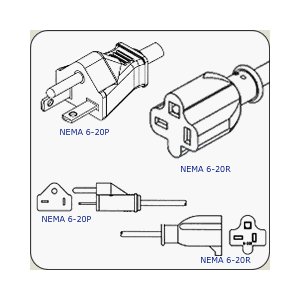
6-20

The only non-locking NEMA 6-series connector I run into on a regular basis is the 6-20.  Note that while this plug/receptacle is similar to it’s 5-20 cousin, the perpendicular blade is the opposite on this connector to prevent you from plugging the wrong cord into the wrong plug and getting a nasty surprise.

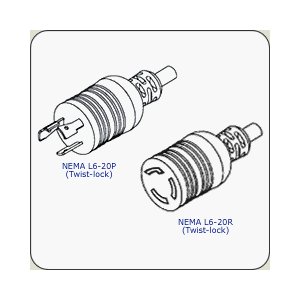
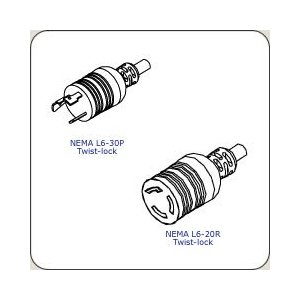
L6-20

The locking version of the NEMA 6-20.  Far more common due to the ability to keep whatever this cord is powering plugged in.  Odds are good that if you are using a heavy duty power supply in a device like a Catalyst 4500 or a Catalyst 6500, you’ve got this cord powering your device.

L6-30

Big devices call for big power.  This 208/240v 30 amp circuit connector is going to power just about anything you can throw at it.  Big UPSes or huge power supplies in a switch like the 8700 watt monster in the Catalyst 6500.  You are most likely to encounter this connector in a rack-mounted PDU where it provides the power coming from the main electrical connection and then the PDU disperses the power to the devices in the rack itself.

IEC 60320


The IEC connectors are fairly common in electronics devices, however I believe that most people couldn’t pick them out of a lineup.  That’s because the IEC connectors are the ends that are on the opposite side of the cord from the power plug.  These ends plug into power transformers and power supplies.  By making them an international standard, the equipment manufacturers need only put one kind of receptacle on their equipment and then manufacture the various country-specific cords when needed.  Also, unlike the NEMA connectors above that use “P” and “R” to denote plugs and receptacles, the IEC connectors use a different number to specify the plug and receptacle, for instance the IEC C19 is the plug and the IEC C20 is the receptacle.

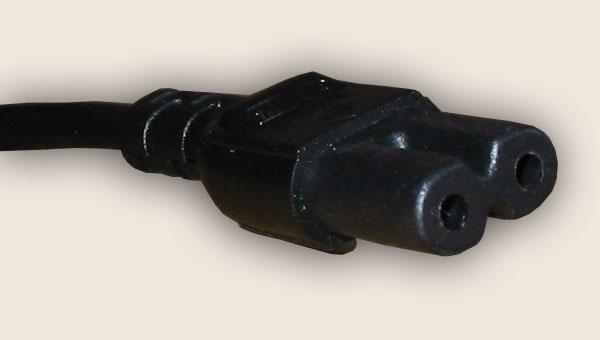
C7/C8

This connector is used for power transformers, laptop power supplies and small appliances, like the original Playstation.  This connector is shaped like a figure 8, unless you have the polarized version when is squared off on the hot end.  I’ve spent many an hour looking for one of these connectors for a forgotten device.

C13/C14

If you’ve ever worked with a computer, you know this power cord.  In fact, for the majority of my career I’ve called it a “computer power cord”.  This particular IEC connector run everything from desktop computer to fixed-configuration switches.  I always carry two or three spare cables with me at all times just in case I need them.  I’m also starting to see more and more higher wattage devices requiring two or more cords to work properly, like server power supplies or the newer power supplies for chassis switches.  The C14 plug is also very common on power strip type PDUs for racks where you plug the C13 end into your server and the C14 end into the PDU.  Saves a bit more space than the NEMA 5-15 connector above.

C15/C16

Odds are good you’ve seen this cable and said “Huh?”.  I’ve started seeing it ship with newer fixed-configuration switches that had Power over Ethernet (PoE) power supplies.  For the life of me, I couldn’t figure out the point of changing this connector.  A chance comment from one of my friends about this so-called “kettle cord” made me start researching what was so special about the connector.  It turns out the C13/C14 connector/cord is only rated to about 70 degrees F.  The C15/C16 was specifically designed for higher temperature devices, like electric kettles and PoE switches with higher wattage power supplies, like those that drive 802.3at or PoE+ 30 watts per port.  This connector will work in the C13/C14 receptacles, but not vice versa.  This prevents the cord melting and causing all kinds of trouble.

C19/C20

If you’ve ever installed a Catalyst 4500 switch, you’ve seen this plug on the power supply.  For a long time, I referred to it as the “chassis switch power connector” without knowing it had a real name.  The C19/C20 connectors are used for devices that require a higher current than that which can be provided by the C13/C14/C15/C16 connectors.  I’ve only ever seen it on chassis switches, but it can also appear in high end workstations or some kinds of UPSes.


Tom’s Take

When you stare at the long list of power options available for a switch or a server, you might find your eyes crossing at the multitude of unfamiliar acronyms you find.  At best you’ll end up with an extra power cord you don’t need.  At worst, you could delay a large project for many days because you ordered an L6-20 cord when you really needed a 5-20 connector.  The same goes for ensuring you have the correct power connections hooked up in your server closet or data center.  Electricians aren’t sure what you’re talking about when you tell them you want a “winking man” connector or “the twisty one” kind of plug.  If you tell them you need an L5-20R, they’ll be able to put one in without asking another question.  Network rock stars always talk about the virtues of standardization and the electrical world is no different.  By knowing the standard name for the NEMA or IEC connector you need, you can be sure that you are the one that has the power.

Software I Use Every Day – OS X Edition

For those that have been keeping up, I am now the proud owner of a MacBook Air.  I originally purchased it to use as a learning aid to get better at working on OS X Snow Leopard and Lion.  I also decided to see if I could use it to replace carrying my behemoth Lenovo w701 around to do simple things like console connections.  I’ve done my best to spend time in the last month working with it every day and trying out new software to duplicate my current job functions.  Now that I’ve got a handle on things, I figured I’d share what I’ve learned with you in a manner similar to my last software blog post.


Terminal Access – iTerm2

This was the first program I downloaded after I logged into my MacBook.  If you are a network rock star, it should be your first download as well.  This program is the terminal on steroids.  Tabs, split window panes, search-in-window, and profile support top the list of the most needed features for someone that spends most of their day staring at a CLI window.  I don’t even open the Terminal.App program any more.  I just use iTerm2.  This program replaced PuTTY for me and did a great job of replacing TeraTerm as well.  The only thing that it lacks is the ability to use a serial console connection.  I think that’s more of a single-purpose use case for the iTerm2 folks, so I doubt it will ever be rolled into the program.  All things being equal, this will probably be the most useful program you’ll download for your Mac.


Serial Console Access – ZTerm

The console is where I live.  I spend more time staring at CLI screens that I do my own kids.  The inability for me to access the familiar confines of a serial connection is a deal breaker.  I was a little apprehensive about serial console access on the Mac after hearing about some troubles that people were having after upgrading to OS X Lion.  I pulled out my trust Prolific PL-2303 serial adapter and plugged it in to test the driver support.  I had no issues on Lion 10.7.2, but I’ve been told that some may need to go to the Prolific site and download the newest drivers.  As a side note here, I had the exact same issues when I upgraded to Windows 7 64-bit on my laptop, so I think the problems with the adapter are based on the 64-bit drivers and not necessarily on your particular OS.  Once I had the adapter working in the OS, it was time to find a program to access that console connection.  ZTerm kept coming up as the best program to do that very thing.  Some of the other serial connection programs (like CoolTerm) are focused on batch serial connections, like sending commands to a serial device in programming.  ZTerm allows you to have interactive access to the console.  You can also do captures of the serial output, which is a feature I love from TeraTerm.  That way, I can just type show run and not have to worry about copying and pasting the input into a new Notepad window.  A quick note – when launching ZTerm for the first time, the baud rate of the connection is set to 38400.  Since networking equipment only plays nice at 9600, be sure to change that and save your settings so it comes up correctly after that.

Note that ZTerm is shareware and costs $20 to register.  It’s worth every penny for those that need to access equipment through old fashioned serial links.


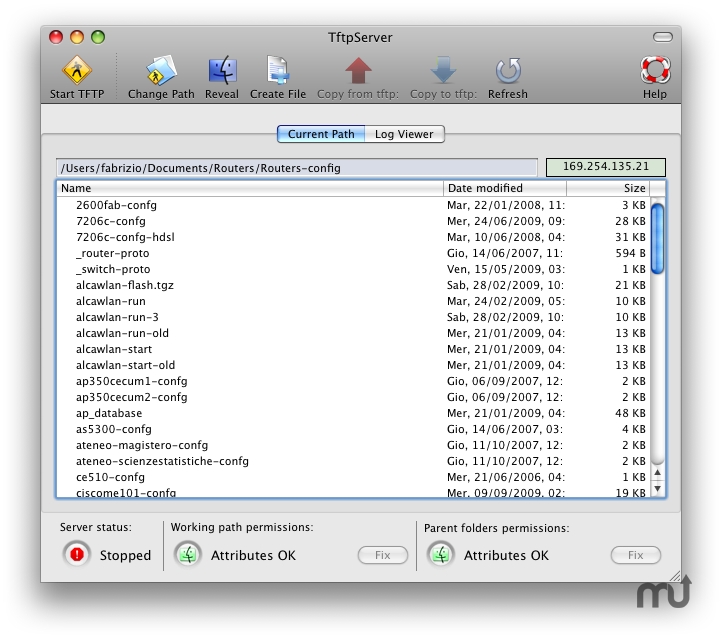
TFTP Server – TFTPServer for Mac

OS X has its own built-in TFTP server.  However, I’ve watched competent network rock stars struggle with permissions issues and the archaic CLI needed to get it running.  In the comments of my original software blog post, Simon Naughton (@norgsy) pointed me toward Fabrizio La Rosa’s TFTPServer GUI configuration tool.  This little jewel helps you get the right permissions setup on your TFTP service as well as letting you point the TFTP service to a specific directory for serving files.  I love this because I can keep the remote machine from needed to sift through large numbers of files and keep only the necessary files located in my TFTP directory.  I can also enable and disable the program in a flash without needing to remember the five argument CLI command or forgetting to sudo and get a failed error message.  Do yourself a favor and download this program.  Even if you only ever use TFTP once, you’ll be glad you have this little tool to help and won’t have to spend hours sifting through documentation and forum posts.


SFTP – Built In

This was one of my first “Ah ha!” moments with OS X.  Working with voice requires access to FTP services for COP file uploads and DiRT backups.  I have used FTP forever on my Windows machines because SFTP was such a pain to setup.  I wanted to duplicate that functionality on the MacBook Air, but a few searches found that Apple has removed the ability to configure the FTP service from the GUI.  I knew I was going to need to use FTP at some point, so I kept looking and found an article on OSXDaily about enabling FTP with a command line string.  However, buried in the article is a gem that took me by surprise.  By enabling remote login in the sharing page under System Preferences, you automatically enable SSH and SFTP!  Just like that.  After all the fits and starts I had with SFTP on Windows, OS X enables it with a simple radio button.  Who knew?  Now that I have a simple SFTP server running on my MacBook, I don’t think I’ll ever use FTP again unless I have to.  Should you find yourself in a predicament where you can’t use SFTP though, there’s the CLI command to enable the Lion FTP server:

sudo -s launchctl load -w /System/Library/LaunchDaemons/ftp.plist

And here’s the command to turn it off once you’re done with it:

sudo -s launchctl unload -w /System/Library/LaunchDaemons/ftp.plist

RSS Feeds – Reeder

My favorite RSS reader for the iDevices, Reeder allows me to digest my RSS feeds from Google Reader in a quick and clean manner.  No ads, no fluff, just the info that I need to take in.  Thankfully, Silvio Rizzi also put out a version for OS X as well.  I keep this one up and running at all times in a separate screen so I can flip over and see what my friends are posting.  It’s a great tool that allows me to be in the know about what’s going on.  It’s $5 on the Mac App Store, but once again worth every penny you pay for it.


Tom’s Take

There are a ton of other apps that I use frequently on my MacBook Air, but the ones I’ve listed shine above all others.  Those get a workout and some of the reasons why my little adventure with OS X is staring to grow on me.  Yes, there are apps that don’t really have an equivalent right now.  I’ve managed to avoid the need for modeling/graphics software so far, so I can’t compare the alternatives to Microsoft Visio.  I spend a lot of my time using Netformx DesignXpert, which I can’t use natively in OS X.  Beyond that, it’s just a matter of deciding what I want to do and finding a program that will do it for me.  There are a lot of options available, both in the Mac App Store and out on the web.  The trick with a Mac isn’t so much about worrying how you’re going to do something, but rather what you want to do.  The rest just seems to take care of itself.

IT Christmas Carols

What would Christmas be without someone trying to come up with a funny list of Christmas carols with names related to their profession?  I humbly submit…

Oh, Spanning Tree

I’ll Be /home for Christmas

#FFFFFF Christmas

Rockin’ Around the Source Tree

Little Toner Drummer Boy

Blu-Ray Christmas

Chestnuts Roasting on an Open-Source Fire

Arctic Silver Bells

AFK In A Manger

Slide Deck the Halls

The 0xC Days of Christmas

What Child Process Is This?

Here We Come A-WAASailing

Rudolph the LED-Nosed Reindeer

For what it’s worth, I almost wrote lyics for some of these.  Then I decided that this was enough torture for one year.  There’s always next season.  If you can think of some that I missed, please leave them unwrapped in the comments below.

Merry Christmas to all and have a safe and festive holiday season.