Less Than Dial Peer Zero

There was a good question posed by Karla Reyes a few days ago about the use of a voice dial peer that included the string incoming-called-number.  I did my best to figure out why one would use such a dial peer in production, and that led me to a search and discovery of all sorts of interesting things about dial peers and what happens when you are forced into defaults.

On a Cisco phone system, whether it be CallManager or CallManager Express, dial peers on your voice gateways route calls to the correct destinations, both inbound and outbound.  The outbound dial peers I’m familiar with, having configured them on numerous CUCME systems.  The inbound dial peers, not so much.  I configure most of my systems to use connection plar opx <extension> to ring analog circuits and send the calls to an operator or an auto attendant (AA).  Absent that configuration, you can still configure dial peers to evaluate incoming calls and route them to the proper locations.

Cisco voice gateways will evaluate the dial peers and choose the one the has the longest set of matching digits when deciding where to send a call.  So if one dial peer is 8… and the other is 85.., then if you call “8511”, the second dial peer will be used since it has the most matching digits of the two.  If you dial “8721”, the first dial peer is matched.  This is a simple, straight forward process.  When incoming calls are headed into the system, the same process is used.  So what happens if there isn’t a perfect match?

This is where Dial Peer 0 comes into play.  Dial Peer 0 exists on every voice gateway.  It’s a sneaky little default setting that no one pays much attention to until they stumble across it.  Part of the reason is that it’s invisible.  No reference to Dial Peer 0 pops up in the configuration.  Since it’s the default and it’s hard-coded, it’s always there.  It’s kind of like the implicit deny statement at the end of every access list.  And much like that deny statement, it often produces strange and undesirable results when it gets triggered.  That’s because Dial Peer 0 is designed to work with just about anything, so it has some of the silliest settings imaginable:

  • It supports any codec you throw at it.  The designers figured that rather than waste precious time negotiating whether or not your should use G.711 or G.729, Dial Peer 0 should just accept whatever it’s sent and move on.  Not so great when you are trying to keep bandwidth conserved on a slow link and someone sends you big fat voice packets.
  • DTMF packets are sent in-band, so if you decide to use G.729 as your signaling protocol, the tones can get mangled by the compression process.
  • All the voice signaling and data packets have their IP precedence settings remarked to 0.  All that pain and effort you went through getting your perfect Quality of Service (QoS) setup working gets chucked right out the window.
  • Resource Reservation Protocol (RSVP) is disabled.  That means if you spent even more time and pain setting up an Integrated Services QoS setup, it’s going to fail when the call hits Dial Peer 0.
  • IVR applications are disabled.  This means that any scripts that would be used for things like auto attendants are going to break.
  • Last but not least, Direct Inward Dial (DID) isn’t present.  This means your callers will get confused because they’ll hear a secondary dial tone when the call leg completes.  This is where they would enter your extension number to speak to you.  Instead, they’ll figure the call didn’t work then hang up and try again.  Enterprising hackers will hear the dial tone and realize what that means then try and transfer to another number, such as long distance or international calling.  That’ll run up your phone bill fast.

Sounds like a whole bunch of bad reasons to never use Dial Peer 0, right?  Except you can’t get rid of it.  It’s always there, lurking and waiting to screw up your day.  The only way to avoid using it is to configure a new default dial peer to match instead of letting the call fall all the way down to Dial Peer 0.  In order to understand that, you have to know the order in which Cisco matches incoming dial peers:

  1. Match the dialed number with incoming-called-address configured in the dial peer.
  2. Match the calling number with answer-address configured in the dial peer.
  3. Match the calling number with destination-pattern configured in the dial peer.
  4. Match an POTS dial peer with a port command configured in the dial peer.
  5. Take your chances with Dial Peer 0.

The easiest (and by far most popular) method of overriding Dial Peer 0 is to use #1 above like this:

dial-peer voice 1 pots
  incoming-called-number .
  direct-inward-dial

This ensures Dial Peer 1 is always matched ahead of Dial Peer 0, but not matched if a longer match exists.  It also uses DID to disable two-stage dialing, so those nefarious hackers won’t get a chance to call Cuba on your dime.

Tom’s Take

Defaults exist so that we don’t have to think about things sometimes.  Anyone who’s ever told someone how to install Microsoft Office by saying “Click Next, Next, I Agree, Next, Next” will know what defaults come in very handy.  However, if the default settings are baked in and unable to be changed, it makes life difficult if you can’t account for them and find a way to work around them.  At the very worst, it just means you get to spend a little more time on the phone with your favorite TAC engineers.

I’d like to thank Karla Reyes, Amy Arnold, and Aaron Conaway for their help on this post.

Software I Use Every Day

People tend to find programs that work really well for them in their day-to-day jobs and then find themselves using those programs over and over again.  I’m no different.  In my job as a network engineer for a Value Added Reseller (VAR), I have quite a few programs installed on my laptop at any one time.  However, there are three that always find themselves getting installed first whenever I upgrade, or I find myself installing them when I’m remotely connected to a server and need to do some work.  The best thing about these three programs?  They’re totally free.

TeraTerm

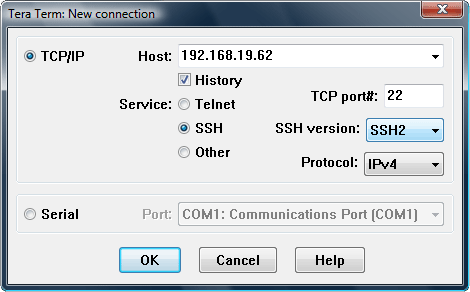
If you work with Cisco/HP/Juniper/Brocade/etc devices that have a console port, odds are good you have a console cable or three in your backpack.  You also have some sort of terminal program on your laptop.  A lot of engineers I know used Hyperterm in Windows XP.  I loathe Hyperterm.  A crippled version of a retail product that’s confusing and hard to use.  When I started at my current employer, my mentor introduced me to TeraTerm.  It’s a wonderful little program that can be used to telnet, SSH, or console to a device.  There are a ton of programs out there that can do the same, such as PuTTY or SecureCRT.  No matter how many times I use them I keep coming back to TeraTerm.  One reason is the Serial connection drop down box.  On my laptop, every time I plug in a USB-to-Serial converter, it is assigned a different COM port depending on which port I plugged it into.  With PuTTY, I have to remember when COM port is associated with a particular USB port.  With TeraTerm, I just choose from a drop down box.  Simple.  Another nice option is the ability to log all your console output to a text file.  If you’ve every had to type show tech-support on a router, you know the flood of info that comes rushing at you with no way to stop or pause and copy it to a file for TAC.  With TeraTerm, you just set the logging option, pick a file name, type your command, and sit back while it takes care of the copying for you.  It’s also great if you want to capture a configuration after you’re finished for archival just in case you need it again.

TeraTerm has had some development issues in the past, but since 2004 it has been maintained by it’s own development team for free at Sourceforge.  Get it HERE.  You may also be interested in PuTTY or SecureCRT, but please note that SecureCRT isn’t free.

TFTPD32

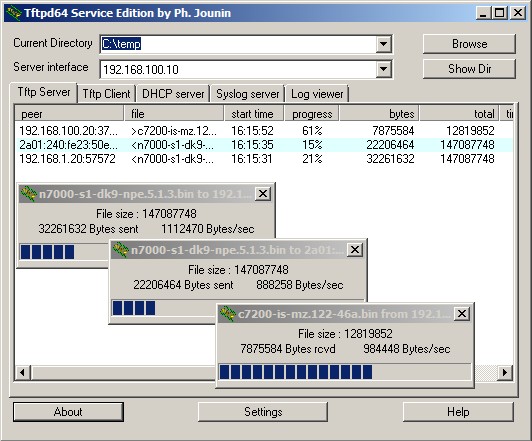
If you work with Cisco/HP/Juniper/Brocade/etc devices, you’ve found yourself in need of a TFTP server at some point in time.  TFTP is the most popular way to upload/download software and configurations to and from these devices.  It’s a quick protocol with little overhead, since it relies on UDP packets to deliver information.  Many vendors have a TFTP server, whether it be Solarwinds, 3COM’s old TFTP server, or even Klever’s PumpKIN TFTP server.  I find myself coming back to TFTPD32 because it’s more than just a server.  It’s also a TFTP client, which is handy if you want to try and pull down a file to make sure it’s being shared correctly.  It’s a tiny DHCP server if you are plugged directly into a device such as an access point and you need to give it a quick address to get to the web configuration.  It’s a Simple Network Time Protocol (SNTP) server if you have a device that needs to sync to an NTP server, such as CUCM during setup.  Lastly, it has a syslog server if you need to redirect syslog output during a debug or troubleshooting session.  TFTPD32 also supports the transfer of files over 32MB in size, which has left some of the older TFTP servers in the dust, as most modern firmware images are well above 32MB.  There’s even a 64-bit version for those who have made the switch to the new generation of operating systems.  If you just need something simple to transfer files to and from your routers, you can’t go wrong with TFTPD32.

TFTPD32 is free and available HERE.  You may also be interested in alternatives from Solarwinds or Klever’s PumpKIN.  Note that Solarwinds requires registration.  I don’t recommend using the old 3COM TFTP server any longer, as it isn’t capable of 32MB image transfers and is generally considered dead software.

freeFTPd

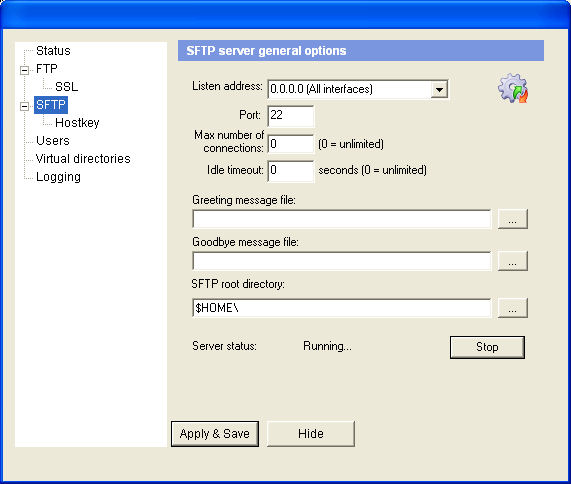
Working with CUCM lately as much as I have been, I’m finding myself growing more reliant on using FTP instead of TFTP.  CUCM seems to want to use FTP (or SFTP) for almost everything, whether it be configuration backups or upload of new COP files.  I’ve used Xlight FTP server (the free version) for a while, but when I needed an SFTP option, the licensing options for Xlight seemed somewhat steep.  After some searching, I came across freeFTPd.  It’s very simple to setup and configure both FTP and SFTP, along with users and virtual directories.  You can also set it to listen on all your laptop’s interfaces, so if you find yourself with a slow Ethernet connection you can always flip over to the wireless interface.  I highly recommend installing freeFTPd if you use CUCM today or you might find yourself working on it in the future.  You’ll thank me later.

You can also use Xlight’s FTP server or Filezilla.  Note that Xlight is a 30-day trial of the standard edition, but after those 30 days it becomes the limited personal edition.  You might also check the license terms in case you want to use it professionally.

Tom’s Take

Discussing favorite programs is a lot like arguing who the best Doctor is.  Everyone has their opinions and beliefs about why a particular program works the best, or they’ve been burned by a program in the past and have forsworn it for all eternity.  I find these programs easy to use, easy to install if they aren’t on the machine I’m using, and since they are mostly open source, free of any sticky licensing issues that might cause problems down the road.  Feel free to suggest any programs you find useful in the comments so that others might try them out too.  Note that because I’m a Windows user, all of these programs run on Windows, either XP or Windows 7.  If you’re interested in a Mac version of this list, please feel free to send me a MacBook Pro and I’ll whip one up for you.  I’m keeping the MacBook, though.

How to Transfer

The number one question I get asked when installing a new phone system has to be “How do I transfer a call?”  Seems that most people who have been using phones most of their adult lives are mystified by the little button that allows them to send a call somewhere else.  Especially when I put the complexity of a Voice over IP (VoIP) phone system in their hands.

The majority of people that have been using Private Branch Exchange (PBX) phone systems for the past few decades should be familiar with basic unsupervised transfer.  You may also hear this referred to as a blind transfer or a cold transfer.  In this implementation, the party initiating the transfer presses the transfer button, dials the number that the call needs to go to, and is then disconnected from the call.  The original caller is sent to the new target and when the target answers, they get an earful of whatever the original caller wishes to tell them.  They call this blind (or cold) because the other party has no idea it’s coming.  Some people, especially executives, get kind of upset by all this messy blind stuff.

Most modern phone systems use a method of supervised transfers.  These are also called consult transfers or warm transfers.  These kinds of transfers start out the same.  A called party presses the transfer button and dials the number of the person that needs to get the phone call.  In this case, though, the called party stays on the phone until the target picks up.  All the while, the original caller is hearing the dulcet tones of Streaming Winds (or whatever your music on hold happens to be).  When the target picks up, you get to give them all the gory details of the phone conversation so far, out of earshot of the transferred party.  Only when the person on the other end agrees to take the call do you complete the transfer by pressing the Transfer button again.  It’s a warm transfer because the target gets to hear a friendly voice before the original caller gets to launch into whatever they want to talk about.  It’s still possible for you to pull off a blind transfer in this setup.  When the target’s phone starts ringing, you press the transfer button to complete the transfer.  Now, the original caller will hear the target’s phone ringing and they get to start talking as soon as the phone picks up.  In some cases, depending on how the transfer caller ID works, this can be worse than a blind transfer, because the target will see the caller ID of the original called party and think it’s someone internally wanting to talk, only to get an outside caller when they answer.  It’s caused some embarrassment before, I can assure you.

For whatever reason, some people have a problem with warm transfers.  Especially if they are used to blind transfers.  They hang up on the original caller, thinking the transfer went through with no issues.  The problem is that the call won’t complete until the transfer button is pressed twice, meaning that hanging up without pressing it twice will disconnect the caller.  Then they get to call back, angry they’ve been disconnected.  No amount of training in this world has been able to break people of this bad habit.

Cisco Unified Communications Manager (CUCM) doesn’t have an option for blind transfers.  It’s a consult transfer system only.  However, there is an option you can set that will act like a blind system and allow your users to act as they always have without disconnecting callers.

  1. Log into your CUCM publisher and go to the System menu.
  2. Choose the Service Parameter option.
  3. Choose the publisher server from the dropdown menu.
  4. Choose the Cisco CallManager Service.
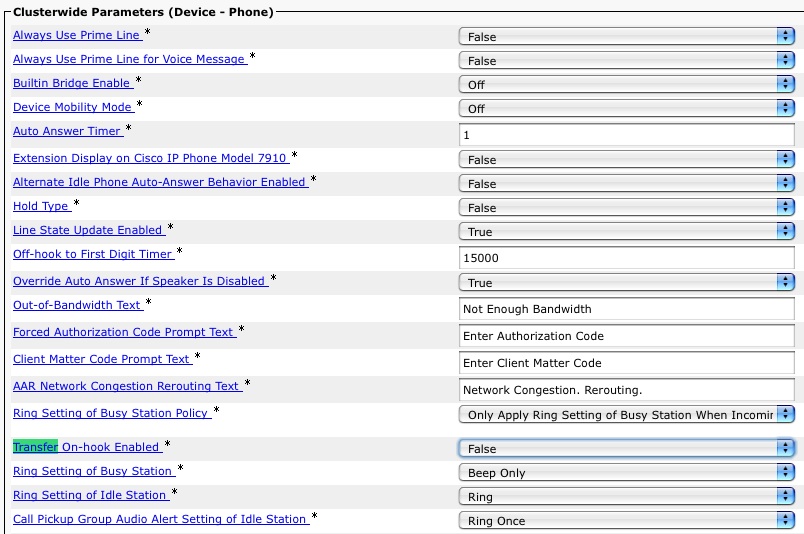
  5. Scroll down until you find the Clusterwide Parameters (Device-Phone)
  6. Look for the Transfer On-Hook Enabled setting.  By default, it’s set to FALSE.
  7. Change this setting to TRUE to allow On-hook transfers.

Here’s a picture in case you get lost:

Easy as cake.  If your phones are all SCCP-based, the setting will take effect immediately.  If you phones are SIP, you’re going to have to reset them to change this, so be sure to do it when you can reboot them all without affecting communications.

There you have it.  Once you’ve enabled this little setting, you can still use a warm transfer, but those users that can’t or won’t transfer with the Transfer button can still pull off a transfer by hanging up without disconnecting the caller.  If you can find a way to drill the concept of a warm transfer into the heads of those that just don’t seem to get it for some reason, you can make some real money.  Sure, it may involve some heavy duty mind control, but in the end I think it will all be worth it.

CCIE…For A Few Dollars More

The price of becoming an Expert just went up a little.  Effective August 1, 2011, the price of the CCIE lab is being increased by $100US across the board to be $1500.  The email that candidates received this morning:

As of August 1, 2011, the price of the CCIE Lab will change from $1400
to $1500 USD*.  Your lab fee will be processed 90 days before your
scheduled lab date. Since payment for your lab will be processed after
this date, you will incur the new price.  While you can cancel your
lab date without cost, we hope you will continue on with your
certification exam to certify that you are one of the most expert
networking professionals in the world.

As an administrative change, the timing on this is just about right.  The Cisco fiscal year begins on August 1 every year, so we are now officially in FY12.  Revenue increases usually get recognized in a new accounting period for reasons that I’ve managed to forget since my last accounting class in college.  Suffice to say that tying the lab price increase to the beginning of the fiscal year isn’t all that unheard of.

Why increase the price at all?  What am I getting for an extra 7%?  All valid questions.  Allow me to speculate:

1.  A Weak Dollar.  It’s no secret that the US dollar isn’t doing so well against other foreign currencies, like the Euro.  I’m not a Harvard Economist, so I’m not going to delve into areas that I know nothing about.  However, the price difference between the two currencies could lead Cisco to believe that the customers paying for the lab in denominations other than the US Dollar aren’t getting a fair shake.  Or, it could mean that other candidates are looking at the US labs as a bargain compared to Brussels and Dubai.  That would mean they could start booking labs here as opposed to there and start overloading the seating available here for US students.  It’s happened before, so I wouldn’t be that surprised to see it again if the candidates believed the price difference was that great.  By raising the lab to $1500, Cisco is essentially resetting the level so that everyone is fair again.

2.  Layoffs.  Yes, I know that within the next two weeks, Cisco is looking at about 6,500 layoffs from all over the company.  This includes 2,100 people who opted for an “early retirement” package in lieu of a furlough.  Why would this have an impact on the CCIE lab?  Because I have it on good authority that once of those 2,100 retirees was a CCIE proctor.  Typically, most labs run two proctors.  One shows up early to get the lab up and running for the day and run the candidates through the morning instructions.  The other proctor ends the lab and collects materials.  Depending on the time differences, the first proctor may not even be around when the lab ends.  Only having one proctor available for a site means a lot of overtime for that poor soul.  More likely is the idea that a new proctor will need to be brought on board, so increasing the price of the lab makes sense from the perspective of training a new guy in how to be mean and paying a chunk of his/her salary in an environment where pennies are going to be pinched pretty soon.

3.  Technology Refreshes.  Before any candidates out there have a heart attack, notice I said “technology” and not “blueprint”.  There is a lot of interesting technology coming in the future for the CCIE lab.  Mark Snow hinted at some of it in his Cisco Live 2011 recap post.  The plan going forward is to port all the lab workbooks to the CCIE Lab Delivery System that the R&S lab uses now.  This costs money.  Also, Cisco wants to start introducing more troubleshooting tasks in the actual configuration section now that the Open-Ended Questions have been removed.  This isn’t cheap.  In addition, Cisco is working on varying the lab tasks slightly among different versions of the exam, for instance asking a task to be configured one way on a version and the same task to have a slightly different configuration in another version.  This kind of development takes time and (you guessed it) money.  So, by adding another $100 to the lab price, they can effectively pay for the development of these new technologies without having to increase revenue from another source.  By making sure the CCIE lab can generate enough revenue to fund its own development, you never have to worry about another business unit getting involved and deciding how things are going to be run.

Tom’s Take

The CCIE lab isn’t cheap.  Not by a long shot.  Between the lab costs and the flights and the hotels and the rental cars, even one trip is a fairly costly adventure.  Adding another $100 onto that may not seem like a lot up front.  But the psychological effect can’t be understated.  The lab is now a nice round $1500 amount.  For those footing the bill themselves, this is another wallet-sized portrait of Benjamin Franklin that they have to part with.  In the end, all the pain and suffering is worth it, even that of your poor bank account.  I think the price increase will fund some great new advances in the lab and hopefully do away with the 3-ring binders for the workbooks and usher in a new age that uses technology to full advantage.  If this increase is due to currency parity, then the additional revenue that is brought in after the currency markets stabilize will be useful as well.  Just don’t expect the price of the lab to go down anytime soon, if ever.  Because if there’s one thing you can count on, it’s the cost of the CCIE lab always being a fistful of dollars.

You Can Call Me Al (or not)

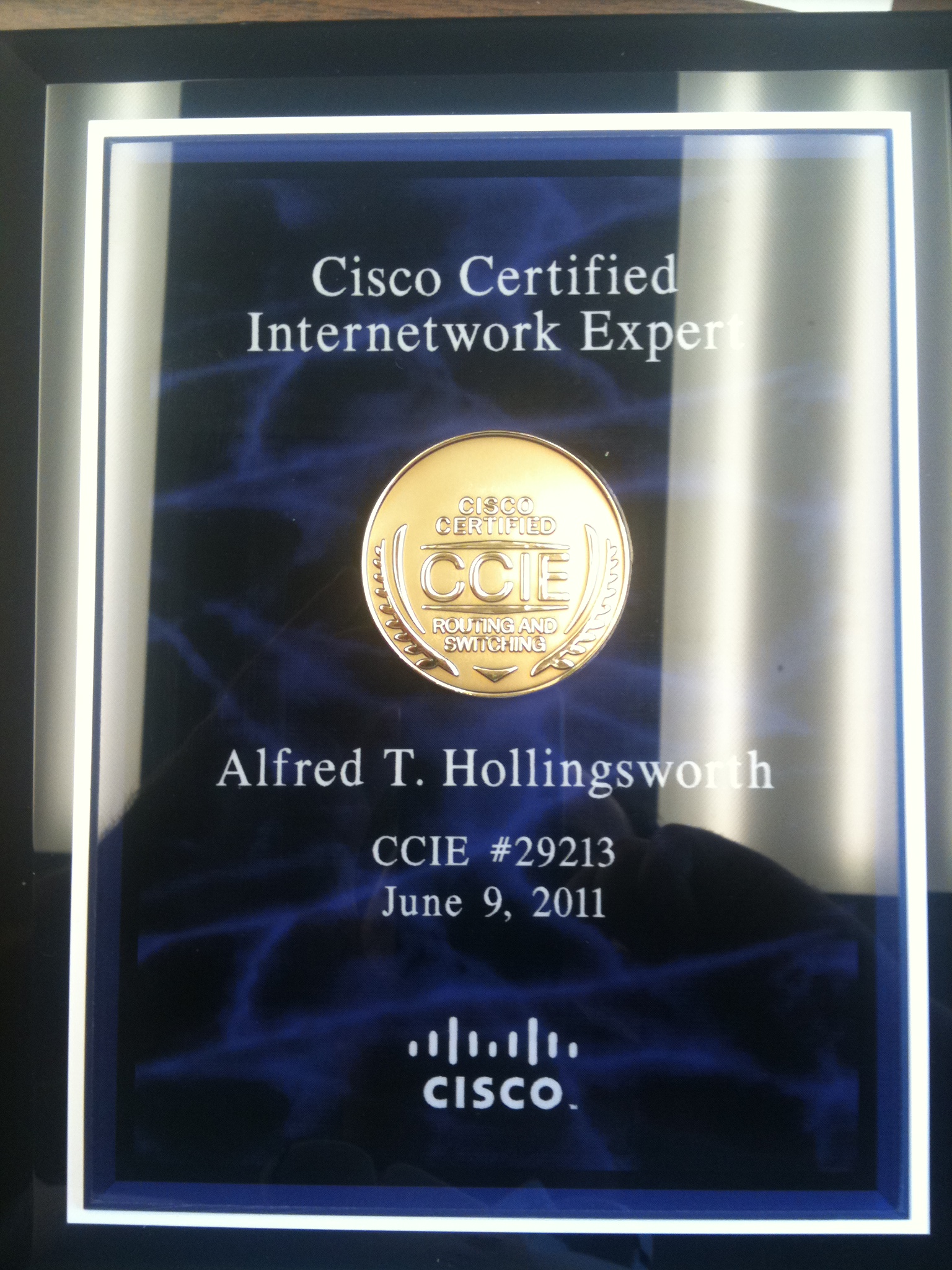
My CCIE plaque arrived today.  I’m happy that it weighed more than my usual certificates, as it can now be a handy weapon to wield when salesmen intrude on my solitude of studying:

Purdy, Ain't It?

There was one thing that did seem to generate some discussion, though.  Yes, my plaque says “Alfred” because my legal first name is indeed Alfred.  It’s a fun story.

I am the first male grandchild born to my both sides of my family.  Therefore, it is my responsibility to carry on the family name and legacy.  My mother and father had already agreed to name me after my grandfathers.  My paternal grandfather was named Alfred.  My maternal grandfather was named Tommy, so they decided on Thomas.  Right up to the point where my mom went into labor they both knew what my name was going to be.  Or so they thought.

I was a particularly difficult child, even before I was born.  20-some-odd hours of labor and an emergency C-section later, and Mom found herself sitting in the Intensive Care Unit (ICU).  When the nurses presented my father with the birth certificate, he filled it out according to what he thought was going to be the correct name.  They had discussed the names, but not the order.  Naturally, my father picked his dad’s name as my first name (Alfred) and put Thomas as my middle name.  In Mississippi (where I was born), the practice at that time was to file the birth certificate with the state and provide a stamped copy to the parents as the official birth certificate.  So three days later when Mom finally came around, she was presented with a new baby boy and a Xeroxed copy of the birth certificate proudly proclaiming me as Alfred Thomas Hollingsworth.  To which she replied, “He named our son WHAT?!?!”  The nurse jumped back and assured my mother that since she pushed me out, she could name me whatever she wanted.  My mother politely declined, knowing that she would later name my brother something normal, like John.  I’ve gone by Tom most of my life.  The only time I heard Alfred as a boy was when I was in trouble.  The only time I hear it now is when the government or a telemarketer calls my house.  But it always seems to be a great source of fun when people find out my “real name”.

There’s a moral in this for IT people as well.  Communication is very important, even on the little details.  My parents knew what two names they were going to use for me, but they forgot the important detail of what order to put them in.  When faced with a decision, my father chose what he thought was the logical order.  My mother had always assumed I would be Thomas Alfred, but never communicated that to my father.  And now when people try to verify my CCIE number, I constantly have to tell them to use Alfred as the verification name.  If you glaze over the details in any type of communication, you will invariably end up with results that aren’t quite what you expected, even if the majority of the project/trouble ticket/birth certificate is correct.  Then, being called “Al” is the least of your worries.

For Sale: One Nerd

As many of you know, I’m a recently certified CCIE.  As many of these things happen, it has take a while for my current employer to talk to me about what this means to them and to me moving forward.  I’ve heard many stories about CCIEs that have attained their lab only to find themselves out of a job quickly because their employer either doesn’t see the advantage of having a Cisco Expert on staff, or they feel that having a CCIE around will cost too much in the long run and they decide to part ways before the expenses grow too great.  In my case, I’m graced with an employer that wants to keep me around for the foreseeable future.  However, I’m now tasked with a different challenge.

After some conversations, I’ve been asked to come up with a way to sell myself.  No, not like that.  Or that.  Okay, maybe like that.  I’m supposed to find a way to put my skill set front and center and bring in new customers based on things that I can provide that no one else can.  This is a somewhat interesting proposition for me.  Despite what I might say or do around my Twitter friends, I’m usually a shy and reserved person.  I have a hard time being anything other than modest, and I don’t take compliments very well.  Now, I have to turn that on its head and find a way to put myself out there for all the world to see.

When I’m in a group of people, such as at Cisco Live, it’s easy for me to put on a fun act.  Tattoos nonwithstanding, I get to be funny and entertaining for my friends.  I feel comfortable calling attention to myself and generally being goofy.  However, in front of people that don’t know me very well, I find myself much more reserved.  The hardest job interview I’ve ever had involved the interviewer telling me, “Son, I don’t know anything about you.  If you don’t tell me more about yourself, you aren’t going to do very well.”  I tend to hang back and speak only when spoken to.  I don’t interrupt conversation, even when I see someone is wrong and needs to be corrected.  Many times, it’s easy for me to take this role as the silent partner because the people I’m meeting with do the majority of the discussing.

Now, however, I think I’m going to have to be more forward.  That doesn’t sit well with me.  I’ve tried my hand at sales-type activities before and found they weren’t for me.  I’m good at presenting information and answering questions.  I suck at closing people.  I don’t have the patience or desire to endlessly ask someone to buy something.  I tend to take the approach that I’ve presented you with all the information that you need to make up your mind.  It’s up to you to buy this widget or not.  I think I’m going to need to start finding ways to “close the deal”, even if only from the aspect that I have to convince the people I’m “selling” to that I’m capable of doing the job they want me to do.

This is just a little peak into what happens after you spend years of your life chasing something that identifies you as one of the best in your field.  It tends to change your standing in ways you couldn’t possibly understand when you start out on the path.  I’m going to be spending a lot of time in the immediate future figuring out exactly how I can sell myself more effectively than I have been.  And suggestions would be warmly appreciated.

Nerd Icons

A while back, I took Angry Cisco Guy’s Cisco Geek picture and turned it into a Cisco Nerd picture.  You know, for branding purposes.  Afterwards, I noticed two things.  Firstly, Solarwinds has some great stickers that say things like “Network Geek” or “IOS Geek”.  They seem to be popular with my co-workers.  The other is Netpappy’s current Twitter avatar.  It looked very appealing to me, as it boldly stated who he was and what he was all about.  Taking my preference for nerdiness into account, I figured I’d come up with my own icon set for displaying my talents.  I took the Cisco marketing icons that are almost universally recognized in the networking industry and added a little Photoshop magic.

Routers:

Switches:

Voice:

CallManager (Per request of Erik Peterson)

Security:

Wireless:

And even one for the VDCBadgers out there:

Thoughts?  Ideas?  Let me here em!

EDIT: Due to several people using these as Twitter avatars, I’ve resized them so that no dimension is more than 128 pixels, which means it shouldn’t be cut off when you put it into Twitter.  Enjoy!

Yet Another Edit:

Seems that I’ve got a few more icons to add to the pile thanks to some submissions of other vendors material.  I’ll be happy to keep churning these out, but remember that marketing icons make much better source material than wireframes in Visio.  You want something that can be recognized on sight, like the Aircraft Recognition Guides.

Juniper Router:

Juniper L2/L3 Switch:

Juniper Secured Router/Firewall:

My Thoughts on Dell and Force 10

Big announcement today concerning Michael Dell’s little computer company and their drive to keep up with the Joneses in the data center.  Dell has been a player in the server market for many years, but in the data center they are quickly losing out to the likes of HP, Cisco, and even IBM.  Until they hired away HP’s chief blade architect a few years ago, they weren’t even interested in blade servers/enclosures.  Instead, they relied on the tried-and-true model of 1U rack-mounted servers everywhere.  That has all changed recently with the explosion of high-density server enclosures becoming the rage with customers.  Now, the push seems to be headed toward offering a soup-to-nuts portfolio that allows your customers to go to one vendor to get all their data center needs, whether it be storage, servers, or networking.  HP was the first company to really do this, having acquired 3Com last year and integrating their core switching products into the Flex family of data center offerings.  Cisco has always had a strong background in networking, and their UCS product line appears to be coming on strong as of late.  IBM has been a constant bellweather in the market, offering storage and servers, but being forced to outsource their networking offerings.  Dell found itself in the same boat as IBM, relying on Brocade and Juniper as OEM partners to offer their networking connectivity for anything beyond simple low-end ports, which are covered by the Dell PowerConnect line.  However, the days of OEM relationships are quickly drying up, as the bigger vendors are on an acquisition spree and the little fish in the market are becoming meals for hungry vendors.

Dell has enjoyed a very strong relationship with Brocade in the past, and the positioning of Brocade as a strong player in the data center made them a very logical target for Dell’s pocketbook.  In fact, it had been reported several weeks ago that a deal between Dell and Brocade was all but done.  So, imagine the surprise of everyone when Dell announced on July 20th that they were buying Force10 Networks, a smaller vendor that specializes in high-performance switching for markets such as stock market trading floors.  To say that my Twitter stream erupted was an understatement.  We all knew that Dell was going to buy someone, but most figured it would be Brocade.  I even ranked Arista ahead of Force10 as the likely target of Dell’s acquisition fever.  I just figured that Force10 was a little too small and specialized to garner much attention from the big boys.  Don’t get me wrong, I think that Force10 makes some great products.  Their presentation at Network Field Day was well received, and they several customers that will swear by their performance.

What I expected from Dell was a purchase that would serve them across their whole network portfolio.  Brocade would have given them a replacement for the PowerConnect line at the low end as well as data center and fibre channel connectivity options.  They were already OEM-ing Brocade’s product line, so why not buy them outright?  I think that comes down the fact that EVERYONE is OEM-ing from Brocade (or so it seems).  EMC, IBM, and even HP have products from Brocade in their offerings.  If Dell had purchased Brocade outright, it would have forced those vendors to look elsewhere for fibre channel connectivity.  This would either be due to a desire to not inflate a competitor’s bottom line, or perhaps later if and when Dell decided to change the rules of how other vendors OEM from them.  This move away from a Dell-owned Brocade would have really muddied the waters for those inside Dell that wanted Brocade for it’s revenue stream.  As it is, I’m pretty sure that Dell is going to scale back on the B-series PowerConnect stuff everywhere but the fibre channel line and use Force10 as the main data center core technology group, while at the same time maintaining the PowerConnect line at the lower end for campus connectivity.  This will allow them to keep their margins on the PowerConnect side while at the same time increasing them in the data center, since they’ll no longer have to pay OEM fees to Brocade.

Whither Juniper?

The next most popular topic of conversation after Force10 involved…Juniper.  Juniper was a long-shot target of acquisition for Dell (and others), and now that the only major server vendor without a solid networking background is IBM, people are staring to ask who, if not IBM, is going to buy Juniper?  And when?

Folks, Juniper isn’t an easy acquisition.  Add in the fact that the IBM you see today isn’t the IBM of your father (or my early networking days for that matter), and you’ll see that Juniper is best left to its own devices for the time being.  Juniper isn’t really what I would consider a “data center switching” company like Force10 or Arista.  They tend to fall more in the service provider/campus LAN market to me.  I think that if someone like IBM could pony up the billions to buy them, they’d quickly find themselves lost in what to do with Juniper’s other technologies.  Buying Juniper for their data center offerings would be like buying a Porsche because you like the stereo.  You’re missing the point.  I’d wager money that Juniper is more likely to buy twenty more companies before they get bought themselves.  Their networking business is growing by leaps and bounds right now, and saddling them with a large company as ‘oversight’ would probably cripple their innovation.

IBM already owns a high-speed, low-latency networking company that they bought about this time last year, Blade Networks.  Why should they go out and spend more money right now?  Especially if they are happy with their OEM partnerships with Brocade and Juniper (like Dell has been doing previously)?  IBM has shed so much of what it used to be that it no longer resembles the monster that it once was.  Gone are the PCs and Thinkpads and low-end servers.  Instead, they’ve moved to the blade and high end server market, with storage to complement.  They used to be number one, but have long since been passed by HP.  Now they find themselves fighting off their old foe Dell and this new upstart, Cisco.  Does it really make sense for them to mortgage the family farm to buy Juniper, only to let it die off?  I’d rather see them make a play for a smaller company, maybe even one as well-known as Arista.  It would fit the profile a bit better than buying Juniper.  That’s more HP’s style.

Tom’s Take

I fully expect the trumpets of Dell’s new-found data center switching expertise to start sounding as soon as the ink is dry on Force10.  In fact, don’t be surprised to see it come up during Tech Field Day 7 next month in Austin, TX.  I think Dell will get a lot of mileage out of their new stalking horse, as most of the complaints I’ve heard about Force10 come from their sales staff, and we all know how great Dell is at selling.

For now, Juniper needs to sit back and bide its time, perhaps stroking a white Persian cat.  They can go down the interoperability road, telling their customers that since they have strong OEM relationships with many vendors, they can tie all these new switches together will very little effort.  They shouldn’t worry themselves with the idea that anyone is going to buy them anytime soon.

So…The Tattoo

Probably the most talked about thing at Cisco Live, at least from my perspective, was this little joke that took on a life of its own.  Since a lot of people asked about it, and since it still keeps popping up all over the place, I figured I’d take the time to say something about it.

In the World of Solutions (WoS), Cisco usually has a lounge for any Cisco Certified individuals to come in and chat and hang out.  A couple of years ago, they started making the CCIEs go into this lounge to get their silver CCIE ribbon for their badge holder.  This usually means there is a long line of CCIEs waiting to pick up their shinies.  This year, Cisco hired an airbrush artist to put fake CCIE logo tattoos on any CCIE that wanted one.  You could get the basic new CCIE logo, or a specific logo with any track name, such as Routing and Switching or ISP Dial.  People started getting tattoos put on their arms and calves right away.  Some people, like Marko Milivojevic, got two tattoos on each arm for his dual CCIE accomplishments.  I skipped getting at tattoo on Monday night, due to the long line and the desire to get as many codes as I could for the Destination Collaboration game (which I ended up winning on day one).

The next day (Tuesday), I was just getting out of a class and decided to go back to the WoS to pick up a few t-shirts and other pieces of swag.  Along the way, I saw a tweet from Mr. Tugs aimed at the Learning@Cisco people asking if anyone had gotten the “tramp stamp” CCIE tattoo yet.  From Wikipedia:

lower back tattoo is a body decoration, sometimes intended to emphasize sexual attractiveness. Such tattoos have become popular since the late 1990s. They are sometimes derided as suggestive of promiscuity and often referred to as “tramp stamps”[1] and other slang terms.[2] The German term Arschgeweih can be translated as ‘ass antlers’. Such tattoos are primarily seen on women, although a small but increasing number of men have them as well.

While the lower back is not the widest area of the human back, it has abundant space for a large design and horizontal tattoo designs can be worked easily. In contrast to the abdomen, which is otherwise a similar location, the lower back does not stretch significantly during pregnancy or other weight gains, thus providing a more stable site for a design. Lower back tattoos are often left uncovered by individuals wearing crop tops that are designed to expose the midriff and low-rise jeans that are worn low around the hips.

For those that might not be too familiar with the term “tramp stamp”.  At first it appeared to be a joke in good fun, pointing out that since the majority of attendees are male, the possibility of someone getting a tattoo in an area usually associated with someone feminine was out of the question.  The Cisco Learning folks decided to up the ante by offering a free t-shirt to the first person to get said tattoo in the lower back region.  As I walked into the Certification Lounge, I asked if anyone had gotten it yet, and I was told that no one had.  Julia, the Certification lady, asked if I was thinking about going for it.

To take a moment here to explain my thinking…I was pretty sure this would be a funny little joke for everyone.  I couldn’t care less about the position of the tattoo.  I figured Learning@Cisco would tweet about it and my name would get attached to it somehow.  My friends would have a good laugh about it and I’d be on the receiving end of some good-natured ribbing about it for the next couple of days.  I’ve been known to do silly things before, so this wasn’t entirely out of character for me.  However, the confluence of events rose to make this somewhat of the Perfect Tramp Stamp Storm.

Once I had committed to getting said tattoo, Marko walked over and said that if I would get it, he would get it too, provided there was a t-shirt in it for him as well.  Once he got the green light for his t-shirt, we went about the business of getting stamped.  When I looked up halfway through the process, I noticed a bunch of my friends sitting on the couches in the Certification Lounge.  What was originally going to be a bit of a shock to them turned into them crowding around to see and start taking pictures.  I was doomed from the moment I stood up.  A couple of quick photos followed while Marko got his matching tattoo.  Once we had completed the process, Julia asked us for a quick picture so she could tweet it out to the world to show that two CCIEs had stepped up and sacrificed a little dignity for a t-shirt.  When she posted the pic to twitter, she not only used the conference hashtag of #cl11, but she also appended the hashtag #CCIE2011, which was to be used for pictures taken at the CCIE party that night.  This was the beginning of the end.

As word spread about the tattoo, the picture kept getting retweeted over and over again.  Because the hashtag for the CCIE party pictures was embedded in the original tweet (and subsequent retweets), the picture kept popping up on the monitors at the party.  It wasn’t all that uncommon to see the picture three or four times in a row while walking around the party.  It ended up being so popular that Carlos Dominguez put it up on the big screen during his introduction at the Wednesday keynote by Padmassree Warrior.  He said it was his favorite picture at Cisco Live so far and he called Marko and I “two of our brightest CCIEs”.  For Marko and I, this was praise enough to make it worth it.

The picture keeps cropping up even a week later, as people find it and retweet it or my friends keep bringing it back up as a punchline in a joke.  Frankly, I’m more than amused.  If my jovial behavior during Cisco Live didn’t already make me popular, going to the lengths that I did to get my backside up on a giant screen in front of 15,000 live guests and who knows how many thousand around the world virtually sealed the deal.  I’ll always be known as the “Tramp Stamp CCIE”.  And I’m perfectly fine with that.

Tom’s Take

Never be afraid to make an ass out of yourself.  It takes a lot of confidence to put yourself out there and to be ready to weather the storm of criticism and jeers.  I’m pale and a little chunkier than I could stand to be.  I’m also not afraid to have fun and use some self deprecation to accomplish good humor.  If all I’m ever known for is one famous tattoo, I can die a happy man.

Should you really want to see the evidence of my little bit of humor, I’ll link to it rather than putting the pictures in this post.  Be aware, though, that what has been seen cannot be unseen.  Do not observe my paleness while under the influence of medication or while operating heavy machinery.  My back has been known to cause blindness and discomfort in test subjects and small children.  Do not expose yourself to these pictures for more than a few minutes.  Should your find yourself with blindness lasting for more than four hours, please consult a physician.

With that out of the way, check out my tattoo HERE (thanks Amy and Greg) and HERE (Thanks Learning@Cisco).

CCIE Data Center – Coming Soon-ish

Right before I left for Cisco Live, I had a big post about the rumored CCIE Data Center certification exam that I was going to publish.  I held off at the last second because I wanted to gather some more information at Cisco Live from the army of Cisco people that would be there.  I’m glad I waited.

Speculation has been rampant that Cisco is readying an update to the CCIE Storage Area Network (SAN) lab certification exam to better align their position with the new Unified Computing System (UCS) hardware and various other technologies like Wide-Area Application Services (WAAS) and the Application Control Engine (ACE).  These items are heavily utilized in modern datacenters to provide the best customer experience with large scale computing deployments.  Since the focus inside of Cisco for the past few months has involved UCS to a large degree, there is a lot of support in the partner community for top-tier certifications to recognize the investment that partners make in UCS training for their employees.  Also, having a program with the prestige of the CCIE attached to your data center learning gives the engineers working on the product an aura of intelligence when it comes to product.

During Cisco Live, there was even an overview of the CCIE SAN program in the breakout session BRKCCIE-1001.  Curiously, it was titled CCIE Data Center/Storage Certification.  I’m sure that people flooded into the class hoping to hear whether or not the data center CCIE would be coming out soon.  However, the majority of the class dealt with CCIE SAN and the methodologies and topologies of that exam. Only in the last few slides are any hints of the future of data center certification, and even then it is just a suggestion of updates to the existing blueprint.  What follows in this article are my ideas about what a proposed CCIE Data Center might involve.  They are based on conversations I had in the past week, but in no way represent the official position of the CCIE program or any person inside of Cisco, so don’t go quoting me as the gospel truth.

I think the CCIE Data Center program is still 12-15 months out.  Why?  Well, there is still a lot of life left in the SAN program.  The announcement of the removal of the Core Knowledge/Open Ended Questions slated for August 15th proved it.  Why bother mentioning SAN if it’s not going to be around for a while?  There are still a number of students in the CCIE SAN track today and announcing changes this soon would wreck all their hard work and study.  This is also a requirement that any major changes to a track or blueprint must be preceded by a 6-month notice.  As we haven’t heard any announcement yet, the data center CCIE couldn’t possibly arrive earlier than next January.

There is a lot of hardware that could go into a CCIE Data Center exam.  UCS, MDS, WAAS, ACE, load balancers, and even FC/FCoE storage arrays must be considered at a minimum.  What about focus?  There are lots of different areas that you could exam for track focus, from simple UCS deployments to more of a service provider, hosted cloud type integration.  How to cover all of those bases in one exam?  Especially if you have to shoehorn it all into 8 hours?  I’m pretty sure that we might end up seeing some form of tracks in the CCIE Data Center after it launches, similar to the way the CCIE Service Provider used to be subdivided.

What about all those SAN folks that busted their butts learning about MDS switches and figuring out crafty ways to configure fibre channel?  Are they going to be left out in the cold just like the old CCIE ISP Dial guys?  Relics of a bygone era?  I doubt it.  MDS switches are still on the proposed blueprints that I’ve seen being kicked around, and even the rumors say that the SAN program is being upgraded, not retired.  Don’t be shocked if the SAN guys get some kind of “bridge” program to take what they’ve learned about storage and apply it to a Data Center track.  My guess would be something like running the two tracks parallel for a few months after launch and then allowing SAN CCIEs and candidates a single free shot at the Data Center lab exam.

Tom’s Take

It’s time for Cisco to come out with a CCIE for the modern data center.  The other vendors that play in this space love to tout their expertise building multivendor networks and implementing large scale server/storage/switching deployments.  But let’s face it: they aren’t CCIEs.  Once someone gets the digits, they take on a different aura.  Having CCIEs focused on servers and storage would give Cisco a competitive advantage in the data center market, where it appears the battle for supremacy will be waged for the next couple of years.  I think Cisco is going to take their time and get this one perfect before releasing it to the public, both to be sure that it covers their goals for where they want the Cisco data center brand to go as well as to ensure they don’t alienate those CCIEs who have diligently studied SANs and taken the battle standard thus far.  Just remember to have a little patience, since the CCIE is a marathon that pays off in the end.