Write Like The Wind

2053fountain_pen

At the beginning of 2013, I looked at the amount of writing I had been doing.  I had been putting out a post or two a week for the last part of 2012.  Networking Field Day usually kept me busy.  Big news stories also generated a special post after they broke.  I asked myself, “Could I write two posts a week for a whole year?”

The idea is pretty sound.  I know several people that post very frequently.  I had lots of posts backlogged that I could put up to talk about subjects I never seemed to get around to discussing.  So, with a great deal of excitement, I made my decision.  Every Monday and Thursday of 2013 would have a blog post.  In all, 105 posts for the year (counting this one).

Let me be the first to tell you…writing is hard.  It’s easy enough to come up with something every once in a while.  I personally have set a goal of writing a post a week to make sure I stay on track with my blog.  If I don’t write something once a week, then I miss a week.  Then two.  Next thing you know, six months from now I’m writing that “Wow, I haven’t updated in a while…” post.  I hate those posts.

Reaping What You Sow

Not that my life didn’t get complicated along the way.  I changed jobs.  My primary source of material, Tech Field Day, now became my job and not something I could count on for inspiration.  Then, I took on extra work.  I wrote some posts for Aruba’s Airheads Community site.  I also picked up a side job halfway through the year writing for Network Computing.  I applied my usual efficiency to that work, so I was cranking out one post a week for them as well.

My best laid plans of two posts per week ended up being three.  I wrote a lot.  Sometimes, I had everything ready to go and knew exactly what I wanted to say.  Other times I was drafting something at the eleventh hour.  It was important to make sure that I hit my targets.  Some of my posts covered technology, but many more were about the things I do now: writing, blogging, and community relations.  I’m still a technical person, but now I spend the majority of my time writing blogs, editing white papers, and talking to people.

I found out that I like writing.  Quite a bit, in fact.  I like thinking about a given situation or technology and analyzing the different aspects.  I like taking an orthogonal approach to a topic everyone is discussing.  Sometimes, that means I get to play the devil’s advocate.  Other times I make a stand against something I don’t like.  In fact, I created an entire Activism category for blog posts solely because I’ve spent a lot of time discussing issues that I think need to be addressed.

The Next Chapter

Now, all that being said, I’m going to look forward to writing in the future.  I’m probably going to throttle back just a bit on the “two posts per week” target.  With Network Computing going strong, I don’t want to compromise on either front.  That means I’ll probably cut back a post or two here to make sure all my posts are of good quality.  More than once this year I was told, “You write way more than you need to.”  In many ways, that’s because there’s a lot going on in my brain.  This blog serves as a way for me to get it all out and in a form that I can digest and analyze.  I’m just pleased that others find it interesting as well.

Tech Field Day is going to keep me busy in the coming year.  It’s going to give me a lot of exposure to topics I wouldn’t have otherwise gotten to be involved in.  Hopefully that means I’m going to spend more time writing technical things alongside my discussions of social media, writing, and the occasional humorous list.

I’m not out of ideas.  Not by a long shot.  But, I think that some of my ideas are going to need some time to percolate as opposed to just throwing them out there half baked.  Technology is changing every day.  It’s important to be a part of what’s going on and how it can best be used to affect change in a world that hasn’t seen much upheaval in the last decade.  I hope that some of the things I write in the coming months will help in some small part to move the needle.


The CoR Issue

Image from John Welsh.  Read his blog for more voice goodness.

Image from John Welsh. Read his blog for more voice goodness.

In my former life as a voice engineer, I spent a lot of my time explaining class of restriction (CoR) to users and administrators.  The same kinds of questions kept getting asked every time I setup a new system.  Users wanted to know how to make long distance calls.  Administrators wanted to restrict long distance calls.  In some cases, administration went to the extreme of asking if phones could be configured to have no dial tone during class periods or only have long distance enabled during break and lunch periods.

This kind of technology restriction leads to all kinds of behavioral issues.  The administrators may have had the best of intentions in the beginning.  Restricting long distance calls cuts down on billing issues.  Using access codes removes arguments about who dialed a specific number.  Removing dial tone from a handset during work hours encourages teachers and staff and employees to focus on their duties.  It all sounds great. Until the users get involved.

No Restrictions

Users are ingenious creatures.  Given a restriction, they will do everything they can to go around it.  Long distance codes will be shared around a department until an unrestricted one can be found and exploited.  Phones that have dial tone turned off will be ignored.  Worse yet, given a restrictive enough environment users will turn to personal devices to avoid complications.

I used to tell school officials the unvarnished truth.  If you disable a phone during class, teachers will just drag out their cell phone to make a call when needed.  They won’t wait for a break, especially if it is a disciplinary issue or an emergency.  Cell phones are pervasive enough now that most everyone carries one.  Do you think that an employee that has a restricted phone is going to accept it?  Or will they just use their own phone to make a long distance call or make a call during a restricted time?

Class of restriction needs to be rethought for phone systems in today’s environments.  We need to ensure that things like access codes are in place for transparency, not for behavior modification.  Given that we have options like extension mobility for user identification on a specific device, it makes sense that we should be abel to identify phone calls from a given user on a given extension with ease.  There should be no reason for a client matter code or forced authorization code.

Likewise, restricting dial tone on a phone should be discouraged.  Giving users a good reason to use non-controlled devices like cell phones isn’t really a good option.  Instead, you should be counseling the users to treat an in-room phone like any other corporate device.  It should be used when appropriate.  If direct inward dial (DID) is configured for the extension, users should be cautioned to only give the number to trusted parties.  DID is usually not configured for extensions in most of my deployments, so it’s not an issue.  That’s not to say it won’t come up in your deployment.


Tom’s Take

Class of restriction is a necessary evil in a phone system.  It prevents expensive toll calls like 900 numbers or international calls.  However, it should really on be used to curtail these kinds of problems and not to restrict normal user behavior, like long distance calls.  I can remember using my Cisco Cius for the first time only to discover that a firmware bug rendered it unusable due to CoR preventing me from entering a long distance code.  I had to shelve the unit until the bug was fixed.  Which just happened to be a few weeks before the device was officially killed off.  When you restrict the use of your device, users will choose to not use your device.  Giving users the largest number of options will encourage them to use everything at their disposal.  CoR shouldn’t create issues, it should allow users to solve them.

Is The Blog Dead?

I couldn’t help but notice an article that kept getting tweeted about and linked all over the place last week.  It was a piece by Jason Kottke titled “R.I.P. The Blog, 1997-2013“.  It’s actually a bit of commentary on a longer piece he wrote for the Nieman Journalism Lab called “The Blog Is Dead, Long Live The Blog“.  Kottke talks about how people today are more likely to turn to the various social media channels to spread their message rather than the tried-and-true arena of the blog.

Kottke admits in both pieces that blogging isn’t going away.  He even admits that blogging is going to be his go-to written form for a long time to come.  But the fact that the article spread around like wildfire got me to thinking about why blogging is so important to me.  I didn’t start out as a blogger.  My foray into the greater online world first came through Facebook.  Later, as I decided to make it more professional I turned to Twitter to interact with people.  Blogging wasn’t even the first thing on my mind.  As I started writing though, I realized how important it is to the greater community.  The reason?  Blogging is thought without restriction.

Automatic Filtration

Social media is wonderful for interaction.  It allows you to talk to friends and followers around the world.  I’m still amazed when I have conversations in real time with Aussies and Belgians.  However, social media facilitates these conversations through an immense filtering system.  Sometimes, we aren’t aware of the filters and restrictions placed on our communications.

twitter02_color_128x128Twitter forces users to think in 140-ish characters.  Ideas must be small enough to digest and easily recirculate.  I’ve even caught myself cutting down on thoughts in order to hit the smaller target of being about to put “RT: @networkingnerd” at the begging for tweet attribution.  Part of the reason I started a blog was because I had thoughts that were more than 140 characters long.  The words just flow for some ideas.  There’s no way I could really express myself if I had to make ten or more tweets to express what I was thinking on a subject.  Not to mention that most people on Twitter are conditioned to unfollow prolific tweeters when they start firing off tweet after tweet in rapid succession.

facebook_color02_128x128Facebook is better for longer discussion, but they are worse from the filtering department. The changes to their news feed algorithm this year weren’t the first time that Facebook has tweaked the way that users view their firehose of updates.  They believe in curating a given users feed to display what they think is relevant.  At best this smacks of arrogance.  Why does Facebook think they know what’s more important to me that I do?  Why must my Facebook app always default to Most Important rather than my preferred Most Recent?  Facebook has been searching for a way to monetize their product even before their rocky IPO.  By offering advertisers a prime spot in a user’s news feed, they can guarantee that the ad will be viewed thanks to the heavy handed way that they curate the feed.  As much reach as Facebook has, I can’t trust them to put my posts and articles where they belong for people that want to read what I have to say.

Other social platforms suffer from artificial restriction.  Pinterest is great for those that post with picture and captions or comments.  It’s not the best for me to write long pieces, especially when they aren’t about a craft or a wish list for gifts.  Tumblr is more suited for blogging, but the comment system is geared toward sharing and not constructive discussion.  Add in the fact that Tumblr is blocked in many enterprise networks due to questionable content and you can see how limiting the reach of a single person can be when it comes to corporate policy.  I had to fight this battle in my old job more than once in order to read some very smart people that blogged on Tumblr.

Blogging for me is about unrestricted freedom to pour out my thoughts.  I don’t want to worry about who will see it or how it will be read.  I want people to digest my thoughts and words and have a reaction.  Whether they choose to share it via numerous social media channels or leave a comment makes no difference to me.  I like seeing people share what I’ve committed to virtual paper.  A blog gives me an avenue to write and write without worry.  Sometimes that means it’s just a few paragraphs about something humorous.  Other times it’s an activist rant about something I find abhorrent.  The key is that those thoughts can co-exist without fear of being pigeonholed or categorized by an algorithm or other artificial filter.


Tom’s Take

Sometimes, people make sensationalist posts to call attention to things.  I’ve done it before and will likely do it again in the future.  The key is to read what’s offered and make your own conclusion.  For some, that will be via retweeting or liking.  For others, it will be adding a +1 or a heart.  For me, it’s about collecting my thoughts and pouring them out via a well-worn keyboard on WordPress.  It’s about sharing everything rattling around in my head and offering up analysis and opinion for all to see.  That part isn’t going away any time soon, despite what others might say about blogging in general.  So long as we continue to express ourselves without restriction, the blog will never really die no matter how we choose to share it.

Brave New (Dell) World

Dell_Logo

Companies that don’t reinvent themselves from time to time find themselves consigned to the scrap heap of forgotten technology.  As anyone that worked at Wang.  Or Packard Bell.  Or Gateway.  But, not everyone can be like IBM.  It takes time and careful planning to pull of a radical change.  And last but not least, it takes a lot of money and people willing to ride out the storm.  That’s why Dell has garnered so much attention as of late with their move to go private.

I was invited to attend Dell World 2013 in Austin, TX by the good folks at Dell.  Not only did I get a chance to see the big keynote address and walk around their solutions area, but I participated in a Think Tank roundtable discussion with some of the best and brightest in the industry and got to take a tour of some of the Dell facilities just up the road in Round Rock, TX.  It was rather interesting to see some of the changes and realignments since Michael Dell took his company private with the help of Silver Lake Capital.

ESG Influencer Day

The day before Dell World officially kicked off was a day devoted to the influencers.  Sarah Vela (@SarahVatDell) and Michelle Richard (@Meesh_Says) hosted us as we toured Dell’s Executive Briefing Center.  We got to discuss some of Dell’s innovations, like the containerized data center concept.

DellDCContainer

Dell can drop a small data center on your property with just a couple of months of notice.  Most of that is prepping the servers in the container.  There’s a high-speed video of the assembly of this particular unit that runs in the EBC.  It’s interesting to think that a vendor can provide a significant amount of processing power in a compact package that can be delivered almost anywhere on the planet with little notice.  This is probably as close as you’re going to get to the elasticity of Amazon in an on-premise package.  Not bad.

The Think Tank was another interesting outing.  After a couple of months of being a silent part of Tech Field Day, I finally had an opportunity to express some opinions about innovation.  I’ve written about it before, and also recently.  The most recent post was inspired in large part by things that were discussed in the Think Tank.  It believe that IT is capable of a staggering amount of innovation if they could just be given the chance to think about it.  That’s why DevOps and software defined methodologies have such great promise.  If I can use automation to take over a large part of my day-to-day work, I can use that extra time to create improvement.  Unloading the drudgery from the workday can create a lot of innovation.  Just look at Google’s Ten Percent Time idea.  Now what if that was 25%?  Or 50%?

Dell does a great job with their influencer engagements.  This was my second involvement with them and it’s been very good.  I felt like a valued part of the conversation and got to take a sneak peek at some of the major announcements the day before they came out.  I think Dell is going to have a much easier road in front of it by continuing to involve the community in events such as this.

What’s The Big Dell?

Okay, so you all know I’m not a huge fan of keynotes.  Usually, that means that I’m tweeting away in Full Snark Mode.  And that’s if I’m not opposed to things being said on stage.  In the case of Dell World, Michael Dell confirmed several ideas I had about the privatization of his company.  I’ve always held the idea that Dell was upset the shareholders were trying to tell him how to run his company.  He has a vision for what he wants to do and if you agree with that then you are welcome to come along for the ride.

The problem with going public is much the same as borrowing $20 from your friend.  It’s all well and good at first.  After a while, your buddy may be making comments about your spending habits as a way to encourage you to pay him back.  The longer that relationship goes, the more pointed the comments.  Now, imagine if that buddy was also your boss and had a direct impact on the number of hours your worked or the percentage of the commission you earned.  What if comments from him had a direct impact on the amount of money you earned?  That is the shareholder problem in a nutshell.  It’s nice to be flush with cash from an IPO.  It’s something else entirely when those same shareholder start making demands of you or start impacting your value because they disagree with your management style.  Ask Michael Dell how he feels about Carl Icahn?  I’m sure that one shareholder could provide a mountain of material.  And he wasn’t the only one that threatened to derail the buyout.  He was just the most vocal.

With the shareholders out of the way, Dell can proceed according to the visions of their CEO.  The only master he has to answer to now is Silver Lake Capital.  So long as Dell can provide good return on investment to them I don’t see any opposition to his ideas.  Another curious announcement was the Dell Strategic Innovation Venture Fund.  Dell has started a $300 million fund to explore new technologies and fund companies doing that work.  A more cynical person might think that Michael Dell is using he new-found freedom to offer an incentive to other startups to avoid the same kinds of issues he had – answering to single-minded masters only focused on dividends and stock price.  By offering to invest in a hot new startup, Michael Dell will hopefully spur innovation in areas like storage.  Just remember that venture capital funds need returns on their investments as well, so all that money will come with some strings attached.  I’m sure that Silver Lake has more to do with this than they’re letting on.  Time will tell if Dell’s new venture fund will pay off as handsomely as they hope.


Tom’s Take

Dell World was great.  It was smaller than VMWorld or Cisco Live.  But it fit the culture of the company putting on the show.  There weren’t any earth shattering announcements to come out of the event, but that fits the profile of a company finding its way in the world for the second time.  Dell is going to need to consolidate and coordinate business units to maximize effort and output.  That’s not a surprise.  The exuberance that Michael Dell showed on stage during the event is starting to flow down into the rest of Dell as well.  Unlike a regular startup in a loft office in San Francisco, Dell has a track record and enough stability to stick around for while.  I just hope that they don’t lose their identity in this brave new world.  Dell has always been an extension of Michael Dell.  Now it’s time to see how far that can go.

Disclaimer

I was an invited guest of Dell at Dell World 2013.  They paid for my travel and lodging at the event. I also received a fleece pullover, water bottle, travel coffee mug, and the best Smores I’ve ever had (really).  At no time did they ask for any consideration in the writing of this review, nor were they promised any.  The opinions and analysis presented herein reflect my own thoughts.  Any errors or omissions are not intentional.

Is LISP The Answer to Multihoming?

LISPMultihoming

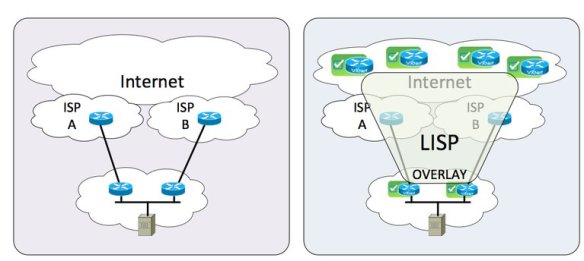
One of the biggest use cases for Locator/Identifier Separation Protocol (LISP) that will benefit small and medium enterprises is the ability to multihome to different service providers without needing to run Border Gateway Protocol (BGP). It’s the answer to a difficult and costly problem. But is it really the best solution?

Current SMB users may find themselves in a situation where they can’t run BGP. Perhaps their upstream ISP blocks the ability to establish a connection. In many cases, business class service is required with additional fees necessary to multihome. In order to take full advantage of independent links to different ISPs, two (or more) NAT configurations are required to send and receive packets correctly across the balanced connections. While technically feasible, it’s a mess to troubleshoot. It also doesn’t scale when multiple egress connections are configured. And more often that not, the configuration to make everything work correctly exists on a single router in the network, eliminating the advantages of multihoming.

LISP seeks to solve this by using a mapping database to send packets to the correct Ingress Tunnel Router (ITR) without the need for BGP. The diagram of a LISP packet looks a lot like an overlay. That’s because it is in many ways. The LISP packets are tunneled from an Egress Tunnel Router (ETR) to a LISP speaking decapsulation point. Depending on the deployment policies of LISP for a given ISP, it could be the next hop router on a connection. It could also be a router several hops upstream. LISP is capable of operating over non-LISP speaking connections, but it does eventually need decapsulation.

Where’s the Achille’s Heel in this design? LISP may solve the issue without BGP, but it does introduce the need for the LISP session to terminate on a single device (or perhaps a group of devices). This creates issues in the event the link goes down and the backup link needs to be brought online. That tunnel state won’t be preserved across the failover. It’s also a gamble to assume your ISP will support LISP. Many large ISPs should give you options to terminate LISP connections. But what about the smaller ISP that services many SMB companies? Does the local telephone company have the technical ability to configure a LISP connection? Let along making it redundant and highly available?

Right Tool For The Job

I think back to a lesson my father taught me about tools. He told me, “Son, you can use a screwdriver as a chisel if you try hard enough. But you’re better off spending the money to buy a chisel.” The argument against using BGP to multihome ISP connections has always come down to cost. I’ve gotten into heated discussions with people that always come back to the expense of upgrading to a business-class connection to run BGP or ensure availability. NAT may allow you to multihome across two residential cable modems, but why do you need 99.999% uptime across those two if you’re not willing to pay for it?

LISP solves one issue only to introduce more. I see LISP being misused the same way NAT has been. LISP was proposed by David Meyer to solve the exploding IPv4 routing table and the specter of an out-of-control IPv6 routing table.  While multihoming is certainly another function that it can serve, I don’t think that was Meyer’s original idea.  BGP might not be perfect, but it’s what we’ve got.  We’ve been using it for a while and it seems to get the job done.  LISP isn’t going to replace BGP by a long shot.  All you have to do it look at LISP ALternate Topology (LISP-ALT), which was the first iteration of the mapping database before the current LISP-TREE.  Guess what LISP-ALT used for mapping?  That’s right, BGP.


Tom’s Take

LISP multihoming for IPv4 or IPv6 in SMEs isn’t going to fix the problem we have today with trying to create redundancy from consumer-grade connections.  It is another overlay that will create some complexity and eventually not be adopted because there are still enough people out there that are willing to forgo an interesting idea simply because it came from Cisco.  IPv6 multihoming can be fixed at the protocol level.  Tuning router advertisements or configuring routes at the edge with BGP will get the job done, even if it isn’t as elegant as LISP.  Using the right tool for the right job is the way to make multihoming happen.

Are Exit Strategies Hurting Innovation?

MSP-exit-strategy-300x225

During the Think Tank that I participated in at Dell World, the topic of conversation turned to startups.  Specifically, how do startups drive innovation?  As I listened to the folks around the table like Justin Warren (@JPWarren) and Bob Plankers (@Plankers) talk about the advantages that startups enjoy when it comes to agility, I started to wonder if some startups today are hurting the process more than they are helping it.

Exit Strategy

The entire point of creating a business is to make money.  You do that by creating a product that you can sell to someone.  It doesn’t have to be a runaway success.  So long as you structure the business correctly you can make money for a good long while.  The key is that you must structure the business to pay off in the long run.

Startups seem to have this idea that the most important part of the equation is to build something quickly and get it onto the market.  The business comes second.  That only works if you are playing a very short game.  The bad decisions you make in the foundation of your business will come back to bite you down the road.

Startups that don’t have a business plan only have one other option – an exit strategy.  In far too many cases, the business plan for a startup is to build something so awesome that another larger company is going to want to buy them.  As I’ve said before talking about innovation, buying your way into a new product line does work to a point.  For the large vendor, it is dependent on the available cash on hand.  For the startup, the idea is that you need to have enough capital on hand to survive long enough to be bought.

Looking For A Buyer For The End Of The World

There’s nothing more awkward than a company that’s obviously seeking a buyout from a large vendor that hasn’t received it yet.  I look at the example of Violin Memory.  Violin makes flash storage cards for servers to accelerate caching for workloads.  They were a strategic parter of HP for a long time.  Eventually, HP decided to build those cards themselves rather than rely on Violin as a supplier.  This put Violin in a very difficult position.  In hindsight, I’m sure that Violin wanted to be bought by HP and become a division inside the server organization.  Instead, they were forced to look elsewhere for funds.  They chose to file an initial public offering (IPO) that hit the initial target.  After that, the parts of the business that weren’t so great started dragging the stock price down, angering the investors to the point where executives are starting to leave and lawsuits look likely.

Where did Violin go wrong?  If they had built a solid business in the first place they might have been able to keep selling along even though HP had decided not to buy them.  They might have been able to stay afloat long enough to find another buyer or file an IPO when they have a more stable situation with earnings or expenses.  They might have been able to make money instead of losing it hand over fist.

The Standoff

The idea that startups are just looking for a payday from a larger company is hurting innovation.  Startups just want to get the idea formed enough to get some interest from buyers.  Who cares if we can make it work in reality?  We just have to get someone to bite on the prototype.  That means that development is key.  Things like payroll and operating expenses come second.

In return, companies are becoming skittish of buying a startup.  Why take a chance on a company that may not be around next week?  I’d rather spend my time on internal innovation.  Or, better yet buy that failed startup for pennies on the dollar when they liquidate due to inability to manage a business.  Larger companies are going to shy away from startups that want millions (or billions) for ideas.  That lengthens the time that it takes to innovate, either because companies must invest time internally or spend countless hours negotiating purchases of intellectual property.


Tom’s Take

Obviously, not all startups have these issues.  Look at companies like Nimble Storage.  They are a business first.  They make money.  They don’t have out-of-control expenses.  They filed for an IPO because it was the right time, not because they needed more money to keep the lights on.  That’s the key to proper innovation.  Build a company that just happens to make something.  Don’t build a product that just happens to have a business around it.  That means you can continue to improve and innovate on your product as time goes on.  It means you don’t have to look for an exit strategy as soon as the funding starts running dry.  Then your strategy looks more like a plan.

Get a CCIE, Don’t Be A CCIE

Getting a CCIE is considered to be the pinnacle of a person’s networking career.  It is the culmination of hundreds (if not thousands) of hours of study.  People pass the lab and celebrate with the relief that can only come from completing a milestone in life.  But it’s important for newly-minted CCIEs to realize that getting your number doesn’t mean you obtained hubris with it.

A great article that talks about something similar comes from Hunter Walk.  It’s Fine To Get an MBA, But Don’t Be An MBA shows many of the things I’m talking about.  With the MBA, it’s a bit different.  The MBA is a pure book learning environment with very little practical experience.  The CCIE is a totally practical exam that requires demonstration of knowledge.  However, both of these things share something in common.  People get very hung up on the knowledge from the certification and forget to keep an open mind about other ideas.  In essence, someone that is “Being a CCIE” is using their certification incorrectly.

Here are some points:

Get A CCIE to further your knowledge about networking and learn how system work. Don’t Be A CCIE and think that you’ve learned everything there is to know about networking.

Get A CCIE and work with your coworkers and peers to solve problems.  Don’t Be A CCIE and ignore everyone because you think you’re smarter than they are.

Get A CCIE and contribute to the community with knowledge and experience.  Don’t Be A CCIE and refuse to share because you can’t be bothered.

Get A CCIE and help your company to take on bigger and better networking projects.  Don’t Be A CCIE and assume you are indispensable.

Get A CCIE because you want to.  Don’t Be A CCIE and assume you’ve always been one.

A CCIE doesn’t change who you are.  It just serves to show people how dedicated you can be.  Don’t let five little numbers turn you into a bully or a know-it-all.  Realize you still have much to learn.  Understand that your position is now at the forefront of where networking is going, not where it has been.  When you know that being a CCIE is more than just a piece of paper, then you will have truly gotten your CCIE.

CCIE Version 5: Out With The Old

Cisco announced this week that they are upgrading the venerable CCIE certification to version five.  It’s been about three years since Cisco last refreshed the exam and several thousand people have gotten their digits.  However, technology marches on.  Cisco talked to several subject matter experts (SMEs) and decided that some changes were in order.  Here are a few of the ones that I found the most interesting.

CCIEv5 Lab Schedule

Time Is On My Side

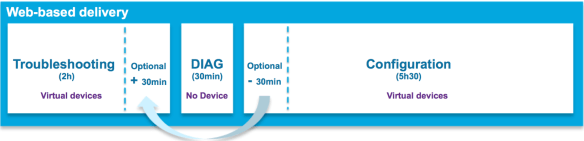
The v5 lab exam has two pacing changes that reflect reality a bit better.  The first is the ability to take some extra time on the troubleshooting section.  One of my biggest peeves about the TS section was the hard 2-hour time limit.  One of my failing attempts had me right on the verge of solving an issue when the time limit slammed shut on me.  If I only had five more minutes, I could have solved that problem.  Now, I can take those five minutes.

The TS section has an available 30 minute overflow window that can be used to extend your time.  Be aware that time has to come from somewhere, since the overall exam is still eight hours.  You’re borrowing time from the configuration section.  Be sure you aren’t doing yourself a disservice at the beginning.  In many cases, the candidates know the lab config cold.  It’s the troubleshooting the need a little more time with.  This is a welcome change in my eyes.

Diagnostics

The biggest addition is the new 30-minute Diagnostic section.  Rather than focusing on problem solving, this section is more about problem determination.  There’s no CLI.  Only a set of artifacts from a system with a problem: emails, log files, etc.  The idea is that the CCIE candidate should be an expert at figuring out what is wrong, not just how to fix it.  This is more in line with the troubleshooting sections in the Voice and Security labs.  Parsing log files for errors is a much larger part of my time than implementing routing.  Teaching candidates what to look for will prevent problems in the future with newly minted CCIEs that can diagnose issues in front of customers.

Some are wondering if the Diagnostic section is going to be the new “weed out” addition, like the Open Ended Questions (OEQs) from v3 and early v4.  I see the Diagnostic section as an attempt to temper the CCIE with more real world needs.  While the exam has never been a test of ideal design, knowing how to fix a non-ideal design when problems occur is important.  Knowing how to find out what’s screwed up is the first step.  It’s high time people learned how to do that.

Be Careful What You Wish For

The CCIE v5 is seeing a lot of technology changes.  The written exam is getting a new section, Network Principles.  This serves to refocus candidates away from Cisco specific solutions and more toward making sure they are experts in networking.  There’s a lot of opportunity to reinforce networking here and not idle trivia about config minimums and maximums.  Let’s hope this pays off.

The content of the written is also being updated.  Cisco is going to make sure candidates know the difference between IOS and IOS XE.  Cisco Express Forwarding is going to get a focus, as is ISIS (again).  Given that ISIS is important in TRILL this could be an indication of where FabricPath development is headed.  The written is also getting more IPv6 topics.  I’ll cover IPv6 in just a bit.

The biggest change in content is the complete removal of frame relay.  It’s been banished to the same pile as ATM and ISDN.  No written, no lab.  In it’s place, we get Dynamic Multipoint VPN (DMVPN).  I’ve talked about why Frame Relay is on the lab before.  People still complained about it.  Now, you get your wish.  DMVPN with OSPF serves the same purpose as Frame Relay with OSPF.  It’s all about Stupid Router Tricks.  Using OSPF with DMVPN requires use of mGRE, which is a Non-Broadcast Multi-Access (NBMA) network.  Just like Frame Relay.  The fact that almost every guide today recommends you use EIGRP with DMVPN should tell you how hard it is to do.  And now you’re forced to use OSPF to simulate NBMA instead of Frame Relay.  Hope all you candidates are happy now.

vCCIE

The lab is also 100% virtual now.  No physical equipment in either the TS or lab config sections.  This is a big change.  Cisco wants to reduce the amount of equipment that needs to be physically present to build a lab.  They also want to be able to offer the lab in more places than San Jose and RTP.  Now, with everything being software, they could offer the lab at any secured PearsonVUE testing center.  They’ve tried in the past, but the access requirements caused some disaster.  Now, it’s all delivered in a browser window.  This will make remote labs possible.  I can see a huge expansion of the testing sites around the time of the launch.

This also means that hardware-specific questions are out.  Like layer 2 QoS on switches.  The last reason to have a physical switch (WRR and SRR queueing) is gone.  Now, all you are going to get quizzed on is software functionality.  Which probably means the loss of a few easy points.  With the removal of Frame Relay and L2 QoS, I bet that services section of the lab is going to be really fun now.

IPv6 Is Real

Now, for my favorite part.  The JNCIE has had a robust IPv6 section for years.  All routing protocols need to be configured for IPv4 and IPv6.  The CCIE has always had a separate IPv6 section.  Not any more.  Going forward in version 5, all routing tasks will be configured for v4 and v6.  Given that RIPng has been retired to the written exam only (finally), it’s a safe bet that you’re going to love working with OSPFv3 and EIGRP for IPv6.

I think it’s great that Cisco has finally caught up to the reality of the world.  If CCIEs are well versed in IPv6, we should start seeing adoption numbers rise significantly.  Ensuring that engineers know to configure v4 and v6 simultaneously means dual stack is going to be the preferred transition method.  The only IPv6-related thing that worries me is the inclusion of an item on the written exam: IPv6 Network Address Translation.  You all know I’m a huge fan of NAT.  Especially NAT66, which is what I’ve been told will be the tested knowledge.

Um, why?!? 

You’ve removed RIPng to the trivia section.  You collapsed multicast into the main routing portions.  You’re moving forward with IPv6 and making it a critical topic on the test.  And now you’re dredging up NAT?!? We don’t NAT IPv6.  Especially to another IPv6 address.  Unique Local Addresses (ULA) is about the only thing I could see using NAT66.  Ed Horley (@EHorley) thinks it’s a bad idea.  Ivan Pepelnjak (@IOSHints) doesn’t think fondly of it either, but admits it may have a use in SMBs.  And you want CCIEs and enterprise network engineers to understand it?  Why not use LISP instead?  Or maybe a better network design for enterprises that doesn’t need NAT66?  Next time you need an IPv6 SME to tell you how bad this idea is, call me.  I’ve got a list of people.


Tom’s Take

I’m glad to see the CCIE update.  Getting rid of Frame Relay and adding more IPv6 is a great thing.  I’m curious to see how the Diagnostic section will play out.  The flexible time for the TS section is way overdue.  The CCIE v5 looks to be pretty solid on paper.  People are going to start complaining about DMVPN.  Or the lack of SDN-related content.  Or the fact that EIGRP is still tested.  But overall, this update should carry the CCIE far enough into the future that we’ll see CCIE 60,000 before it’s refreshed again.

More CCIE v5 Coverage:

Bob McCouch (@BobMcCouch) – Some Thoughts on CCIE R&S v5

Anthony Burke (@Pandom_) – Cisco CCIE v5

Daniel Dib (@DanielDibSWE) – RS v5 – My Thoughts

INE – CCIE R&S Version 5 Updates Now Official

IPExpert – The CCIE Routing and Switching (R&S) 5.0 Lab Is FINALLY Here!

SDN and Appeal of Abstraction

MeadowSunrise

During the recent Storage Field Day 4, I was listening to Howard Marks (@DeepStorageNet) talking about storage Quality of Service (QoS).  He was describing something he wanted his storage array to do that sounded suspiciously similar to strict priority queuing (or Low Latency Queuing if you speak Cisco).

As I explained how we solved the problem of allowing a specific amount of priority for a given packet stream, it finally dawned on me how software defined networking had the ability to increase productivity in organizations.  It’s not via automation, although that is a very alluring feature.  It’s because SDN can act as a language interpreter for those that don’t speak the right syntax.

It’s said that a picture is worth a thousand words.  As true as that is I would also argue that a few words can paint a thousand pictures.  It’s all in the interpretation.  If I told you I wanted a picture of a “meadow at sunrise”, you’ve probably come up with an idea in your head of what that would look like.  And the odds are good that it’s totally different from my picture.  These simple words are open to interpretation on a wide scale.  Now, let’s constrain the pictures a bit based on the recipient.  Someone that lives in France would have a totally different idea of a meadow than someone that lives in San Francisco.  Each view is totally valid, but the construction of the picture will be dictated by the thought process of the person.  They each know what the meadow looks like, they’re just a bit different.

Painting with SDN

Extend this metaphor to software.  Specifically to networking and storage.  I have a concept that I need to implement.  User A needs guaranteed access to a specific resource for a period of time that should not exceed a given threshold.  A phone may need priority queue access to a slow WAN link.  A backup client may need guaranteed access to a target server without overrunning the link bandwidth.  Two totally different use cases that can be described in the same general language.  Today, I would need two people to implement those instructions on different systems.  Programming a storage array is much different that programming a router or a switch.

But the abstraction of SDN allows my to input a given command and have it executed on dissimilar hardware via automation and integration.  The SDN management system doesn’t care that I want LLQ on a router or strict priority QoS on a backup client.  It knows that there should be an implementation of the given commands on a set of attached systems.  It’s up to the API integration with the systems to determine the syntax needed to execute the commands.  As a network engineer, I don’t need to know the commands to create the QoS construct on the storage array.  I just need to know what I want to accomplish.  The software takes care of the rest.

SDN could usher in a new age for natural language programming.  I often hear my friends in the CCIE community complaining that people only learn the commands to make something happen.  They ignore the basic concepts behind why something works the way it does.  If I can’t explain the concept to my 8-year old son, I don’t know it very well.  I can’t abstract it to the point where a simpler mind can understand.  What if that simple mind had the capability to translate those instructions into actionable programming?  What if I just had to state what I wanted to do?  “Ensure that all traffic on Link A is given priority treatment, except if it is for the backup server.”  The system can create API calls to program the access control lists and storage arrays to take care of all that without needing to fire up a CLI session or a browser.

This is going to require a lot of programming on the front end.  The management system needs to be able to interpret keywords in the instruction set to pick out the right execution items.  Then the system needs to know where to dispatch the commands to make them land on the right APIs.  In the case of the above example, the system would need to know to send two different sets of commands – one to the storage array to provide metered access during backup windows and another set to the networking gear to ensure the right QoS policies were enforced during the given time window.  Oh, and you’re going to want to have the system go back and clean up those ACLs when it’s time for production hours to start again.


Tom’s Take

This isn’t going to be easy by any means.  But adding all the value into the front end management system means that any other system attached on the backend via API is going to benefit.  I’d rather be doing the work in the right places as opposed to spending all our time on the backend and neglecting the interface to the whole system.  Engineers are notorious for writing terrible GUIs.  Let’s take the time to abstract the bad things away and instead make something that’s really going to change the way we program systems.

Troubleshooting and Triage

When troubleshooting any major issue, people tend to feel a bit lost at first.  There is the crowd that wants to fix the immediate problem.  Then there is the group that wants to look at everything going on and address the root problem no matter how long it takes.  The key to troubleshooting is to realize how each of these approaches has their place and how they are both right and wrong at the same time.

The first approach is triage.  Think of it like a medical emergency room.  Their purpose is to fix the immediate symptoms and stabilize the patient.  Especially critical is the stabilization part.  You can’t fix a network that has bouncing routes or intermittent bridging loops.  Often the true root cause of the problem is buried beneath a pile of other symptoms.  Only when the immediate issues are resolved does the real problem surface.  Learning how to triage problems is a very important troubleshooting skill.  It gives a quick response while allowing the worst of the issue to be dealt with.

It’s important to remember that triage is just a quick fix.  Emergency rooms would never triage a patient without following up with a more in-depth consult or return visit.  Triage fails when engineers leave the patch in place and consider it the final solution.  Most times that I’ve seen this approach have been due to time constraints.  Rather than spending the time to research and test to find the true problem people are content to make the majority of the symptoms go away no matter how briefly.  It happens all the time.

“Just make it work for now.  We’ll fix it later.”

“If we configure it like this, will it stay up until the end of the quarter?”

“We don’t have time to debate this.  The CEO wants things up NOW!”

True in-depth troubleshooting is what happens when we have time and a clear way to solve the deeper root issues.  Deep troubleshooting figures out that the cause of a route flap is actually a bad Ethernet cable.  That’s not something you can easily determine from a quick analysis.  It takes time and effort to figure out.  When I worked on an inbound desktop help desk, we tested for CD-ROM failures by flipping the IDE cables back and forth on the IDE ports on the motherboard.  In part, this was to test to ensure the drive failure followed the switch of cables and ports.  In addition, it also tested the cable and port to make sure the dead drive wasn’t masking a bigger failure.  It took more time to do it properly but we never ran into an issue where a good CD-ROM drive was returned and the problem persisted.

In-depth troubleshooting can fail when there are so many problems masking the real issue that you start trying to fix the wrong problem.  Tunnel vision is easy to get when working on a problem.  If you tunnel in on an ancillary symptom and fail to fix the root cause you aren’t really doing much better than simple triage.  Just like a doctor, you need to ensure that you are treating the real problem under all the symptoms.  Remember not to be sidetracked by each small issue you uncover.  Fix them and keep digging for the real issue underneath it all.


Tom’s Take

I’ve had a lot of people comment that I was able to figure out problems quickly.  They also liked how I was able to “fix” things quickly.  That’s because I was very good at triage.  In my job as a VAR engineer, I didn’t really have time to dig deeper into the issue to uncover root cause.  Thankfully, a couple of the guys that I worked with were the exact opposite of me.  They loved digging into problems and pulling everything apart until they found the real issue.  They were labeled “slow” or “methodical” by some.  I loved working with them because the complemented my style perfectly.  I fix the big issues and make people happy.  They fix the underlying cause and keep them that way.  Just like ER doctors and specialists.  We both have our place.  It’s important to realize which is more important at a given time.