Asking The Right Question About The Wireless Future

It wasn’t that long ago that I wrote a piece about how Wi-Fi 6E isn’t going to move the needle very much in terms of connectivity. I stand by my convictions that the technology is just too new and doesn’t provide a great impetus to force users to upgrade or augment systems that are already deployed. Thankfully, someone at the recent Mobility Field Day 10 went and did a great job of summarizing some of my objections in a much simpler way. Thanks to Nick Swiatecki for this amazing presentation:

He captured so many of my hesitations as he discussed the future of wireless connectivity. And he managed to expand on them perfectly!

New Isn’t Automatically Better

Any time I see someone telling me that Wi-Fi 7 is right around the corner and that we need to see what it brings I can’t help but laugh. There may be devices that have support for it right now, but as Nick points out in the above video, that’s only one part of the puzzle. We still have to wait for the clients and the regulatory bodies to catch up to the infrastructure technology. Could you imagine if we did the same thing with wired networks? If we deployed amazing new cables that ran four times the speed but didn’t interface with the existing Ethernet connections at the client? We’d be laughed out of the building.

Likewise, deploying pre-standard Wi-Fi 7 devices today doesn’t gain you much unless you have a way to access them with a client adapter. Yes, they do exist. Yes, they’re final. However, they’re more final than the Draft 802.11n cards that I deployed years and years ago. That doesn’t mean that we’re going to see a lot of benefit from them however. Because the value of the first generation of a technology is rarely leaps and bounds above what came before it.

A couple of years ago I asked if the M1 MacBook wireless was really slower than the predecessor laptop. Spoiler alert, it is but not so much you’d really notice. Since then we’ve gained two more generations of that hardware and the wireless has gotten faster. Not because the specs have changed in the standard. It’s because the manufacturers have gotten better about building the devices. We’ve squeezed more performance out of them instead of just slapping a label on the box and saying it’s a version number higher or it’s got more of the MHz things so it must be better.

Nick, in the above video, points this out perfectly. People keep asking about Wi-Fi 7 and they miss out on the fact that there’s a lot of technology that needs to run very smoothly in order to give us significant gains in speed over Wi-Fi 6 and Wi-Fi 6E. And those technologies probably aren’t going to be implemented well (if at all) in the first cards and APs that come off the line. In fact, given the history of 802.11 specifications those important features are probably going to be marked as optional anyway to ensure the specifications get passed on time to allow the shipping hardware to be standardized.

In a perfect world you’re going to miss a lot of the advances in the first revision of the hardware. I remember a time when you had to be right under the AP to see the speed increases promised by the “next generation” of wireless. Adding more and more advanced technology to the AP and hoping the client adapters catch up quickly isn’t going to help sell your devices any faster either. Everything has to work together to ensure it all runs smoothly for the users. If you think for a minutes that they aren’t going to call you to tell you that the wireless is running slow then you’re very mistaken. They’re upset they didn’t get the promised speeds on the box or that something along the line is making their experience difficult. That’s the nature of the beast.

Asking the Right Questions

The other part of this discussion is how to ensure that everyone has realistic ideas about what new technology brings. For that, we recorded a great roundtable discussion about Wi-Fi 7 promises and reality:

I think the biggest takeaway from this discussion is that, despite the hype, we’re not ready for Wi-Fi 7 just yet. The key to having this talk with your stakeholders is to remind them that spending the money on the new devices isn’t going to automatically mean increased speeds or enhanced performance. In fact, you’re going to do a great job of talking them out of deploying cutting edge hardware simply by reminding them they aren’t going to see anywhere near the promises from the vendors without investing even more in client hardware or understanding that those amazing fast multi-spectrum speeds aren’t going to be possible on an iPhone.

We’re not even really touching on the reality that some of the best parts of 6GHz aren’t even available yet because of FCC restrictions. Or that we just assume that Wi-Fi 7 will include 6GHz when it doesn’t even have to. That’s especially true of IoT devices. Lower cost devices will likely have lower cost radios for components which means the best speed increases are going to be for the most expensive pieces of the puzzle. Are you ready to upgrade your brand new laptop in six months because a new version of the standard came out that’s just slightly faster?

Those are the questions you have to ask and answer from your stakeholders before you ever decide how the next part of the project is going to proceed. Because there is always going to be faster hardware or newer revisions of the specification for you to understand. And if the goalposts keep moving every time something new comes along you’re either going to be broke or extremely disappointed.


Tom’s Take

I’m glad that Nick from Cisco was able to present at Mobility Field Day. Not only did he confirm what a lot of professionals are thinking but he did it in a way that helped other viewers understand where the challenges with new wireless technologies lie. We may be a bit jaded in the wired world because Ethernet is such a bedrock standard. In the wireless world I promise that clients are always going to be getting more impressive and the amount of time between those leaps is going to shrink even more than it already has. The real question should be whether or not we need to chase that advantage.

The Essence of Cisco and Splunk

You no doubt noticed that Cisco bought Splunk last week for $28 billion. It was a deal that had been rumored for at least a year if not longer. The purchase makes a lot of sense from a number of angles. I’m going to focus on a couple of them here with some alliteration to help you understand why this may be one of the biggest signals of a shift in the way that Cisco does business.

The S Stands for Security

Cisco is now a premier security company now. The addition of the most power SIEM on the market means that Cisco’s security strategy now has a completeness of vision. SecureX has been a very big part of the sales cycle for Cisco as of late and having all the parts to make it work top to bottom is a big win. XDR is a great thing for organizations but it doesn’t work without massive amounts of data to analyze. Guess where Splunk comes in?

Aside from some very specialized plays, Cisco now has an answer for just about everything a modern enterprise could want in a security vendor. They may not be number one in every market but they’re making a play for number two in as many places as possible. More importantly it’s a stack that is nominally integrated together to serve as a single source for customers. I’ll be the first person to say that the integration of Cisco software acquisitions isn’t seamless. However, when the SKUs all appear together on a bill of materials most organizations won’t look beyond that. Especially if there are professional services available to just make it work.

Cisco is building out their security presence in a big way. All thanks to a big investment in Splunk.

The S Stands for Software

When the pundits said that Cisco could never really transform themselves from a hardware vendor to a software company there was a lot of agreement. Looking back at the transition that Chuck Robbins has led since then what would you say now? Cisco has aggressively gone after software companies across the board to build up a portfolio of recurring revenue that isn’t dependent on refresh cycles or silicon innovations.

Software is the future for Cisco. Iteration on their core value products is going to increase their profit far beyond what they could hope to realize through continuing to push switches and routers. That doesn’t mean that Cisco is going to abandon the hardware market. It just means that Cisco is going to spend more time investing in things with better margins. The current market for software subscriptions and recurring licensing revenue is hot and investors want to see those periodic returns instead of a cycle-based push for companies to adopt new technologies.

What makes more sense to you? Betting on a model where customers need to pay per gigabyte of data stored or a technology which may be dead on the vine?. Taking the nerd hat off for a moment means you need to see the value that companies want to realize, not the hope that something is going to be big in the future. Hardware will come along when the software is ready to support it. Blu-Ray didn’t win over HD-DVD because it was technically superior. It won because Sony supported it and convinced Disney to move their media onto it exclusively.

Software is the way forward for Cisco. Software that provides value for enterprises and drives upgrades and expansion. The hardware itself isn’t going to pull more software onto the bottom line.

The S Stands for Synergy

The word synergy is overused in business vernacular. Jack Welch burned us out on the idea that we can get more out of things together by finding hidden gems that aren’t readily apparent. I think that the real value in the synergy between Cisco and Splunk can be found in the value of creating better code and better programmers.

A bad example of synergy is Cisco’s purchase of Flip Video. When it became clear that the market for consumer video gear wasn’t going to blow up quite like Cisco had hoped they pivoted to talk about using the optics inside the cameras to improve video quality for their video collaboration products. Which never struck me as a good argument. They bet on something that didn’t pay off and had to salvage it the best they could. How many people went on to use Cisco cameras outside of the big telepresence rooms? How many are using them today instead of phone cameras or cheap webcams?

Real synergy comes when the underlying processes are examined and improved or augmented. Cisco is gaining a group of developers and product people that succeed based on the quality of their code. If Splunk didn’t work it wouldn’t be a market leader. The value of what that team can deliver to Cisco across the organization is important. The ongoing critiques of Cisco’s code quality has created a group of industry professionals that are guarded when it comes to using Cisco software on their devices or for their enterprises. I think adding the expertise of the Splunk teams to that group will go a long way to helping Cisco write more stable code in the long term.


Tom’s Take

Cisco needed Splunk. They needed a SIEM to compete in the wider security market and rather than investing in R&D to build one they decided to pick up the best that was available. The long courtship between the two companies finally paid off for the investors. Now the key is to properly integrate Splunk into the wider Cisco Security strategy and also figure out how to get additional benefits from the development teams to offset the big purchase price. The essence of those S’s above is that Cisco is continuing their transformation away from a networking hardware company and becoming a more diversified software firm. It will take time for the market to see if that is the best course of action.

My Belated Review of Cisco Live 2023

It’s been a couple of weeks since Cisco Live US 2023 and I’m just now getting around to writing about it. I was thrilled to attend my 18th Cisco Live and it was just the thing I needed to reconnect with the community. The landscape of Cisco Live looks a little different than it has in years past. There are some challenges that are rising that need to be studied and understood before they become bigger than the event itself.

Showstopping Reveals? Or Consistent Improvement?

What was the big announcement from Cisco this year? What was the thing that was said on stage that stopped the presses and got people chattering? Was it a switch? A firewall? Was it a revolutionary new AI platform? Or a stable IP connection to Mars? Do you even know? Or was it more of a discussion of general topics with some technologies brought up alongside them?

In the last few years you may have noticed that the number of huge big announcements coinciding with the big yearly conferences has come down a bit. Rather than having some big news drop the morning of the keynote the big reveals are being given their own time to shine instead. Rather than piling up tons of news of acquisitions or new product releases and watching them all get lost in the shuffle of fanfare they’re now being spaced out or bunched up at the end of quarters instead.

The big keynotes are instead being used to push initiatives. Rather than talking products the companies are talking strategies. Things like sustainability and outreach replace speeds and feeds. The goal isn’t to show off something shiny but instead to show off what the goal is to utilize the new products. Those kinds of announcements tend to play better with the press and analysts as well as the investors.

Does that mean that we’re never going to see another big announcement during an event keynote? No. What it does mean is that you shouldn’t expect to see groundbreaking shifts happening during those discussions. Steady and predictable is what the investors like. And during those keynotes that’s what you’re going to see for the most part.

Community Marches On

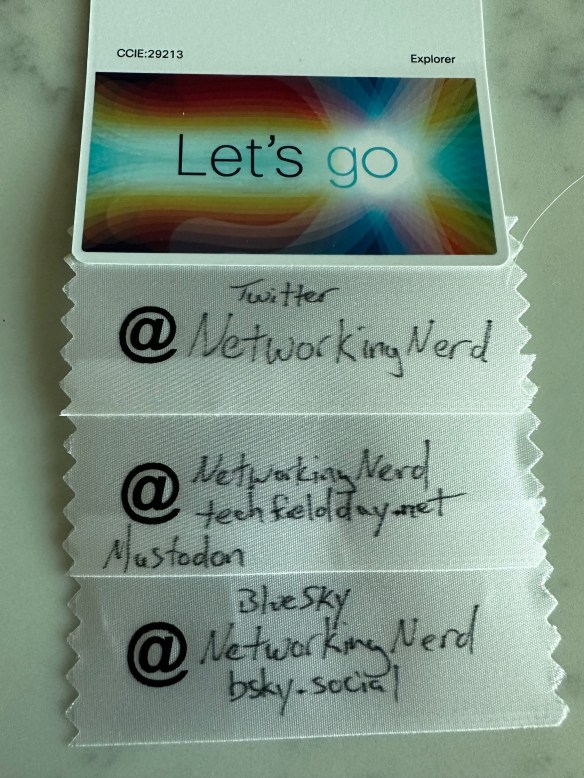
Social media sure has been fun for the past few months wouldn’t you say? The decline of Twitter, the rise of Mastodon and BlueSky, and even more craziness all over the place. Proof? Check out my badge from Cisco Live this year:

Yes, I needed all of those flags to show people where I was posting things to social media. And keeping track of all of the communities can be tiring. Some people still use Twitter because it’s there. Some people have embraced the Fediverse and deleted Twitter altogether. Others are trying out BlueSky and finding their groove again. And that doesn’t even discuss the number of people that are embracing video platforms or other means of posting. It is a certainty that the former king of the hill is rolling down very quickly in the face of so many other options.

One thing that I loved is that the community around Cisco Live has endured through so much upheaval. As soon as we arrived on site it was just like old times. People coordinated hangouts and invited friends all over. Parties were held. Introductions were made. And people caught up as if they hadn’t seen each other in forever. It made me happy to see that the impending collapse of a social platform didn’t affect the people that used it to build a great group.

Another thing that I realized when I got to the event was that this was the tenth anniversary of the Cisco Live Social Media Hub. I can still vividly remember when I walked into the convention center in Orlando in 2013 to find this brand new area dedicated for us to hang out and enjoy a little spotlight. Over the years the hub has grown from just a few tables and some laptops to an entire control center that serves as a central meeting location for folks as well as a set for some creative content to be made. I remember on more than one occasion seeing folks running around staging shots for a TikTok video and seeing lots of extra content being posted from everywhere. It’s good when you don’t have to make your own little space.


Tom’s Take

What does the future of Cisco Live look like? Is it going to continue to be a huge draw for people to come and enjoy the community? Is Cisco going to keep releasing new products and making this a destination for networking professionals? Given the number of attendees increased again this year I’d say that there is definitely a desire for people to attend conferences in person again. Given that the community has continued to persevere through all manner of challenges I’d say they’re also here to stay as well. All in all, I’m glad to see Cisco Live has continued to see success. As long as we temper our expectations for what the conference will be in the future and continue to keep the community alive then I don’t see any challenges that can’t be overcome.

A Modest Proposal for Cisco Interface Naming

If you’re going to be configuring an interface in a switch, which one are you going to use? The interface has a name and a number based on where it is on the device. The numbering part is fairly easy to figure out. The module number comes first, followed by the slot, and finally the port. In the world of Cisco, which is the one I’m the most familiar with, that means a fixed configuration switch usually has interfaces labeled 0/24, with no module and the slot almost always being zero. With a modular switch the interface would be labeled 2/0/28 to indicate the 28th port on the second line card.

The issue arises when you factor in the first part of the interface naming convention. The nomenclature used in the Cisco world since the beginning of time has been the interface speed. If your interface is a 100Mbit Ethernet interface then the interface name is FastEthernet0/48. If you’re using a 1Gbit interface it’s GigabitEthernet0/48. If it’s a 10Gbit interface it becomes TenGigabitEthernet0/48. It’s a progression of interface speeds. Even if the port is capable of using 10/100/1000 the port is referred to at the highest speed. The 10Gbit ports don’t negotiate to a lower speed so they are always TenGigabit.

Now, with the new Catalyst 9000X Series switches you have the option of a port that can do 10/100/1000/2.5G/5G/10G. It’s a multi-gigabit capable port as outlined in this video from a recent Field Day event:

I don’t even want to think about the nightmare of trying to remember the name of the interface in a situation like that. It’s hard enough still to remember what the switches are capable of, whether it’s a gigabit port or a ten gigabit port. It’s hard enough for me but it’s impossible for anyone looking to make a script or automation that needs to be repeatable over a wide variety of switches.

Naming Convention Unity

The obvious solution here is actually present in another Cisco platform already. The Nexus series of switches running Cisco NX-OS already knows how to handle interface naming issues. It’s a problem that occurs when you could be running Gigabit Ethernet or Fibre Channel over Ethernet interfaces.

How does NX-OS fix this? The interface type is always Ethernet. It doesn’t matter what speed the interface is running at because it’s always Ethernet under the hood. So the every interface is labeled Ethernet(module/slot/port). It’s wonderful when you’re working on the device because you never have to make a typo based on the interface speed. It’s also consistent across every platform and module that could be installed.

The solution to the problem actually came from my friend Bruno Wollmann (@WollmanBruno) during the event. It’s well past time to adopt the NX-OS convention in every other version of Cisco IOS. You can alias the old interface names to the new nomenclature to ease the transition if you’d like. Otherwise it’s time to start making people use the basic convention of calling everything Ethernet.

This would ease new users into IOS by making all interfaces the same and focusing on the module/slot/port complexity as the primary place to learn about naming. It also helps with the development of automation and orchestration scripts. Rather than needing to detect device types or write different scripts for NX-OS or IOS-XE you can just use the same logic for both.


Tom’s Take

It’s time we move into the future of interface names. Bruno made an excellent point when he said that it’s time to adopt a standard across the whole line of switches. Cisco may not be ready to do a single OS but having unity between the features will go a long way to making it easier to work on the various platforms. You can do a lot with aliasing in the system to ease the transition but maybe by the time we get to IOS 20 we can use something that’s more manageable for the future.

A Gift Guide for Sanity In Your Home IT Life

If you’re reading my blog you’re probably the designated IT person for your family or immediate friend group. Just like doctors that get called for every little scrape or plumbers that get the nod when something isn’t draining over the holidays, you are the one that gets an email or a text message when something pops up that isn’t “right” or has a weird error message. These kinds of engagements are hard because you can’t just walk away from them and you’re likely not getting paid. So how can you be the Designated Computer Friend and still keep your sanity this holiday season?

The answer, dear reader, is gifts. If you’re struggling to find something to give your friends that says “I like you but I also want to reduce the number of times that you call me about your computer problems” then you should definitely read on for more info! Note that I’m not going to fill this post will affiliate links or plug products that have sponsored anything. Instead, I’m going to just share the classes or types of devices that I think are the best way to get control of things.

Step 1: Infrastructure Upgrades

When you go visit your parents for Thanksgiving or some other holiday check in, are they still running the same wireless network they got when they got their high-speed Internet? Is their Wi-Fi SSID still the default with the password printed on the side of the router/modem combo? Then you’re going to want to upgrade their experience to keep your sanity for the next few holidays.

The first thing you need to do it get control of their wireless setup. You need to get some form of wireless access point that wasn’t manufactured in the early part of the century. Most of the models on the market have Wi-Fi 6 support now. You don’t need to go crazy with a Wi-Fi 6E model for your loved ones right now because none of their devices will support it. You just need something more modern with a user interface that wasn’t written to look like Windows 3.1.

You also need to see about an access point that is controlled via a cloud console. If you’re the IT person in the group you probably already use some form control for your home equipment. You don’t need a full Meraki or Juniper Mist setup to lighten your load. That is, unless you already have one of those dashboards set up and you have spare capacity. Otherwise you could look at something like Ubiquiti as a middle ground.

Why a cloud controller AP? Because then you can log in and fix things or diagnose issues without needing to spend time talking to less technical users. You can find out if they have an unstable Internet connection or change SSID passwords at the drop of a hat. You can even set up notifications for those remote devices to let you know when a problem happens so you can be ready and waiting for the call. And you can keep tabs on necessary upgrades and such so you aren’t fielding calls when the next major exploit comes out and your parents call you asking if they’re going to get infected by this virus. You can just tell them they’re up-to-date and good to go. The other advantage of this method is that when you upgrade your own equipment at home you can just waterfall the old functional gear down to them and give them a “new to you” upgrade that they’ll appreciate.

Step 2: Device Upgrades

My dad was notorious for using everything long past the point of needing to be retired. It’s the way he was raised. If there’s a hole you patch it. If it breaks you fix it. If that fix doesn’t work you wrap it in duct tape and use it until it crumbles to dust. While that works for the majority of things out there it does cause issues with technology far too often.

He had a iPad that he loved. He didn’t use it all day, every day but he did use it frequently enough to say that it was his primary computing device. It was a fourth-generation device, so it fell out of fashion a few years ago. When he would call me and ask me questions about why it was behaving a certain way or why he couldn’t download some new app from the App Store I would always remind him that he had an older device that wasn’t fast enough or new enough to run the latest programs or even operating software. This would usually elicit a grumble or two and then we would move on.

If you’re the Designated IT Person and you spend half your time trying to figure out what versions of OS and software are running on a device, do yourself a favor and invest in a new device for your users just to ease the headaches. If they use a tablet as their primary computing device, which many people today do, then just buy a new one and help them migrate all the data across to the new one while you’re eating turkey or opening presents.

Being on later hardware ensures that the operating system is the latest version with all the patches for security that are needed to keep your users safe. It also means you’re not trying to figure out what the last supported version of the software was that works with the rest of the things. I’ve played this game trying to get an Apple Watch to connect to an older phone with mismatched software as well as trying to get support for newer wireless security on older laptops with very little capability to do much more than WPA1. The amount of hours I burned trying to make the old junk work with the new stuff would have been better served just buying a new version of the same old thing and getting all their software moved over. Problems seem to just disappear when you are running on something that was manufactured within the last five years.

Step 3: Help Them Remember

This is probably my biggest request: Forgotten passwords. Either it’s the forgotten Apple ID or maybe the wireless network password. My parents and in-laws forget the passwords they need to log into things all the time. I finally broke down and taught them how to use a password management tool a few years ago and it made all the difference in the world. Now, instead of them having to remember what their password was for a shopping site they can just set it to automatically fill everything in. And since they only need to remember the master password for their app they don’t have to change it.

Better yet, most of these apps have a secure section for notes. So all those other important non-password things that seem to come up all the time are great to put in here. Social Security Numbers, bank account numbers, and so much more can be put in one central location and made easy to access. The best part? If you make it a shared vault you can request access to help them out when they forget how to get in. Or you can be designated as a trusted party that can access the account in the event of a tragedy. Getting your loved ones used to using password vaults now makes it much easier to have them storing important info there in case something happens down the road that requires you to jump in without their interaction. Trust me on this.


Tom’s Take

Your loved ones don’t need knick knacks and useless junk. If you want to show them you love them, give them the gift of not having to call you every couple of days because they can’t remember the wireless password or because they keep getting this error that says their app isn’t support on this device. Invest in your sanity and their happiness by giving them something that works and that has the ability for you to help manage it from the background. If you can make it stable and useful and magically work before they call you with a problem you’re going to find yourself a happier person in the years to come.

SD-WAN and Technical Debt

Back during Networking Field Day 22, I was having a fun conversation with Phil Gervasi (@Network_Phil) and Carl Fugate (@CarlFugate) about SD-WAN and innovation. I mentioned that it was fascinating to see how SD-WAN companies kept innovating but that bigger, more established companies that had bought into SD-WAN seemed to be having issues catching up. As our conversation continued I realized that technical debt plays a huge role in startup culture in all factors, not just with SD-WAN. However, SD-WAN is a great example of technical debt to talk about here.

Any Color You Want In Black

Big companies have investments in supply chains. They have products that are designed in a certain way because it’s the least expensive way to develop the project or it involves using technology developed by the company that gives them a competitive advantage. Think about something like the Cisco Nexus 9000-series switches that launched with Cisco ACI. Every one of them came with the Insieme ASIC that was built to accelerate the policy component of ACI. Whether or not you wanted to use ACI or Insieme in your deployment, you were getting the ASIC in the switch.

Policies like this lead to unintentional constraints in development. Think back five years to Cisco’s IWAN solution. It was very much the precursor to SD-WAN. It was a collection of technologies like Performance Routing (PfR), Application Visibility Control (AVC), Policy Based Routing (PBR), and Network Based Application Recognition (NBAR). If that alphabet soup of acronyms makes you break in hives, you’re not alone. Cisco IWAN was a platform very much market by potential and complexity.

Let’s step back and ask ourselves an important question: “Why?” Why was IWAN so complicated? Why was IWAN hard to deploy? Why did IWAN fail to capture a lot of market share and ride the wave that eventually became SD-WAN? Looking back, a lot of the choices that were made that eventually doomed IWAN can come down to existing technical debt. Cisco is a company that makes design decisions based on what they’ve been doing for a while.

I’m sure that the design criteria for IWAN came down to two points:

  1. It needs to run on IOS.
  2. It needs to be an ISR router.

That doesn’t sound like much. But imagine the constraints you run into with just those two limitations. You have a hardware platform that may not be suited for the kind of work you want to do. Maybe you want to take advantage of x86 chipset acceleration. Too bad. You have to run what’s in the ISR. Which means it could be underpowered. Or incapable of doing things like crypto acceleration for VPNs, which is important for building a mesh of encrypted tunnels. Or maybe you need some flexibility to build a better detection platform for applications. Except you have to use IOS. Which uses NBAR. And anything you write to extend NBAR has to run on their platforms going forward. Which means you need to account for every possible permutation of hardware that IOS runs on. Which is problematic at best.

See how technical debt can creep in from the most simplistic of sources? All we wanted to do was build a platform to connect WANs together easily. Now we’re mired in a years-old hardware choice and an aging software platform that can’t help us do what needs to be done. Is it any wonder why IWAN didn’t succeed in the original form? Or why so many people involved with the first generation of SD-WAN startups were involved with IWAN, even if just tangentially?

Debt-Free Development

Now, let’s look at a startup like CloudGenix, who was a presenter at Networking Field Day 22 and was recently acquired by Palo Alto Networks. They started off on a different path when they founded the startup. They knew what they wanted to accomplish. They had a vision for what would later be called SD-WAN. But instead of shoehorning it into an existing platform, they had the freedom to build what they wanted.

No need to keep the ISR platform? Great. That means you can build on x86 hardware to make your software more universally deployable on a variety of boxes. Speaking of boxes, using commercial off-the-shelf (COTS) equipment means you can buy some very small devices to run the software. You don’t need a system designed to use ATM modules or T1 connections. If all you little system is ever going to use is Ethernet there’s no reason to include expansion at all. Maybe USB for something like a 4G/LTE modem. But those USB ports are baked into the board already.

A little side note here that came from Olivier Huynh Van of Gluware. You know the USB capabilities on a Cisco ISR? Yeah, the ISR chipset didn’t support USB natively. And it’s almost impossible to find USB that isn’t baked into an x86 board today. So Cisco had to add it to the ISR in a way that wasn’t 100% spec-supported. It’s essentially emulated in the OS. Which is why not every USB drive works in an ISR. Take that for what’s it’s worth.

Back to CloudGenix. Okay, so you have a platform you can build on. And you can build software that can run on any x86 device with Ethernet ports and USB devices. That means your software doesn’t need to do complicated things. It also means there are a lot of methods already out there for programming network operating systems for x86 hardware, such as Intel’s Data Plane Development Kit (DPDK). However CloudGenix chose to build their OS, they didn’t need to build everything completely from scratch. Even if they chose to do it there are still a ton of resources out there to help them get started. Which means you don’t have to restart your development every time you need to add a feature.

Also, the focus on building the functions you want into an OS you can bend to your needs means you don’t need to rely on other teams to build pieces of it. You can build your own GUI. You can make it look however you want. You can also make it operate in a manner that is easiest for your customer base. You don’t need to include every knob or button or bell and whistle. You can expose or hide functions as you wish. Don’t want customers to have tons of control over VPN creation or certificate authentication? You don’t need to worry about the GUI team exposing it without your permission. Simple and easy.

One other benefit of developing on platforms without technical debt? It’s easy to port your software from physical to virtual. CloudGenix was already successful in porting their software to run from physical hardware to the cloud thanks to CloudBlades. Could you imagine trying to get the original Cisco IWAN running in a cloud package for AWS or Azure? If those hives aren’t going crazy right now I’m sure you must have nerves or steel.


Tom’s Take

Technical debt is no joke. Every decision you make has consequences. And they may not be apparent for this generation of products. People you may never meet may have to live with your decisions as they try to build their vision. Sometimes you can work with those constraints. But more often than not brilliant people are going to jump ship and do it on their own. Not everyone is going to succeed. But for those that have the vision and drive and turn out something that works the rewards are legion. And that’s more than enough to pay off any debts, technical or not.

Magical Mechanics

If you’re a fan of this blog, you’ve probably read my last post about the new SD-WAN magic quadrant that’s been making the rounds and generating discussion. Some people are smiling that this report places Cisco in an area other than leadership in the SD-WAN space. Others are decrying the report as being unfair and contradictory. I wanted to take another look at it given some new information and some additional thoughts on the results.

Fair and Square

The first thing I wanted to do is make sure that I was completely transparent with the way the Gartner Magic Quadrant (MQ) works. I have a very good idea thanks to a conversation with Andrew Lerner (@Fast_Lerner), who is the Research VP of Networking at Gartner. Andrew was nice enough to clarify my understanding of the MQ and accompanying documentation. I’ll quote him here to make sure I don’t get anything wrong:

In an MQ, we assess the overall vendors’ behavior and offering in the market. Product, service/support sales, marketing, innovation, etc. if a vendor has multiple products in a market and sells them regularly to the enterprise, they are part of the MQ assessment. Viable products are not “excluded”.

As you can see from Andrew’s explanation, the MQ takes into account all the aspects of a company. It’s not just a product. It’s the sales, marketing, and other aspects of the company that give the overall score for a company. So how does Gartner figure out how products and services? That’s where their Critical Capabilities documents come into play. They are focused exclusively on products and services. They don’t take marketing or sales or anything else into account.

According to Andrew, when Gartner did their Critical Capabilities document on Cisco, they looked at Meraki MX and IOS-XE only. Viptela vEdge was not examined. So, the CC documents give us the Gartner overview of technology behind the MQ analysis. While the CC documents are focused solely on the Meraki MX and IOS-XD SD-WAN technology, they are components of the overall analysis in the MQ that was published.

What does that all mean in the long run?

Axis and Allies

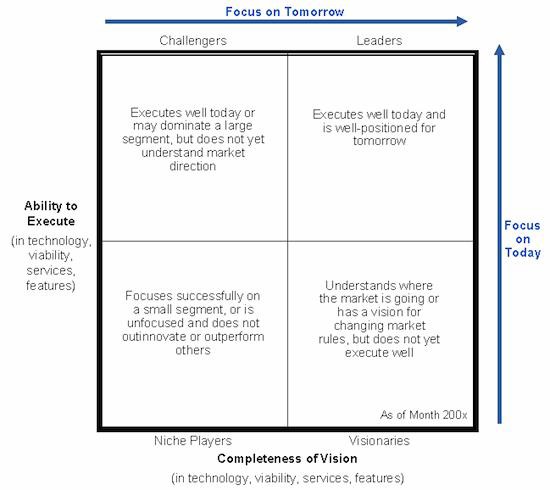
In order to break this down a bit further, let’s ignore the actual quadrants in the MQ for the moment. Instead, let’s think about this picture as a graph. One axis of the graph is “Ability to Execute,” or in other words can the company do what they say they’re going to do? The other axis is “Completeness of Vision.” This is a question of how the company has rounded out their understanding of the market forces and direction. I want to use this sample MQ with some labels thrown in to help my readers understand how each axis can affect the ranking a company gets:

So, let’s look at where Cisco was situated on those graphs. They are not in the upper right part of the graph, which is the “good” part according to what most people will tell you when they glance at it. Cisco was ranked almost directly in the middle of the graph. Why would that be?

Let’s look at the Execution axis. Why would Cisco have some issues with execution on SD-WAN? Well, the biggest one is probably the shift to IOS-XE and the issues with code quality. Almost everyone involved deploying IOS-XE has told me that Cisco had significant issues in the early releases. Daniel Dib (@DanielDibSwe) had a great conversation with me about the breakdown between the router code and the controller code a week ago. Here’s the first tweet in the chain:

So, there were issues that have been addressed. But is the code completely stable right now? I can’t say, since I haven’t deployed it. But ask around and see what the common wisdom is. I would be genuinely interested to hear how much better things have gotten in the last six months. But, those code quality issues from months ago are going to be a concern in the report. And you can’t guarantee that every box is going to be running on the latest code. Having issues with stable code is going to impact your ability to execute on your vision.

Now, let’s look at the Completeness of Vision axis. If you reference the above picture you’ll see that the Challengers square represents companies that don’t yet understand the market direction. Given that this was the location that Cisco was placed in (barely), let’s examine why that might be. Let’s start by asking “which Cisco product is best for my SD-WAN solution?” Do you know for sure? Which one are you going to be offered?

In my last post, I said that Cisco had been deemphasizing vEdge deployments in favor of IOS-XE. But I completely forgot about Meraki as an additional offering for SMBs and smaller deployments. Where does Meraki make the most sense? And how big does your network need to be before it outgrows a Meraki deployment? Are you chasing a feature? Or maybe you need a service that isn’t offered natively on the Meraki platform? All of these questions need to be answered when you look at what you’re going to do with SD-WAN.

The other companies that Cisco will tell you are their biggest competitors are probably VMware and Silver Peak. How many SD-WAN platforms do they sell? How about companies ranked closer to Cisco in the MQ like Citrix, CloudGenix, or Versa Networks? How many SD-WAN solutions do they offer? How about HPE, Juniper and Aryaka?

In almost every case, the answer is “one”. Each of these companies have settled on a single solution for SD-WAN or SD-Branch. They don’t split those deployments across different product lines. They may have different sized boxes for things, but they all run the same common software. Can you integrate an IOS-XE SD-WAN appliance into a Meraki deployment? Can you take a Meraki MX and make it work with vEdge?

You may be starting to see that the completeness of Cisco’s vision isn’t lacking in SD-WAN but instead how they’re going to accomplish it. Rather than having one solution that can be scaled to fit all needs, Cisco is choosing to offer two different solutions for SMBs and enterprises. And if you count vEdge as a separate product from IOS-XE, as Cisco has suggested in some of their internal reports, then you have three products! I’m not saying that Cisco doesn’t have a vision. But it really looks like that vision is hazier than it should be.

If Cisco had a unified vision with stable code that was integrated up and down the stack I have no doubts they would have been rated higher. When Cisco was deploying Viptela vEdge as the sole SD-WAN offering they had it was much easier to figure out how everything was going to integrate together. But, just like all transitions, the devil is in the details here as Cisco tries to move to IOS-XE. Code quality is going to be a potential source of problems no matter what. But if you are staking your reputation on moving everyone to a single code base from a different more stable one you had better get it right quickly. Otherwise you’re going to get it counted against you.


Tom’s Take

I really appreciate Andrew Lerner for reaching out regarding my analysis of the MQ. I will admit I wasn’t exactly spot on with the differences between the MQ and the Critical Capabilities documents. But the results are close. The CC analyzes Cisco’s big platforms and tells people how they work. The MQ takes everything as a whole and gives Cisco a ranking of where they stand in the market. Sales numbers aside, do you think Cisco should be a leader in the SD-WAN space? Do you feel that where they are today with IOS-XE and Meraki MX is a complete vision? If you do then you likely won’t care about the MQ either way. But for those that have questions about execution and vision, maybe it’s time to figure out what might have caused Cisco to be right in the middle this time around.

SD-WAN Squares and Perplexing Planes

The latest arcane polygon is out in the SD-WAN space. Normally, my fortune telling skills don’t involve geometry. I like to talk to real people about their concerns and their successes. Yes, I know that the gardening people do that too. It’s just that no one really bothers to read their reports and instead makes all their decisions based on boring wall art.

Speaking of which, I’m going to summarize that particular piece of art here. Note this isn’t the same for copyright reasons but close enough for you to get the point:

4D8DB810-3618-44EA-8AA2-99EB7EAA3E45

So, if you can’t tell by the colors here, the big news is that Cisco has slipped out of the top Good part of the polygon and is now in the bottom Bad part (denoted by the red) and is in danger of going out of business and being the laughing stock of the networking community. Well, no, not so much that last part. But their implementation has slipped into the lower part of the quadrant where first-stage startups and cash-strapped companies live and wish they could build something.

Cisco released a report rebutting those claims and it talks about how Viptela is a huge part of their deployments and that they have mindshare and marketshare. But after talking with some colleagues in the networking industry and looking a bit deeper into the issue, I think Cisco has the same problem that Boeing had this year. Their assurances are inconsistent with reality.

A WANderful World

When you deploy Cisco SD-WAN, what exactly are you deploying? In the past, the answer was IWAN. IWAN was very much an initial attempt to create SD-WAN. It wasn’t perfect and it was soon surpassed by other technologies, many of which were built by IWAN team members that left to found their own startups. But Cisco quickly realized they needed to jump in the fray and get some help. That’s when the bought Viptela.

Here’s where things start getting murky. The integration of Viptela SD-WAN has been problematic. The initial sales model after the acquisition was to continue to sell Viptela vEdge to the customer. The plan was then to integrate the software on a Cisco ISR, then to integrate the Viptela software into IOS-XE. They’ve been selling vEdge boxes for a long while and are supporting them still. But the transition plan to IOS-XE is in full effect. The handwriting on the wall is that soon Cisco will only offer IOS-XE SD-WAN for sale, not vEdge.

Flash forward to 2019. A report is released about the impact and forward outlook for SD-WAN. It has a big analyst name attached to it. In that report, they leave out the references to vEdge and instead grade Cisco on their IOS-XE offering which isn’t as mature as vEdge. Or as deployed as vEdge. Or, as stated by even Cisco, as stable as vEdge, at least at first. That means that Cisco is getting graded on their newest offering. Which, for Cisco, means they can’t talk about how widely deployed and stable vEdge is. Why would this particular analyst firm do that?

Same is Same

The common wisdom is that Gartner graded Cisco on the curve that the sales message is that IOS-XE is the way and the future of SD-WAN at Cisco. Why talk about what came before when the new hot thing is going to be IOS-XE? Don’t buy this old vEdge when this new ISR is the best thing ever.

Don’t believe me? Go call your Cisco account team and try to buy a vEdge. I bet you get “upsold” to an ISR. The path forward is to let vEdge fade away. So it only makes sense that you should be grading Cisco on what their plans are, not on what they’ve already sold. I’ll admit that I don’t put together analyst reports with graphics very often, so maybe my thinking is flawed. But if I call your company and they won’t sell me the product that you want me to grade you on, I’m going to guess I shouldn’t grade you on it.

So Cisco is mad that Gartner isn’t grading them on their old solution and is instead looking at their new solution in a vacuum. And since they can’t draw on the sales numbers or the stability of their existing solution that you aren’t going to be able to buy without a fight, they slipped down in the square to a place that doesn’t show them as the 800-lb gorilla. Where have a heard something like this before?

Plane to See

The situation that immediately sprung to mind was the issue with Boeing’s 737-MAX airliner. In a nutshell, Boeing introduced a new airliner with a different engine and configuration that changed its flight profile. Rather than try to get the airframe recertified, which could take months or years, they claimed it was the same as the old one and just updated training manuals. They also didn’t disclose there was a new software program that tried to override the new flight characteristics and that particular “flaw” caused the tragic crashes of two flights full of people.

I’m not trying to compare analyst reports to tragedies in any way. But I do find it curious that companies want their new stuff to be treated just like their old stuff with regards to approvals and regulation and analysis. They know that the new product is going to have issues and concerns but they don’t want you to count those because remember how awesome our old thing was?

Likewise, they don’t want you to count the old problems against them. Like the Pinto or the Edsel from Ford, they don’t want you to think their old issues should matter. Just look at how far we’ve come! But that’s not how these things work. We can’t take the old product into account when trying to figure out how the new one works. We can’t assume the new solution is the same as the old one without testing, no matter how much people would like us to do that. It’s like claiming the Space Shuttle was as good as the Saturn V rocket because it went into space and came from NASA.

If your platform has bugs in the first version, those count against you too. You have to work it all out and realize people are going to remember that instability when they grade your product going forward. Remember that common wisdom says not to install an operating system update until the first service patch. You have to consider that reputation every time you release a patch or an update.


Tom’s Take

The SD-WAN MQ tells me that Cisco isn’t getting any more favors from the analysts. The marketing message not lining up with the install base is the heart of a transition away from hardware and software that Cisco doesn’t own. The hope that they could just smile and shrug their shoulders and hope that no one caught on has been dashed. Instead, Cisco now has to realize their going to have to earn that spot back through good code releases and consistent support and licensing. No one is going to give them any slack with SD-WAN like they have with switches and unified communications. If Cisco thinks that they’re just going to be able to bluff their way through this product transition, that idea just won’t fly.

The Development of DevNet’s Future

You’re probably familiar with Cisco DevNet. If not, DevNet is the place Cisco has embraced outreach to the developer community building for software-defined networking (SDN). Though initially cautious in getting into the software developer community, Cisco has embraced their new role and really opened up to help networking professionals embrace the new software normal in networking. But where is DevNet going to go from here?

Humble Beginnings

DevNet wasn’t always the darling of Cisco’s offerings. I can remember sitting in on some of the first discussions around Cisco OnePK and thinking to myself, “This is never going to work.”

My hesitation with Cisco’s first attempts to focus on software platforms came from two places. The first was what I saw as Cisco trying to figure out how to extend the platforms to include some programmability. It was more about saying they could do software and less about making that software easy to use or program against. The second place was actually the lack of a place to store all of this software knowledge. Programmers and developers are fickle lot and you have to have a repository where they can get access to the pieces they needed.

DevNet was that place that Cisco should have built from the start. It was a way to get people excited and involved in the process. But it wasn’t for everyone at first. If you don’t speak developer you’re going to feel lost. Even if you are completely fluent in networking and you know what you want to accomplish, just not how to get there. DevNet started off as the place to let the curious learn how to combine networking and programming.

The Ascent

DevNet really came into their own about 3 years ago. I use that timeline because that’s when I first heard that people were wanting to spend more time at Cisco Live in the DevNet Zone learning programming and other techniques and less time in traditional sessions. Considering the long history of Cisco Live that’s an impressive feat.

More importantly, DevNet changed the conversation for professionals. Instead of just being for the curious, DevNet became a place where anyone could go and find the information they needed. It became a resource. Not just a playground. Instead of poking around and playing with things it became a place to go and figure things out. Or a place to learn more about a new technology that you wanted to implement, like automation. If the regular sessions at Cisco Live were what you had to learn, DevNet is where you wanted to go and learn.

Susie Wee (@SusieWee) deserves all the credit in the world here. She has seen what the developer community needs to thrive inside of Cisco and she’s delivered it. She’s the kind of ambassador that can go between the various Cisco business units (BUs) and foster the kind of attitudes that people need to have to succeed. It’s no longer about turf wars or fiefdoms. Instead, it’s about leveraging a common platform for developers and networkers alike to find a common ground to build from. But even that’s not enough to complete the vision.

Narrow of Purpose, Wide of Vision

During Cisco Live 2019, I talked quite a bit with Susie and her team. And one of things that struck me from our conversations was not how DevNet was an open and amazing place. Or how they were adding sessions as fast as they could find instructors. It was that so many people weren’t taking advantage of it. That’s when I realized that DevNet needs to shift their focus. Instead of just providing a place for networking people to learn, they’re going to have to go on the offensive.

DevNet needs to enhance and increase their outreach programs. Being a static resource is fine when your audience is eager to learn and looking for answers. But those people have already flocked to the DevNet banner. For things to grow, DevNet needs to pull the laggards along. The people who think automation is just a fad. Or that SDN is in the Trough of Disillusionment from a pretty Gartner graphic. DevNet has momentum, and soon will have the certification program needed to help networking people show off their transformation to developers.


Tom’s Take

For DevNet to really succeed, they need to be grabbing people by the collar and dragging them to the new reality of networking. It’s not enough to give people a place to do research on nice-to-have projects. You’re going to have get the people engaged and motivated. That means committing resources to entry-level outreach. Maybe even building a DevNet Academy similar to the Cisco Academy. But it has to happen. Because the people that aren’t already at DevNet aren’t going to get there on their own. They need a push (or a pull) to find out what they don’t know that they don’t know.

Cisco Live 2019 – Rededicating Community

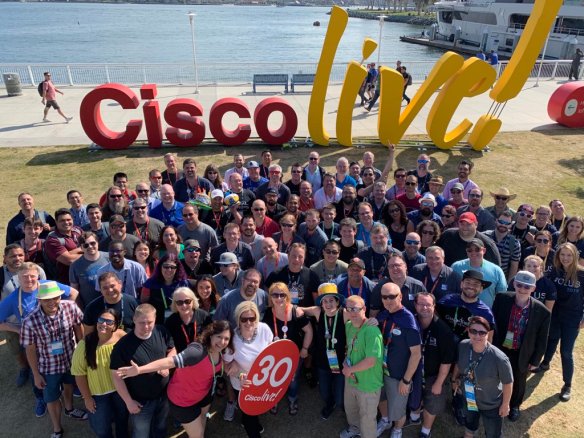
The 2019 Cisco Live Sign Photo

Another Cisco Live is in the books for me. I was a bit shocked to realize this was my 14th event in a row. I’ve been going to Cisco Live half of the time it’s been around! This year was back in San Diego, which has good and bad points. I’d like to discuss a few of them there and get the thoughts of the community.

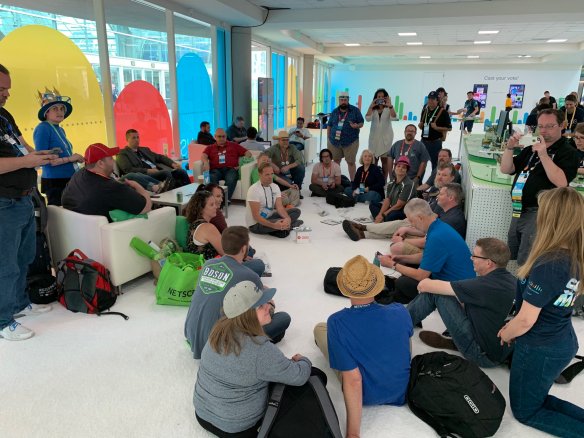
Good: The Social Media Hub Has Been Freed! – After last year’s issues with the Social Media Hub being locked behind the World of Solutions, someone at Cisco woke up and realized that social people don’t keep the same hours as the show floor people. So, the Hub was located in a breezeway between the Sails Pavilion and the rest of the convention center. And it was great. People congregated. Couches were used. Discussions were had. And the community was able to come together again. Not during the hours when it was convenient. But a long time. This picture of the big meeting on Thursday just solidifies in my mind why the Social Media Hub has to be in a common area:

You don’t get this kind of interaction anywhere else!

Good: Community Leaders Step Forward – Not gonna lie. I feel disconnected sometimes. My job at Tech Field Day takes me away from the action. I spend more time in special sessions than I do in the social media hub. For any other place that could spell disaster. But not for Cisco Live. When the community needs a leader, someone steps forward to fill the role. This year, I was happy to see my good friend Denise Fishburne filling that role. The session above was filled with people paying rapt attention to Fish’s stories and her bringing people into the community. She’s a master at this kind of interaction. I was even proud to sit on the edge and watch her work her craft.

Fish is the d’Artagnan of the group. She may be part of the Musketeers of Social Media but Fish is undoubtedly the leader. A community should hope to have a leader that is as passionate and involved as she is, especially given her prominent role in Cisco. I feel like she can be the director of what the people in the Social Media Hub need. And I’m happy to call her my friend.

Bad: Passes Still Suck – You don’t have to do the math to figure out that $700 is bigger than $200. And that $600/night is worse than $200/night. And yet, for some reason we find ourselves in San Diego, where the Gaslamp hotels are beyond insane, wondering what exactly we’re getting with our $700 event pass. Sessions? Nope. Lunch? Well, sort of. Access to the show floor? Only when it’s open for the random times during the week. Compelling content? That’s the most subjective piece of all. And yet Cisco is still trying to tell us that the idea of a $200 social-only pass doesn’t make sense.

Fine. I get it. Cisco wants to keep the budgets for Cisco Live high. They got the Foo Fighters after all, right? They also don’t have to worry about policing the snacks and food everywhere. Or at least not ordering the lowest line items on the menu. Which means less fussing about piddly things inside the convention center. And for the next two years it’s going to work out just great in Las Vegas. Because Vegas is affordable with the right setup. People are already booking rooms at the surrounding hotels. You can stay at the Luxor or the Excalibur for nothing. But if the pass situation is still $700 (or more) in a couple of years you’re going to see a lot of people dropping out. Because….

Bad: WTF?!? San Francisco?!? – I’ve covered this before. My distaste for Moscone is documented. I thought we were going to avoid it this time around. And yet, I found out we’re going back to SF in 2022.

WHY?!?!?!?

Moscone isn’t any bigger. We didn’t magically find seating for 10,000 extra people. More importantly, the hotel situation in San Fran is worse than ever before. You seriously can’t find a good room this year for VMworld. People are paying upwards of $500/night for a non-air conditioned shoe box! And why would you do this to yourself Cisco?

Sure, it’s cheap. Your employees don’t need hotel rooms. You can truck everything up. But your costs savings are being passed along to the customer. Because you would rather them pay through the nose instead of footing the bill yourself. And Moscone still won’t hold the whole conference. We’ll be spilled over into 8 different hotels and walking from who knows where to get to the slightly nicer shack of a convention center.

I’m not saying that Cisco Live needs to be in Vegas every year. But it’s time for Cisco to start understanding that their conference needs a real convention center. And Moscone ain’t it.

Better: Going Back to Orlando – As you can see above, I’ve edited this post to include new information about Cisco Live 2022. I have been informed by multiple people, including internal Cisco folks, that Live 2022 is going to Orlando and not SF. My original discussion about Cisco Live in SF came from other sources with no hard confirmation. I believe now it was floated as a trial balloon to see how the community would respond. Which means all my statements above still stand regarding SF. Now it just means that there’s a different date attached to it.

Orlando is a better town for conventions than SF. It’s on-par with San Diego with the benefit that hotels are way cheaper for people because of the large amount of tourism. I think it’s time that Cisco did some serious soul searching to find a new venue that isn’t in California or Florida for Cisco Live. Because if all we’re going to do is bounce back and forth between San Diego and Orlando and Vegas over and over again, maybe it’s time to just move Cisco Live to Vegas and be done with the moving.


Tom’s Take

Cisco Live is something important to me. It has been for years, especially with the community that’s been created. There’s nothing like it anywhere else. Sure, there have been some questionable decisions and changes here and there. But the community survives because it rededicates itself every year to being about the people. I wasn’t kidding when I tweeted this:

Because the real heart of the community is each and every one of the people that get on a plane and make the choice time and again to be a part of something special. That kind of dedication makes us all better in every possible way.