Unknown's avatar

About networkingnerd

Tom Hollingsworth, CCIE #29213, is a former network engineer and current organizer for Tech Field Day. Tom has been in the IT industry since 2002, and has been a nerd since he first drew breath.

The Value of the Internet of Things

NestPrice
The recent sale of IBM’s x86 server business to Lenovo has people in the industry talking.  Some of the conversation has centered around the selling price.  Lenovo picked up IBM’s servers for $2.3 billion, which is almost 66% less than the initial asking price of $6 billion two years ago.  That price drew immediate comparisons to the Google acquisition of Nest, which was $3.2 billion.  Many people asked how a gadget maker with only two shipping products could be worth more than the entirety of IBM’s server business.
Are You Being Served?
It says a lot for the decline of hardware manufacturing, especially at the low end.  IT departments have been moving away from smaller, task focused servers for many years now.  Instead of buying a new 1U, dual socket machine to host an application, developers have used server virtualization as a way to spin up new services quickly with very little additional cost.  That means that older low end servers aren’t being replaced when they reach the end of their life.  Those workloads are being virtualized and moved away while the equipment is permanently retired.
It also means that the target for server manufacturers is no longer the low end.  IT departments that have seen the benefits of virtualization now want larger servers with more memory and CPU power to insert into virtual clusters.  Why license several small servers when I can save money by buying a really big server?  With advances in SAN technology and parts that can be replaced without powering down the system, the need to have multiple systems for failover is practically negated.
And those virtual workloads are easily migrated away from onsite hardware as well.  The shift to cloud computing is the coup-de-gras for the low end server market.  It is just as easy to spin up an Amazon Web Services (AWS) instance to test software as it is to provision new hardware or a virtual cluster.  Companies looking to do hybrid cloud testing or public cloud deployments don’t want to spend money on hardware for the data center.  They would rather pour that money into AWS instances.
Those Internet Things
I think the disparity in the purchase price also speaks volumes for the value yet to be recognized in the Internet of Things (IoT).  Nest was worth so much to Google because it gave them an avenue not previously available.  Google wants to have as many devices in your home as it can afford to acquire.  Each of those devices can provide data to tune Google’s algorithms and provide quality data to advertisers that pay Google handsomely for those analytics.
IoT devices don’t need home servers.  They don’t ask for DNS entries.  They don’t have web interfaces.  The only setup needed out of the box is a connection to the wireless network in your home.  Once that happens, IoT devices usually connect back to a server in the cloud.  The customer accesses the device via an application downloaded from an app store.  No need for any additional hardware in the customer’s home.
IoT devices need infrastructure to work effectively.  However, they don’t need that infrastructure to exist on premises.  The shift to cloud computing means that these devices are happy to exist anywhere without dependence on hardware.  Users are more than willing to download apps to control them instead of debating how to configure the web UI.  Without the need for low end hardware to run these devices, the market for that hardware is effectively dead.

Tom’s Take
I think IBM got exactly what they wanted when they offloaded their server business.  They can now concentrate on services and software.  The kinds of things that are going to be important in the Internet of Things.  Rather than lamenting the fire sale price of a dying product line, we should instead by looking to the value still locked inside IoT devices and how much higher it can go.

A Plan To Fix E-Rate

The federal E-Rate program is in the news again. This time, it is due to a mention in the president’s State of the Union speech. He asked a deceptively simple question: “Why can’t schools have the same kind of wifi we have in coffee shops?” After the speech, press releases went flying from the Federal Communications Commission (FCC) talking about a restructuring plan that will eliminate older parts of the Federal Universal Service Fund (USF) like pagers and dial-up connections.

This isn’t the first time that E-Rate has been skewered by the president. Back in June of 2013, he asked some tough questions about increasing the availability of broadband connections to schools. Back then, I thought a lot about what his aim was and how easily it would be accomplished. With the recent news, I feel that I have to say something that the government doesn’t want to hear but needs to be said.

Mr. President, E-Rate is fundamentally broken and needs to be completely overhauled before your goals are met.

E-Rate hasn’t really changed since its inception in 1997. All that’s happened is more rules being piled on the top to combat fraud and attempt to keep up with changing technologies. Yet no one has really looked at the landscape of education technology today to see how best to use E-Rate funding. Computer labs have given way to laptop carts or even tablet carts. T1 WAN connections are now metro fiber handoffs at speeds of 100Mbit or better. Servers do much more than run DNS or web servers.

E-Rate has to be completely overhauled. The program no longer meets the needs of its constituents. Today, it serves as a vehicle for service providers and resellers to make money while forcing as much technology into schools as their meager budgets can afford. When schools with a 90% discount percentage are still having a hard time meeting their funding commitments, you have to take a long hard look at the prices being charged and the value being offered to the schools.

With that in mind, I’ve decided to take a stab at fixing E-Rate. It’s not a perfect solution, but I think it’s a great start. We need to build on the important pieces and discard the things that no longer make sense. To that end, I’m suggesting the Priority 1 / Priority 2 split be abolished. Cisco even agrees with me (PDF Link). In it’s place, we need to take a hard look at what our schools need to educate the youth of America.

Tier 1: WAN Connections

Schools need faster WAN connections. Online testing has replaced Scantrons. Streaming video is augmenting the classroom. The majority of traffic is outbound to the Internet, not internally. T1/T3 doesn’t cut it any more. Schools are going to need 100Mbit or better to meet student needs. Yet providers are reluctant to build out fiber networks that are unprofitable. Schools don’t want to pay for expensive circuits that are going to be clogged with junk.

Tier 1 in my proposal will be funding for fast WAN circuits and the routers that connect them. In the current system, that router is Priority 2, so even if you get the 10Gbit circuit you asked for, you may not be able to light it if P2 doesn’t come through. Under my plan, these circuits would be mandated to be fiber. That way, you can increase the amount of bandwidth to a site without the need to run a new line. That’s important, since most schools find themselves quickly consuming additional bandwidth before they realize it. Having a circuit capable of having additional head room is key to the future.

Service providers would also be capped at the amount that they could charge on a monthly basis for the circuit. It does a school no good to order a 1Gbps fiber circuit if they can’t afford to pay for it every month. By capping the amount that SPs can charge, they will be forced to compete or find other means to fund build outs.

Tier 2: Wireless Infrastructure

Wireless is key to the LAN connectivity in schools today. The days of wiring honeycombing the walls is through. Yet, Priority 2 still has a cabling component. It’s time to bring out schools into the 21st century. To that end, Tier 2 of my plan will be focused entirely on improving school wireless connectivity. No more cable runs unless they have a wireless AP on the end. Switches must be PoE/PoE+ capable to support the wireless infrastructure.

In addition, wireless site surveys must be performed before any installation plan is approved. VARs tend to skimp on the surveys now due to inability to recover costs in a straightforward manner. Now, they must do them. The costs of the site survey will be a line item for the site that is capped based on discount percentage. This will lead to an overall reduction in the amount of equipment ordered and installed, so the costs are easy to justify. The capped amount keeps VARs from price gouging with unnecessary additional work that isn’t critical to the infrastructure.

Tier 3: Server Infrastructure

Servers are still an important part of education IT. Even though the applications and services they provide are being increasing outsourced to hosted facilities there will still be a need to maintain existing equipment. However, current E-Rate rules only allow servers to serve Internet functions like DNS, DHCP, or Web Servers. This is ridiculous. DNS is an integral part of Active Directory, so almost every server that is a member of a domain is running it. DHCP is a minuscule part of a server’s function. Given the costs of engineering multiple DHCP servers in a network, having this as a valid E-Rate function is pointless. And when’s the last time a school had their own web server? Hosting services provide scale and easy-of-use that can’t be matched by a small box running in the back of the data center.

Tier 3 of my plan has servers available for schools. However, the hardware can run only one approved role: hypervisors. If you take a server under my E-Rate plan, it has to run ESX/Hyper-V/KVM on the bare metal. This means that ordering fewer big servers will be key to run virtual workloads. They cost allocation nightmare is over. These servers will be performing hypervisor duties all the time. The end user will be responsible for licensing the OS running on the guest. That gets rid of the gray areas we have today.

If you take a virtual server under Tier 3, you must provide a migration plan for your existing non-virtualized workloads. That means that once you accept Tier 3 funding for a server, you have one calendar year to migrate your workloads to that system. After that year, you can no longer claim existing servers as eligible. Moving to the future shouldn’t be painful, but buying a big server and not taking advantage of it is silly. If you show the foresight to use virtualization you’re going to use it all the way.

Of course, for those schools that don’t want to take a server because their workloads already exist in private clouds like Amazon Web Services (AWS) or Rackspace, there will be funding for AWS as well. We have to embrace the available options to ensure our students are learning at the fullest capacity.

Tom’s Take

E-Rate is a fifteen year old program in need of a remodel. The current system is underfunded, prone to gaming, and will eventually collapse in on itself. When USF is forced to rely on rollover funds from previous years to meet funding goals even at 90% something has to change. Priority 1 is bleeding E-Rate dry. The above plan focuses on the technology needed for schools to continue efficiently educating students in the coming years. It meets the immediate needs of education without starving the fund, since an increase is unlikely to come, even though other parts of USF have a sketchy reputation at best, as a quick Google search about the USF-funded cell phone program will attest. As Damon Killian said in The Running Man, “Hard times call for hard choices.” We have to be willing to blow up E-Rate as we know it in order to refocus it to make it serve the ultimate goal: Educating our students.

Disclaimer

Because I know someone from the FCC or SLD is going to read this, here’s the following disclaimer: I don’t work for an E-Rate provider. While I have in the past, this post does not reflect the opinions of anyone at that organization or any other organization involved in the consulting or execution of E-Rate. Don’t assume that because I think the program is broken that means the people that are still working with the program should be punished. They are doing good work while still conforming to the craziest red tape ever. Don’t punish them because I spoke out. Instead, fix the system so no one has to speak out again.

The Slippery Slope of Social Sign-In

FBTalons

At the recent Wireless Field Day 6, we got a chance to see a presentation from AirTight Networks about their foray into Social Wifi. The idea is that business can offer free guest wifi for customers in exchange for a Facebook Like or by following the business on Twitter. AirTight has made the process very seamless by allowing an integrated Facebook login button. Users can just click their way to free wifi.

I’m a bit guarded about this whole approach. It has nothing to do with AirTight’s implementation. In face, several other wireless companies are racing to have similar integration. It does have everything to do with the way that data is freely exchanged in today’s society. Sometimes more freely than it should.

Don’t Forget Me

Facebook knows a lot about me. They know where I live. They know who my friends are. They know my wife and how many kids we have. While I haven’t filled out the fields, there are others that have indicated things like political views and even more personal information like relationship status or sexual orientation. Facebook has become a social data dump for hundreds of millions of people.

For years, I’ve said that Facebook holds the holy grail of advertising – an searchable database of everything a given demographic “likes”. Facebook knows this, which is why they are so focused on growing their advertising arm. Every change to the timeline and every misguided attempt to “fix” their profile security has a single aim: convincing business to pay for access to your information.

Now, with social wifi, those business can get access to a large amount of data easily. When you create the API integration with Facebook, you can indicate a large number of discreet data points easily. It’s just a bunch of checkboxes. Having worked in IT before, I know the siren call that could cause a business owner to check every box he could with the idea that it’s better to collect more data rather than less. It’s just harmless, right?

Give It Away Now

People don’t safeguard their social media permissions and data like they should. If you’ve ever gotten DM spam from a follower or watched a Facebook wall swamped with “on behalf of” postings you know that people are willing to sign over the rights to their accounts for a 10% discount coupon or a silly analytics game. And that’s after the warning popup telling the user what permissions they are signing away. What if the data collection is more surreptitious?

The country came unglued when it was revealed that a government agency was collecting metadata and other discreet information about people that used online services. The uproar led to hearings and debate about how far reaching that program was. Yet many of those outraged people don’t think twice about letting a coffee shop have access to a wealth of data that would make the NSA salivate.

Providers are quick to say that there are ways to limit how much data is collected. It’s trivial to disable the ability to see how many children a user has. But what if that’s the data the business wants? Who is to say that Target or Walmart won’t collect that information for an innocent purpose today only to use it to target advertisements to users at a later date. That’s the exact kind of thing that people don’t think about.

Big data and our analytic integrations are allowing it to happen with ease today. The abundance of storage means we can collect everything and keep it forever without needing to worry about when we should throw things away. Ubiquitous wireless connectivity means we are never truly disconnected from the world. Services that we rely on to tell us about appointments or directions collect data they shouldn’t because it’s too difficult to decide how to dispose of it. It may sound a bit paranoid but you would be shocked to see what people are willing to trade without realizing.


Tom’s Take

Given the choice between paying a few dollars for wifi access or “liking” a company’s page on Facebook, I’ll gladly fork over the cash. I’d rather give up something of middling value (money) instead of giving up something more important to me (my identity). The key for vendors investigating social wifi is simple: transparency. Don’t just tell me that you can restrict the data that a business can collect. Show me exactly what data they are collecting. Don’t rely on the generalized permission prompts that Facebook and Twitter provide. If business really want to know how I voted in the last election then the wifi provider has a social responsibility to tell me that before I sign up. If shady businesses are forced to admit they are overstepping their data collection bounds then they might just change their tune. Let’s make technology work to protect our privacy for once.

Linux Lost The Battle But Won The War

I can still remember my first experience with Linux.  I was an intern at IBM in 2001 and downloaded the IBM Linux Client for e-Business onto a 3.5″ floppy and set about installing it to a test machine in my cubicle.  It was based on Red Hat 6.1.  I had lots of fun recompiling kernels, testing broken applications (thanks Lotus Notes), and trying to get basic hardware working (thanks deCSS).  I couldn’t help but think at the time that there was great potential in the software.

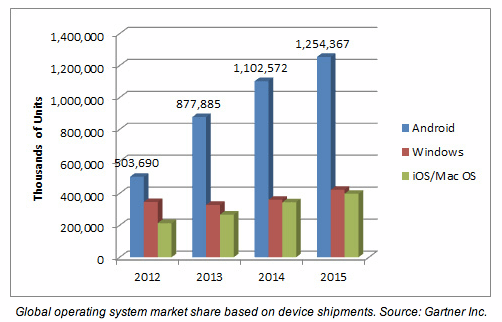
I’ve played with Linux on and off for the last twelve years.  SuSE, Novell, Ubuntu, Gentoo, Slackware, and countless other distros too obscure to rank on Google.  Each of them met needs the others didn’t.  Each tried to unseat Microsoft Windows as the predominant desktop OS.  Despite a range of options and configurability, they never quite hit the mark.  I think every year since 2005 has been the “Year of Desktop Linux”.  Yet year after year I see more Windows laptops out there and very few being offered with Linux installed from the factory.  It seems as though Linux might not ever reach the point of taking over the desktop.  Then I saw a chart that forced me to look at the battle in a new perspective:

AndroidDominance

Consider that Android is based on kernel version 3.4 with some Google modifications.  That means it runs Linux under the hood, even if the interface doesn’t look anything like KDE or GNOME.  And it’s running on millions of devices out there.  Phones and tablets in the hands of consumers world wide.  Linux doesn’t need to win the desktop battle any more.  It’s already ahead in the war for computing dominance.

It happened not because Linux was a clearly superior alternative to Windows-based computing.  It didn’t happen because users finally got fed up with horrible “every other version” nonsense from Redmond.  It happened because Linux offered something Windows has never been able to give developers – flexibility.

I’ve said more than once that the inherent flexibility of Linux could be considered a detriment to desktop dominance.  If you don’t like your window manager you can trade it out.  Swap GNOME for xfce or KDE if you prefer something different.  You can trade filesystems if you want.  You can pull out pieces of just about everything whenever you desire, even the kernel.  Without the mantra of forcing the user to accept what’s offered, people not only swap around at the drop of a hat but are also free to spin their own distro whenever they want.  As of this writing, Ubuntu has 72 distinct projects based on the core distro.  Is it a wonder why people have a hard time figuring out what to install?

Android, on the other hand, has minimal flexibility when it comes to the OS.  Google lets the carriers put their own UI customizations in place, and the hacker community has spun some very interesting builds of their own.  But the rank and file mobile device user isn’t going to go out and hack their way to OS nirvana.  They take what’s offered and use it in their daily computing lives.  Android’s development flexibility means it can be installed on a variety of hardware, from low end mobile phones to high end tablets.  Microsoft has much more stringent rules for hardware running their mobile OS.  Android’s licensing model is also a bit more friendly (it’s hard to beat free).

If the market is really driving toward a model of mobile devices replacing larger desktop computing, then Android may have given Linux the lead that it needs in the war for computing dominance.  Linux is already the choice for appliance computing.  Virtualization hypervisors other than Hyper-V are either Linux under the hood or owe much of their success to Linux.  Mobile devices are dominated by Linux.  Analysts were so focused on how Linux was a subpar performer when it came to workstation mindshare that they forgot to see that the other fronts in the battle were being quietly lost by Microsoft.


Tom’s Take

I’m not going to jump right out there and say that Linux is going to take over the desktop any time soon.  It doesn’t have to.  With the backing of Google and Android, it can quietly keep right on replacing desktop machines as they die off and mobile devices start replicating that functionality.  While I spend time on my old desktop PC now, it’s mostly for game playing.  The other functions that I use computers for, like email and web surfing, are slowly being replaced by mobile devices.  Whether or not you realize it, Linux and *BSD make up a large majority of the devices that people use in every day computing.  The hears and minds of the people were won by Linux without unseating the king of the desktop.  All that remains is to see how Microsoft chooses to act.  With a lead like the one Android has already in the mobile market, the war might be over before we know it.

Let’s Hear It For Uptime

I recently had to have a technician come troubleshoot a phone issue at my home.  I still have a landline with my cable provider.  Mostly because it would be too expensive to change to a package without a phone.  The landline does come in handy on occasion, so I needed to have it fixed.  When I was speaking with the technician that came to fix things, I inquired about something the customer service people on the phone had said about upgrading my equipment.  The field tech told me, “You don’t want that.  Your old system is much better.”  When he explained how the low voltage system would be replaced by a full voice over IP (VoIP) router, I agreed with him.  My thoughts were mostly around the uptime of my phone in the event of a power outage.

Uptime is something that we have grown accustomed to in today’s world.  If you don’t believe me, go unplug your wireless router for the next five minutes.  If your family isn’t ready to burn you at the stake then you are luckier than most.  For the rest of us we measure our happiness in the availability of services.  Cloud email, streaming video, and Internet access all have to be available at the touch of a button.  Whether it be for work or for personal use, uptime is very important in a connected world.

It still surprises me that people don’t focus on uptime as an important metric of their solutions.  Selling redundant equipment or ensuring redundant paths should be one of the first considerations you have when planning a system.  As Greg Ferro once told me, “When I tell you to buy one switch, I always mean two.” Backup equipment is as important as anything you can install.

You have to test your uptime as well.  You don’t have to go to all the trouble of building your own chaos monkey, but you need to pull the plug on the primary every so often to be sure everything works.  You also need to make sure that your backup systems are covered all the way down.  Switches may function just fine with two control engines, but everything stops without power.  Generators and battery backups are important.  In the above case, I would need to put my entire network on a battery backup system in order to ensure I have the same phone uptime that I enjoy now with a relatively low-tech system.

You also have to account for other situations as well.  Several gaming sites were taken offline recently due to the efforts of a group launching distributed denial of service (DDoS) attacks against soft targets like login servers.  You have to make sure that the important aspects of your infrastructure are protected against external issues like this.  Customers don’t know the difference between a security related attack and an outage.  They all look the same in the eyes of a person paying for your service.

We should all strive to provide the most uptime possible for everything that we do.  Potential customers may scoff at the idea of paying for extra parts they don’t currently use.  That usually falls away once you explain what happens in the event of an outage.  We should also strive to point out issues with contingency plans when we see them.  Redundant circuits from a provider aren’t really redundant if they share the same last mile. You’ll never know how this affects you until you test your settings.  When it comes to uptime, take nothing for granted.  Test everything until you know that it won’t quit when failure happens.

image1

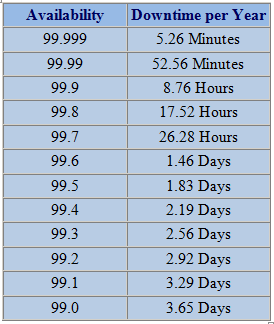
Don’t just plan for downtime.  Forget how many nines you support.  I was once told that a software vendor had “seven nines” of uptime.  I responded by telling them, “that’s three seconds of downtime allowed per year.  Wouldn’t it just be easier to say you never go down?”  Rather than having the mindset that something will eventually fail you should instead have the idea that everything will stay up and running.  It’s a subtle shift in thinking, but changing your perception does wonders for designing solutions that are always available.

The Compost-PC Era

Generic Mobile Devices

I realized the other day that the vibration motor in my iPhone 5s had gone out.  Thankfully, my device was still covered under warranty.  I set up an appointment to have it fixed at the nearest Apple store.  I figured I’d go in and they’d just pop in a new motor.  It is a simple repair according to iFixit.  I backed my phone up one last time as a precaution.  When I arrived at the store, it took no time to determine what was wrong.

What shocked me was that the Genius tech told me, “We’re just going to replace your whole phone.  We’ll send the old one off to get repaired.”  I was taken aback.  This was a $20 part that should have taken all of five minutes to pop in.  Instead, I got my phone completely replaced after just three months.  As the new phone synced from my last iClould backup, I started thinking about what this means for the future of devices.

Bring Your Own Disposable

Most mobile devices are a wonder of space engineering.  Cramming an extra long battery in with a vibrant color screen and enough storage to satisfy users is a challenge in any device.  Making it small enough and light enough to hold in the palm of your hand is even more difficult.  Compromises must be made.  Devices today are held together as much by glue and adhesive as they are nuts and bolts and screws.  Gaining access to a device to repair a broken part is becoming more and more impossible with each new generation.

I can still remember opening the case on my first PC to add a sound card and an Overdrive processor.  It was a bit scary but led to a career in repairing computers.  I’ve downright terrified to pop open an iPhone.  The ribbon cables are so fragile that it doesn’t take much to render the phone unusable.  Even Apple knows this.  They are much more likely to have the repairs done in a separate facility rather than at the store.  Other than screen replacements, the majority of broken parts result in a new phone being given to the customer.  After all, it’s very easy to replace devices when the data is safe somewhere.

The Cloud Will Save It All

Use of cloud storage and backup is the key to the disposable device trend.  If you tell me that I’m going to lose my laptop and all the data on it I’m going to get a little concerned.  If you tell me that I’m going to lose my phone, I don’t mind as much thanks to the cloud backup I have configured.  In the above case, my data was synced back to my phone as I shopped for a new screen protector.  Just like a corporate system, data loss is the biggest concern on a device.  Cloud storage is a lot like a roaming profile.  I can sync that data back to a fresh device and keep going after a short interruption.  Gone are the wasted hours of reinstallation of operating system and software.

Why repair devices when they can easily be replaced at little cost?  Why should you pay someone to spend their time diagnosing a bad CPU or bad RAM when you can just unwrap a new mobile device, sync your profile and data, and move on with your project?  The implications for PC repair techs are legion.  As are the implications for manufacturers that create products that are easy to open and contain field replaceable parts.

Why go to all the extra effort of making a device that can be easily repaired if it’s much cheaper to just glue it together and recycle what parts you can after it breaks?  Customers have already shown their propensity to upgrade devices with every new cycle each year.  They’d rather buy everything new instead of upgrading the old to match.  That means making the device field repairable (or upgradable) is extra cost you don’t need.  Making devices that aren’t easily fixed in the field means you need to spend less of your budgets training people how to repair them.  In fact, it’s just easier to have the customer send the device back to the manufacturing plant.


Tom’s Take

The cloud has enabled us to keep our data consistent between devices.  While it has helped blur the lines between desktop and mobile device, it has also helped blur the lines tying people to a specific device.  If I can have my phone or tablet replaced with almost no impact, I’m going to elect to have than done rather than finding replacement parts to keep the old one running just a bit longer.  It also means that after pulling the useful parts out of those mildly broken devices that they will end up in the same landfill that analysts are saying will be filled with rejected desktop PCs.

The Splinter In Your Mind

Splinter

You don’t know what it is, but it’s there, like a splinter in your mind, driving you mad. – Morpheus

We’ve all had a moment when we’re troubleshooting an issue and something just doesn’t feel right.  Or we’ve put together a solution and it works but there’s a little voice in the back of your mind telling you that something is missing.  You can’t quite put your finger on it but you know you can’t rest until you’ve figured it out.

The quote above comes from the first Matrix movie, when Morpheus is trying to explain to Thomas Anderson exactly why he feels so out of place in the world.  The term actually predates that movie, having been the title of an excellent Star Wars novel.  Splinter of the Mind’s Eye was released in 1978, so it’s almost as old as I am!  The term describes that feeling you get when something is nagging away at you and won’t let go.  I get it quite often.  Sometimes I recognize a person but can’t remember who they are.  Other times I can’t remember a critical step to a project.  But it comes very often when I’m troubleshooting a problem and the solution is just agonizingly out of reach.

How do you combat the splinter?  What can you do to overcome that feeling that will drive you crazy in short order?  Here are a few things I do.  Sometimes they help, sometimes they don’t.  But the idea is to try and dislodge the splinter and get your thought process rolling again.

Think It Through

This is probably my favorite solution.  When I’m faced with a tough problem and an elusive solution, my first step is to walk through the problem step by step.  If it’s a routing loop, I talk my way through the installation of the route into the routing table.  If the problem is a layer 2 issue, I think through the packet as it goes through the network.  The key is that you envision every step along the way.  Often our minds get distracted by an unimportant step and leave it out.  By going back through and thinking of every piece you often force an overlooked concern to the surface.  This can cause the splinter to move and create a new line of thinking.  Perhaps that routing loop is being caused by a redistribution?  Maybe you didn’t know the network used to run RIP and now is running OSPF.  By imagining the packet moving through the network, you can understand where the problem can occur.

You can also speak out loud when thinking things through.  I find it very useful to actually speak the words as I’m thinking.  That’s because my brain runs much faster than my mouth.  By forcing myself to put the thoughts into words, I can usually slow things down long enough to figure out the missing steps.

Draw It Out

If the problem is a little more nebulous, you might need a piece of paper or a whiteboard to draw things.  I’m not the best artist in the world, but I know that a crude diagram of what I’m thinking about will help me visualize things in a new way.  Maybe I forgot to add a piece to the drawing that fixes the issue.  Other times it just helps me think about the problem.  By filtering the splinter in your mind through another creative process like drawing, you can force it out in a different way.  I was very fond of this at my old job when I had a wall-sized whiteboard.  There’s no reason you can’t do it with a regular piece of paper though.  Colored pencils or markers can also help peel apart the layers of the issue.

Forget About It

Yes, it is strange advice to just forget about a problem.  But, ask yourself how many times you’ve stumbled onto the solution when you’re taking a shower or just about to fall asleep?  The brain is a miraculous computer, but sometimes it has a focus problem.  If you think about something for too long, you can get fatigued and lose your ability to apply critical reasoning.  It’s a “forest for the trees” kind of issue.

I always made it a point when I was troubleshooting a really hard problem to walk away for a few minutes.  Whether it was stepping out to get something to eat or just walking into a conference room for five minutes, I always tried to find some time to clear my mind and refocus on the situation.  By thinking about a shopping list or an order form or even the batting order of the 1962 Yankees you can jar the splinter loose and create new connections.  I always joked with my coworkers that the most efficient way to solve high severity issues was to install a shower in my office.  They didn’t find it nearly as funny as I did.


Tom’s Take

I can’t promise that these solutions are going to fix that nagging feeling in the back of your mind.  Some problems are just that tough.  But when you’ve applied every bit of critical reasoning you can to an issue and you’ve reached the point where your stuck but just can’t let go, sometimes it helps to apply one of the above methods.

If you let the splinter fester in the back of your mind, you’ll constantly be asking yourself what you can do or what you need to look at to fix things.  It will eventually consume you if you let it.  Instead, you should look at a way to move the splinter.  If you can do that you’ll sleep better at night.

2014 – Introductions Are In Order

It’s January 1 again.  Time to look back at what I said I was going to do for 2013.  Remember how there was going to be lots of IPv6 in the coming year?  Three whole posts.  Not exactly ushering the future, is it?  What did I work on instead?

It’s been a bit of a change for me.  I’ve gone from bits and bytes to spreadsheets and event planning.  It’s a good thing.  I’m more in touch with people now that I ever was behind a console screen.  I can see the up-and-comers in the industry.  I help bring attention to people that deserve it.  People like Brent Salisbury (@NetworkStatic), Jason Edelman (@JEdelman8), and Jake Snyder (@JSnyder81).

I still get involved with technology.  It’s just more at a higher architectural level.  That means I can stay grounded while at the same time interacting with the people that really know what’s going on.  In many ways, it’s the cross discipline aspect that I’ve been preaching to my old coworkers for years taken to a different extreme.

That means 2014 is going to look much different than I thought it would a year ago.  Almost like I need to introduce myself to the new year all over again.

I really want to spend the next year concentrating on the people.  I want to help bring bloggers and influencers along and give them a way to express themselves.  Perhaps that means social media.  Or a new blog.  Or maybe getting them on board with programs like the Solarwinds Ambassadors.  I want the smart people out there to show the world how smart they are.  I don’t want anyone to go unheard for lack of a platform.

I also really liked this article from John Mark Troyer about creating the new year you want to see.  John has some great points here.  I’ve always tried to stay away from making bold predictions for the coming year because they never pan out.  If you want to be right, you either couch the prediction with a healthy about of uncertainty or you guess something that’s almost guaranteed to happen.  I much prefer writing about what I need to accomplish or what I think needs to happen.  You really are more likely to get something accomplished if you have a concrete goal of self advancement.

Every new year starts out with limitless potential.  Every one of us has the ability and the desire to do something amazing.  I’ve never been one for making resolutions, as that seems to be setting yourself up for failure in many cases.  Instead, I try to do what I can every day to be awesome.  You should too.  Make 2014 an even better year than the last ten or twenty.  Learn how SDN works.  Learn a programming language.  Write a book or a blog or a funny tweet. Express yourself so that everyone knows who you are.  Make 2014 the year you introduce yourself to the world.  If you’ve already done that, make sure the world won’t forget you any time soon.

Write Like The Wind

2053fountain_pen

At the beginning of 2013, I looked at the amount of writing I had been doing.  I had been putting out a post or two a week for the last part of 2012.  Networking Field Day usually kept me busy.  Big news stories also generated a special post after they broke.  I asked myself, “Could I write two posts a week for a whole year?”

The idea is pretty sound.  I know several people that post very frequently.  I had lots of posts backlogged that I could put up to talk about subjects I never seemed to get around to discussing.  So, with a great deal of excitement, I made my decision.  Every Monday and Thursday of 2013 would have a blog post.  In all, 105 posts for the year (counting this one).

Let me be the first to tell you…writing is hard.  It’s easy enough to come up with something every once in a while.  I personally have set a goal of writing a post a week to make sure I stay on track with my blog.  If I don’t write something once a week, then I miss a week.  Then two.  Next thing you know, six months from now I’m writing that “Wow, I haven’t updated in a while…” post.  I hate those posts.

Reaping What You Sow

Not that my life didn’t get complicated along the way.  I changed jobs.  My primary source of material, Tech Field Day, now became my job and not something I could count on for inspiration.  Then, I took on extra work.  I wrote some posts for Aruba’s Airheads Community site.  I also picked up a side job halfway through the year writing for Network Computing.  I applied my usual efficiency to that work, so I was cranking out one post a week for them as well.

My best laid plans of two posts per week ended up being three.  I wrote a lot.  Sometimes, I had everything ready to go and knew exactly what I wanted to say.  Other times I was drafting something at the eleventh hour.  It was important to make sure that I hit my targets.  Some of my posts covered technology, but many more were about the things I do now: writing, blogging, and community relations.  I’m still a technical person, but now I spend the majority of my time writing blogs, editing white papers, and talking to people.

I found out that I like writing.  Quite a bit, in fact.  I like thinking about a given situation or technology and analyzing the different aspects.  I like taking an orthogonal approach to a topic everyone is discussing.  Sometimes, that means I get to play the devil’s advocate.  Other times I make a stand against something I don’t like.  In fact, I created an entire Activism category for blog posts solely because I’ve spent a lot of time discussing issues that I think need to be addressed.

The Next Chapter

Now, all that being said, I’m going to look forward to writing in the future.  I’m probably going to throttle back just a bit on the “two posts per week” target.  With Network Computing going strong, I don’t want to compromise on either front.  That means I’ll probably cut back a post or two here to make sure all my posts are of good quality.  More than once this year I was told, “You write way more than you need to.”  In many ways, that’s because there’s a lot going on in my brain.  This blog serves as a way for me to get it all out and in a form that I can digest and analyze.  I’m just pleased that others find it interesting as well.

Tech Field Day is going to keep me busy in the coming year.  It’s going to give me a lot of exposure to topics I wouldn’t have otherwise gotten to be involved in.  Hopefully that means I’m going to spend more time writing technical things alongside my discussions of social media, writing, and the occasional humorous list.

I’m not out of ideas.  Not by a long shot.  But, I think that some of my ideas are going to need some time to percolate as opposed to just throwing them out there half baked.  Technology is changing every day.  It’s important to be a part of what’s going on and how it can best be used to affect change in a world that hasn’t seen much upheaval in the last decade.  I hope that some of the things I write in the coming months will help in some small part to move the needle.

The CoR Issue

Image from John Welsh.  Read his blog for more voice goodness.

Image from John Welsh. Read his blog for more voice goodness.

In my former life as a voice engineer, I spent a lot of my time explaining class of restriction (CoR) to users and administrators.  The same kinds of questions kept getting asked every time I setup a new system.  Users wanted to know how to make long distance calls.  Administrators wanted to restrict long distance calls.  In some cases, administration went to the extreme of asking if phones could be configured to have no dial tone during class periods or only have long distance enabled during break and lunch periods.

This kind of technology restriction leads to all kinds of behavioral issues.  The administrators may have had the best of intentions in the beginning.  Restricting long distance calls cuts down on billing issues.  Using access codes removes arguments about who dialed a specific number.  Removing dial tone from a handset during work hours encourages teachers and staff and employees to focus on their duties.  It all sounds great. Until the users get involved.

No Restrictions

Users are ingenious creatures.  Given a restriction, they will do everything they can to go around it.  Long distance codes will be shared around a department until an unrestricted one can be found and exploited.  Phones that have dial tone turned off will be ignored.  Worse yet, given a restrictive enough environment users will turn to personal devices to avoid complications.

I used to tell school officials the unvarnished truth.  If you disable a phone during class, teachers will just drag out their cell phone to make a call when needed.  They won’t wait for a break, especially if it is a disciplinary issue or an emergency.  Cell phones are pervasive enough now that most everyone carries one.  Do you think that an employee that has a restricted phone is going to accept it?  Or will they just use their own phone to make a long distance call or make a call during a restricted time?

Class of restriction needs to be rethought for phone systems in today’s environments.  We need to ensure that things like access codes are in place for transparency, not for behavior modification.  Given that we have options like extension mobility for user identification on a specific device, it makes sense that we should be abel to identify phone calls from a given user on a given extension with ease.  There should be no reason for a client matter code or forced authorization code.

Likewise, restricting dial tone on a phone should be discouraged.  Giving users a good reason to use non-controlled devices like cell phones isn’t really a good option.  Instead, you should be counseling the users to treat an in-room phone like any other corporate device.  It should be used when appropriate.  If direct inward dial (DID) is configured for the extension, users should be cautioned to only give the number to trusted parties.  DID is usually not configured for extensions in most of my deployments, so it’s not an issue.  That’s not to say it won’t come up in your deployment.


Tom’s Take

Class of restriction is a necessary evil in a phone system.  It prevents expensive toll calls like 900 numbers or international calls.  However, it should really on be used to curtail these kinds of problems and not to restrict normal user behavior, like long distance calls.  I can remember using my Cisco Cius for the first time only to discover that a firmware bug rendered it unusable due to CoR preventing me from entering a long distance code.  I had to shelve the unit until the bug was fixed.  Which just happened to be a few weeks before the device was officially killed off.  When you restrict the use of your device, users will choose to not use your device.  Giving users the largest number of options will encourage them to use everything at their disposal.  CoR shouldn’t create issues, it should allow users to solve them.