Painless Progress with My Ubiquiti Upgrade

I’m not a wireless engineer by trade. I don’t have a lab of access points that I’m using to test the latest and greatest solutions. I leave that to my friends. I fall more in the camp of having a working wireless network that meets my needs and keeps my family from yelling at me when the network is down.

Ubiquitous Usage

For the last five years my house has been running on Ubiquiti gear. You may recall I did a review back in 2018 after having it up and running for a few months. Since then I’ve had no issues. In fact, the only problem I had was not with the gear but with the machine I installed the controller software on. Turns out hard disk drives do eventually go bad and I needed to replace it and get everything up and running again. Which was my intention when it went down sometime in 2021. Of course, life being what it is I deprioritized the recovery of the system. I realized after more than a year that my wireless network hadn’t hiccuped once. Sure, I couldn’t make any changes to it but the joy of having a stable environment is that you don’t need to make constant changes. Still, I was impressed that I had no issues the necessitated my recovery of my controller software.

Flash forward to late 2023. I’m talking with some of the folks at Ubiquiti about a totally unrelated matter and I just happened to mention that I was impressed at how long the system had been running. They asked me what hardware I was working with and when I told them they laughed and said I needed to check out their new stuff. I was just about to ask them what I should look at when they told me they were going to ship me a package to install and try out.

Dreaming of Ease

Tom Hildebrand really did a great job because I got a UPS shipment at the beginning of December with a Ubiquiti Dream Machine SE, a new U6 Pro AP, and a G5 Flex Camera. As soon as I had the chance I unboxed the UDM SE and started looking over the installation process. The UDM SE is an all-in-one switch, firewall, and controller for the APs. I booted the system and started to do the setup process. I panicked for a moment because I realized that my computer was currently doing something connected to my old network and I didn’t want to have to dig through the pile to find a laptop to connect in via Ethernet to configure things.

That’s when my first surprise popped up. The UDM SE allows you to download the UniFi app to your phone and do the setup process from a mobile device. I was able to configure the UDM SE with my network settings and network names and get it staged and ready to do without the need for a laptop. That was a big win in my book. Lugging your laptop to a remote site for an installation isn’t always feasible. And counting on someone to have the right software isn’t either. How many times have you asked a junior admin or remote IT person what terminal program they’re using only to be met with a blank stare?

Once the UDM SE was up and running, getting the new U6 AP joined was easy. It joined the controller, downloaded the firmware updates and adopted my new (old) network settings. Since I didn’t have my old controller software handy I just recreated the old network settings from scratch. I took the opportunity to clean out some older compatibility issues that I was ready to be rid of thanks to an old Xbox 360 and some other ancient devices that were long ago retired. Clean implementations for the win. After the U6 was ready to go I installed it in my office and got ready to move my old AP to a different location to provide coverage.

The UDM SE detected that there were two APs that were running but part of a different controller. It asked me if I wanted to take them over and I happily responded in the affirmative. Sadly, when asked for the password to the old controller I drew a blank because that was two years ago and I can barely remember what I eat for breakfast. Ubiquiti has a solution for that and with some judicious use of the reset button I was able to reset the APs and join them to the UDM SE with no issues. Now everything is humming along smoothly. The camera is still waiting to be deployed once I figure out where I want to put it.

How is it all working? Zero complaints so far. Much like my previous deployment everything is humming right along and all my devices joined the new network without complaint. All the APs are running on new firmware and my new settings mean fewer questions about why something isn’t working because the kids are on a different network than the printer or one of the devices can’t download movies or something like that. Given how long I was running the old network without any form of control I’m glad it picked right up and kept going. Scheduling the right downtime at the beginning of the month may have had something to do with that but otherwise I’m trilled to see how it’s going.


Tom’s Take

Now that I’ve been running Ubiquiti for the last five years how would I rate it? I’d say for people that don’t want to rely on consumer APs from a big box store to run your home network you need to check Ubiquiti out. I know my friend Darrel Derosia is doing some amazing enterprise things with it in Memphis but I don’t need to run an entire arena. What I need is seamless connectivity for my devices without worry about what’s going to go down when I walk upstairs. My home network budget precludes enterprise gear. It fits nicely with Ubiquiti’s price point and functionality. Whether I’m trying to track down a lost Nintendo Switch or limit bandwidth so game updates aren’t choking out my cable modem I’m pleased with the performance and flexibility I have so far. I’m still putting the UDM SE through it’s paces and once I get the camera installed and working with it I’ll have more to say but rest assured I’m very thankful for Tom and his team for letting me kick the tires on some awesome hardware.

Disclaimer: The hardware mentioned in this post was provided by Ubiquiti at no charge to me. Ubiquiti did not ask for a review of their equipment and the opinions and perspectives represented in this post are mine and mine alone with not expectation of editorial review or compensation.


Cross Training for Career Completeness

Are you good at your job? Have you spent thousands of hours training to be the best at a particular discipline? Can you configure things with your eyes closed and are finally on top of the world? What happens next? Where do you go if things change?

It sounds like an age-old career question. You’ve mastered a role. You’ve learned all there is to learn. What more can you do? It’s not something specific to technology either. One of my favorite stories about this struggle comes from the iconic martial artist Bruce Lee. He spent his formative years becoming an expert at Wing Chun and no one would argue he wasn’t one of the best. As the story goes, in 1967 he engaged in a sparring match with a practitioner of a different art and, although he won, he was exhausted and thought things had gone on far too long. This is what encouraged him to develop Jeet Kun Do as a way to incorporate new styles together for more efficiency and eventually led to the development of mixed martial arts (MMA).

What does Bruce Lee have to do with tech? The value of cross training with different tech disciplines is critical for your ability to continue to exist as a technology practitioner.

Time Marches On

A great example of this came up during Mobility Field Day back in May. During the Fortinet presentation there was a discussion about wireless and SASE. I’m sure a couple of the delegates were shrugging their shoulders in puzzlement about this inclusion. After all, what does SASE have to do with SNR or Wi-Fi 6E? Why should they care about software running on an AP when the real action is in the spectrum?

To me, as someone who sees the bigger picture, the value of talking about SASE is crucial. Access points are no longer radio bridges. They are edge computing devices that run a variety of software programs. In the old days it took everything the CPU had to process the connection requests and forward the frames to the right location. Today there is a whole suite of security being done at the edge to keep users safe and reduce the amount of traffic being forwarded into the network.

Does that mean that every wireless engineer needs to become a security expert? No. Far from it. There is specialized knowledge in both areas that people will spend years perfecting. Does that mean that wireless people need to ignore the bigger security picture? That’s also a negative. APs are going to be running more and more software in the modern IT world because it makes sense to put it there and not in the middle of the enterprise or the cloud. Why process traffic if you don’t have to?

It also means that people need to look outside of their specific skillset to understand the value of cross training. There are some areas that have easy crossover potential. Networking and wireless have a lot of commonality. So do storage and cloud, as well as virtualization and storage and cloud. We constantly talk about the importance of including security in the discussion everywhere, from implementation to development. Yet when we talk about the need to understand these technologies at a basic level we often face resistance from operations teams that just want to focus on their area and not the bigger picture.

New Approaches

Jeet Kune Do is a great example of why cross training has valuable lessons for us to learn about disruption. In a traditional martial arts fight, you attack your opponent. The philosophy of Jeet Kun Do is to attack your opponent’s attacks. You spend time defending by keeping them from attacking you. That’s a pretty different approach.

Likewise, in IT we need to examine how to we secure users and operate networks. Fortinet believes security needs to happen at the edge. Their philosophy is informed by their expertise in developing edge hardware to do this role. Other companies would say this is best performed in the cloud using their software, which is often their strength. Which approach is better? There is no right answer. I will say that I am personally a proponent of doing the security stuff as close the edge as possible to reduce the need for more complexity in the core. It might be a remnant of my old “three tier” network training but I feel the edge is the best place to do the hard work, especially given the power of the modern edge compute node CPU.

That doesn’t mean it’s always going to be the best way to do things. That’s why you have to continuously learn and train on new ways of doing things. SASE itself came from SD-WAN which came from SDN. Ten years ago most of this was theoretical or in the very early deployment stage. Today we have practical applications and real-world examples. Where will it go in five years? You only know if you learn how it works now.


Tom’s Take

I’ve always been a voracious learner and training myself on different aspects of technology has given me the visibility to understand the importance of how it all works together. Like Bruce Lee I always look for what’s important and incorporate it into my knowledge base and discard the rest. I know that learning about multiple kinds of technology is the key to having a long career in the industry. You just have to want to see the bigger picture for cross training to be effective.

Disclaimer: This post mentions Fortinet, a presenter at Mobility Field Day 9. The opinions expressed in this post reflect my own perspective and were not influenced by consideration from any companies mentioned.

Why Do We Accept Bad Wireless Clients?

We recorded a fun roundtable discussion last week during Mobility Field Day that talked about the challenges that wireless architects face in their daily lives. It’s about an hour but it’s packed with great discussions about hard things we deal with:

One of the surprises for me is that all the conversations came back to how terrible wireless clients can be. The discussion kept coming back to how hard it is to find quality clients and how we adjust our expectations for the bad ones.

Driven to Madness

Did you know that 70% of Windows crashes are caused by third-party drivers? That’s Microsoft’s own research saying it. That doesn’t mean that Windows is any better or more stable with their OS design compared to Linux or MacOS. However, I’ve fiddled with drivers on Linux and I can tell you how horrible that experience can be1. Windows is quite tolerant of hardware that wouldn’t work anywhere else. As long as the manufacturer provides a driver you’re going to get something that works most of the time.

Apply that logic to a wireless networking card. You can buy just about anything and install it on your system and it will mostly work. Even with reputable companies like Intel you have challenges though. I have heard stories of driver updates working in one release and then breaking horribly in another. I’ve had to do the dance of installing beta software to make a function work at the expense of stability of the networking stack. Anyone that has ever sent out an email cautioning users to not update any drivers on their system knows the pain that can be caused by bad drivers corrupting clients.

That’s just the software we can control. What if it’s an OS we can’t do anything about? More and more users are turning to phones and tablets for their workhorse devices. Just a causal glance at Youtube will reveal a cornucopia of using a tablet as a daily driver machine. Those devices aren’t immune to driver challenges. They just come in a hidden package during system updates. Maybe the developers decided to roll out a new feature. Maybe they wanted to test a new power management algorithm. Maybe they’re just chaotic neutral and wanted to disrupt the world. Whatever the reason you’re stuck with the results. If you can’t test it fast enough you may find your users updated their devices chasing a feature. Most companies stop signing the code for the older version shortly after issuing an update so downgrading is impossible. Then what? You have a shiny brick? Maybe you have to create a special network that disables features for them? There are no solid answers.

Pushing Back

My comment in the roundtable boils down to something simple: Why do we allow this to happen? Why are we letting client manufacturers do this? The answer is probably more elegant than you realize. We do it because users expect every device to work. Just like the Windows driver issues you wouldn’t plug something into a computer and then expect it to not work, right? Wireless is no different to the user. They want to walk in somewhere and connect. Whether it’s a coffee shop or their home office or the corporate network it needs to be seamless and friction-free.

Would you expect the same of an Ethernet cable? or a PATA hard drive? Would you expect to be able to bring a phone from home and plug it into your corporate PBX? Of course not. Part of the issue is a lack of visible incompatibility. If you know the Ethernet cable won’t plug into a device you won’t try to connect it. If the cable for your disk drive isn’t compatible with your motherboard you get a different drive. With wireless we expect the nerds in the back to “make it work”. Wireless is one of the best protocols at making things work poorly just to say it is up and running. If you had an Ethernet network with 15% packet loss you’d claim it was broken. Yet Wi-Fi will connect and drop packets due to bad SNR and other factors because it’s designed to work under adverse conditions.

Why do we tolerate bad clients? Why don’t we push back against the vendors and tell them to do better? The standard argument is that we don’t control the client manufacturing process. How are we supposed to tell vendors to support a function if we can’t make our voices heard? While we may not be able to convince Intel or Apple or Samsung to build in support for specific protocols we can affect that change with consumption. If you work in an enterprise and you need support for something, say 802.11r, you can refuse to purchase a device until it’s supported.

But wait, you say, I don’t control that either. You may not control the devices but you control the network to which they attach. You can tell your users that the device isn’t supported. Just like a PATA hard disk or a floppy drive you can tell users that what they want to do won’t work and you need to do something different. If they want to use their personal iPad for work or their ancient laptop to connect they need to update it or use a different communications method. If your purchasing department wants to save $10 per laptop because they come with inferior wireless cards you can push back and tell them that the specs aren’t compatible with the network setup. Period, full stop, end of sentence.


Tom’s Take

The power to solve bad clients won’t come from companies that make money doing the least amount of work possible. It won’t come from companies that don’t provide feedback in the form of lost sales. It will come when someone puts their foot down and refuses to support any more bad client hardware and software. If the Wi-Fi Alliance won’t enforce good client connectivity it’s time we do it for them.

If you disagree I’d love to hear what you think. Is there a solution I’m not seeing? Or are we just doomed to live with bad client devices forever?


  1. If you say Winmodem around me I will scream. ↩︎

A Gift Guide for Sanity In Your Home IT Life

If you’re reading my blog you’re probably the designated IT person for your family or immediate friend group. Just like doctors that get called for every little scrape or plumbers that get the nod when something isn’t draining over the holidays, you are the one that gets an email or a text message when something pops up that isn’t “right” or has a weird error message. These kinds of engagements are hard because you can’t just walk away from them and you’re likely not getting paid. So how can you be the Designated Computer Friend and still keep your sanity this holiday season?

The answer, dear reader, is gifts. If you’re struggling to find something to give your friends that says “I like you but I also want to reduce the number of times that you call me about your computer problems” then you should definitely read on for more info! Note that I’m not going to fill this post will affiliate links or plug products that have sponsored anything. Instead, I’m going to just share the classes or types of devices that I think are the best way to get control of things.

Step 1: Infrastructure Upgrades

When you go visit your parents for Thanksgiving or some other holiday check in, are they still running the same wireless network they got when they got their high-speed Internet? Is their Wi-Fi SSID still the default with the password printed on the side of the router/modem combo? Then you’re going to want to upgrade their experience to keep your sanity for the next few holidays.

The first thing you need to do it get control of their wireless setup. You need to get some form of wireless access point that wasn’t manufactured in the early part of the century. Most of the models on the market have Wi-Fi 6 support now. You don’t need to go crazy with a Wi-Fi 6E model for your loved ones right now because none of their devices will support it. You just need something more modern with a user interface that wasn’t written to look like Windows 3.1.

You also need to see about an access point that is controlled via a cloud console. If you’re the IT person in the group you probably already use some form control for your home equipment. You don’t need a full Meraki or Juniper Mist setup to lighten your load. That is, unless you already have one of those dashboards set up and you have spare capacity. Otherwise you could look at something like Ubiquiti as a middle ground.

Why a cloud controller AP? Because then you can log in and fix things or diagnose issues without needing to spend time talking to less technical users. You can find out if they have an unstable Internet connection or change SSID passwords at the drop of a hat. You can even set up notifications for those remote devices to let you know when a problem happens so you can be ready and waiting for the call. And you can keep tabs on necessary upgrades and such so you aren’t fielding calls when the next major exploit comes out and your parents call you asking if they’re going to get infected by this virus. You can just tell them they’re up-to-date and good to go. The other advantage of this method is that when you upgrade your own equipment at home you can just waterfall the old functional gear down to them and give them a “new to you” upgrade that they’ll appreciate.

Step 2: Device Upgrades

My dad was notorious for using everything long past the point of needing to be retired. It’s the way he was raised. If there’s a hole you patch it. If it breaks you fix it. If that fix doesn’t work you wrap it in duct tape and use it until it crumbles to dust. While that works for the majority of things out there it does cause issues with technology far too often.

He had a iPad that he loved. He didn’t use it all day, every day but he did use it frequently enough to say that it was his primary computing device. It was a fourth-generation device, so it fell out of fashion a few years ago. When he would call me and ask me questions about why it was behaving a certain way or why he couldn’t download some new app from the App Store I would always remind him that he had an older device that wasn’t fast enough or new enough to run the latest programs or even operating software. This would usually elicit a grumble or two and then we would move on.

If you’re the Designated IT Person and you spend half your time trying to figure out what versions of OS and software are running on a device, do yourself a favor and invest in a new device for your users just to ease the headaches. If they use a tablet as their primary computing device, which many people today do, then just buy a new one and help them migrate all the data across to the new one while you’re eating turkey or opening presents.

Being on later hardware ensures that the operating system is the latest version with all the patches for security that are needed to keep your users safe. It also means you’re not trying to figure out what the last supported version of the software was that works with the rest of the things. I’ve played this game trying to get an Apple Watch to connect to an older phone with mismatched software as well as trying to get support for newer wireless security on older laptops with very little capability to do much more than WPA1. The amount of hours I burned trying to make the old junk work with the new stuff would have been better served just buying a new version of the same old thing and getting all their software moved over. Problems seem to just disappear when you are running on something that was manufactured within the last five years.

Step 3: Help Them Remember

This is probably my biggest request: Forgotten passwords. Either it’s the forgotten Apple ID or maybe the wireless network password. My parents and in-laws forget the passwords they need to log into things all the time. I finally broke down and taught them how to use a password management tool a few years ago and it made all the difference in the world. Now, instead of them having to remember what their password was for a shopping site they can just set it to automatically fill everything in. And since they only need to remember the master password for their app they don’t have to change it.

Better yet, most of these apps have a secure section for notes. So all those other important non-password things that seem to come up all the time are great to put in here. Social Security Numbers, bank account numbers, and so much more can be put in one central location and made easy to access. The best part? If you make it a shared vault you can request access to help them out when they forget how to get in. Or you can be designated as a trusted party that can access the account in the event of a tragedy. Getting your loved ones used to using password vaults now makes it much easier to have them storing important info there in case something happens down the road that requires you to jump in without their interaction. Trust me on this.


Tom’s Take

Your loved ones don’t need knick knacks and useless junk. If you want to show them you love them, give them the gift of not having to call you every couple of days because they can’t remember the wireless password or because they keep getting this error that says their app isn’t support on this device. Invest in your sanity and their happiness by giving them something that works and that has the ability for you to help manage it from the background. If you can make it stable and useful and magically work before they call you with a problem you’re going to find yourself a happier person in the years to come.

Private 5G Needs Complexity To Thrive

I know we talk about the subject of private 5G a lot in the industry but there are more players coming out every day looking to add their voice to the growing supporters of these solutions. And despite the fact that we tend to see 5G and Wi-Fi technologies as ships in the night this discussion isn’t going to go away any time soon. In part it’s because decision makers aren’t quite savvy enough to distinguish between the bands, thinking all wireless communications are pretty much the same.

I think we’re not going to see much overlap between these two technologies. But the reasons why aren’t quite what you might think.

Walking Workforces

Working from anywhere other than the traditional office is here to stay. Every major Silicon Valley company has looked at the cost benefit analysis and decided to let workers do their thing from where they live. How can I tell it’s permanent? Because they’re reducing salaries for those that choose to stay away from the Bay Area. That carrot is pretty enticing and for the companies to say that it’s not on the table for remote work going forward means they have no incentive to make people want to move to work from an office.

Mobile workers don’t care about how they connect. As long as they can get online they are able to get things done. They are the prime use case for 5G and Private 5G deployments. Who cares about the Wi-Fi at a coffee shop if you’ve got fast connectivity built in to your mobile phone or tablet? Moreover, I can also see a few of the more heavily regulated companies requiring you to use a 5G uplink to connect to sensitive data though a VPN or other technology. It eliminates some of the issues with wireless protection methods and ensures that no one can easily snoop on what you’re sending.

Mobile workers will start to demand 5G in their devices. It’s a no-brainer for it to be in the phone and the tablet. As laptops go it’s a smart decision at some point, provided enough people have swapped over to using tablets by then. I use my laptop every day when I work but I’m finding myself turning to my iPad more and more. Not for any magical reason but because it’s convenient if I want to work from somewhere other than my desk. I think that when laptops hit a wall from a performance standpoint you’re going to see a lot of manufacturers start to include 5G as a connection option to lure people back to them instead of abandoning them to the big tablet competition.

However, 5G is really only a killer technology for these more complex devices. The cost of a 5G radio isn’t inconsequential to the overall cost of a device. After all, Apple raised the price of their iPad when they included a 5G radio, didn’t they? You could argue that they didn’t when they upgraded the iPhone to a 5G chipset but the cellular technology is much more integral to the iPhone than the iPad. As companies examine how they are going to move forward with their radio technology it only makes sense to put the 5G radios in things that have ample space, appropriate power, and the ability to recover the costs of including the chips. It’s going to be much more powerful but it’s also going to be a bigger portion of the bill of materials for the device. Higher selling prices and higher margins are the order of the day in that market.

Reassuringly Expensive IoT

One of the drivers for private 5G that I’ve heard of recently is the drive to have IoT sensors connected over the protocol. The thinking goes that the number of devices that are going to be deployed it going to create a significant amount of traffic in a dense area that is going to require the controls present in 5G to ensure they aren’t creating issues. I would tend to agree but with a huge caveat.

The IoT sensors that people are talking about here aren’t the ones that you might think of in the consumer space. For whatever reason people tend to assume IoT is a thermostat or a small device that does simple work. That’s not the case here. These IoT devices aren’t things that you’re going to be buying one or two at a time. They are sensors connected to a larger system. Think HVAC relays and probes. Think lighting sensors or other environmental tech. You know what comes along with that kind of hardware? Monitoring. Maintenance. Subscription costs.

The IoT that is going to take advantage of private 5G isn’t something you’re going to be deploying yourself. Instead, it’s going to be something that you partner with another organization to deploy. You might “own” the tech in the sense that you control the data but you aren’t going to be the one going out to Best Buy or Tech Data to order a spare. Instead, you’re going to pay someone to deploy it and it when it goes wrong. So how does that differ from the IoT thermostat that comes to mind? Price. Those sensors are several hundred dollars each. You’re paying for the technology included in them with that monthly fee to monitor and maintain them. They will talk to the radio station in the building or somewhere nearby and relay that data back to your dashboard. Perhaps it’s on-site or, more likely, in a cloud instance somewhere. All those fees mean that the devices become more complex and can absorb the cost of more complicated radio technology.

What About Wireless?

Remember when wireless was something cool that you had to show off to people that bought a brand new laptop? Or the thrill of seeing your first iPhone connect to attwifi at Starbucks instead of using that data plan you paid so dearly to get? Wireless isn’t cool any more. Yes, it’s faster. Yes, it is the new edge of our world. But it’s not cool. In the same way that Ethernet isn’t cool. Or web browsers aren’t cool. Or the internal combustion engine isn’t cool. Wi-Fi isn’t cool any more because it is necessary. You couldn’t open an office today without having some form of wireless communications. Even if you tried I’m sure that someone would hop over to the nearest big box store and buy a consumer-grade router to get wireless working before the paint was even dry on the walls.

We shouldn’t think about private 5G replacing Wi-Fi because it never will. There will be use cases where 5G makes much more sense, like in high-density deployments or in areas were the contention in the wireless spectrum is just too great to make effective use of it. However, not deploying Wi-Fi in favor of deploying private 5G is a mistake. Wireless is the perfect “set it and forget it” technology. Provide an SSID for people to connect to and then let them go crazy. Public venues are going to rely on Wi-Fi for the rest of time. These places don’t have the kind of staff necessary to make private 5G economical in the long run.

Instead, think of private 5G deployments more like the way that Wi-Fi used to be. It’s an option for devices that need to be managed and controlled by the organization. They need to be provisioned. They need to consume cycles to operate properly. They need to be owned by the company and not the employee. Private 5G is more of a play for infrastructure. Wi-Fi is the default medium given the wide adoption it has today. It may not be the coolest way to connect to the network but it’s the one you can be sure is up and running without the need for the IT department to come down and make it work for you.


Tom’s Take

I’ll admit that the idea of private 5G makes me smile some days. I wish I had some kind of base station here at my house to counteract the horrible reception that I get. However, as long as my Internet connection is stable I have enough wireless coverage in the house to make the devices I have work properly. Private 5G isn’t something that is going to displace the installed base of Wi-Fi devices out there. With the amount of management that 5G requires in devices you’re not going to see a cheap or simple method to deploying it appear any time soon. The pie-in-the-sky vision of having pervasive low power deployments in cheap devices is not going to be realistic on the near future horizon. Instead, think of private 5G as something that you need to use when your other methods won’t work or when someone you are partnering with to deploy new technology requires it. That way you won’t be caught off-guard when the complexity of the technology comes to play.

It’s A Wireless Problem, Right?

How many times have your users come to your office and told you the wireless was down? Or maybe you get a phone call or a text message sent from their phone. If there’s a way for people to figure out that the wireless isn’t working they will not hesitate to tell you about it. But is it always the wireless?

Path of Destruction

During CWNP Wi-Fi Trek 2019, Keith Parsons (@KeithRParsons) gave a great talk about Tips, Techniques, and Tools for Troubleshooting Wireless LAN. It went into a lot of detail about how many things you have to look at when you start troubleshooting wireless issues. It makes your head spin when you try and figure out exactly where the issues all lie.

However, I did have to put up a point that I didn’t necessarily agree with Keith on:

I spent a lot of time in the past working with irate customers in schools. And you can better believe that every time there was an issue it was the network’s fault. Or the wireless. Or something. But no matter what the issue ended up being, someone always made sure to remind me the next time, “You know, the wireless is flaky.”

I spent a lot of time trying to educate users about the nuances between signal strength, throughput, Internet uplinks, application performance (in the days before cloud!) and all the various things that could go wrong in the pathway between the user’s workstation and wherever the data was that they were trying to access. Wanna know how many times it really worked?

Very few.

Because your users don’t really care. It’s not all that dissimilar to the utility companies that you rely on in your daily life. If there is a water main break halfway across town that reduces your water pressure or causes you to not have water at all, you likely don’t spend your time troubleshooting the water system. Instead, you complain that the water is out and you move on with your day until it somehow magically gets fixed. Because you don’t have any visibility into the way the water system works. And, honestly, even if you did it might not make that much difference.

A Little Q&A

But educating your users about issues like this isn’t a lost cause. Because instead of trying to avail them of all the possible problems that you could be dealing with, you need to help them start to understand the initial steps of the troubleshooting process. Honestly, if you can train them to answer the following two questions you’ll likely get a head start on the process and make them very happy.

  1. When Did The Problem Start? One of the biggest issues with troubleshooting is figuring out when the problem started in the first place. How many times have you started troubleshooting something only to learn that the real issue has been going on for days or weeks and they don’t really remember why it started in the first place? Especially with wireless you have to know when things started. Because of the ephemeral nature of things like RSSI your issue could be caused by something crazy that you have no idea about. So you have to get your users to start writing down when things are going wrong. That way you have a place to start.
  2. What Were You Doing When It Happened? This one usually takes a little more coaching. People don’t think about what they’re doing when a problem happens outside of what is causing them to not be able to get anything done. Rarely do they even think that something they did caused the issue. And if they do, they’re going to try and hide it from you every time. So you need to get them to start detailing what was going on. Maybe they were up walking around and roamed to a different AP in a corner of the office. Maybe they were trying to work from the break room during lunch and the microwave was giving them fits. You have to figure out what they were doing as well as what they were trying to accomplish before you can really be sure that you are on the right track to solving a problem.

When you think about the insane number of things that you can start troubleshooting in any scenario, you might just be tempted to give up. But, as I mentioned almost a decade ago, you have to start isolating factors before you can really fix issues. As Keith mentioned in his talk, it’s way too easy to pick a rabbit hole issue and start troubleshooting to make it fit instead of actually fixing what’s ailing the user. Just like the scientific method, you have to make your conclusions fit the data instead of making the data fit your hypothesis. If you are dead set on moving an AP or turning off a feature you’re going to be disappointed when that doesn’t actually fix what the users are trying to tell you is wrong.


Tom’s Take

Troubleshooting is the magic that makes technical people look like wizards to regular folks. But it’s not because we have magical powers. Instead, it’s because we know instinctively what to start looking for and what to discard when it becomes apparent that we need to move on to a new issue. That’s what really separates a the best of the best. Being able to focus on the issue and not the next solution that may not work. Keith Parsons is one such wizard. Having him speak at Wi-Fi Trek 2019 was a huge success and should really help people understand how to look at these issues and keep them on the right troubleshooting track.

Fast Friday – Mobility Field Day 4

This week’s post is running behind because I’m out in San Jose enjoying great discussions from Mobility Field Day 4. This event is bringing a lot of great discussion to the community to get everyone excited for current and future wireless technologies. Some quick thoughts here with more ideas to come soon.

  • Analytics is becoming a huge driver for deployments. The more data you can gather, the better everything can be. When you start to include IoT as a part of the field you can see why all those analytics matter. You need to invest in a lot of CPU horsepower to make it all work the way you want. Which is also driving lots of people to build in the cloud to have access to what they need on-demand from an infrastructure side of things.
  • Spectrum is a huge problem and source of potential for wireless. You have to have access to spectrum to make everything work. 2.4 GHz is pretty crowded and getting worse with IoT. 5 GHz is getting crowded as well, especially with LAA being used. And the opening of the 6 GHz spectrum could be held up in political concerns. Are there new investigations that need to happen to find bands that can be used without causing friction?
  • The driver for technology has to be something other than desire. We have to build solutions and put things out there to make them happen. Because if we don’t we’re going to stuck with what we have for a long time. No one wants to move and reinvest without clear value. But clear value often doesn’t develop until people have already moved. Something has to break the logjam of hesitance. That’s the reason why we still need bold startups with new technology jumping out to make things work.

Tom’s Take

I know I’ll have more thoughts when I get back from this event, but wireless has become the new edge and that’s a very interesting shift. The more innovation we can drive there means the more capable we can make our clients and empower users.

The Cargo Cult of Google Tools

You should definitely watch this amazing video from Ben Sigelman of LightStep that was recorded at Cloud Field Day 4. The good stuff comes right up front.

In less than five minutes, he takes apart crazy notions that we have in the world today. I like the observation that you can’t build a system more than three or four orders of magnitude. Yes, you really shouldn’t be using Hadoop for simple things. And Machine Learning is not a magic wand that fixes every problem.

However, my favorite thing was the quick mention of how emulating Google for the sake of using their tools for every solution is folly. Ben should know, because he is an ex-Googler. I think I can sum up this entire discussion in less than a minute of his talk here:

Google’s solutions were built for scale that basically doesn’t exist outside of a maybe a handful of companies with a trillion dollar valuation. It’s foolish to assume that their solutions are better. They’re just more scalable. But they are actually very feature-poor. There’s a tradeoff there. We should not be imitating what Google did without thinking about why they did it. Sometimes the “whys” will apply to us, sometimes they won’t.

Gee, where have I heard something like this before? Oh yeah. How about this post. Or maybe this one on OCP. If I had a microphone I would have handed it to Ben so he could drop it.

Building a Laser Moustrap

We’ve reached the point in networking and other IT disciplines where we have built cargo cults around Facebook and Google. We practically worship every tool they release into the wild and try to emulate that style in our own networks. And it’s not just the tools we use, either. We also keep trying to emulate the service provider style of Facebook and Google where they treated their primary users and consumers of services like your ISP treats you. That architectural style is being lauded by so many analysts and forward-thinking firms that you’re probably sick of hearing about it.

Guess what? You are not Google. Or Facebook. Or LinkedIn. You are not solving massive problems at the scale that they are solving them. Your 50-person office does not need Cassandra or Hadoop or TensorFlow. Why?

  • Google Has Massive Scale – Ben mentioned it in the video above. The published scale of Google is massive, and even it’s on the low side of the number. The real numbers could even be an order of magnitude higher than what we realize. When you have to start quoting throughput numbers in “Library of Congress” numbers to make sense to normal people, you’re in a class by yourself.
  • Google Builds Solutions For Their Problems – It’s all well and good that Google has built a ton of tools to solve their issues. It’s even nice of them to have shared those tools with the community through open source. But realistically speaking, when are you really going to use Cassandra to solve all but the most complicated and complex database issues? It’s like a guy that goes out to buy a pneumatic impact wrench to fix the training wheels on his daughter’s bike. Sure, it will get the job done. But it’s going to be way overpowered and cause more problems than it solves.
  • Google’s Tools Don’t Solve Your Problems – This is the crux of Ben’s argument above. Google’s tools aren’t designed to solve a small flow issue in an SME network. They’re designed to keep the lights on in an organization that maps the world and provides video content to billions of people. Google tools are purpose built. And they aren’t flexible outside that purpose. They are built to be scalable, not flexible.

Down To Earth

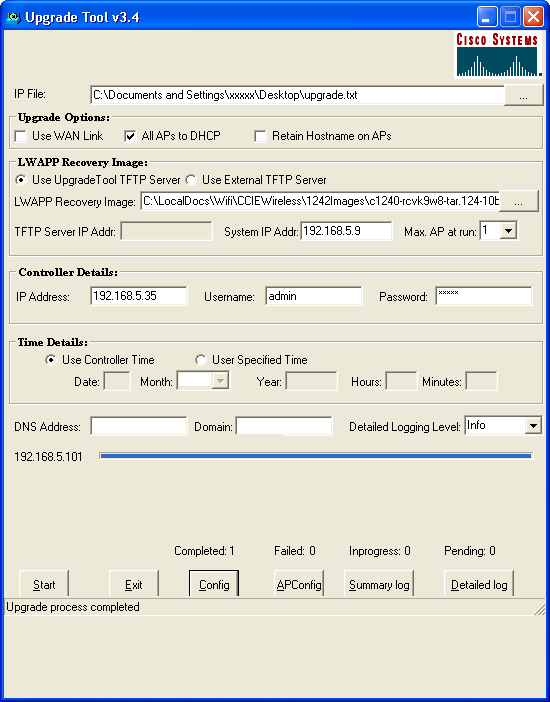
Since Google’s scale numbers are hard to comprehend, let’s look at a better example from days gone by. I’m talking about the Cisco Aironet-to-LWAPP Upgrade Tool:

I used this a lot back in the day to upgrade autonomous APs to LWAPP controller-based APs. It was a very simple tool. It did exactly what it said in the title. And it didn’t do much more than that. You fed it an image and pointed it at an AP and it did the rest. There was some magic on the backend of removing and installing certificates and other necessary things to pave the way for the upgrade, but it was essentially a batch TFTP server.

It was simple. It didn’t check that you had the right image for the AP. It didn’t throw out good error codes when you blew something up. It only ran on a maximum of 5 APs at a time. And you had to close the tool every three or four uses because it had a memory leak! But, it was a still a better choice than trying to upgrade those APs by hand through the CLI.

This tool is over ten years old at this point and is still available for download on Cisco’s site. Why? Because you may still need it. It doesn’t scale to 1,000 APs. It doesn’t give you any other functionality other than upgrading 5 Aironet APs at a time to LWAPP (or CAPWAP) images. That’s it. That’s the purpose of the tool. And it’s still useful.

Tools like this aren’t built to be the ultimate solution to every problem. They don’t try to pack in every possible feature to be a “single pane of glass” problem solver. Instead, they focus on one problem and solve it better than anything else. Now, imagine that tool running at a scale your mind can’t comprehend. And you’ll know now why Google builds their tools the way they do.


Tom’s Take

I have a constant discussion on Twitter about the phrase “begs the question”. Begging the question is a logical fallacy. Almost every time the speaker really means “raises the question”. Likewise, every time you think you need to use a Google tool to solve a problem, you’re almost always wrong. You’re not operating at the scale necessary to need that solution. Instead, the majority of people looking to implement Google solutions in their networks are like people that put chrome everything on a car. They’re looking to show off instead of get things done. It’s time to retire the Google Cargo Cult and instead ask ourselves what problems we’re really trying to solve, as Ben Sigelman mentions above. I think we’ll end up much happier in the long run and find our work lives much less complicated.

A Wireless Brick In The Wall

I had a very interesting conversation today with some friends about predictive wireless surveys. The question was really more of a confirmation: Do you need to draw your walls in the survey plan when deciding where to put your access points? Now, before you all run screaming to the comments to remind me that “YES YOU DO!!!”, there were some other interesting things that were offered that I wanted to expound upon here.

Don’t Trust, Verify

One of the most important parts of the wall question is material. Rather than just assuming that every wall in the building is made from gypsum or from wood, you need to actually go to the site or have someone go and tell you what the building material is made from. Don’t guess about the construction material.

Why? Because not everyone uses the same framing for buildings. Wood beams may be popular in one type of building, but steel reinforcement is used in other kinds. And you don’t want to base your predictive survey on one only to find out it’s the other.

Likewise, you need to make sure that the wall itself is actually made of what you think it is. Find out what kind of sheetrock they used. Make sure it’s not actually something like stucco plastered over chicken wire. Chicken wire as the structure of a plaster wall is a guaranteed Faraday Cage.

Another fun thing to run across is old buildings. One site survey I did for a wireless bid involved making sure that a couple of buildings on the outer campus were covered as well. When I asked about the buildings and when they were made, I found out they had been built in the 1950s and were constructed like bomb shelters. Thick concrete walls everywhere. Reinforcement all throughout. Once I learned this, the number of APs went up and the client had to get an explanation of why all the previous efforts to cover the buildings with antennas hadn’t worked out so well.

X-Ray Vision

Speaking of which, you also need to make sure to verify the structures underneath the walls. Not just the reinforcement. But the services behind the walls. For example, water pipes go everywhere in a building. They tend to be concentrated in certain areas but they can run the entire length of a floor or across many floors in a high rise.

Why are water pipes bad for wireless? Well, it turns out that the resonant frequency of water is the same as 802.11b/g/n – 2.4GHz. It’s how microwaves operate. And water loves to absorb radiation in that spectral range. Which means water pipes love to absorb wireless signals. So you need to know where they are in the building.

Architectural diagrams are a great way to find out these little details. Don’t just assume that walking through a building and staring at a wall is going to give you every bit of info you need. You need to research plans, blueprints, and diagrams about things. You need to understand how these things are laid out in order to know where to locate access points and how to correct predictive surveys when they do something unexpected.

Lastly, don’t forget to take into account the movement and placement of things. We often wish we could get involved in a predictive survey at the beginning of the project. A greenfield building is a great time to figure out the best place to put APs so we don’t have to go crawling over bookcases. However, you shouldn’t discount the chaos that can occur when an office is furnished or when people start moving things around. Things like plants don’t matter as much as when someone moves the kitchen microwave across the room or decides to install a new microphone system in the conference room without telling anyone.


Tom’s Take

Wireless engineers usually find out when the take the job that it involves being part radio engineer, part networking engineer, part artist, and part construction general contractor. You need to know a little bit about how buildings are made in order to make the invisible network operate optimally. Sure, traditional networking guys have it easy. They can just avoid running cables by florescent lights or interference sources and be good. But wireless engineers need to know if the very material of the wall is going to cause problems for them.

It’s Probably Not The Wi-Fi

After finishing up Mobility Field Day last week, I got a chance to reflect on a lot of the information that was shared with the delegates. Much of the work in wireless now is focused on analytics. Companies like Cape Networks and Nyansa are trying to provide a holistic look at every part of the network infrastructure to help professionals figure out why their might be issues occurring for users. And over and over again, the resound cry that I heard was “It’s Not The Wi-Fi”

Building A Better Access Layer

Most of wireless is focused on the design of the physical layer. If you talk to any professional and ask them to show your their tool kit, they will likely pull out a whole array of mobile testing devices, USB network adapters, and diagramming software that would make AutoCAD jealous. All of these tools focus on the most important part of the equation for wireless professionals – the air. When the physical radio spectrum isn’t working users will complain about it. Wireless pros leap into action with their tools to figure out where the fault is. Either that, or they are very focused on providing the right design from the beginning with the tools validating that access point placement is correct and coverage overlap provides redundancy without interference.

These aren’t easy problems to solve. That’s why wireless folks get paid the big bucks to build it right or fix it after it was built wrong. Wired networkers don’t need to worry about microwave ovens or water pipes. Aside from the errant fluorescent light or overly aggressive pair of cable pliers, wired networks are generally free from the kinds of problems that can plague a wire-free access layer.

However, the better question that should be asked is how the users know it’s the wireless network that’s behind the faults? To the users, the system is in one of three states: perfect, horribly broken, or slow. I think we can all agree that the first state of perfection almost never actually exists in reality. It might exist shortly after installation when user load is low and actual application use is negligible. However, users are usually living in one of the latter states. Either the wireless is “slow” or it’s horribly broken. Why?

No-Service Station

As it turns out, thanks to some of the reporting from companies like Cape and Nyansa, it turns out that a large majority of the so-called wireless issues are in fact not wireless related at all. Those designs that wireless pros spend so much time fretting over are removed from the equation. Instead, the issues are with services.

Yes, those pesky network services. The ones like DNS or DHCP that seem invisible until they break. Or those services that we pay hefty sums to every month like Amazon or Microsoft Azure. The same issues that plague wired networking exist in the wireless world as well and seem to escape blame.

DNS is invisible to the majority of users. I’ve tried to explain it many times with middling to poor results. The idea that computers on the internet don’t understand words and must rely on services to translate them to numbers never seems to click. And when you add in the reliance on this system and how it can be knocked out with DDoS attacks or hijacking, it always comes back to being about the wireless.

It’s not hard to imagine why. The wireless is the first thing users see when they start having issues. It’s the new firewall. Or the new virus. Or the new popup. It’s a thing they can point to as the single source of problems. And if there is an issue at any point along the way, it must be the fault of the wireless. It can’t possibly be DNS or routing issues or a DDoS on AWS. Instead, the wireless is down.

And so wireless pros find themselves defending their designs and configurations without knowing that there is an issue somewhere else down the line. That’s why the analytics platforms of the future are so important. By giving wireless pros visibility into systems beyond the spectrum, they can reliably state that the wireless isn’t at fault. They can also engage other teams to find out why the DNS servers are down or why the default gateway for the branch office has been changed or is offline. That’s the kind of info that can turn a user away from blaming the wireless for all the problems and finding out what’s actually wrong.


Tom’s Take

If I had a nickel for every problem that was blamed on the wireless network or the firewall or some errant virus when that actually wasn’t the case, I could retire and buy my own evil overlord island next to Larry Ellison. Alas, these are issues that are never going to go away. Instead, the only real hope that we have is speeding the time to diagnose and resolve them by involving professionals that manage the systems that are actually down. And perhaps having some pictures of the monitoring systems goes a long way to tell users that they should make sure that the issue is indeed the wireless before proclaiming that it is. Because, to be honest, it probably isn’t the Wi-Fi.